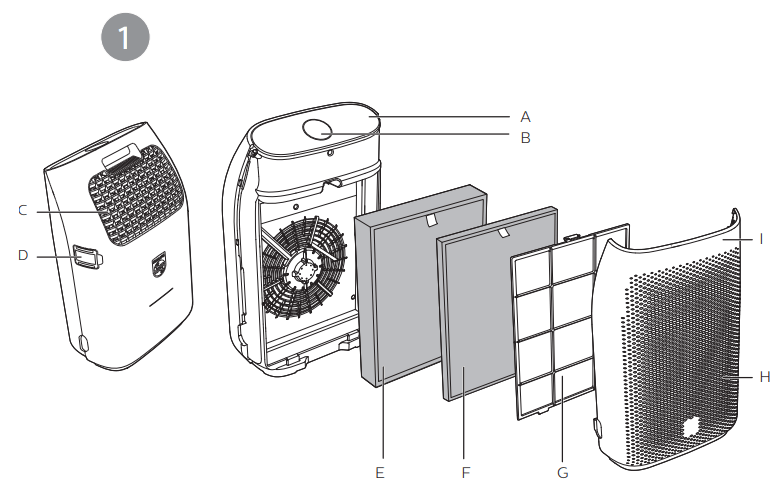
A Control panel B Air quality light C Air outlet D Air quality sensor E NanoProtect True HEPA filter (FY1410) F NanoProtect Active Carbon filter (FY1413) G Pre-filter H Air inlet I Front panel
Controls overview (Fig.2)
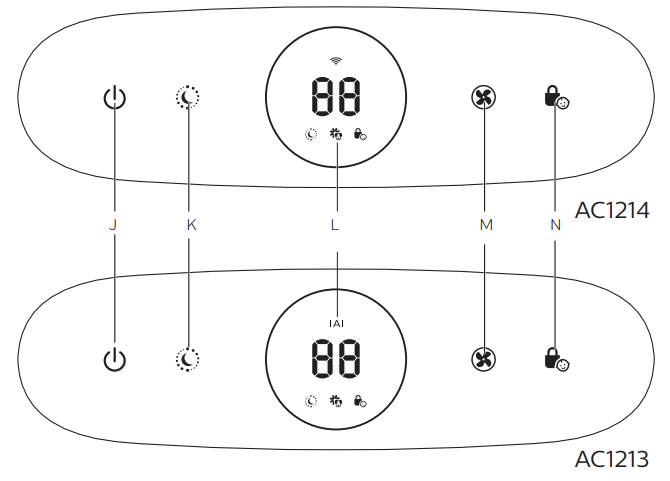
J On/Off button K Night sensing mode button L Display screen M Fan speed button N Child lock button
Getting started
Installing the filters
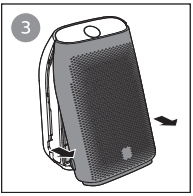
Pull the bottom part of the front panel and gently lift to remove it from the air purifier (Fig.3).
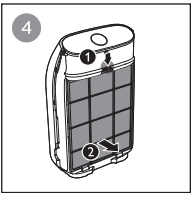
Press the clip down (1) and pull the pre-filter towards you (2) (Fig.4).
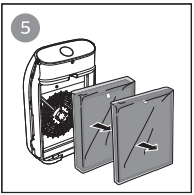
Remove all filters (Fig.5).
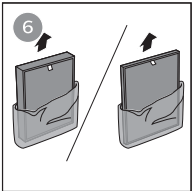
Remove all packaging materials from the filters (Fig.6).
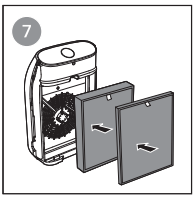
Place the thick HEPA filter (FY1410) into the air purifier and then the thin Active Carbon filter (FY1413) (Fig.7). The model numbers are shown on each filter.
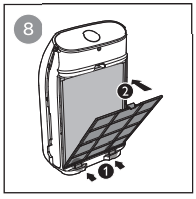
Attach the pre-filter back into the air purifier (Fig.8).
Note
Make sure the side with the clip is pointing towards you, and that all hooks of the pre-filter are properly attached to the purifier.
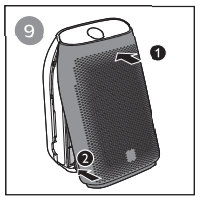
Reattach the front panel by pressing the top part of the panel onto the top of the air purifier (1). Then, gently push the panel against the body of the air purifier (2)(Fig.9).
Wash your hands thoroughly after installing filters.
Setting up the Wi-Fi connection for the first time
1. Put the plug of the air purifier in the wall outlet and touch to turn on the air purifier.
» The Wi-Fi indicator is not displayed on the screen when using the air purifier for the first time.
2. Download and install the 'Air Matters' App developed by FreshIdeas Studio or Philips 'HealthSuite health' App from the App Store or Google Play.
3. Touch and simultaneously for 3 seconds until you hear a beep.
» The air purifier goes to pairing mode.
» The Wi-Fi indicator blinks orange.
4. Make sure that your mobile device is successfully connected to your Wi-Fi network.
5. Launch the 'Air Matters' or Philips 'HealthSuite health' App and follow the onscreen instructions to connect the air purifier to your network.
6. After the successful pairing and connection, the Wi-Fi indicator will light up white. If pairing is not successful, consult the troubleshooting section, or the help section in the 'Air Matters' or Philips 'HealthSuite health' App for extensive and up-to-date troubleshooting tips
Setting up the Wi-Fi connection when the network has changed
1. Put the plug of the air purifier in the wall outlet and touch to turn on the air purifier.
» The Wi-Fi indicator blinks white.
2. Touch and simultaneously for 3 seconds until you hear a beep.
» The air purifier goes to pairing mode.
» The Wi-Fi indicator blinks orange.
3. Enter your Wi-Fi network name and password in the App on your mobile device. The network name and password are case-sensitive.
4. Follow the steps 5-6 in "Setting up the Wi-Fi connection for the first time" section.
Using the air purifier
Understanding the air quality light
Indoor Allergen Index (IAI) is a real-time numerical display that provides visual and immediate feedback on indoor allergen level.
The air quality light automatically goes on when the air purifier is switched on, and lights up all colors in sequence. After approximately 30 seconds, the air quality sensors select the color that corresponds to the surrounding air quality of airborne particles
Turning on and of
Note
Always place the air purifier on a stable, horizontal, and level surface with the front of the unit facing away from walls or furniture.
For optimum purification performance, close doors and windows.
Keep curtains away from the air inlet or air outlet.
Put the plug of the air purifier in the wall outlet.
Touch to switch on the air purifier fig. 10
The air purifier beeps.
The air purifier operates under the auto mode by default.
When the air purifier is warming up, displays on the screen.
After measuring the air quality for approximately 30 seconds, the air quality sensor automatically selects the appropriate air quality light color.
Touch and hold for 3 seconds to switch off the air purifier.
Note
If the air purifier stays connected to the electrical outlet after turning OFF, the air purifier will operate under the previous settings when turned ON again.
If the air purifier accidentally shuts off during running, it restarts automatically and operates under previous settings when the power supply is resumed.
Changing the fan speed
There are several fan speeds available. You can choose the auto mode, speed 1, 2, 3 or turbo mode (t).
Auto(A)
Touch the fan speed button repeatedly to select the auto mode fig.11
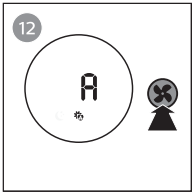
Allergen mode
The specially designed allergen mode can effectively reduce common allergens such as pollen and pet dander.
Touch the fan speed button to select the Allergen mode .fig.12
Auto (A) and display on the screen.
Manual
Touch the fan speed button repeatedly to select the fan speed you need fig.13
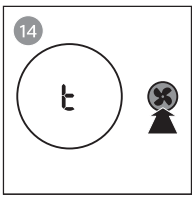
Turbo (t)
In turbo mode, the air purifier operates on the highest speed.
Touch the fan speed button to select the turbo mode (t) fig.14
Light sensor
With the light sensor, the air purifier can work according to the ambient light. When the ambient light dims for 10 seconds, all the lights on the control panel will turn off slowly. During this period, you can touch any of the buttons, all lights will turn on again. If you don't perform other operations within 10 seconds, all lights will turn off. After the ambient light becomes bright and lasts at least for 10 seconds, all lights will turn on again.
Night sensing mode
You can activate the night sensing mode in two ways.
Activating the night sensing mode manually
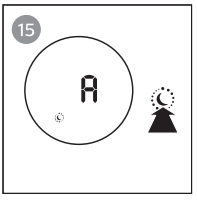
Before you go to sleep, touch manually to activate the night sensing mode (Fig.15).
If the air quality light is blue, the air purifier directly goes to the night sensing mode. The air purifier operates quietly and the air quality light will be dimmed.
If the air quality light is not blue, the air purifier operates under turbo mode for a maximum of 10 minutes, the air quality light blinks slow during this time, and then goes to the night sensing mode.
Auto activating the night sensing mode
When the air purifier operates in auto mode or allergen mode, if the light sensor detects the lights in your room are turned off, the air purifier goes to the night sensing mode automatically. The air purifier will adjust the fan speed in real-time to make sure the air in your room is good. The air quality light will be dimmed.
Note
The light sensor detects the lights in your room after 11 hours in the night sensing mode.
If the lights in your room are turned on, the air purifier will quit the night sensing mode and operate under the previous mode. The air quality light and the display will be on again.
To exit the night sensing mode manually, touch or button.
Setting the child lock
Touch and hold the child lock button for 3 seconds to activate child lock (Fig.16).
The child lock icon displays on the screen.
When the child lock is on, all the other buttons are not responsive, only the child lock icon blinks.
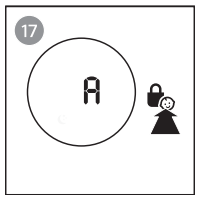
Touch and hold the child lock button for 3 seconds again to deactivate child lock (Fig.17).
The child lock icon disappears.
Note
• The child lock function is automatically unlocked when the pre-filter cleaning code or the filter replacement code displays on the screen.
Cleaning
Note
Always turn the air purifier off and unplug the air purifier from the electrical outlet before cleaning.
Never immerse the air purifier in water or any other liquid.
Never use abrasive, aggressive, or flammable cleaning agents such as bleach or alcohol to clean any part of the air purifier.
Only the pre-filter is washable. The air filter is not washable.
Do not attempt to clean the filters or air quality sensor with a vacuum.
Cleaning the body of the air purifier
Regularly clean the inside and outside of the air purifier to prevent dust from collecting.
Use a soft, dry cloth to clean both the interior and exterior of the air purifier.
The air outlet can also be cleaned with a dry, soft cloth.
Detach the front cover from the air purifier and wash it under running tap water.
Cleaning the air quality sensor
Clean the air quality sensor every 2 months for optimal functioning of the purifier.
Note
If the air purifier is used in a dusty environment, it may need to be cleaned more often.
If the humidity level in the room is very high, condensation may develop on the air quality sensor and the air quality light may indicate a more poor air quality even though the air quality is actually good. If this occurs, clean the air quality sensor or use the air purifier on a manual speed setting.
Switch off the air purifier and unplug from the wall outlet.
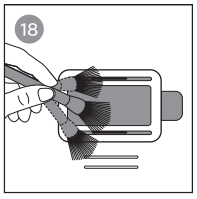
Clean the air quality sensor inlet and outlet with a soft brush Fig.18
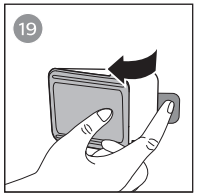
Remove the air quality sensor cover Fig.19
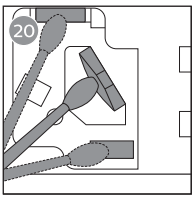
Clean the air quality sensor, the dust inlet and the dust outlet with a damp cotton swab Fig.20
Dry all parts thoroughly with a dry cotton swab.
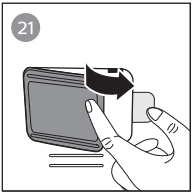
Reattach the air quality sensor cover Fig.21
Note
• Always keep air quality cover closed while the air purifier is working.
Cleaning the pre-filter
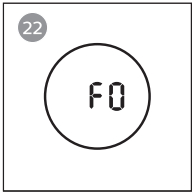
Clean the pre-filter when F0 is displayed on the screen . Fig.22
Switch off the air purifier and unplug from the wall outlet.
Pull the bottom part of the front panel and then gently lift to remove it from the air purifier
Press the clip down (1) and pull the pre-filter towards you (2).
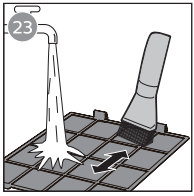
If the pre-filter is very dirty, use a soft brush to brush away the dust. Then wash the pre-filter under running tap water Fig.23
Allow the pre-filter to air dry thoroughly before placing back in the air purifier.
Note
To optimize the lifetime of the prefilter, make sure it dries completely after cleaning.
Wash your hands after handling the filter.
Put the pre-filter back into the air purifier
Note
Make sure the side with the clip is pointing towards you, and that all hooks of the pre-filter are properly attached to the air purifier.
To reattach the front panel, press the top part of the panel onto the top of the air purifier (1). Then, gently push the panel against the body of the air purifier (2)
Put the plug of the air purifier in the wall outlet.
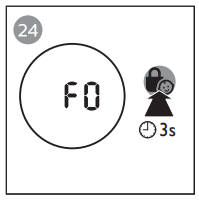
Touch and hold the for 3 seconds to reset the pre-filter cleaning time Fig.24
Wash your hands thoroughly after installing filters.
Replacing the filters
Filter replacement indicator
This air purifier is equipped with a filter replacement indicator to make sure that the air purification filter is in optimal condition when the air purifier is operating. When the filters need to be replaced, the filter code displays on the screen.
If the filters are not replaced in 14 days, the air purifier will stop operating and automatically lock.
Replacing the filters
Note
The HEPA and Active Carbon filters are not washable or reusable.
Always turn off the air purifier and unplug from the electrical outlet before replacing the filters.
Do not clean the filter with a vacuum.
Turn off the air purifier and unplug from the wall outlet.
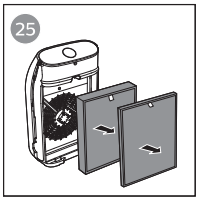
Take out the used air filter according to the filter alert light status displayed on the screen. Discard used filters. fig.25
Note
Do not touch the pleated filter surface, or smell the filter as it has collected pollutants from the air.
Remove all packaging material from the new filter
Place the new filters into the air purifier
Put the plug of the air purifier in the wall outlet.
Touch and hold the for 3 seconds to reset the filter lifetime counter
Wash your hands after changing a filter.
Filter reset
You can replace filters even if there is no filter replacement code displayed on the screen. After replacing a filter, you need to reset the filter lifetime counter manually.
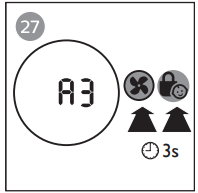
Touch and simultaneously for 3 seconds to enter the filter reset mode (fig.27).
Code (A3) of the NanoProtect True HEPA filter displays on the screen.
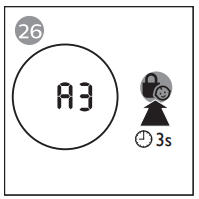
Touch and hold for 3 seconds to force reset the filter lifetime counter of the NanoProtect True HEPA filter. (fig.26)
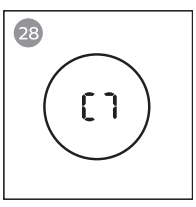
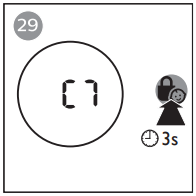
Code (C7) of the Nanoprotect Active Carbon filter displays on the screen after the lifetime counter of the NanoProtect True HEPA filter has been reset.(fig.28)
Touch and hold for 3 seconds to force reset the filter lifetime counter of the NanoProtect Active Carbon filter and exit the filter reset mode.(fig.29)
Storage
Turn off the air purifier and unplug from the wall outlet.
Clean the air purifier, air quality sensor and pre-filter (see chapter ‘Cleaning’).
Let all parts dry thoroughly before storing.
Wrap the filter and pre-filter separately in air tight plastic bags.
Store the air purifier, the filter and pre-filter in a cool, dry location.
Always thoroughly wash hands after handling filters.
Troubleshooting
This chapter summarizes the most common problems you could encounter with the air purifier. If you are unable to solve the problem with the information below, visit www. philips.com/support or call 1-866-309-8817 for assistance.
Problem
Possible solution
The air purifier does not work even though it is plugged in to the wall outlet and switched on.
• Try a different electrical outlet or check the wall switch.
• The filter alert status is displaying the filter code. Replace the corresponding filter and reset the filter lifetime counter (see chapter "Replacing the filter").
• If the problem persists, visit www.philips.com/support or call 1-866-309-8817 for assistance.
The air purifier does not work even though it is switched on.
• The filter replacement indicator has been on continuously but you have not replaced the corresponding filter, and the air purifier is now locked. In this case, replace the filter and reset the filter lifetime counter.
The air purifier accidentally powers off.
• The air purifier restarts automatically and goes to the previous mode when the power resumes.
The Wi-Fi setup is not successful.
• If the router your purifier is connected to is dual – band and currently it is not connecting to a 2.4GHz network, please switch to another band of the same router (2.4GHz) and try to pair your purifier again. 5Ghz networks are not supported.
• Web authentication networks are not supported.
• Check if the purifier is within range of the Wi-Fi router. You can try to locate the air purifier closer to the Wi-Fi router.
• Check if the network name is correct. The network name is case-sensitive.
• Check if the Wi-Fi password is correct. The password is case-sensitive.
• Retry the setup with the instructions in section ‘Set up the Wi-Fi connection when the network has changed’.
• The Wi-Fi connectivity can be interrupted by electromagnetic or other interferences. Keep the appliance away from other electronic devices that may cause interferences.
• Check if the mobile device is in airplane mode. Make sure to have the airplane mode deactivated when connecting to the Wi-Fi network.
• Consult the help section in the App for extensive and upto-date troubleshooting tips.
The airflow that comes out of the air outlet is significantly weaker than before.
• The pre-filter is dirty. Clean the pre-filter (see chapter "Cleaning").
The air quality does not improve, even though the air purifier has been operating for a long time.
• One of the filters has not been placed in the air purifier or the filter is not placed properly. Make sure that all filters are properly installed in the following order, starting with the innermost filter: 1) NanoProtect True HEPA filter (FY1410); 2) NanoProtect Active Carbon filter (FY1413) 3) pre-filter.
• The air quality sensor is wet. Make sure that the air quality sensor is clean and dry (see chapter "Cleaning").
The color of the air quality light always stays the same.
• The air quality sensor is dirty. Clean the air quality sensor (see chapter "Cleaning").
The air purifier produces a unpleasant smell.
• The first few times you use the air purifier, it may produce a plastic smell. This is normal. The air purifier may also produce an unpleasant smell when the filter is dirty. In this case, clean or replace the appropriate filter.
• If the air purifier produces a burnt odor, switch OFF and unplug from the electrical outlet. Call 1-866-309-8817 for assistance.
The air purifier is loud.
• If the air purifier is too loud, change the fan speed to a lower fan speed level. When using the air purifier in a bedroom at night, choose the night sensing mode or select a lower fan speed level.
The air purifier still indicates that I need to replace a filter, but I already did.
• Perhaps you did not reset the filter lifetime counter. Plug in the air purifier, touch to switch on the air purifier, and touch and hold the for 3 seconds.
Error codes "E1", "E2", "E3" or "E4" displays on the screen.
• The air purifier has malfunctions. Visit www.philips.com/ support or call 1-866-309-8817 for assistance.
-902051.png) to turn on the air purifier.
to turn on the air purifier.  is not displayed on the screen when using the air purifier for the first time.
 -868163.png) simultaneously for 3 seconds until you hear a beep.
simultaneously for 3 seconds until you hear a beep. -246660.png)
-888496.png) displays on the screen.
displays on the screen.-723685.png) repeatedly to select the auto mode fig.11
repeatedly to select the auto mode fig.11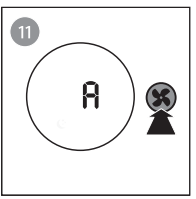
-816164.png) display on the screen.
display on the screen.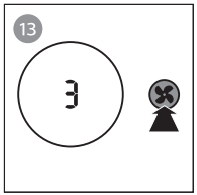
-956447.png) for 3 seconds to activate child lock (Fig.16).
for 3 seconds to activate child lock (Fig.16).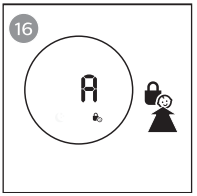
-532147.png)