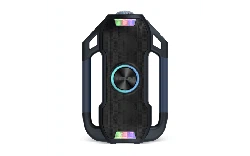
Party Splash
™
User Guide English ( 2 – 8 )
Guía del usuario Español ( 9 – 16 )
Guide d’utilisation Français ( 17 – 23 )
Appendix English ( 24 )
SUPPORT / SOPORTE / ASSISTANCE
ionaudio.com/support
Tap or click for technical support.
Toque o haga clic para obtener soporte
técnico.
Appuyez ou cliquez pour obtenir une
assistance technique.

2
User Guide (English)
Introduction
Thank you for purchasing the Party Splash
™
. At ION, your entertainment is as important to us
as it is to you. That’s why we design our products with one thing in mind—to make your life
more fun and more convenient.
Note: Before you first use the product, please fully charge the battery. Your unit was
purposely shipped with a reduced battery charge to ensure safe transit. For optimal charging,
power off the speaker while charging.
Use the included micro-USB cable to connect the unit to a power adapter (not included)
connected to a power outlet and let it charge for up to 4 hours. This helps ensure the longest
life for your battery.
Box Contents
Party Splash
™
Speaker
Micro-USB cable (3.2 ft. / 100 cm)
Quickstart Guide
Important Notes
• Party Splash
™
is IP67 waterproof, submersible up to 3 ft. (1 m) for 30 minutes, and dust-
/dirt-/sand-proof.
• If the speaker fills with water, the sound will be muffled until the water has drained from the
speaker.
• If Party Splash
™
is exposed to saltwater, we recommend that you rinse it with tap water to
maintain long term performance of your product.
• Reposition Party Splash
™
in the upright position for the best sound experience. Party
Splash
™
will continue to float in the position that it was placed or tossed into the water
(e.g., if placed on its side, Party Splash
™
will continue to float on its side).
3
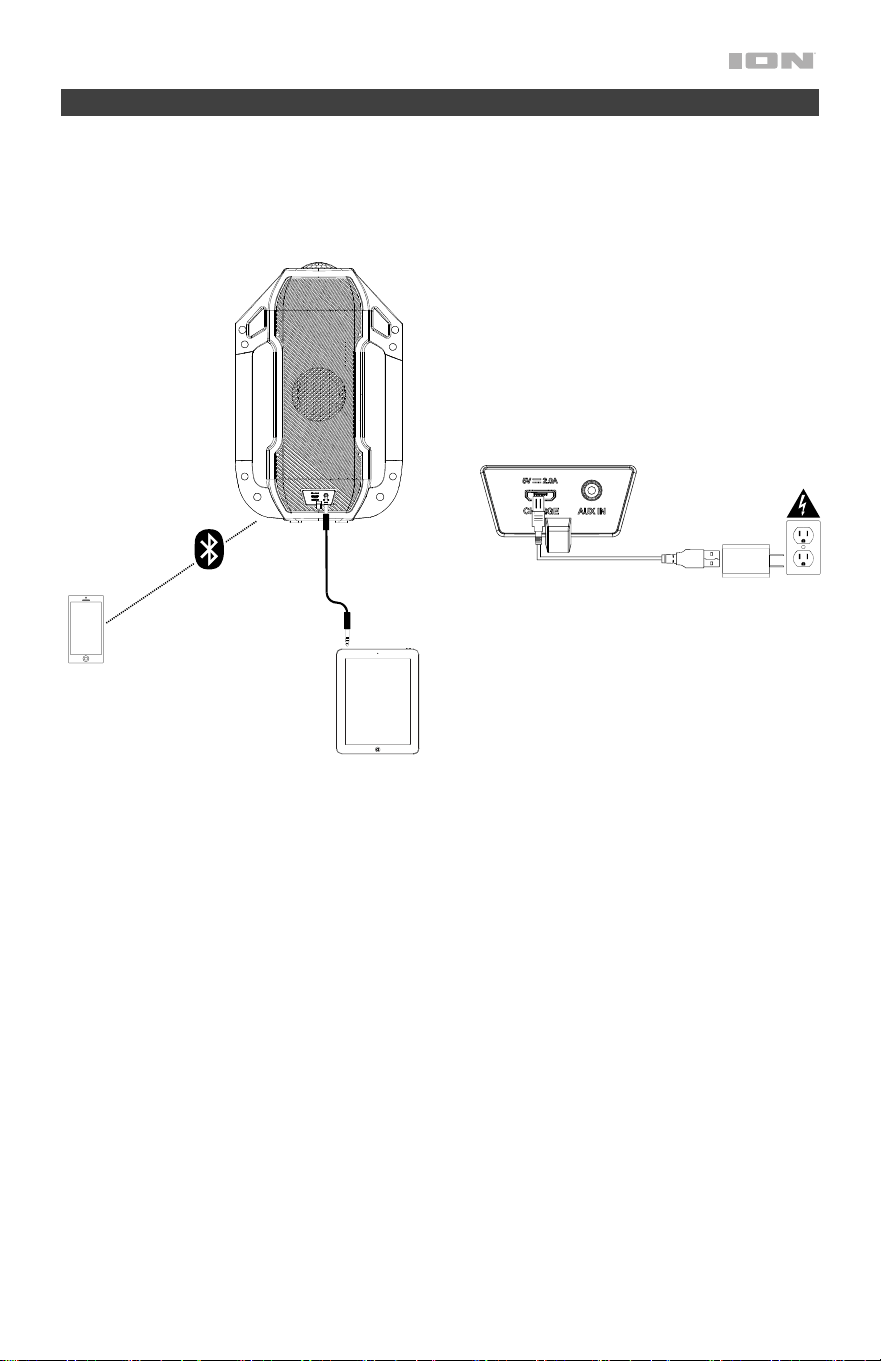
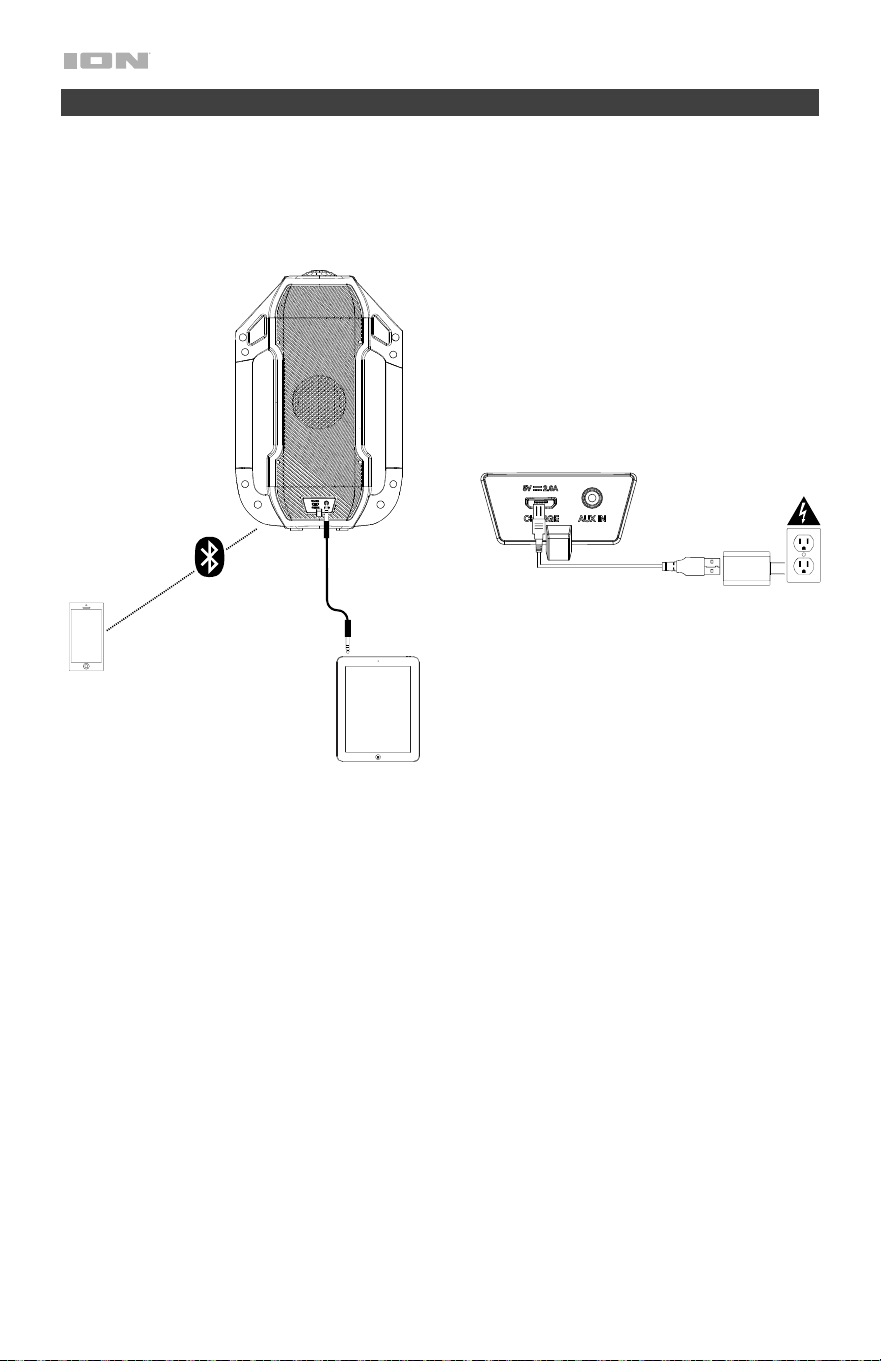
Setup
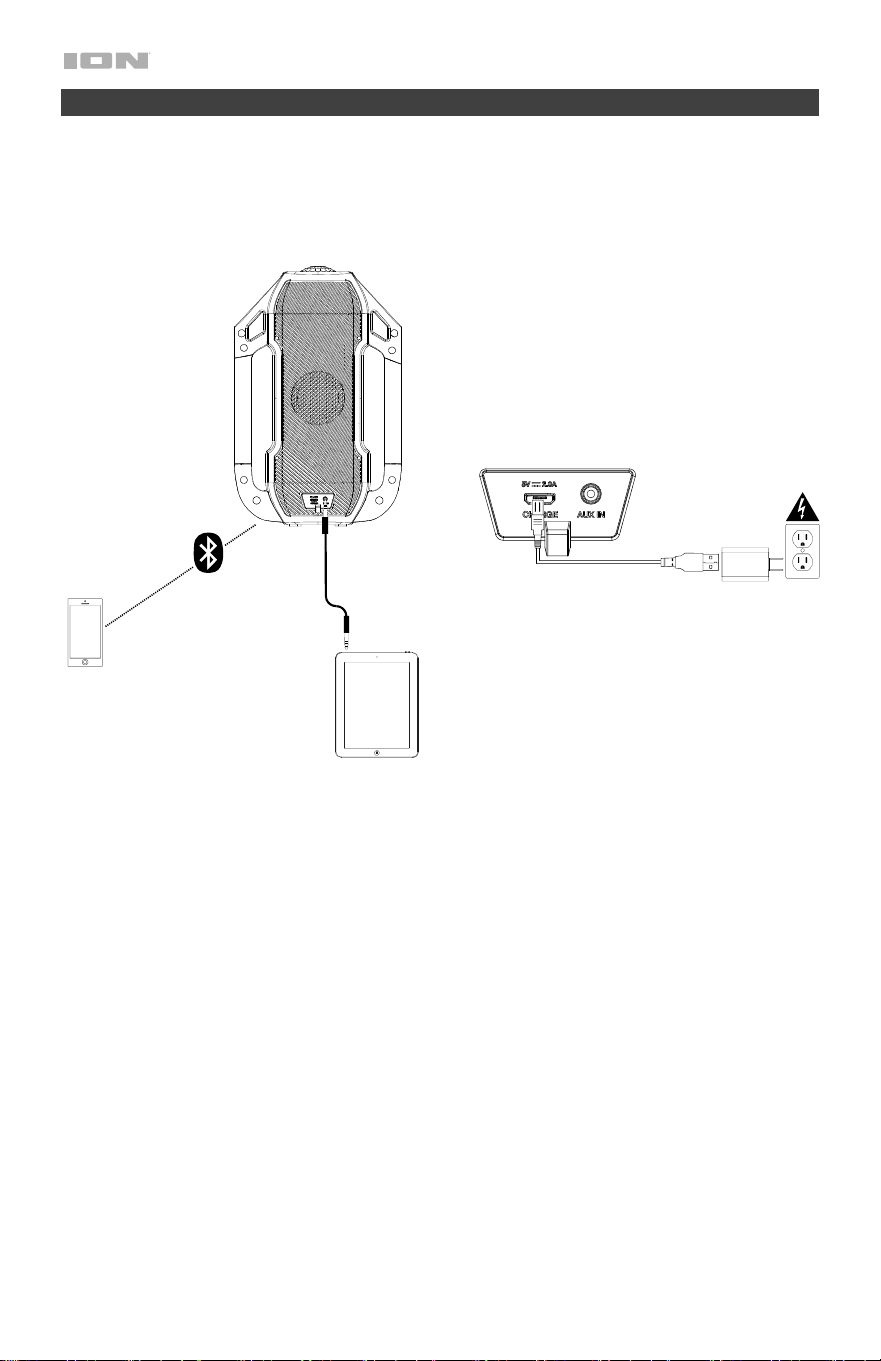
Items not listed under Introduction > Box Contents are sold separately.
Tablet
Front
Panel
Rear
Panel
Power
Smartphone
4
Features
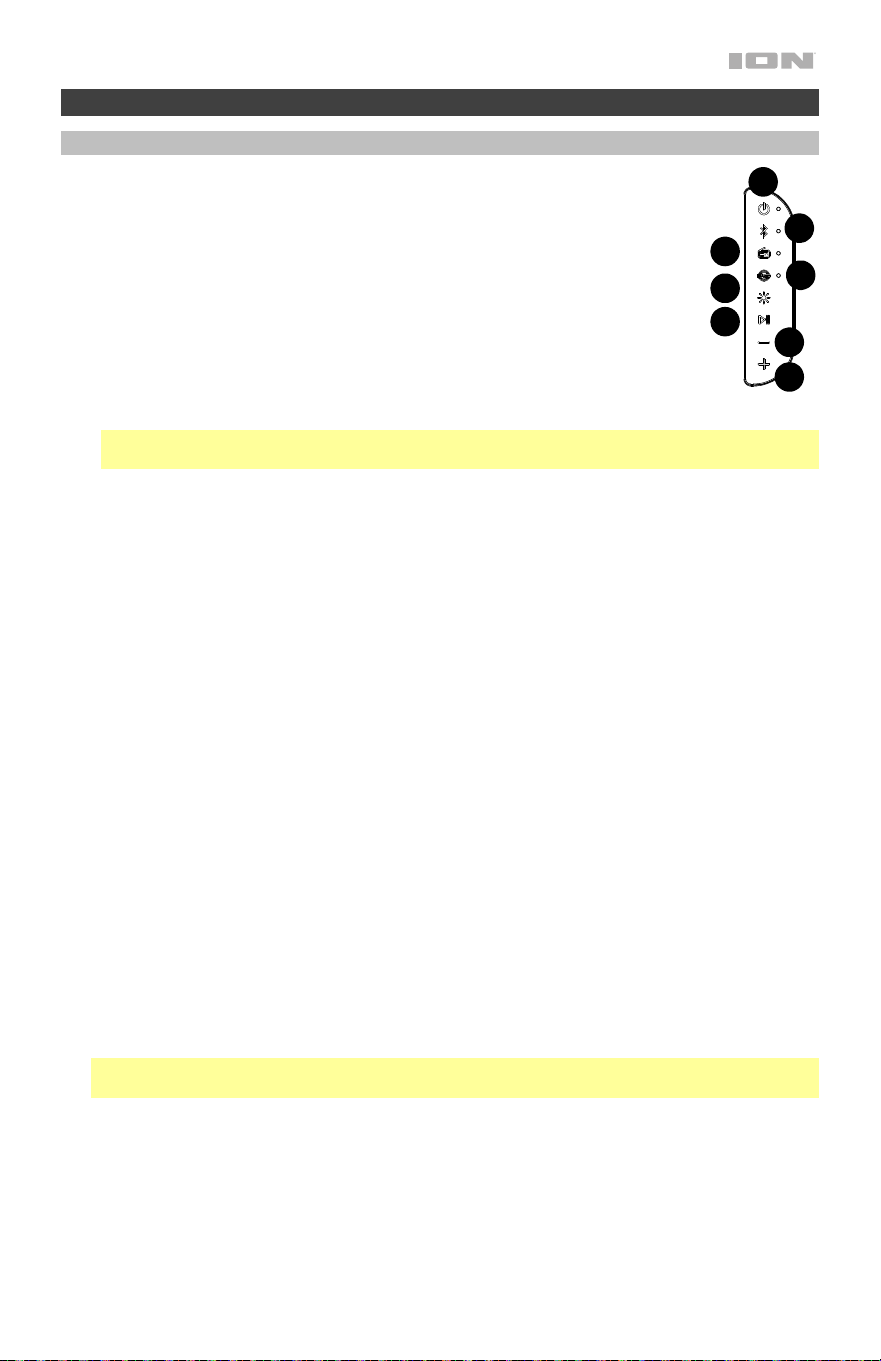
Front Panel
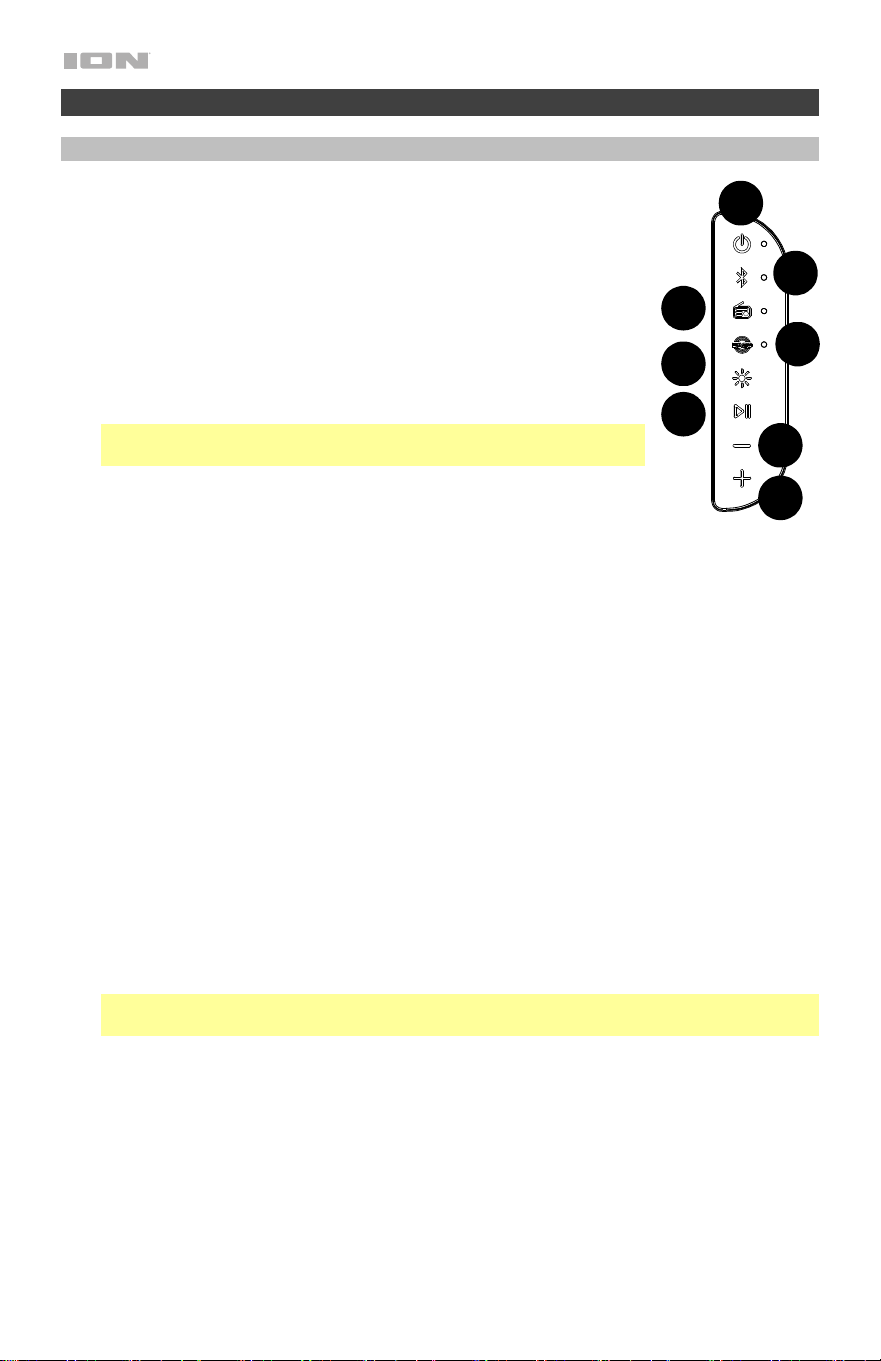
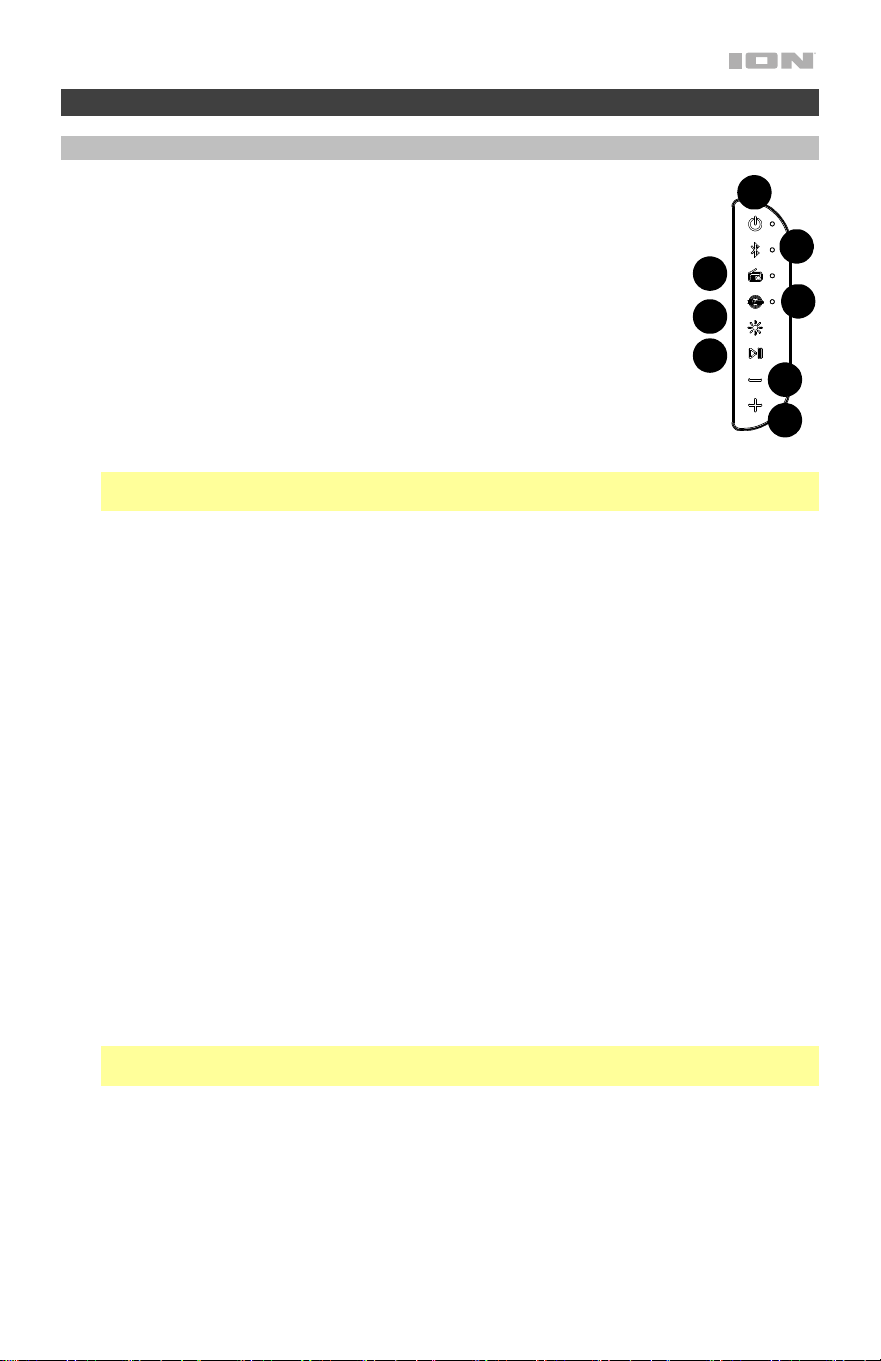
1. Power On/Off Button: Press and hold this button to turn Party
Splash
™
on/off.
• The Power LED will be lit solid white when powered ON.
• The Power LED will flash red 3 times every 60 seconds when
the battery is low.
• The Power LED will be lit solid red when charging.
• If powered OFF and charging, the power LED will be lit solid
red. When the battery is fully charged, the red LED will turn
off.
• Battery status can be seen from the ION Sound XP
™
app.
Note: If no audio plays for 15 minutes, even if there is a Bluetooth
connection, Party Splash
™
will automatically power off.
2. Bluetooth
®
Button: Press and release this button to enter
Bluetooth pairing mode.
See Pairing a Bluetooth Device for more
information.
3. Light Mode Button: Press and release this button to select how the bass radiator lights
are selected:
• OFF
• Bass Radiator LEDs lit
• Bass Radiator LEDs + front bottom LED
• Bass Radiator LEDs + front/bottom LED + front/top LED
• Bass Radiator LEDs + front/bottom LED + front/top LED + top faceted dome
In each mode, press and hold this button to toggle between these modes:
• Color Cycle: The lights slowly glow and cycle through colors. Press and hold the
light mode button to freeze the lights on one color.
• Beat Sync: The lights react to the beat of the music.
• Off: The lights turn off.
4. Bass Button: Press this button to enhance the bass EQ. Press this button again to
deactivate this feature.
5. Previous Track Button: Press and hold in radio mode to seek. Press this button to tune
in a radio station or go to the previous track on a Bluetooth connected device.
6. Next Track Button: Press and hold in radio mode to seek. Press this button to tune in a
radio station or go to the next track on a Bluetooth connected device.
Note: With some apps, pressing the Previous Track button or Next Track button may
go to another playlist or music genre.
7. Play/Pause Button: Press to play or pause a track from a connected Bluetooth device.
8. Radio Button: Press this button to set the radio to FM or turn the radio off. See Using
the Radio for more information.
8
1
2
1
4
1
3
1
6
1
1
1
7
1
5
5
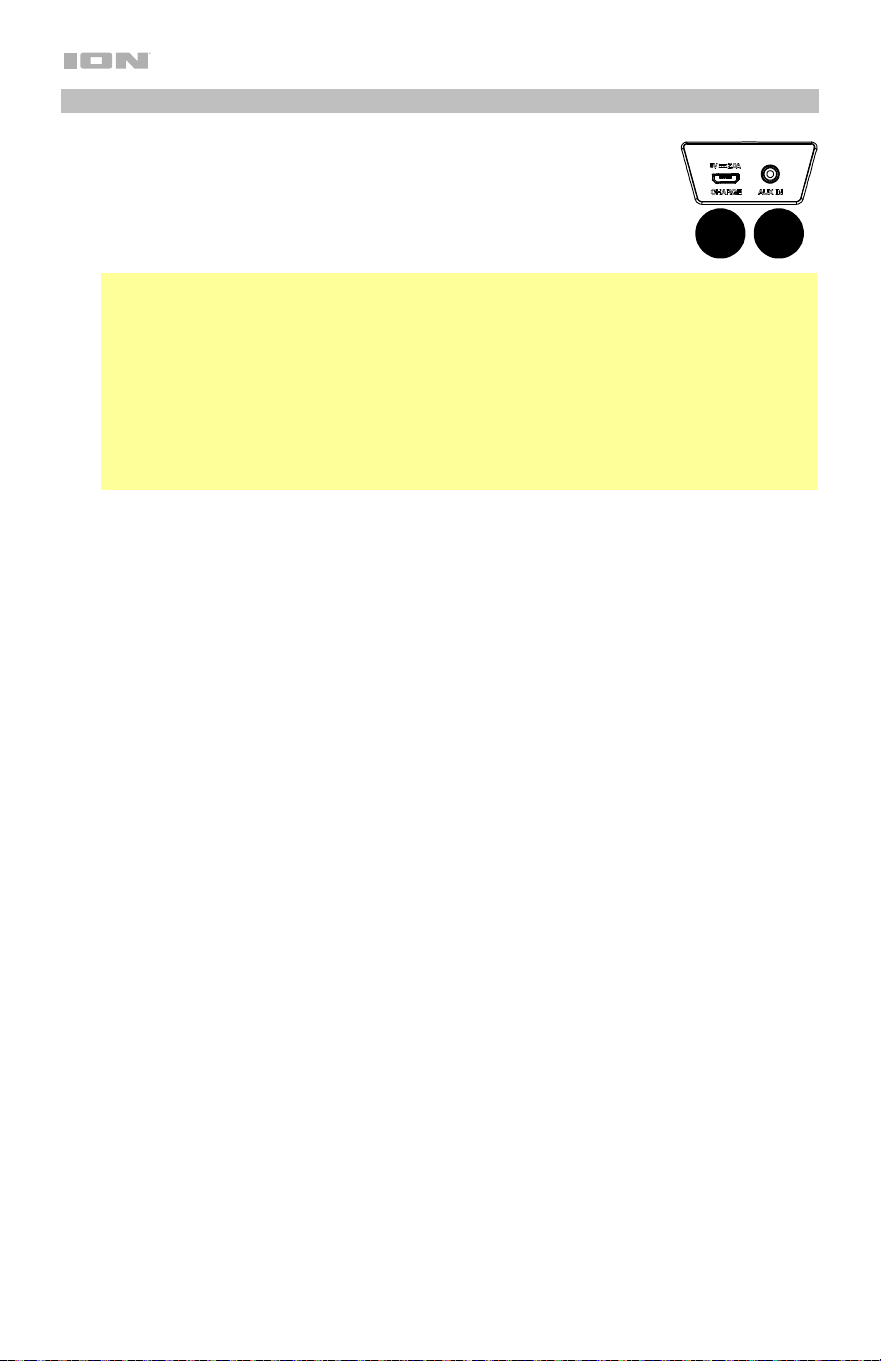
Rear Panel
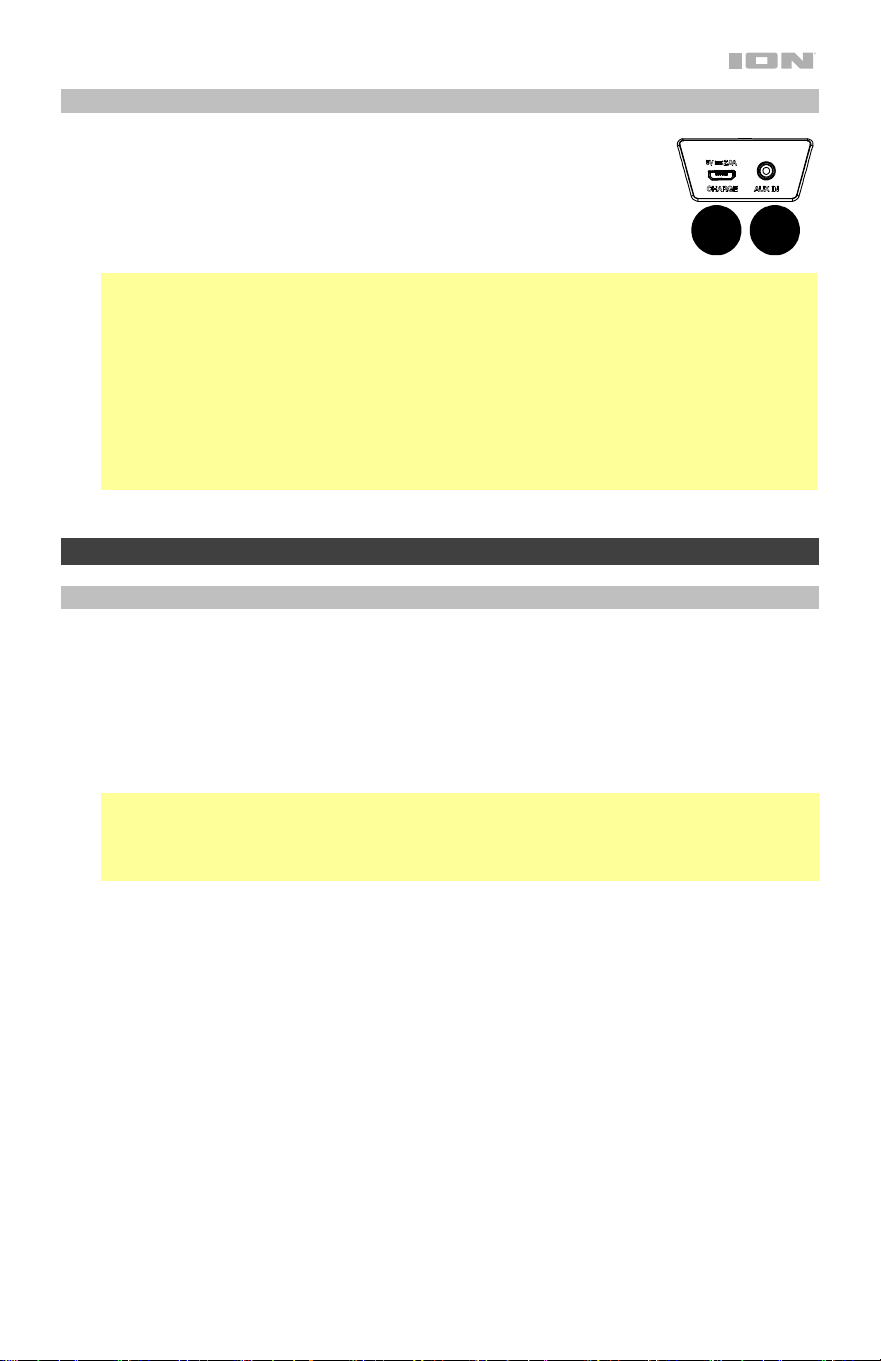
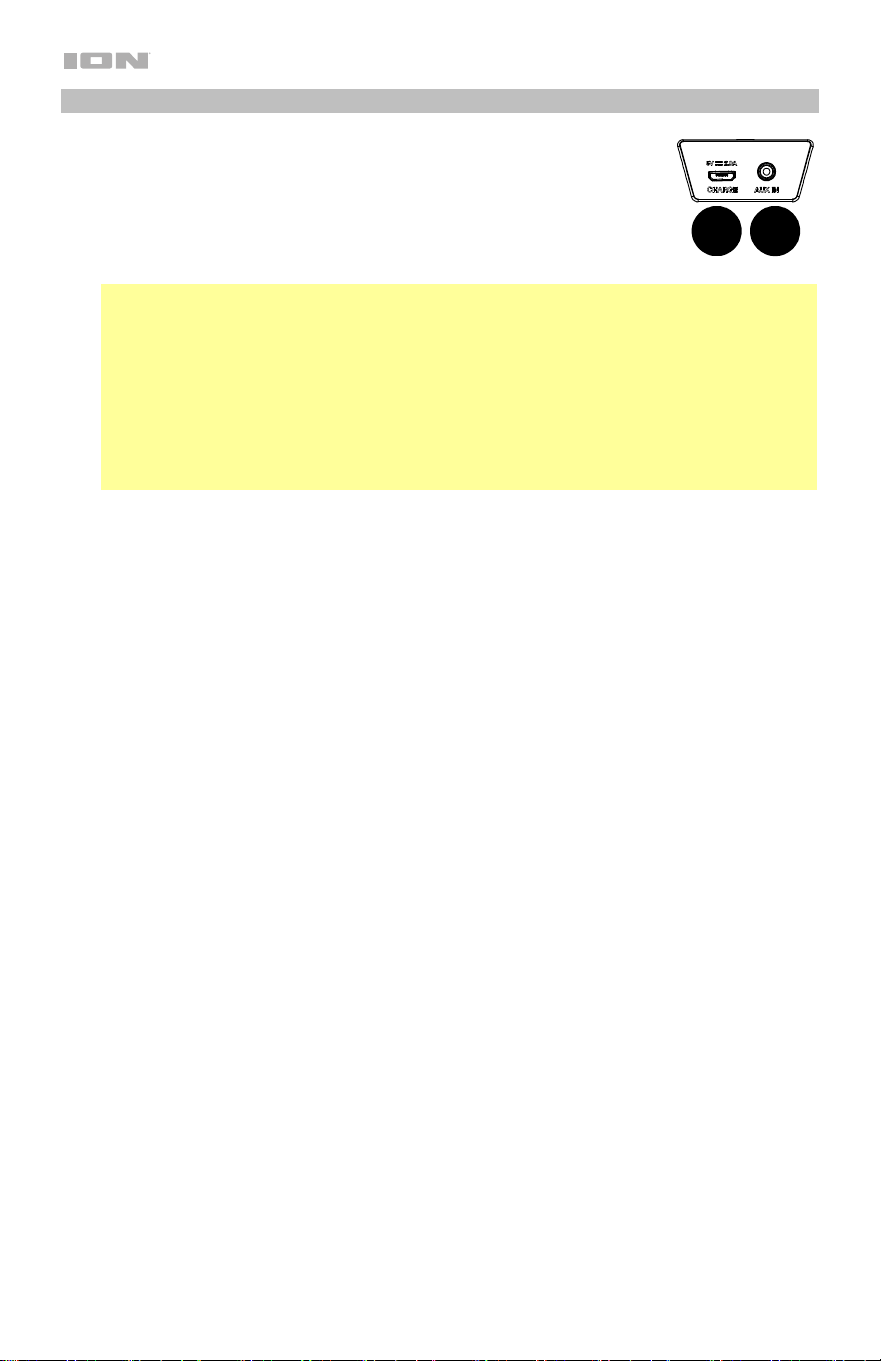
9. Micro-USB Port: Open the top compartment to access the USB
port. Connect the included micro-USB cable to a USB power
adapter (not included) to charge Party Splash.
10. Aux Input:
Open the top compartment to access this Aux input. This
stereo 1/8” (3.5 mm) input can be used to connect a CD player, MP3
player, or other audio source.
Notes:
• In Bluetooth mode or FM mode, connecting an aux cable to the Aux input will switch
from Bluetooth or FM mode to Aux mode.
• If a device is connected to the Aux input, with no Bluetooth connection, the power
LED will be lit white.
• If a device is connected to the Aux input, with a Bluetooth connection, the power LED
will be lit white, and the Bluetooth LED will be lit blue.
• If in Aux mode, and the Aux cable is disconnected, the mode will revert to the last
mode it was last in, either FM or Bluetooth.
Operation
Pairing a Bluetooth Device
1. Make sure the speaker is within range of your Bluetooth device (no more than 100 ft. /
30.5 m away).
2. Press the Bluetooth button on the speaker.
3. Navigate to your Bluetooth device’s setup screen. Then find and select Party Splash. Do
not connect to iSP149_BLE; this is reserved exclusively for connecting to the ION Sound
XP
™
app. If your Bluetooth device prompts for a pairing code, enter 0000. Once a
Bluetooth device is connected, the LED near the Bluetooth button will be lit solid blue.
Note: If you have previously connected to your Bluetooth device, Party Splash
™
will
reconnect automatically.
Tip: Press the Power button quickly twice to enable or disable the Bluetooth pairing
voice prompts, or toggle on/off from the app.
To disconnect a paired Bluetooth device, press and hold the Bluetooth button.
9
10

6
Call Answering via Bluetooth
To answer a call when connected via Bluetooth, quickly press and release the Play/Pause
button. Bluetooth music will be paused until the call is completed or rejected.
To reject an incoming call, press and hold the Play/Pause button.
To control the volume of the caller, use the +/- buttons.
To end a call and and unpause Bluetooth music, press Play/Pause.
Linking Two Speakers
Note: Visit ionaudio.com for a list of compatible ION speakers to link to Party Splash
™
.
Note: In order to use Stereo-Link Mode, you cannot have a Bluetooth device connected. If
another Party Splash
™
is connected to a Bluetooth device, disconnect by pressing and holding
the Bluetooth button.
1. Power on Party Splash
™
and the other compatible ION speaker.
2. Double press the Bluetooth button on one speaker.
Repeat this for the second speaker.
The speakers will search for each other to link as their blue LEDs begin to blink fast.
Note: It may take up to 1 minute to make the connection.
3. When the two speakers are “linked,” one speaker’s blue LED will be lit solid, while the
other speaker’s blue LED will blink slowly to indicate it’s ready to pair the stereo-linked
speakers to your Bluetooth device.
4. Navigate to your Bluetooth device’s setup screen, find “Party Splash” and connect.
To disconnect, double press the Bluetooth button on one of the two speakers.
Note: If a speaker is in Stereo-Link mode when you power it off, it will be in Stereo-Link Mode
the next time you power it on (they will automatically link when you power them on as long as
they are in close range of each other and powered on within 15 seconds of each other).
Using the Radio
1. Press the Radio button.
2. Select a radio station using the +/- buttons.
Note: Pause playback from or disable Bluetooth entirely before using the radio to prevent both
audio signals from being active at the same time.
To save a preset station, use the ION Sound XP
™
app.
To recall a preset station, press and release Play/Pause to advance through one of the 6
presets.

7
App Control
IMPORTANT: To ensure the best possible experience with the app, use the most current
Android OS or iOS on your device.
Follow these steps to download the free app on your device:
1. Open the Apple App Store or Google Play on your device. Then, search for the ION
Sound XP app.
2. Follow the on-screen instructions to download and install the app. Once downloaded,
the ION Sound XP app will appear on your device's home screen.
3. Connect your device to Party Splash
™
via Bluetooth. See the Pairing with a Bluetooth
Device to learn how to do this.
4. Open the ION Sound XP
™
app. If prompted, allow the app to access your device's
Bluetooth and Location Services.
5. Tap to select Add A Product on the screen. The app will scan and find Party Splash
™
.
If you are having issues connecting, tap Help with setting up? for additional tips.
6. Select the Party Splash
™
icon to go to the next screen, where you can use the app to
control various functions of the speaker such as:
• Radio: Play the radio, change stations, and edit presets.
• EQ Adjustment: Adjust the speaker's low, mid, and high band equalization.
• EQ Preset: Select from the EQ presets in the drop-down menu.
• Volume: Adjust the speaker volume.
• Stereo Linking: Text window for Stereo-Linking instructions.
• Light Effect: Select which individual LED section is on or off, and cycle the lighting
effect between Color Cycle, Beat Sync, and Off.
• Battery Status: Displays the battery level.
• Support: Visit ionaudio.com, contact Technical Support, and view Warranty
information and Frequently Asked Questions.

8
Troubleshooting
If the unit is not charging: Make sure the power cable is properly connected to the power
input and the power outlet.
If the sound is distorted: Try lowering the volume control of your sound source.
If there is too much bass: Try adjusting the tone or EQ control on your sound source to lower
the bass level. This will allow you to play the music louder before clipping (distortion) occurs.
If you cannot connect your audio device to Party Splash
™
via Bluetooth:
• Have your audio device (e.g., smartphone or tablet) and Party Splash
™
as close together
as possible while trying to connect. Make sure both the audio device and Party Splash
™
are unobstructed by walls, furniture, etc.
• Reset the Bluetooth connection on Party Splash
™
to disconnect Party Splash
™
from any
other audio device and restart the search process. If this does not work right away,
power off Party Splash
™
and then power it back on. See Pairing a Bluetooth Device for
more information.
• Reset the Bluetooth connection on your audio device by turning Bluetooth off and back
on. You can find this under the Bluetooth menu in the Settings for your phone or other
audio device.
If this does not work, and you have connected to Party Splash
™
before, find Party
Splash
™
in the list of available or previously connected devices in your audio device's
Bluetooth menu, tap the "gear" or “i” icon located next to it and then select Unpair or
Forget. Turn Party Splash
™
off and back on and try pairing again once it reappears in
your available devices list.
Note: If Party Splash
™
has been paired to another audio device recently that is still within
range, you may need to repeat this process with that audio device to fully disconnect.
If you experience audio dropouts while playing music from a Bluetooth device, this may
be happening because your unit is trying to link to another speaker. This can occur if you
power off a speaker that was linked to your unit or if you have just turned on your unit and it is
in Stereo-Link mode. To stop the audio dropouts, exit Stereo-Link mode by double-pressing
the Bluetooth button. Alternatively, you can wait for your unit to link to another speaker if
there is one within range.
If there is a delay in the audio signal between the left and right speakers when linked,
break the link by double-pressing the Link button, and pair them again following the
instructions in the Linking Two Speakers section.

9
Guía del usuario (Español)
Introducción
Gracias por comprar el Party Splash
™
. En ION, su entretenimiento es tan importante para
nosotros como para usted. Por eso es que diseñamos nuestros productos con una sola cosa en
mente—hacer que su vida sea más divertida y cómoda.
Nota: Antes de utilizar por primera vez el producto, cargue completamente la batería. Su
unidad se despachó intencionalmente con una carga reducida de la batería por razones de
seguridad en el tránsito.
Utilice el cable del micro-USB incluido para conectar la unidad a un adaptador de corriente
(no incluido) USB conectado a una toma de corrientey permita que la unidad se cargue
durante hasta 4 horas. Esto contribuye a asegurar la vida útil más larga de su batería.
Contenido de la caja
Altavoz Party Splash
™
Cable micro-USB (100 cm / 3.2 pies)
Guía de inicio rápido
Notas importantes
• El Party Splash
™
tiene impermeabilidad de nivel IP67 y es sumergible hasta 3 pies (1 m)
durante 30 minutos y a prueba de polvo/suciedad/arena.
• Si el altavoz de llena de agua, el sonido se oirá "tapado" hasta que se drene el agua.
• Si el Party Splash
™
se expone a agua salada, le recomendamos enjuagarlo con agua de la
canilla para mantener el rendimiento largo plazo de su producto.
• Reubique al Party Splash
™
en una posición vertical para obtener un mejor sonido. El Party
Splash
TM
continuará flotando en la posición en la que se colocó o dejó en el agua (es decir,
si se lo dejó sobre su costado, el Party Splash
™
seguirá flotando sobre su costado).
10
Instalación
Los elementos que no se enumeran en Introducción > Contenido de la caja se venden por
separado.
Tableta
Smartphone
Alimentación
Panel
frontal
Panel
trasero
11
Características
Panel frontal
1. Botón de encendido/apagado: Mantenga pulsado este botón para
encender o apagar el Party Splash
™
.
• El LED de encendido quedará permanentemente iluminado de color
blanco cuando se encienda la unidad.
• El LED de encendido parpadeará de color rojo 3 veces cada 60
segundos si la batería está descargada.
• El LED de encendido quedará permanentemente iluminado de color
rojo durante la carga.
• Si la unidad está apagada y cargándose, el LED de encendido
quedará permanentemente iluminado de color rojo. Cuando la batería
esté 100% cargada, el LED rojo se apagará.
• El estado de la batería se puede ver desde la aplicación ION Sound
XP
™
.
Nota: Si no se reproduce durante 15 minutos, por más que haya una conexión Bluetooth, el
Party Splash
™
se apagará automáticamente.
2. Botón de Bluetooth: Presione y suelte este botón para ingresar al modo de emparejamiento
Bluetooth. Para más información, consulte Cómo aparear un dispositivo de Bluetooth.
3. Botón de modo de luz: Pulse y suelte este botón para seleccionar la forma en que se
seleccionan las luces del radiador de graves:
• Apagadas
• LED del radiador de graves encendidos
• LED del radiador de graves + LED delantero inferior
• LED del radiador de graves + LED delantero/inferior + LED delantero/superior
• LED del radiador de graves + LED delantero/inferior + LED delantero/superior + domo
facetado superior
En cada modo, mantenga pulsado este botón para alternar entre estos modos.
• Ciclo de color: Las luces brillan suavemente y cambian de un color a otro. Mantenga
pulsado el botón de modo para congelar las luces en un color.
• Sincronización con el rio: Las luces reaccionan al rio de la música.
• Apagadas: Las luces se apagan.
4. Botón de graves: Pulse este botón para reforzar la EQ de graves. Presione este botón
nuevamente para desactivar esta función.
5. Previous Track (Botón de pista anterior): Mantenga pulsado en el modo de radio para buscar.
Presione este botón para sintonizar una estación de radio o ir a la pista anterior en un
dispositivo conectado por Bluetooth.
6. Next Track (Botón de pista siguiente): Mantenga pulsado en el modo de radio para buscar.
Presione este botón para sintonizar una estación de radio o ir a la siguiente pista en un
dispositivo conectado por Bluetooth.
Nota: En algunas aplicaciones, pulsar los botones Previous Track (Pista anterior) o Next
Track (Pista siguiente) hará que vaya a otra lista de reproducción o género musical.
7. Botón de reproducir/pausa: Pulse para reproducir o hacer pausa en una pista de un
dispositivo Bluetooth conectado.
8. Botón de selector de radio: Pulse este botón a ajusta la radio a FM o la apaga. Para más
información, consulte Usando la radio.
8
1
2
1
4
1
3
1
6
1
1
1
7
1
5
12
Panel trasero
9. Puerto USB-Micro: Abra el compartimento superior para acceder al
puerto USB. Conecte el cable micro-USB incluido a un adaptador de
corriente USB (no incluido) para cargar el Party Splash
™
.
10. Entrada auxiliar: Abra el compartimento superior para acceder a esta
entrada auxiliar. Esta entrada estéreo de 1/8” (3,5 mm) se puede utilizar
para conectar un reproductor de CD, MP3 u otra fuente de audio.
Notas:
• En los modos Bluetooth o FM, al conectar un cable auxiliar a la entrada auxiliar, el modo
se cambiará Bluetooth o FM al modo auxiliar.
• Si se conecta un dispositivo a la entrada auxiliar, sin haber ninguna conexión Bluetooth, el
LED de encendido se iluminará de color blanco.
• Si se conecta un dispositivo a la entrada auxiliar, habiendo una conexión Bluetooth, el LED
de encendido se iluminará de color blanco y el LED Bluetooth de azul.
• Si el cable auxiliar se desconecta estando en modo auxiliar, se volverá al último modo
elegido, ya sea FM o Bluetooth.
9
10

13
Funcionamiento
Cómo aparear un dispositivo de Bluetooth
1. Asegúrese de que el altavoz se encuentre dentro del alcance de su dispositivo Bluetooth
(no más de 100 pies / 30,5 m de distancia).
2. Pulse el botón Bluetooth del altavoz.
3. Navegue a la pantalla de configuración de su dispositivo Bluetooth. Luego busque y
seleccione Party Splash. No conecte al iSP149_BLE. Si su dispositivo Bluetooth solicita
un código de apareamiento, ingrese 0000. Una vez conectado un dispositivo Bluetooth, el
LED junto al botón Bluetooth quedará permanentemente encendido de color azul.
Nota: Si ya lo había conectado a su dispositivo Bluetooth previamente, el Party Splash
™
se
reconectará.
Consejo: Pulse el botón de encendido dos veces rápidamente para activar o desactivar los
avisos de voz relacionados con el apareamiento Bluetooth o seleccione la activación/
desactivación desde la aplicación.
Para desconectar un dispositivo Bluetooth apareado, presione y mantenga botón Bluetooth.
Cómo atender llamadas mediante Bluetooth
Para atender una llamada estando conectado mediante Bluetooth, pulse y suelte
rápidamente el botón reproducir/pausa. La música que se estaba reproduciendo mediante
Bluetooth quedará en pausa hasta que la llamada se termine o rechace.
Para rechazar una llamada entrante, mantenga pulsado el botón de reproducción/pausa.
Para controlar el volumen de la llamada, utilice los botones +/-.
Para finalizar una llamada y reanudar la reproducción de la música mediante Bluetooth,
pulse reproducción/pausa.

14
Enlace dos altavoces
Nota: Visite ionaudio.com para obtener una lista de altavoces ION compatibles para
vincularlos a Party Splash
™
.
Nota: Para poder usar el modo Stereo-Link, no podrá tener un dispositivo Bluetooth
conectado. Si hay otro Party Splash
™
conectado a un dispositivo Bluetooth, desconéctelo
manteniendo pulsado el botón Bluetooth.
1. Encienda Party Splash
™
y el otro altavoz ION compatible.
2. Pulse dos veces el botón Bluetooth de uno de los altavoces.
Repita este paso en el
segundo altavoz.
Los altavoces se buscarán el uno al otro para enlazarse a la vez que
sus LED azules comienzan a parpadear rápidamente.
Nota: La conexión puede demorar hasta 1 minuto.
3. Una vez que ambos altavoces están "enlazados", el LED azul de un altavoz quedará
encendido, mientras que el LED azul del otro altavoz parpadeará lentamente para indicar
que está listo para aparear los altavoces enlazados en estéreo a su dispositivo Bluetooth.
4. Navegue a la pantalla de configuración Bluetooth de su dispositivo, busque “Party
Splash” y establezca la conexión.
Para desconectarse, presione dos veces el botón Bluetooth en uno de los dos altavoces.
Nota: Si un altavoz se encuentra en modo Stereo-Link cuando lo apaga, lo seguirá estando la
próxima vez que lo encienda (se enlazan automáticamente cuando se encienden siempre que
estén dentro del alcance del otro y se enciendan con menos de 15 segundos de diferencia
entre sí).

15
Usando la radio
1. Presione el botón de Radio.
2. Seleccione una estación de radio con los botones +/-.
Nota: Detenga la reproducción o deshabilite el Bluetooth por completo antes de utilizar la
radio para evitar que ambas señales de audio estén activas al mismo tiempo.
Para guardar un preset de estación, utilice la aplicación de ION Sound XP
™
.
Para recuperar un preset de estación, pulse y suelte reproducir/pausa para recorrer los 6
presets.
Control de aplicación
IMPORTANTE: Para asegurarse la mejor experiencia posible con la aplicación, utilice el
Android OS o IOS más actualizado en su dispositivo.
Siga los pasos indicados a continuación para descargar la aplicación a su dispositivo:
1. En su dispositivo, vaya a la tienda de aplicaciones respectiva de Apple o Google Play.
Luego busque la aplicación gratuita ION Sound XP.
2. Siga las instrucciones que aparecen en la pantalla para descargar e instalar la aplicación.
Una vez descargada, la aplicación ION Sound XP aparecerá en la pantalla de inicio de su
dispositivo.
3. Conecte su dispositivo al altavoz Party Splash
TM
mediante Bluetooth. Consulte Cómo
aparear un dispositivo de Bluetooth para saber cómo hacer esto.
4. Abra la aplicación ION Sound XP
™
. Si se le pide elegir, permita a la aplicación acceder a
los servicios de Bluetooth y ubicación de su dispositivo.
5. Toque para seleccionar Add A Product en la pantalla. La aplicación escaneará y
encontrará Party Splash
™
.
Si tiene problemas para conectarse, toque ¿Necesita ayuda para la configuración? para
obtener consejos adicionales.
6. Seleccione el icono Party Splash
™
para pasar a la próxima pantalla, en donde podrá
utilizar la aplicación para controlar diversas funciones del altavoz tales como:
• Radio: Reproducir la radio, cambiar estaciones y editar presets.
• Ajuste de la EQ: Ajuste la ecualización de las bandas de graves, medios y agudos
del altavoz.
• Preset de EQ: Seleccione uno de los presets de EQ del menú desplegable.
• Volumen: Ajustar el volumen del altavoz.
• Enlace estéreo: Ventana de texto con instrucciones para el enlace estéreo
mediante Stereo-Link.
• Efectos de iluminación: Elija la sección de LED individual que se enciende o
apaga, y recorra los siguientes efectos de iluminación: ciclo de colores,
sincronización con el ritmo o desactivado.
• Estado de la batería: Muestra el nivel de la batería.
• Soporte: Visite ionaudio.com, contáctese con soporte técnico y obtenga
información sobre la garantía y preguntas frecuentes.

16
Solución de problemas
Si la unidad no se carga: Asegúrese de que el cable de alimentación esté conectado
correctamente a la entrada de corriente y a la toma de corriente.
Si el sonido está distorsionado: Pruebe bajando el control de volumen de su fuente de
sonido.
Si los graves son demasiado fuertes: Intente ajustando el control de tono o ecualización de
su Party Splash
™
o fuente de sonido para reducir el nivel de graves. De esta forma podrá
reproducir la música con más volumen antes de que se produzca el recorte (distorsión).
Si no puede conectar su dispositivo de audio al Party Splash
™
mediante Bluetooth:
• Mantenga su dispositivo de audio (por ej., teléfono inteligente [smartphone] o tableta) y el
Party Splash
™
lo más cerca posible entre sí al realizar la conexión. Asegúrese que tanto el
dispositivo de audio como el Party Splash
™
no estén obstruidos por paredes, muebles,
etc.
• Reinicie la conexión Bluetooth del Party Splash
™
para desconectarlo Party Splash
™
de
cualquier otro dispositivo de audio y reinicie el proceso de búsqueda. Si esto no funciona
en seguida, apague el Party Splash
™
y luego vuelva a encenderlo. Para más información,
consulte Cómo aparear un dispositivo de Bluetooth.
• Reinicie la conexión Bluetooth de su dispositivo de audio apagando el Bluetooth y luego
volviendo a encenderlo. Puede encontrar esta opción dentro del menú Bluetooth en los
ajustes de su teléfono o dispositivo de audio.
Si esto no funciona y ya se había conectado al Party Splash
™
anteriormente, busque
Party Splash
™
en la lista de dispositivos disponibles o previamente conectados en el
menú Bluetooth de su dispositivo de audio, toque el icono de engranaje o "i" ubicado
junto a él y luego seleccione Desaparear u Olvidar. Apague el Party Splash
™
, luego
vuelva a encenderlo e intente aparearlo nuevamente una vez que vuelva a aparecer en su
lista de dispositivos disponibles.
Nota: Si Party Splash
™
ya ha sido recientemente apareado con otro dispositivo de audio
que aún se encuentre dentro del alcance, es posible que tenga que repetir este proceso
con ese dispositivo de audio para desconectarlo completamente.
Si experimenta cortes en el audio al reproducir música desde un dispositivo Bluetooth,
es posible que esto suceda debido a que su unidad está intentando enlazarse con otro
altavoz. Esto puede ocurrir si apaga un altavoz que estaba enlazado con su unidad o si acaba
de encender su unidad y la misma se encuentra en modo Stereo-Link. Para detener los cortes
de audio, salga del modo Stereo-Link pulsando dos veces el botón Bluetooth. Como
alternativa, puede esperar a que su unidad se enlace con otro altavoz si es que hay uno
dentro del alcance.
Si hay una demora en la señal de audio entre los altavoces izquierdo y derecho una vez
enlazados, interrumpa el enlace pulsando dos veces el botón de enlace y vuelva a aparearlos
nuevamente siguiendo las instrucciones de la sección Enlace dos altavoces.

17
Guide d'utilisation (Français)
Présentation
Merci d’avoir fait l’acquisition de l’enceinte Party Splash
MC
. Chez ION, votre divertissement est aussi
important pour nous qu’il l’est pour vous. C’est pourquoi nous concevons nos produits avec une seule
chose en tête — rendre la vie plus amusante et plus pratique.
Remarque : Veuillez vous assurer d'avoir complètement chargé la batterie du produit avant sa
première utilisation. L’appareil a été expressément expédié avec une charge de batterie
réduite afin d’assurer un transport sécuritaire.
Veuillez utiliser le câble micro-USB et l’adaptateur d’alimentation (non inclus) fournis pour
brancher l’appareil à une prise secteur et le laisser se recharger jusqu'à 4 heures. Ceci
permettra de maximiser la durée de vie de la batterie.
Contenu de la boîte
Hautparleur Party Splash
MC
Câble de micro-USB (100 cm / 3,2 pieds)
Guide d'utilisation rapide
Remarques importantes
•
L'enceinte Party Splash
MC
à un niveau d'étanchéité IP67, elle peut être submergée dans 1 m
d'eau pendant 30 minutes, en plus d'être à l’épreuve de la poussière, de la saleté et du sable.
• Si l'enceinte se remplit d'eau, le bruit sera étouffé jusqu'à ce que toute l'eau se soit écoulée.
• Si la Party Splash
MC
est exposée à de l'eau salée, nous vous recommandons de la rincer avec de
l'eau du robinet afin de préserver ses performances à long terme.
• Repositionner la Party Splash
MC
à la verticale pour une expérience sonore optimale. La Party
Splash
MC
continuera à flotter dans la position qu’elle a été placée ou amerrit dans l’eau (p. ex., si
elle est placée sur le côté, elle continuera à flotter sur le côté).
18
Installer
Les éléments qui ne figurent pas dans la section Présentation > Contenu de la boîte sont vendus
séparément.
Tablette
Téléphone
intelligent
Panneau
avant
Panneau
arrière
Alimentation
19
Caractéristiques
Panneau avant
1. Touche Marche / Arrêt : Maintenez cette touche enfoncé pour allumer /
éteindre Party Splash
MC
.
• La DEL d’alimentation devient blanche lorsque l’appareil est sous tension.
• La DEL d’alimentation devient rouge et clignote 3 fois toutes les 60
secondes lorsque la batterie est faible.
• La DEL d’alimentation cesse de clignoter et demeure rouge durant le
rechargement.
• S'il est hors tension et en cours de rechargement, la DEL d'alimentation
sera rouge. Lorsque la batterie est complètement rechargée, la DEL rouge
s'éteint.
• L'état de charge de la batterie peut être vérifié depuis l'application ION Sound XP
MC
.
Remarque : Si aucun son n'est diffusé pendant plus de 15 minutes, même si la connexion
Bluetooth est active, la Party Splash
MC
s'éteint automatiquement.
2. Touche Bluetooth : Enfoncer puis relâcher la touche Bluetooth permet de jumeler un appareil
Bluetooth. Veuillez consulter la section Jumelage d'un appareil Bluetooth pour savoir
comment procéder.
3. Touche de mode d'éclairage : Appuyez puis relâchez cette touche pour sélectionner la façon
dont les lumières du radiateur passif seront allumées :
• OFF (éteintes)
• DEL du radiateur passif allumées
• DEL du radiateur passif + DEL inférieure avant allumées
• DEL du radiateur passif + DEL inférieure avant + DEL supérieure avant allumées
• DEL du radiateur passif + DEL inférieure avant + DEL supérieure avant + dôme à facettes
allumées
Pour tous les modes, maintenez cette touche enfoncée pour basculer entre les modes suivants :
• Color Cycle : Les lumières brillent et défilent à travers toutes les couleurs. Maintenez la
touche du mode d’éclairage enfoncée afin que les lumières s’allument d’une seule couleur.
• Beat Sync : Les lumières se synchronisent au rythme de la musique.
• Off : Les lumières sont éteintes. C'est le mode par défaut lors de la mise sous tension initiale
de la Party Splash
MC
.
4. Touche de basses
: Appuyez sur cette touche pour améliorer l'égalisation des basses. Appuyez
sur cette touche permet d'augmenter la réponse en basse fréquence.
5. Touche de piste précédente : Appuyez et maintenez en mode radio pour rechercher. Appuyez
sur cette touche pour syntoniser une station de radio ou passer à la piste précédente sur un
appareil connecté Bluetooth.
6. Touche de piste suivante : Appuyez et maintenez en mode radio pour rechercher. Appuyez sur
ce touche pour syntoniser une station de radio ou passer à la piste suivante sur un appareil
connecté Bluetooth.
Remarque : avec certaines applications, appuyez sur la touche Piste précédente ou Piste
suivante pour accéder à une autre liste de lecture ou à un autre genre de musique.
7. Lancer/interrompre la lecture : Appuyer sur cette touche permet de lancer la lecture ou
d’interrompre la lecture d’une piste sur un appareil Bluetooth connecté.
8. Sélecteur de bande radio : Appuyez sur cette touche permet de commuter entre la bande FM
et d’éteindre la radio. Veuillez consulter la section Utilisation de la radio pour savoir comment
procéder.
8
1
2
1
4
1
3
1
6
1
1
1
7
1
5
20
Panneau arrière
9. Port Micro-USB: Ouvrez le compartiment supérieur pour accéder au
port USB. Branchez le câble micro-USB fourni à un adaptateur
secteur USB (non fourni) pour recharger la Party Splash
MC
.
10. Entrée Aux : Ouvrez le compartiment supérieur pour accéder à cette
entrée Aux. Cette entrée stéréo 3,5 mm peut être utilisée pour
connecter un lecteur CD, un lecteur MP3 ou une autre source audio.
Remarques :
• Lorsque vous branchez un câble auxiliaire à l'entrée auxiliaire, l'enceinte basculera du
mode Bluetooth ou FM au mode auxiliaire.
• Si un appareil est branché à l'entrée auxiliaire alors qu'il n'y a pas d'appareil
Bluetooth déjà connecté, la DEL d'alimentation sera blanche.
• Si un appareil est branché à l'entrée auxiliaire alors qu'il y a un appareil Bluetooth
déjà connecté, la DEL d'alimentation sera blanche et la DEL Bluetooth sera bleue.
• Si le câble auxiliaire est débranché en mode auxiliaire, l'enceinte bascule au mode
précédent, soit FM ou Bluetooth.
9
10

21
Opération
Jumelage d'un appareil Bluetooth
1. Assurez-vous que l'enceinte est à portée de votre appareil Bluetooth (pas plus de 30,5 m).
2. Appuyez la touche Bluetooth sur l'enceinte.
3. Accédez à l'écran de configuration de votre appareil Bluetooth. Ensuite, recherchez et
sélectionnez Party Splash. Ne branchez pas à iSP149_BLE. Si votre appareil Bluetooth vous
demande un code de jumelage, entrez 0000. Une fois l'enceinte connectée à un appareil
Bluetooth, la DEL à proximité de la touche Bluetooth sera bleue.
Remarque : Si vous vous êtes déjà connecté à votre appareil Bluetooth, Party Splash
MC
se
reconnectera automatiquement.
Conseil : Appuyez rapidement deux fois sur la touche d'alimentation pour activer et désactiver les
messages vocaux de jumelage Bluetooth ou activez et désactivez-les à partir de l'application.
Pour déconnecter un appareil Bluetooth jumelé, appuyez et maintenez fois sur la touche Bluetooth.
Prendre des appels via la connexion Bluetooth
Pour prendre un appel lorsque l'enceinte est connectée via Bluetooth, appuyez et relâchez
rapidement la touche pour lancer/interrompre la lecture. La musique Bluetooth sera interrompue
jusqu'à ce que l'appel soit terminé ou refusé.
Pour refuser un appel entrant, maintenez la touche pour lancer et interrompre la lecture
enfoncée.
Pour contrôler le volume de l'appelant, utilisez les touches +/-.
Pour terminer un appel et relancer la lecture de la musique Bluetooth, appuyez sur la touche
pour lancer/interrompre la lecture.
Liaison de deux enceintes
Remarque : visitez ionaudio.com pour obtenir la liste des enceintes ION compatibles à lier à Party
Splash
MC
.
Remarque : Pour utiliser le mode Stereo-Link, aucun appareil Bluetooth ne doit être connecté. Si
une autre Party Splash
MC
est connectée à un appareil Bluetooth, supprimer la connexion en
maintenant la touche Bluetooth enfoncée.
1. Allumez le Party Splash
MC
et l'autre enceinte ION compatible.
2. Appuyez deux fois sur la touche Bluetooth d'une des enceintes. Répétez cette opération sur la
deuxième enceinte. Les enceintes tenteront de se trouver afin de se connecter et leurs DEL
bleues commenceront à clignoter rapidement.
Remarque : l'établissement de la connexion peut prendre jusqu'à 1 minute.
3. Lorsque les deux enceintes sont reliées, la DEL bleue d’une des enceintes devrait être allumée,
alors que la DEL bleue de l’autre enceinte devrait clignotée lentement afin d’indiquer qu'elles
sont prêtes à être jumelées à un appareil Bluetooth.
4. Accédez à l'écran de configuration de votre appareil Bluetooth, recherchez « Party Splash » et
appuyez sur Connecter.
Pour vous déconnecter, appuyez deux fois sur la touche Bluetooth sur l'une des deux enceintes.
Remarque : Lorsqu'une enceinte est en mode Stereo-Link lors de la mise hors tension, elle
demeurera en mode Stereo-Link lors de la remise sous tension. Elles se relieront automatiquement
lors de la remise sous tension tant qu'elles sont à proximité l'une de l'autre et remisent sous tension
à moins de 15 secondes d'intervalle.

22
Utilisation de la radio
1. Appuyez sur la touche Radio.
2. Sélectionnez une station de radio à l'aide des touches +/-.
Remarque : Interrompez la lecture ou désactivez complètement la fonction Bluetooth avant
d'utiliser la radio afin d'éviter que les deux signaux audio soient actifs en même temps.
Pour programmer une station, utilisez l'application ION Sound XP
MC
.
Pour rappeler une station programmée, appuyez puis relâchez la touche pour
lancer/interrompre la lecture pour parcourir les 6 préréglages.
Contrôle d’application
IMPORTANT : Afin de profiter de la meilleure expérience possible avec l’application, assurez-
vous d’avoir la toute dernière version Android OS ou iOS sur votre appareil.
Veuillez suivre les étapes ci-dessous afin de télécharger l’application sur votre appareil :
1. Accédez au Apple App Store ou à Google Play à partir de votre appareil. Recherchez
l’application ION Sound XP
MC
.
2. Suivez ensuite les consignes à l'écran afin de la télécharger et de l'installer. Une fois
téléchargée, l’application ION Sound XP
MC
s’affiche sur la fenêtre d’accueil de votre
appareil.
3. Connectez votre appareil à Party Splash
MC
via Bluetooth. Veuillez consulter la section
Jumelage d'un appareil Bluetooth pour savoir comment procéder.
4. Ouvrez l'application ION Sound XP
MC
. Si vous y êtes invité, autorisez l'application à
accéder aux services Bluetooth et de localisation de votre appareil.
5. Appuyez sur pour et sélectionnez Add A Product sur l'écran. L'application va scanner et
trouver Party Splash
MC
.
Si vous éprouvez des problèmes de connexion, appuyez sur « Help with setting up? » afin
d'obtenir des conseils supplémentaires.
6. Sélectionnez l'icône Party Splash
MC
pour passer à la fenêtre suivante, où vous pouvez
utiliser l'application pour contrôler diverses fonctions de l’enceinte comme :
• Radio : Ce réglage permet d'écouter la radio, de changer la station et de modifier les
préréglages.
• Réglage de l’égalisation (EQ) : Cette option permet de régler l'égalisation des
bandes de fréquences basses, moyennes et hautes de l'enceinte.
• Préréglage d'égalisation (EQ) : Sélectionnez les préréglages EQ à partir du menu
déroulant.
• Volume : Ce réglage permet d’ajuster le volume de l’enceinte.
• Mode Stereo Link : Fenêtre textuelle contenant les instructions pour utiliser le mode
Stereo-Link.
• Effets d’éclairage : Cette option permet de sélectionner les sections DEL
individuelles qui seront activées et de sélectionner l'effet d'éclairage parmi les modes
cycle de couleur et synchronisation à la musique et éteint.
• État de la batterie : Affiche le niveau de charge de la batterie.
• Assistance technique : Ce réglage permet d’accéder à ionaudio.com, de contacter
l’assistance technique et de consulter les informations de garantie et les questions
fréquemment posées.

23
Dépannage
Si l’appareil ne se recharge pas : Veuillez vous assurer que le câble d’alimentation secteur
est correctement branché à l’entrée d’alimentation et à une prise secteur.
Lorsqu'il y a de la distorsion : Essayez de diminuer le volume sur l'appareil d'entrée audio ou
l'instrument de musique. Essayez également de diminuer le volume de la Party Splash
MC
.
Lorsqu'il y a trop de basses fréquences : Essayez de régler le niveau de tonalité et
d'égalisation de la Party Splash
MC
ou de la source d'entrée audio afin de diminuer le niveau
des basses fréquences. Cela vous permettra d'augmenter le volume de la musique avant que
l'écrêtage se produise.
Si vous ne pouvez connecter votre appareil audio à la Party Splash
MC
par connexion
Bluetooth :
• Veillez à ce que votre appareil audio (p. ex., téléphone intelligent ou tablette) et la Party
Splash
MC
soient le plus près possible l’un de l’autre lors du jumelage. Veillez également à
ce qu’aucun obstacle ne se trouve entre l’appareil audio et la Party Splash
MC
, comme des
murs, des meubles, etc.
• Réinitialisez la connexion Bluetooth sur la Party Splash
MC
afin de supprimer toute
connexion à la Party Splash
MC
et recommencer le processus de recherche d’appareil. Si
cela ne fonctionne pas immédiatement, mettez la Party Splash
MC
hors tension et de
nouveau sous tension. Veuillez consulter la section Jumelage d’un appareil Bluetooth
afin d’en savoir plus.
• Réinitialisez la connexion Bluetooth sur l’appareil audio en désactivant et réactivant la
connexion Bluetooth. Vous pouvez effectuer ceci à partir du menu Bluetooth dans les
réglages de votre téléphone intelligent ou autre appareil audio.
Si cela ne fonctionne pas et que vous avez déjà connecté votre appareil à la Party
Splash
MC
auparavant, veuillez rechercher la Party Splash
MC
dans la liste des appareils
disponibles ou précédemment connectés dans le menu Bluetooth de votre appareil
audio, puis appuyer sur l'icône engrenage ou « i » située à côté de « Oublier cet
appareil ». Mettez la Party Splash
MC
hors tension et de nouveau sous tension et réessayez
de la jumeler une fois qu’elle apparaît dans la liste des appareils disponibles.
Remarque : Si la Party Splash
MC
a été récemment jumelée à un autre appareil audio qui
est toujours dans son champ de portée, il se peut que vous deviez répéter ce processus
avec cet appareil audio afin de supprimer la connexion.
Si vous éprouvez des pertes audio lorsque vous écoutez de la musique à partir d’un
appareil Bluetooth, il se peut que la Party Splash
MC
tente de se connecter à une autre
enceinte. Ceci peut se produire lorsque vous éteignez une enceinte reliée à la Party Splash
MC
ou lorsque vous venez tout juste d’allumer celle-ci et qu’elle est en mode Link. Pour supprimer
les pertes audio, quittez le mode Link en appuyant deux fois sur la touche Bluetooth. Vous
pouvez également attendre qu’elle se connecte à une autre enceinte s'il y en a une à sa
portée.
S'il y a un retard dans le signal audio entre les enceintes gauche et droite lorsqu'elles
sont reliées, rompez le lien en appuyant deux fois sur la touche Link et jumelez-les de
nouveau en suivant les instructions de la section Liaison de deux enceintes.
24
Appendix (English)
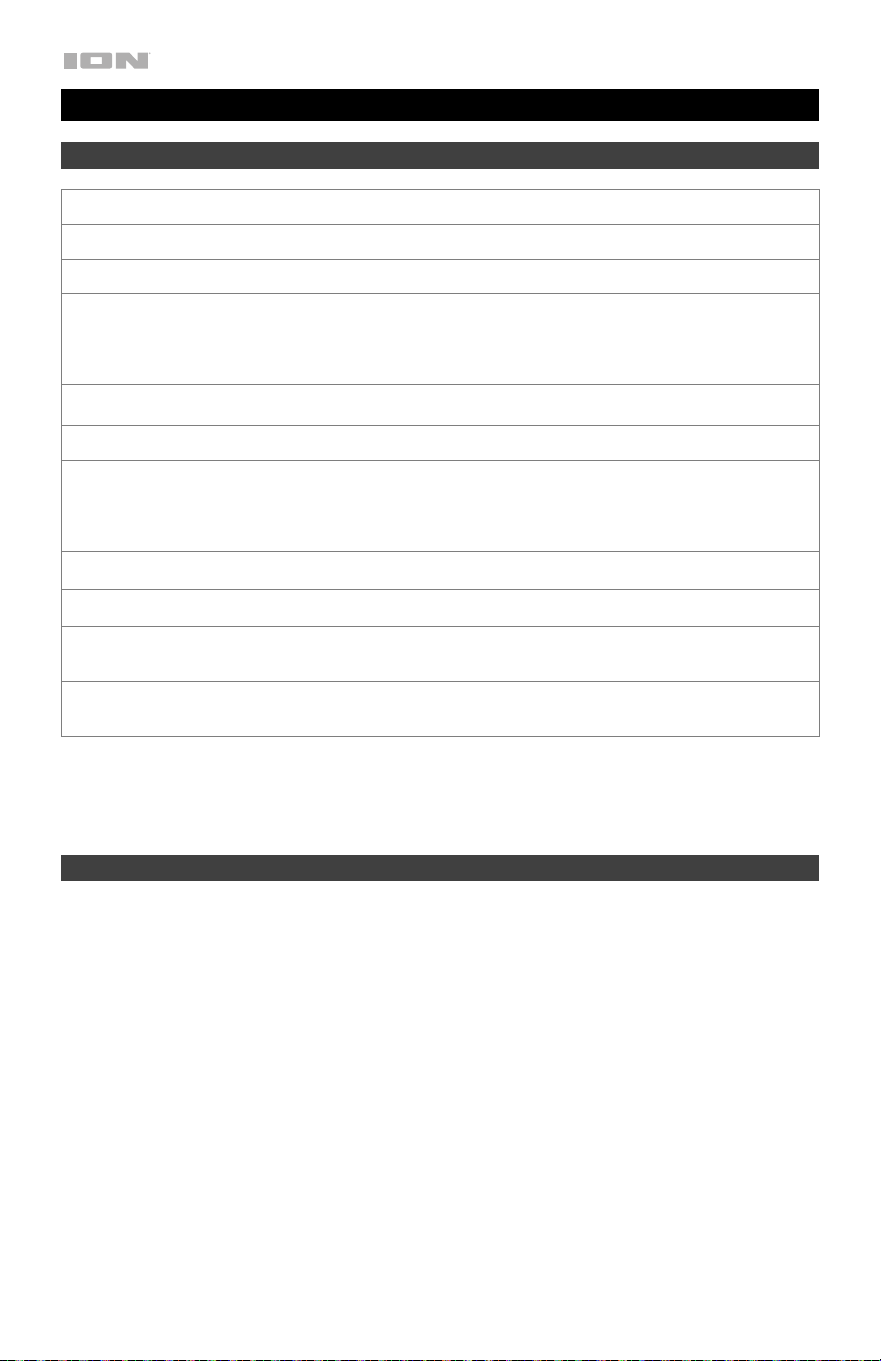
Technical Specifications
Output Power
30 W (Peak)
Frequency Response
125 Hz - 15 kHz
Speaker
Tweeters: (2) 2.5” drivers
Bluetooth Specifications Profile: A2DP, AVRCP
Module: Bluetooth 5.0
Range: Up to 100 feet / 30.5 meters
Water Resistance Class
IP67
Power Input Voltage: DC 5V, 2A
Battery Type: Internal rechargeable Li Ion battery
Battery life: Up to 20 hours
Recharge time: Up to 4 hours
Aux Input
3.5 mm (1/8”) line-level
Charge Port
micro-USB
Dimensions
(width x depth x height)
7.76" x 4.69" x 11.65"
197 x 119 x 296 mm
Weight
3.57 lbs.
1.62 kg
Specifications are subject to change without notice. Bluetooth and wireless reception and range are
affected by walls, obstructions, and movement. For optimal performance, place the product in the center of
the room so it is unobstructed by walls, furniture, etc. Battery life may vary based on temperature, age, and
volume usage of product.
Trademarks & Licenses
ION Audio is a trademark of inMusic Brands, Inc., registered in the U.S. and other countries. App Store is a
trademark of Apple Inc., registered in the U.S. and other countries. Android and Google Play are registered
trademarks of Google Inc. The Bluetooth word mark and logos are owned by the Bluetooth SIG, Inc. and
any use of such marks by ION Audio is under license. All other product names, company names,
trademarks, or trade names are those of their respective owners.

25

ionaudio.com
Manual Version 1.0
