
1
IMPORTANT SAFETY INFORMATION
We thank you for choosing our product. To ensure your safety and health, please use this equipment
correctly. It is important to read this entire manual before assembling and using the equipment. Safe
and effective use can only be achieved if the equipment is assembled, maintained, and used properly.
It is your responsibility to ensure that all users of the equipment are informed of all warnings and
precautions.
1. Before starting any exercise program, you should consult your physician to determine if you have
any medical or physical conditions that could put your health and safety at risk or prevent you from
using the equipment properly. Your physician’s advice is essential if you are taking medication
that affects your heart rate, blood pressure or cholesterol level.
2. Be aware of your body’s signals. Incorrect or excessive exercise can damage your health. Stop
exercising if you experience any of the following symptoms: pain, tightness in your chest, irregular
heartbeat, shortness of breath, lightheadedness, dizziness, or feelings of nausea. If you do
experience any of these conditions, you should consult your physician before continuing with your
exercise program.
3. Keep children and pets away from the equipment. The equipment is designed for adult use only.
4. Use the equipment on a solid, flat level surface with a protective cover for your floor or carpet. To
ensure safety, the equipment should have at least 2 feet (60CM) of free space all around it.
5. Ensure that all nuts and bolts are securely tightened before using the equipment. The safety of the
equipment can only be maintained if it is regularly examined for damage and/or wear and tear.
6. Always use the equipment as indicated. If you find any defective components while assembling or
checking the equipment, or if you hear any unusual noises coming from the equipment during
exercise, discontinue use of the equipment immediately and do not use until the problem has
been rectified.
7. Wear suitable clothing while using the equipment. Avoid wearing loose clothing that may become
entangled in the equipment.
8. Do not place fingers or objects into the moving parts of the equipment.
9. The maximum weight capacity of this unit is 220 pounds (100 KG) on each side of the stepper.
10. The equipment is not suitable for therapeutic use.
11. To avoid bodily injury and/or damage to the product or property, proper lifting and moving are
required.
12. Your product is intended for use in cool and dry conditions. You should avoid storage in extreme
cold, hot, or damp areas as this may lead to corrosion and other related problems.
13. This equipment is designed for indoor and home use only; it is not intended for commercial use.
2
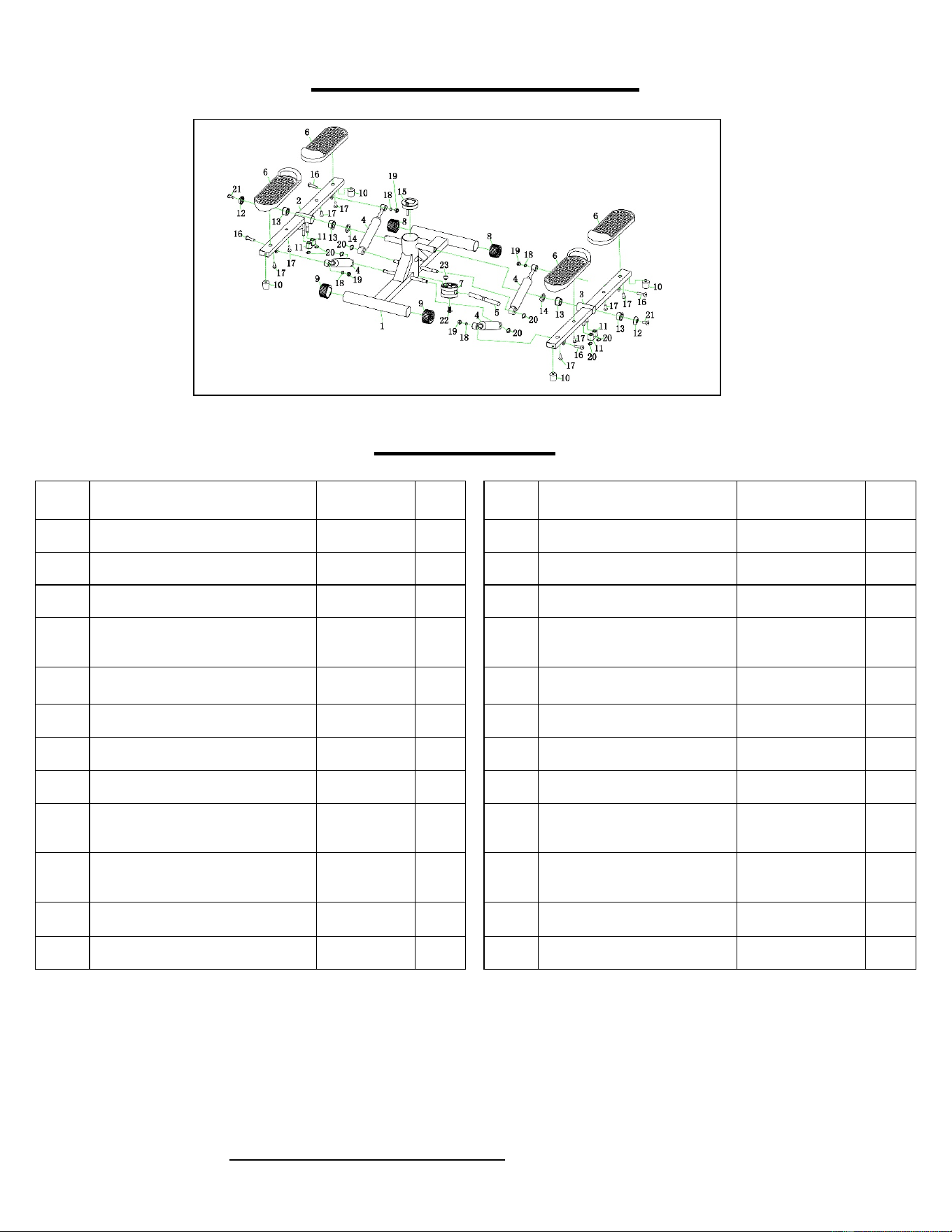
EXPLODED DIAGRAM
PARTS LIST
No. Description Spec. Qty.
No. Description Spec. Qty.
1
Main Frame
1
13
Bushing
4
2
Left Pedal Frame
1
14
Plastic Ring
2
3
Right Pedal Frame
1
15
Meter
1
4 Hydraulic Cylinder 4 16
Flat Hexagon Socket Head
Screw
M8
4
5 Swing Axle 1 17 Flat Cross Self-Tapping Screw
M5
8
6
Pedal
4
18
Washer
M8
4
7
Axle Base
1
19
Locknut
M8
4
8
Front End Cap
2
20
Circlip
8
9
Adjustable Rear End Cap
2
21
Flat Hexagon Socket Head
Screw
M8
2
10
Stopper
4 22
Flat Hexagon Socket Head Self-
Tapping Screw
M8
1
11
Fixed Plastic Block
4
23
Magnet
1
12
Cover
2
Ordering Replacement Parts (U.S. and Canadian Customers only)
Please provide the following information in order for us to accurately identify the part(s) needed:
The model number (found on cover of manual)
The product name (found on cover of manual)
The part number found on the “EXPLODED DIAGRAM” and “PARTS LIST” (found near the front of
the manual)
Please contact us at support@sunnyhealthfitness.com or 1- 877 - 90SUNNY (877-907-8669).
3
ASSEMBLY INSTRUCTIONS
We value your experience using Sunny Health and Fitness products. For assistance with parts or
troubleshooting, please contact us at support@sunnyhealthfitness.com or 1-877-90SUNNY (877-907-
8669).
MAINTENANCE & CARE
1. Always use a dry cloth when cleaning the stepper. Never clean the stepper using a wet or damp
cloth.
2. Store the stepper in a dry area free of moisture, do not store or leave outdoors.
3. During exercise, the hydraulic cylinders may produce noise if they become too hot, it is perfectly
normal for this to occur.
4. To avoid injury to your hands, please refrain from touching the hydraulic cylinders during or
immediately following an exercise.
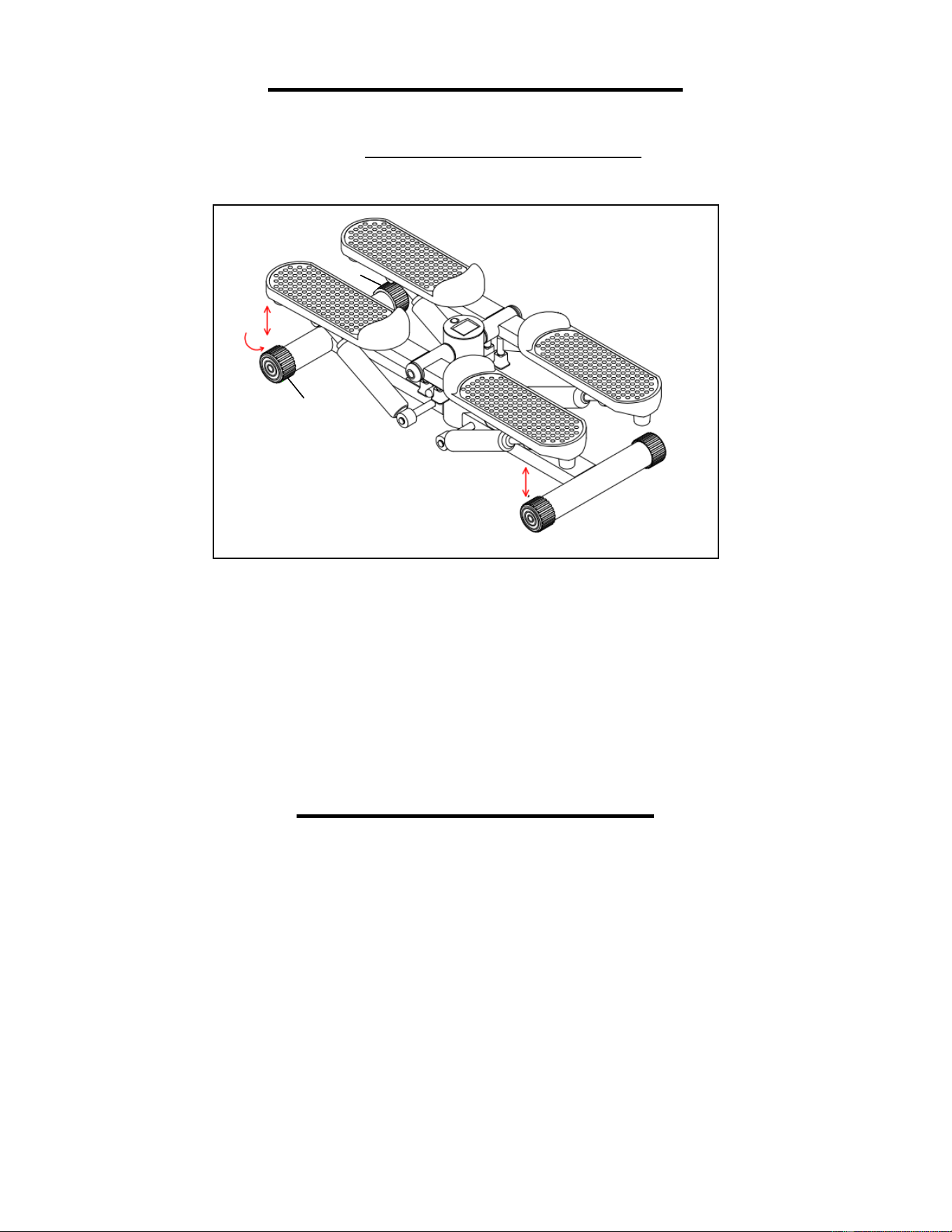
Remove the stepper from the packaging. Place the stepper on
the floor horizontally. You can adjust the
Adjustable Rear End
Caps (No. 9) to make sure the entire machine is the same level.
Two people can now use the stepper at the same time to do up
and down movements.
9
9
4
EXERCISE METER
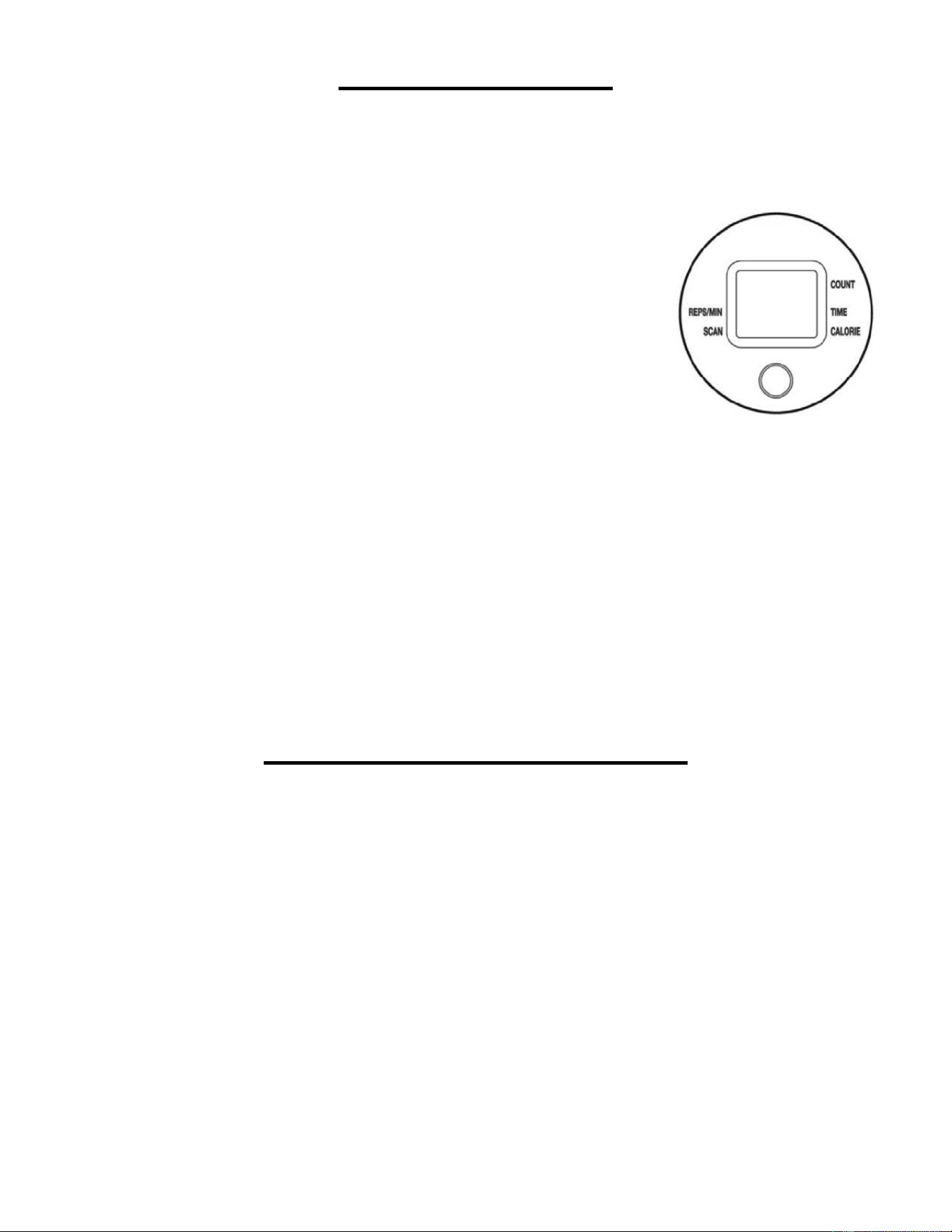
Our exercise meter on the Sunny Tandem Stepper allows the user to tailor a personalized workout by
monitoring their progress. During a workout, the exercise meter will repeatedly display your Time,
Calories, Count, and Total Count. With our easy-to-use exercise meter, the user can efficiently track
their fitness improvements from one workout to the next.
KEY FUNCTIONS:
MODE: Press to select a function or hold for 3 seconds to reset.
FUNCTIONS:
STOP: When stepping has stopped, “STOP” will display on the LCD.
REPS/MIN: Displays steps per minute.
SCAN: Automatically scans through each function in the sequence.
TIME: Counts the total time of an exercise from 00.00-99.59.
CALORIES: Counts the number of total calories burned during an exercise from start to finish.
COUNT: Automatically counts the steps made during exercise.
OPERATING INSTRUCTIONS
AUTO ON/OFF: The meter will activate when you press MODE or when you begin stepping. If there's
no signal for approximately 4 minutes, the meter will automatically turn off. When you are not
stepping, the meter shows STOP.
DISPLAY: The meter always displays number of steps at the top.
The bottom of the meter can display REPS/MIN, TIME, or CAL. Press MODE to select which function
you want to display at the bottom. An arrow points to the function displayed.
SCAN: If an arrow points to SCAN, then the meter will automatically rotate the display at the bottom
of the meter in the following sequence: REPS/MIN, TIME, CAL. An arrow will point to the function
displayed.
RESET: Press and hold the button for 3 seconds to reset all values.
NOTE:
1. If there is a problem with the display, please replace the battery to improve results. Replacing the
battery will reset all values.
2. Please use one AAA 1.5 V battery as a power supply. One battery is installed in the meter.
5
HOW TO REPLACE THE BATTERY
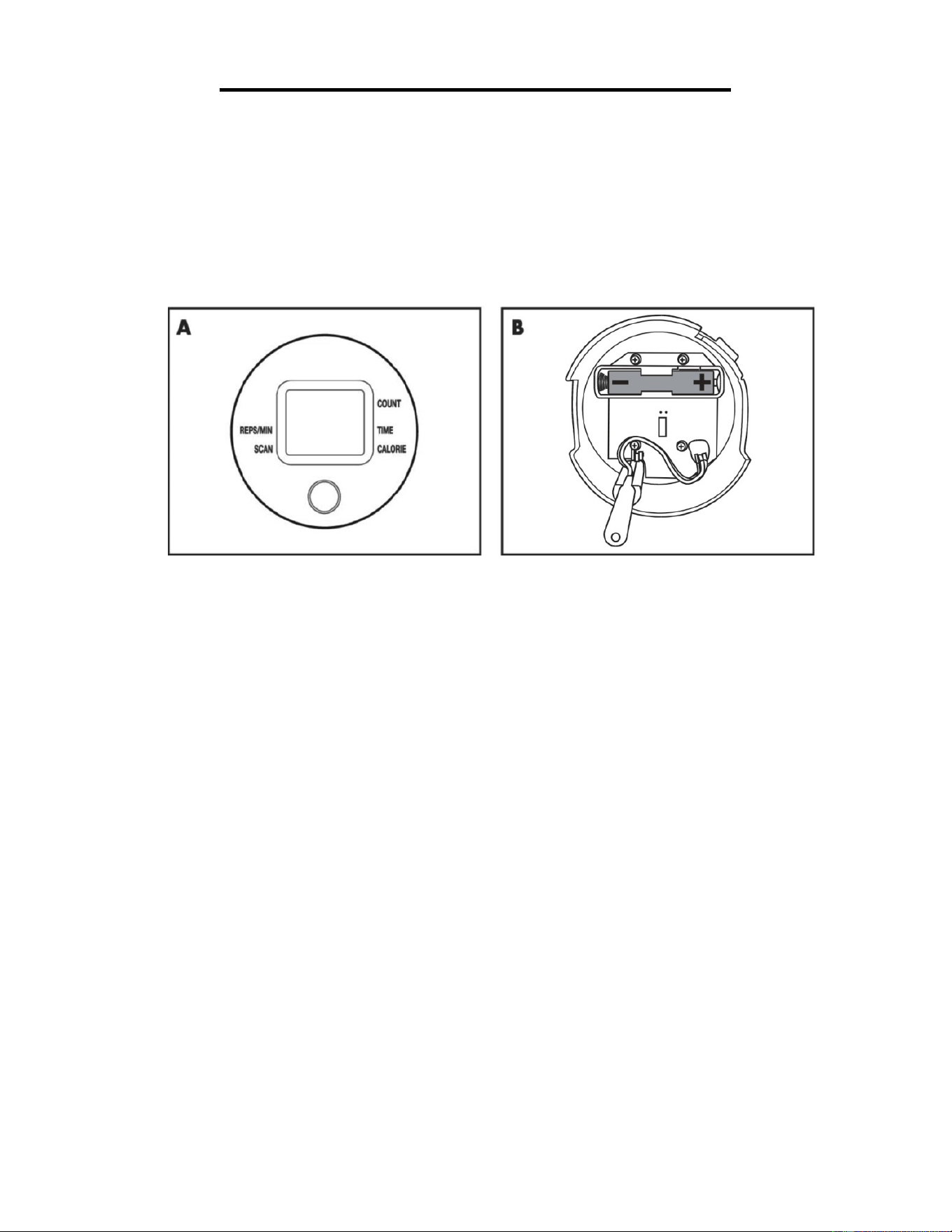
1. Pull out the meter from the equipment and place one AAA battery into the battery housing on the
back of meter. Please refer to the illustrations below.
2. Insure the battery is correctly positioned and the battery springs are in proper contact with the
battery.
3. Place the meter back into the original location and make sure it is secured in position.
4. If the display is illegible or only partial segments appear, remove the battery and wait 15 seconds
before reinstalling.
5. Removing the battery will erase the meter values.
Version 1.1
