

Contents
1. ATTENTION ..............................................................................................1
2. ILLUSTRATION (PART NAME) ............................................................... 3
3. TECHNICAL PARAMETERS ...................................................................4
4. ATTACHED ACCESSORIES ...................................................................4
5. ASSEMBLY INSTRUCTION .................................................................... 6
5.1 PRODUCT ASSEMBLY ......................................................................6
5.2 VACUUM CLEANER CHARGING ......................................................7
5.3 USED AS STICK VACUUM CLEANER ..............................................8
5.4 USED AS A HANDHELD VACUUM CLEANER .................................9
6. CLEANING AND MAINTENANCE ........................................................ 10
6.1 EMPTY THE DUST ...........................................................................10
6.2 CLEAN THE DUSTBIN AND HEPA FILTER ....................................10
6.3 CLEAN UP THE MOTORIZED BRUSH ........................................... 12
6.4 UNBLOCK ......................................................................................... 13
7. REPLACE THE BATTERY PACK .........................................................13
8. PROBLEM-SOLVING .............................................................................15
9. ONE-YEAR LIMITED WARRANTY ....................................................... 17


1
1. ATTENTION
Before using this product, please read this instruction manual
carefully to prevent unnecessary body injury and property damage.
1. Please note that this product is only for home use and not for
commercial use.
2. Upon opening the box, please make sure that all of the parts are in good
condition. If any parts are missing or broken, please do not use the product
and contact the dealer or service immediately. Please keep the instruction
manual, warranty card, invoice, package, and so on for future, storage or
repair.
3. Ensure that the local power (V) falls within the range indicated on the
charger.
4. Do not leave the charger unattended while it is being charged. The
charger should be placed on a dry surface.
5. Please hold the plug instead of the cord to pull the charger out from the
socket, cord shall stay away from heat sources, and do not touch the
charger with a wet hand.
6. This product is not a toy, please store this product far away from the
reach of children. Special attention shall be made when children are
playing around.
7. Please never use this product to vacuum any liquid, heat temperature
substance, very fine substance (E.g. sawdust, plaster powder, cement,
ash, carbon powder), sharp substance (E.g. glass, staple), and hazardous
substances (E.g. detergent, solvent), chemical substance (E.g. acid),
flammable substance (petrol, alcohol), etc.
8. Please cut off the power before you clean the product, please always
use a dry or slightly wet soft cloth, and do not use alcohol, benzene, etc.
9. This product itself can’t stand, please apply the product body onto the
holder.
10. Do not have the product immersed in the water, do not leave or use the

2
product outside of the house!
11. Please make sure all parts are assembled correctly. Do not use this
product without filtration.
12. Do not try disassembling the battery, do not place the battery on a
metal surface or near heat sources, and do not put the battery in a fire.
13. Do not try disassembling or repairing this product/charger yourself,
please call professionals for any repair or replacement with the original
parts/unit.
14. Please make sure that products can no longer be used before you
discard them, the battery pack must be removed from the product for
further safe recycling disposal.
15. This product cannot be used by persons (including children) with
reduced physical, sensory or mental capabilities or lack of experience and
knowledge unless they have been given supervision or instruction
concerning the use of the appliance in a safe way and understand the
hazards involved.
16. This product is not for any professional and commercial use, any
damage/consequence caused by improper use or use without following
this instruction is not covered by warranty.
3
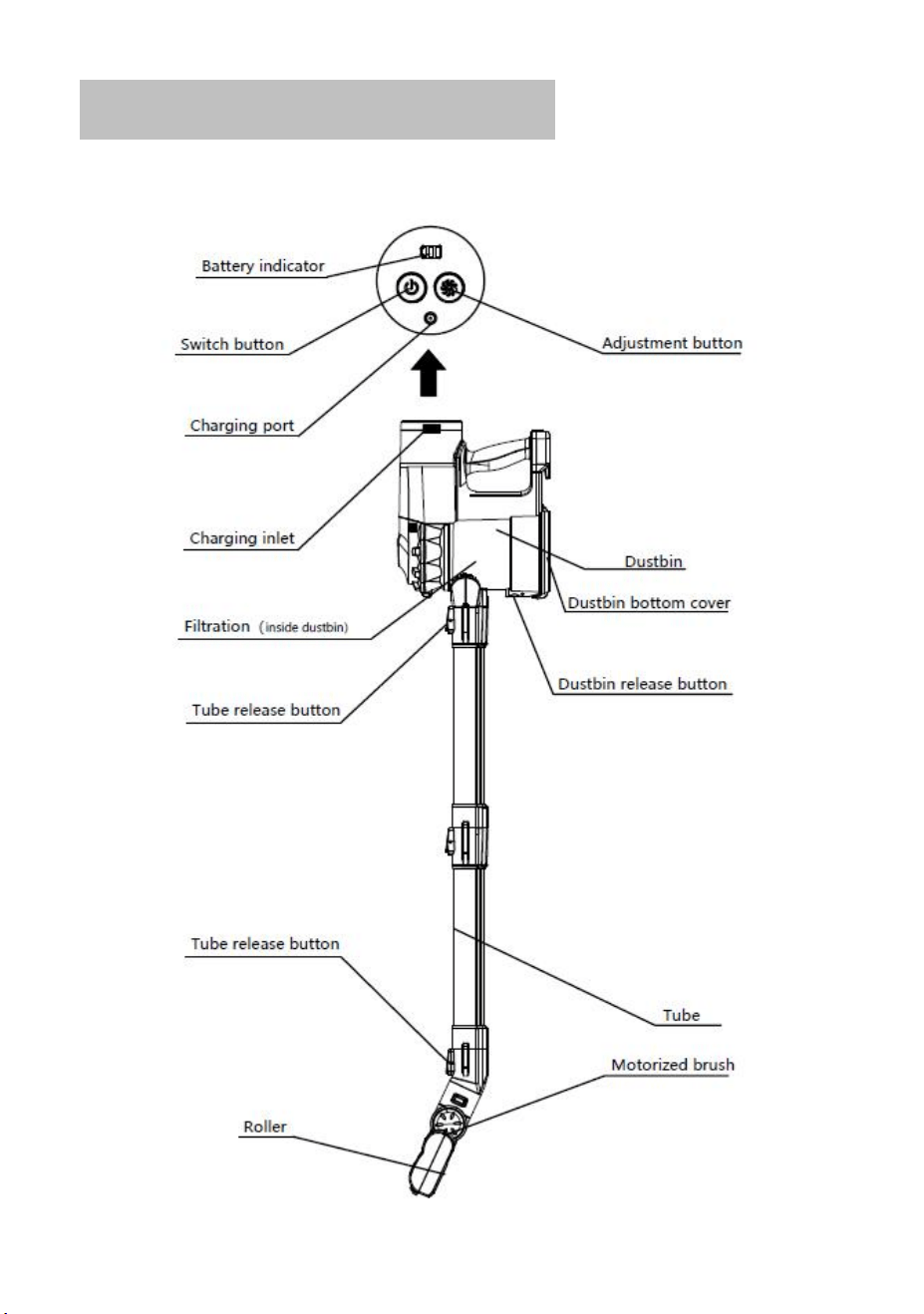
2. ILLUSTRATION (PART NAME)
4
3. TECHNICAL PARAMETERS
Cleaner parameter
Model name:Handheld Cordless Vacuum Cleaner
Model no:D300
Rated voltage:22.2V
_ _ _
Rated power:200W
N.W.: 1.42 KG
Charger parameter
Model no:CZH013260050USWP
Charger input:100-240V ~50/60Hz 0.4A Max
Charger output:26V
_ _ _
500mA
Battery Parameter
Battery: Li-ion 2200mAh, 48.8Wh
High-speed working time:12-14 minutes
Middle-speed working time:18-20 minutes
Low speed working time:34-38 minutes
Charging time:4-5H
4. ATTACHED ACCESSORIES
PICTURE
DESCRIPTION
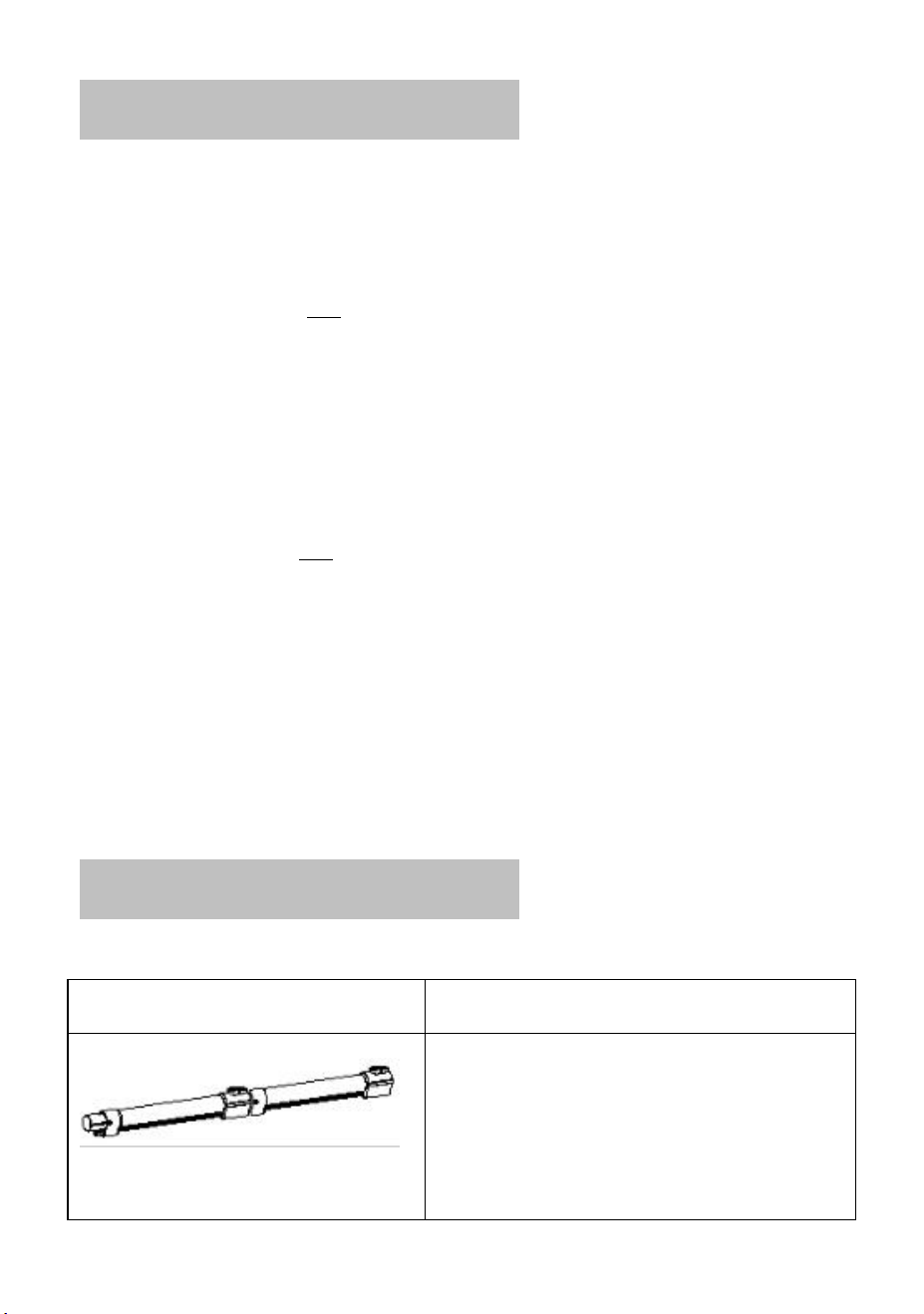
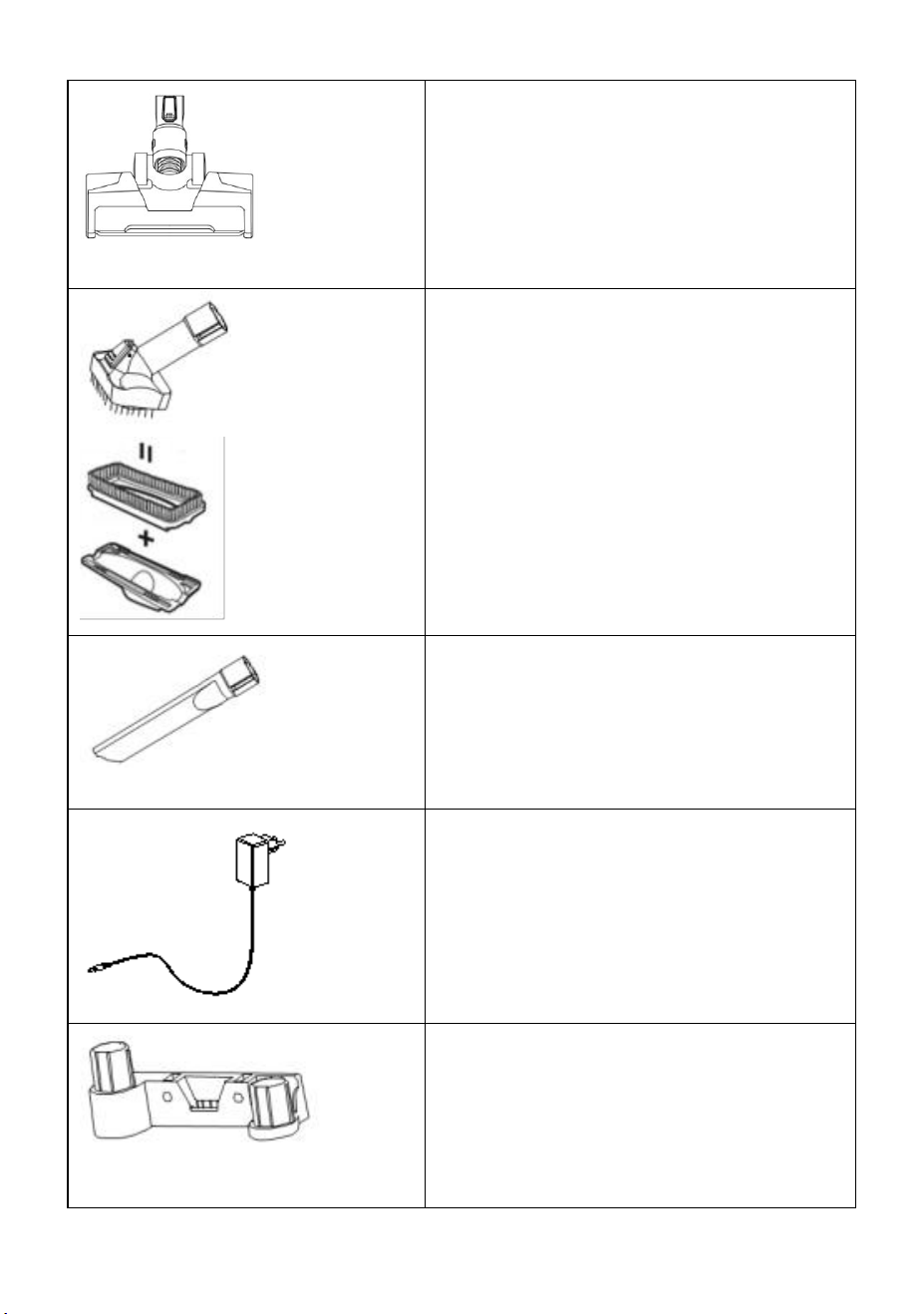
Connection tube
You can use 1 or 2 extension tubes to
adjust the length of the vacuum
cleaner.
5
Motorized Brush Head
Equipped with LED lights and roller
brush, perfect for removing fine/dry
dust/particles on hard floors.
2 in 1 nozzle
The brush can be removed when
pushing the button.
With a brush: For cleaning and dusting
tables and counter tops.
Without brush: Upholstery Cleaning
Tool, Great for home upholstery
cleanings like sofa, mattress, sheets,
and curtains.
Crevice Tool
Great for cleaning tight spaces.
Charger
Only can be used with an iwoly D300
vacuum cleaner.
Holder
The wall-mounted holder can be
securely mounted on the wall with
screws, which helps to store the
vacuum cleaner and attachments.
6
5. ASSEMBLY INSTRUCTION
Please carefully read “ATTENTION” before assembly:
This product itself can’t stand, please apply the body part onto the holder
which is on the connection tube.
5.1 PRODUCT ASSEMBLY
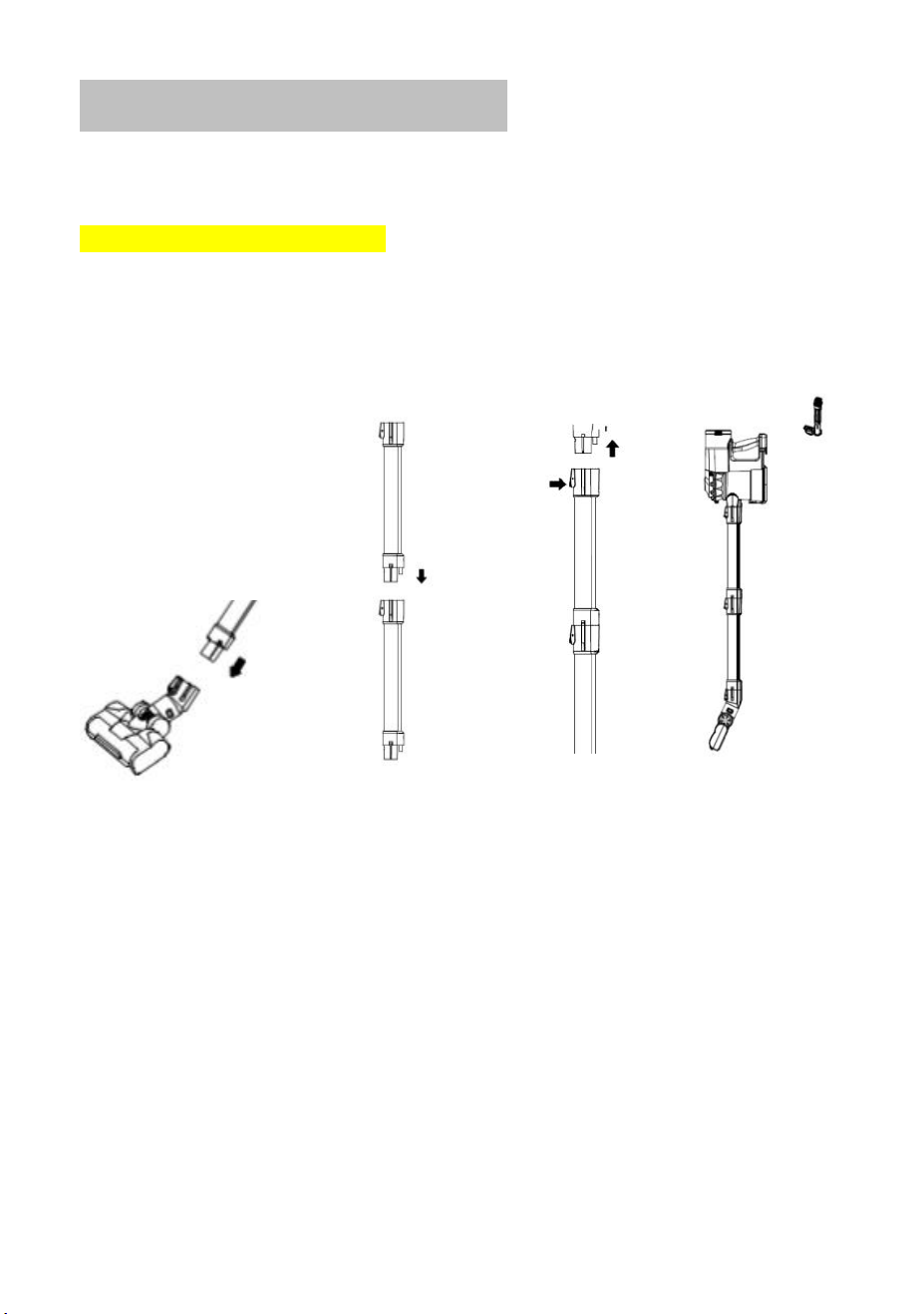
1. Connect the motorized brush head and the connection tube until the
button is locked.
2. Insert the body into the connection tube until the button is locked.
3. Hang the assembled vacuum cleaner and a 2-in-1 nozzle on the
holder.
7
5.2 VACUUM CLEANER CHARGING
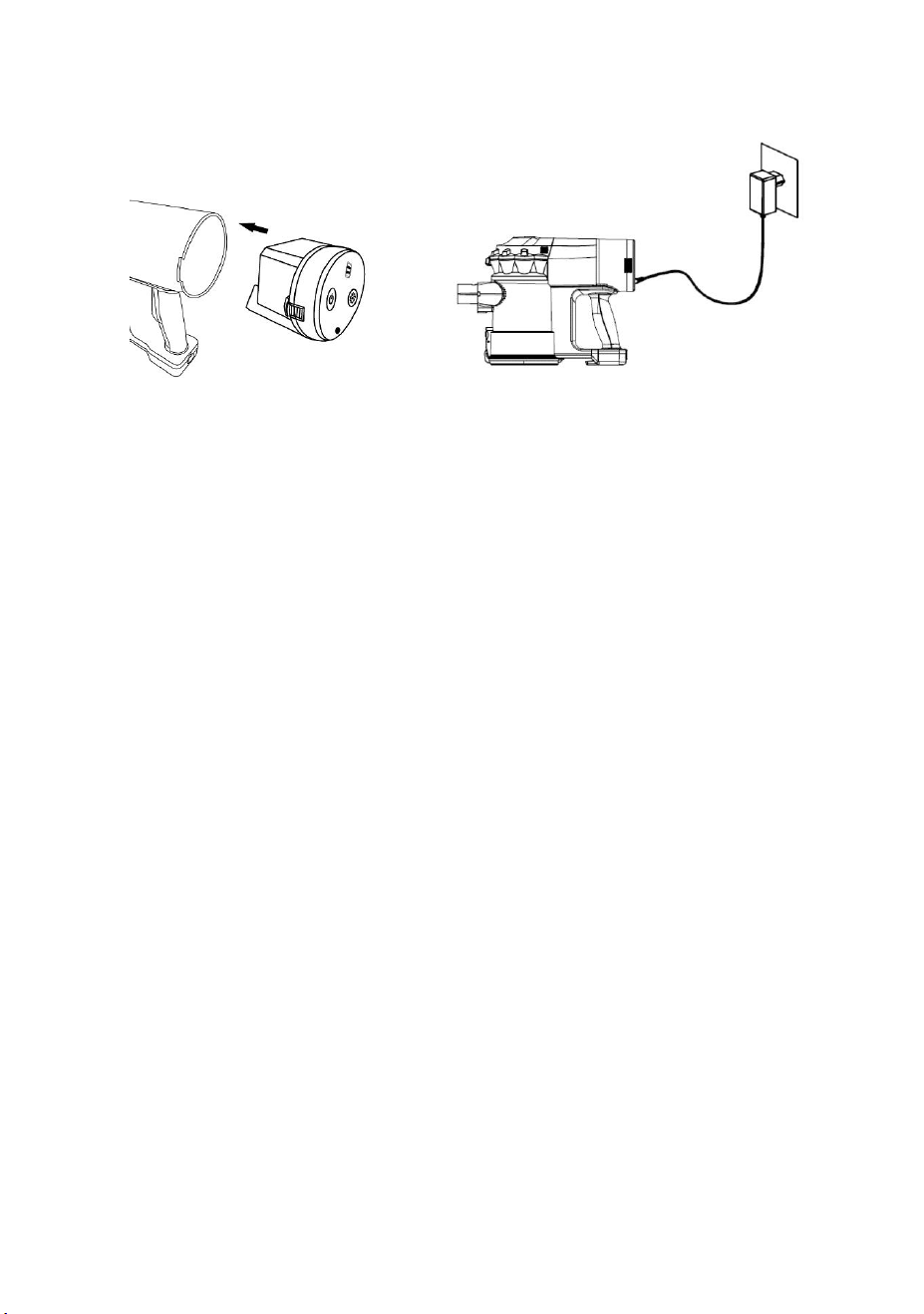
BATTERY ASSEMBLY:
Same as an illustration: Have the battery pack locked into the cleaner
body.
BATTERY CHARGING:
1. Make sure that the product is powered off, plug the adapter charging
head into the charging port behind the console (The battery pack can be
charged separately), and plug the adapter into a 100-240V to 50/60Hz
power outlet.
2. When charging the battery, the 3 charging indicators will light in turn,
and the indicator lights up to show the current charge. When the charge is
complete, all 3 lights are on for 3 minutes and then turned off.
WARNING: Do not turn on the product and do not try removing the
battery while it is charging!
ATTENTION:
① Only within 0
0
C--45
0
C can charge be allowed, overheating or over cold
could prolong the charging time or even damage the battery.
② Normal charging takes 4-5 hours, please charge fully and use the
product until the battery is fully discharged 1-3 times when you initiate
using it so that the battery can be fully activated.
8
③ If this product will not be used for a long time, please charge and
discharge this product once every 3 months.
5.3 USED AS A STICK VACUUM CLEANER
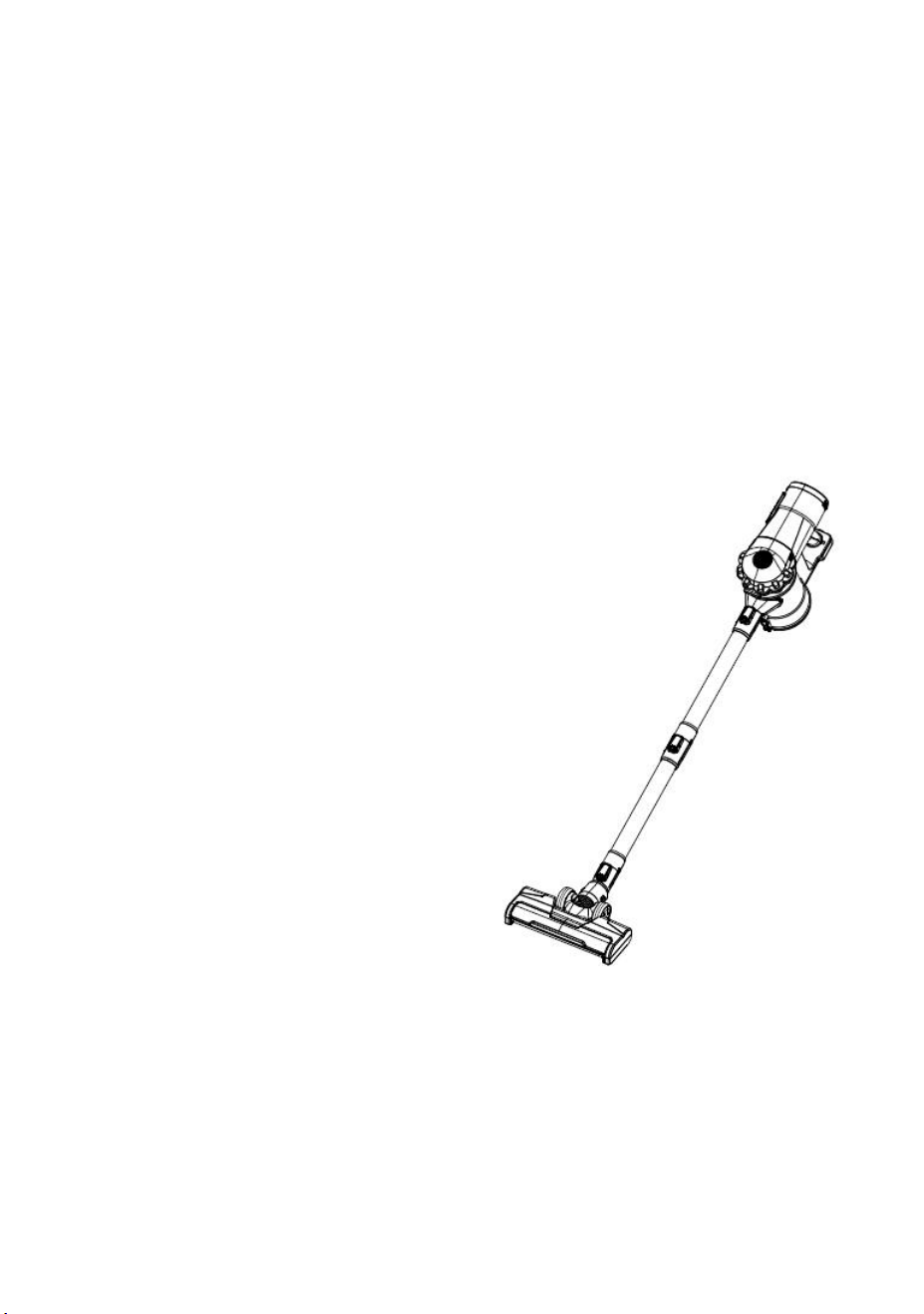
1. Step on the motorized brush and tilt the appliance backward;
2. Press the power button to turn on the power supply;
3. Press the adjustment button to adjust the flow;
4. Move back and forth and start cleaning (You may use 1pc of the tube
only or 2pcs tubes connected).
.
Switch Button
First press: Power on (normal mode)
Second press: Power off
Adjustment Button
First press: High mode
Second press: Economic mode
Third press: Normal mode
ATTENTION:
① When the battery is powered off, the vacuum cleaner turns off and the
three power indicators on the battery pack flash at the same time. Please
charge it in time.
② The motorized roller rolls at a very high speed, to avoid damaging the
cleaning surface, do not stay cleaning in the same spot too long.
9
③ Overheating protection function:The motorized brush has an
overheating protection function which can cut off the power to the brush
when a blockage or hair twirling occurs. Please turn off the product,
unblock and clean the brush. Do not use the product until it cools down.
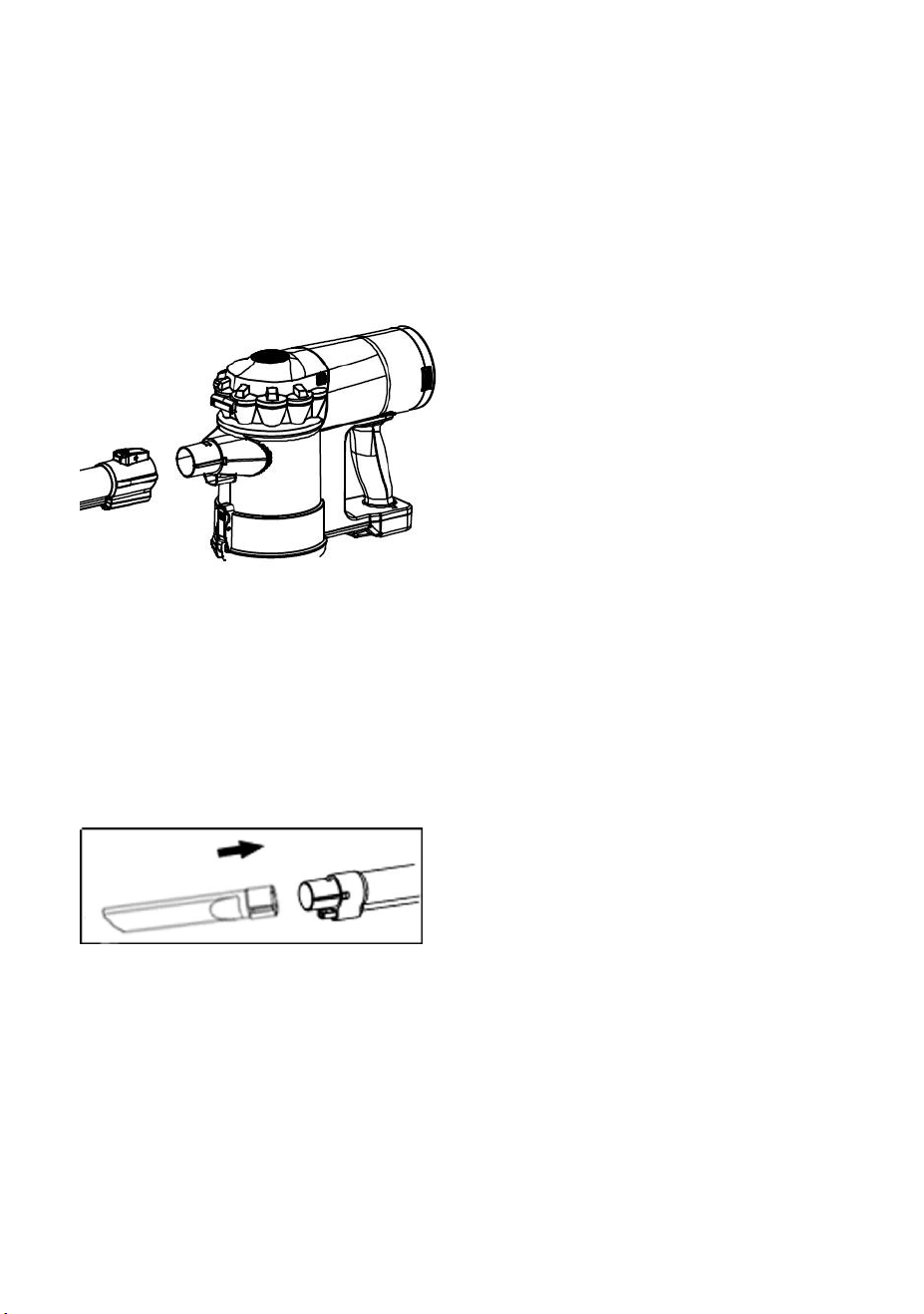
5.4 USED AS A HANDHELD VACUUM CLEANER
① Press the button on the connection tube;
② Separate the body and connection tubes (place the motorized brush
and connection tube properly)
;
③ Using a nozzle: Insert the hand-held vacuum cleaner snort as shown.
Or use the connection tube as shown before connecting the nozzle.
④ Press the power switch to start the machine.
10
6. CLEANING AND MAINTENANCE
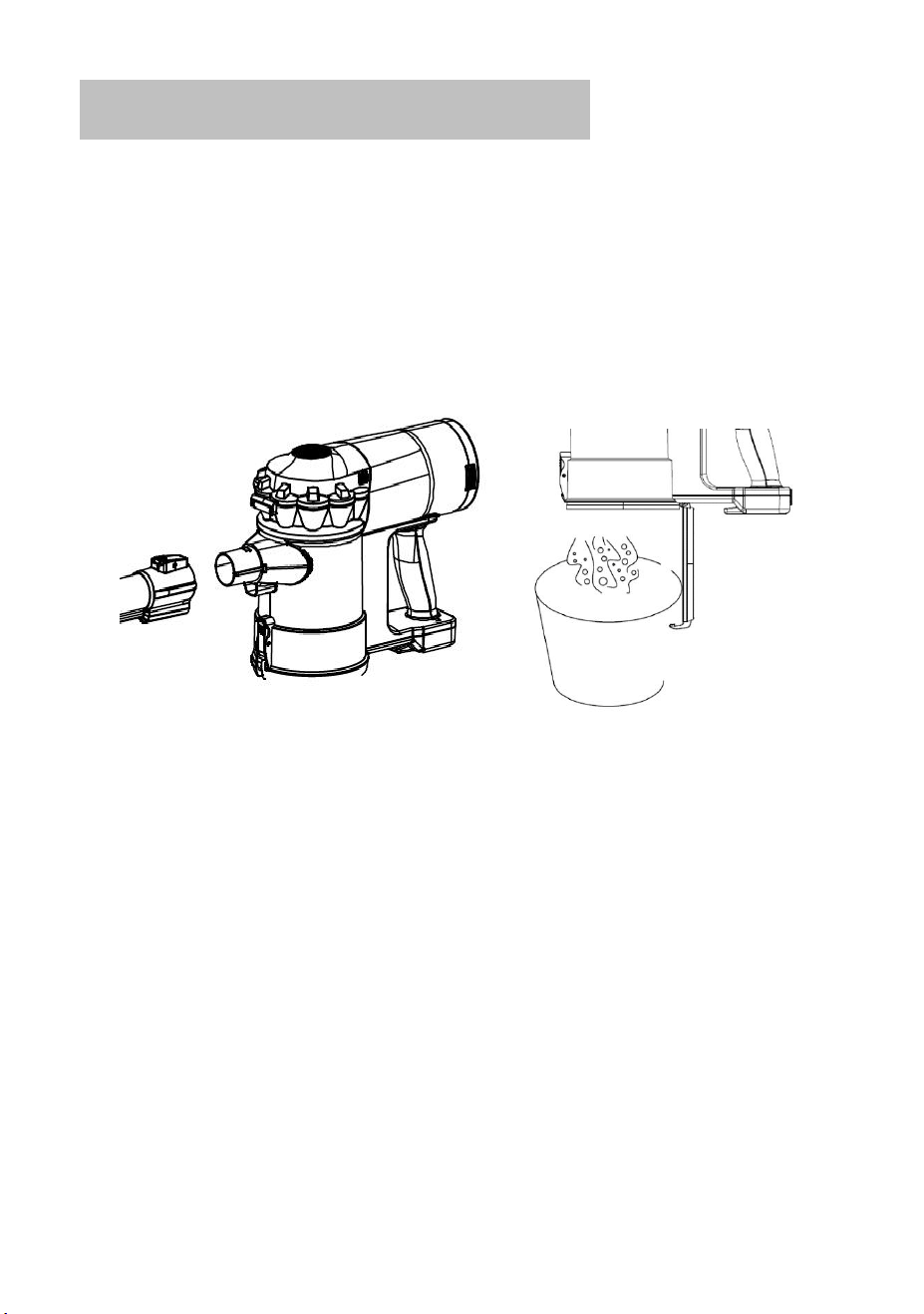
6.1 EMPTY THE DUST
Attention:
Please empty the dust when it reaches the “MAX” level on the dustbin.
① Turn off the power and press the connection tube button to separate the
vacuum cleaner as shown.
② Aim the bottom of the dustbin at the garbage can and push the dustbin
release button of the dust collection cup, the cover of dustbin will open.
③ Gently shake to empty the dust in the dustbin, close the bottom cover,
and lock.
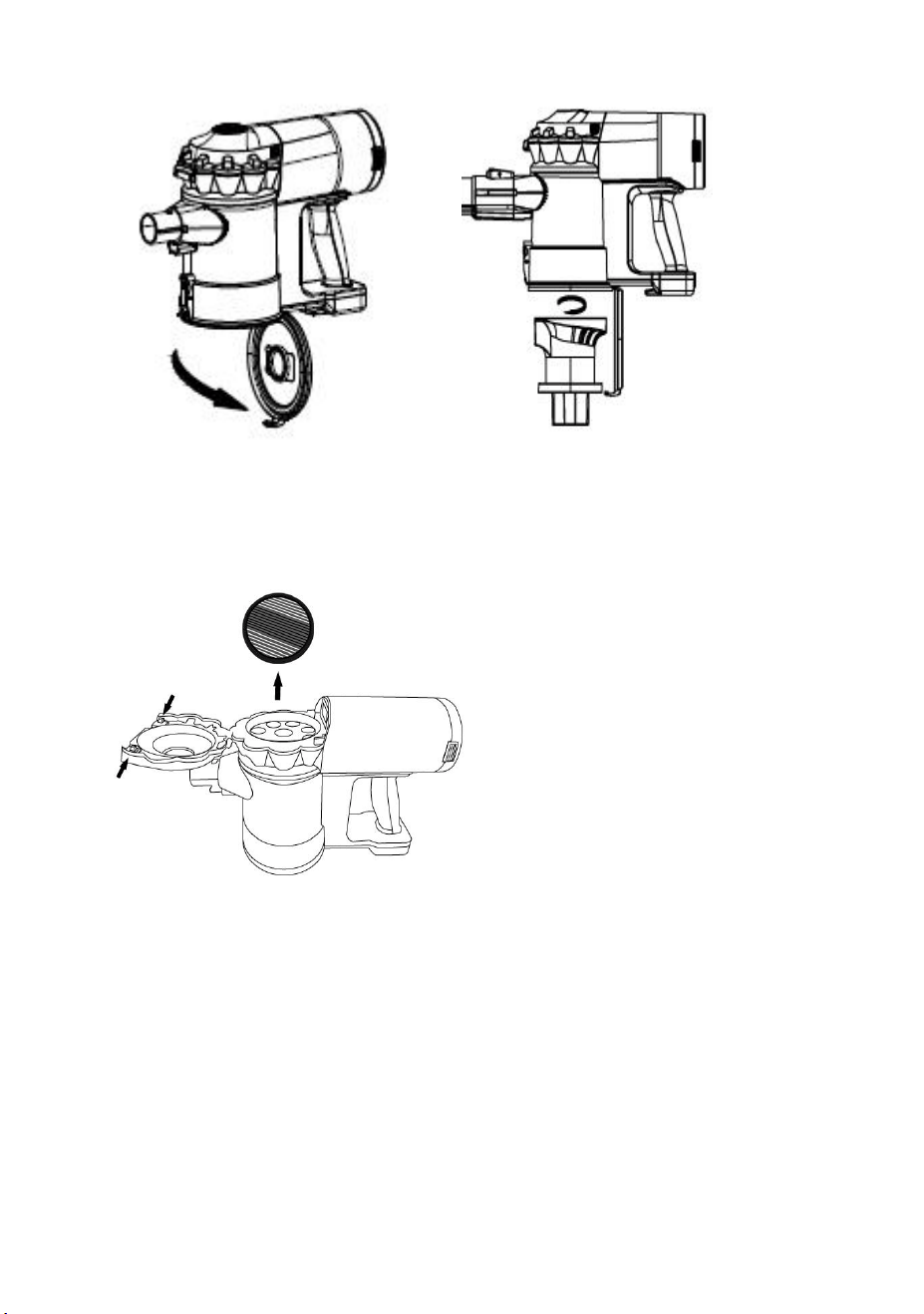
6.2 CLEAN THE DUSTBIN AND HEPA FILTER
To maximize the cleaning performance, cleaning the filtration system after
every 4-6 times using is suggested.
11
① Turn off the power, press the dustbin release button and empty the dust;
② Hold the bottom of the filter assembly, rotate and remove the filter
assembly in the direction shown;
③ Press the buttons on upper cover and remove the HEPA filter from the
upper part of the filter assembly;
④ Clean the filter cotton assembly, filter and dustbin and dry;
⑤ Reassemble all parts correctly in reverse order.
*The wrong assembly will reduce suction and even damage the motor*
Attention
:
① Before assembly back, make sure that all parts after cleaning are
completely dry, otherwise do not use them.
12
② The dustbin is not available for water flushing to prevent liquid from
entering the interior of the host and can be wiped with a slightly damp soft
cloth. Do not use until it gets completely dry.
WARNING: DO NOT USE THE PRODUCT WITHOUT
FILTRATION
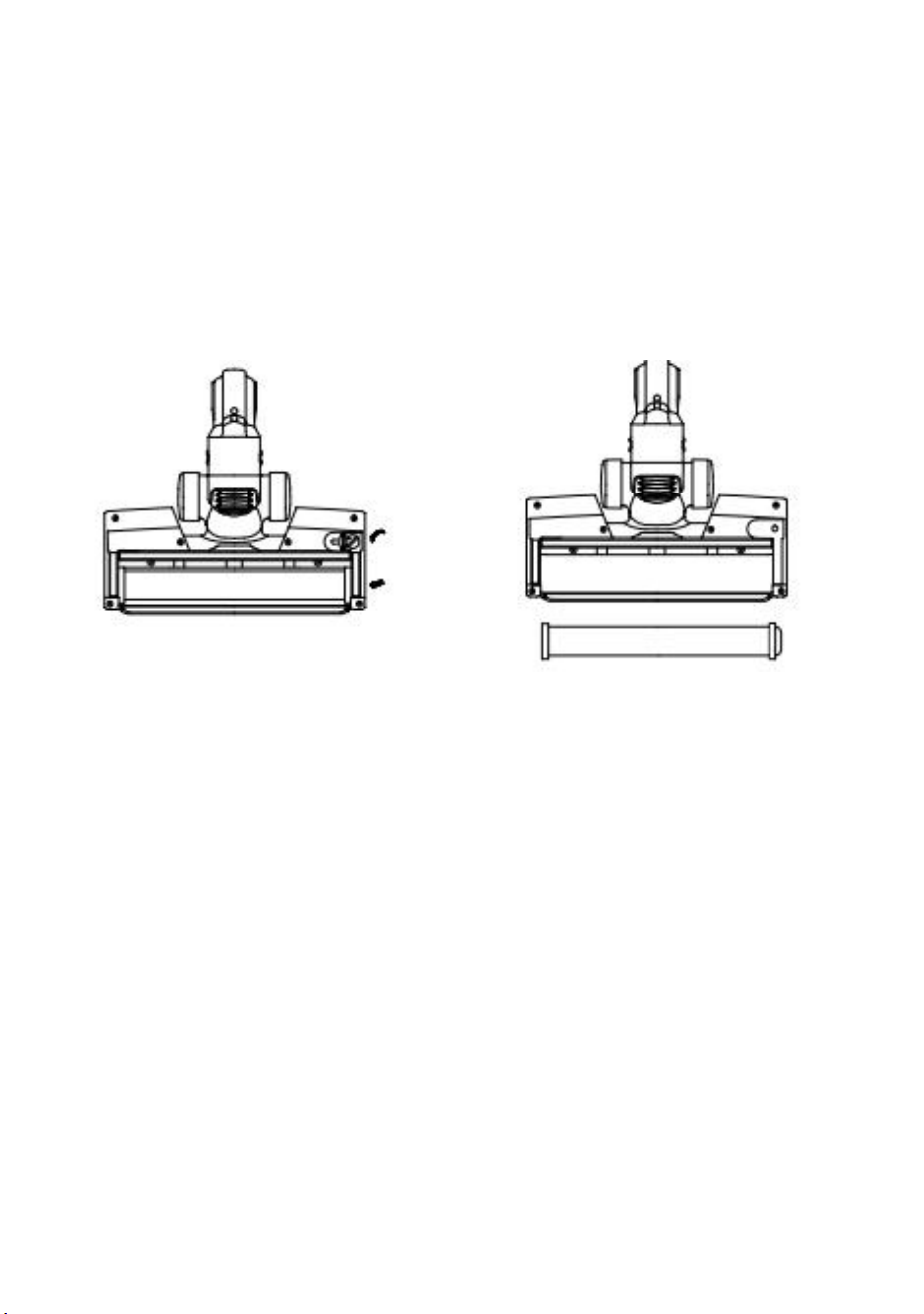
6.3 CLEAN UP THE MOTORIZED BRUSH
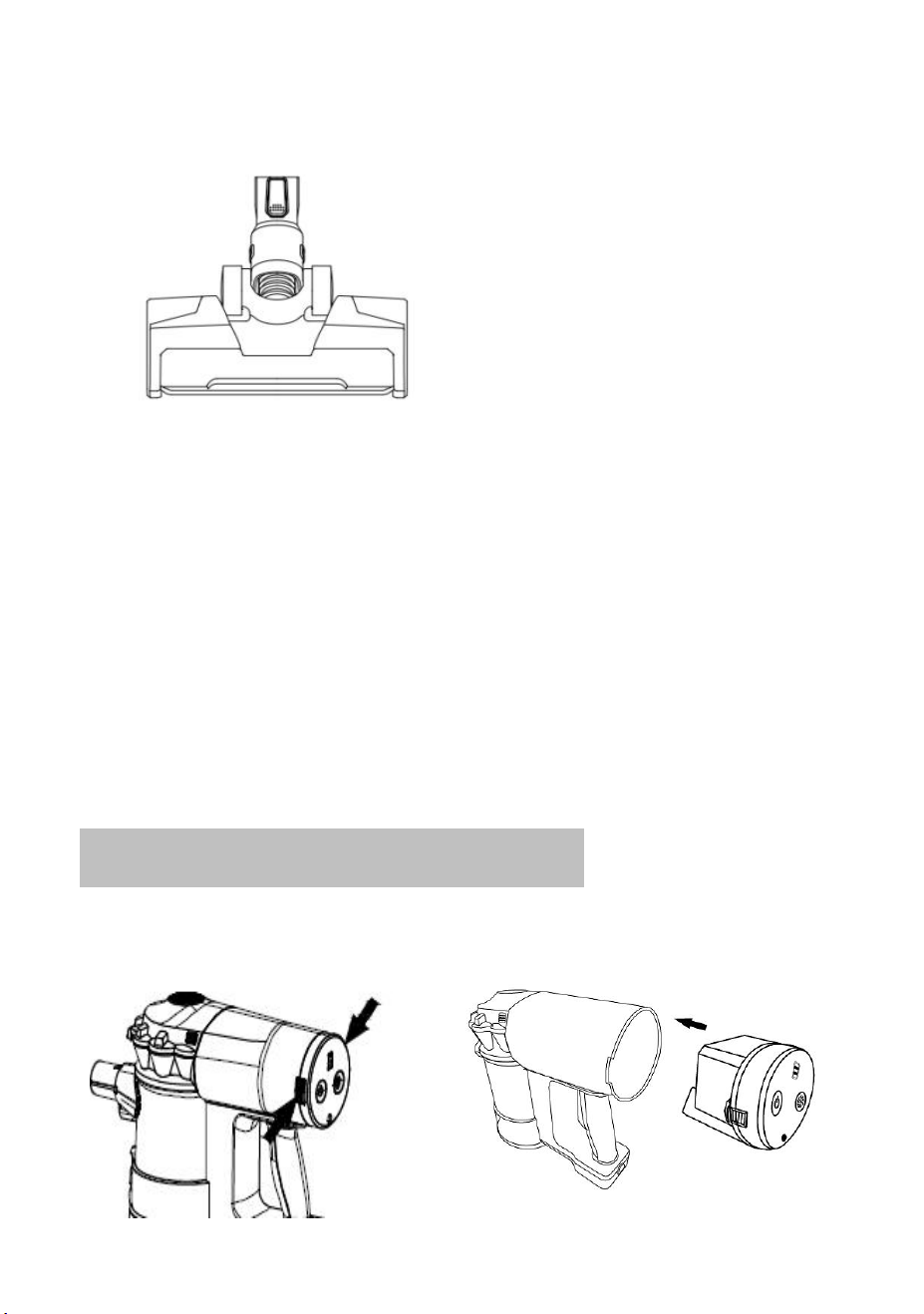
1. Turn off the power and release the motorized brush head.
2. Turn the button on the bottom of the brush head by the coin to “unlock”
position.
3. Open the roller fixing cover.
4. Lift the roller and take it out.
5. Along the groove on the roller, cut off twirled hair or blockage with
scissors or a knife.
6. Place back the cleaning roller.
7. Cover the fixing cover and turn the button back to the “lock” position.
13
6.4 UNBLOCK
①This product has a protection function. When the roller brush is stuck
by the winding and will automatically cut off the power to the motorized
brush. Please turn off the product and unblock the roller immediately.
(
Please refer to 6.3
)
②When the machine duct is blocked, the protection device will cut off
all power, check and clean the motorized brush, connection tube, or
host air duct, remove the blockage, and cool down for some time can
be used again.
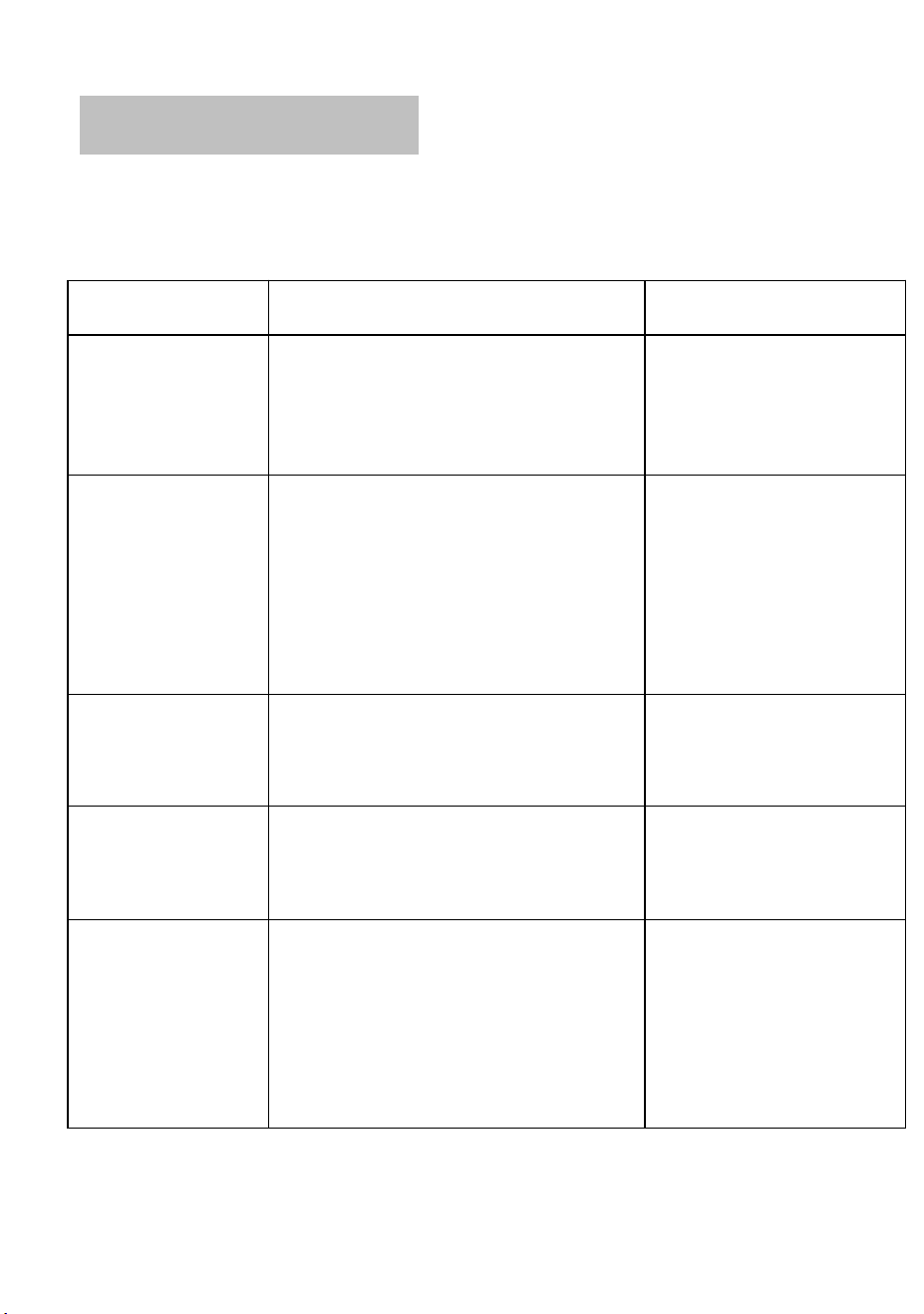
7. REPLACE THE BATTERY PACK

14
1
. Turn off the power.
2. Press the release button left and right of the battery pack, and remove
the battery pack.
3. Insert the new battery pack into the body until the button is locked.
ATTENTION:
Must use original battery pack and charger.
Do not use the battery pack for another purpose.
15
8. PROBLEM-SOLVING
Some simple problems in the use process can be resolved by referencing
the following methods.
Problem
Possible causes
Solving
The product
cannot start
●Running out of power
●Referring to the
“battery charging”
instruction, charge the
battery
No suction or
weak suction
●Dustbin is full of dust
●Filtering is not correctly assembled
or dust blocked the HEPA
●Nozzle and/or tubes blocked
●Empty the dust
●Assembly the filtering
again or clean/replace
the filtering
●Referring to “unblock”
instruction, unblock the
nozzle and/or tube
The nozzle roller
does not rotate
●Roller blocked, protection function
works
●Referring to the
“unblock” instruction,
unblock the nozzle
The motor makes
a strange noise.
● When the filter is not properly
attached to the main body, the dust
has entered the motor.
● Contact the seller and
replace the main body
of the vacuum cleaner.
Using time
shorter
●Battery not fully charged
●Battery aging
●Referring to the
“Battery charging”
instruction, charge the
battery
●Purchase the original
battery Pack from the
manufacturer

16
Smell bad
● A non-dry HEPA filter was used.
● Dust entered the motor.
● Replace the HEPA
filter.
● Contact the seller and
replace the main body
of the vacuum cleaner.
Body and handle
warm-up
It will become warm due to the heat generated by the motor,
but this is not abnormal.
The tube
detachable part is
damaged.
Please contact the seller or the after-sales service to get a
replacement part.
The dust cup lid is
damaged.
Please contact the seller or the after-sales service to get a
replacement part.
The charger is
lost
Please contact the seller or the after-sales service to get a
replacement part.
WARNING: FOR SOLVING OTHER PROBLEMS OR REPLACEMENT,
PLEASE ALWAYS RESORT TO THE PROFESSIONALS SPECIFIED,
ANY UNAUTHORISED REPAIRING ARE NOT COVERED BY
WARRANTY

17
9. ONE-YEAR LIMITED WARRANTY
The 1-Year Limited Warranty applies to purchases made from authorized
retailers of Shenzhen Mingke Lixin Technology Co., Ltd. Warranty
coverage applies to the original owner and the original product only and is
not transferable.
warrants that the unit shall be free from defects in material and
workmanship for a period of 1 year from the date of purchase when it is
used under normal household conditions and maintained according to the
requirements outlined in this instruction manual, subject to the following
conditions and exclusions.
What is covered in my warranty?
1. The original unit and/or non-wearable components deemed defective,
in ’s sole discretion, will be repaired or replaced for up to 1 year
from the original purchase date.
2. If the unit is replaced, reserves the right to replace the unit
with one of equal or greater value.
What is not covered in my warranty?
Our Customer Service/Product Specialists are available to provide all the
warranty service options available to you.
1. Normal wear and tear of wearable parts such as foam filters, HEPA
filters, pads, etc., which require regular maintenance and/or replacement
to ensure the proper functioning of your unit are not covered by this

18
warranty.
2. Any unit that has been tampered with or used for commercial purposes.
3. Damage caused by misuse, abuse, negligent handling, or damage
due to mishandling in transit.
4. Consequential and incidental damages.
5. Defects caused by or resulting from damages from shipping or from
repairs, service, or alteration to the product or any of its parts which have
been performed by a repair person not authorized by .
How to get service?
If your appliance fails to operate properly while in use under normal
household conditions within the warranty period, send an e-mail to
options.