USER MANUAL
Before using, please read the operating instructions carefully to
ensure proper application and achieve satisfactory results.
For any service related
issues, please contact us:
718-576-6342
support@koolmore.com
KOOLMORE RESERVE
WINE COOLER
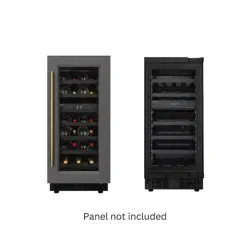
PANEL READY
Models:
KM-CW28DZ-BPR, KM-CW28DZ-WPR, KM-CW46DZ-BPR
KM-CW46DZ-BPR, KM-CWB24-BPR, KM-CWB24-WPR

Stay informed with the latest information for your
KoolMore Reserve Appliance.
If you need any assistance or have questions, our
customer support team is here to help.
When using an electrical appliance, basic precautions should always be followed, including the
following to reduce the risk of fire, electric shock, and injury to persons, including the following:
• Read all instructions carefully, even if you are quite familiar with the appliance.
• The appliance is intended to be used for storage of wine. Use this appliance only as described
in this manual. Other uses not recommended may cause fire, electric shock, or personal injury.
• In compliance with EN standards: This appliance can be used by children aged from 8 years
and above and persons with reduced physical, sensory, or mental capabilities or lack of
experience and knowledge if they have been given supervision or instruction concerning use of
the appliance in a safe way and understand the hazards involved. Children shall not play with
the appliance. Cleaning and maintenance shall not be made by children without supervision.
• Do not place the appliance on a power strip or double adapter or extension cord to avoid the
risk of fire.
• Do not immerse the unit, cord, or plug in water or spray any other liquid.
• Unplug the appliance from the plug socket when not in use, when moving from one location to
another, and before cleaning.
• To disconnect the appliance, grip the plug and pull it from the wall outlet. Never pull by the cord.
WARNING: Please keep the appliance away from substances which can cause ignition. Do not operate
the appliance in the presence of explosive and/or flammable fumes.
• Do not place the appliance or any of its part near an open flame, cooking, or other heating
appliance.
• Do not operate the appliance with a damaged cord or plug, if the product malfunctions, or if it is
dropped or damaged in any manner. If the SUPPLY CORD is damaged, it must be replaced by
the manufacturer, an authorized service center, or similarly qualified persons in order to avoid a
hazard.
• The use of attachments not recommended by the manufacturer may be hazardous.
• Place the unit on a dry level surface.
• Do not operate if the housing is removed or damaged.
• A loose fit between the AC outlet (receptacle) and plug may cause overheating and a distortion
of the plug. Contact a qualified electrician to replace loose or worn-out outlets.
• Locate the unit away from direct sunlight and sources of heat (stove, heater, radiator, etc.).
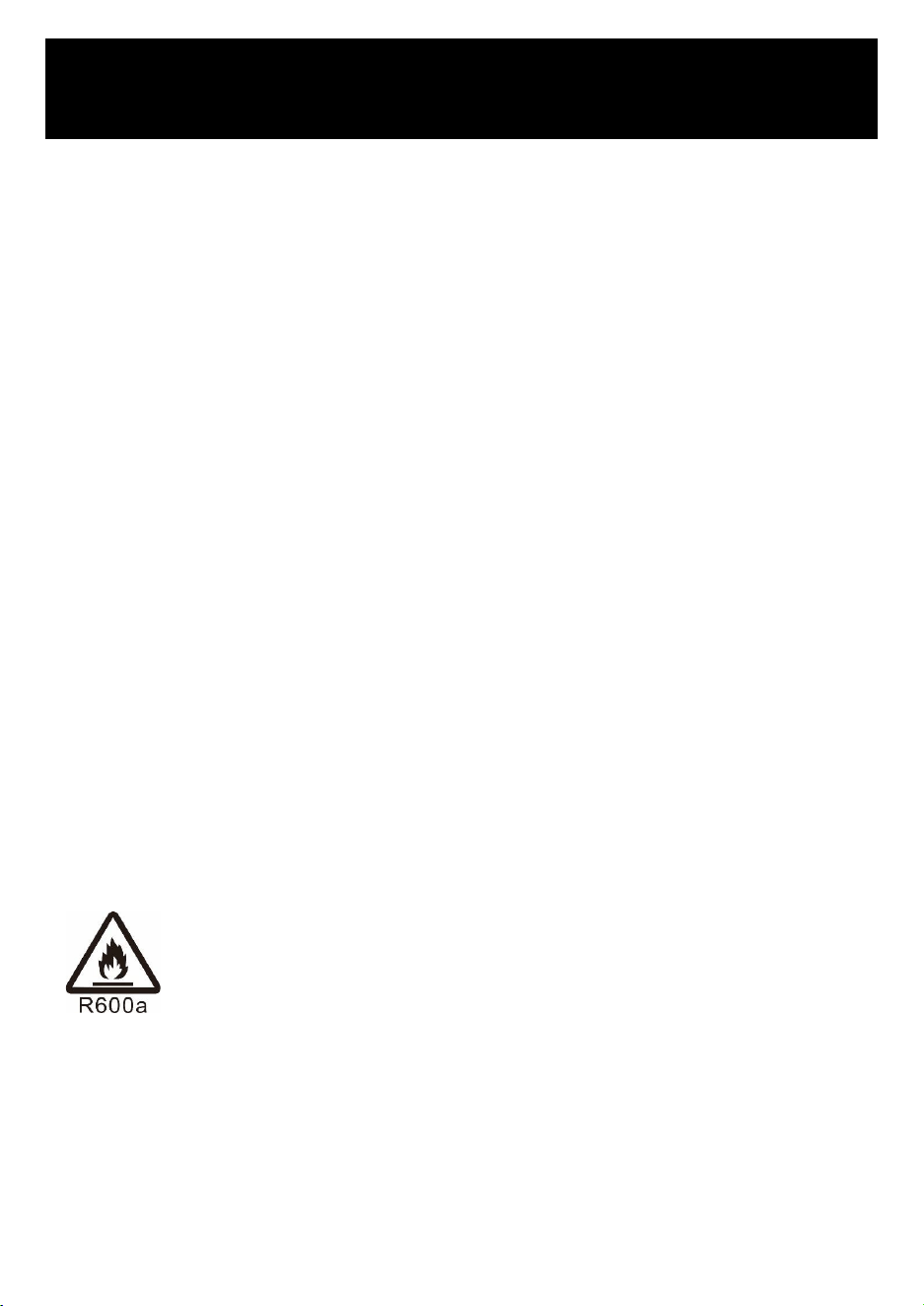
R600a WARNING:
This appliance is CFC- and HCFC-free and contains small quantities of isobutane
(R600a), which is environmentally friendly, but flammable. It does not damage the ozone
layer, nor does it increase the greenhouse effect. Care must be taken during transporta-
tion and setting up of the appliance that no parts of the cooling system are damaged.
Leaking coolant can ignite and may damage the eyes.
In the event of any damage:
• Avoid open flames and anything which creates a spark.
• Disconnect from the mains.
• Air the room in which the appliance is located for several minutes and
• Contact the Service Department for advice.
• The more coolant there is in an appliance, the larger the room it should be installed in. In the
event of a leakage, if the appliance is in a small room, there is a danger of combustible gas
being made. The room size is calculated based on the amount of refrigerant and must be at
SAFETY
2

When using an electrical appliance, basic precautions should always be followed, including the
following to reduce the risk of fire, electric shock, and injury to persons, including the following:
• Read all instructions carefully, even if you are quite familiar with the appliance.
• The appliance is intended to be used for storage of wine. Use this appliance only as described
in this manual. Other uses not recommended may cause fire, electric shock, or personal injury.
• In compliance with EN standards: This appliance can be used by children aged from 8 years
and above and persons with reduced physical, sensory, or mental capabilities or lack of
experience and knowledge if they have been given supervision or instruction concerning use of
the appliance in a safe way and understand the hazards involved. Children shall not play with
the appliance. Cleaning and maintenance shall not be made by children without supervision.
• Do not place the appliance on a power strip or double adapter or extension cord to avoid the
risk of fire.
• Do not immerse the unit, cord, or plug in water or spray any other liquid.
• Unplug the appliance from the plug socket when not in use, when moving from one location to
another, and before cleaning.
• To disconnect the appliance, grip the plug and pull it from the wall outlet. Never pull by the cord.
WARNING: Please keep the appliance away from substances which can cause ignition. Do not operate
the appliance in the presence of explosive and/or flammable fumes.
• Do not place the appliance or any of its part near an open flame, cooking, or other heating
appliance.
• Do not operate the appliance with a damaged cord or plug, if the product malfunctions, or if it is
dropped or damaged in any manner. If the SUPPLY CORD is damaged, it must be replaced by
the manufacturer, an authorized service center, or similarly qualified persons in order to avoid a
hazard.
• The use of attachments not recommended by the manufacturer may be hazardous.
• Place the unit on a dry level surface.
• Do not operate if the housing is removed or damaged.
• A loose fit between the AC outlet (receptacle) and plug may cause overheating and a distortion
of the plug. Contact a qualified electrician to replace loose or worn-out outlets.
• Locate the unit away from direct sunlight and sources of heat (stove, heater, radiator, etc.).
R600a WARNING:
This appliance is CFC- and HCFC-free and contains small quantities of isobutane
(R600a), which is environmentally friendly, but flammable. It does not damage the ozone
layer, nor does it increase the greenhouse effect. Care must be taken during transporta-
tion and setting up of the appliance that no parts of the cooling system are damaged.
Leaking coolant can ignite and may damage the eyes.
In the event of any damage:
• Avoid open flames and anything which creates a spark.
• Disconnect from the mains.
• Air the room in which the appliance is located for several minutes and
• Contact the Service Department for advice.
• The more coolant there is in an appliance, the larger the room it should be installed in. In the
event of a leakage, if the appliance is in a small room, there is a danger of combustible gas
being made. The room size is calculated based on the amount of refrigerant and must be at
least 1 cubic meter for every 8 g of refrigerant. The building up of room space is calculated on the
data plate inside the appliance. It is hazardous for anyone other than an authorised service person to
carry out servicing or repairs to this appliance. In Queensland and Australia, the authorised person
must hold a Gas Work Authorization for hydrocarbon refrigerants, before carrying out servicing or
repairs which involve the removal of covers.
• WARNING: Keep ventilation openings, in the appliance enclosure or in the built-in structure, clear of
obstruction. No liability will be accepted for any damage as a result of repairs carried out by
unqualified personnel. In this case, neither the guarantee nor any other liability claims will apply.
• WARNING: Do not use mechanical devices or other means to accelerate the defrosting process, other
than those recommended by the manufacturer.
• WARNING: Do not damage the refrigerant circuit. Never use an appliance with a damaged circuit.
• WARNING: Do not use any electrical appliance inside the food storage compartment of the appliance,
unless they are of the type recommended by the manufacturer.
• WARNING: To avoid a hazard due to instability of the appliance, it must be fixed in accordance with
the instructions.
• CAUTION: Please keep the products away from the fire or similar glowing substance before you
dispose of the appliance.
• WARNING: Do not store explosive substances such as aerosol cans with a flammable propellant in
this appliance.
• WARNING: When position the appliance, ensure the supply cord is not trapped or damaged.
• WARNING: Do not locate multiple portable socket-outlets or portable power supplies at the rear of the
appliance.
• WARNING: Danger of injury from LED lamp. If the cover is detached: do not look directly into the
illumination with optical lenses from close proximity. The eyes can be injured.
• WARNING: To avoid contamination of food, please respect the following instructions:
• Owing to door openings and closings, a significant increase of the temperature in the compartments
of the appliance.
• Clean regularly surfaces that can come in contact with food and accessible drainage system.
• Clean water tanks if they have not been used for 48 hours; flush the water system connected to a
water supply if water has not been drawn for 5 days.
• Store raw meat and fish in suitable containers in the refrigerator, so that it is not in contact with or
drip onto other food.
• Two-star frozen-food compartments are suitable for storing pre-frozen food, storing or making ice
cubes.
• One, two, and three-star compartments are not suitable for storing defrosting fresh food.
• If the refrigerating appliance is left empty for long periods, switch off, air, clean, dry, and leave the
door open to prevent mould developing with the appliance.
• Regarding the information pertaining to the use of the appliance, thanks to refer to the below
paragraph of the manual.
• Regarding the method for replacing illuminating lamps (if the lamps can be replaced by the user),
thanks to refer to the below paragraph of the manual.
• This appliance is intended to be used in household and similar applications such as:
- staff kitchen areas in shops, offices and other working environments;
- farm houses and by clients in hotels, motels and other residential type environments;
- bed and breakfast type environments;
- catering and similar non-retail applications.
• Do not attempt to repair or replace any part of your appliance unless it is specifically recommended
in this manual. All other servicing should be referred to a qualified technician.
• Replace all panels after service before operating.
WARNING: Glass breakage. Danger of injury from broken glass. If installed at altitudes above 1500m there is
a risk of the glass in the door breaking because of changes in air pressure. Shards of glass can cause severe
injury if not handled with care.
• Use two or more people to move and install the appliance. Failure to do so can result in back or other
injury.
• Never clean appliance parts with flammable fluids. These fumes can create a fire hazard or
explosion. And do not store or use gasoline or other flammable vapors and liquids in the vicinity of
this or any other appliance. The fumes can create a fire hazard or explosion.
• Do not connect or disconnect the electric plug when your hands are wet.
• It is recommended that a separate circuit, serving only your appliance be provided. Use receptacles
that cannot be turned off by a switch or pull chain.
• If you have a lockable appliance, do not keep the key near the appliance or within reach of children.
• If you have lost the instruction manual, please contact the local agent or send us an email for the
electronic version.
WARNING: To reduce the risk of fire, electric shock or personal injury, unplug or disconnect the appliance
from the power supply before servicing.
SAVE THESE INSTRUCTIONS
If you are experiencing problems, check the Troubleshooting Guide at the back of this manual. It lists
causes of minor operating problems that you can correct by yourself.
DISPOSAL
Dispose of your appliance packaging properly. Ensure that any plastic wrappings, bags etc. are disposed
of safely and kept out of the reach of babies and young children. Danger of suffocation!
Refrigeration equipment must be properly disposed of in a professional and appropriate way, in
accordance with the current local regulations and laws which protects the environment; this applies to
your old appliance and to your new unit once it has reached the end of its service life.
WARNING: Please ensure that old, worn appliances are rendered unusable before disposal by removing the
doors, removing the plug, cutting the network cable, and removing or destroying any snap fastenings or
bolts. You will thus prevent children from locking themselves in the appliance during play (risk of suffoca-
tion) or endangering their lives in any other way. DO NOT dispose of the appliance in landfill as the insulation
(Cyclopentane) and refrigerant gas (R600a) contained in these appliances are flammable.
DISPOSAL INSTRUCTIONS:
• The appliance must not be disposed of in the dustbin or with normal household rubbish.
• The coolant circuit, particularly the heat exchanger at the back/bottom of the unit, must not be
damaged.
• The crossed-out wheeled bin symbol on the product or its packaging indicates that this product is not
to be handled as normal household waste but is to be taken to a recycling collection point for
electrical and electronic goods. By correctly disposing of this product you are contributing to the
protection of the environment and to the health of your fellow human beings. Improper disposal
endangers health and the environment. Further information about the recycling of the product may be
obtained from your town hall, refuse collection department or the store where you purchased the
product.
3

When using an electrical appliance, basic precautions should always be followed, including the
following to reduce the risk of fire, electric shock, and injury to persons, including the following:
• Read all instructions carefully, even if you are quite familiar with the appliance.
• The appliance is intended to be used for storage of wine. Use this appliance only as described
in this manual. Other uses not recommended may cause fire, electric shock, or personal injury.
• In compliance with EN standards: This appliance can be used by children aged from 8 years
and above and persons with reduced physical, sensory, or mental capabilities or lack of
experience and knowledge if they have been given supervision or instruction concerning use of
the appliance in a safe way and understand the hazards involved. Children shall not play with
the appliance. Cleaning and maintenance shall not be made by children without supervision.
• Do not place the appliance on a power strip or double adapter or extension cord to avoid the
risk of fire.
• Do not immerse the unit, cord, or plug in water or spray any other liquid.
• Unplug the appliance from the plug socket when not in use, when moving from one location to
another, and before cleaning.
• To disconnect the appliance, grip the plug and pull it from the wall outlet. Never pull by the cord.
WARNING: Please keep the appliance away from substances which can cause ignition. Do not operate
the appliance in the presence of explosive and/or flammable fumes.
• Do not place the appliance or any of its part near an open flame, cooking, or other heating
appliance.
• Do not operate the appliance with a damaged cord or plug, if the product malfunctions, or if it is
dropped or damaged in any manner. If the SUPPLY CORD is damaged, it must be replaced by
the manufacturer, an authorized service center, or similarly qualified persons in order to avoid a
hazard.
• The use of attachments not recommended by the manufacturer may be hazardous.
• Place the unit on a dry level surface.
• Do not operate if the housing is removed or damaged.
• A loose fit between the AC outlet (receptacle) and plug may cause overheating and a distortion
of the plug. Contact a qualified electrician to replace loose or worn-out outlets.
• Locate the unit away from direct sunlight and sources of heat (stove, heater, radiator, etc.).
R600a WARNING:
This appliance is CFC- and HCFC-free and contains small quantities of isobutane
(R600a), which is environmentally friendly, but flammable. It does not damage the ozone
layer, nor does it increase the greenhouse effect. Care must be taken during transporta-
tion and setting up of the appliance that no parts of the cooling system are damaged.
Leaking coolant can ignite and may damage the eyes.
In the event of any damage:
• Avoid open flames and anything which creates a spark.
• Disconnect from the mains.
• Air the room in which the appliance is located for several minutes and
• Contact the Service Department for advice.
• The more coolant there is in an appliance, the larger the room it should be installed in. In the
event of a leakage, if the appliance is in a small room, there is a danger of combustible gas
being made. The room size is calculated based on the amount of refrigerant and must be at
least 1 cubic meter for every 8 g of refrigerant. The building up of room space is calculated on the
data plate inside the appliance. It is hazardous for anyone other than an authorised service person to
carry out servicing or repairs to this appliance. In Queensland and Australia, the authorised person
must hold a Gas Work Authorization for hydrocarbon refrigerants, before carrying out servicing or
repairs which involve the removal of covers.
• WARNING: Keep ventilation openings, in the appliance enclosure or in the built-in structure, clear of
obstruction. No liability will be accepted for any damage as a result of repairs carried out by
unqualified personnel. In this case, neither the guarantee nor any other liability claims will apply.
• WARNING: Do not use mechanical devices or other means to accelerate the defrosting process, other
than those recommended by the manufacturer.
• WARNING: Do not damage the refrigerant circuit. Never use an appliance with a damaged circuit.
• WARNING: Do not use any electrical appliance inside the food storage compartment of the appliance,
unless they are of the type recommended by the manufacturer.
• WARNING: To avoid a hazard due to instability of the appliance, it must be fixed in accordance with
the instructions.
• CAUTION: Please keep the products away from the fire or similar glowing substance before you
dispose of the appliance.
• WARNING: Do not store explosive substances such as aerosol cans with a flammable propellant in
this appliance.
• WARNING: When position the appliance, ensure the supply cord is not trapped or damaged.
• WARNING: Do not locate multiple portable socket-outlets or portable power supplies at the rear of the
appliance.
• WARNING: Danger of injury from LED lamp. If the cover is detached: do not look directly into the
illumination with optical lenses from close proximity. The eyes can be injured.
• WARNING: To avoid contamination of food, please respect the following instructions:
• Owing to door openings and closings, a significant increase of the temperature in the compartments
of the appliance.
• Clean regularly surfaces that can come in contact with food and accessible drainage system.
• Clean water tanks if they have not been used for 48 hours; flush the water system connected to a
water supply if water has not been drawn for 5 days.
• Store raw meat and fish in suitable containers in the refrigerator, so that it is not in contact with or
drip onto other food.
• Two-star frozen-food compartments are suitable for storing pre-frozen food, storing or making ice
cubes.
• One, two, and three-star compartments are not suitable for storing defrosting fresh food.
• If the refrigerating appliance is left empty for long periods, switch off, air, clean, dry, and leave the
door open to prevent mould developing with the appliance.
• Regarding the information pertaining to the use of the appliance, thanks to refer to the below
paragraph of the manual.
• Regarding the method for replacing illuminating lamps (if the lamps can be replaced by the user),
thanks to refer to the below paragraph of the manual.
• This appliance is intended to be used in household and similar applications such as:
- staff kitchen areas in shops, offices and other working environments;
- farm houses and by clients in hotels, motels and other residential type environments;
- bed and breakfast type environments;
- catering and similar non-retail applications.
• Do not attempt to repair or replace any part of your appliance unless it is specifically recommended
in this manual. All other servicing should be referred to a qualified technician.
• Replace all panels after service before operating.
WARNING: Glass breakage. Danger of injury from broken glass. If installed at altitudes above 1500m there is
a risk of the glass in the door breaking because of changes in air pressure. Shards of glass can cause severe
injury if not handled with care.
• Use two or more people to move and install the appliance. Failure to do so can result in back or other
injury.
• Never clean appliance parts with flammable fluids. These fumes can create a fire hazard or
explosion. And do not store or use gasoline or other flammable vapors and liquids in the vicinity of
this or any other appliance. The fumes can create a fire hazard or explosion.
• Do not connect or disconnect the electric plug when your hands are wet.
• It is recommended that a separate circuit, serving only your appliance be provided. Use receptacles
that cannot be turned off by a switch or pull chain.
• If you have a lockable appliance, do not keep the key near the appliance or within reach of children.
• If you have lost the instruction manual, please contact the local agent or send us an email for the
electronic version.
WARNING: To reduce the risk of fire, electric shock or personal injury, unplug or disconnect the appliance
from the power supply before servicing.
SAVE THESE INSTRUCTIONS
If you are experiencing problems, check the Troubleshooting Guide at the back of this manual. It lists
causes of minor operating problems that you can correct by yourself.
DISPOSAL
Dispose of your appliance packaging properly. Ensure that any plastic wrappings, bags etc. are disposed
of safely and kept out of the reach of babies and young children. Danger of suffocation!
Refrigeration equipment must be properly disposed of in a professional and appropriate way, in
accordance with the current local regulations and laws which protects the environment; this applies to
your old appliance and to your new unit once it has reached the end of its service life.
WARNING: Please ensure that old, worn appliances are rendered unusable before disposal by removing the
doors, removing the plug, cutting the network cable, and removing or destroying any snap fastenings or
bolts. You will thus prevent children from locking themselves in the appliance during play (risk of suffoca-
tion) or endangering their lives in any other way. DO NOT dispose of the appliance in landfill as the insulation
(Cyclopentane) and refrigerant gas (R600a) contained in these appliances are flammable.
DISPOSAL INSTRUCTIONS:
• The appliance must not be disposed of in the dustbin or with normal household rubbish.
• The coolant circuit, particularly the heat exchanger at the back/bottom of the unit, must not be
damaged.
• The crossed-out wheeled bin symbol on the product or its packaging indicates that this product is not
to be handled as normal household waste but is to be taken to a recycling collection point for
electrical and electronic goods. By correctly disposing of this product you are contributing to the
protection of the environment and to the health of your fellow human beings. Improper disposal
endangers health and the environment. Further information about the recycling of the product may be
obtained from your town hall, refuse collection department or the store where you purchased the
product.
4

• Built-in or Free-standing installation with single, dual or three temperature zone, depending on your
model.
• Continuously variable electronic temperature control with digital display and SMARTLIGHT touchpad
input.
• Temperature can be set from 5° to 20°C (41° to 68°F) for either compartment and can be displayed in
either Fahrenheit or Celsius degrees.
• Can be set to the long time storage maturing temperature or a specific serving temperature for
red/white/sparkling wines.
• Cooling and Heating to maintain the perfect storage and/or service condition.
• Dynamic compressor type cooling to ensure interior air circulation with even distribution of tempera-
ture and humidity.
• Soft LED Interior Light with ON/OFF switch – Function mode and Showcase mode.
• Adjustable display brightness and interior lighting brightness.
• Open-door and malfunction warning system.
• Shabbos mode will allow the lights to remain off during Shabbos and Yom Tov (Jewish Holidays).
• Temperature memory function - If power is interrupted (power surge, breaker switch, etc.) and then
powered up again, the unit will operate with the last temperature set-point.
• Automatic defrosting with defrost water evaporation.
• Reversible tempered double/triple pane smoked glass door protects your wine from UV light and
creates an attractive display with minimal condensation and low noise.
• Black coated matte steel outer frame and black plastic interior liner offer lifetime performance and
stability. The black liner prevents excessive light from damaging the maturing process.
• Optional stainless steel-framed glass door with stainless steel handle.
• Optional roll-out and adjustable solid varnished beech shelves allow for maximum convenience and
flexibility to accommodate various size bottles.
• Environmentally friendly refrigerant and foaming insulation gas.
• Optional humidity control system (Humidity Box).
• Optional security lock system with keys.
• Optional advanced control system.
• Optional active charcoal air filter.
NOTE: Features and specifications are subject to change without notice.
PRODUCT FEATURES
5

BEFORE USING YOUR APPLIANCE
• Remove all exterior and interior packing. Clean the interior surface with lukewarm water using a soft
cloth. The unit may have residual odors at first, they will disappear as the unit cools.
• Before connecting the appliance to the power source, let it stand upright for at least 24 hours. This
will reduce the possibility of a malfunction in the cooling system caused by handling during
transportation to ensure that oil flows back into the compressor. During this time we recommend
that you leave the door open to clear any residual odors.
INSTALLATION OF YOUR APPLIANCE
• The appliances are designed to be built-in or recessed or freestanding installation depending on your
model. For the freestanding installation only models, it is not intended to be used as a built-in
appliance.
WARNING: Do not store or install the appliance outdoors. The unit is for indoor use only.
WARNING: Do not install the appliance in the laundry. Avoid locating the unit in damp areas.
• Place your appliance on a floor/surface that is strong enough to support it when it is fully loaded. To
level your unit, adjust the front leveling leg at the bottom of the unit.
• For freestanding installation, 100mm of space between the back and sides of the unit are suggested,
which allows the proper air circulation to cool the compressor and condenser. It is energy saving.
Even with built-in installation, for a must to keep 5mm space on each side and at the top to ensure
proper air vent across and ventilation. Take care that the service at the front of the appliance must
never be covered or blocked in any way.
• Locate the unit away from direct sunlight and sources of heat (stove, heater, radiator, etc.). Direct
sunlight may affect the acrylic coating and heat sources may increase electric consumption.
Extreme cold ambient temperatures may also cause the unit not to perform properly.
• Plug the unit into an exclusive, easily accessible plug socket. Any questions concerning power
and/or grounding should be directed towards a qualified electrician or an authorized products
service centre.
• The appliance must be installed to all electrical, plumbing, water and drain connections in
accordance with state and local codes.
IMPORTANT: HIGH HUMIDITY CLIMATE. During periods of high humidity, some condensation may appear
on outside surface of glass door. This condensation will disappear when humidity levels drop. For
prevention, it is advisable to install the appliance with sufficient ventilation in a dry and/or an air-condi-
tioned place or switch on the ANTI-CONDENSATION MODE if available.
NOTE: The appliance must be positioned so that the plug is accessible.
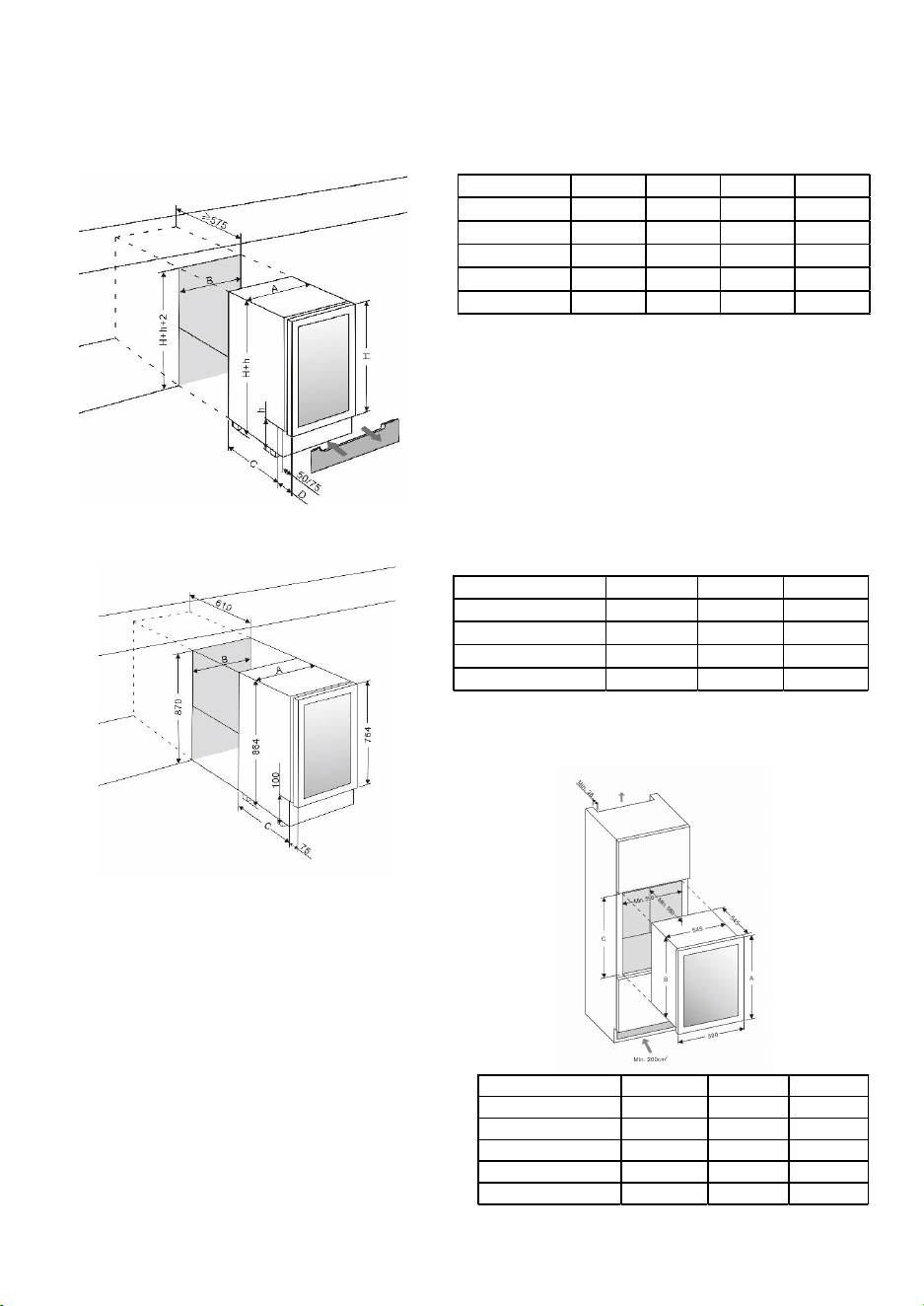
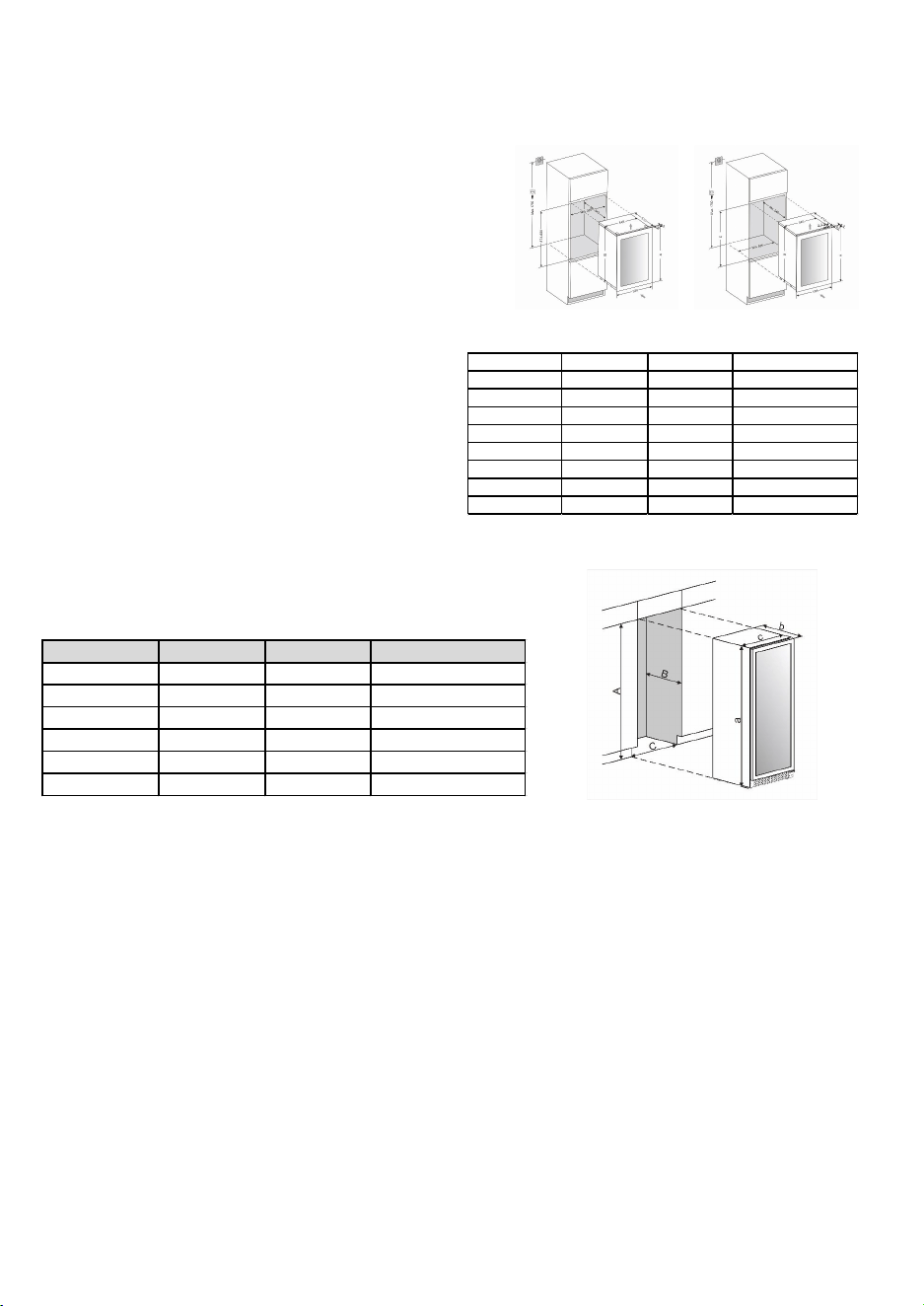
BUILT-UNDER INSTRUCTIONS
Make sure your installation does not block the front ventilation grille. The unit is designed to fit under
worktops between 820 and 890mm in height, using the height-adjustable ventilation grille to ensure that
the feet are concealed from front view. Remove the adjustable ventilation grille screws and slide it to the
required height. Tighten the screws to lock the grille in position.
If the unit is fully integrated to be installed for fitting kitchen plinth, make sure that the ventilation gaps in
the plinth are at least 300 square centimeters and remove the ventilation grilles, so that warm air can
INSTALLATION
disperse unhindered. Otherwise the appliance has to work harder, resulting in an increase in electricity
consumption.
NOTE: When pushing the appliance into the niche, make sure that the mains cable does not get trapped.
NOTE:
H – Can be approximately 27.56, 28.35, 30.71, or 31.5 inches depending on the actual
product specification.
h – Can be approximately 3.15, 3.94, 4.72, or 5.91 inches based on the actual product
specification. The standard maximum adjustable height for the plinth is about 2.76
inches. If you require taller adjustable height legs, they are available for purchase from
your dealer or the Spare Parts Department.
For flush inset built-in installation, an additional 0.12 inches of door clearance is required
for dimension B.
6
BEFORE USING YOUR APPLIANCE
• Remove all exterior and interior packing. Clean the interior surface with lukewarm water using a soft
cloth. The unit may have residual odors at first, they will disappear as the unit cools.
• Before connecting the appliance to the power source, let it stand upright for at least 24 hours. This
will reduce the possibility of a malfunction in the cooling system caused by handling during
transportation to ensure that oil flows back into the compressor. During this time we recommend
that you leave the door open to clear any residual odors.
INSTALLATION OF YOUR APPLIANCE
• The appliances are designed to be built-in or recessed or freestanding installation depending on your
model. For the freestanding installation only models, it is not intended to be used as a built-in
appliance.
WARNING: Do not store or install the appliance outdoors. The unit is for indoor use only.
WARNING: Do not install the appliance in the laundry. Avoid locating the unit in damp areas.
• Place your appliance on a floor/surface that is strong enough to support it when it is fully loaded. To
level your unit, adjust the front leveling leg at the bottom of the unit.
• For freestanding installation, 100mm of space between the back and sides of the unit are suggested,
which allows the proper air circulation to cool the compressor and condenser. It is energy saving.
Even with built-in installation, for a must to keep 5mm space on each side and at the top to ensure
proper air vent across and ventilation. Take care that the service at the front of the appliance must
never be covered or blocked in any way.
• Locate the unit away from direct sunlight and sources of heat (stove, heater, radiator, etc.). Direct
sunlight may affect the acrylic coating and heat sources may increase electric consumption.
Extreme cold ambient temperatures may also cause the unit not to perform properly.
• Plug the unit into an exclusive, easily accessible plug socket. Any questions concerning power
and/or grounding should be directed towards a qualified electrician or an authorized products
service centre.
• The appliance must be installed to all electrical, plumbing, water and drain connections in
accordance with state and local codes.
IMPORTANT: HIGH HUMIDITY CLIMATE. During periods of high humidity, some condensation may appear
on outside surface of glass door. This condensation will disappear when humidity levels drop. For
prevention, it is advisable to install the appliance with sufficient ventilation in a dry and/or an air-condi-
tioned place or switch on the ANTI-CONDENSATION MODE if available.
NOTE: The appliance must be positioned so that the plug is accessible.
BUILT-UNDER INSTRUCTIONS
Make sure your installation does not block the front ventilation grille. The unit is designed to fit under
worktops between 820 and 890mm in height, using the height-adjustable ventilation grille to ensure that
the feet are concealed from front view. Remove the adjustable ventilation grille screws and slide it to the
required height. Tighten the screws to lock the grille in position.
If the unit is fully integrated to be installed for fitting kitchen plinth, make sure that the ventilation gaps in
the plinth are at least 300 square centimeters and remove the ventilation grilles, so that warm air can
disperse unhindered. Otherwise the appliance has to work harder, resulting in an increase in electricity
consumption.
NOTE: When pushing the appliance into the niche, make sure that the mains cable does not get trapped.
NOTE:
H – Can be approximately 27.56, 28.35, 30.71, or 31.5 inches depending on the actual
product specification.
h – Can be approximately 3.15, 3.94, 4.72, or 5.91 inches based on the actual product
specification. The standard maximum adjustable height for the plinth is about 2.76
inches. If you require taller adjustable height legs, they are available for purchase from
your dealer or the Spare Parts Department.
For flush inset built-in installation, an additional 0.12 inches of door clearance is required
for dimension B.
Width A (in) B (in) C (in) D (in)
5.91 in Wide 5.83 5.91 17.91 2.95
11.81 in Wide 11.61 11.81 17.32 4.53
15.75 in Wide 15.55 15.75 18.11 4.53
19.69 in Wide 19.49 19.69 18.11 4.53
23.62 in Wide 23.43 23.62 17.32 4.53
Width A (inches) B (inches) C (inches )
14.76" Wide 14.76" 14.96" 19.49"
17.52" Wide 17.52" 17.72" 20.47"
23.62" Wide 23.43" 24.02" 20.47"
29.53" Wide 29.53" 29.92" 20.47"
FULLY INTEGRATED BUILT-IN-COLUMN
INSTRUCTIONS
RISK OF DAMAGE!
The wine cabinet has an elongated glass door and
must not be set down vertically at any time!
DESIGN 1 –
The unit door seals the installed unit almost
completely, so an air vent must be provided in the
base of the housing. Warmed air must be
conducted via the ventilation shaft to the rear wall
of the housing and then expelled upwards. The
ventilation channels should measure at least 200
square centimeters in cross-section.
Aperture Height A (inches) B (inches ) C (inches)
17.72" 17.91" 17.56" 17.68"
23.62" 23.43" 23.07" 23.23"
34.65" 34.84" 34.49" 34.65"
48.03" 48.58" 48.07" 48.19"
70.08" 70.28" 69.72" 69.88"
7
3. Rotate the glass door 180° and refit the glass door to the opposite side. Then screw and tighten it
after the door is leveled.
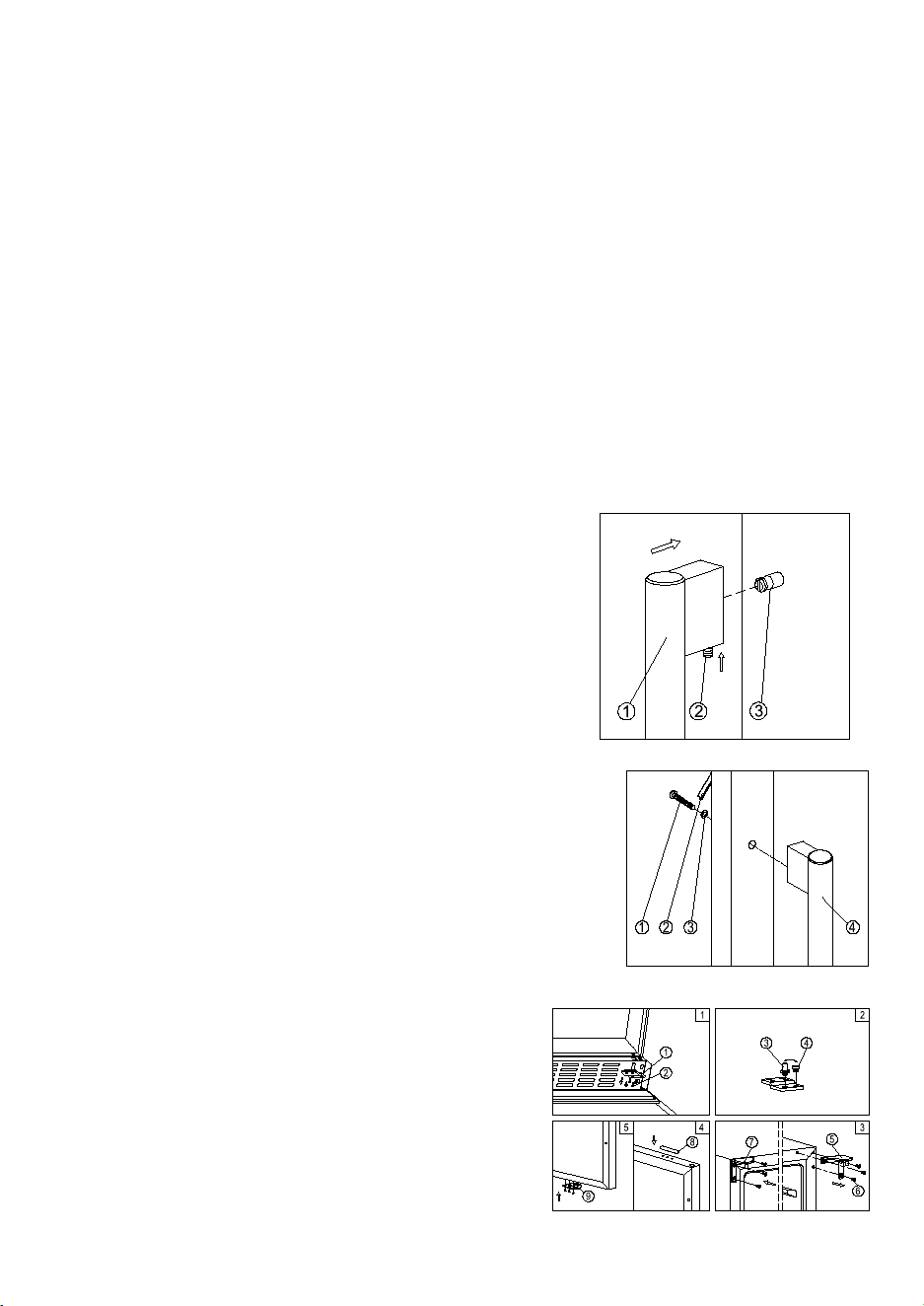
DESIGN 6 – For freestanding models
1. Remove the bottom hinge (3) by unscrewing the
four lock screws (4). Be careful to hold the glass
door firmly after removing the screws. (Fig. 1)
2. Gently pull down to remove the glass door from
the right top hinge and place it on a padded
surface to avoid the risk of damage. Then
remove the right top hinge (8). (Fig. 3)
3. Unscrew and transfer hinge pin (5) and
adjustable leg (6) of the bottom hinge to the
opposite side. (Fig. 2)
4. Pop out the cover caps on the left side of cabinet and use them to cover the screw holes on the
right hand side.
5. Screw the alternative left top hinge (9), included in the fittings, on the left hand side of cabinet. (Fig.
4)
6. Unscrew the four lock screws (2) and transfer the door supporter (1) to the opposite side. (Fig. 1)
7. Rotate the door 180° and relocate the door to the designated position. Then screw the bottom
hinge assembly on the left designated position and tighten it after the door is leveled.
ANTI-TIP BRACKET INSTALLATION
To reduce the risk of tipping the unit by abnormal
usage or improper loading, the appliance must be
secured by properly installing the anti-tip device (if
your model supplied with it) packed with the
appliance.
Place the anti-tip bracket on the floor as shown in the
figure. An anti-tip bracket can be installed at the left
side.
Mark the locations of the 4 holes of the anti-tip bracket on the floor.
Use an 8mm / 5/16” masonry drill bit and insert plastic anchors.
Secure bracket to floor using screws.
Slide appliance into position and make sure the leg engages the anti-tip bracket.
NOTE: If the unit is relocated, the bracket must be
removed and installed in the new location.
SECURING THE APPLIANCE
Pop out the two cover caps on the opposite side of
hinge and secure the appliance in the niche by
tightening the screws through the attachment
bracket if the unit is provided with an attachment
bracket.
Note: In locations where there is frequent lightning, it is advisable to use surge protectors.
Do not connect the appliance to the mains electricity supply by an extension lead. Extension leads do
not guarantee the required safety of the appliance (e.g. danger of overheating).
The appliance must not be connected to an inverter and must not be used with a plug adapter as these
can cause damage to the appliance’s electronic unit.
The cord must rest securely behind the appliance and not be allowed to lie or hang unprotected.
WARNING:
THIS APPLIANCE MUST BE GOUNDED.
INSTALLING THE HANDLE
IMPORTANT: Do not overtighten the screws & do not use power tools to install the handle.
DESIGN 1 – Locate the handle (1) over the mounting stubs (3)
of the door and tighten the grub screws (2) with an Allen key
to secure the handle.
DESIGN 2 –
Remove the door gasket (2) on the side you wish to install the
handle - you can see two designated holes for handle
installation.
Install the handle (4) tightly as shown above with two screws
(1) and flat washers (3) provided.
Replace the door gasket.
REVERSING THE DOOR HINGE
It is possible to reverse the door on this appliance, if required.
To do so, follow the steps below:
Note: All parts removed must be saved to do the reinstallation
of door.
WARNING: To ensure the proper functioning of the appliance, air vents should never be blocked or covered.
DESIGN 2 –
Air at the back of the unit gets warm. The unit is
equipped with an integrated ventilation system to
disperse the warm air automatically. Air intake is
provided underneath the appliance door and the air
escapes at the top of the door. The air inlet and outlet
must not be covered or blocked in any way. They must
also be regularly cleaned of dust.
After installation make sure that the appliance door
opens and closes properly.
WARNING: If the ventilation gaps given are not
observed, the compressor will run more frequently
and for longer periods. This will result in increased
energy consumption and a higher operating tempera-
ture for the compressor. This may, in turn, cause
damage to the compressor. It is essential to observe
the ventilation gaps given.
BUILT-IN CABINETRY INSTRUCTIONS
Make sure your installation does not block the front
ventilation grille. And be sure the door will open and
close properly in the chosen location.
NOTE:
To ensure proper service access and ventilation, A must be at least 5mm more than a, B must be at least
5mm more than b and C must be at least 5mm more than c.
For flush inset built-in installation, an extra 3mm door clearance is required for dimension C.
ELECTRICAL CONNECTION
WARNING: Improper use of the grounded plug can result in the risk of electrical shock. If the power cord is
damaged, have it replaced by a qualified electrician or an authorized service center.
All electrical work should be carried out by a suitably qualified and competent person in accordance with
local and national safety regulations.
Check that the voltage marked on the product corresponds with your supply voltage.
Connect this appliance to a separate at least 13A circuit.
Connection should be made via a suitable switched socket which is easily accessible. For extra safety it is
advisable to install a residual current device (RCD) with a trip current of 30mA.
Have the receptacle and the circuit checked by a qualified electrician to ensure that the socket is grounded
correctly.
Aperture A (inches) B (inches ) C (inches )
17.72" 17.91" 17.60" 17.72"
23.62" 23.39" 23.15" 23.23" - 23.31"
34.65" 34.84" 33.86" 33.94" - 34.06"
48.03" 40.71" 40.16" 40.24" - 40.35"
41.34" 41.54" 41.26" 41.34"
48.03" 48.58" 48.07" 48.15" - 48.31"
55.12" 55.59" 55.04" 55.12" - 55.24"
70.08" 70.28" 69.72" 69.80" - 70.00"
A (inches) B (inches ) C (inches)
100 58.11 22.64 23.43
125 69.61 22.64 23.43
170 69.61 26.77 23.43
125S 71.65 22.64 23.43
170S 71.65 26.77 23.43
220 71.65 26.77 26.77
DESIGN 1 – For built-under models
1. Remove the bottom hinge (1) by unscrewing the four lock screws (2). Be careful to hold the glass
door firmly after removing the screws. (Fig. 1)
2. Gently pull down to remove the glass door from the right top hinge and place it on a padded
surface to avoid the risk of damage. Then remove the right top hinge (5). (Fig. 3)
3. Unscrew and transfer hinge pin (3) and/or door stopper (4) of the bottom hinge to the opposite
side. (Fig. 2)
4. Pop out the cover caps on the left side of cabinet and use them to cover the screw holes on the
right-hand side.
5. Screw the alternative left top hinge (7), included in the fittings, on the left-hand side of cabinet. (Fig.
3)
6. Unscrew and transfer the holes cover (8) and lock catch (9) to the opposite side of glass door.
(Only for models with lock on the ventilation grille) (Fig. 4)
7. Rotate the door 180° (No need for models with lock on the door) and relocate the door to the
designated position. Then screw the bottom hinge assembly on the left designated position and
tighten it after the door is leveled.
8. Transfer the handle & plugs to the opposite positions if need.
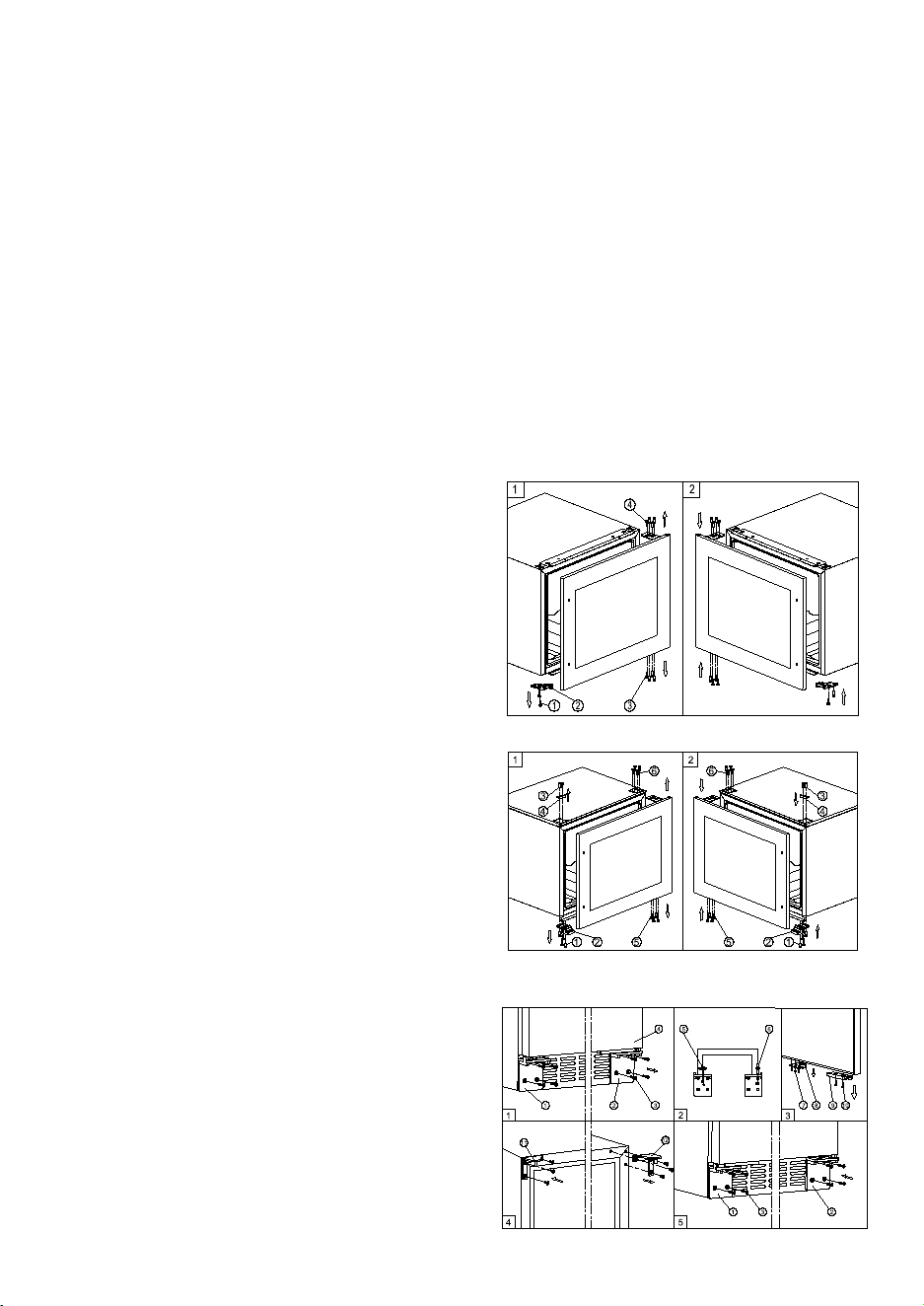
DESIGN 2 – For fully integrated models
1. Remove the glass door by unscrewing the eight
lock screws (3) and (4). Be careful to hold the
glass door firmly after removing the screws and
place it on a padded surface to avoid the risk of
damage.
2. Unscrew and transfer the door supporter (2) to
the opposite side.
3. Rotate the glass door 180° and refit the glass
door to the opposite side. Then screw and
tighten it after the door is leveled.
4. Remove the glass door by unscrewing the eight
lock screws (5) and (6). Be careful to hold the
glass door firmly after removing the screws and
place it on a padded surface to avoid the risk of
damage.
5. Unscrew the screws (1) and (3) then transfer the
door supporter (2) and decoration cover (4) to
the opposite side.
6. Rotate the glass door 180° and refit the glass
door to the opposite side. Then screw and
tighten it after the door is leveled.
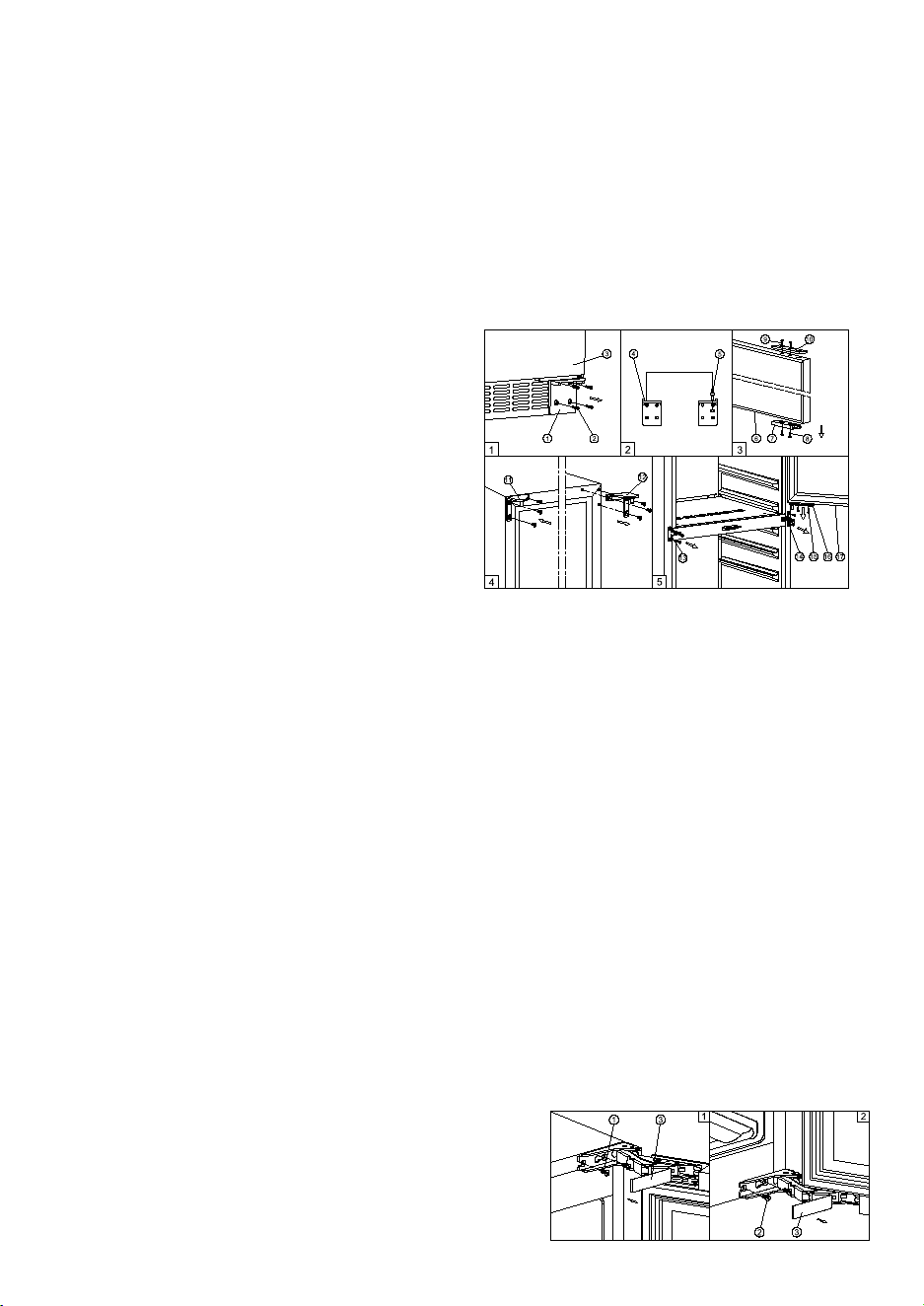
DESIGN 3 – For high models
1. Remove the right bottom hinge (2) and/or left
bottom hinge (1) by unscrewing the eight
lock screws (3). Be careful to hold the door
(4) firmly after removing the screws. (Fig. 1)
2. Gently pull down to remove the door from the
right top hinge and place it on a padded
surface to avoid the risk of damage. Then
remove the right top hinge (12). (Fig. 4)
3. Pop out the cover caps on the left side of
cabinet and use them to cover the screw
holes on the right hand side.
4. Screw the alternative left top hinge (11), included in the fittings, on the left hand side of cabinet.
(Fig. 4)
5. Unscrew and transfer hinge pin (6) and/or door supporter (5) to the opposite bottom hinge. (Fig. 2)
6. Unscrew and transfer the door adapter (9) and/or lock catch (8) to the top designated positions of
the door. (Fig. 3)
7. Rotate the door 180° and relocate it to the designated position. Then screw the bottom hinges on
the designated positions and tighten them. (Fig. 5)
8. Recheck and adjust the door alignment by loosening the screws (10) and moving the door adapter
(9). Tighten the screws (10) after the door is levelled. (Fig. 5)
DESIGN 4 – For vertical double door models
1. Remove the right bottom hinge (1) by
unscrewing the four screws (2). Be careful to
hold the lower glass door (3) firmly after
removing the screws. And then gently pull
down to remove the lower glass door from
the middle hinge and place it on a padded
surface to avoid the risk of damage. (Fig. 1)
2. Unscrew and transfer the door adapter (7)
and (10) to the designated opposite position
of lower glass door. At the same time
unscrew and transfer hinge pin (5) of the left
bottom hinge (4) included in the fittings. (Fig.
2 & 3)
3. Remove the door adapter (16) by unscrewing the two lock screws (15). Be careful to hold the upper
glass door firmly after removing the screws. And then gently pull down to remove the upper glass
door (17) from the top hinge and place it on a padded surface to avoid the risk of damage. Then
remove the right top hinge (12). (Fig. 5 & 4)
4. Unscrew and transfer the middle hinge (14) and the middle fixing plate (13) to the opposite
position. (Fig. 5)
5. Pop out the cover caps on the left side of cabinet and use them to cover the screw holes on the
right hand side.
6. Screw the alternative left top hinge (11), included in the fittings, on the left-hand side of the cabinet.
(Fig. 4)
7. Relocate the door adapter (16) on the middle hinge.
8. Set the upper glass door to the designated position and install the two lock screws to connect the
door adapter (16) with the upper glass door and tighten them before the door is leveled.
9. Set the lower glass door to the designated position. Then screw the left bottom hinge on the left
designated position and tighten them.
10. Recheck and adjust the lower door alignment by loosening the screws (8) & (9) and moving the
door adapter (7) & (10). Tighten the screws (8) & (9) after the door is leveled.
11. Transfer the handles and plugs to the opposite positions.
DESIGN 5 – For models with articulated hinge
WARNING: Use extreme caution with the articulated hinges. The hinge is self-closing and many pinch
points exist prior to built-in installation.
1. Remove the cover caps (3) and then remove the glass
door by unscrewing the four screws (1) and (2). Be
careful to hold the glass door firmly after removing the
screws and place it on a padded surface to avoid the risk
of damage.
2. Pop out the cover caps on the left side of the cabinet
and use them to cover the screw holes on the right-hand
side.
8
3. Rotate the glass door 180° and refit the glass door to the opposite side. Then screw and tighten it
after the door is leveled.
DESIGN 6 – For freestanding models
1. Remove the bottom hinge (3) by unscrewing the
four lock screws (4). Be careful to hold the glass
door firmly after removing the screws. (Fig. 1)
2. Gently pull down to remove the glass door from
the right top hinge and place it on a padded
surface to avoid the risk of damage. Then
remove the right top hinge (8). (Fig. 3)
3. Unscrew and transfer hinge pin (5) and
adjustable leg (6) of the bottom hinge to the
opposite side. (Fig. 2)
4. Pop out the cover caps on the left side of cabinet and use them to cover the screw holes on the
right hand side.
5. Screw the alternative left top hinge (9), included in the fittings, on the left hand side of cabinet. (Fig.
4)
6. Unscrew the four lock screws (2) and transfer the door supporter (1) to the opposite side. (Fig. 1)
7. Rotate the door 180° and relocate the door to the designated position. Then screw the bottom
hinge assembly on the left designated position and tighten it after the door is leveled.
ANTI-TIP BRACKET INSTALLATION
To reduce the risk of tipping the unit by abnormal
usage or improper loading, the appliance must be
secured by properly installing the anti-tip device (if
your model supplied with it) packed with the
appliance.
Place the anti-tip bracket on the floor as shown in the
figure. An anti-tip bracket can be installed at the left
side.
Mark the locations of the 4 holes of the anti-tip bracket on the floor.
Use an 8mm / 5/16” masonry drill bit and insert plastic anchors.
Secure bracket to floor using screws.
Slide appliance into position and make sure the leg engages the anti-tip bracket.
NOTE: If the unit is relocated, the bracket must be
removed and installed in the new location.
SECURING THE APPLIANCE
Pop out the two cover caps on the opposite side of
hinge and secure the appliance in the niche by
tightening the screws through the attachment
bracket if the unit is provided with an attachment
bracket.
Note: In locations where there is frequent lightning, it is advisable to use surge protectors.
Do not connect the appliance to the mains electricity supply by an extension lead. Extension leads do
not guarantee the required safety of the appliance (e.g. danger of overheating).
The appliance must not be connected to an inverter and must not be used with a plug adapter as these
can cause damage to the appliance’s electronic unit.
The cord must rest securely behind the appliance and not be allowed to lie or hang unprotected.
WARNING:
THIS APPLIANCE MUST BE GOUNDED.
INSTALLING THE HANDLE
IMPORTANT: Do not overtighten the screws & do not use power tools to install the handle.
DESIGN 1 – Locate the handle (1) over the mounting stubs (3)
of the door and tighten the grub screws (2) with an Allen key
to secure the handle.
DESIGN 2 –
Remove the door gasket (2) on the side you wish to install the
handle - you can see two designated holes for handle
installation.
Install the handle (4) tightly as shown above with two screws
(1) and flat washers (3) provided.
Replace the door gasket.
REVERSING THE DOOR HINGE
It is possible to reverse the door on this appliance, if required.
To do so, follow the steps below:
Note: All parts removed must be saved to do the reinstallation
of door.
WARNING: To ensure the proper functioning of the appliance, air vents should never be blocked or covered.
DESIGN 2 –
Air at the back of the unit gets warm. The unit is
equipped with an integrated ventilation system to
disperse the warm air automatically. Air intake is
provided underneath the appliance door and the air
escapes at the top of the door. The air inlet and outlet
must not be covered or blocked in any way. They must
also be regularly cleaned of dust.
After installation make sure that the appliance door
opens and closes properly.
WARNING: If the ventilation gaps given are not
observed, the compressor will run more frequently
and for longer periods. This will result in increased
energy consumption and a higher operating tempera-
ture for the compressor. This may, in turn, cause
damage to the compressor. It is essential to observe
the ventilation gaps given.
BUILT-IN CABINETRY INSTRUCTIONS
Make sure your installation does not block the front
ventilation grille. And be sure the door will open and
close properly in the chosen location.
NOTE:
To ensure proper service access and ventilation, A must be at least 5mm more than a, B must be at least
5mm more than b and C must be at least 5mm more than c.
For flush inset built-in installation, an extra 3mm door clearance is required for dimension C.
ELECTRICAL CONNECTION
WARNING: Improper use of the grounded plug can result in the risk of electrical shock. If the power cord is
damaged, have it replaced by a qualified electrician or an authorized service center.
All electrical work should be carried out by a suitably qualified and competent person in accordance with
local and national safety regulations.
Check that the voltage marked on the product corresponds with your supply voltage.
Connect this appliance to a separate at least 13A circuit.
Connection should be made via a suitable switched socket which is easily accessible. For extra safety it is
advisable to install a residual current device (RCD) with a trip current of 30mA.
Have the receptacle and the circuit checked by a qualified electrician to ensure that the socket is grounded
correctly.
DESIGN 1 – For built-under models
1. Remove the bottom hinge (1) by unscrewing the four lock screws (2). Be careful to hold the glass
door firmly after removing the screws. (Fig. 1)
2. Gently pull down to remove the glass door from the right top hinge and place it on a padded
surface to avoid the risk of damage. Then remove the right top hinge (5). (Fig. 3)
3. Unscrew and transfer hinge pin (3) and/or door stopper (4) of the bottom hinge to the opposite
side. (Fig. 2)
4. Pop out the cover caps on the left side of cabinet and use them to cover the screw holes on the
right-hand side.
5. Screw the alternative left top hinge (7), included in the fittings, on the left-hand side of cabinet. (Fig.
3)
6. Unscrew and transfer the holes cover (8) and lock catch (9) to the opposite side of glass door.
(Only for models with lock on the ventilation grille) (Fig. 4)
7. Rotate the door 180° (No need for models with lock on the door) and relocate the door to the
designated position. Then screw the bottom hinge assembly on the left designated position and
tighten it after the door is leveled.
8. Transfer the handle & plugs to the opposite positions if need.
DESIGN 2 – For fully integrated models
1. Remove the glass door by unscrewing the eight
lock screws (3) and (4). Be careful to hold the
glass door firmly after removing the screws and
place it on a padded surface to avoid the risk of
damage.
2. Unscrew and transfer the door supporter (2) to
the opposite side.
3. Rotate the glass door 180° and refit the glass
door to the opposite side. Then screw and
tighten it after the door is leveled.
4. Remove the glass door by unscrewing the eight
lock screws (5) and (6). Be careful to hold the
glass door firmly after removing the screws and
place it on a padded surface to avoid the risk of
damage.
5. Unscrew the screws (1) and (3) then transfer the
door supporter (2) and decoration cover (4) to
the opposite side.
6. Rotate the glass door 180° and refit the glass
door to the opposite side. Then screw and
tighten it after the door is leveled.
DESIGN 3 – For high models
1. Remove the right bottom hinge (2) and/or left
bottom hinge (1) by unscrewing the eight
lock screws (3). Be careful to hold the door
(4) firmly after removing the screws. (Fig. 1)
2. Gently pull down to remove the door from the
right top hinge and place it on a padded
surface to avoid the risk of damage. Then
remove the right top hinge (12). (Fig. 4)
3. Pop out the cover caps on the left side of
cabinet and use them to cover the screw
holes on the right hand side.
4. Screw the alternative left top hinge (11), included in the fittings, on the left hand side of cabinet.
(Fig. 4)
5. Unscrew and transfer hinge pin (6) and/or door supporter (5) to the opposite bottom hinge. (Fig. 2)
6. Unscrew and transfer the door adapter (9) and/or lock catch (8) to the top designated positions of
the door. (Fig. 3)
7. Rotate the door 180° and relocate it to the designated position. Then screw the bottom hinges on
the designated positions and tighten them. (Fig. 5)
8. Recheck and adjust the door alignment by loosening the screws (10) and moving the door adapter
(9). Tighten the screws (10) after the door is levelled. (Fig. 5)
DESIGN 4 – For vertical double door models
1. Remove the right bottom hinge (1) by
unscrewing the four screws (2). Be careful to
hold the lower glass door (3) firmly after
removing the screws. And then gently pull
down to remove the lower glass door from
the middle hinge and place it on a padded
surface to avoid the risk of damage. (Fig. 1)
2. Unscrew and transfer the door adapter (7)
and (10) to the designated opposite position
of lower glass door. At the same time
unscrew and transfer hinge pin (5) of the left
bottom hinge (4) included in the fittings. (Fig.
2 & 3)
3. Remove the door adapter (16) by unscrewing the two lock screws (15). Be careful to hold the upper
glass door firmly after removing the screws. And then gently pull down to remove the upper glass
door (17) from the top hinge and place it on a padded surface to avoid the risk of damage. Then
remove the right top hinge (12). (Fig. 5 & 4)
4. Unscrew and transfer the middle hinge (14) and the middle fixing plate (13) to the opposite
position. (Fig. 5)
5. Pop out the cover caps on the left side of cabinet and use them to cover the screw holes on the
right hand side.
6. Screw the alternative left top hinge (11), included in the fittings, on the left-hand side of the cabinet.
(Fig. 4)
7. Relocate the door adapter (16) on the middle hinge.
8. Set the upper glass door to the designated position and install the two lock screws to connect the
door adapter (16) with the upper glass door and tighten them before the door is leveled.
9. Set the lower glass door to the designated position. Then screw the left bottom hinge on the left
designated position and tighten them.
10. Recheck and adjust the lower door alignment by loosening the screws (8) & (9) and moving the
door adapter (7) & (10). Tighten the screws (8) & (9) after the door is leveled.
11. Transfer the handles and plugs to the opposite positions.
DESIGN 5 – For models with articulated hinge
WARNING: Use extreme caution with the articulated hinges. The hinge is self-closing and many pinch
points exist prior to built-in installation.
1. Remove the cover caps (3) and then remove the glass
door by unscrewing the four screws (1) and (2). Be
careful to hold the glass door firmly after removing the
screws and place it on a padded surface to avoid the risk
of damage.
2. Pop out the cover caps on the left side of the cabinet
and use them to cover the screw holes on the right-hand
side.
9
3. Rotate the glass door 180° and refit the glass door to the opposite side. Then screw and tighten it
after the door is leveled.
DESIGN 6 – For freestanding models
1. Remove the bottom hinge (3) by unscrewing the
four lock screws (4). Be careful to hold the glass
door firmly after removing the screws. (Fig. 1)
2. Gently pull down to remove the glass door from
the right top hinge and place it on a padded
surface to avoid the risk of damage. Then
remove the right top hinge (8). (Fig. 3)
3. Unscrew and transfer hinge pin (5) and
adjustable leg (6) of the bottom hinge to the
opposite side. (Fig. 2)
4. Pop out the cover caps on the left side of cabinet and use them to cover the screw holes on the
right hand side.
5. Screw the alternative left top hinge (9), included in the fittings, on the left hand side of cabinet. (Fig.
4)
6. Unscrew the four lock screws (2) and transfer the door supporter (1) to the opposite side. (Fig. 1)
7. Rotate the door 180° and relocate the door to the designated position. Then screw the bottom
hinge assembly on the left designated position and tighten it after the door is leveled.
ANTI-TIP BRACKET INSTALLATION
To reduce the risk of tipping the unit by abnormal
usage or improper loading, the appliance must be
secured by properly installing the anti-tip device (if
your model supplied with it) packed with the
appliance.
Place the anti-tip bracket on the floor as shown in the
figure. An anti-tip bracket can be installed at the left
side.
Mark the locations of the 4 holes of the anti-tip bracket on the floor.
Use an 8mm / 5/16” masonry drill bit and insert plastic anchors.
Secure bracket to floor using screws.
Slide appliance into position and make sure the leg engages the anti-tip bracket.
NOTE: If the unit is relocated, the bracket must be
removed and installed in the new location.
SECURING THE APPLIANCE
Pop out the two cover caps on the opposite side of
hinge and secure the appliance in the niche by
tightening the screws through the attachment
bracket if the unit is provided with an attachment
bracket.
Note: In locations where there is frequent lightning, it is advisable to use surge protectors.
Do not connect the appliance to the mains electricity supply by an extension lead. Extension leads do
not guarantee the required safety of the appliance (e.g. danger of overheating).
The appliance must not be connected to an inverter and must not be used with a plug adapter as these
can cause damage to the appliance’s electronic unit.
The cord must rest securely behind the appliance and not be allowed to lie or hang unprotected.
WARNING:
THIS APPLIANCE MUST BE GOUNDED.
INSTALLING THE HANDLE
IMPORTANT: Do not overtighten the screws & do not use power tools to install the handle.
DESIGN 1 – Locate the handle (1) over the mounting stubs (3)
of the door and tighten the grub screws (2) with an Allen key
to secure the handle.
DESIGN 2 –
Remove the door gasket (2) on the side you wish to install the
handle - you can see two designated holes for handle
installation.
Install the handle (4) tightly as shown above with two screws
(1) and flat washers (3) provided.
Replace the door gasket.
REVERSING THE DOOR HINGE
It is possible to reverse the door on this appliance, if required.
To do so, follow the steps below:
Note: All parts removed must be saved to do the reinstallation
of door.
WARNING: To ensure the proper functioning of the appliance, air vents should never be blocked or covered.
DESIGN 2 –
Air at the back of the unit gets warm. The unit is
equipped with an integrated ventilation system to
disperse the warm air automatically. Air intake is
provided underneath the appliance door and the air
escapes at the top of the door. The air inlet and outlet
must not be covered or blocked in any way. They must
also be regularly cleaned of dust.
After installation make sure that the appliance door
opens and closes properly.
WARNING: If the ventilation gaps given are not
observed, the compressor will run more frequently
and for longer periods. This will result in increased
energy consumption and a higher operating tempera-
ture for the compressor. This may, in turn, cause
damage to the compressor. It is essential to observe
the ventilation gaps given.
BUILT-IN CABINETRY INSTRUCTIONS
Make sure your installation does not block the front
ventilation grille. And be sure the door will open and
close properly in the chosen location.
NOTE:
To ensure proper service access and ventilation, A must be at least 5mm more than a, B must be at least
5mm more than b and C must be at least 5mm more than c.
For flush inset built-in installation, an extra 3mm door clearance is required for dimension C.
ELECTRICAL CONNECTION
WARNING: Improper use of the grounded plug can result in the risk of electrical shock. If the power cord is
damaged, have it replaced by a qualified electrician or an authorized service center.
All electrical work should be carried out by a suitably qualified and competent person in accordance with
local and national safety regulations.
Check that the voltage marked on the product corresponds with your supply voltage.
Connect this appliance to a separate at least 13A circuit.
Connection should be made via a suitable switched socket which is easily accessible. For extra safety it is
advisable to install a residual current device (RCD) with a trip current of 30mA.
Have the receptacle and the circuit checked by a qualified electrician to ensure that the socket is grounded
correctly.
DESIGN 1 – For built-under models
1. Remove the bottom hinge (1) by unscrewing the four lock screws (2). Be careful to hold the glass
door firmly after removing the screws. (Fig. 1)
2. Gently pull down to remove the glass door from the right top hinge and place it on a padded
surface to avoid the risk of damage. Then remove the right top hinge (5). (Fig. 3)
3. Unscrew and transfer hinge pin (3) and/or door stopper (4) of the bottom hinge to the opposite
side. (Fig. 2)
4. Pop out the cover caps on the left side of cabinet and use them to cover the screw holes on the
right-hand side.
5. Screw the alternative left top hinge (7), included in the fittings, on the left-hand side of cabinet. (Fig.
3)
6. Unscrew and transfer the holes cover (8) and lock catch (9) to the opposite side of glass door.
(Only for models with lock on the ventilation grille) (Fig. 4)
7. Rotate the door 180° (No need for models with lock on the door) and relocate the door to the
designated position. Then screw the bottom hinge assembly on the left designated position and
tighten it after the door is leveled.
8. Transfer the handle & plugs to the opposite positions if need.
DESIGN 2 – For fully integrated models
1. Remove the glass door by unscrewing the eight
lock screws (3) and (4). Be careful to hold the
glass door firmly after removing the screws and
place it on a padded surface to avoid the risk of
damage.
2. Unscrew and transfer the door supporter (2) to
the opposite side.
3. Rotate the glass door 180° and refit the glass
door to the opposite side. Then screw and
tighten it after the door is leveled.
4. Remove the glass door by unscrewing the eight
lock screws (5) and (6). Be careful to hold the
glass door firmly after removing the screws and
place it on a padded surface to avoid the risk of
damage.
5. Unscrew the screws (1) and (3) then transfer the
door supporter (2) and decoration cover (4) to
the opposite side.
6. Rotate the glass door 180° and refit the glass
door to the opposite side. Then screw and
tighten it after the door is leveled.
DESIGN 3 – For high models
1. Remove the right bottom hinge (2) and/or left
bottom hinge (1) by unscrewing the eight
lock screws (3). Be careful to hold the door
(4) firmly after removing the screws. (Fig. 1)
2. Gently pull down to remove the door from the
right top hinge and place it on a padded
surface to avoid the risk of damage. Then
remove the right top hinge (12). (Fig. 4)
3. Pop out the cover caps on the left side of
cabinet and use them to cover the screw
holes on the right hand side.
4. Screw the alternative left top hinge (11), included in the fittings, on the left hand side of cabinet.
(Fig. 4)
5. Unscrew and transfer hinge pin (6) and/or door supporter (5) to the opposite bottom hinge. (Fig. 2)
6. Unscrew and transfer the door adapter (9) and/or lock catch (8) to the top designated positions of
the door. (Fig. 3)
7. Rotate the door 180° and relocate it to the designated position. Then screw the bottom hinges on
the designated positions and tighten them. (Fig. 5)
8. Recheck and adjust the door alignment by loosening the screws (10) and moving the door adapter
(9). Tighten the screws (10) after the door is levelled. (Fig. 5)
DESIGN 4 – For vertical double door models
1. Remove the right bottom hinge (1) by
unscrewing the four screws (2). Be careful to
hold the lower glass door (3) firmly after
removing the screws. And then gently pull
down to remove the lower glass door from
the middle hinge and place it on a padded
surface to avoid the risk of damage. (Fig. 1)
2. Unscrew and transfer the door adapter (7)
and (10) to the designated opposite position
of lower glass door. At the same time
unscrew and transfer hinge pin (5) of the left
bottom hinge (4) included in the fittings. (Fig.
2 & 3)
3. Remove the door adapter (16) by unscrewing the two lock screws (15). Be careful to hold the upper
glass door firmly after removing the screws. And then gently pull down to remove the upper glass
door (17) from the top hinge and place it on a padded surface to avoid the risk of damage. Then
remove the right top hinge (12). (Fig. 5 & 4)
4. Unscrew and transfer the middle hinge (14) and the middle fixing plate (13) to the opposite
position. (Fig. 5)
5. Pop out the cover caps on the left side of cabinet and use them to cover the screw holes on the
right hand side.
6. Screw the alternative left top hinge (11), included in the fittings, on the left-hand side of the cabinet.
(Fig. 4)
7. Relocate the door adapter (16) on the middle hinge.
8. Set the upper glass door to the designated position and install the two lock screws to connect the
door adapter (16) with the upper glass door and tighten them before the door is leveled.
9. Set the lower glass door to the designated position. Then screw the left bottom hinge on the left
designated position and tighten them.
10. Recheck and adjust the lower door alignment by loosening the screws (8) & (9) and moving the
door adapter (7) & (10). Tighten the screws (8) & (9) after the door is leveled.
11. Transfer the handles and plugs to the opposite positions.
DESIGN 5 – For models with articulated hinge
WARNING: Use extreme caution with the articulated hinges. The hinge is self-closing and many pinch
points exist prior to built-in installation.
1. Remove the cover caps (3) and then remove the glass
door by unscrewing the four screws (1) and (2). Be
careful to hold the glass door firmly after removing the
screws and place it on a padded surface to avoid the risk
of damage.
2. Pop out the cover caps on the left side of the cabinet
and use them to cover the screw holes on the right-hand
side.
10
3. Rotate the glass door 180° and refit the glass door to the opposite side. Then screw and tighten it
after the door is leveled.
DESIGN 6 – For freestanding models
1. Remove the bottom hinge (3) by unscrewing the
four lock screws (4). Be careful to hold the glass
door firmly after removing the screws. (Fig. 1)
2. Gently pull down to remove the glass door from
the right top hinge and place it on a padded
surface to avoid the risk of damage. Then
remove the right top hinge (8). (Fig. 3)
3. Unscrew and transfer hinge pin (5) and
adjustable leg (6) of the bottom hinge to the
opposite side. (Fig. 2)
4. Pop out the cover caps on the left side of cabinet and use them to cover the screw holes on the
right hand side.
5. Screw the alternative left top hinge (9), included in the fittings, on the left hand side of cabinet. (Fig.
4)
6. Unscrew the four lock screws (2) and transfer the door supporter (1) to the opposite side. (Fig. 1)
7. Rotate the door 180° and relocate the door to the designated position. Then screw the bottom
hinge assembly on the left designated position and tighten it after the door is leveled.
ANTI-TIP BRACKET INSTALLATION
To reduce the risk of tipping the unit by abnormal
usage or improper loading, the appliance must be
secured by properly installing the anti-tip device (if
your model supplied with it) packed with the
appliance.
Place the anti-tip bracket on the floor as shown in the
figure. An anti-tip bracket can be installed at the left
side.
Mark the locations of the 4 holes of the anti-tip bracket on the floor.
Use an 8mm / 5/16” masonry drill bit and insert plastic anchors.
Secure bracket to floor using screws.
Slide appliance into position and make sure the leg engages the anti-tip bracket.
NOTE: If the unit is relocated, the bracket must be
removed and installed in the new location.
SECURING THE APPLIANCE
Pop out the two cover caps on the opposite side of
hinge and secure the appliance in the niche by
tightening the screws through the attachment
bracket if the unit is provided with an attachment
bracket.
Note: In locations where there is frequent lightning, it is advisable to use surge protectors.
Do not connect the appliance to the mains electricity supply by an extension lead. Extension leads do
not guarantee the required safety of the appliance (e.g. danger of overheating).
The appliance must not be connected to an inverter and must not be used with a plug adapter as these
can cause damage to the appliance’s electronic unit.
The cord must rest securely behind the appliance and not be allowed to lie or hang unprotected.
WARNING:
THIS APPLIANCE MUST BE GOUNDED.
INSTALLING THE HANDLE
IMPORTANT: Do not overtighten the screws & do not use power tools to install the handle.
DESIGN 1 – Locate the handle (1) over the mounting stubs (3)
of the door and tighten the grub screws (2) with an Allen key
to secure the handle.
DESIGN 2 –
Remove the door gasket (2) on the side you wish to install the
handle - you can see two designated holes for handle
installation.
Install the handle (4) tightly as shown above with two screws
(1) and flat washers (3) provided.
Replace the door gasket.
REVERSING THE DOOR HINGE
It is possible to reverse the door on this appliance, if required.
To do so, follow the steps below:
Note: All parts removed must be saved to do the reinstallation
of door.
WARNING: To ensure the proper functioning of the appliance, air vents should never be blocked or covered.
DESIGN 2 –
Air at the back of the unit gets warm. The unit is
equipped with an integrated ventilation system to
disperse the warm air automatically. Air intake is
provided underneath the appliance door and the air
escapes at the top of the door. The air inlet and outlet
must not be covered or blocked in any way. They must
also be regularly cleaned of dust.
After installation make sure that the appliance door
opens and closes properly.
WARNING: If the ventilation gaps given are not
observed, the compressor will run more frequently
and for longer periods. This will result in increased
energy consumption and a higher operating tempera-
ture for the compressor. This may, in turn, cause
damage to the compressor. It is essential to observe
the ventilation gaps given.
BUILT-IN CABINETRY INSTRUCTIONS
Make sure your installation does not block the front
ventilation grille. And be sure the door will open and
close properly in the chosen location.
NOTE:
To ensure proper service access and ventilation, A must be at least 5mm more than a, B must be at least
5mm more than b and C must be at least 5mm more than c.
For flush inset built-in installation, an extra 3mm door clearance is required for dimension C.
ELECTRICAL CONNECTION
WARNING: Improper use of the grounded plug can result in the risk of electrical shock. If the power cord is
damaged, have it replaced by a qualified electrician or an authorized service center.
All electrical work should be carried out by a suitably qualified and competent person in accordance with
local and national safety regulations.
Check that the voltage marked on the product corresponds with your supply voltage.
Connect this appliance to a separate at least 13A circuit.
Connection should be made via a suitable switched socket which is easily accessible. For extra safety it is
advisable to install a residual current device (RCD) with a trip current of 30mA.
Have the receptacle and the circuit checked by a qualified electrician to ensure that the socket is grounded
correctly.
DESIGN 1 – For built-under models
1. Remove the bottom hinge (1) by unscrewing the four lock screws (2). Be careful to hold the glass
door firmly after removing the screws. (Fig. 1)
2. Gently pull down to remove the glass door from the right top hinge and place it on a padded
surface to avoid the risk of damage. Then remove the right top hinge (5). (Fig. 3)
3. Unscrew and transfer hinge pin (3) and/or door stopper (4) of the bottom hinge to the opposite
side. (Fig. 2)
4. Pop out the cover caps on the left side of cabinet and use them to cover the screw holes on the
right-hand side.
5. Screw the alternative left top hinge (7), included in the fittings, on the left-hand side of cabinet. (Fig.
3)
6. Unscrew and transfer the holes cover (8) and lock catch (9) to the opposite side of glass door.
(Only for models with lock on the ventilation grille) (Fig. 4)
7. Rotate the door 180° (No need for models with lock on the door) and relocate the door to the
designated position. Then screw the bottom hinge assembly on the left designated position and
tighten it after the door is leveled.
8. Transfer the handle & plugs to the opposite positions if need.
DESIGN 2 – For fully integrated models
1. Remove the glass door by unscrewing the eight
lock screws (3) and (4). Be careful to hold the
glass door firmly after removing the screws and
place it on a padded surface to avoid the risk of
damage.
2. Unscrew and transfer the door supporter (2) to
the opposite side.
3. Rotate the glass door 180° and refit the glass
door to the opposite side. Then screw and
tighten it after the door is leveled.
4. Remove the glass door by unscrewing the eight
lock screws (5) and (6). Be careful to hold the
glass door firmly after removing the screws and
place it on a padded surface to avoid the risk of
damage.
5. Unscrew the screws (1) and (3) then transfer the
door supporter (2) and decoration cover (4) to
the opposite side.
6. Rotate the glass door 180° and refit the glass
door to the opposite side. Then screw and
tighten it after the door is leveled.
DESIGN 3 – For high models
1. Remove the right bottom hinge (2) and/or left
bottom hinge (1) by unscrewing the eight
lock screws (3). Be careful to hold the door
(4) firmly after removing the screws. (Fig. 1)
2. Gently pull down to remove the door from the
right top hinge and place it on a padded
surface to avoid the risk of damage. Then
remove the right top hinge (12). (Fig. 4)
3. Pop out the cover caps on the left side of
cabinet and use them to cover the screw
holes on the right hand side.
4. Screw the alternative left top hinge (11), included in the fittings, on the left hand side of cabinet.
(Fig. 4)
5. Unscrew and transfer hinge pin (6) and/or door supporter (5) to the opposite bottom hinge. (Fig. 2)
6. Unscrew and transfer the door adapter (9) and/or lock catch (8) to the top designated positions of
the door. (Fig. 3)
7. Rotate the door 180° and relocate it to the designated position. Then screw the bottom hinges on
the designated positions and tighten them. (Fig. 5)
8. Recheck and adjust the door alignment by loosening the screws (10) and moving the door adapter
(9). Tighten the screws (10) after the door is levelled. (Fig. 5)
DESIGN 4 – For vertical double door models
1. Remove the right bottom hinge (1) by
unscrewing the four screws (2). Be careful to
hold the lower glass door (3) firmly after
removing the screws. And then gently pull
down to remove the lower glass door from
the middle hinge and place it on a padded
surface to avoid the risk of damage. (Fig. 1)
2. Unscrew and transfer the door adapter (7)
and (10) to the designated opposite position
of lower glass door. At the same time
unscrew and transfer hinge pin (5) of the left
bottom hinge (4) included in the fittings. (Fig.
2 & 3)
3. Remove the door adapter (16) by unscrewing the two lock screws (15). Be careful to hold the upper
glass door firmly after removing the screws. And then gently pull down to remove the upper glass
door (17) from the top hinge and place it on a padded surface to avoid the risk of damage. Then
remove the right top hinge (12). (Fig. 5 & 4)
4. Unscrew and transfer the middle hinge (14) and the middle fixing plate (13) to the opposite
position. (Fig. 5)
5. Pop out the cover caps on the left side of cabinet and use them to cover the screw holes on the
right hand side.
6. Screw the alternative left top hinge (11), included in the fittings, on the left-hand side of the cabinet.
(Fig. 4)
7. Relocate the door adapter (16) on the middle hinge.
8. Set the upper glass door to the designated position and install the two lock screws to connect the
door adapter (16) with the upper glass door and tighten them before the door is leveled.
9. Set the lower glass door to the designated position. Then screw the left bottom hinge on the left
designated position and tighten them.
10. Recheck and adjust the lower door alignment by loosening the screws (8) & (9) and moving the
door adapter (7) & (10). Tighten the screws (8) & (9) after the door is leveled.
11. Transfer the handles and plugs to the opposite positions.
DESIGN 5 – For models with articulated hinge
WARNING: Use extreme caution with the articulated hinges. The hinge is self-closing and many pinch
points exist prior to built-in installation.
1. Remove the cover caps (3) and then remove the glass
door by unscrewing the four screws (1) and (2). Be
careful to hold the glass door firmly after removing the
screws and place it on a padded surface to avoid the risk
of damage.
2. Pop out the cover caps on the left side of the cabinet
and use them to cover the screw holes on the right-hand
side.
11
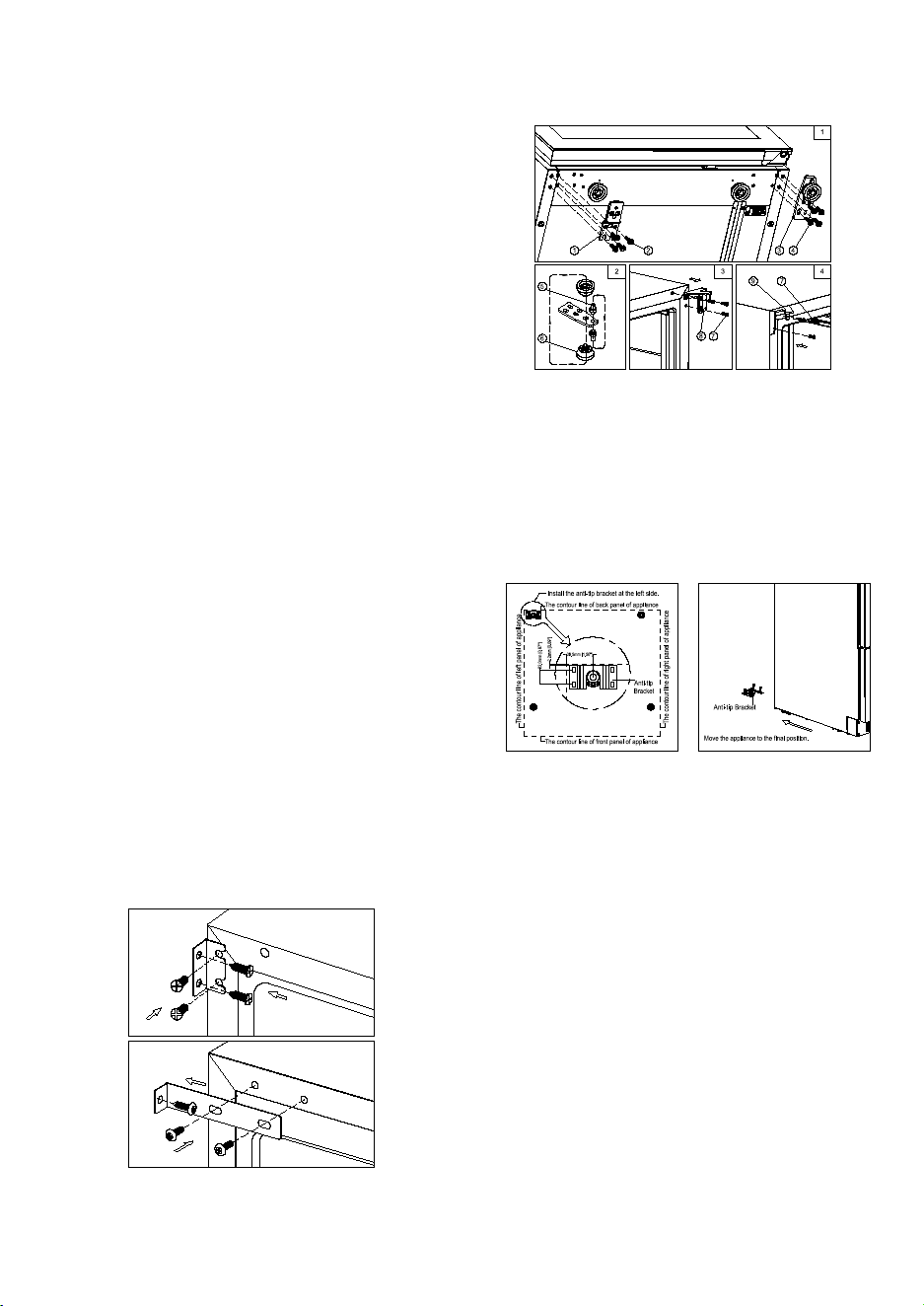
3. Rotate the glass door 180° and refit the glass door to the opposite side. Then screw and tighten it
after the door is leveled.
DESIGN 6 – For freestanding models
1. Remove the bottom hinge (3) by unscrewing the
four lock screws (4). Be careful to hold the glass
door firmly after removing the screws. (Fig. 1)
2. Gently pull down to remove the glass door from
the right top hinge and place it on a padded
surface to avoid the risk of damage. Then
remove the right top hinge (8). (Fig. 3)
3. Unscrew and transfer hinge pin (5) and
adjustable leg (6) of the bottom hinge to the
opposite side. (Fig. 2)
4. Pop out the cover caps on the left side of cabinet and use them to cover the screw holes on the
right hand side.
5. Screw the alternative left top hinge (9), included in the fittings, on the left hand side of cabinet. (Fig.
4)
6. Unscrew the four lock screws (2) and transfer the door supporter (1) to the opposite side. (Fig. 1)
7. Rotate the door 180° and relocate the door to the designated position. Then screw the bottom
hinge assembly on the left designated position and tighten it after the door is leveled.
ANTI-TIP BRACKET INSTALLATION
To reduce the risk of tipping the unit by abnormal
usage or improper loading, the appliance must be
secured by properly installing the anti-tip device (if
your model supplied with it) packed with the
appliance.
Place the anti-tip bracket on the floor as shown in the
figure. An anti-tip bracket can be installed at the left
side.
Mark the locations of the 4 holes of the anti-tip bracket on the floor.
Use an 8mm / 5/16” masonry drill bit and insert plastic anchors.
Secure bracket to floor using screws.
Slide appliance into position and make sure the leg engages the anti-tip bracket.
NOTE: If the unit is relocated, the bracket must be
removed and installed in the new location.
SECURING THE APPLIANCE
Pop out the two cover caps on the opposite side of
hinge and secure the appliance in the niche by
tightening the screws through the attachment
bracket if the unit is provided with an attachment
bracket.
Note: In locations where there is frequent lightning, it is advisable to use surge protectors.
Do not connect the appliance to the mains electricity supply by an extension lead. Extension leads do
not guarantee the required safety of the appliance (e.g. danger of overheating).
The appliance must not be connected to an inverter and must not be used with a plug adapter as these
can cause damage to the appliance’s electronic unit.
The cord must rest securely behind the appliance and not be allowed to lie or hang unprotected.
WARNING:
THIS APPLIANCE MUST BE GOUNDED.
INSTALLING THE HANDLE
IMPORTANT: Do not overtighten the screws & do not use power tools to install the handle.
DESIGN 1 – Locate the handle (1) over the mounting stubs (3)
of the door and tighten the grub screws (2) with an Allen key
to secure the handle.
DESIGN 2 –
Remove the door gasket (2) on the side you wish to install the
handle - you can see two designated holes for handle
installation.
Install the handle (4) tightly as shown above with two screws
(1) and flat washers (3) provided.
Replace the door gasket.
REVERSING THE DOOR HINGE
It is possible to reverse the door on this appliance, if required.
To do so, follow the steps below:
Note: All parts removed must be saved to do the reinstallation
of door.
WARNING: To ensure the proper functioning of the appliance, air vents should never be blocked or covered.
DESIGN 2 –
Air at the back of the unit gets warm. The unit is
equipped with an integrated ventilation system to
disperse the warm air automatically. Air intake is
provided underneath the appliance door and the air
escapes at the top of the door. The air inlet and outlet
must not be covered or blocked in any way. They must
also be regularly cleaned of dust.
After installation make sure that the appliance door
opens and closes properly.
WARNING: If the ventilation gaps given are not
observed, the compressor will run more frequently
and for longer periods. This will result in increased
energy consumption and a higher operating tempera-
ture for the compressor. This may, in turn, cause
damage to the compressor. It is essential to observe
the ventilation gaps given.
BUILT-IN CABINETRY INSTRUCTIONS
Make sure your installation does not block the front
ventilation grille. And be sure the door will open and
close properly in the chosen location.
NOTE:
To ensure proper service access and ventilation, A must be at least 5mm more than a, B must be at least
5mm more than b and C must be at least 5mm more than c.
For flush inset built-in installation, an extra 3mm door clearance is required for dimension C.
ELECTRICAL CONNECTION
WARNING: Improper use of the grounded plug can result in the risk of electrical shock. If the power cord is
damaged, have it replaced by a qualified electrician or an authorized service center.
All electrical work should be carried out by a suitably qualified and competent person in accordance with
local and national safety regulations.
Check that the voltage marked on the product corresponds with your supply voltage.
Connect this appliance to a separate at least 13A circuit.
Connection should be made via a suitable switched socket which is easily accessible. For extra safety it is
advisable to install a residual current device (RCD) with a trip current of 30mA.
Have the receptacle and the circuit checked by a qualified electrician to ensure that the socket is grounded
correctly.
DESIGN 1 – For built-under models
1. Remove the bottom hinge (1) by unscrewing the four lock screws (2). Be careful to hold the glass
door firmly after removing the screws. (Fig. 1)
2. Gently pull down to remove the glass door from the right top hinge and place it on a padded
surface to avoid the risk of damage. Then remove the right top hinge (5). (Fig. 3)
3. Unscrew and transfer hinge pin (3) and/or door stopper (4) of the bottom hinge to the opposite
side. (Fig. 2)
4. Pop out the cover caps on the left side of cabinet and use them to cover the screw holes on the
right-hand side.
5. Screw the alternative left top hinge (7), included in the fittings, on the left-hand side of cabinet. (Fig.
3)
6. Unscrew and transfer the holes cover (8) and lock catch (9) to the opposite side of glass door.
(Only for models with lock on the ventilation grille) (Fig. 4)
7. Rotate the door 180° (No need for models with lock on the door) and relocate the door to the
designated position. Then screw the bottom hinge assembly on the left designated position and
tighten it after the door is leveled.
8. Transfer the handle & plugs to the opposite positions if need.
DESIGN 2 – For fully integrated models
1. Remove the glass door by unscrewing the eight
lock screws (3) and (4). Be careful to hold the
glass door firmly after removing the screws and
place it on a padded surface to avoid the risk of
damage.
2. Unscrew and transfer the door supporter (2) to
the opposite side.
3. Rotate the glass door 180° and refit the glass
door to the opposite side. Then screw and
tighten it after the door is leveled.
4. Remove the glass door by unscrewing the eight
lock screws (5) and (6). Be careful to hold the
glass door firmly after removing the screws and
place it on a padded surface to avoid the risk of
damage.
5. Unscrew the screws (1) and (3) then transfer the
door supporter (2) and decoration cover (4) to
the opposite side.
6. Rotate the glass door 180° and refit the glass
door to the opposite side. Then screw and
tighten it after the door is leveled.
DESIGN 3 – For high models
1. Remove the right bottom hinge (2) and/or left
bottom hinge (1) by unscrewing the eight
lock screws (3). Be careful to hold the door
(4) firmly after removing the screws. (Fig. 1)
2. Gently pull down to remove the door from the
right top hinge and place it on a padded
surface to avoid the risk of damage. Then
remove the right top hinge (12). (Fig. 4)
3. Pop out the cover caps on the left side of
cabinet and use them to cover the screw
holes on the right hand side.
4. Screw the alternative left top hinge (11), included in the fittings, on the left hand side of cabinet.
(Fig. 4)
5. Unscrew and transfer hinge pin (6) and/or door supporter (5) to the opposite bottom hinge. (Fig. 2)
6. Unscrew and transfer the door adapter (9) and/or lock catch (8) to the top designated positions of
the door. (Fig. 3)
7. Rotate the door 180° and relocate it to the designated position. Then screw the bottom hinges on
the designated positions and tighten them. (Fig. 5)
8. Recheck and adjust the door alignment by loosening the screws (10) and moving the door adapter
(9). Tighten the screws (10) after the door is levelled. (Fig. 5)
DESIGN 4 – For vertical double door models
1. Remove the right bottom hinge (1) by
unscrewing the four screws (2). Be careful to
hold the lower glass door (3) firmly after
removing the screws. And then gently pull
down to remove the lower glass door from
the middle hinge and place it on a padded
surface to avoid the risk of damage. (Fig. 1)
2. Unscrew and transfer the door adapter (7)
and (10) to the designated opposite position
of lower glass door. At the same time
unscrew and transfer hinge pin (5) of the left
bottom hinge (4) included in the fittings. (Fig.
2 & 3)
3. Remove the door adapter (16) by unscrewing the two lock screws (15). Be careful to hold the upper
glass door firmly after removing the screws. And then gently pull down to remove the upper glass
door (17) from the top hinge and place it on a padded surface to avoid the risk of damage. Then
remove the right top hinge (12). (Fig. 5 & 4)
4. Unscrew and transfer the middle hinge (14) and the middle fixing plate (13) to the opposite
position. (Fig. 5)
5. Pop out the cover caps on the left side of cabinet and use them to cover the screw holes on the
right hand side.
6. Screw the alternative left top hinge (11), included in the fittings, on the left-hand side of the cabinet.
(Fig. 4)
7. Relocate the door adapter (16) on the middle hinge.
8. Set the upper glass door to the designated position and install the two lock screws to connect the
door adapter (16) with the upper glass door and tighten them before the door is leveled.
9. Set the lower glass door to the designated position. Then screw the left bottom hinge on the left
designated position and tighten them.
10. Recheck and adjust the lower door alignment by loosening the screws (8) & (9) and moving the
door adapter (7) & (10). Tighten the screws (8) & (9) after the door is leveled.
11. Transfer the handles and plugs to the opposite positions.
DESIGN 5 – For models with articulated hinge
WARNING: Use extreme caution with the articulated hinges. The hinge is self-closing and many pinch
points exist prior to built-in installation.
1. Remove the cover caps (3) and then remove the glass
door by unscrewing the four screws (1) and (2). Be
careful to hold the glass door firmly after removing the
screws and place it on a padded surface to avoid the risk
of damage.
2. Pop out the cover caps on the left side of the cabinet
and use them to cover the screw holes on the right-hand
side.
12
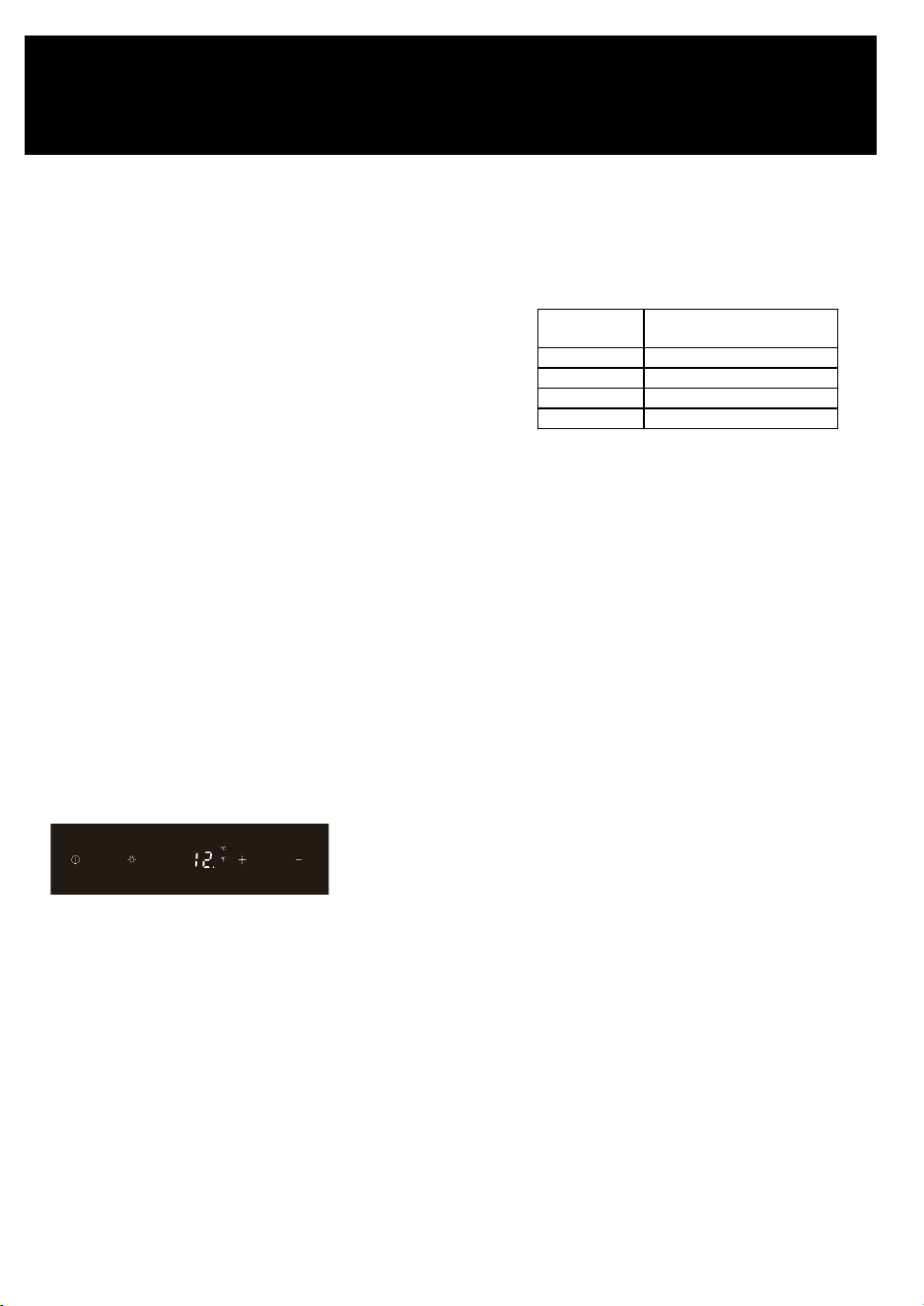
OPERATING YOUR APPLIANCE
This appliance is designed for operation at certain ambient temperatures. The climatic class is specified
on the rating plate.
The appliance may not work properly if it is left for a
long period at a temperature outside the specified
range. For example, placing your unit in extreme cold
or hot conditions may cause interior temperatures to
fluctuate. The range between 41°F and 68°F may not
be reached.
NOTE: A unit with no heater will not raise its internal temperature if the ambient temperature where the
unit is located is lower than the set temperature.
NOTE:
When you use the appliance for the first time or restart the appliance after having been shut off for a long
time, there could be a few degrees variance between the temperature you select and the one indicated on
the LED readout. This is normal and it is due to the length of the activation time. Once the unit is running
for a few hours, everything will be back to normal.
If the unit is unplugged, has lost power, or is turned off, you must wait 3 to 5 minutes before restarting the
unit. If you attempt to restart before this time delay, the unit will not start.
USE AND CONTROL – SINGLE ZONE with LED DISPLAY
The Controls of Your Unit
POWER
To turn the appliance off, lightly touch and hold the power key for 5 seconds until the temperature
display goes off.
To turn the appliance on, lightly touch and hold the power key for 1 second until the temperature display
lights up.
LIGHT
To turn the interior light on/off, lightly touch and hold the light key for 5 seconds. The interior light
indicator will light up or go out to confirm the selection.
UP
Used to increase (warm) the set temperature by 1°F.
DOWN
Used to decrease (cool) the set temperature by 1°F.
Climatic class
Ambient room
temperatures
SN +50°F to +89.6°F
N +60.8°F to +89.6°F
ST +60.8°F to +100.4°F
T +60.8°F to +109.4°F
OPERATION
Display
Displays the digital temperature and service indicators.
Light Indicator / Multi-key Function
The interior light indicator is the dot at the bottom right of the display. The interior light indicator will light
up in showcase mode.
The interior light indicator will flash when the multi-key function is selected. To perform the multi-key
function, lightly touch and hold the first key, then touch the rest key for at least 5 seconds and then
release all keys.
Child Lock
If in 2 minutes or longer without touching any key, the child lock will be activated automatically for
models in this series.
Setting the Temperature Control
• The unit has a single adjustable temperature zone. The temperature can be set between 41°F and
68°F. It can be used as a wine maturing cabinet or a wine serving cabinet. The recommended
temperature setting range for maturing wine is between 52°F and 57°F. The recommended
temperature setting range for serving white wine is between 46°F and 50°F and for serving red wine
is between 61°F and 64°F.
• When the unit is plugged in for the first time, the unit will power up automatically to 54°F. The
temperature preset at the factory is 54°F (ideal maturing temperature).
• You can set the temperature as required by touching the UP or DOWN key. When you touch either
key at the first time, the display will show the last temperature set previously. The temperature will
increase 1°F if you touch the UP key once, or the temperature will decrease 1°F if you touch the
DOWN key once. The display flashes while you make the setting.
• After the temperature has been set, the display shows the current inner temperature.
• To view the set temperature at any time, touch the UP or DOWN key; the set temperature will
temporarily flash in the display for 5 seconds. Then the display shows the current inner temperature
again.
USE AND CONTROL – DUAL ZONE with LED
DISPLAY
The Controls of Your Unit
POWER
To turn the appliance off, lightly touch and hold the
power key for 5 seconds until temperature display
goes off.
To turn the appliance on, lightly touch and hold the
power key for 1 second until temperature display
lights up.
UP
To increase (warm) the set temperature by 1°C or 1°F.
DOWN
To decrease (cool) the set temperature by 1°C or 1°F.
LIGHT
To turn the interior light on/off, lightly touch and hold the light key for 5 seconds. The interior light
indicator will light up or go out to confirm the selection.
Display
Displays the digital temperature and service indicators.
Is for the UPPER temperature zone and is for the LOWER temperature zone.
Is for the LEFT temperature zone and is for the RIGHT temperature zone.
Light Indicator / Multi-key Function
The interior light indicator is the dot at the bottom right of the display. The interior light indicator will light
up in showcase mode.
The interior light indicator will flash when the multi-key function is selected. To perform the multi-key
function, lightly touch and hold the first key, then touch the rest key for at least 5 seconds and then
release all keys.
Child Lock
If in 2 minutes or longer without touching any key, the child lock will be activated automatically for
models with the control outside of cabinet. To cancel the lock, lightly touch the UP and DOWN keys
simultaneously for at least 5 seconds.
Setting the Temperature Control
• The unit has two separate temperature zones. The temperature of both zones can be set between
41°F and 68°F. It can be used as a wine maturing cabinet or a wine serving cabinet. For maturing
wine, the recommended temperature setting ranges of both zones should be between 52°F and
57°F. For serving wine, the recommended temperature setting range of UPPER/LEFT zone should
be between 41°F and 50°F which is ideal for serving white wine and 61°F and 64°F which is ideal for
serving red wine. The recommended temperature setting range of LOWER/RIGHT zone should be
between 59°F and 68°F which is ideal for serving wine.
• When the unit is plugged in for the first time, the unit will power up automatically to the preset
defaults. The preset temperature is the factory for UPPER/LEFT temperature zone at 54°F and for
LOWER/RIGHT temperature zone at 64°F.
• You can touch the left side UP and DOWN keys to select the internal temperature of the
"UPPER/LEFT temperature zone and touch the right side UP and DOWN keys to control the internal
temperature of the LOWER/RIGHT temperature zone. When you touch either key at the first time, the
display will show the last temperature set previously.
• IMPORTANT: For non-Twin Wine Conditioning System, the temperature set for the LOWER
temperature zone must always be just as high as or higher than that in the UPPER temperature
zone.
• The temperature that you desire to set will increase 1ºF if you touch the UP key once, on the
contrary, the temperature will decrease 1ºF if you touch the DOWN key once. The display flashes
while you make the setting.
• After the temperature has been set, the display shows the current inner temperature of the
particular temperature zone.
• To view the set temperature at any time, touch the UP or DOWN key, the set temperature will
temporarily flash in the display for 5 seconds. Then the display shows the current inner temperature
again.
SETTINGS MODE
Certain settings on the wine cabinet can only be selected in Settings mode. In Settings mode only the UP
and DOWN keys of the lower/right zone are functional for dual zone LED display units.
Touch and hold the UP key for 5 seconds to enter and leave Settings mode. The appliance will leave
Settings mode automatically after approximately one minute.
ºF/ºC Selection
Lightly touch and hold the UP key for 5 seconds to enter Settings mode.
Use the UP and DOWN keys to select the temperature display setting in Fahrenheit or Celsius degree.
Touch and hold the UP key for 5 seconds to confirm the selection.
Display Brightness
• Lightly touch and hold the UP key for 5 seconds to enter Settings mode and then touch the POWER
key once.
• Use the UP and DOWN keys to select the brightness of the display when the door is close. When the
door is open, the display brightness returns to its normal level.
- d0: off
- d1: dimmest setting (default)
- d2: medium setting
- d3: brightest setting
• Touch and hold the UP key for 5 seconds to confirm the selection.
Interior Lighting Brightness
• Lightly touch and hold the UP key for 5 seconds to enter Settings mode and then touch the POWER
key twice.
• Use the UP and DOWN keys to select the brightness of the interior lighting when the door is close.
When the door is open, the interior lighting returns to its normal level.
- L0: off when the door is close or open
- L1: dimmest setting
- L2: medium setting
- L3: brightest setting (default)
• Touch and hold the UP key for 5 seconds to confirm the selection.
Fan Mode
• Lightly touch and hold the UP key for 5 seconds to enter Settings mode and then touch the POWER
key three (3) times.
• Use the UP and DOWN keys to select the fan mode.
- F0: Silent mode - Energy-saving mode (default)
- F1: DynaClima mode - half-time
- F2: DynaClima mode - full time
• Touch and hold the UP key for 5 seconds to confirm the selection.
Audible Tones
• Lightly touch and hold the UP key for 5 seconds to enter Settings mode and then touch the POWER
key four (4) times.
• Use the UP and DOWN keys to select the audible tones.
- S0: sensor tone ON, alarm tone OFF
- S1: sensor tone ON, alarm tone ON (default)
- S2: sensor tone OFF, alarm tone OFF
- S3: sensor tone OFF, alarm tone ON
• Touch and hold the UP key for 5 seconds to confirm the selection.
TEMPERATURE DISPLAY:
• During normal operation, the temperature display on the control panel shows the temperature inside
the appliance.
- The temperature display will flash under the following conditions:
- A different temperature is being set.
• The temperature in the zone deviates by more than 5°C (9°F) from the set temperature.
• The temperature display flashing is a safety feature to ensure that temperature changes do not go
unnoticed and potentially affect the stored wine.
TEMPERATURE MEMORY FUNCTION:
In the event of a power interruption (e.g., power surge or breaker switch), the unit retains the previous
temperature settings.
When power is restored, the cabinet temperature will return to the same setting temperature as before
the power interruption, ensuring your wine is stored at the desired temperature.
TEMPERATURE ALARM:
• An audible alarm will activate if the temperature in one of the zones goes outside the temperature
range.
• The relevant temperature display will also flash when the alarm is triggered.
• The specific temperature settings determine what is considered too warm or too cool.
• The audible alarm can sound under the following circumstances:
- When you turn on the appliance, and the temperature inside is significantly different from the set
temperature.
- After a prolonged power outage.
- When a large number of items are added to the unit simultaneously or when there's a significant
influx of ambient air due to rearranging or removing items.
- When the appliance's door is not properly closed.
- If there is a fault with the appliance itself.
• The audible alarm will automatically stop, and the temperature display will cease flashing once the
set temperature is reached again.
• However, if the noise from the alarm is bothersome, you can manually turn off the audible alarm by
touching any key once, and the alarm will stop. The relevant temperature display will continue to
flash until the set temperature is achieved.
• This information provides details about the temperature display, memory function, and temperature
alarm features of the wine cabinet.
HUMIDITY ALARM:
• If your model is equipped with a humidity alarm, it will sound if the humidity inside the unit rises or
falls outside the humidity range.
• The relevant humidity display will flash, and symbols will light up to indicate too low or too high
humidity levels.
• The audible alarm will automatically silence, and the humidity display will stop flashing, along with
the symbols, when the set humidity range is reached again.
• If the noise from the alarm disturbs you, you can manually turn off the audible alarm by touching
any key once, and the alarm will stop. The relevant humidity display will continue to flash, and the
symbols will remain lit up until the set humidity is achieved. Once reached, the display will remain
constant, the symbols will go out, and the alarm system is fully active again.
DOOR ALARM:
• If the door of the unit is left open for more than 60 seconds, an audible alarm will sound.
• You can switch off the audible door alarm by closing the door or touching any key once.
AUTO DOOR OPEN SYSTEM (PushOpen DOOR FUNCTION):
• The PushOpen door function, if your model is equipped with it, is activated when the unit is
powered.
• To open the door, push the door slightly inward on the top left position for the right hinge model (or
the top right position for the left hinge model) and then release it. The door will open slightly due to
the push piston. You can then fully open the door manually.
• The push piston will automatically return to its
initial position after 2 seconds.
• Note that for models with articulated hinges, the
door will close by itself after approximately 2
seconds if you don't pull the door open
manually.
• Avoid blocking or holding the door during
opening or closing to prevent damage to the
auto door open system.
INTERIOR LIGHT / TriColor LIGHTING:
• The interior lighting in the unit helps you view your wine labels and enhances the display of your
wine collection.
• You can toggle between two modes of operation for the interior lights by touching and holding the
LIGHT key for 5 seconds:
- Functional (default) mode: Lights turn on only when the door is open and go out approximately 5
seconds after the door is closed.
- Showcase mode: Lights are on whether or not the door is open, and the light indicator will
illuminate for LED display units.
• LED type lights are used in the unit, designed for long life and not user-serviceable. If they need to
be changed, contact the service department.
• If your model has TriColor lighting, you can select the color of the interior light (amber, white, and
blue) by touching the LIGHT key. You can also toggle between single color mode and dynamic color
mode. In dynamic color mode, the light will cycle through the available colors, and touching the
LIGHT key when the desired color is on will change the interior light to that color. To return to the
dynamic color mode, touch the LIGHT key again.
DYNACLIMA / SILENT MODES:
The appliance has two different running modes: DynaClima and Silent modes.
DynaClima (Dynamic Climate) mode is designed to distribute relative humidity and temperature evenly
inside the unit. This mode is ideal for long-term wine storage and mimics the conditions of a wine cellar.
In DynaClima mode, the interior fan continues to circulate air even when the set temperature is reached,
which may result in increased noise during operation.
Silent mode, also known as energy-saving mode, operates without the fan once the set temperature is
reached, reducing noise levels.
SHABBOS MODE:
Shabbos mode is available for observing Shabbos & Yom Tov (Jewish holidays).
Activating Shabbos mode turns off the displays, interior light, sensor tones, and audible alarms,
preventing them from turning on during the observance.
Normal cooling operations continue to operate.
To initiate Shabbos mode, touch the POWER and LIGHT keys simultaneously for at least 5 seconds. The
displays and interior lights will go out to confirm that Shabbos mode is ON.
Shabbos mode can be canceled by repeating the same process, and it will automatically turn off after 96
hours.
ANTI-CONDENSATION MODE:
If your model is equipped with it, the anti-condensation mode can prevent condensation from forming on
the surface of the glass door, especially in high humidity climates.
Simply switch on this mode during periods of high humidity to eliminate condensation.
Note that using this mode will increase the energy consumption of the wine cellar, so it should be
switched off when not needed.
You can find the switch for this mode on the control panel, where "I" is ON, and "O" is OFF.
ECO DEMO MODE:
Eco Demo mode can be activated for exhibition or salesroom purposes.
In this mode, the compressor and all fan motors are switched OFF, while the lights remain ON.
For models with LED Displays, you can activate Eco Demo mode by touching and holding the "UP,"
"DOWN," and "LIGHT" keys simultaneously for at least 5 seconds.
Eco Demo mode can be canceled by repeating the same process.
BOTTLE RACKS AND STORAGE:
• The text provides important warnings and information about the proper use of bottle racks and
storage within the wine cellar.
• It emphasizes not pulling out more than one loaded shelf at a time to prevent the unit from tilting
forward.
• Stacked bottles should not be loaded on a shelf.
• Shelves should not be slid outward beyond their fixed position to prevent bottles from falling.
• To avoid damaging the door gasket, ensure the door is fully open when pulling shelves out.
• It's important not to cover any part of the shelves with materials that inhibit air circulation within the
cabinet.
• The wine racks are designed to slide out for easy access, except for the bottom fixed shelf.
• The number of bottles that can be stored may vary depending on bottle sizes and dimensions.
• Bottles can be loaded in single rows or by stacking, with some recommendations to distribute the
load evenly.
• Tips are provided for air circulation, preventing mold, and promoting temperature uniformity.
• Recommendations include not overloading the wine cellar, laying bottles flat, avoiding obstructing
internal fans, not cross-contaminating with other odors, and storing only unopened bottles to
prevent spillage.
OPERATING NOISES:
• The unit is cooled by a compressor (refrigeration aggregate), which produces operating noise as it
pumps coolant through the cooling system.
• Even when the compressor is not actively running, noises caused by temperature and pressure
changes are unavoidable.
• Operating noise is most audible immediately after the compressor starts running and becomes
quieter as the compressor continues to operate.
• Normal noises associated with the unit include gurgling sounds from the refrigerant flowing
through coils, humming noises from the motor compressor (which may become louder briefly when
the motor starts), crackling or popping sounds due to materials contracting and expanding with
temperature variations, and fan operating sounds for air circulation within the wine cabinet.
• Unusual noises are typically a result of improper installation, and tubing should not come into
contact with walls, furniture, or other tubing.
• In open-plan kitchens or partition walls, the operating noise may be more noticeable due to the
surrounding architecture.
DEFROSTING / HYGROMETRY / VENTILATION:
• The unit is equipped with an automatic defrost system that operates during the "Off-cycle."
• During defrosting, condensate collects in the drain trough behind the rear wall of the unit, and some
of it flows through the drainage hole into the drip tray near the compressor.
• Heat from the discharge pipe or compressor evaporates the collected condensation in the tray.
• Part of the remaining water is retained within the unit to maintain the required humidity level for
natural cork preservation.
• This system also provides natural ventilation and constant air circulation within the cabinet.
• Fresh air admission is permitted through the drainpipe and/or air exchange pipe, and air is
circulated using fans and open shelves.
• Manual defrosting may be required if frost accumulates on the evaporator due to repeated
openings in high heat or high humidity conditions.
WINE SERVING TEMPERATURE CHART:
• The text mentions that all wines mature at a constant temperature set between 52°F to 57°F.
• It provides a chart indicating the recommended serving temperatures for various types of wine.
However, the specific temperatures are not provided in this text. If you are interested in the
temperature recommendations for different types of wine, you may need to refer to additional
sources or wine guides.
IMPORTANT INFORMATION ABOUT TEMPERATURE:
• Your wine storage unit is designed to provide optimal conditions for storing and serving wines.
• Fine wines require specific conditions to reach their full potential, and they need long and gentle
development.
• All wines mature at the same constant temperature range, which is typically set between 11°C to
14°C (approximately 52°F to 57°F).
• The key to wine storage is not only the exact temperature but also its consistency. As long as the
temperature within your wine cellar remains constant within the specified range, your wines will be
stored under ideal conditions.
• It's important to note that not all wines improve with age. Some wines are best consumed at an
early stage (2 to 3 years), while others have the potential to age for many decades (50 years or
more). Each wine has its peak in maturity, and it's advisable to consult with your wine merchant to
get relevant information about the wines you intend to store.
• Extreme temperatures can have adverse effects on wine. If the temperature is too high (above
20°C), wine can mature too quickly, preventing the full development of aromas. On the other hand, if
the temperature is too low (below 5°C), wine cannot mature properly.
• Temperature fluctuations can also negatively impact wine by subjecting it to stress and interrupting
the maturation process. Therefore, maintaining a constant temperature is crucial for proper wine
storage.
RECOMMENDED SERVING TEMPERATURES FOR VARIOUS WINE STYLES
13
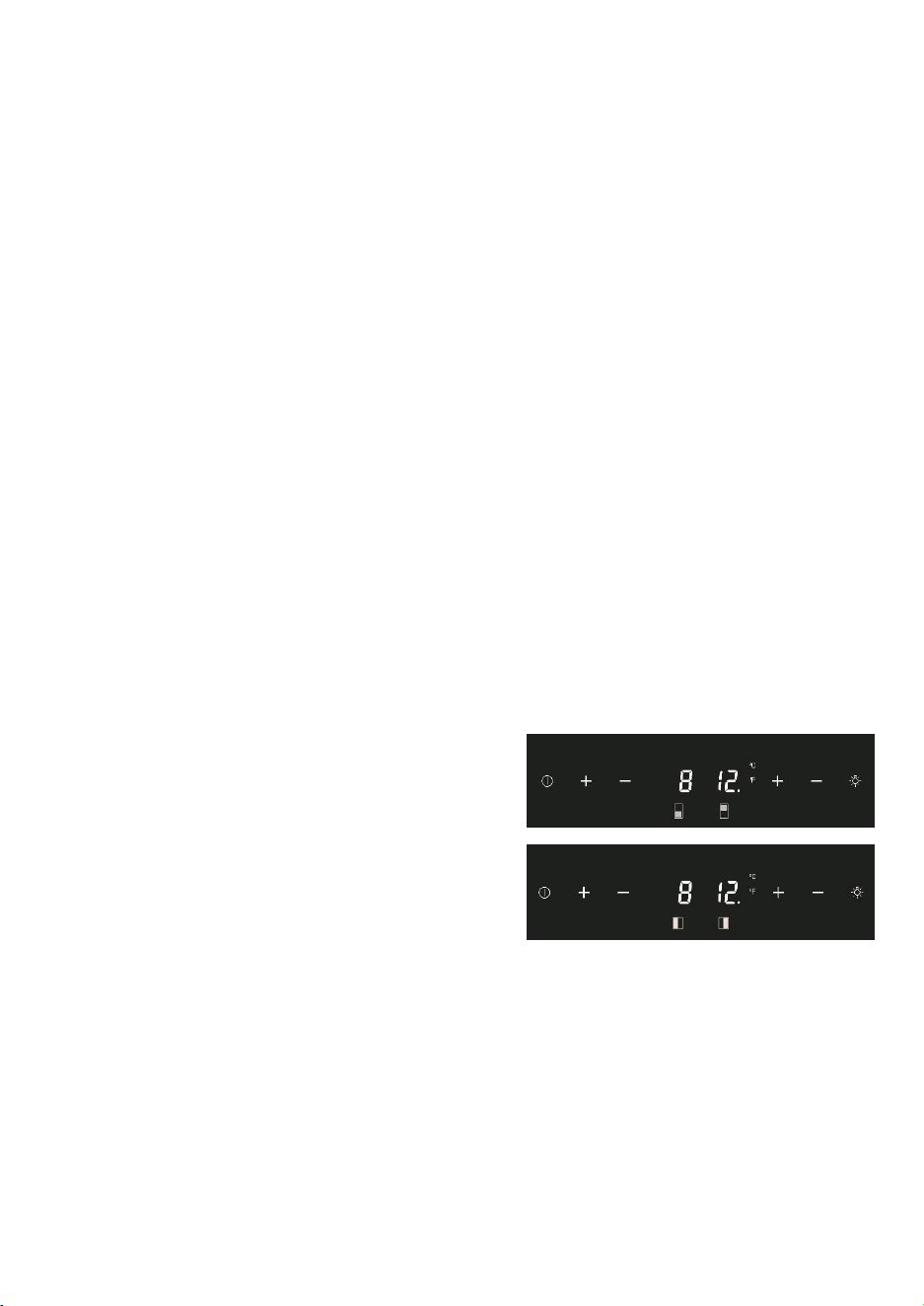
OPERATING YOUR APPLIANCE
This appliance is designed for operation at certain ambient temperatures. The climatic class is specified
on the rating plate.
The appliance may not work properly if it is left for a
long period at a temperature outside the specified
range. For example, placing your unit in extreme cold
or hot conditions may cause interior temperatures to
fluctuate. The range between 41°F and 68°F may not
be reached.
NOTE: A unit with no heater will not raise its internal temperature if the ambient temperature where the
unit is located is lower than the set temperature.
NOTE:
When you use the appliance for the first time or restart the appliance after having been shut off for a long
time, there could be a few degrees variance between the temperature you select and the one indicated on
the LED readout. This is normal and it is due to the length of the activation time. Once the unit is running
for a few hours, everything will be back to normal.
If the unit is unplugged, has lost power, or is turned off, you must wait 3 to 5 minutes before restarting the
unit. If you attempt to restart before this time delay, the unit will not start.
USE AND CONTROL – SINGLE ZONE with LED DISPLAY
The Controls of Your Unit
POWER
To turn the appliance off, lightly touch and hold the power key for 5 seconds until the temperature
display goes off.
To turn the appliance on, lightly touch and hold the power key for 1 second until the temperature display
lights up.
LIGHT
To turn the interior light on/off, lightly touch and hold the light key for 5 seconds. The interior light
indicator will light up or go out to confirm the selection.
UP
Used to increase (warm) the set temperature by 1°F.
DOWN
Used to decrease (cool) the set temperature by 1°F.
Display
Displays the digital temperature and service indicators.
Light Indicator / Multi-key Function
The interior light indicator is the dot at the bottom right of the display. The interior light indicator will light
up in showcase mode.
The interior light indicator will flash when the multi-key function is selected. To perform the multi-key
function, lightly touch and hold the first key, then touch the rest key for at least 5 seconds and then
release all keys.
Child Lock
If in 2 minutes or longer without touching any key, the child lock will be activated automatically for
models in this series.
Setting the Temperature Control
• The unit has a single adjustable temperature zone. The temperature can be set between 41°F and
68°F. It can be used as a wine maturing cabinet or a wine serving cabinet. The recommended
temperature setting range for maturing wine is between 52°F and 57°F. The recommended
temperature setting range for serving white wine is between 46°F and 50°F and for serving red wine
is between 61°F and 64°F.
• When the unit is plugged in for the first time, the unit will power up automatically to 54°F. The
temperature preset at the factory is 54°F (ideal maturing temperature).
• You can set the temperature as required by touching the UP or DOWN key. When you touch either
key at the first time, the display will show the last temperature set previously. The temperature will
increase 1°F if you touch the UP key once, or the temperature will decrease 1°F if you touch the
DOWN key once. The display flashes while you make the setting.
• After the temperature has been set, the display shows the current inner temperature.
• To view the set temperature at any time, touch the UP or DOWN key; the set temperature will
temporarily flash in the display for 5 seconds. Then the display shows the current inner temperature
again.
USE AND CONTROL – DUAL ZONE with LED
DISPLAY
The Controls of Your Unit
POWER
To turn the appliance off, lightly touch and hold the
power key for 5 seconds until temperature display
goes off.
To turn the appliance on, lightly touch and hold the
power key for 1 second until temperature display
lights up.
UP
To increase (warm) the set temperature by 1°C or 1°F.
DOWN
To decrease (cool) the set temperature by 1°C or 1°F.
LIGHT
To turn the interior light on/off, lightly touch and hold the light key for 5 seconds. The interior light
indicator will light up or go out to confirm the selection.
Display
Displays the digital temperature and service indicators.
Is for the UPPER temperature zone and is for the LOWER temperature zone.
Is for the LEFT temperature zone and is for the RIGHT temperature zone.
Light Indicator / Multi-key Function
The interior light indicator is the dot at the bottom right of the display. The interior light indicator will light
up in showcase mode.
The interior light indicator will flash when the multi-key function is selected. To perform the multi-key
function, lightly touch and hold the first key, then touch the rest key for at least 5 seconds and then
release all keys.
Child Lock
If in 2 minutes or longer without touching any key, the child lock will be activated automatically for
models with the control outside of cabinet. To cancel the lock, lightly touch the UP and DOWN keys
simultaneously for at least 5 seconds.
Setting the Temperature Control
• The unit has two separate temperature zones. The temperature of both zones can be set between
41°F and 68°F. It can be used as a wine maturing cabinet or a wine serving cabinet. For maturing
wine, the recommended temperature setting ranges of both zones should be between 52°F and
57°F. For serving wine, the recommended temperature setting range of UPPER/LEFT zone should
be between 41°F and 50°F which is ideal for serving white wine and 61°F and 64°F which is ideal for
serving red wine. The recommended temperature setting range of LOWER/RIGHT zone should be
between 59°F and 68°F which is ideal for serving wine.
• When the unit is plugged in for the first time, the unit will power up automatically to the preset
defaults. The preset temperature is the factory for UPPER/LEFT temperature zone at 54°F and for
LOWER/RIGHT temperature zone at 64°F.
• You can touch the left side UP and DOWN keys to select the internal temperature of the
"UPPER/LEFT temperature zone and touch the right side UP and DOWN keys to control the internal
temperature of the LOWER/RIGHT temperature zone. When you touch either key at the first time, the
display will show the last temperature set previously.
• IMPORTANT: For non-Twin Wine Conditioning System, the temperature set for the LOWER
temperature zone must always be just as high as or higher than that in the UPPER temperature
zone.
• The temperature that you desire to set will increase 1ºF if you touch the UP key once, on the
contrary, the temperature will decrease 1ºF if you touch the DOWN key once. The display flashes
while you make the setting.
• After the temperature has been set, the display shows the current inner temperature of the
particular temperature zone.
• To view the set temperature at any time, touch the UP or DOWN key, the set temperature will
temporarily flash in the display for 5 seconds. Then the display shows the current inner temperature
again.
SETTINGS MODE
Certain settings on the wine cabinet can only be selected in Settings mode. In Settings mode only the UP
and DOWN keys of the lower/right zone are functional for dual zone LED display units.
Touch and hold the UP key for 5 seconds to enter and leave Settings mode. The appliance will leave
Settings mode automatically after approximately one minute.
ºF/ºC Selection
Lightly touch and hold the UP key for 5 seconds to enter Settings mode.
Use the UP and DOWN keys to select the temperature display setting in Fahrenheit or Celsius degree.
Touch and hold the UP key for 5 seconds to confirm the selection.
Display Brightness
• Lightly touch and hold the UP key for 5 seconds to enter Settings mode and then touch the POWER
key once.
• Use the UP and DOWN keys to select the brightness of the display when the door is close. When the
door is open, the display brightness returns to its normal level.
- d0: off
- d1: dimmest setting (default)
- d2: medium setting
- d3: brightest setting
• Touch and hold the UP key for 5 seconds to confirm the selection.
Interior Lighting Brightness
• Lightly touch and hold the UP key for 5 seconds to enter Settings mode and then touch the POWER
key twice.
• Use the UP and DOWN keys to select the brightness of the interior lighting when the door is close.
When the door is open, the interior lighting returns to its normal level.
- L0: off when the door is close or open
- L1: dimmest setting
- L2: medium setting
- L3: brightest setting (default)
• Touch and hold the UP key for 5 seconds to confirm the selection.
Fan Mode
• Lightly touch and hold the UP key for 5 seconds to enter Settings mode and then touch the POWER
key three (3) times.
• Use the UP and DOWN keys to select the fan mode.
- F0: Silent mode - Energy-saving mode (default)
- F1: DynaClima mode - half-time
- F2: DynaClima mode - full time
• Touch and hold the UP key for 5 seconds to confirm the selection.
Audible Tones
• Lightly touch and hold the UP key for 5 seconds to enter Settings mode and then touch the POWER
key four (4) times.
• Use the UP and DOWN keys to select the audible tones.
- S0: sensor tone ON, alarm tone OFF
- S1: sensor tone ON, alarm tone ON (default)
- S2: sensor tone OFF, alarm tone OFF
- S3: sensor tone OFF, alarm tone ON
• Touch and hold the UP key for 5 seconds to confirm the selection.
TEMPERATURE DISPLAY:
• During normal operation, the temperature display on the control panel shows the temperature inside
the appliance.
- The temperature display will flash under the following conditions:
- A different temperature is being set.
• The temperature in the zone deviates by more than 5°C (9°F) from the set temperature.
• The temperature display flashing is a safety feature to ensure that temperature changes do not go
unnoticed and potentially affect the stored wine.
TEMPERATURE MEMORY FUNCTION:
In the event of a power interruption (e.g., power surge or breaker switch), the unit retains the previous
temperature settings.
When power is restored, the cabinet temperature will return to the same setting temperature as before
the power interruption, ensuring your wine is stored at the desired temperature.
TEMPERATURE ALARM:
• An audible alarm will activate if the temperature in one of the zones goes outside the temperature
range.
• The relevant temperature display will also flash when the alarm is triggered.
• The specific temperature settings determine what is considered too warm or too cool.
• The audible alarm can sound under the following circumstances:
- When you turn on the appliance, and the temperature inside is significantly different from the set
temperature.
- After a prolonged power outage.
- When a large number of items are added to the unit simultaneously or when there's a significant
influx of ambient air due to rearranging or removing items.
- When the appliance's door is not properly closed.
- If there is a fault with the appliance itself.
• The audible alarm will automatically stop, and the temperature display will cease flashing once the
set temperature is reached again.
• However, if the noise from the alarm is bothersome, you can manually turn off the audible alarm by
touching any key once, and the alarm will stop. The relevant temperature display will continue to
flash until the set temperature is achieved.
• This information provides details about the temperature display, memory function, and temperature
alarm features of the wine cabinet.
HUMIDITY ALARM:
• If your model is equipped with a humidity alarm, it will sound if the humidity inside the unit rises or
falls outside the humidity range.
• The relevant humidity display will flash, and symbols will light up to indicate too low or too high
humidity levels.
• The audible alarm will automatically silence, and the humidity display will stop flashing, along with
the symbols, when the set humidity range is reached again.
• If the noise from the alarm disturbs you, you can manually turn off the audible alarm by touching
any key once, and the alarm will stop. The relevant humidity display will continue to flash, and the
symbols will remain lit up until the set humidity is achieved. Once reached, the display will remain
constant, the symbols will go out, and the alarm system is fully active again.
DOOR ALARM:
• If the door of the unit is left open for more than 60 seconds, an audible alarm will sound.
• You can switch off the audible door alarm by closing the door or touching any key once.
AUTO DOOR OPEN SYSTEM (PushOpen DOOR FUNCTION):
• The PushOpen door function, if your model is equipped with it, is activated when the unit is
powered.
• To open the door, push the door slightly inward on the top left position for the right hinge model (or
the top right position for the left hinge model) and then release it. The door will open slightly due to
the push piston. You can then fully open the door manually.
• The push piston will automatically return to its
initial position after 2 seconds.
• Note that for models with articulated hinges, the
door will close by itself after approximately 2
seconds if you don't pull the door open
manually.
• Avoid blocking or holding the door during
opening or closing to prevent damage to the
auto door open system.
INTERIOR LIGHT / TriColor LIGHTING:
• The interior lighting in the unit helps you view your wine labels and enhances the display of your
wine collection.
• You can toggle between two modes of operation for the interior lights by touching and holding the
LIGHT key for 5 seconds:
- Functional (default) mode: Lights turn on only when the door is open and go out approximately 5
seconds after the door is closed.
- Showcase mode: Lights are on whether or not the door is open, and the light indicator will
illuminate for LED display units.
• LED type lights are used in the unit, designed for long life and not user-serviceable. If they need to
be changed, contact the service department.
• If your model has TriColor lighting, you can select the color of the interior light (amber, white, and
blue) by touching the LIGHT key. You can also toggle between single color mode and dynamic color
mode. In dynamic color mode, the light will cycle through the available colors, and touching the
LIGHT key when the desired color is on will change the interior light to that color. To return to the
dynamic color mode, touch the LIGHT key again.
DYNACLIMA / SILENT MODES:
The appliance has two different running modes: DynaClima and Silent modes.
DynaClima (Dynamic Climate) mode is designed to distribute relative humidity and temperature evenly
inside the unit. This mode is ideal for long-term wine storage and mimics the conditions of a wine cellar.
In DynaClima mode, the interior fan continues to circulate air even when the set temperature is reached,
which may result in increased noise during operation.
Silent mode, also known as energy-saving mode, operates without the fan once the set temperature is
reached, reducing noise levels.
SHABBOS MODE:
Shabbos mode is available for observing Shabbos & Yom Tov (Jewish holidays).
Activating Shabbos mode turns off the displays, interior light, sensor tones, and audible alarms,
preventing them from turning on during the observance.
Normal cooling operations continue to operate.
To initiate Shabbos mode, touch the POWER and LIGHT keys simultaneously for at least 5 seconds. The
displays and interior lights will go out to confirm that Shabbos mode is ON.
Shabbos mode can be canceled by repeating the same process, and it will automatically turn off after 96
hours.
ANTI-CONDENSATION MODE:
If your model is equipped with it, the anti-condensation mode can prevent condensation from forming on
the surface of the glass door, especially in high humidity climates.
Simply switch on this mode during periods of high humidity to eliminate condensation.
Note that using this mode will increase the energy consumption of the wine cellar, so it should be
switched off when not needed.
You can find the switch for this mode on the control panel, where "I" is ON, and "O" is OFF.
ECO DEMO MODE:
Eco Demo mode can be activated for exhibition or salesroom purposes.
In this mode, the compressor and all fan motors are switched OFF, while the lights remain ON.
For models with LED Displays, you can activate Eco Demo mode by touching and holding the "UP,"
"DOWN," and "LIGHT" keys simultaneously for at least 5 seconds.
Eco Demo mode can be canceled by repeating the same process.
BOTTLE RACKS AND STORAGE:
• The text provides important warnings and information about the proper use of bottle racks and
storage within the wine cellar.
• It emphasizes not pulling out more than one loaded shelf at a time to prevent the unit from tilting
forward.
• Stacked bottles should not be loaded on a shelf.
• Shelves should not be slid outward beyond their fixed position to prevent bottles from falling.
• To avoid damaging the door gasket, ensure the door is fully open when pulling shelves out.
• It's important not to cover any part of the shelves with materials that inhibit air circulation within the
cabinet.
• The wine racks are designed to slide out for easy access, except for the bottom fixed shelf.
• The number of bottles that can be stored may vary depending on bottle sizes and dimensions.
• Bottles can be loaded in single rows or by stacking, with some recommendations to distribute the
load evenly.
• Tips are provided for air circulation, preventing mold, and promoting temperature uniformity.
• Recommendations include not overloading the wine cellar, laying bottles flat, avoiding obstructing
internal fans, not cross-contaminating with other odors, and storing only unopened bottles to
prevent spillage.
OPERATING NOISES:
• The unit is cooled by a compressor (refrigeration aggregate), which produces operating noise as it
pumps coolant through the cooling system.
• Even when the compressor is not actively running, noises caused by temperature and pressure
changes are unavoidable.
• Operating noise is most audible immediately after the compressor starts running and becomes
quieter as the compressor continues to operate.
• Normal noises associated with the unit include gurgling sounds from the refrigerant flowing
through coils, humming noises from the motor compressor (which may become louder briefly when
the motor starts), crackling or popping sounds due to materials contracting and expanding with
temperature variations, and fan operating sounds for air circulation within the wine cabinet.
• Unusual noises are typically a result of improper installation, and tubing should not come into
contact with walls, furniture, or other tubing.
• In open-plan kitchens or partition walls, the operating noise may be more noticeable due to the
surrounding architecture.
DEFROSTING / HYGROMETRY / VENTILATION:
• The unit is equipped with an automatic defrost system that operates during the "Off-cycle."
• During defrosting, condensate collects in the drain trough behind the rear wall of the unit, and some
of it flows through the drainage hole into the drip tray near the compressor.
• Heat from the discharge pipe or compressor evaporates the collected condensation in the tray.
• Part of the remaining water is retained within the unit to maintain the required humidity level for
natural cork preservation.
• This system also provides natural ventilation and constant air circulation within the cabinet.
• Fresh air admission is permitted through the drainpipe and/or air exchange pipe, and air is
circulated using fans and open shelves.
• Manual defrosting may be required if frost accumulates on the evaporator due to repeated
openings in high heat or high humidity conditions.
WINE SERVING TEMPERATURE CHART:
• The text mentions that all wines mature at a constant temperature set between 52°F to 57°F.
• It provides a chart indicating the recommended serving temperatures for various types of wine.
However, the specific temperatures are not provided in this text. If you are interested in the
temperature recommendations for different types of wine, you may need to refer to additional
sources or wine guides.
IMPORTANT INFORMATION ABOUT TEMPERATURE:
• Your wine storage unit is designed to provide optimal conditions for storing and serving wines.
• Fine wines require specific conditions to reach their full potential, and they need long and gentle
development.
• All wines mature at the same constant temperature range, which is typically set between 11°C to
14°C (approximately 52°F to 57°F).
• The key to wine storage is not only the exact temperature but also its consistency. As long as the
temperature within your wine cellar remains constant within the specified range, your wines will be
stored under ideal conditions.
• It's important to note that not all wines improve with age. Some wines are best consumed at an
early stage (2 to 3 years), while others have the potential to age for many decades (50 years or
more). Each wine has its peak in maturity, and it's advisable to consult with your wine merchant to
get relevant information about the wines you intend to store.
• Extreme temperatures can have adverse effects on wine. If the temperature is too high (above
20°C), wine can mature too quickly, preventing the full development of aromas. On the other hand, if
the temperature is too low (below 5°C), wine cannot mature properly.
• Temperature fluctuations can also negatively impact wine by subjecting it to stress and interrupting
the maturation process. Therefore, maintaining a constant temperature is crucial for proper wine
storage.
RECOMMENDED SERVING TEMPERATURES FOR VARIOUS WINE STYLES
14

OPERATING YOUR APPLIANCE
This appliance is designed for operation at certain ambient temperatures. The climatic class is specified
on the rating plate.
The appliance may not work properly if it is left for a
long period at a temperature outside the specified
range. For example, placing your unit in extreme cold
or hot conditions may cause interior temperatures to
fluctuate. The range between 41°F and 68°F may not
be reached.
NOTE: A unit with no heater will not raise its internal temperature if the ambient temperature where the
unit is located is lower than the set temperature.
NOTE:
When you use the appliance for the first time or restart the appliance after having been shut off for a long
time, there could be a few degrees variance between the temperature you select and the one indicated on
the LED readout. This is normal and it is due to the length of the activation time. Once the unit is running
for a few hours, everything will be back to normal.
If the unit is unplugged, has lost power, or is turned off, you must wait 3 to 5 minutes before restarting the
unit. If you attempt to restart before this time delay, the unit will not start.
USE AND CONTROL – SINGLE ZONE with LED DISPLAY
The Controls of Your Unit
POWER
To turn the appliance off, lightly touch and hold the power key for 5 seconds until the temperature
display goes off.
To turn the appliance on, lightly touch and hold the power key for 1 second until the temperature display
lights up.
LIGHT
To turn the interior light on/off, lightly touch and hold the light key for 5 seconds. The interior light
indicator will light up or go out to confirm the selection.
UP
Used to increase (warm) the set temperature by 1°F.
DOWN
Used to decrease (cool) the set temperature by 1°F.
Display
Displays the digital temperature and service indicators.
Light Indicator / Multi-key Function
The interior light indicator is the dot at the bottom right of the display. The interior light indicator will light
up in showcase mode.
The interior light indicator will flash when the multi-key function is selected. To perform the multi-key
function, lightly touch and hold the first key, then touch the rest key for at least 5 seconds and then
release all keys.
Child Lock
If in 2 minutes or longer without touching any key, the child lock will be activated automatically for
models in this series.
Setting the Temperature Control
• The unit has a single adjustable temperature zone. The temperature can be set between 41°F and
68°F. It can be used as a wine maturing cabinet or a wine serving cabinet. The recommended
temperature setting range for maturing wine is between 52°F and 57°F. The recommended
temperature setting range for serving white wine is between 46°F and 50°F and for serving red wine
is between 61°F and 64°F.
• When the unit is plugged in for the first time, the unit will power up automatically to 54°F. The
temperature preset at the factory is 54°F (ideal maturing temperature).
• You can set the temperature as required by touching the UP or DOWN key. When you touch either
key at the first time, the display will show the last temperature set previously. The temperature will
increase 1°F if you touch the UP key once, or the temperature will decrease 1°F if you touch the
DOWN key once. The display flashes while you make the setting.
• After the temperature has been set, the display shows the current inner temperature.
• To view the set temperature at any time, touch the UP or DOWN key; the set temperature will
temporarily flash in the display for 5 seconds. Then the display shows the current inner temperature
again.
USE AND CONTROL – DUAL ZONE with LED
DISPLAY
The Controls of Your Unit
POWER
To turn the appliance off, lightly touch and hold the
power key for 5 seconds until temperature display
goes off.
To turn the appliance on, lightly touch and hold the
power key for 1 second until temperature display
lights up.
UP
To increase (warm) the set temperature by 1°C or 1°F.
DOWN
To decrease (cool) the set temperature by 1°C or 1°F.
LIGHT
To turn the interior light on/off, lightly touch and hold the light key for 5 seconds. The interior light
indicator will light up or go out to confirm the selection.
Display
Displays the digital temperature and service indicators.
Is for the UPPER temperature zone and is for the LOWER temperature zone.
Is for the LEFT temperature zone and is for the RIGHT temperature zone.
Light Indicator / Multi-key Function
The interior light indicator is the dot at the bottom right of the display. The interior light indicator will light
up in showcase mode.
The interior light indicator will flash when the multi-key function is selected. To perform the multi-key
function, lightly touch and hold the first key, then touch the rest key for at least 5 seconds and then
release all keys.
Child Lock
If in 2 minutes or longer without touching any key, the child lock will be activated automatically for
models with the control outside of cabinet. To cancel the lock, lightly touch the UP and DOWN keys
simultaneously for at least 5 seconds.
Setting the Temperature Control
• The unit has two separate temperature zones. The temperature of both zones can be set between
41°F and 68°F. It can be used as a wine maturing cabinet or a wine serving cabinet. For maturing
wine, the recommended temperature setting ranges of both zones should be between 52°F and
57°F. For serving wine, the recommended temperature setting range of UPPER/LEFT zone should
be between 41°F and 50°F which is ideal for serving white wine and 61°F and 64°F which is ideal for
serving red wine. The recommended temperature setting range of LOWER/RIGHT zone should be
between 59°F and 68°F which is ideal for serving wine.
• When the unit is plugged in for the first time, the unit will power up automatically to the preset
defaults. The preset temperature is the factory for UPPER/LEFT temperature zone at 54°F and for
LOWER/RIGHT temperature zone at 64°F.
• You can touch the left side UP and DOWN keys to select the internal temperature of the
"UPPER/LEFT temperature zone and touch the right side UP and DOWN keys to control the internal
temperature of the LOWER/RIGHT temperature zone. When you touch either key at the first time, the
display will show the last temperature set previously.
• IMPORTANT: For non-Twin Wine Conditioning System, the temperature set for the LOWER
temperature zone must always be just as high as or higher than that in the UPPER temperature
zone.
• The temperature that you desire to set will increase 1ºF if you touch the UP key once, on the
contrary, the temperature will decrease 1ºF if you touch the DOWN key once. The display flashes
while you make the setting.
• After the temperature has been set, the display shows the current inner temperature of the
particular temperature zone.
• To view the set temperature at any time, touch the UP or DOWN key, the set temperature will
temporarily flash in the display for 5 seconds. Then the display shows the current inner temperature
again.
SETTINGS MODE
Certain settings on the wine cabinet can only be selected in Settings mode. In Settings mode only the UP
and DOWN keys of the lower/right zone are functional for dual zone LED display units.
Touch and hold the UP key for 5 seconds to enter and leave Settings mode. The appliance will leave
Settings mode automatically after approximately one minute.
ºF/ºC Selection
Lightly touch and hold the UP key for 5 seconds to enter Settings mode.
Use the UP and DOWN keys to select the temperature display setting in Fahrenheit or Celsius degree.
Touch and hold the UP key for 5 seconds to confirm the selection.
Display Brightness
• Lightly touch and hold the UP key for 5 seconds to enter Settings mode and then touch the POWER
key once.
• Use the UP and DOWN keys to select the brightness of the display when the door is close. When the
door is open, the display brightness returns to its normal level.
- d0: off
- d1: dimmest setting (default)
- d2: medium setting
- d3: brightest setting
• Touch and hold the UP key for 5 seconds to confirm the selection.
Interior Lighting Brightness
• Lightly touch and hold the UP key for 5 seconds to enter Settings mode and then touch the POWER
key twice.
• Use the UP and DOWN keys to select the brightness of the interior lighting when the door is close.
When the door is open, the interior lighting returns to its normal level.
- L0: off when the door is close or open
- L1: dimmest setting
- L2: medium setting
- L3: brightest setting (default)
• Touch and hold the UP key for 5 seconds to confirm the selection.
Fan Mode
• Lightly touch and hold the UP key for 5 seconds to enter Settings mode and then touch the POWER
key three (3) times.
• Use the UP and DOWN keys to select the fan mode.
- F0: Silent mode - Energy-saving mode (default)
- F1: DynaClima mode - half-time
- F2: DynaClima mode - full time
• Touch and hold the UP key for 5 seconds to confirm the selection.
Audible Tones
• Lightly touch and hold the UP key for 5 seconds to enter Settings mode and then touch the POWER
key four (4) times.
• Use the UP and DOWN keys to select the audible tones.
- S0: sensor tone ON, alarm tone OFF
- S1: sensor tone ON, alarm tone ON (default)
- S2: sensor tone OFF, alarm tone OFF
- S3: sensor tone OFF, alarm tone ON
• Touch and hold the UP key for 5 seconds to confirm the selection.
TEMPERATURE DISPLAY:
• During normal operation, the temperature display on the control panel shows the temperature inside
the appliance.
- The temperature display will flash under the following conditions:
- A different temperature is being set.
• The temperature in the zone deviates by more than 5°C (9°F) from the set temperature.
• The temperature display flashing is a safety feature to ensure that temperature changes do not go
unnoticed and potentially affect the stored wine.
TEMPERATURE MEMORY FUNCTION:
In the event of a power interruption (e.g., power surge or breaker switch), the unit retains the previous
temperature settings.
When power is restored, the cabinet temperature will return to the same setting temperature as before
the power interruption, ensuring your wine is stored at the desired temperature.
TEMPERATURE ALARM:
• An audible alarm will activate if the temperature in one of the zones goes outside the temperature
range.
• The relevant temperature display will also flash when the alarm is triggered.
• The specific temperature settings determine what is considered too warm or too cool.
• The audible alarm can sound under the following circumstances:
- When you turn on the appliance, and the temperature inside is significantly different from the set
temperature.
- After a prolonged power outage.
- When a large number of items are added to the unit simultaneously or when there's a significant
influx of ambient air due to rearranging or removing items.
- When the appliance's door is not properly closed.
- If there is a fault with the appliance itself.
• The audible alarm will automatically stop, and the temperature display will cease flashing once the
set temperature is reached again.
• However, if the noise from the alarm is bothersome, you can manually turn off the audible alarm by
touching any key once, and the alarm will stop. The relevant temperature display will continue to
flash until the set temperature is achieved.
• This information provides details about the temperature display, memory function, and temperature
alarm features of the wine cabinet.
HUMIDITY ALARM:
• If your model is equipped with a humidity alarm, it will sound if the humidity inside the unit rises or
falls outside the humidity range.
• The relevant humidity display will flash, and symbols will light up to indicate too low or too high
humidity levels.
• The audible alarm will automatically silence, and the humidity display will stop flashing, along with
the symbols, when the set humidity range is reached again.
• If the noise from the alarm disturbs you, you can manually turn off the audible alarm by touching
any key once, and the alarm will stop. The relevant humidity display will continue to flash, and the
symbols will remain lit up until the set humidity is achieved. Once reached, the display will remain
constant, the symbols will go out, and the alarm system is fully active again.
DOOR ALARM:
• If the door of the unit is left open for more than 60 seconds, an audible alarm will sound.
• You can switch off the audible door alarm by closing the door or touching any key once.
AUTO DOOR OPEN SYSTEM (PushOpen DOOR FUNCTION):
• The PushOpen door function, if your model is equipped with it, is activated when the unit is
powered.
• To open the door, push the door slightly inward on the top left position for the right hinge model (or
the top right position for the left hinge model) and then release it. The door will open slightly due to
the push piston. You can then fully open the door manually.
• The push piston will automatically return to its
initial position after 2 seconds.
• Note that for models with articulated hinges, the
door will close by itself after approximately 2
seconds if you don't pull the door open
manually.
• Avoid blocking or holding the door during
opening or closing to prevent damage to the
auto door open system.
INTERIOR LIGHT / TriColor LIGHTING:
• The interior lighting in the unit helps you view your wine labels and enhances the display of your
wine collection.
• You can toggle between two modes of operation for the interior lights by touching and holding the
LIGHT key for 5 seconds:
- Functional (default) mode: Lights turn on only when the door is open and go out approximately 5
seconds after the door is closed.
- Showcase mode: Lights are on whether or not the door is open, and the light indicator will
illuminate for LED display units.
• LED type lights are used in the unit, designed for long life and not user-serviceable. If they need to
be changed, contact the service department.
• If your model has TriColor lighting, you can select the color of the interior light (amber, white, and
blue) by touching the LIGHT key. You can also toggle between single color mode and dynamic color
mode. In dynamic color mode, the light will cycle through the available colors, and touching the
LIGHT key when the desired color is on will change the interior light to that color. To return to the
dynamic color mode, touch the LIGHT key again.
DYNACLIMA / SILENT MODES:
The appliance has two different running modes: DynaClima and Silent modes.
DynaClima (Dynamic Climate) mode is designed to distribute relative humidity and temperature evenly
inside the unit. This mode is ideal for long-term wine storage and mimics the conditions of a wine cellar.
In DynaClima mode, the interior fan continues to circulate air even when the set temperature is reached,
which may result in increased noise during operation.
Silent mode, also known as energy-saving mode, operates without the fan once the set temperature is
reached, reducing noise levels.
SHABBOS MODE:
Shabbos mode is available for observing Shabbos & Yom Tov (Jewish holidays).
Activating Shabbos mode turns off the displays, interior light, sensor tones, and audible alarms,
preventing them from turning on during the observance.
Normal cooling operations continue to operate.
To initiate Shabbos mode, touch the POWER and LIGHT keys simultaneously for at least 5 seconds. The
displays and interior lights will go out to confirm that Shabbos mode is ON.
Shabbos mode can be canceled by repeating the same process, and it will automatically turn off after 96
hours.
ANTI-CONDENSATION MODE:
If your model is equipped with it, the anti-condensation mode can prevent condensation from forming on
the surface of the glass door, especially in high humidity climates.
Simply switch on this mode during periods of high humidity to eliminate condensation.
Note that using this mode will increase the energy consumption of the wine cellar, so it should be
switched off when not needed.
You can find the switch for this mode on the control panel, where "I" is ON, and "O" is OFF.
ECO DEMO MODE:
Eco Demo mode can be activated for exhibition or salesroom purposes.
In this mode, the compressor and all fan motors are switched OFF, while the lights remain ON.
For models with LED Displays, you can activate Eco Demo mode by touching and holding the "UP,"
"DOWN," and "LIGHT" keys simultaneously for at least 5 seconds.
Eco Demo mode can be canceled by repeating the same process.
BOTTLE RACKS AND STORAGE:
• The text provides important warnings and information about the proper use of bottle racks and
storage within the wine cellar.
• It emphasizes not pulling out more than one loaded shelf at a time to prevent the unit from tilting
forward.
• Stacked bottles should not be loaded on a shelf.
• Shelves should not be slid outward beyond their fixed position to prevent bottles from falling.
• To avoid damaging the door gasket, ensure the door is fully open when pulling shelves out.
• It's important not to cover any part of the shelves with materials that inhibit air circulation within the
cabinet.
• The wine racks are designed to slide out for easy access, except for the bottom fixed shelf.
• The number of bottles that can be stored may vary depending on bottle sizes and dimensions.
• Bottles can be loaded in single rows or by stacking, with some recommendations to distribute the
load evenly.
• Tips are provided for air circulation, preventing mold, and promoting temperature uniformity.
• Recommendations include not overloading the wine cellar, laying bottles flat, avoiding obstructing
internal fans, not cross-contaminating with other odors, and storing only unopened bottles to
prevent spillage.
OPERATING NOISES:
• The unit is cooled by a compressor (refrigeration aggregate), which produces operating noise as it
pumps coolant through the cooling system.
• Even when the compressor is not actively running, noises caused by temperature and pressure
changes are unavoidable.
• Operating noise is most audible immediately after the compressor starts running and becomes
quieter as the compressor continues to operate.
• Normal noises associated with the unit include gurgling sounds from the refrigerant flowing
through coils, humming noises from the motor compressor (which may become louder briefly when
the motor starts), crackling or popping sounds due to materials contracting and expanding with
temperature variations, and fan operating sounds for air circulation within the wine cabinet.
• Unusual noises are typically a result of improper installation, and tubing should not come into
contact with walls, furniture, or other tubing.
• In open-plan kitchens or partition walls, the operating noise may be more noticeable due to the
surrounding architecture.
DEFROSTING / HYGROMETRY / VENTILATION:
• The unit is equipped with an automatic defrost system that operates during the "Off-cycle."
• During defrosting, condensate collects in the drain trough behind the rear wall of the unit, and some
of it flows through the drainage hole into the drip tray near the compressor.
• Heat from the discharge pipe or compressor evaporates the collected condensation in the tray.
• Part of the remaining water is retained within the unit to maintain the required humidity level for
natural cork preservation.
• This system also provides natural ventilation and constant air circulation within the cabinet.
• Fresh air admission is permitted through the drainpipe and/or air exchange pipe, and air is
circulated using fans and open shelves.
• Manual defrosting may be required if frost accumulates on the evaporator due to repeated
openings in high heat or high humidity conditions.
WINE SERVING TEMPERATURE CHART:
• The text mentions that all wines mature at a constant temperature set between 52°F to 57°F.
• It provides a chart indicating the recommended serving temperatures for various types of wine.
However, the specific temperatures are not provided in this text. If you are interested in the
temperature recommendations for different types of wine, you may need to refer to additional
sources or wine guides.
IMPORTANT INFORMATION ABOUT TEMPERATURE:
• Your wine storage unit is designed to provide optimal conditions for storing and serving wines.
• Fine wines require specific conditions to reach their full potential, and they need long and gentle
development.
• All wines mature at the same constant temperature range, which is typically set between 11°C to
14°C (approximately 52°F to 57°F).
• The key to wine storage is not only the exact temperature but also its consistency. As long as the
temperature within your wine cellar remains constant within the specified range, your wines will be
stored under ideal conditions.
• It's important to note that not all wines improve with age. Some wines are best consumed at an
early stage (2 to 3 years), while others have the potential to age for many decades (50 years or
more). Each wine has its peak in maturity, and it's advisable to consult with your wine merchant to
get relevant information about the wines you intend to store.
• Extreme temperatures can have adverse effects on wine. If the temperature is too high (above
20°C), wine can mature too quickly, preventing the full development of aromas. On the other hand, if
the temperature is too low (below 5°C), wine cannot mature properly.
• Temperature fluctuations can also negatively impact wine by subjecting it to stress and interrupting
the maturation process. Therefore, maintaining a constant temperature is crucial for proper wine
storage.
RECOMMENDED SERVING TEMPERATURES FOR VARIOUS WINE STYLES
15

OPERATING YOUR APPLIANCE
This appliance is designed for operation at certain ambient temperatures. The climatic class is specified
on the rating plate.
The appliance may not work properly if it is left for a
long period at a temperature outside the specified
range. For example, placing your unit in extreme cold
or hot conditions may cause interior temperatures to
fluctuate. The range between 41°F and 68°F may not
be reached.
NOTE: A unit with no heater will not raise its internal temperature if the ambient temperature where the
unit is located is lower than the set temperature.
NOTE:
When you use the appliance for the first time or restart the appliance after having been shut off for a long
time, there could be a few degrees variance between the temperature you select and the one indicated on
the LED readout. This is normal and it is due to the length of the activation time. Once the unit is running
for a few hours, everything will be back to normal.
If the unit is unplugged, has lost power, or is turned off, you must wait 3 to 5 minutes before restarting the
unit. If you attempt to restart before this time delay, the unit will not start.
USE AND CONTROL – SINGLE ZONE with LED DISPLAY
The Controls of Your Unit
POWER
To turn the appliance off, lightly touch and hold the power key for 5 seconds until the temperature
display goes off.
To turn the appliance on, lightly touch and hold the power key for 1 second until the temperature display
lights up.
LIGHT
To turn the interior light on/off, lightly touch and hold the light key for 5 seconds. The interior light
indicator will light up or go out to confirm the selection.
UP
Used to increase (warm) the set temperature by 1°F.
DOWN
Used to decrease (cool) the set temperature by 1°F.
Display
Displays the digital temperature and service indicators.
Light Indicator / Multi-key Function
The interior light indicator is the dot at the bottom right of the display. The interior light indicator will light
up in showcase mode.
The interior light indicator will flash when the multi-key function is selected. To perform the multi-key
function, lightly touch and hold the first key, then touch the rest key for at least 5 seconds and then
release all keys.
Child Lock
If in 2 minutes or longer without touching any key, the child lock will be activated automatically for
models in this series.
Setting the Temperature Control
• The unit has a single adjustable temperature zone. The temperature can be set between 41°F and
68°F. It can be used as a wine maturing cabinet or a wine serving cabinet. The recommended
temperature setting range for maturing wine is between 52°F and 57°F. The recommended
temperature setting range for serving white wine is between 46°F and 50°F and for serving red wine
is between 61°F and 64°F.
• When the unit is plugged in for the first time, the unit will power up automatically to 54°F. The
temperature preset at the factory is 54°F (ideal maturing temperature).
• You can set the temperature as required by touching the UP or DOWN key. When you touch either
key at the first time, the display will show the last temperature set previously. The temperature will
increase 1°F if you touch the UP key once, or the temperature will decrease 1°F if you touch the
DOWN key once. The display flashes while you make the setting.
• After the temperature has been set, the display shows the current inner temperature.
• To view the set temperature at any time, touch the UP or DOWN key; the set temperature will
temporarily flash in the display for 5 seconds. Then the display shows the current inner temperature
again.
USE AND CONTROL – DUAL ZONE with LED
DISPLAY
The Controls of Your Unit
POWER
To turn the appliance off, lightly touch and hold the
power key for 5 seconds until temperature display
goes off.
To turn the appliance on, lightly touch and hold the
power key for 1 second until temperature display
lights up.
UP
To increase (warm) the set temperature by 1°C or 1°F.
DOWN
To decrease (cool) the set temperature by 1°C or 1°F.
LIGHT
To turn the interior light on/off, lightly touch and hold the light key for 5 seconds. The interior light
indicator will light up or go out to confirm the selection.
Display
Displays the digital temperature and service indicators.
Is for the UPPER temperature zone and is for the LOWER temperature zone.
Is for the LEFT temperature zone and is for the RIGHT temperature zone.
Light Indicator / Multi-key Function
The interior light indicator is the dot at the bottom right of the display. The interior light indicator will light
up in showcase mode.
The interior light indicator will flash when the multi-key function is selected. To perform the multi-key
function, lightly touch and hold the first key, then touch the rest key for at least 5 seconds and then
release all keys.
Child Lock
If in 2 minutes or longer without touching any key, the child lock will be activated automatically for
models with the control outside of cabinet. To cancel the lock, lightly touch the UP and DOWN keys
simultaneously for at least 5 seconds.
Setting the Temperature Control
• The unit has two separate temperature zones. The temperature of both zones can be set between
41°F and 68°F. It can be used as a wine maturing cabinet or a wine serving cabinet. For maturing
wine, the recommended temperature setting ranges of both zones should be between 52°F and
57°F. For serving wine, the recommended temperature setting range of UPPER/LEFT zone should
be between 41°F and 50°F which is ideal for serving white wine and 61°F and 64°F which is ideal for
serving red wine. The recommended temperature setting range of LOWER/RIGHT zone should be
between 59°F and 68°F which is ideal for serving wine.
• When the unit is plugged in for the first time, the unit will power up automatically to the preset
defaults. The preset temperature is the factory for UPPER/LEFT temperature zone at 54°F and for
LOWER/RIGHT temperature zone at 64°F.
• You can touch the left side UP and DOWN keys to select the internal temperature of the
"UPPER/LEFT temperature zone and touch the right side UP and DOWN keys to control the internal
temperature of the LOWER/RIGHT temperature zone. When you touch either key at the first time, the
display will show the last temperature set previously.
• IMPORTANT: For non-Twin Wine Conditioning System, the temperature set for the LOWER
temperature zone must always be just as high as or higher than that in the UPPER temperature
zone.
• The temperature that you desire to set will increase 1ºF if you touch the UP key once, on the
contrary, the temperature will decrease 1ºF if you touch the DOWN key once. The display flashes
while you make the setting.
• After the temperature has been set, the display shows the current inner temperature of the
particular temperature zone.
• To view the set temperature at any time, touch the UP or DOWN key, the set temperature will
temporarily flash in the display for 5 seconds. Then the display shows the current inner temperature
again.
SETTINGS MODE
Certain settings on the wine cabinet can only be selected in Settings mode. In Settings mode only the UP
and DOWN keys of the lower/right zone are functional for dual zone LED display units.
Touch and hold the UP key for 5 seconds to enter and leave Settings mode. The appliance will leave
Settings mode automatically after approximately one minute.
ºF/ºC Selection
Lightly touch and hold the UP key for 5 seconds to enter Settings mode.
Use the UP and DOWN keys to select the temperature display setting in Fahrenheit or Celsius degree.
Touch and hold the UP key for 5 seconds to confirm the selection.
Display Brightness
• Lightly touch and hold the UP key for 5 seconds to enter Settings mode and then touch the POWER
key once.
• Use the UP and DOWN keys to select the brightness of the display when the door is close. When the
door is open, the display brightness returns to its normal level.
- d0: off
- d1: dimmest setting (default)
- d2: medium setting
- d3: brightest setting
• Touch and hold the UP key for 5 seconds to confirm the selection.
Interior Lighting Brightness
• Lightly touch and hold the UP key for 5 seconds to enter Settings mode and then touch the POWER
key twice.
• Use the UP and DOWN keys to select the brightness of the interior lighting when the door is close.
When the door is open, the interior lighting returns to its normal level.
- L0: off when the door is close or open
- L1: dimmest setting
- L2: medium setting
- L3: brightest setting (default)
• Touch and hold the UP key for 5 seconds to confirm the selection.
Fan Mode
• Lightly touch and hold the UP key for 5 seconds to enter Settings mode and then touch the POWER
key three (3) times.
• Use the UP and DOWN keys to select the fan mode.
- F0: Silent mode - Energy-saving mode (default)
- F1: DynaClima mode - half-time
- F2: DynaClima mode - full time
• Touch and hold the UP key for 5 seconds to confirm the selection.
Audible Tones
• Lightly touch and hold the UP key for 5 seconds to enter Settings mode and then touch the POWER
key four (4) times.
• Use the UP and DOWN keys to select the audible tones.
- S0: sensor tone ON, alarm tone OFF
- S1: sensor tone ON, alarm tone ON (default)
- S2: sensor tone OFF, alarm tone OFF
- S3: sensor tone OFF, alarm tone ON
• Touch and hold the UP key for 5 seconds to confirm the selection.
TEMPERATURE DISPLAY:
• During normal operation, the temperature display on the control panel shows the temperature inside
the appliance.
- The temperature display will flash under the following conditions:
- A different temperature is being set.
• The temperature in the zone deviates by more than 5°C (9°F) from the set temperature.
• The temperature display flashing is a safety feature to ensure that temperature changes do not go
unnoticed and potentially affect the stored wine.
TEMPERATURE MEMORY FUNCTION:
In the event of a power interruption (e.g., power surge or breaker switch), the unit retains the previous
temperature settings.
When power is restored, the cabinet temperature will return to the same setting temperature as before
the power interruption, ensuring your wine is stored at the desired temperature.
TEMPERATURE ALARM:
• An audible alarm will activate if the temperature in one of the zones goes outside the temperature
range.
• The relevant temperature display will also flash when the alarm is triggered.
• The specific temperature settings determine what is considered too warm or too cool.
• The audible alarm can sound under the following circumstances:
- When you turn on the appliance, and the temperature inside is significantly different from the set
temperature.
- After a prolonged power outage.
- When a large number of items are added to the unit simultaneously or when there's a significant
influx of ambient air due to rearranging or removing items.
- When the appliance's door is not properly closed.
- If there is a fault with the appliance itself.
• The audible alarm will automatically stop, and the temperature display will cease flashing once the
set temperature is reached again.
• However, if the noise from the alarm is bothersome, you can manually turn off the audible alarm by
touching any key once, and the alarm will stop. The relevant temperature display will continue to
flash until the set temperature is achieved.
• This information provides details about the temperature display, memory function, and temperature
alarm features of the wine cabinet.
HUMIDITY ALARM:
• If your model is equipped with a humidity alarm, it will sound if the humidity inside the unit rises or
falls outside the humidity range.
• The relevant humidity display will flash, and symbols will light up to indicate too low or too high
humidity levels.
• The audible alarm will automatically silence, and the humidity display will stop flashing, along with
the symbols, when the set humidity range is reached again.
• If the noise from the alarm disturbs you, you can manually turn off the audible alarm by touching
any key once, and the alarm will stop. The relevant humidity display will continue to flash, and the
symbols will remain lit up until the set humidity is achieved. Once reached, the display will remain
constant, the symbols will go out, and the alarm system is fully active again.
DOOR ALARM:
• If the door of the unit is left open for more than 60 seconds, an audible alarm will sound.
• You can switch off the audible door alarm by closing the door or touching any key once.
AUTO DOOR OPEN SYSTEM (PushOpen DOOR FUNCTION):
• The PushOpen door function, if your model is equipped with it, is activated when the unit is
powered.
• To open the door, push the door slightly inward on the top left position for the right hinge model (or
the top right position for the left hinge model) and then release it. The door will open slightly due to
the push piston. You can then fully open the door manually.
• The push piston will automatically return to its
initial position after 2 seconds.
• Note that for models with articulated hinges, the
door will close by itself after approximately 2
seconds if you don't pull the door open
manually.
• Avoid blocking or holding the door during
opening or closing to prevent damage to the
auto door open system.
INTERIOR LIGHT / TriColor LIGHTING:
• The interior lighting in the unit helps you view your wine labels and enhances the display of your
wine collection.
• You can toggle between two modes of operation for the interior lights by touching and holding the
LIGHT key for 5 seconds:
- Functional (default) mode: Lights turn on only when the door is open and go out approximately 5
seconds after the door is closed.
- Showcase mode: Lights are on whether or not the door is open, and the light indicator will
illuminate for LED display units.
• LED type lights are used in the unit, designed for long life and not user-serviceable. If they need to
be changed, contact the service department.
• If your model has TriColor lighting, you can select the color of the interior light (amber, white, and
blue) by touching the LIGHT key. You can also toggle between single color mode and dynamic color
mode. In dynamic color mode, the light will cycle through the available colors, and touching the
LIGHT key when the desired color is on will change the interior light to that color. To return to the
dynamic color mode, touch the LIGHT key again.
DYNACLIMA / SILENT MODES:
The appliance has two different running modes: DynaClima and Silent modes.
DynaClima (Dynamic Climate) mode is designed to distribute relative humidity and temperature evenly
inside the unit. This mode is ideal for long-term wine storage and mimics the conditions of a wine cellar.
In DynaClima mode, the interior fan continues to circulate air even when the set temperature is reached,
which may result in increased noise during operation.
Silent mode, also known as energy-saving mode, operates without the fan once the set temperature is
reached, reducing noise levels.
SHABBOS MODE:
Shabbos mode is available for observing Shabbos & Yom Tov (Jewish holidays).
Activating Shabbos mode turns off the displays, interior light, sensor tones, and audible alarms,
preventing them from turning on during the observance.
Normal cooling operations continue to operate.
To initiate Shabbos mode, touch the POWER and LIGHT keys simultaneously for at least 5 seconds. The
displays and interior lights will go out to confirm that Shabbos mode is ON.
Shabbos mode can be canceled by repeating the same process, and it will automatically turn off after 96
hours.
ANTI-CONDENSATION MODE:
If your model is equipped with it, the anti-condensation mode can prevent condensation from forming on
the surface of the glass door, especially in high humidity climates.
Simply switch on this mode during periods of high humidity to eliminate condensation.
Note that using this mode will increase the energy consumption of the wine cellar, so it should be
switched off when not needed.
You can find the switch for this mode on the control panel, where "I" is ON, and "O" is OFF.
ECO DEMO MODE:
Eco Demo mode can be activated for exhibition or salesroom purposes.
In this mode, the compressor and all fan motors are switched OFF, while the lights remain ON.
For models with LED Displays, you can activate Eco Demo mode by touching and holding the "UP,"
"DOWN," and "LIGHT" keys simultaneously for at least 5 seconds.
Eco Demo mode can be canceled by repeating the same process.
BOTTLE RACKS AND STORAGE:
• The text provides important warnings and information about the proper use of bottle racks and
storage within the wine cellar.
• It emphasizes not pulling out more than one loaded shelf at a time to prevent the unit from tilting
forward.
• Stacked bottles should not be loaded on a shelf.
• Shelves should not be slid outward beyond their fixed position to prevent bottles from falling.
• To avoid damaging the door gasket, ensure the door is fully open when pulling shelves out.
• It's important not to cover any part of the shelves with materials that inhibit air circulation within the
cabinet.
• The wine racks are designed to slide out for easy access, except for the bottom fixed shelf.
• The number of bottles that can be stored may vary depending on bottle sizes and dimensions.
• Bottles can be loaded in single rows or by stacking, with some recommendations to distribute the
load evenly.
• Tips are provided for air circulation, preventing mold, and promoting temperature uniformity.
• Recommendations include not overloading the wine cellar, laying bottles flat, avoiding obstructing
internal fans, not cross-contaminating with other odors, and storing only unopened bottles to
prevent spillage.
OPERATING NOISES:
• The unit is cooled by a compressor (refrigeration aggregate), which produces operating noise as it
pumps coolant through the cooling system.
• Even when the compressor is not actively running, noises caused by temperature and pressure
changes are unavoidable.
• Operating noise is most audible immediately after the compressor starts running and becomes
quieter as the compressor continues to operate.
• Normal noises associated with the unit include gurgling sounds from the refrigerant flowing
through coils, humming noises from the motor compressor (which may become louder briefly when
the motor starts), crackling or popping sounds due to materials contracting and expanding with
temperature variations, and fan operating sounds for air circulation within the wine cabinet.
• Unusual noises are typically a result of improper installation, and tubing should not come into
contact with walls, furniture, or other tubing.
• In open-plan kitchens or partition walls, the operating noise may be more noticeable due to the
surrounding architecture.
DEFROSTING / HYGROMETRY / VENTILATION:
• The unit is equipped with an automatic defrost system that operates during the "Off-cycle."
• During defrosting, condensate collects in the drain trough behind the rear wall of the unit, and some
of it flows through the drainage hole into the drip tray near the compressor.
• Heat from the discharge pipe or compressor evaporates the collected condensation in the tray.
• Part of the remaining water is retained within the unit to maintain the required humidity level for
natural cork preservation.
• This system also provides natural ventilation and constant air circulation within the cabinet.
• Fresh air admission is permitted through the drainpipe and/or air exchange pipe, and air is
circulated using fans and open shelves.
• Manual defrosting may be required if frost accumulates on the evaporator due to repeated
openings in high heat or high humidity conditions.
WINE SERVING TEMPERATURE CHART:
• The text mentions that all wines mature at a constant temperature set between 52°F to 57°F.
• It provides a chart indicating the recommended serving temperatures for various types of wine.
However, the specific temperatures are not provided in this text. If you are interested in the
temperature recommendations for different types of wine, you may need to refer to additional
sources or wine guides.
IMPORTANT INFORMATION ABOUT TEMPERATURE:
• Your wine storage unit is designed to provide optimal conditions for storing and serving wines.
• Fine wines require specific conditions to reach their full potential, and they need long and gentle
development.
• All wines mature at the same constant temperature range, which is typically set between 11°C to
14°C (approximately 52°F to 57°F).
• The key to wine storage is not only the exact temperature but also its consistency. As long as the
temperature within your wine cellar remains constant within the specified range, your wines will be
stored under ideal conditions.
• It's important to note that not all wines improve with age. Some wines are best consumed at an
early stage (2 to 3 years), while others have the potential to age for many decades (50 years or
more). Each wine has its peak in maturity, and it's advisable to consult with your wine merchant to
get relevant information about the wines you intend to store.
• Extreme temperatures can have adverse effects on wine. If the temperature is too high (above
20°C), wine can mature too quickly, preventing the full development of aromas. On the other hand, if
the temperature is too low (below 5°C), wine cannot mature properly.
• Temperature fluctuations can also negatively impact wine by subjecting it to stress and interrupting
the maturation process. Therefore, maintaining a constant temperature is crucial for proper wine
storage.
RECOMMENDED SERVING TEMPERATURES FOR VARIOUS WINE STYLES
16

OPERATING YOUR APPLIANCE
This appliance is designed for operation at certain ambient temperatures. The climatic class is specified
on the rating plate.
The appliance may not work properly if it is left for a
long period at a temperature outside the specified
range. For example, placing your unit in extreme cold
or hot conditions may cause interior temperatures to
fluctuate. The range between 41°F and 68°F may not
be reached.
NOTE: A unit with no heater will not raise its internal temperature if the ambient temperature where the
unit is located is lower than the set temperature.
NOTE:
When you use the appliance for the first time or restart the appliance after having been shut off for a long
time, there could be a few degrees variance between the temperature you select and the one indicated on
the LED readout. This is normal and it is due to the length of the activation time. Once the unit is running
for a few hours, everything will be back to normal.
If the unit is unplugged, has lost power, or is turned off, you must wait 3 to 5 minutes before restarting the
unit. If you attempt to restart before this time delay, the unit will not start.
USE AND CONTROL – SINGLE ZONE with LED DISPLAY
The Controls of Your Unit
POWER
To turn the appliance off, lightly touch and hold the power key for 5 seconds until the temperature
display goes off.
To turn the appliance on, lightly touch and hold the power key for 1 second until the temperature display
lights up.
LIGHT
To turn the interior light on/off, lightly touch and hold the light key for 5 seconds. The interior light
indicator will light up or go out to confirm the selection.
UP
Used to increase (warm) the set temperature by 1°F.
DOWN
Used to decrease (cool) the set temperature by 1°F.
Display
Displays the digital temperature and service indicators.
Light Indicator / Multi-key Function
The interior light indicator is the dot at the bottom right of the display. The interior light indicator will light
up in showcase mode.
The interior light indicator will flash when the multi-key function is selected. To perform the multi-key
function, lightly touch and hold the first key, then touch the rest key for at least 5 seconds and then
release all keys.
Child Lock
If in 2 minutes or longer without touching any key, the child lock will be activated automatically for
models in this series.
Setting the Temperature Control
• The unit has a single adjustable temperature zone. The temperature can be set between 41°F and
68°F. It can be used as a wine maturing cabinet or a wine serving cabinet. The recommended
temperature setting range for maturing wine is between 52°F and 57°F. The recommended
temperature setting range for serving white wine is between 46°F and 50°F and for serving red wine
is between 61°F and 64°F.
• When the unit is plugged in for the first time, the unit will power up automatically to 54°F. The
temperature preset at the factory is 54°F (ideal maturing temperature).
• You can set the temperature as required by touching the UP or DOWN key. When you touch either
key at the first time, the display will show the last temperature set previously. The temperature will
increase 1°F if you touch the UP key once, or the temperature will decrease 1°F if you touch the
DOWN key once. The display flashes while you make the setting.
• After the temperature has been set, the display shows the current inner temperature.
• To view the set temperature at any time, touch the UP or DOWN key; the set temperature will
temporarily flash in the display for 5 seconds. Then the display shows the current inner temperature
again.
USE AND CONTROL – DUAL ZONE with LED
DISPLAY
The Controls of Your Unit
POWER
To turn the appliance off, lightly touch and hold the
power key for 5 seconds until temperature display
goes off.
To turn the appliance on, lightly touch and hold the
power key for 1 second until temperature display
lights up.
UP
To increase (warm) the set temperature by 1°C or 1°F.
DOWN
To decrease (cool) the set temperature by 1°C or 1°F.
LIGHT
To turn the interior light on/off, lightly touch and hold the light key for 5 seconds. The interior light
indicator will light up or go out to confirm the selection.
Display
Displays the digital temperature and service indicators.
Is for the UPPER temperature zone and is for the LOWER temperature zone.
Is for the LEFT temperature zone and is for the RIGHT temperature zone.
Light Indicator / Multi-key Function
The interior light indicator is the dot at the bottom right of the display. The interior light indicator will light
up in showcase mode.
The interior light indicator will flash when the multi-key function is selected. To perform the multi-key
function, lightly touch and hold the first key, then touch the rest key for at least 5 seconds and then
release all keys.
Child Lock
If in 2 minutes or longer without touching any key, the child lock will be activated automatically for
models with the control outside of cabinet. To cancel the lock, lightly touch the UP and DOWN keys
simultaneously for at least 5 seconds.
Setting the Temperature Control
• The unit has two separate temperature zones. The temperature of both zones can be set between
41°F and 68°F. It can be used as a wine maturing cabinet or a wine serving cabinet. For maturing
wine, the recommended temperature setting ranges of both zones should be between 52°F and
57°F. For serving wine, the recommended temperature setting range of UPPER/LEFT zone should
be between 41°F and 50°F which is ideal for serving white wine and 61°F and 64°F which is ideal for
serving red wine. The recommended temperature setting range of LOWER/RIGHT zone should be
between 59°F and 68°F which is ideal for serving wine.
• When the unit is plugged in for the first time, the unit will power up automatically to the preset
defaults. The preset temperature is the factory for UPPER/LEFT temperature zone at 54°F and for
LOWER/RIGHT temperature zone at 64°F.
• You can touch the left side UP and DOWN keys to select the internal temperature of the
"UPPER/LEFT temperature zone and touch the right side UP and DOWN keys to control the internal
temperature of the LOWER/RIGHT temperature zone. When you touch either key at the first time, the
display will show the last temperature set previously.
• IMPORTANT: For non-Twin Wine Conditioning System, the temperature set for the LOWER
temperature zone must always be just as high as or higher than that in the UPPER temperature
zone.
• The temperature that you desire to set will increase 1ºF if you touch the UP key once, on the
contrary, the temperature will decrease 1ºF if you touch the DOWN key once. The display flashes
while you make the setting.
• After the temperature has been set, the display shows the current inner temperature of the
particular temperature zone.
• To view the set temperature at any time, touch the UP or DOWN key, the set temperature will
temporarily flash in the display for 5 seconds. Then the display shows the current inner temperature
again.
SETTINGS MODE
Certain settings on the wine cabinet can only be selected in Settings mode. In Settings mode only the UP
and DOWN keys of the lower/right zone are functional for dual zone LED display units.
Touch and hold the UP key for 5 seconds to enter and leave Settings mode. The appliance will leave
Settings mode automatically after approximately one minute.
ºF/ºC Selection
Lightly touch and hold the UP key for 5 seconds to enter Settings mode.
Use the UP and DOWN keys to select the temperature display setting in Fahrenheit or Celsius degree.
Touch and hold the UP key for 5 seconds to confirm the selection.
Display Brightness
• Lightly touch and hold the UP key for 5 seconds to enter Settings mode and then touch the POWER
key once.
• Use the UP and DOWN keys to select the brightness of the display when the door is close. When the
door is open, the display brightness returns to its normal level.
- d0: off
- d1: dimmest setting (default)
- d2: medium setting
- d3: brightest setting
• Touch and hold the UP key for 5 seconds to confirm the selection.
Interior Lighting Brightness
• Lightly touch and hold the UP key for 5 seconds to enter Settings mode and then touch the POWER
key twice.
• Use the UP and DOWN keys to select the brightness of the interior lighting when the door is close.
When the door is open, the interior lighting returns to its normal level.
- L0: off when the door is close or open
- L1: dimmest setting
- L2: medium setting
- L3: brightest setting (default)
• Touch and hold the UP key for 5 seconds to confirm the selection.
Fan Mode
• Lightly touch and hold the UP key for 5 seconds to enter Settings mode and then touch the POWER
key three (3) times.
• Use the UP and DOWN keys to select the fan mode.
- F0: Silent mode - Energy-saving mode (default)
- F1: DynaClima mode - half-time
- F2: DynaClima mode - full time
• Touch and hold the UP key for 5 seconds to confirm the selection.
Audible Tones
• Lightly touch and hold the UP key for 5 seconds to enter Settings mode and then touch the POWER
key four (4) times.
• Use the UP and DOWN keys to select the audible tones.
- S0: sensor tone ON, alarm tone OFF
- S1: sensor tone ON, alarm tone ON (default)
- S2: sensor tone OFF, alarm tone OFF
- S3: sensor tone OFF, alarm tone ON
• Touch and hold the UP key for 5 seconds to confirm the selection.
TEMPERATURE DISPLAY:
• During normal operation, the temperature display on the control panel shows the temperature inside
the appliance.
- The temperature display will flash under the following conditions:
- A different temperature is being set.
• The temperature in the zone deviates by more than 5°C (9°F) from the set temperature.
• The temperature display flashing is a safety feature to ensure that temperature changes do not go
unnoticed and potentially affect the stored wine.
TEMPERATURE MEMORY FUNCTION:
In the event of a power interruption (e.g., power surge or breaker switch), the unit retains the previous
temperature settings.
When power is restored, the cabinet temperature will return to the same setting temperature as before
the power interruption, ensuring your wine is stored at the desired temperature.
TEMPERATURE ALARM:
• An audible alarm will activate if the temperature in one of the zones goes outside the temperature
range.
• The relevant temperature display will also flash when the alarm is triggered.
• The specific temperature settings determine what is considered too warm or too cool.
• The audible alarm can sound under the following circumstances:
- When you turn on the appliance, and the temperature inside is significantly different from the set
temperature.
- After a prolonged power outage.
- When a large number of items are added to the unit simultaneously or when there's a significant
influx of ambient air due to rearranging or removing items.
- When the appliance's door is not properly closed.
- If there is a fault with the appliance itself.
• The audible alarm will automatically stop, and the temperature display will cease flashing once the
set temperature is reached again.
• However, if the noise from the alarm is bothersome, you can manually turn off the audible alarm by
touching any key once, and the alarm will stop. The relevant temperature display will continue to
flash until the set temperature is achieved.
• This information provides details about the temperature display, memory function, and temperature
alarm features of the wine cabinet.
HUMIDITY ALARM:
• If your model is equipped with a humidity alarm, it will sound if the humidity inside the unit rises or
falls outside the humidity range.
• The relevant humidity display will flash, and symbols will light up to indicate too low or too high
humidity levels.
• The audible alarm will automatically silence, and the humidity display will stop flashing, along with
the symbols, when the set humidity range is reached again.
• If the noise from the alarm disturbs you, you can manually turn off the audible alarm by touching
any key once, and the alarm will stop. The relevant humidity display will continue to flash, and the
symbols will remain lit up until the set humidity is achieved. Once reached, the display will remain
constant, the symbols will go out, and the alarm system is fully active again.
DOOR ALARM:
• If the door of the unit is left open for more than 60 seconds, an audible alarm will sound.
• You can switch off the audible door alarm by closing the door or touching any key once.
AUTO DOOR OPEN SYSTEM (PushOpen DOOR FUNCTION):
• The PushOpen door function, if your model is equipped with it, is activated when the unit is
powered.
• To open the door, push the door slightly inward on the top left position for the right hinge model (or
the top right position for the left hinge model) and then release it. The door will open slightly due to
the push piston. You can then fully open the door manually.
• The push piston will automatically return to its
initial position after 2 seconds.
• Note that for models with articulated hinges, the
door will close by itself after approximately 2
seconds if you don't pull the door open
manually.
• Avoid blocking or holding the door during
opening or closing to prevent damage to the
auto door open system.
INTERIOR LIGHT / TriColor LIGHTING:
• The interior lighting in the unit helps you view your wine labels and enhances the display of your
wine collection.
• You can toggle between two modes of operation for the interior lights by touching and holding the
LIGHT key for 5 seconds:
- Functional (default) mode: Lights turn on only when the door is open and go out approximately 5
seconds after the door is closed.
- Showcase mode: Lights are on whether or not the door is open, and the light indicator will
illuminate for LED display units.
• LED type lights are used in the unit, designed for long life and not user-serviceable. If they need to
be changed, contact the service department.
• If your model has TriColor lighting, you can select the color of the interior light (amber, white, and
blue) by touching the LIGHT key. You can also toggle between single color mode and dynamic color
mode. In dynamic color mode, the light will cycle through the available colors, and touching the
LIGHT key when the desired color is on will change the interior light to that color. To return to the
dynamic color mode, touch the LIGHT key again.
DYNACLIMA / SILENT MODES:
The appliance has two different running modes: DynaClima and Silent modes.
DynaClima (Dynamic Climate) mode is designed to distribute relative humidity and temperature evenly
inside the unit. This mode is ideal for long-term wine storage and mimics the conditions of a wine cellar.
In DynaClima mode, the interior fan continues to circulate air even when the set temperature is reached,
which may result in increased noise during operation.
Silent mode, also known as energy-saving mode, operates without the fan once the set temperature is
reached, reducing noise levels.
SHABBOS MODE:
Shabbos mode is available for observing Shabbos & Yom Tov (Jewish holidays).
Activating Shabbos mode turns off the displays, interior light, sensor tones, and audible alarms,
preventing them from turning on during the observance.
Normal cooling operations continue to operate.
To initiate Shabbos mode, touch the POWER and LIGHT keys simultaneously for at least 5 seconds. The
displays and interior lights will go out to confirm that Shabbos mode is ON.
Shabbos mode can be canceled by repeating the same process, and it will automatically turn off after 96
hours.
ANTI-CONDENSATION MODE:
If your model is equipped with it, the anti-condensation mode can prevent condensation from forming on
the surface of the glass door, especially in high humidity climates.
Simply switch on this mode during periods of high humidity to eliminate condensation.
Note that using this mode will increase the energy consumption of the wine cellar, so it should be
switched off when not needed.
You can find the switch for this mode on the control panel, where "I" is ON, and "O" is OFF.
ECO DEMO MODE:
Eco Demo mode can be activated for exhibition or salesroom purposes.
In this mode, the compressor and all fan motors are switched OFF, while the lights remain ON.
For models with LED Displays, you can activate Eco Demo mode by touching and holding the "UP,"
"DOWN," and "LIGHT" keys simultaneously for at least 5 seconds.
Eco Demo mode can be canceled by repeating the same process.
BOTTLE RACKS AND STORAGE:
• The text provides important warnings and information about the proper use of bottle racks and
storage within the wine cellar.
• It emphasizes not pulling out more than one loaded shelf at a time to prevent the unit from tilting
forward.
• Stacked bottles should not be loaded on a shelf.
• Shelves should not be slid outward beyond their fixed position to prevent bottles from falling.
• To avoid damaging the door gasket, ensure the door is fully open when pulling shelves out.
• It's important not to cover any part of the shelves with materials that inhibit air circulation within the
cabinet.
• The wine racks are designed to slide out for easy access, except for the bottom fixed shelf.
• The number of bottles that can be stored may vary depending on bottle sizes and dimensions.
• Bottles can be loaded in single rows or by stacking, with some recommendations to distribute the
load evenly.
• Tips are provided for air circulation, preventing mold, and promoting temperature uniformity.
• Recommendations include not overloading the wine cellar, laying bottles flat, avoiding obstructing
internal fans, not cross-contaminating with other odors, and storing only unopened bottles to
prevent spillage.
OPERATING NOISES:
• The unit is cooled by a compressor (refrigeration aggregate), which produces operating noise as it
pumps coolant through the cooling system.
• Even when the compressor is not actively running, noises caused by temperature and pressure
changes are unavoidable.
• Operating noise is most audible immediately after the compressor starts running and becomes
quieter as the compressor continues to operate.
• Normal noises associated with the unit include gurgling sounds from the refrigerant flowing
through coils, humming noises from the motor compressor (which may become louder briefly when
the motor starts), crackling or popping sounds due to materials contracting and expanding with
temperature variations, and fan operating sounds for air circulation within the wine cabinet.
• Unusual noises are typically a result of improper installation, and tubing should not come into
contact with walls, furniture, or other tubing.
• In open-plan kitchens or partition walls, the operating noise may be more noticeable due to the
surrounding architecture.
DEFROSTING / HYGROMETRY / VENTILATION:
• The unit is equipped with an automatic defrost system that operates during the "Off-cycle."
• During defrosting, condensate collects in the drain trough behind the rear wall of the unit, and some
of it flows through the drainage hole into the drip tray near the compressor.
• Heat from the discharge pipe or compressor evaporates the collected condensation in the tray.
• Part of the remaining water is retained within the unit to maintain the required humidity level for
natural cork preservation.
• This system also provides natural ventilation and constant air circulation within the cabinet.
• Fresh air admission is permitted through the drainpipe and/or air exchange pipe, and air is
circulated using fans and open shelves.
• Manual defrosting may be required if frost accumulates on the evaporator due to repeated
openings in high heat or high humidity conditions.
WINE SERVING TEMPERATURE CHART:
• The text mentions that all wines mature at a constant temperature set between 52°F to 57°F.
• It provides a chart indicating the recommended serving temperatures for various types of wine.
However, the specific temperatures are not provided in this text. If you are interested in the
temperature recommendations for different types of wine, you may need to refer to additional
sources or wine guides.
IMPORTANT INFORMATION ABOUT TEMPERATURE:
• Your wine storage unit is designed to provide optimal conditions for storing and serving wines.
• Fine wines require specific conditions to reach their full potential, and they need long and gentle
development.
• All wines mature at the same constant temperature range, which is typically set between 11°C to
14°C (approximately 52°F to 57°F).
• The key to wine storage is not only the exact temperature but also its consistency. As long as the
temperature within your wine cellar remains constant within the specified range, your wines will be
stored under ideal conditions.
• It's important to note that not all wines improve with age. Some wines are best consumed at an
early stage (2 to 3 years), while others have the potential to age for many decades (50 years or
more). Each wine has its peak in maturity, and it's advisable to consult with your wine merchant to
get relevant information about the wines you intend to store.
• Extreme temperatures can have adverse effects on wine. If the temperature is too high (above
20°C), wine can mature too quickly, preventing the full development of aromas. On the other hand, if
the temperature is too low (below 5°C), wine cannot mature properly.
• Temperature fluctuations can also negatively impact wine by subjecting it to stress and interrupting
the maturation process. Therefore, maintaining a constant temperature is crucial for proper wine
storage.
RECOMMENDED SERVING TEMPERATURES FOR VARIOUS WINE STYLES
16

OPERATING YOUR APPLIANCE
This appliance is designed for operation at certain ambient temperatures. The climatic class is specified
on the rating plate.
The appliance may not work properly if it is left for a
long period at a temperature outside the specified
range. For example, placing your unit in extreme cold
or hot conditions may cause interior temperatures to
fluctuate. The range between 41°F and 68°F may not
be reached.
NOTE: A unit with no heater will not raise its internal temperature if the ambient temperature where the
unit is located is lower than the set temperature.
NOTE:
When you use the appliance for the first time or restart the appliance after having been shut off for a long
time, there could be a few degrees variance between the temperature you select and the one indicated on
the LED readout. This is normal and it is due to the length of the activation time. Once the unit is running
for a few hours, everything will be back to normal.
If the unit is unplugged, has lost power, or is turned off, you must wait 3 to 5 minutes before restarting the
unit. If you attempt to restart before this time delay, the unit will not start.
USE AND CONTROL – SINGLE ZONE with LED DISPLAY
The Controls of Your Unit
POWER
To turn the appliance off, lightly touch and hold the power key for 5 seconds until the temperature
display goes off.
To turn the appliance on, lightly touch and hold the power key for 1 second until the temperature display
lights up.
LIGHT
To turn the interior light on/off, lightly touch and hold the light key for 5 seconds. The interior light
indicator will light up or go out to confirm the selection.
UP
Used to increase (warm) the set temperature by 1°F.
DOWN
Used to decrease (cool) the set temperature by 1°F.
Display
Displays the digital temperature and service indicators.
Light Indicator / Multi-key Function
The interior light indicator is the dot at the bottom right of the display. The interior light indicator will light
up in showcase mode.
The interior light indicator will flash when the multi-key function is selected. To perform the multi-key
function, lightly touch and hold the first key, then touch the rest key for at least 5 seconds and then
release all keys.
Child Lock
If in 2 minutes or longer without touching any key, the child lock will be activated automatically for
models in this series.
Setting the Temperature Control
• The unit has a single adjustable temperature zone. The temperature can be set between 41°F and
68°F. It can be used as a wine maturing cabinet or a wine serving cabinet. The recommended
temperature setting range for maturing wine is between 52°F and 57°F. The recommended
temperature setting range for serving white wine is between 46°F and 50°F and for serving red wine
is between 61°F and 64°F.
• When the unit is plugged in for the first time, the unit will power up automatically to 54°F. The
temperature preset at the factory is 54°F (ideal maturing temperature).
• You can set the temperature as required by touching the UP or DOWN key. When you touch either
key at the first time, the display will show the last temperature set previously. The temperature will
increase 1°F if you touch the UP key once, or the temperature will decrease 1°F if you touch the
DOWN key once. The display flashes while you make the setting.
• After the temperature has been set, the display shows the current inner temperature.
• To view the set temperature at any time, touch the UP or DOWN key; the set temperature will
temporarily flash in the display for 5 seconds. Then the display shows the current inner temperature
again.
USE AND CONTROL – DUAL ZONE with LED
DISPLAY
The Controls of Your Unit
POWER
To turn the appliance off, lightly touch and hold the
power key for 5 seconds until temperature display
goes off.
To turn the appliance on, lightly touch and hold the
power key for 1 second until temperature display
lights up.
UP
To increase (warm) the set temperature by 1°C or 1°F.
DOWN
To decrease (cool) the set temperature by 1°C or 1°F.
LIGHT
To turn the interior light on/off, lightly touch and hold the light key for 5 seconds. The interior light
indicator will light up or go out to confirm the selection.
Display
Displays the digital temperature and service indicators.
Is for the UPPER temperature zone and is for the LOWER temperature zone.
Is for the LEFT temperature zone and is for the RIGHT temperature zone.
Light Indicator / Multi-key Function
The interior light indicator is the dot at the bottom right of the display. The interior light indicator will light
up in showcase mode.
The interior light indicator will flash when the multi-key function is selected. To perform the multi-key
function, lightly touch and hold the first key, then touch the rest key for at least 5 seconds and then
release all keys.
Child Lock
If in 2 minutes or longer without touching any key, the child lock will be activated automatically for
models with the control outside of cabinet. To cancel the lock, lightly touch the UP and DOWN keys
simultaneously for at least 5 seconds.
Setting the Temperature Control
• The unit has two separate temperature zones. The temperature of both zones can be set between
41°F and 68°F. It can be used as a wine maturing cabinet or a wine serving cabinet. For maturing
wine, the recommended temperature setting ranges of both zones should be between 52°F and
57°F. For serving wine, the recommended temperature setting range of UPPER/LEFT zone should
be between 41°F and 50°F which is ideal for serving white wine and 61°F and 64°F which is ideal for
serving red wine. The recommended temperature setting range of LOWER/RIGHT zone should be
between 59°F and 68°F which is ideal for serving wine.
• When the unit is plugged in for the first time, the unit will power up automatically to the preset
defaults. The preset temperature is the factory for UPPER/LEFT temperature zone at 54°F and for
LOWER/RIGHT temperature zone at 64°F.
• You can touch the left side UP and DOWN keys to select the internal temperature of the
"UPPER/LEFT temperature zone and touch the right side UP and DOWN keys to control the internal
temperature of the LOWER/RIGHT temperature zone. When you touch either key at the first time, the
display will show the last temperature set previously.
• IMPORTANT: For non-Twin Wine Conditioning System, the temperature set for the LOWER
temperature zone must always be just as high as or higher than that in the UPPER temperature
zone.
• The temperature that you desire to set will increase 1ºF if you touch the UP key once, on the
contrary, the temperature will decrease 1ºF if you touch the DOWN key once. The display flashes
while you make the setting.
• After the temperature has been set, the display shows the current inner temperature of the
particular temperature zone.
• To view the set temperature at any time, touch the UP or DOWN key, the set temperature will
temporarily flash in the display for 5 seconds. Then the display shows the current inner temperature
again.
SETTINGS MODE
Certain settings on the wine cabinet can only be selected in Settings mode. In Settings mode only the UP
and DOWN keys of the lower/right zone are functional for dual zone LED display units.
Touch and hold the UP key for 5 seconds to enter and leave Settings mode. The appliance will leave
Settings mode automatically after approximately one minute.
ºF/ºC Selection
Lightly touch and hold the UP key for 5 seconds to enter Settings mode.
Use the UP and DOWN keys to select the temperature display setting in Fahrenheit or Celsius degree.
Touch and hold the UP key for 5 seconds to confirm the selection.
Display Brightness
• Lightly touch and hold the UP key for 5 seconds to enter Settings mode and then touch the POWER
key once.
• Use the UP and DOWN keys to select the brightness of the display when the door is close. When the
door is open, the display brightness returns to its normal level.
- d0: off
- d1: dimmest setting (default)
- d2: medium setting
- d3: brightest setting
• Touch and hold the UP key for 5 seconds to confirm the selection.
Interior Lighting Brightness
• Lightly touch and hold the UP key for 5 seconds to enter Settings mode and then touch the POWER
key twice.
• Use the UP and DOWN keys to select the brightness of the interior lighting when the door is close.
When the door is open, the interior lighting returns to its normal level.
- L0: off when the door is close or open
- L1: dimmest setting
- L2: medium setting
- L3: brightest setting (default)
• Touch and hold the UP key for 5 seconds to confirm the selection.
Fan Mode
• Lightly touch and hold the UP key for 5 seconds to enter Settings mode and then touch the POWER
key three (3) times.
• Use the UP and DOWN keys to select the fan mode.
- F0: Silent mode - Energy-saving mode (default)
- F1: DynaClima mode - half-time
- F2: DynaClima mode - full time
• Touch and hold the UP key for 5 seconds to confirm the selection.
Audible Tones
• Lightly touch and hold the UP key for 5 seconds to enter Settings mode and then touch the POWER
key four (4) times.
• Use the UP and DOWN keys to select the audible tones.
- S0: sensor tone ON, alarm tone OFF
- S1: sensor tone ON, alarm tone ON (default)
- S2: sensor tone OFF, alarm tone OFF
- S3: sensor tone OFF, alarm tone ON
• Touch and hold the UP key for 5 seconds to confirm the selection.
TEMPERATURE DISPLAY:
• During normal operation, the temperature display on the control panel shows the temperature inside
the appliance.
- The temperature display will flash under the following conditions:
- A different temperature is being set.
• The temperature in the zone deviates by more than 5°C (9°F) from the set temperature.
• The temperature display flashing is a safety feature to ensure that temperature changes do not go
unnoticed and potentially affect the stored wine.
TEMPERATURE MEMORY FUNCTION:
In the event of a power interruption (e.g., power surge or breaker switch), the unit retains the previous
temperature settings.
When power is restored, the cabinet temperature will return to the same setting temperature as before
the power interruption, ensuring your wine is stored at the desired temperature.
TEMPERATURE ALARM:
• An audible alarm will activate if the temperature in one of the zones goes outside the temperature
range.
• The relevant temperature display will also flash when the alarm is triggered.
• The specific temperature settings determine what is considered too warm or too cool.
• The audible alarm can sound under the following circumstances:
- When you turn on the appliance, and the temperature inside is significantly different from the set
temperature.
- After a prolonged power outage.
- When a large number of items are added to the unit simultaneously or when there's a significant
influx of ambient air due to rearranging or removing items.
- When the appliance's door is not properly closed.
- If there is a fault with the appliance itself.
• The audible alarm will automatically stop, and the temperature display will cease flashing once the
set temperature is reached again.
• However, if the noise from the alarm is bothersome, you can manually turn off the audible alarm by
touching any key once, and the alarm will stop. The relevant temperature display will continue to
flash until the set temperature is achieved.
• This information provides details about the temperature display, memory function, and temperature
alarm features of the wine cabinet.
HUMIDITY ALARM:
• If your model is equipped with a humidity alarm, it will sound if the humidity inside the unit rises or
falls outside the humidity range.
• The relevant humidity display will flash, and symbols will light up to indicate too low or too high
humidity levels.
• The audible alarm will automatically silence, and the humidity display will stop flashing, along with
the symbols, when the set humidity range is reached again.
• If the noise from the alarm disturbs you, you can manually turn off the audible alarm by touching
any key once, and the alarm will stop. The relevant humidity display will continue to flash, and the
symbols will remain lit up until the set humidity is achieved. Once reached, the display will remain
constant, the symbols will go out, and the alarm system is fully active again.
DOOR ALARM:
• If the door of the unit is left open for more than 60 seconds, an audible alarm will sound.
• You can switch off the audible door alarm by closing the door or touching any key once.
AUTO DOOR OPEN SYSTEM (PushOpen DOOR FUNCTION):
• The PushOpen door function, if your model is equipped with it, is activated when the unit is
powered.
• To open the door, push the door slightly inward on the top left position for the right hinge model (or
the top right position for the left hinge model) and then release it. The door will open slightly due to
the push piston. You can then fully open the door manually.
• The push piston will automatically return to its
initial position after 2 seconds.
• Note that for models with articulated hinges, the
door will close by itself after approximately 2
seconds if you don't pull the door open
manually.
• Avoid blocking or holding the door during
opening or closing to prevent damage to the
auto door open system.
INTERIOR LIGHT / TriColor LIGHTING:
• The interior lighting in the unit helps you view your wine labels and enhances the display of your
wine collection.
• You can toggle between two modes of operation for the interior lights by touching and holding the
LIGHT key for 5 seconds:
- Functional (default) mode: Lights turn on only when the door is open and go out approximately 5
seconds after the door is closed.
- Showcase mode: Lights are on whether or not the door is open, and the light indicator will
illuminate for LED display units.
• LED type lights are used in the unit, designed for long life and not user-serviceable. If they need to
be changed, contact the service department.
• If your model has TriColor lighting, you can select the color of the interior light (amber, white, and
blue) by touching the LIGHT key. You can also toggle between single color mode and dynamic color
mode. In dynamic color mode, the light will cycle through the available colors, and touching the
LIGHT key when the desired color is on will change the interior light to that color. To return to the
dynamic color mode, touch the LIGHT key again.
DYNACLIMA / SILENT MODES:
The appliance has two different running modes: DynaClima and Silent modes.
DynaClima (Dynamic Climate) mode is designed to distribute relative humidity and temperature evenly
inside the unit. This mode is ideal for long-term wine storage and mimics the conditions of a wine cellar.
In DynaClima mode, the interior fan continues to circulate air even when the set temperature is reached,
which may result in increased noise during operation.
Silent mode, also known as energy-saving mode, operates without the fan once the set temperature is
reached, reducing noise levels.
SHABBOS MODE:
Shabbos mode is available for observing Shabbos & Yom Tov (Jewish holidays).
Activating Shabbos mode turns off the displays, interior light, sensor tones, and audible alarms,
preventing them from turning on during the observance.
Normal cooling operations continue to operate.
To initiate Shabbos mode, touch the POWER and LIGHT keys simultaneously for at least 5 seconds. The
displays and interior lights will go out to confirm that Shabbos mode is ON.
Shabbos mode can be canceled by repeating the same process, and it will automatically turn off after 96
hours.
ANTI-CONDENSATION MODE:
If your model is equipped with it, the anti-condensation mode can prevent condensation from forming on
the surface of the glass door, especially in high humidity climates.
Simply switch on this mode during periods of high humidity to eliminate condensation.
Note that using this mode will increase the energy consumption of the wine cellar, so it should be
switched off when not needed.
You can find the switch for this mode on the control panel, where "I" is ON, and "O" is OFF.
ECO DEMO MODE:
Eco Demo mode can be activated for exhibition or salesroom purposes.
In this mode, the compressor and all fan motors are switched OFF, while the lights remain ON.
For models with LED Displays, you can activate Eco Demo mode by touching and holding the "UP,"
"DOWN," and "LIGHT" keys simultaneously for at least 5 seconds.
Eco Demo mode can be canceled by repeating the same process.
BOTTLE RACKS AND STORAGE:
• The text provides important warnings and information about the proper use of bottle racks and
storage within the wine cellar.
• It emphasizes not pulling out more than one loaded shelf at a time to prevent the unit from tilting
forward.
• Stacked bottles should not be loaded on a shelf.
• Shelves should not be slid outward beyond their fixed position to prevent bottles from falling.
• To avoid damaging the door gasket, ensure the door is fully open when pulling shelves out.
• It's important not to cover any part of the shelves with materials that inhibit air circulation within the
cabinet.
• The wine racks are designed to slide out for easy access, except for the bottom fixed shelf.
• The number of bottles that can be stored may vary depending on bottle sizes and dimensions.
• Bottles can be loaded in single rows or by stacking, with some recommendations to distribute the
load evenly.
• Tips are provided for air circulation, preventing mold, and promoting temperature uniformity.
• Recommendations include not overloading the wine cellar, laying bottles flat, avoiding obstructing
internal fans, not cross-contaminating with other odors, and storing only unopened bottles to
prevent spillage.
OPERATING NOISES:
• The unit is cooled by a compressor (refrigeration aggregate), which produces operating noise as it
pumps coolant through the cooling system.
• Even when the compressor is not actively running, noises caused by temperature and pressure
changes are unavoidable.
• Operating noise is most audible immediately after the compressor starts running and becomes
quieter as the compressor continues to operate.
• Normal noises associated with the unit include gurgling sounds from the refrigerant flowing
through coils, humming noises from the motor compressor (which may become louder briefly when
the motor starts), crackling or popping sounds due to materials contracting and expanding with
temperature variations, and fan operating sounds for air circulation within the wine cabinet.
• Unusual noises are typically a result of improper installation, and tubing should not come into
contact with walls, furniture, or other tubing.
• In open-plan kitchens or partition walls, the operating noise may be more noticeable due to the
surrounding architecture.
DEFROSTING / HYGROMETRY / VENTILATION:
• The unit is equipped with an automatic defrost system that operates during the "Off-cycle."
• During defrosting, condensate collects in the drain trough behind the rear wall of the unit, and some
of it flows through the drainage hole into the drip tray near the compressor.
• Heat from the discharge pipe or compressor evaporates the collected condensation in the tray.
• Part of the remaining water is retained within the unit to maintain the required humidity level for
natural cork preservation.
• This system also provides natural ventilation and constant air circulation within the cabinet.
• Fresh air admission is permitted through the drainpipe and/or air exchange pipe, and air is
circulated using fans and open shelves.
• Manual defrosting may be required if frost accumulates on the evaporator due to repeated
openings in high heat or high humidity conditions.
WINE SERVING TEMPERATURE CHART:
• The text mentions that all wines mature at a constant temperature set between 52°F to 57°F.
• It provides a chart indicating the recommended serving temperatures for various types of wine.
However, the specific temperatures are not provided in this text. If you are interested in the
temperature recommendations for different types of wine, you may need to refer to additional
sources or wine guides.
IMPORTANT INFORMATION ABOUT TEMPERATURE:
• Your wine storage unit is designed to provide optimal conditions for storing and serving wines.
• Fine wines require specific conditions to reach their full potential, and they need long and gentle
development.
• All wines mature at the same constant temperature range, which is typically set between 11°C to
14°C (approximately 52°F to 57°F).
• The key to wine storage is not only the exact temperature but also its consistency. As long as the
temperature within your wine cellar remains constant within the specified range, your wines will be
stored under ideal conditions.
• It's important to note that not all wines improve with age. Some wines are best consumed at an
early stage (2 to 3 years), while others have the potential to age for many decades (50 years or
more). Each wine has its peak in maturity, and it's advisable to consult with your wine merchant to
get relevant information about the wines you intend to store.
• Extreme temperatures can have adverse effects on wine. If the temperature is too high (above
20°C), wine can mature too quickly, preventing the full development of aromas. On the other hand, if
the temperature is too low (below 5°C), wine cannot mature properly.
• Temperature fluctuations can also negatively impact wine by subjecting it to stress and interrupting
the maturation process. Therefore, maintaining a constant temperature is crucial for proper wine
storage.
RECOMMENDED SERVING TEMPERATURES FOR VARIOUS WINE STYLES
17

OPERATING YOUR APPLIANCE
This appliance is designed for operation at certain ambient temperatures. The climatic class is specified
on the rating plate.
The appliance may not work properly if it is left for a
long period at a temperature outside the specified
range. For example, placing your unit in extreme cold
or hot conditions may cause interior temperatures to
fluctuate. The range between 41°F and 68°F may not
be reached.
NOTE: A unit with no heater will not raise its internal temperature if the ambient temperature where the
unit is located is lower than the set temperature.
NOTE:
When you use the appliance for the first time or restart the appliance after having been shut off for a long
time, there could be a few degrees variance between the temperature you select and the one indicated on
the LED readout. This is normal and it is due to the length of the activation time. Once the unit is running
for a few hours, everything will be back to normal.
If the unit is unplugged, has lost power, or is turned off, you must wait 3 to 5 minutes before restarting the
unit. If you attempt to restart before this time delay, the unit will not start.
USE AND CONTROL – SINGLE ZONE with LED DISPLAY
The Controls of Your Unit
POWER
To turn the appliance off, lightly touch and hold the power key for 5 seconds until the temperature
display goes off.
To turn the appliance on, lightly touch and hold the power key for 1 second until the temperature display
lights up.
LIGHT
To turn the interior light on/off, lightly touch and hold the light key for 5 seconds. The interior light
indicator will light up or go out to confirm the selection.
UP
Used to increase (warm) the set temperature by 1°F.
DOWN
Used to decrease (cool) the set temperature by 1°F.
Display
Displays the digital temperature and service indicators.
Light Indicator / Multi-key Function
The interior light indicator is the dot at the bottom right of the display. The interior light indicator will light
up in showcase mode.
The interior light indicator will flash when the multi-key function is selected. To perform the multi-key
function, lightly touch and hold the first key, then touch the rest key for at least 5 seconds and then
release all keys.
Child Lock
If in 2 minutes or longer without touching any key, the child lock will be activated automatically for
models in this series.
Setting the Temperature Control
• The unit has a single adjustable temperature zone. The temperature can be set between 41°F and
68°F. It can be used as a wine maturing cabinet or a wine serving cabinet. The recommended
temperature setting range for maturing wine is between 52°F and 57°F. The recommended
temperature setting range for serving white wine is between 46°F and 50°F and for serving red wine
is between 61°F and 64°F.
• When the unit is plugged in for the first time, the unit will power up automatically to 54°F. The
temperature preset at the factory is 54°F (ideal maturing temperature).
• You can set the temperature as required by touching the UP or DOWN key. When you touch either
key at the first time, the display will show the last temperature set previously. The temperature will
increase 1°F if you touch the UP key once, or the temperature will decrease 1°F if you touch the
DOWN key once. The display flashes while you make the setting.
• After the temperature has been set, the display shows the current inner temperature.
• To view the set temperature at any time, touch the UP or DOWN key; the set temperature will
temporarily flash in the display for 5 seconds. Then the display shows the current inner temperature
again.
USE AND CONTROL – DUAL ZONE with LED
DISPLAY
The Controls of Your Unit
POWER
To turn the appliance off, lightly touch and hold the
power key for 5 seconds until temperature display
goes off.
To turn the appliance on, lightly touch and hold the
power key for 1 second until temperature display
lights up.
UP
To increase (warm) the set temperature by 1°C or 1°F.
DOWN
To decrease (cool) the set temperature by 1°C or 1°F.
LIGHT
To turn the interior light on/off, lightly touch and hold the light key for 5 seconds. The interior light
indicator will light up or go out to confirm the selection.
Display
Displays the digital temperature and service indicators.
Is for the UPPER temperature zone and is for the LOWER temperature zone.
Is for the LEFT temperature zone and is for the RIGHT temperature zone.
Light Indicator / Multi-key Function
The interior light indicator is the dot at the bottom right of the display. The interior light indicator will light
up in showcase mode.
The interior light indicator will flash when the multi-key function is selected. To perform the multi-key
function, lightly touch and hold the first key, then touch the rest key for at least 5 seconds and then
release all keys.
Child Lock
If in 2 minutes or longer without touching any key, the child lock will be activated automatically for
models with the control outside of cabinet. To cancel the lock, lightly touch the UP and DOWN keys
simultaneously for at least 5 seconds.
Setting the Temperature Control
• The unit has two separate temperature zones. The temperature of both zones can be set between
41°F and 68°F. It can be used as a wine maturing cabinet or a wine serving cabinet. For maturing
wine, the recommended temperature setting ranges of both zones should be between 52°F and
57°F. For serving wine, the recommended temperature setting range of UPPER/LEFT zone should
be between 41°F and 50°F which is ideal for serving white wine and 61°F and 64°F which is ideal for
serving red wine. The recommended temperature setting range of LOWER/RIGHT zone should be
between 59°F and 68°F which is ideal for serving wine.
• When the unit is plugged in for the first time, the unit will power up automatically to the preset
defaults. The preset temperature is the factory for UPPER/LEFT temperature zone at 54°F and for
LOWER/RIGHT temperature zone at 64°F.
• You can touch the left side UP and DOWN keys to select the internal temperature of the
"UPPER/LEFT temperature zone and touch the right side UP and DOWN keys to control the internal
temperature of the LOWER/RIGHT temperature zone. When you touch either key at the first time, the
display will show the last temperature set previously.
• IMPORTANT: For non-Twin Wine Conditioning System, the temperature set for the LOWER
temperature zone must always be just as high as or higher than that in the UPPER temperature
zone.
• The temperature that you desire to set will increase 1ºF if you touch the UP key once, on the
contrary, the temperature will decrease 1ºF if you touch the DOWN key once. The display flashes
while you make the setting.
• After the temperature has been set, the display shows the current inner temperature of the
particular temperature zone.
• To view the set temperature at any time, touch the UP or DOWN key, the set temperature will
temporarily flash in the display for 5 seconds. Then the display shows the current inner temperature
again.
SETTINGS MODE
Certain settings on the wine cabinet can only be selected in Settings mode. In Settings mode only the UP
and DOWN keys of the lower/right zone are functional for dual zone LED display units.
Touch and hold the UP key for 5 seconds to enter and leave Settings mode. The appliance will leave
Settings mode automatically after approximately one minute.
ºF/ºC Selection
Lightly touch and hold the UP key for 5 seconds to enter Settings mode.
Use the UP and DOWN keys to select the temperature display setting in Fahrenheit or Celsius degree.
Touch and hold the UP key for 5 seconds to confirm the selection.
Display Brightness
• Lightly touch and hold the UP key for 5 seconds to enter Settings mode and then touch the POWER
key once.
• Use the UP and DOWN keys to select the brightness of the display when the door is close. When the
door is open, the display brightness returns to its normal level.
- d0: off
- d1: dimmest setting (default)
- d2: medium setting
- d3: brightest setting
• Touch and hold the UP key for 5 seconds to confirm the selection.
Interior Lighting Brightness
• Lightly touch and hold the UP key for 5 seconds to enter Settings mode and then touch the POWER
key twice.
• Use the UP and DOWN keys to select the brightness of the interior lighting when the door is close.
When the door is open, the interior lighting returns to its normal level.
- L0: off when the door is close or open
- L1: dimmest setting
- L2: medium setting
- L3: brightest setting (default)
• Touch and hold the UP key for 5 seconds to confirm the selection.
Fan Mode
• Lightly touch and hold the UP key for 5 seconds to enter Settings mode and then touch the POWER
key three (3) times.
• Use the UP and DOWN keys to select the fan mode.
- F0: Silent mode - Energy-saving mode (default)
- F1: DynaClima mode - half-time
- F2: DynaClima mode - full time
• Touch and hold the UP key for 5 seconds to confirm the selection.
Audible Tones
• Lightly touch and hold the UP key for 5 seconds to enter Settings mode and then touch the POWER
key four (4) times.
• Use the UP and DOWN keys to select the audible tones.
- S0: sensor tone ON, alarm tone OFF
- S1: sensor tone ON, alarm tone ON (default)
- S2: sensor tone OFF, alarm tone OFF
- S3: sensor tone OFF, alarm tone ON
• Touch and hold the UP key for 5 seconds to confirm the selection.
TEMPERATURE DISPLAY:
• During normal operation, the temperature display on the control panel shows the temperature inside
the appliance.
- The temperature display will flash under the following conditions:
- A different temperature is being set.
• The temperature in the zone deviates by more than 5°C (9°F) from the set temperature.
• The temperature display flashing is a safety feature to ensure that temperature changes do not go
unnoticed and potentially affect the stored wine.
TEMPERATURE MEMORY FUNCTION:
In the event of a power interruption (e.g., power surge or breaker switch), the unit retains the previous
temperature settings.
When power is restored, the cabinet temperature will return to the same setting temperature as before
the power interruption, ensuring your wine is stored at the desired temperature.
TEMPERATURE ALARM:
• An audible alarm will activate if the temperature in one of the zones goes outside the temperature
range.
• The relevant temperature display will also flash when the alarm is triggered.
• The specific temperature settings determine what is considered too warm or too cool.
• The audible alarm can sound under the following circumstances:
- When you turn on the appliance, and the temperature inside is significantly different from the set
temperature.
- After a prolonged power outage.
- When a large number of items are added to the unit simultaneously or when there's a significant
influx of ambient air due to rearranging or removing items.
- When the appliance's door is not properly closed.
- If there is a fault with the appliance itself.
• The audible alarm will automatically stop, and the temperature display will cease flashing once the
set temperature is reached again.
• However, if the noise from the alarm is bothersome, you can manually turn off the audible alarm by
touching any key once, and the alarm will stop. The relevant temperature display will continue to
flash until the set temperature is achieved.
• This information provides details about the temperature display, memory function, and temperature
alarm features of the wine cabinet.
HUMIDITY ALARM:
• If your model is equipped with a humidity alarm, it will sound if the humidity inside the unit rises or
falls outside the humidity range.
• The relevant humidity display will flash, and symbols will light up to indicate too low or too high
humidity levels.
• The audible alarm will automatically silence, and the humidity display will stop flashing, along with
the symbols, when the set humidity range is reached again.
• If the noise from the alarm disturbs you, you can manually turn off the audible alarm by touching
any key once, and the alarm will stop. The relevant humidity display will continue to flash, and the
symbols will remain lit up until the set humidity is achieved. Once reached, the display will remain
constant, the symbols will go out, and the alarm system is fully active again.
DOOR ALARM:
• If the door of the unit is left open for more than 60 seconds, an audible alarm will sound.
• You can switch off the audible door alarm by closing the door or touching any key once.
AUTO DOOR OPEN SYSTEM (PushOpen DOOR FUNCTION):
• The PushOpen door function, if your model is equipped with it, is activated when the unit is
powered.
• To open the door, push the door slightly inward on the top left position for the right hinge model (or
the top right position for the left hinge model) and then release it. The door will open slightly due to
the push piston. You can then fully open the door manually.
• The push piston will automatically return to its
initial position after 2 seconds.
• Note that for models with articulated hinges, the
door will close by itself after approximately 2
seconds if you don't pull the door open
manually.
• Avoid blocking or holding the door during
opening or closing to prevent damage to the
auto door open system.
INTERIOR LIGHT / TriColor LIGHTING:
• The interior lighting in the unit helps you view your wine labels and enhances the display of your
wine collection.
• You can toggle between two modes of operation for the interior lights by touching and holding the
LIGHT key for 5 seconds:
- Functional (default) mode: Lights turn on only when the door is open and go out approximately 5
seconds after the door is closed.
- Showcase mode: Lights are on whether or not the door is open, and the light indicator will
illuminate for LED display units.
• LED type lights are used in the unit, designed for long life and not user-serviceable. If they need to
be changed, contact the service department.
• If your model has TriColor lighting, you can select the color of the interior light (amber, white, and
blue) by touching the LIGHT key. You can also toggle between single color mode and dynamic color
mode. In dynamic color mode, the light will cycle through the available colors, and touching the
LIGHT key when the desired color is on will change the interior light to that color. To return to the
dynamic color mode, touch the LIGHT key again.
DYNACLIMA / SILENT MODES:
The appliance has two different running modes: DynaClima and Silent modes.
DynaClima (Dynamic Climate) mode is designed to distribute relative humidity and temperature evenly
inside the unit. This mode is ideal for long-term wine storage and mimics the conditions of a wine cellar.
In DynaClima mode, the interior fan continues to circulate air even when the set temperature is reached,
which may result in increased noise during operation.
Silent mode, also known as energy-saving mode, operates without the fan once the set temperature is
reached, reducing noise levels.
SHABBOS MODE:
Shabbos mode is available for observing Shabbos & Yom Tov (Jewish holidays).
Activating Shabbos mode turns off the displays, interior light, sensor tones, and audible alarms,
preventing them from turning on during the observance.
Normal cooling operations continue to operate.
To initiate Shabbos mode, touch the POWER and LIGHT keys simultaneously for at least 5 seconds. The
displays and interior lights will go out to confirm that Shabbos mode is ON.
Shabbos mode can be canceled by repeating the same process, and it will automatically turn off after 96
hours.
ANTI-CONDENSATION MODE:
If your model is equipped with it, the anti-condensation mode can prevent condensation from forming on
the surface of the glass door, especially in high humidity climates.
Simply switch on this mode during periods of high humidity to eliminate condensation.
Note that using this mode will increase the energy consumption of the wine cellar, so it should be
switched off when not needed.
You can find the switch for this mode on the control panel, where "I" is ON, and "O" is OFF.
ECO DEMO MODE:
Eco Demo mode can be activated for exhibition or salesroom purposes.
In this mode, the compressor and all fan motors are switched OFF, while the lights remain ON.
For models with LED Displays, you can activate Eco Demo mode by touching and holding the "UP,"
"DOWN," and "LIGHT" keys simultaneously for at least 5 seconds.
Eco Demo mode can be canceled by repeating the same process.
BOTTLE RACKS AND STORAGE:
• The text provides important warnings and information about the proper use of bottle racks and
storage within the wine cellar.
• It emphasizes not pulling out more than one loaded shelf at a time to prevent the unit from tilting
forward.
• Stacked bottles should not be loaded on a shelf.
• Shelves should not be slid outward beyond their fixed position to prevent bottles from falling.
• To avoid damaging the door gasket, ensure the door is fully open when pulling shelves out.
• It's important not to cover any part of the shelves with materials that inhibit air circulation within the
cabinet.
• The wine racks are designed to slide out for easy access, except for the bottom fixed shelf.
• The number of bottles that can be stored may vary depending on bottle sizes and dimensions.
• Bottles can be loaded in single rows or by stacking, with some recommendations to distribute the
load evenly.
• Tips are provided for air circulation, preventing mold, and promoting temperature uniformity.
• Recommendations include not overloading the wine cellar, laying bottles flat, avoiding obstructing
internal fans, not cross-contaminating with other odors, and storing only unopened bottles to
prevent spillage.
OPERATING NOISES:
• The unit is cooled by a compressor (refrigeration aggregate), which produces operating noise as it
pumps coolant through the cooling system.
• Even when the compressor is not actively running, noises caused by temperature and pressure
changes are unavoidable.
• Operating noise is most audible immediately after the compressor starts running and becomes
quieter as the compressor continues to operate.
• Normal noises associated with the unit include gurgling sounds from the refrigerant flowing
through coils, humming noises from the motor compressor (which may become louder briefly when
the motor starts), crackling or popping sounds due to materials contracting and expanding with
temperature variations, and fan operating sounds for air circulation within the wine cabinet.
• Unusual noises are typically a result of improper installation, and tubing should not come into
contact with walls, furniture, or other tubing.
• In open-plan kitchens or partition walls, the operating noise may be more noticeable due to the
surrounding architecture.
DEFROSTING / HYGROMETRY / VENTILATION:
• The unit is equipped with an automatic defrost system that operates during the "Off-cycle."
• During defrosting, condensate collects in the drain trough behind the rear wall of the unit, and some
of it flows through the drainage hole into the drip tray near the compressor.
• Heat from the discharge pipe or compressor evaporates the collected condensation in the tray.
• Part of the remaining water is retained within the unit to maintain the required humidity level for
natural cork preservation.
• This system also provides natural ventilation and constant air circulation within the cabinet.
• Fresh air admission is permitted through the drainpipe and/or air exchange pipe, and air is
circulated using fans and open shelves.
• Manual defrosting may be required if frost accumulates on the evaporator due to repeated
openings in high heat or high humidity conditions.
WINE SERVING TEMPERATURE CHART:
• The text mentions that all wines mature at a constant temperature set between 52°F to 57°F.
• It provides a chart indicating the recommended serving temperatures for various types of wine.
However, the specific temperatures are not provided in this text. If you are interested in the
temperature recommendations for different types of wine, you may need to refer to additional
sources or wine guides.
IMPORTANT INFORMATION ABOUT TEMPERATURE:
• Your wine storage unit is designed to provide optimal conditions for storing and serving wines.
• Fine wines require specific conditions to reach their full potential, and they need long and gentle
development.
• All wines mature at the same constant temperature range, which is typically set between 11°C to
14°C (approximately 52°F to 57°F).
• The key to wine storage is not only the exact temperature but also its consistency. As long as the
temperature within your wine cellar remains constant within the specified range, your wines will be
stored under ideal conditions.
• It's important to note that not all wines improve with age. Some wines are best consumed at an
early stage (2 to 3 years), while others have the potential to age for many decades (50 years or
more). Each wine has its peak in maturity, and it's advisable to consult with your wine merchant to
get relevant information about the wines you intend to store.
• Extreme temperatures can have adverse effects on wine. If the temperature is too high (above
20°C), wine can mature too quickly, preventing the full development of aromas. On the other hand, if
the temperature is too low (below 5°C), wine cannot mature properly.
• Temperature fluctuations can also negatively impact wine by subjecting it to stress and interrupting
the maturation process. Therefore, maintaining a constant temperature is crucial for proper wine
storage.
RECOMMENDED SERVING TEMPERATURES FOR VARIOUS WINE STYLES
18
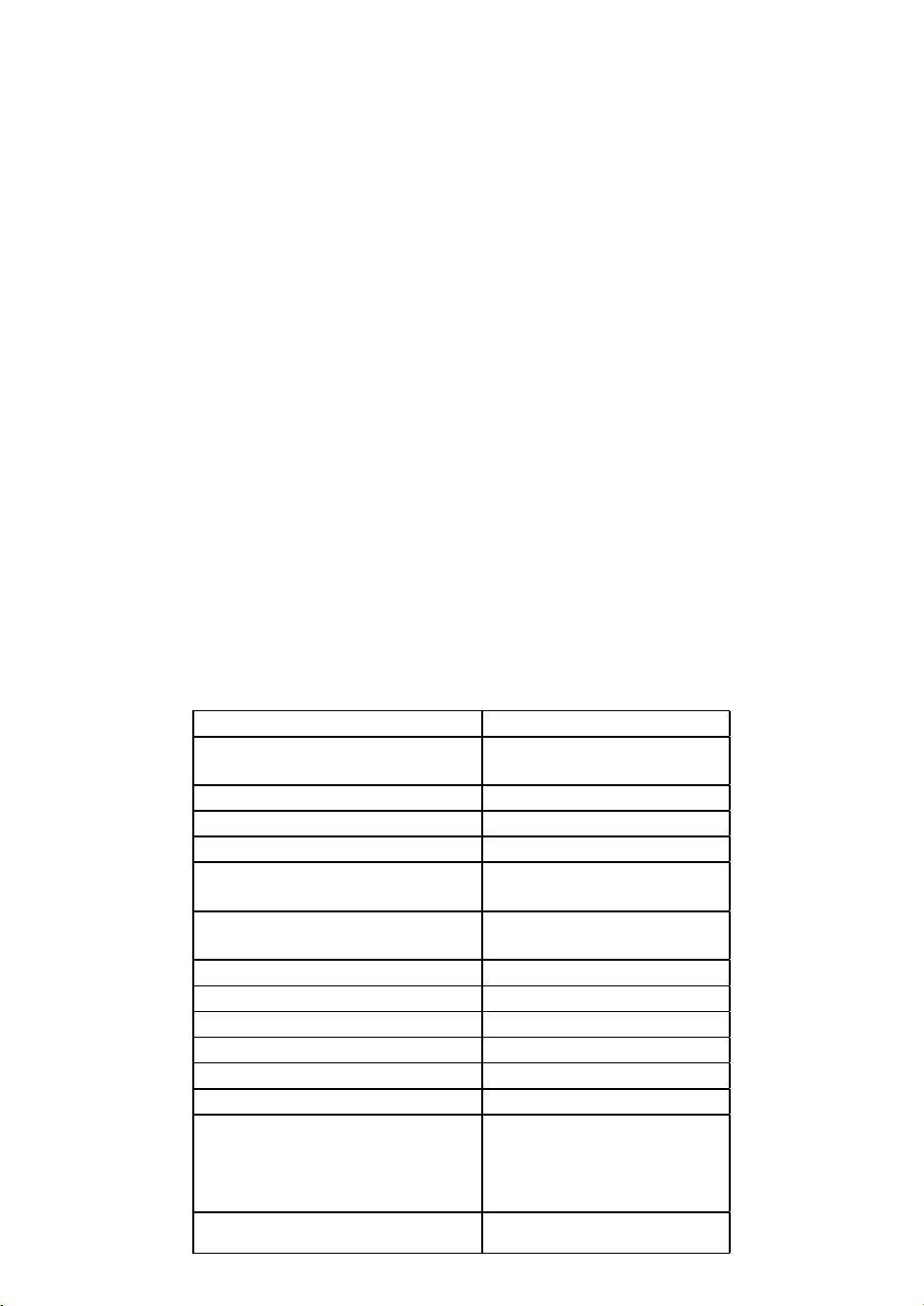
OPERATING YOUR APPLIANCE
This appliance is designed for operation at certain ambient temperatures. The climatic class is specified
on the rating plate.
The appliance may not work properly if it is left for a
long period at a temperature outside the specified
range. For example, placing your unit in extreme cold
or hot conditions may cause interior temperatures to
fluctuate. The range between 41°F and 68°F may not
be reached.
NOTE: A unit with no heater will not raise its internal temperature if the ambient temperature where the
unit is located is lower than the set temperature.
NOTE:
When you use the appliance for the first time or restart the appliance after having been shut off for a long
time, there could be a few degrees variance between the temperature you select and the one indicated on
the LED readout. This is normal and it is due to the length of the activation time. Once the unit is running
for a few hours, everything will be back to normal.
If the unit is unplugged, has lost power, or is turned off, you must wait 3 to 5 minutes before restarting the
unit. If you attempt to restart before this time delay, the unit will not start.
USE AND CONTROL – SINGLE ZONE with LED DISPLAY
The Controls of Your Unit
POWER
To turn the appliance off, lightly touch and hold the power key for 5 seconds until the temperature
display goes off.
To turn the appliance on, lightly touch and hold the power key for 1 second until the temperature display
lights up.
LIGHT
To turn the interior light on/off, lightly touch and hold the light key for 5 seconds. The interior light
indicator will light up or go out to confirm the selection.
UP
Used to increase (warm) the set temperature by 1°F.
DOWN
Used to decrease (cool) the set temperature by 1°F.
Display
Displays the digital temperature and service indicators.
Light Indicator / Multi-key Function
The interior light indicator is the dot at the bottom right of the display. The interior light indicator will light
up in showcase mode.
The interior light indicator will flash when the multi-key function is selected. To perform the multi-key
function, lightly touch and hold the first key, then touch the rest key for at least 5 seconds and then
release all keys.
Child Lock
If in 2 minutes or longer without touching any key, the child lock will be activated automatically for
models in this series.
Setting the Temperature Control
• The unit has a single adjustable temperature zone. The temperature can be set between 41°F and
68°F. It can be used as a wine maturing cabinet or a wine serving cabinet. The recommended
temperature setting range for maturing wine is between 52°F and 57°F. The recommended
temperature setting range for serving white wine is between 46°F and 50°F and for serving red wine
is between 61°F and 64°F.
• When the unit is plugged in for the first time, the unit will power up automatically to 54°F. The
temperature preset at the factory is 54°F (ideal maturing temperature).
• You can set the temperature as required by touching the UP or DOWN key. When you touch either
key at the first time, the display will show the last temperature set previously. The temperature will
increase 1°F if you touch the UP key once, or the temperature will decrease 1°F if you touch the
DOWN key once. The display flashes while you make the setting.
• After the temperature has been set, the display shows the current inner temperature.
• To view the set temperature at any time, touch the UP or DOWN key; the set temperature will
temporarily flash in the display for 5 seconds. Then the display shows the current inner temperature
again.
USE AND CONTROL – DUAL ZONE with LED
DISPLAY
The Controls of Your Unit
POWER
To turn the appliance off, lightly touch and hold the
power key for 5 seconds until temperature display
goes off.
To turn the appliance on, lightly touch and hold the
power key for 1 second until temperature display
lights up.
UP
To increase (warm) the set temperature by 1°C or 1°F.
DOWN
To decrease (cool) the set temperature by 1°C or 1°F.
LIGHT
To turn the interior light on/off, lightly touch and hold the light key for 5 seconds. The interior light
indicator will light up or go out to confirm the selection.
Display
Displays the digital temperature and service indicators.
Is for the UPPER temperature zone and is for the LOWER temperature zone.
Is for the LEFT temperature zone and is for the RIGHT temperature zone.
Light Indicator / Multi-key Function
The interior light indicator is the dot at the bottom right of the display. The interior light indicator will light
up in showcase mode.
The interior light indicator will flash when the multi-key function is selected. To perform the multi-key
function, lightly touch and hold the first key, then touch the rest key for at least 5 seconds and then
release all keys.
Child Lock
If in 2 minutes or longer without touching any key, the child lock will be activated automatically for
models with the control outside of cabinet. To cancel the lock, lightly touch the UP and DOWN keys
simultaneously for at least 5 seconds.
Setting the Temperature Control
• The unit has two separate temperature zones. The temperature of both zones can be set between
41°F and 68°F. It can be used as a wine maturing cabinet or a wine serving cabinet. For maturing
wine, the recommended temperature setting ranges of both zones should be between 52°F and
57°F. For serving wine, the recommended temperature setting range of UPPER/LEFT zone should
be between 41°F and 50°F which is ideal for serving white wine and 61°F and 64°F which is ideal for
serving red wine. The recommended temperature setting range of LOWER/RIGHT zone should be
between 59°F and 68°F which is ideal for serving wine.
• When the unit is plugged in for the first time, the unit will power up automatically to the preset
defaults. The preset temperature is the factory for UPPER/LEFT temperature zone at 54°F and for
LOWER/RIGHT temperature zone at 64°F.
• You can touch the left side UP and DOWN keys to select the internal temperature of the
"UPPER/LEFT temperature zone and touch the right side UP and DOWN keys to control the internal
temperature of the LOWER/RIGHT temperature zone. When you touch either key at the first time, the
display will show the last temperature set previously.
• IMPORTANT: For non-Twin Wine Conditioning System, the temperature set for the LOWER
temperature zone must always be just as high as or higher than that in the UPPER temperature
zone.
• The temperature that you desire to set will increase 1ºF if you touch the UP key once, on the
contrary, the temperature will decrease 1ºF if you touch the DOWN key once. The display flashes
while you make the setting.
• After the temperature has been set, the display shows the current inner temperature of the
particular temperature zone.
• To view the set temperature at any time, touch the UP or DOWN key, the set temperature will
temporarily flash in the display for 5 seconds. Then the display shows the current inner temperature
again.
SETTINGS MODE
Certain settings on the wine cabinet can only be selected in Settings mode. In Settings mode only the UP
and DOWN keys of the lower/right zone are functional for dual zone LED display units.
Touch and hold the UP key for 5 seconds to enter and leave Settings mode. The appliance will leave
Settings mode automatically after approximately one minute.
ºF/ºC Selection
Lightly touch and hold the UP key for 5 seconds to enter Settings mode.
Use the UP and DOWN keys to select the temperature display setting in Fahrenheit or Celsius degree.
Touch and hold the UP key for 5 seconds to confirm the selection.
Display Brightness
• Lightly touch and hold the UP key for 5 seconds to enter Settings mode and then touch the POWER
key once.
• Use the UP and DOWN keys to select the brightness of the display when the door is close. When the
door is open, the display brightness returns to its normal level.
- d0: off
- d1: dimmest setting (default)
- d2: medium setting
- d3: brightest setting
• Touch and hold the UP key for 5 seconds to confirm the selection.
Interior Lighting Brightness
• Lightly touch and hold the UP key for 5 seconds to enter Settings mode and then touch the POWER
key twice.
• Use the UP and DOWN keys to select the brightness of the interior lighting when the door is close.
When the door is open, the interior lighting returns to its normal level.
- L0: off when the door is close or open
- L1: dimmest setting
- L2: medium setting
- L3: brightest setting (default)
• Touch and hold the UP key for 5 seconds to confirm the selection.
Fan Mode
• Lightly touch and hold the UP key for 5 seconds to enter Settings mode and then touch the POWER
key three (3) times.
• Use the UP and DOWN keys to select the fan mode.
- F0: Silent mode - Energy-saving mode (default)
- F1: DynaClima mode - half-time
- F2: DynaClima mode - full time
• Touch and hold the UP key for 5 seconds to confirm the selection.
Audible Tones
• Lightly touch and hold the UP key for 5 seconds to enter Settings mode and then touch the POWER
key four (4) times.
• Use the UP and DOWN keys to select the audible tones.
- S0: sensor tone ON, alarm tone OFF
- S1: sensor tone ON, alarm tone ON (default)
- S2: sensor tone OFF, alarm tone OFF
- S3: sensor tone OFF, alarm tone ON
• Touch and hold the UP key for 5 seconds to confirm the selection.
TEMPERATURE DISPLAY:
• During normal operation, the temperature display on the control panel shows the temperature inside
the appliance.
- The temperature display will flash under the following conditions:
- A different temperature is being set.
• The temperature in the zone deviates by more than 5°C (9°F) from the set temperature.
• The temperature display flashing is a safety feature to ensure that temperature changes do not go
unnoticed and potentially affect the stored wine.
TEMPERATURE MEMORY FUNCTION:
In the event of a power interruption (e.g., power surge or breaker switch), the unit retains the previous
temperature settings.
When power is restored, the cabinet temperature will return to the same setting temperature as before
the power interruption, ensuring your wine is stored at the desired temperature.
TEMPERATURE ALARM:
• An audible alarm will activate if the temperature in one of the zones goes outside the temperature
range.
• The relevant temperature display will also flash when the alarm is triggered.
• The specific temperature settings determine what is considered too warm or too cool.
• The audible alarm can sound under the following circumstances:
- When you turn on the appliance, and the temperature inside is significantly different from the set
temperature.
- After a prolonged power outage.
- When a large number of items are added to the unit simultaneously or when there's a significant
influx of ambient air due to rearranging or removing items.
- When the appliance's door is not properly closed.
- If there is a fault with the appliance itself.
• The audible alarm will automatically stop, and the temperature display will cease flashing once the
set temperature is reached again.
• However, if the noise from the alarm is bothersome, you can manually turn off the audible alarm by
touching any key once, and the alarm will stop. The relevant temperature display will continue to
flash until the set temperature is achieved.
• This information provides details about the temperature display, memory function, and temperature
alarm features of the wine cabinet.
HUMIDITY ALARM:
• If your model is equipped with a humidity alarm, it will sound if the humidity inside the unit rises or
falls outside the humidity range.
• The relevant humidity display will flash, and symbols will light up to indicate too low or too high
humidity levels.
• The audible alarm will automatically silence, and the humidity display will stop flashing, along with
the symbols, when the set humidity range is reached again.
• If the noise from the alarm disturbs you, you can manually turn off the audible alarm by touching
any key once, and the alarm will stop. The relevant humidity display will continue to flash, and the
symbols will remain lit up until the set humidity is achieved. Once reached, the display will remain
constant, the symbols will go out, and the alarm system is fully active again.
DOOR ALARM:
• If the door of the unit is left open for more than 60 seconds, an audible alarm will sound.
• You can switch off the audible door alarm by closing the door or touching any key once.
AUTO DOOR OPEN SYSTEM (PushOpen DOOR FUNCTION):
• The PushOpen door function, if your model is equipped with it, is activated when the unit is
powered.
• To open the door, push the door slightly inward on the top left position for the right hinge model (or
the top right position for the left hinge model) and then release it. The door will open slightly due to
the push piston. You can then fully open the door manually.
• The push piston will automatically return to its
initial position after 2 seconds.
• Note that for models with articulated hinges, the
door will close by itself after approximately 2
seconds if you don't pull the door open
manually.
• Avoid blocking or holding the door during
opening or closing to prevent damage to the
auto door open system.
INTERIOR LIGHT / TriColor LIGHTING:
• The interior lighting in the unit helps you view your wine labels and enhances the display of your
wine collection.
• You can toggle between two modes of operation for the interior lights by touching and holding the
LIGHT key for 5 seconds:
- Functional (default) mode: Lights turn on only when the door is open and go out approximately 5
seconds after the door is closed.
- Showcase mode: Lights are on whether or not the door is open, and the light indicator will
illuminate for LED display units.
• LED type lights are used in the unit, designed for long life and not user-serviceable. If they need to
be changed, contact the service department.
• If your model has TriColor lighting, you can select the color of the interior light (amber, white, and
blue) by touching the LIGHT key. You can also toggle between single color mode and dynamic color
mode. In dynamic color mode, the light will cycle through the available colors, and touching the
LIGHT key when the desired color is on will change the interior light to that color. To return to the
dynamic color mode, touch the LIGHT key again.
DYNACLIMA / SILENT MODES:
The appliance has two different running modes: DynaClima and Silent modes.
DynaClima (Dynamic Climate) mode is designed to distribute relative humidity and temperature evenly
inside the unit. This mode is ideal for long-term wine storage and mimics the conditions of a wine cellar.
In DynaClima mode, the interior fan continues to circulate air even when the set temperature is reached,
which may result in increased noise during operation.
Silent mode, also known as energy-saving mode, operates without the fan once the set temperature is
reached, reducing noise levels.
SHABBOS MODE:
Shabbos mode is available for observing Shabbos & Yom Tov (Jewish holidays).
Activating Shabbos mode turns off the displays, interior light, sensor tones, and audible alarms,
preventing them from turning on during the observance.
Normal cooling operations continue to operate.
To initiate Shabbos mode, touch the POWER and LIGHT keys simultaneously for at least 5 seconds. The
displays and interior lights will go out to confirm that Shabbos mode is ON.
Shabbos mode can be canceled by repeating the same process, and it will automatically turn off after 96
hours.
ANTI-CONDENSATION MODE:
If your model is equipped with it, the anti-condensation mode can prevent condensation from forming on
the surface of the glass door, especially in high humidity climates.
Simply switch on this mode during periods of high humidity to eliminate condensation.
Note that using this mode will increase the energy consumption of the wine cellar, so it should be
switched off when not needed.
You can find the switch for this mode on the control panel, where "I" is ON, and "O" is OFF.
ECO DEMO MODE:
Eco Demo mode can be activated for exhibition or salesroom purposes.
In this mode, the compressor and all fan motors are switched OFF, while the lights remain ON.
For models with LED Displays, you can activate Eco Demo mode by touching and holding the "UP,"
"DOWN," and "LIGHT" keys simultaneously for at least 5 seconds.
Eco Demo mode can be canceled by repeating the same process.
BOTTLE RACKS AND STORAGE:
• The text provides important warnings and information about the proper use of bottle racks and
storage within the wine cellar.
• It emphasizes not pulling out more than one loaded shelf at a time to prevent the unit from tilting
forward.
• Stacked bottles should not be loaded on a shelf.
• Shelves should not be slid outward beyond their fixed position to prevent bottles from falling.
• To avoid damaging the door gasket, ensure the door is fully open when pulling shelves out.
• It's important not to cover any part of the shelves with materials that inhibit air circulation within the
cabinet.
• The wine racks are designed to slide out for easy access, except for the bottom fixed shelf.
• The number of bottles that can be stored may vary depending on bottle sizes and dimensions.
• Bottles can be loaded in single rows or by stacking, with some recommendations to distribute the
load evenly.
• Tips are provided for air circulation, preventing mold, and promoting temperature uniformity.
• Recommendations include not overloading the wine cellar, laying bottles flat, avoiding obstructing
internal fans, not cross-contaminating with other odors, and storing only unopened bottles to
prevent spillage.
OPERATING NOISES:
• The unit is cooled by a compressor (refrigeration aggregate), which produces operating noise as it
pumps coolant through the cooling system.
• Even when the compressor is not actively running, noises caused by temperature and pressure
changes are unavoidable.
• Operating noise is most audible immediately after the compressor starts running and becomes
quieter as the compressor continues to operate.
• Normal noises associated with the unit include gurgling sounds from the refrigerant flowing
through coils, humming noises from the motor compressor (which may become louder briefly when
the motor starts), crackling or popping sounds due to materials contracting and expanding with
temperature variations, and fan operating sounds for air circulation within the wine cabinet.
• Unusual noises are typically a result of improper installation, and tubing should not come into
contact with walls, furniture, or other tubing.
• In open-plan kitchens or partition walls, the operating noise may be more noticeable due to the
surrounding architecture.
DEFROSTING / HYGROMETRY / VENTILATION:
• The unit is equipped with an automatic defrost system that operates during the "Off-cycle."
• During defrosting, condensate collects in the drain trough behind the rear wall of the unit, and some
of it flows through the drainage hole into the drip tray near the compressor.
• Heat from the discharge pipe or compressor evaporates the collected condensation in the tray.
• Part of the remaining water is retained within the unit to maintain the required humidity level for
natural cork preservation.
• This system also provides natural ventilation and constant air circulation within the cabinet.
• Fresh air admission is permitted through the drainpipe and/or air exchange pipe, and air is
circulated using fans and open shelves.
• Manual defrosting may be required if frost accumulates on the evaporator due to repeated
openings in high heat or high humidity conditions.
WINE SERVING TEMPERATURE CHART:
• The text mentions that all wines mature at a constant temperature set between 52°F to 57°F.
• It provides a chart indicating the recommended serving temperatures for various types of wine.
However, the specific temperatures are not provided in this text. If you are interested in the
temperature recommendations for different types of wine, you may need to refer to additional
sources or wine guides.
IMPORTANT INFORMATION ABOUT TEMPERATURE:
• Your wine storage unit is designed to provide optimal conditions for storing and serving wines.
• Fine wines require specific conditions to reach their full potential, and they need long and gentle
development.
• All wines mature at the same constant temperature range, which is typically set between 11°C to
14°C (approximately 52°F to 57°F).
• The key to wine storage is not only the exact temperature but also its consistency. As long as the
temperature within your wine cellar remains constant within the specified range, your wines will be
stored under ideal conditions.
• It's important to note that not all wines improve with age. Some wines are best consumed at an
early stage (2 to 3 years), while others have the potential to age for many decades (50 years or
more). Each wine has its peak in maturity, and it's advisable to consult with your wine merchant to
get relevant information about the wines you intend to store.
• Extreme temperatures can have adverse effects on wine. If the temperature is too high (above
20°C), wine can mature too quickly, preventing the full development of aromas. On the other hand, if
the temperature is too low (below 5°C), wine cannot mature properly.
• Temperature fluctuations can also negatively impact wine by subjecting it to stress and interrupting
the maturation process. Therefore, maintaining a constant temperature is crucial for proper wine
storage.
RECOMMENDED SERVING TEMPERATURES FOR VARIOUS WINE STYLES
Wine Style °F
Champagne NV, Sparkling, Spumante 43
Dry White Semillon, Sauvignon Blanc 46
Champagne Vintage 50
Dry White Chardonnay 50
Dry White Gewürztraminer, Riesling,
Pinot grigio
50
Sweet White Sauternes, Barsac,
Montbazillac, Ice Wine, Late Harvest
50
Beaujolais 55
Sweet White Vintage: Sauternes… 57
White Vintage Chardonnay 57
Red Pinot Noir 61
Red Grenache, Syrah 61
Red Vintage Pinot Noir 65
Cabernet & Merlot: French,
Australian, New Zealand, Chilean,
Italian, Spanish, Californian,
Argentinean…
68
Vintage Bordeaux …
Room temperature not exceeding
20°C/68°F
19
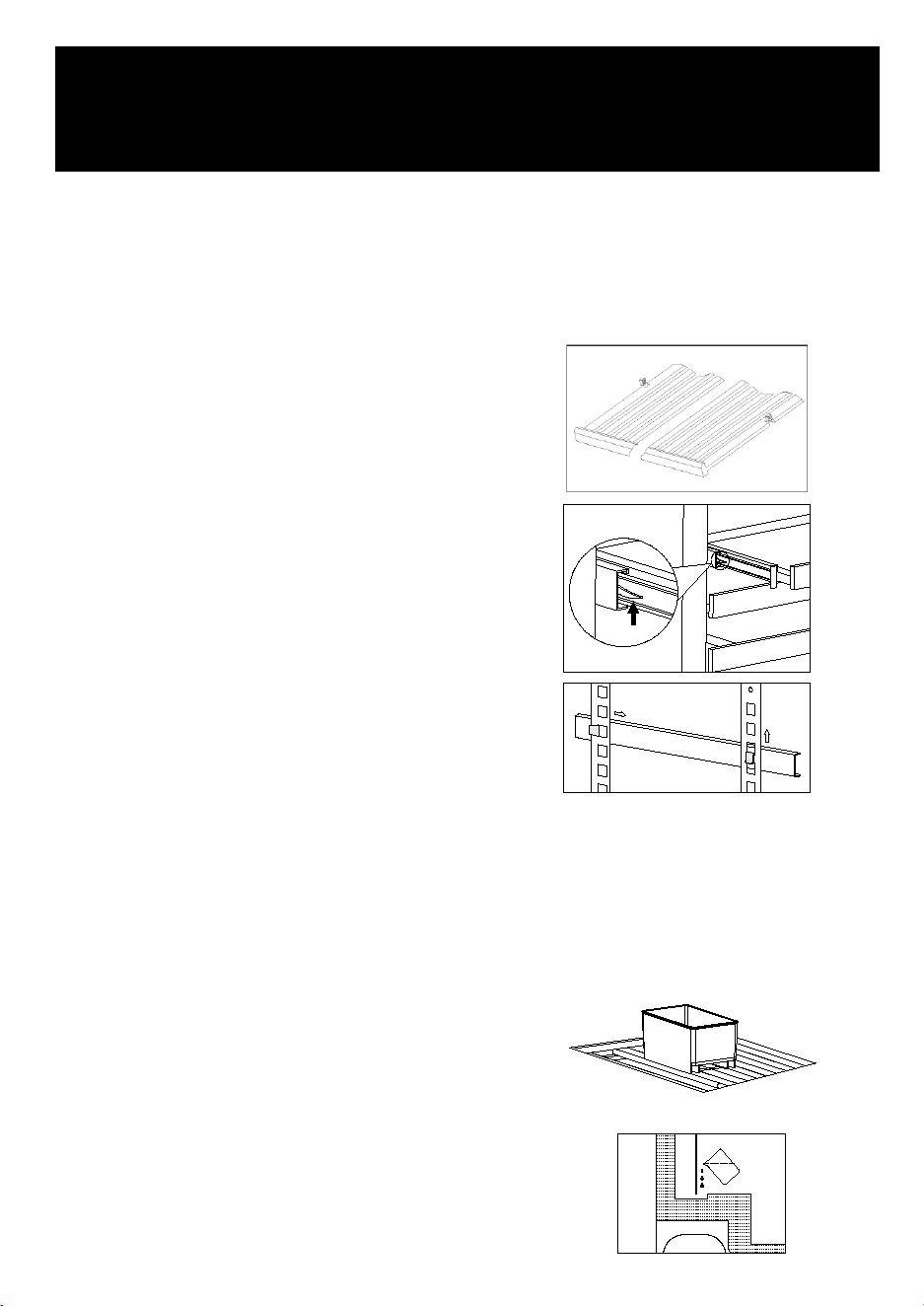
A warning is provided to emphasize the importance of unplugging the appliance during service and
cleaning to prevent electrical shock or other personal injury.
REMOVING SHELVES:
Instructions are given on how to remove shelves from
the rail compartment:
Move the shelf to the position where the notches of
the wooden shelf are exactly under the plastic rack
stops on both sides.
Lift the shelf up and out to remove it.
To replace the shelf, the steps described above
should be repeated in reverse.
For models with full extension slides, additional steps
are provided to remove and replace the shelves,
involving slide release levers.
For height-adjustable shelves, instructions are given
on how to remove tracks or ledges for sliding shelves
or storage shelves.
A caution is included to remind users to be careful
not to scratch the sides of the unit when removing or
replacing shelves.
HUMIDITY CONTROL:
• The appliance is equipped with a system for maintaining the correct level of humidity.
• In extremely dry environmental conditions, users may need to add water to the humidity box
provided with the wine cellar.
• To maintain humidity, users should fill the small plastic reservoir (humidity box) about ¾ full with
water and place it onto the runners found on the shelf of the appliance.
• It's important to regularly check the water level and refill the reservoir as needed.
• Proper positioning of the reservoir on the shelf runners is emphasized to avoid water spillage.
• When starting to use the unit for the first time,
users should add approximately 500ml of
steamed water into the drain trough softly.
• This water addition helps ensure that the unit
maintains the correct humidity level for the next
approximately six months.
• If the humidity alarm indicates a low humidity
level at any point, users should add another
500ml of steamed water into the drain trough.
• Too high humidity level inside the cabinet will
not spoil the stored wines but mildew and mould
may appear and labels may get unstuck
MAINTENANCE
20
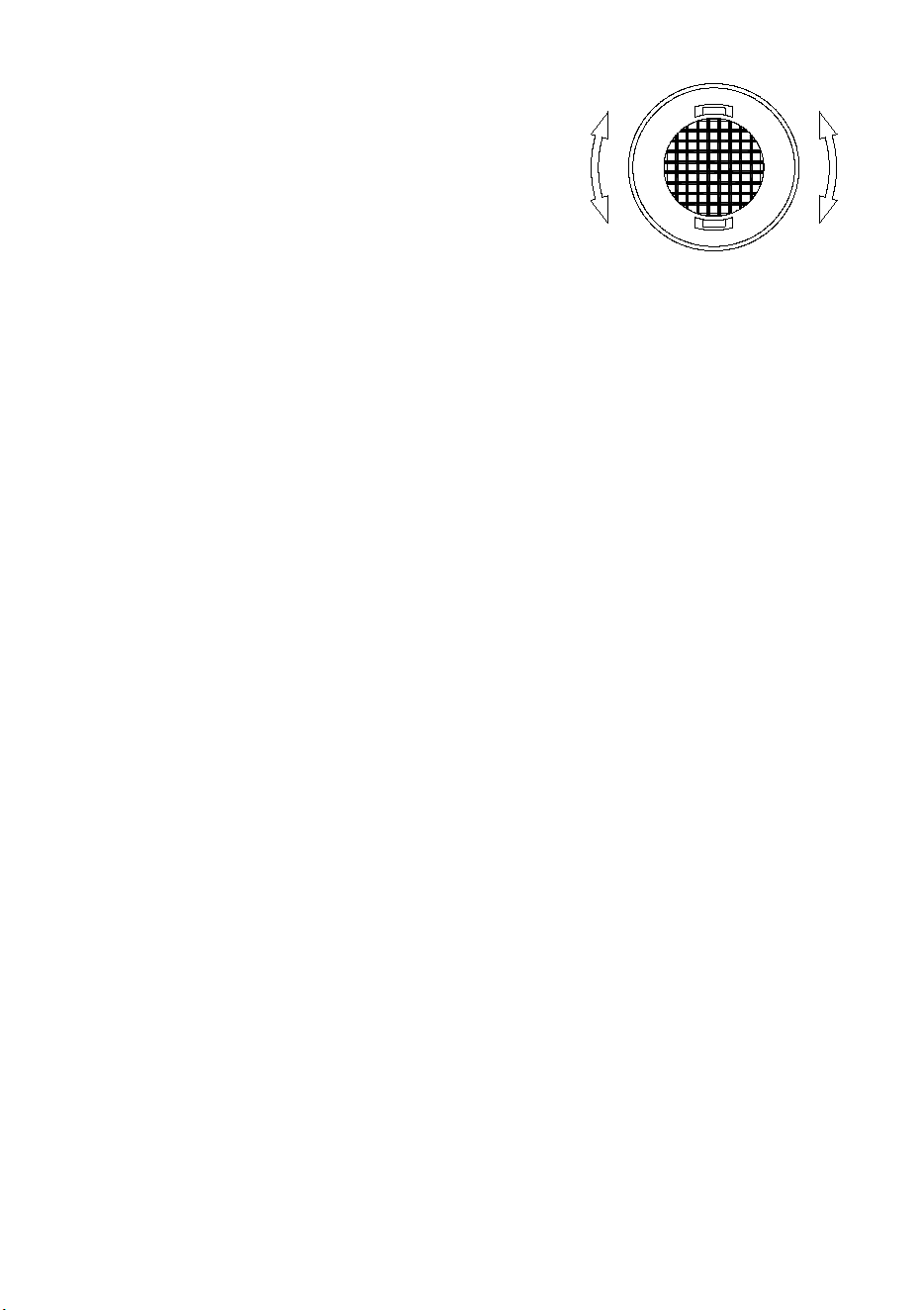
ACTIVE CHARCOAL AIR FILTER:
• The active charcoal air filter (if your model is
equipped with it) is located in the back of the
compartment.
• The active charcoal filter ensures optimum air
quality by filtering incoming air and absorbing
unwanted odors.
• It should be replaced with a new one once a year,
and replacement filters can be purchased from
your dealer or the Spare Parts Department.
• To replace the filter:
- Remove the shelf in front of the filter.
- Grip the filter and turn it 90° clockwise or counterclockwise to remove it.
- Insert the new filter in the vertical position and turn it 90° clockwise or counterclockwise until it
clicks into position.
DOOR LOCK:
• If the unit is equipped with a lock system, the keys are located inside the plastic bag that contains
the Owner’s Manual.
• Insert the key into the lock, push in, and turn it counterclockwise to unlock the door.
• To lock the door, perform the reverse operation, ensuring the metal pin is engaged completely.
• Remove the key and place it in a secure place for safekeeping.
CLEANING YOUR APPLIANCE:
• Turn off the power, unplug the appliance, and remove all items including shelves and rack.
• Wash the inside surfaces with a warm water and baking soda solution (about 2 tablespoons of
baking soda to a quart of water).
• Wash the shelves with a mild detergent solution.
• When cleaning any area of the controls, wring excess water out of the sponge or cloth.
• Clean the sealing gasket around the door regularly with clean water to prevent discoloration and
prolong service life. Ensure that it continues to provide a tight seal.
• Wash the outside cabinet with warm water and mild liquid detergent. Rinse well and wipe dry with a
clean soft cloth.
• Do not clean the stainless steel with steel wool pads. It is recommended to use an all-in-one
stainless steel cleaner and clean in the direction of the grain.
POWER FAILURE:
• In the event of a power interruption, all previous temperature settings are automatically memorized.
• If power is interrupted (power surge, breaker switch, etc.) and then powered up again, the unit will
operate with the last temperature set-point.
• Most power failures are corrected within a few hours and should not affect the temperature of your
appliance if you minimize the number of times the door is opened.
• If the power is going to be off for a longer period, take proper steps to protect your contents.
• Note: Irrespective of the cause, if you notice abnormal temperature or humidity levels inside your
unit, only long and frequent exposure to these abnormal conditions can cause a detrimental effect
on your wines.
VACATION TIME:
For short holidays (less than three weeks), it is recommended to leave the unit in operation.
For long absences, if the appliance will not be used for several months, follow these steps:
• Remove all items from the appliance.
• Turn off the appliance and unplug it.
• Clean and dry the interior thoroughly.
• To prevent odor and mold growth, leave the door open slightly, and if necessary, block it open.
MOVING YOUR APPLIANCE:
When moving your appliance, follow these steps:
• Unplug the power plug from the electrical outlet.
• Remove the contents from the racks and all moving parts from inside.
• Raise the adjustable legs up to the base to avoid damage.
• Tape the door shut and lock it if it has a lock system.
• Transport the unit only in the upright position.
• Protect the outside of the appliance with a blanket or similar item.
ENERGY SAVING TIPS:
- If the unit will be left empty for long periods, it is suggested to:
- Unplug the appliance.
- After careful cleaning, leave the door slightly ajar to allow air circulation inside the cabinet to
avoid possible condensation, mold, or odors.
• Install the appliance in the coolest area of the room, away from heat-producing appliances and
direct sunlight.
• Ensure that the unit is adequately ventilated and never cover air vents. Clean dust and dirt from the
condenser at regular intervals.
• Only open the door for as long as necessary and for as short a time as possible.
• Store the content in an organized way to optimize space utilization.
• Do not overfill the appliance to allow air to circulate effectively.
21

ACTIVE CHARCOAL AIR FILTER:
• The active charcoal air filter (if your model is
equipped with it) is located in the back of the
compartment.
• The active charcoal filter ensures optimum air
quality by filtering incoming air and absorbing
unwanted odors.
• It should be replaced with a new one once a year,
and replacement filters can be purchased from
your dealer or the Spare Parts Department.
• To replace the filter:
- Remove the shelf in front of the filter.
- Grip the filter and turn it 90° clockwise or counterclockwise to remove it.
- Insert the new filter in the vertical position and turn it 90° clockwise or counterclockwise until it
clicks into position.
DOOR LOCK:
• If the unit is equipped with a lock system, the keys are located inside the plastic bag that contains
the Owner’s Manual.
• Insert the key into the lock, push in, and turn it counterclockwise to unlock the door.
• To lock the door, perform the reverse operation, ensuring the metal pin is engaged completely.
• Remove the key and place it in a secure place for safekeeping.
CLEANING YOUR APPLIANCE:
• Turn off the power, unplug the appliance, and remove all items including shelves and rack.
• Wash the inside surfaces with a warm water and baking soda solution (about 2 tablespoons of
baking soda to a quart of water).
• Wash the shelves with a mild detergent solution.
• When cleaning any area of the controls, wring excess water out of the sponge or cloth.
• Clean the sealing gasket around the door regularly with clean water to prevent discoloration and
prolong service life. Ensure that it continues to provide a tight seal.
• Wash the outside cabinet with warm water and mild liquid detergent. Rinse well and wipe dry with a
clean soft cloth.
• Do not clean the stainless steel with steel wool pads. It is recommended to use an all-in-one
stainless steel cleaner and clean in the direction of the grain.
POWER FAILURE:
• In the event of a power interruption, all previous temperature settings are automatically memorized.
• If power is interrupted (power surge, breaker switch, etc.) and then powered up again, the unit will
operate with the last temperature set-point.
• Most power failures are corrected within a few hours and should not affect the temperature of your
appliance if you minimize the number of times the door is opened.
• If the power is going to be off for a longer period, take proper steps to protect your contents.
• Note: Irrespective of the cause, if you notice abnormal temperature or humidity levels inside your
unit, only long and frequent exposure to these abnormal conditions can cause a detrimental effect
on your wines.
VACATION TIME:
For short holidays (less than three weeks), it is recommended to leave the unit in operation.
For long absences, if the appliance will not be used for several months, follow these steps:
• Remove all items from the appliance.
• Turn off the appliance and unplug it.
• Clean and dry the interior thoroughly.
• To prevent odor and mold growth, leave the door open slightly, and if necessary, block it open.
MOVING YOUR APPLIANCE:
When moving your appliance, follow these steps:
• Unplug the power plug from the electrical outlet.
• Remove the contents from the racks and all moving parts from inside.
• Raise the adjustable legs up to the base to avoid damage.
• Tape the door shut and lock it if it has a lock system.
• Transport the unit only in the upright position.
• Protect the outside of the appliance with a blanket or similar item.
ENERGY SAVING TIPS:
- If the unit will be left empty for long periods, it is suggested to:
- Unplug the appliance.
- After careful cleaning, leave the door slightly ajar to allow air circulation inside the cabinet to
avoid possible condensation, mold, or odors.
• Install the appliance in the coolest area of the room, away from heat-producing appliances and
direct sunlight.
• Ensure that the unit is adequately ventilated and never cover air vents. Clean dust and dirt from the
condenser at regular intervals.
• Only open the door for as long as necessary and for as short a time as possible.
• Store the content in an organized way to optimize space utilization.
• Do not overfill the appliance to allow air to circulate effectively.
22
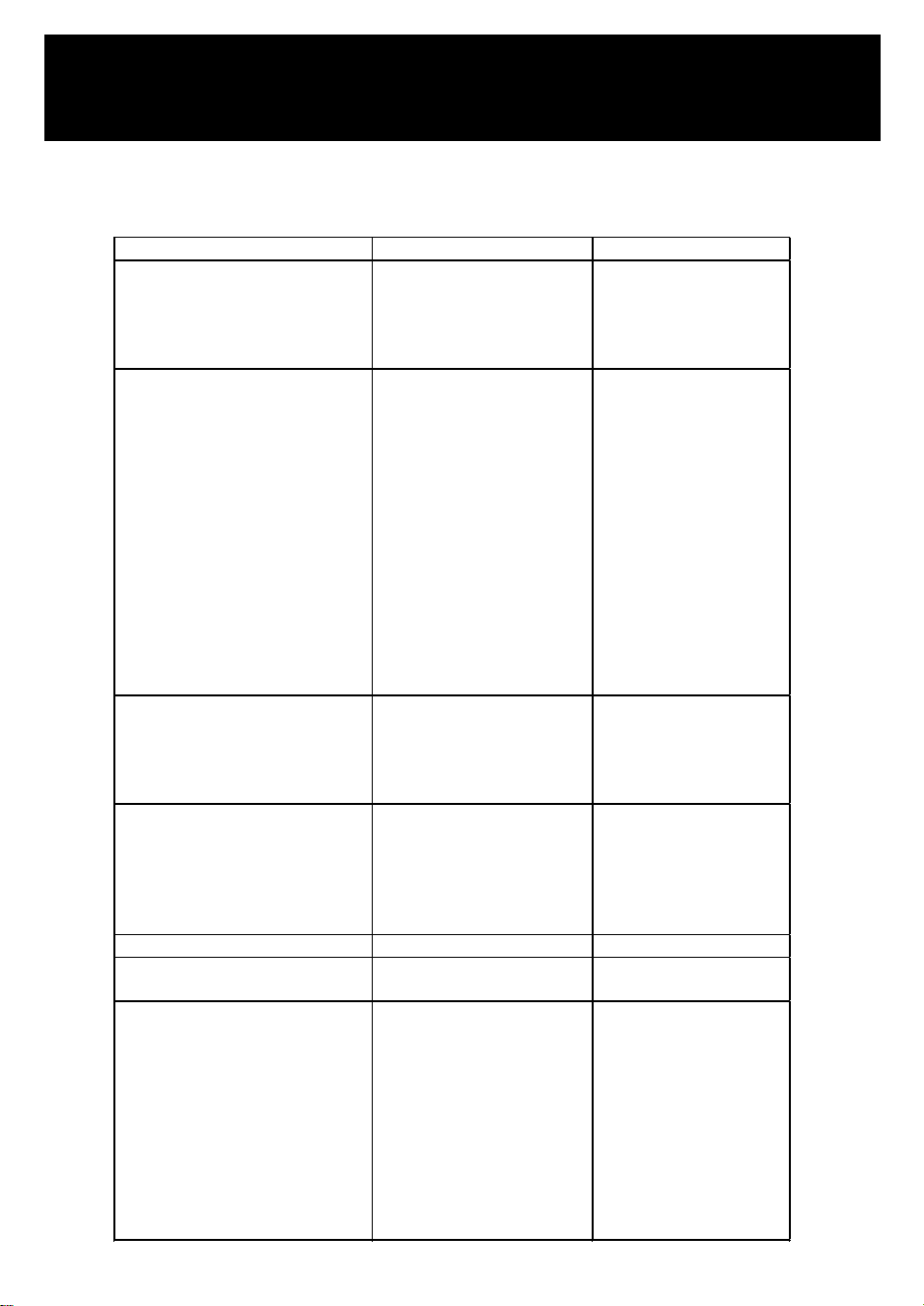
PROBLEM POSSIBLE CAUSE REMEDY
Nothing works. Appliance does not
operate.
Appliance is not connected to a
power supply. The appliance is
turned off. Circuit breaker has
tripped or a fuse has blown.
Connect the appliance.
Switch on the appliance.
Switch on circuit breaker or
replace fuse.
Appliance is not cold enough.
The temperature is not set
correctly. The ambient
temperature could require a
different temperature setting.
The door was opened too
often. The door was not closed
completely. Door is not
hermetically sealed. The
condenser is too dirty. The
ventilation opening is blocked
or too dusty. The room
temperature is higher than
average. A large amount of
bottles has been added to the
unit.
Check the set temperature.
Set a different temperature.
Do not open the door more
often than necessary. Close
door properly. Check the
door seal and clean or
replace. Clean the
condenser when necessary.
Clear the obstructions and
clean off the dust. Put the
appliance in a cooler place.
Leave the appliance to work
for a while until the set
temperature has been
reached.
Appliance turns itself on and off
frequently.
The door is opened too often.
The door is not closed
completely. The door gasket
does not seal properly.
Do not open the door more
often than necessary. Close
door properly. Check the
door seal and clean or
replace.
The light does not come on.
Appliance is not connected to a
power supply. Circuit breaker
has tripped or a fuse has
blown. The light was switched
off on the control panel. Light
malfunctioning.
Connect the appliance.
Switch on circuit breaker or
replace fuse. Switch on the
light. Call for service to have
it replaced.
Door will not open. Door locked. Unlock the door.
Vibrations.
The appliance is not properly
level.
Level the appliance with the
adjustable feet.
The appliance seems to make too
much noise.
The rattling noise may come
from the flow of the refrigerant,
which is normal. As each cycle
ends, you may hear gurgling
sounds caused by the flow of
refrigerant in your appliance. If
temperature fluctuations occur,
the contraction and expansion
of the inner walls may cause
popping and crackling noises.
-
PROBLEMS WITH YOUR APPLIANCE
You can solve many common problems easily, saving you the cost of a possible service call. Try the
suggestions below to see if you can solve the problem before calling customer service.
TROUBLESHOOTING
23
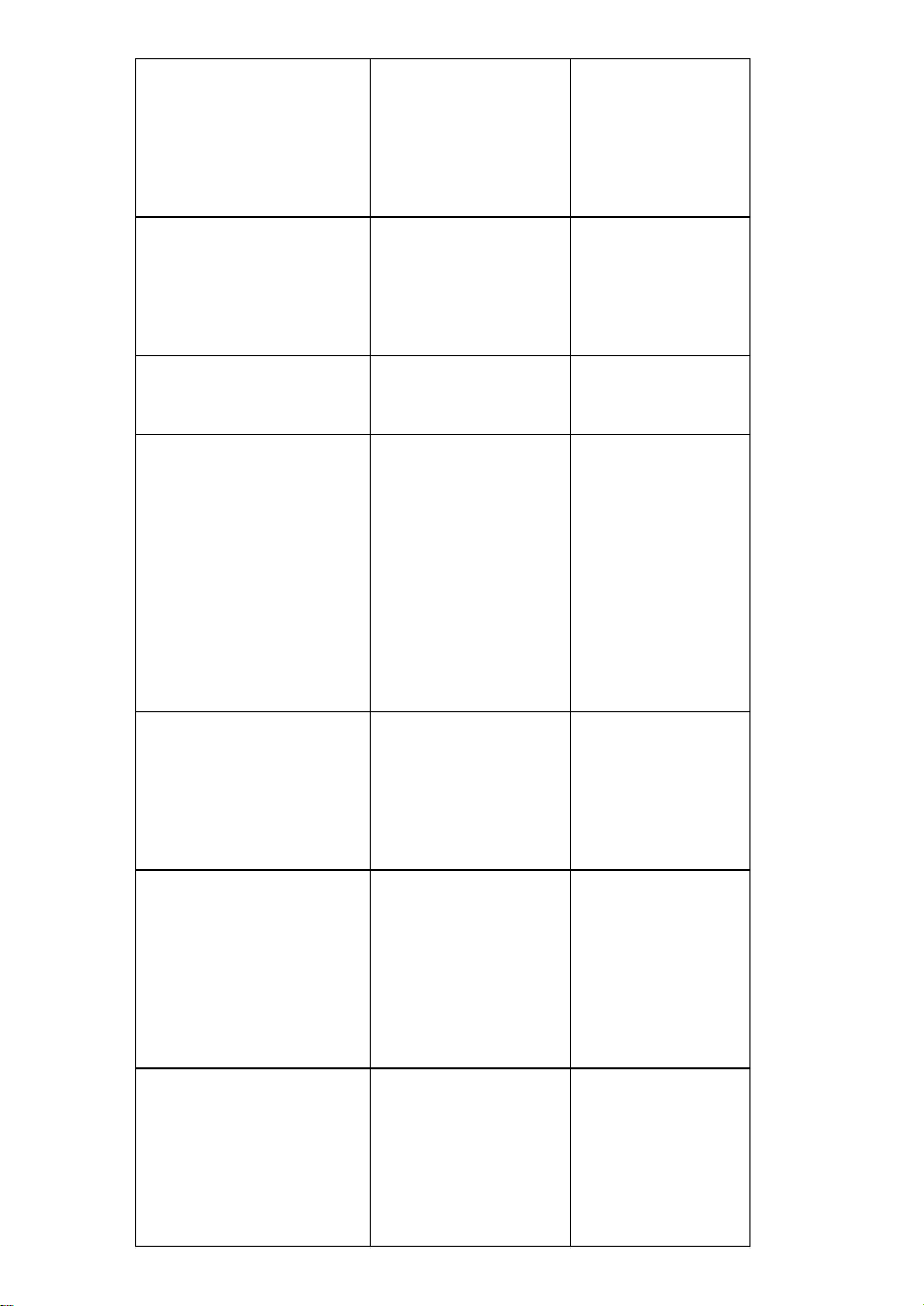
The door will not close properly.
The appliance is not properly
level. The door was reversed
and not properly re-installed.
The gasket is dirty. The shelves
are out of position.
Level the appliance with the
adjustable feet. Level the
appliance with the
adjustable feet. Check the
door hinge and reassemble
correctly. Clean the door
gasket. Check the shelves
and refit correctly.
E0, E1, E2, E3, E4, E5, E6, E7, E8, E9,
Ec or Et appears on the display.
Error codes.
Try resetting the controls by
disconnecting power to the
unit for 5 minutes, then
reconnect. If error code
returns, problem cannot be
resolved by user. Call for
service.
Alarm sounds and temperature
display NOT flashing (door alarm).
Door has been left open longer
than 60 seconds.
Close door, or touch any
key to disable alarm. Alarm
will reset when door is
closed.
The alarm sounds AND the
temperature display flashes
(temperature alarm).
Has the appliance door been
open for longer than 60
seconds? If not, then the
temperature has risen higher or
fallen lower than the
temperature that has been set.
This could be due to: - The
appliance door being opened
too often. - The ventilation
opening being covered or too
dusty. - A lengthy interruption
to the power supply. - A large
amount of bottles has been
added to the unit.
If yes, close the door. - Do
not open the door more
often than necessary. - Clear
the obstructions and clean
the dust. - Leave the
appliance to work for a
while until the set
temperature has been
reached.
The icon dashes “--” is lit up and
flashing in the temperature display.
The temperature display is out
of the range.
If the temperature is not
within this range that the
appliance is able to display,
the icon dashes “--” will be
displayed instead. That is
normal. Keep door closed
and allow unit to cool to set
temperature.
Condensation on outside surfaces of
glass door
High humidity climate.
During periods of high
humidity, some
condensation may appear
on outside surfaces of glass
door. It will disappear when
humidity levels drop. It is
advisable to install the
appliance in a dry sufficient
ventilation area with and/or
an air-conditioned place.
The wooden shelves are warping.
Volume change due to moisture
absorption or drying out is a
typical characteristic of wood.
An increase in humidity will
cause wooden components to
warp, which can lead to
cracking. Knots and grain
patina are part of the natural
character of wood.
Replace the shelves if need.
24

LIMITED WARRANTY
Koolmore Supply, Inc. extends a limited warranty to the original purchaser, guaranteeing that this Koolmore
product is free from manufacturing defects in material or workmanship for one year from the date of
purchase.
Should you discover any such defect within the warranty period, Koolmore Supply, Inc., reserves the right to
repair or replace the product without charge, or to cover the cost of replacement parts and repair labor needed
to correct defects present at the time of purchase or resulting from regular usage, when the appliance has been
installed, operated, and maintained as per the instructions provided.
At its sole discretion, Koolmore Supply Inc. may decide to replace the product. In such an event, your replace-
ment appliance will carry the warranty for the remaining term of the original unit's warranty period.
This warranty is valid exclusively to the original purchaser of the product and only applicable within the United
States. The warranty commences from the date of original consumer purchase. Proof of the original purchase
date will be required to obtain service under this warranty.
Under this limited warranty, your sole and exclusive remedy will be product repair, as outlined above. All
services must be provided by a Koolmore-designated service company.
To claim warranty or request repair service:
Email [email protected]. Please include your name, address, phone number, warranty repair request,
and a copy of your proof of purchase receipt. Alternatively, visit koolmore.com and use the contact us page. A
Koolmore customer service representative will promptly arrange service for your appliance.
We thank you for choosing Koolmore.
WARRANTY EXCLUSIONS
This limited warranty will not cover:
1. Failure of the product to perform during power failures or interruptions,
or due to inadequate electrical service.
2. Damage incurred during transportation or handling.
3. Damage caused by accidents, vermin, lightning, winds, fire, floods, or acts of God.
4. Damage resulting from accidents, alterations, misuse, abuse, improper installation, repair, or
maintenance. This includes using any external device that alters or converts the voltage or
frequency of electricity.
5. Unauthorized product modifications, repairs by unauthorized centers, or use of non-approved
replacement parts.
6. Abnormal cleaning and maintenance not aligned with the user's manual.
7. Use of incompatible accessories or components.
8. Any costs associated with repairs or replacements under these excluded circumstances shall be
the responsibility of the consumer.
WARRANTY
25