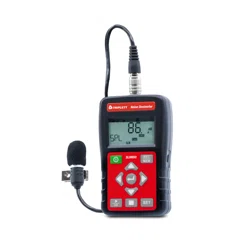
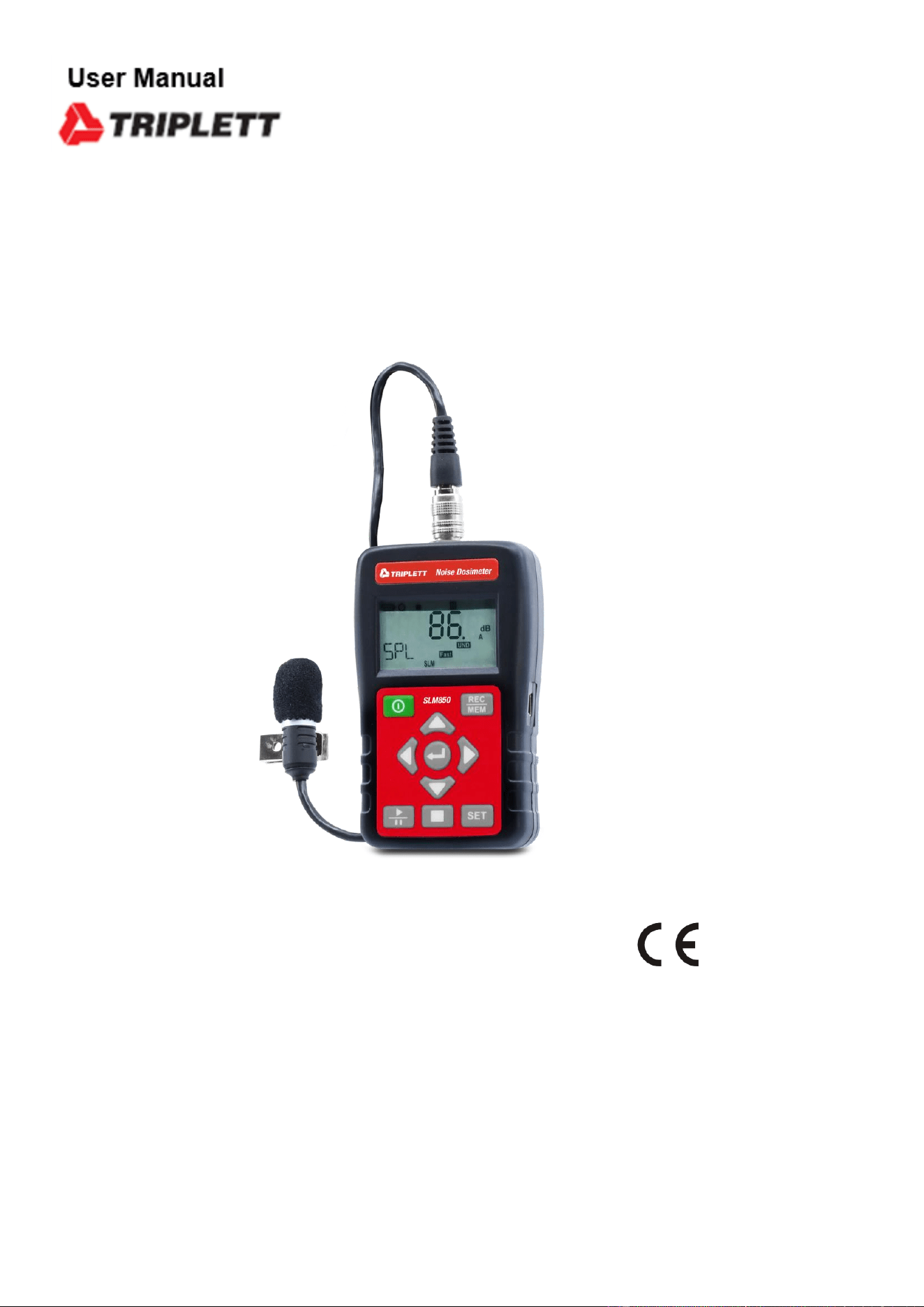
SLM850
Noise Dosimeter


Contents:
1. SAFETY PRECAUTIONS ......................................................................................................... 3
1.1. Preliminary Description ..................................................................................................... 3
1.2. Note ................................................................................................................................... 3
2. PREPARATION FOR USE ....................................................................................................... 4
2.1. Initial .................................................................................................................................. 4
2.2. Supply Voltage .................................................................................................................. 4
2.3. Calibration ......................................................................................................................... 4
2.4. Storage .............................................................................................................................. 4
3. INSTRUMENT INSTRUCTIONS ............................................................................................... 5
3.1. Instrument Description ...................................................................................................... 5
3.1.1. Controls Description ................................................................................................................... 5
3.1.2. Display Description ..................................................................................................................... 6
3.1.3. ST-130S Microphone .................................................................................................................. 7
3.2. Noise Does Measurement Procedures ............................................................................. 7
3.3. Sound Level Measurement Procedures ............................................................................ 8
3.4. Auto Data Record .............................................................................................................. 9
3.5. Single Data Record ........................................................................................................... 9
3.6. Viewing Logged Reading .................................................................................................. 9
3.7. Set Mode ......................................................................................................................... 10
3.7.1. Test Mode Set ......................................................................................................................... 10
3.7.2. Auto Power Off Set ................................................................................................................... 10
3.7.3. Sampling Time & Auto Record Set ........................................................................................... 11
3.7.4. Real Time Clock Set ................................................................................................................. 11
3.7.5. 94dB Offset Adjust Set ............................................................................................................. 11
3.7.6. Noise Standard Set .................................................................................................................. 12
3.7.7. SLM Function Set .................................................................................................................... 12
4. SOFTWARE ............................................................................................................................ 13
4.1. System Requirements ..................................................................................................... 13
4.2. Software Description ....................................................................................................... 13
4.3. Tools Description ............................................................................................................. 14
4.4. Open File ......................................................................................................................... 14
4.4.1. Zoom Function .......................................................................................................................... 14
4.4.2. Deag function ........................................................................................................................... 14
4.5. Option .............................................................................................................................. 15
4.5.1. PC Setting ................................................................................................................................. 15
4.5.2. Meter Setting ............................................................................................................................ 15
4.5.3. Dose Setting ............................................................................................................................. 15
4.6. Print Noise Dose Report .................................................................................................. 16
4.7. Sound level chart & Noise dose chart (LN %) ................................................................. 16
4.8. Enable PC data logger .................................................................................................... 17
4.9. Dowload Record data ...................................................................................................... 17
4.10. Erase Record data .......................................................................................................... 17
5. EXPLANATION ....................................................................................................................... 18
5.1. 1. Measurement Parameters: .......................................................................................... 18
5.2. A, C, Z Weighting Instruction: .......................................................................................... 19
5.2.1. Input interface ........................................................................................................................... 19
6. MAINTENANCE ...................................................................................................................... 20
6.1. General Information ......................................................................................................... 20
6.2. Battery Replacement ....................................................................................................... 20
6.3. Cleaning .......................................................................................................................... 20
6.4. End of Life ....................................................................................................................... 20
7. TECHNICAL SPECIFICATIONS ............................................................................................. 21
7.1. Feature ............................................................................................................................ 21
7.2. Environment .................................................................................................................... 22
7.2.1. Environmental Conditions ......................................................................................................... 22

EN - 2
7.2.2. EMC .......................................................................................................................................... 22
7.3. Accessories ..................................................................................................................... 22
8. SERVICE ..................................................................... ERROR! BOOKMARK NOT DEFINED.
8.1. Warranty Conditions .......................................................... Error! Bookmark not defined.
8.2. Service .............................................................................. Error! Bookmark not defined.
EN - 3
1. SAFETY PRECAUTIONS
When taking measurements:
˙ Avoid doing measurements in humid or wet places - make sure that humidity is
within the limits indicated in section “environmental conditions”.
˙ Avoid doing measurements in presence of explosive gas, combustible gas, steam or
excessive dust.
The following symbols are used:
Caution: refer to the user’s manual. An incorrect use may damage the
tester or its components
The instrument conforms to the CE standard
1.1. Preliminary Description
The ST-130/ST-130s is designed to test noise exposure in accordance with
OSHA,MSHA,DOS,ACGIH, and ISO standards.
Fast and easy on-site surveys help determine noise reduction requirements.
The meter can also be used in SLM(sound level meter)mode.
The SLM mode has a datalogging feature that can record up to 1000K readings
which can be downloand to PC for analysis.
The built-in USB interface to connect PC.
Applications: Evaluation of environmental noise, Measurements of noise at
workplaces, Assessment of product noise.
1.2. Note
CAUTION
Does not observe the warning and/or operation instruction, it’s
possible to damage the instrument either its components or the
operator
˙ Do not operate the instrument at temperature and humidity environment beyond
to reference conditions of chapter 7.2.1.
˙ Keep the microphone dry and avoid severe vibration.
˙ Wind blowing across the microphone would bring additional extraneous noise.
Once using the instrument in the presence of wind, it must mount the windscreen to
prevent the undesirable signals.
EN - 4
2. PREPARATION FOR USE
2.1. Initial
The instrument has been checked mechanically and electrically prior to shipment.
Take care to ensure the instrument reaches you undamaged.
However, it is wise to carry out a rapid check in order to detect any possible damage that
may cause during transport.
If its damage, claims to the dealer immediately.
Check the packaging content according to packing list reported in 7.3.1 chapter. In case
of discrepancies, contact the dealer immediately.
In the event of re-shipment of the instrument please follow the instructions reported in
chapter.
2.2. Supply Voltage
The instrument is powered by batteries.
When battery voltage is low than low battery voltage, turn on low battery symbol.
.
CAUTION
If you don’t use the instrument for a long period, please take the
batteries out to prevent eventual acid leakage from damaging the
instrument
2.3. Calibration
The instrument complies with the technical specifications contained in this manual and
such compliance is guaranteed for 1 year. The instrument is maybe need recalibration
after one year.
2.4. Storage
After a period of storage in extreme environmental conditions exceeding the limits
mentioned in paragraph 7.2.1 let the instrument return to normal measuring conditions
before using it.
EN - 5
3. INSTRUMENT INSTRUCTIONS
3.1. Instrument Description
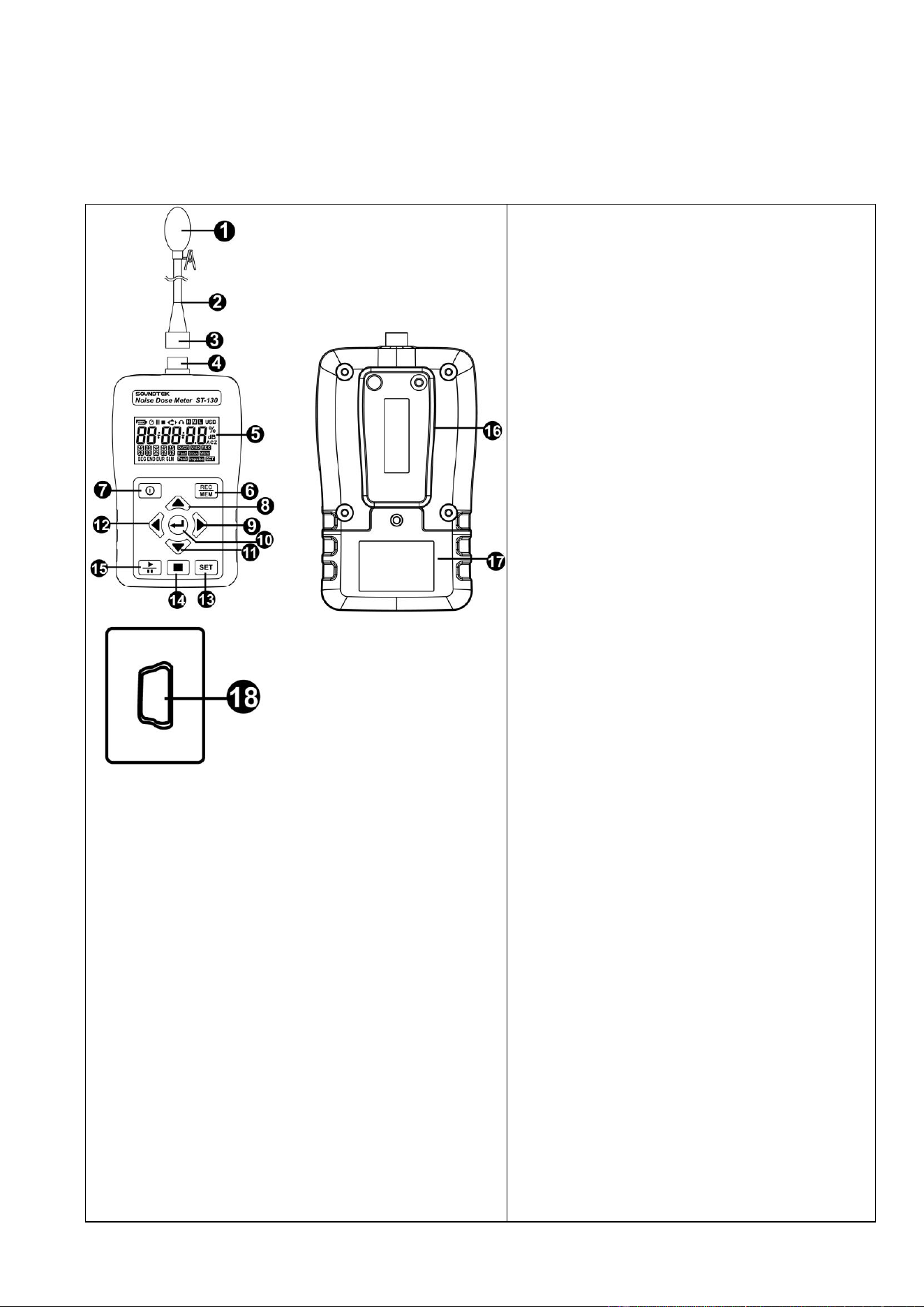
3.1.1. Controls Description
1. Microphone
2. Microphone Cable
3. Microphone Connector (Male)
4. Microphone Connector (Female)
5. LCD Display
6. Record dada / Reading Record
dada button
7. Power ON/OFF Button
8. UP Button
9. Right Button
10. Enter Button
11. Down Button
12. Left Button
13. SET Button
14. Stop Button
15. Start /Pause Button
16. Belt clip
17. Battery Cover
18. USB Interface
EN - 6
3.1.2. Display Description
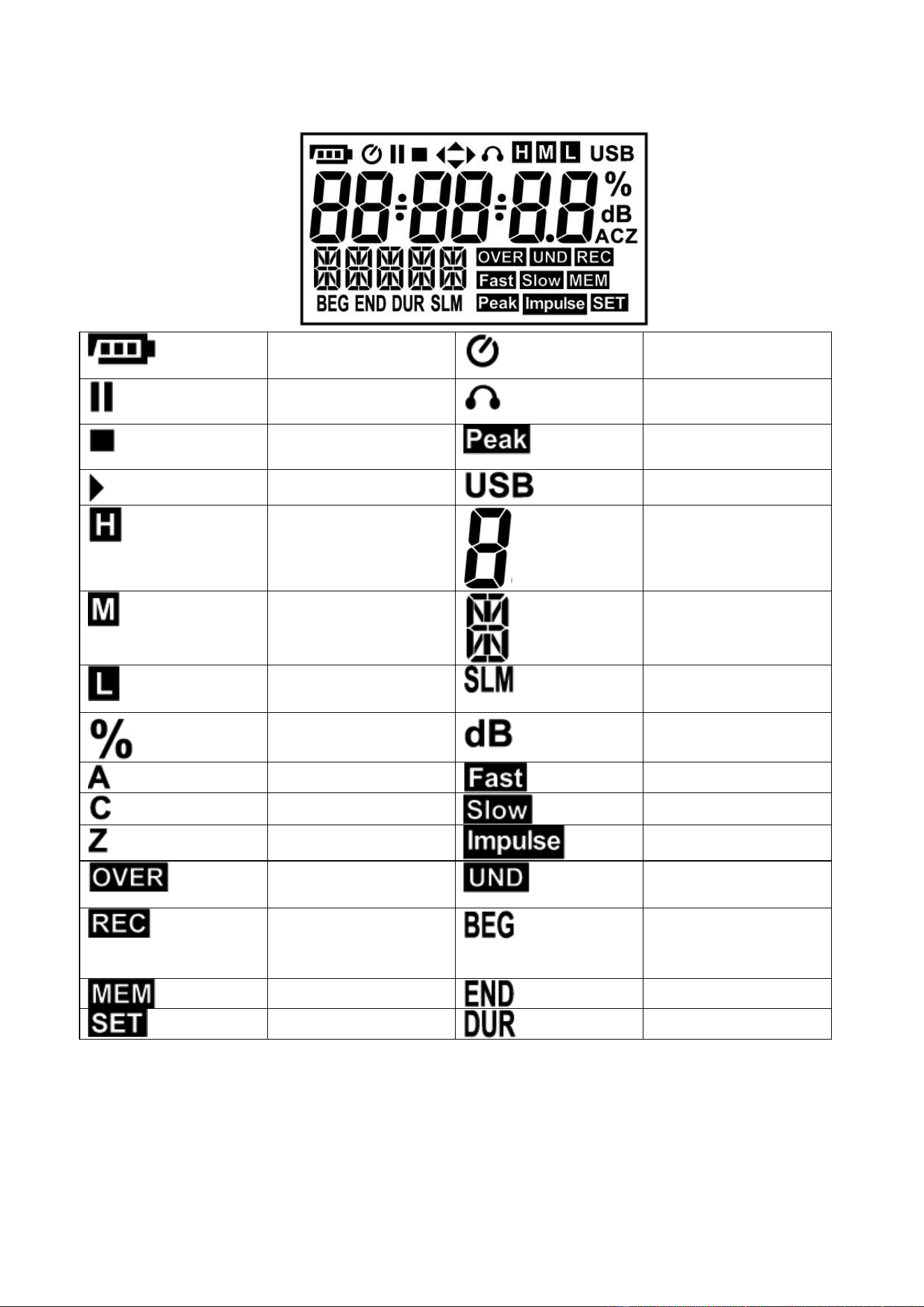
Low Battery
Auto Power Off
Enable
Pause
115dB
indicator(SPL)
Stop
140 dB
indicator(Peak)
Start
USB Interface
SPL Hi dB Range
(140~70)
dB Display
SPL Mid dB
Range (110~50)
Testing mode
SPL Lo dB Range
(90~30)
Sound Level Meter
mode
Noise Dose %
Sound Noise dB
A Weighting
Fast Weighting
C Weighting
Slow Weighting
Z Weighting
Impulse Weighting
dB test data > Hi
level
dB test data < Lo
level
Solid:Auto Record
standby ;Flashing
Recording
Start test time
Visit record data
Stop test time
SET mode turn on
Test duration
EN - 7
3.1.3. ST-130S Microphone
˙ Diameter : 1/2 inch
˙ Polarization voltage : 0V
˙ Dynamic range : 25dBA ~140dB
˙ Sensitivity : -32±3dB (250Hz 0dB=1V/Pa)
˙ Free field frequency response : ±2dB(25Hz~12.5kHz)
Frequency (KHz)
Deviation of pressure
0.25
0.0
1
-0.1
2
-0.5
3
-0.6
4
-0.9
5
-1.2
6
-1.7
7
-2.2
8
-2.8
9
-3.3
10
-4.1
12.5
-6.0
3.2. Noise Does Measurement Procedures
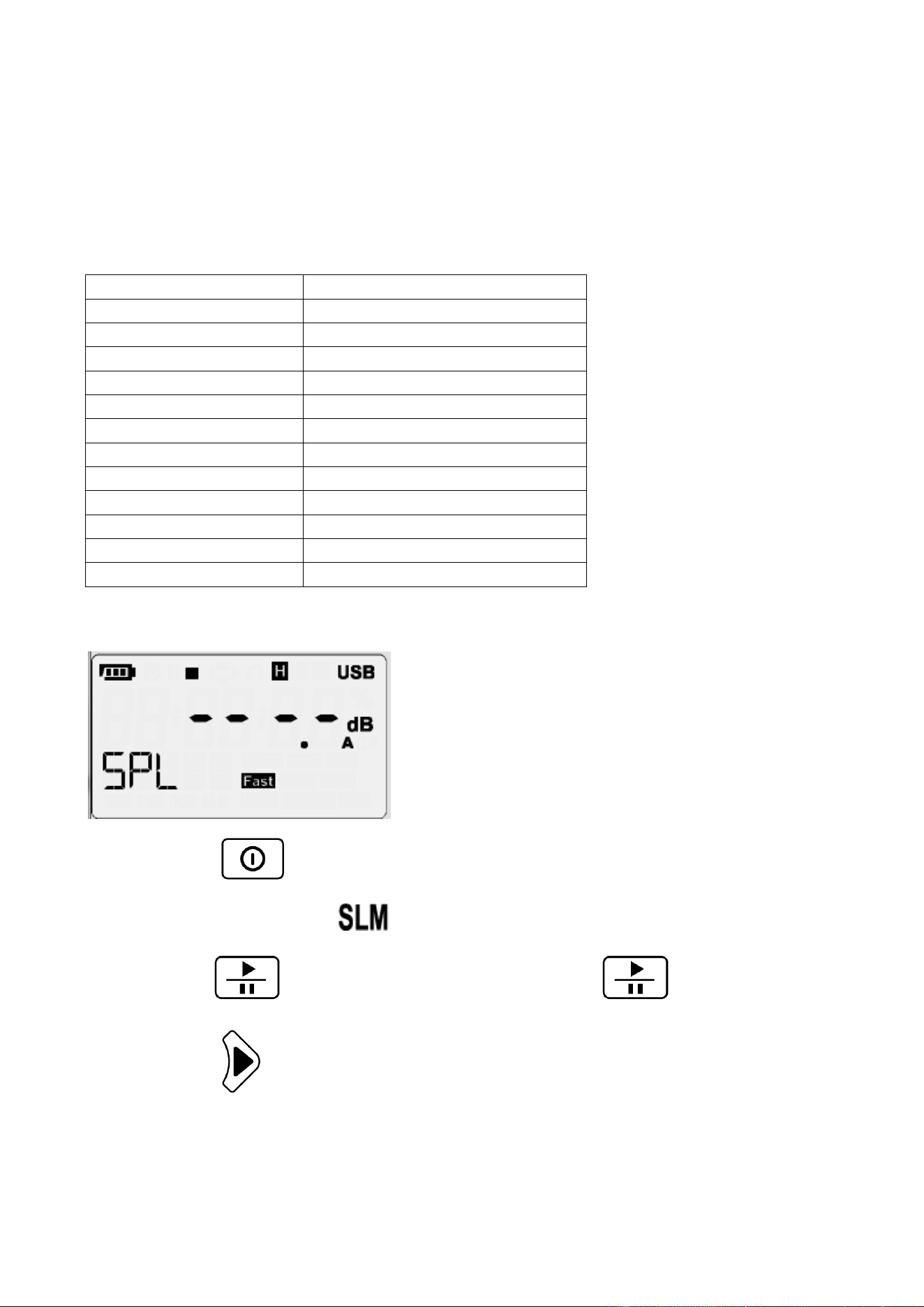
⚫ Press turn on meter
⚫ LCD do not display symbol.
⚫ Press turn on noise dose testing. ,press again pause testing.
⚫ Press select testing information
◎ SPL→Dose%→LPMAX→LPMIN→PKMAX→LEQ→SEL→LEP8→TWA8→
LVAG→LN%
EN - 8
⚫ Press to observe testing date information. Press change date
dispaly information.
◎ Time(hh:mm:ss)→date(YY-DD-MM)
⚫ Press stop testing
3.3. Sound Level Measurement Procedures
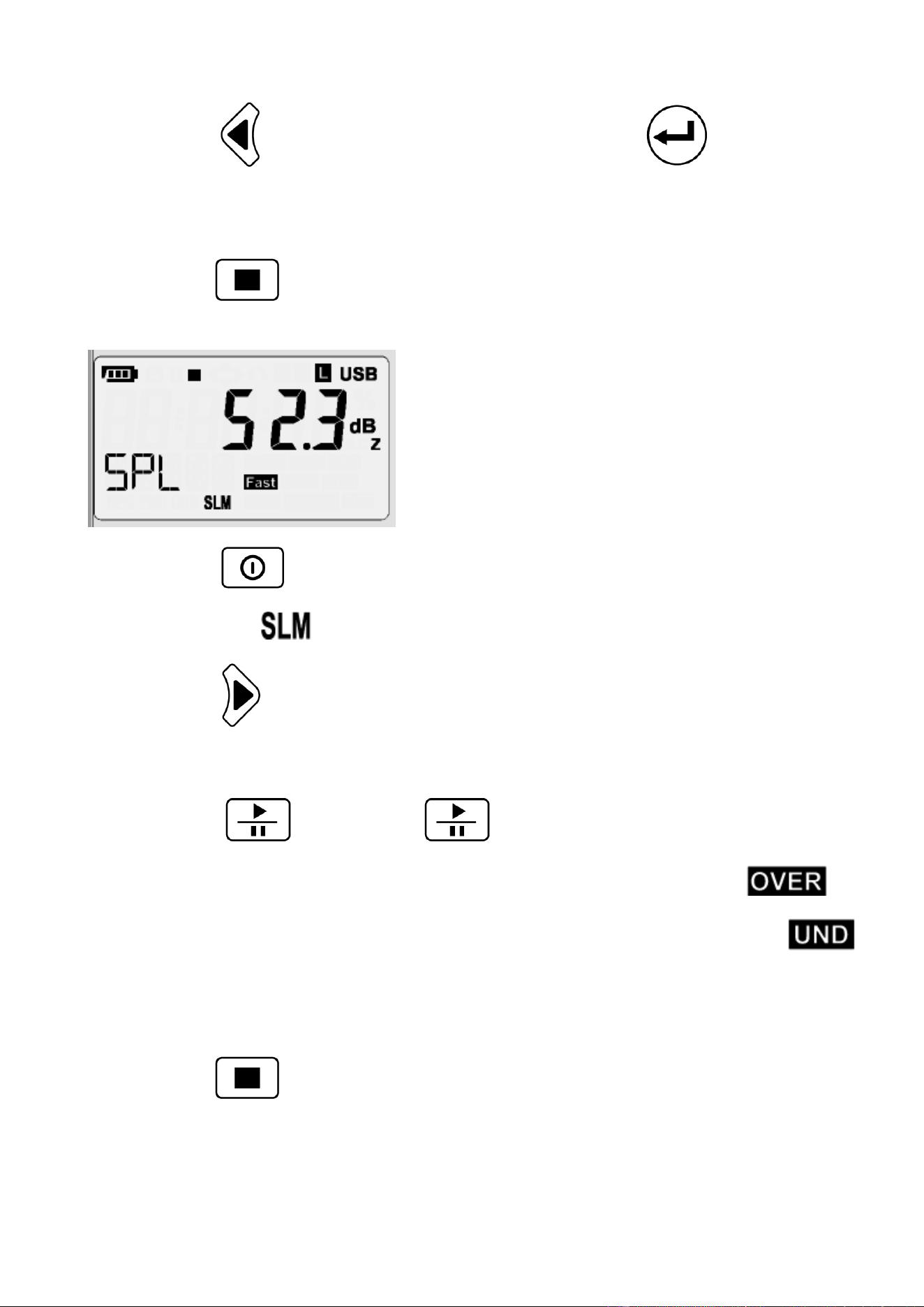
⚫ Press turn on meter
⚫ LCD show symbol
⚫ Press button to select test function.
◎ SPL→Leq→SEL→PeakMAX
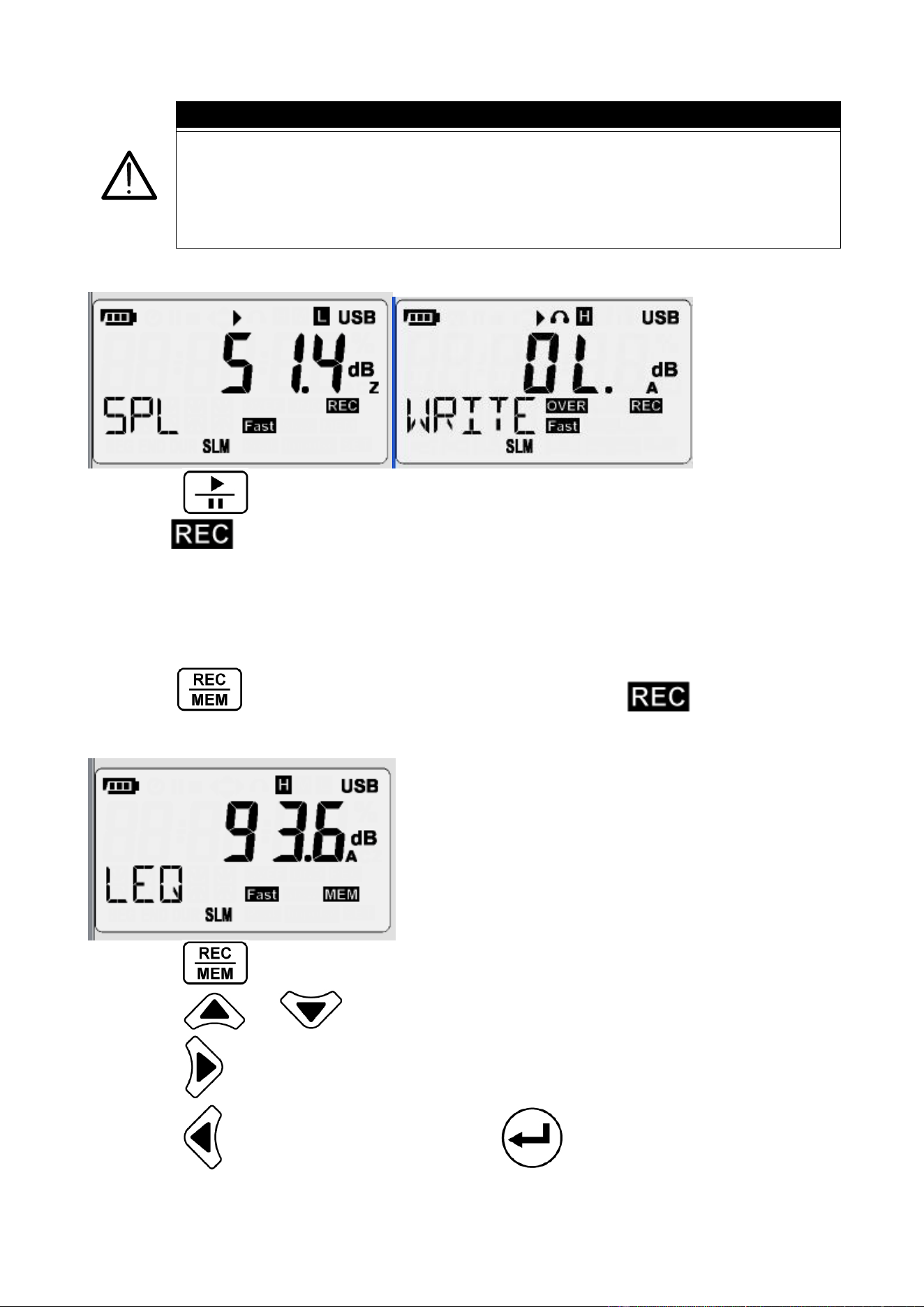
⚫ Press testing , Press again pause testing
⚫ If test data big than HI test range at the same time LCD showing
⚫ If test data small than Low test range at the same time LCD showing
⚫ Leq integral time setting and the same sampling time
⚫ When the sampling time is set to zero, the integration time until the user exits
⚫ Press stop testing
EN - 9
CAUTION
Wind blowing across the microphone would bring additional
extraneous noise. Once using the instrument in the presence of wind
with speed higher than 10m/s, it must mount the windscreen to
prevent the undesirable signals. Keep the microphone dry and avoid
severe vibration.
3.4. Auto Data Record
˙ Press enabled Auto Record function.
˙ LCD symbol will be flash.
˙ The bottom left of LCD display ”Write” , this mean the data will be writing to memory.
˙ The bottom left of LCD display”FULL”, this mean the data will be full.
˙ Auto Record function can not use menu record.
3.5. Single Data Record
˙ Press each time to store the display reading and symbol flash.
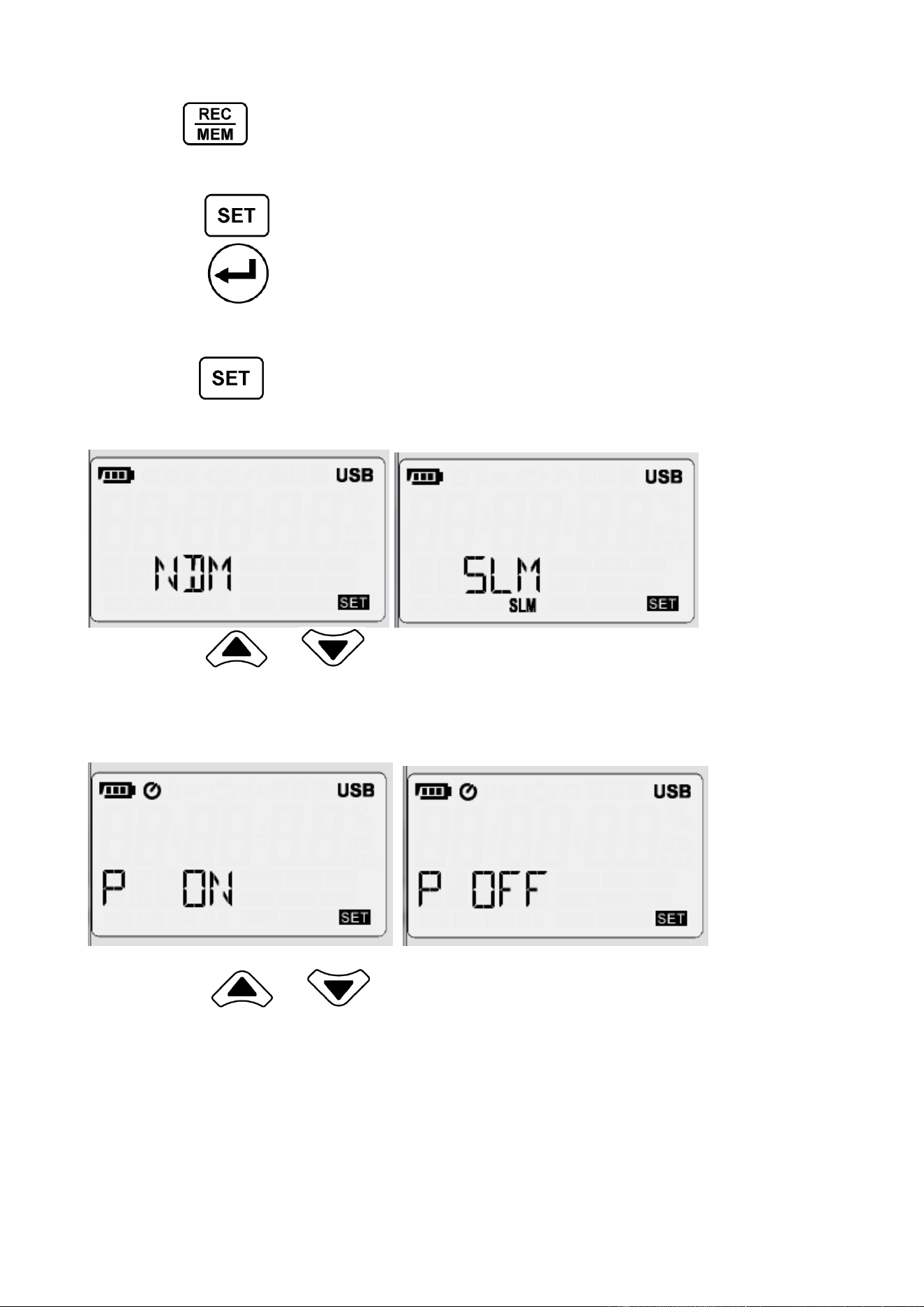
3.6. Viewing Logged Reading
˙ Press button more than 1 sec into the viewing logged reading mode.
˙ Press or to scroll through the readings.
˙ Press select dose record information. (Nosie Dose Meter mode)
˙ Press to change data or date, Press change Time.
(hh:mm:ss→YY-MM-DD)
EN - 10
˙ Press more than 1 sec again to exit viewing logged reading mode.
3.7. Set Mode
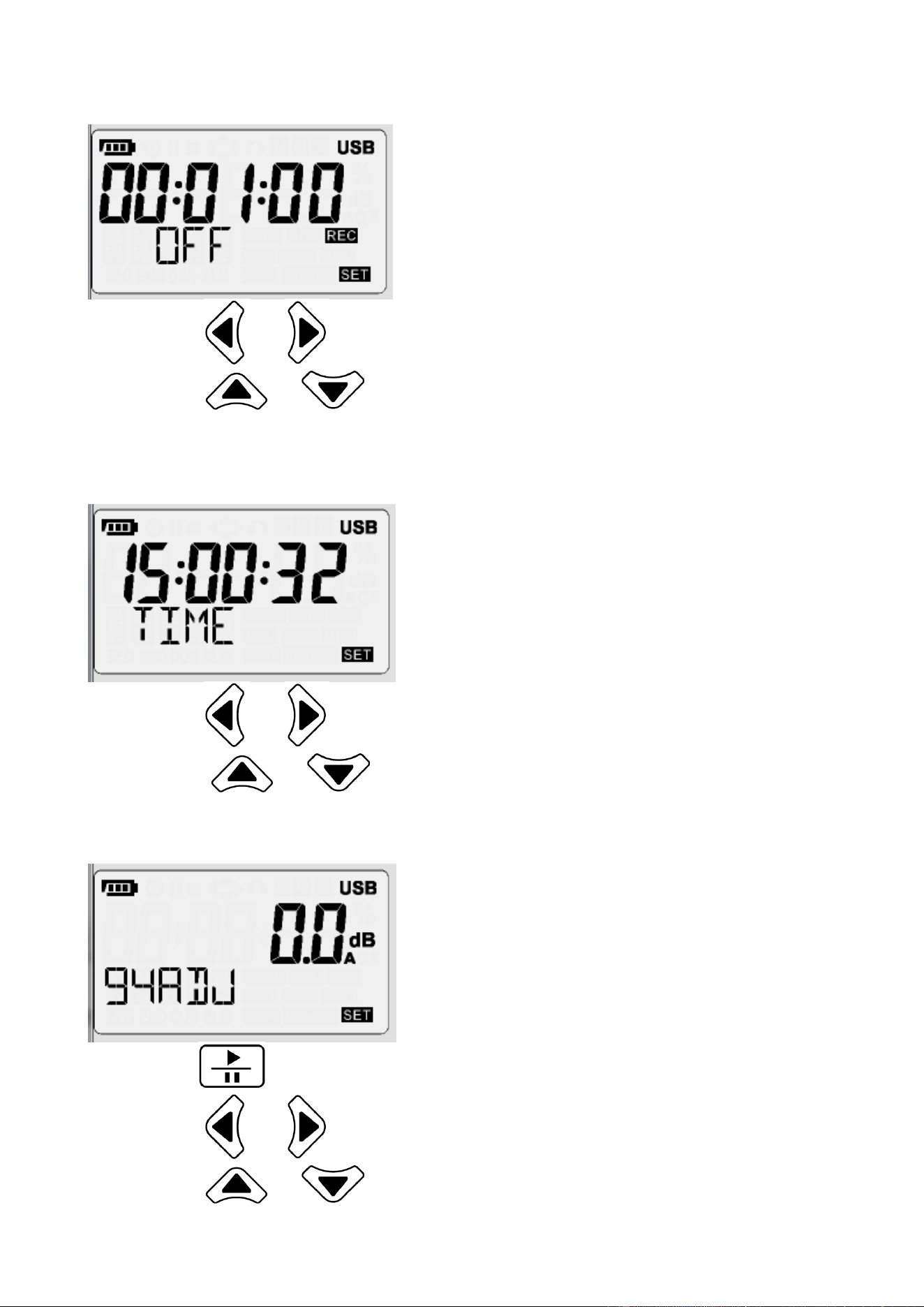
˙ Press into set mode , can set 7 functions in set mode
˙ Press exit set mode
◎ Test Mode→Auto Power Off→Sampling Time & Auto Record→Real Time
Clock→94dB Offset Adjust→Noise standard→SLM Fuunction
˙ Press again,save set and into next set mode
3.7.1. Test Mode Set
˙ Press or , change test mode. (NDM →SLM)
◎ NDM: Noise Dose Meter
◎ SLM:Sound Level Meter
3.7.2. Auto Power Off Set
˙ Press or , enable or disable Auto Power Off function
EN - 11
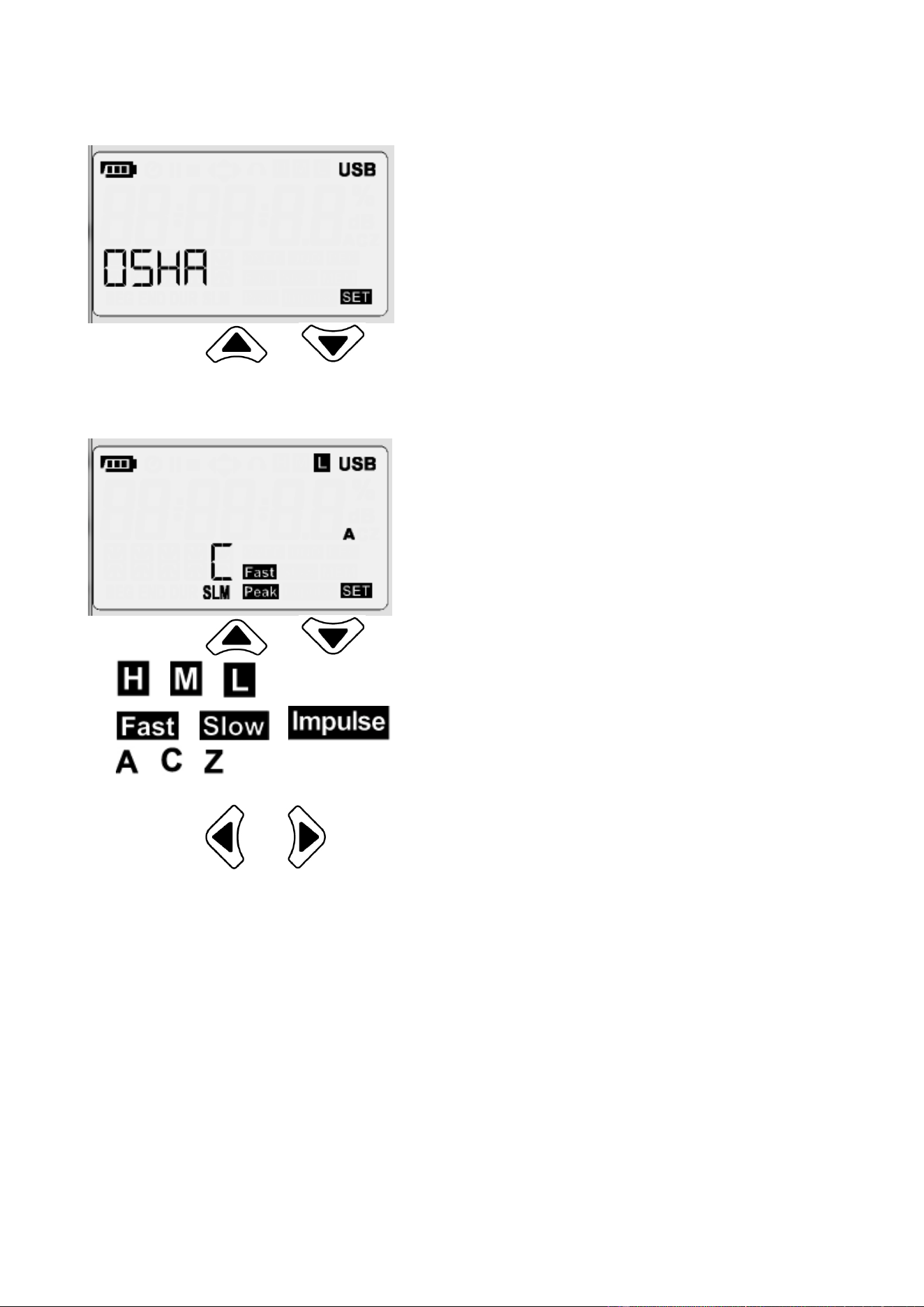
3.7.3. Sampling Time & Auto Record Set
˙ Press or , select auto records set or sampling time.
˙ Press or enable or disable Auto Record, adjust sampling time.
˙ Minimum sampling time: 1 second; Maximum sampling time: 23 hours 59 minutes
59 seconds
3.7.4. Real Time Clock Set
˙ Press or , select option to adjust.
˙ Press or , adjust time digit.
˙
3.7.5. 94dB Offset Adjust Set
˙ Press , auto run 94dB offset adjust.
˙ Press or , change frequency weighted
˙ Press or , adjust offset
EN - 12
3.7.6. Noise Standard Set
˙ Press or ,select NDM testing law
◎ OSHA→MSHS→DOD→ACGIH→ISO85→ISO90→USER
3.7.7. SLM Function Set
˙ Press or , change test function
◎ → →
◎ → →
◎ → →
◎ Peak C →Peak Z
˙ Press or ,selsect test function
◎ Sound level range→Time weighted→Frequency weighted→Peak frequency
EN - 13
4. SOFTWARE
4.1. System Requirements
• Operating: Windows XP/Windows Vista/Windows 7/Windows 8/Windows10.
• Storage:200 MB of available hard disk space.
• Processor: Intel Pentium® 4
• Memory:1 GB RAM (XP), 1.5 GB (Windows Vista/Windows 7/Windows 8)
• Other: PL2303 Windows Drive ;Microsoft .NET Framework 3.5 Service Pack 1
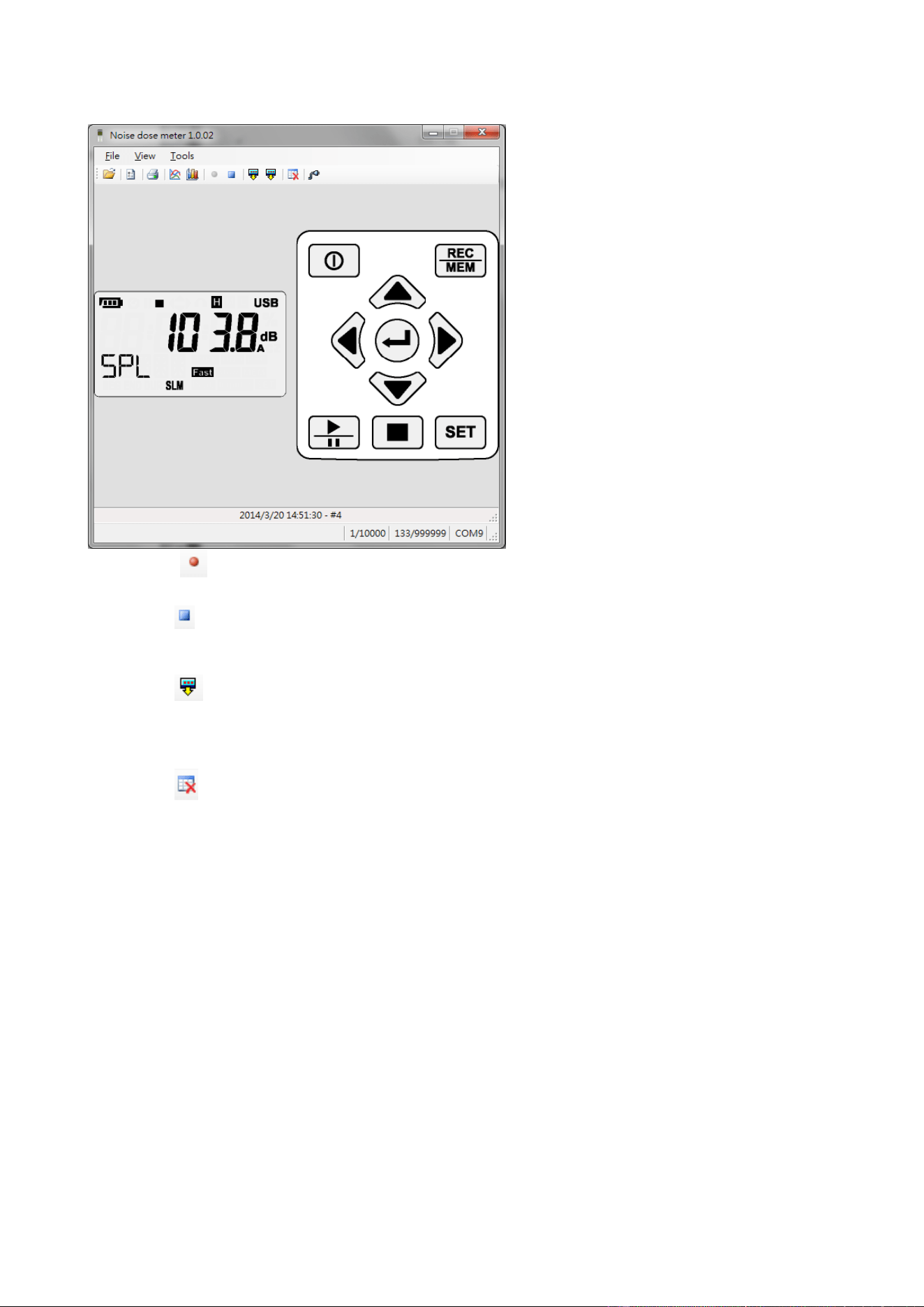
4.2. Software Description
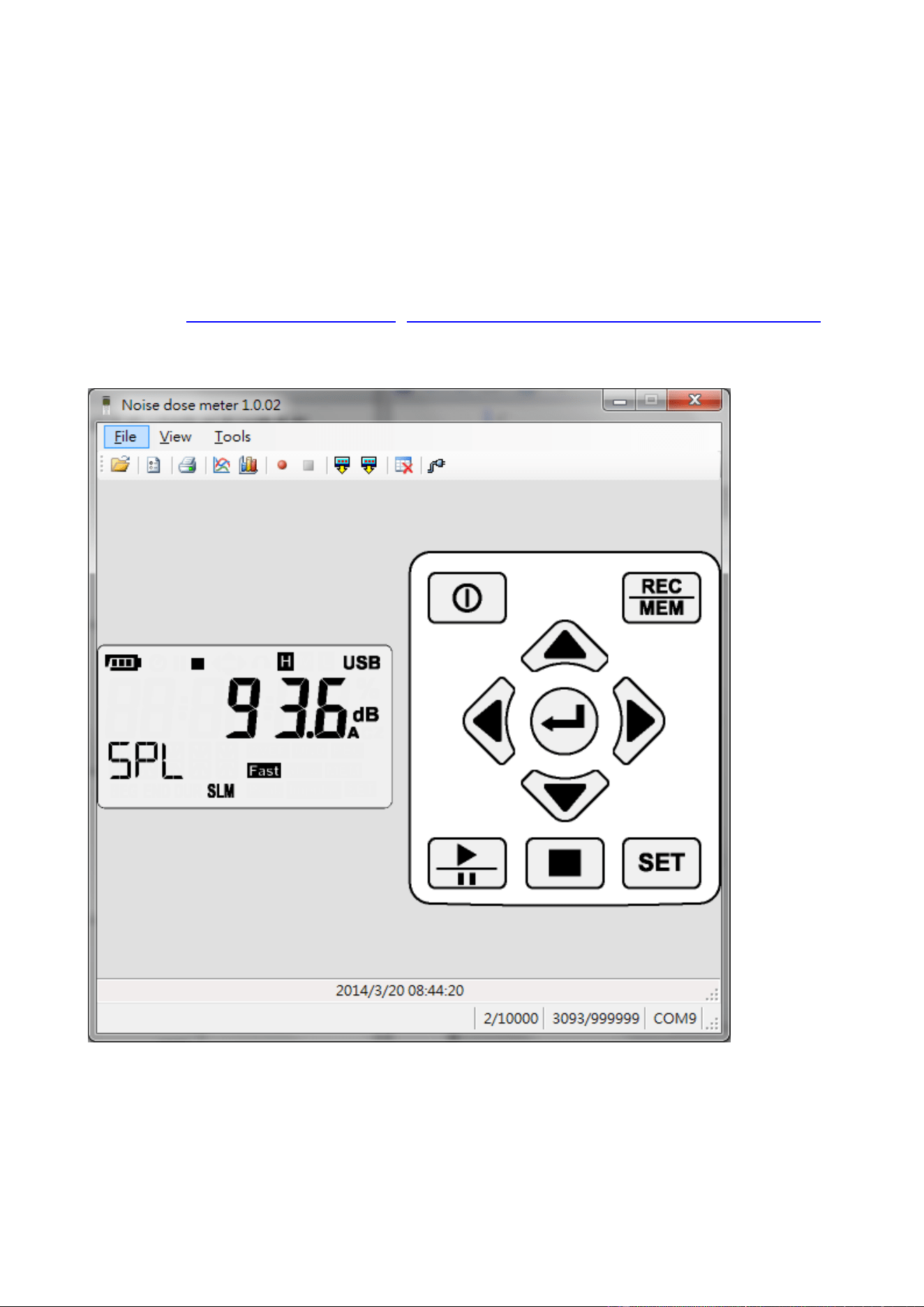
EN - 14
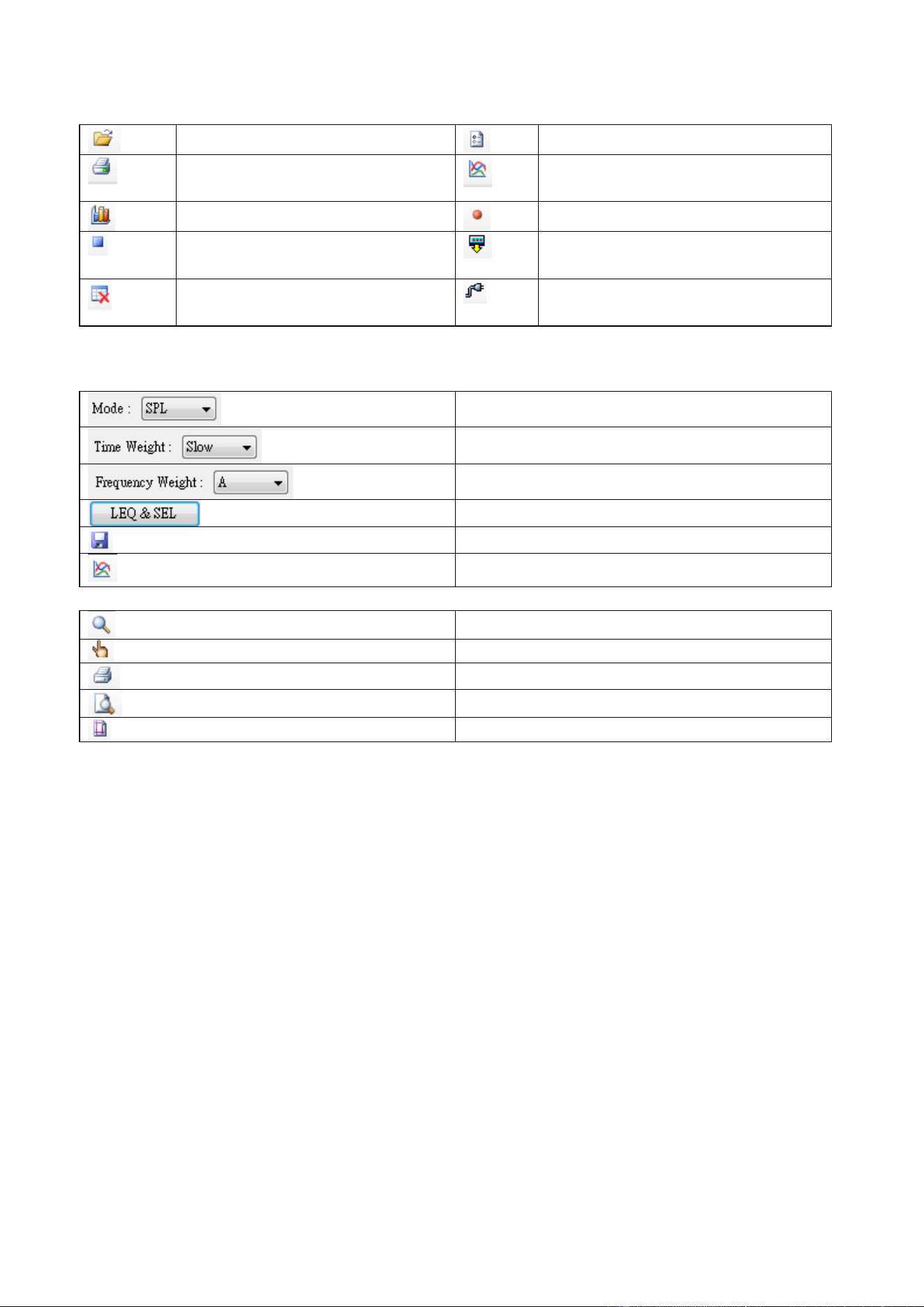
4.3. Tools Description
Open file
Options
Print noise dose report
(*.ndr)
Sound level chart
Noise dose chart (LN%)
Start to log sound level (*.csv)
Stop to log sound level
Download sound level logs;
Doenload noise does report
Erase mesdured data that
stored in meter
Automatic detect port which
connect with meter
4.4. Open File
• Sound Level Log List Tool
SPL→LEQ→SEL→PeakMax
Fast→Slow→Impluse
A→C→Z
Calculate LEQ & SEL
Save file as….
Graph
• Sound Level Logs Graph
Zoom
Deag
Print
Pront Preview
Print Setup
4.4.1. Zoom Function
˙ Click the left mouse button to zoom in
˙ Click the left mouse button to original size
˙ Hold the left mouse button to moving selection range
˙ keyboard'+', '-' can zoom in or zoom out
4.4.2. Deag function
˙ Hold the left mouse button can moving view range
˙ Hold CTRL+ left mouse button can be change view range and zoom
EN - 15
4.5. Option
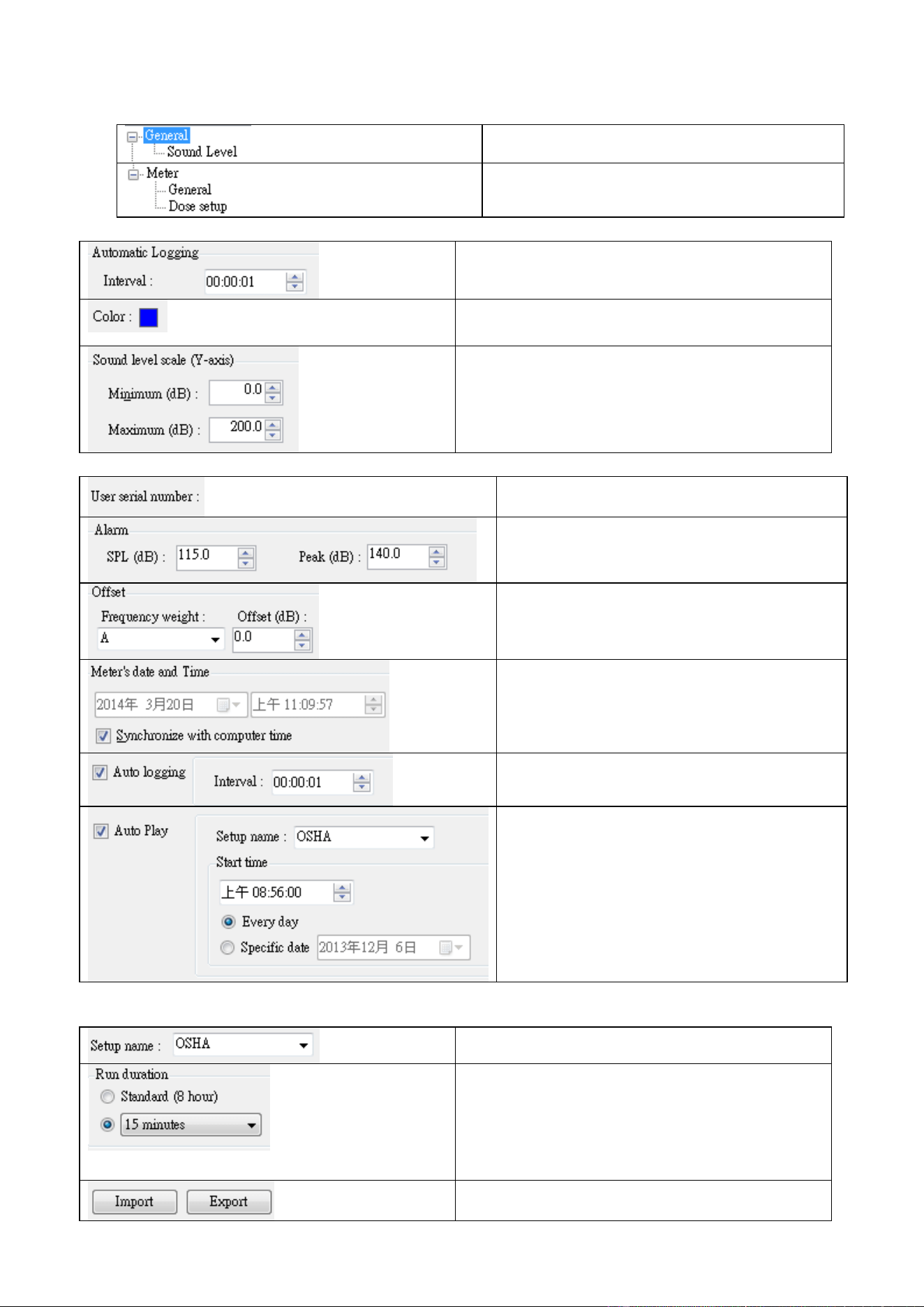
PC Setting
Meter Setting
4.5.1. PC Setting
PC data logger sample time.
Click the left mouse button to change
the color box
Graph (Y-axis) sound level range
4.5.2. Meter Setting
Serial number(0~9;A~Z)16 word
Alarm setting
Offset setting
MAX:+1.5dB MIN:-1.5dB
Setting meter real time clock
Enable/disable auto record.
Setting sample time
Enable/disable auto play noise dose
function.
Meter must be turn on and setting in
NDM(noise does meter) mode
4.5.3. Dose Setting
Select noise dose standard
Select noise dose play time.
Default standard(8hour),
Other 5;10;15;30min
1;2 ;4;8;10;12;24 hour
Setting information import or export ,file
EN - 16
format(*.ncg)
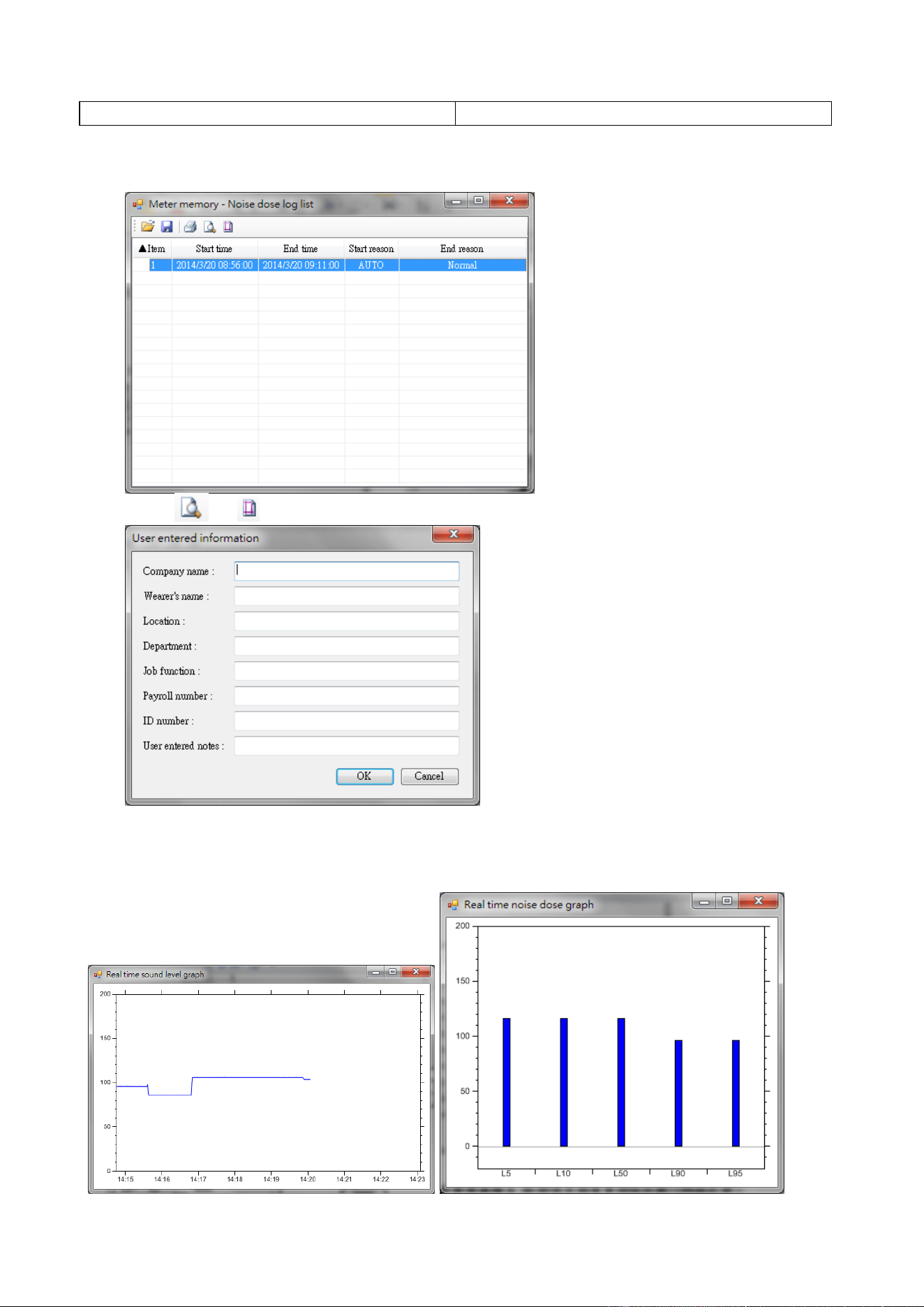
4.6. Print Noise Dose Report
• Select noise dose logger report (*.ndr)
• Click or and key in user information , click ok ,the output report
4.7. Sound level chart & Noise dose chart (LN %)
• Sound level char. X-axis is the time coordinate. Y-axis is the sound coordinate.
• Noise does chart. X-axis is the LN%. Y-axis is the sound coordinate.
EN - 17
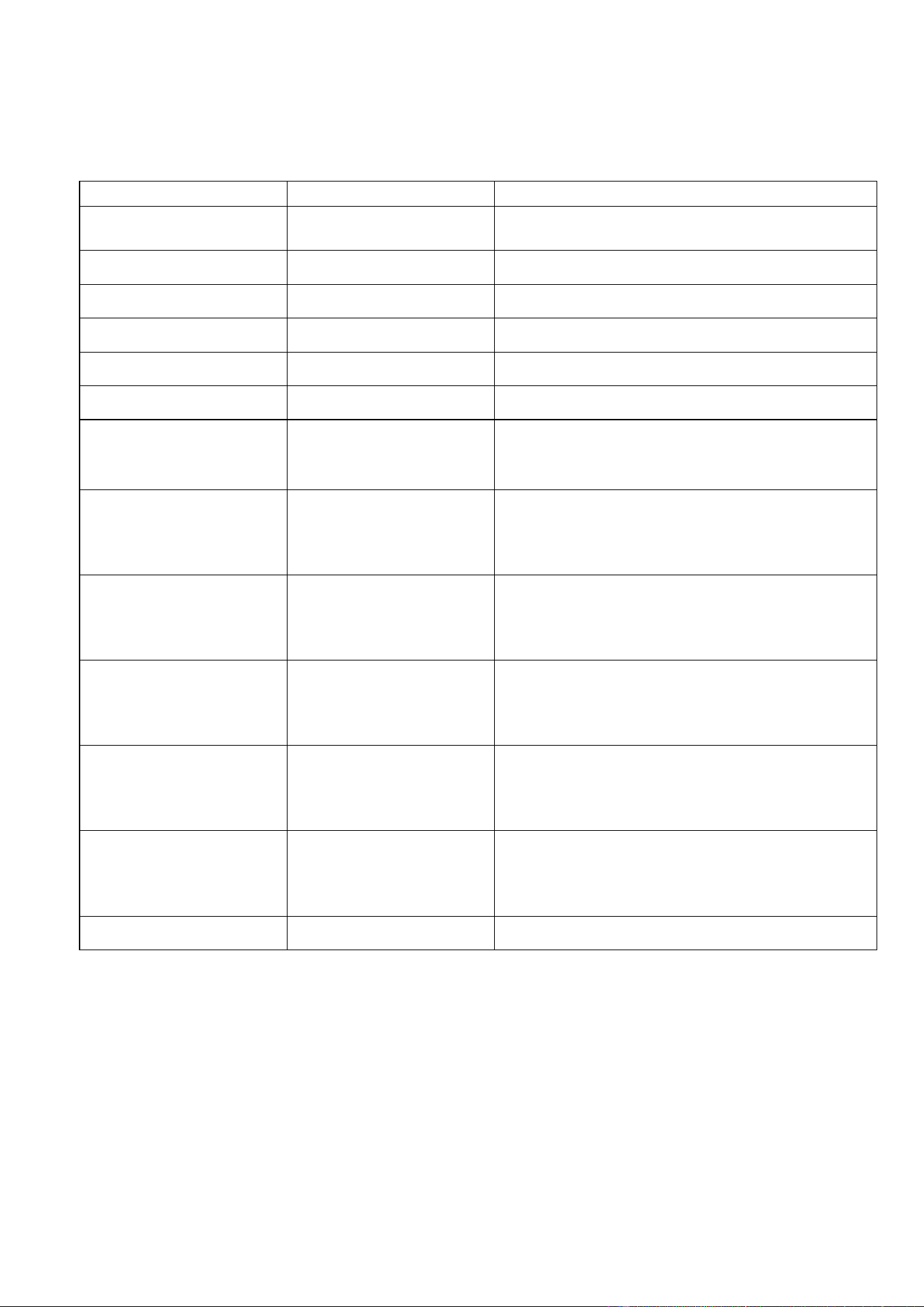
4.8. Enable PC data logger
• Click enable data logger.
• Create a new log file (*. csv) in the hard disk.
• Click stop data logger.
4.9. Download Record data
• Click download sound level logs or noise dose report on the meter mrmory
• Download 100K record data. it takes about 15 minutes time-consuming, please be patiently
4.10. Erase Record data
• Click delete all records of the meter
EN - 18
5. EXPLANATION
5.1. 1. MEASUREMENT PARAMETERS:
Test Function
Screen parameter
Explanation
SPL
LAFp
Sound pressure level (SPL)
SPL
LASp
Sound pressure level (SPL)
SPL
LCFp
Sound pressure level (SPL)
SPL
LCSp
Sound pressure level (SPL)
SPL
LZFp
Sound pressure level (SPL)
SPL
LZSp
Sound pressure level (SPL)
Leq
LAFq
Equivalent continuous level for the
duration of the measurement for A
weighting
Leq
LCFq
Equivalent continuous level for the
duration of the measurement for C
weighting
Leq
LZFq
Equivalent continuous level for the
duration of the measurement for Z
weighting
SEL
LAE
Frequency weighted sound exposure
level for the duration of the measuremen
for A weighting
SEL
LCE
Frequency weighted sound exposure
level for the duration of the measuremen
for C weighting
SEL
LZE
Frequency weighted sound exposure
level for the duration of the measuremen
for A weighting
Peak
Lcpeak
Instantaneous C peak level
EN - 19
5.2. A, C, Z WEIGHTING INSTRUCTION:
A: The A weighting curve is based on 40 Phon Fletcher-Munson Equal Loudness
Contour, Noise assessment in human, suggest to use the A weighting.
C: The C weighting in essentially is approximate smooth. With labor safety concern,
suggest using the C weighting.
Z: The Z weighting for the electric instrument interior not the linear signal which
processes after the filter, suits in wants to output AC or the DC signal does other
research to use.
The Z weighting is a linear signal which is not processed through the filter.
It’s suitable to output AC or DC signal for research.
Sound Level Meter Class Description:
⚫ Class 0: use in the laboratory reference standard.
⚫ Class 1: laboratory or field use.
⚫ Class 2: laboratory or field use.
⚫ Class 3: general field use.
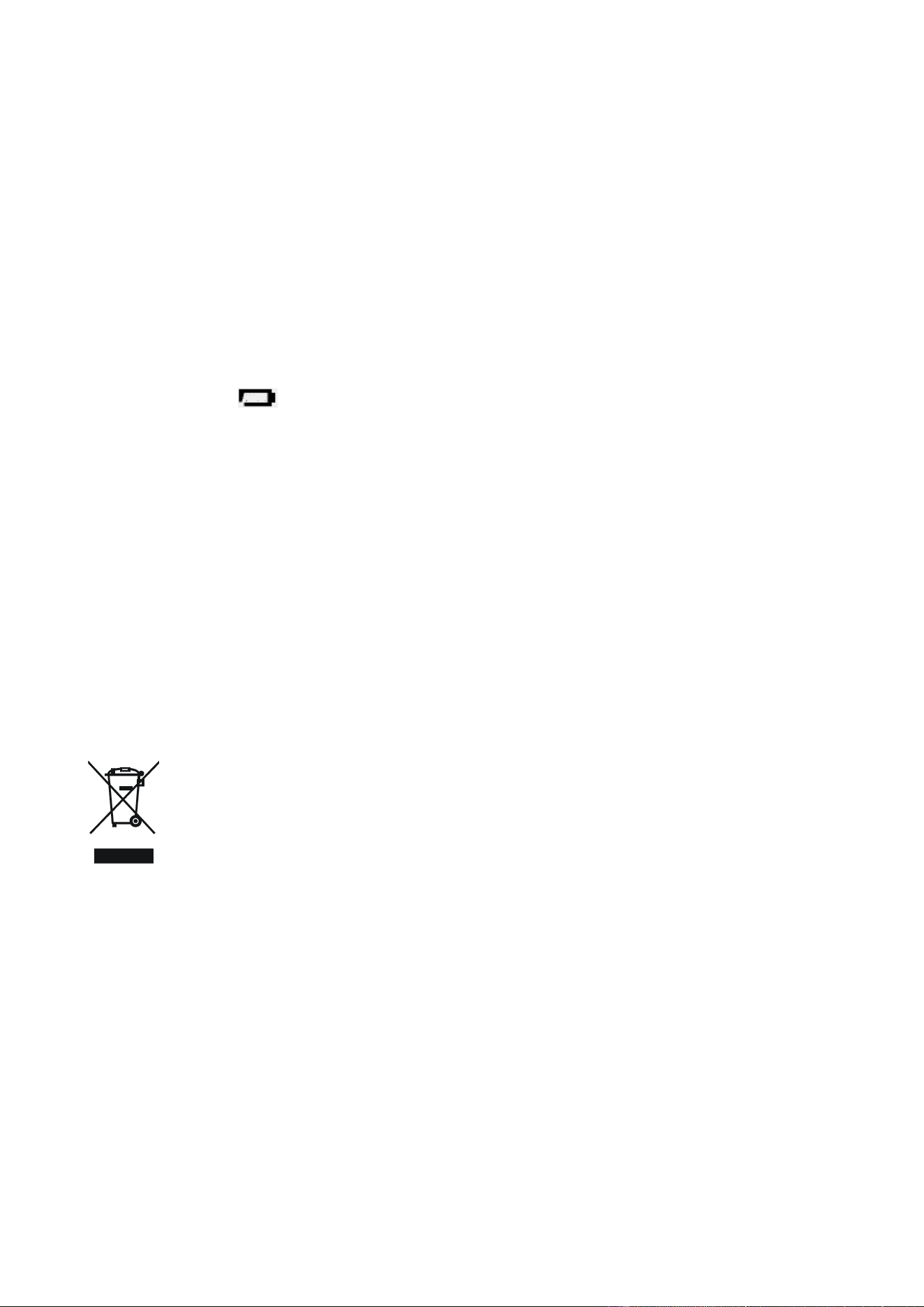
5.2.1. Input interface
The front is PLT 4, the signal input receptacle.
ST-130
Pin 1 Power
Pin 2 GND
Pin 3 NC
Pin 4 NC
ST-130S
Pin 1 Power (+)
Pin 2 GND
Pin 3 Power (-)
Pin 4 GND
EN - 20
6. MAINTENANCE
6.1. GENERAL INFORMATION
This is a precision instrument. To guarantee its performances be sure to use it or keep it
stored on suitable environmental conditions. Do not expose it to high temperatures or
humidity or direct sunlight. Be sure to turn it off after use. If you expect not to use the
instrument for a long period remove batteries to avoid leakages of battery liquid which
could damage the its inner components.
6.2. BATTERY REPLACEMENT
The low battery “ ” indication is displayed; the batteries are to be replaced.
• Turn off the instrument.
• Remove the battery cover.
• Remove all the batteries from the battery holder.
• Insert four new batteries of the same type respecting the polarity signs.
• Install the battery cover.
• Please depend on the local laws and regulations to process the waste battery.
6.3. CLEANING
To clean the instruments use a soft dry cloth. Never use a wet cloth, solvents or wate.
6.4. END OF LIFE
Caution: this symbol indicates that equipment and its accessories shall be
subject to a separate collection and correct disposal.
EN - 21
7. TECHNICAL SPECIFICATIONS
7.1. FEATURE
Environmental conditions: temperature 23℃ ± 5℃, relative humidity < 80%.
Display
999999 count LCD
Display Refresh Rate
1 Time/sec
Standards
IEC 61252-1993
IEC 61672-1-2002
ANSI S1,25-1992
ANSI S1,4-1983
ANSI S1,43-1997
Microphone(ST-130S)
1/2” pre-polarized condenser microphone build in
preamplifier: 1V/Pa@250HZ, frequency range: 20
Hz~12.5 kHz, Thermal noise: <25 dB(A)
Microphone(ST-130)
1/2 inch Electret condenser microphone
Measurement Items(NDM)
SPL, DOSE%, LPMAX, LPMIN, PKMAX, LEQ, SEL, LEP8, TWA8,
LAVG, L5%, L10%, L50%, L90%, L95%
Measurement Items(SLM)
SPL, LEQ, SEL, PKMAX
Measurement Range
30dB to 140dB (A)
35dB to 140dB (C)
40dB to 140dB (Z)
Primary RMS Range @1Khz
41dB to 86dB (L)
55dB to 106dB (M)
75dB to 125dB (H)
Dynamic Range
60 dB
Accuracy
±1.5dB@94dB 1KHZ
Internal memory
MAX Datalogger data:10000(NDM);1000000(SLM)
Maximum Peak C Weighting
Sound Level Measurement
90~143 dB
Time Weighting
Fast, Slow, Impulse, Peak
Frequency Weighting
A/C/Z
Frequency Range
20Hz~8KHz
Starting Time
<10 Second
Battery Life(ST-130)
24 hours ( 9V×1 battery Alkaline )
Battery Life(ST-130S)
20 hours ( 9V×1 battery Alkaline )
Dimensions
113(L) x 65(W) x 34(H) mm
Weight
160g (not including battery)
EN - 22
7.2. ENVIRONMENT
7.2.1. Environmental Conditions
˙ For inside use, max height: 2000m
˙ Reference temperature: 23° ± 5℃
˙ Operation temperature: 5 ~ 40 ℃
˙ Operation humidity: <80% RH
˙ Storage temperature -10 ~ 60 ℃
˙ Storage humidity <70%
7.2.2. EMC
EN61326-1:CISPR 11:Group 1, Class A
⚫ Class A – Equipment for use in domestic establishments and outside
facilities.
⚫ Group 1 – RF energy generated is needed for internal functioning.
7.3. ACCESSORIES
⚫ Meter: Noise Dose body.
⚫ User’s manual.
⚫ Carrying case.
⚫ 1 batteries 9 V 、NEDA 1604 、IEC 6F22 or JIS 006P
⚫ Diameter windscreen.
⚫ Setup CD-Disk.
⚫ MINI USB Cable (Mini B type).