15 16
07 08
03 04
09 10
05 06
AVIGATOR 410W
User Manual
11 12
13 14
included
01
01
02
03-04
05
06-07
08
08
08
09
09
10
11
12-13
14-15
16
16
17
18
19
02
17 18
K7 25000K
Important safety considerations
21
19 20
Indicator
Up
Right/Volume+
MutePower Switch
Play/Pause
Fast ForwardFast Backward
Move Up
Move Right
Return
Volume Down
OK
Move Left
Move Down
Input Source
Volume Up
Menu
Left/Volume-
Back
Source
Power Botton
DownOK
Dust Removal Kit x1
The content from Hulu, Netflix, and similar services can not be mirrored or cast
* Due to copyright restrictions of Hutu, Netflix, and similar services, the contents MAY NOT be mirrored or cast
What should I do if I want to watch contents from Hulu, Netflix, and similar services via the projector?
* Please prepare a Fire TV stick, Roku stick or Chromecast™ (not included), and then connect it to the projector
to watch the contents.
Blurry Image
* Adjust focus ring/keystone.
* Projector and screen/wall must be in effective distance.
Remote Unresponsive
* Make sure the remote points at the IR receiver directly.
* Do not cover IR receiver.
*Try a new pair of AAA batteries.
Upside Down Images
* Go to Menu > PICTURE > Projection Mode to flip the projection image.
FCC Statement
Any changes or modifications not expressly approved by the party responsible for compliance could void the
user's authority to operate the equipment. This device complies with part 15 of the FCC Rules. Operation is subject
to the following two conditions:
(1) This device may not cause harmful interference, and
(2) this device must accept any interference received, including interference that may cause undesired
operation.
NOTE: This equipment has been tested and found to comply with the limits for a Class B digital device, pursuant to
part 15 of the FCC Rules. These limits are designed to provide reasonable protection against harmful interference
in a residential installation. This equipment generates, uses and can radiate radio frequency energy and, if not
installed and used in accordance with the instructions, may cause harmful interference to radio communications.
However,there is no guarantee that interference will not occur in a particular installation. If this equipment does
cause harmful interference to radio or television reception, which can be determined by turning the equipment
off and on, the user is encouraged to try to correct the interference by one or more of the following measures:
—Reorient or relocate the receiving antenna.
—Increase the separation between the equipment and receiver.
—Connect the equipment into an outlet on a circuit different from that to which the receiver is connected.
—Consult the dealer or an experienced radio/TV technician for help.
This equipment complies with FCC radiation exposure limits set forth for an uncontrolled environment .This
equipment should be installed and operated with minimum distance of 20cm between the radiator&your body.
This transmitter must not be co-located or operating in conjunction with any other antenna or transmitter.
ISEDC Warning
This device complies with Industry Canada licence-exempt RSS standard(s). Operation is subject to the following
two conditions:
(1) this device may not cause interference, and
(2) this device must accept any interference, including interference that may cause undesired operation of the
device.
Le present appareil est conforme aux CNR d'Industrie Canada applicables aux appareils radio exempts de
licence.
L'expLoitation est autorisee aux deux conditions suivantes:
(1) I'appareil ne doit pas produire de brouillage, et
(2) I'utilisateur de I'appareil doit accepter tout brouillage radioelectrique subi, meme si le brouillage est susceptible
d'en compromettre le fonctionnement.
The device is compliance with RF exposure guidelines, users can obtain Canadian information on RF exposure
and compliance.
The minimum distance from body to use the device is 20cm.
L'appareil est conforme aux directives d'exposition aux RF, les utilisateurs peuvent obtenirdes informations
canadiennessur I'exposition aux RF et la conformite. La distance minimale du corps pour utiliser l'appareil est de
20cm.
This transmitter must not be co-located or operating in conjunction with any other antenna or transmitter.
Cet emetteur ne doit pas etre colocatise ou fonctionner en conjonction avec une autre antenne ou un autre
emetteur
This product bears the selective sorting symbol for Waste electrical and electronic equipment (WEEE).
This means that this product must be handled pursuant to European directive 2012/19/EU in order to be
recycled or dismantled to minimize its impact on the environment.
User has the choice to give this product to a competent recycling organization orthe retailer when he buys
a new electrical or electronic equipment.
This product can be used across EU member states.
The device is low power device, it can meet the requirement of the RF exposure.
The mains plug is used as the disconnect device, the disconnect device shall remain readily operable.
CAUTION
To avoid replacement of a battery with an incorrect type.
Don't disposal of a battery into fire or a hot oven, or mechanically crush or cut of a Battery.
Don't leave a battery in an extremely high temperature surrounding environment.
To avoid battery subjected to extremely low air pressure.
The mains plug is used as the disconnect device, the disconnect device shall remain readily operable.
The symbol indicates for indoor use only
Class 11 equipment
The symbol indicates DC voltage
The symbol indicates AC voltage
RECYCLING
Carrying Bag x1FAQ Card x1
Fire stick/Roku/
Chromecast
Tel: +1(626) 278-4691
Email: [email protected]
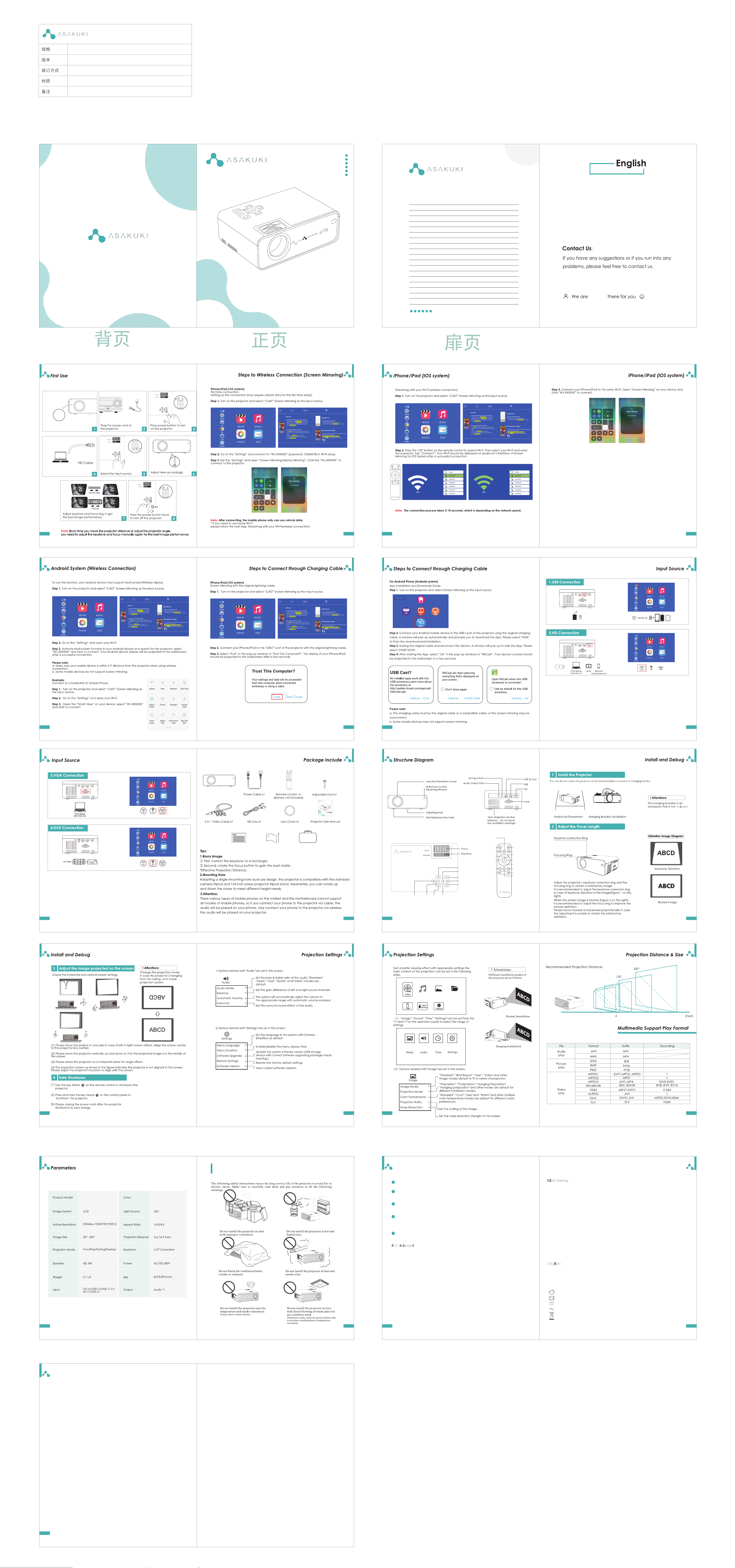
Content
First Use
Step to Wireless Connection(Screen Mirroring)
Iphone/Ipad(IOS System)
Andriod System(Wireless Connection)
Step to Connect with Charging Cable
Input Source
USB Connection
HD Connection
VGA Connection
DVD Connection
Package Include
Structure Diagram
Install and Debug
Projection Settings
Projection Distance & Size
Multiple Support Play Format
Parameters
Important Safety Considerations
Troubleshooting Guide
Connect projector to
HD port support device.
Uncover the projector len cap.
Note:
Each time you move the projector distance or adjust the projector angle,
you need to adjust the keystone and focus manually again for the best image performance.
4-20 ft(Suggested projection distance: 5 ft-10 ft)
5
5-10ft
4-20 ft(Suggested projection distance: 5 ft-10 ft)
34”
50”
80”
8 12 20
(If you use your phone cellular date, please ignore Step 2)
1 2 3
4 5
7 8
6
always
120*140mm
V1.03
骑马订
内页128哑粉纸,封面200太阳哑粉纸
此文档版权仅归ASAKUKI所有
Troubleshooting Guide
1
2
3
4
5
V 1.03