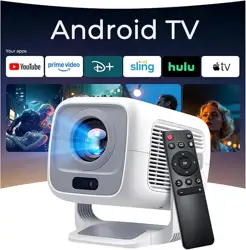
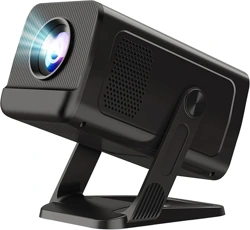
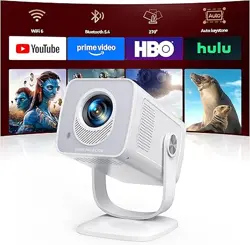
WEMI X3AQ Native 1080P Smart Mini Projector with WiFi 6 Bluetooth 5.4, Full HD 4K Support Auto Focus&Keystone,Built-in Apps Android TV OS,Stereo Speakers,Portable Movie Projector for iPhone Home Outdoor X3
Product's Documents
Below are documents related to this product, you can read online or download:
The WEMI X3 is a portable smart mini projector designed for home cinema, outdoor movie nights, gaming, and presentations. It features native 1080p resolution with 4K support, Android TV OS, auto focus and keystone correction, WiFi 6, Bluetooth 5.4, and built-in stereo speakers.
Key Features at a Glance
Native 1080p / 4K Support: 1920 x 1080 native resolution; supports 4K input (4096 x 2160) via HDMI.
600 ANSI Lumens Brightness: 5-element optical lens with rare-earth glass for clear, vivid images.
Android TV 11 OS: Built-in Google Play Store access to 10,000+ apps and 800+ free live channels.
AI Visual Calibration: Auto focus, auto keystone correction, and digital zoom for quick setup.
HiFi Stereo Dual Speakers: Dolby Atmos support via built-in speakers.
WiFi 6 & Bluetooth 5.4: Ultra-fast wireless streaming and bi-directional Bluetooth connection.
Portable Design: Handheld size (6.1" x 4.8" x 5.1"), weight 1.4 lb (635 g), 270° rotation.
What's in the Box
WEMI X3 Projector
Power Adapter
HDMI Cable
Remote Control
Cleaning Kit
User Manual
Product Specifications
Specification
Details
Native Resolution
1920 x 1080 (Full HD)
Maximum Resolution Supported
4096 x 2160 (4K)
Brightness
600 ANSI Lumens
Contrast Ratio
10000:1
Display Technology
LCD
Light Source Life
Up to 50,000 hours
Image Size
40" – 130"
Throw Distance
1.64 ft – 10 ft
Operating System
Android 11 OS
Connectivity
WiFi 6, Bluetooth 5.4, HDMI, USB, 3.5mm Audio Jack
Built-in Media
Adapter, Cleaning Kit, HDMI Cable, Remote, User Manual
Important: Before first use, update the projector to the latest software version to ensure optimal performance and access to the newest features.
Connect the power adapter to the projector and plug into a wall outlet.
Press the power button on the projector or remote to turn it on.
Follow the on-screen Android TV setup wizard to connect to WiFi and sign in to your Google account.
Navigate to Settings > About device > Online upgrade.
If an update is available, follow the prompts to download and install it. The projector will reboot automatically.
2. Connecting to WiFi
From the Android TV home screen, go to Settings > Network & Internet.
Select your WiFi network and enter the password.
Once connected, the projector will display a confirmation. WiFi 6 ensures fast, stable streaming.
3. Using Auto Focus & Keystone
Place the projector on a flat surface or mount it.
The projector will automatically adjust focus and keystone when powered on.
If manual adjustment is needed, use the Focus and Keystone options in the settings menu or use the remote control buttons.
Use Digital Zoom in the settings to fine-tune the image size without moving the projector.
4. Screen Mirroring (iOS / Android)
Note: Due to HDCP protection, screen mirroring may not work with some apps like Prime Video or Netflix. For best results, use a streaming device (e.g., Fire Stick, Roku) or the built-in Android TV apps.
iOS (AirPlay)
Ensure the projector and your iOS device are on the same WiFi network.
Open the ScreenCast app on the projector (from the apps menu).
On your iPhone/iPad, open Control Center and tap Screen Mirroring.
Select the WEMI X3 from the list. Your device screen will appear on the projector.
Android
Ensure both devices are on the same WiFi network.
Open the ScreenCast app on the projector.
On your Android device, go to Settings > Connected devices > Cast (or similar).
Select the WEMI X3 from the list.
5. Connecting External Devices
HDMI: Connect laptops, gaming consoles, streaming sticks, or Blu-ray players. The projector will automatically detect the input.
USB: Insert a USB drive containing video, photo, or music files. Use the built-in media player to browse and play content.
Bluetooth: Go to Settings > Remote & Accessories > Add accessory to pair Bluetooth speakers, headphones, or a smartphone.
3.5mm Audio: Connect external speakers or headphones for enhanced audio.
6. Using the Remote Control
Power: Turn the projector on/off.
Navigation: Directional pad and OK button for menu navigation.
Home: Return to the Android TV home screen.
Back: Go back to the previous screen.
Volume: Adjust the built-in speaker volume.
Focus/Keystone: Dedicated buttons (if available) or access via settings menu.
7. Mounting Options
Tabletop: Place on a stable, flat surface. Use the adjustable foot for tilt.
Ceiling Mount: Use a standard projector ceiling mount (not included). Ensure the mount supports the weight (1.4 lb).
Wall Mount: Use a compatible wall bracket.
Tripod: The projector has a standard 1/4" tripod screw hole (bottom).
8. Troubleshooting Common Issues
Issue
Solution
No picture or blank screen
Check power connection. Ensure the input source is selected correctly. Try a different HDMI cable or device.
Image is blurry
Run auto focus again. Clean the lens with the included cleaning kit. Ensure the projector is at the correct distance from the screen.
WiFi connection drops or slow
Move the projector closer to the router. Restart the router and projector. Ensure no interference from other devices.
Screen mirroring not working
Update the projector software (Settings > About device > Online upgrade). Ensure both devices are on the same WiFi network. For HDCP-protected apps, use a streaming device.
Remote control not responding
Replace batteries. Point the remote directly at the projector. Pair the remote again via Bluetooth if using Bluetooth mode.
Audio issues (no sound or low volume)
Check volume settings on the projector and connected device. Ensure external speakers are properly connected. Try restarting the projector.
Occasional lag or glitch
Update the projector software (Settings > About device > Online upgrade). Reboot the projector.
Warranty and Support
Warranty: 2-Year Warranty & 1-Year Free Replacement. Full refund available within 365 days (you do not need to return the product for a refund within this period).
Manufacturer: WEMI Instruments
Contact: For support, please visit the WEMI store on Amazon or refer to the contact information provided in the product packaging. Ensure you have your model number (X3AQ) and order details ready when contacting support.
Safety & Maintenance
Do not look directly into the lens while the projector is on.
Ensure adequate ventilation around the projector. Do not block the air vents.
Clean the lens only with the provided cleaning kit or a soft, dry microfiber cloth.
Do not expose the projector to rain, moisture, or extreme temperatures.
Unplug the projector during thunderstorms or if not in use for extended periods.