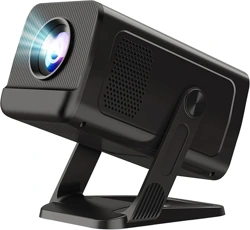
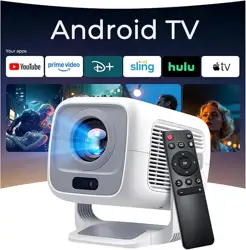
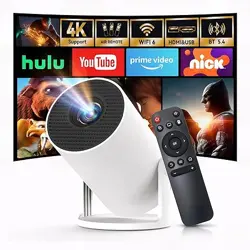
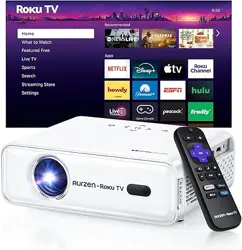
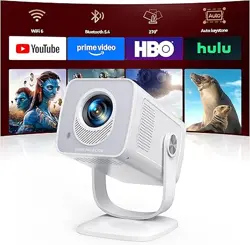
WEMI X1AQ Mini Projector for Bedroom with WiFi and Bi-directional Bluetooth 1080P 4K Support Smart Android TV OS Built-in Apps Auto Keystone Compatible with Netflix, YouTube, Prime Video, Disney+
Product's Documents
Below are documents related to this product, you can read online or download:
The WEMI X1AQ Mini Projector is a compact, portable smart projector designed for indoor and outdoor entertainment. It runs on Android 11 TV OS, supports 1080p and 4K input, and features built-in Wi-Fi 6 and Bluetooth 5.4. The projector delivers up to 100 inches of image size with 400 ANSI lumens brightness.
Key highlights:
Native resolution: 1280 x 720 (supports 4K input up to 4096 x 2160)
Brightness: 400 ANSI lumens
Contrast ratio: 1500:1
Image size: 40" to 100"
Throw distance: 0.6 m – 3 m
LED lamp life: up to 30,000 hours
Dimensions: 5.35" x 3.35" x 4.3" (136 x 85 x 109 mm)
Weight: 356 g
What’s in the Box
WEMI X1AQ Mini Projector
Remote control (requires 2 x AAA batteries – not included)
HDMI cable
Power adapter
Cleaning kit
User manual
Features
3.1 Smart Android 11 TV OS
The projector runs Android 11, giving you access to built-in apps such as Netflix, YouTube, Prime Video, and Disney+. You can stream content directly without an external device.
3.2 Wi-Fi 6 & Bluetooth 5.4
Dual-band Wi-Fi 6 (2.4 GHz / 5 GHz) ensures stable streaming. Bluetooth 5.4 allows you to connect wireless speakers, headphones, or game controllers. The projector also supports bi-directional Bluetooth – you can use it as a Bluetooth speaker.
3.3 270° Rotation & Flexible Mounting
The projector can be rotated 270° for flexible placement. It supports tabletop, ceiling, wall, bracket, and tripod mounting.
3.4 Auto Vertical Keystone & Manual Focus
Automatic vertical keystone correction ( ±40° ) simplifies setup. Manual focus ring lets you sharpen the image.
3.5 Multiple Connectivity Options
Connect via HDMI, USB, or wirelessly through AirPlay, Miracast, or DLNA for screen mirroring from iOS and Android devices.
3.6 Built-in Speaker
A built-in speaker provides audio for casual viewing. For enhanced sound, connect external speakers via Bluetooth or the 3.5 mm audio jack.
3.7 Long-lasting LED Lamp
The LED light source is rated for 30,000 hours of operation, reducing the need for lamp replacements.
Place the projector on a stable, flat surface or mount it securely.
Connect the power adapter to the projector and plug it into a wall outlet.
Press the power button on the projector or remote to turn it on.
Adjust the focus ring on the lens until the image is sharp.
If the image is trapezoidal, the projector will automatically correct vertical keystone. Use the remote to manually adjust horizontal keystone if needed.
5.2 Connecting to Wi-Fi
From the Android home screen, go to Settings > Network & Internet.
Select your Wi-Fi network and enter the password.
Once connected, you can stream apps like Netflix, YouTube, Prime Video, and Disney+.
5.3 Screen Mirroring
iOS (AirPlay): Swipe down to open Control Center, tap Screen Mirroring, and select the projector.
Android (Miracast/DLNA): Open Settings > Cast or Smart View, then select the projector.
Wired: Connect your device via HDMI or USB (for media files).
5.4 Using Bluetooth
Go to Settings > Bluetooth.
Turn on Bluetooth and pair with your speaker, headphones, or game controller.
To use the projector as a Bluetooth speaker, enable the “Bi-directional Bluetooth” function in the audio settings.
5.5 Adjusting Projection Modes
The projector supports four projection modes:
Front Table – standard placement in front of the screen.
Rear Table – behind a translucent screen.
Front Ceiling – mounted upside down on the ceiling.
Rear Ceiling – mounted upside down behind the screen.
Change the mode in Settings > Projection.
5.6 Cleaning and Maintenance
Clean the lens with the provided cleaning cloth. Do not use abrasive materials.
Ensure the ventilation grilles are free of dust.
If the projector will not be used for a long time, store it in a sealed bag or case to prevent dust buildup.
Troubleshooting
Issue
Possible Cause
Solution
No image / black screen
Power not connected, or input source not selected
Check power cable; press the power button; verify the correct HDMI/USB input is selected.
Blurry image
Focus not adjusted
Rotate the focus ring on the lens until the image is clear.
Image is trapezoidal
Projector not perpendicular to screen
Use auto keystone correction or adjust manually in settings.
No sound
Volume muted or external speaker not connected
Increase volume using remote; check Bluetooth pairing or audio cable connection.
Wi-Fi not connecting
Incorrect password or router issue
Re-enter password; restart router; ensure projector is within range.
Remote not working
Batteries missing or low
Insert two AAA batteries (not included). Point remote at the IR sensor on the projector.
Warranty and Support
Warranty: 2-year warranty with 1-year free replacement. Please clean the lens regularly and seal the projector if not used for a long time to avoid dust.
Contact: Visit the WEMI Store on Amazon for support and product information.