Overview
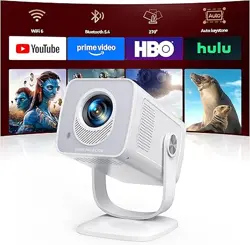
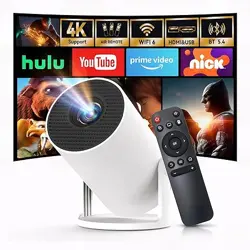
The HOTPEAK PR06 is a portable mini projector designed for home entertainment, business presentations, education, and gaming. It features built-in WiFi and Bluetooth, a 270° rotatable base, and supports 4K decoding with a native 720P resolution. The projector runs on Android TV 11.0, providing access to over 5000 video resources without additional downloads.

Key Features:
- Native 720P resolution, supports 1080P/4K decoding
- 200 ANSI lumens brightness
- Built-in Android TV 11.0 system
- Dual-band WiFi 6 (5G + 2.4G) for fast wireless streaming
- Bluetooth 5.0 for connecting speakers or mice
- Automatic vertical keystone correction and manual focus
- 270° rotatable base for flexible placement
- Projection size from 40 to 130 inches
- Compact and lightweight (1.5 lbs)
What's in the Box
- Main unit (projector) × 1
- Power cord × 1
- Remote control × 1
- Instruction manual × 1
Note: HDMI and USB cables are not included.
Features
Display and Resolution
The projector uses LED projection technology with a brightness of 200 ANSI lumens. It supports native 720P resolution and can decode 1080P and 4K content for clear and sharp images. The contrast ratio is 8000:1.

Built-in Android 11.0 System
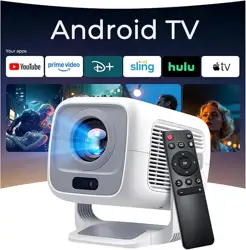
Equipped with Android TV 11.0, the projector offers access to over 5000 video resources without additional downloads. Ensure the system is updated to the latest version for optimal performance.

WiFi 6 and Wireless Casting
Supports dual-band 5G + 2.4G WiFi 6 for ultra-fast, low-latency wireless transmission. Compatible with Miracast and AirPlay for wireless casting from smartphones and laptops. Ensure both devices are connected to the same Wi-Fi network before casting.

Bluetooth 5.0
Built-in Bluetooth 5.0 allows wireless connection to headphones, speakers, or mice for an enhanced audio experience. Note: Bluetooth pairing is only supported with speakers and mice, not smartphones.

Automatic Keystone Correction and Manual Focus
The projector features automatic vertical keystone correction to adjust image tilt from any vertical angle. Manual focus can be operated with one hand without tools for a clear image.

270° Rotatable Base
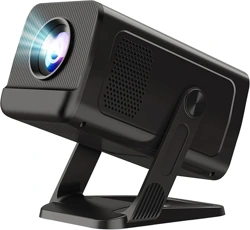
The 270° rotating base allows projection onto walls, floors, or ceilings, making it suitable for various viewing angles and locations.

Connectivity
Equipped with HDMI, USB, and 3.5mm audio interfaces. Compatible with TV boxes, computers, game consoles, USB flash drives, and mobile phones.
Portable Design
Weighing only 1.5 pounds and measuring 5.5 x 4.7 x 8.6 inches, the projector is easy to carry in a backpack or hold in one hand.
Use Guide
Setting Up the Projector
- Place the projector on a stable, flat surface or use the 270° rotatable base to adjust the projection angle.
- Connect the power cord to the projector and plug it into a power outlet.
- Press the power button on the projector or use the remote control to turn it on.
Connecting to Wi-Fi
- Navigate to the Wi-Fi settings in the Android TV menu.
- Select your Wi-Fi network and enter the password.
- Ensure the projector is connected to the same network as your smartphone or laptop for casting.
Wireless Casting from Smartphone
- Ensure your smartphone and projector are connected to the same Wi-Fi network.
- Use Miracast (Android) or AirPlay (iOS) to cast content to the projector.
- Select the projector from the list of available devices on your phone.
Adjusting Focus and Keystone
- Use the manual focus ring on the projector lens to sharpen the image.
- The projector automatically adjusts vertical keystone correction. If needed, adjust manually via the settings menu.
Connecting External Devices
- HDMI: Connect a TV stick, laptop, or game console to the HDMI port.
- USB: Insert a USB flash drive to play media files directly.
- Audio: Use the 3.5mm audio jack to connect external speakers or headphones.
Using Bluetooth
- Go to the Bluetooth settings in the Android TV menu.
- Pair with a Bluetooth speaker or mouse (not compatible with smartphones).
Using the Remote Control
The remote control allows you to navigate the Android TV interface, adjust volume, and control playback. Point the remote at the projector's IR receiver.
Projection Size and Distance
The projector can display images from 40 to 130 inches. The minimum throw distance is 3.2 feet, and the maximum is 13.6 feet. Adjust the projector distance to achieve the desired screen size.


Specifications
| Brand | HOTPEAK |
|---|---|
| Model | PR06 |
| Native Resolution | 1920 x 1080 (1080P) |
| Display Resolution Maximum | 1920 x 1080 |
| Display Type | LED |
| Brightness | 200 ANSI Lumens |
| Contrast Ratio | 8000:1 |
| Video Encoding | H.265 |
| Connectivity Technology | Wi-Fi (Dual-band 5G + 2.4G WiFi 6), Bluetooth 5.0 |
| Hardware Connectivity | HDMI, USB, 3.5mm Audio |
| Control Method | Remote |
| Form Factor | Portable |
| Mounting Type | Tabletop Mount |
| Maximum Image Size | 130 Inches |
| Minimum Throw Distance | 3.2 Feet |
| Maximum Throw Distance | 13.6 Feet |
| Item Dimensions L x W x H | 5.5" x 4.7" x 8.6" |
| Weight | 1.5 lbs |
| Color | White |
| Additional Features | Built-In Speaker, Digital Keystone Correction, Lightweight |
| Recommended Uses | Business, Education, Gaming, Home Cinema |
| Compatible Devices | Laptop, Speaker, TV Stick, Game Console, USB Flash Drive |
| UPC | 758918449809 |
| ASIN | B0FSQMT5VJ |
Troubleshooting
No Image or Signal
- Ensure the projector is powered on and the lens cap is removed.
- Check that the correct input source (HDMI, USB, etc.) is selected.
- Verify that the connected device is powered on and properly connected.
Wi-Fi Connection Issues
- Ensure the projector is within range of the Wi-Fi router.
- Restart the projector and router.
- Check that the Wi-Fi password is entered correctly.
Bluetooth Pairing Failure
- Ensure the Bluetooth device is in pairing mode.
- Note that Bluetooth is only compatible with speakers and mice, not smartphones.
- Move the Bluetooth device closer to the projector.
Image Blurry or Distorted
- Adjust the manual focus ring until the image is clear.
- Ensure the projector is placed on a stable surface and the keystone correction is properly set.
Remote Control Not Working
- Check the batteries in the remote and replace if necessary.
- Ensure there are no obstructions between the remote and the projector's IR receiver.
Safety and Maintenance
- Do not expose the projector to extreme temperatures or moisture.
- Clean the lens with a soft, dry cloth to avoid scratches.
- Ensure proper ventilation around the projector to prevent overheating.
- Unplug the projector when not in use for extended periods.
- Do not attempt to disassemble or repair the projector yourself. Contact customer support for assistance.