Overview
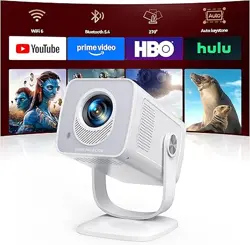
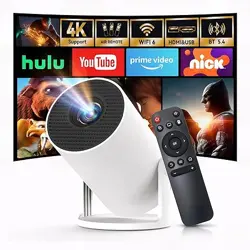
The YGSKK Mini Projector is a portable LED projector with native 1080p resolution (compatible with 4K input). It features built-in Wi‑Fi 6 and Bluetooth 5.3, an electric focus mechanism, and a 210° rotating base. The projector includes pre‑installed streaming apps (Netflix, Prime Video, YouTube, Hulu) and an app store for additional downloads. It is designed for home cinema, gaming, business, and education use.


What’s in the Box
- YGSKK Mini Projector (1 unit)
- Remote control
- HDMI cable
- Power cord
- User manual
Product Specifications
| Specification | Details |
|---|---|
| Native Resolution | 1920 × 1080 pixels |
| Maximum Resolution (compatible) | 4096 × 2160 pixels (4K) |
| Brightness | 300 ANSI lumens |
| Contrast Ratio | 10000:1 |
| Display Type | LED |
| Light Source Life | Up to 100,000 hours |
| Image Size | 50 – 200 inches |
| Throw Distance | 4.92 – 16.4 feet |
| Connectivity | Wi‑Fi 6 (2.4/5 GHz), Bluetooth 5.3, HDMI, USB, 3.5 mm audio jack |
| Built-in Speaker | Yes (high‑fidelity stereo) |
| Electric Focus | Yes (remote control F+/F- buttons) |
| Rotation | 210° (base rotates, including ceiling projection) |
| Dimensions (L×W×H) | 8 × 4 × 4 inches |
| Weight | 1.7 pounds |
| Controller Type | Remote control (included) |
| Compatible Devices | Smartphones, tablets, laptops, gaming consoles (PS5, Switch, Xbox), TV sticks, USB drives, Bluetooth speakers/headphones |
Features
Built-in Streaming Apps & App Store
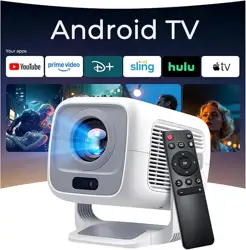
The projector comes with pre‑installed apps: Netflix, Prime Video, YouTube, and Hulu. You can also access the built‑in app store to download additional applications. No external streaming device is required.
Wi‑Fi 6 & Bluetooth 5.3
Equipped with the latest Wi‑Fi 6 technology (backward compatible with 5G and 2.4G networks) for faster, more stable streaming. Bluetooth 5.3 allows connection to wireless speakers, headphones, or other audio devices. Note: Bluetooth does not support direct connection to smartphones; it only works with Bluetooth audio devices.

Native 1080p & 4K Compatibility
The projector delivers native 1080p full HD resolution. It is also compatible with 4K content when connected via HDMI from a 4K source (e.g., 4K TV stick or USB drive).
Electric Focusing
Use the F+ and F- buttons on the remote control to adjust focus electronically. The image becomes clear within approximately 3 seconds – no manual lens adjustment needed.
210° Rotation Base
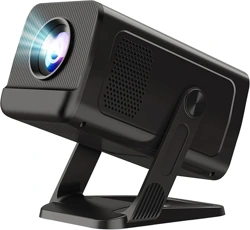
The built‑in base rotates 210°, allowing you to project onto walls, screens, or ceilings. The angle can be adjusted freely to suit your environment.

Wireless Screen Mirroring (Smartphones)
Use the J-Share feature to mirror your smartphone wirelessly. Both the phone and projector must be on the same Wi‑Fi network.
- iPhone: Use the built‑in Screen Mirroring function – no additional app required.
- Android: Download the J‑Share app (or compatible mirroring app) to connect.

Multiple Connectivity Ports
The projector includes HDMI, USB, and 3.5 mm audio ports. It supports TV sticks, TV boxes, DVD players, laptops, USB flash drives, gaming consoles (PS5, Switch, Xbox), and external speakers/headphones. An HDMI cable is included.

Large Screen Projection (50–200 inches)
Project an image from 50 to 200 inches diagonally. The optimal projection distance is between 4.92 feet and 17 feet. Adjust the projector position to achieve your desired screen size.

Built-in Speaker
The projector is equipped with high‑fidelity stereo speakers for clear audio. For enhanced sound, you can connect external Bluetooth speakers or wired headphones via the 3.5 mm jack.
Portable Design
Dimensions: 8 × 4 × 4 inches; weight: 1.7 pounds. The compact size makes it easy to carry in a backpack or suitcase for indoor and outdoor use.

Use Guide
Setting Up the Projector
- Place the projector on a stable, flat surface or mount it on a tabletop. Ensure the ventilation grilles are not blocked.
- Connect the power cord to the projector and plug it into a wall outlet.
- Press the power button on the projector or remote to turn it on.
Connecting to Wi‑Fi
- On the home screen, navigate to Settings > Network.
- Select your Wi‑Fi network (2.4 GHz, 5 GHz, or Wi‑Fi 6).
- Enter the password using the on‑screen keyboard (use the remote control).
- Wait for the connection confirmation.
Using Built-in Apps
- From the home screen, select the desired app (Netflix, YouTube, Prime Video, Hulu).
- If prompted, sign in with your account credentials.
- Browse and play content directly – no external device needed.
- To download additional apps, open the App Store from the home screen and follow the on‑screen instructions.
Adjusting Focus (Electric Focus)
- Press the F+ or F- button on the remote control.
- The image will sharpen within about 3 seconds.
- Repeat until the image is clear.
Rotating the Projection Angle
- Hold the projector base firmly.
- Rotate the projector body to the desired angle (up to 210°).
- For ceiling projection, rotate the unit upward until the image appears on the ceiling.
Wireless Screen Mirroring (Smartphone)
For iPhone:
- Ensure the projector and iPhone are on the same Wi‑Fi network.
- On the projector, open the J-Share or screen mirroring function.
- On your iPhone, swipe down to open Control Center, tap Screen Mirroring, and select the projector from the list.
For Android:
- Ensure both devices are on the same Wi‑Fi network.
- On the projector, open the J-Share app (or compatible mirroring app).
- On your Android phone, download and open the same mirroring app, then follow the app’s instructions to connect.
Connecting External Devices
- HDMI: Connect your device (TV stick, laptop, PS5, etc.) to the projector’s HDMI port using the included HDMI cable. Select the corresponding HDMI input from the projector menu.
- USB: Insert a USB drive into the USB port. Use the file manager to play media files (video, photo, music).
- Audio: For external speakers or headphones, connect via the 3.5 mm audio jack or pair Bluetooth audio devices (speakers/headphones) through the Bluetooth settings.
Adjusting Image Size
Move the projector closer to the screen for a smaller image (minimum 50 inches at 4.92 feet) or farther away for a larger image (maximum 200 inches at 17 feet). Use the focus buttons to sharpen the image after repositioning.
Using the Remote Control
- Power: Turn projector on/off.
- F+ / F-: Electric focus adjustment.
- Directional pad: Navigate menus and apps.
- OK: Confirm selection.
- Back: Return to previous screen.
- Home: Return to the main home screen.
- Volume +/-: Adjust built‑in speaker volume.
Important Notes
- Bluetooth does not support direct connection to smartphones. It is only for Bluetooth audio devices (speakers, headphones).
- For 4K playback, connect a 4K device (e.g., 4K TV stick or USB drive) via HDMI.
- Ensure adequate ventilation around the projector to prevent overheating.
- The light source has a rated life of up to 100,000 hours under normal use.
Product Videos
The following videos provide additional demonstrations and user reviews. Click the links to view on Amazon.
- Mini Projector Overview & Test (7:15) – by RVR2-Reviews
- Mini projector for home movies and presentations (3:32) – by Marcos & Ana Everyday Reviews
- Customer Review: Valuable (0:05) – by Nancy Kelly
- Customer Review: Great picture quality (0:40) – by sara wang
- Customer Review: Good then eventually horrible (1:15) – by Jamile Jones
- Customer Review: A good choice for a reasonable price (0:08) – by Xin Xiang
- Customer Review: Great value and even better quality (0:11) – by CindyVicky
- Customer Review: Best Projector I’ve Purchased! (0:36) – by JING LI
- Customer Review: Worth it (0:15) – by summer xia
- Customer Review: Excellent mini projector for home (0:36) – by Su R.
These videos are hosted on Amazon and can be accessed from the product page.
Warranty and Support
The YGSKK Mini Projector comes with a 3‑year manufacturer’s warranty. For technical support or any issues during use, you can contact the YGSKK support team 24/7.
Contact: Refer to the user manual included in the box or visit the YGSKK brand page on Amazon for support contact information.
Note: The warranty covers manufacturing defects. Damage caused by misuse, unauthorized modifications, or normal wear is not covered.