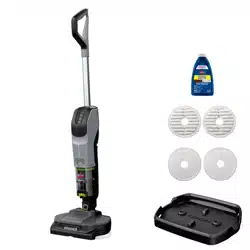
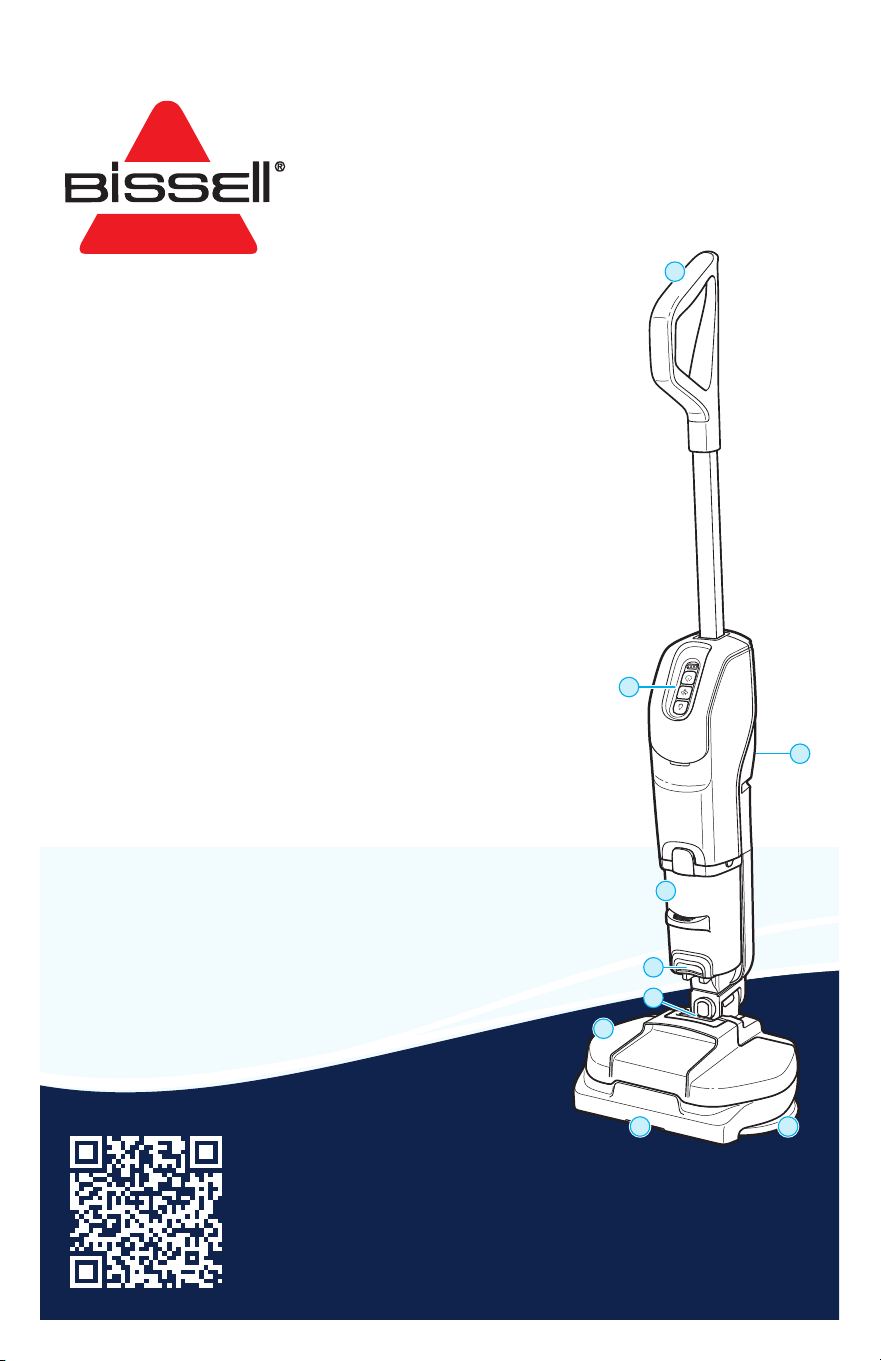
Product Overview
1. Handle
2. Power & Mode Buttons
3. Charging Port
4. Dry Dirt Tank
5. Dry Dirt Tank Release Button
6. Clean Water Tank Release Button
7. Clean Water Tank
8. Vacuum Air Path
9. Mop Pads
SPINWAVE® + VAC
VACUUM MOP
3764, 3851 SERIES
Important Safety Instructions ................................ 2
Warranty ............................................................................... 3
What’s in the Box? ......................................................... 3
Assembly and Charging the Battery ................4
Attaching the Mop Pads ............................................4
Filling the Clean Water Tank....................................5
Controls and Cleaning Tips ...................................... 6
Cleaning Your Floors .................................................... 7
Emptying the Dirt Tank...............................................8
After-Cleaning Care ......................................................9
Troubleshooting ............................................................. 10
3
1
4
7
8 9
2
5
6
Meet your new BISSELL® product!
Go to support.BISSELL.com for a walkthrough of your new purchase,
including videos, tips, support, and more. Want to get started right
away? This guide has all the information you need to set up your new
product. Let’s take a look...

2 BISSELL.com
IMPORTANT SAFETY INSTRUCTIONS
WARNING
TO REDUCE THE RISK OF FIRE, ELECTRIC SHOCK OR INJURY:
• Use indoors only.
• Do not immerse. Use only on surfaces moistened by
cleaning process.
• Use only cleaning products intended for use with this
appliance to prevent internal component damage. See
the Cleaning Formulas section of this guide.
• Children should be supervised to ensure that they do
not play with the appliance.
• Do not allow to be used as a toy. Close attention is
necessary when used by or near children.
• Do not use for any purpose other than described in this
user guide. Use only manufacturer’s recommended
attachments.
• Do not charge with damaged charger or plug. If
appliance is not working as it should, has been
dropped, damaged, left outdoors or dropped into
water, have it repaired by a qualified technician.
• Do not pull or carry charger by cord, use cord as a
handle, close door on cord, or pull cord around sharp
edges or corners. Do not run appliance over cord. Keep
cord, docking station or Charger away from heated
surfaces.
• Do not unplug charger by pulling on cord. To unplug,
grasp the charger plug, not the cord.
• Do not handle charger, charger plug, or appliance with
wet hands.
• Do not put any object into openings. Do not use with
any opening blocked; keep openings free of dust, lint,
hair, and anything that may reduce air flow.
• Keep hair, loose clothing, fingers, and all parts of body
away from openings and moving parts.
• Mop pads may start unexpectedly. Unplug before
cleaning or servicing.
• Turn OFF all controls before plugging or unplugging
charger.
• Use extra care when cleaning on stairs.
• Do not use to pick up flammable or combustible
materials (lighter fluid, gasoline, kerosene, etc.) or use
in areas where they may be present.
• Do not pick up anything that is burning or smoking,
such as cigarettes, matches, or hot ashes.
• Do not use without filters in place.
• Risk of injury from moving parts. Brush may start
unexpectedly. Turn OFF before cleaning or servicing.
• Turn OFF all controls, including the power switch,
and disconnect charger from electrical outlet before
making any adjustments, performing maintenance,
troubleshooting, changing accessories, or storing
appliance. Such preventative safety measures reduce
the risk of starting the appliance accidentally.
• Recharge appliance only with the charger specified by
the manufacturer. A charger that is suitable for one
type of battery pack may create a risk of fire when
used with another battery pack.
• Use only with charger: SUNSTRONG INTERNATIONAL
INDUSTRIAL LTD., MODEL SSC-297100US.
• Battery pack, charging port on the appliance and
charger output are not to be shortcircuited.
• Under abusive conditions, liquid may be ejected from
the battery; avoid contact. If contact accidentally
occurs, flush with water. If liquid contacts eyes
additionally seek medical help. Liquid ejected from the
battery may cause irritation or burns.
• Do not use appliance that is damaged or modified.
Damaged or modified batteries may exhibit
unpredictable behavior resulting in fire, explosion or
risk of injury.
• Do not expose battery pack or appliance to fire or
excessive temperature. Exposure to fire or temperature
above 130°C/265°F may cause explosion.
• Follow all charging instructions and do not charge
the appliance outside of the temperature range
specified in the instructions. Charging improperly or
at temperatures outside of the specified range may
damage the battery and increase the risk of fire.
• Have servicing performed by a qualified repair person
using only identical replacement parts. This will ensure
that the safety of the product is maintained.
• Do not modify or attempt to repair the appliance
except as indicated in the instructions for use or care.
• Unplug charger from electrical socket when not in use,
before cleaning, maintaining or servicing the appliance.
• Keep the temperature range of between 4-40°C/40-
104°F when charging battery, storing unit or during use.
• Do not charge the machine outdoors.
• Do not turn your appliance ON until you are familiar
with all instructions and operating procedures.
• This appliance contains batteries that are non-
replaceable.
• Do not incinerate the appliance even if it is severely
damaged. The batteries can explode in a fire.
• The battery must be removed from the appliance
before it is scrapped.
• Keep appliance on a level surface.
• Do not carry the appliance while it is in use.
• Do not use appliance in an enclosed space filled with
vapors given off by oil-based paint, paint thinner,
some moth-proofing substances, flammable dust, or
other explosive or toxic vapors.
• Do not use to pick up toxic material (chlorine bleach,
ammonia, drain cleaner, etc.).
• Do not pick up hard or sharp objects such as glass,
nails, screws, coins, etc.
• Plastic film can be dangerous. To avoid danger of
suffocation, keep away from children.
READ ALL INSTRUCTIONS BEFORE USING YOUR APPLIANCE.
When using an electrical appliance, basic precautions should be observed, including the following:
BISSELL.com 3
SAVE THESE INSTRUCTIONS
THIS MODEL IS FOR HOUSEHOLD USE ONLY.
COMMERCIAL USE OF THIS UNIT VOIDS THE MANUFACTURER’S WARRANTY.
IMPORTANT INFORMATION
• Keep appliance on a level surface.
• If your appliance has a motorized brush roll, do not leave machine running in the same spot without the
handle fully upright.
• Do not store where freezing may occur.
WARNING
This product contains Lithium-Ion rechargeable batteries. DO NOT mix Lithium-Ion batteries
with general household waste. According to Federal and State regulations, removal and proper
disposal of Lithium-Ion batteries is required. For specific battery disposal instructions please
contact Call2Recycle at 877-723-1297 or visit www.call2recycle.org. For full instructions on
battery removal for recycling visit support.BISSELL.com.
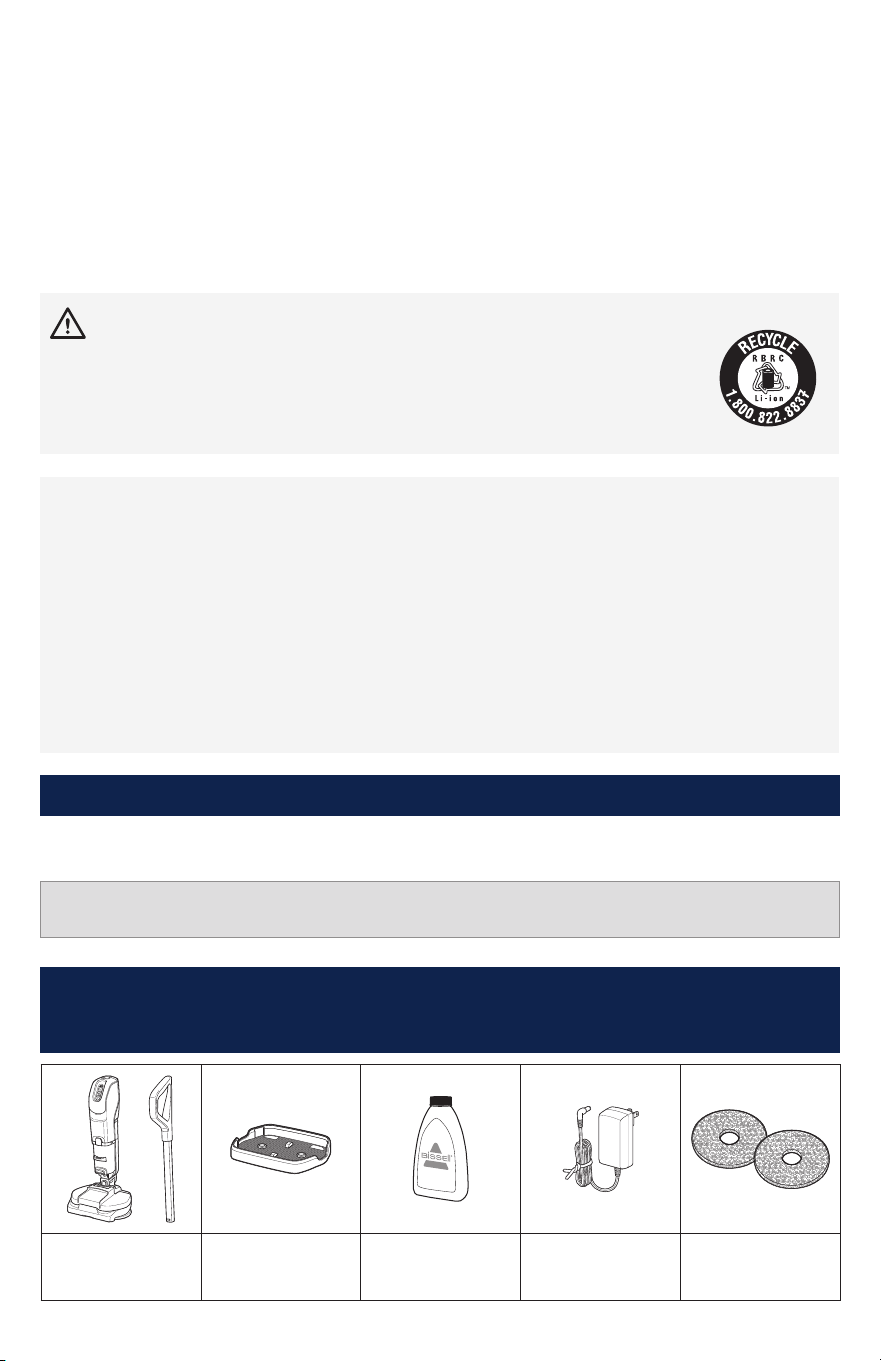
Body & Handle Storage Tray Trial Formula Charger Mop Pads
(quantity and style may
vary by model)
What’s in the Box?
Standard accessories may vary by model.To identify what should be included with your purchase,
please refer to the “Carton Contents” list located on the carton top flap.
FCC Part l5 NOTE: This equipment has been tested and found to comply with the limits for a Class B digital device, pursuant to Part
15 of the Federal Communications Commission (FCC) rules. These limits are designed to provide reasonable protection against
harmful interference in a residential installation. This equipment generates, uses and can radiate radio frequency energy and, if
not installed and used in accordance with the instructions, may cause harmful interference to radio communications. However,
there is no guarantee that interference will not occur in a particular installation. If this equipment does cause harmful interference
to radio or television reception, which can be determined by turning the equipment OFF and ON, the user is encouraged to try to
correct the interference by one or more of the following measures: (1) Reorient or relocate the receiving antenna. (2) Increase the
separation between the equipment and receiver. (3) Connect the equipment into an outlet on a circuit dierent from that to which
the receiver is connected. (4) Consult the dealer or an experienced radio/TV technician for help. This device complies with Part 15 of
the FCC rules. Operation is subject to the following two conditions: (1) this device may not cause harmful interference, and (2) this
device must accept any interference received, including interference that may cause undesired operation. CAUTION: Any changes or
modifications to this unit not expressly approved by the party responsible for compliance could void the user’s authority to operate
the equipment.
Warranty
NOTICE Disconnecting the battery will destroy the appliance and invalidate the warranty.
Limited 2-year warranty, may vary by state. Visit support.BISSELL.com or call 1-800-237-7691 for
complete warranty information.
4 BISSELL.com
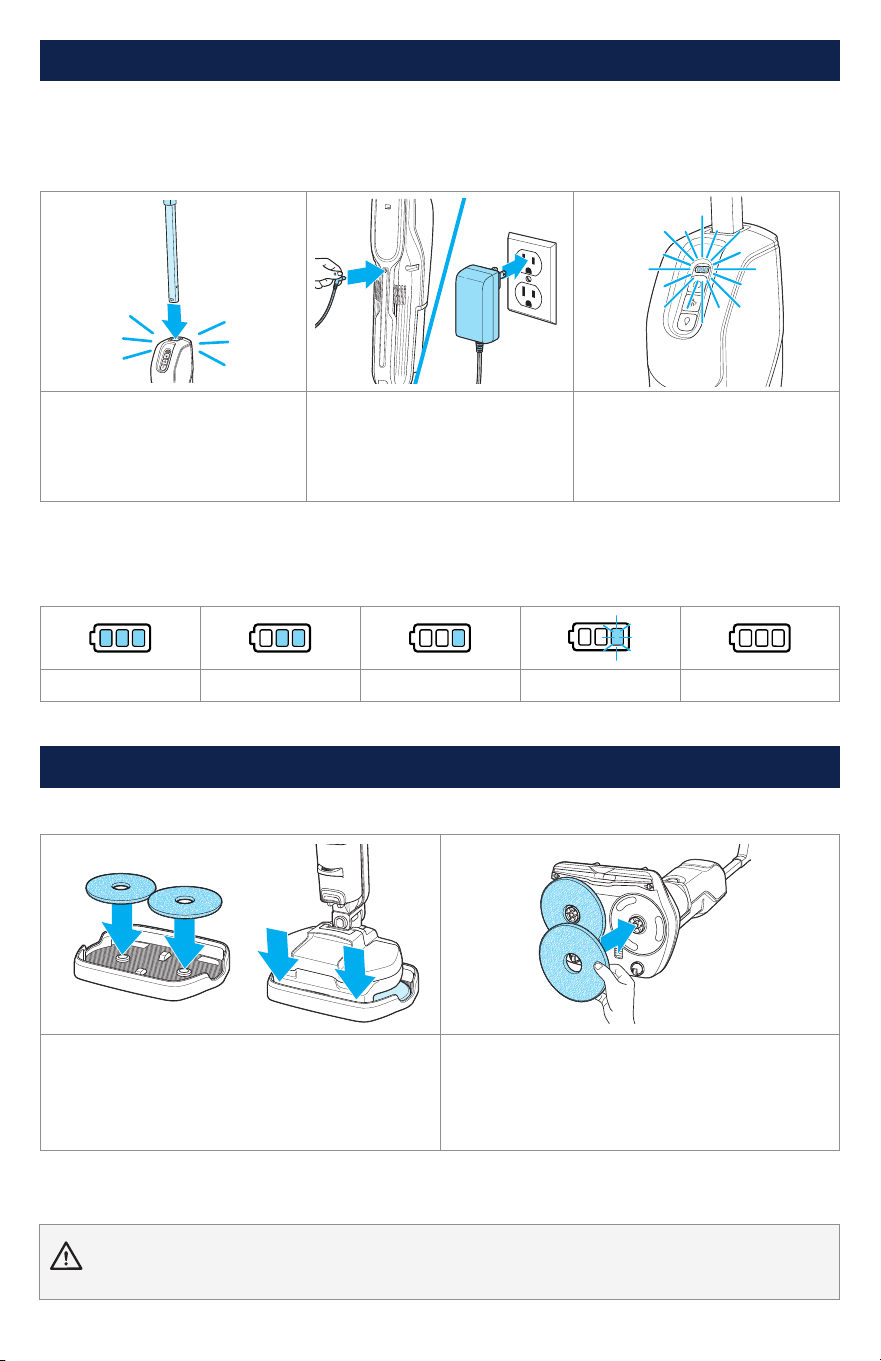
Attaching the Mop Pads
Note: Your machine may come with mop pads attached.
Option 1: With Tray
Place mop pads on tray, aligning center opening
of pad on raised parts of tray. Tilt machine so
front of foot aligns to tray. Set machine down,
tray and pads should align and attach.
Option 2: Without Tray
With machine OFF, remove clean tank and flip
machine so you can see under the foot. Align
pads to circles on foot.
WARNING To reduce the risk of fire and electric shock due to internal component damage, use only BISSELL
cleaning formula intended for use with this machine.
Assembly and Charging the Battery
Important Charging Information:
• Plug in the machine immediately upon receiving. For maximum run time (up to 70 minutes in Wet Mop-
Only mode) charge for 3 hours before use.
• If planning to store for over 6 months, ensure battery is fully charged before storage.
1. Insert handle into body until
it clicks into place.
2. Before charging, ensure
machine is OFF. Plug charging
adapter into machine and then
into a wall outlet. Battery status
indicator lights will illuminate.
3. Battery indicator lights
will blink during charging and
illuminate fully at 70% charge.
When fully charged, lights will
turn off.
Battery Power Indicator
Your machine has an LED light display that will turn on when power button is pushed to show battery
life status.
100% to 67% 66% to 33% 32% to 10% < 10% 0%
BISSELL.com 5
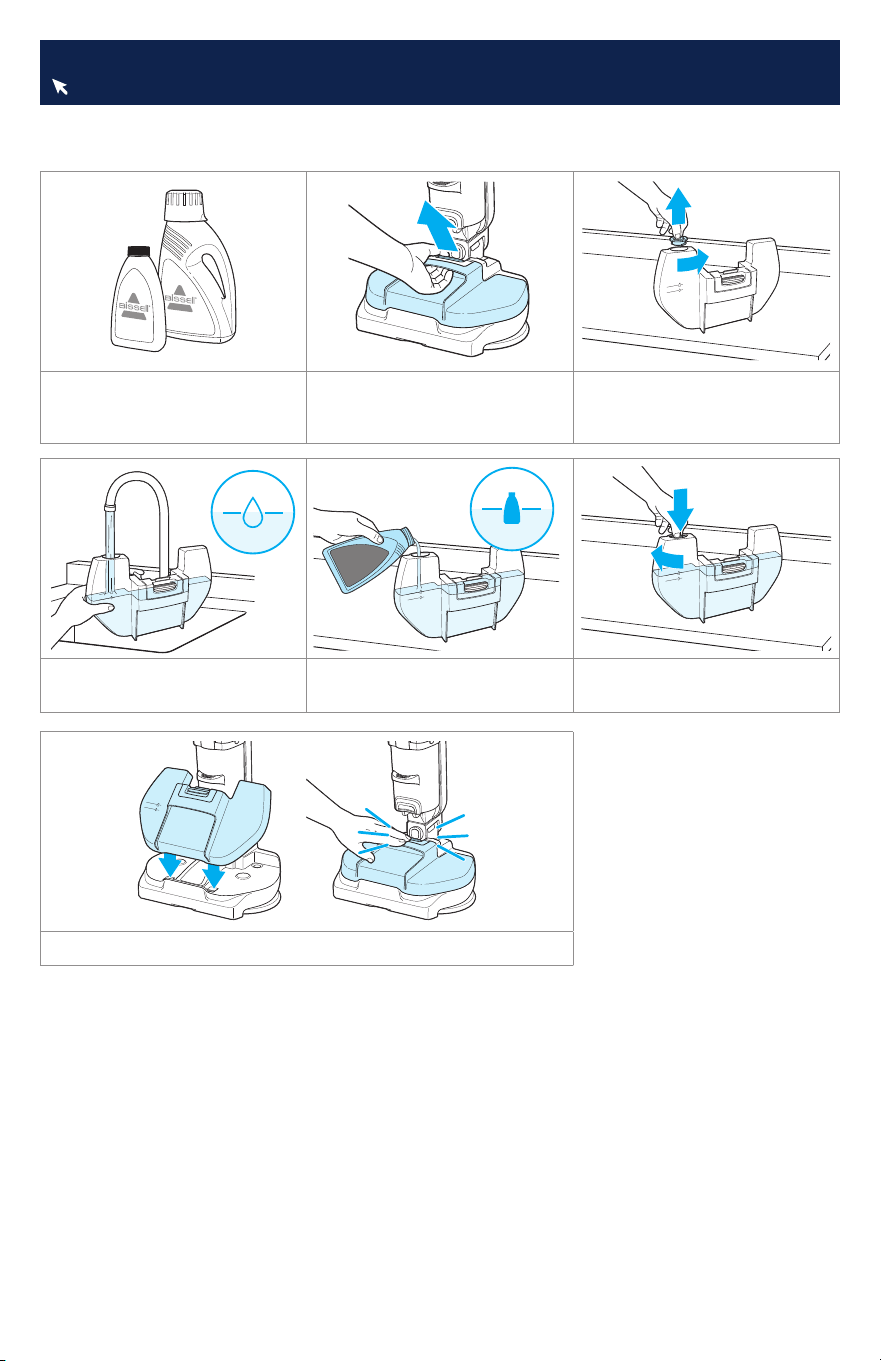
This machine is compatible with BISSELL® formulas made for hard surfaces.
Always use genuine BISSELL formulas in your machine. Other formulas may harm the machine.
1. Choose your formula.* 2. Remove tank from foot
using center grip. Tank can be
set on a flat surface if needed.
3. Twist cap to remove.
4. Add warm water (140°F /
60°C max) to water line.
5. Add BISSELL formula to
formula line.
6. Close cap.
7. Reinstall tank to machine. It will click into place.
*Compatible BISSELL formulas include: Multi-Surface, Wood Floor, Hard Floor Sanitize,
Simply Multi-Surface, Multi-Surface Pet Lemon Eucalyptus
Filling the Clean Water Tank
Find more formulas at BISSELL.com.
6 BISSELL.com
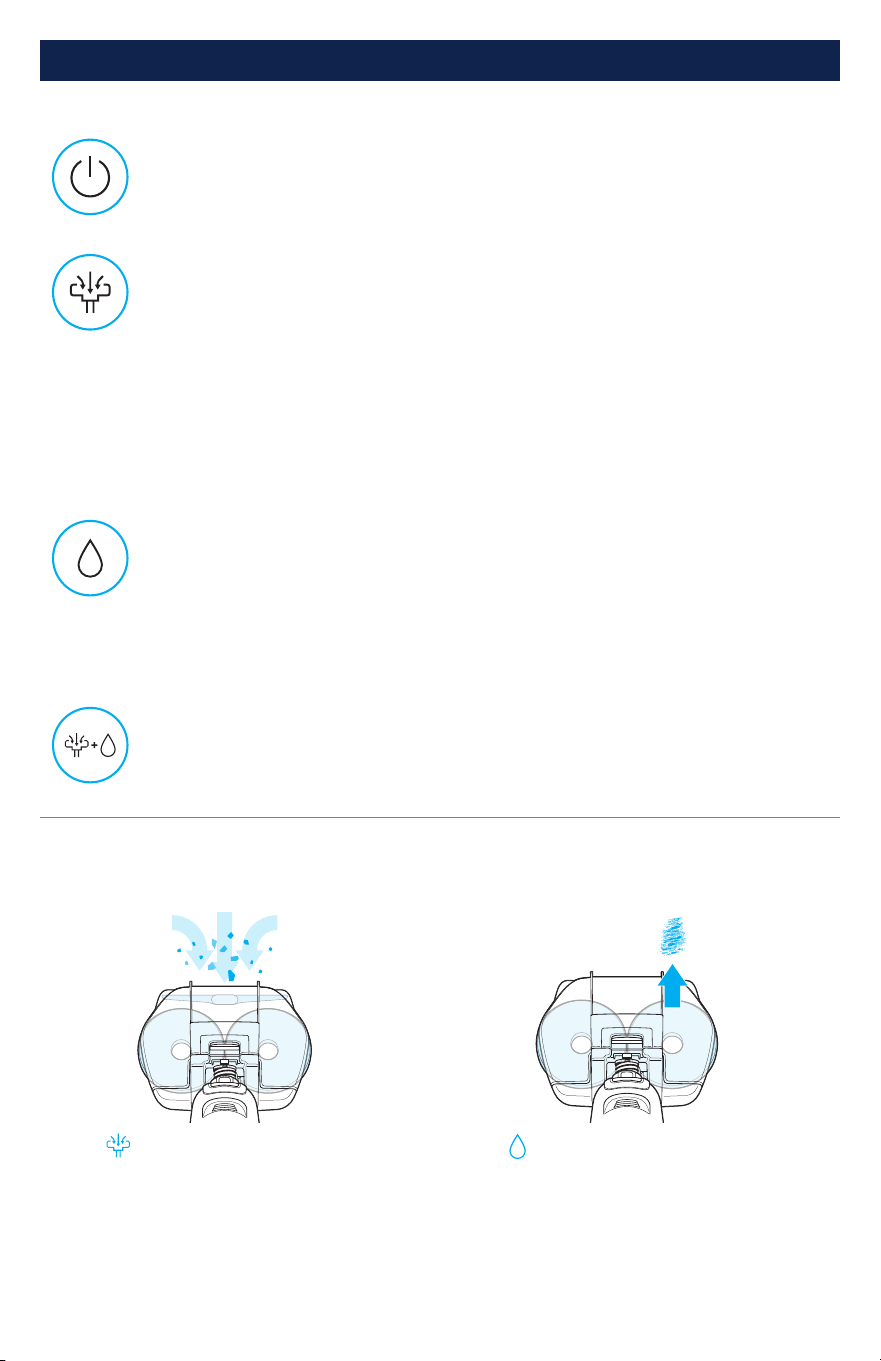
Power On/Off
Machine defaults to dry vacuum ON and wet mop OFF.
Machine will remain in last cleaning mode used if turned back on within 5 minutes.
Controls and Cleaning Tips
Cleaning Tips
This product is meant for sealed hard surfaces. Do NOT use this product on area rugs or carpet.
Controls
Dry Vacuum + Wet Mop at the Same Time
RUN TIME: 20 MINS
Turn both modes on for fast and easy 2-in-1 cleaning.
Wet Mop On/Off
RUN TIME: 70 MINS
Blue LED indicates wet mop is ON.
Scrub, mop, and refresh hard floors.
With wet mop ON, recline machine. Mop pads will start spinning and fluid will
flow through center opening of pads to floor. See next page for more.
Dry Vacuum On/Off
RUN TIME: 20 MINS
Note: Do not use for wet spills. If wet debris or water gets into dry dirt tank,
reference pages 8–9 for steps on how to clean it out.
White LED indicates vacuum is ON.
Great for light debris pick-up and quick touch-ups, such as:
• Baking soda
• Cat litter
• Confetti
• Dirt
• Dry crumbs
• Pet food
• Pet hair
• and more!
Mopping Tough Messes
For difficult, stuck-on messes, aim center
of mop pad on stain. Fluid comes through
center of each mop pad.
Vacuuming Dry Debris
For optimal performance, use clean, dry pads
to capture debris with fewer passes. Aim
machine front and center for best suction.
Seeing a dry path on the floor where the pads touch? Slow down for even cleaning. Aim for 8 inches
per second. Your foot may be a helpful reference as you move the machine along.
BISSELL.com 7
Cleaning Your Floors
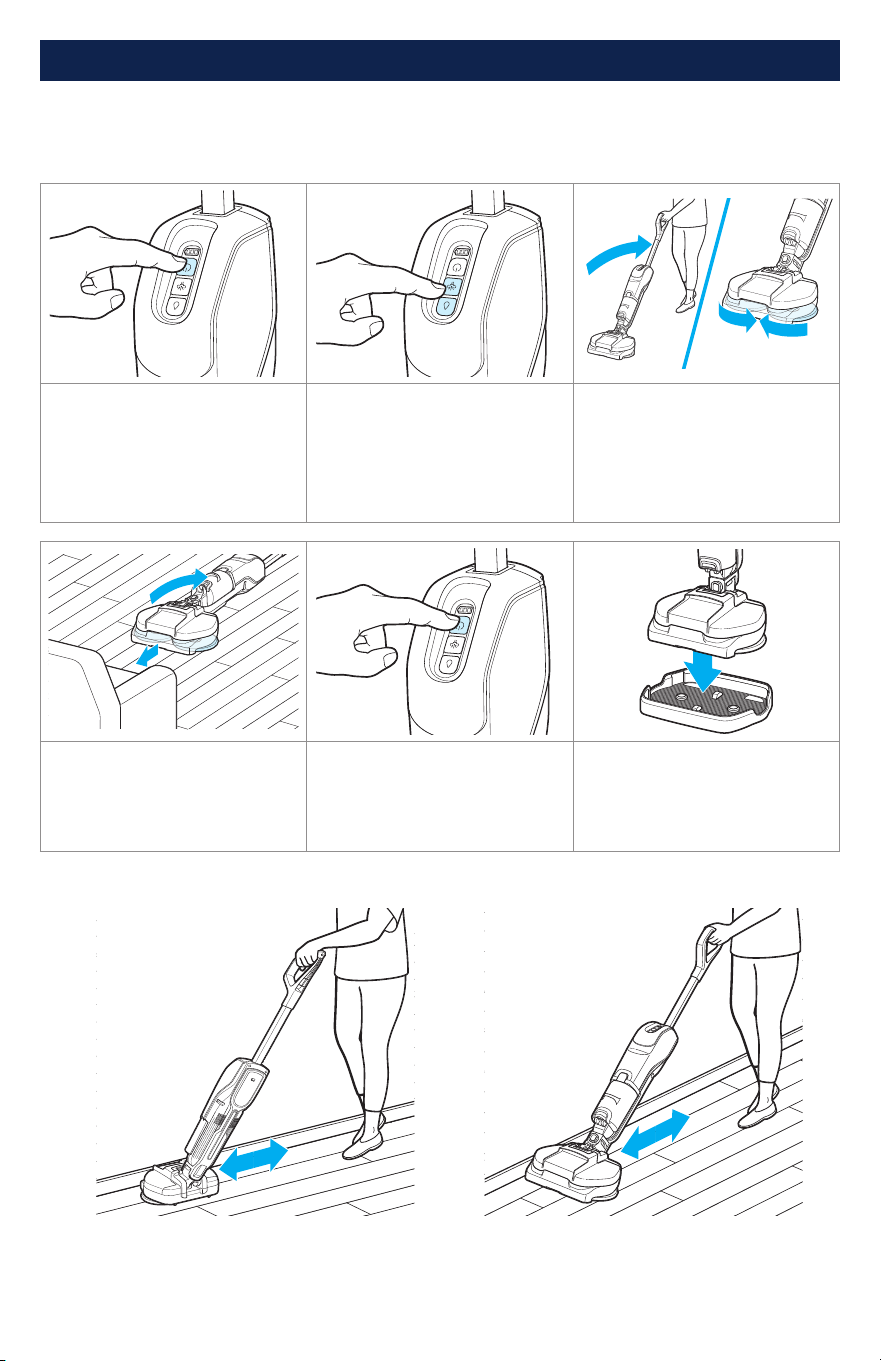
1. Press power button to turn
machine ON. Machine starts
with dry vacuum ON.
Note: Machine will remain in
last cleaning mode used if
turned back on within 5 minutes.
2. Select mode: dry vacuum,
wet mop, or both. Each mode
has a light indicating it is ON.
See page 6 for cleaning modes.
3. Recline machine to start
spinning mop pads.
In wet mop mode, start
by moving the device back
and forth to prime (about
30 seconds).
4. Your machine can recline
to lay flat to help reach under
low clearances.
5. Press power button to turn
OFF. Note: Machine will remain
in last cleaning mode used if
turned back on within 5 minutes.
6. When finished cleaning,
place machine in storage tray.
Using Swivel for Edge Cleaning
IMPORTANT: Ensure heavy debris, puddles and/or heavy wet messes are removed from floor
before starting. The vacuum is for cleaning dry debris; do not use the vacuum mode for picking
up wet spills. If wet debris or water gets into dirty tank, reference pages 8–9 for steps on how to
clean it out.
Edge Vacuuming: Swivel the device to a 90°
angle and glide effortlessly along the edge.
Edge Mopping: Mop pads are designed
to reach right up to the edge, ensuring
thorough cleaning against floor trim.
8 BISSELL.com
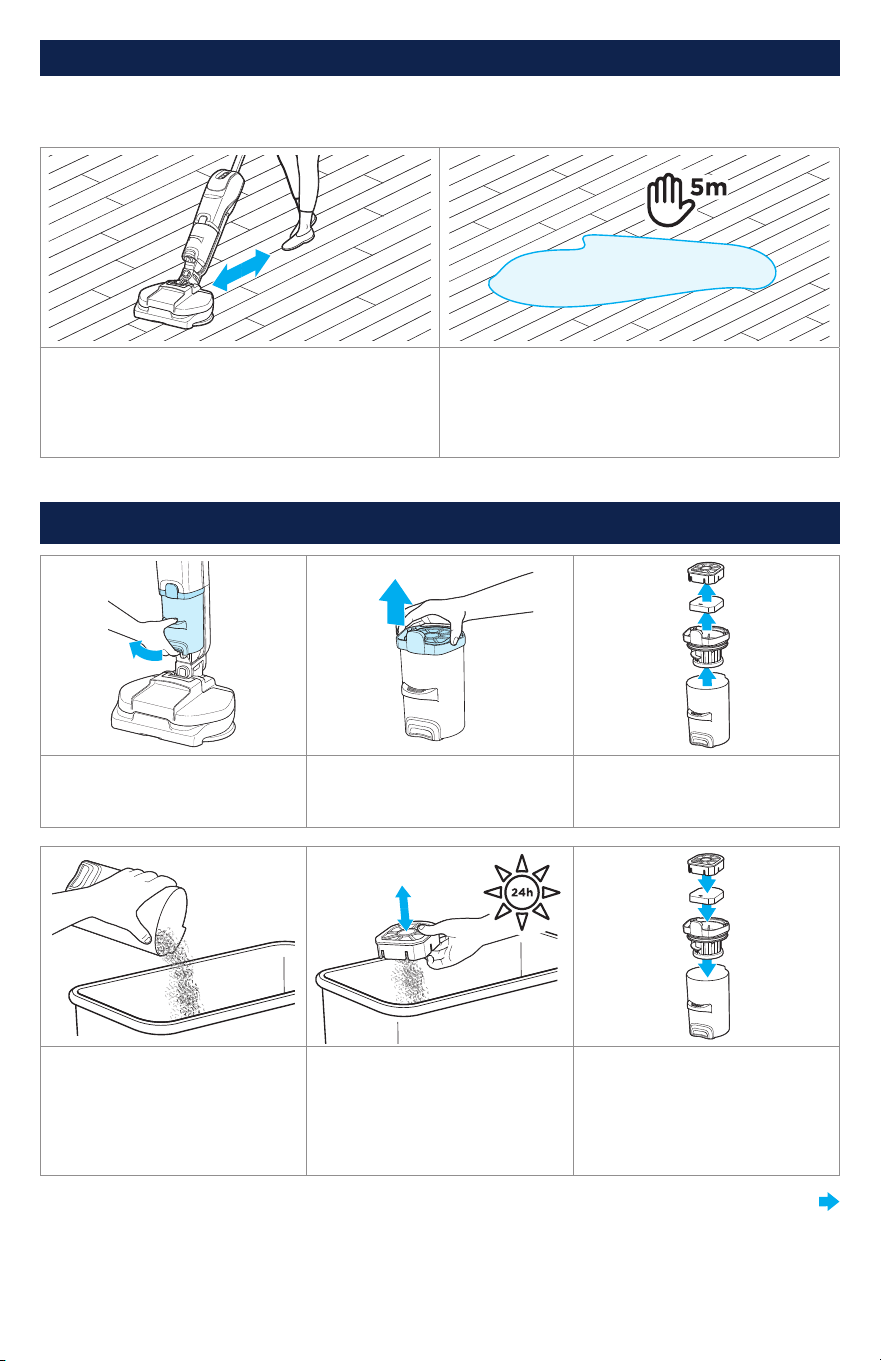
Emptying the Dirt Tank
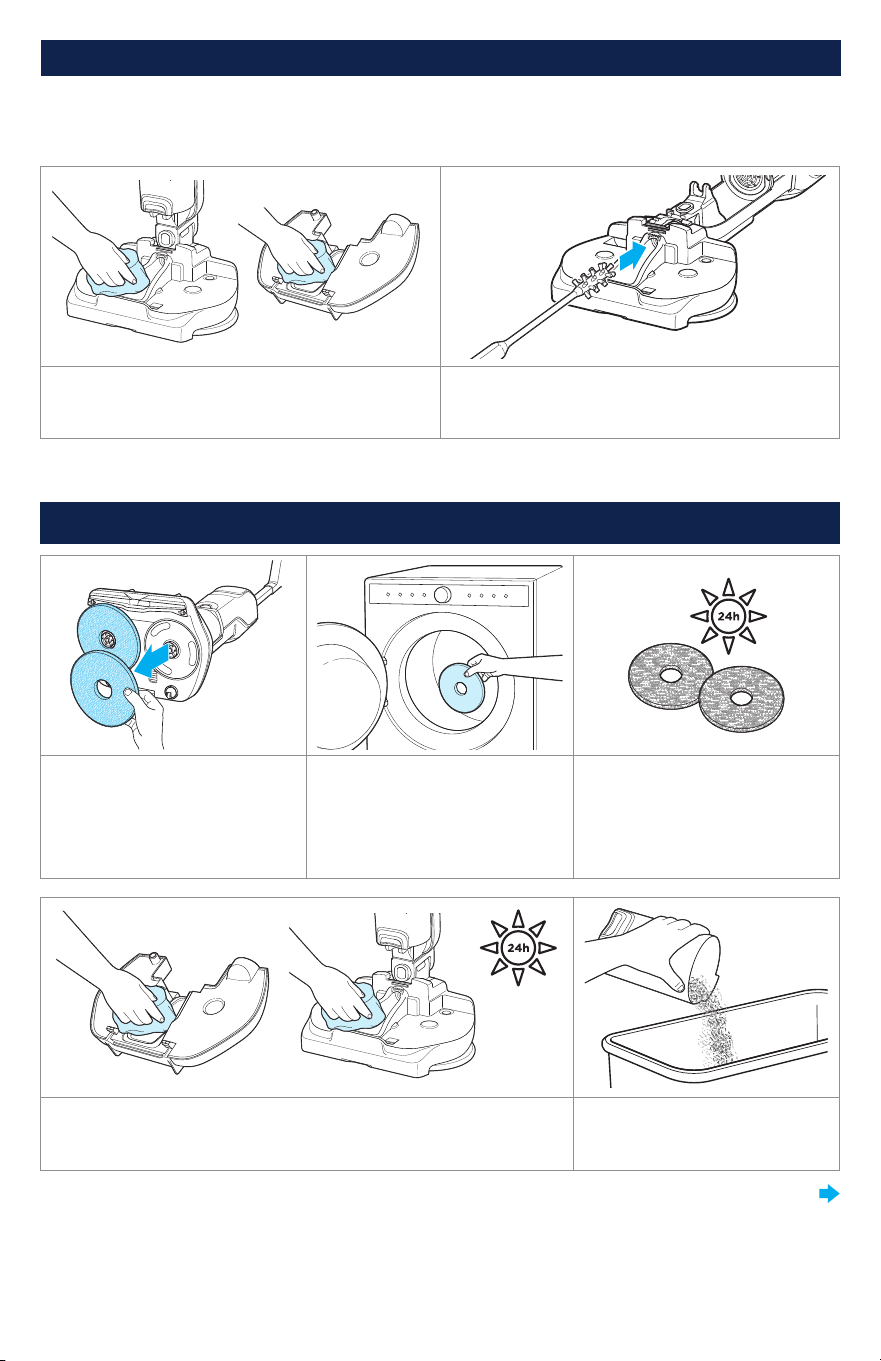
1. Press button at bottom of
tank to release. Rotate up and
pull tank out to remove.
2. Pull lid up to remove. 3. Separate filter by pulling
blue cage off.
4. Empty tank. If contents
appear wet, see next page for
cleaning instructions.
5. Separate filter from tank
and tap on side of trash bin to
remove dust and debris. If filter
feels wet or damp, rinse and
allow to dry completely before
reinstalling.
6. Reassemble tank.
Cleaning Your Floors (continued)
Using Hard Floor Sanitize Formula
Please read “DIRECTIONS FOR USE” on Hard Floor Sanitize label. Use on hard nonporous floors only.
1. Follow cleaning instructions on previous page
to remove visible soils.
To Sanitize: Turn dry vacuum OFF and wet mop
ON.
2. With wet mop ON, clean floors keeping the
device in motion to spread the solution to the
floor. Continue doing so to allow the floor to
remain wet for 5 min. Allow floors to air dry.
Do not use the vacuum during this time.
CONTINUED ON NEXT PAGE
BISSELL.com 9
After-Cleaning Care
1. Pull mop pads to remove. 2. Mop pads may be machine*
or hand washed.
*Machine wash warm. Use only liquid detergents.
Do not use bleach or fabric softener. Tumble dry
on low. Do not iron or dry clean.
3. Let mop pads dry
completely before reattaching.
4. Use a damp cloth to clean suction path on machine under
clean tank and on the foot. Allow to dry completely before
reinstalling tank.
5. Empty tank. If contents
seem wet, follow prior steps to
remove all wet debris.
CONTINUED ON NEXT PAGE
Wet Debris Clean Out
If water is picked up by the vacuum and the dry dirt tank has wet debris, ensure your machine is
cleaned out completely.
1. Remove clean tank and clean out the vacuum
air path.
2. Recline machine for easy access and use a
small bottle brush to clear the hose-like path
inside the machine.
Emptying the Dirt Tank (continued)
10 BISSELL.com
Problem Possible Cause Remedies
Machine will
not turn on
Battery is not charged.
Charge machine with provided charger. If
machine charges for 3 full hours and product still
doesn’t turn on, contact BISSELL Consumer Care.
Mop pads are
not spinning
Machine is upright. Recline machine.
Mop pads are
wobbling
Mop pads are not installed
properly.
Turn Power OFF. Turn machine upside down to
see pad installation. Ensure pads are aligned to
center circles on foot and secured tightly.
Fluid is not
coming out
of machine
Clean water tank is empty.
Refill clean water tank with more warm water and
cleaning formula.
Clean water tank is not seated
properly.
Reinstall clean water tank. See instructions on
page 5.
Machine is upright. Recline machine.
Spray tips are clogged.
Locate spray tip opening (yellow port) under mop
pad driver. Remove debris that may be blocking
opening.
Fluid receiver is clogged.
Remove clean tank. Wipe in and around the
circular opening in the upper right corner above
the molded installation graphic to remove any
clog or debris in that area.
Machine is
leaking
Cap of clean water tank is not
closed properly.
Remove clean water tank and reinstall cap.
Clean water tank is not seated
properly.
Reinstall clean water tank. See instructions on
page 5.
Troubleshooting
After-Cleaning Care (continued)
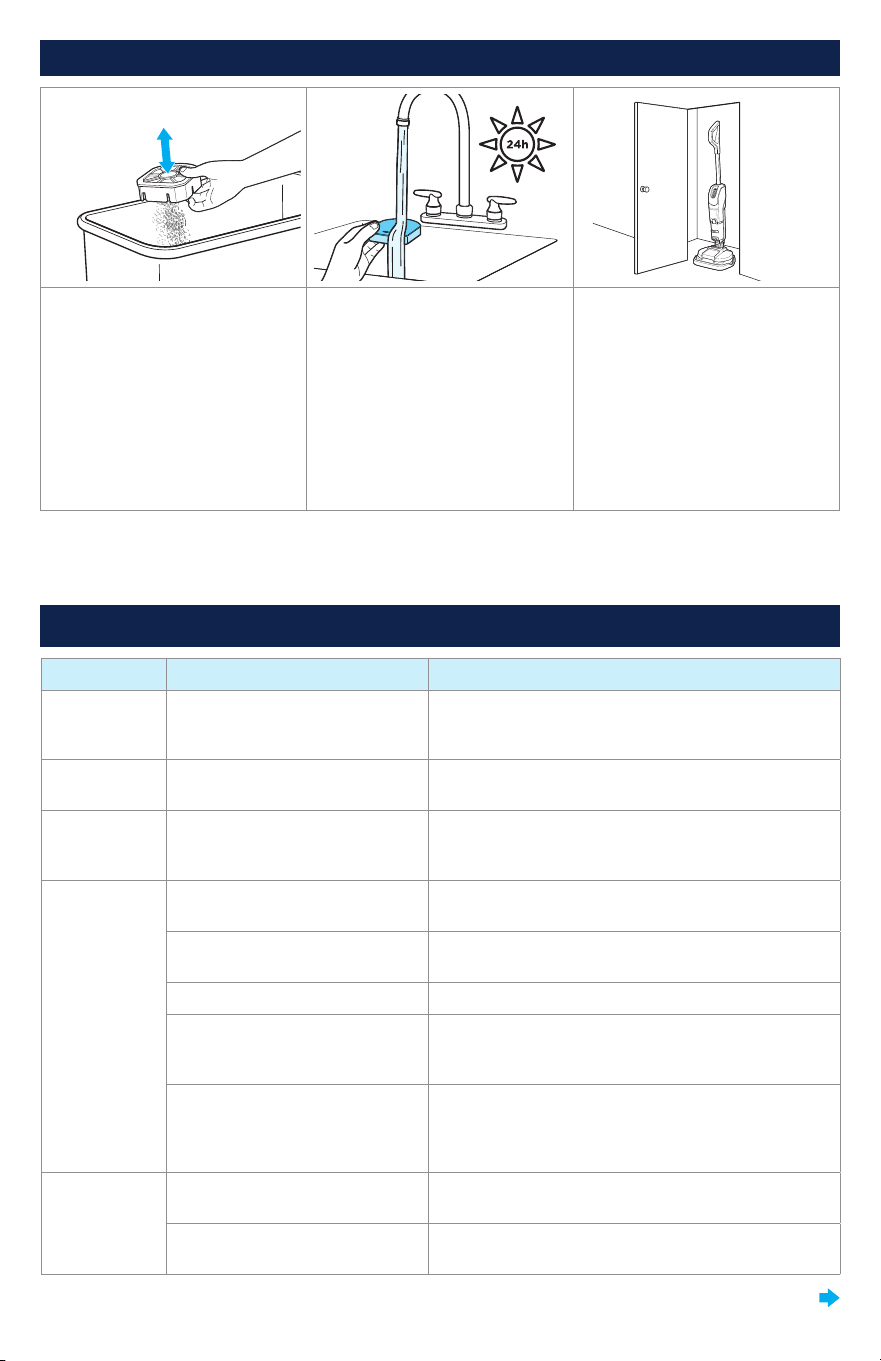
6. Separate filter from tank
and tap on side of trash bin to
remove dust and debris.
7. Occasionally wash filter to
maintain vacuum performance.
Rinse and allow to dry
completely before reinstalling.
8. Store machine in a
protected, dry area. Since
this product uses water, it
must not be stored where
there is danger of freezing.
Freezing will damage internal
components and may void the
warranty. If planning to store
for over 6 months, ensure
battery is fully charged before
storage.
Note: Any other maintenance or servicing not included in this manual should be performed by an
authorized service representative.
CONTINUED ON NEXT PAGE

Vacuum does
not pick up
debris/has
no suction
Filter needs to be cleaned or is
not installed correctly.
Clean and reinstall filters. See instructions on
page 8.
Front suction nozzle is clogged
and needs to be cleared.
Machine is for dry messes only. Clean suction
path under clean tank, machine foot (page 9).
Empty, dry dirt tank before next use. Wash and
dry filter before reusing.
Debris is too large or spread
beyond suction area.
Aim machine front and center to large debris for
optimal suction performance.
Wet debris
in dry dirt
tank or fluid
coming out
of motor
exhaust
Moving device too slowly while
cleaning or too many wet
passes in one area.
Make sure keep unit moving while wet cleaning.
Cleaning one spot for a long period of time could
cause moisture to be ingested into dry debris
collection tank.
Ran over large, wet mess.
Machine is for dry messes only. Clean suction
path under clean tank, machine foot (page 9).
Empty, dry dirt tank before next use. Wash and
dry filter before reusing.
All (3) LED
lights are
flashing
Machine lost communication
with battery.
Press power button to turn machine off. Wait 10
seconds and turn machine back on. If lights flash
again, contact BISSELL Consumer Care.
Vacuum LED
flashing
Vacuum motor error: Vacuum
motor went into protective
status.
Press power button to turn machine off. Wait 10
seconds and turn machine back on. If lights flash
again, contact BISSELL Consumer Care.
Wet Mop LED
and vacuum
LED lights
flashing
alternately
Pad error: Pad motor went into
protective status.
Shut machine off, wait 10 seconds and turn
machine back on. If lights flash again, contact
BISSELL Consumer Care.
Check pads for hair or other material interfering
with proper pad rotation.
Device used on area rug or
carpet.
This product is designed for hard floors. Stop use
on area rug and carpet.
Machine
unexpectedly
turns off.
The battery has gone into a
protective status.
Wait 10 minutes then press the power button and
the machine should begin functioning again.
Mop light
is flashing/
blinking.
Water pump error.
Press power button to turn machine off. Wait 10
seconds and turn machine back on. If lights flash
again, contact BISSELL Consumer Care.
Troubleshooting (continued)

But wait, there’s more!
Join us online for a complete guide to your new product, including
troubleshooting, product registration, parts, and more.
Go to support.BISSELL.com.
VIDEOSINFOREGISTER PARTS SUPPORT
We’re Waggin’ Our Tails!
BISSELL proudly supports BISSELL Pet Foundation® and its mission to
help save homeless pets. When you buy a BISSELL® product, you help
save pets, too. We’re proud to design products that help make pet
messes, odors and pet homelessness disappear.
Visit BISSELLsavespets.com to learn more.
©2024 BISSELL Inc. All rights reserved.
Part Number 1641969 01/24 v16
