User Manual
TMDL20
Single Use Dry Ice Temperature Datalogger
EN12830:2018, RTCA DO-160G
Introduction
Congratulations on your purchase of the Triplett
TMDL20 single use dry ice temperature
datalogger.
This datalogger is designed for monitoring
temperature subject to quality control
requirement in transportation and storage.
Temperature measurements are saved
throughout the duration of the measurement
period.
This datalogger is equipped with a user defined
programming function. The measurement report
output is implemented using a PDF file, no
unique software, and no USB driver is required.
Read through the instruction manual before using
this logger. The logger is calibrated before
shipment.
Product Description
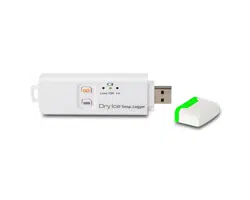
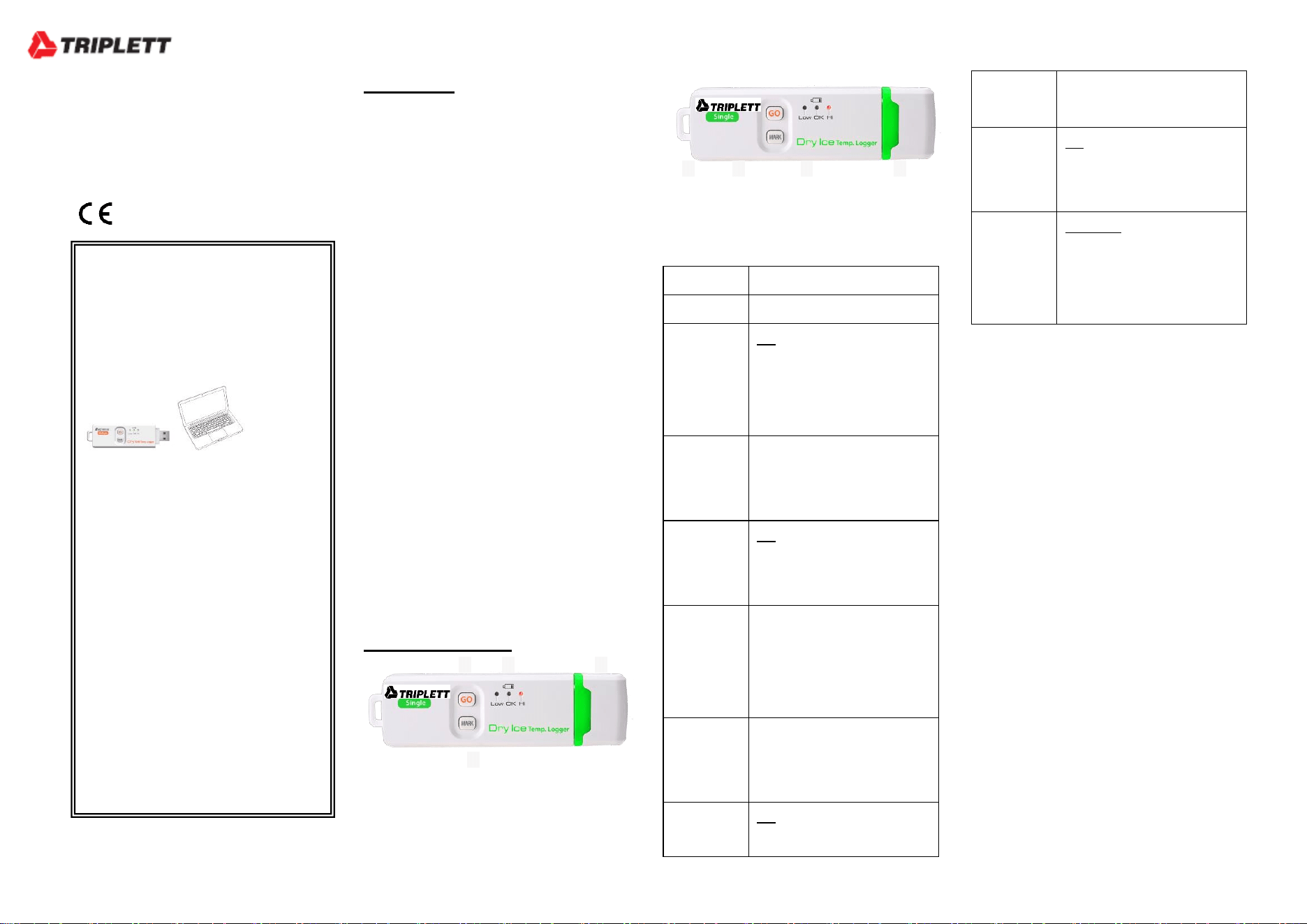
① USB2.0 plug & play connector. USB driver is
not required. PC software is also not required.
② LED indicator:
Status
LED indication
Power OFF
All LEDs are OFF.
Standby
OK Green LED blinks triple
every 5 seconds when logger is
programmed to standy but not
yet start to log.
Activate
recording
Red LEDs flash in sequence 3
times to indicate you are
activating a logger.
Recording
OK Green LED blinks every 10
seconds when logging function
is under going.
Marking
Red/Red/Red LEDs flash in
sequence to indicate you are
marking the time stamp into
logger.
Stop
recording
Red LEDs flash in sequence to
indicate you are stopping a
logger
Recording
is
OK Green LED blinks every 5
seconds after logging function
completed
is ended automatically or
manually.
Low power
OK RED LED blinks every 5
seconds to indicate the battery
power is below 3.0V
Over alarm
threshold
Low/High Red LED blinks
every 10 seconds when the
measuring set limit value is
exceeded during record.
③ GO (START/STOP) key:
This logger can only be turned ON and OFF
through PC. Plug into PC to execute
configuration may turn it on and it will be turned
off automatically after the report is generated.
After the logger is programmed, press the GO
key for 5 seconds to start logging. To stop logging,
press the GO key again for 5 seconds. In the
logging mode, short press key won’t power off or
stop the logger.
④MARK key:
To mark an event manually during the
measurement period, press the MARK key for 5
seconds until the red LEDs flash in sequence.
This MARK function is usually used when there is
a transition, from one location to another. At most
8 marks can be identified in the PDF report.
⑤ High accuracy built in PT1000 sensor for
temperature measuring.
③ ② ①
⑦ ⑥ ⑤ ⑧
④
QUICK GUIDE
Step 1:
Plug Logger into USB port of Windows
computer to config the logger
Step 2:
Long press “GO” till red LED flashes in
sequence 3 times.
Step 3:
Put the logger into dry ice
transportation box.
Step 4:
Take out the logger from box while
reaching destination.
Step 5:
Plug logger into computer to get report.
The recording function of this logger is
also ended at this moment.

⑥ Built in Battery. This logger is operated by 1 pc
3.6V built in lithium battery. The battery is not
replaceable or re-chargable. Suggest on-shelf
storage time is no more than 1 year time.
⑦ Hanger
⑧Waterproof USB plug cover:
To provide the logger with water proof feature,
wear on this plug cover before logging trip.
Operation
NOTE:
1. Adobe Reader software is required.
2. Program the logger and generate the PDF
report at room temperature. For example: if
the logger is removed from a freezer, it should
be allowed to return to the ambient room
temperature before generating the PDF
report.
3. The executable file for programming the
logger is named: PDF Logger Configuration
Tool
Step1 Configuring the data logger
It is possible to make configuration changes at
anytime before the logging function is started.
Once the logger is started, configuration changes
cannot be made anymore. If the logger is locked
with a Password, the Password is required to
make configuration changes.
- First, connect the data logger to a PC via the
USB port. The green LED is on while the
connection with computer is built.
- Windows file management window will appear.
- If the correct file folder is not open, click on
Folder to view files.
- Open the file " PDF Logger Configuration Tool.
exe".
- The default language is English. The user may
change it to one of six alternate languages. There
are English, German, French, Italian, Spanish,
and Portuguese.
- User programmable parameters are as follows:
★Sampling rate
Select the sampling interval you need from 30
seconds to 2 hours.
★Start delay
Select the start delay from 0 min to 24 hours. For
example: If the delay is 5 minutes, and the
sampling rate is 10 minutes, the real time to log
the first temperature measurement is 5 minutes
after the GO key is pressed. All measurements
after the first measurement will be at a 10 minute
(or selected) interval.
★Unit of Measurement (UoM)
Select the unit that will be displayed on the report.
The selections are Celsius or Fahrenheit
★Password
The Password function is default OFF. The user
may enable it to prevent unauthorized
reprogramming prior to pressing the logger
starting key. A Password may have up to 16
alpha or numeric characters.
★Company Name
A user defined name, location or descriptor, can
be input under Company Name. It will be
displayed on the PDF report as the Title, with a
maximum of 20 characters.
★Alarm types
Regardless of the Alarm Type, if the red LED is
triggered, it won’t stop even the reading return to
normal range or logging is stopped. The way to
stop red alarm LED is to plug logger into
computer to generate report.
Single: an alarm is triggered immediately when
the measured value exceeds the alarm threshold.
Cumulative: an alarm is not triggered when the
measured value exceeds the alarm threshold, but
only once the overall average value during alarm
delay duration exceeds the alarm threshold.
Disable: No alarm function during the logging
process
★Alarm delay
The preset alarm delay interval for a single alarm
type is always ZERO.
The adjustable alarm delay interval for a
cumulative alarm type can be 5 minutes to 2
hours.
★Alarm Limits
Select the alarm threshold values. For example: if
2 - 8 deg C is selected, it means that an alarm
condition will occur below 2 deg C, or above 8
deg C. The programmable alarm limit of each
parameter is limited to one decimal. To
summarize, to activate a alarm when 30 min
average value of hazardous alarm delay period is
higher than 8
℃
, please program the alarm delay
as 30 mins, alarm type as cumulative and range
as 2~8
℃

★Time zone
Before programming the logger the user must
assure that the PC is set for the correct time zone.
The logger will auto synchronize to the time zone
of the PC, when Save is pressed. Time zone
changes over the transit distance are not
adjusted in the logged data.
The default value of above parameters are:
Sampling rate: 5 min Alarm Type: Disable
Start delay: 0 min Alarm delay: 0 min
Temp. Unit: °C Alarm Limits: blank
Password: disable
Company Name: blank Language: English
Once all the programming is done, press "Save"
to confirm the setting and then you may close the
setup window and remove the logger from PC
USB port.
Step2 Start logging
-When logger is successfully programmed, the
green LED blinks triple every 5 seconds to
indicate the logger is in standby mode.
-Put on the USB plug cover and then press "GO"
key for five seconds to start the logging.
-Red LEDs will flash in sequence 3 times to
indicate the logging is activated.
-During the logging, the green LED will blink
every ten seconds. If battery power is too low to
maintain a normal operation, red LED blinks.
- To place a bookmark manually during the
delivery transition, press MARK key for 5
seconds till the Red LEDs flash in sequence.
Step3 Download data
-Press "GO" key for 5 seconds till red LEDs flash
in sequence to stop the logging.
-Plug logger into PC USB port can also stop the
logging
- The PDF report will be generated automatically
upon the logging is plugged into computer. The
report contains statistics report, diagram and all
detail data. The language of the report is identical
to the language you used to do setting.
-The generated PDF report will be kept in logger.
You may copy and paste it to any file folder you
need.
-The recording function of this logger is ended
while you plug it into computer or press key to
stop it.
Specifications
Model Single Use Dry Ice Temp. Logger
Temp. & Ext. By PT1000 sensor
measurement -80.0~70.0
o
C (-112.0~158.0
o
F)
Temp. resolution 0.1
o
C (0.1
o
F)
Temp. accuracy +/-0.5
o
C
T90 Response Within 20 mins
Logging Type Multiple use
Sampling points 8192 points
On-shelf Life Best to use within one year
Operating temp. -80~70
o
C (Logging status); room
temp.(PC status)
Operating RH% Humidity < 80%
Storage temp. -40~85
o
C
Storage RH% Humidity <90%
Weight ~20g
Battery Built in 1 PC 3.6V Lithiim battery
Sampling interval 30 seconds, 5, 10, 30, 60, 90, 120
minutes
Start delay 0, 5, 30, 45, 60, 90,120 minutes, 24
hours
Alarm range Temp: -80.0~70.0
o
C
Alarm delay 0, 5, 30, 45, 60, 90, 120 minutes
Alarm type Single, Cumulative, Disable
Operation keys 2 Keys, GO & Mark
LED indicator REC, Low battery, High /Low alarm
Protection class IP67
Directives EN12830:2018, RTCA DO-160G
Operating System Windows only
Warranty
Triplett / Jewell Instruments extends the following
warranty to the original purchaser of these goods
for use. Triplett warrants to the original purchaser
for use that the products sold by it will be free
from defects in workmanship and material for a
period of (1) one year from the date of purchase.
This warranty does not apply to any of our
products which have been repaired or altered by
unauthorized persons in any way or purchased
from unauthorized distributors so as, in our sole
judgment, to injure their stability or reliability, or
which have been subject to misuse, abuse,
misapplication, negligence, accident or which
have had the serial numbers altered, defaced, or
removed. Accessories, including batteries are not
covered by this warranty.
Copyright © 2023 Triplett
www.triplett.com
