B8
RORSOU
RORSOU
1.0 Specification
Speaker size Ф 40.0mm
Battery capaclty
Battery Version
400mAh
Transmission range
Frequency response range 20Hz-20000Hz
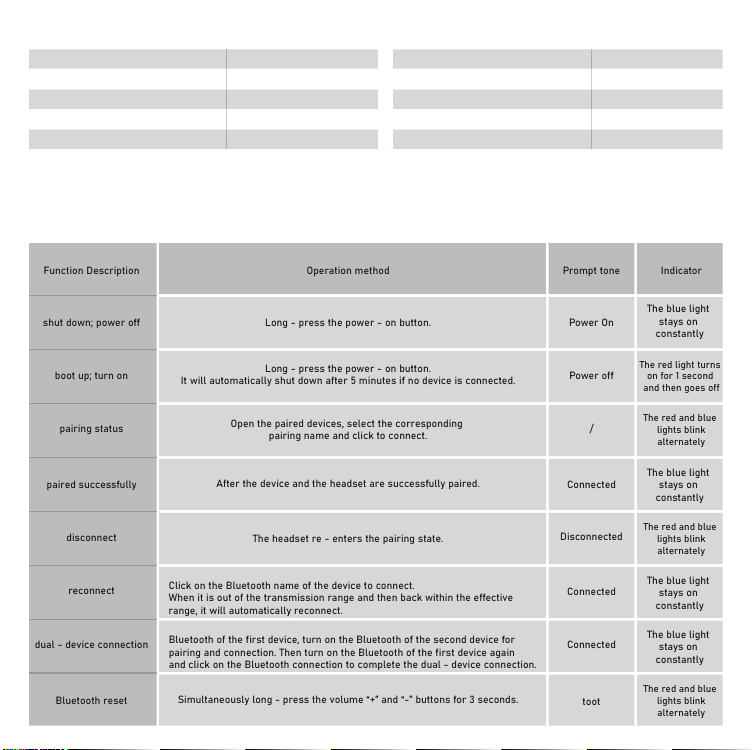
Function Description Operation method
Long - press the power - on button.
Long - press the power - on button.
It will automatically shut down after 5 minutes if no device is connected.
Open the paired devices, select the corresponding
pairing name and click to connect.
After the device and the headset are successfully paired.
The headset re - enters the pairing state.
It will automatically reconnect to the last connected device when powered on
Click on the Bluetooth name of the device to connect.
When it is out of the transmission range and then back within the effective
range, it will automatically reconnect.
After the headset is successfully connected to the first device, turn off the
Bluetooth of the first device, turn on the Bluetooth of the second device for
pairing and connection. Then turn on the Bluetooth of the first device again
and click on the Bluetooth connection to complete the dual - device connection.
Simultaneously long - press the volume “+” and “-” buttons for 3 seconds.
Prompt tone
Power On
Power off
/
Connected
Disconnected
Connected
Connected
toot
The blue light
stays on
constantly
The blue light
stays on
constantly
The blue light
stays on
constantly
The blue light
stays on
constantly
The blue light
stays on
constantly
The red light turns
on for 1 second
and then goes off
The red and blue
lights blink
alternately
The red and blue
lights blink
alternately
The red and blue
lights blink
alternately
Indicator
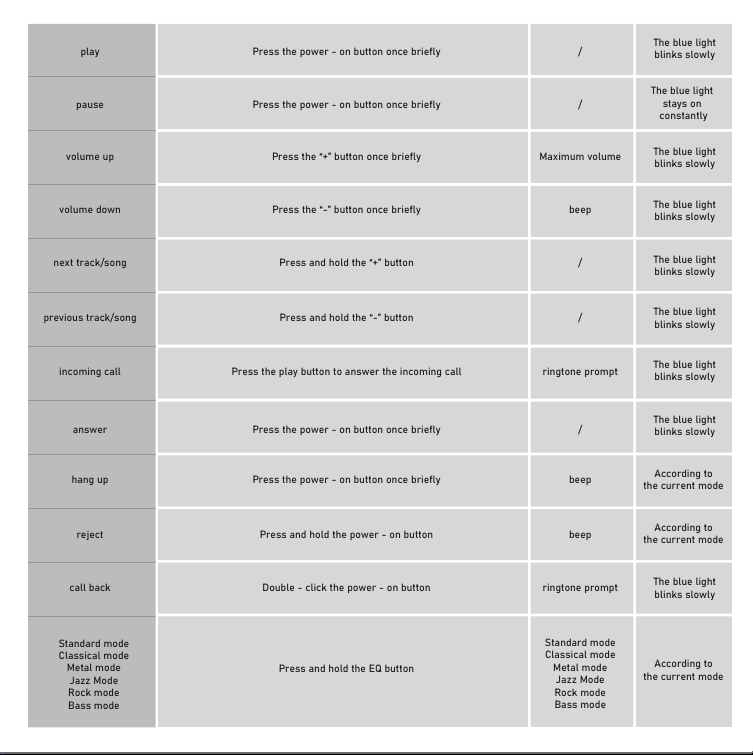
play Press the power - on button once briefly
The blue light
blinks slowly
voice assistant Triple - click the power - on button /
The blue light
blinks slowly
AUX cable
Inserting an audio cable while the device is
powered on will cause it to shut down automatically
/
turn off
turn off
low battery
It starts to give a warning when the battery level
reaches 20%, and gives a warning every 10 minutes
Battery Low
The red light blinks
slowly twice
charging
It will shut down during charging
/
The blue light
blinks slowly
fully charged / /
The blue light
blinks slowly
The blue light
blinks slowly
The blue light
blinks slowly
The blue light
blinks slowly
The blue light
blinks slowly
The blue light
blinks slowly
The blue light
blinks slowly
pause Press the power - on button once briefly
volume up Press the “+” button once briefly
volume down Press the “-” button once briefly
ne
xt track/song Press and hold the “+” button
previous track/song Press and hold the “-” button
incoming call Press the play button to answer the incoming call
answer Press the power - on button once briefly
hang up Press the power - on button once briefly
According to
the current mode
According to
the current mode
According to
the current mode
reject Press and hold the power - on button
call back Double - click the power - on button
Standard mode
Classical mode
Metal mode
Jazz Mode
Rock mode
Bass mode
Press and hold the EQ button
/
/
Maximum volume
beep
/
/
ringtone prompt
/
beep
beep
ringtone prompt
Standard mode
Classical mode
Metal mode
Jazz Mode
Rock mode
Bass mode
shut down; power off
boot up; turn on
pairing status
paired successfully
disconnect
reconnect
dual - device connection
Bluetooth reset
≥10m
Charging port Type-C
Speaker impedance 32Q
Charging time 2.5H
Standby time
200H
V5.4
2.0 Key function guide
Thank yuo for puichasing the RORSOU authentic product.
120mm*120mm
Turn on the headphones and enable Bluetooth on your frst mobile phone. Search for the "RORSOU B8" and connect to the headphones.
3.0 Bluetooth connection tutorial
Bluetooth
RORSOU B8
正面 背面
B8
RORSOU
RORSOU
1.0 Specification
Speaker size Ф 40.0mm
Battery capaclty
Battery Version
400mAh
Transmission range
Frequency response range 20Hz-20000Hz
Function Description Operation method
Long - press the power - on button.
Long - press the power - on button.
It will automatically shut down after 5 minutes if no device is connected.
Open the paired devices, select the corresponding
pairing name and click to connect.
After the device and the headset are successfully paired.
The headset re - enters the pairing state.
It will automatically reconnect to the last connected device when powered on
Click on the Bluetooth name of the device to connect.
When it is out of the transmission range and then back within the effective
range, it will automatically reconnect.
After the headset is successfully connected to the first device, turn off the
Bluetooth of the first device, turn on the Bluetooth of the second device for
pairing and connection. Then turn on the Bluetooth of the first device again
and click on the Bluetooth connection to complete the dual - device connection.
Simultaneously long - press the volume “+” and “-” buttons for 3 seconds.
Prompt tone
Power On
Power off
/
Connected
Disconnected
Connected
Connected
toot
The blue light
stays on
constantly
The blue light
stays on
constantly
The blue light
stays on
constantly
The blue light
stays on
constantly
The blue light
stays on
constantly
The red light turns
on for 1 second
and then goes off
The red and blue
lights blink
alternately
The red and blue
lights blink
alternately
The red and blue
lights blink
alternately
Indicator
play Press the power - on button once briefly
The blue light
blinks slowly
voice assistant Triple - click the power - on button /
The blue light
blinks slowly
AUX cable
Inserting an audio cable while the device is
powered on will cause it to shut down automatically
/
turn off
turn off
low battery
It starts to give a warning when the battery level
reaches 20%, and gives a warning every 10 minutes
Battery Low
The red light blinks
slowly twice
charging
It will shut down during charging
/
The blue light
blinks slowly
fully charged / /
The blue light
blinks slowly
The blue light
blinks slowly
The blue light
blinks slowly
The blue light
blinks slowly
The blue light
blinks slowly
The blue light
blinks slowly
The blue light
blinks slowly
pause Press the power - on button once briefly
volume up Press the “+” button once briefly
volume down Press the “-” button once briefly
ne
xt track/song Press and hold the “+” button
previous track/song Press and hold the “-” button
incoming call Press the play button to answer the incoming call
answer Press the power - on button once briefly
hang up Press the power - on button once briefly
According to
the current mode
According to
the current mode
According to
the current mode
reject Press and hold the power - on button
call back Double - click the power - on button
Standard mode
Classical mode
Metal mode
Jazz Mode
Rock mode
Bass mode
Press and hold the EQ button
/
/
Maximum volume
beep
/
/
ringtone prompt
/
beep
beep
ringtone prompt
Standard mode
Classical mode
Metal mode
Jazz Mode
Rock mode
Bass mode
shut down; power off
boot up; turn on
pairing status
paired successfully
disconnect
reconnect
dual - device connection
Bluetooth reset
≥10m
Charging port Type-C
Speaker impedance 32Q
Charging time 2.5H
Standby time
200H
V5.4
2.0 Key function guide
Thank yuo for puichasing the RORSOU authentic product.
120mm*120mm
Turn on the headphones and enable Bluetooth on your frst mobile phone. Search for the "RORSOU B8" and connect to the headphones.
3.0 Bluetooth connection tutorial
Bluetooth
RORSOU B8
正面 背面
B8
RORSOU
RORSOU
1.0 Specification
Speaker size Ф 40.0mm
Battery capaclty
Battery Version
400mAh
Transmission range
Frequency response range 20Hz-20000Hz
Function Description Operation method
Long - press the power - on button.
Long - press the power - on button.
It will automatically shut down after 5 minutes if no device is connected.
Open the paired devices, select the corresponding
pairing name and click to connect.
After the device and the headset are successfully paired.
The headset re - enters the pairing state.
It will automatically reconnect to the last connected device when powered on
Click on the Bluetooth name of the device to connect.
When it is out of the transmission range and then back within the effective
range, it will automatically reconnect.
After the headset is successfully connected to the first device, turn off the
Bluetooth of the first device, turn on the Bluetooth of the second device for
pairing and connection. Then turn on the Bluetooth of the first device again
and click on the Bluetooth connection to complete the dual - device connection.
Simultaneously long - press the volume “+” and “-” buttons for 3 seconds.
Prompt tone
Power On
Power off
/
Connected
Disconnected
Connected
Connected
toot
The blue light
stays on
constantly
The blue light
stays on
constantly
The blue light
stays on
constantly
The blue light
stays on
constantly
The blue light
stays on
constantly
The red light turns
on for 1 second
and then goes off
The red and blue
lights blink
alternately
The red and blue
lights blink
alternately
The red and blue
lights blink
alternately
Indicator
play Press the power - on button once briefly
The blue light
blinks slowly
voice assistant Triple - click the power - on button /
The blue light
blinks slowly
AUX cable
Inserting an audio cable while the device is
powered on will cause it to shut down automatically
/
turn off
turn off
low battery
It starts to give a warning when the battery level
reaches 20%, and gives a warning every 10 minutes
Battery Low
The red light blinks
slowly twice
charging
It will shut down during charging
/
The blue light
blinks slowly
fully charged / /
The blue light
blinks slowly
The blue light
blinks slowly
The blue light
blinks slowly
The blue light
blinks slowly
The blue light
blinks slowly
The blue light
blinks slowly
The blue light
blinks slowly
pause Press the power - on button once briefly
volume up Press the “+” button once briefly
volume down Press the “-” button once briefly
ne
xt track/song Press and hold the “+” button
previous track/song Press and hold the “-” button
incoming call Press the play button to answer the incoming call
answer Press the power - on button once briefly
hang up Press the power - on button once briefly
According to
the current mode
According to
the current mode
According to
the current mode
reject Press and hold the power - on button
call back Double - click the power - on button
Standard mode
Classical mode
Metal mode
Jazz Mode
Rock mode
Bass mode
Press and hold the EQ button
/
/
Maximum volume
beep
/
/
ringtone prompt
/
beep
beep
ringtone prompt
Standard mode
Classical mode
Metal mode
Jazz Mode
Rock mode
Bass mode
shut down; power off
boot up; turn on
pairing status
paired successfully
disconnect
reconnect
dual - device connection
Bluetooth reset
≥10m
Charging port Type-C
Speaker impedance 32Q
Charging time 2.5H
Standby time
200H
V5.4
2.0 Key function guide
Thank yuo for puichasing the RORSOU authentic product.
120mm*120mm
Turn on the headphones and enable Bluetooth on your frst mobile phone. Search for the "RORSOU B8" and connect to the headphones.
3.0 Bluetooth connection tutorial
Bluetooth
RORSOU B8
正面 背面
B8
RORSOU
RORSOU
1.0 Specification
Speaker size Ф 40.0mm
Battery capaclty
Battery Version
400mAh
Transmission range
Frequency response range 20Hz-20000Hz
Function Description Operation method
Long - press the power - on button.
Long - press the power - on button.
It will automatically shut down after 5 minutes if no device is connected.
Open the paired devices, select the corresponding
pairing name and click to connect.
After the device and the headset are successfully paired.
The headset re - enters the pairing state.
It will automatically reconnect to the last connected device when powered on
Click on the Bluetooth name of the device to connect.
When it is out of the transmission range and then back within the effective
range, it will automatically reconnect.
After the headset is successfully connected to the first device, turn off the
Bluetooth of the first device, turn on the Bluetooth of the second device for
pairing and connection. Then turn on the Bluetooth of the first device again
and click on the Bluetooth connection to complete the dual - device connection.
Simultaneously long - press the volume “+” and “-” buttons for 3 seconds.
Prompt tone
Power On
Power off
/
Connected
Disconnected
Connected
Connected
toot
The blue light
stays on
constantly
The blue light
stays on
constantly
The blue light
stays on
constantly
The blue light
stays on
constantly
The blue light
stays on
constantly
The red light turns
on for 1 second
and then goes off
The red and blue
lights blink
alternately
The red and blue
lights blink
alternately
The red and blue
lights blink
alternately
Indicator
play Press the power - on button once briefly
The blue light
blinks slowly
voice assistant Triple - click the power - on button /
The blue light
blinks slowly
AUX cable
Inserting an audio cable while the device is
powered on will cause it to shut down automatically
/
turn off
turn off
low battery
It starts to give a warning when the battery level
reaches 20%, and gives a warning every 10 minutes
Battery Low
The red light blinks
slowly twice
charging
It will shut down during charging
/
The blue light
blinks slowly
fully charged / /
The blue light
blinks slowly
The blue light
blinks slowly
The blue light
blinks slowly
The blue light
blinks slowly
The blue light
blinks slowly
The blue light
blinks slowly
The blue light
blinks slowly
pause Press the power - on button once briefly
volume up Press the “+” button once briefly
volume down Press the “-” button once briefly
ne
xt track/song Press and hold the “+” button
previous track/song Press and hold the “-” button
incoming call Press the play button to answer the incoming call
answer Press the power - on button once briefly
hang up Press the power - on button once briefly
According to
the current mode
According to
the current mode
According to
the current mode
reject Press and hold the power - on button
call back Double - click the power - on button
Standard mode
Classical mode
Metal mode
Jazz Mode
Rock mode
Bass mode
Press and hold the EQ button
/
/
Maximum volume
beep
/
/
ringtone prompt
/
beep
beep
ringtone prompt
Standard mode
Classical mode
Metal mode
Jazz Mode
Rock mode
Bass mode
shut down; power off
boot up; turn on
pairing status
paired successfully
disconnect
reconnect
dual - device connection
Bluetooth reset
≥10m
Charging port Type-C
Speaker impedance 32Q
Charging time 2.5H
Standby time
200H
V5.4
2.0 Key function guide
Thank yuo for puichasing the RORSOU authentic product.
120mm*120mm
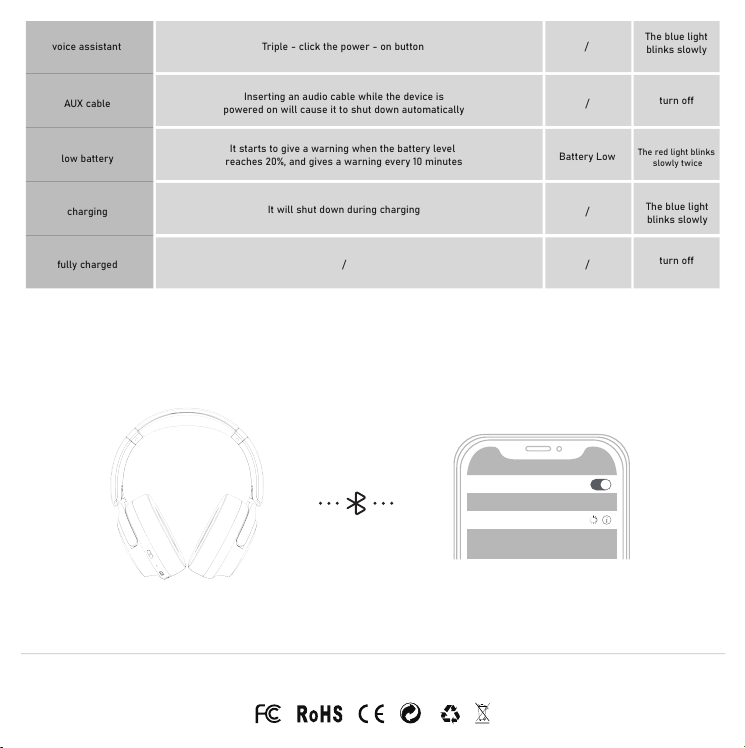
Turn on the headphones and enable Bluetooth on your frst mobile phone. Search for the "RORSOU B8" and connect to the headphones.
3.0 Bluetooth connection tutorial
Bluetooth
RORSOU B8
正面 背面

FCC Statement:
This device complies with part 15 of the FCC Rules. Operation is subject to the
following two conditions:
(1) This device may not cause harmful interference, and
(2) this device must accept any interference received, including interference
that may cause undesired operation.
This equipment has been tested and found to comply with the limits for a Class
B digital device, pursuant to part 15 of the FCC Rules. These limits are
designed to
provide reasonable protection against harmful interference in a residential
installation. This equipment generates, uses and can radiate radio frequency
energy and, if not installed and used in accordance with the instructions, may
cause harmful interference to radio communications. However, there is no
guarant ee that interference will not occur in a particular installation. If this
equipment does cause harmful interference to radio or television reception,
which can be determined by turning the equipment off and on, the user is
encouraged to try to correct the interference by one or more of the following
measures:
—Reorient or relocate the receiving antenna.
—Increase the separation between the equipment and receiver.
—Connect the equipment into an outlet on a circuit different from that to which
the receiver is connected.
—Consult the dealer or an experienced radio/TV technician for help.
Caution: Any changes or modifications not expressly approved by the party
responsible for compliance could void the user's authority to operate the
equipment.
This equipment complies with FCC radiation exposure limits set forth for an
uncontrolled environm ent. This transmitter must not be co‐located or
operating in conjunction with any other antenna or transmitter.
