Product Parameters:
Bluetooth Version: V5.3
Support:a2dp\avctp\avdtp\avrcp\hfp\spp\smp\att\gap\gatt\rfcomm\sdp\l2cap profile
Working Distance Range: 10m
ANC Frequency Range: 20-1000HZ
ANC Noise Value:-30±3db
Working frequency Range: 2.402GHz-2.480GHz
Battery Specifications: 3.7V/600mAh
Charging Voltage: 5V/1A
Charging Time: about
2.5 hours
Working time (Bluetooth only): about 60 hours
Working time(ANC only): about 60 hours
Working time(Bluetooth and ANC):about
35
hours
Items Included:
1. One USB Charging cable
2. One 3.5MM Audio Cable
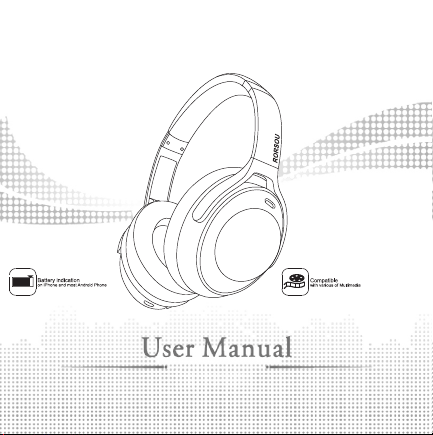
3. One User Manual
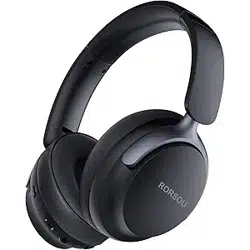
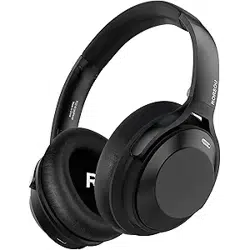
4. O ne Wireless ANC Headphones
Bluetooth mode operation:
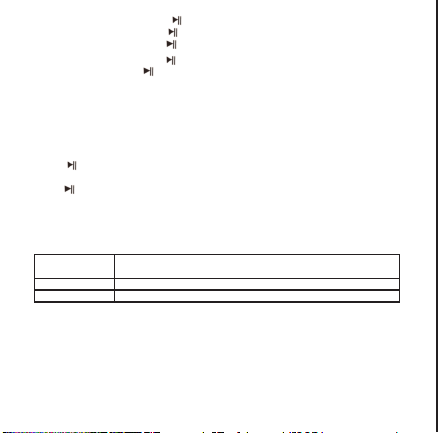
Bluetooth pairing:long press“ ” for three seconds,voice prompt “power on” to
start up the Bluetooth headphones,it will enter pairing mode automatically,voice
prompt “Bluetooth mode”, indicator light flash with blue and red. Turn on the smart
device's Bluetooth searching function and select the device “ RORSOU A6 ”, no
password is required, after successfully pairing, a tone “Connected” will be heard, the
LED indicator light turn to be blue.
Clear pairing:long press the “+”and “- ”for 3s at the same time to clear the original
pair of connected devices.
Button Description:
1) Play/pause the music: short press “ ”to play or pause the music
2) Last/next song: long press “+ ”for 2 seconds to the next song; long press “-”for 2
seconds to the previous song
3) Volume contral: short press “+” for increasing volume; short press “-” for reducing
volume
4)Voice assistance:triple press“ ”to active the voice assistance
5)Answer the call: short press “ ”when calls coming
6) End of the call: short press “ ”when calls ending
7) Reject the call: Long press “ ”for 2 seconds when calls coming
8) Power off: long press “ ”for 3 seconds to turn off the headphone
TRANSPARENT MODE/ANC MODE
Transparent mode:short press“ ANC”button to switch the transparent mode,voice
prompt“Transparent mode”,the indicator light will turn to be green.
ANC mode:short press “ ANC”button again to switch the ANC mode,voice prompt
“ANC mode”,the indicator light will turn to be green.
Low latency mode
Press“ ” for five times to enter the low latency game mode,voice prompt “Game
mode”.
Press“ ” for five times again to switch the music mode,voice prompt “Music mode”.
Aux-in mode
When the headset is on other mode,insert the Aux-in line,it will switch to Aux-in playing
mode.
LED indicator light Status:
Charge Status
LED indicator light stays red when charging. When fully charged,
LED indicator light turns to be blue.
Pairing Status LED indicator light alternating flashes blue and red.
Palying Status Blue LED indicator flash once in every 5s
Note:
If no pairing connection after the Bluetooth headset enters the pairing mode, please
turn off the headset to save power.
Do not perform other operations when searching Bluetooth to prevent the program
error.
Please select a proper volume while using to prevent damage to your ears.
Please note that a good environment for using the Bluetooth headsets can avoid
damage to the headsets.
Please charge the headset after a long time none-use.
A6
5.
O ne Travel Protective Storage Bag
2A9P5-A6

Product Parameters:
Bluetooth Version: V5.3
Support:a2dp\avctp\avdtp\avrcp\hfp\spp\smp\att\gap\gatt\rfcomm\sdp\l2cap profile
Working Distance Range: 10m
ANC Frequency Range: 20-1000HZ
ANC Noise Value:-30±3db
Working frequency Range: 2.402GHz-2.480GHz
Battery Specifications: 3.7V/600mAh
Charging Voltage: 5V/1A
Charging Time: about
2.5 hours
Working time (Bluetooth only): about 60 hours
Working time(ANC only): about 60 hours
Working time(Bluetooth and ANC):about
35
hours
Items Included:
1. One USB Charging cable
2. One 3.5MM Audio Cable
3. One User Manual
4. O ne Wireless ANC Headphones
Bluetooth mode operation:
Bluetooth pairing:long press“ ” for three seconds,voice prompt “power on” to
start up the Bluetooth headphones,it will enter pairing mode automatically,voice
prompt “Bluetooth mode”, indicator light flash with blue and red. Turn on the smart
device's Bluetooth searching function and select the device “ RORSOU A6 ”, no
password is required, after successfully pairing, a tone “Connected” will be heard, the
LED indicator light turn to be blue.
Clear pairing:long press the “+”and “- ”for 3s at the same time to clear the original
pair of connected devices.
Button Description:
1) Play/pause the music: short press “ ”to play or pause the music
2) Last/next song: long press “+ ”for 2 seconds to the next song; long press “-”for 2
seconds to the previous song
3) Volume contral: short press “+” for increasing volume; short press “-” for reducing
volume
4)Voice assistance:triple press“ ”to active the voice assistance
5)Answer the call: short press “ ”when calls coming
6) End of the call: short press “ ”when calls ending
7) Reject the call: Long press “ ”for 2 seconds when calls coming
8) Power off: long press “ ”for 3 seconds to turn off the headphone
TRANSPARENT MODE/ANC MODE
Transparent mode:short press“ ANC”button to switch the transparent mode,voice
prompt“Transparent mode”,the indicator light will turn to be green.
ANC mode:short press “ ANC”button again to switch the ANC mode,voice prompt
“ANC mode”,the indicator light will turn to be green.
Low latency mode
Press“ ” for five times to enter the low latency game mode,voice prompt “Game
mode”.
Press“ ” for five times again to switch the music mode,voice prompt “Music mode”.
Aux-in mode
When the headset is on other mode,insert the Aux-in line,it will switch to Aux-in playing
mode.
LED indicator light Status:
Charge Status
LED indicator light stays red when charging. When fully charged,
LED indicator light turns to be blue.
Pairing Status LED indicator light alternating flashes blue and red.
Palying Status Blue LED indicator flash once in every 5s
Note:
If no pairing connection after the Bluetooth headset enters the pairing mode, please
turn off the headset to save power.
Do not perform other operations when searching Bluetooth to prevent the program
error.
Please select a proper volume while using to prevent damage to your ears.
Please note that a good environment for using the Bluetooth headsets can avoid
damage to the headsets.
Please charge the headset after a long time none-use.
A6
5.
O ne Travel Protective Storage Bag
2A9P5-A6
Product Parameters:
Bluetooth Version: V5.3
Support:a2dp\avctp\avdtp\avrcp\hfp\spp\smp\att\gap\gatt\rfcomm\sdp\l2cap profile
Working Distance Range: 10m
ANC Frequency Range: 20-1000HZ
ANC Noise Value:-30±3db
Working frequency Range: 2.402GHz-2.480GHz
Battery Specifications: 3.7V/600mAh
Charging Voltage: 5V/1A
Charging Time: about
2.5 hours
Working time (Bluetooth only): about 60 hours
Working time(ANC only): about 60 hours
Working time(Bluetooth and ANC):about
35
hours
Items Included:
1. One USB Charging cable
2. One 3.5MM Audio Cable
3. One User Manual
4. O ne Wireless ANC Headphones
Bluetooth mode operation:
Bluetooth pairing:long press“ ” for three seconds,voice prompt “power on” to
start up the Bluetooth headphones,it will enter pairing mode automatically,voice
prompt “Bluetooth mode”, indicator light flash with blue and red. Turn on the smart
device's Bluetooth searching function and select the device “ RORSOU A6 ”, no
password is required, after successfully pairing, a tone “Connected” will be heard, the
LED indicator light turn to be blue.
Clear pairing:long press the “+”and “- ”for 3s at the same time to clear the original
pair of connected devices.
Button Description:
1) Play/pause the music: short press “ ”to play or pause the music
2) Last/next song: long press “+ ”for 2 seconds to the next song; long press “-”for 2
seconds to the previous song
3) Volume contral: short press “+” for increasing volume; short press “-” for reducing
volume
4)Voice assistance:triple press“ ”to active the voice assistance
5)Answer the call: short press “ ”when calls coming
6) End of the call: short press “ ”when calls ending
7) Reject the call: Long press “ ”for 2 seconds when calls coming
8) Power off: long press “ ”for 3 seconds to turn off the headphone
TRANSPARENT MODE/ANC MODE
Transparent mode:short press“ ANC”button to switch the transparent mode,voice
prompt“Transparent mode”,the indicator light will turn to be green.
ANC mode:short press “ ANC”button again to switch the ANC mode,voice prompt
“ANC mode”,the indicator light will turn to be green.
Low latency mode
Press“ ” for five times to enter the low latency game mode,voice prompt “Game
mode”.
Press“ ” for five times again to switch the music mode,voice prompt “Music mode”.
Aux-in mode
When the headset is on other mode,insert the Aux-in line,it will switch to Aux-in playing
mode.
LED indicator light Status:
Charge Status
LED indicator light stays red when charging. When fully charged,
LED indicator light turns to be blue.
Pairing Status LED indicator light alternating flashes blue and red.
Palying Status Blue LED indicator flash once in every 5s
Note:
If no pairing connection after the Bluetooth headset enters the pairing mode, please
turn off the headset to save power.
Do not perform other operations when searching Bluetooth to prevent the program
error.
Please select a proper volume while using to prevent damage to your ears.
Please note that a good environment for using the Bluetooth headsets can avoid
damage to the headsets.
Please charge the headset after a long time none-use.
A6
5.
O ne Travel Protective Storage Bag
2A9P5-A6
Product Parameters:
Bluetooth Version: V5.3
Support:a2dp\avctp\avdtp\avrcp\hfp\spp\smp\att\gap\gatt\rfcomm\sdp\l2cap profile
Working Distance Range: 10m
ANC Frequency Range: 20-1000HZ
ANC Noise Value:-30±3db
Working frequency Range: 2.402GHz-2.480GHz
Battery Specifications: 3.7V/600mAh
Charging Voltage: 5V/1A
Charging Time: about
2.5 hours
Working time (Bluetooth only): about 60 hours
Working time(ANC only): about 60 hours
Working time(Bluetooth and ANC):about
35
hours
Items Included:
1. One USB Charging cable
2. One 3.5MM Audio Cable
3. One User Manual
4. O ne Wireless ANC Headphones
Bluetooth mode operation:
Bluetooth pairing:long press“ ” for three seconds,voice prompt “power on” to
start up the Bluetooth headphones,it will enter pairing mode automatically,voice
prompt “Bluetooth mode”, indicator light flash with blue and red. Turn on the smart
device's Bluetooth searching function and select the device “ RORSOU A6 ”, no
password is required, after successfully pairing, a tone “Connected” will be heard, the
LED indicator light turn to be blue.
Clear pairing:long press the “+”and “- ”for 3s at the same time to clear the original
pair of connected devices.
Button Description:
1) Play/pause the music: short press “ ”to play or pause the music
2) Last/next song: long press “+ ”for 2 seconds to the next song; long press “-”for 2
seconds to the previous song
3) Volume contral: short press “+” for increasing volume; short press “-” for reducing
volume
4)Voice assistance:triple press“ ”to active the voice assistance
5)Answer the call: short press “ ”when calls coming
6) End of the call: short press “ ”when calls ending
7) Reject the call: Long press “ ”for 2 seconds when calls coming
8) Power off: long press “ ”for 3 seconds to turn off the headphone
TRANSPARENT MODE/ANC MODE
Transparent mode:short press“ ANC”button to switch the transparent mode,voice
prompt“Transparent mode”,the indicator light will turn to be green.
ANC mode:short press “ ANC”button again to switch the ANC mode,voice prompt
“ANC mode”,the indicator light will turn to be green.
Low latency mode
Press“ ” for five times to enter the low latency game mode,voice prompt “Game
mode”.
Press“ ” for five times again to switch the music mode,voice prompt “Music mode”.
Aux-in mode
When the headset is on other mode,insert the Aux-in line,it will switch to Aux-in playing
mode.
LED indicator light Status:
Charge Status
LED indicator light stays red when charging. When fully charged,
LED indicator light turns to be blue.
Pairing Status LED indicator light alternating flashes blue and red.
Palying Status Blue LED indicator flash once in every 5s
Note:
If no pairing connection after the Bluetooth headset enters the pairing mode, please
turn off the headset to save power.
Do not perform other operations when searching Bluetooth to prevent the program
error.
Please select a proper volume while using to prevent damage to your ears.
Please note that a good environment for using the Bluetooth headsets can avoid
damage to the headsets.
Please charge the headset after a long time none-use.
A6
5.
O ne Travel Protective Storage Bag
2A9P5-A6
Product Parameters:
Bluetooth Version: V5.3
Support:a2dp\avctp\avdtp\avrcp\hfp\spp\smp\att\gap\gatt\rfcomm\sdp\l2cap profile
Working Distance Range: 10m
ANC Frequency Range: 20-1000HZ
ANC Noise Value:-30±3db
Working frequency Range: 2.402GHz-2.480GHz
Battery Specifications: 3.7V/600mAh
Charging Voltage: 5V/1A
Charging Time: about
2.5 hours
Working time (Bluetooth only): about 60 hours
Working time(ANC only): about 60 hours
Working time(Bluetooth and ANC):about
35
hours
Items Included:
1. One USB Charging cable
2. One 3.5MM Audio Cable
3. One User Manual
4. O ne Wireless ANC Headphones
Bluetooth mode operation:
Bluetooth pairing:long press“ ” for three seconds,voice prompt “power on” to
start up the Bluetooth headphones,it will enter pairing mode automatically,voice
prompt “Bluetooth mode”, indicator light flash with blue and red. Turn on the smart
device's Bluetooth searching function and select the device “ RORSOU A6 ”, no
password is required, after successfully pairing, a tone “Connected” will be heard, the
LED indicator light turn to be blue.
Clear pairing:long press the “+”and “- ”for 3s at the same time to clear the original
pair of connected devices.
Button Description:
1) Play/pause the music: short press “ ”to play or pause the music
2) Last/next song: long press “+ ”for 2 seconds to the next song; long press “-”for 2
seconds to the previous song
3) Volume contral: short press “+” for increasing volume; short press “-” for reducing
volume
4)Voice assistance:triple press“ ”to active the voice assistance
5)Answer the call: short press “ ”when calls coming
6) End of the call: short press “ ”when calls ending
7) Reject the call: Long press “ ”for 2 seconds when calls coming
8) Power off: long press “ ”for 3 seconds to turn off the headphone
TRANSPARENT MODE/ANC MODE
Transparent mode:short press“ ANC”button to switch the transparent mode,voice
prompt“Transparent mode”,the indicator light will turn to be green.
ANC mode:short press “ ANC”button again to switch the ANC mode,voice prompt
“ANC mode”,the indicator light will turn to be green.
Low latency mode
Press“ ” for five times to enter the low latency game mode,voice prompt “Game
mode”.
Press“ ” for five times again to switch the music mode,voice prompt “Music mode”.
Aux-in mode
When the headset is on other mode,insert the Aux-in line,it will switch to Aux-in playing
mode.
LED indicator light Status:
Charge Status
LED indicator light stays red when charging. When fully charged,
LED indicator light turns to be blue.
Pairing Status LED indicator light alternating flashes blue and red.
Palying Status Blue LED indicator flash once in every 5s
Note:
If no pairing connection after the Bluetooth headset enters the pairing mode, please
turn off the headset to save power.
Do not perform other operations when searching Bluetooth to prevent the program
error.
Please select a proper volume while using to prevent damage to your ears.
Please note that a good environment for using the Bluetooth headsets can avoid
damage to the headsets.
Please charge the headset after a long time none-use.
A6
5.
O ne Travel Protective Storage Bag
2A9P5-A6
Product Parameters:
Bluetooth Version: V5.3
Support:a2dp\avctp\avdtp\avrcp\hfp\spp\smp\att\gap\gatt\rfcomm\sdp\l2cap profile
Working Distance Range: 10m
ANC Frequency Range: 20-1000HZ
ANC Noise Value:-30±3db
Working frequency Range: 2.402GHz-2.480GHz
Battery Specifications: 3.7V/600mAh
Charging Voltage: 5V/1A
Charging Time: about
2.5 hours
Working time (Bluetooth only): about 60 hours
Working time(ANC only): about 60 hours
Working time(Bluetooth and ANC):about
35
hours
Items Included:
1. One USB Charging cable
2. One 3.5MM Audio Cable
3. One User Manual
4. O ne Wireless ANC Headphones
Bluetooth mode operation:
Bluetooth pairing:long press“ ” for three seconds,voice prompt “power on” to
start up the Bluetooth headphones,it will enter pairing mode automatically,voice
prompt “Bluetooth mode”, indicator light flash with blue and red. Turn on the smart
device's Bluetooth searching function and select the device “ RORSOU A6 ”, no
password is required, after successfully pairing, a tone “Connected” will be heard, the
LED indicator light turn to be blue.
Clear pairing:long press the “+”and “- ”for 3s at the same time to clear the original
pair of connected devices.
Button Description:
1) Play/pause the music: short press “ ”to play or pause the music
2) Last/next song: long press “+ ”for 2 seconds to the next song; long press “-”for 2
seconds to the previous song
3) Volume contral: short press “+” for increasing volume; short press “-” for reducing
volume
4)Voice assistance:triple press“ ”to active the voice assistance
5)Answer the call: short press “ ”when calls coming
6) End of the call: short press “ ”when calls ending
7) Reject the call: Long press “ ”for 2 seconds when calls coming
8) Power off: long press “ ”for 3 seconds to turn off the headphone
TRANSPARENT MODE/ANC MODE
Transparent mode:short press“ ANC”button to switch the transparent mode,voice
prompt“Transparent mode”,the indicator light will turn to be green.
ANC mode:short press “ ANC”button again to switch the ANC mode,voice prompt
“ANC mode”,the indicator light will turn to be green.
Low latency mode
Press“ ” for five times to enter the low latency game mode,voice prompt “Game
mode”.
Press“ ” for five times again to switch the music mode,voice prompt “Music mode”.
Aux-in mode
When the headset is on other mode,insert the Aux-in line,it will switch to Aux-in playing
mode.
LED indicator light Status:
Charge Status
LED indicator light stays red when charging. When fully charged,
LED indicator light turns to be blue.
Pairing Status LED indicator light alternating flashes blue and red.
Palying Status Blue LED indicator flash once in every 5s
Note:
If no pairing connection after the Bluetooth headset enters the pairing mode, please
turn off the headset to save power.
Do not perform other operations when searching Bluetooth to prevent the program
error.
Please select a proper volume while using to prevent damage to your ears.
Please note that a good environment for using the Bluetooth headsets can avoid
damage to the headsets.
Please charge the headset after a long time none-use.
A6
5.
O ne Travel Protective Storage Bag
2A9P5-A6