BG-Air4Kast
4K60 UHD HDMI 2.0 Wireless Extender Kit up to 164ft (50m)
User Manual

BZBGEAR BG-Air4Kast PRODUCT MANUAL
Address: 830 National Drive #140, Sacramento, CA 95834, USA · Tel: +1(888)499-9906 · Email: support@bzbgear.com 2

BZBGEAR BG-Air4Kast PRODUCT MANUAL
TABLE OF CONTENTS
Statement 4
Safety Precaution 4
Introduction 5
Features 5
Package Contents 5
Specifications 6
Panel Descriptions 7
Connection Diagram 9
Connection Instructions 9
SSID Pairing Instructions 10
Troubleshooting 10
Tech Support 11
Limited Product Warranty Terms 11
Mission Statement 11
Copyright 11
FCC Radiation Exposure Statement 12
Address: 830 National Drive #140, Sacramento, CA 95834, USA · Tel: +1(888)499-9906 · Email: support@bzbgear.com 3

BZBGEAR BG-Air4Kast PRODUCT MANUAL
Statement
Please read these instructions carefully before connecting, operating, or configuring this
product. Please save this manual for future reference.
Safety Precaution
● To prevent damaging this product, avoid heavy pressure, strong vibration, or immersion
during transportation, storage, and installation.
● The housing of this product is made of organic materials. Do not expose to any liquid,
gas, or solids which may corrode the shell.
● Do not expose the product to rain or moisture.
● To prevent the risk of electric shock, do not open the case. Installation and maintenance
should only be carried out by qualified technicians.
● Do not use the product beyond the specified temperature, humidity, or power supply
specifications.
● This product does not contain parts that can be maintained or repaired by users.
Damage caused by dismantling the product without authorization from BZBGEAR is not
covered under the warranty policy.
● Installation and use of this product must strictly comply with local electrical safety
standards.
Address: 830 National Drive #140, Sacramento, CA 95834, USA · Tel: +1(888)499-9906 · Email: support@bzbgear.com 4

BZBGEAR BG-Air4Kast PRODUCT MANUAL
Introduction
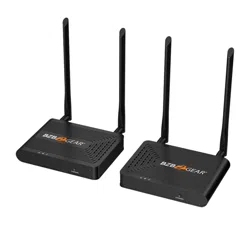
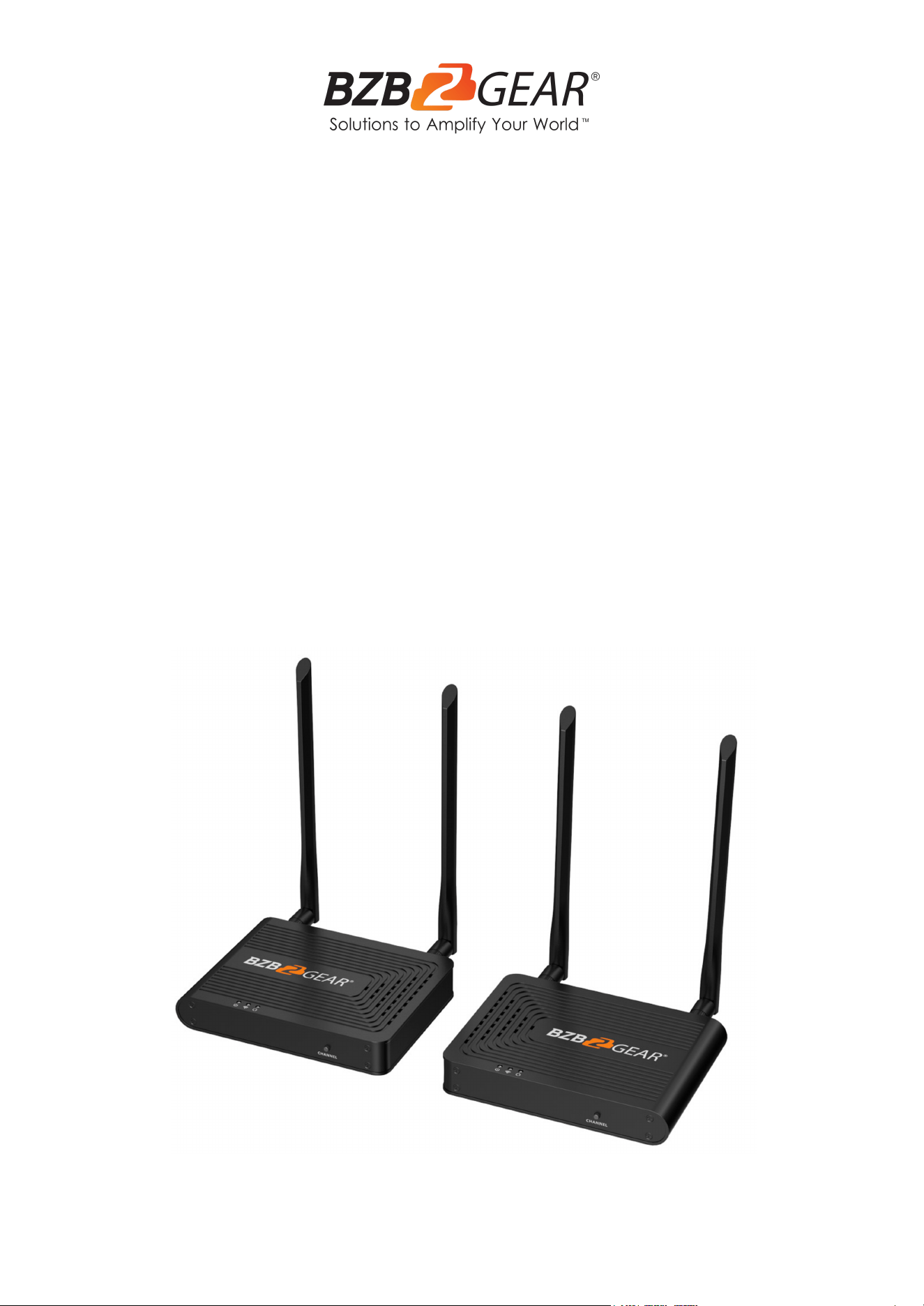
The BG-Air4Kast is an advanced 4K@60Hz HDMI wireless extender solution
consisting of a transmitter and a receiver. It leverages ipcolor STREAM technology
for high-definition and low-latency video transmission. Operating on the 5G wireless
frequency band, it delivers stability, anti-interference capabilities, and increased
performance. The BG-Air4Kast supports wireless transmission up to 164ft (50m),
offering a solution for wirelessly transmitting video in applications such as video
conferences, home entertainment, and multimedia education.
Note: Transmission distances may vary as interference from solid structures and
other wireless signals may affect performance.
Features
● Ipcolor STREAM technology allows for high definition and low-latency transmission.
● Up to 3840x2160@60Hz resolution, backward compatible.
● 4K Wireless transmission up to 164ft (50m) / 1080p60 230ft (70m) line of sight.
● HDMI loop out on transmitter for local monitoring.
● SSID pairing and channel switching to avoid interference in case multiple sets of
BG-Air4Kast are in the same area.
● IR passback (Receiver to Transmitter) to control source devices.
● 5G wireless for strong anti-interference.
● Firmware upgradeable via Micro USB port.
Package Contents
● 1 x BG-Air4Kast TX
● 1 x BG-Air4Kast RX
● 4 x Antenna
● 1 x IR Blaster Extension cable
● 1 x User Manual
● 4 x Mounting Ears
● 2 x 5V2A Power Adapters
● 1 x IR Receiver Extension Cable
● 12 x Screws
Address: 830 National Drive #140, Sacramento, CA 95834, USA · Tel: +1(888)499-9906 · Email: support@bzbgear.com 5
BZBGEAR BG-Air4Kast PRODUCT MANUAL
Specifications
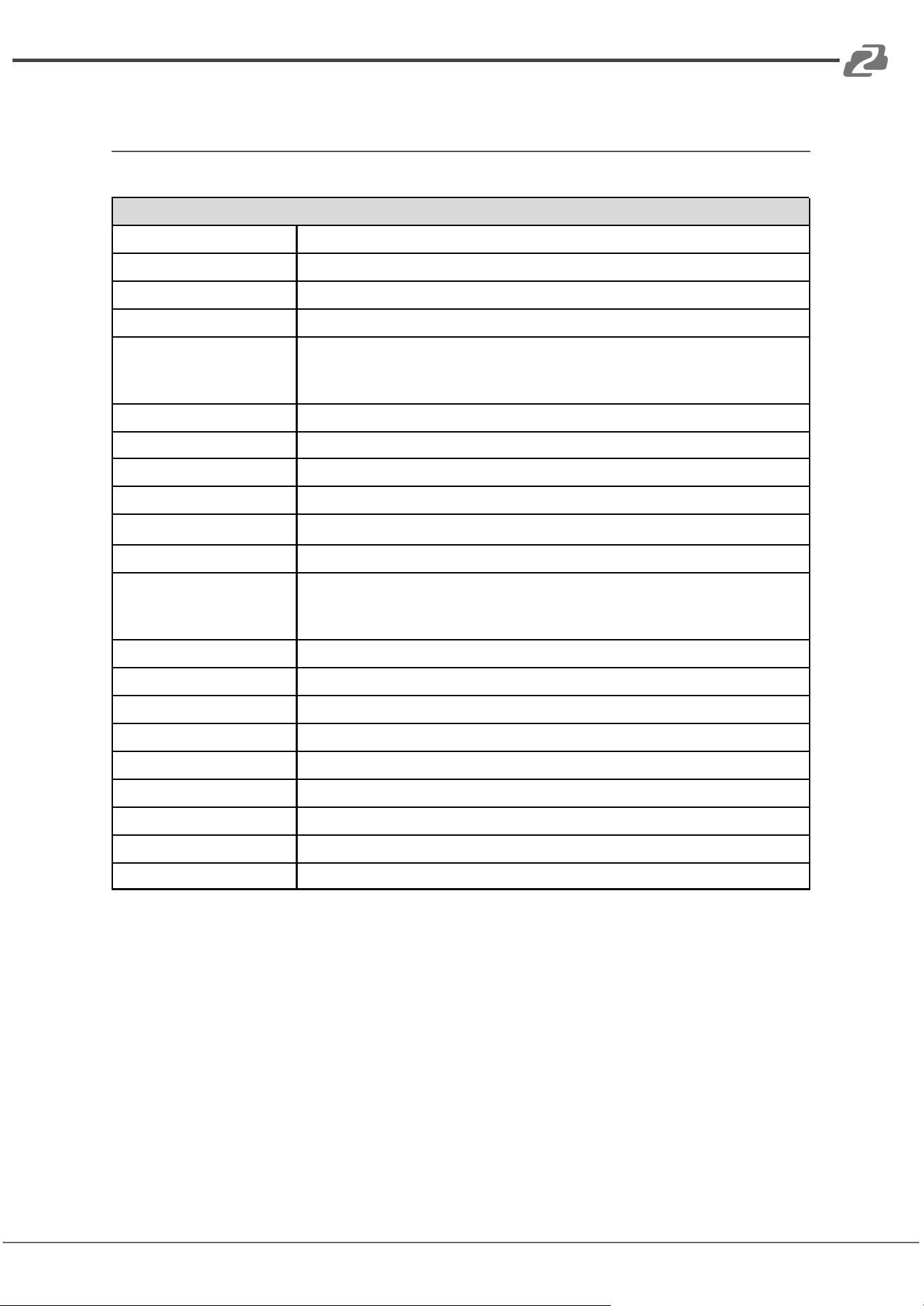
Technical Specifications
Power Supply
DC 5V/2A (TX ≤ 6W, RX ≤ 4W)
HDMI Version
HDMI 2.0
HDCP Version
HDCP 1.4 / HDCP 2.2
Maximum Transfer Rate
18Gbps
Supported Resolutions
3840x2160@24/30/50/60Hz,
1080P@50/60Hz, 720P@50/60Hz,
1920x1200, 2560x1440, 2560x1600
Audio Format
PCM
WiFi Frequency Bands
5.18~5.24 GHz
Transmission Distances
4K60 ~ 164ft (50m) / 1080p60 230ft (70m) line of sight
Latency
130~180ms
Connection Type
One-to-one
SSID Pairing
Supported
ESD Protection
1a Contact discharge level 3
1b Air discharge level 3
Standard: IEC61000-4-2
Infrared Frequency
20~60kHz
Receiving Range
≤ 5m
Working Temperature
-20~60℃
Storage Temperature
-30~70℃
Humidity
0~90% RH (no condensation)
Dimensions (L x W x H)
154mm x 116mm x 25mm
Color
Black
Material
Iron
Weight
TX: 1Lb / RX: 1Lb
Address: 830 National Drive #140, Sacramento, CA 95834, USA · Tel: +1(888)499-9906 · Email: support@bzbgear.com 6
BZBGEAR BG-Air4Kast PRODUCT MANUAL
Panel Descriptions
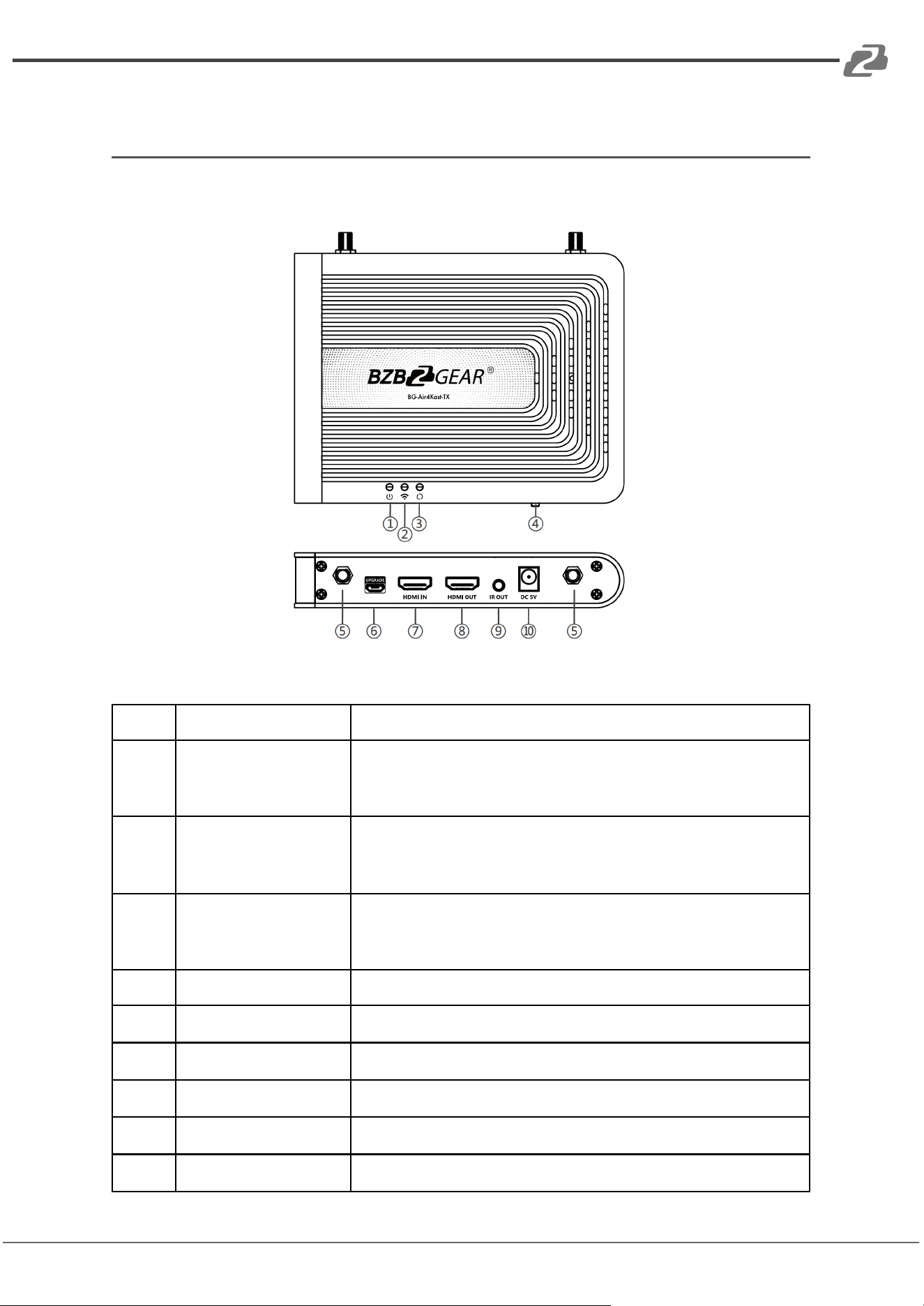
Transmitter (TX)
1.
Power Indicator
The LED will illuminate blue when the device is powered on.
2.
WiFi Indicator
Slow Flash: Waiting for connection
Solid: Connection established
Rapid Flash: SSID Pairing Mode
3.
Signal Indicator
Off: No HDMI signal detected
Solid: HDMI signal is transmitting
Rapid Flash: Restore Factory Settings in progress
4.
Channel Switch Button
Press to switch broadcasting channels
Press and hold for 5s for SSID Pairing mode
Press and hold for 10s to restore factory settings
5.
Antenna Connectors
Connect the included antennas
6.
Micro USB Port
Used for firmware upgrades
7.
HDMI Input
Connect to a source device using an HDMI cable
8.
HDMI Output
Connect to a display using an HDMI cable
9.
IR Out
Connect the included IR Blaster extension cable
10.
Power Input
Connect the included 5V/2A power supply
Address: 830 National Drive #140, Sacramento, CA 95834, USA · Tel: +1(888)499-9906 · Email: support@bzbgear.com 7
BZBGEAR BG-Air4Kast PRODUCT MANUAL
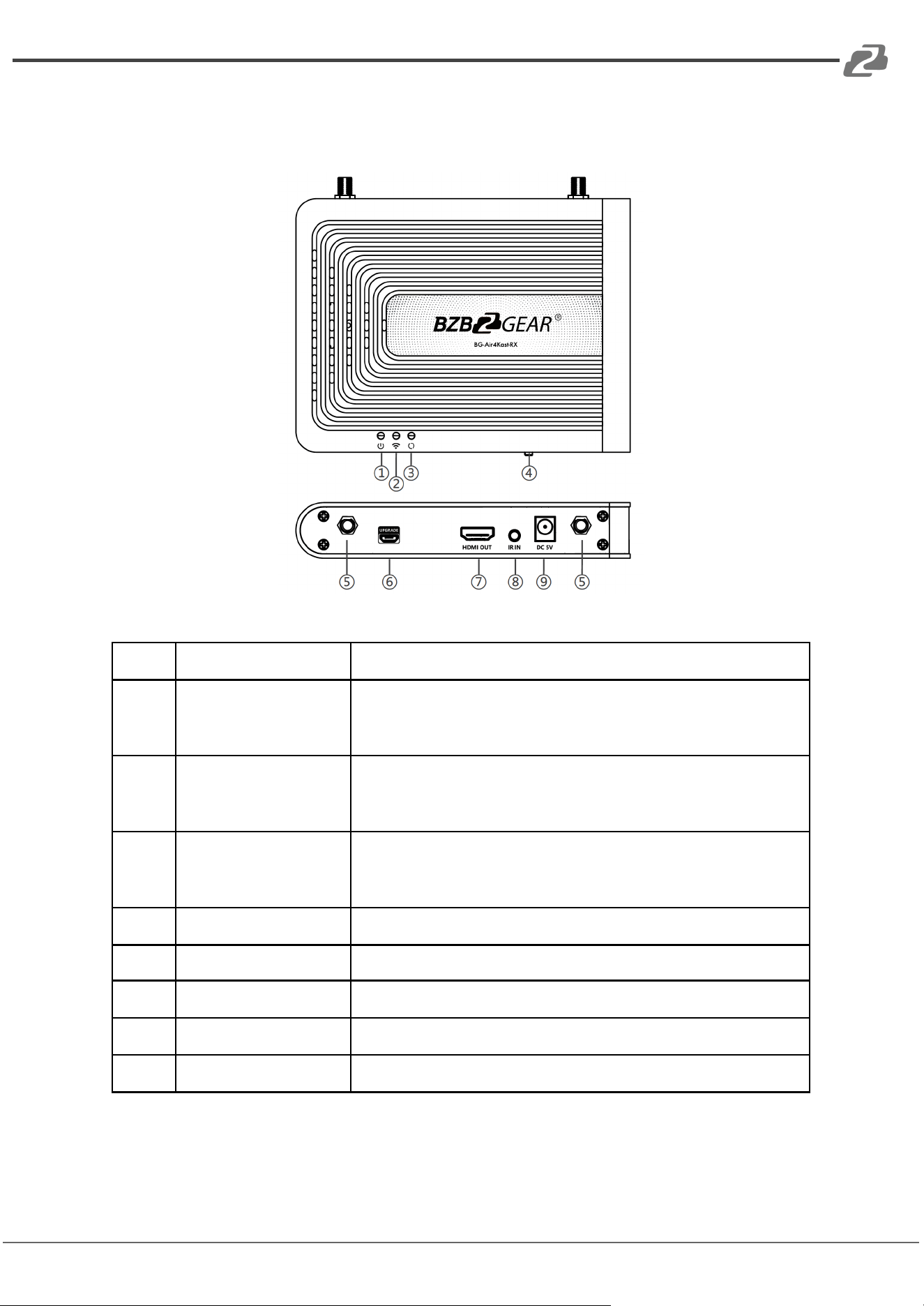
Receiver (RX)
1.
Power Indicator
The LED will illuminate blue when the device is powered on.
2.
WiFi Indicator
Slow Flash: Waiting for connection
Solid: Connection established
Rapid Flash: SSID Pairing Mode
3.
Signal Indicator
Off: No HDMI signal detected
Solid: HDMI signal is transmitting
Rapid Flash: Restore Factory Settings in progress
4.
Channel Switch Button
Press to switch broadcasting channels
Press and hold for 5s for SSID Pairing mode
Press and hold for 10s to restore factory settings
5.
Antenna Connectors
Connect the included antennas
6.
Micro USB Port
Used for firmware upgrades
7.
HDMI Out
Connect to a display using an HDMI cable
8.
IR In
Connect the included IR Receiver extension cable
9.
Power Input
Connect the included 5V/2A power supply
Address: 830 National Drive #140, Sacramento, CA 95834, USA · Tel: +1(888)499-9906 · Email: support@bzbgear.com 8
BZBGEAR BG-Air4Kast PRODUCT MANUAL
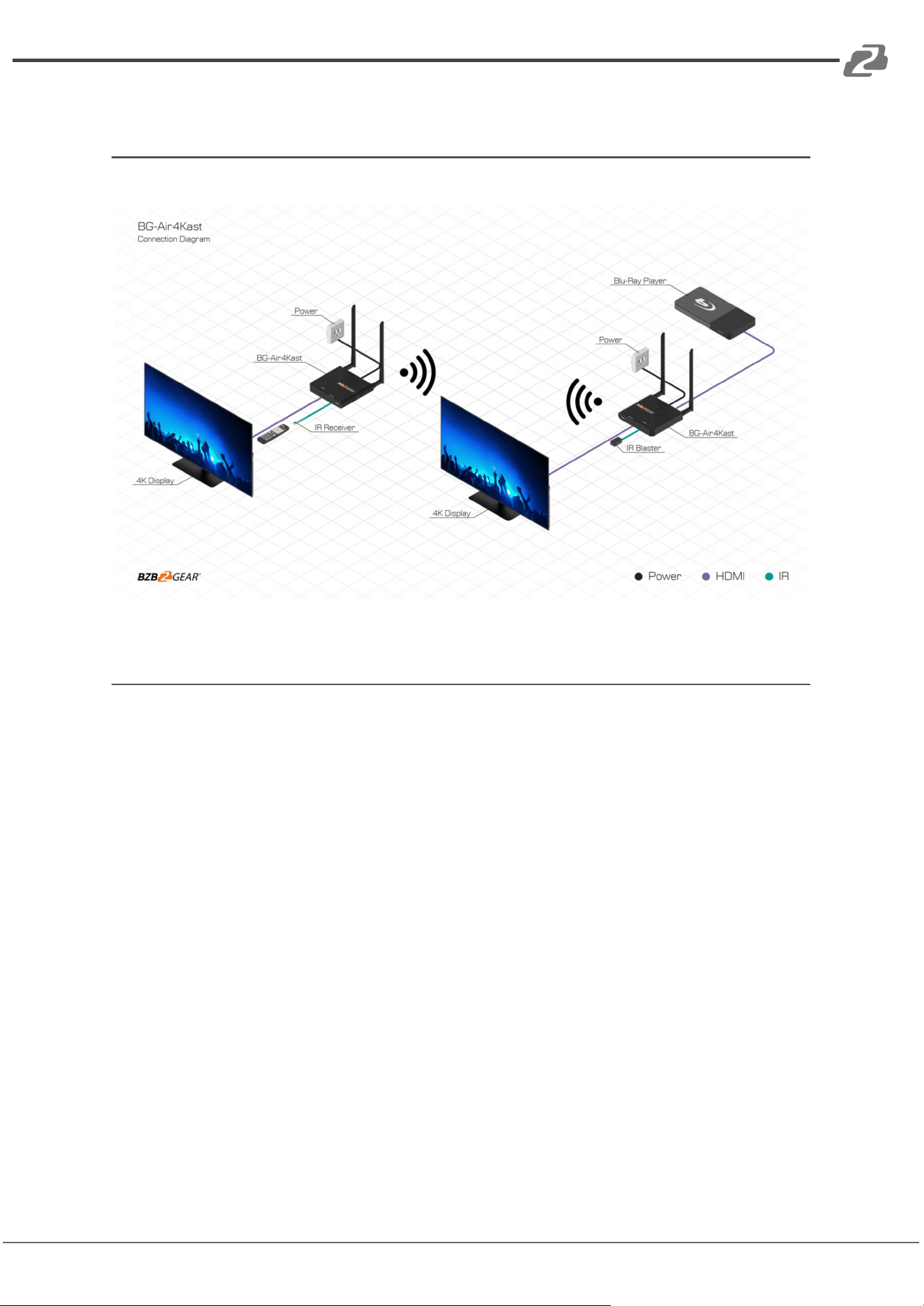
Connection Diagram
Connection Instructions
1. Connect the source device to the HDMI IN port of the transmitter with an HDMI
cable, and connect the HDMI OUT port of the receiver to the display device with
another HDMI cable.
2. If using the IR passback function, connect the IR blaster extension cable into the IR
OUT port of the transmitter, and connect the IR receiver extension cable into the IR
IN port of the receiver.
a: The emitter of the IR blaster extension cable should be as close as
possible to the IR receiving window of the source device.
b: Point the remote control at the receiving head of the IR receiver extension
cable to operate.
3. Plug the included power supplies into the devices to turn them on.
4. If multiple sets of BG-Air4Kast are being used at the same time and in the same
area, in order to prevent interference switch each set of transmitters and receivers
to a different channel after they have been manually paired using the SSID function.
Address: 830 National Drive #140, Sacramento, CA 95834, USA · Tel: +1(888)499-9906 · Email: support@bzbgear.com 9
BZBGEAR BG-Air4Kast PRODUCT MANUAL
SSID Pairing Instructions
1. Enter SSID pairing mode by holding the transmitter and receiver's channel switch
buttons for five seconds. Both WiFi connection indicators will rapidly flash yellow.
2. When the SSID pairing is successful, the WiFi indicators on the transmitter and
receiver will change from quick flashing to a slow flashing or steady on.
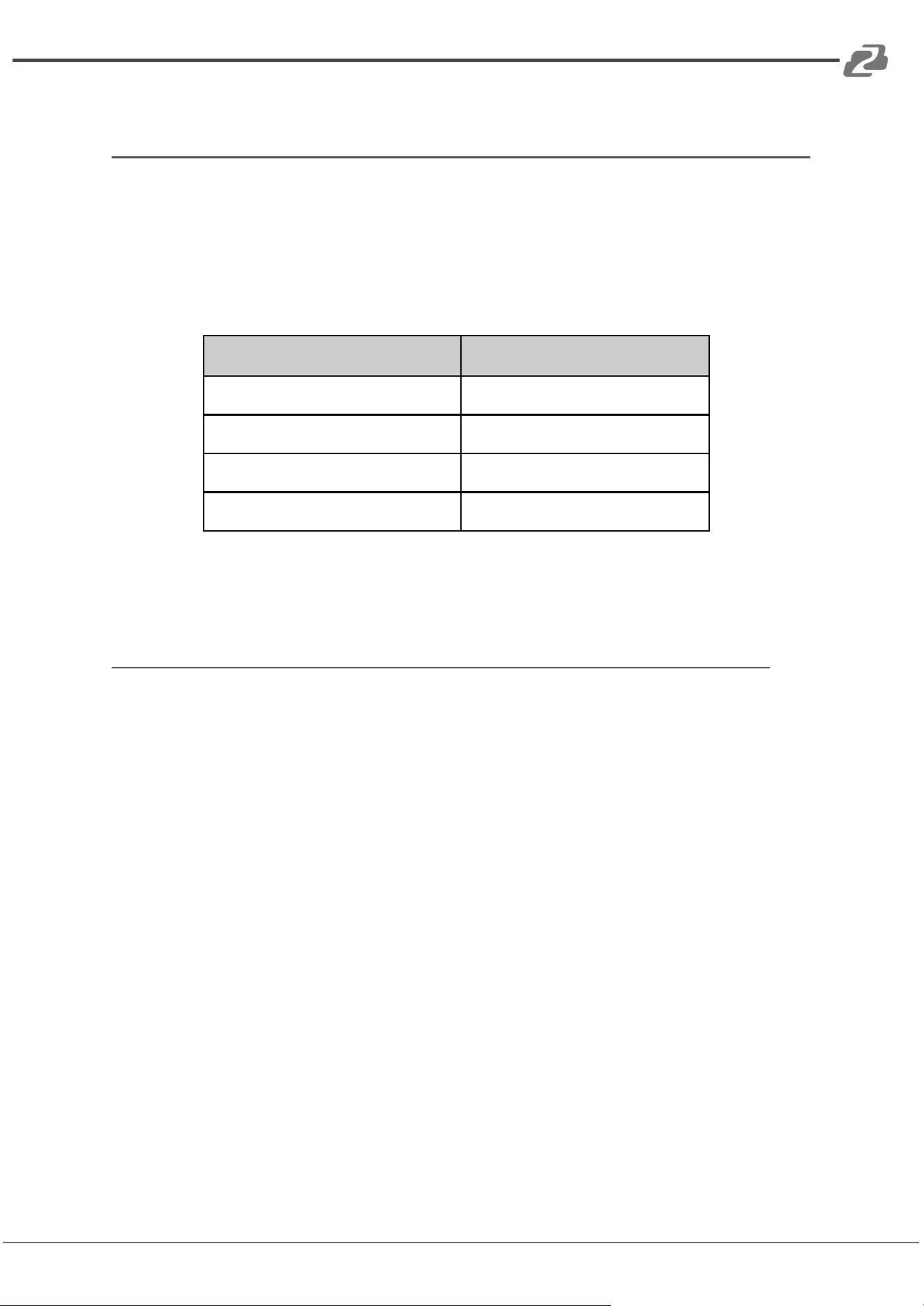
Channel Number
Frequency
Channel 1
5.180 GHz
Channel 2
5.200 GHz
Channel 3
5.220 GHz
Channel 4
5.240 GHz
Troubleshooting
1. Why are the receiver and transmitter not connected and showing “Search ipcolor
Tx” on the display?
a. Move the Transmitter and Receiver closer.
b. Power cycle the transmitter and receiver.
c. Re-pair the transmitter and receiver.
2. Why is the WiFi indicator solid but the display is showing “Please check the TX input
signal”?
a. Ensure the TX has an HDMI input and that the resolution is within the
specified range
b. Try conning the signal source directly to the display device or change the
signal source and HDMI cables and then try again.
3. Why is the display stuttering or the image is unstable?
a. Place the transmitter and receiver closer and minimize the number of
obstructions between the transmitter and receiver.
b. Switch to a different channel to avoid interference from other wireless signals
and devices.
c. Power cycle the transmitter and receiver.
Address: 830 National Drive #140, Sacramento, CA 95834, USA · Tel: +1(888)499-9906 · Email: support@bzbgear.com 10

BZBGEAR BG-Air4Kast PRODUCT MANUAL
Tech Support
Have technical questions? We may have answered them already!
Please visit BZBGEAR’s support page (bzbgear.com/support) for helpful information and
tips regarding our products. Here you will find our Knowledge Base
(bzbgear.com/knowledge-base) with detailed tutorials, quick start guides, and step-by-step
troubleshooting instructions. Or explore our YouTube channel, BZB TV
(youtube.com/c/BZBTVchannel), for help setting up, configuring, and other helpful how-to
videos about our gear.
Need more in-depth support? Connect with one of our technical specialists directly:
Phone
1.888.499.9906
Email
support@bzbgear.com
Live Chat
bzbgear.com
Limited Product Warranty Terms
Pro Line: 5-year warranty from the date of purchase for AV/Broadcasting products bought
on or after August 1, 2024.
Essential Line: 3-year warranty from the date of purchase for AV/Broadcasting products
bought on or after August 1, 2024.
Cables: Lifetime Limited Product Warranty.
For complete warranty information, please visit bzbgear.com/warranty.
For questions, please call 1.888.499.9906 or email support@bzbgear.com.
Mission Statement
BZBGEAR is a breakthrough manufacturer of high-quality, innovative audiovisual equipment
ranging from AVoIP, professional broadcasting, conferencing, home theater, to live
streaming solutions. We pride ourselves on unparalleled customer support and services.
Our team offers system design consultation, and highly reviewed technical support for all
the products in our catalog. BZBGEAR delivers quality products designed with users in
mind.
Copyright
All the contents in this manual and its copyright are owned by BZBGEAR. No one is allowed
to imitate, copy, or translate this manual without BZBGEAR’s permission. This manual
contains no guarantee, standpoint expression or other implies in any form. Product
specification and information in this manual is for reference only and subject to change
without notice.
All rights reserved. No reproducing is allowed without acknowledgement.
Address: 830 National Drive #140, Sacramento, CA 95834, USA · Tel: +1(888)499-9906 · Email: support@bzbgear.com 11

BZBGEAR BG-Air4Kast PRODUCT MANUAL
FCC Radiation Exposure Statement
This equipment complies with FCC radiation exposure limits set forth for an
uncontrolled environment. This equipment should be installed and operated with
minimum distance 20cm between the radiator and your body.
FCC Warning
This device complies with Part 15 of the FCC Rules. Operation is subject to the
following two conditions:
(1) This device may not cause harmful interference, and (2) this device must accept
any interference received, including interference that may cause undesired operation.
Note: This equipment has been tested and found to comply with the limits for a Class
B digital device, pursuant to part 15 of the FCC Rules. These limits are designed to
provide reasonable protection against harmful interference in a residential installation.
This equipment generates, uses and can radiate radio frequency energy and, if not
installed and used in accordance with the instructions, may cause harmful interference
to radio communications. However, there is no guarantee that interference will not
occur in a particular installation. If this equipment does cause harmful interference to
radio or television reception, which can be determined by turning the equipment off
and on, the user is encouraged to try to correct the interference by one or more of the
following measures:
—Reorient or relocate the receiving antenna.
—Increase the separation between the equipment and receiver.
—Connect the equipment into an outlet on a circuit different from that to which the
receiver is connected.
—Consult the dealer or an experienced radio/TV technician for help.
NOTE 2: Any changes or modifications to this unit not expressly approved by the
party responsible for compliance could void the user’s authority to operate the
equipment.
Address: 830 National Drive #140, Sacramento, CA 95834, USA · Tel: +1(888)499-9906 · Email: support@bzbgear.com 12
