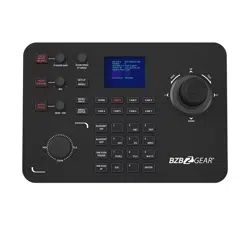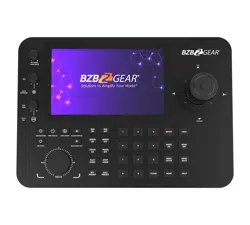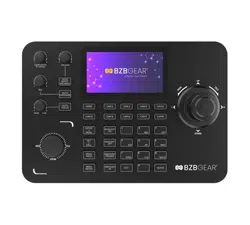
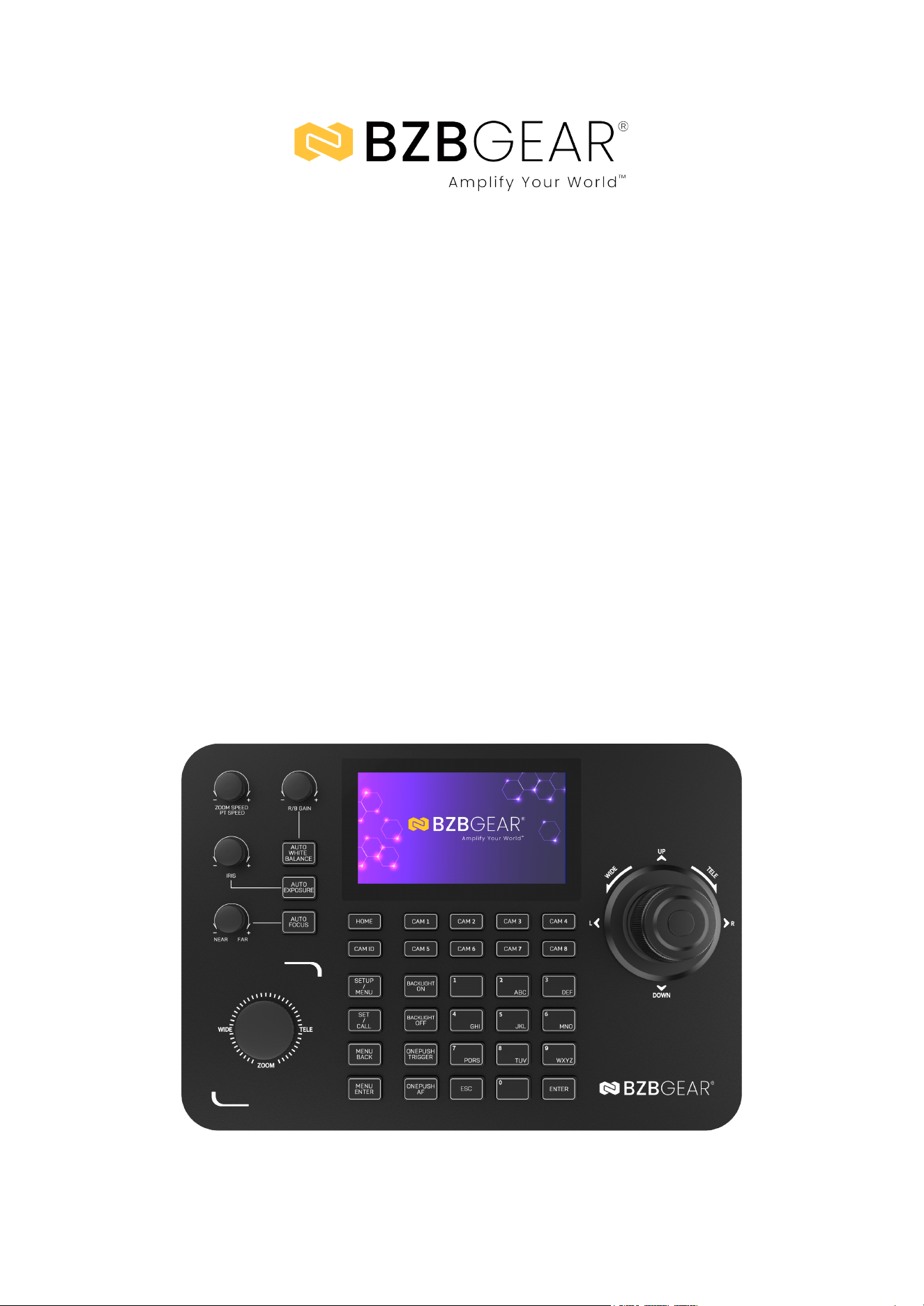
BG-COMMANDER-G2
Universal Advanced Serial and IP PTZ Joystick Controller with 5''
Touch LCD Screen and POE/RS-232/422/485
User Manual
BZBGEAR BG-COMMANDER-G2 PRODUCT MANUAL
Address: 830 National Drive #140, Sacramento, CA 95834, USA · Tel: +1(888)499-9906 · Email: support@bzbgear.com 2
BZBGEAR BG-COMMANDER-G2 PRODUCT MANUAL
TABLE OF CONTENTS
Statement 4
Safety Precaution 4
Introduction 5
Features 5
Packing List 6
Specifications 7
Operation Controls and Functions 8
Button and Knob Functions 9
Connection Diagrams 10
Serial Connection Guide 10
Web GUI 13
FAQs 14
Troubleshooting 15
Tech Support 16
Limited Product Warranty Terms 16
Mission Statement 16
Copyright 16
Address: 830 National Drive #140, Sacramento, CA 95834, USA · Tel: +1(888)499-9906 · Email: support@bzbgear.com 3
BZBGEAR BG-COMMANDER-G2 PRODUCT MANUAL
Statement
Please read these instructions carefully before connecting, operating, or configuring this
product. Please save this manual for future reference.
Safety Precaution
● To prevent damaging this product, avoid heavy pressure, strong vibration, or immersion
during transportation, storage, and installation.
● The housing of this product is made of organic materials. Do not expose to any liquid,
gas, or solids which may corrode the shell.
● Do not expose the product to rain or moisture.
● To prevent the risk of electric shock, do not open the case. Installation and maintenance
should only be carried out by qualified technicians.
● Do not use the product beyond the specified temperature, humidity, or power supply
specifications.
● This product does not contain parts that can be maintained or repaired by users.
Damage caused by dismantling the product without authorization from BZBGEAR is not
covered under the warranty policy.
● Installation and use of this product must strictly comply with local electrical safety
standards.
Address: 830 National Drive #140, Sacramento, CA 95834, USA · Tel: +1(888)499-9906 · Email: support@bzbgear.com 4

BZBGEAR BG-COMMANDER-G2 PRODUCT MANUAL
Introduction
The BG-COMMANDER-G2 is a professional-grade IP/serial PTZ controller designed
for seamless control of PTZ cameras in both networked and analog environments. It
features dual control modes, supporting IP-based setups with unique IP and MAC
addresses and traditional RS-422/RS-232 protocols for legacy systems. Its
compatibility with industry-standard protocols such as VISCA over IP, ONVIF, NDI,
VISCA, PELCO-P, and PELCO-D ensures it can integrate effortlessly into diverse
camera ecosystems. The built-in 720x1280 HD touchscreen provides a crisp,
intuitive interface for configuring and managing cameras, while the multi-axis,
pressure-sensitive joystick offers precise pan, tilt, zoom, and focus adjustments,
adapting seamlessly to user input.
Engineered for efficiency, the BG-COMMANDER-G2 includes seven programmable
camera shortcut keys for rapid switching, browser-based configuration for remote
management, and Power over Ethernet (PoE) support for simplified installation.
Additional features, such as a ship-type zoom switch, self-resetting knobs, and
backlit silicone buttons, enhance usability in professional AV environments. With a
durable, sleek design and low power consumption, the BG-COMMANDER-G2 is
ideal for video production, conferencing, broadcasting, and house-of-worship
applications, offering unmatched versatility and precision in camera control.
Features
● Network Operation: Equipped with a unique IP and MAC address for seamless
network operation.
● IP Protocol Support: Compatible with VISCA over IP (UDP/TCP), ONVIF, and NDI
for networked cameras.
● Analog Protocol Support: Supports legacy systems with protocols like VISCA,
PELCO-P, and PELCO-D.
● HD LCD Touchscreen: Integrated 720x1280 HD touchscreen delivers a vivid,
user-friendly interface for effortless operation.
● Precision Joystick Control: A multi-axis, four-dimensional joystick offers precise
pan, tilt, zoom, and focus control.
● Adjustable Joystick Speed: Joystick pressure allows for adjustable speed,
enabling both fast and slow camera movements with ease.
● Zoom Control: Intuitive ship-type switch for smooth and powerful zoom
adjustments.
● Quick Camera Switching: Features 7 programmable shortcut keys for efficient
management of multiple cameras, enhancing productivity during meetings.
● Browser-Based Configuration: Simplified device setup with front-end parameter
configuration through a web browser interface.
● Standard PoE Power Supply: Supports Power over Ethernet (PoE) for streamlined
power and data management, reducing installation complexity.
Address: 830 National Drive #140, Sacramento, CA 95834, USA · Tel: +1(888)499-9906 · Email: support@bzbgear.com 5
BZBGEAR BG-COMMANDER-G2 PRODUCT MANUAL
Packing List
● 1x BG-COMMANDER-G2
● 1x DC12V-2A Adapter
● 1x Product Manual
Address: 830 National Drive #140, Sacramento, CA 95834, USA · Tel: +1(888)499-9906 · Email: support@bzbgear.com 6
BZBGEAR BG-COMMANDER-G2 PRODUCT MANUAL
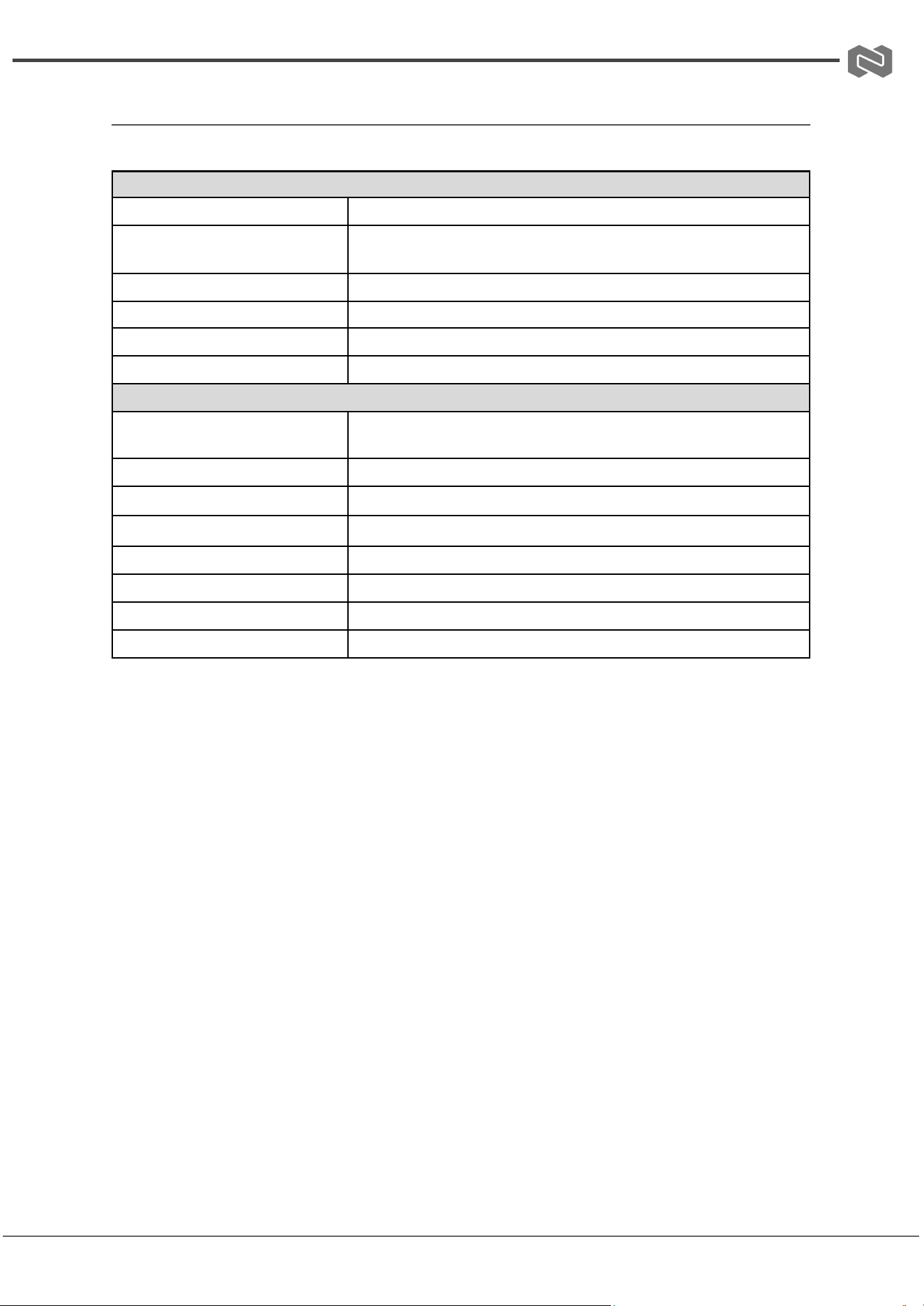
Specifications
Technical Specifications
Operating System
Linux
Supported Protocols
VISCA over IP (UDP/TCP), ONVIF, NDI, VISCA, PELCO-P,
PELCO-D
Camera Search Protocols
ONVIF, NDI
Communication Interfaces
RS-422, RS-232, RJ45
Display
HD touchscreen (720x1280)
Cue Tone
Button sound prompt (On/Off)
Mechanical Specifications
Key Physical Features
Self-resetting knob, stepless knob, backlit silicone buttons, 4D
joystick
Power Consumption
≤5W
PoE Standards
PoE 802.3af/802.3at/802.3bt standards
Power Supply
DC12V-2A (Center Positive, Outer Negative)
Operating Temperature
14°F to 131°F / -10°C to 55°C
Operating Humidity
20% to 80% (non-condensing)
Storage Temperature
14°F to 140°F / -10°C to 60°C
Storage Humidity
0% to 90% (non-condensing)
Address: 830 National Drive #140, Sacramento, CA 95834, USA · Tel: +1(888)499-9906 · Email: support@bzbgear.com 7
BZBGEAR BG-COMMANDER-G2 PRODUCT MANUAL
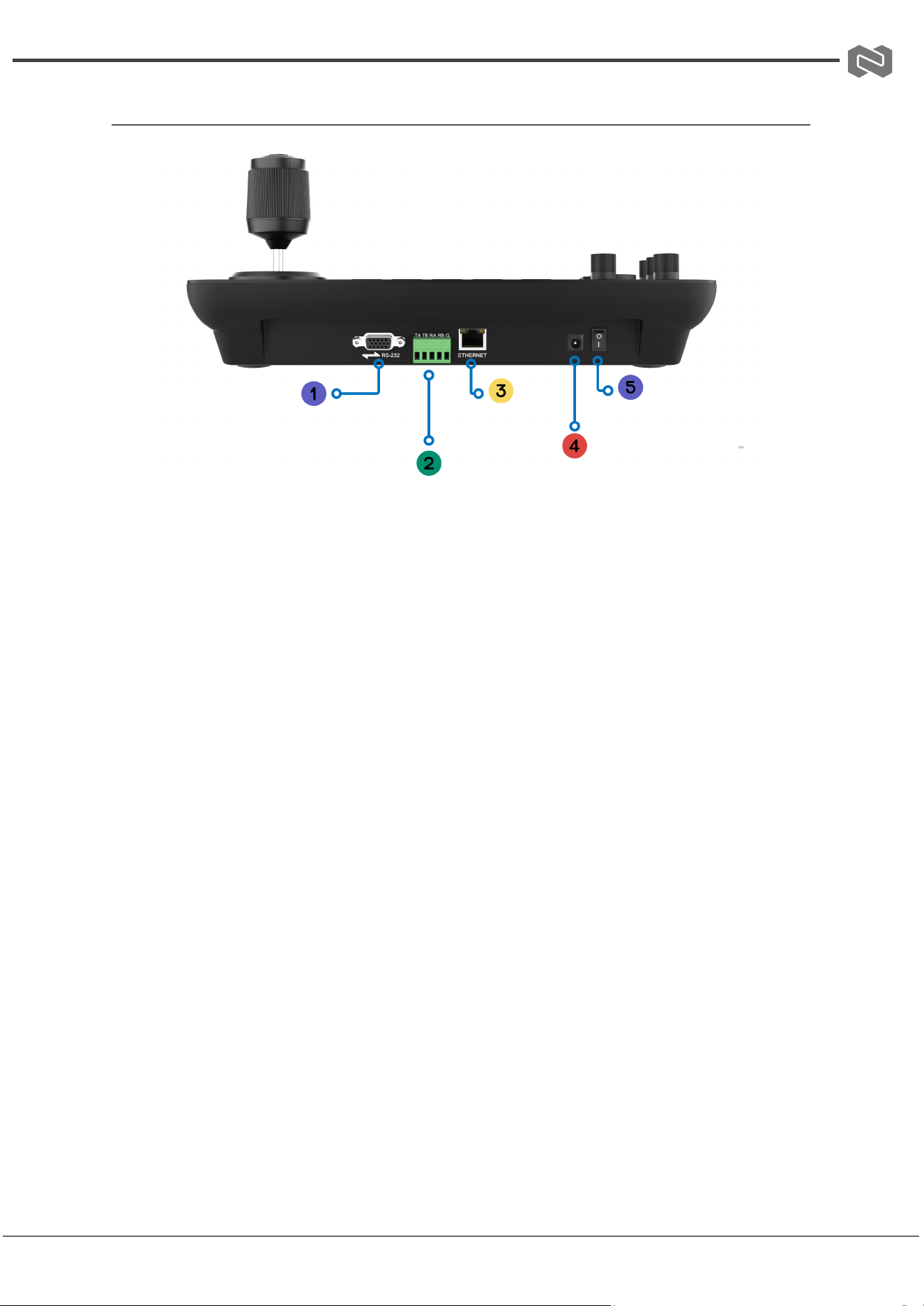
Operation Controls and Functions
1. RS-232
2. RS-485/422
3. Ethernet Port
4. DC 12V2a Power Input
5. Power ON/OFF Switch
Address: 830 National Drive #140, Sacramento, CA 95834, USA · Tel: +1(888)499-9906 · Email: support@bzbgear.com 8
BZBGEAR BG-COMMANDER-G2 PRODUCT MANUAL
Button and Knob Functions
Buttons & Functions:
● SETUP / MENU: Short press → Home screen, Long press → Camera menu
● SET / CALL: Set presets (long-press + numeric + ENTER), Recall presets
(short-press + numeric + ENTER)
● MENU BACK / ENTER: Navigate and confirm menu selections
● HOME: Return to watch position
● BACKLIGHT ON/OFF: Toggle backlight
● ONE PUSH TRIGGER / AF: One-touch White Balance / Auto Focus
● AUTO WHITE BALANCE / EXPOSURE / FOCUS: Automatic adjustment
● CAM ID / CAM 1-8: Switch or select camera
● Numeric Keys (0-9): Preset/camera ID input
● ESC / BACK / RECORD: Back or start/stop recording (requires local storage)
● NEAR / FAR: Manual focus
Knob Control Section
Knobs & Functions:
● R GAIN / B GAIN: Adjust red/blue color gain (press to toggle)
● ZOOM SPEED: Zoom speed adjustment
● PT SPEED: Pan-tilt speed adjustment
● IRIS: Aperture / brightness control
● ZOOM: Zoom in/out
Tips
● Preset recall: If camera doesn’t move, it may already be at that position; move and
try again.
● Knobs: Pressing certain knobs switches related settings (e.g., R ↔ B Gain).
● Recording: Only works with cameras that support local storage.
Address: 830 National Drive #140, Sacramento, CA 95834, USA · Tel: +1(888)499-9906 · Email: support@bzbgear.com 9
BZBGEAR BG-COMMANDER-G2 PRODUCT MANUAL
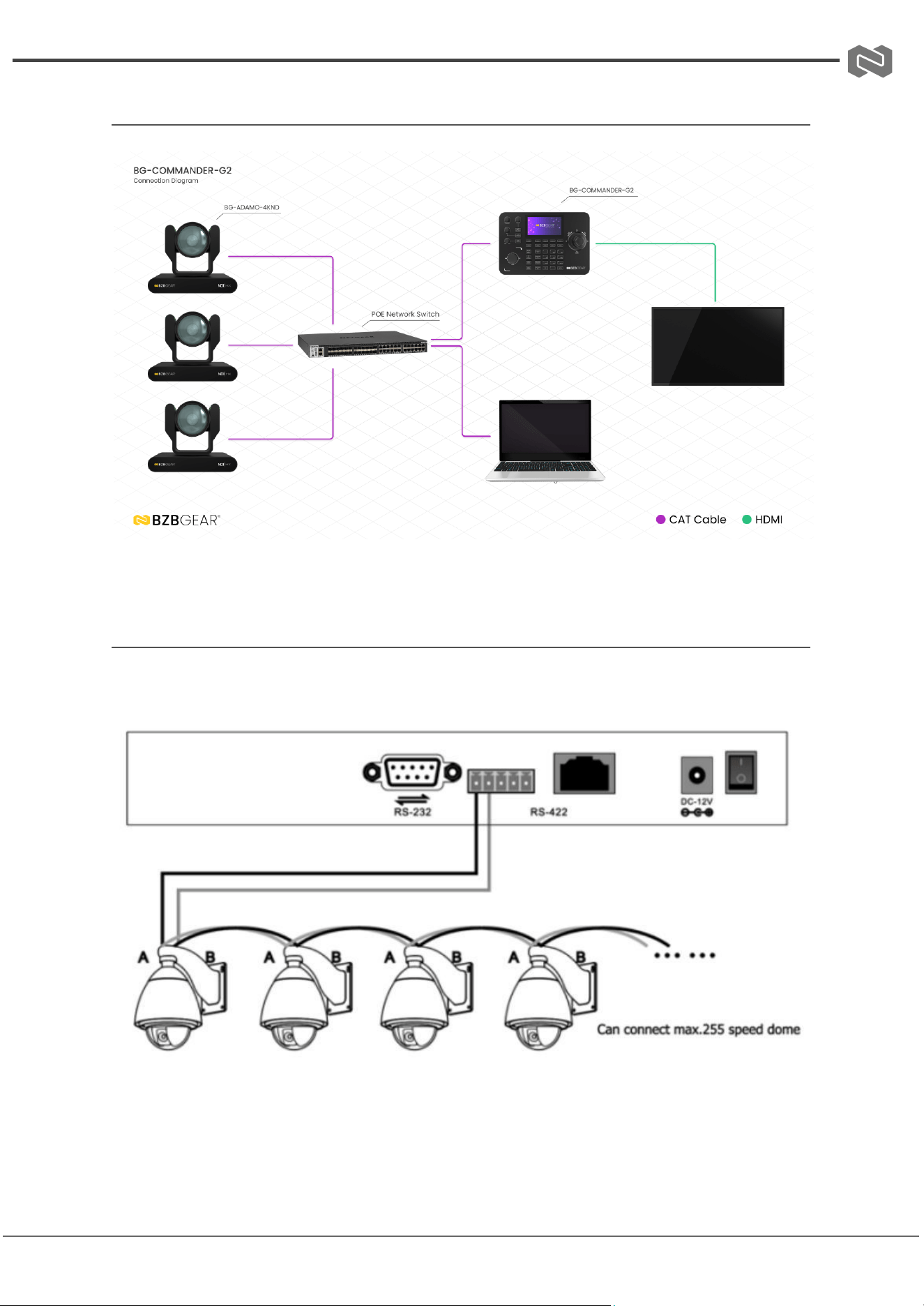
Connection Diagrams
Serial Connection Guide
1. RS485 connection diagram
Control output:
The RS485+ of the camera is connected to the Ta of the controller, and the RS485- of the
camera is connected to the Tb of the controller.
Address: 830 National Drive #140, Sacramento, CA 95834, USA · Tel: +1(888)499-9906 · Email: support@bzbgear.com 10
BZBGEAR BG-COMMANDER-G2 PRODUCT MANUAL
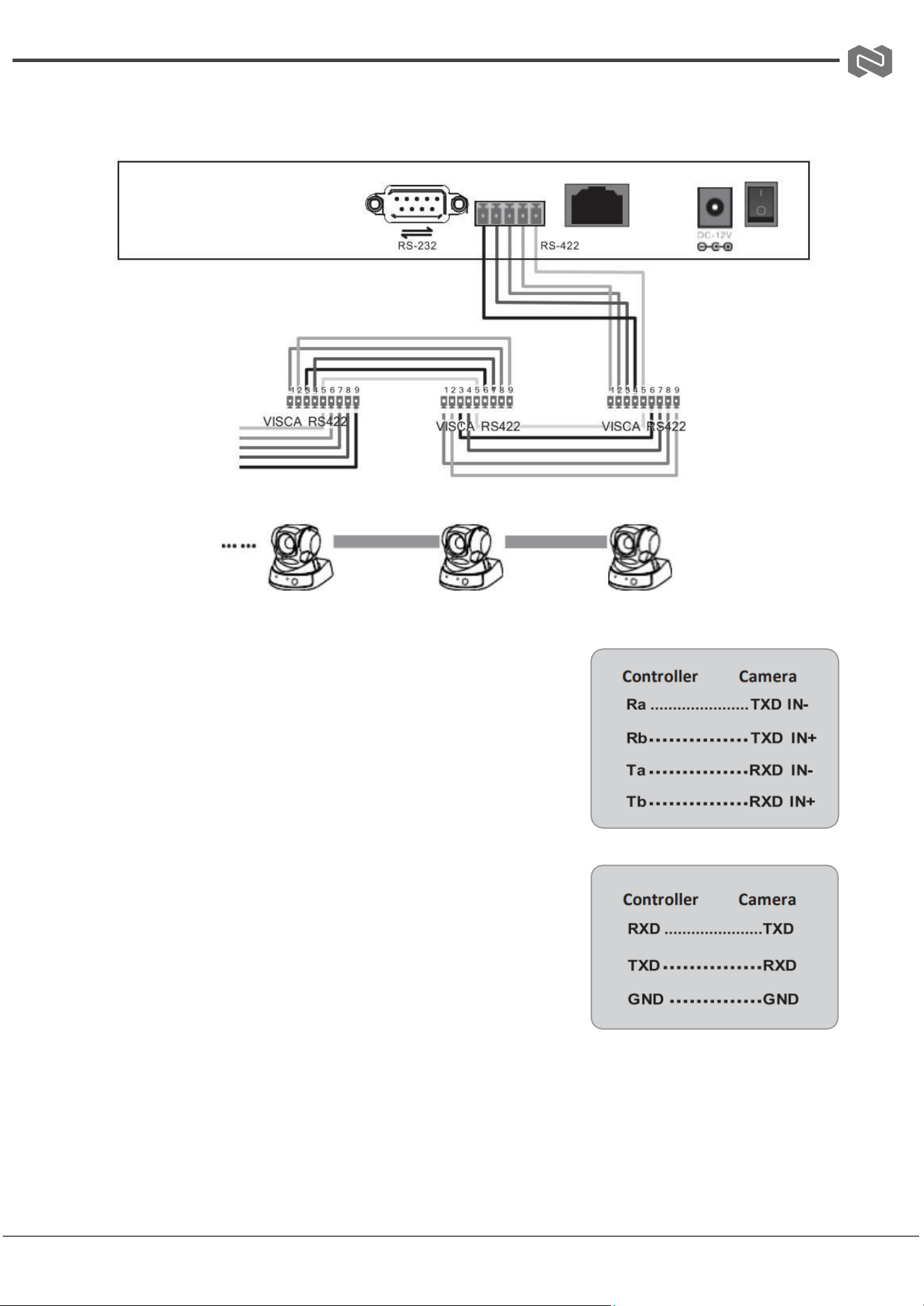
2. RS 422 connection diagram
7 cameras max
When using RS422 bus connection mode, the third pin (Ra)
of the controller is connected to the TXD IN- of the camera,
the fourth pin (Rb) of the controller is connected to the
TXD IN+ of the camera, the first pin (Ta) of the controller is
connected to the RXD IN- of the camera, and the second
pin (Tb) of the controller is connected to the RXD IN+
Using RS232 connection mode, the first pin (RXD) of the
controller (10 Pin terminal) is connected to the camera input
interface TXD, the second pin (TXD) of the controller is
connected to the camera RXD, and the third pin of the
controller is connected to the camera GND (you can also use
the standard RS232 DB9 interface of the controller to
connect the camera.
Address: 830 National Drive #140, Sacramento, CA 95834, USA · Tel: +1(888)499-9906 · Email: support@bzbgear.com 11
BZBGEAR BG-COMMANDER-G2 PRODUCT MANUAL
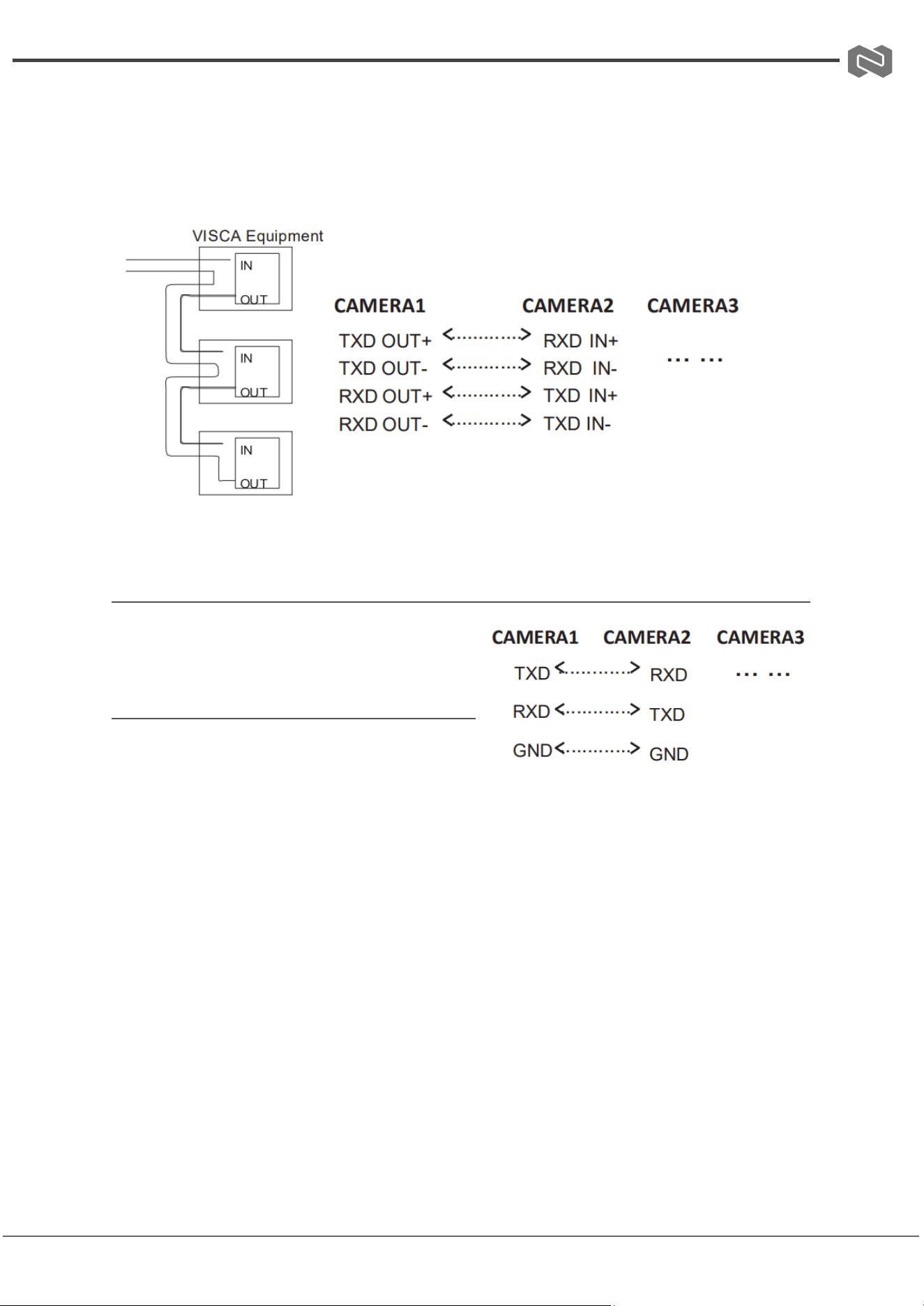
3. Connection between cameras
Using RS422 bus cascade connection mode, the output of camera 1 is connected to the
input of camera 2, the output of camera 2 is connected to the input of camera 3, and so on.
As below:
RS232 cascade connection
The output of camera 1 is connected to the
input of camera 2, the output of camera 2 is
connected to the input of camera 3, and so on.
Address: 830 National Drive #140, Sacramento, CA 95834, USA · Tel: +1(888)499-9906 · Email: support@bzbgear.com 12
BZBGEAR BG-COMMANDER-G2 PRODUCT MANUAL
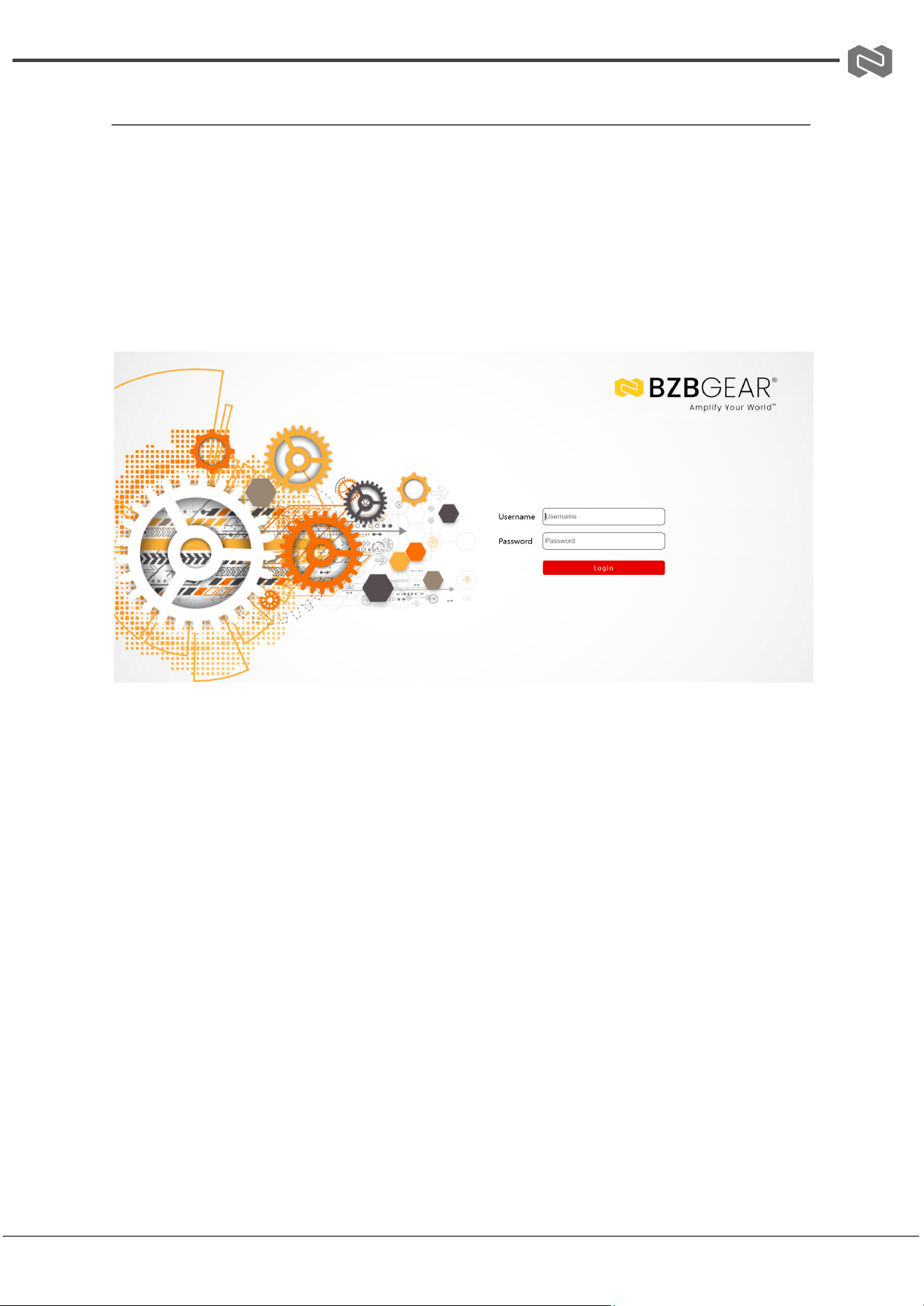
Web GUI
To access the Web GUI of the BG-COMMANDER-G2, enter the unit’s IP address into the
address bar of your web browser. This will open the login page. The default login
credentials are:
● Username: admin
● Password: (leave blank)
Note: If you are unable to access the Web GUI, ensure that both the BG-COMMANDER-G2
and your computer are connected to the same network.
Address: 830 National Drive #140, Sacramento, CA 95834, USA · Tel: +1(888)499-9906 · Email: support@bzbgear.com 13
BZBGEAR BG-COMMANDER-G2 PRODUCT MANUAL
FAQs
(1) “Connection Failed” message appears on screen
● Ensure the device with the specified IP address is properly connected to the LAN.
● Verify that the network cable or Wi-Fi connection is stable.
● Confirm that the IP address is correct and not conflicting with another device.
(2) “Username/Password Error” message appears on screen
● Double-check the username and password entered for the device.
● Make sure there are no typing errors (case sensitivity matters).
● If the credentials were recently changed, update them in the system.
(3) Unable to add third-party devices via ONVIF protocol
● Confirm that the third-party camera supports ONVIF and has the feature enabled.
● Verify that the camera’s network settings (IP, port) match the configuration.
● Check if ONVIF access requires a specific username/password and use those
credentials.
Address: 830 National Drive #140, Sacramento, CA 95834, USA · Tel: +1(888)499-9906 · Email: support@bzbgear.com 14
BZBGEAR BG-COMMANDER-G2 PRODUCT MANUAL
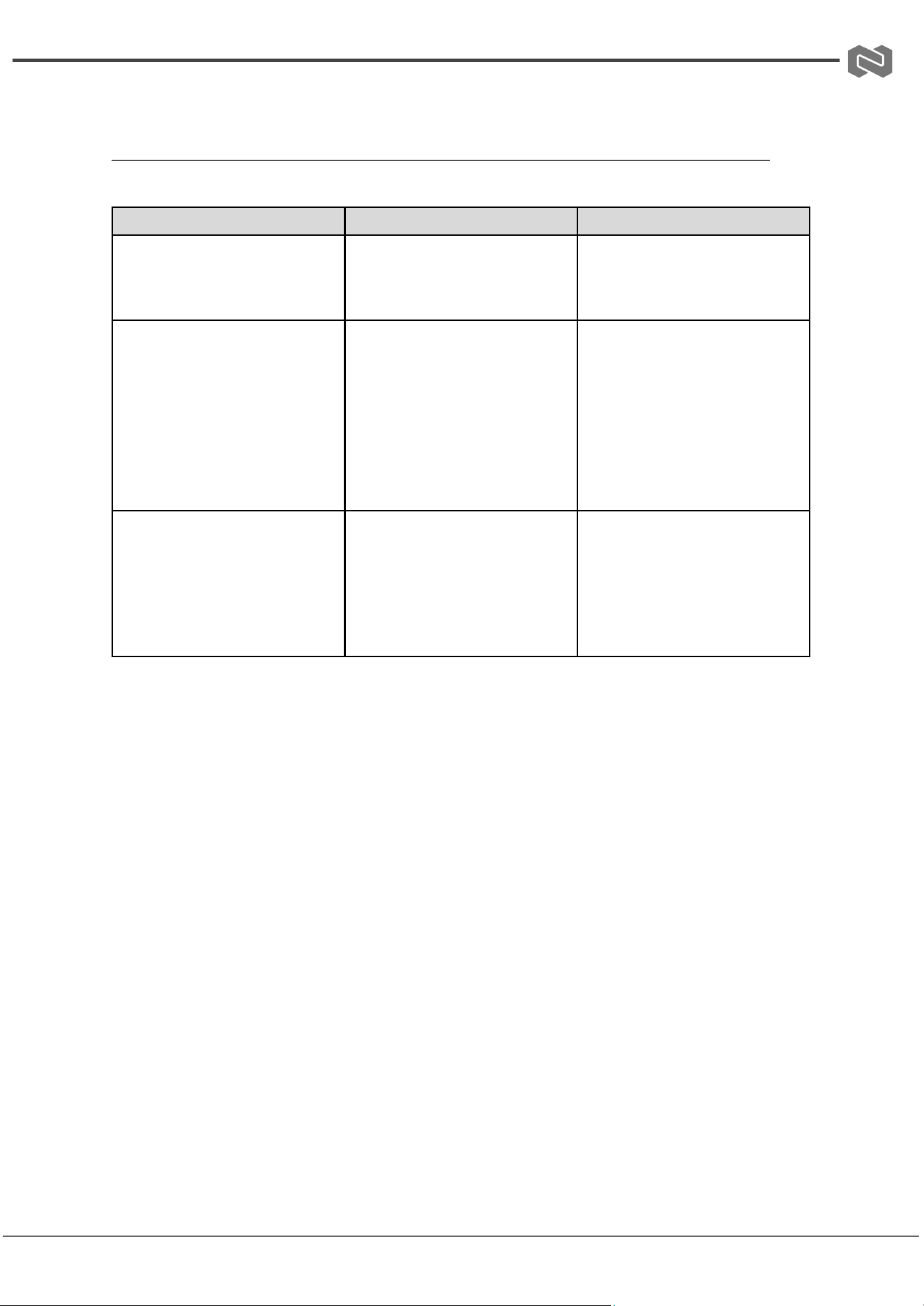
Troubleshooting
Problems
Causes
Solutions
No Power / All LED off
Power supply not connected,
connected fully, or wrong power
supply.
Check if the power supply is
connected correctly and the
output voltage value is within
recommended specifications.
No sound or sound issues
The HDMI connection is faulty,
the audio format is not
supported by the displays, or
the source player is set to
another port for audio output
Check if the HDMI cables are
connected correctly.
Check if the audio format is
supported by the display and
that a user has not changed the
supported audio format on the
player`s audio output. Ensure
output settings from the HDMI
source device as set correctly.
No picture or picture flickers
The HDMI cable may be faulty
or the category cable quality is
faulty.
Check if the HDMI
and category cable connections
are correct and undamaged.
Change to another good
working HDMI cable or category
cable (CAT6 or better cable is
recommended).
Address: 830 National Drive #140, Sacramento, CA 95834, USA · Tel: +1(888)499-9906 · Email: support@bzbgear.com 15

BZBGEAR BG-COMMANDER-G2 PRODUCT MANUAL
Tech Support
Have technical questions? We may have answered them already!
Please visit BZBGEAR’s support page (bzbgear.com/support) for helpful information and
tips regarding our products. Here you will find our Knowledge Base
(bzbgear.com/knowledge-base) with detailed tutorials, quick start guides, and step-by-step
troubleshooting instructions. Or explore our YouTube channel, BZB TV
(youtube.com/c/BZBTVchannel), for help setting up, configuring, and other helpful how-to
videos about our gear.
Need more in-depth support? Connect with one of our technical specialists directly:
Phone
1.888.499.9906
Email
support@bzbgear.com
Live Chat
bzbgear.com
Limited Product Warranty Terms
Pro Line: 5-year warranty from the date of purchase for AV/Broadcasting products bought
on or after August 1, 2024.
Essential Line: 3-year warranty from the date of purchase for AV/Broadcasting products
bought on or after August 1, 2024.
Cables: Lifetime Limited Product Warranty.
For complete warranty information, please visit bzbgear.com/warranty.
For questions, please call 1.888.499.9906 or email support@bzbgear.com.
Mission Statement
BZBGEAR is a breakthrough manufacturer of high-quality, innovative audiovisual equipment
ranging from AVoIP, professional broadcasting, conferencing, home theater, to live
streaming solutions. We pride ourselves on unparalleled customer support and services.
Our team offers system design consultation, and highly reviewed technical support for all
the products in our catalog. BZBGEAR delivers quality products designed with users in
mind.
Copyright
All the contents in this manual and its copyright are owned by BZBGEAR. No one is allowed
to imitate, copy, or translate this manual without BZBGEAR’s permission. This manual
contains no guarantee, standpoint expression or other implies in any form. Product
specification and information in this manual is for reference only and subject to change
without notice.
All rights reserved. No reproducing is allowed without acknowledgement.
Address: 830 National Drive #140, Sacramento, CA 95834, USA · Tel: +1(888)499-9906 · Email: support@bzbgear.com 16