BG-PSC6X2-4K
6X2 4K 18Gbps UHD HDMI/USB-C/DP/VGA & Audio Conference
Room Presentation Switcher/Scaler
User Manual

BZBGEAR BG-PSC6X2-4K PRODUCT MANUAL
Address: 830 National Drive #140, Sacramento, CA 95834, USA · Tel: +1(888)499-9906 · Email: support@bzbgear.com 2

BZBGEAR BG-PSC6X2-4K PRODUCT MANUAL
TABLE OF CONTENTS
Statement 4
Safety Precaution 4
Introduction 5
Features 5
Packing List 5
Technical Specifications 6
Operation Controls and Functions 7
Remote Control Description 9
IR TX/RX Guidelines 10
RS-232 Pin Assignment 11
RS232 and Telnet Commands 12
Application Example 14
Tech Support 15
Limited Product Warranty Terms 15
Mission Statement 15
Copyright 16
Address: 830 National Drive #140, Sacramento, CA 95834, USA · Tel: +1(888)499-9906 · Email: support@bzbgear.com 3

BZBGEAR BG-PSC6X2-4K PRODUCT MANUAL
Statement
Please read these instructions carefully before connecting, operating, or configuring this
product. Please save this manual for future reference.
Safety Precaution
● Unpack the equipment carefully and save the original box and packing material for
possible future shipment.
● Follow basic safety precautions to reduce the risk of fire, electrical shock and injury to
persons.
● To prevent damaging this product, avoid heavy pressure, strong vibration, or immersion
during transportation, storage, and installation.
● Do not dismantle the housing or modify the module.
● Using supplies or parts not meeting the products’ specifications may cause damage,
deterioration or malfunction.
● Do not put any heavy items on the extension cable in case of extrusion.
● Install the device in a place with fine ventilation to avoid damage caused by overheat.
● Do not twist or pull by force ends of the optical cable. It can cause malfunction.
● The housing of this product is made of organic materials. Do not expose to any liquid,
gas, or solids which may corrode the shell.
● Unplug this device during lightning storms.
● Do not use liquid or aerosol cleaners to clean this unit. Clean only with a soft dry
microfiber cloth.
● Always unplug the power to the device before cleaning.
● If an object or liquid falls or spills on to the housing, unplug the module immediately.
● To prevent the risk of electric shock, do not open the case. Installation and maintenance
should only be carried out by qualified technicians.
● Do not use the product beyond the specified temperature, humidity, or power supply
specifications.
● This product does not contain parts that can be maintained or repaired by users.
Damage caused by dismantling the product without authorization from BZBGEAR is not
covered under the warranty policy.
● Installation and use of this product must strictly comply with local electrical safety
standards.
● Product specifications may be subject to technical upgrades without further notice.
● Unplug the power cord when left unused for a long period of time.
● Information on disposal for scrapped devices: do not burn or mix with general
household waste, please treat them as normal electrical wastes.
Address: 830 National Drive #140, Sacramento, CA 95834, USA · Tel: +1(888)499-9906 · Email: support@bzbgear.com 4

BZBGEAR BG-PSC6X2-4K PRODUCT MANUAL
Introduction
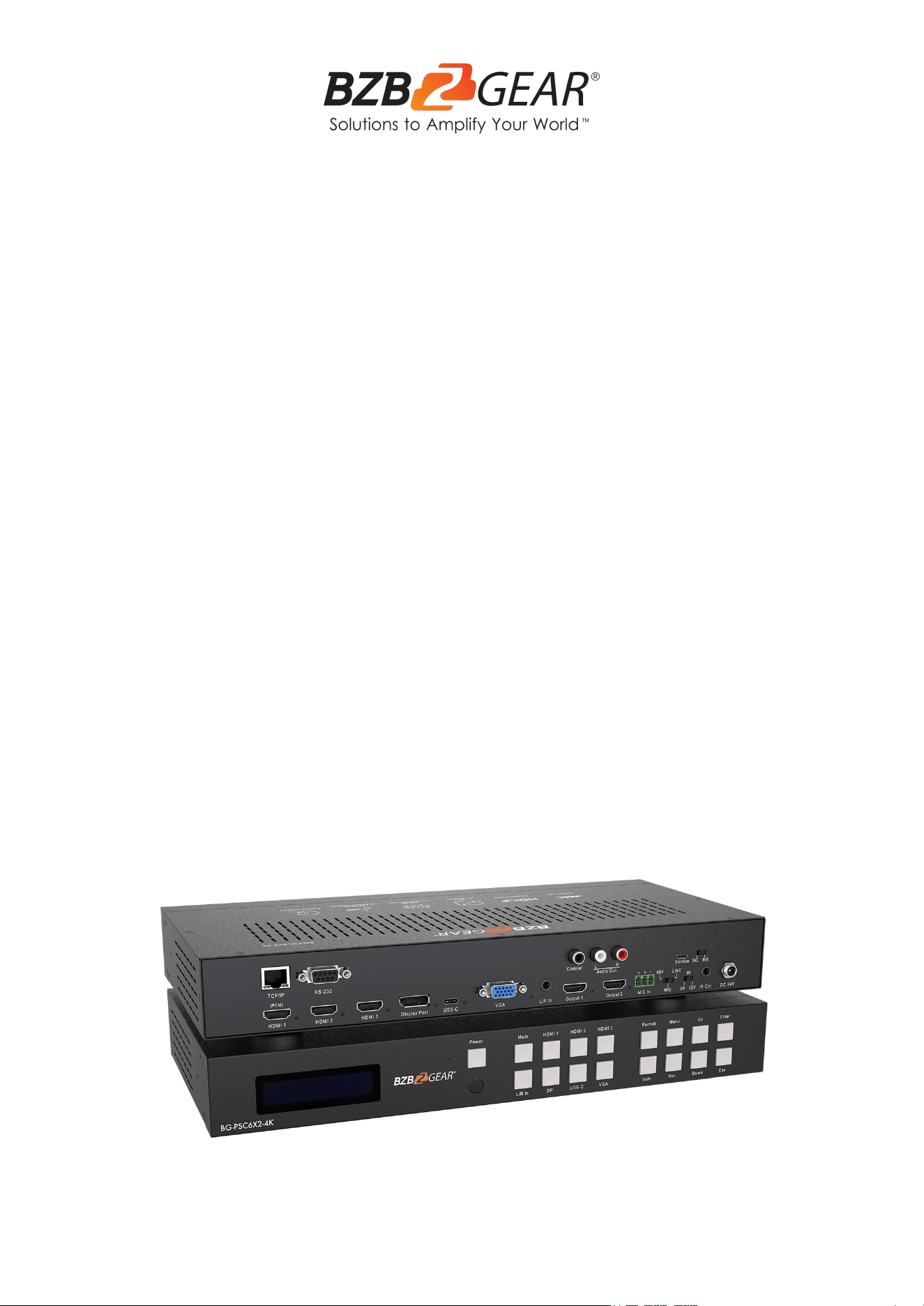
The BG-PSC6X2-4K is a 4K 18Gbps presentation scaler and switcher that supports 6
inputs including 3 HDMI inputs, 1 DisplayPort, 1 USB-C, and 1 VGA, with 2 HDMI mirrored
outputs. Utilizing a built-in scaler chip, the video can be scaled to various aspect ratios and
resolutions from 1024x768 up to 3840x 2160 @ 60Hz.
This presentation switcher also features advanced audio embedding and de-embedding, it
can offer flexible applications of audio which includes analog and digital audio, MIC In, and
Line out. Each source and display can be controlled and configured via front-panel buttons,
the included IR remote, RS232, Telnet, or WebGUI.
Features
● 4K@60Hz 4:4:4, HDR10, HLG and full 3D
● Switch & Scale 6 sources to 2 displays
● 3x HDMI input, 1x VGA w/Audio input, 1x USB-C input, 1x Display port input
● 2x HDMI mirrored outputs
● 1x MIC line level audio input (70 Db) with phantom power.
● Audio embedding and de-embedding
● 3x HDMI inputs support CEC pass-through
● Scaling from 640x480 to 4096x2160@60Hz
● Front-panel LCD display for status feedback
● Front-panel button, IR remote control, RS-232, TCP/IP and WebGUI for control
● HDCP 2.2 compliant
Packing List
● 1x BG-PSC6X2-4K
● 1x 24V/1A power supply
● 1x Remote control
● 1x IR Receiver cable
● 1x Mounting kit
● 1x User Manual
● 1х Quick Start Guide
Address: 830 National Drive #140, Sacramento, CA 95834, USA · Tel: +1(888)499-9906 · Email: support@bzbgear.com 5
BZBGEAR BG-PSC6X2-4K PRODUCT MANUAL
Technical Specifications
General
Bandwidth:
18Gbps
Video Input Connectors:
3x HDMI Type A, 1x VGA, 1x USB-C, 1x DP
Video Output Connectors:
2x HDMI Type A
Audio Input Connectors:
1x 3.5mm stereo jack
Audio Output Connectors:
1x 3.5mm stereo jack, 1x RCA (SPDIF)
RS-232 serial port:
1x DB 9 connector
IR Input ports:
1x 3.5mm stereo jack
Dimensions (W x H x D):
13.6” x 6.5" x 1.8" [345mm x 165mm x 45mm]
Shipping Weight:
4.4lbs [2.0Kg]
Operating Temperature:
32°F to 104°F / 0°C to 40°C
Storage Temperature:
-4°F to 140°F / -20°C to 60°C
Power Supply:
DC 24V/1A
Address: 830 National Drive #140, Sacramento, CA 95834, USA · Tel: +1(888)499-9906 · Email: support@bzbgear.com 6
BZBGEAR BG-PSC6X2-4K PRODUCT MANUAL
Operation Controls and Functions
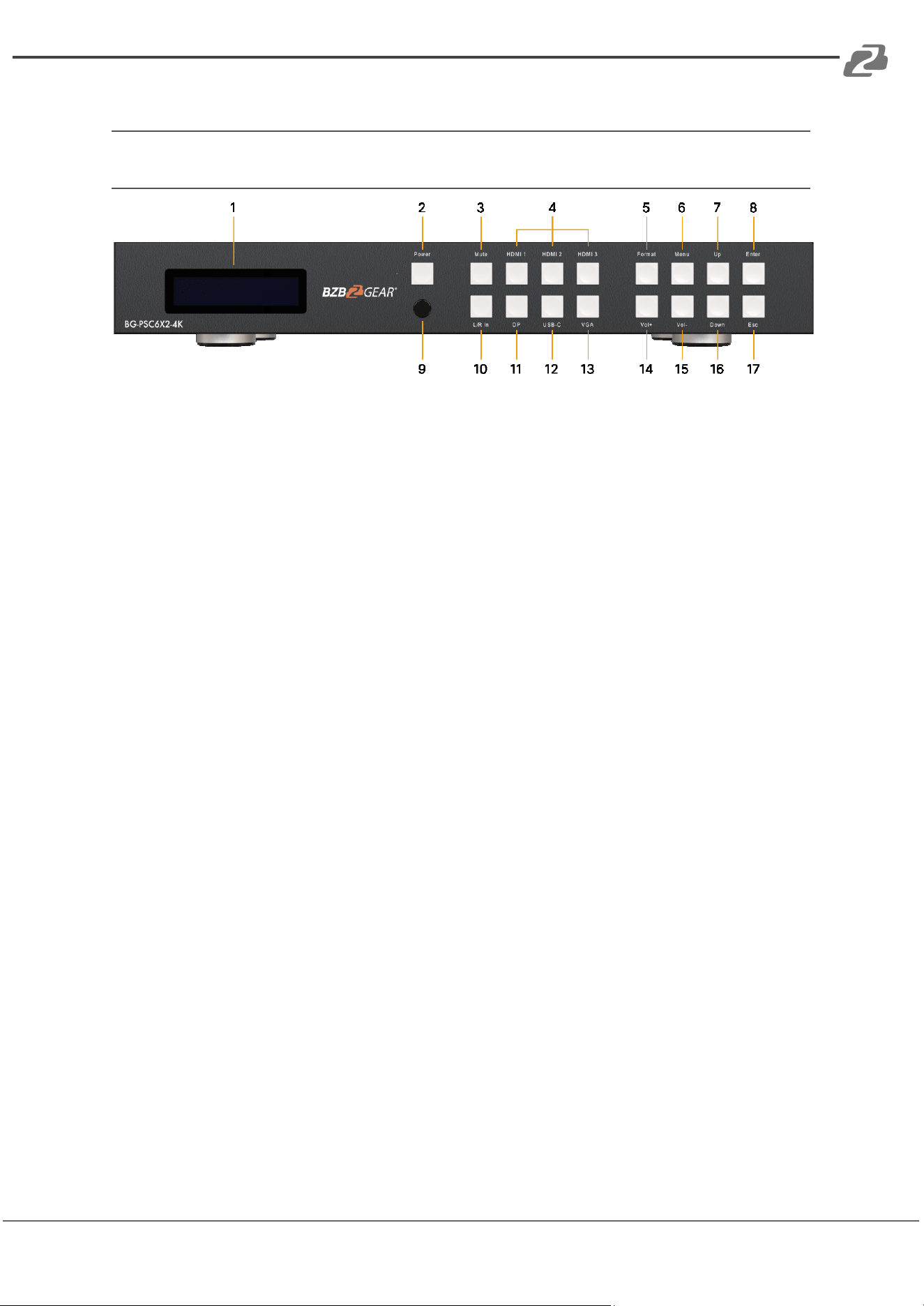
Front Panel
1. LCD display: It shows the status of input-to-output selection, EDID info, and the
other information.
2. Power button: Press to power on the unit.
3. Mute button: Press to mute the HDMI outputs, L/R, & Coaxial audio outputs.
4. HDMI 1-3 Input selection buttons: Press to select the source for Output 1 & 2 from
HDMI Input 1 through 3.
5. Format set button: Press to set the resolution for the output.
6. Menu button: Press to enter EDID settings, volume settings, or F/M information.
7. Up selection button: Press to change the segment's value.
8. Enter button: Press to confirm the settings.
9. IR receiver window: Receive the IR from the remote control.
10. L/R In: Press to embed analog audio into the HDMI outputs.
11. DP: Input button – Press to select DisplayPort Input.
12. USB-C Input button: Press to select USB-C Input.
13. VGA Input button: Press to select VGA Input.
14. Volume up: Press to increase audio’s volume from HDMI outputs and Audio output.
15. Volume down: Press to decrease audio’s volume from HDMI outputs and Audio
output.
16. Down selection button: Press to change the segment's value.
17. ESC: Press to quit EDID set mode.
Address: 830 National Drive #140, Sacramento, CA 95834, USA · Tel: +1(888)499-9906 · Email: support@bzbgear.com 7
BZBGEAR BG-PSC6X2-4K PRODUCT MANUAL
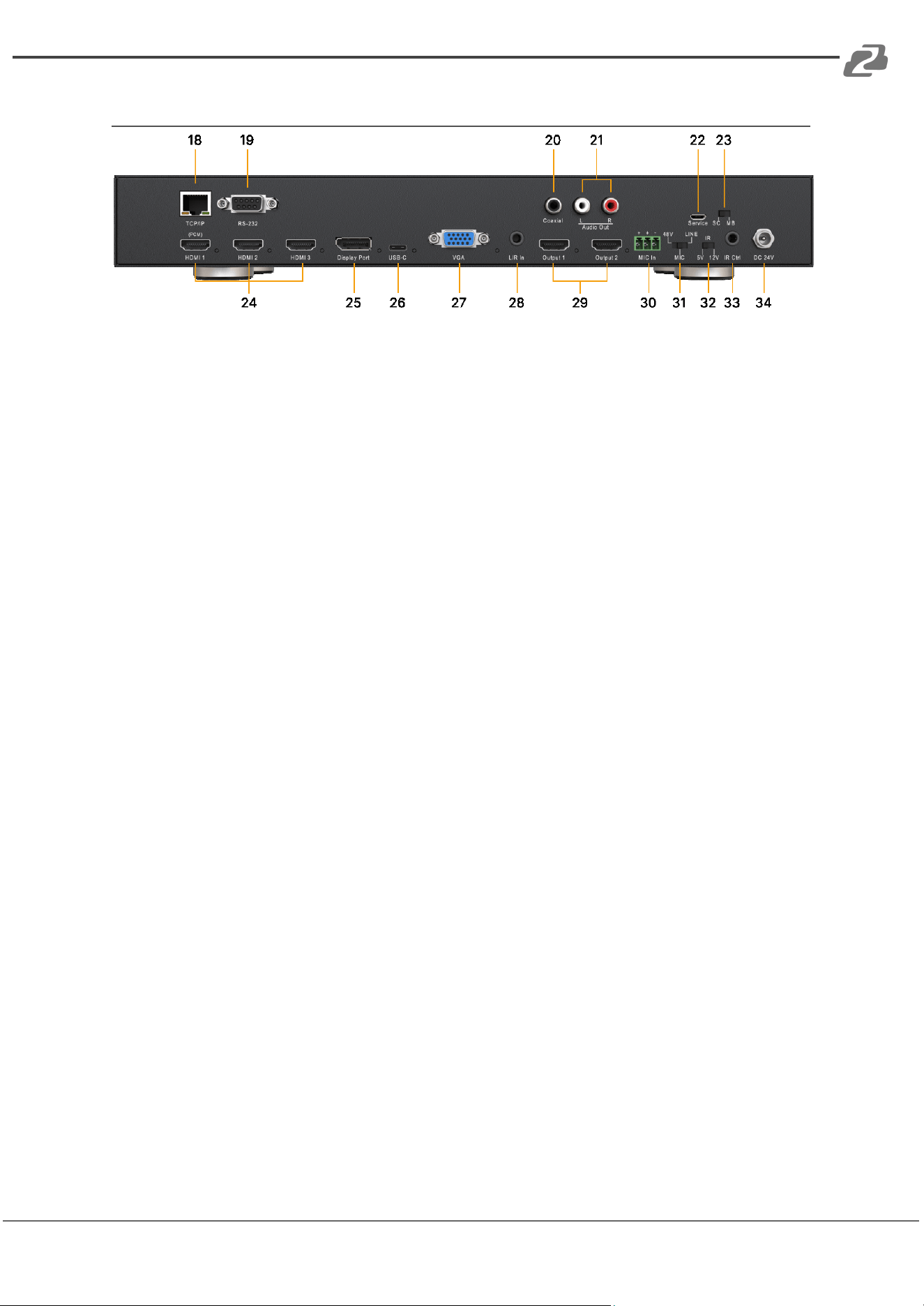
Rear Panel
18. TCP/IP port: RJ45 connector, for TCP/IP control.
19. RS232 port: DB9 female connector, to control the unit from a PC or control
processor.
20. Coaxial audio output: Output coaxial audio which always follows HDMI outputs.
21. L/R audio output: Output analog audio which follows HDMI outputs.
22. Service port: Micro USB port, for firmware upgrade.
23. Upgrade slip switch: Used with a service port to upgrade SC/Scaler Chip or
MB/Main Board.
24. HDMI Input 1-3: Connect to HDMI sources.
25. DP Input: Connect to DisplayPort source.
26. USB-C: Input – Micro USB port, connect to USB-C source.
27. VGA Input: Connect to VGA source.
28. L/R Input: L/R audio input with VGA input.
29. HDMI Output 1-2: Connect to an HDMI display.
30. MIC In: Plug microphone in for audio source output.
31. 48V/MIC/Line: Slip switcher.
32. IR slip switcher: Slip to select 5V IR or 12V IR.
33. IR Ctr: Connect to an IR receiver cable.
34. DC 24V: Use included 24V/1A power supply to power on the unit.
Address: 830 National Drive #140, Sacramento, CA 95834, USA · Tel: +1(888)499-9906 · Email: support@bzbgear.com 8
BZBGEAR BG-PSC6X2-4K PRODUCT MANUAL
Remote Control Description
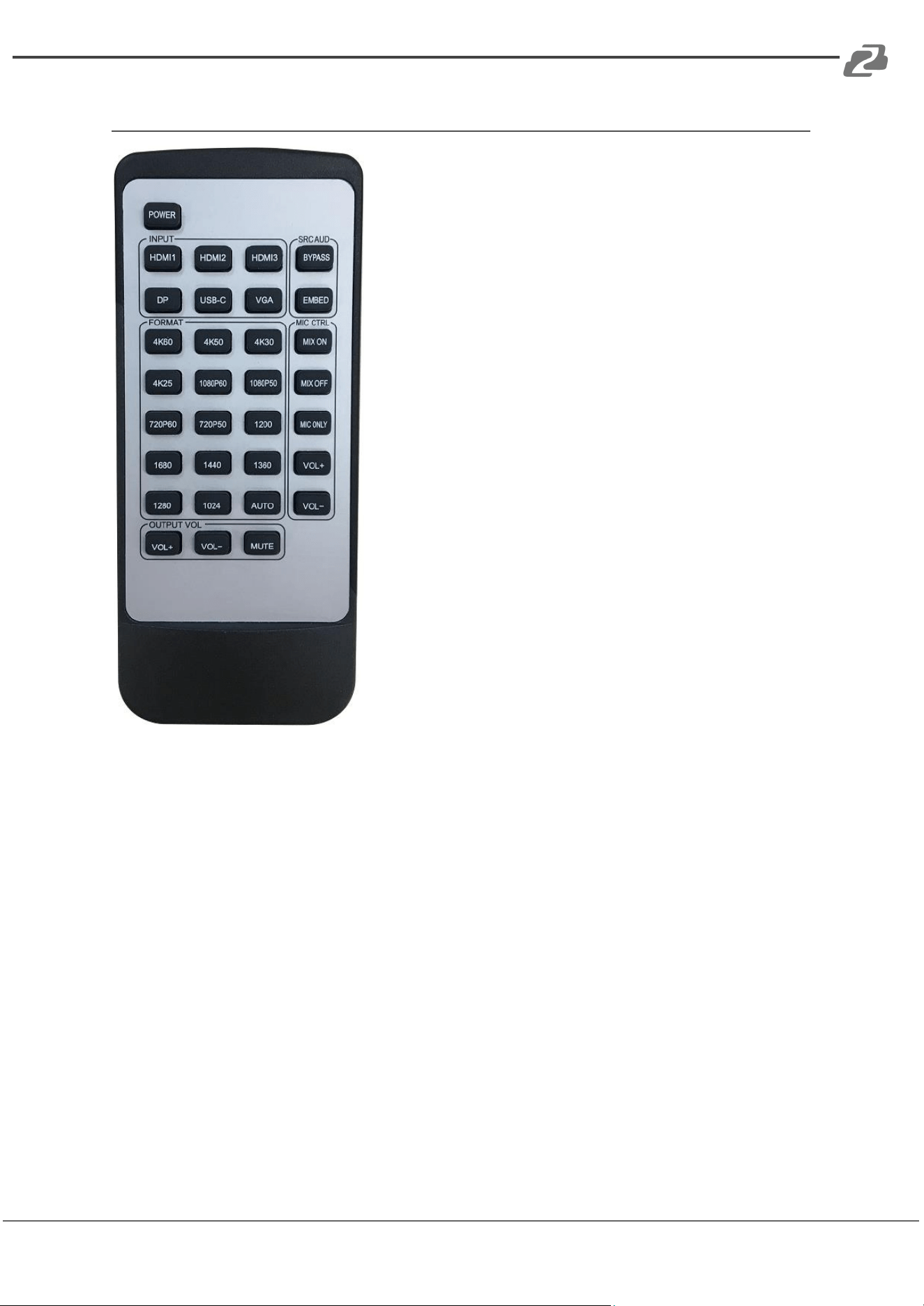
Input: Source selection for HDMI output 1 & output 2.
SRC AUD/Source Audio:
● Bypass: Audio on HDMI outputs is from HDMI
input selected.
● Embed: Audio on HDMI outputs is from L/R
Analogue audio input (3.5mm Jack)
Format: Video output resolution selection.
The BG-PSC6X2-4K includes a built-in video scaler.
Press the required resolution button on remote control
to change the HDMI output video resolution
MIC control:
● Mix On: Turn on Mix Audio mode
● Mix Off: Turn off Mix Audio mode
● Mic Only: Only microphone has audio output
● Vol+: Increase the volume of microphone
● Vol-: Decrease the volume of microphone
Output Vol: Press to Increase/Decrease/Mute the
volume of Audio from HDMI outputs and De-embedded
audio output.
Address: 830 National Drive #140, Sacramento, CA 95834, USA · Tel: +1(888)499-9906 · Email: support@bzbgear.com 9
BZBGEAR BG-PSC6X2-4K PRODUCT MANUAL
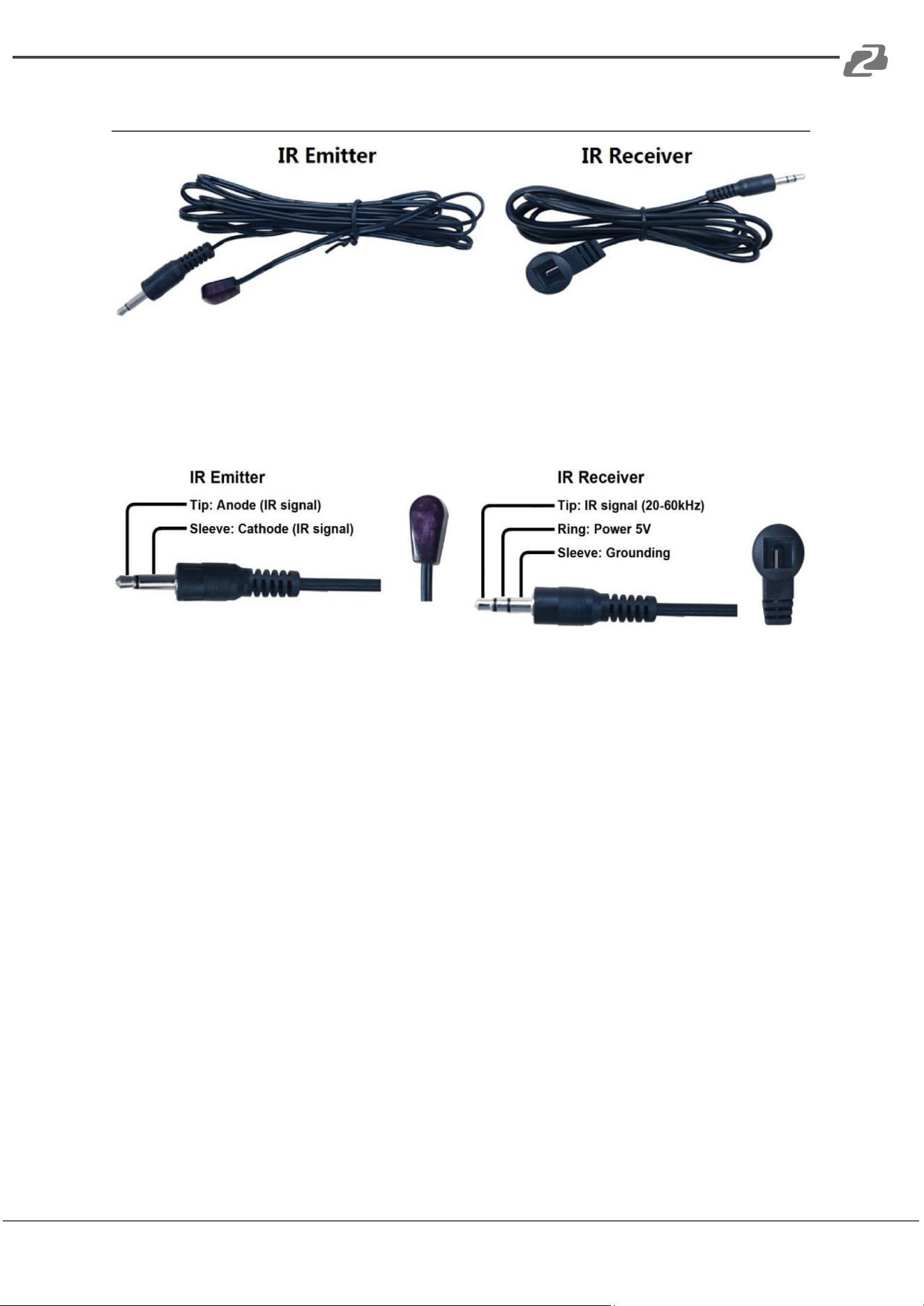
IR TX/RX Guidelines
IR Emitter: Plug in the IR emitter to emit all IR command signals received from the IR
receiver from the other end to control the devices corresponding to the IR signals.
IR Receiver: Plug in the IR receiver to receiver all IR command signals from the IR remote
controls of the corresponding devices.
Address: 830 National Drive #140, Sacramento, CA 95834, USA · Tel: +1(888)499-9906 · Email: support@bzbgear.com 10
BZBGEAR BG-PSC6X2-4K PRODUCT MANUAL
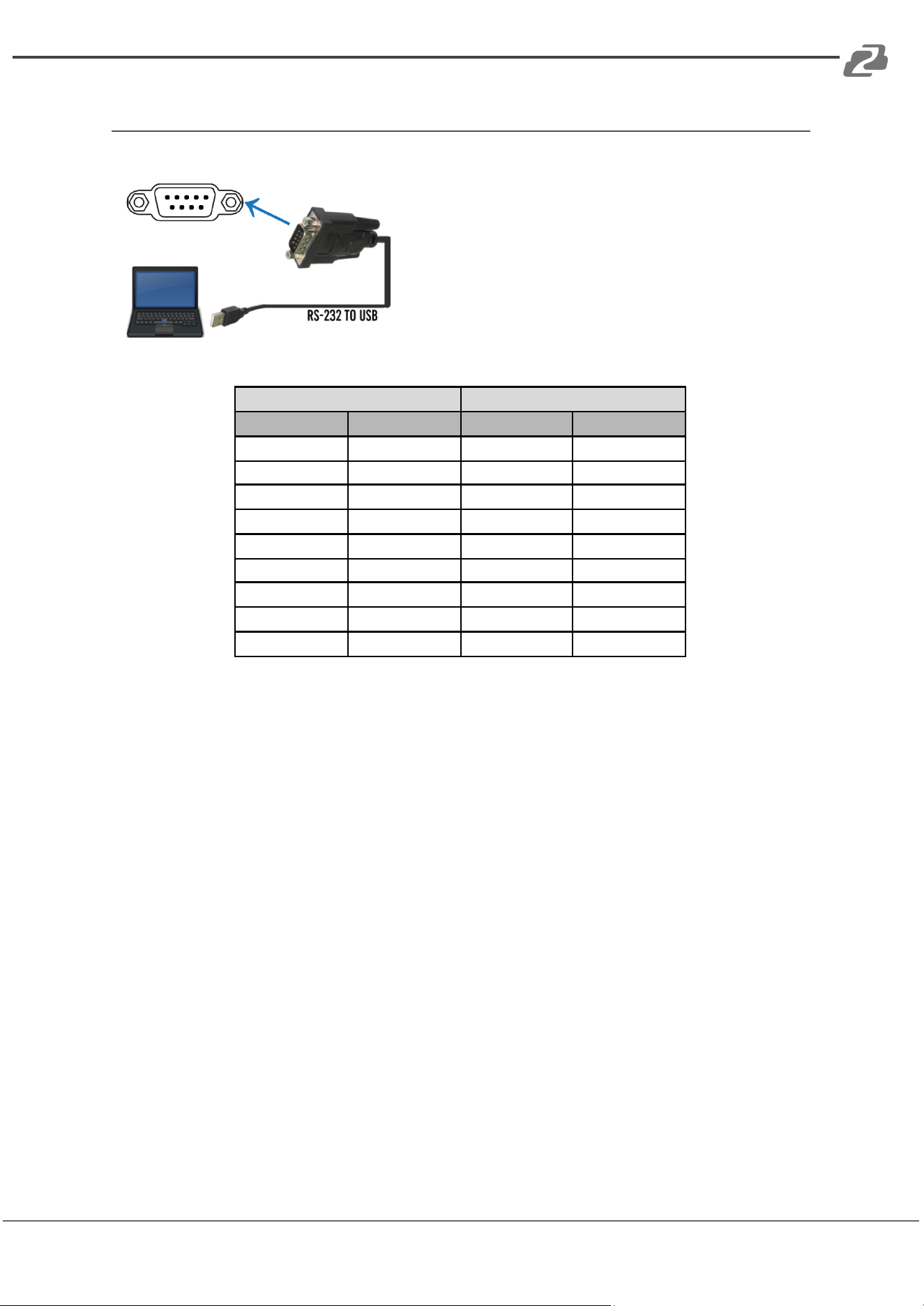
RS-232 Pin Assignment
The connection method is as follows:
Baud Rate: 57600 bps Data Bit: 8-bit
Parity: None Stop Bit: 1-bit
Flow Control: None
BG-PSC6X2-4K
Remote Control Console
PIN
Assignment
PIN
Assignment
1
NC
1
NC
2
Tx
2
Rx
3
Rx
3
Tx
4
NC
4
NC
5
GND
5
GND
6
NC
6
NC
7
NC
7
NC
8
NC
8
NC
9
NC
9
NC
Address: 830 National Drive #140, Sacramento, CA 95834, USA · Tel: +1(888)499-9906 · Email: support@bzbgear.com 11

BZBGEAR BG-PSC6X2-4K PRODUCT MANUAL
RS232 and Telnet Commands
Command
Action
?
Print Help Information
HELP
Print Help Information
STATUS
Print System Status And Port Status
PON
Power On, System Run On Normal State
POFF
Power Off, System Run On Power Save State
IR ON/OFF
Set System IR Control On Or Off
KEY ON/OFF
Set System KEY Control On Or Off
LCD ON/OFF
Set LCD Always On or Auto Turn Off In Power On State
RSB x
Set RS232 Baud Rate to x bps
X= [0:115200, 1:57600, 2:38400, 3:19200, 4:9600]
RESET
Reset System To Default Setting
(Should Type "Yes" To Confirm, "No" To Discard)
RESET ALL
Reset System And Network To Default Setting
(Should Type "Yes" To Confirm, "No" To Discard)
OUT xx ON/OFF
Set Output: xx On Or Off
OUT xx FR yy
Set OUTPUT:xx From INPUT:yy
xx=00: Select All OUTPUT Port
xx=[01...02]: Select One OUTPUT Port
yy=Select One Input Port
[01…03:HDMI, 04:DP, 05:USB-C, 06:VGA]
OUT OSD ON/OFF
Set Scaler OSD Show On or Off
OUT RES rr
Set Scaler Output Resolution
(Change Output Resolution Will Effect VGA EDID Setting)
Rr=00: 1024x768@60Hz
rr=01: 1280x1024@60Hz
rr=02: 1360x768@60Hz
rr=03: 1440x900@60Hz
rr=04: 1680x1050@60Hz
rr=05: 1920x1200@60Hz
rr=06: 720p@50Hz
rr=07: 720p@60Hz
rr=08: 1080p@50Hz
rr=09: 1080p@60Hz
rr=10: 4K2K@25Hz
rr=11: 4K2K@30Hz
rr=12: 4K2K@50Hz
rr=13: 4K2K@60Hz
rr=14: Auto
EDID xx CP yy
Set Input:xx EDID Copy From Output:yy yy=[00]:
EDID xx DF zz
Set Input:xx EDID To Default EDID:zz xx=00: Select All INPUT Port
xx=[01...05]: Select One INPUT Port
yy=[01...02]: Select One OUTPUT Port
zz=00: HDMI 1080p@60Hz, Audio 2CH PCM
zz=01: HDMI 1080p@60Hz, Audio 5.1CH DTS/DOLBY
zz=02: HDMI 1080p@60Hz, Audio 7.1CH DTS/DOLBY/HD
zz=03: HDMI 1080i@60Hz, Audio 2CH PCM
zz=04: HDMI 1080i@60Hz, Audio 5.1CH DTS/DOLBY
zz=05: HDMI 1080i@60Hz, Audio 7.1CH DTS/DOLBY/HD
zz=06: HDMI 1080p@60Hz/3D, Audio 2CH PCM
zz=07: HDMI 1080p@60Hz/3D, Audio 5.1CH DTS/DOLBY
zz=08: HDMI 1080p@60Hz/3D, Audio 7.1CH DTS/DOLBY/HD
zz=09: HDMI 4K@30Hz 4:4:4, Audio 2CH PCM
zz=10: HDMI 4K@30Hz 4:4:4, Audio 5.1CH DTS/DOLBY
zz=11: HDMI 4K@30Hz 4:4:4, Audio 7.1CH DTS/DOLBY/HD
Address: 830 National Drive #140, Sacramento, CA 95834, USA · Tel: +1(888)499-9906 · Email: support@bzbgear.com 12

BZBGEAR BG-PSC6X2-4K PRODUCT MANUAL
Command
Action
zz=12: DVI 1280x1024@60Hz, Audio None
zz=13: DVI 1920x1080@60Hz, Audio None
zz=14: DVI 1920x1200@60Hz, Audio None
zz=15: User EDID 1
zz=16: User EDID 2
zz=17: GUI Download EDID
zz=18: HDMI 4K@60Hz 4:2:0, Audio 2CH PCM
zz=19: HDMI 4K@60Hz 4:2:0, Audio 5.1CH DTS/DOLBY
zz=20: HDMI 4K@60Hz 4:2:0, Audio 7.1CH DTS/DOLBY/HD
zz=21: HDMI 4K@60Hz 4:2:0, Audio 2CH PCM
zz=22: HDMI 4K@60Hz 4:2:0, Audio 5.1CH DTS/DOLBY
zz=23: HDMI 4K@60Hz 4:4:4, Audio 7.1CH DTS/DOLBY/HD
AUD SCA ORG
Scaler Audio Input Follow Port Selection
AUD SCA ANA
Scaler Audio Input From Analog L/R Signal
AUC PCM SCA/BYP
When Input PCM Audio, Use Scaler To Process Or Just Bypass To Output. Bitstream Audio
Always Bypass HDMI 1 And VGA Input Audio Always Use Scaler Process
AUD RX yy ORG
HDMI Input: yy Use Original HDMI/DVI Signal
AUD RX yy ANA
HDMI Input: yy Embedded Analog L/R When DVI Signal
yy=[01…04]: HDMI Input 01 ~ 04
VOL xx
Set Scaler Audio Volume
xx=[00…100]: Volume Value
xx=+: Volume Increase
xx=-: Volume Decrease
MUTE ON/OFF
Set Scaler Output Audio Mute ON Or OFF
MIC MIX mm
Set MIC And Background Audio Mix Mode
mm=ON: Mix MIC And Background Audio
mm=BGO: Background Audio Only
mm= MICO: MIC Audio Only
MIC VOL xx
Set MIC Input Audio Volume
xx=[00…01]:MIC Volume Value
MIC MUTE ON/OFF
Set MIC Mute On Or Off
MIC AUTOBG ON/OFF
Set Auto Decrease Background Audio When Detect MIC Voice
MIC BGVOL pp
Set Auto Decrease Background Audio To pp Percent of “VOL xx”
pp=[00…100]:Percent of “VOL xx” Setting
MIC BGR dd
After Speaking, The MIC Takes dd Second To Raise The Volume
dd=[01…20]: Delay Seconds
NET DHCP ON/OFF
Set Auto IP(DHCP) ON Or OFF
NET IP xxx.xxx.xxx.xxx
Set IP Address
NET GW xxx.xxx.xxx.xxx
Set Gateway Address
NET SM xxx.xxx.xxx.xxx
Set Subnet Mask Address
NET TN XXXX
Set Telnet Port
NET RB
Set Network Reboot and Apply New Config!!!
Address: 830 National Drive #140, Sacramento, CA 95834, USA · Tel: +1(888)499-9906 · Email: support@bzbgear.com 13
BZBGEAR BG-PSC6X2-4K PRODUCT MANUAL
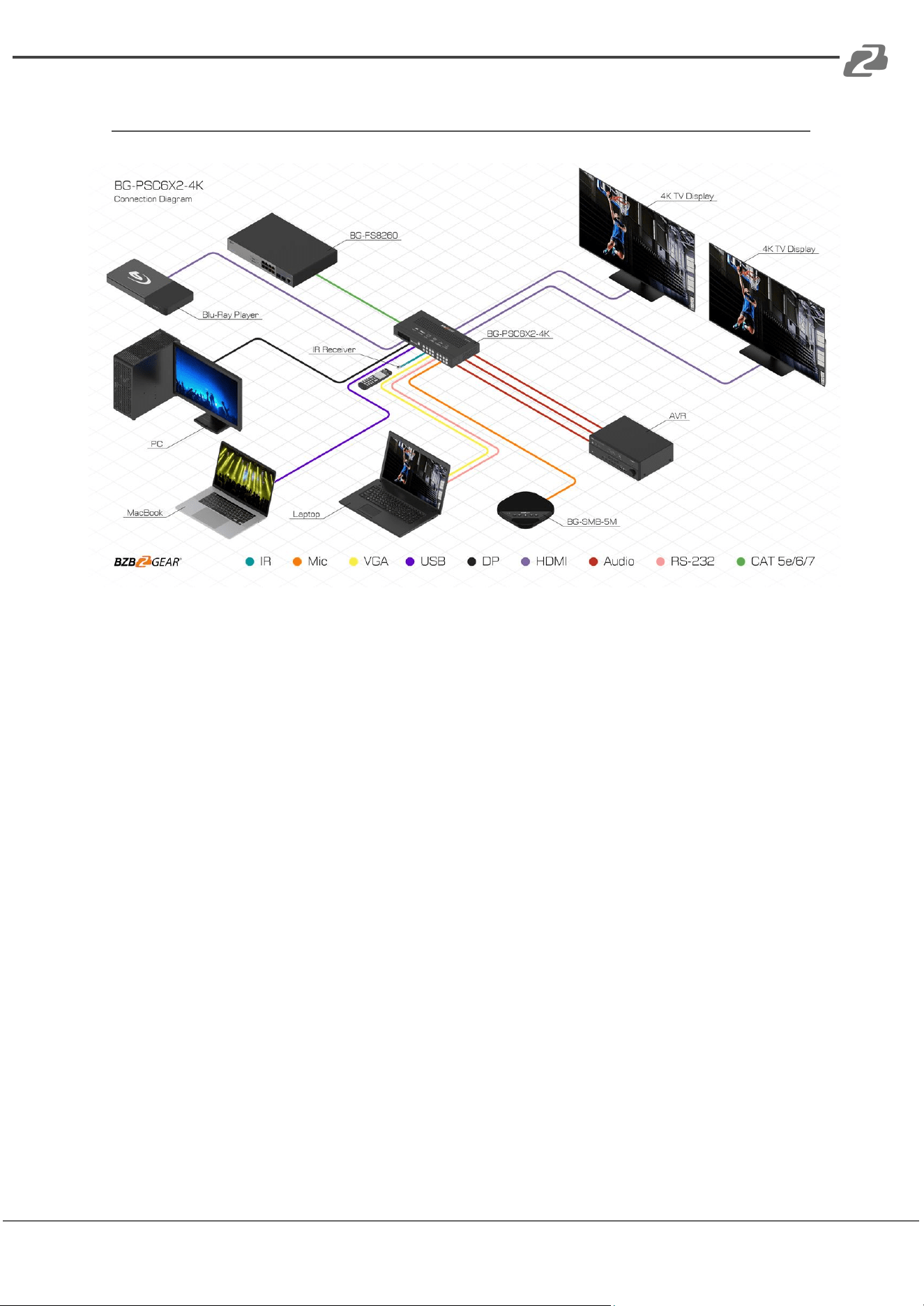
Application Example
Address: 830 National Drive #140, Sacramento, CA 95834, USA · Tel: +1(888)499-9906 · Email: support@bzbgear.com 14

BZBGEAR BG-PSC6X2-4K PRODUCT MANUAL
Tech Support
Have technical questions? We may have answered them already!
Please visit BZBGEAR’s support page (bzbgear.com/support) for helpful information and
tips regarding our products. Here you will find our Knowledge Base
(bzbgear.com/knowledge-base) with detailed tutorials, quick start guides, and step-by-step
troubleshooting instructions. Or explore our YouTube channel, BZB TV
(youtube.com/c/BZBTVchannel), for help setting up, configuring, and other helpful how-to
videos about our gear.
Need more in-depth support? Connect with one of our technical specialists directly:
Phone
1.888.499.9906
Email
support@bzbgear.com
Live Chat
bzbgear.com
Limited Product Warranty Terms
Pro Line: 5-year warranty from the date of purchase for AV/Broadcasting products bought
on or after August 1, 2024.
Essential Line: 3-year warranty from the date of purchase for AV/Broadcasting products
bought on or after August 1, 2024.
Cables: Lifetime Limited Product Warranty.
For complete warranty information, please visit bzbgear.com/warranty.
For questions, please call 1.888.499.9906 or email support@bzbgear.com.
Mission Statement
BZBGEAR is a breakthrough manufacturer of high-quality, innovative audiovisual equipment
ranging from AVoIP, professional broadcasting, conferencing, home theater, to live
streaming solutions. We pride ourselves on unparalleled customer support and services.
Our team offers system design consultation, and highly reviewed technical support for all
the products in our catalog. BZBGEAR delivers quality products designed with users in
mind.
Address: 830 National Drive #140, Sacramento, CA 95834, USA · Tel: +1(888)499-9906 · Email: support@bzbgear.com 15

BZBGEAR BG-PSC6X2-4K PRODUCT MANUAL
Copyright
All the contents in this manual and its copyright are owned by BZBGEAR. No one is allowed
to imitate, copy, or translate this manual without BZBGEAR’s permission. This manual
contains no guarantee, standpoint expression or other implies in any form. Product
specification and information in this manual is for reference only and subject to change
without notice.
All rights reserved. No reproducing is allowed without acknowledgement.
Address: 830 National Drive #140, Sacramento, CA 95834, USA · Tel: +1(888)499-9906 · Email: support@bzbgear.com 16