For Help, Go To: cbyge.com/switch-support or call 1-844-30C-BYGE 1
™
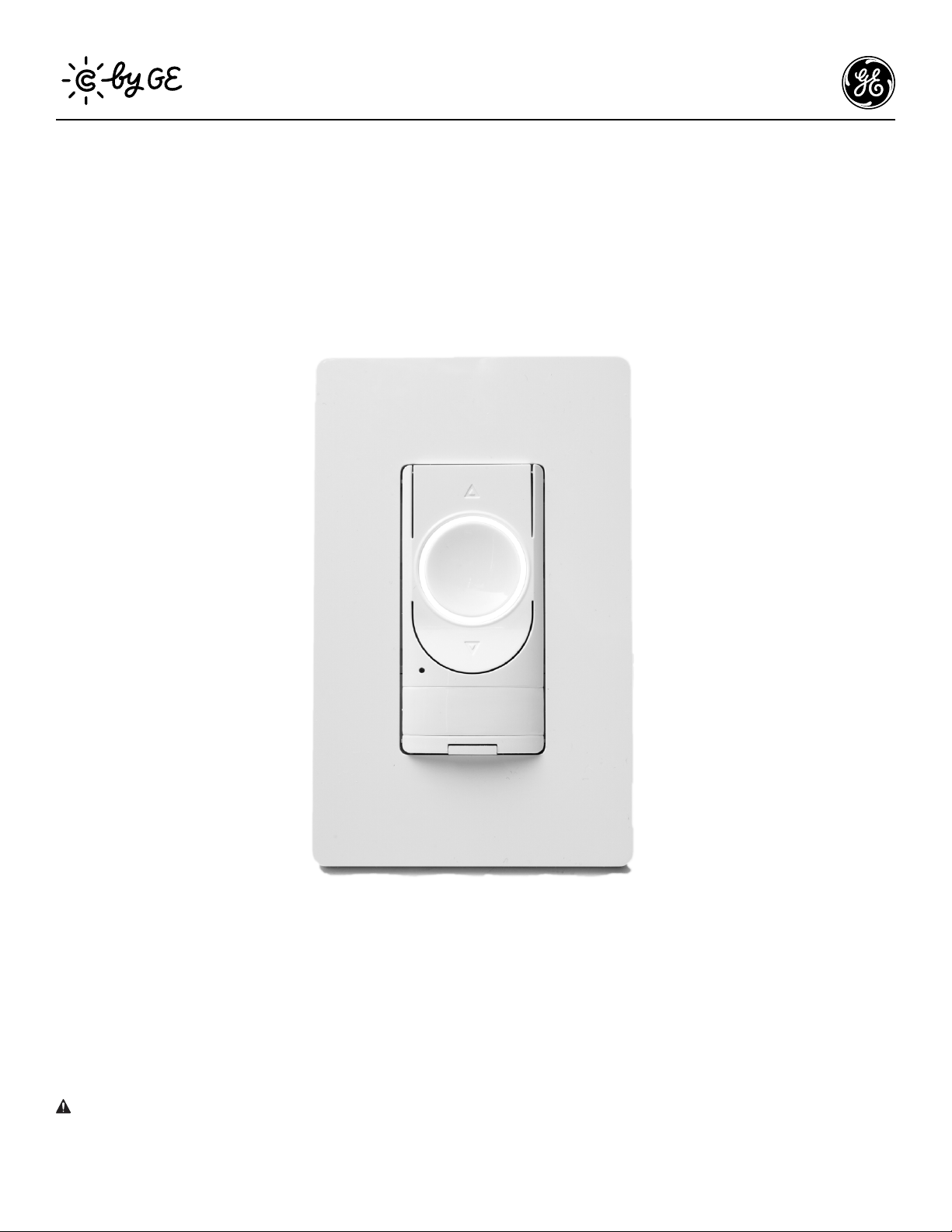
C-Start
™
Smart Switch Installation Guide
3-Way (Multi-Switch) Installation
WARNING: RISK OF ELECTRIC SHOCK
This product installation requires handling 120 volt wiring. Follow each step carefully.
If any concerns handling wiring, hire a qualified electrician. Ensure all work meets local and federal regulations.
! IMPORTANT NOTE ON 3-WAY WIRING:
If you are installing the C by GE Smart Switch on a 3-way or multi-way circuit, all switches on this circuit must be a C by GE Smart Switch.
The C by GE Smart switch will only work with other C by GE Smart switches on the same circuit.
For Help, Go To: cbyge.com/switch-support or call 1-844-30C-BYGE 2
™
Compatibility Requirements
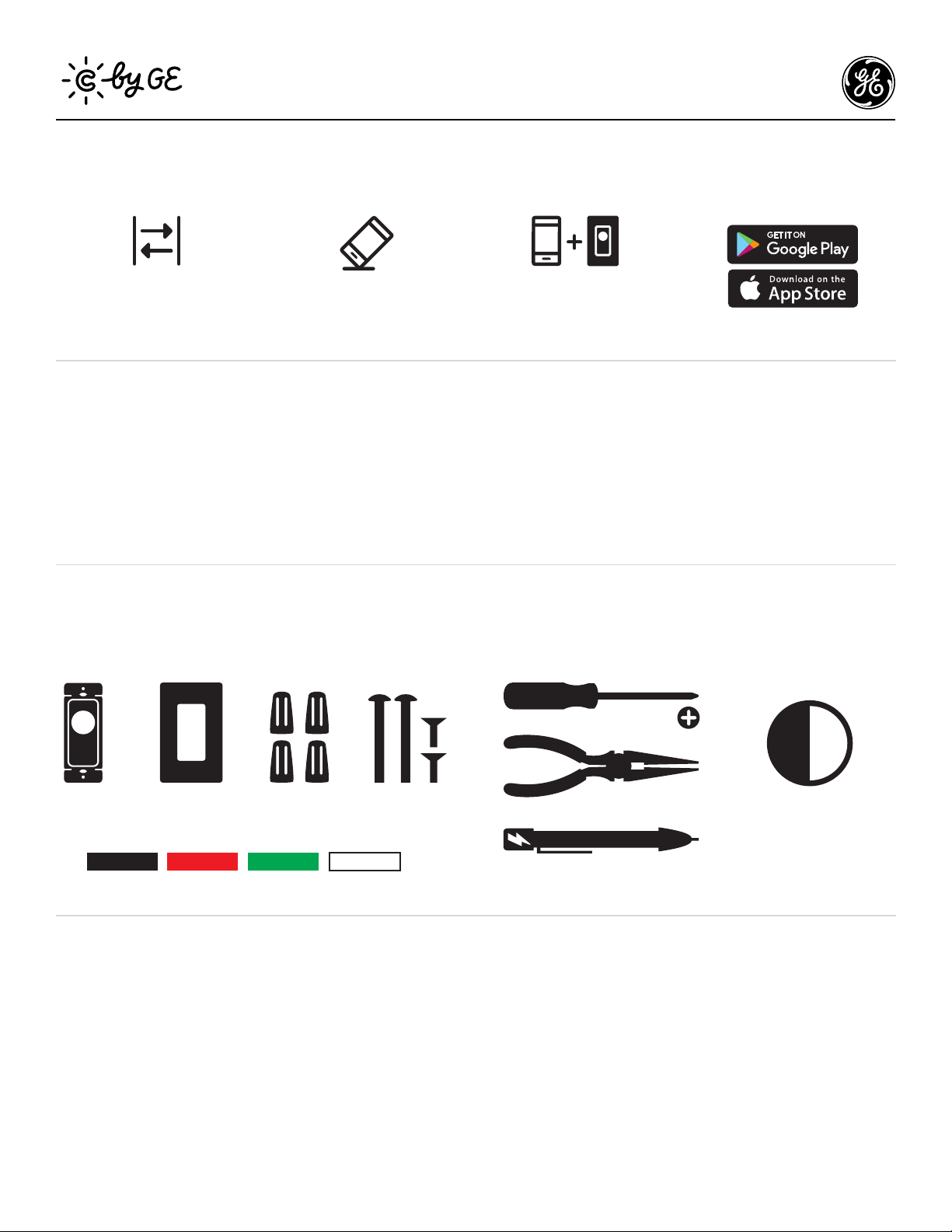
Rating 120V AC 60Hz
Neutral wire is required (Wire is usually white or grey)
Ground wire is required (Wire is usually green, green with
a yellow stripe, or copper)
Wi-Fi 802.11 b/g/n @ 2.4 GHZ is required
Works with compatible LED bulbs, including C by GE smart LED
bulbs. Visit cbyge.com/compatibility
LED up to 150 watts
Incandescent/halogen up to 450 watts
Let’s Do It
Phillips Screwdriver
Needle Nose Pliers
(recommended)
Approximately
30 minutes of your day
to install and setup
the switch
12
6
39
Voltage Tester
(recommended)
Wire Labels
Line Load Ground Neutral
INCLUDED (PER SWITCH)
YOU’LL NEED
Wall Plate 4 Wire Nuts 4 Phillips
Mounting Screws
Switch
Download
the C by GE app
Install
your C-Start Switch
Add
your C-Start Switch
to the C by GE app
Simple DIY Setup
And we’re here to help. For in-depth instructional videos and a guided tour
through the installation, go to cbyge.com/switch-support.
You Got This!
For Help, Go To: cbyge.com/switch-support or call 1-844-30C-BYGE 3
™
BEFORE YOU DO ANYTHING: Step 1
Turn Off The Power!
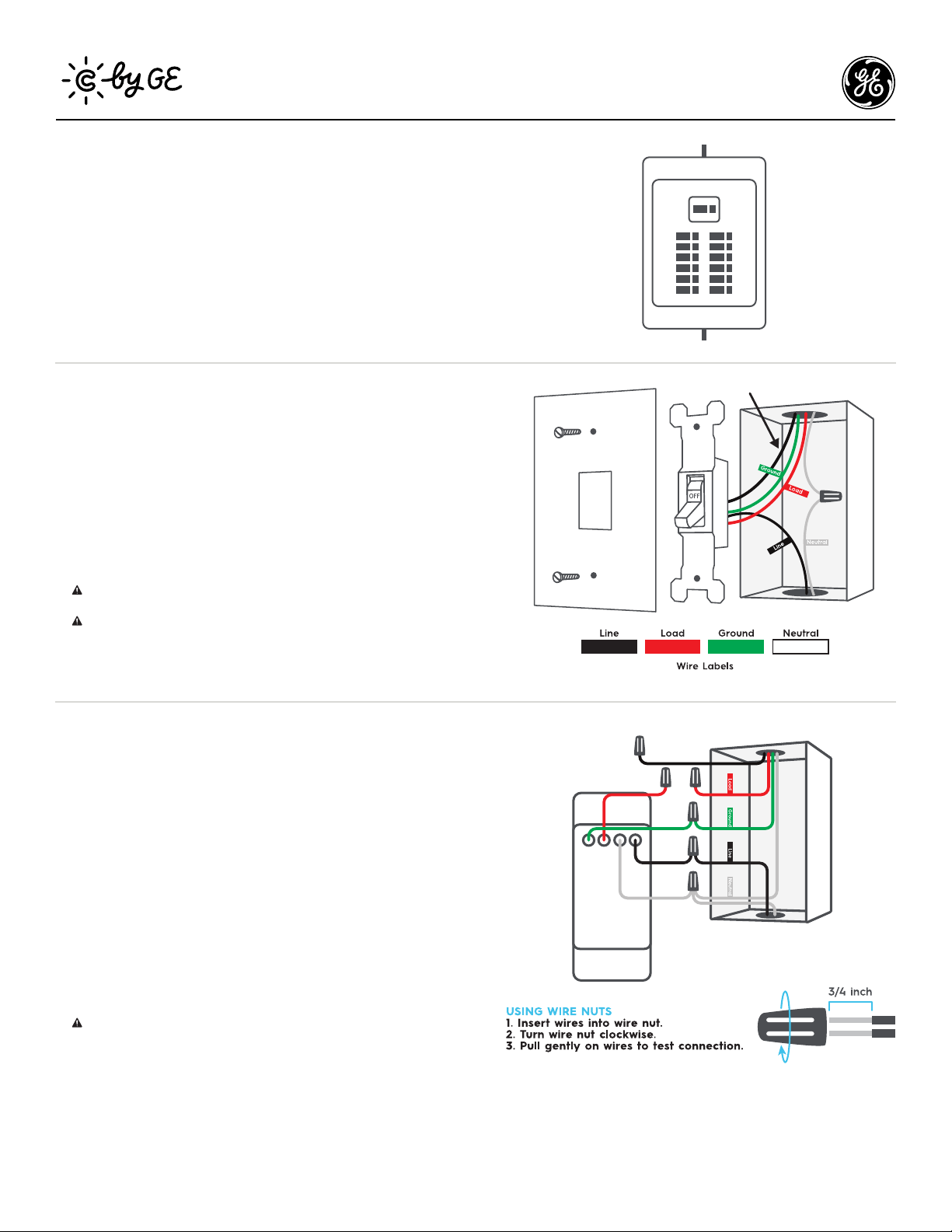
Turn off the power for the switch location at the circuit breaker box.
Test existing switch by toggling switch on/off, ensuring lights do not turn on.
Now, follow these setup steps for a 3-way switch installation.
ON OFF
STEP 2
Remove Your
Old Switch
1. Remove the existing wall plate and switch from the wall.
2. Use voltage tester on the black wire to confirm power to the
switch is off (recommended).
3. Before disconnecting the wires from the wall, label each with
the provided wire labels.
Neutral and ground wires are required. If you don’t have either
wire, the C-Start switch is not compatible.
You may see a 5th wire connected to your existing switch. This
may be the 3-way traveler wire (black or white). This wire is not
needed and will be addressed in the next step.
4. Disconnect wires and remove existing switch.
STEP 3
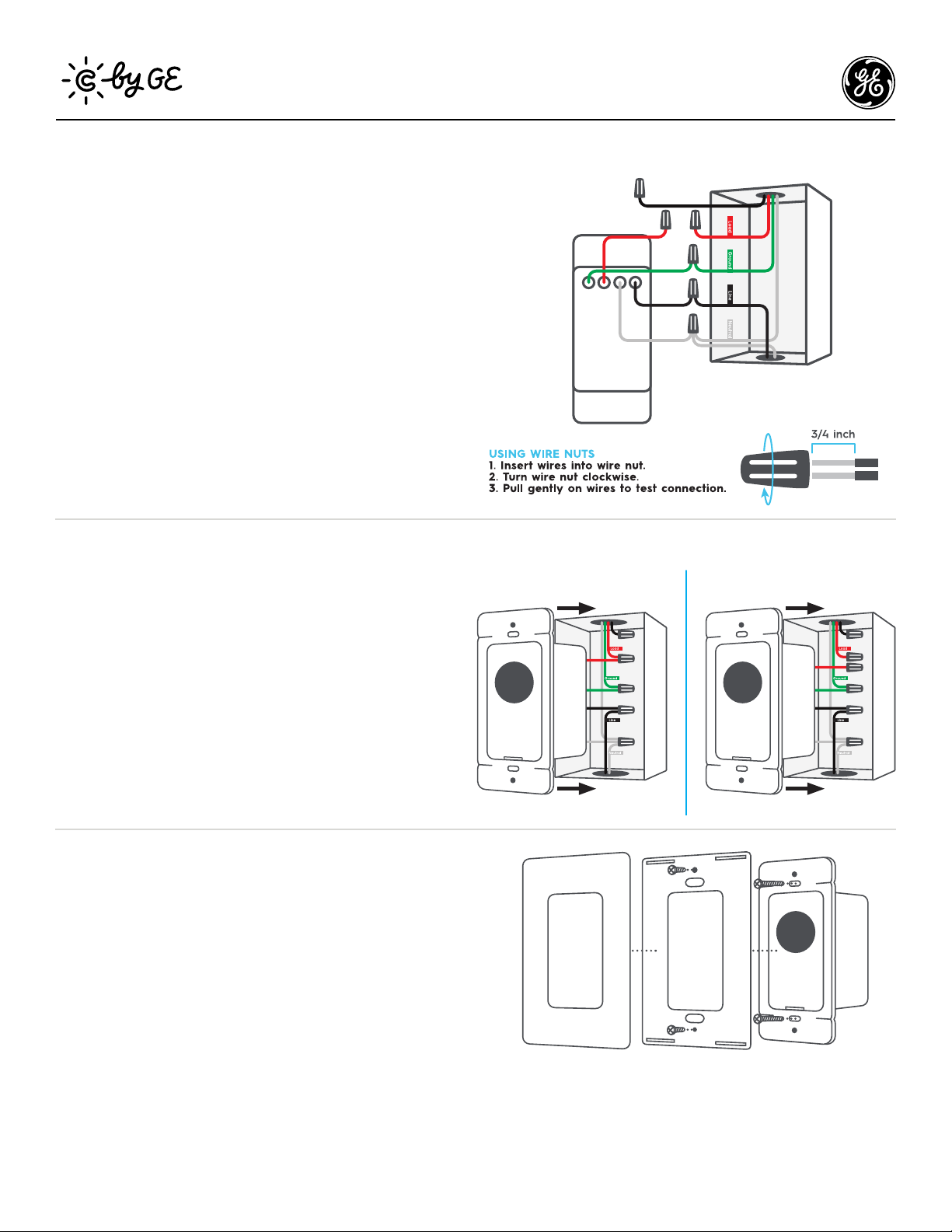
Connect The Wires:
The First Switch
1. Connect the neutral (white) wire on the switch to the neutral
(white label) wire from the wall.
2. Connect the line (black) wire on the switch to the line (black
label) wire from the wall.
3. Connect the load (red) wire on the switch with the load
(red label) wire from the wall.
4. Connect the ground (green) wire on the switch with the
ground (green label) wire from the wall.
5. If there is a 5th wire in the wall box (traveler wire), cap the
wire. This wire is not needed for the C by GE switch.
Incorrectly connecting the neutral or ground wire from the wall
to the line or load wire on the switch will damage the product.
3-Way Traveler Wire
STEP 2: Remove Old Switch
IMAGE 2 - 3-WAY NEW
line wire moved to bottom hole
3-Way traveler wire added
3-Way Traveler Wire
STEP 2: Remove Old Switch
IMAGE 2 - 3-WAY NEW
line wire moved to bottom hole
3-Way traveler wire added
3-Way Traveler Wire
STEP 3: Connect Wires
IMAGE 4 - SECOND SWITCH NEW
line wire moved to bottom hole
3-Way traveler wire added
load wires individually capped
3-Way Traveler Wire
STEP 3: Connect Wires
IMAGE 4 - SECOND SWITCH NEW
line wire moved to bottom hole
3-Way traveler wire added
load wires individually capped
For Help, Go To: cbyge.com/switch-support or call 1-844-30C-BYGE 4
™
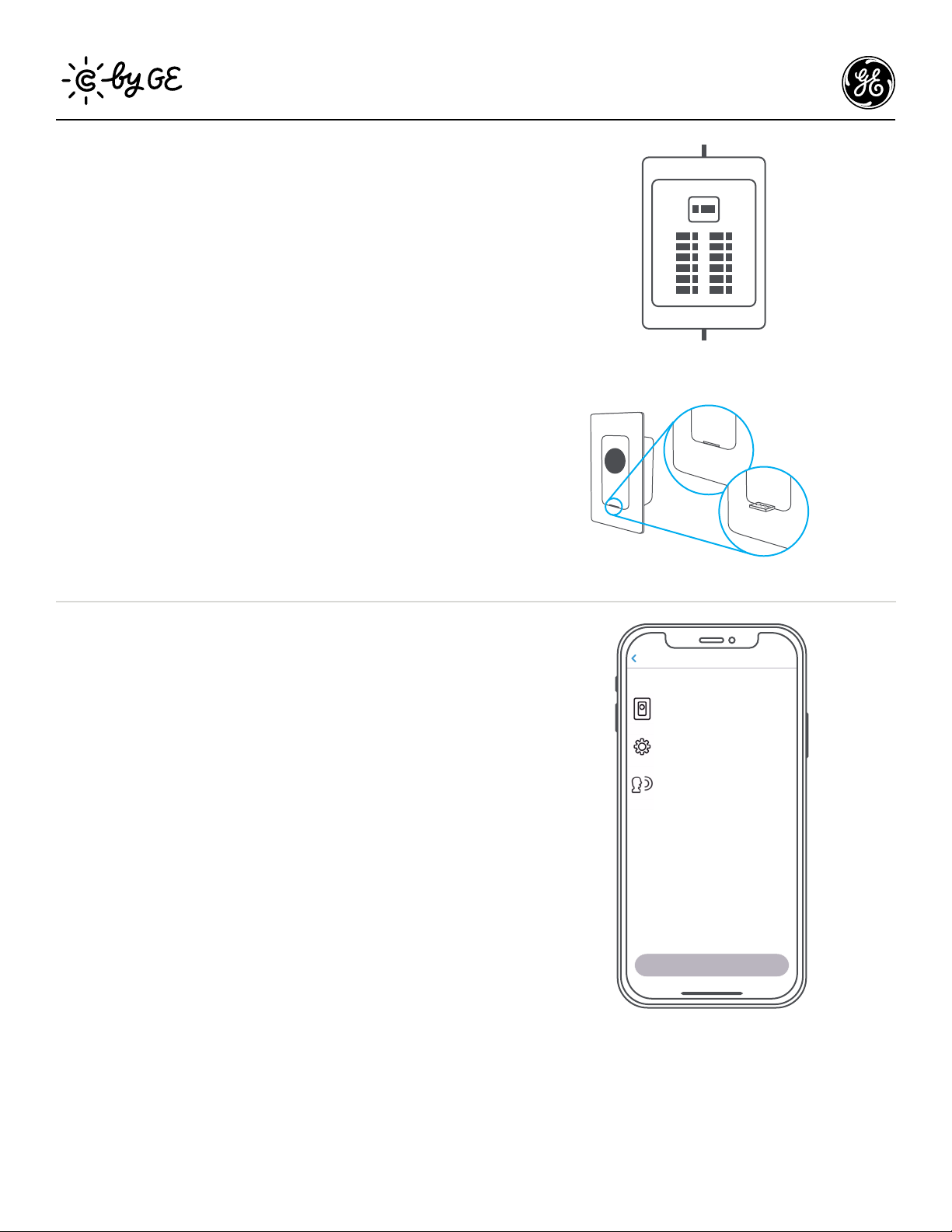
STEP 6
Secure The Switch
Using a Phillips screwdriver and the screws provided, secure the
switch to the wall until level and flush. Screw on the faceplate
bracket, then snap the faceplate cover onto the bracket.
STEP 5
Fit Wires Into Wall Box
Neatly push the wires back into the box, rotating the switch
so it’s oriented according to the image.
STEP 4
Connect The Wires:
The Second Switch
If you have more than two switches controlling your 3-way circuit,
this step can be repeated for any additional switch on that circuit.
1. Connect the neutral (white) wire on the switch to the neutral
(white label) wire from the wall.
2. Connect the line (black) wire on the switch to the line (black
label) wire from the wall.
3. Connect the ground (green) wire on the switch with the
ground (green label) wire from the wall.
4. Do NOT connect the load (red) wire on the switch with
the load (red or black) wire from the wall. Cap both wires
separately using two wire nuts.
5. If there is a 5th wire in the wall box (traveler wire), cap the
wire. This wire is not needed for the C by GE switch.
3-Way Traveler Wire
STEP 3: Connect Wires
IMAGE 4 - SECOND SWITCH NEW
line wire moved to bottom hole
3-Way traveler wire added
load wires individually capped
3-Way Traveler Wire
STEP 3: Connect Wires
IMAGE 4 - SECOND SWITCH NEW
line wire moved to bottom hole
3-Way traveler wire added
load wires individually capped
STEP 4: Fit Wires Into Wall Box
IMAGE 5 - NEW
line wire moved to bottom hole
3-Way traveler wire added
load wires individually capped in 2nd illustration
First Switch Second Switch
For Help, Go To: cbyge.com/switch-support or call 1-844-30C-BYGE 5
™
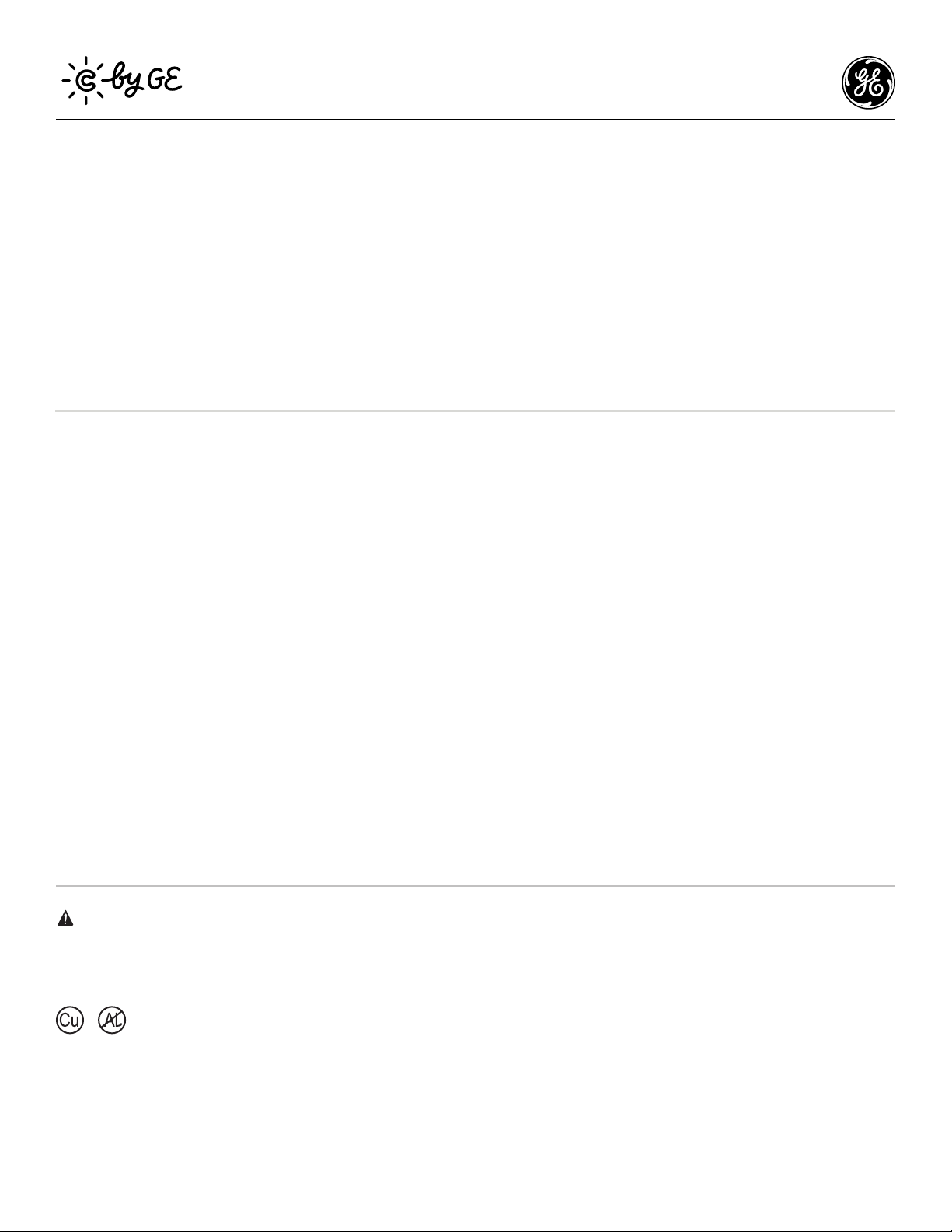
Depressed,
socket powered
Pulled out,
no power to socket
STEP 7
Turn The Power Back On
STEP 8
Enable 3-Way Control
in the C by GE App
After the switch is secured and faceplate mounted, turn the
power back on at the circuit breaker box.
At the switch, the light ring will flash blue indicating the device
is wired correctly and the device is in setup mode.
Light ring will continuously flash blue until the switch is added
to the C by GE app.
Light ring will flash red if the circuit is overloaded.
Max load rating 150W LED and 450W incandescent/halogen.
Light ring will not illuminate if wired incorrectly.
IF LIGHTS DON’T TURN ON:
1. Check that air gap switch is depressed.
2. Check that power to the switch is on at the breaker.
3. Turn power off at the breaker, return to the switch to confirm
the wires are securely and properly wired according to the
installation guide.
4. Go to cbyge.com/switch-support for more troubleshooting.
Now that your switches are installed, you have one more step
to complete the 3-way connection. Next, you must enable 3-way
control by grouping the switches together in the C by GE app.
1. Download the C by GE app.
2. Add both switches to the C by GE app.
3. Create a Room in the C by GE app.
4. Add both switches to that Room.
This process virtually groups your switches together, allowing
for 3-way control. Test that your 3-way switch operates correctly.
ON OFF
Get Started
Switch Setup
Install your Switch
Install your switch using instructions
included in the box.
Configure your Switch
Connect the switch to Wi-Fi, name the
switch, and add it to a room.
Enable Voice Assistant Control
Connect your switch to Amazon Alexa or
the Google Assistant.
There are 3 steps in setting up a Switch.
You’ve completed the C-Start Switch installation.
Congratulations!
For Help, Go To: cbyge.com/switch-support or call 1-844-30C-BYGE 6
™
Additional Information and Warnings
FCC Compliance Statement Compliance Notice:
This equipment has been tested and found to comply with the limits for a Class B digital device, pursuant to part 15 of the FCC Rules. These limits
are designed to provide reasonable protection against harmful interference in a residential installation. This equipment generates, uses and
can radiate radio frequency energy and, if not installed and used in accordance with the instructions, may cause harmful interference to radio
communications. However, there is no guarantee that interference will not occur in a particular installation. If this equipment does cause harmful
interference to radio or television reception, which can be determined by turning the equipment off and on, the user is encouraged to try to correct
the interference by one or more of the following measures:
• Reorient or relocate the receiving antenna.
• Increase the separation between the equipment and receiver.
• Connect the equipment into an outlet on a circuit different from that to which the receiver is connected.
• Consult the dealer or an experienced radio/TV technician for help.
This device complies with part 15 of FCC rules. Operation is subject to the following two conditions:
1. This device may not cause harmful interference.
2. This device must accept any interference received, including interference that may cause undesired operation.
Changes or modifications that are not expressly approved by the manufacturer could void the user’s authority to operate the equipment.
RF Exposure Information:
This equipment complies with FCC radiation exposure limits set forth for an uncontrolled environment. In order to avoid the possibility of
exceeding the FCC radio frequency exposure limits, human proximity to the antenna shall not be less than 8 inches during normal operation.
RF Exposure Statement:
This equipment complies with IC RSS-102 radiation exposure limits set forth for an uncontrolled environment. This transmitter must be installed
to provide a separation distance of at least 8 inches from all persons and must not be collocated or operating in conjunction with any other
antenna or transmitter.
CAUTION - To reduce the risk of overheating and possible damage to other equipment, do not install to control a receptacle or motor-
operated appliance or transformer-supplied appliance.
For supply connections, use copper wire only rated at 75C.
Next...
Amazon Alexa
To setup, open the Alexa app, search for the C by GE skill,
follow the setup instructions.
Try this...
Alexa, turn off the living room.
Alexa, turn on the bedroom.
Alexa, set kitchen to 50%.
Google Assistant
To setup, open the Google
Assistant or Google Home app,
search for the C by GE action, follow the setup instructions.
Try this...
Hey Google, turn on the lights.
Hey Google, good morning.
Hey Google, I’m leaving.
Enable Your Voice Assistant
