Go online for a comprehensive walkthrough
of your product!
This guide has everything you need to get ready for first use,
including setting up, using and maintaining your machine,
but online you’ll find additional resources like tips and
troubleshooting, videos, product registration, parts, and more.
Go to global.BISSELL.com.
PET HAIR ERASER® SLIM CORDLESS
MODEL 2907F
H
O
M
E
C
L
E
A
N
I
N
G
E
X
P
E
R
T
S
E
S
T
.
1
8
7
6
U
.
S
.
A
.
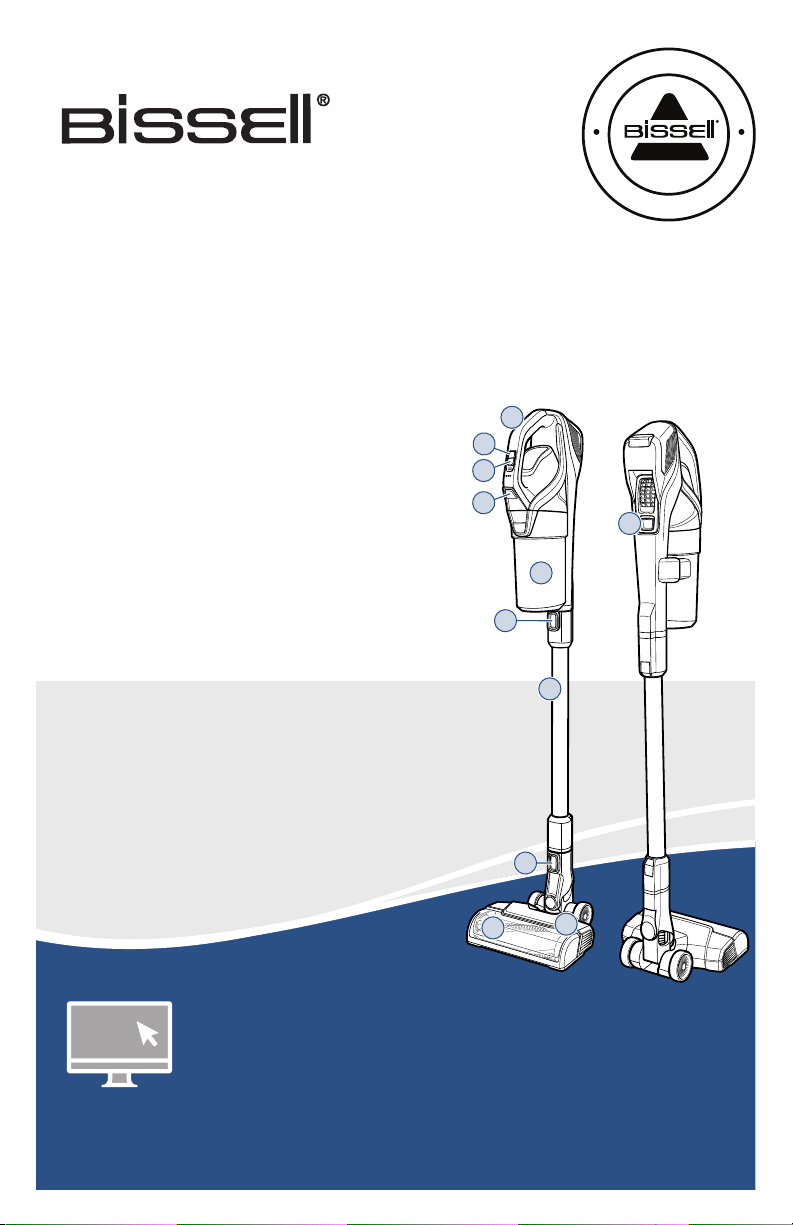
Product Overview
1. Hand Vacuum
2. Power Button
3. Cleaning Mode Button
4. Tank Release Button
5. Dirt Tank
6. Hand Vacuum
Release Button
7. Extension Wand
8. Foot Release Button
9. Tangle-Free Brush Roll
10. Motorised Floor Cleaning Foot
11. Charging Port
What’s in the Box? .............................................................3
Assembly .............................................................................. 3
Installing the Wall Storage & Charging Station ....... 4
Charging the Battery ........................................................ 5
Using the Vacuum .............................................................. 6
Attaching Tools for Hand Vac Use ............................... 6
Emptying the Dirt Tank .................................................... 7
Cleaning & Replacing the Filters ...................................8
Maintaining the Brush Roll ..............................................9
Troubleshooting .................................................................10
Warranty ............................................................................... 11
2
3
4
6
8
1
5
7
11
9
10

2 global.BISSELL.com
IMPORTANT SAFETY INSTRUCTIONS
WARNING
TO REDUCE THE RISK OF FIRE, ELECTRIC SHOCK OR INJURY:
• This appliance can be used by children aged from 8 years
and above and persons with reduced physical, sensory or
mental capabilities or lack of experience and knowledge if
they have been given supervision or instruction concerning
use of the appliance in a safe way and understand the
hazards involved. Cleaning and user maintenance shall not
be made by children without supervision.
• Children should be supervised to ensure that they do not
play with the appliance.
• Keep hair, loose clothing, fingers, and all parts of body away
from openings and moving parts of the appliance and its
accessories.
• Do not use with damaged cord or plug.
• If the charger supply cord is damaged, it must be replaced
by the manufacturer, its service agent or similarly qualified
person in order to avoid a hazard.
• Do not incinerate the appliance even if it is severely
damaged. The batteries can explode in a fire.
• The battery is to be disposed of safely.
• This appliance contains batteries that are only replaceable
by skilled persons.
• Under abusive conditions, liquid may be ejected from the
battery; avoid contact. If contact accidentally occurs, flush
with water. If liquid contacts eyes, additionally seek medical
help. Liquid ejected from the battery may cause irritation
or burns.
• Recharge only with the charger specified by the
manufacturer. A charger that is suitable for one type of
battery pack may create a risk of fire when used with
another battery pack.
• Use only with charger provided by manufacturer Mass
Power, Model S018-1B262060HA.
• Unplug charger from electrical socket when not in use,
before cleaning, maintaining or servicing the appliance, and
if your appliance has an accessory tool with a moving brush,
before connecting or disconnecting the tool.
• This appliance contains batteries that are non-user
replaceable.
• Do not use with damaged cord or charger. If appliance is
not working as it should, has been dropped, damaged, left
outdoors, or dropped into water, return it to a service center.
• The battery must be removed from the appliance before it
is scrapped.
• Do not immerse in water or liquid.
• Turn OFF all controls before unplugging.
• Do not pull or carry charger by cord, use cord as a handle, close door on cord,
or pull cord around sharp edges or corners.
• Keep charger cord away from heated surfaces.
• To unplug, grasp the charger plug, not the cord.
• Do not handle charger plug or appliance with wet hands.
• Battery pack and charger base output terminals are not to be short-circuited.
• Do not charge the appliance outdoors.
• The appliance must be disconnected from the supply mains when removing
the battery.
• Do not recharge, disassemble, heat above 60° C, or incinerate.
• Keep batteries out of reach of children.
• Dispose of used batteries promptly.
• Never put batteries in mouth. If swallowed, contact your physician or local
poison control.
• Prevent unintentional starting. Ensure the switch is in the OFF-position
before picking up or carrying the appliance. Carrying the appliance with your
finger on the switch or energising appliance that have the switch on invites
accidents.
• Do not use appliance that is damaged or modified. Damaged or modified
batteries may exhibit unpredictable behavior resulting in fire, explosion or
risk of injury.
• Do not expose appliance to fire or excessive temperature. Exposure to fire or
temperature above 130° C may cause explosion.
• Follow all charging instructions and do not charge the appliance outside of
the temperature range specified in the instructions. Charging improperly or
at temperatures outside of the specified range may damage the battery and
increase the risk of fire.
• Have servicing performed by a qualified repair person using only identical
replacement parts. This will ensure that the safety of the product is
maintained.
• Do not modify or attempt to repair the appliance except as indicated in the
instructions for use and care.
• Keep the temperature range of between 4-30° C when charging battery,
storing appliance or during use.
• Plastic film can be dangerous. To avoid danger of suffocation, keep away
from children.
• Use only as described in this user guide.
• Use only manufacturer’s recommended attachments.
• If appliance is not working as it should, has been dropped, damaged, left
outdoors, or dropped into water; do not attempt to operate it and have it
repaired at an authorised service center.
• Do not put any object into openings.
• Do not use with any opening blocked; keep free of dust, lint, hair, and
anything that may reduce air flow.
• Use extra care when cleaning on stairs.
• Do not use to pick up flammable or combustible liquids, such as petroleum,
or use in areas where they may be present.
• Do not pick up toxic material (chlorine bleach, ammonia, drain cleaner, etc.).
• Do not use appliance in an enclosed space filled with vapours given off by
oil-based paint, paint thinner, some moth-proofing substances, flammable
dust, or other explosive or toxic vapours.
• Do not pick up anything that is burning or smoking, such as cigarettes,
matches or hot ashes.
• Do not use without filters in place.
• Do not use on wet surfaces. Do not expose to rain. Store indoors.
SAVE THESE INSTRUCTIONS
ORIGINAL INSTRUCTIONS. FOR OPERATION ON A 220-240 VOLT
A.C. 50-60 HZ POWER SUPPLY ONLY.
THIS MODEL IS FOR HOUSEHOLD USE ONLY.
READ ALL INSTRUCTIONS BEFORE USING YOUR APPLIANCE.
When using an electrical appliance, basic precautions should be observed, including the following:
global.BISSELL.com 3
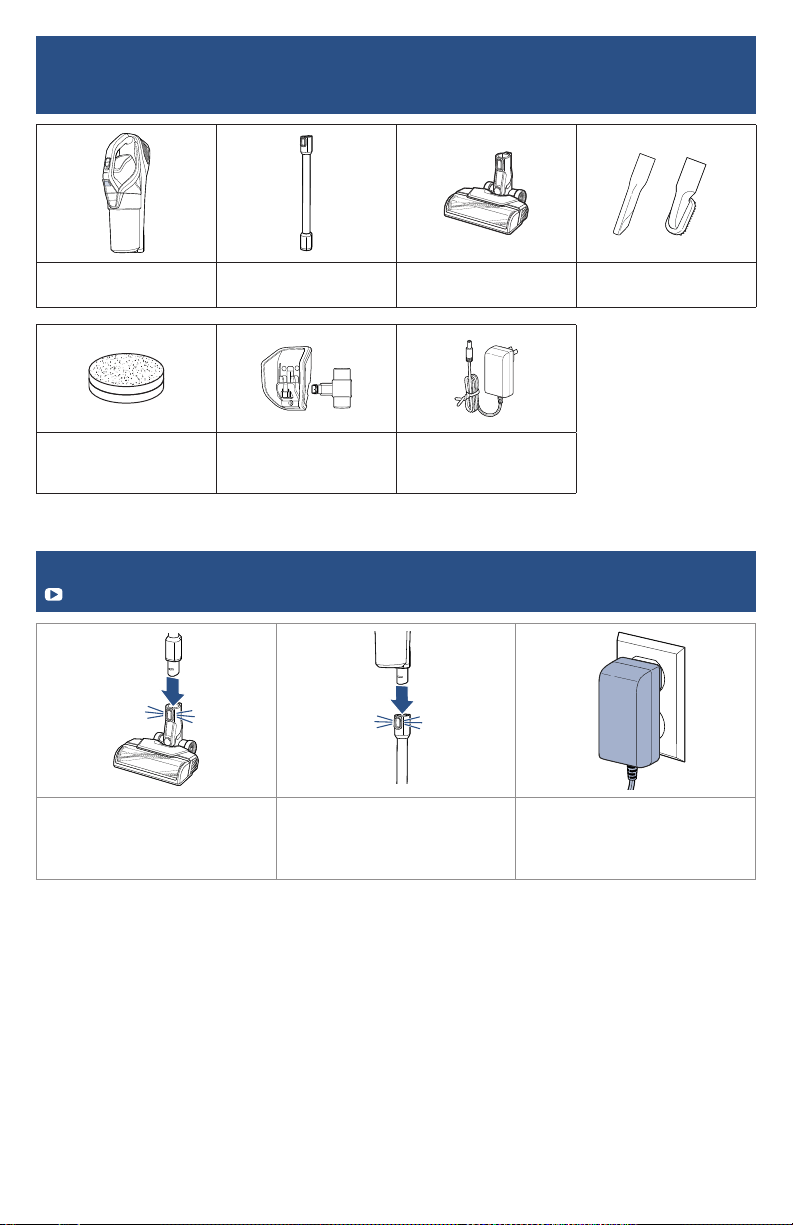
What’s in the Box?
Standard accessories may vary by model.To identify what should be included with your purchase,
please refer to the “Carton Contents” list located on the underside of the insert inside the carton.
Assembly
Go to global.BISSELL.com for assembly videos.
1. Connect the extension wand
to foot. You’ll hear a “click”
when they’re connected.
2. Connect the hand vacuum
to the extension wand. You’ll
hear a “click” when they’re
connected.
3. Make sure to charge your
stick vacuum before first use.
Refer to page 5, “Charging the
Battery” for instructions.
Hand Vacuum Extension Wand Foot Crevice Tool &
Dusting Brush
Optional Scented Filter Wall Storage &
Charging Station
(Includes 3 Screws & Anchors)
Charger
4 global.BISSELL.com
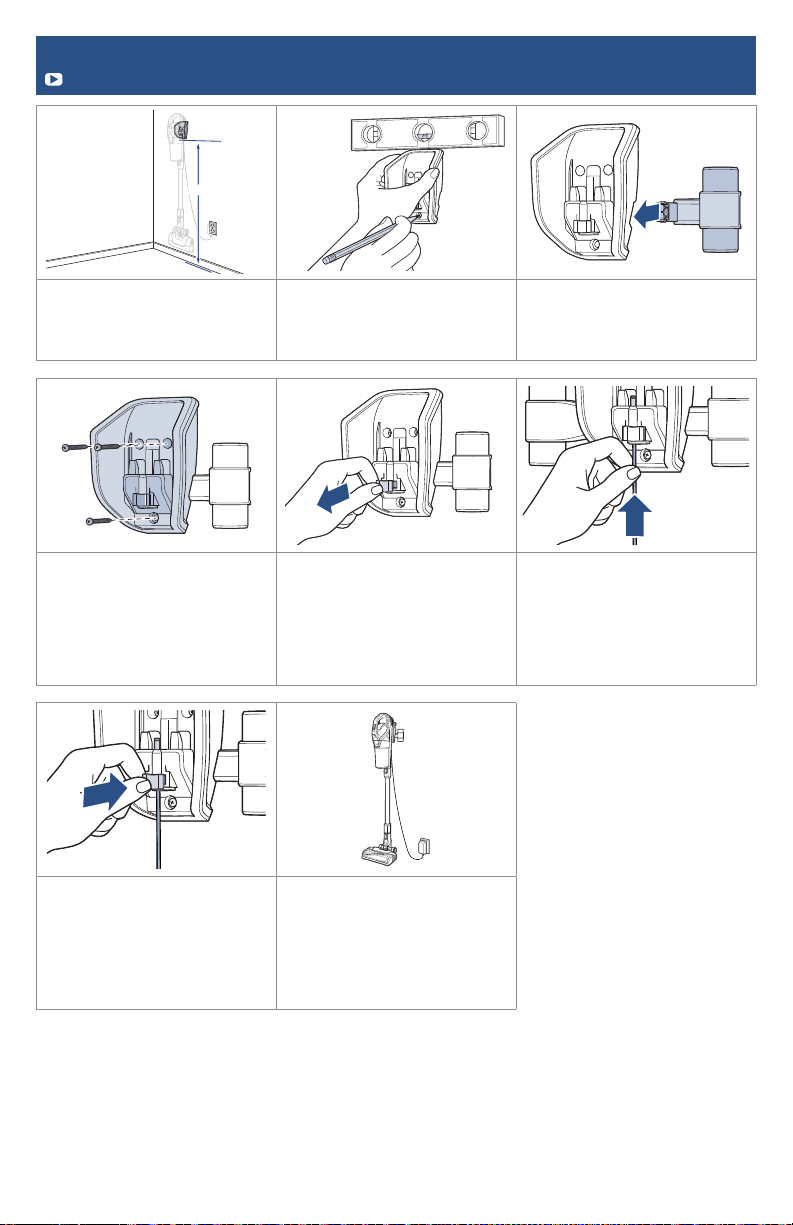
Installing the Wall Storage & Charging Station
Go to global.BISSELL.com for more tips and video instructions.
>1.2m>1.2m
1. Install your Wall Storage
& Charging Station at least
1.2 metres to allow the
machine to hang comfortably.
2. Using a level, mark the screw
hole locations on the wall with
a pencil.
3. Insert tool holder on the
side of the wall mount.
4. Screw the wall mount into
a wall. Ensure the mount is
high enough up off the ground
for the vacuum to hang
comfortably. Screwing into
a wall stud will provide best
support.
5. To install the charging
cable, remove the power cable
clip from the Wall Storage &
Charging Station.
6. Insert the charging cable.
7. Secure the cable with the
charging cable clip.
8. Hang the vacuum on the
center storage piece and
insert tools on the tool holder
provided. Plug the power
adapter into the wall and place
the machine on the wall mount
for charging.
global.BISSELL.com 5
Charging the Battery
Go to global.BISSELL.com for for additional how-to videos.
Charging the Hand Vacuum
5h
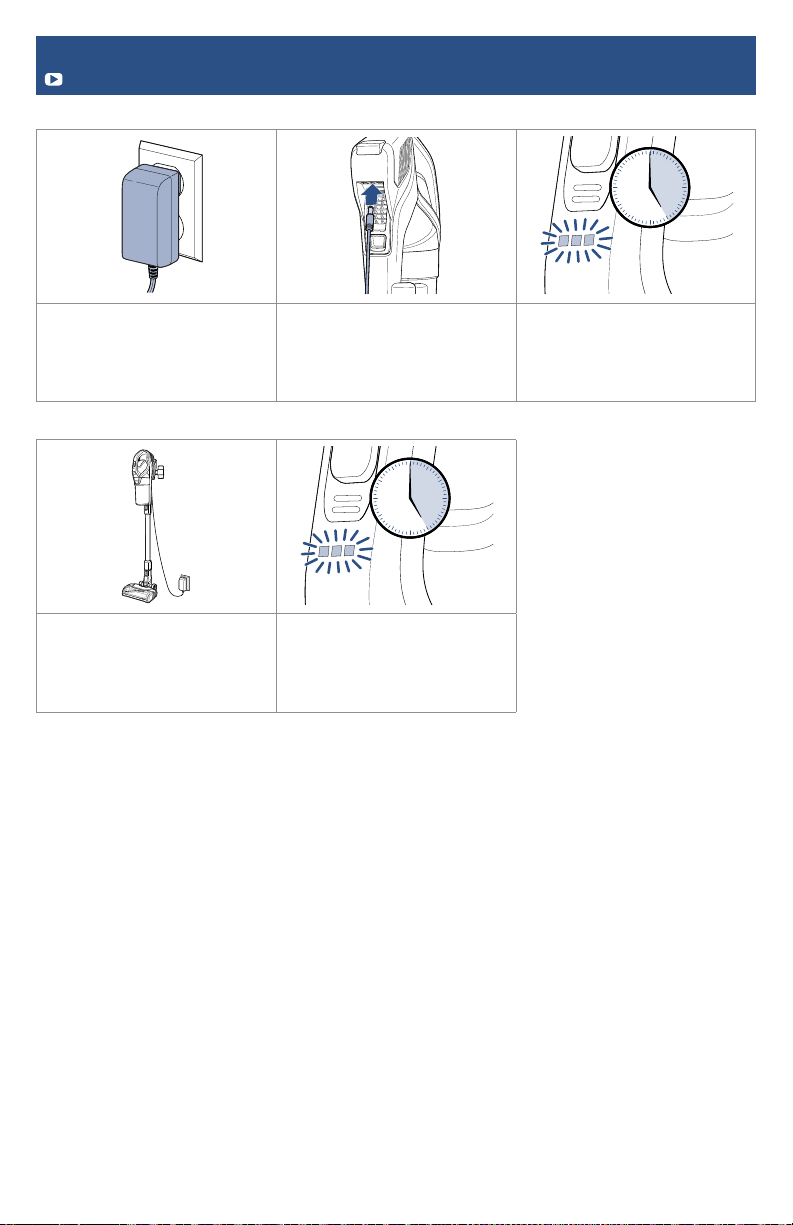
1. Before first use, make sure
to fully charge your stick
vacuum. Plug the battery
charger into the wall.
2. Plug the charger into the
charging port on the back of
the hand vacuum.
3. Let the hand vacuum
charge for 5 hours or until all
three sections of the battery
charge icon are illuminated
and flashing.
Charging with the Wall Storage & Charging Station
5h
1. Follow instructions for
installing the Wall Storage
& Charging Station. Once
installed, hang the machine
onto the station.
2. Let the hand vacuum
charge for 5 hours or until all
three sections of the battery
charge icon are illuminated
and flashing.
6 global.BISSELL.com
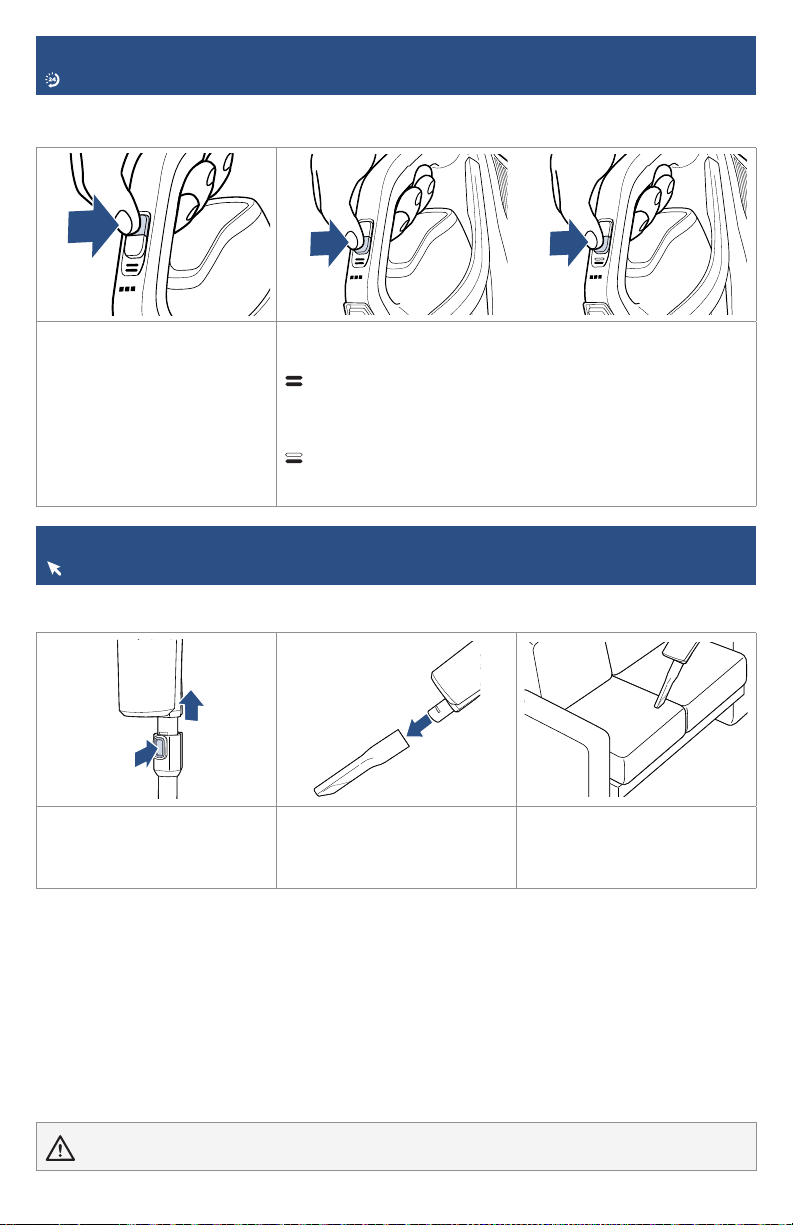
1. Press the power button to
begin cleaning and to turn OFF
the machine when finished
cleaning.
2. With the machine powered ON, press the cleaning mode
button to toggle between the two modes:
Carpet Cleaning Mode
Recommended for maximum suction providing the most
powerful clean for your carpets. This is the default mode when
the vacuum is turned ON.
Hard Floor Mode
Recommended to achieve the longest run time. It’s great for
hard floors, low pile carpets and area rugs.
Using the Vacuum
Looking for more guidance? Go to global.BISSELL.com for tips and 24-7 support.
Pet Hair Eraser® Slim Cordless can be used as a stick vacuum, hand vacuum or for extended reach
with the hand vacuum and extension wand.
WARNING Do not use your vacuum until you are familiar with all instructions and operating procedures.
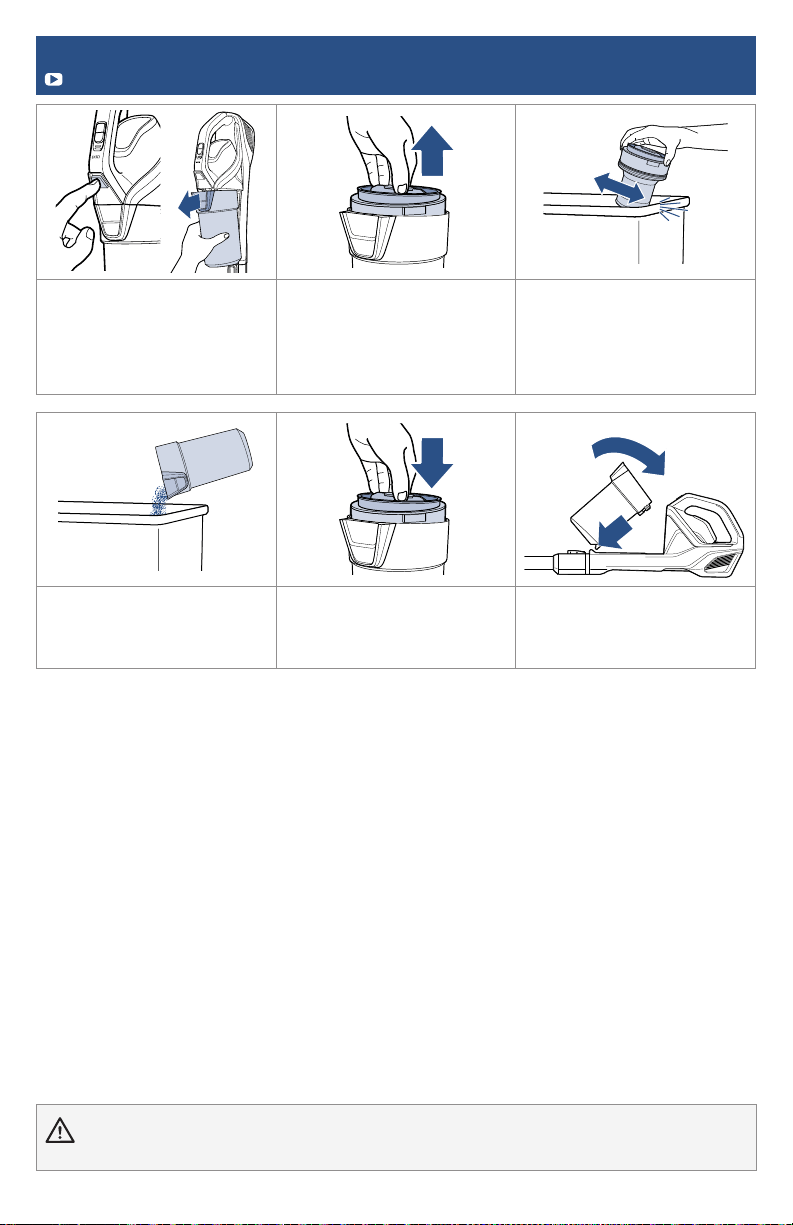
Clean stairs or furniture easily with the tools provided. Pair your desired tool with the hand vacuum
or extension wand. Note: Ensure the vacuum is OFF when connecting tools.
1. To use as a hand vacuum,
press the release button
to disconnect it from the
extension wand.
2. Attach your chosen tool. 3. Use the tool to clean
furniture, stairs or other
surfaces in your home.
Attaching Tools for Hand Vac Use
Go to global.BISSELL.com for tips on above floor cleaning tools.
global.BISSELL.com 7
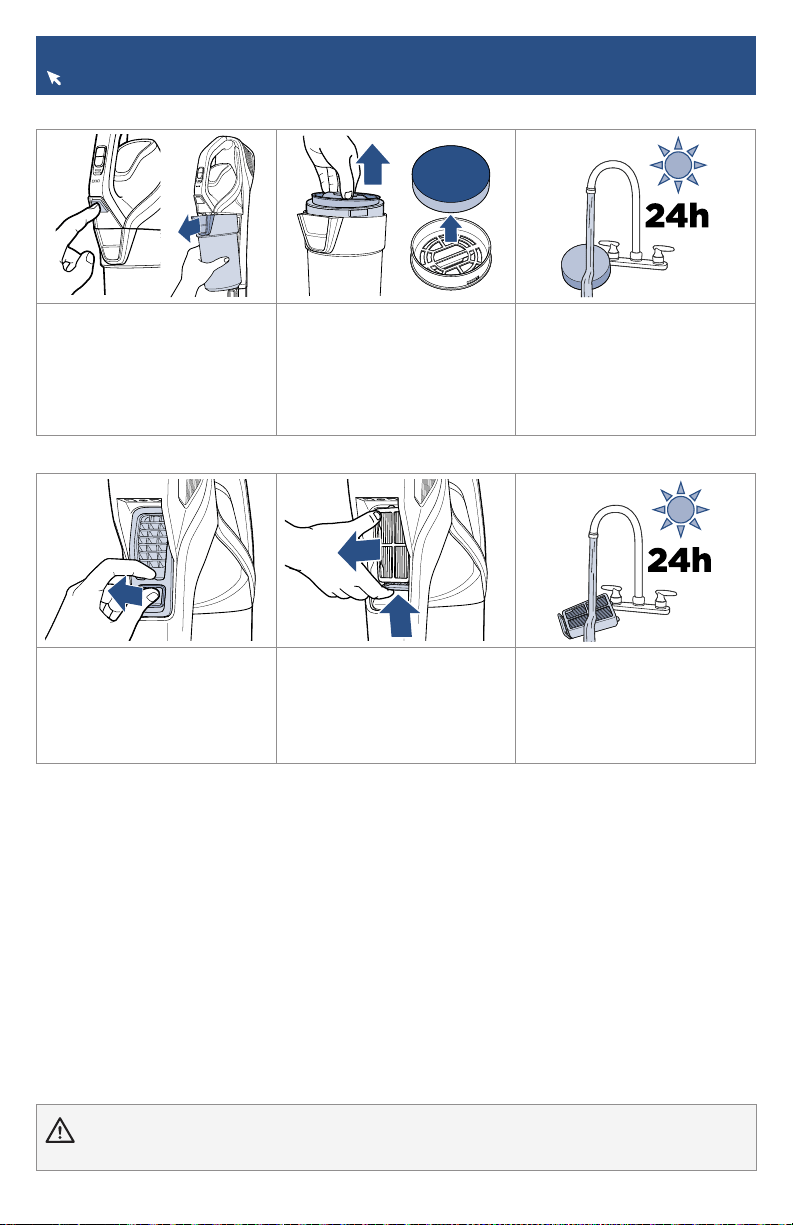
1. Turn OFF your machine.
Remove the dirt tank from
the hand vacuum by pressing
the tank release button on the
front of the tank.
2. Grab the middle grip of
the filter and pull up. This will
activate a wiping feature to
remove debris from the mesh
filter screen. Twisting the grip
will remove the filter only.
3. Fully remove the separator
from the tank and tap the
mesh screen on the side of the
trash bin.
4. Dump dirt from the tank
into the trash bin.
5. Slide the separator back
into the tank, ensuring the
notch is seated into the tank
correctly.
6. Reattach tank by guiding
the bottom into the hook on
the hand vacuum. Push into
place.
Emptying the Dirt Tank
More of a video person? Go to global.BISSELL.com for additional how-to videos.
WARNING Before using your vacuum, make sure that the dirt tank is in locked position and that the filter is in
place. DO NOT operate your vacuum without the filter.
8 global.BISSELL.com
Cleaning & Replacing the Filters
Go to global.BISSELL.com for tips on maintaining and replacing your vacuum filter.
WARNING Before using your vacuum, make sure that the dirt tank is in locked position and that the filter is in
place. DO NOT operate your vacuum without the filter.
Pre-Motor Filter
1. For best cleaning
performance, always clean
your filter after each use.
Turn machine OFF. Remove
dirt tank by pressing the tank
release button and sliding the
tank out.
2. Twist top to remove filter
frame from the separator.
Remove the filter from the
filter frame housing. Tap the
filter against the side of a trash
bin to remove dust and debris.
3. Rinse under warm water
and squeeze to remove dirt.
Lay out for 24 hours until
completely dry. Reinsert filter
into the frame with the tag side
touching the frame.
Post-Motor Filter
4. To clean the post-motor filter
located on the back of the hand
vac, turn OFF machine. Pinch
the latch on the filter cover to
remove.
5. Press up on the bottom tab
to pull filter out.
6. If there’s debris on the filter,
tap it on a trash bin and rinse
under warm water. Let dry for
at least 24 hours before putting
it back in the vacuum and
replacing the filter cover.
global.BISSELL.com 9
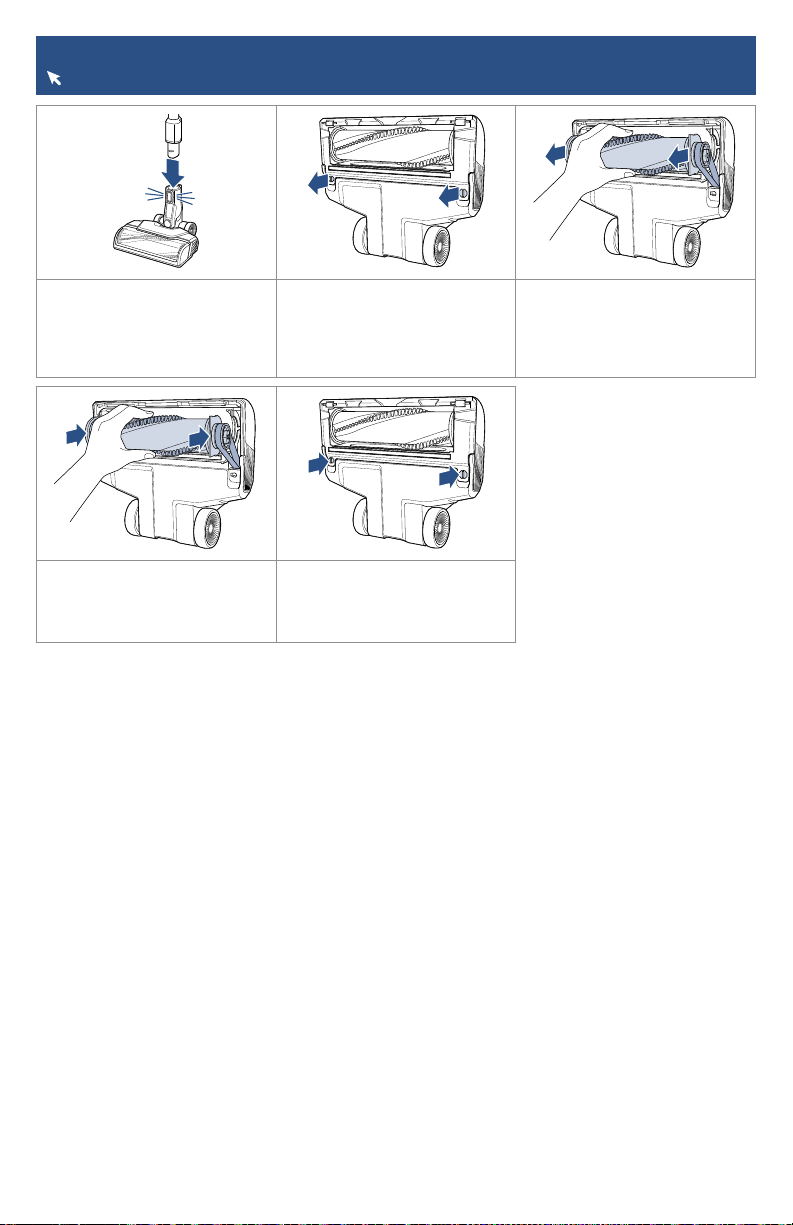
Maintaining the Brush Roll
Go to global.BISSELL.com for tips on maintaining and replacing your vacuum.
1. Turn the machine OFF and
press the foot release button
to disconnect the motorised
cleaning foot.
2. Use a flathead screwdriver
or coin to twist the bottom
screws counter-clockwise and
release the brush roll side
covers.
3. Remove the brush and clear
any debris from brush, brush
housing and the air suction
channel.
4. Reattach brush roll by
inserting into the belt and
pressing in to place.
5. Attach and secure brush
roll cover by using flathead
screwdriver or coin to twist the
screws clockwise.
10 global.BISSELL.com
Problem Possible Cause Remedies
Vacuum
won’t
pick up
dirt
Filters are dirty. Remove and rinse pre- and post-motor filters. Allow enough
time for them to dry completely before reinserting.
There is a clog in the
vacuum.
Remove the foot and extension wand from the hand vacuum.
Check for debris buildup or clogs in each of these sections.
Clear any debris or clogs before reassembling.
Dirt tank is not seated
correctly.
Remove the tank and reseat properly.
Dirt is
escaping
from the
vacuum
Dirt tank is full. Empty the tank.
Filters are missing or
dirty.
Check to see if the pre- and post-motor filters are in place
and clean. Clean filters if necessary.
There is a clog in the
vacuum.
Remove the foot and extension wand from the hand vacuum.
Check for debris buildup or clogs in each of these sections.
Clear any debris or clogs before reassembling.
Vacuum
won’t
charge
Wrong charger is being
used.
Use only the charger that comes with the machine.
Charger is not plugged
into the machine
properly.
Remove the charger and reinstall to the hand vacuum.
WARNING To reduce the risk of fire, electric shock or injury, turn power OFF and disconnect plug from
electrical outlet before performing maintenance or troubleshooting. Other maintenance or service not included in the manual
should be performed by an authorized service representative.
Troubleshooting
Below are some of the issues you may run into. If you don’t see the issue you’re experiencing
below, visit global.BISSELL.com.
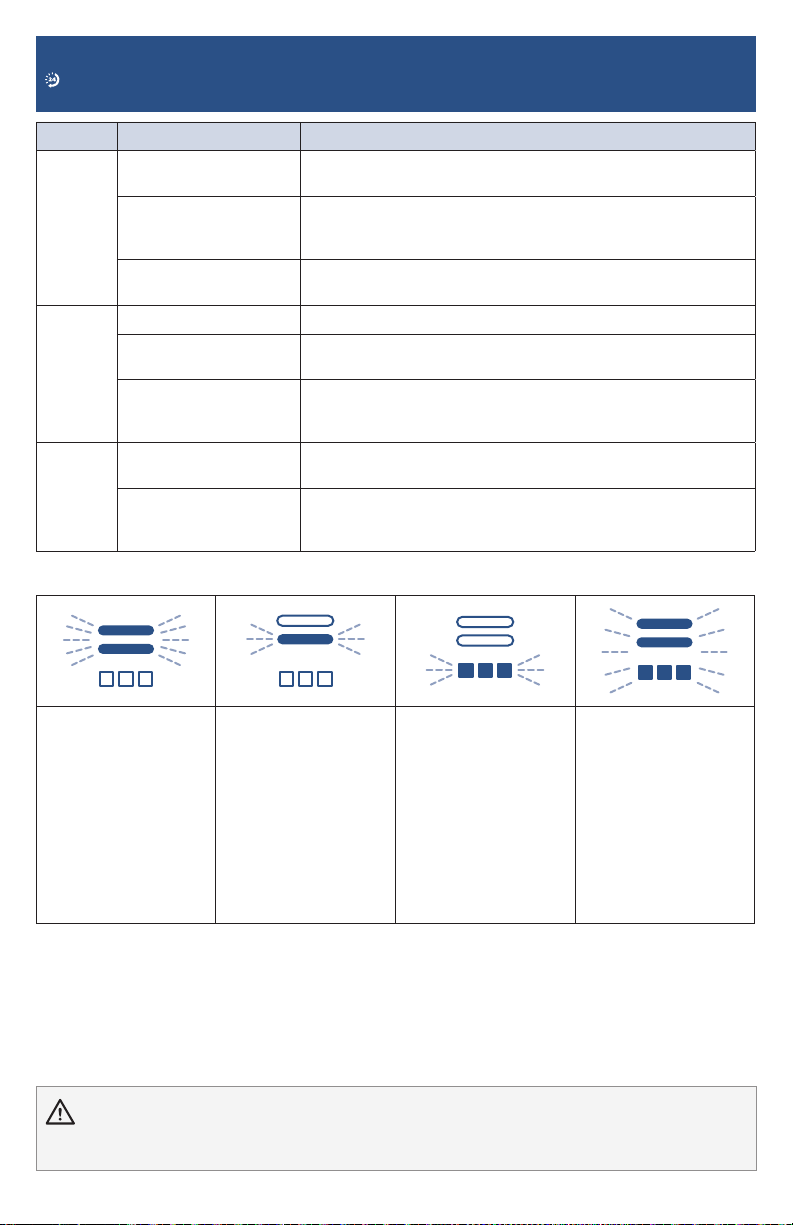
Errors
Behavior: 3 flashes,
then solid.
Cause: Suction motor
fault.
Remedy: Turn machine
OFF. Check and clean
filters. Check for and
clear any clogs.
Behavior: 3 flashes,
then solid.
Cause: Brush roll stall.
Remedy: Turn machine
OFF. Check and clean
filters. Clear debris or
clogs from brush roll.
Behavior: Flashing.
Cause: Charger issue.
Remedy: Turn machine
OFF. Unplug the
charging cable from
the wall and check
for cable damage.
If charging cable
is damaged please
contact Consumer
Care.
Behavior: 3 flashes,
then solid.
Cause: Battery issue.
Remedy: Turn machine
OFF and remove
the charger. Contact
Consumer Care.
If the remedies do not solve the problems, contact Consumer Care.

Warranty
This warranty gives you specific legal rights,
in addition to rights you may have under the
Australian Consumer Law. If you need additional
instruction regarding this warranty or have
questions regarding what it may cover, please
contact your local BISSELL® Consumer Care on
the details set out below.
It may be necessary to obtain some of your
personal information, such as a mailing address,
to fulfill terms of this warranty. Any personal
data will be handled pursuant to BISSELL’s
Privacy Policy, which can be found at
global.BISSELL.com/privacy-policy.
BISSELL® Two-Year Warranty
Subject to the *conditions identified below,
BISSELL will repair or replace (with new,
refurbished, lightly used, or remanufactured
components or products), at BISSELL’s option,
free of charge from the date of purchase by the
original purchaser, for two years any defective
or malfunctioning part due to manufacturer
defect. This warranty applies to product used for
personal purposes, and not commercial or rental
service. This warranty does not apply to fans or
routine maintenance or consumable components
such as filters, belts, brush rolls, etc., damage
or malfunction caused by negligence, abuse,
neglect, unauthorised repair, or any other use
not in accordance with the user guide. BISSELL
recommends that the original packaging be kept
for the duration of the warranty period in case
such need arises within the warranty period that
the item needs repacking and transportation.
*Conditions of Warranty
Subject to whether such loss is reasonably
foreseeable, BISSELL and its in-country
distributors are not liable for incidental or
consequential damages of any nature associated
with the use of this product.
This warranty is in addition to other rights or
remedies under law. Nothing in this warranty
excludes, limits or modifies any liability of
BISSELL which is imposed by law, or limits or
modifies any remedy available to the consumer
which is granted by law. To make a claim under
this warranty contact BISSELL Australia PTY
LTD (details below). Contact BISSELL prior to
returning any goods. Where agreed, BISSELL will
reimburse reasonable postage / handling costs
(if any) for returning goods to BISSELL. To claim
expenses incurred in making a claim under this
warranty please provide BISSELL with a copy of
the receipt of the expenses by email or post.
For Australian Consumers Only: Our goods
come with guarantees that cannot be excluded
under the Australian Consumer Law. You are
entitled to a replacement or refund for a
major failure and compensation for any other
reasonably foreseeable loss or damage. You
are also entitled to have the goods repaired or
replaced if the goods fail to be of acceptable
quality and the failure does not amount to a
major failure.
Consumer Care
Australia
Telephone: 1300 247 735
Website: www.BISSELL.com.au
New Zealand
Telephone: 0800 247 735
Website: www.BISSELL.co.nz

VIDEOSINFOREGISTER PARTS SUPPORT
©2021 BISSELL Inc. All rights reserved.
Part Number 1624201 01/21 RevC
But wait, there’s more!
Join us online for a complete guide to your new
product, including troubleshooting, parts and
more. Go to global.BISSELL.com.
VIDEOSINFO PARTS
