IN 155 Rev. A 0101
Providing Exceptional Consumer Optical Products Since 1975
Customer Support (800) 676-1343
E-mail: [email protected]
Corporate Offices (831) 763-7000
P.O. Box 1815, Santa Cruz, CA 95061
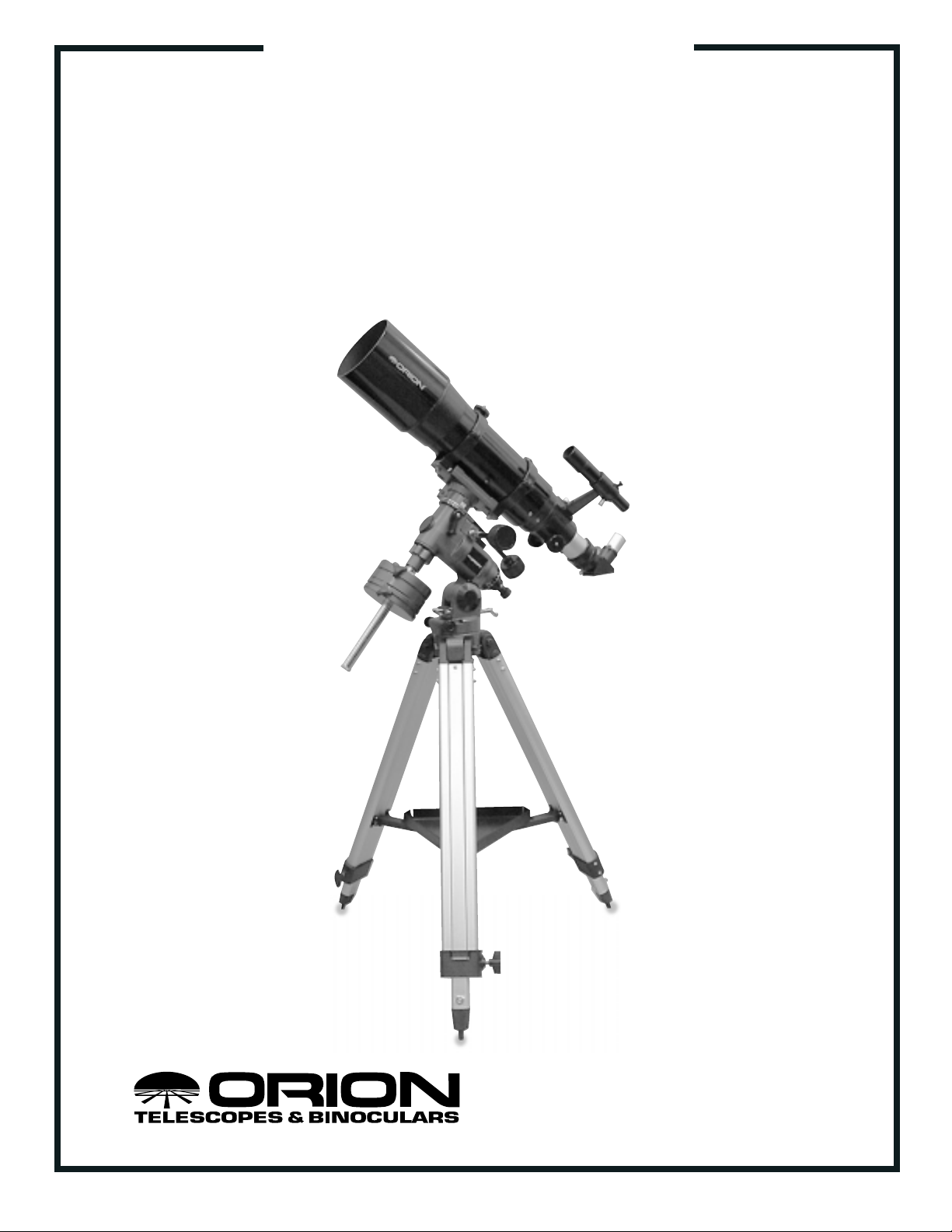
INSTRUCTION MANUAL
Orion
®
AstroView
™
120ST EQ
#9005 Equatorial Refracting Telescope
2
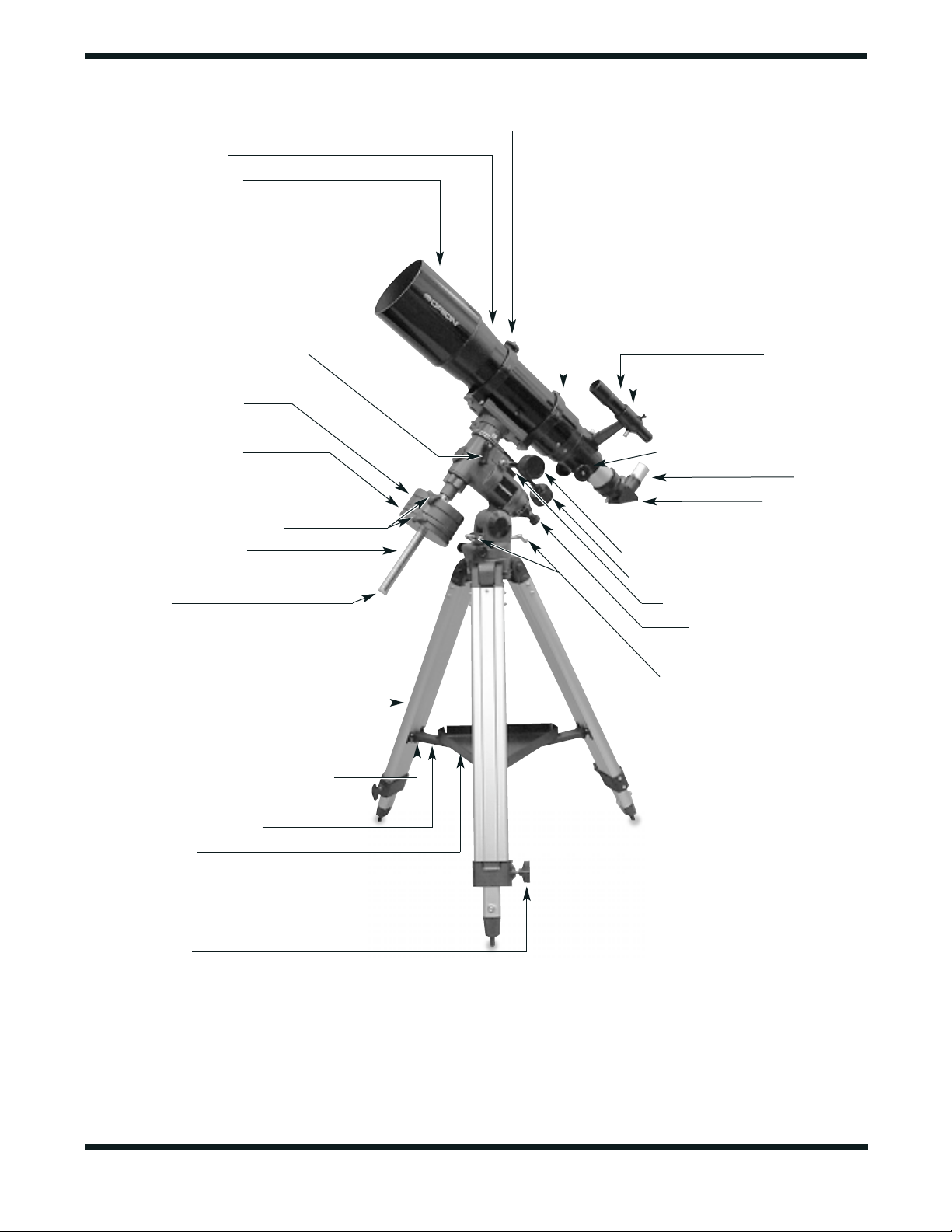
Tube rings
Objective lens cell
Dew cap/lens shade
Declination lock lever
Large counterweight
Small counterweight
Counterweight lock knobs
Counterweight shaft
“Toe saver”
Tripod leg
Accessory tray attachment point
Accessory tray bracket
Accessory tray
Leg lock knob
Finder scope
Finder bracket
Focus knob
Eyepiece
Star diagonal
Right Ascension slow-motion control
Declination slow-motion control
Right Ascension lock lever
Polar axis finder scope
Latitude adjustment T-bolts
Figure 1. The AstroView 120ST EQ Refractor

3
1. Parts List
Qty. Description
1 Optical tube assembly
1 German-type equatorial mount
1 Large counterweight
1 Small counterweight
1 Counterweight shaft
3 Tripod Legs with mounting hardware
1 Accessory tray with mounting hardware
1 Accessory tray bracket
2 Slow-motion control cables
1 Polar axis finder scope
1 Plastic cover for polar axis finder scope
2 Optical tube mounting rings
1 6x30 achromatic crosshair finder scope
1 Finder scope bracket with O-ring
1 Mirror star diagonal (1.25")
1 25mm (40x) Plössl eyepiece (1.25")
1 10mm (100x) Plössl eyepiece (1.25")
1 Dust cap
4 Assembly Tools (2 wrenches, Phillips screwdriver,
flat-head screwdriver key)
Congratulations on your purchase of a quality Orion telescope! Your new AstroView 120ST EQ
Refractor is designed for high-resolution viewing of astronomical objects. With its precision optics and
equatorial mount, you’ll be able to locate and enjoy hundreds of fascinating celestial denizens, including
the planets, Moon, and a variety of deep-sky galaxies, nebulas, and star clusters.
If you have never owned a telescope, we are pleased to welcome you to amateur astronomy.Take some
time to familiarize yourself with the night sky. Learn to recognize the patterns of stars in the major con-
stellations; a star wheel, or planisphere, available from Orion or from your local telescope shop, will
greatly help.With a little practice, a little patience, and a reasonably dark sky away from city lights, you’ll
find your telescope to be a never-ending source of wonder, exploration, and relaxation.
These instructions will help you set up, properly use and care for your telescope.Please read them over
thoroughly before getting started.
Table of Contents
1. Parts List............................................................................................................................... 3
2. Assembly.............................................................................................................................. 4
3. Balancing the Telescope.......................................................................................................6
4. Aligning the Finder Scope.................................................................................................... 7
5. Setting Up and Using the Equatorial Mount......................................................................... 7
6. Using Your Telescope–Astronomical Observing ................................................................... 11
7. Astrophotography.................................................................................................................. 14
8. Terrestrial Viewing................................................................................................................. 15
9. Care and Maintenance......................................................................................................... 15
10. Specifications........................................................................................................................ 16
WARNING: Never look directly at the Sun
through your telescope or its finder scope—
even for an instant—without a professionally
made solar filter that completely covers the
front of the instrument, or permanent eye
damage could result.Young children should use
this telescope only with adult supervision.
4
2. Assembly
Carefully open all of the boxes in the shipping container. Make
sure all the parts listed in Section 1 are present.Save the boxes
and packaging material. In the unlikely event that you need to
return the telescope, you must use the original packaging.
Assembling the telescope for the first time should take about
30 minutes.No tools are needed, other than the ones provid-
ed. All bolts should be tightened securely to eliminate flexing
and wobbling, but be careful not to over-tighten or the threads
may strip. Refer to Figure 1 during the assembly process.
During assembly (and anytime, for that matter), DO NOT
touch the surfaces of the telescope objective lens or the lens-
es of the finder scope or eyepieces with your fingers. The
optical surfaces have delicate coatings on them that can eas-
ily be damaged if touched inappropriately. NEVER remove
any lens assembly from its housing for any reason, or the
product warranty and return policy will be voided.
1. Lay the equatorial mount on its side.Attach the tripod legs
one at a time to the mount using the bolts installed in the
tops of the tripod legs. Remove the bolt from the leg, line
up the holes in the top of the leg with the holes in the base
of the mount, and reinstall the bolt so it passes through
the leg and the mount. Tighten the wingnuts only finger-
tight, for now. Note that the accessory tray bracket
attachment point on each leg should face inward.
2. Tighten the leg lock knobs at the base of the tripod legs.
For now, keep the legs at their shortest (fully retracted)
length; you can extend them to a more desirable length
later, after the scope is completely assembled.
3. With the tripod legs now attached to the equatorial mount,
stand the tripod upright (be careful!) and spread the legs
apart enough to connect each end of the accessory tray
bracket to the attachment point on each leg. Use the
screw that comes installed in each attachment point to do
this. First remove the screw using the supplied screwdriv-
er, then line up one of the ends of the bracket with the
attachment point and reinstall the screw. Make sure the
smooth side of the accessory tray bracket faces up.
4. Now, with the accessory tray bracket attached, spread the
tripod legs apart as far as they will go, until the bracket is
taut. Attach the accessory tray to the brackets with the
three wingnut-head screws already installed in the tray.
Push the screws up through the holes in the bracket, then
thread them into the holes in the tray.
5. Next, tighten the wingnuts at the top of the tripod legs, so
the legs are securely fastened to the equatorial mount.
Use the larger wrench and your fingers to do this.
6. Orient the equatorial mount as it appears in Figure 1, at a
latitude of about 40°, i.e., so the pointer next to the latitude
scale (located directly above the Orion logo on one side of
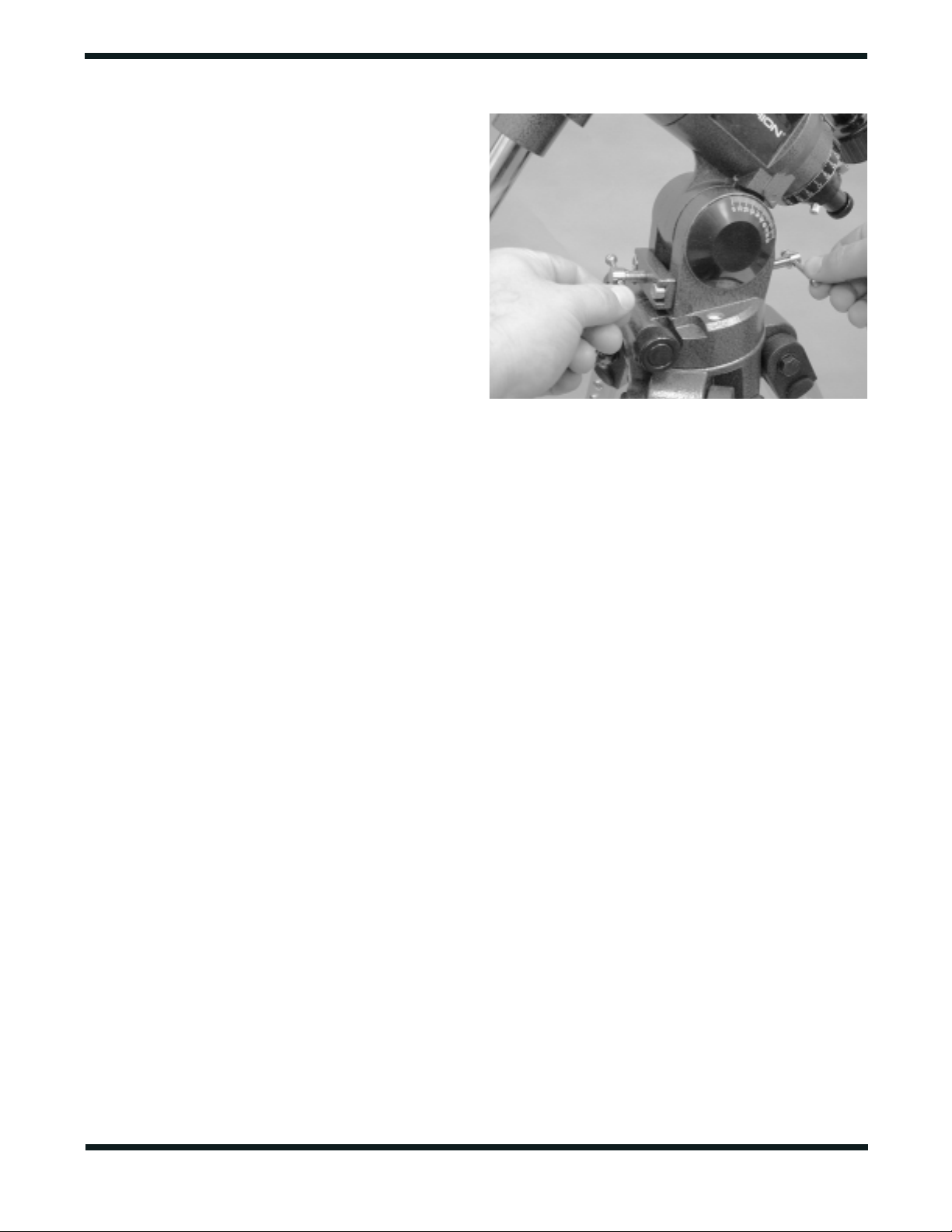
the mount) is pointing to the line at “40.”To do this, loosen
one of the latitude adjusting T-bolts and then tighten the
other latitude adjusting T-bolt until the pointer and the “40”
line up (Figure 2).The declination (Dec.) and right ascen-
sion (R.A.) axes many need re-positioning (rotation) as
well.Be sure to loosen the RA and Dec. lock levers before
doing this. Retighten them once the equatorial mount is
properly oriented.
7. Thread the counterweight shaft into the equatorial mount
at the base of the declination axis until tight. Make sure
the casting at the top of the bar is threaded clockwise as
far as it will go before attaching the shaft.
8. Remove the knurled “toe saver” retaining screw on the
bottom of the counterweight shaft and slide both counter-
weights onto the shaft. Make sure the counterweight lock
knobs are adequately loosened so the metal pin inside the
counterweight is recessed enough to allow the counter-
weight shaft to pass through the hole. Position the
counterweights about halfway up the shaft and tighten the
lock knobs. Replace the toe saver on the end of the bar.It
prevents the counterweights from falling on your foot if the
lock knobs happen to come loose.
9. Attach the two tube rings to the equatorial head using the
bolts that come installed in the rings.Remove the bolts, then
push them, with the washers still attached, up through the
holes in the tube ring mounting plate (on the top of the equa-
torial mount) and rethread them into the bottom of the tube
rings. Tighten the bolts securely with the smaller wrench.
Open the tube rings by loosening the knurled ring clamps.
10.Lay the telescope optical tube in the tube rings at about the
midpoint of the tube’s length. Rotate the tube in the rings
so the focus knobs are on the underside of the telescope.
Close the rings over the tube and tighten the knurled ring
clamps finger-tight to secure the telescope in position.
11.Now attach the two slow-motion cables to the R.A.and Dec.
worm gear shafts of the equatorial mount by positioning the
small screw on the end of the cable over the indented slot
on the worm gear shaft.Then tighten the screw.
Figure 2: To adjust the latitude angle of the equatorial mount, loosen
one of the two latitude adjustment T-bolts, then tighten the other.
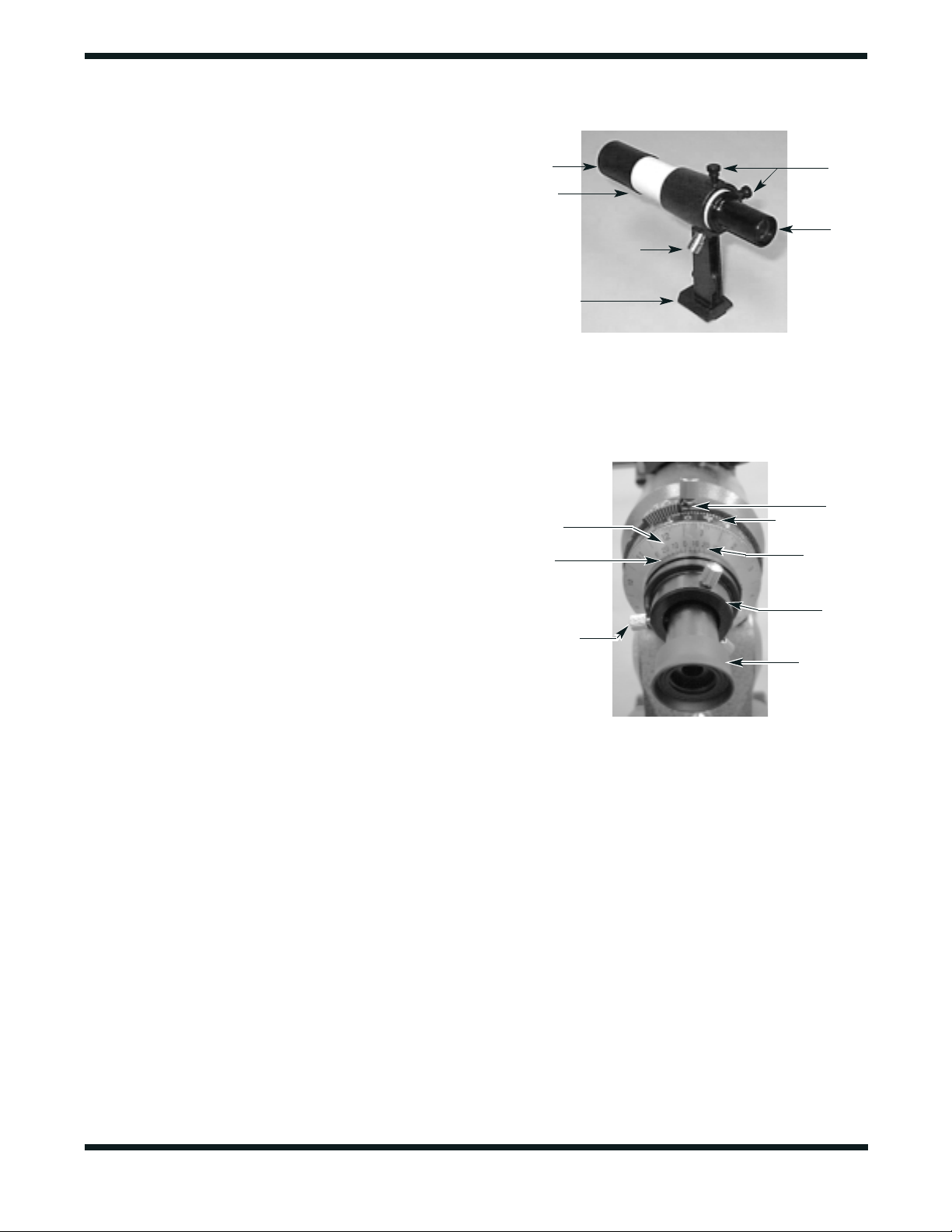
12.To place the finder scope in the finder scope bracket
(Figure 3), first unthread the two black nylon thumbscrews
until the screw ends are flush with the inside diameter of
the bracket. Place the O-ring that comes on the base of
the bracket over the body of the finder scope until it seats
into the groove on the middle of the finder scope.Slide the
eyepiece end (narrow end) of the finder scope into the end
of the bracket’s cylinder that does not have the alignment
thumbscrews while pulling the chrome, spring-loaded ten-
sioner on the bracket with your fingers. Push the finder
scope through the bracket until the O-ring seats just inside
the front opening of the bracket cylinder. Now, release the
tensioner and tighten the two black nylon thumbscrews a
couple of turns each to secure the finder scope in place.
13.Insert the base of the finder scope bracket into the dove-
tail slot on the top of the focuser. Lock the bracket into
position by tightening the knurled thumbscrew on the
dovetail slot.
14.Remove the cover cap on the end of the focuser.Insert the
chrome barrel of the star diagonal into the focuser and
secure with the thumbscrew on the drawtube.
15.Then insert an eyepiece into the star diagonal and secure
it in place with the thumbscrews on the diagonal. (Always
loosen the thumbscrews before rotating or removing the
diagonal or an eyepiece.)
16.Install the polar axis finder scope into its housing inside
the R.A. axis of the equatorial mount (Figure 4). First
loosen the three thumbscrews on the housing, which is
located at the rear of the R.A. axis. Insert the front end of
the polar finder (the end without the eyeguard) into the
housing so only about 1" of the polar finder extends from
the back of the housing.Do this slowly and with a twisting
motion to prevent the internal O-ring from becoming
unseated. If it does become unseated, you can remove
the entire housing from the mount to locate the O-ring and
reseat it.This is done by rotating the entire housing coun-
terclockwise. Once the polar axis finder scope is in the
housing, tighten the three thumbscrews. These thumb-
screws will be used later to align the finder with the
mount’s R.A. axis.
17.Remove the objective lens dust cover.
The AstroView 120ST is now assembled and should appear
as pictured in Figure 1.
5
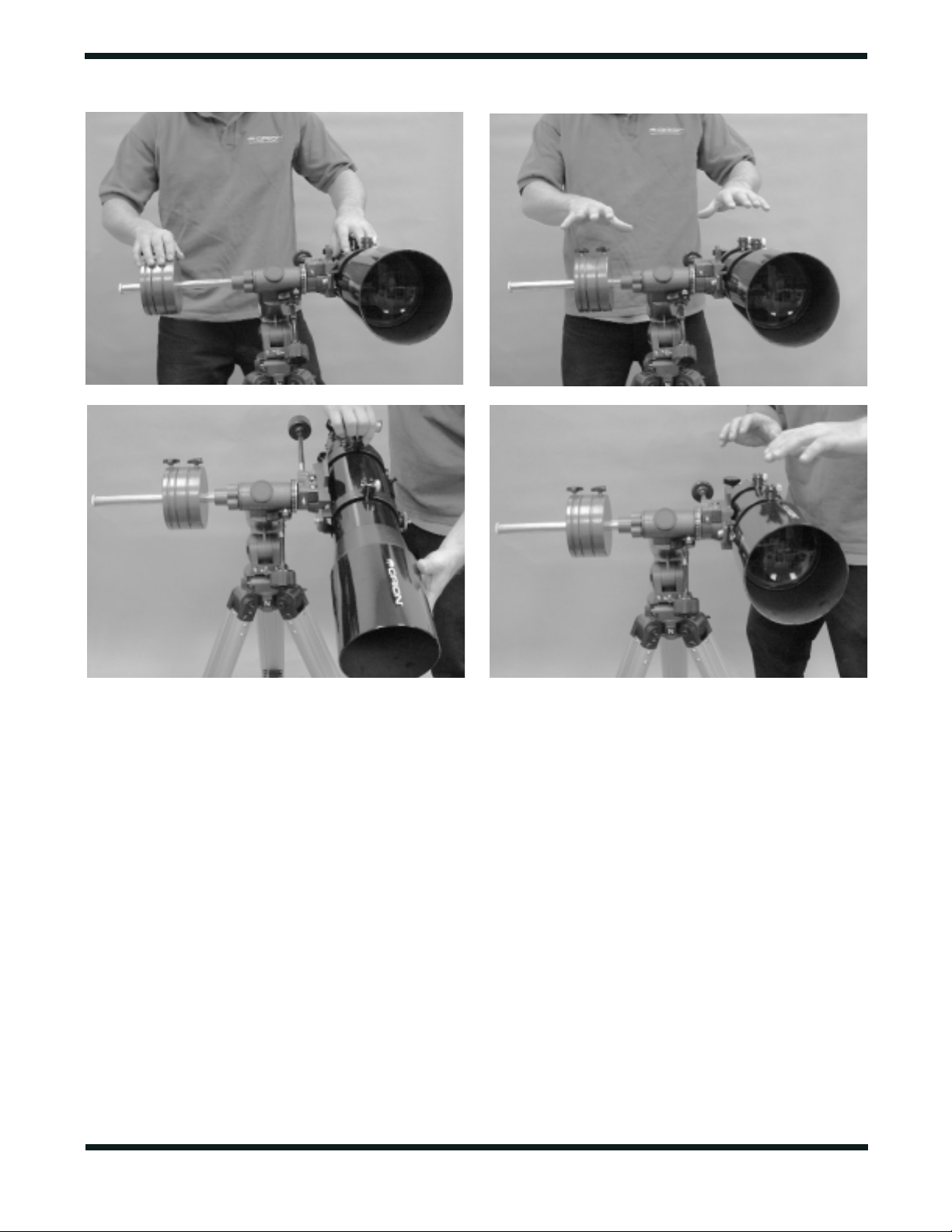
Pointer
R.A. setting circle
Meridian
offset scale
Polar scope
housing
Polar axis
finder scope
Figure 4. The polar axis finder scope installed in the right
ascension (R.A.) axis of the mount.
Date circle
Ring with
engraved time
meridian indicator
mark
Polar scope
alignment
thumbscrew (3)
Figure 3. The 6x30 finder scope and bracket.
Black nylon
alignment
thumbscrews
Eyepiece
Objective
lens cell
Lock ring
Spring-loaded tensioner
Dovetail base
6
3. Balancing the Telescope
To ensure smooth movement of the telescope on both axes of
the equatorial mount, it is imperative that the optical tube is
properly balanced. We will first balance the telescope with
respect to the R.A. axis, then the Dec. axis.
1. Keeping one hand on the telescope optical tube, loosen
the R.A.lock lever.Make sure the Dec.lock lever is locked,
for now.The telescope should now be able to rotate freely
about the R.A. axis. Rotate it until the counterweight shaft
is parallel to the ground (i.e., horizontal).
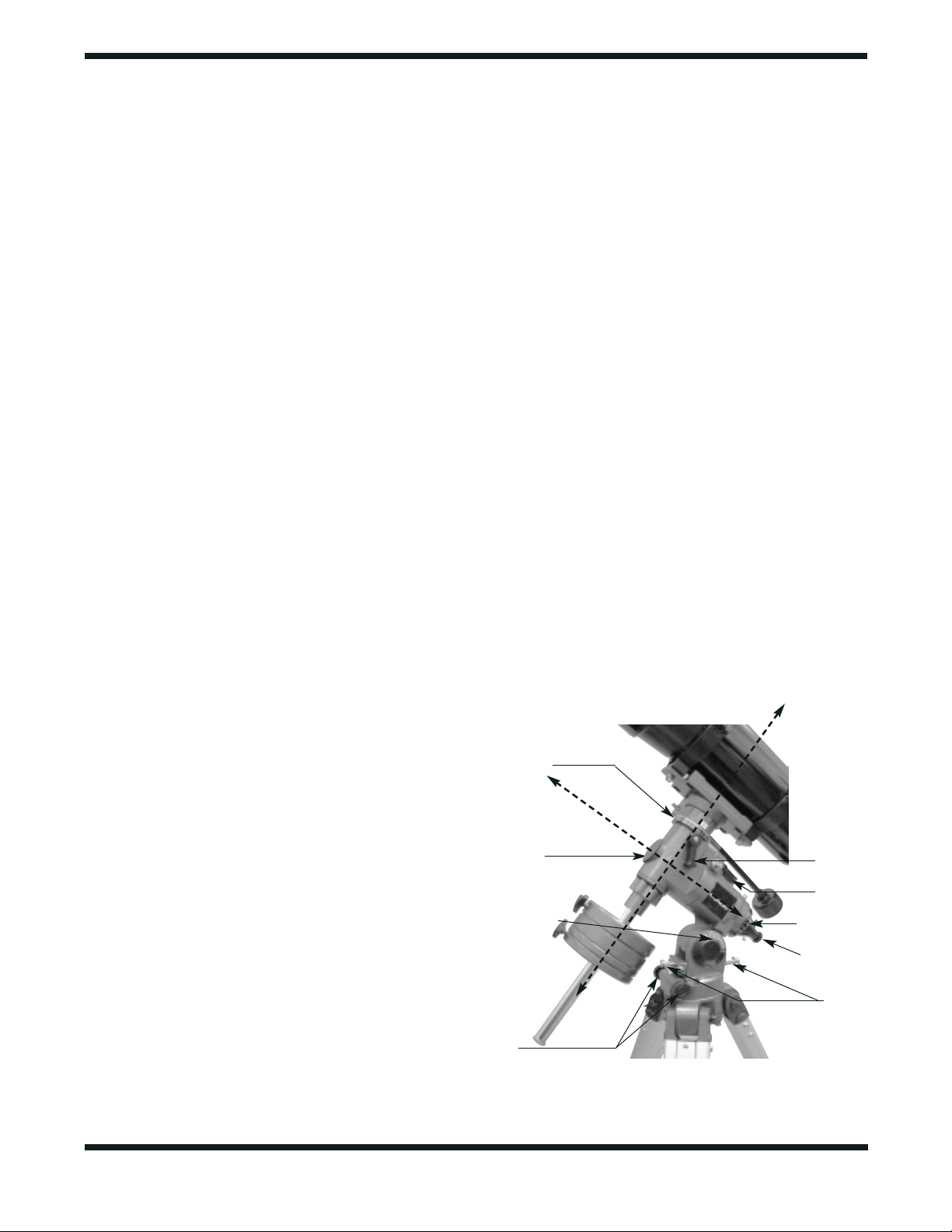
2. Now loosen the counterweight lock knobs and slide the
weights along the shaft until they exactly counterbalance
the telescope (Figure 5a) That’s the point at which the
shaft remains horizontal even when you let go with both
hands (5b).
3. Retighten the counterweight lock knobs.The telescope is
now balanced on the R.A. axis.
4. To balance the telescope on the Dec. axis, first tighten the
R.A.lock lever, with the counterweight shaft still in the hor-
izontal position.
5. With one hand on the telescope optical tube, loosen the
Dec. lock lever. The telescope should now be able to
rotate freely about the Dec. axis. Loosen the tube ring
clamps a few turns, until you can slide the telescope tube
forward and back inside the rings (this can be aided by
using a slight twisting motion on the optical tube while you
push or pull on it) (5c).
6. Position the telescope in the mounting rings so it remains
horizontal when you carefully let go with both hands.This
is the balance point for the optical tube with respect to the
Dec. axis (5d).
7. Retighten the tube ring clamps.
Figure 5.
Proper operation of the equatorial mount requires that the telescope tube be balanced on both the R.A. and Dec. axes. (a) With
the R.A. lock knob released, slide the counterweight along the counterweight shaft until it just counterbalances the tube. (b) When you let go
with both hands, the tube should not drift up or down. (c) With the Dec. lock knob released, loosen the tube ring lock clamps a few turns and
slide the telescope forward or back in the tube rings. (d) When the tube is balanced about the Dec. axis, it will not move when you let.
a.
c. d.
b.
The telescope is now balanced on both axes. Now when you
loosen the lock lever on one or both axes and manually point
the telescope, it should move without resistance and should
not drift from where you point it.
4. Aligning the Finder Scope
A finder scope has a wide field of view to facilitate the loca-
tion of objects for subsequent viewing through the main
telescope, which has a much narrower field of view.The find-
er scope and the main telescope must be aligned so they
point to exactly the same spot in the sky.
Alignment is easiest to do in daylight hours.First, insert the lowest-
power (25mm) eyepiece into the star diagonal. Then loosen the
R.A. and Dec. lock levers so the telescope can be moved freely.
Point the main telescope at a discrete object such as the top of
a telephone pole or a street sign that is at least a quarter-mile
away. Move the telescope so the target object appears in the
very center of the field of view when you look into the eyepiece.
Now tighten the R.A.and Dec.lock levers.Use the slow-motion
control knobs to re-center the object in the field of view, if it
moved off center when you tightened the lock levers.
Now look through the finder scope. Is the object centered in
the finder scope’s field of view, i.e., on the crosshairs? If not,
hopefully it will be visible somewhere in the field of view, so
that only fine adjustment of the finder scope alignment screws
will be needed to center it on the crosshairs. Otherwise you’ll
have to make coarser adjustments to the two black nylon
alignment thumbscrews to redirect the aim of the finder scope.
Note that the image seen through the finder scope appears
upside down.This is normal for astronomical finder scopes.
Once the target object is centered on the crosshairs of the
finder scope, look again in the main telescope’s eyepiece and
see if it is still centered there as well. If it isn’t, repeat the
entire process, making sure not to move the main telescope
while adjusting the alignment of the finder scope.
When the target object is centered on the crosshairs of the
finder scope and in the telescope’s eyepiece, the finder scope
is now aligned and ready to be used for an observing session.
The finder scope and bracket can be removed from the dove-
tail for storage, and then reinstalled without significantly
changing the finder scope’s alignment.
The finder scope alignment should be checked before every
observing session. This can easily be done at night, before
viewing through the telescope. Choose any bright star or plan-
et, center the object in the telescope eyepiece, and then adjust
the finder scope’s alignment screws until the star or planet is
also centered on the finder’s crosshairs.The finder scope is an
invaluable tool for finding objects in the night sky; its usage for
this purpose will be discussed later, in detail.
If, when looking through the finder scope, you notice that the
images appear somewhat out of focus, you will need to refo-
cus the finder scope for your eyes. First loosen the lock ring
located behind the objective lens cell on the body of the find-
er scope (see Figure 3). Back the lock ring off by a few turns,
for now. Refocus the finder scope on a distant object by
threading the objective lens cell in or out of the finder scope
body. Precise focusing will be achieved by focusing the finder
scope on a bright star. Once the image appears sharp,
retighten the lock ring behind the objective lens cell.The find-
er scope’s focus should not need to be adjusted again.
5. Setting Up and Using
the Equatorial Mount
When you look at the night sky, you no doubt have noticed that
the stars appear to move slowly from east to west over time.That
apparent motion is caused by the Earth’s rotation (from west to
east).An equatorial mount (Figure 6) is designed to compensate
for that motion, allowing you to easily “track” the movement of
astronomical objects, thereby keeping them from drifting out of
the telescope’s field of view while you’re observing.
This is accomplished by slowly rotating the telescope on its right
ascension (R.A.) axis, using only the R.A.slow-motion cable.But
first the R.A. axis of the mount must be aligned with the Earth’s
rotational (polar) axis—a process called polar alignment.
Polar Alignment
For Northern Hemisphere observers, approximate polar
alignment is achieved by pointing the mount’s R.A.axis at the
North Star, or Polaris. It lies within 1° of the north celestial
pole (NCP), which is an extension of the Earth’s rotational
axis out into space.Stars in the Northern Hemisphere appear
to revolve around Polaris.
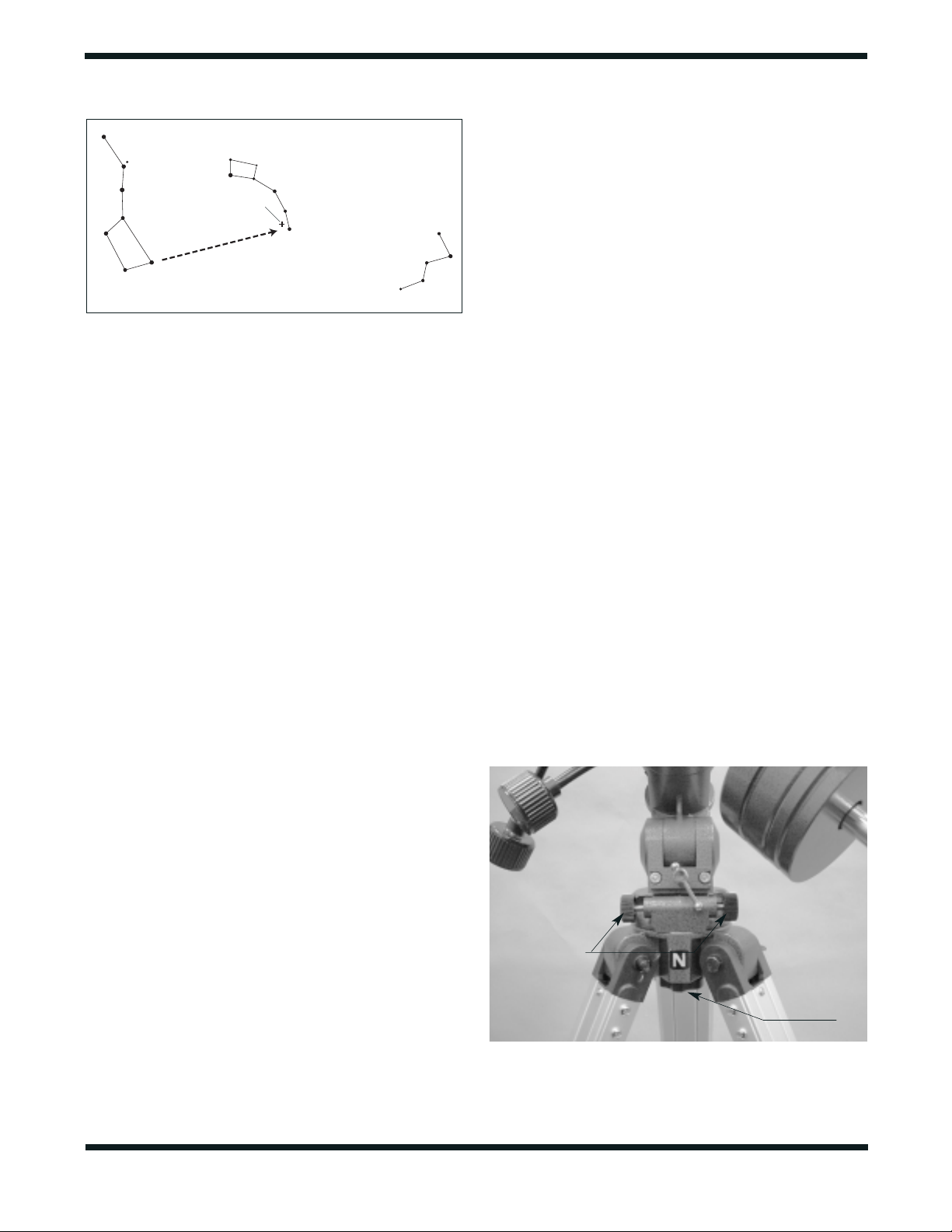
To find Polaris in the sky, look north and locate the pattern of
the Big Dipper (Figure 7). The two stars at the end of the
“bowl” of the Big Dipper point right to Polaris.
7
Figure 6. The equatorial mount of the AstroView 120ST EQ.
Declination
lock lever
Right Ascension
lock lever
Right Ascension
Setting Circle
Polar axis
finder scope
Latitude
adjusting T-bolts
D
e
c
lin
a
tio
n
a
xis (D
e
c.)
Front opening
in R.A. axis
Latitude scale
Azimuth fine
adjustment
knobs
Right ascension
(R.A.) axis
Declination
Setting Circle
Observers in the Southern Hemisphere aren’t so fortunate to
have a bright star so near the south celestial pole (SCP).The
star Sigma Octantis lies about 1° from the SCP, but it is bare-
ly visible with the naked eye (magnitude 5.5).
For general visual observation, an approximate polar align-
ment is sufficient:
1. Level the equatorial mount by adjusting the length of the
three tripod legs.
2. Loosen one of the latitude adjusting T-bolts and tighten the
other to tilt the mount until the pointer on the latitude scale
is set at the latitude of your observing site. If you don’t
know your latitude, consult a geographical atlas to find it.
For example, if your latitude is 35° North, set the pointer
to +35.The latitude setting should not have to be adjusted
again unless you move to a different viewing location
some distance away.
3. Loosen the Dec. lock lever and rotate the telescope opti-
cal tube until it is parallel with the R.A. axis. The pointer
on the Dec. setting circle should read 90°. Retighten the
Dec. lock lever.
4. Move the tripod so the telescope tube (and R.A. axis)
points roughly at Polaris. If you cannot see Polaris direct-
ly from your observing site, consult a compass and rotate
the tripod so the telescope points north. There is a label
bearing a large “N” at the base of the equatorial mount
(Figure 8). It should be facing north.
The equatorial mount is now approximately polar-aligned for
casual observing.More precise polar alignment is required for
astrophotography and for use of the manual setting circles.
Note: From this point on in your observing session, you
should not make any further adjustments to the latitude of
the mount, nor should you move the tripod. Doing so will
undo the polar alignment.The telescope should be moved
only about its R.A. and Dec. axes.
The Polar Axis Finder Scope
A nice feature of the AstroView 120ST is the polar axis finder scope
housed inside the R.A.axis of the equatorial mount (see Figure 4).
When properly aligned and used, it makes accurate polar align-
ment quick and easy to do.Alignment of the polar finder need only
be done once, unless it gets bumped or otherwise shifts its position.
Remove the round cover cap from the front opening in the R.A.
axis of the mount (see Figure 6). Look through the polar finder
at a distant object during the day.Focus the polar finder so that
the images and reticle are sharp by rotating the eyepiece end
of the finder. Notice that the reticle pattern consists of a
crosshair with a circle around the middle.On the circumference
of this circle is a tiny circle; this is where Polaris will be placed
for accurate polar alignment once the finder is properly aligned.
Alignment of the polar finder is best done during the day, before
going out into the field at night.
Aligning the Polar Axis Finder Scope
Aligning the polar axis finder scope so that it will accurately
point at the true north pole is a two-step procedure. First, the
polar finder must be rotated in its housing so that the small
circle in which Polaris will be placed in is in the proper initial
position. Next, the polar axis finder must be adjusted so that
it points directly along the mount’s R.A. axis.
We will start by aligning the polar finder rotationally. Refer to
Figure 4.
1. Loosen the large thumbscrew just above the R.A. setting
circle. Rotate the R.A. setting circle until the line above the
“0” on the setting circle lines up with the pointed indicator
that is cast into the mount (located directly below the large
8
Figure 7.
To find Polaris in the night sky, look north and find the Big
Dipper. Extend an imaginary line from the two "Pointer Stars" in the
bowl of the Big Dipper. Go about five times the distance between
those stars and you'll reach Polaris, which lies within 1∞ of the north
celestial pole (NCP).
Big Dipper
(in Ursa Major)
Little Dipper
(in Ursa Minor)
Cassiopeia
N.C.P.
P
o
i
n
t
e
r
S
t
a
r
s
Polaris
Figure 8. For polar alignment, position the tripod so that the "N"
label at the base of the mount faces north.The two azimuth fine
adjustment knobs above it are used to make small adjustments to
the mount's azimuth position.
Azimuth fine
adjustment knobs
Tripod attachment
knob

9
thumbscrew; see Figure 3). Retighten the thumbscrew.
2. Rotate the date circle until the “0” line on the meridian off-
set scale lines up with the time meridian indicator mark.
The meridian offset scale is printed on the inner circum-
ference of the date circle, and is labeled “E20” to “W20”.
The time meridian indicator mark is an engraved line on
the exterior of the polar finder’s housing. It is on the “ring”
of the housing that is closest to the date circle.
3. The R.A. setting circle is labeled in hours, from “0” to “23”
(military time). For Northern Hemisphere observers, refer
to the top numbers on the setting circle. Each small line
represents 10 minutes of R.A. The date circle is labeled
from “1” to “12,”with each number representing a month of
the year (“1” is January, “2” is February, etc.). Each small
line represents a two-day increment.
4. Loosen the R.A. lock lever and rotate the mount about the
R.A. axis until the March 1 indicating mark (the long line
between the “2”and the “3”) on the date circle lines up with
the 4 PM mark (the long line above the “16”) on the R.A.
setting circle.You may find it convenient to remove both the
counterweights and the telescope optical tube to do this.
5. Now, loosen the three thumbscrews on the polar finder
housing and rotate the polar finder so the small circle where
Polaris will be centered is located straight down from the
intersection of the crosshairs. Retighten the thumbscrews.
The polar axis finder scope is now properly set in its initial
position. Next, we must align it so that it is exactly parallel to
the mount’s R.A. axis:
6. Look through the polar finder at a distant object (during the
day) and center it on the crosshairs.You may need to adjust the
latitude adjustment T-bolts and the tripod position to do this.
7. Rotate the mount 180° about the R.A. axis. Again, it may be
convenient to remove the counterweights and optical tube first.
8. Look through the polar finder again. Is the object being
viewed still centered on the crosshairs? If it is, then no fur-
ther adjustment is necessary. If not, then look through the
polar finder while rotating the mount about the R.A. axis.
You will notice that the object you have previously centered
moves in a circular path. Use the three thumbscrews on
the housing to redirect the crosshairs of the polar finder to
the apparent center of this circular path. Repeat this pro-
cedure until the position that the crosshairs point to does
not rotate off-center when the mount is rotated in R.A.
Once this is accomplished, retighten the thumbscrews.
The polar axis finder scope is now ready to be used.When not in
use, replace the plastic protective cover to prevent the polar find-
er from getting bumped, which could knock it out of alignment.
Using the Polar Axis Finder
When using the polar finder in the field at night, you will need a
red flashlight to illuminate the finder’s reticle.Shine the flashlight
at an angle into the front opening in the R.A. axis. Do not shine
it directly into the opening, or the light will be too bright, and you
will also obstruct the view of the polar finder.It may be helpful to
have a friend hold the flashlight while you look through the polar
finder.
For most accurate polar alignment, you will need to know the
approximate longitude of your observing site.This information can
be obtained by looking at a local map. Now, you must figure the
difference between the longitude of your observing site and the
closest standard time meridian.The standard time meridians are
75°, 90°, 105°, and 120° for the 48 continental states (150° and
165° for Hawaii and Alaska). Choose the standard time meridian
that is closest in value to your local longitude, and then calculate
the difference. If your local longitude has a value less than the
closest standard time meridian, then you are east of the standard
time meridian by the calculated amount. If your local longitude
has a value greater than the closest standard time meridian, then
you are west of the standard time meridian by the calculated
amount. For example, if you are in Las Vegas, which has a longi-
tude of 115°, then the closest standard time meridian is 120°.The
difference between these two numbers is 5°. Since Las Vegas’
longitude value is less than the standard time meridian value, you
are 5° east of the closest time meridian.
Take your calculated difference from the closest standard time
meridian and rotate the date circle so that the meridian offset scale
line that corresponds to your calculated difference lines up with the
engraved time meridian indicator mark on the polar finder housing.
Each line of the meridian offset scale represents 5° of longitude.
Lines to the left of the “0”on the meridian offset scale indicate east
of the closest standard time meridian, while lines to the right of the
“0”indicate west of the closest standard time meridian. Continuing
with the prior example of observing in Las Vegas, you would rotate
the date circle so that the first line to the left of the “0”on the merid-
ian offset scale lines up with the time meridian indicator mark.
Make sure that the “0” mark on the R.A. setting circle lines up
with the pointed indicator cast into the mount, and that the
large thumbscrew just above it is tightened. Now, rotate the
mount about the R.A. axis of the mount until the line on the
R.A. setting circle that corresponds to your current local time
lines up with the line on the date circle that indicates the cur-
rent date. If you are on daylight savings time, subtract one
hour from your current local time. For example, if it was
November 1 at 9 PM, you would rotate the telescope in R.A.
until the line above the “21” on the R.A. setting circle lines up
with the long line between the “10” and “11” on the date circle.
Finally, look through the polar alignment finder scope while
shining a red flashlight at an angle down the front opening of
the R.A.axis, and center Polaris in the small circle.Do this by
rotating the tripod left or right, and adjusting the tilt of the R.A.
axis up-or-down with the latitude adjustment T-bolts. When
you are close, you can use the azimuth fine adjustment knobs
(Figure 8) for final positioning.To do this, you will first need to
loosen the big tripod attachment knob directly underneath
the base of the equatorial mount. The fine adjustment knobs
work by loosening one and then tightening the other. When
done, retighten the tripod attachment knob to firmly secure
the mount and tripod.
Once Polaris is centered in the small circle, you are done.The
telescope is now accurately polar aligned, and can be used
for advanced observational applications, such as astropho-

10
tography or precise use of the manual setting circles.As men-
tioned before, only move the telescope along the R.A. and
Dec. axes; if you move the tripod, or change the tilt of the
equatorial mount, you will need to polar align again.
Remember, accurate polar alignment is not needed for casu-
al visual observing. Most of the time, approximate polar
alignment, as outlined previously, will suffice.
Tracking Celestial Objects
When you observe a celestial object through the telescope,
you’ll see it drift slowly across the field of view. To keep it in
the field, if your equatorial mount is polar-aligned, just turn the
R.A. slow-motion control.The Dec. slow-motion control is not
needed for tracking. Objects will appear to move faster at
higher magnifications, because the field of view is narrower.
Optional Motor Drive
An optional DC motor drive system can be mounted on the
AstroView’s equatorial mount to provide hands-free tracking.
Objects will then remain stationary in the field of view without any
manual adjustment of the R.A. slow-motion control. The motor
drive system is necessary for astrophotography.
Understanding the Setting Circles
The setting circles on an equatorial mount enable you to locate
celestial objects by their “celestial coordinates.”Every astronomical
object resides in a specific location on the “celestial sphere.”That
location is denoted by two numbers:its right ascension (R.A.) and
declination (Dec.).In the same way, every location on Earth can be
described by its longitude and latitude. R.A. is similar to longitude
on Earth, and Dec. is similar to latitude.The R.A. and Dec. values
for celestial objects can be found in any star atlas or star catalog.
So, the coordinates for the Orion Nebula listed in a star atlas
will look like this:
R.A. 5h 35.4m Dec. -5° 27’
That’s 5 hours and 35.4 minutes in right ascension, and -5
degrees and 27 arc-minutes in declination (the negative sign
denotes south of the celestial equator).There are 60 minutes
in 1 hour of R.A and there are 60 arc-minutes in 1 degree of
declination.
The telescope’s R.A. setting circle is scaled in hours, from 1
through 24, with small lines in between representing 10-
minute increments. The upper set of numbers apply to
viewing in the Northern Hemisphere, while the numbers
below them apply to viewing in the Southern Hemisphere.
The Dec. setting circle is scaled in degrees.
Before you can use the setting circles to locate objects, the
mount must be accurately polar aligned, and the setting cir-
cles must be calibrated. The declination setting circle was
calibrated at the factory, and should read 90° when the tele-
scope optical tube is pointing exactly along the R.A. axis.
Calibrating the Right Ascension Setting Circle
1. Identify a bright star near the celestial equator and look up
its coordinates in a star atlas.
2. Loosen the R.A. and Dec. lock levers on the equatorial
mount, so the telescope optical tube can move freely.
3 Point the telescope at the bright star whose coordinates
you know. Center the star in the telescope’s eyepiece.
Lock the R.A. and Dec. lock levers.
4. Loosen the large thumbscrew just above the R.A. setting
circle and rotate the R.A. setting circle so the pointer indi-
cates the R.A.coordinate listed for the bright star in the star
atlas. Do not retighten the thumbscrew when using the
R.A. setting circles for finding objects; the thumbscrew is
only needed for polar alignment using the polar axis finder
scope.
Finding Objects With the Setting Circles
Now that both setting circles are calibrated, look up in a star
atlas the coordinates of an object you wish to view.
1. Loosen the Dec. lock lever and rotate the telescope until
the Dec. value from the star atlas matches the reading on
the Dec. setting circle. If the telescope is being aimed
toward the south and the Dec. setting circle pointer pass-
es the 0° indicator, the value on the Dec. setting circle
becomes a negative number. Retighten the lock lever.
2. Loosen the R.A. lock lever and rotate the telescope until
the R.A. value from the star atlas matches the reading on
the R.A. setting circle. Retighten the lock lever.
Most setting circles are not accurate enough to put an object
dead-center in your finder scope’s field of view, but they’ll get
you close, assuming the equatorial mount is accurately polar-
aligned.The R.A.setting circle should be recalibrated every time
you wish to locate a new object. Do so by calibrating the setting
circle for the centered object before moving on to the next one.
Confused About Pointing the Telescope?
Beginners occasionally experience some confusion about
how to point the telescope overhead or in other directions. In
Figure 1 the telescope is pointed north as it would be during
polar alignment. The counterweight shaft is oriented down-
ward.But it will not look like that when the telescope is pointed
in other directions.Let’s say you want to view an object that is
directly overhead, at the zenith. How do you do it?
One thing you DO NOT do is make any adjustment to the lat-
itude adjustment T-bolts. That will spoil the mount’s polar
alignment. Remember, once the mount is polar aligned, the
telescope should be moved only on the R.A. and Dec. axes.
To point the scope overhead, first loosen the R.A. lock lever
and rotate the telescope on the R.A. axis until the counter-
weight shaft is horizontal (parallel to the ground).Then loosen
the Dec. lock lever and rotate the telescope until it is pointing
straight overhead. The counterweight shaft is still horizontal.
Then retighten both lock levers.
What if you need to aim the telescope directly north, but at an
object that is nearer to the horizon than Polaris? You can’t do
it with the counterweight down as pictured in Figure 1.Again,
you have to rotate the scope in R.A.so that the counterweight
shaft is positioned horizontally.Then rotate the scope in Dec.
so it points to where you want it near the horizon.
11
c. d.
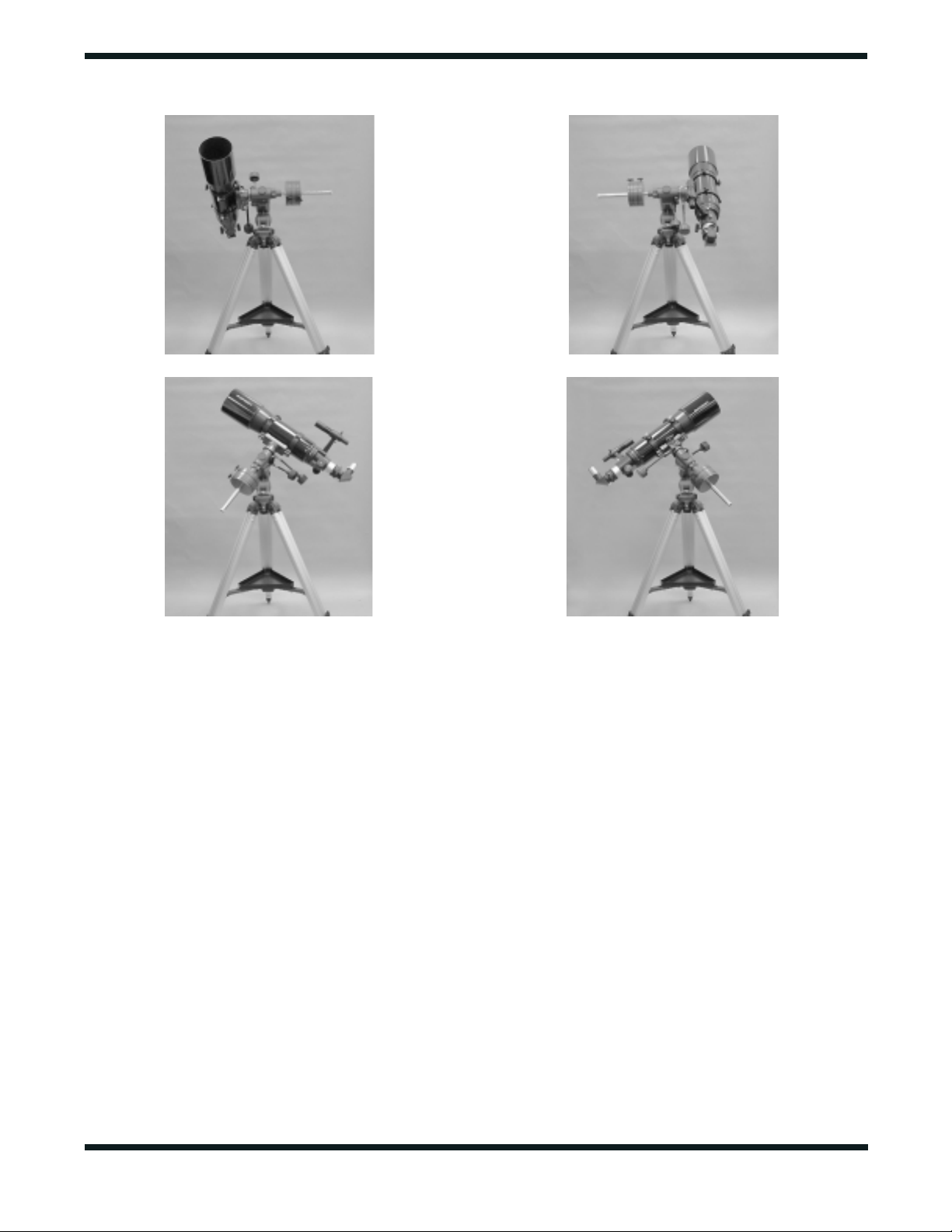
Figure 9. This illustration shows the telescope pointed in the four cardinal directions: (a) north, (b) south, (c) east, (d) west. Note that the
tripod and mount have not been moved; only the telescope tube has been moved on the R.A. and Dec. axes.
a.
b.
To point the telescope directly south, the counterweight shaft
should again be horizontal.Then you simply rotate the scope
on the Dec. axis until it points in the south direction.
To point the telescope to the east or west, or in other directions,
you rotate the telescope on its R.A.and Dec.axes.Depending on
the altitude of the object you want to observe, the counterweight
shaft will be oriented somewhere between vertical and horizontal.
Figure 9 illustrates how the telescope will look when pointed
at the four cardinal directions—north, south, east and west.
The key things to remember when pointing the telescope are
that a) you only move it in R.A.and Dec., not in azimuth or lat-
itude (altitude), and b) the counterweight and shaft will not
always appear as it does in Figure 1.In fact it almost never will!
6. Using Your Telescope—
Astronomical Observing
Choosing an Observing Site
When selecting a location for observing, get as far away as
possible from direct artificial light such as streetlights, porch
lights, and automobile headlights.The glare from these lights
will greatly impair your dark-adapted night vision. Set up on a
grass or dirt surface, not asphalt, because asphalt radiates
more heat. Heat disturbs the surrounding air and degrades
the images seen through the telescope. Avoid viewing over
rooftops and chimneys, as they often have warm air currents
rising from them. Similarly, avoid observing from indoors
through an open (or closed) window, because the tempera-
ture difference between the indoor and outdoor air will cause
image blurring and distortion.
If at all possible, escape the light-polluted city sky and head
for darker country skies.You’ll be amazed at how many more
stars and deep-sky objects are visible in a dark sky!
Cooling the Telescope
All optical instruments need time to reach “thermal equilibri-
um.”The bigger the instrument and the larger the temperature
change, the more time is needed.Allow at least a half-hour for
your telescope to cool to the temperature outdoors. In very
cold climates (below freezing), it is essential to store the tele-
scope as cold as possible. If it has to adjust to more than a
40° temperature change, allow at least one hour.
Aiming the Telescope
To view an object in the main telescope, first loosen both the R.A.
and Dec. lock levers. Aim the telescope at the object you wish to
observe by “eyeballing” along the length of the telescope tube (or

use the setting circles to “dial in”the object’s coordinates).Then look
through the (aligned) finder scope and move the telescope tube
until the object is generally centered on the finder’s crosshairs.
Retighten the R.A.and Dec.lock levers.Then accurately center the
object on the finder’s crosshairs using the R.A. and Dec. slow-
motion controls. The object should now be visible in the main
telescope with a low-power (long focal length) eyepiece. If neces-
sary, use the R.A.and Dec. slow-motion controls to re-position the
object within the field-of-view of the main telescope’s eyepiece.
Focusing the Telescope
Practice focusing the telescope in the daytime before using it
for the first time at night. Start by turning the focus knob until
the focuser drawtube is near the center of its adjustment range.
Insert the star diagonal into the drawtube and an eyepiece into
the star diagonal (secure with the thumbscrews). Point the tel-
escope at a distant subject and center it in the field of view.
Now, slowly rotate the focus knob until the object comes into
sharp focus. Go a little bit beyond sharp focus until the image
just starts to blur again, then reverse the rotation of the knob,
just to make sure you hit the exact focus point. The telescope
can only focus on objects at least 50 to 100 feet away.
Do You Wear Eyeglasses?
If you wear eyeglasses, you may be able to keep them on while
you observe, if your eyepieces have enough “eye relief” to allow
you to see the whole field of view. You can try this by looking
through the eyepiece first with your glasses on and then with
them off, and see if the glasses restrict the view to only a por-
tion of the full field. If they do, you can easily observe with your
glasses off by just refocusing the telescope the needed amount.
Calculating the Magnification
It is desirable to have a range of eyepieces of different focal
lengths, to allow viewing over a range of magnifications. To
calculate the magnification, or power, of a telescope, simply
divide the focal length of the telescope by the focal length of
the eyepiece (the number printed on the eyepiece):
Magnification =
T
elescope Focal Length (mm)
Eyepiece Focal Length (mm)
For example, the AstroView 120ST, which has a focal length
of 600mm, used in combination with a 25mm eyepiece, yields
a power of
600 ÷ 25 = 24x.
Every telescope has a useful limit of power of about 45x-60x
per inch of aperture.Claims of higher power by some telescope
manufacturers are a misleading advertising gimmick and
should be dismissed. Keep in mind that at higher powers, an
image will always be dimmer and less sharp (this is a funda-
mental law of optics). The steadiness of the air (the “seeing”)
will limit how much magnification an image can tolerate.
Always start viewing with your lowest-power (longest focal length)
eyepiece in the telescope.After you have located and looked at the
object with it, you can try switching to a higher power eyepiece to
ferret out more detail, if atmospheric conditions permit.If the image
you see is not crisp and steady, reduce the magnification by
switching to a longer focal length eyepiece. As a general rule, a
small but well-resolved image will show more detail and provide a
more enjoyable view than a dim and fuzzy, over-magnified image.
Use of 2" Eyepieces
Another nice feature of the AstroView 120ST is its ability to
use either 1.25" or 2" barrel-diameter eyepieces. At low pow-
ers (long focal lengths), 2" eyepieces can give a wider field of
view than standard 1.25" eyepieces. This is especially desir-
able for observing deep-sky objects, as many of them appear
quite big, but faint. If you want to use 2" eyepieces, such as
the Orion Optiluxe 2" eyepieces, we recommend that you also
purchase a 2" star diagonal for refractors; this will provide for
a comfortable viewing angle.
To use 2" eyepieces, simply loosen the two large thumbscrews on
the focuser drawtube that are just in front of the thumbscrew that
holds the provided 1.25" star diagonal in place. Once these large
thumbscrews are loosened, the entire back end of the focuser,
including any 1.25 diagonal and eyepiece that may be attached,
comes off, exposing the 2" diameter focuser drawtube. Now, insert
your 2" star diagonal into the drawtube and secure with the two
large thumbscrews. Insert a 2" eyepiece into the 2" diagonal,
secure it in place with the thumbscrew on the diagonal, and you’re
ready to observe.
Let Your Eyes Dark-Adapt
Don’t expect to go from a lighted house into the darkness of the
outdoors at night and immediately see faint nebulas, galaxies,
and star clusters—or even very many stars, for that matter.Your
eyes take about 30 minutes to reach perhaps 80% of their full
dark-adapted sensitivity. As your eyes become dark-adapted,
more stars will glimmer into view and you’ll be able to see
fainter details in objects you view in your telescope.
To see what you’re doing in the darkness, use a red-filtered flash-
light rather than a white light. Red light does not spoil your eyes’
dark adaptation like white light does. A flashlight with a red LED
light is ideal, such as the Orion RedBeam LED flashlight, or you
can cover the front of a regular incandescent flashlight with red
cellophane or paper. Beware, too, that nearby porch and street
lights and car headlights will ruin your night vision.
“Seeing” and Transparency
Atmospheric conditions vary significantly from night to night.
“Seeing” refers to the steadiness of the Earth’s atmosphere at
a given time. In conditions of poor seeing, atmospheric turbu-
lence causes objects viewed through the telescope to “boil.” If
the stars are twinkling noticeably when you look up at the sky
with just your eyes, the seeing is bad and you will be limited to
viewing with low powers (bad seeing affects images at high
powers more severely).Planetary observing may also be poor.
In conditions of good seeing, star twinkling is minimal and
images appear steady in the eyepiece. Seeing is best over-
head, worst at the horizon. Also, seeing generally gets better
after midnight, when much of the heat absorbed by the Earth
during the day has radiated off into space.
Avoid looking over buildings, pavement, or any other source
of heat, as they will cause “heat wave” disturbances that will
distort the image you see through the telescope.
12

13
Especially important for observing faint objects is good “trans-
parency”—air free of moisture, smoke, and dust. All tend to
scatter light, which reduces an object’s brightness.Transparency
is judged by the magnitude of the faintest stars you can see with
the unaided eye (6th magnitude or fainter is desirable).
Note About Chromatic Abberation
Chromatic abberation literally means color distortion.Whenever
light passes through one material to another, light of different
wavelengths (color), is bent by different amounts.This is a prob-
lem that plagues refractor-type telescopes, since light passes
through both air and glass to form an image. Most astronomical
objects emit a spectrum comprised of many different wave-
lengths of light, so each wavelength will be bent by a slightly
different amount when passing through a lens. This results in
each color of light reaching precise focus at a slightly different
point, which will provide unacceptable images.
Achromatic refractors, like the AstroView 120ST, are
designed to minimize chromatic abberation to acceptable
levels.The objective lens is actually comprised of two individ-
ual lenses, called elements, made of different materials,
which bend light in slightly different ways. By precisely spac-
ing and shaping the elements, the chromatic abberation
incurred when light passes through air and the first glass ele-
ment is reduced by the way the second element bends the
light.The result is an image that is much better color correct-
ed than a non-achromatic (one element) objective lens.
Even with the achromatic lens design, however, the
AstroView 120ST will suffer a bit from chromatic abberation
due to its large aperture and short focal length. This will be
noticeable, to some degree, on extremely bright objects, such
as the brightest stars in the sky. What you will notice is that
the object, when focused, has a slight “purple-halo” around it.
This will not present a problem for most observers, as the eye
readily adapts to the view and is still able to distinguish fine
details. Chromatic abberation will never inhibit deep sky
observing, as deep sky objects are too faint to cause any
noticeable color distortion.
How to Find Interesting Celestial Objects
To locate celestial objects with your telescope, you first need
to become reasonably familiar with the night sky. Unless you
know how to recognize the constellation Orion, for instance,
you won’t have much luck locating the Orion Nebula, unless,
or course, you look up its celestial coordinates and use the
telescope’s setting circles. Even then, it would be good to
know in advance whether that constellation will be above the
horizon at the time you plan to observe.A simple planisphere,
or star wheel, can be a valuable tool both for learning the con-
stellations and for determining which ones are visible on a
given night at a given time.
A good star chart or atlas will come in very handy for helping
find objects among the dizzying multitude of stars overhead.
Except for the Moon and the brighter planets, it’s pretty time-
consuming and frustrating to hunt for objects randomly,
without knowing where to look.You should have specific tar-
gets in mind before you begin observing.
Start with a basic star atlas, one that shows stars no fainter
than 5th or 6th magnitude. In addition to stars, the atlas will
show the positions of a number of interesting deep-sky
objects, with different symbols representing the different types
of objects, such as galaxies, open star clusters, globular clus-
ters, diffuse nebulas, and planetary nebulas. So, for example,
your atlas might show a globular cluster sitting just above the
lid of the “Teapot’ pattern of stars in Sagittarius.You then know
to point your telescope in that direction to home in on the clus-
ter, which happens to be 6.9-magnitude Messier 28 (M28).
You can see a great number and variety of astronomical
objects with your AstroView 120ST, including:
A. The Moon
With its rocky, cratered surface, the Moon is one of the easi-
est and most interesting targets to view with your telescope.
The best time to observe our only natural satellite is during a
partial phase, that is, when the Moon is NOT full. During par-
tial phases, shadows on the surface reveal more detail,
especially right along the border between the dark and light
portions of the disk (called the “terminator”).A full Moon is too
bright and devoid of surface shadows to yield a pleasing view.
Try using a Moon Filter to dim the Moon when it is very bright.
It simply threads onto the bottom of the eyepieces (you must
first remove the eyepiece from the star diagonal to attach the
Moon filter).
B. The Sun
You can change your nighttime telescope into a daytime Sun
viewer by installing an optional full-aperture solar filter over
the front opening of the AstroView 120ST EQ. The primary
attraction is sunspots, which change shape, appearance, and
location daily. Sunspots are directly related to magnetic activ-
ity in the Sun. Many observers like to make drawings of
sunspots to monitor how the Sun is changing from day to day.
Important Note: Do not look at the Sun with any optical
instrument without a professionally made solar filter, or
permanent eye damage could result.
C. The Planets
The planets don’t stay put like the stars (they don’t have fixed
R.A. and Dec. coordinates), so you’ll have to refer to charts
published monthly at our website, www.telescope.com, or in
monthly magazines like Astronomy, Sky & Telescope, to
locate them.Venus, Mars, Jupiter, and Saturn are the bright-
est objects in the sky after the Sun and the Moon. Not all four
of these planets are normally visible at any one time.
JUPITER The largest planet, Jupiter, is a great subject to
observe.You can see the disk of the giant planet and watch
the ever-changing positions of its four largest moons, Io,
Callisto, Europa, and Ganymede. If atmospheric conditions
are good, you may be able to resolve thin cloud bands on the
planet’s disk.
SATURN The ringed planet is a breathtaking sight when it is
well positioned.The tilt angle of the rings varies over a period
of many years; sometimes they are seen edge-on, while at
other times they are broadside and look like giant “ears” on

each side of Saturn’s disk. A steady atmosphere (good see-
ing) is necessary for a good view.You might see a tiny, bright
“star” close by; that’s Saturn’s brightest moon, Titan.
VENUS At its brightest, Venus is the most luminous object in
the sky, excluding the Sun and the Moon. It is so bright that
sometimes it is visible to the naked eye during full daylight!
Ironically, Venus appears as a thin crescent, not a full disk,
when at its peak brightness.Because it is so close to the Sun,
it never wanders too far from the morning or evening horizon.
No surface markings can be seen on Venus, which is always
shrouded in dense clouds.
MARS If atmospheric conditions are good, you may be able
to see some subtle surface detail on the Red Planet, possibly
even the polar ice cap.Mars makes a close approach to Earth
every two years; during those approaches its disk is larger
and thus more favorable for viewing.
D. Stars
Stars will appear like twinkling points of light in the telescope.
Even powerful telescopes cannot magnify stars to appear as
more than points of light! You can, however, enjoy the different col-
ors of the stars and locate many pretty double and multiple stars.
The famous “Double-Double” in the constellation Lyra and the
gorgeous two-color double star Albireo in Cygnus are favorites.
Defocusing the image of a star slightly can help bring out its color.
E. Deep-Sky Objects
Under dark skies, you can observe a wealth of fascinating
deep-sky objects, including gaseous nebulas, open and glob-
ular star clusters, and different types of galaxies. Most
deep-sky objects are very faint, so it is important that you find
an observing site well away from light pollution.Take plenty of
time to let your eyes adjust to the darkness.Don’t expect these
subjects to appear like the photographs you see in books and
magazines; most will look like dim gray smudges. (Our eyes
are not sensitive enough to see color in such faint objects.) But
as you become more experienced and your observing skills
get sharper, you will be able to discern more subtle details.
Remember that the higher the magnification you use, the dim-
mer the image will appear. So stick with low power when
observing deep-sky objects, because they’re already very faint.
Consult a star atlas or observing guide for information on find-
ing and identifying deep-sky objects. A good source to start
with is the Orion DeepMap 600.
7. Astrophotography
Several different types of astrophotography can be success-
fully attempted with the AstroView 120ST:
Moon Photography
This is perhaps the simplest form of astrophotography, as no
motor drive is required. All that is needed is a T-ring for your
specific camera model. Connect the T-ring to your camera
body, and then thread the T-ring onto the rear of the focuser
drawtube (remove the star diagonal first).
Now you’re ready to shoot.Point the telescope toward the Moon,
and center it within the camera’s viewfinder. Focus the image
with the telescope’s focuser.Try several exposure times, all less
than 1 second, depending on the phase of the moon and the ISO
(film speed) of the film being used. A remote shutter release is
recommended, as touching the camera’s shutter release can
vibrate the camera enough to ruin the exposure.
This method of taking pictures is the same method with which
a daytime, terrestrial photograph could be taken through the
AstroView 120ST.
Planetary Photography
Once basic Moon photography has been mastered, it’s time to
get images of the planets. This type of astrophotography also
works to get highly magnified shots of the Moon. In addition to
the T-ring, you will need a Universal 1.25" Camera Adapter.The
EQ-3 Motor Drive System (single or dual-axis) is also required.
This is because a longer exposure is necessary, which would
cause the image to blur if no motor drive was used for tracking.
The equatorial mount must be accurately polar aligned, too.
As before, connect the T-ring to your camera. Before connect-
ing the camera adapter to the T-ring, an eyepiece must be
inserted and locked into the body of the camera adapter.Start
by using a medium-low power eyepiece (about 25mm); you
can increase the magnification later with a higher-power eye-
piece.Then connect the entire camera adapter, with eyepiece
inside, to the T-ring. Insert the whole system into the tele-
scope’s focuser drawtube and secure firmly with the
thumbscrew.
Aim the telescope at the planet (or Moon) you wish to shoot.The
image will be highly magnified, so you may need to use the find-
er scope to center it within the camera’s viewfinder.Turn the motor
drive on.Adjust the telescope’s focuser so that the image appears
sharp in the camera’s viewfinder. The camera’s shutter is now
ready to be opened.A remote shutter release must be used or the
image will be blurred beyond recognition. Try exposure times
between 1 and 10 seconds, depending upon the brightness of the
planet to be photographed and the ISO of the film being used.
“Piggybacking Photography”
The Moon and planets are interesting targets for the budding
astrophotographer, but what next? Literally thousands of deep-sky
objects can be captured on film with a type of astrophotography
called “piggybacking.”The basic idea is that a camera with its own
camera lens attached rides on top of the main telescope.The tel-
escope and camera both move with the rotation of the Earth when
the mount is polar aligned and the motor drive is engaged. This
allows for a long exposure through the camera without having the
object or background stars blurred. In addition to the motor drive
(dual-axis), an illuminated reticle eyepiece is also needed. The T-
ring and camera adapter are not needed, since the camera is
exposing through its own lens.Any camera lens with a focal length
between 35mm and 400mm is appropriate.
On top of one of the tube rings is a piggyback camera adapter.
This is the black knob with the threaded shaft protruding
through it.The tube ring with the piggyback adapter should be
closest to the objective end of the telescope. Remove the tube
14

15
rings from the equatorial mount and swap their positions, if
necessary.Now, connect the camera to the piggyback adapter.
There should be a 1/4"-20 mounting hole in the bottom of the
camera’s body. Thread the protruding shaft of the piggyback
adapter into the 1/4"-20 mounting hole in the camera a few
turns. Position the camera so it is parallel with the telescope
tube and turn the knurled black knob of the piggyback adapter
counter-clockwise until the camera is locked into position.
Aim the telescope at a deep-sky object. It should be a fairly
large deep-sky object, as the camera lens will likely have a
wide field of view. Check to make sure that the object is also
centered in the camera’s viewfinder. Turn the motor drive on.
Now, look into the telescope’s eyepiece and center the brightest
star within the field of view. Remove the eyepiece and insert the
illuminated reticle eyepiece into the telescope’s star diagonal.Turn
the eyepiece’s illuminator on (dimly!). Recenter the bright star
(guide star) on the crosshairs of the reticle eyepiece.Check again
to make sure that the object to be photographed is still centered
within the camera’s field of view. If it is not, recenter it either by
repositioning the camera on the piggyback adapter, or by moving
the main telescope.If you move the main telescope, then you will
need to recenter another guide star on the illuminated eyepiece’s
crosshairs.Once the object is centered in the camera and a guide
star is centered in the reticle eyepiece, you’re ready to shoot.
Deep-sky objects are quite faint, and typically require expo-
sures on the order of 10 minutes.To hold the camera’s shutter
open this long, you will need a locking shutter release cable.
Set the camera’s shutter to the “B”(bulb) setting. Depress the
locking shutter release cable and lock it.You are now expos-
ing your first deep-sky object.
While exposing through the camera lens, you will need to mon-
itor the accuracy of the mount’s tracking by looking through the
illuminated reticle eyepiece in the main telescope. If the guide
star drifts from its initial position, then use the hand controller of
the motor drive to “move” the guide star back to the center of
the crosshairs. Any drifting along the Dec. axis is a result of
improper polar alignment, so if the guide star drifts greatly in
Dec., the mount may need to be polar aligned more accurately.
When the exposure is complete, unlock the shutter release
cable and close the camera’s shutter.
Astrophotography can be enjoyable and rewarding, as well as
frustrating and time-consuming. Start slowly and consult out-
side resources, such as books and magazines, for more
details about astrophotography. Remember...have fun!
8. Terrestrial Viewing
The AstroView 120ST Refractor may also be used for long-dis-
tance viewing over land. For this application we recommend
substitution of an Orion 45° Correct-Image Diagonal for the 90°
star diagonal that comes standard with the telescope. The cor-
rect-image diagonal will yield an upright, nonreversed image and
also provides a more comfortable viewing angle, since the tele-
scope will be aimed more horizontally for terrestrial subjects.
For terrestrial viewing, it’s best to stick with low powers of 50x
or less.At higher powers the image loses sharpness and clar-
ity. That’s because when the scope is pointed near the hori-
zon, it is peering through the thickest and most turbulent part
of the Earth’s atmosphere.
Remember to aim well clear of the Sun, unless the front of the
telescope is fitted with a professionally made solar filter and
the finder scope is covered with foil or some other completely
opaque material.
9. Care and Maintenance
If you give your telescope reasonable care, it will last a life-
time. Store it in a clean, dry, dust-free place, safe from rapid
changes in temperature and humidity. Do not store the tele-
scope outdoors, although storage in a garage or shed is OK.
Small components like eyepieces and other accessories
should be kept in a protective box or storage case. Keep the
cap on the front of the telescope when it is not in use.
Your AstroView 120ST telescope requires very little mechani-
cal maintenance. The optical tube is aluminum and has a
smooth painted finish that is fairly scratch-resistant. If a
scratch does appear on the tube, it will not harm the tele-
scope.If you wish, you may apply some auto touch-up paint to
the scratch.Smudges on the tube can be wiped off with a soft
cloth and a household cleaner such as Windex or Formula
409.
Cleaning the Optics
A small amount of dust or a few specks on the glass objective
(main) lens will not affect the performance of the telescope.If dust
builds up, however, simply blow it off with a blower bulb, or lightly
brush it off with a soft camel hair brush.Avoid touching optical sur-
faces with your fingers, as skin oil may etch optical coatings.
To remove fingerprints or smudges from a lens, use photo-
graphic-type lens cleaning fluid and lint-free optical lens
cleaning tissue. Do not use household cleaners or eyeglass-
type cleaning cloth or wipes, as they often contain undesirable
additives like silicone, which don’t work well on precision
optics. Place a few drops of fluid on the tissue (not directly on
the lens), wipe gently, then remove the fluid with a dry tissue
or two. Do not “polish” or rub hard when cleaning the lens, as
this will scratch it.The tissue may leave fibers on the lens, but
this is not a problem;they can be blown off with a blower bulb.
Never disassemble the telescope or eyepieces to clean opti-
cal surfaces!
Orion Telescopes & Binoculars
Post Office Box 1815, Santa Cruz, CA 95061
Customer Support Help Line (800) 676-1343 • Day or Evening
One-Year Limited Warranty
This Orion AstroView 120ST Equatorial refractor is warranted against defects in materials or
workmanship for a period of one year from the date of purchase.This warranty is for the ben-
efit of the original retail purchaser only. During this warranty period Orion Telescopes &
Binoculars will repair or replace, at Orion’s option, any warranted instrument that proves to be
defective, provided it is returned postage paid to: Orion Warranty Repair, 89 Hangar Way,
Watsonville, CA 95076. If the product is not registered, proof of purchase (such as a copy of
the original invoice) is required.
This warranty does not apply if, in Orion’s judgment, the instrument has been abused, mis-
handled, or modified, nor does it apply to normal wear and tear.This warranty gives you specific
legal rights, and you may also have other rights, which vary from state to state. For further war-
ranty service information, contact: Customer Service Department, Orion Telescopes &
Binoculars, P. O. Box 1815, Santa Cruz, CA 95061; (800) 676-1343.
10. Specifications
Optical tube: Seamless aluminum
Objective lens diameter: 120mm (4.7")
Objective lens: crown and flint, achromatic, air-spaced, diffraction limited
Objective lens coating: fully coated with multi-coatings
Focal length: 600mm
Focal ratio: f/5
Eyepieces: 25mm and 10mm Plössls, fully coated, 1.25"
Magnification: 24x (with 25mm), 60x (with 10mm)
Focuser: Rack and pinion, accepts 1.25" or 2" accessories
Diagonal: 90° star diagonal, mirror type, 1.25"
Finder scope: 6x magnification, 30mm aperture, achromatic, crosshairs
Mount: German-type equatorial
Tripod: Aluminum
Motor drives: Optional