Bluetooth
®
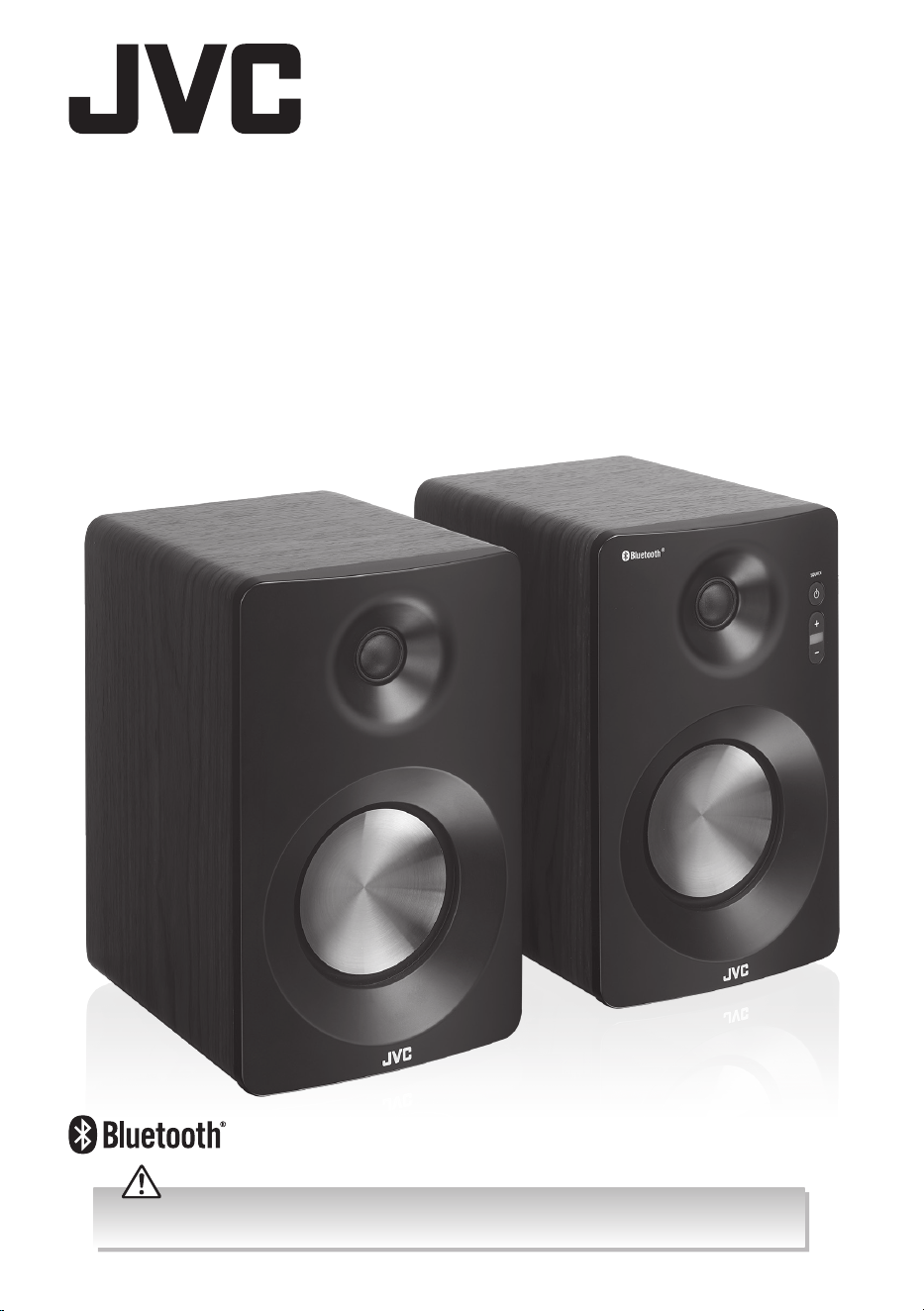
Bookshelf
Speakers
XS-D629BM
Instruction Manual
Before using this appliance, read all safety instructions carefully rst in the Safety Warnings booklet and
keep them for future reference.

1
Safety Warnings
Bluetooth® Speakers
obstruct the ventilation vents.
• A minimum distance of 5 cm around the
unit should be maintained to allow for
sucient ventilation.
• Do not install or place this unit in a
bookcase, built-in cabinet or in another
conned space. Ensure the unit is well
ventilated.
Safety
• Always disconnect the unit from the mains
supply before connecting / disconnecting
other devices or moving the unit.
• Unplug the unit from the mains socket
during a lightning storm.
• In the interests of safety and to avoid
unnecessary energy consumption,
never leave the unit switched on while
unattended for long periods of time, e.g.
overnight, while on holiday or while out of
the house. Switch it o and disconnect the
mains plug from the mains socket.
Mains Cable
• Make sure the unit or unit stand is not
resting on top of the mains cable, as the
weight of the unit may damage the mains
cable and create a safety hazard.
• If the mains cable is damaged it must be
replaced by the manufacturer, its service
agent, or similarly qualied persons in
order to avoid a hazard.
The mains plug is used as disconnect
device, the disconnect device shall
remain readily operable.
Interference
• Do not place the unit on or near appliances
which may cause electromagnetic
interference. If you do, it may adversely
aect the operating performance of the
unit, and cause a distorted picture or
sound.
Batteries
• Batteries used in the unit are easily
swallowed by young children and this is
dangerous.
• Keep loose batteries away from young
children and make sure that the battery
holder tray is secure in the unit. Seek
medical advice if you believe a cell has
been swallowed.
• Please dispose of batteries correctly by
following the guidance in this manual.
• Read all the instructions carefully before
using the unit and keep them for future
reference.
• Retain the manual. If you pass the unit
onto a third party make sure to include this
manual.
• Check that the voltage marked on the
rating label matches your mains voltage.
Damage
• Please inspect the unit for damage after
unpacking.
• Do not continue to operate the unit if you
are in any doubt about it working normally,
or if it is damaged in any way - switch o,
withdraw the mains plug and consult your
dealer.
Location of Unit
• The unit must be placed on a at stable
surface and not subjected to vibrations.
• Do not place the unit on sloped or unstable
surfaces as the unit may fall o or tip over.
• The mains socket must be located near the
unit and should be easily accessible.
• This unit is designed for indoor use only.
Temperature
• Avoid extreme degrees of temperature,
either hot or cold. Place the unit well away
from heat sources such as radiators or gas /
electric res.
• Avoid exposure to direct sunlight and other
sources of heat.
Naked Flames
• Never place any type of candle or naked
ame on the top of or near the unit.
Moisture
• To reduce the risk of re, electric shock or
product damage, do not expose this unit
to rain, moisture, dripping or splashing.
No objects lled with liquids, such as
vases, should be placed on the unit. Do
not operate the unit with wet hands, near
water or other liquid.
• If you spill any liquid into the unit, it can
cause serious damage. Switch it o at the
mains immediately. Withdraw the mains
plug and consult your dealer.
Ventilation
• To prevent the risk of electric shock or
re hazard due to overheating, ensure
that curtains and other materials do not
2
• Do not expose the battery to direct
sunlight or sources of excessive heat.
• Do not ingest the battery - Chemical Burn
Hazard.
• The remote control supplied with this
product contains a coin/button cell battery.
If the coin/button cell battery is swallowed,
it can cause severe internal burns in just 2
hours and can lead to death.
• Keep new and used battery away from
children.
• If the battery compartment does not close
securely, stop using the product and keep
it away from children.
• If you think batteries might have been
swallowed or placed inside any part of the
body, seek immediate medical attention.
Supervision
• Children should be supervised to ensure
that they do not play with the unit and the
remote control.
• Never let anyone especially children push
anything into the holes, slots or any other
openings in the case - this could result in a
fatal electric shock.
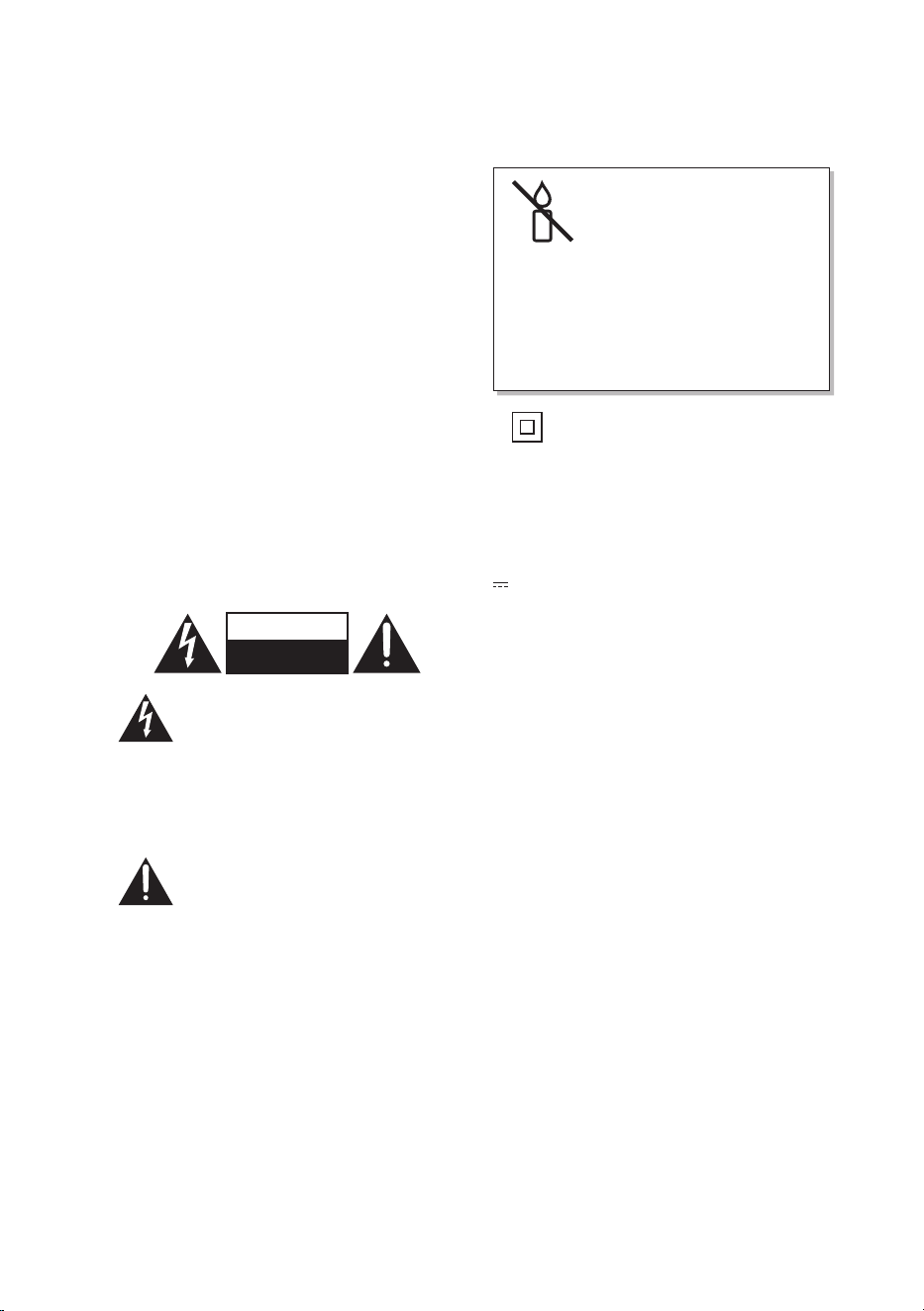
CAUTION
RISK OF ELECTRIC SHOCK
DO NOT OPEN
The lightning ash with arrowhead
symbol, within an
equilateral triangle, is
intended to alert the user to the
presence of uninsulated “dangerous
voltage” within the unit’s enclosure
that may be of sucient magnitude
to constitute a risk of electric shock.
The exclamation point within an
equilateral triangle is
intended to alert the user
to the presence of important
operating and maintenance
(servicing) instructions in the
manual accompanying the unit.
Service
• To reduce the risk of electric shock, do not
remove screws. The unit does not contain
any user-serviceable parts. Please leave all
maintenance work to qualied personnel.
• Do not open any xed covers as this may
expose dangerous voltages.
Maintenance
• Ensure to unplug the unit from the mains
socket before cleaning.
• Do not use any type of abrasive pad or
abrasive cleaning solutions as these may
damage the unit’s surface.
• Do not use liquids to clean the unit.
To prevent the
spread of re, keep
candles or other
open ames away
from this product
at all times.
• This equipment is a Class II or double
insulated electrical appliance. It has
been designed in such a way that it
does not require a safety connection
to electrical earth.
~ AC voltage: This symbol indicates that the
rated voltage marked with the symbol is AC
voltage.
DC voltage: This symbol indicates that the
rated voltage marked with the symbol is DC
voltage.
3
The symbol on the product or its packaging indicates that this product
must not be disposed of with your other household waste. Instead, it is
your responsibility to dispose of your waste equipment by handing it over
to a designated collection point for the recycling of waste electrical and
electronic equipment. The separate collection and recycling of your waste
equipment at the time of disposal will help conserve natural resources and
ensure that it is recycled in a manner that protects human health and the
environment.
For more information about where you can drop o your waste for
recycling, please contact your local authority, or where you purchased your
product.
Notes for battery disposal
The batteries used with this product contain chemicals that are harmful to
the environment. To preserve our environment, dispose of used batteries
according to your local laws or regulations. Do not dispose of batteries with
normal household waste.
For more information, please contact the local authority or your retailer
where you purchased the product.
All trademarks are the property of their respective owners and all rights are acknowledged.
The Bluetooth® word mark and logos are registered trademarks owned by Bluetooth SIG,
Inc. and any use of such marks by Currys Group Limited is under license. Other trademarks
and trade names are those of their respective owners.
Useful Information and Licences
Visit Partmaster.co.uk today for the easiest way to buy electrical
spares and accessories. With over 1 million spares and accessories
available we can deliver direct to your door the very next day. Visit www.partmaster.co.uk or
call 0344 800 3456 (UK customers only). Calls charged at National Rate.

(Safety-JVC Bluetooth Speaker-250110V3)
This product is distributed and warranted exclusively by Currys Group Limited.
“JVC” is the trademark of JVCKENWOOD Corporation,
used by Currys Group Limited under license.
UK Representative and Responsible Person
Currys Group Limited (No. 504877)
1 Portal Way, London, W3 6RS, UK
https://www.currys.co.uk
EU Representative and Responsible Person
Currys Ireland Limited (No. 259460)
3rd Floor Oce Suite, Omni Park SC,
Santry, Dublin 9, Republic of Ireland
https://www.currys.ie
UK & EU Contact details: business.standards@currys.co.uk
Safety Warnings - Coin, Lithium Coin Cell Battery
b) Do not allow children to replace
batteries without adult supervision
c) Do not short-circuit batteries
Always insert batteries correctly with
regard to polarity (+ and -) marked on the
battery and the equipment
When batteries are inserted in reverse they
might be short-circuited or charged. This
can cause overheating, leakage, venting,
rupture, explosion, re and personal injury.
When the positive (+) and negative (–)
terminals of a battery are in electrical
contact with each other, the battery
becomes short-circuited. For example
loose batteries in a pocket with keys or
coins, can be short-circuited. This can
result in venting, leakage, explosion, re
and personal injury.
d) Do not charge batteries
Attempting to charge a non-rechargeable
(primary) battery can cause internal
gas and/or heat generation resulting
in leakage, venting, explosion, re and
personal injury.
e) Do not force discharge batteries
When batteries are force discharged
by means of an external power source,
the voltage of the battery will be forced
below its design capability and gases will
be generated inside the battery. This can
result in leakage, venting, explosion, re
and personal injury.
f) Do not mix new and used batteries or
batteries of dierent types or brands
When replacing batteries, replace all of
them at the same time with new batteries
of the same brand and type. When
batteries of dierent brand or type are
used together or new and used batteries
are used together, some batteries might
be over-discharged / force discharged due
to a dierence of voltage or capacity. This
can result in leakage, venting, explosion or
re, and can cause personal injury.
g) Exhausted batteries should be
immediately removed from equipment
and properly disposed of
• WARNING: This product contains a coin
battery. A coin battery can cause serious
internal chemical burns if swallowed.
• WARNING: Dispose of used batteries
immediately. Keep new and used
batteries away from children. If you
think batteries might have been
swallowed or placed inside any part
of the body, seek immediate medical
attention.
Location of the Lithium coin cell battery
The Lithium coin cell battery is located in the
battery compartment.
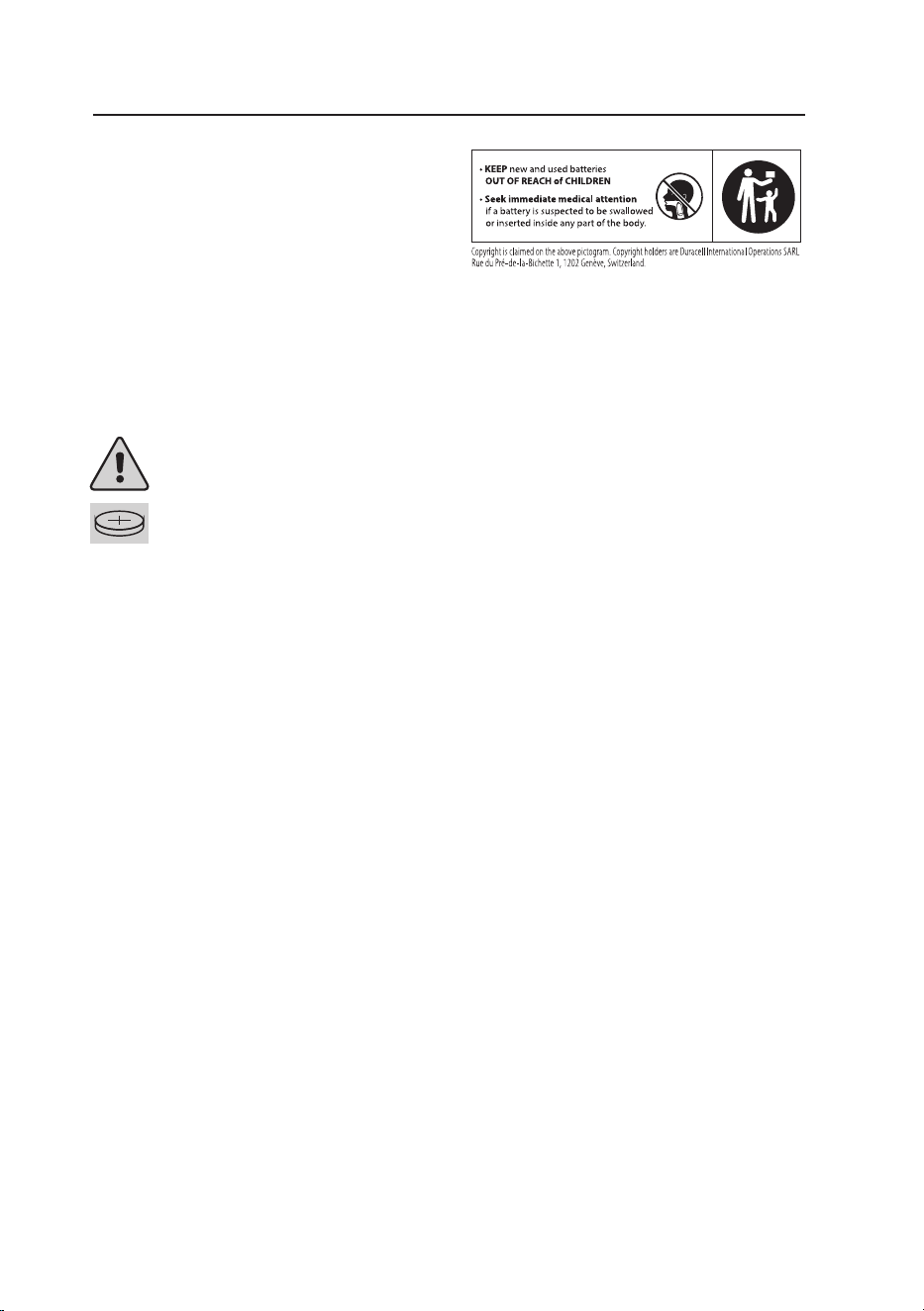
BATTERY WARNING: KEEP OUT OF REACH OF CHILDREN
If the battery compartment does not close securely,
stop using the product and keep it away from children.
If you think batteries might have been swallowed or
placed inside any part of the body, seek immediate
medical attention.
Precautions during handling of batteries
When used correctly, lithium batteries
provide a safe and dependable source of
power. However, if they are misused or
abused, leakage, venting or in extreme cases,
explosion and/or re can result.
a) Keep new and used batteries out of the
reach of children
If a battery has been ingested, or there is a
possibility one might have been ingested,
please seek medical attention and inform
the medical authorities that you suspect
battery ingestion.
It’s not always clear when a child has
swallowed a button battery, as there are
no specic symptoms. However, they
might:
• cough, gag, or drool;
• seem to have a stomach bug or virus;
• vomit;
• complain of pain in their stomach,
chest, or throat;
• appear tired or sluggish; and
• lose their appetite.
Since the signs aren’t obvious, it’s
important to keep a close eye on loose,
used, or spare button batteries in your
home, as well as the products that contain
them.

When discharged batteries are kept in
the equipment for a long time, electrolyte
leakage can occur causing damage to the
equipment and/or personal injury.
h) Do not heat batteries
When a battery is exposed to heat,
leakage, venting, explosion or re can
occur and cause personal injury.
i) Do not weld or solder directly to
batteries
The heat from welding or soldering
directly to a battery can cause leakage,
venting, explosion or re, and can cause
personal injury.
j) Do not dismantle batteries
When a battery is dismantled or taken
apart, contact with the components can
be harmful and can cause personal injury
or re.
k) Do not deform batteries
Batteries should not be crushed,
punctured, or otherwise mutilated.
Such abuse can cause leakage, venting,
explosion or re, and can cause personal
injury.
l) Do not dispose of batteries in re
When batteries are disposed of in re, the
heat build-up can cause explosion and/or
re and personal injury. Do not incinerate
batteries except for approved disposal in a
controlled incinerator.
m) A lithium battery with a damaged
container should not be exposed to
water
Lithium metal in contact with water can
produce hydrogen gas, re, explosion and/
or cause personal injury.
n) Do not encapsulate and/or modify
batteries
Encapsulation or any other modication
to a battery can result in blockage of
the pressure relief mechanism(s) and
subsequent explosion and personal injury.
Advice from the battery manufacturer
should be sought if it is considered
necessary to make any modication.
o) Store unused batteries in their original
packaging away from metal objects. If
already unpacked, do not mix or jumble
batteries
Unpacked batteries could get jumbled or
get mixed with metal objects such as keys,
coins, etc. This can cause battery short-
circuiting which can result in leakage,
venting, explosion or re, and personal
injury. One of the best ways to prevent
this from happening is to store unused
batteries in their original packaging.
p) Remove batteries from equipment if
it is not to be used for an extended
period of time unless it is for emergency
purposes
It is advantageous to remove batteries
immediately from equipment which has
ceased to function satisfactorily, or when
a long period of disuse is anticipated (e.g.
camcorders, digital cameras, photoash,
etc.). Although most lithium batteries
on the market today are highly leak
resistant, a battery that has been partially
or completely exhausted might be more
prone to leak than one that is unused.
q) If the battery compartment does not
close securely, stop using the product
and keep it away from children.
Storage
a) Store batteries in well ventilated, dry
and cool conditions
High temperature or high humidity
can cause deterioration of the battery
performance and/or surface corrosion.
b) Avoid storing or displaying batteries in
direct sun or in places where they get
exposed to rain
When batteries get wet, their insulation
resistance might be impaired and self-
discharge and corrosion can occur. Heat
can cause deterioration.
c) When batteries are unpacked and
mixed they can be short-circuited or
damaged.
Disposal
a) Do not dismantle batteries
Some ingredients of lithium batteries
might be ammable or harmful. They can
cause injuries, re, rupture or explosion.
b) Do not dispose of batteries in re
except under conditions of approved
and controlled incineration
Lithium burns violently. Lithium batteries
can explode in a re. Combustion
products from lithium batteries can be
toxic and corrosive.
c) Store collected batteries in a clean and
dry environment out of direct sunlight
and away from extreme heat
Dirt and wetness might cause short-
circuits and heat. Heat might cause
leakage of ammable gas. This can result
in re, rupture or explosion.
d) Store collected batteries in a well-
ventilated area

Used batteries might contain a residual
charge. If they are short-circuited,
abnormally charged or force discharged,
leakage of ammable gas might be
caused. This can result in re, rupture or
explosion.
e) Do not mix collected batteries with
other materials
Used batteries might contain residual
charge. If they are short-circuited,
abnormally charged or force discharged,
the generated heat can ignite ammable
wastes such as oily rags, paper or wood
and cause a re.
f) Protect battery terminals
Protection of terminals should be
considered by providing insulation,
particularly for those batteries with a high
voltage. Unprotected terminals might
cause short-circuits, abnormal charging
and forced discharge. This can result in
leakage, re, rupture or explosion.
Instructions for use
a) Always select the correct size and type of
battery most suitable for the intended use.
Information provided with the equipment
to assist correct battery selection should
be retained for reference.
b) Replace all batteries of a set at the same
time.
c) Clean the battery contacts and also
those of the equipment prior to battery
installation.
d) Ensure that the batteries are installed
correctly with regard to polarity (+ and –).
e) Remove exhausted batteries promptly.

IB safety-Lithium Coin Cell Battery-UK-250910V3

Contents
Safety Warnings ..........................................................................Safety Warnings booklet
Unpacking .............................................................................................................................3
Product Overview ................................................................................................................4
Main Unit ......................................................................................................................................................... 4
Remote Control ............................................................................................................................................5
Preparation ...........................................................................................................................6
First-time use of Remote Control ........................................................................................................... 6
Battery Replacement for the Remote Control ..................................................................................6
Remote Control Operation Range .........................................................................................................7
Connections ..........................................................................................................................7
Connecting the Speakers ..........................................................................................................................7
AUX Connection ...........................................................................................................................................8
Connecting a USB device ..........................................................................................................................9
Charging from the USB CHARGING Port .............................................................................................9
Connecting to the Mains Supply ........................................................................................................ 10
General Operation .............................................................................................................11
Standby / ON ...............................................................................................................................................11
Auto Standby ............................................................................................................................................... 11
Selecting Modes .........................................................................................................................................11
Adjusting the Speaker Level Settings and Eects ......................................................................... 11
AUX IN Operation ............................................................................................................... 11
Bluetooth® Operation ........................................................................................................12
Listen to Music from Bluetooth Device .............................................................................................12
USB Operation ....................................................................................................................13
Maintenance .......................................................................................................................13
Hints and Tips .....................................................................................................................13
Product Fiche and Specifications .....................................................................................14
3
Unpacking
Remove all items from the packaging. Retain the packaging. If you dispose of it please do so
according to local regulations.
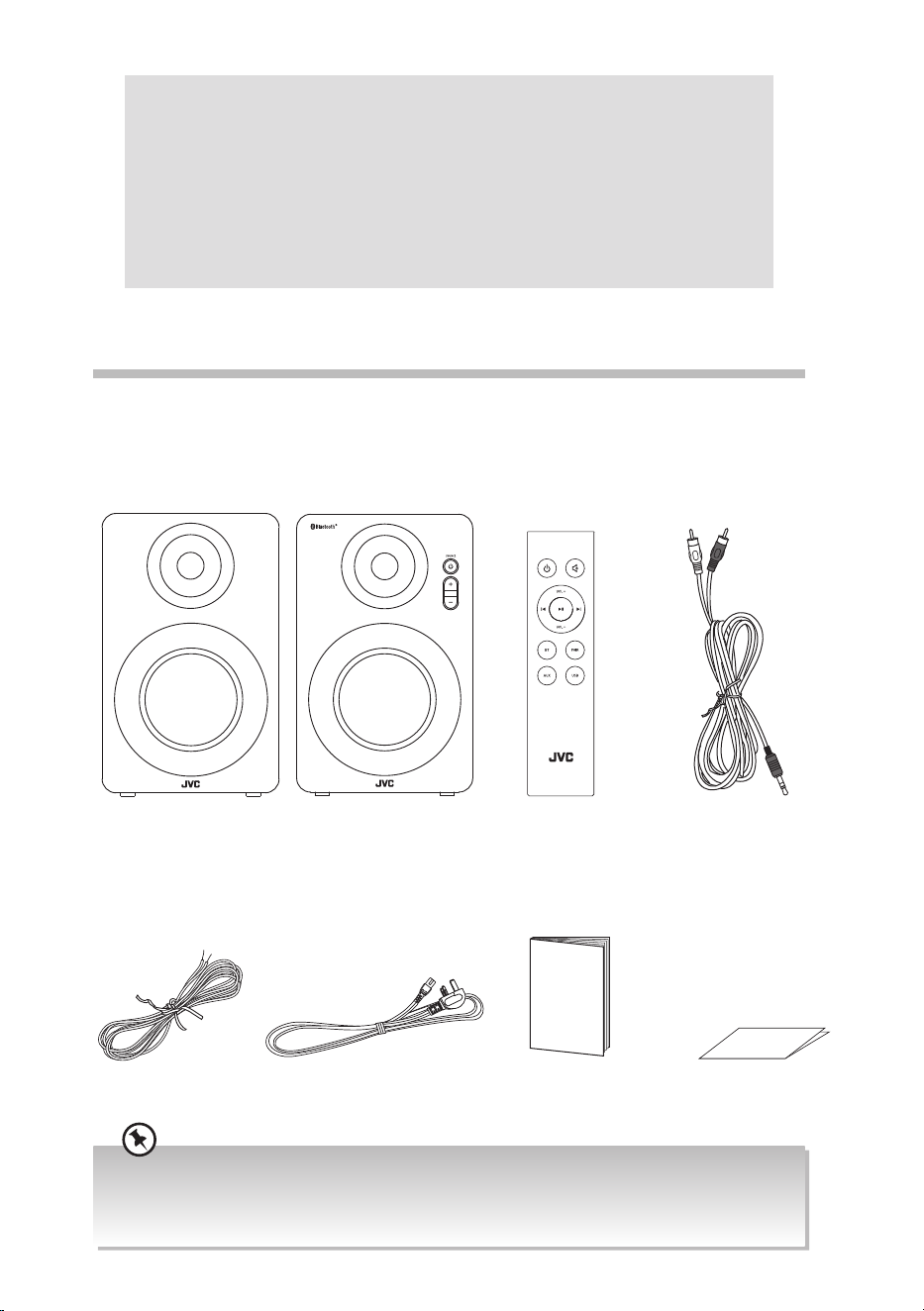
The following items are included:
Main Unit Remote Control
(Battery included)
Speaker cable Mains cable
RCA to 3.5 mm
stereo audio cable
Instruction Manual Quick Start Guide
Instruction
Manual
Thank you for purchasing your new product.
We recommend that you spend some time reading this instruction manual
in order that you fully understand all the operational features it oers. You
will also nd some hints and tips to help you resolve any issues.
Read all the safety instructions carefully before use and keep this
instruction manual for future reference.
• If items are missing, or damaged please contact Partmaster (UK only). Tel: 0344 800 3456 for assistance.
• If you require additional assistance:
For UK, please call our UK Call Centre on 0344 561 1234.
For Ireland, please call our Ireland Call Centre on 0818 810575.
Quick Start Guide
4
Product Overview
Main Unit
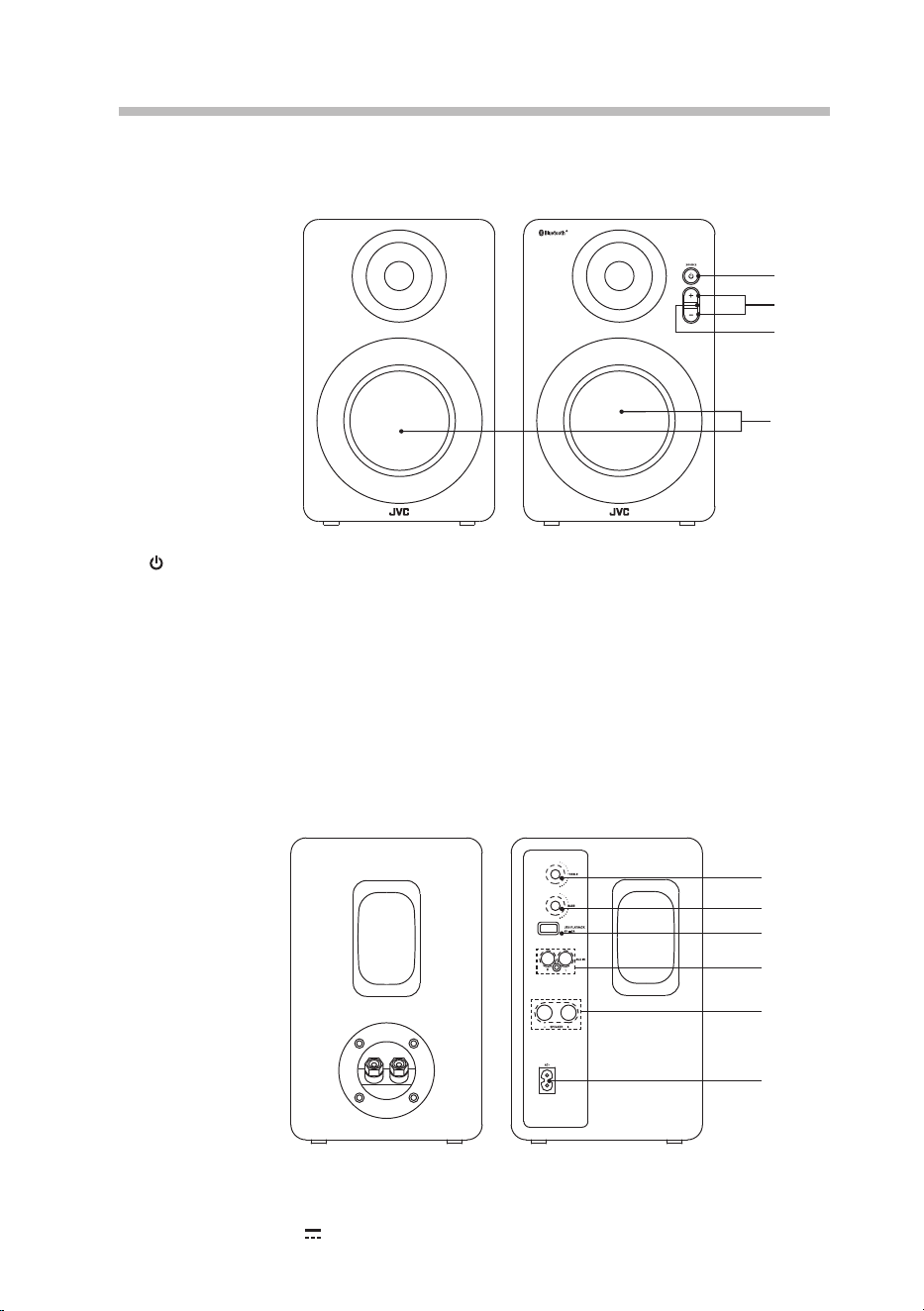
Front View (right speaker)
1. SOURCE Button
• Press to switch on the unit.
• Press and hold to switch o the unit.
• In Standby mode: Light up red
• In AUX IN mode: Light up green
• In BT mode: Light up blue
• In USB mode: Light up yellow
• The status indicator ashes quickly
while adjust volume/bass/treble level.
1
1
2
3
4
5
6
2
4
3
Rear View
1. TREBLE Dial
2. BASS Dial
3. USB PLAYBACK 5V
2.0A Socket
– +
2. +/– Button
• Press to increase/decrease volume
level.
• In BT mode, press both +/– buttons to
clear all pairing settings.
3. Remote Control Sensor
4. Speakers
4. AUX IN L/R Sockets
5. –SPEAKER+ Sockets
6. AC~ Socket
5
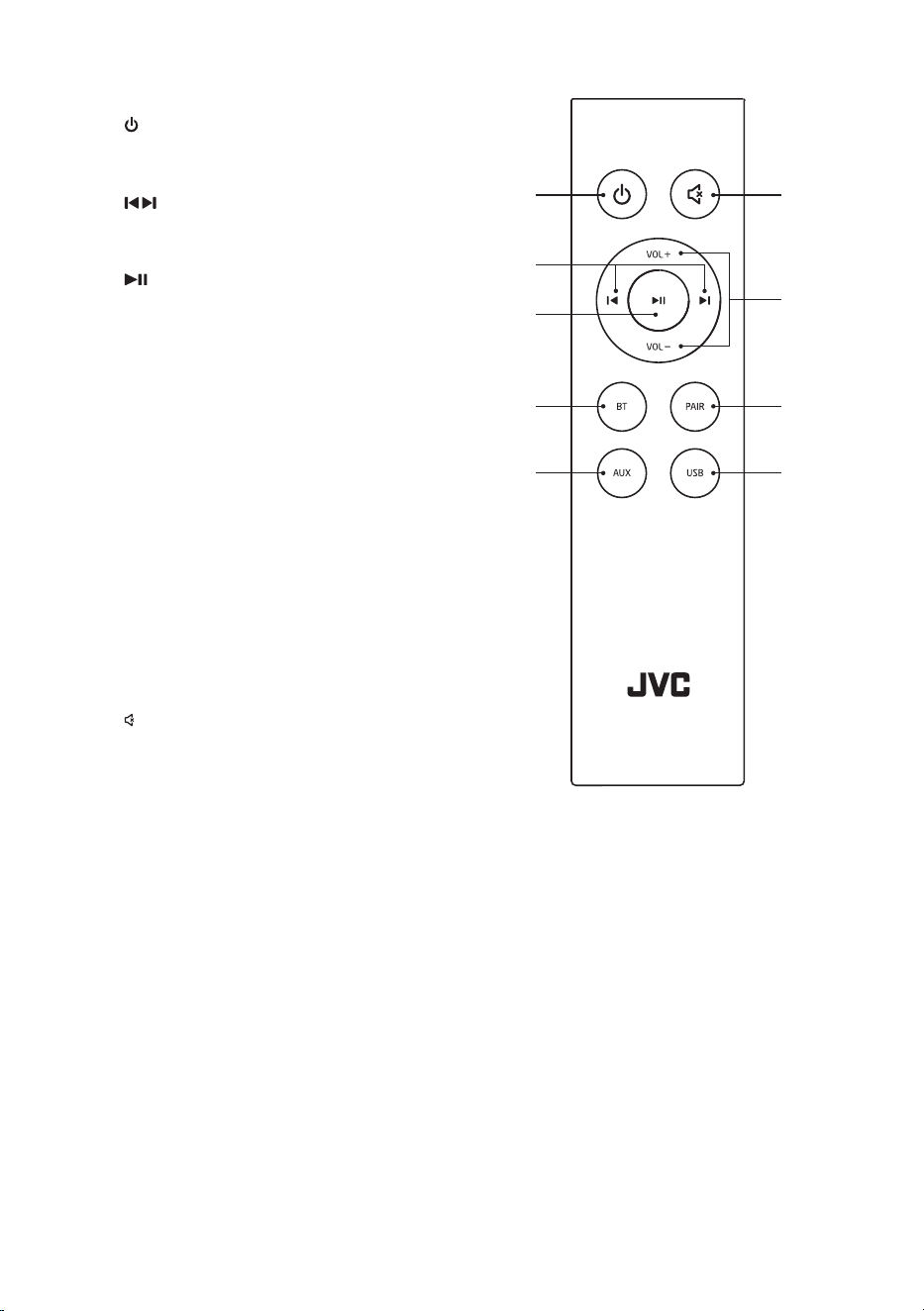
1. Button
Switch the unit between On and
Standby mode.
2.
Button
Skip to previous/next track in BT/
USB mode.
3.
Button
Play / pause / resume playback in BT/
USB mode.
4. BT Button
Switch to BT mode.
5. AUX Button
Press to switch to AUX IN mode.
6. USB Button
Press to switch to USB mode.
7. PAIR Button
• Press to activate the pairing
function in BT mode.
• Press to disconnect the existing the
paired Bluetooth device.
8. VOL +/– Buttons
Press to increase/decrease the
volume level.
9.
MUTE Button
Mute the unit or resume the sound.
Remote Control
1
2
4
3
5 6
7
9
8
6
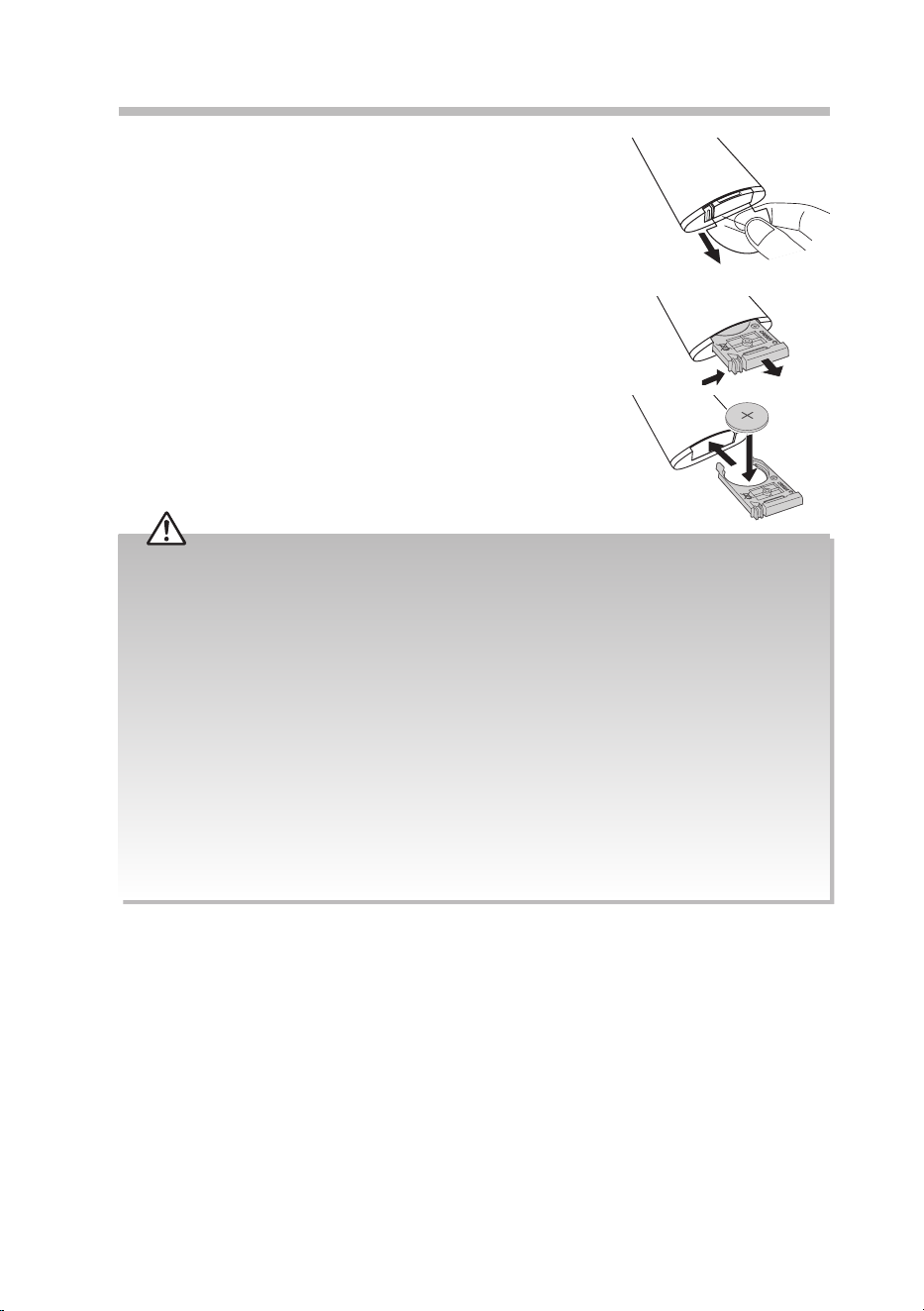
2. Replace with a new CR2025 battery.
3. Slide the tray back into the remote control.
There will be a click once it is back in place.
Handling the Battery
• Improper or incorrect use of batteries may cause corrosion or battery leakage, which could cause re,
personal injury or damage to property.
• Only use the battery type indicated in this manual.
• Do not install new batteries with used ones and do not mix dierent types of batteries.
• Do not dispose of used batteries as domestic waste. Dispose of them in accordance with local
regulations.
Handling the Remote Control
• Do not drop the remote control.
• Do not allow anything to impact the remote control.
• Do not spill water or any liquid on the remote control.
• Do not place the remote control on a wet object.
• Do not place the remote control under direct sunlight or near sources of excessive heat.
• Remove the battery from the remote control when not in use for a long period of time, as corrosion or
battery leakage may occur and result in physical injury, and / or property damage, and / or re.
• When the battery is exhausted, the remote control will not function.
Preparation
First-time Use of Remote Control
The unit has a pre-installed lithium CR2025 battery.
Remove the protective tab to activate the remote control
battery.
Battery Replacement for the Remote
Control
1. Gently push the tab of the battery tray in and
slide it free from the remote control.
7
Remote Control Operation Range
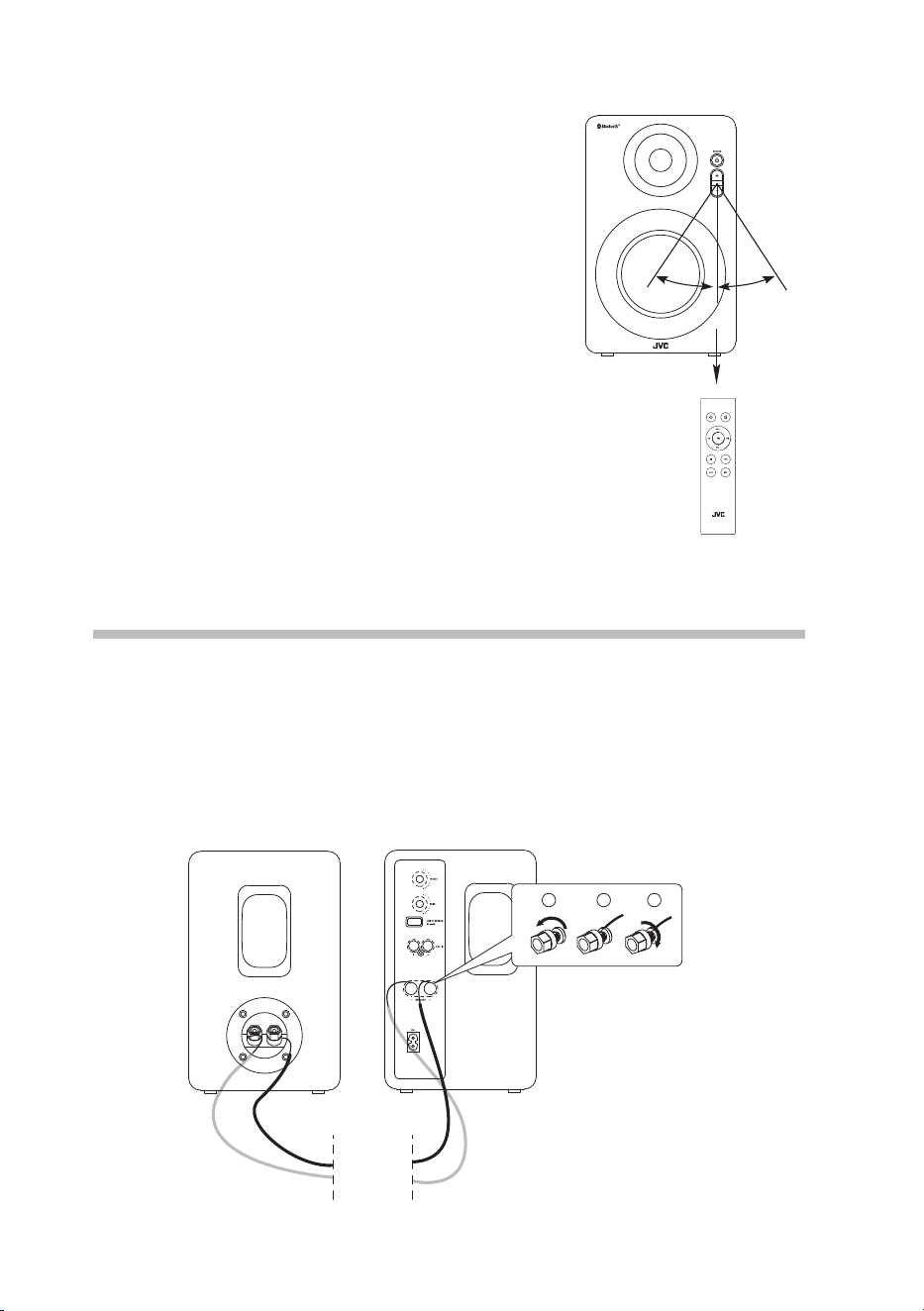
• The remote control sensor on the front unit is sensitive
to the remote control’s commands up to a maximum of 6
metres away and within a maximum of a 60° arc.
• Please note that the operating distance may
vary depending on the brightness of the room.
30°
30°
Max. 6 m
Front View of the right speaker
Connection
Connecting the Speakers
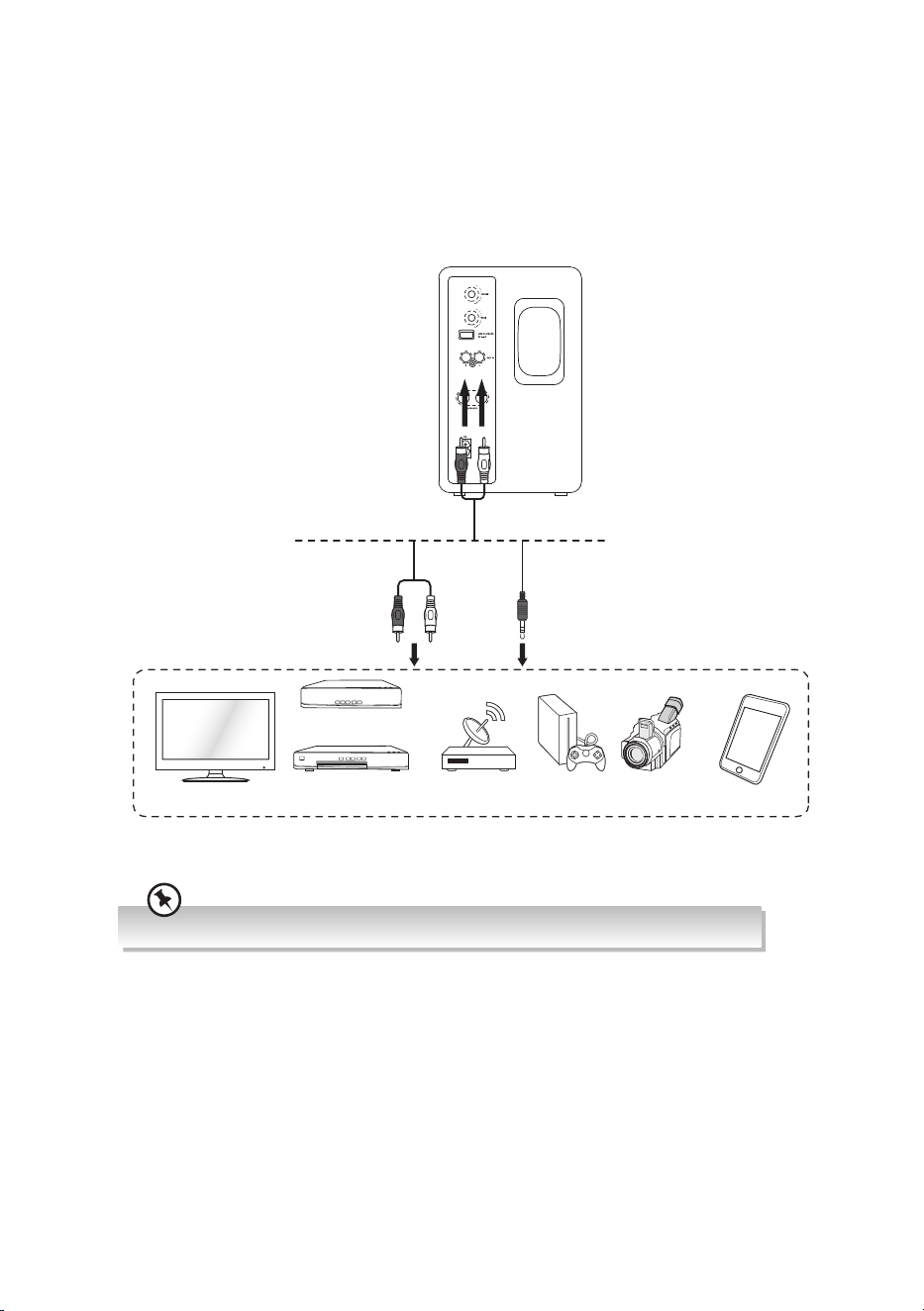
Connect the speakers (L & R) with the speaker cable. Make sure that the red/black cable
is connected to the + socket and the silver cable is connected to the – socket of both
speakers.
– +
1 2 3
Rear view of the Right SpeakerRear view of the Left Speaker
8
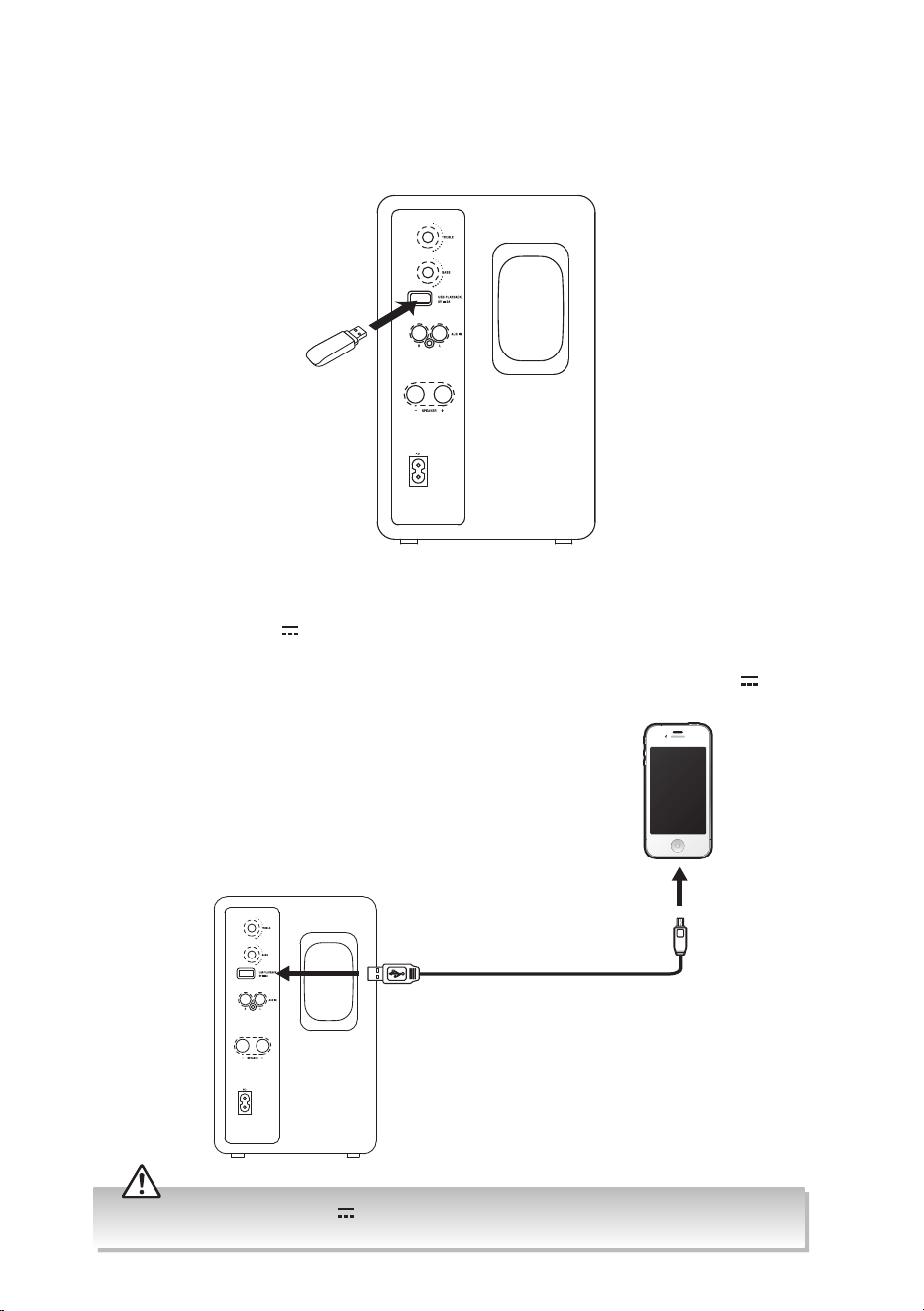
Ensure to match the colour on the cable plugs to the colour on the input and output sockets.
Blu-ray Player / DVD
Player / Recorder
Set-top Box
Satellite
Receiver
Game
Console
Video
Camera
Mobile device
OR
RCA to 3.5 mm Stereo
Audio Cable (included)
RCA Stereo Audio Cable
(not included)
AUX Connection
Use an 3.5 mm to RCA Stereo Audio Cable (included) / RCA to RCA Stereo Audio Cable (not
included) to connect the AUX IN socket to the AUDIO OUT sockets of the external device.
After connection, press on the remote control to select to play audio from your input
device.
Rear View of the Right Speaker
TV
9
Connecting a USB device
When a USB device is connected to the unit, press SOURCE button repeatedly on the unit
or press USB button on the remote control to select USB mode.
Charging from the USB CHARGING Port
The USB PLAYBACK 5V 2.0A port is designed only for charging mobile devices (e.g. MP3
player, mobile phone, etc). It supplies 5V DC at a charging current of up to 2000mA (2.0A).
Use a USB cable (not included) to connect mobile device to the USB PLAYBACK 5V
2.0A
port of the unit and the mobile device will start charging.
Rear View of the Speaker (R)
Rear View of the Speaker (R)
ONLY use the USB PLAYBACK 5V 2.0A port to charge small mobile devices. NEVER use this port for
any other purpose.
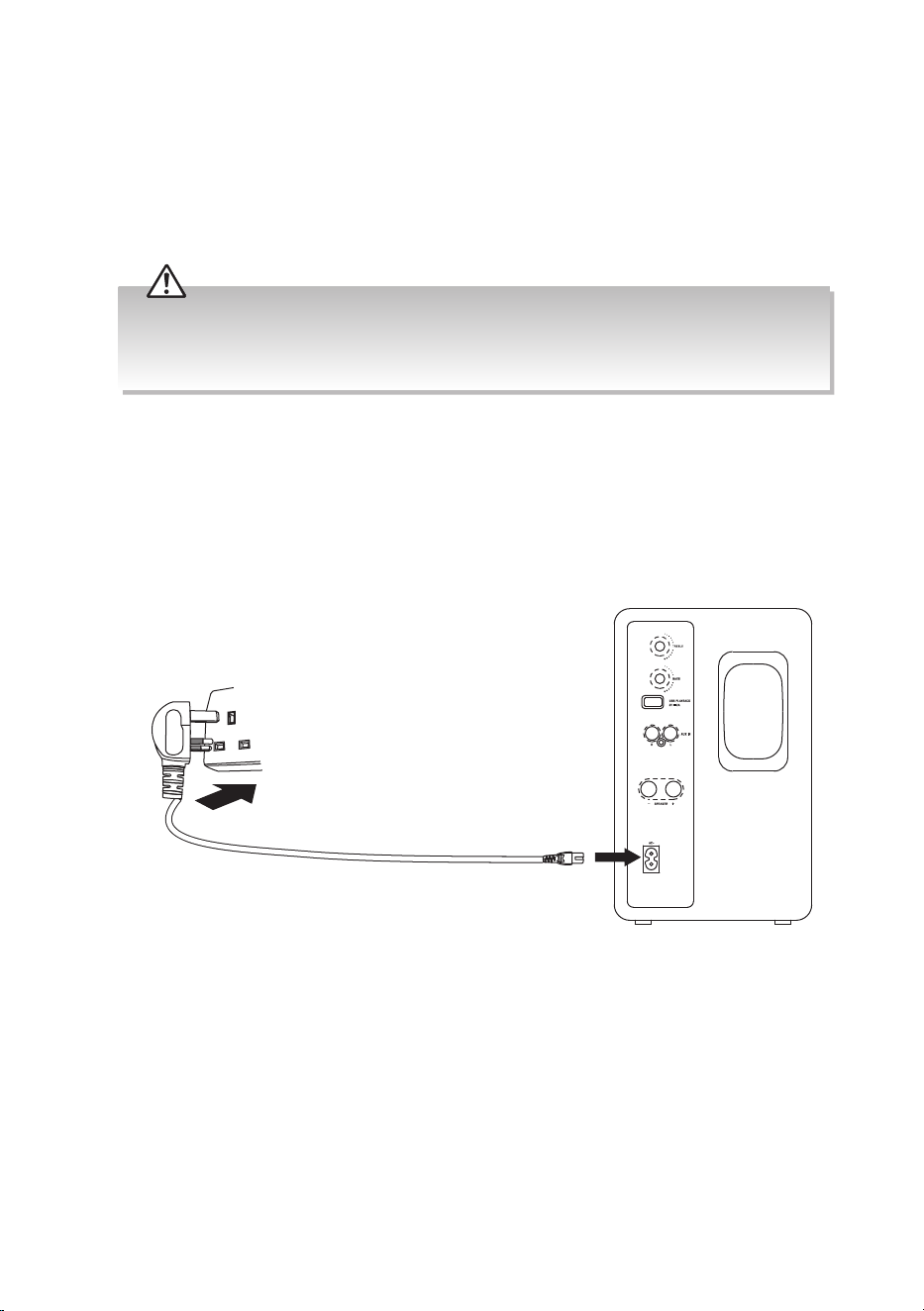
10
Connecting to the Mains Supply
• This unit is designed to operate with an AC power supply.
• Connecting the unit to any other power source may cause damage to the unit. Unwind
the mains cable to its full length. Connect the mains plug to a mains socket. Make sure
the mains plug is fully inserted into the mains socket. The unit is now connected and
ready to use.
• To switch the unit o completely, unplug the mains plug from the mains socket.
• Ensure all audio connections of the unit are connected before connecting to the mains power socket.
• Please turn the unit o completely to save energy when not in use.
• The mains cable is designed for this JVC speaker only. DO NOT use the mains cable for other purposes.
To the
mains socket
Rear View of the Speaker (R)

11
General Operation
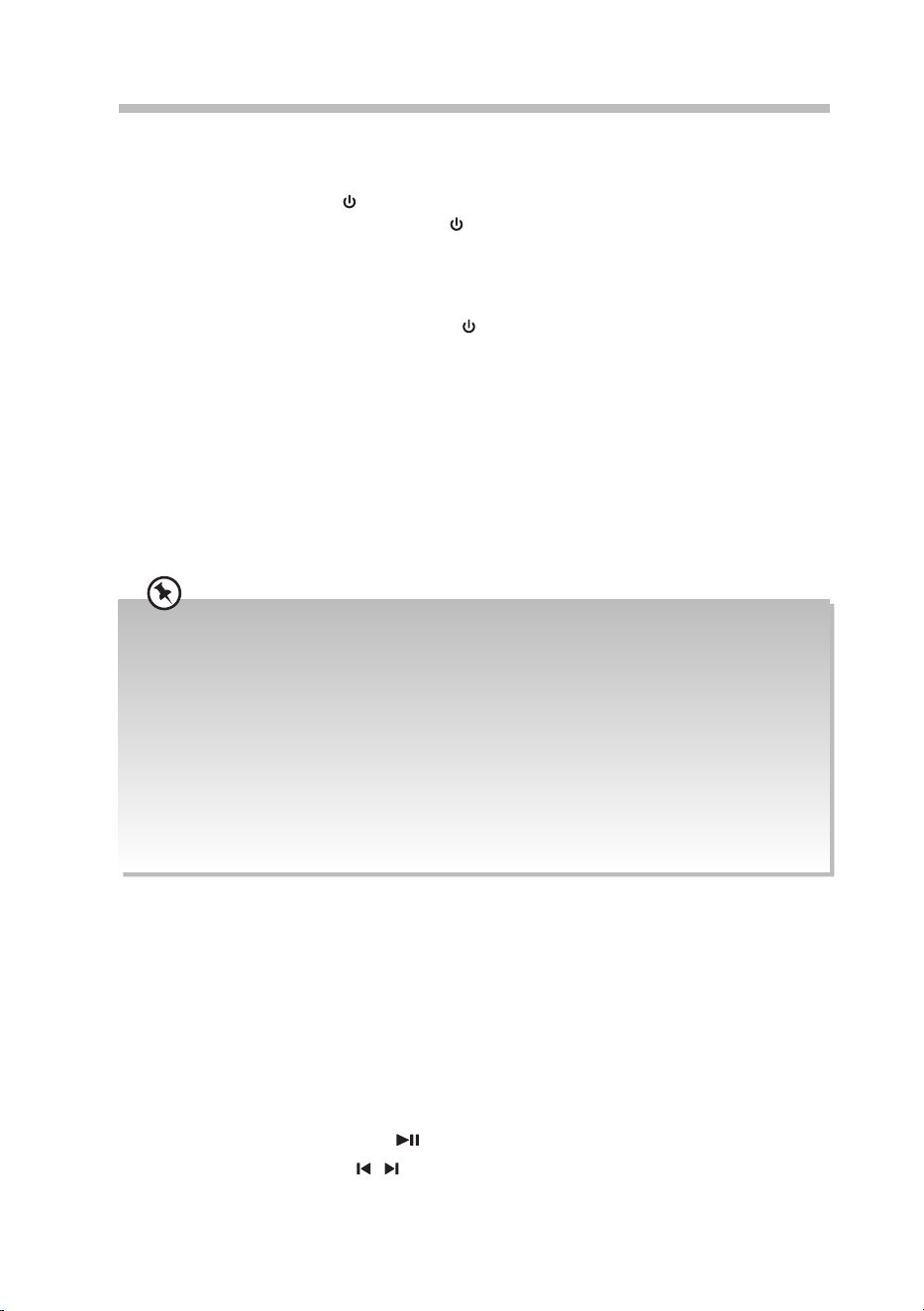
Standby / ON
When you rst connect the unit to the mains socket, the unit will be in Standby mode. The
SOURCE button will light up red.
To switch on the unit,
• Press
SOURCE button on the unit, or button on the remote control.
To switch o the unit,
• Press and hold
SOURCE button on the unit.
• Press
button on the remote control.
The
SOURCE button will light up red. Disconnect the mains plug from the mains socket if
you want to switch the unit o completely.
The status indicator of the last used mode will light up after the unit is switched on.
Auto Standby
When there is no input signal (or weak input signal) for over 15 minutes, the unit will
automatically switch to Standby mode.
Selecting Modes
Press SOURCE button repeatedly on the unit, or BT/AUX/USB button on the remote
control to switch between BT/AUX IN/USB mode.
Adjusting the Speaker Level Settings and Eects
Adjusting the Volume
• Press +/– on the unit or VOL+/VOL– on the remote control to increase/decrease the
volume.
• If you wish to turn the sound o, press
on the remote control. Press again, or press
+/– on the unit or VOL+/VOL– on the remote control to resume normal listening.
Adjusting the Bass Volume Level
Turn BASS knob clockwise/anti-clockwise to adjust the bass level.
Adjusting the Treble Volume Level
Turn TREBLE knob clockwise/anti-clockwise to adjust the treble level.
AUX IN Operation
1. Before connecting to the mains socket, ensure all the connections are completed.
2. While in On mode, press
SOURCE button repeatedly on the unit, or AUX button on
the remote control to select AUX IN mode.
3. Operate your audio device directly for playback features.
12
Bluetooth® Operation
Pairing the unit with a Bluetooth® device to listen to music:
First time pairing
1. While in On mode, press
SOURCE button repeatedly on the unit, or BT button on the
remote control to select BT mode. The SOURCE button will ash in blue.
2. Activate your Bluetooth® device and select the search mode. “XS-D629BM” will appear
on your Bluetooth® device list.
3. Select “XS-D629BM” and enter “0000” for the password if necessary. After pairing, your
will hear “Paired“ from the unit, and the
SOURCE button will light up in blue.
If your Bluetooth® device supports A2DP, play music via your device.
To disconnect the Bluetooth® function,
• Switch to another function on the unit;
• Disable the function from your Bluetooth® device. You will hear “Disconnected“ from
the unit.
• You may also press and hold +/– button on the unit or PAIR button on the remote
control for about 2 seconds to clear all pairing settings. You will hear “Pairing“ from the
unit. The LED indicator will ash in blue, and the unit is now ready for pairing. Follow
step 2-3 in “First time pairing“ above to pair your Bluetooth® device.
• The operational range between the unit and the device is approximately 8 metres.
• Before connecting a Bluetooth® device to the unit, ensure you know the device’s capabilities.
• Compatibility with all Bluetooth® devices is not guaranteed.
• If no other Bluetooth device pairs with this player within two minutes, the player will recover its
previous connection.
• The player will also be disconnected when your device is moved beyond the operational range.
• Any obstacle between the device and the unit can reduce operational range.
• If you want to reconnect your device to this player, place it within the operational range.
• If the device is moved beyond the operational range, when it is brought back, please check if the
device is still connected to the player
• Keep this player away from other electronic devices that may cause interference.
• The player will also be disconnected when your device is moved beyond the operational range.
Listen to Music from Bluetooth Device
• If the connected Bluetooth device supports Advanced Audio Distribution Prole
(A2DP), you can listen to the music stored on the device through the player.
• If the device also supports Audio Video Remote Control Prole (AVRCP), you can use the
player’s remote control to play music stored on the device.
1. Pair your device with the player.
2. Play music via your device (if it supports A2DP)
3. Use supplied remote control to control play (if it supports AVRCP)
• To pause/resume play, press
button.
• To skip to a track, press
/ button.
13
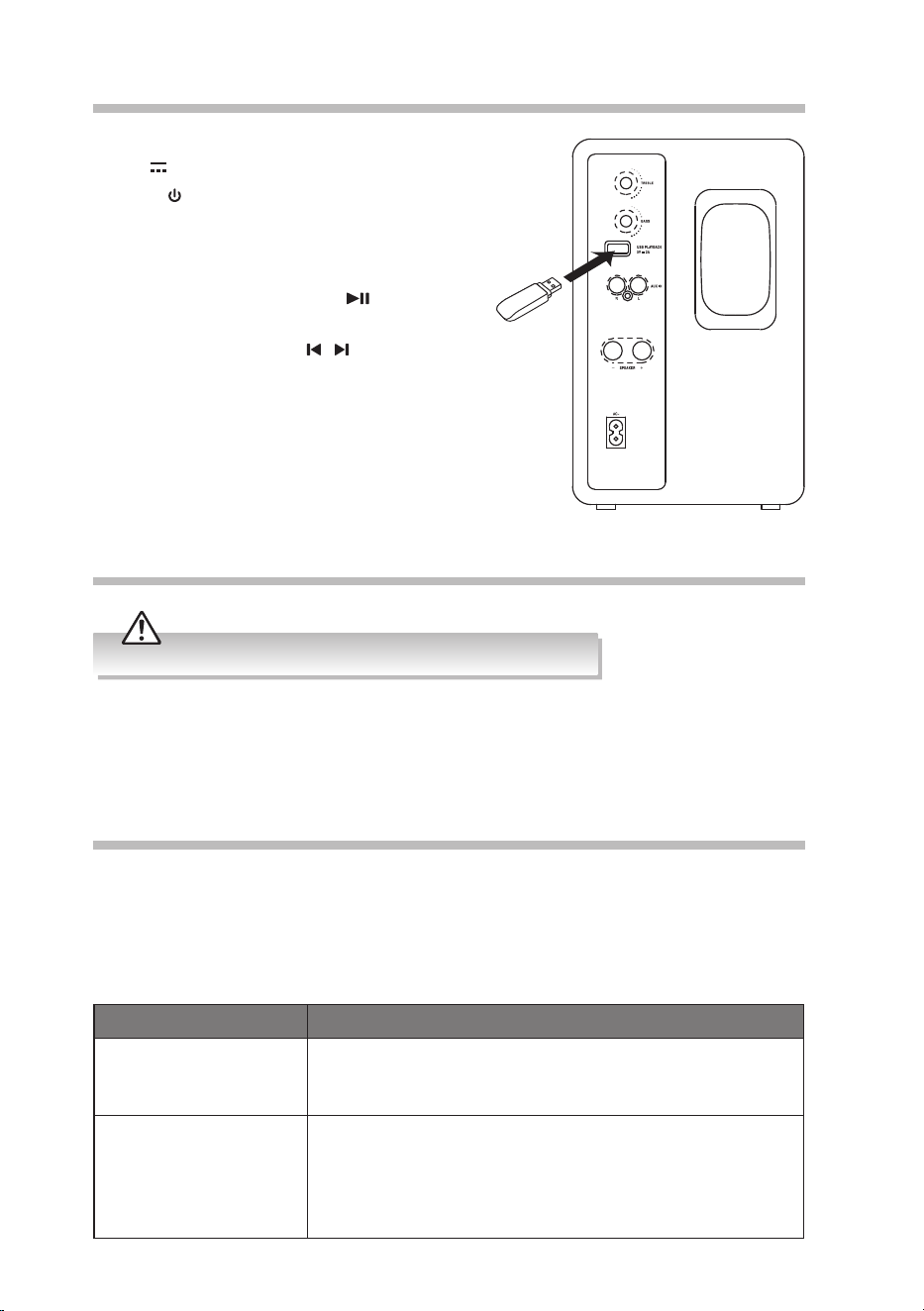
USB Operation
1. Insert the USB device to the USB PLAYBACK
5V 2.0A socket on the unit.
2. Press
SOURCE button repeatedly on the unit
or press the USB button on the remote control
to switch to USB mode.
3. The unit will play music automatically.
• To pause/resume play, press
button on the
remote control.
• To skip to a track, press
/ buttons on the
remote control.
Maintenance
Ensure the unit is fully unplugged from the mains socket before cleaning.
• To clean the units, wipe the case with a slightly moist, lint-free cloth.
• Do not use any cleaning uids containing alcohol, ammonia or abrasives.
• Do not spray aerosol at or near the unit.
Hints and Tips
If a problem does occur, it may often be due to something very minor. The following table
contains various tips. If you require additional assistance please click on the link for Support
Centre:
• For UK, please call our UK Call Centre on 0344 561 1234.
• For Ireland, please call our Ireland Call Centre on 0818 810575.
Problem Solution
No power. • Make sure that the mains plug is connected.
• Make sure that there is a power at the mains socket.
• Make sure that you select the On mode.
The remote control does
not function.
• Use the remote control near the unit.
• Point the remote control at the remote sensor on the unit.
• Replace the battery in the remote control with a new one.
• Remove any obstacles between the remote control and
the unit.
14
Product Fiche and Specifications
Brand
JVC
Model
XS-D629BM
Power Supply Input
AC220-240V~ 50-60Hz
Power Consumption
35 W
Standby Power Consumption
0.45 W
Output Power
2 × 30 W rms
Frequency Response
50 Hz - 20 KHz
USB (Charging) 5 V
2.0 A
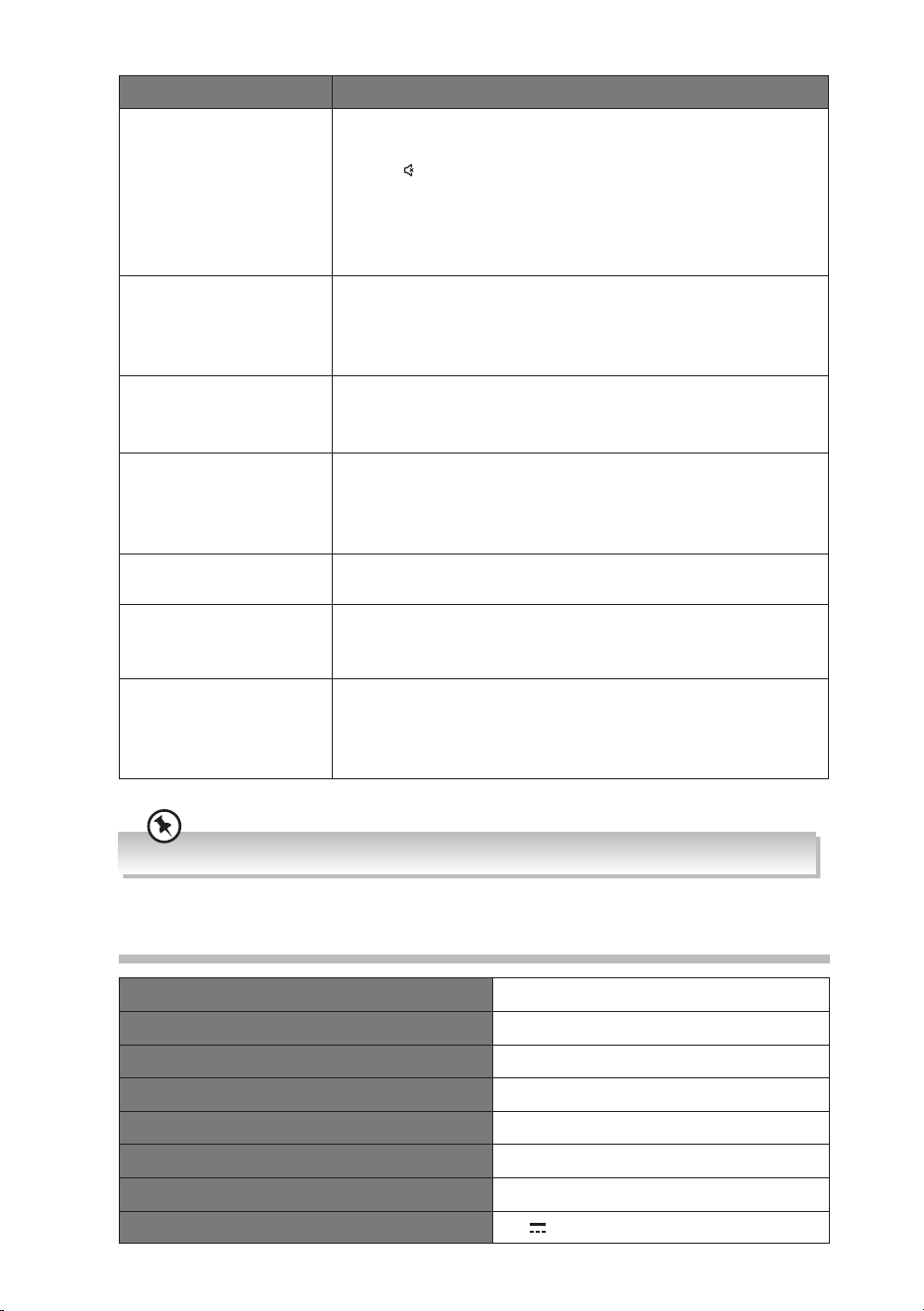
Problem Solution
No sound. • Press + on the unit or VOL+ on the remote control to
increase the volume.
• Press
button on the remote control to ensure the unit is
not muted.
• Select a dierent input source.
• If using BT mode, ensure that the volume on your source
device is turned up and that the device is not muted.
The unit switches back
to Standby mode
automatically.
• When the unit’s external input signal level is too low, or
is idle for approximately 15 minutes, it will automatically
switch to Standby mode for power saving. Please increase
the volume level of your external device.
The unit does not
respond when pressing
any buttons.
• The unit may freeze up during use. Switch the unit o and
then on again at the mains socket to reset the unit.
I cannot nd
“XS-D629BM” on my
Bluetooth® device.
• Ensure the Bluetooth® function is activated on your
Bluetooth® device.
• Ensure you have paired your unit with the Bluetooth®
device.
Unable to insert USB
device or memory Card
• Insert the USB device or memory card the other way
round.
Cannot play some les
from USB device or
memory Card
• Check the le format.
• Only MP3 le formats are supported.
USB port not charging • Make sure the allowable charging current of the mobile
device is compatible with the unit’s charging current
(2000 mA or 2.0 A). Otherwise, use the mobile device’s
own charging adapter for charging.
If any anomaly is encountered, unplug the mains cable from the mains socket and reconnect it again.
15
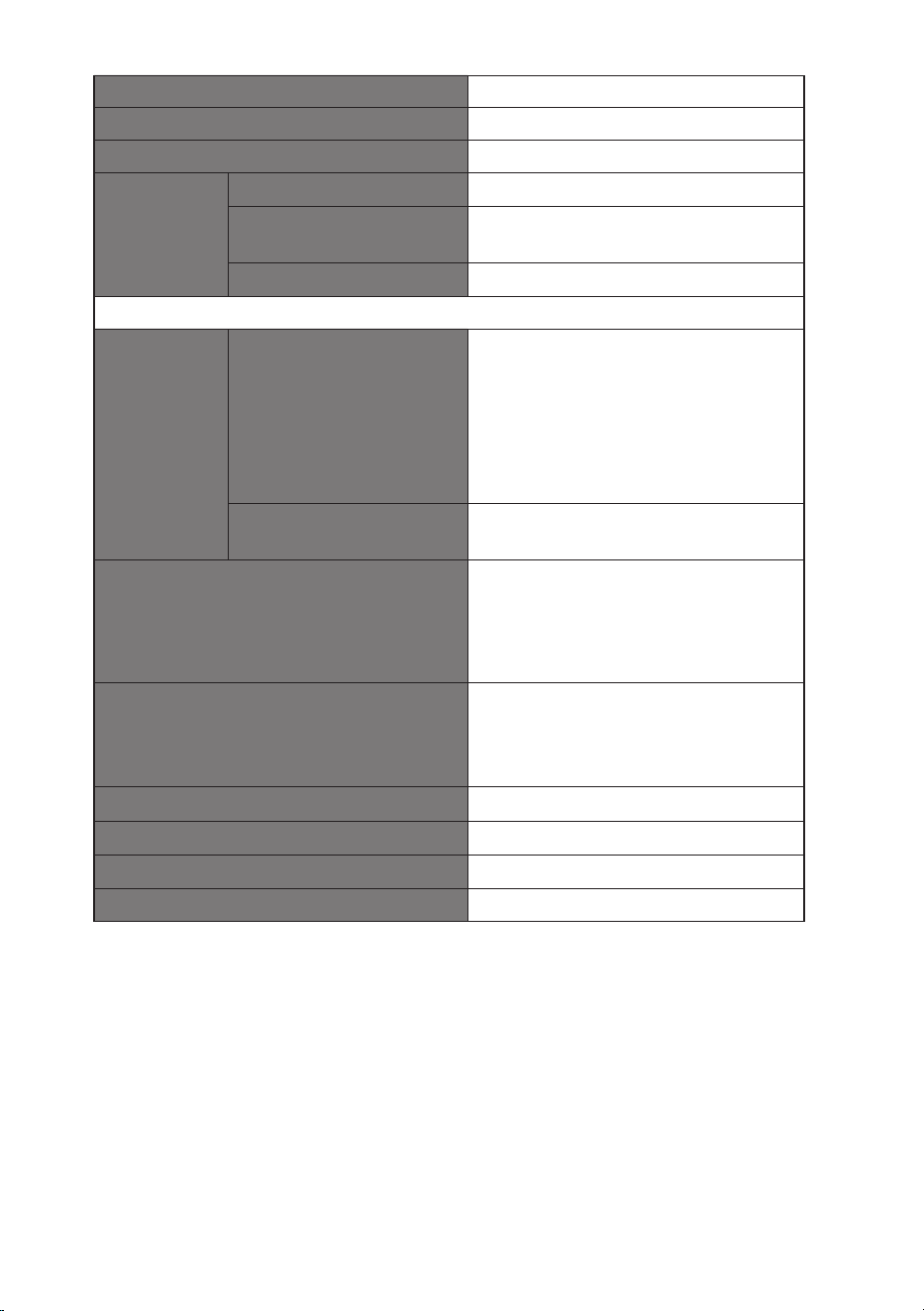
Total harmonic distortion 1% (1 kHz, 1 W)
Audio input sensitivity 700 mV
Impedance 8 Ω
Bluetooth® Version
V4.2
Maximum power
transmitted
5 dBm
Frequency bands
2402 MHz ~ 2480 MHz
Ecodesign Information
Information
on Power
Consumption
Power consumption
of another low power
consumption condition
when the unit is
operating at standby
mode with USB port
power supply.
0.45W
Network Standby Power
Consumption
N/A
Time interval for Power management
function switches the unit automatically
into standby mode
The unit should switch to another
condition (when the unit is operating at
standby mode with USB power supply)
automatically when not providing main
functions for 15 minutes.
Power consumption in network standby
if all wired network ports are connected
and all wireless network ports are
activated
N/A
How to activate wireless network port No wireless network port
How to deactivate wireless network port No wireless network port
Net Weight
4.55 kg
Dimension
152 mm (W) × 243 mm (H) × 215 mm (D)
Features and specications are subject to change without prior notice.
For the latest version of the Safety and Instruction Manual, please visit the ocial
website below (other websites may not contain the full and most updated version):
https://www.currys.co.uk/services/repairs-maintenance/product-service-manuals.html

(IB-XS-D629BM-250325V5)
This product is distributed and warranted exclusively by Currys Group Limited
“JVC” is the trademark of JVCKENWOOD Corporation,
used by Currys Group Limited under license.
For Help and Support Call
UK: 0344 561 1234
Ireland: 0818 810575
Declaration of Conformity (RED)
Hereby, Currys Group Limited declares that the radio
equipment type [XS-D629BM] is in compliance with
Directive 2014/53/EU.
The full text of the EU declaration of conformity is
available at the following internet address: https://www.
currys.co.uk/
Declaration of Conformity (RER)
Hereby, Currys Group Limited declares that the radio
equipment type [XS-D629BM] is in compliance with Radio
Equipment Regulations 2017 (S.I. 2017/1206).
The full text of the UK declaration of conformity is
available at the following internet address: https://www.
currys.co.uk/
