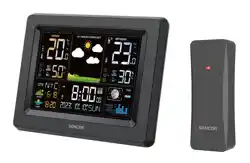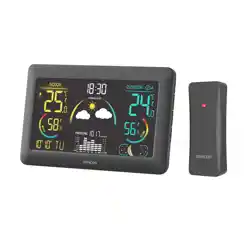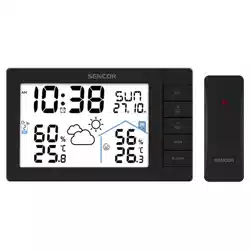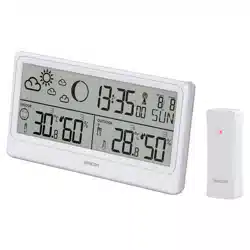
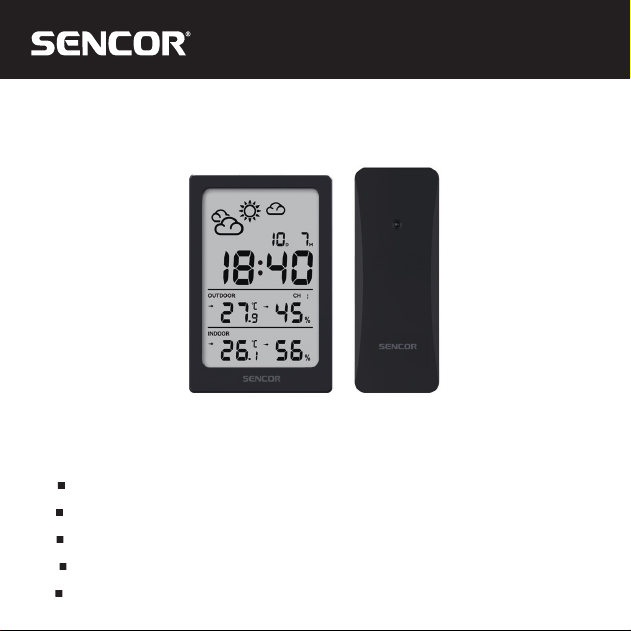
SWS 2300
EN User Manual WEATHER STATION
CZ
Uživatelská příručka METEOROLOGICKÁ STANICE
SK
Používateľská príručka METEOROLOGICKÁ STANICA
HU
Felhasználói kézikönyv METEOROLÓGIAI ÁLLOMÁS
PL
Podręcznik użytkownika STACJA POGODOWA

EN – 2
FEATURES
• 5 buttons: SET, +/CH, -/°C/°F, MIN/MAX, ALARM; 1 top button: SNOOZE
• 12/24 hours switchable
• Calendar display
• Alarm with snooze (snooze duration adjustable 5-60 minutes)
• Indoor/outdoor temperature and humidity display (switchable between °C/°F)
• Indoor & Outdoor record of maximum and minimum temperature and humidity(records can
be clearded manually)
• Support up to 3 sensors(1 included)
• Temperature/humidity trend display
• Weather forecast and freezing point alarm
• Low battery indication
.H\WRQHRQRႇ
• Indoor temperature range: -10°C~50.0°C
• Outdoor temperature range: -40°C~60°C
• Indoor humidity: Range: 1%~99%
• Outdoor humidity: Range: 1%~99%
• Powered by: 2*AAA batteries
POWER ON OR RESET
After powering on, the LCD will be fully displayed for 3 seconds, and it will switch to the
standard display mode, display the date and time, detect the indoor temperature and humidity,
and then proceed.
EN – 3
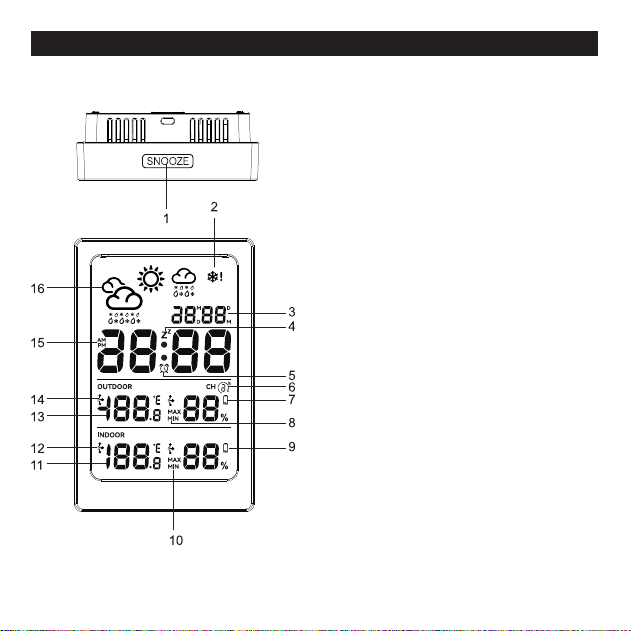
OVERVIEW
Main Unit
1. Touch button: Snooze
2. Freezing Alert
3. Date/Month
4. Snooze
5. Alarm
6. Outdoor channel and cycle display for
3 channels
7. Low battery indicator(Sensor)
8. Max/min record for temperature and
humidity for outdoor channel
9. Low battery indicator(Main unit)
10. Max/min record for temperature and
humidity for main unit
11. Indoor temperature and humidity
12. Trend for indoor temperature and humidity
13. Outdoor temperature and humidity
14. Trend for outdoor channel
15. 12hour format AM/PM
16. Weather Forecast
EN – 4
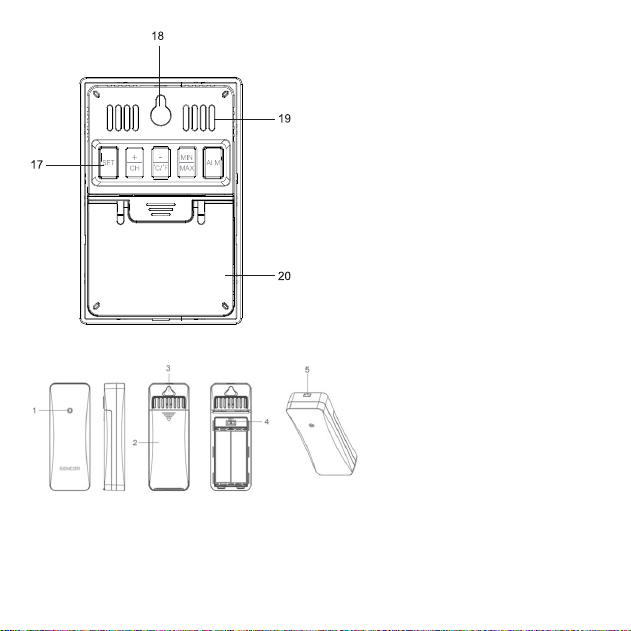
17. Buttons: SET, +/CH, -/°C/°F, MIN/MAX,
ALARM
18. Hanging Hole
19. Ventilation Hole
20. Battery compartment cover and stand
SENSOR
1. LED light
2. Battery Compartment
3. Hanging Hole
4. Channel shift
5. Rope hanging hole

EN – 5
BUTTON FUNCTION
SET
• In standard mode, press and hold the SET button for 3 seconds to enter the time setting.
+/CH
• In standard mode, single press the +/CH key to switch the channel CH
• In standard mode,, long press the +/CH key to clear all channel ID and re-receiving mode.
• During setting, single press the +/CH key to increase, long press to increase quickly
-/°C/°F
• In standard mode,, single press the -/°C/°F key to switch the temperature unit °C/°F
• During setting, single press the -/°C/°F key to decrease, long press to decrease quickly
MAX/MIN
• In standard mode, press the MAX/MIN button to view the maximum/minimum temperature
and humidity values within 24 hours.
• When the maximum and minimum values are displayed, press and hold the MAX/MIN button
for 3 seconds to clear the maximum and minimum temperature and humidity values.
ALARM
• In standard mode, single press the ALM button to view the alarm time, and press again to
WXUQRQRႇWKHDODUP
• In standard mode, press and hold the ALM button for 3 seconds to enter the alarm setting
• In alarm setting mode, press +/CH and -/°C/°F key to set the clock time.
(tips: if there is no operation for 5 seconds, it will return to normal time display mode.)
SNOOZE
• When the alarm is sounding, press the SNOOZE button to enter snooze or press any other
key to stop the alarm.
• In the setting state, press the SNOOZE button to save and exit the setting.
EN – 6
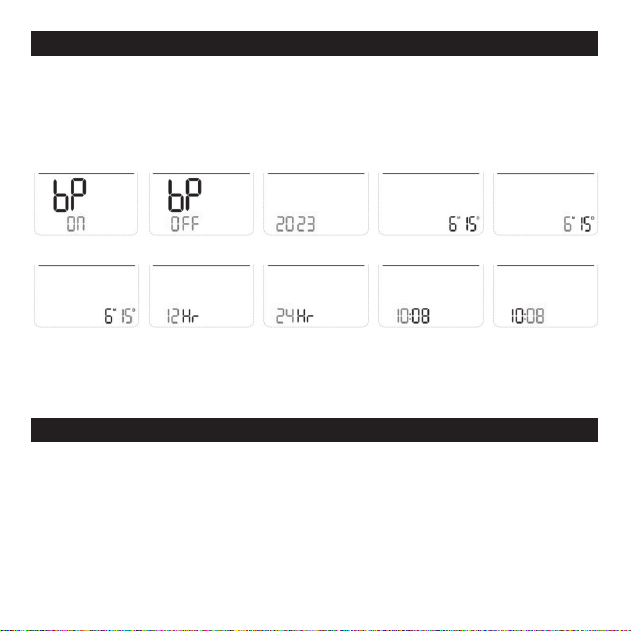
TIME SETTING
• In standard mode, press and hold the SET button for 3 seconds to enter the time setting.
7KHVHWWLQJLWHPVZLOOÀDVK6KRUWSUHVVWKH6(7NH\WRVHOHFWWKHVHWWLQJLWHPV
Setting sequence:
Key tone ON/OFF -- Year -- DM/MD -- Month -- Day -- 12/24HR -- Hour -- Minute -- Exit.
:KHQWKHVHWWLQJLWHPÀDVKHVVKRUWSUHVVWKH&+RU&)EXWWRQWRLQFUHDVHRUGHFUHDVH
the value, and long press the button to quickly increase or decrease the value.
• If there is no operation within 20 seconds, the setting interface will automatically exit.
ALARM CLOCK AND SNOOZE TIME SETTINGS
• In time display mode, press the ALM button to view the alarm time.
,QDODUPFORFNGLVSOD\PRGHSUHVVWKH$/$50EXWWRQWRWXUQRQRႇWKHDODUPFORFN
• In normal display mode, press and hold the ALARM key for 3 seconds to enter the alarm
time and snooze time setting. The setting sequence is: Hours--Minutes--Snooze Time--Exit.
:KHQWKHVHWWLQJLWHPÀDVKHVVKRUWSUHVVWKH&+RU&)EXWWRQWRLQFUHDVHRUGHFUHDVH
the value, and long press the button to quickly increase or decrease the value.
• If there is no operation within 20 seconds, the setting interface will automatically exit.

EN – 7
ALARM FUNCTION
• Alarm time is 2 minutes, snooze time default is 5 minutes
Alarm format:
0-10 seconds: BI once per second
10-20 seconds: BI BI twice per second
21-30 seconds: BI BI BI BI fourth per second
31-120 seconds: continuous BI BI sounds
• When the alarm is ringing, press the “SNOOZE” button to enter snooze, press any other
button to stop the alarm.
INDOOR TEMPERATURE AND HUMIDITY FUNCTION
• Temperature range:-10°C~ 50°C. Below -10°C: LL.L; above 50°C: HH.H.
• Humidity detection range: 1%RH~99%RH, if it exceeds the low value, it will display 1%RH, if
it exceeds the high value, it will display 99%RH
• Frequency of detection: 30 seconds.
• Detection error: ±1°C; ±5%RH
OUTDOOR TEMPERATURE AND HUMIDITY FUNCTION
• Temperature detection range: -40.0 °C~60.0°C, Below -40.0 °C: LLL; above 60.0°C: HH.H.
• Humidity detection range: 1%RH~99%RH, if it exceeds the low value, it will display 1%RH, if
it exceeds the high value, it will display 99%RH
TEMPEARTURE AND HUMIDITY MAX/MIN VALUE AND TREND
FUNCTION
In the mode of checking the value of MAX or MIN, press and hold the [MIN/MAX] button for
more than 2 seconds to clear the maximum and minimum values of MAX, When clearing, the
MAX value or MIN value is displayed as --and after 1 second, it will converted to current value.
EN – 8
Trends Icon will not display at the moment of powering on.
The trend
will dislay, when the temperature increase 1°C compared to last data, or
increase 1 °C in 1 hour;
The trend
will dislay, when the humidity value increase 5% compared to last data, or
increase 5% in 1 hour
Vice the verse for decrease trends.
:KHQWKHLQFUHDVHGHFUHDVHLVOHVVWKHQ&RULQKRXUĺLFRQZLOOGLVSOD\
Frost Alert
• When the OUTDOOR temperature is within the range of -1.0~+2.9°C &+30.2°F~ +37.2°F,
the frost alarm symbol
ZLOOÀDVKFRQWLQXRXVO\2QO\ZKHQWKHWHPSHUDWXUHGHWHFWLRQ
value is not within the temperature range of frost point alarm, the symbol will not display.
When the outdoor temperature of the current RF channel is in the range of -1.0~+2.9°C&
+30.2°F~+37.2°F, the symbol of frost and snow
ÀDVKHV
Remarks: The frost alarm does not need to be turned on, it will display as long as the
corresponding channel temperature is reached, and the temperature of other channels is
reached, it needs to be switched to this channel to display.
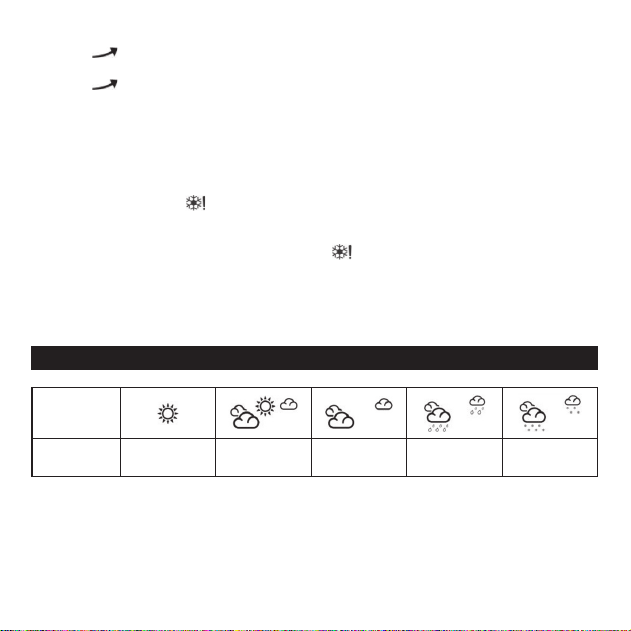
WEATHER FORECAST FUNCTION
WEATHER
ICON
Description Sunny
Partly
Cloudy
Cloudy Rainy Snowy
Weather forecast in 12+ Hour: Sunny, Partly Cloudy, Cloudy, Rainy, Snowy
The weather icon displays are based on the hourly calculation of indoor/outdoor temperature
&humidity. The forecast station predict weather conditions for the next 12 hours with 70–75%
accuracy. The remote sensor should be put on the outside to have accurate outdoor data.
2ULWZLOOHႇHFWWKHDFFXUDWHRIZHDWKHUIRUHFDVW
The default display weather is partly cloudy, the main unit will calibrate the weather report in
1–2 weeks with the temperature and humidity data changes.

EN – 9
7KHUHPRWHVHQVRUVKRXOGEHSODFHRXWVLGHWRJHWDFFXUDWHRXWGRRUGDWDRULWZLOOHႇHFWWKH
accurate of weather forecast.
RF RECEPTION INSTRUCTIONS
• After powering on and detecting temperature and humidity, it will automatically enter RF
reception for 3 minutes and exit immediately upon reception.
'XULQJWKHUHFHLYLQJSURFHVVRQO\WKH5)UHFHLYLQJPDUNÀDVKHVDQGWKHGDWDGRHVQRW
ÀDVK,IQRGDWDLVUHFHLYHGRUWKHFRGHLVORVWIRUKRXU³´ZLOOEHGLVSOD\HG
• Short press the +/CH key to switch to view the outdoor temperature and humidity of 3
GLႇHUHQWFKDQQHOV7KHVZLWFKLQJGLVSOD\VHTXHQFHLV&+&+&+$XWRF\FOHVZLWFK
once every 10 seconds).
• In standard mode, press and hold the +/CH button for 3 seconds to forcefully clear the data
of all outdoor channels and re-receive.
• When the receiver receive and pairs for 3 minutes, CH1 is displayed by default.
(YHQLIWKH&+RU&+FKDQQHOUHFHLYHVWKHVLJQDO¿UVWLWZLOOQRWMXPSDXWRPDWLFDOO\WRWKH
received channel.
• When it is in the auto cycle modle, unregistered channels will not be displayed and will jump
directly to the registered channels.
INDOOR AND OUTDOOR LOW BATTERY INDICATION
FUNCTION
• When the battery of the machine is low, the LCD will display the low battery icon.
• Outdoor transmitter current channel low power indicator
TECHNICAL SPECIFICATIONS
• Weather Forecast Icon (Sunny, Partly Cloudy, Cloudy, Rainy, Thunderstorm, Snowy)
• Digital Time, Date
• Alarm with snooze (snooze duration adjustable 5-60 minutes)
• Indoor/outdoor temperature and humidity display
• Temperature/humidity trend display

EN – 10
• Frost Alert for outdoor channel
• Max/Min memory records (24h)
• Alarm with snooze settable (5-60mins)
.H\WRQHRQRႇ
• Indoor temperature range: -10°C~50.0°C
• Outdoor temperature range: -40°C~60°C
• Indoor humidity: Range: 1%~99%
• Outdoor humidity: Range: 1%~99%
• 12/24 hours switchable
• Temperature display with °C/°F selectable
• Low battery indicators (for main unit and outdoor sensor)
• Desktop or wall mountable
• Support up to 3 sensors
• Function Auto scrolling measured data of all 3 outdoor sensors
• 1 Sensor included (SWS TH 2300-3200-4440)
• Transmission between main unit and sensor up to 80m (in open area)
• Sensor Transmission Frequency: 433.92MHZ
• Power of Station: 2 × 1.5V Type AAA (Batteries not included)
• Power of sensor: 2× 1.5V Type AA (Batteries not included)
• Dimensions of main unit: (w/h/d) 65 × 100 × 24mm
• Weight of Main Unit: 99 g
EN – 11
INSTRUCTIONS AND INFORMATION ON THE DISPOSAL OF DISCARDED PACKAGING
MATERIALS
Take the packaging material to a collection yard for disposal.
DISPOSAL OF DISCARDED ELECTRICAL AND ELECTRONIC EQUIPMENT
This symbol on the product, accessory or packaging indicates that the product
must not be treated as normal household waste. Please dispose of this product
in a collection yard designated for the recycling of electrical and electronic
equipment. In some EU countries or in some European countries, you can return
your products to your local retailer when you buy an equivalent new product.
Correct disposal of this product helps save valuable natural resources and
prevents possible adverse impacts on the environment and human health that
might be caused by improper waste disposal. Please contact your local authority or
the nearest waste collection yard for further details. Improper disposal of this type
RIZDVWHPD\EHVXEMHFWWRDOHJDO¿QH
For companies in the European Union
If you need to dispose of electrical or electronic equipment, ask your dealer or
supplier for the necessary information.
Disposal in countries outside the European Union
To dispose of this product, please ask your local authorities or dealer for the
necessary information on correct disposal.
This product complies with EU requirements.
)$67ý5DVKHUHE\GHFODUHVWKDWWKHUDGLRGHYLFHW\SH6:6FRQIRUPVWRWKH
EU directive. The full text of the EU Declaration of Conformity is available at: www.sencor.eu.
0DQXIDFWXUHU)$67ý5DV86DQLWDVXětþDQ\&]HFK5HSXEOLF
info@sencor.com

EN – 12
EN
Warranty conditions
Warranty card is not apart of the device packaging.
This product is warranted for the period of 24 months from the date of purchase to the end-user. Warranty
is limited to the following conditions. Warranty is referred only to the customer goods using for common
domestic use. The claim for service can be applied either at dealer’sshop where the product was bought, or
at below mentioned authorized service shops. The end-user is obligated to set up aclaim immediately when
the defects appeared but only till the end of warranty period. The end user is obligated to cooperate to certify
the claiming defects. Only completed and clean (according to hygienic standards) product will be accepted.
In case of eligible warranty claim the warranty period will be prolonged by the period from the date of claim
application till the date of taking over the product by end-user, or the date the end-user is obligated to take it
over. To obtain the service under this warranty, end-user is obligated to certify his claim with duly completed
following documents: receipt, certificate of warranty, certificate of installation.
This warranty is void especially if apply as follows:
Defects which were put on sale.
Wear-out or damage caused by common use.
The product was damaged by unprofessional or wrong installation, used in contrary to the applicable
instruction manual, used in contrary to legal enactment and common process of use or used for another
purpose which has been designed for.
The product was damaged by uncared-for or insufficient maintenance.
The product was damaged by dirt, accident of force majeure (natural disaster, fire, and flood).
Defects on functionality caused by low duality of signal, electromagnetic field interference etc.
The product was mechanically damaged (e.g. broken button, fall).
Damage caused by use of unsuitable media, fillings, expendable supplies (batteries) or by unsuitable
working conditions (e.g. high temperatures, high humidity, quakes).
Repair, modification or other failure action to the product by unauthorized person.
End-user did not prove enough his right to claim (time and place of purchase).
Data on presented documents differs from data on products.
Cases when the claiming product cannot be indentified according to the presented documents (e.g. the
serial number or the warranty seal has been damaged).
Manufacturer:
FAST ČR, a.s., U Sanitasu 1621, Říčany 251 01, Czech Republic
Visit www.sencor.com for detailed information about authorized service centers.
The original version of the instructions is in the Czech language, other language versions are made by the
appropriate translation.