
Fuzozo User Manual
www.fuzozo.net

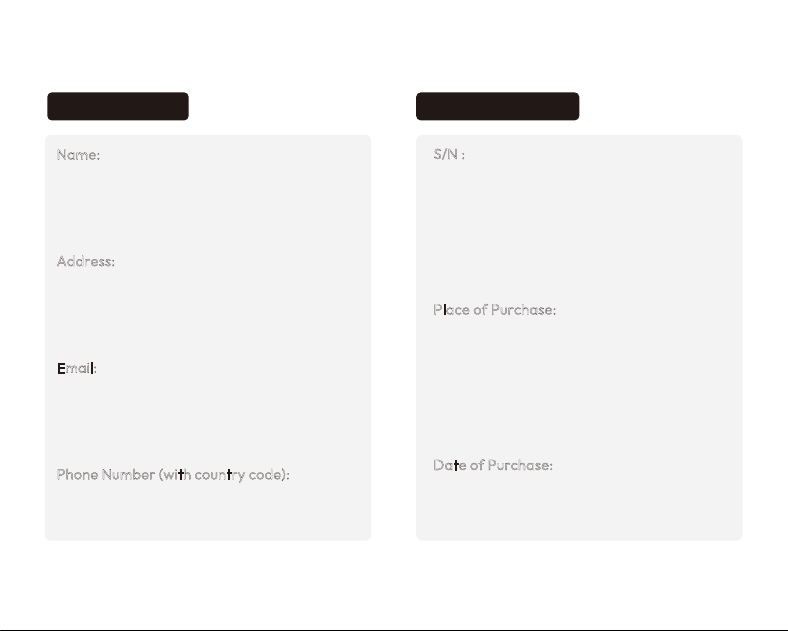
Name:
Address:
Email:
Phone Number (with country code):
S/N :
Place of Purchase:
Date of Purchase:
Manufacturer: Robopoet Technology Hong Kong Limited
Website: www.fuzozo.net
WARRANTY CARD
User Information Product Information
Email: [email protected]
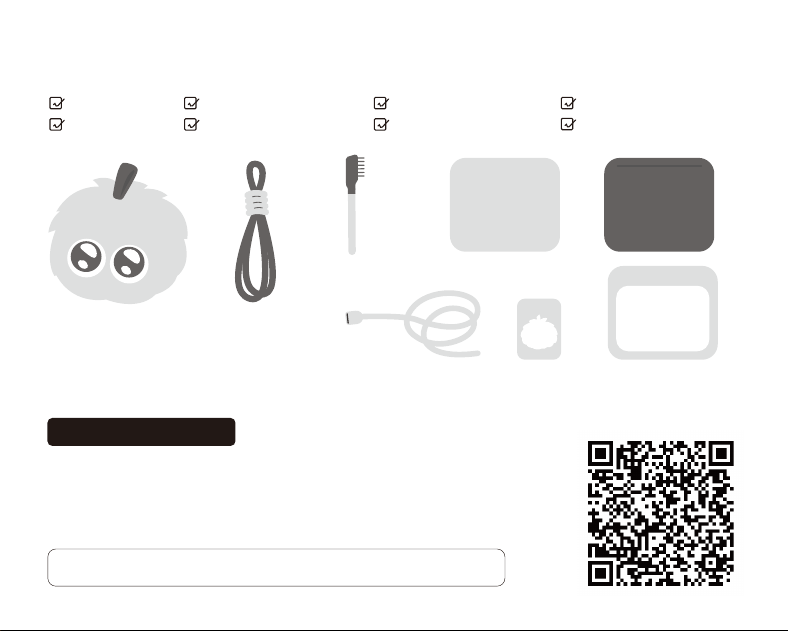
PACKAGE CONTENTS
Fuzozo
Lanyard
User Manual
Charging Cable
x1x1
x1
x1
x1
x1
Fuzozo Nurture Guide
x1 x1
User Manual
Fuzozo Stickers
Fur Brush
Fuzozo Stickers
Fuzozo Nurture Guide
Identity Card
INSTRUCTIONS
Note: Once the product is connected to the network and a digital life has been
activated, the 7-day unconditional return policy no longer applies.
1.
2.
3.
4.
Scan the QR code or search for “Fuzozo” in your mobile app store to download the app.
Open the app and follow the prompts to create your Fuzozo’s “digital life”.
Follow the app prompts to interact with your Fuzozo, build ainity, and unlock more skills.
Adjust your Fuzozo’s volume and eye screen brightness through the app.
App Download and Use

Thank you for purchasing a Fuzozo product. The
content referenced herein relates to your safety, legal
rights, and responsibilities. This disclaimer may be
updated from time to time. Please visit the oicial
Fuzozo website at www.fuzozo.net for the latest prod-
uct information.
By using this product, you acknowledge that you have
carefully read the disclaimer and precautions, and that
you understand, agree to, and accept all terms and
conditions set forth in this disclaimer and safety guide.
You undertake to use this product properly, in appropri-
ate environments, and for legitimate purposes. You
further undertake to assume full responsibility for your
use of this product and any consequences that may
arise. You agree to comply with the terms herein,
including health and safety notices, as well as any
related terms, policies, and guidelines established by
Fuzozo. Failure to use the product properly or to follow
the safety guide instructions, resulting in property
damage or personal injury, shall not be the responsibili-
ty of Fuzozo.
Please note that your use of products, services, applica-
tions, or other content provided by third parties through
Fuzozo (referred to as “Third-Party Content”) is subject
to the relevant policies, regulations, and agreements of
those third parties. In the event of any conflict between
such third-party policies, regulations, or agreements
WARNINGS
Disclaimer
Do not use, store, or charge this product in direct
sunlight, near heat sources, or in high-temperature
environments. Store the product in a cool, dry place.
This product contains a lithium baery. Avoid
impact, crushing, or puncturing.
Only use a standard charger rated at 5V 2A that
complies with national CCC certification (sold sepa-
rately) to charge this product.
Adult supervision is required during charging.
Discontinue use immediately if the product becomes
abnormally hot.
This product is not waterproof. Do not immerse in
water or expose to liquids.
This product is intended for collection and use by
persons aged 18 and above. Do not give to children
under 18 years of age. This product contains small
and sharp accessories — use with care. Keep pack-
aging bags away from young children to prevent
them from playing with them. Minors aged 18 and
1.
2.
3.
4.
5.
6.
and this disclaimer and safety guide, this disclaimer and
safety guide shall prevail. Under no circumstances shall
Fuzozo be considered the licensor of Third-Party Content,
nor shall Fuzozo make any representations or warranties
regarding Third-Party Content, or assume any responsi-
bility or liability for any content or functionality contained
in Third-Party Content.
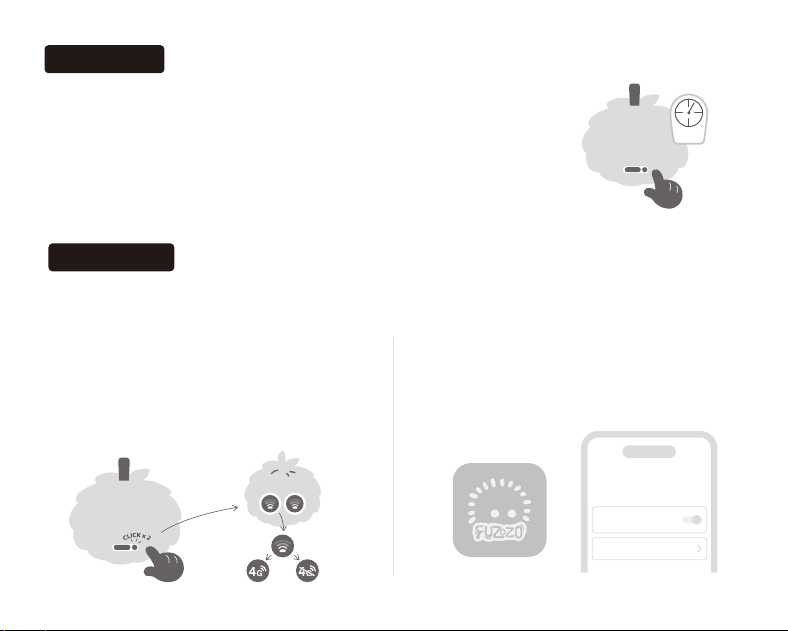
1.
2.
Power On: When the device is o, press and hold the Power buon on
the right side of the charging port on the back for 2 seconds. The eyes
will light up to indicate the device has powered on successfully.
Power O: Press and hold the Power buon on the back for 2 seconds.
The eyes will turn o to indicate the device has powered o successfully.
2 sec
Power On/O
Network Setup
This device supports cellular data and is also compatible with Wi-Fi (2.4 GHz) for network setup.
Choose the appropriate method based on your usage scenario.
Cellular Data Setup: Double-press the Power
buon to activate the cellular data network.
Once activated, the device is ready for
normal use. If the cellular data connection
fails, please contact Support.
1.
Wi-Fi Setup: You can manually add a Wi-Fi
network in the app’ s Seings menu to initiate
Wi-Fi connection.
2.
Network Seings
Wi-Fi Network
Enhancement
Configure Network
Fuzozo APP

above must obtain explicit consent from their
guardian before using this product, and must use
it under the guardian’ s accompaniment or super-
vision. Guardians should fully understand the
product instructions, operating procedures, and
safety risks.
This packaging and manual contain important
information. Please retain for future reference.
Read the instructions before use to avoid
damage, malfunction, or injury caused by
improper operation.
This product contains AI interactive function only
for entertainment purposes. AI responses are not
real human consultation and may have inaccura-
cies. Do NOT rely on AI guidance for emergency,
medical, legal or safety critical maers.
7.
8.
Warranty Exclusions
The warranty policy does not apply to products under
any of the following circumstances:
Product returns and exchanges can only be
processed at the original point of purchase.
Please keep this warranty card in a safe place. Do
not alter or deface it.
For Fuzozo warranty service terms, please contact:
support@fuzozo.net.
2.
3.
4.
The warranty period has expired.
Damage caused by human factors, such as physical
damage or liquid ingress.
Unauthorized disassembly or firmware modifica-
tion by personnel not authorized by Fuzozo.
Damage caused by force majeure.
Resale of your product or purchase from any unof-
ficial or unauthorized channel.
Use of the product in violation of any applicable law
or your agreement with us.
Malfunctions and damage not caused by defects in
the product itself, manufacturing, or quality.
For other out-of-warranty terms, please refer to
the warranty policy.
1.
2.
3.
4.
5.
6.
7.
8.
This product is manufactured under strict quality
control. Within one year from the date of receipt
by the purchaser, should any performance
failure occur due to defects in materials or work-
manship and be confirmed by the authorized
service center, free repair service will be provid-
ed within the warranty period.
1.
Warranty Terms
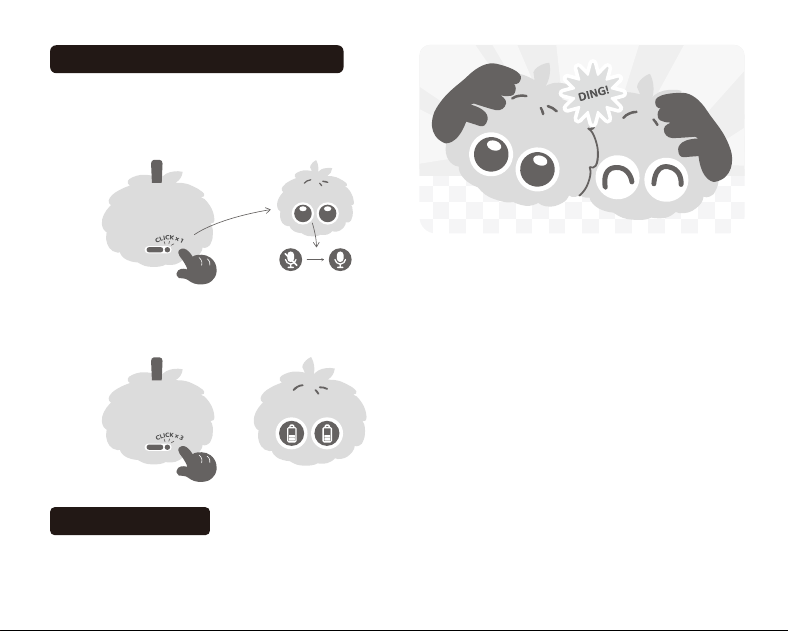
Silent Mode and Baery Level Display
Product Interaction
Silent Mode: Press the Power buon once to enter
silent mode. Press the Power buon once again to
exit silent mode. The eye screen will display the
corresponding status.
1.
*Note: Placing the product too high or too low relative to the
speaking position, placing it against a wall or in a corner, or
speaking in a dialect may aect the product’s wake-up and voice
recognition performance.
Voice Interaction: ●Say “Hey Fuzozo!” to your
Fuzozo to enter “Earth Language” conversation
mode, where you can share your feelings and
interact with your Fuzozo. ●Complete the new user
tasks as prompted in the app to unlock Fuzozo’ s
exclusive “Fuzozo Language” conversation feature.
Say “Papapuu Fifu” to your Fuzozo to enter Fuzozo
Language conversation mode.
Bump to Make Friends: Press two Fuzozos together
side by side. Release when you hear a “ding” sound.
(Both Fuzozos must be connected to the network and
bound to a digital life, otherwise pairing will not
succeed.)
App Interaction: Interact with your Fuzozo through
the activity prompts in the app to build ainity and
unlock more skills.
2.
3.
4.
Baery Level Display: Quickly press the Power
buon three times to display the current baery
level on the eye screen.
2.
Physical Interaction: Touch your Fuzozo’s forehead or
chin, or shake your Fuzozo to trigger corresponding
interactive responses.
1.

This product contains a built-in 3.7–4.2V baery
that is non-removable and non-replaceable. If
damaged, contact Support for repair.
The charger must be used by an adult or under
adult supervision.
Regularly inspect the charger’ s cord, plug, hous-
ing, and other components for damage. Discon-
tinue use if any damage is found, until it has been
properly repaired.
Power o and disconnect from the charger
before cleaning the product.
This product is sold without a charger. If using a
charger for power supply, you should purchase a
compatible charger that complies with FCC, DOE
Level VI and UL safety certification.
1.
2.
3.
4.
5.
Special Baery Notice
Connect the charging cable to the product’ s
charging port and use a standard 5V 2A char-
ger that complies with FCC, DOE Level VI and
UL safety certification (sold separately) to
charge this product. Do not use non-compliant
or unverified chargers. Use only the recom-
mended compliant charger.
A full charge takes approximately 3 hours
(based on laboratory data for Fuzozo series
products; actual time may vary due to various
factors).
During charging, the light on the right side of the
Type-C charging port will turn red to indicate
charging in progress, and turn green when
charging is complete.
Someone must be present during charging. Do
not charge when going out or leaving for an
extended period.
1.
2.
3.
4.
CHARGING REQUIREMENTS
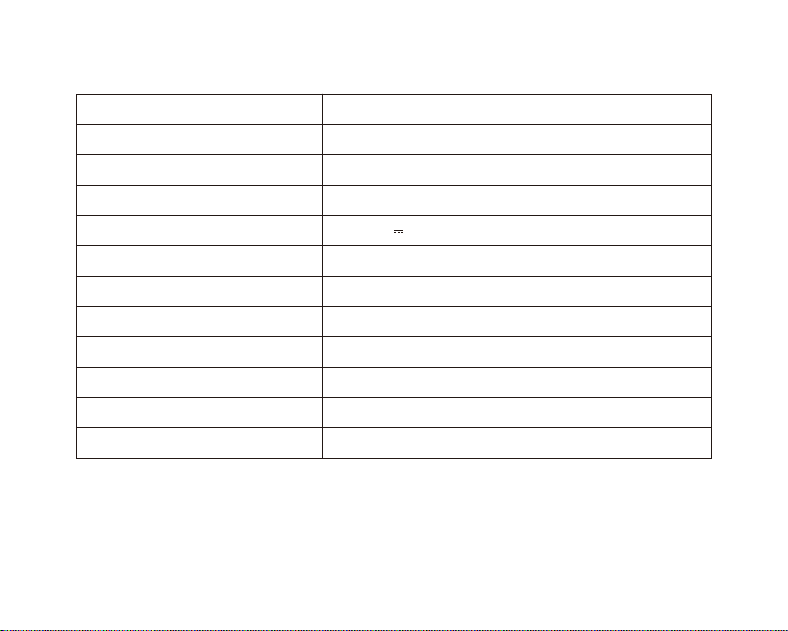
Product Name
Model
Materials
Product Dimensions
Fuzozo
FZ1212
Plush fabric, silicone, plastic, electronic
90*77*67mm
Rated Input
Baery Voltage
Rated Power
Baery Type
Baery Capacity
Country of Origin
3.7-4.2V
Suitable Age
18 years and above
Bluetooth Specifications
Bluetooth 5.4; Bluetooth connection range 10 m
Lithium Polymer Baery
1800mAh
China
5V 2A
10W
PRODUCT INFORMATION
Do not use, store, or charge this product in direct sunlight, near heat sources, or in high-temperature
environments. Store the product in a cool, dry place.
STORAGE PRECAUTIONS

2.
3.
4.
5.
Do not use a charger to charge this product in
damp locations, such as near washbasins or in
bathrooms.
Before use, always check that the appearance is
intact, the assembly is secure, and the device oper-
ates normally. Contact Support if any issues are
found.
Dispose of the product packaging properly to
prevent infants and young children from accessing
it, which may cause suocation. Do not use the
product or accessories if they are damaged or
broken. Do not clean the product while it is powered
on or charging.
Regularly inspect the product. If any abnormality is
found with the charger or charging cable, discon-
tinue use immediately, as there is a risk of electric
shock, short circuit, or fire.
This product is not waterproof. Do not wash with
water or immerse in water.
Do not clean with salt water, hot water, or clean-
ing agents containing bleach, strong acids, strong
alkalis, or other harsh ingredients.
Power o the product before cleaning. For daily
cleaning, use a soft cloth dampened with tap
water, wring it out thoroughly, and gently wipe the
plush surface. After cleaning, gently press with a
dry paper towel to absorb excess moisture. Allow
to air dry completely, then use the fur brush to
groom the plush surface.
For stubborn stains, contact oicial Support for
more cleaning guidance for Fuzozo series products.
1.
2.
3.
4.
SAFETY PRECAUTIONS
This product contains a built-in lithium baery. Use the
device within the temperature range of 0° C to 40° C.
Do not place the product in extremely high-tempera-
ture environments. Keep away from fire sources and
other heat sources. Do not bring near open flames.
Do not strike, impact, crush, or puncture the product.
Do not disassemble, repair, or modify the product on
your own. Do not expose the baery to extremely
low air pressure, as this may cause the baery to
explode or leak flammable liquids or gases.
1.
CLEANING INSTRUCTIONS

This device complies with Part 15 of the FCC Rules.
Operation is subject to the following two condi-
tions:
(1)This device may not cause harmful interference.
(2)This device must accept any interference
received, including interference that may cause
undesired operation.
Changes or modifications not expressly approved
by the party responsible for compliance could void
the user’s authority to operate the equipment.
Note:This equipment has been tested and found to comply
with the limits for a class B digital device,pursuant to Part
15 of the FCC Rules. These limits are designed to provide
reasonable protection against harmful interference in a
residential installation.
FCC S TATE M E NT
This equipment generates uses and can radiate
radio frequency energy and,if not installed and
used in accordance with the instructions,may
cause harmful interference to radio communica-
tions.However,there is no guarantee that inter-
ference will not occur in a particular installation.if
this equipment does cause harmful interference
to radio or television reception,which can be
determined by turning the equipment o and
on,the user is encouraged to try to correct the
interference by one or more of the following
measures:
●Reorient or relocate the receiving antenna.
●Increase the separation between the equip-
ment and receiver.
●Connect the equipment into an outlet on a
circuit dierent from that to which the receiver is
connected.
●Consult the dealer or an experienced radio/TV
technician for help.
The device has been evaluated to meet general
RF exposure requirement.
The device can be used in portable exposure
condition without restriction.
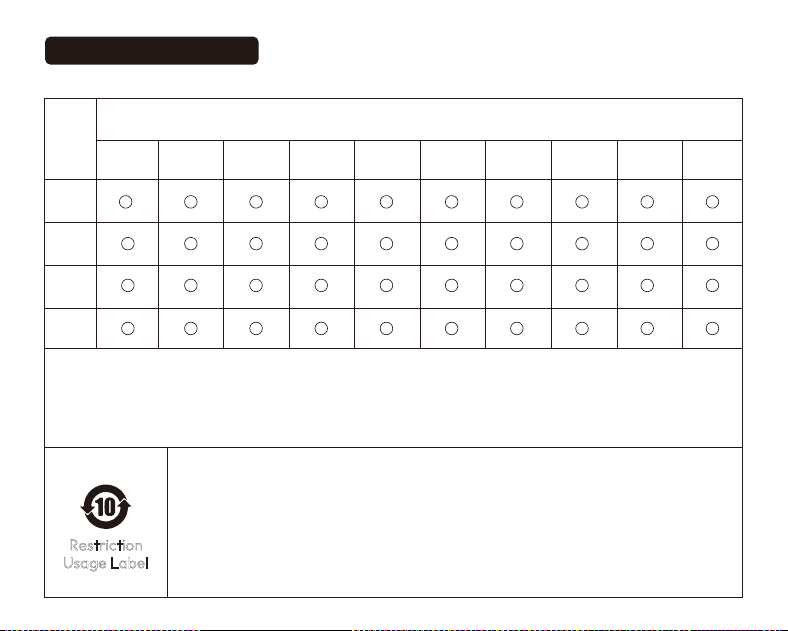
Names and Concentration Levels of Hazardous Substances in the Product
This table is compiled in accordance with SJ/T 11364.
0: Indicates that the concentration of the hazardous substance in all homogeneous materials of this component is below the limit
requirements specified in GB/T 26572.
X: Indicates that the concentration of the hazardous substance in at least one homogeneous material of this component exceeds the limit
requirements specified in GB/T 26572.
Environmental Protection Use Period (EPUP): 10 years. This indicates that, under normal use as described in the
user manual, the hazardous substances contained in this product will not leak or chemically transform, and will
not cause serious environmental pollution or serious harm to person or property within this period.
Recycling Symbol (arrows in a loop): Indicates that this product is recyclable. After exceeding its service life or
when it can no longer function normally after repair, it should not be disposed of with household waste. Please
dispose of it through proper recycling channels and by qualified facilities authorized to handle waste electrical
and electronic equipment. For proper disposal methods, please refer to national or local regulations on the
disposal of used electrical and electronic equipment.
Restriction
Usage Label
Part
Name
Hazardous Substances
PCBA
Plastic
Parts
Hardware
Parts
Accessories
Benzyl Butyl
Phthalate (BBP)
Bis(2-ethylhexyl)
Phthalate
(DEHP)
Lead (Pb)
Cadmium (Cd)
Mercury (Hg)
Hexavalent
Chromium
(Cr(VI))
Polybrominated
Biphenyls (PBBs)
Polybrominated
Diphenyl
Ethers (PBDEs)
Dibutyl
Phthalate (DBP)
Diisobutyl
Phthalate (DIBP)
Environmental Information

www.fuzozo.net