
Unboxing Check
Please confirm that Noddy and its
accessories are complete.
Noddy Noddy Vitality Nest
Type-C Charging Cable Hang Tag
Product Manual
Product Components
Notes
If there is foreign matter in the charging
area or placement is incorrect, recharging
is required.
When the battery is low, Noddy will only
chirp and not move.
Low Battery Reminder
Red
Flashing
Unplug the charging cable and
reconnect it.
Orange
Flashing
Remove Noddy from the Noddy
Vitality Nest. After ensuring the
indicator light turns pale purple,
place it back until the indicator
light turns on.
In These Cases
When Noddy’s battery is
low, it won’t move even
if triggered. You need to
start charging; it will move
after being fully charged.
Is it moving?
When the battery is low,
Noddy won’t respond to
any triggers. You need to
start charging; it can only
be woken up after being
fully charged.
Resting
When Noddy overheats, it
will chirp to remind you.
It’s so
Please wipe gently with a
towel.
Dirty...
Contact Us
Customer Service Hotline:4000-666-370
Manufacturer:Jiangxi Guanying Intelligent Technology Co., Ltd.
Distributor:Jiangxi Guanying Industrial Operation Service Co., Ltd.
Address:No. 139 Hubian Avenue, Economic and Technological
Development Zone, Ganzhou City, Jiangxi Province (Guanying
Digital Intelligence Future Industrial Park)
Hubian Avenue, Economic and Technological Development Zone,
Ganzhou City, Jiangxi Province (Guanying Digital Intelligence
Future Industrial Park)
Notes
Keep the movement away from humid and high-temperatu-
reenvironments;
Avoid direct sunlight and water splashes;
If the device malfunctions, overheats, or emits an odor during
charging, immediately cut off the power, unplug the charger,
and contact customer service;
Do not place metal objects, magnets, magnetic cards, or other
foreign matter in the wireless charging area of the nest,
otherwise normal charging may fail or overheating may cause
damage;
Use a power supply of 10W or higher for charging.
RF warning for Portable device
Mini Program
Manual
Warranty Card
Uncharged: no action triggered, enter sleep mode after 20 minutes,
Bluetooth will disconnect
Charging: no action triggered, enter sleep mode after30 seconds,
Bluetooth will disconnect
Product Manual
With Pet! With Love! With Noddy!
FCC Caution
This device complies with part 15 of the FCC Rules. Operation
is subject to the following two conditions: (1) This device may
not cause harmful interference, and (2) this device must
accept any interference received, including interference that
may cause undesired operation.
Any Changes or modifications not expressly approved by the
party responsible for compliance could void the user's
authority to operate the equipment.
Note: This equipment has been tested and found to comply
with the limits for a Class B digital device, pursuant to part 15
of the FCC Rules. These limits are designed to provide
reasonable protection against harmful interference in a
residential installation. This equipment generates uses and
can radiate radio frequency energy and, if not installed and
used in accordance with the instructions, may cause harmful
interference to radio communications. However, there is no
guarantee that interference will not occur in a particular
installation. If this equipment does cause harmful
interference to radio or television reception, which can be
determined by turning the equipment off and on, the user is
encouraged to try to correct the interference by one or more
of the following measures:
Increase the separation between the equipment and receiver.
Connect the equipment into an outlet on a circuit different
from that to which the receiver is connected.
Consult the dealer or an experienced radio/TV technician for
help.
The device has been evaluated to meet general RF exposure
requirement. The device can be used in portable exposure
condition without restriction.
The FCC ID is displayed on the machine, you need to open the plush toy.
01
02
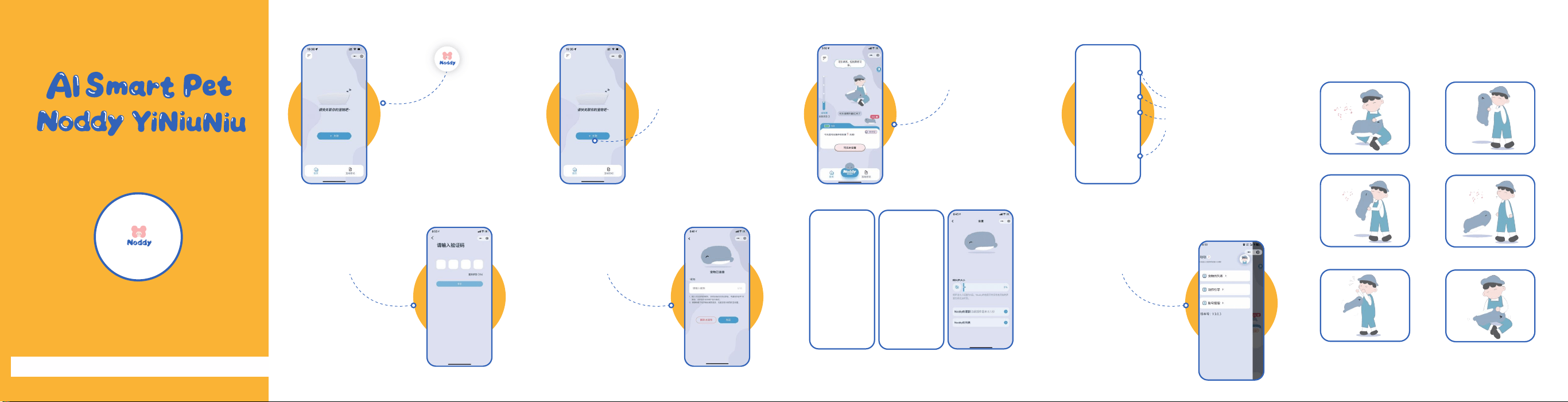
Open the mini program and
enter the homepage
Receive the verification
code and log in
03
04
Turn on the pet and connect
it according to the prompts
Set a pet nickname (Chinese
only)
Note: Ensure the pet is in a
callable state when using
voice interaction
05
07
Main Page Interaction Diary
06 08
Personal Center &
Related Functions
Motion Interaction
Touch Hold It
Hug Call
Be Startled Show Belly
Check historical interaction diaries by date
Intuitive display of the pet's mood curve
The pet's heartwarming growth diary
Display of owner-pet interactions and
the pet's own psychological activities
Growth Introduction
Detailed Display of
Personality Parameters
Functions such as
Volume and OTA
Firmware Update
Mini Program Manual
With Pet! With Love! With Noddy!
First Startup
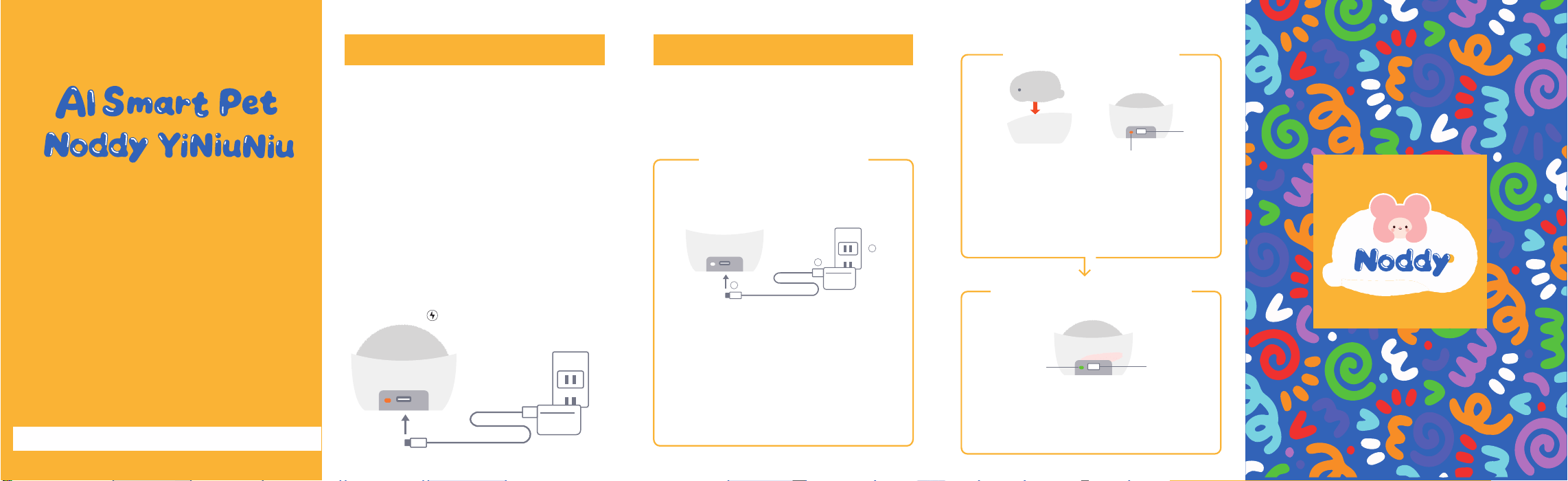
➀ Take out the included Noddy Energy Nest
(Wireless Charging Base). Insert one end of the
power cord into the base port, connect the other
end to the charging head, and plug into a power
source. The Noddy Energy Nest will then be
powered on.
➁ Place the main Noddy unit steadily into the
designated groove of the Noddy Energy Nest.
Wait until the base indicator light turns orange,
which means the device has entered charging
mode. Once charging starts and a certain level
of battery is reached, the pet will gradually wake
up and can respond to touch interactions (such
as slight wiggling, making cooing sounds, etc.)
Charging Precautions
Noddy has a built-in rechargeable battery.
Please be sure to charge it according to the
following method before first use.
Please connect in the order of Noddy Energy
Nest, then the included charging cable. When
connected, the indicator light will flash 3 times
and then turn pale purple.
1
Indicator light (Orange)
3
2
Please fix Noddy's abdomen on the flat surface
inside the Noddy Energy Nest, and move it
appropriately to find the position where the
indicator light turns orange. Orange indicates
charging has started.
As charging progresses, Noddy will start to
activate. When fully charged, the indicator
light will turn green. The full charging time is
approximately 3.5 hours.
Step 2: Set up Noddy
Step 3: Charging in Progress
The side with the indicator
light is the tail
Step 1: Set up the
Noddy Energy Nest
Startup Guide
With Pet! With Love! With Noddy!
Place belly close to the Noddy Energy Nest
Lightning position
Indicator light
(Green)