EN Basal thermometer
Instructions for use ........................... 2
OT 30

2
ENGLISH
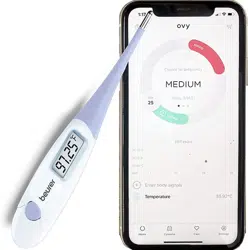
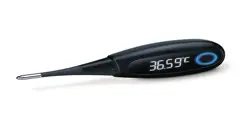
Read these instructions for use carefully and keep them for later use, be
sure to make them accessible to other users and observe the information
they contain.
TABLE OF CONTENTS
1. Included in delivery ...................................................................3
2. Signs and symbols ....................................................................3
3. Intended use .............................................................................. 7
4. Important safety notes .............................................................7
5. The basal thermometer ...........................................................13
6. Initial use .................................................................................13
7. Measuring your basal temperature .......................................... 15
8. Battery replacement ...............................................................19
9. Cleaning the device ................................................................. 19
10. Storage and disposal.............................................................20
11. Error messages .....................................................................21
12. Technical data .......................................................................22
13. Ovy app .................................................................................24
14. Warranty and service ............................................................. 25
3
1. INCLUDED IN DELIVERY
Check that the exterior of the cardboard delivery packaging is intact and make sure
that all contents are present. Before use, ensure that there is no visible damage to the
device or accessories and that all packaging material has been removed. If you have
any doubts, do not use the device and contact your retailer or the specified Customer
Service address.
• 1 x basal thermometer
• 1 x protective cap
• 1 x 3 V button cell battery CR 2032
• 1 x set of these instructions for use
2. SIGNS AND SYMBOLS
The following symbols are used on the device, in these instructions for use, on the
packaging and on the type plate for the device:
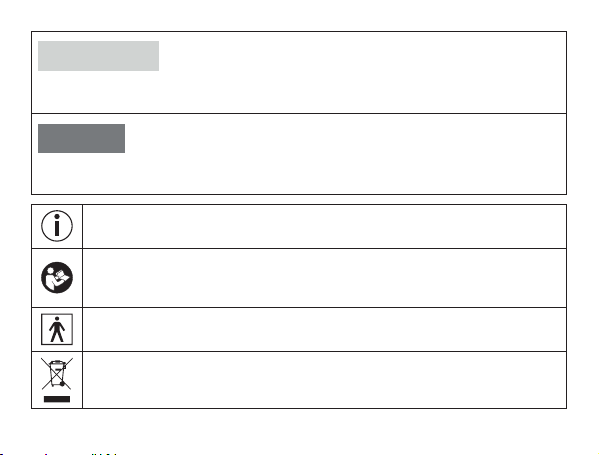
WARNING
Indicates a potentially impending danger. If it is not avoided, there is a risk of death
or serious injury.
4
CAUTION
Indicates a potentially impending danger. If it is not avoided, slight or minor injuries
may result.
NOTICE
Indicates a potentially harmful situation. If it is not avoided, the system or some-
thing in its vicinity may be damaged.
Product information
Note on important information
Observe the instructions
Read the instructions before starting work and/or operating devices or
machines
Type BF applied part
The electronic device must not be disposed of with household waste
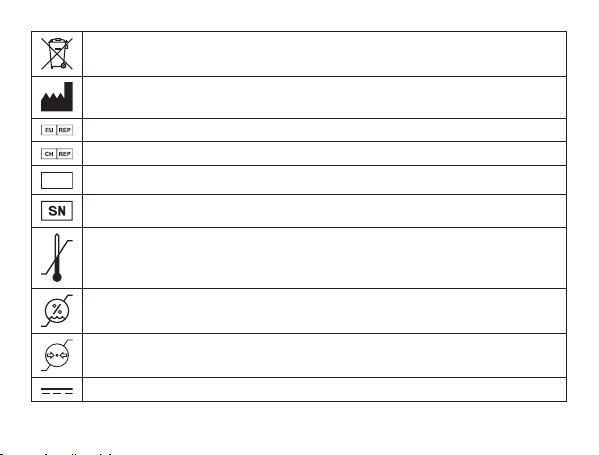
5
Batteries must not be disposed of with household waste
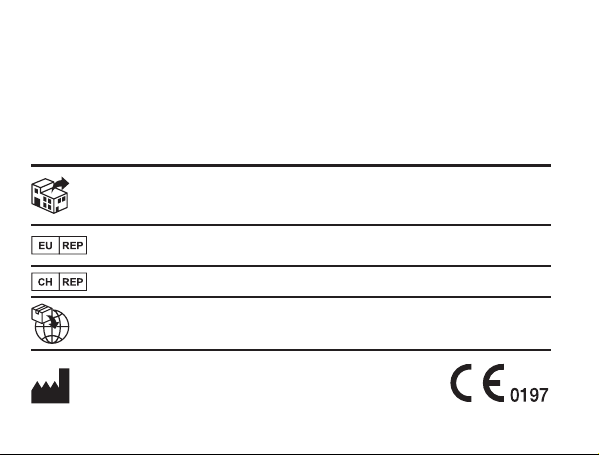
Manufacturer
Authorized representative in the European Community
Swiss authorised representative
IP64
Dust-proof and protected against splashes from all directions
Serial number
Temperature limit
Humidity limitation
Atmospheric pressure limitation
Direct current
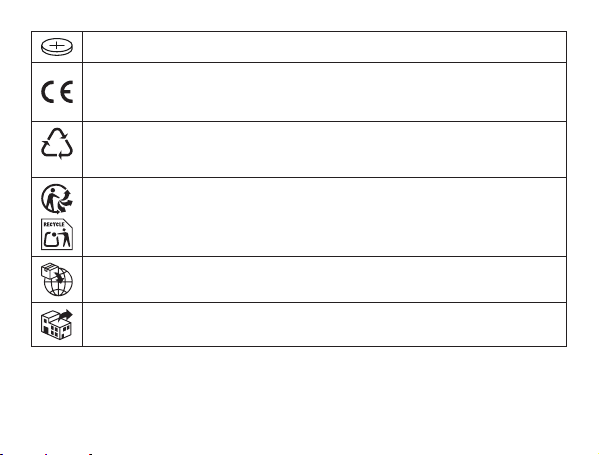
6
Coin battery
CE labelling
This product satisfies the requirements of the applicable European and
national directives.
B
A
Marking to identify the packaging material. A = Material code, B = Material
number: 1-7 = Plastics, 20-22 = Paper and cardboard
Separate the product and packaging elements and dispose of them in
accordance with local regulations.
Importer
Distributor

7
3. INTENDED USE
3.1 Ovulation thermometer
The basal thermometer is a special digital thermometer designed to measure the basal
temperature in women of childbearing age.
3.2 Ovy app
The predictions in the Ovy App are based on an algorithm that compares the current
medical knowledge on the symptothermal method, temperature method and calendar
method with the individual entries and information regarding the woman and provides
a result. The Ovy App therefore helps women to track and understand their cycle in
order to naturally prevent or plan a pregnancy
Please read the instructions for use for the Ovy App carefully. You can find them
in the Ovy App in the settings and on the Ovy website.
4. IMPORTANT SAFETY NOTES
To make optimum use of all the benefits of the thermometer, read the instructions for
use carefully before initial use, retain them for future use and make them available to
other users.

8
• The thermometer is intended for the measurement of human body temperature
only.
• The thermometer is only designed for the measuring area on the human body sta-
ted in the instructions for use.
• Do not leave children unattended with the device.
• This thermometer is not a contraceptive. Only the Ovy App is a contraceptive app.
The thermometer cannot be used for contraception without the Ovy App.
• This thermometer is not a contraceptive.
• Check the thermometer for signs of damage or wear before each use. If the ther-
mometer is damaged or worn, it must no longer be used.
• The minimum duration of measurement until the acoustic signal must always be
observed. Discuss the measured values with your doctor.
• The thermometer contains delicate electronic components. It should therefore be
protected against impacts, bending, high temperatures and direct sunlight.
• This thermometer features a flexible measuring tip and therefore provides more
comfort and safety during measurement. Do not bend the tip more than 90°.
• Operation in the vicinity of strong electromagnetic fields, for example next to a
mobile phone, may cause malfunctions.
• The thermometer conducts a self-test when you switch it on. There is no need to
check the measurement accuracy.

9
• Influencing factors such as alcohol consumption and unusual body signals such as
fever, disrupted sleep, your mood or out-of-the-ordinary physical activity may also
distort your basal temperature and make it unusable for evaluation.
• If you obtain unusual temperature results, please contact your doctor straight away.
• The device conforms with the respective national regulations and European stan-
dard EN 60601-1-2 (Group 1, Class B, in accordance with CISPR 11,IEC 61000-
4-2, IEC 61000-4-3, IEC 61000-4-8, IEC 61000-4-39) and is subject to particular
precautions with regard to electromagnetic compatibility. The device is suitable
for use in all environments listed in these instructions for use, including domestic
environments. Please note that portable and mobile HF communication systems
may interfere with this device.
NOTES ON HANDLING BATTERIES
WARNING
• Risk of explosion! Risk of fire! Failure to comply with the following points
can result in personal injury or cause overheating, leakage, venting, breakage,
explosion, or fire on the battery.
• This device contains non-rechargeable batteries which must not be charged.
• Do not throw batteries into a fire.

10
• Never charge, forcibly discharge, heat, disassemble, open, crush, deform,
encapsulate, or modify batteries.
• Never short-circuit batteries or battery compartment contacts.
• Protect the batteries from direct sunlight, rain, heat, and water.
• Exposure of batteries to an environment with extremely high temperatures or an
extremely low air pressure may result in explosion or leakage of flammable liquids
and gases.
• Dispose of defective and discharged batteries immediately and properly (see
chapter on disposal).
• Do not use modified or damaged batteries.
• Always select the correct battery type.
• Always insert the batteries correctly, taking into account the polarity (+ / -).
• Never mix batteries of dierent manufacturers, capacities (new and used), size, or
type within a device.
• If a battery has leaked, put on protective gloves and clean the battery compartment
with a dry cloth.
• If fluid from a battery comes into contact with your skin or eyes, wash the aected
areas with water and seek medical assistance.

11
• Choking hazard! Keep batteries out of the reach of children. Seek medical
attention immediately if swallowed. Swallowing them may cause burns, severe
internal injuries, and death.
• Never allow children to replace batteries without adult supervision.
CAUTION
• Store batteries in a well-ventilated, dry, and cool place in a non-conductive
container in which the batteries cannot be short-circuited to each other or by other
metal objects.
• Keep batteries clean and dry.
• Keep batteries away from water.
• If the device is not going to be used for a long period of time, remove the batteries
from the battery compartment.
NOTICE
• Do not use rechargeable batteries.
Notes on electromagnetic compatibility
• The device is suitable for use in all environments listed in these instructions for use,
including domestic environments.

12
• The use of the device may be limited in the presence of electromagnetic distur-
bances. This could result in issues such as error messages or the failure of the
display/device.
• Avoid using this device directly next to other devices or stacked on top of other
devices, as this could lead to faulty operation. If, however, it is necessary to use
the device in the manner stated, this device as well as the other devices must be
monitored to ensure they are working properly.
• The use of accessories other than those specified or provided by the manufacturer
of this device can lead to an increase in electromagnetic emissions or a decrease in
the device’s electromagnetic immunity; this can result in faulty operation.
• Failure to comply with the above can impair the performance of the device.
13
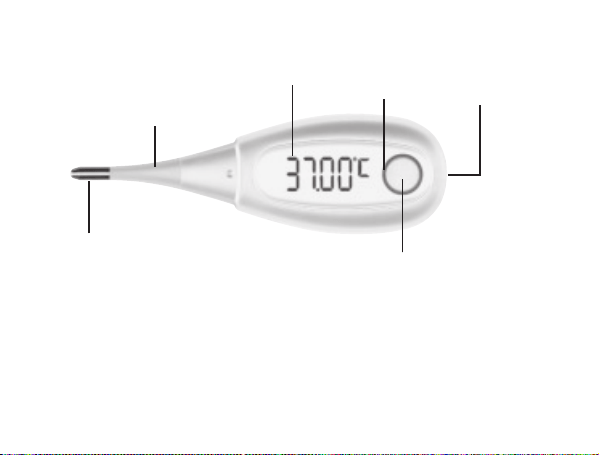
5. THE BASAL THERMOMETER
Measuring sensor
Flexible measuring tip
Display
On/o button
Battery compart-
ment cover
LED ring
6. INITIAL USE
Remove the battery isolation strip
A battery is included in delivery with your thermometer. It has already been inserted
into the thermometer.

14
In order to use the thermometer for the first time, you must first remove the battery iso-
lation strip on the battery compartment cover. In order to remove the battery isolation
strip, you must first open the battery compartment cover by twisting it anti-clockwise
using a coin. Then remove the battery isolation strip. Then close the battery compart-
ment cover by twisting it clockwise using a coin until you feel it click firmly into place.
The thermometer is now ready for use.
Connecting the thermometer with a smartphone
The thermometer can be connected with the Ovy app. In this manner, you can docu-
ment your entire cycle and keep an eye on it using your smartphone.
Before initial use, you have to connect the thermometer with the Ovy app in
order to synchronize the time. You can find further information about the Ovy
app in the “Ovy app” section.
Please read the instructions for use for the Ovy App carefully. You can find
them in the Ovy App in the settings and on the Ovy website.
Before you can transfer your measurements to your smartphone, you first have to
connect the thermometer with the smartphone. Proceed as follows:
1. Download the Ovy App on the Apple App Store (iOS) or on Google Play (Android
TM
).
2. Activate Bluetooth
®
on your smartphone.
3. Open the Ovy app on your smartphone.

15
4. Press the on/o/measure button on the thermometer in order to switch it on.
5.
Press the on/o/measure button again in order to access the measurement memory.
6.
Follow the instructions in the Ovy app. Once the Ovy app is connected with the
thermometer, a six-digit numerical code appears in the display of the thermometer.
7.
Enter the six-digit numerical code in the smartphone. The thermometer is now
connected with your smartphone.
You can only set the temperature unit and thermometer tone via the Ovy app.
7. MEASURING YOUR BASAL TEMPERATURE
Take your temperature at the same time, as soon as you wake up and before you get
out of bed. You should have slept for at least 4hours before the measurement. If you
have slept for less than 4hours before the measurement, enter the amount of sleep
you have had in the Ovy app or activate “Disrupted sleep”. Do not eat anything before
the measurement and avoid physical exertion.
You can take oral, rectal or vaginal measurements, but you should always take the
measurements in the same place in a cycle. We recommend taking the measurement
under your tongue with your mouth closed.
16
The thermometer should not be changed during the cycle. If you change the ther-
mometer during the cycle, you must also note it as a disruption, just like a change
to the place of measurement. For this cycle, a reliable evaluation is then no longer
guaranteed.
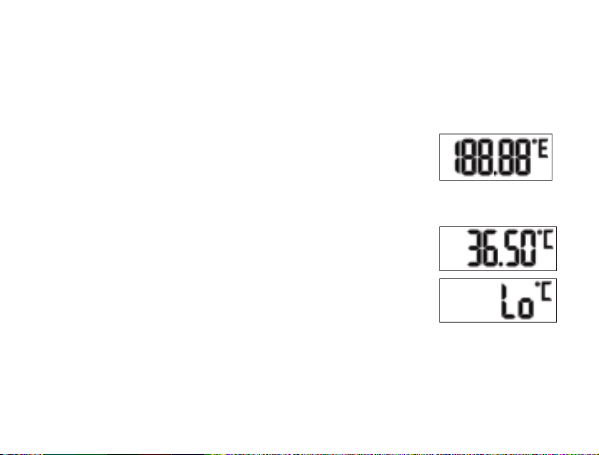
1.
Remove the protective cap from the measuring tip. In or-
der to switch on the thermometer, press the on/o /measure
button. A short acoustic signal confi rms that the device is
switched on. The thermometer fi rst conducts a self-test for
approx. 2 seconds. All segments of the display are visible
during this time.
2.
The last measurement then appears. Then the measurement
symbol “°C” fl ashes and “Lo” is shown on the display. The
thermometer is ready for use.
17
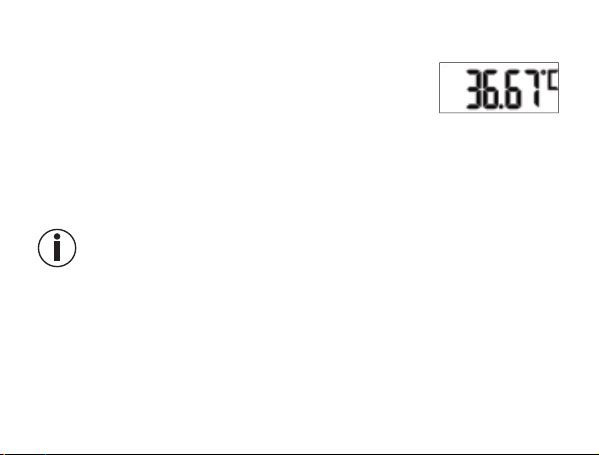
3. Close your mouth and breathe calmly through your nose so
that the air from your breathing does not infl uence the mea-
surement. During measurement, the display is switched o to
save the battery and the LED ring fl ashes slowly. Measuring
ends when a stable temperature is reached. An acoustic si-
gnal sounds and the measured temperature value is shown.
4.
If Bluetooth
®
is activated on your smartphone and your smartphone is in range, the
measurement is transferred to your smartphone immediately after completion of the
measurement. During data transfer, the LED ring on the thermometer lights up blue.
Once the data transfer has been successfully completed, the LED ring fl ashes twice.
If you want to transfer the measurements at a later point in time, you have to
switch to the thermometer‘s measurement memory.
5.
The measurement duration is 3 minutes. Once the measurement is completed, the
acoustic signal sounds. Please always wait until the end of the measurement before
you remove the thermometer from the place of measurement. The last 30 measured
values remain saved. The device switches o automatically around 30 seconds after
the end of the measurement. You can also switch o the thermometer before this
time by pressing the On/O button for 3 seconds.
18
Memory
The thermometer has 30 memory spaces for measurements. The memory menu can-
not be opened during data transfer.
1.
In order to access the memory menu, press the on/o button to switch on the ther-
mometer. After the self-test, briefl y press the on/o button again. The thermometer
now sends measurements to your smartphone. During data transfer, the LED ring
on the thermometer lights up blue. Once the data transfer has been successfully
completed, the LED ring fl ashes twice.
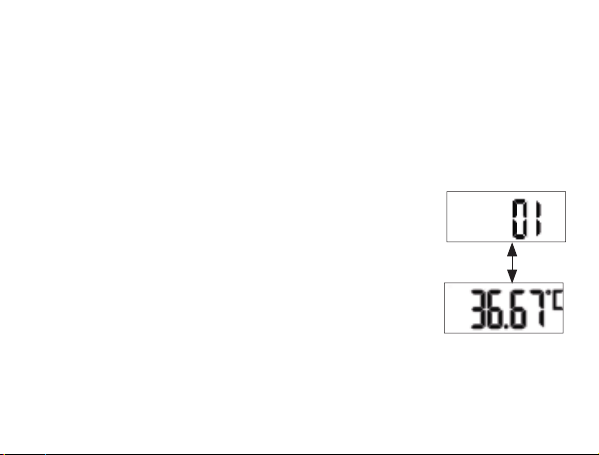
2.
The measurement is displayed during data transfer. After
data transfer, the memory space number fi rst appears in the
display and then the relevant measurement.
3.
In order to navigate between the saved measurements, repeatedly press the on/o
button briefl y. In order to leave the memory menu again and switch o the device,
press and hold the On/O button for three seconds.
19
8. BATTERY REPLACEMENT
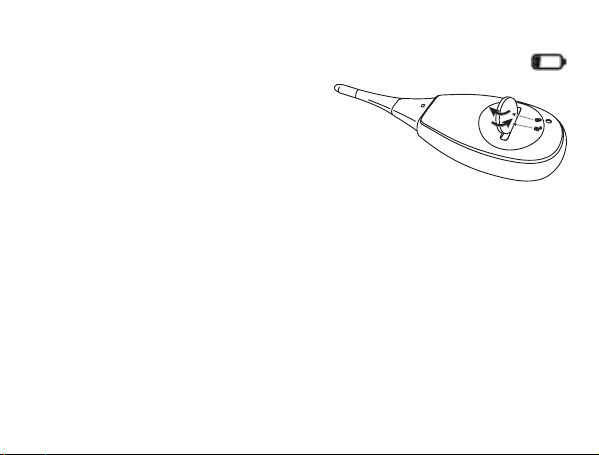
1.
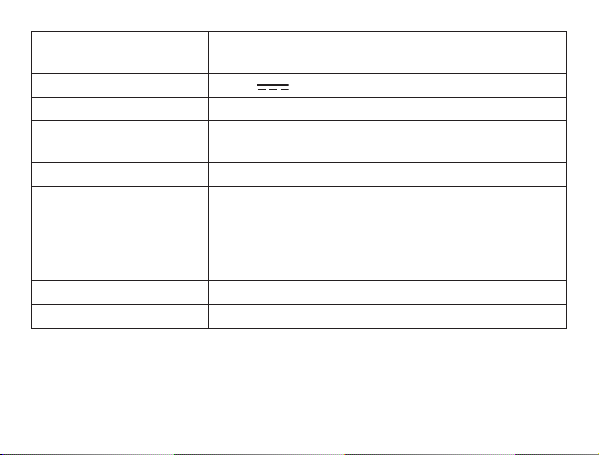
Replace the battery when the battery status indicator appears on the display:
2.
Open the battery compartment cover by
twisting it anti-clockwise with a coin.
3. Remove the battery compartment cover.
4.
Remove the flat battery from the battery
compartment.
5. Insert a new battery (type 3 V CR 2032) with
the + symbol facing upwards.
6. Place the battery compartment cover back onto the battery compartment.
7. Close the battery compartment cover by twisting it clockwise using a coin until you
feel it click firmly into place.
9. CLEANING THE DEVICE
• Clean the basal thermometer with a soft, clean cloth before and after each use.
• In the case of stubborn stains, you can clean the basal thermometer with a cloth
dampened with water or a neutral cleaning agent. Then dry the basal thermometer
with a soft, dry cloth.

20
• You can also disinfect the basal thermometer with 75% ethanol or isopropyl alcohol
diluted with water. To disinfect, do NOT dip the measurement sensor (tip of the
basal thermometer) in alcohol or hot water (≥ 50°C / 122°F).
• In order to prevent damage to the basal thermometer, do not use benzene, petrol
or other strong thinners and solvents for cleaning.
• Do NOT sterilise the basal thermometer by boiling, with gas or with an autoclave.
10. STORAGE AND DISPOSAL
Please store the thermometer in the original protective cap when it is not in use.
The accuracy of this thermometer has been carefully checked and it has been de-
veloped with a long service life in mind. If the device is used for commercial medical
purposes, it must be regularly tested for accuracy by appropriate means. Precise inst-
ructions for checking accuracy may be requested from the service address. For en-
vironmental reasons, do not dispose of the device in the household waste at the end of
its service life. Dispose of the device at a suitable local collection or recycling point in
your country.
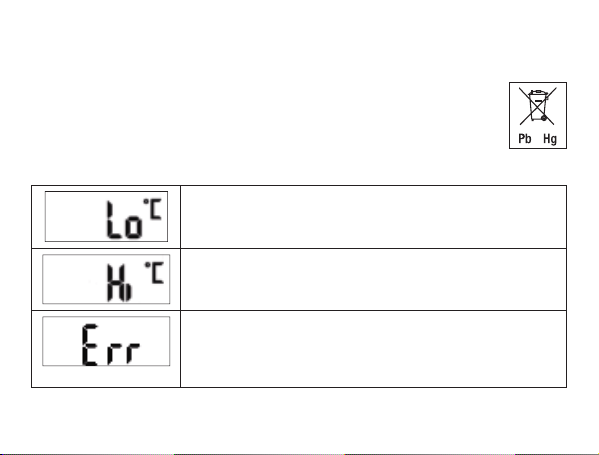
Dispose of the device in accordance with EC Directive – WEEE (Waste Elec-
trical and Electronic Equipment). If you have any questions, please contact
the local authorities responsible for waste disposal.
21
Empty, completely fl at batteries must be disposed of through specially designated
collection boxes, recycling points or electronics retailers. You are legally required to
dispose of the batteries.
The codes below are printed on batteries containing harmful substances:
Pb = Battery contains lead, Cd = Battery contains cadmium, Hg = Battery
contains mercury. This battery contains: Pb, Hg.
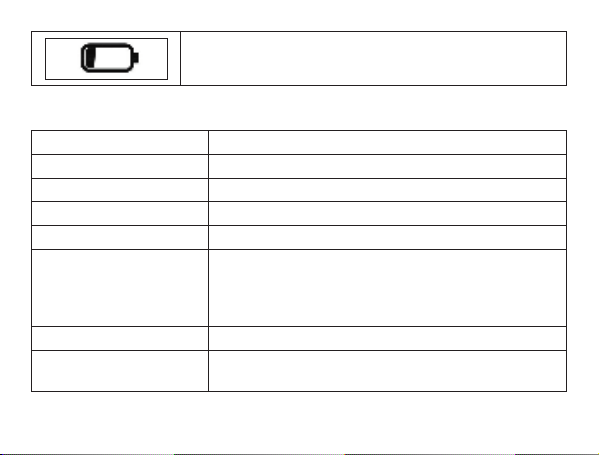
11. ERROR MESSAGES
The measured temperature is below 32.00°C and is therefo-
re outside the measurement range.
The measured temperature is above 43.99°C and is therefo-
re outside the measurement range.
System error. Switch the device o and wait one minu-
te. Then switch the device on again. If the error message
continues to appear, please contact the customer service
department.
22
The battery is flat. Replace the battery.
12. TECHNICAL DATA
Model OT 30
Type DMT-4751
Dimensions 106 x 33 x 19 mm
Weight approx. 24 g (including battery)
Measurement range 32.00°C - 43.99°C
Measurement accuracy ± 0.05°C between 35.00°C and 38.00°C at an ambient
temperature of between 18°C and 28°C,
±0.1°C outside of this measurement and temperature
range
Display OLED display with 5 digits
Storage and transportati-
on conditions
Temperature -20°C – +55°C, Rel. humidity 15% – 95%
700 – 1060 hPa ambient pressure
23
Operating conditions Temperature 5°C – +40°C, Rel. humidity 15% – 95%
700 – 1060 hPa ambient pressure
Power supply 1 x 3V
CR2032 battery
Duration of measurement 3 minutes
Expected service life Information on the product’s service life can be found
on the website.
Battery life 160 measurements
Data transfer 2402 MHz – 2480 MHz frequency band
Max. 2.8 dBM transmission power
The thermometer uses Bluetooth
®
low energy tech-
nology
Compatible with Bluetooth
®
≥ 4.0 smartphones/tablets
Operating mode Direct mode
Contraindication no contraindication
The serial number is located on the device or in the battery compartment.
We hereby confirm that this product complies with the European RED Directive
2014/53/EU. The CE Declaration of Conformity for this product can be found under:
https://www.beurer.com/de/mdr-cedeclarationofconformity.php
24
13. OVY APP
„The Ovy App is available for download in the Apple App Store (iOS) or on Google Play
(Android™). The Ovy App supports two objectives: it can help prevent pregnancy or
facilitate eorts to conceive in the short term. The Ovy App assists women in achieving
pregnancy, pursuing their desire for children, or with hormone-free contraception.
The Ovy App is an independent Class IIb medical device developed by Ovy GmbH.“
System requirements
List of system requirements and compatible devices:
Do you have any questions about the Ovy app?
The Ovy team is on hand to help in such cases and you are welcome to e-mail us at
[email protected]. The Ovy app also has a contact function in your profile, which you
can also use to send us your questions and feedback directly. The Ovy website and the
information sections in the app already oer some answers and diverse background
information about your cycle.

25
Subject to errors and changes
Website: www.ovyapp.com • Contact: hello@ovyapp.com
Facebook: Ovy • Instagram: @ovyapp • Twitter: @ovyapp
14. WARRANTY AND SERVICE
Further information on the guarantee and guarantee conditions can be found in the
guarantee leaflet supplied.
Notification of incidents
For users/patients in the European Union and identical regulation systems, the follo-
wing applies: If during or through use of the product a major incident occurs, notify the
manufacturer and/or their representative of this as well as the respective national
authority of the member state in which the user/patient is located.

26

27
28
791.06_OT30_2024-06-27_05_IM2_BEU_EN
The Bluetooth
®
word mark and logos are registered trademarks owned by Bluetooth SIG, Inc. and any use of such
marks by Beurer GmbH is under license. Other trademarks and trade names are those of their respective owners.
Apple and the Apple logo are trademarks of Apple Inc., registered in the U.S. and other countries. App
Store is a service mark of Apple Inc., registered in the U.S. and other countries.
Google Play and the Google Play logo are trademarks of Google LLC.
Android is a trademark of Google LLC.
BEURER GmbH • Söflinger Str. 218 • 89077 Ulm (Germany)
Tel.: +49 (0) 731 / 39 89-144 • Fax: +49 (0) 731 / 39 89-255
www.beurer.de • Mail: kd@beurer.de
Medical Device Safety Service GmbH
Schigraben 41, 30175 Hannover, Germany
MedEnvoy Switzerland, Gotthardstrasse 28, 6302 Zug, Switzerland
UK Importer: Beurer UK Ltd., Suite 16, Stonecross Place, Stonecross
Lane North, WA3 2SH Lowton, United Kingdom
JOYTECH Healthcare Co., Ltd., No. 365,
Wuzhou Road, Yuhang Economic Development Zone
Hangzhou City, 311100 Zhejiang, P.R.C.