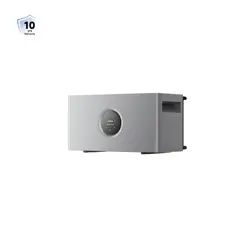
LumeGret A2000
Instruction Manual

EN
1
Table of contents
1 Product Introduction.....................................................................03
2 Pre-Installation..............................................................................06
3 Installation......................................................................................07
4 Specifications.................................................................................15
5 EU Declaration of Conformity.....................................................16
6 Warranty Exclusions......................................................................17

EN
2
DISCLAIMER
This product includes essential printed documentation required for setup and basic
usage. Improper use may result in serious injury damage, or property loss. By using this
product, you agree to and accept all terms outlined in the product documentation. MOVA
is not liable for losses, damages, or injuries caused by misuse or non-compliance.
·
Read this document and other related product documentation before any operation.
·
The installation of this product must comply with all applicable local regulations, codes, or
standards.
·
An overcurrent circuit breaker must be installed between this product and the grid.
·
When the photovoltaic (PV) array is exposed to light, it supplies direct current voltage to the
power conversion equipment (PCE).
·
Use insulation tools and wear personal protective equipment when installing, servicing, or
maintaining this product.
·
Install this product in a tidy, dry, and well-ventilated environment.
·
Keep the product out of reach of children and pets. If the product is to be used near children,
they should be closely supervised.
·
Before making any electrical connections, ensure that any load to be connected (e.g. devices
or equipment intended to be powered by this product) is powered off.
·
Always pull the plug instead of the cord when disconnecting the product to reduce the risk of
damage to the electric plug and cord.
·
Do not put fingers or hands into the product.
·
Do not expose this product to direct sunlight, rain, and snow.
·
Do not expose this product to strong electromagnetic fields to avoid radio interference.
·
Do not install or operate this product near flammable, explosive, corrosive,or caustic sources.
·
Do not install or operate this product during extreme weather events such as lightning, heavy
rain, or strong wind.
·
Do not subject this product to severe impacts, vibrations, or drops to prevent physical
damage.
·
Do not drag, squeeze, step on this product, or throw it into the fire, as there is a risk of
explosion.
·
Do not use any damaged cords or cables with this product.
·
Do not damage, deface, or remove any labels on this product.
·
Do not disassemble, repair, or modify this product by yourself for any maintenance or service,
contact MOVA Customer Service.
·
Do not use any unofficial or unrecommended components and accessories.
·
For any replacements, please contact MOVA for further assistance.
·
Do not clean the product with flammable or toxic solvents. Wipe it with a dry soft cloth.
·
Do not place heavy objects (>40 kg) on the product.
EN
3
1 Product Introduction
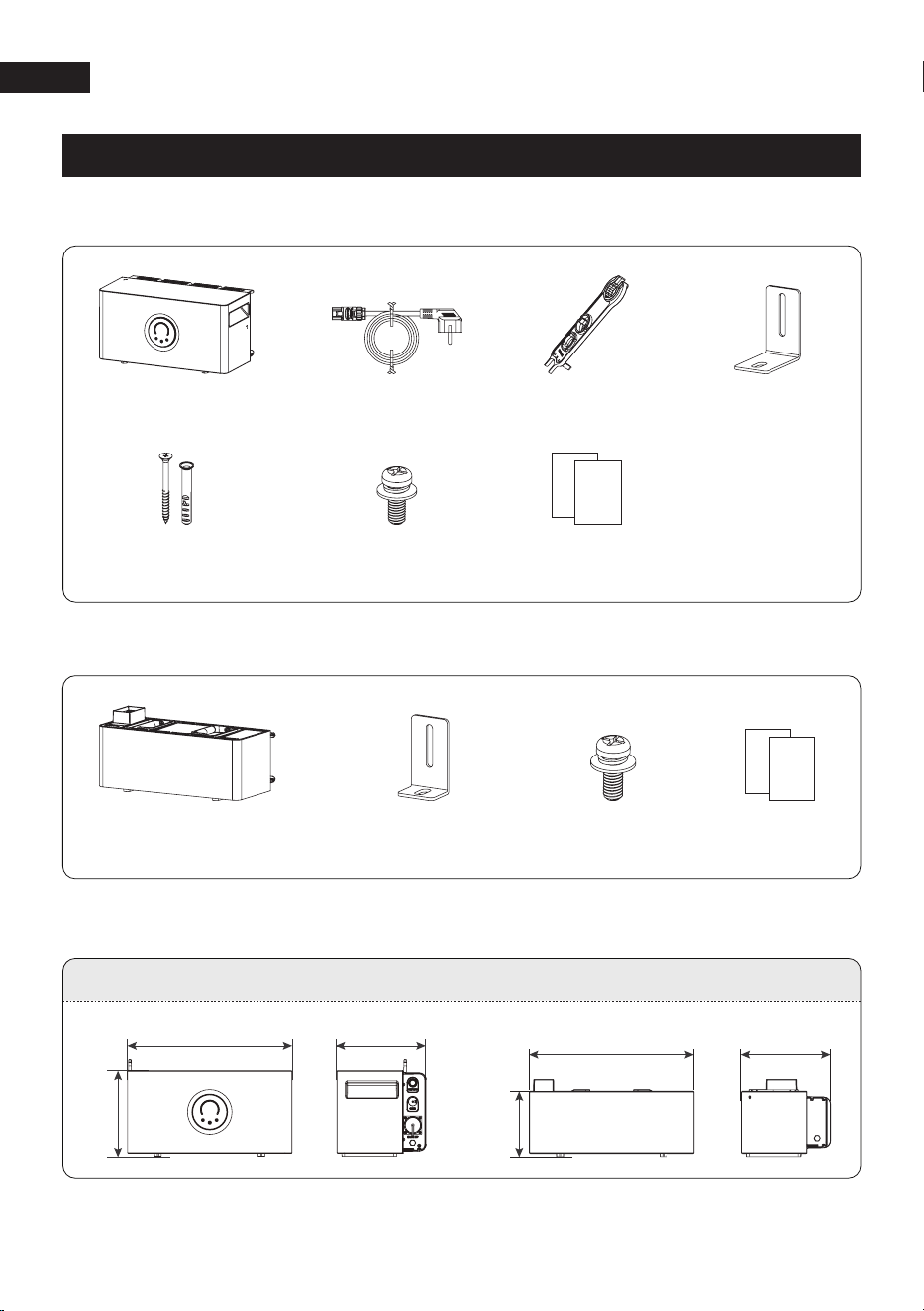
1.1 LumeGret A2000 Package List
1.3 System Dimensions
Documents
LumeGret A2000
×1
AC Power Cord
×1
MC4 Wrench
×1
Expansion Bolts
×2
Locking Bracket
×2
M4*10 Bolts
×2
1.2 LumeGret B2000G Package List (Sold Separately)
Battery
×1
M4*10 bolts
×2
Locking Bracket
×2
249mm
480mm 260mm
188.5mm
480mm 260mm
LumeGret A2000 LumeGret B2000G
Documents
EN
4
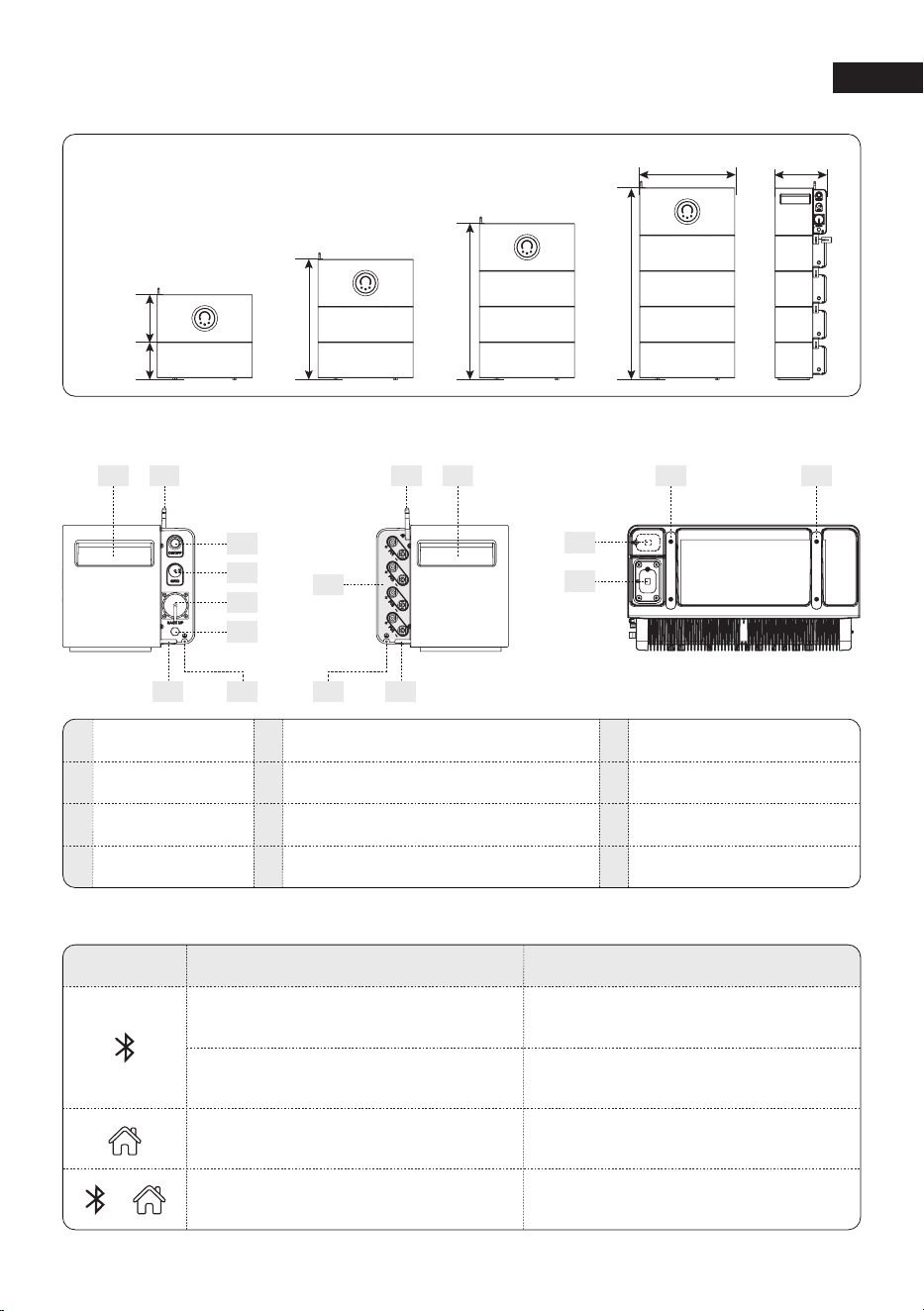
21
3
PV Input Terminal
Antenna
Lifting Handle
Series Connection Mounting Holes
Power Button
Back-up Port
1
2
5
6
9
Ventilation Valve
3
7
Protection Cover
10
Battery Connection Port
11
1
240mm
180mm
260mm
1
2
600mm
1
2
3
780mm
1
2
3
4
480mm
960mm
1.4 Product Overview
4
5
6
7 8
12
78
9
Protective Grounding TerminalGrid Port4 8 Foot Pad12
1.5 Button Controls
Action Button Status
Long press for 6 seconds
Reset Bluetooth and Wi-Fi and
clear historical account data
Long press three times in 10 seconds
Enter pairing mode
Switch to backup modeLong press for 2 seconds
Enable/ disable Child Lock Mode
and disable/enable touch control
Press and hold the two buttons
for 3 seconds
1212
10
11
EN
5
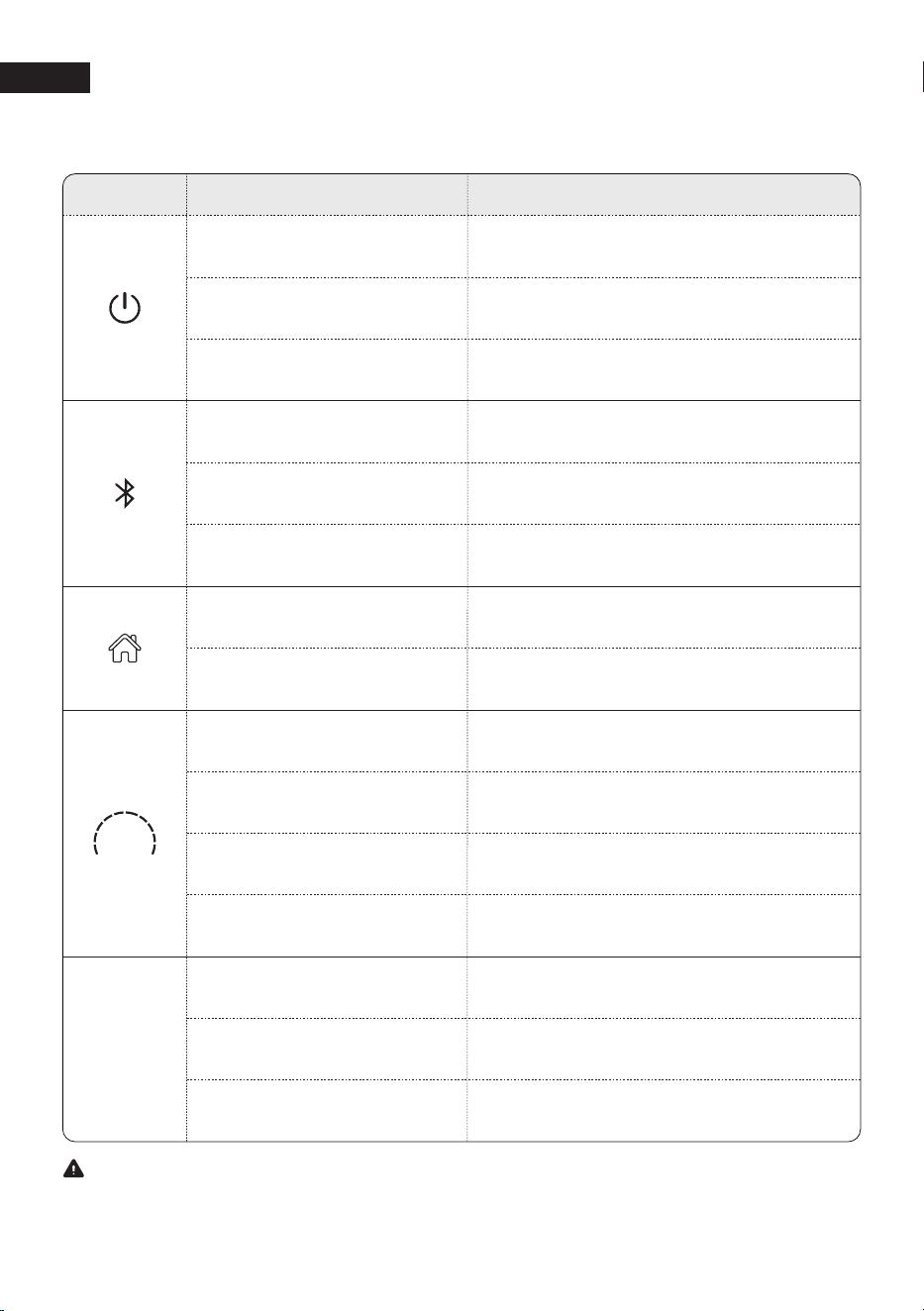
1.6 LED Indicator
Status
Description
Power off Off
Breathing white
Ready to connect to Network
and connectting
Solid whiteNetwork connected
Solid whiteThe system is in backup mode.
OffThe system is not in backup mode
Solid whiteThe system is working normally
Blinking whitePower On
Light
Battery charging
Blinking greenBattery discharging
Solid green
Off
The battery has no power
or system powered off.
The light bar changes according to battery level,
each segment = 10% SOC
Battery level
Note
The duration of the dynamic indicator light can be adjusted via App according to actual needs.
Dynamic
indicator
light
Flowing blueThe system is preparing
Breathing blueThe system is working normally
Blinking redSystem fault
Flash whiteReset
EN
6
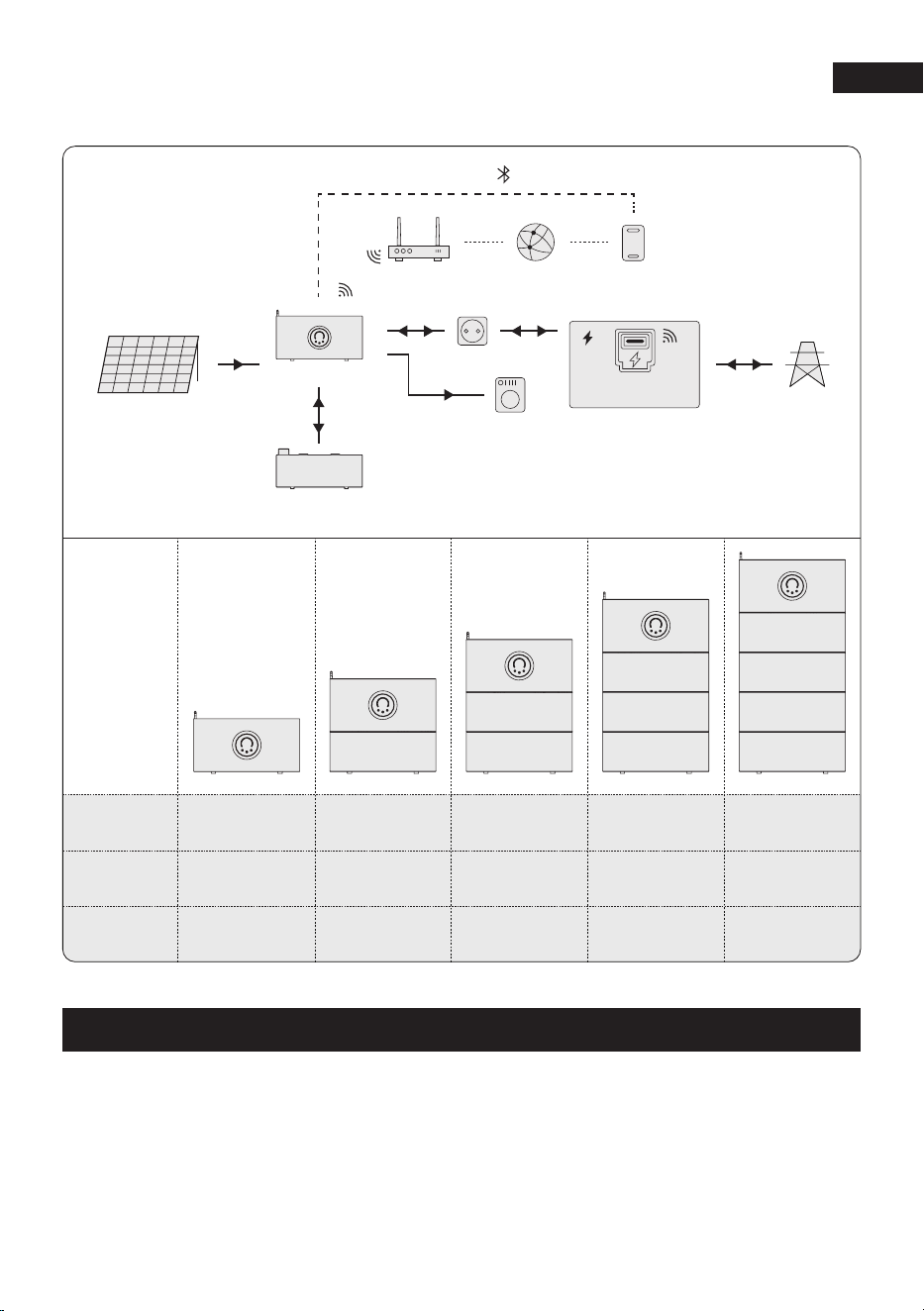
1.7 System Overview
System
Overview
LumeGret
A2000
LumeGret
B2000G
System
Capacity
×1 ×1 ×1 ×1 ×1
/ ×1 ×2 ×3 ×4
1.92 kWh 3.84 kWh 5.76 kWh 7.68 kWh 9.6 kWh
Solar Panels PV Input
DC
LumeGret B2000G
AC
AC
AC
Load
Socket
Router Server Phone
Distribution Box
Smart Meter
Power Grid
Wi-Fi
Wi-Fi
Wi-Fi
Bluetooth
LumeGret A2000
2 Pre-Installation
Before unpacking the unit, carefully inspect the packaging for any signs of damage, such
as holes or cracks, and verify that the model number matches your order. If you notice any
damage or an incorrect model, do not unpack the unit. Contact your dealer or point of purchase
immediately.
2.1 Check the packaging
EN
7
3 Installation
·
After unpacking the unit, check if it is intact and complete, and free from any obvious damage.
·
If any item is missing or damaged, contact your dealer or source of purchase.
2.2 Check the unit
1. Do not install the equipment in a place near flammable, explosive, or corrosive materials.
2. The temperature and humidity at the installation site should be kept within the appropriate
range.
3. Do not install the equipment in a place that is within children's easy reach.
4. Reserve enough space for operations and heat dissipation when installing the system.
5. The temperature inside the box is relatively high when the inverter is running, do not touch
the box before it cools down to avoid getting burned.
6. Install the equipment in a sheltered place to avoid direct sunlight, rain and snow.
7. The place to install the equipment shall be well-ventilated for heat radiation and large enough
for operations.
8. The installation height should be convenient for operation and maintenance, ensuring that the
equipment indicator lights, all labels and the connection terminals are easy to view.
9. The altitude to install the equipment shall be lower than the maximum working altitude. The
maximum operating altitude is 3,000 meters.
2.3 Installation Environment Requirements
NOTICE
·
Charging temperature range: -20<T< 55° C; Discharging temperature range:-20<T< 55° C.
·
If installed in an environment below -20° C, the battery will not be able to continue charging
to restore energy after being discharged, resulting in undervoltage protection.
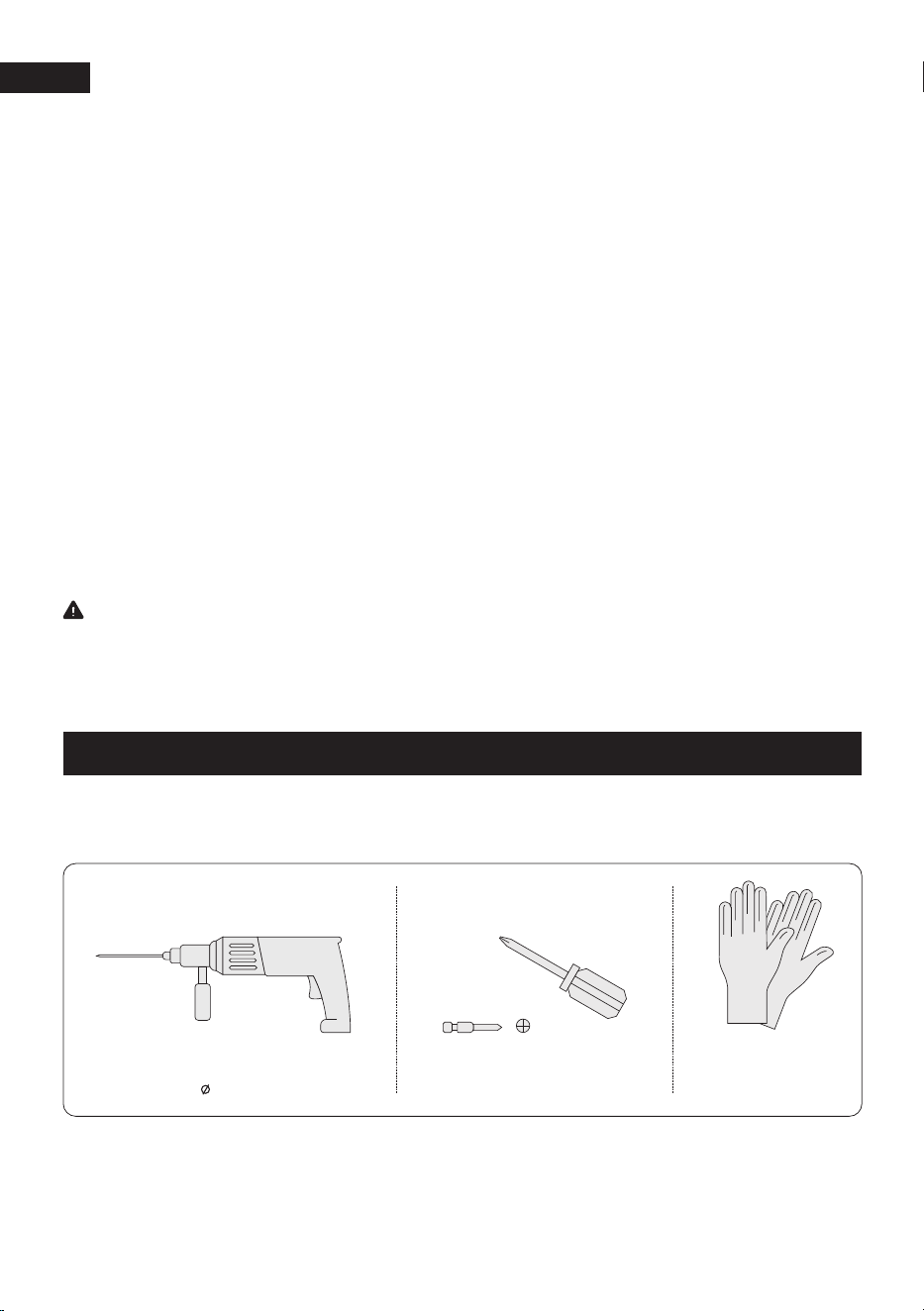
The following tools are not included in this package. Please make sure they are ready
before installation and electrical connections.
Hammer drill Screwdriver
Safety gloves
(PH0, PH1, PH2)8mm
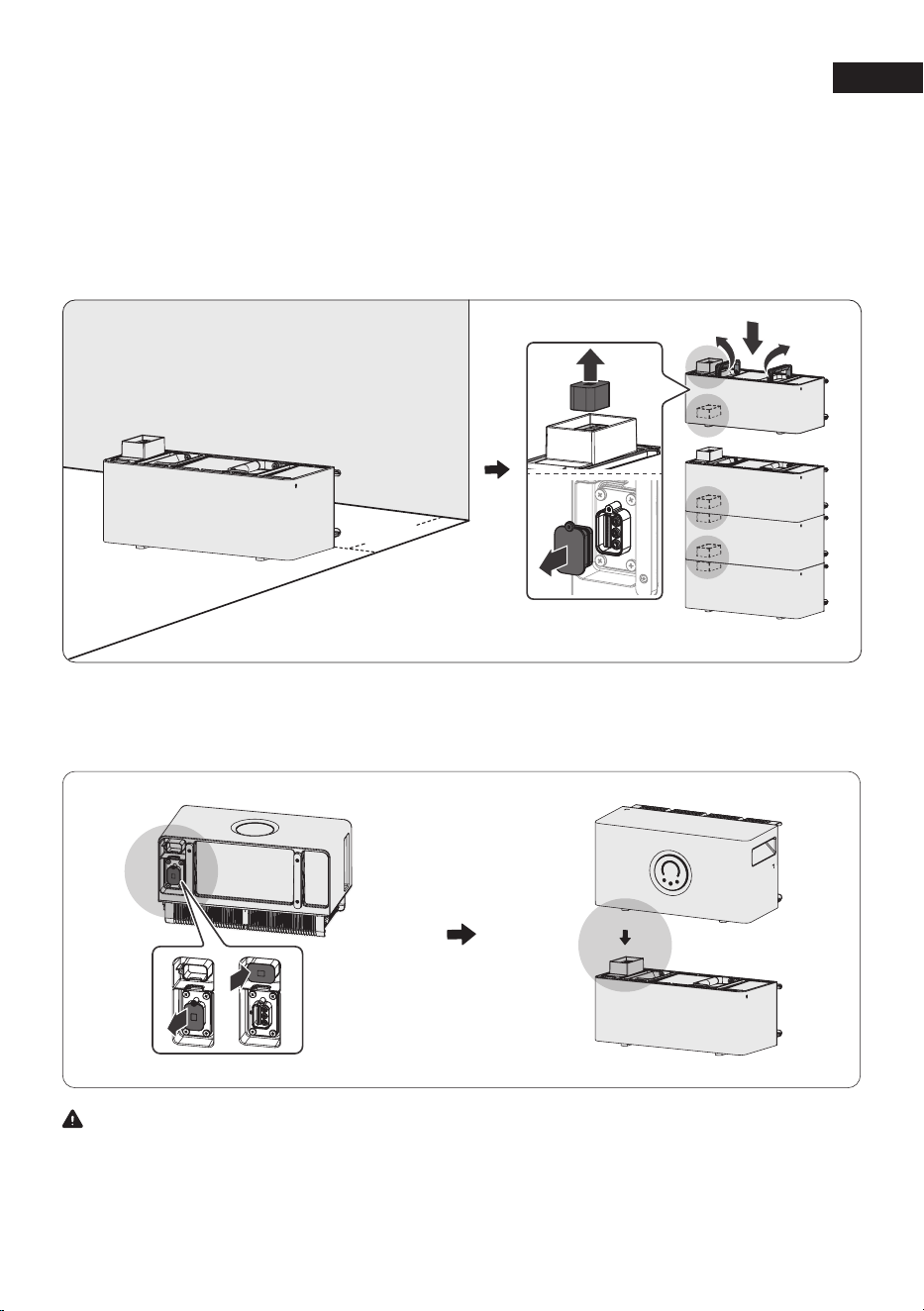
The following are applicable to scenarios where an expansion battery is used. If the expansion
battery is not required, simply place the MOVA LumeGret A2000 in the appropriate installation
location according to the actual needs.
EN
8
Step 2: Remove the bottom rubber plugs of LumeGret A2000, and stack them at the top
of expansion batteries
Warning
If you didn't buy the expansion batteries separately, you can place the MOVA LumeGret A2000
directly on the ground, but make sure that the protective cover of the bottom device should
not be removed!
·
Place expansion battery on the bottom, and keep about 50 mm away from the wall.
·
Remove the bottom protective covers of the expansion batteries. Stack all expansion batteries
one by one. (Up to 4 expansion batteries can be stacked.)
Step 1: Place expansion battery (If you didn't purchase the extended battery separately, please
skip this step)
×
4 PCS
50mm
EN
9
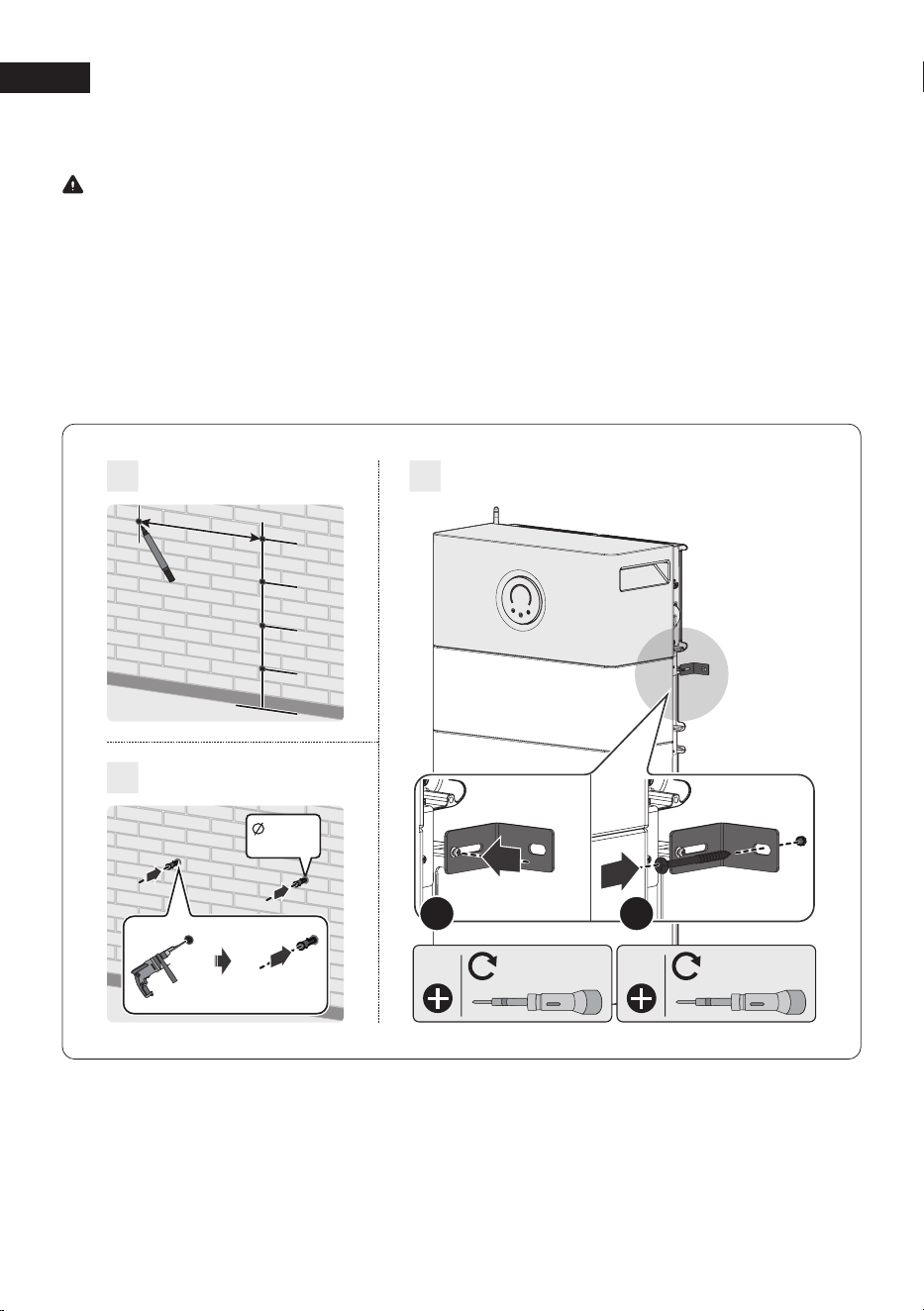
Step 3: Install the Wall Mount Kit
1. Mark a pilot hole.
2. Drill the marked hole and insert the anchor.
3. Install the bracket:
① Tighten the long screw
② Tighten the short screw
Install the bracket on the top battery【NOT LumeGret A2000 main unit】by partially tightening
the short screw. The fitting can be mounted on either the front or the back.
Note
M5 2-3N·m M5 4N·m
1
2
3
166.1mm
180.4mm
180.4mm
180.4mm
517mm
:8mm
D:45mm
1
2
EN
10
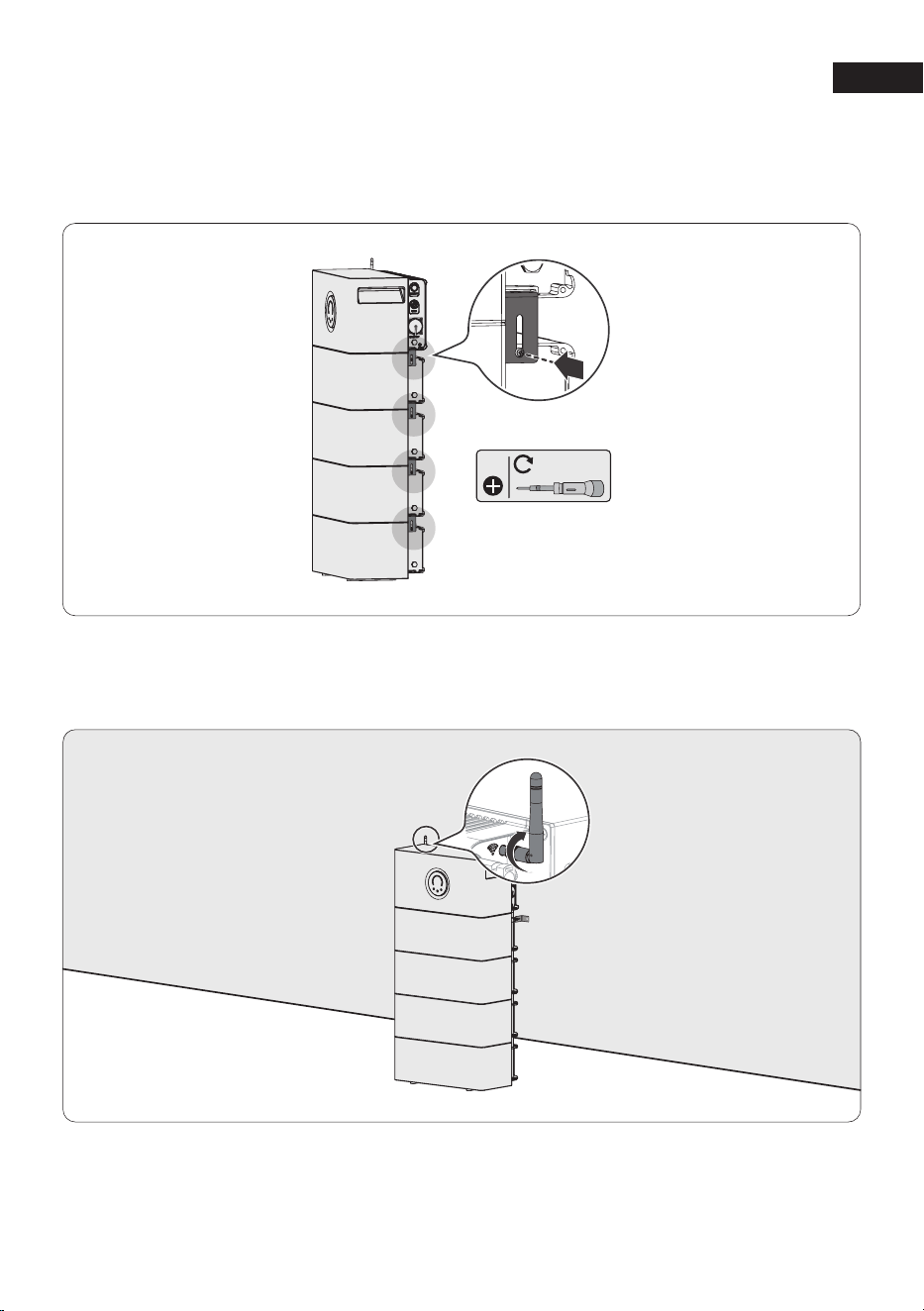
Step 4:
Step 5:
Tighten the antenna on the upper part of the MOVA LumeGret A2000.
Insert the series of brackets into the bracket installation holes of the MOVA LumeGret A2000
and the battery one by one, and then tighten them with screws to complete the fixation
between the MOVA LumeGret A2000 and the battery, as well as between the batteries.
M5 2-3N·m
EN
11
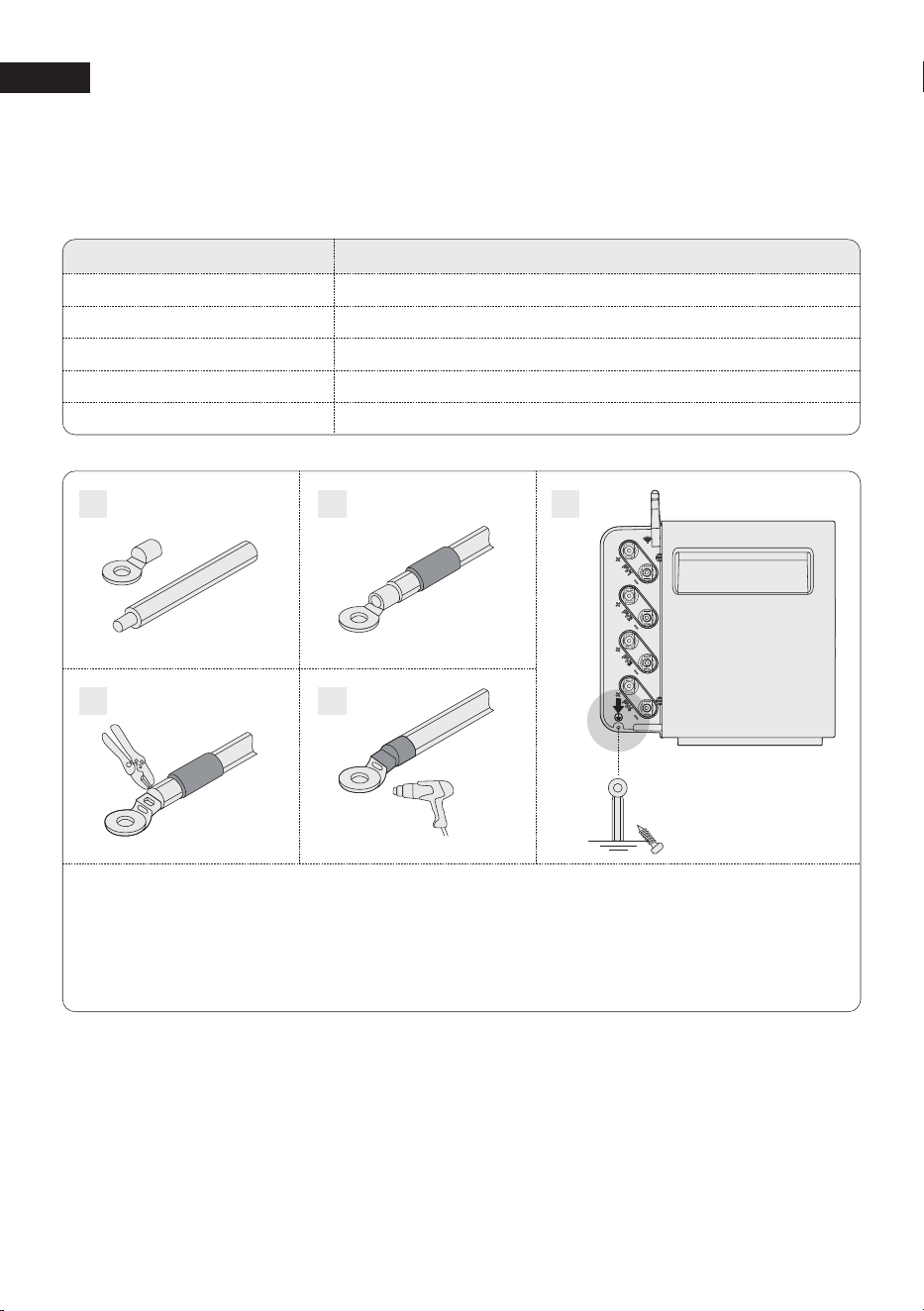
Step 6: Grounding
The following tools and supplies are not included in the package. Ensure that you have them
ready before proceeding with the electrical connections.
Required Supplies
GND cable
Ring terminal
Heat shrink tubing
Heat gun
Phillips screwdriver
Specifications
1 mm2,yellow/green
Suitable for the 1 mm2 GND cable and the M5 screw
Caliber: 8 mm; Length: 25 mm
/
PH2
1. Strip the insulation layer of the GND cable.
2. Insert a heat shrink tubing and a ring terminal into the GND cable.
3. Crimp the ring terminal onto the GND cable using a crimper.
4. Wrap the wire crimping area with the heat shrink tubing using a heat gun.
5. Loosen the pre-installed screw and use it to secure the GND cable.
5
1
2
3
4
EN
12
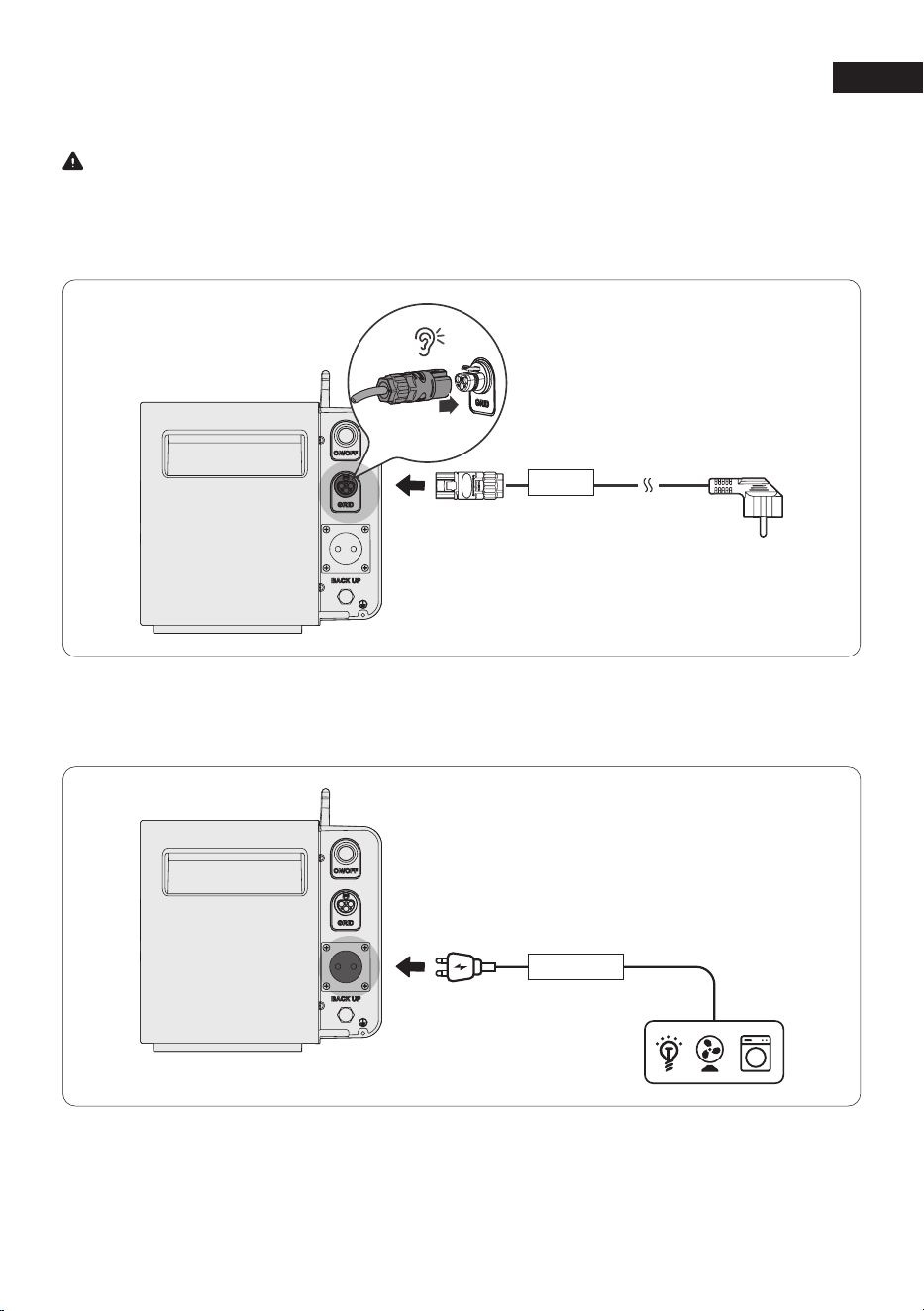
Step 7: Connect to Grid Power via a Home Outlet
Warning
The grid connection must be connected to a grounded electrical outlet or grounding busbar.
Additionally, grounding the product casing via its dedicated grounding terminal is recommended
for enhanced safety. Ensure the device is powered off before installation.
Step 8: Connect to Your Device
Power your device directly using the backup port if needed.
GRID
Back Up
EN
13
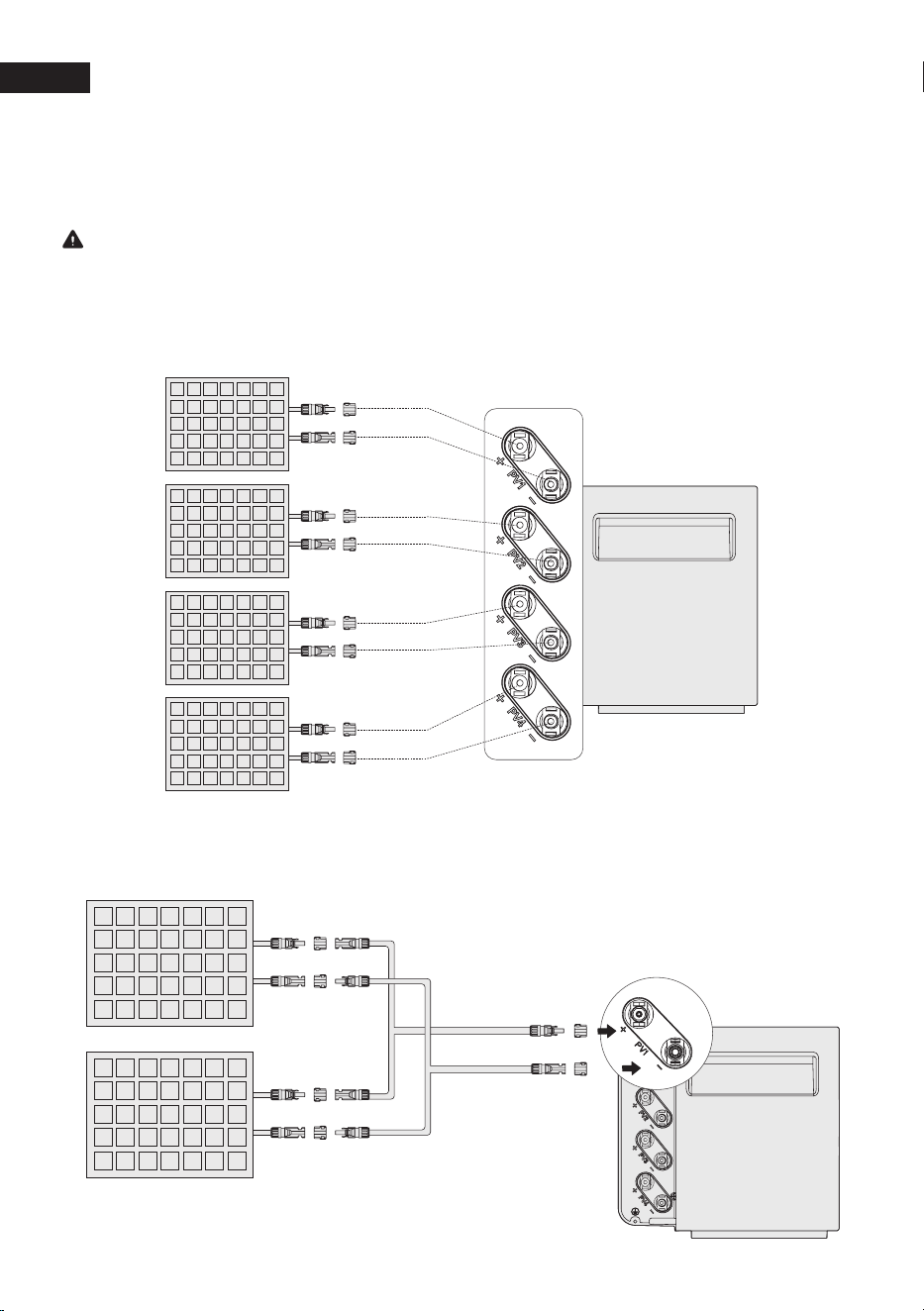
Step 9: Connect to Solar Panels
Solar Panel is not included in the package, it's an optional accessory.
Caution
·
Never connect the leads of a solar panel to different PV terminals (e.g., negtive to PV1-and
positive to PV2+) to prevent short circuits.
·
Install the PV tamper-proof covers onto PV connector of the cable, then connect to the PV
Input Terminal of the LumeGret A2000.
Parallel Connection (Up to 8 PV Modules)
Connect every two pv modules to the same set of pv input ports.
PV4 +
PV4 -
PV3 +
PV3 -
PV2 +
PV2 -
PV1 +
PV1 -
EN
14
Step 10: Power On and Settings
·
Power On: Press the power button to power on the device.
·
Bind the Device and Set Up the Internet:
Follow the in-app instructions to bind the device and enjoy smart control from your phone.
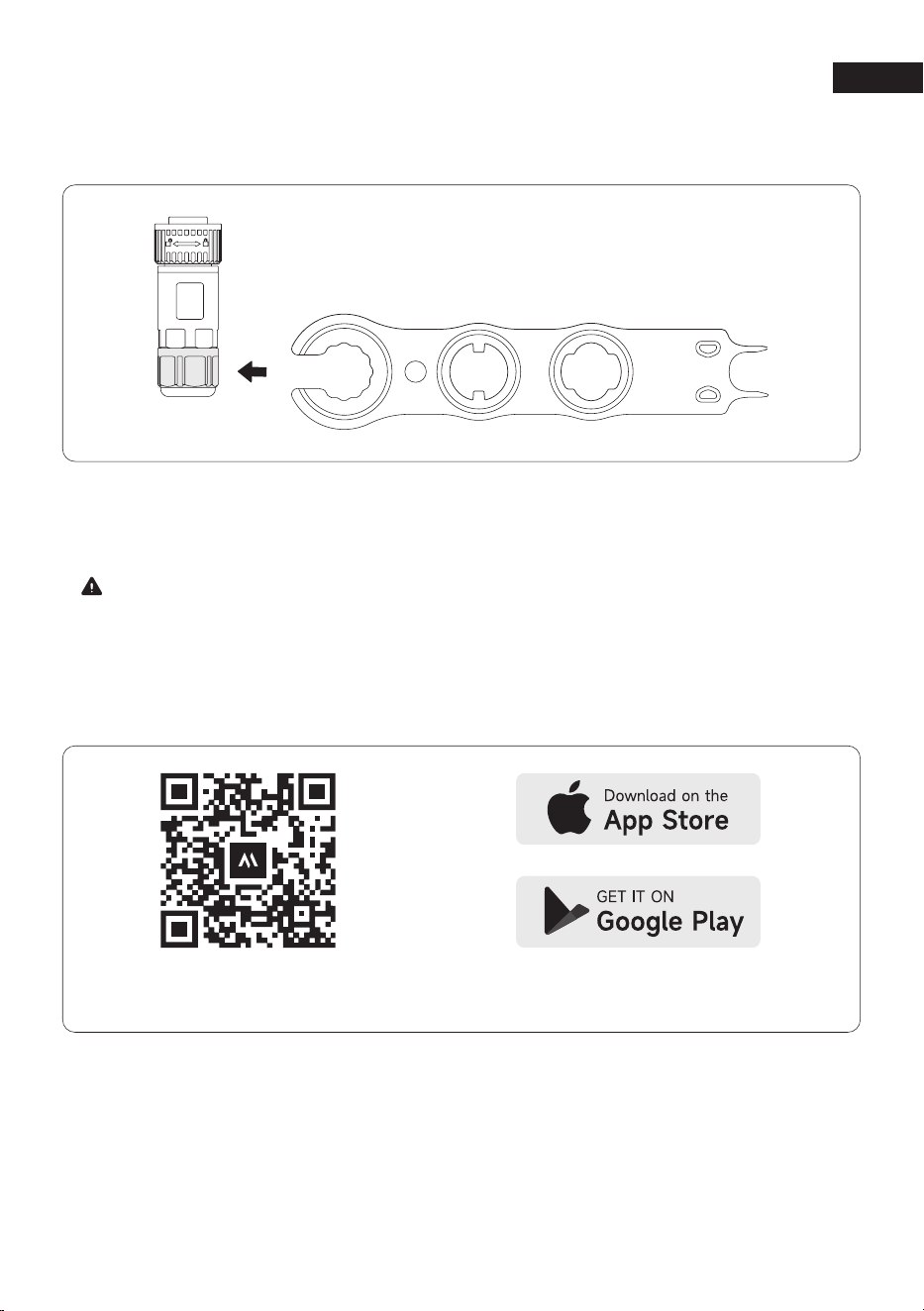
If you need to adjust the PV Connection, disconnect the solar connectors using the PV Wrench.
Scan to download
the MOVAhome APP
Search for the MOVAhome App
in your App store to download it.
·
Download the MOVAhome App:
Scan the QR code or search for the MOVAhome app in your app store to download it.
Then, register an account and log in.
Note:
When the LumeGret A2000 is powered on, the expansion batteries will automatically activate.

EN
15
4 Specifications
PV Terminal
Max. PV Input Voltage: 60V
Operating Voltage Range: 13-60V
Max. PV Input Current: 4*20A
Max. PV Short-Circuit Current (Isc): 4*26A
Max. PV Input Power: 2400W
Battery Data
Rechargeable Battery: LFP
Rated Voltage: 19.2V
Rated Power (Single Device): 1.6kW
Rated Power (With Expandable Battery):
2.4kW
Rated Capacity: 1920Wh
General Parameters
Communication: Wi-Fi & Bluetooth
Protective Class: IP65
Ingress Protection: Class II
Inverter Topology: Isolated
Operating Temperature Range:
-20℃ ~ +55℃
Max Altitude: 3000m
Warranty: 10 Years
Dimensions: 480*249*260mm
Net Weight: 26kg
LumeGret A2000
AC Output (On-Grid Terminal)
Max AC Output Power: 0.8kW
Rated Voltage: 230V
Rated Current: 3.5A
AC Input (On-Grid Terminal)
AC Input Power: 1.5kW
Rated AC Input Voltage: 230V
Rated Current: 6.8A
AC Output (Off-Grid Terminal)
Max AC Output Power: 1.5kW
AC Output Voltage: 230V
Max AC Output Current: 6.8A

EN
16
5 EU Declaration of Conformity
Equipment with Wireless Communication Modules
The equipment with wireless communication modules sold in the European market meets the
requirements of the following directives:
·
Radio Equipment Directive 2014/53/EU (RED)
·
Restrictions of Hazardous Substances Directive 2011/65/EU and (EU) 2015/863 (RoHS)
·
Waste Electrical and Electronic Equipment 2012/19/EU
·
Registration, Evaluation, Authorization and Restriction of Chemicals (EC) No1907/2006 (REACH)
Battery
The batteries sold in the European market meets the requirements of the following directives:
·
Electromagnetic compatibility Directive 2014/30/EU (EMC)
·
Battery Directive 2006/66/EC and Amending Directive 2013/56/EU
·
Waste Electrical and Electronic Equipment 2012/19/EU
·
Registration, Evaluation, Authorization and Restriction of Chemicals (EC) No1907/2006 (REACH)

EN
17
6 Warranty Exclusions
In the event of damage related to the causes listed below, no warranty claims will be
acknowledged or accepted. Claims that relate to defects that are caused by the following
factors are not covered by MOVA’s warranty obligations.
1. Can not provide proof of purchase.
2. Force majeure (storm damage, lightning strike, over voltage, fire, thunderstorm, flooding;
social causes such as war, turmoil, government intervention, strikes, embargoes, market
conditions, etc.).
3. Accidental damage, misuse, abuse, non-compliant use, normal wear and tear, theft, loss, or
confiscation.
4. Improper application of electrical supply voltage, current and/or frequency.
5. Improper installation, commissioning, start-up, configuration, or operation (contrary to the
guidance detailed in the installation manual supplied with each product).
6. Inadequate ventilation and circulation resulting in insufficient cooling and natural airflow.
7. Modifications to any part of the product.
8. Unauthorized repair attempts.
9. Products whose serial number sticker or imprint has been removed, defaced or tampered
with.
10. Products purchased from unauthorized dealers/resellers.
11. Free products/rewards/gifts.
12. Products used outside of the purchasing region, and products that are shipped to areas that
are not easily accessible by courier or freight services, such as overseas or remote islands.
13. Cosmetic or superficial defects, dents, marks or scratches, which do not influence the proper
functioning of the product.
14. This limited warranty does not cover any battery cell or product containing a battery cell
unless you fully charge the battery cell within thirty (30) days of receiving the product and
subsequently charge it at least once every 3 months. Failure to do so will void the warranty
for the battery cell and coverage for any associated damage or malfunctions. It is preferable
to fully charge it within seven (7) days of receiving the product.
15. Our warranties are non-transferable from end user to end user.
Furthermore, this limited warranty and related service will not exceed the original cost of the
MOVA product. Please note that these warranty terms and conditions are subject to change
without prior notice. The MOVA Support Team reserves the right to make a final determination
regarding warranty service eligibility, and to determine the appropriate solution, which may
include replacement, repair, or refund, at its sole discretion.

Manufacturer: LumeGret Energy Technology (Suzhou) Co., Ltd.
Address: 10/F, Building B, No. 7 Qian Zhu Road, Taihu Street, Wuzhong District, Suzhou,
Jiangsu Province, P.R.China
Exporter: Automax Technologies (Hong Kong) Co. , Limited
Address: UNIT 1104A 11/F KAI TAK COMM BLDG NO 317-319 DES VOEUX RD CENTRAL SHEUNG
WAN HONG KONG
https://www.mova.tech/
MADE IN CHINA
(+49)800-400-9824
Monday - Sunday
9:00 - 18:00
aftersales@mova-tech.com