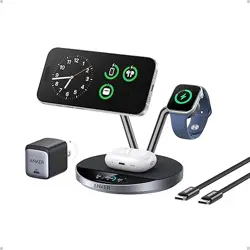
Place your smartphone on the Qi2.2 magnetic wireless module (1);
charging will begin automatically once properly aligned.
For earbuds that support the DPP protocol, place the charging case
on wireless output (2), and charging will start automatically.
To achieve fast charging, ensure you are using a charger that is capable
of fast charging. Some cases may interfere with wireless charging if they
contain metallic material or are overly thick.
5.Caution
Please read all warnings for your safety and optimal user experience.
Please read and follow these instructions carefully and retain for your
records.
1 . Always disconnect the device when not in use.
2 . Do not use if broken or damaged, or if exposed to liquid.
3 . Not to be used where the ambient temperature exceeds 40°C/105°F.
4 . Do not use with damaged or faulty cables/accessories.
5 . Do not place near any sources of heat, open flame, liquid.
6 . Do not use with power extension cords, use only in wall socket.
7 . Designed for indoor use only.
8 . Use a dry cloth to clean the product.
9 . There should be clear space around the product, not touching other
material to avoid overheating.
Smartphones
Compatible with iPhone 17, iPhone 17 Pro, iPhone 17 Pro Max, iPhone
17 Air, iPhone 16, iPhone 16 Pro, iPhone 16 Pro Max, iPhone 16 Plus
iPhone 15, iPhone 15 Pro, iPhone 15 Pro Max, iPhone 15 PlusiPhone 14,
iPhone 14 Pro, iPhone 14 Pro Max, iPhone 14 Plus, iPhone 13, iPhone
13 Pro, iPhone 13 Pro Max, iPhone 13 mini, iPhone 12, iPhone 12 Pro,
iPhone 12 Pro Max, iPhone 12 miniiPhone SE (2nd generation)
(Note: Magnetic charging is only available on the iPhone 12/13/14/15/16/
17 series; other models require a magnetic ring for magnetic charging)
Earphones
Compatible with AirPods 2 (with wireless charging case)/AirPods 3/
AirPods 4/AirPods Pro/AirPods Pro 2 (compatible with AirPods cases
A3059, A2968, A2700, A2566, A2190 and A1938); Not compatible with
AirPods charging cases: A3058, A2897, A1602); Soundcore Liberty Air 2,
Air 2 Pro, Air 2 Pro (compatible with all wireless charging earbuds)
2. Product Specifications
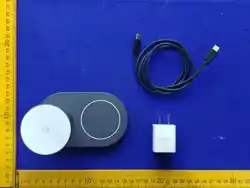
Item Name: 25W 2 in 1 wireless charger
Item Number: RST174
Size: 125.65*75.33*89.80mm
Weight: 349 g
Input: 15V-3.0A
Output 1: Qi2.2 Module 25.0W Max
Output 2: Airpods 5.0W Max
Operating Frequency: 110K-205KHz 360KHZ
Material: PC+ABS
PD Input: 100-240V~,50/60Hz 1.0A
PD MaxOutput: 5.0V/3.0A, 9.0V/3.0A, 12.0/3.0A, 15.0V/2.66A, 20.0V/2.0A
PD Total Output: 40W Max
Cable:60w 3f
3.Production Introduction
This Qi2.2 2-in-1 wireless charger is designed to power your daily
essentials with ease and efficiency. It delivers fast, stable charging
for both your smartphone and earbuds simultaneously, with precise
magnetic alignment for a secure connection. Featuring advanced
safety protection and broad compatibility, it offers a reliable and
clutter-free charging experience at home, in the office, or on the go.
4.Charge Your Device Wirelessly
Connect the charging port (3) to a power source using the included
cable and adapter, then plug it into a wall outlet or power strip.
1.Compatible devices
Q1: Why is my phone not charging?
Alignment: Ensure the phone is centered on the charging induction
area.
Phone Case: Remove heavy cases (>3mm) or those containing
metal/magnets.
Power Supply: Ensure the charger is connected to a live power
source.
Q2: Is it normal for the charger to get warm?
Yes, it is a normal physical phenomenon for the induction coils to
generate heat during energy transfer. Our product features built-in
over-temperature protection for your safety.
Q3: Why is the charging intermittent?
Adapter Power: Please use a QC3.0 or PD fast charger (18W+).
Insufficient power from a standard 5V/1A adapter may cause
instability.
Positioning: Poor electromagnetic induction due to off-center
placement can cause disconnects. Please realign the device.
Q4: Why is the charging speed slow?
Device Limitation: Charging speed varies depending on the
maximum wireless input supported by your smartphone.
Background Usage: If the phone is running high-power apps or
GPS during charging, the speed will be significantly reduced.
6.Q&A
After-sales service:
Please scan this QR code with your mobile phone camera to
activate your warranty service.
RFYRST174
2 in 1
25W 2 IN 1 Wireless Charger
Instruction Manual
The Qi2 logo is a trademark of the Wireless Power Consortium.
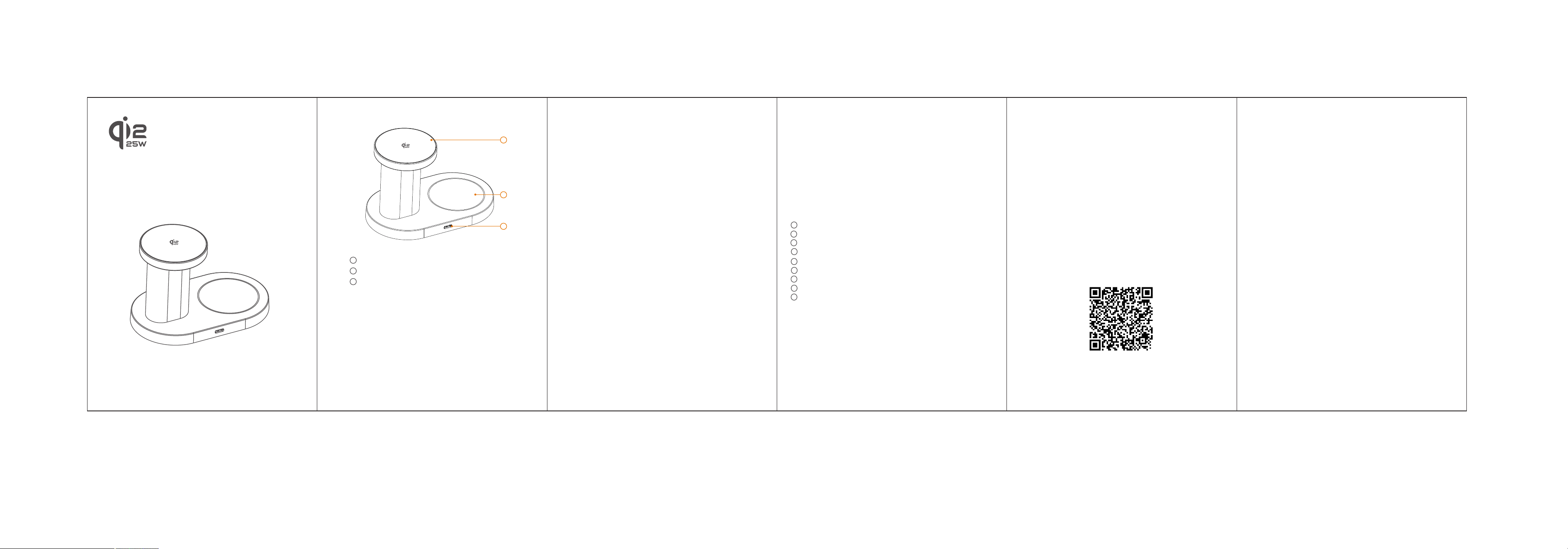
1 . iPhone wireless charge module(wireless output-1)
2 . AirPods wireless charge Spot (wireless output-2)
3 . DC Input Port
1
2
3
This device complies with part 15 of the FCC Rules. Operation is
subject to the following two conditions: (1) This device may not cause
harmful interference, and (2) this device must accept any interference
received, including interference that may cause undesired operation.
Any changes or modifications not expressly approved by the party
responsible for compliance could void the user's authority to operate
the equipment.
NOTE: This equipment has been tested and found to comply with the
limits for a Class B digital device, pursuant to Part 15 of the FCC Rules.
These limits are designed to provide reasonable protection against
harmful interference in a residential installation. This equipment
generates, uses and can radiate radio frequency energy and, if not
installed and used in accordance with the instructions, may cause
harmful interference to radio communications. However, there is no
guarantee that interference will not occur in a particular installation.
If this equipment does cause harmful interference to radio or television
reception, which can be determined by turning the equipment off and
on, the user is encouraged to try to correct the interference by one or
more of the following measures:
-- Reorient or relocate the receiving antenna.
-- Increase the separation between the equipment and receiver.
-- Connect the equipment into an outlet on a circuit different
from that to which the receiver is connected.
-- Consult the dealer or an experienced radio/TV technician for help.
FCC Radiation Exposure Statement
This equipment complies with FCC radiation exposure limits set forth
for an uncontrolled environment. This equipment should be installed
and operated with a minimum distance of 20 cm between the radiator
and your body.