Using the Accessories
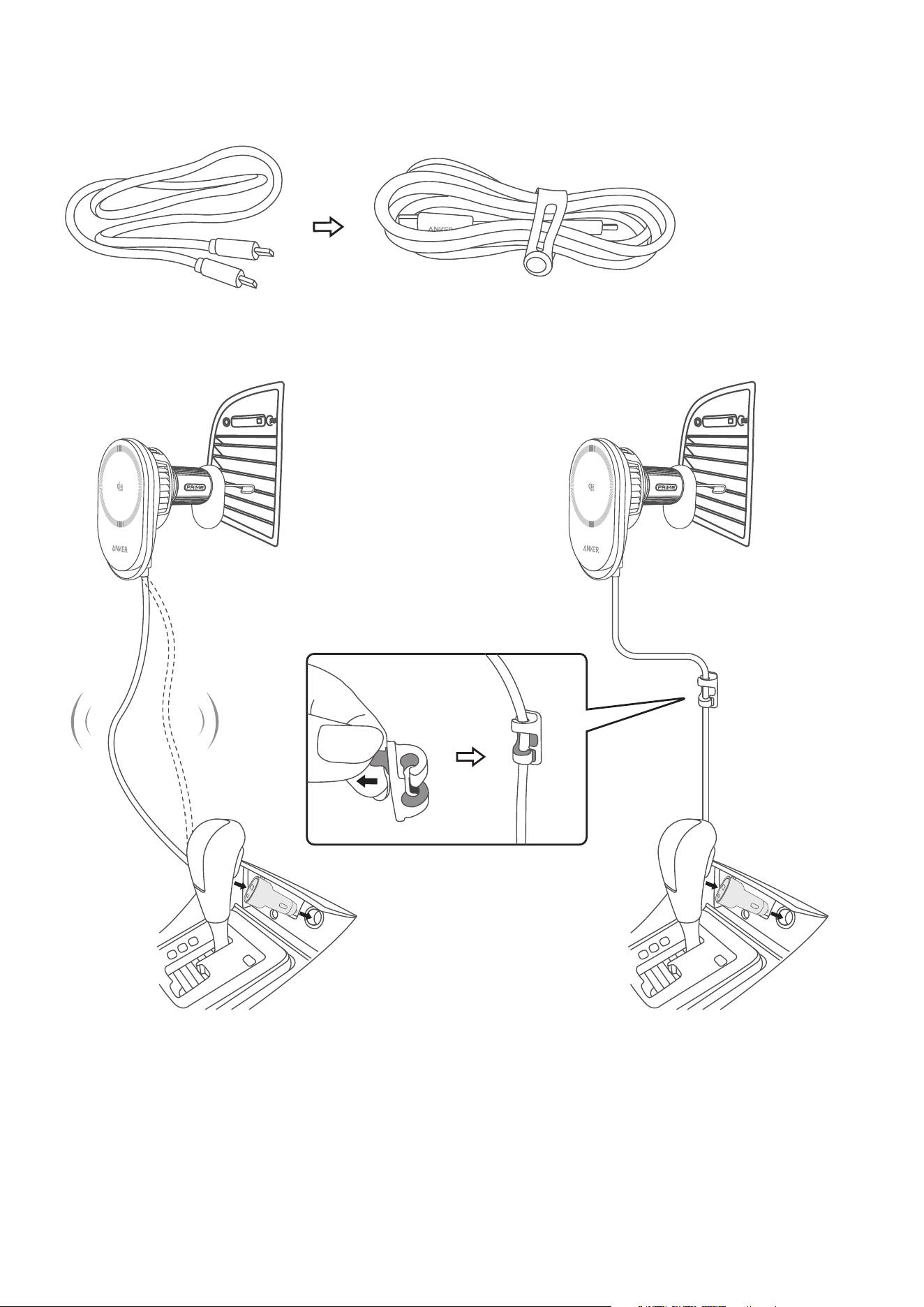
Use the cable organizer to neatly bundle loose cables.
Use the cable holder to keep the cable in place and prevent it from hanging or being tripped over. Peel
o the adhesive film and attach the cable holder to a stable suace.
Using the Wireless Charger
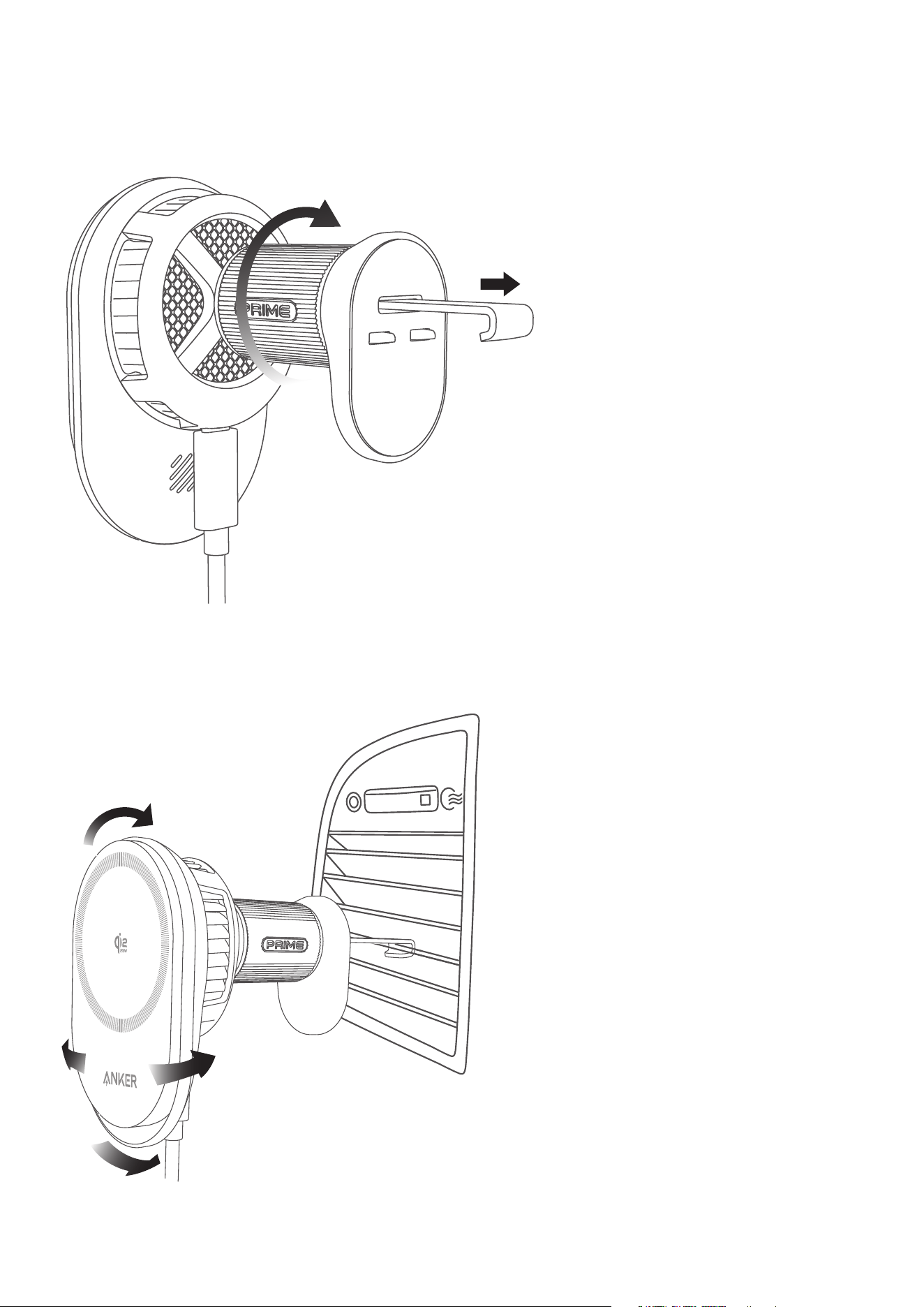
Step 1: Adjust the Mount
Rotate the knob clockwise to extend the mount, and stop turning when you feel resistance. Do not force
the knob to avoid damaging the wireless charger.
Step 2: Mount the Wireless Charger to the Air Vent
Insert the mount into your car’s air vent. Adjust the angle for the best viewing position.
Step 3: Power the Wireless Charger
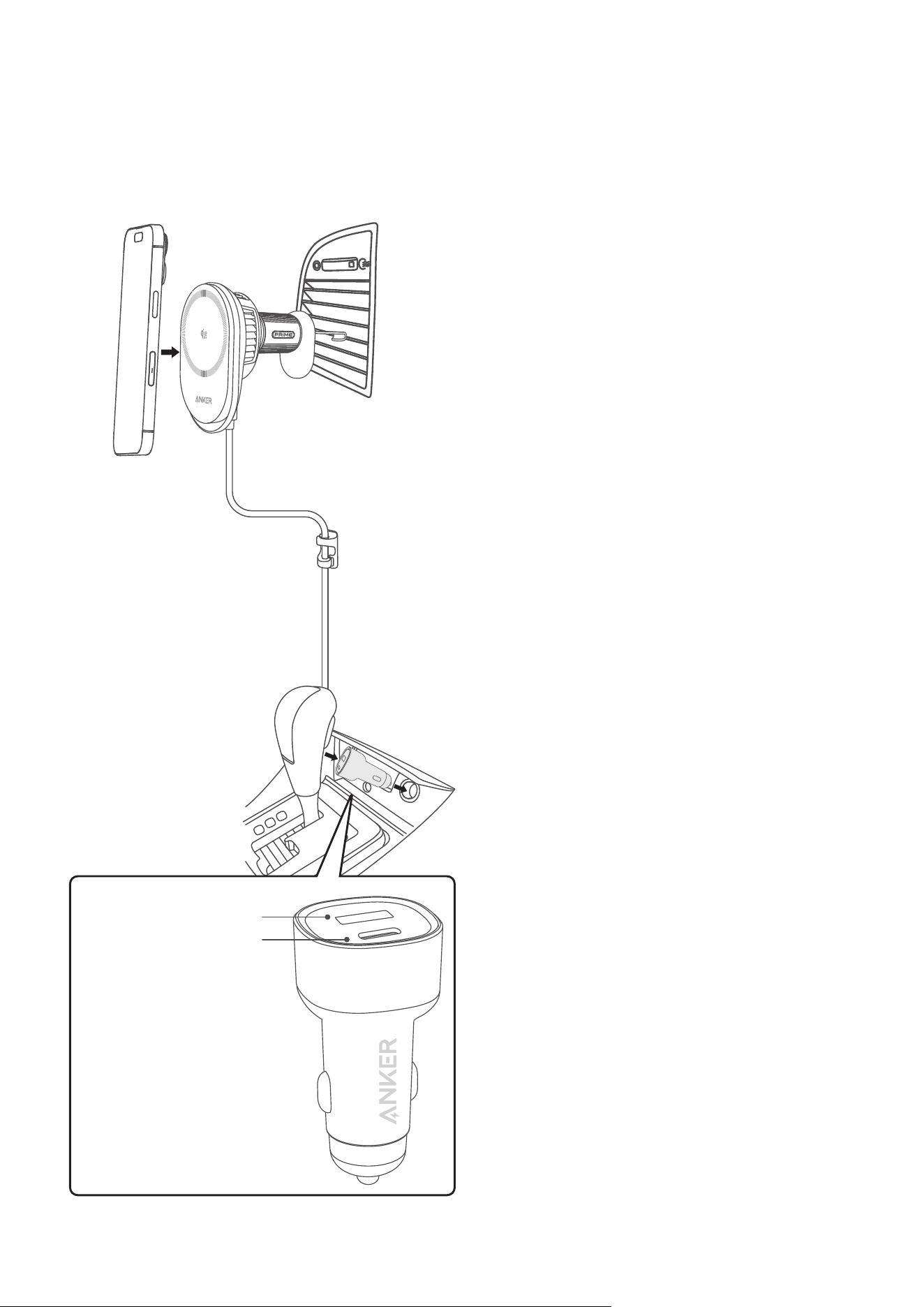
Plug the included adapter into your car’s power outlet. Use the provided cable to connect the adapter
to the charger.
The wireless charging function is compatible with: iPhone 12 / 13 / 14 / 15 / 16 Series and later.
Note: To achieve Qi2.2 25W charging, your device must be iPhone Series 16 and later (excluding iPhone
16e) and running iOS 26 or later. iPhone 12 / 13 / 14 / 15 Series can only be charged with Qi2 15W aer
updating to iOS 17.4 or later.
USB-C
≥45W
USB-A 12W Max
USB-C 48W Max
Cleaning Tips
If the product is used in a dusty or smoky environment, clean the air outlet behind the charging pad
regularly using a dry cloth, brush, or hair dryer. Do not use a wet cloth or expose the product to water.
Ambient Light Guide
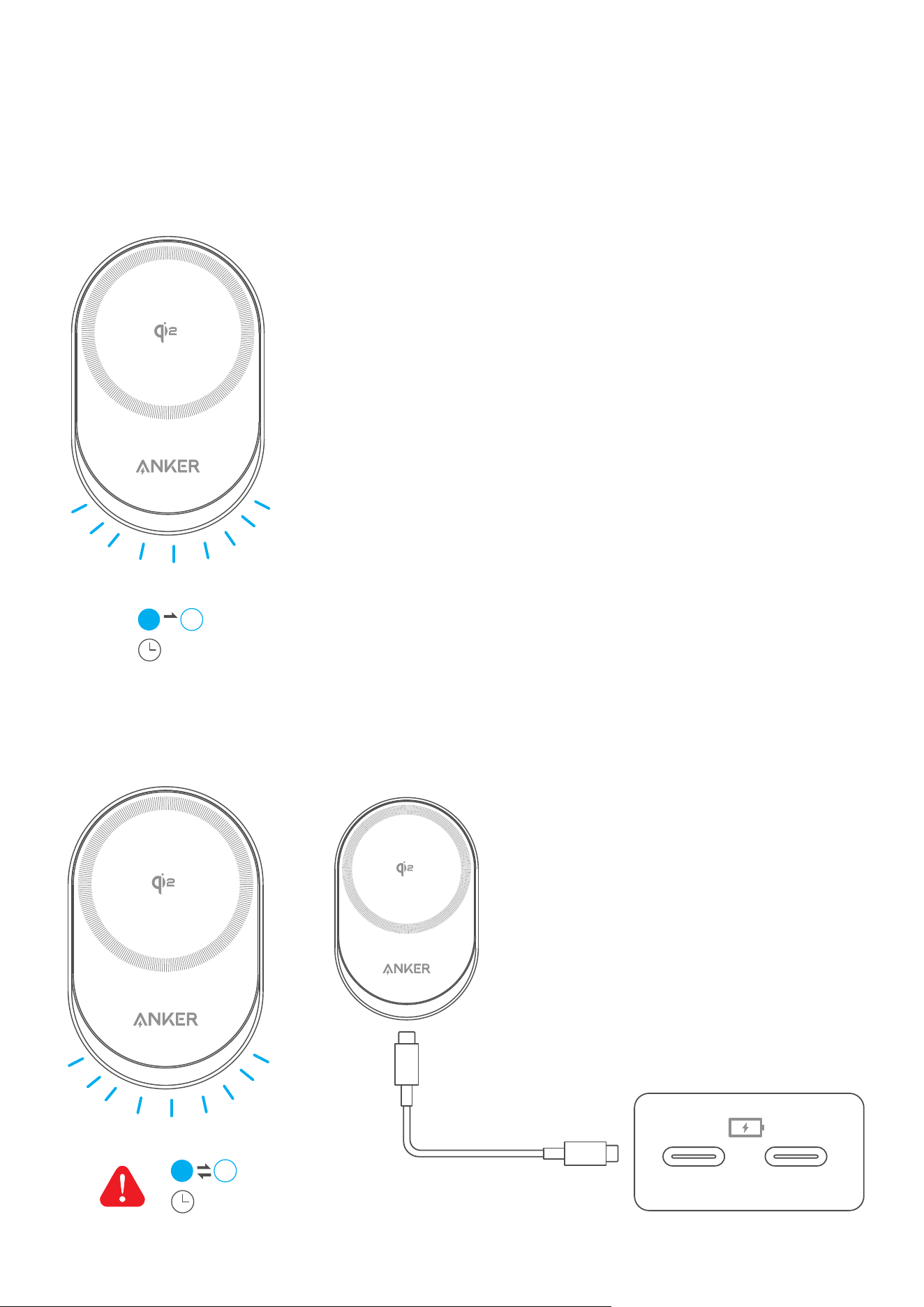
Aer the device is powered on, the ambient light turns on for 30 seconds, then automatically turns o.
30s
If input power is below 18W, charging will pause and the ambient light will flash slowly (once per second).
Use an adapter or USB-C port with at least 45W input for better peormance.
Note: Some vehicle USB-C ports only provide around 12W.
≥45W
1s
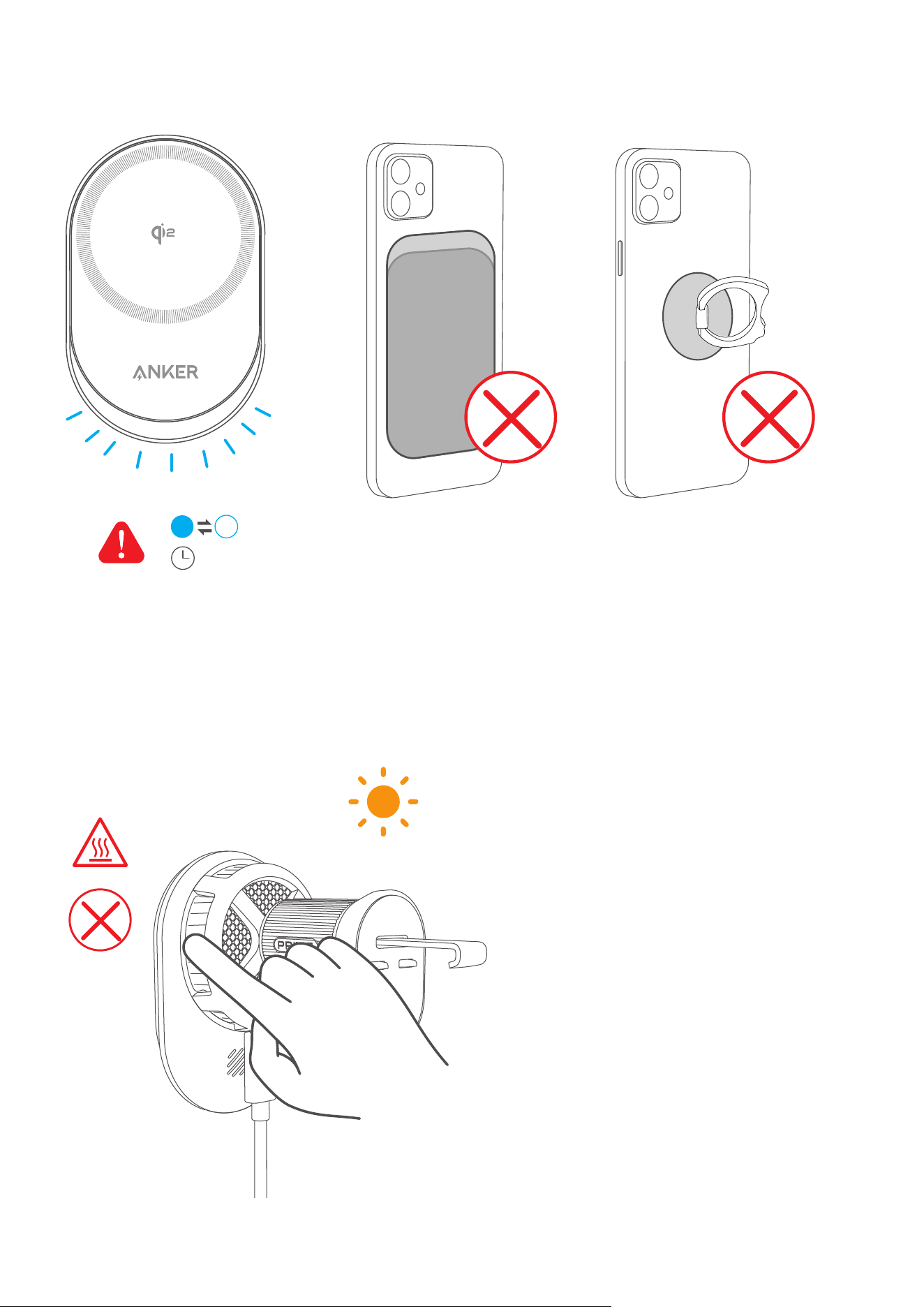
If metal objects are detected, the ambient light will flash rapidly (every 0.25 seconds).
Make sure your phone is properly aligned with the charging suace and remove any metal objects
between the phone and the charger.
0.25s
FAQ
Is it normal for the product to feel warm or hot?
Yes. It’s normal for wireless chargers to heat up, especially during long use like navigation or video
streaming. The metal body helps release heat more eiciently, which can make it feel warmer. Avoid
touching the metal area if the charger has been in direct sunlight for a long time.

Why is wireless charging not working or slower than expected?
• Charging speed may slow down if the charger gets too hot. Try using the product in a cooler
environment between 32 - 77°F (0 - 25°C).
• Incompatible phone cases can cause overheating aect wireless charging. Use magnetic cases
certified by Apple for best peormance. Avoid cases thicker than 2.5 mm or non-magnetic cases.
• Make sure the adapter is securely plugged into a working outlet.
• If the power source doesn’t provide enough power or isn’t compatible, charging may stop or slow
down. We recommend using an adapter or USB-C port with at least 45W input for better experiece.
Is the wireless charger compatible with Android phones?
This product is designed exclusively for iPhones with magnetic wireless charging function (iPhone 12 and
later models, except iPhone 16e).
Why can’t I charge my phone at 25W?
• Device Compatibility: Check that your phone supports the Qi2.2 25W charging standard. To achieve
25W charging with Qi2.2, your device must be iPhone Series 16 and later (excluding iPhone 16e) and
running iOS 26 or later. iPhone 12 / 13 / 14 / 15 Series can only be charged with Qi2 15W aer updating to
iOS 17.4 or later.
• Battery Level: 25W charging is available only when the phone’s battery is below 80%. Once above
this level, charging speed is automatically reduced to protect battery health as part of the phone’s
system strategy.
• Temperature: Charging speed may be reduced appropriately when your device becomes too hot,
especially during long use. Try charging in a cool environment.
• Power Fluctuation: 25W is the maximum output, but real-time charging power changes dynamically
based on temperature, battery level, and the phone’s internal charging strategy. Maximum power is
not sustained at all times.
• Charging Power Mesurement: To view accurate power output, use professional tools like Power-Z to
measure the adapter’s input to the wireless charger. With about 80% conversion eiciency, an input
of 28 - 31W reflects a 25W output to your phone. Avoid relying on third-party apps, as iOS 10 and later
restrict their access to real battery data. These apps only display approximate values and cannot
accurately reflect charging peormance.
Specifications
Input 15V
3A
Output 25W Max