Manual de instrucciones
Instruction manual
Manuel d’instructions
Bedienungsanleitung
Manuale di istruzioni
Manual de instruções
Manual de instrucciones
Instruction manual
Manuel d’instructions
Bedienungsanleitung
Manuale di istruzioni
Manual de instruções
Instructiehandleiding
Instrukcja obsługi

3
SOMMAIRE
1. Pièces et composants
2. Instructions de sécurité
3. Avant utilisation
4. Fonctionnement
5. Nettoyage et entretien
6. Résolution des problèmes
7. Spécifications techniques
8. Recyclage des électroménagers
9. Garantie et SAV
INHALT
1. Teile und Komponenten
2. Sicherheitshinweise
3.
Vor dem Gebrauch
4.Bedienung
5. Reinigung und Wartung
6. Problembehebung
7. Technische Spezifikationen
8. Entsorgung von alten Elektrogeräten
9.Technischer Kundendienst und Garantie
INDICE
1. Parti e componenti
2. Istruzioni di sicurezza
3. Prima dell’uso
4. Funzionamento
5. Pulizia e manutenzione
6. Risoluzione di problemi
7. Specifiche tecniche
8. Riciclaggio degli elettrodomestici
9. Garanzia e SAT
ÍNDICE
1. Peças e componentes
2. Instruções de segurança
3. Antes de usar
4. Funcionamento
5. Limpeza e manutenção
6. Resolução de problemas
7. Especificações técnicas
8.
Reciclagem de eletrodomésticos
9. Garantia e SAT
INHOUD
1. Onderdelen en componenten
2. Veiligheidsinstructies
3. Voor gebruik
4. Werking
5. Schoonmaken en onderhoud
6. Probleemoplossing
7. Technische specificaties
8.
Recyclage van elektrische apparaten
9.
Garantie en technische ondersteuning
SPIS TREŚCI
1. Części i komponenty
2. Instrukcje bezpieczeństwa
3. Przed użyciem
4. Działanie
5. Czyszczenie i konserwacja
6. Rozwiązywanie problemów
7. Dane techniczne
8. Utylizacja starych urządzeń elektrycznych
9. Usługa wsparcia technicznego i gwarancja
/ 70
/ 72
/ 74
/ 78
/ 81
/ 83
/ 84
/ 85
/ 85
/ 36
/ 38
/ 40
/ 44
/ 47
/ 49
/ 51
/ 51
/ 51
/ 86
/ 88
/ 89
/ 93
/ 96
/ 98
/ 99
/ 99
/ 100
/ 52
/ 54
/ 56
/ 60
/ 63
/ 65
/ 67
/ 67
/ 67
/ 102
/ 104
/ 106
/ 110
/ 113
/ 115
/ 117
/ 117
/ 117
/ 116
/ 118
/ 120
/ 124
/ 127
/ 129
/ 130
/ 130
/ 130
/ 04
/ 06
/ 08
/ 12
/ 15
/ 17
/ 18
/ 18
/ 19
ÍNDICE
1. Piezas y componentes
2. Instrucciones de seguridad
3. Antes de usar
4. Funcionamiento
5. Limpieza y mantenimiento
6. Solución de problemas
7. Especificaciones técnicas
8. Reciclaje de electrodomésticos
9. Garantía y SAT
/ 20
/ 22
/ 24
/ 28
/ 31
/ 33
/ 34
/ 35
/ 35
INDEX
1. Parts and components
2. Safety instructions
3. Before use
4. Operation
5. Cleaning and maintenance
6. Troubleshooting
7. Technical specifications
8. Disposal of old electrical appliances
9. Technical support service and warranty
4 5
ESPAÑOL
Conga WinDroid 970Conga WinDroid 970
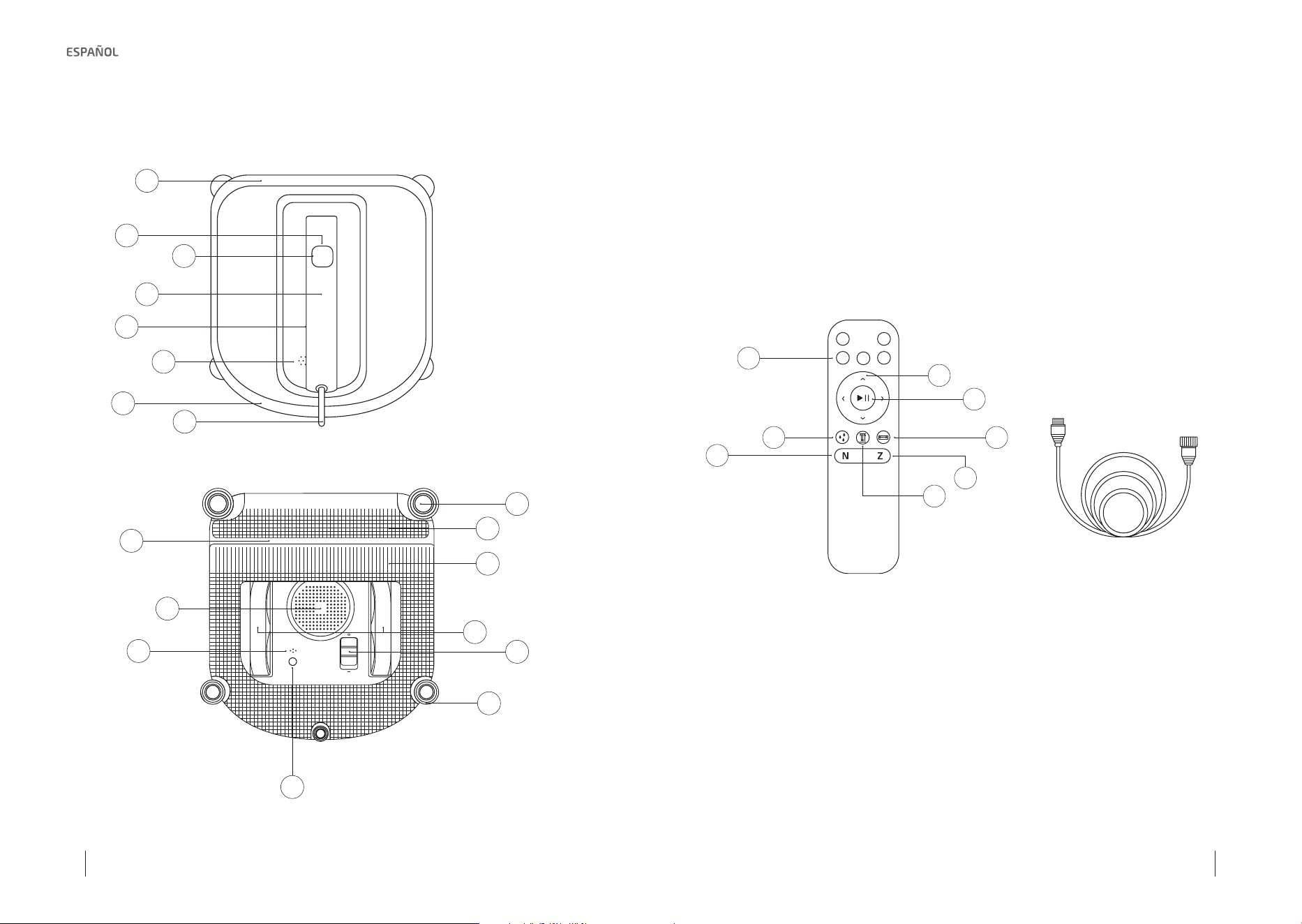
1. PIEZAS Y COMPONENTES
1
9
10
12
17
16
7
11
13
15
18
8
4
5
3
6
2
CLEAN
14
8
1
2
43
5
7
6
Cuerpo principal
1. Parachoques frontal
2. Indicador de estado
3. Botón Start/Pause
4. Asa
5. Botón de programación
6. Altavoz
7. Parachoques trasero
8. Cable de alimentación
9. Sensor detector de bordes
10. Mopa delantera
11. Goma limpiacristales
12. Mopa
13. Ventilador
14. Ruedas motrices
15. Sensor de succión
16. Interruptor
17. Rueda de dirección
18. Indicador de estado
inferior
Mando a distancia
1. Botones de control de dirección
2. Botón de Start/Pause
3. Botón de limpieza de las ruedas
4. Botón de limpieza de área
5. Botón de modo de limpieza N
6. Botón de modo de limpieza Z
7. Botón de limpieza exhaustiva
8. Botones vacíos (sin función)
Composición de la caja
1. Robot limpiacristales
2. Adaptador
3. Ventosa de seguridad
4. Mando a distancia
5. Mopas
6. Solución de limpieza
7. Manual de instrucciones
Cable alargador
20 21
Conga WinDroid 970Conga WinDroid 970
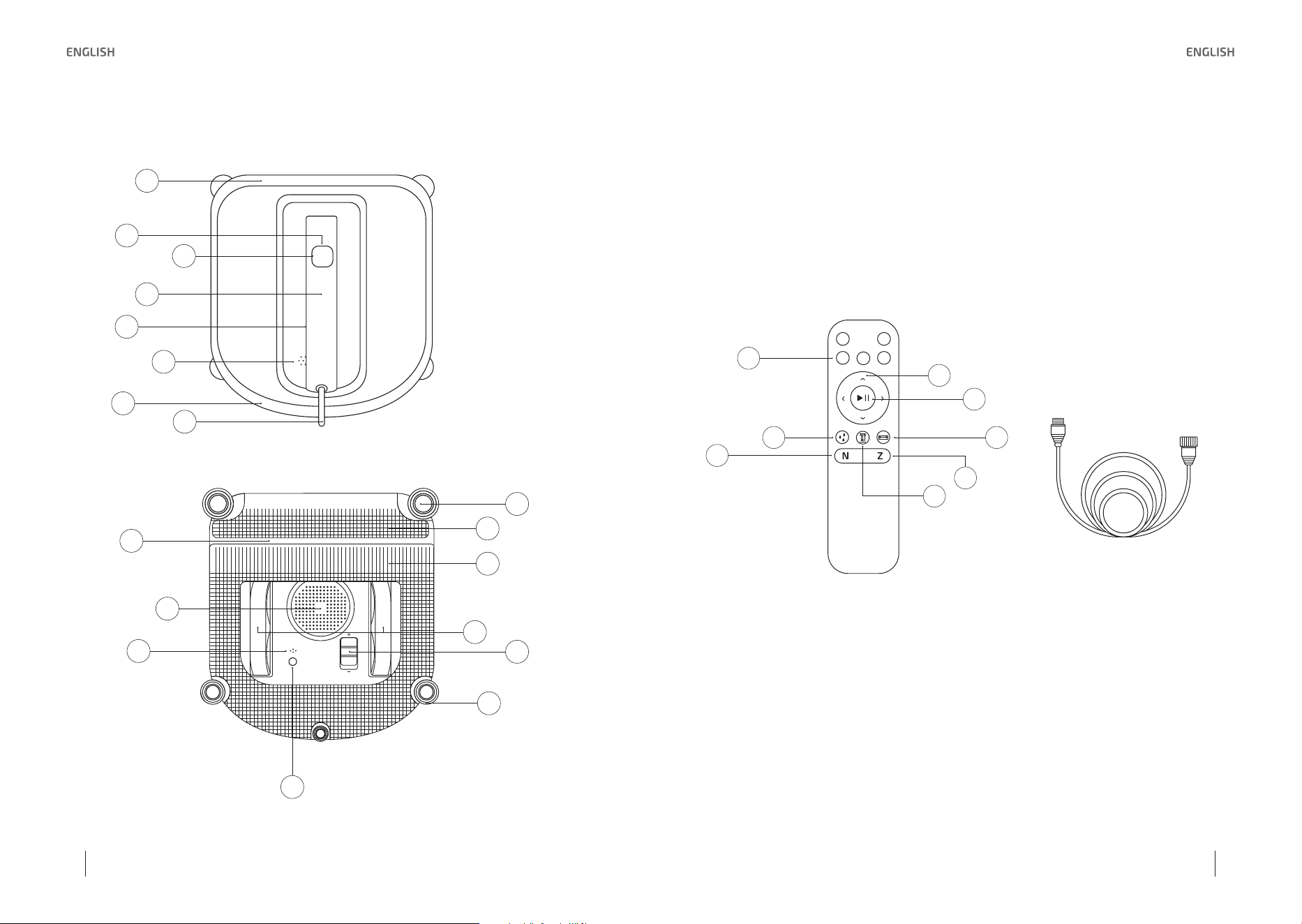
1. PARTS AND COMPONENTS
1
9
10
12
17
16
7
11
13
15
18
8
4
5
3
6
2
CLEAN
14
8
1
2
43
5
7
6
Main body and sensors
1. Front bumper
2. Status indicator
3. Start/ Pause button
4. Handle
5. Schedule button
6. Speaker
7. Rear bumper
8. Power cord
9. Edge-detection sensor
10. Front mop
11. Squeegees
12. Mop
13. Fan
14. Driving wheels
15. Suction sensor
16. Power switch
17. Direction wheel
18. Bottom status indicator
Remote control
1. Direction buttons
2. Start/Pause button
3. Wheels cleaning button
4. Area cleaning button
5. N Cleaning mode button
6. Z Cleaning mode button
7. Thorough cleaning button
8. Empty buttons (no function)
Composition of the box
1. Window cleaning robot
2. Power adapter cord
3. Safety suction cup
4. Remote control
5. Mop cloth
6. Cleaning solution
7. Instruction manual
Extension cord
22 23
Conga WinDroid 970Conga WinDroid 970
2. SAFETY INSTRUCTIONS
Read these instructions thoroughly before using the appliance.
Keep this instruction manual for future reference or new users.
• The appliance must be used in accordance with the
directions in this instruction manual. Product manufacturer
cannot be held liable or responsible for damaged or injuries
caused by improper use.
• The appliance is not intended to be used by children under
the age of 8. It can be used by children over the age of 8, as
long as they are given continuous supervision.
• This appliance is not intended to be used by persons
with reduced physical, sensory, or mental capabilities, or
lack of experience or knowledge, unless they have been
given supervision or instruction concerning the use of the
appliance in a safe way by a person responsible for their
safety, and understand the hazards involved.
• Keep the appliance and its cord out of reach of children
under the age of 8.
• Cleaning and maintenance tasks must not be carried out by
children.
• The appliance is not intended to be operated by means of
an external timer or separate remote-control system.
• Do not use the appliance in extremely hot or cold
environments (below 0 º/32 °F or above 40º /104 °F). Please
ensure the appliance is plugged in while it is cleaning. The
appliance has a back-up battery that must be charged
before using it. The back-up battery powers the appliance if
it becomes unplugged or the electricity fails.
• Do not leave the appliance unattended when it is plugged
in.
• For household and indoor use ONLY. Do not use the appliance
in commercial or industrial environments.
• Do not use the appliance on cracked glass.
• Only use accessories recommended or supplied by the
manufacturer. Only use the power adapter supplied by the
manufacturer.
• Please make sure your power supply voltage matches the
power voltage marked on the power adapter.
• Do not use the appliance on a framed window with a frame
smaller than 5 mm.
• Do not use the appliance on wet or greasy windows.
• Store the appliance away from heat and flammable
materials.
• Do not use the appliance if it is not firmly attached to the
glass or has visible signs of damage.
• To reduce the risk of electrical shock, do not put the
appliance in water or other liquid. Do not place or store
appliance where it can fall or be pulled into a tub or a sink.
• Do not touch the power plug or the appliance with wet
hands.
• Do not charge the appliance in extremely hot or cold
environments or it may affect the battery lifespan.
• When charging the appliance, do not place it on other
electrical appliances and keep it away from fire and liquid.
• Take care not to damage the power cord. Do not pull on or
carry the appliance by the power cord, use the power cord
as a handle, close a window on the power cord, or put heavy
weights on the power cord. Keep the power cord away from
hot surface.
• Do not use with a damaged power cord or receptacle. Do
not use the appliance if it is not working properly, has been
dropped, damaged, or come in contact with water. It must
be repaired by the manufacturer or its service agent in order
to avoid a hazard.
24 25
Conga WinDroid 970Conga WinDroid 970
• If the supply cord is damaged, please contact our service
agent.
• The plug must be removed from the receptacle before
cleaning or maintaining the appliance. Do not unplug the
power adapter by pulling on the power cord.
• Should the back-up battery be replaced, contact our service
agent.
• The back-up battery must be removed and discarded
according to local laws and regulations before disposal of
the appliance.
• The appliance must be disconnected from the receptacle
before removing the battery or disposal of the appliance.
• Please dispose of used batteries according to local laws
and regulations.
• Do not incinerate the appliance even if it is severely
damaged. The battery can explode in a fire.
3. BEFORE USE
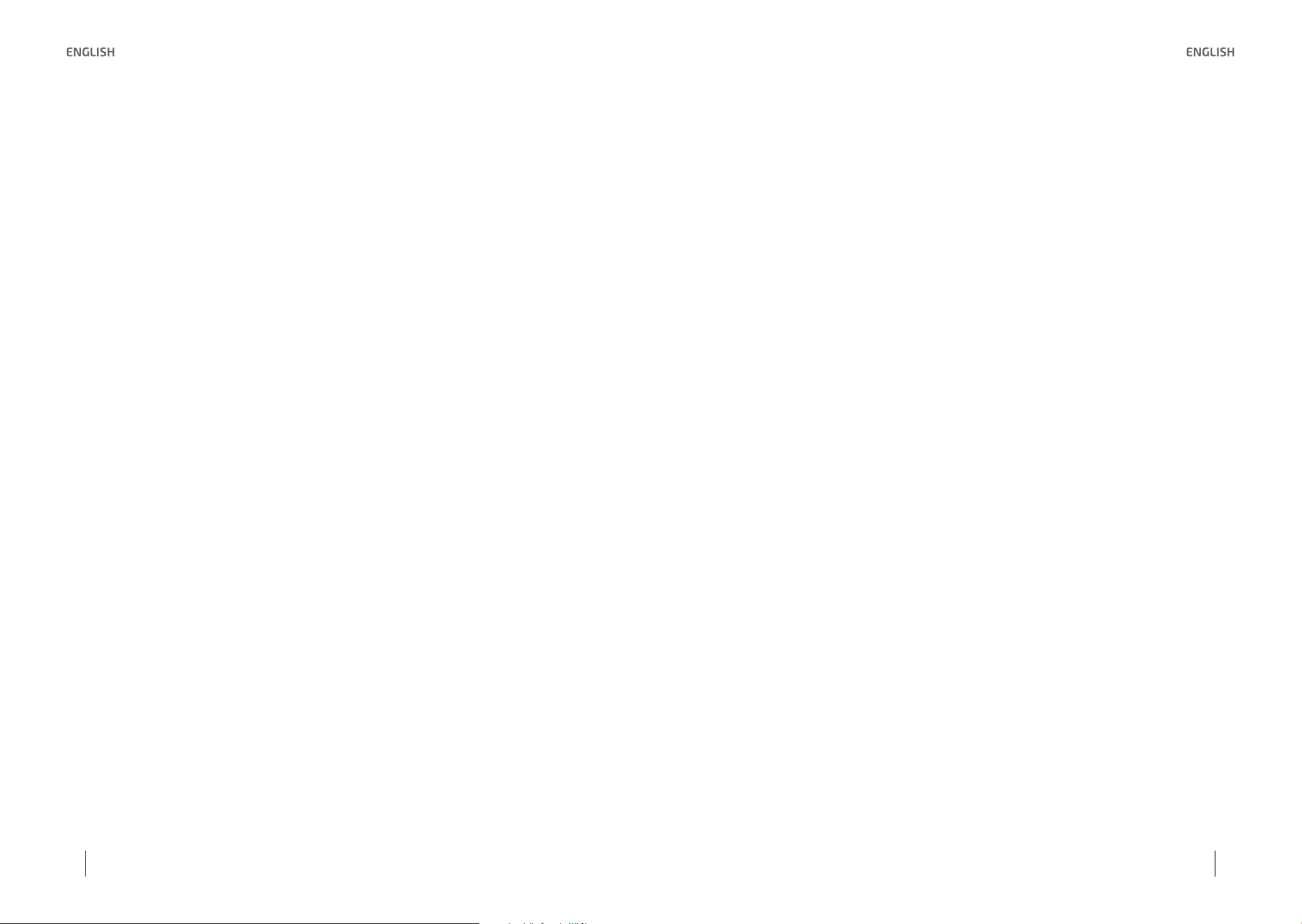
The ideal thickness of the windows must exceed 5 mm. It is suggested not to use the robot on
a framed window thinner than 5 mm (0.2”).
Conga WinDroid 970 can clean framed or frameless glass, larger than 50 x 70 cm (19.7” x 27.6”).
≥5 mm
≥50 cm
≥70 cm
CLEAN
If the window is covered with dirt, clean a small area no smaller than the robot size on the
glass before use and place the robot there.
• Please ensure there is a 13-cm (5.1”) free space between the glass and obstacles in the room
like curtains or furniture.
• Conga WinDroid 970 can clean horizontally mounted glass but only when using the direction
control buttons on the remote control.
• Conga WinDroid 970 can clean glass at an angle but may not operate normally; in such case
there must be a person near supervising the process in order to avoid accidents.
• The robot cannot be used upside down.
• It is recommended to clean the robot with the standard spray clean solution.
Attaching the mop
Turn the robot over and attach the mop to the
bottom of the robot smoothly. The white side of
the mop attaches to the velcro, and the gray mi-
crofiber side faces out. Make sure the mop does
not cover the squeegees or edge-detection
sensors.
26 27
Conga WinDroid 970Conga WinDroid 970
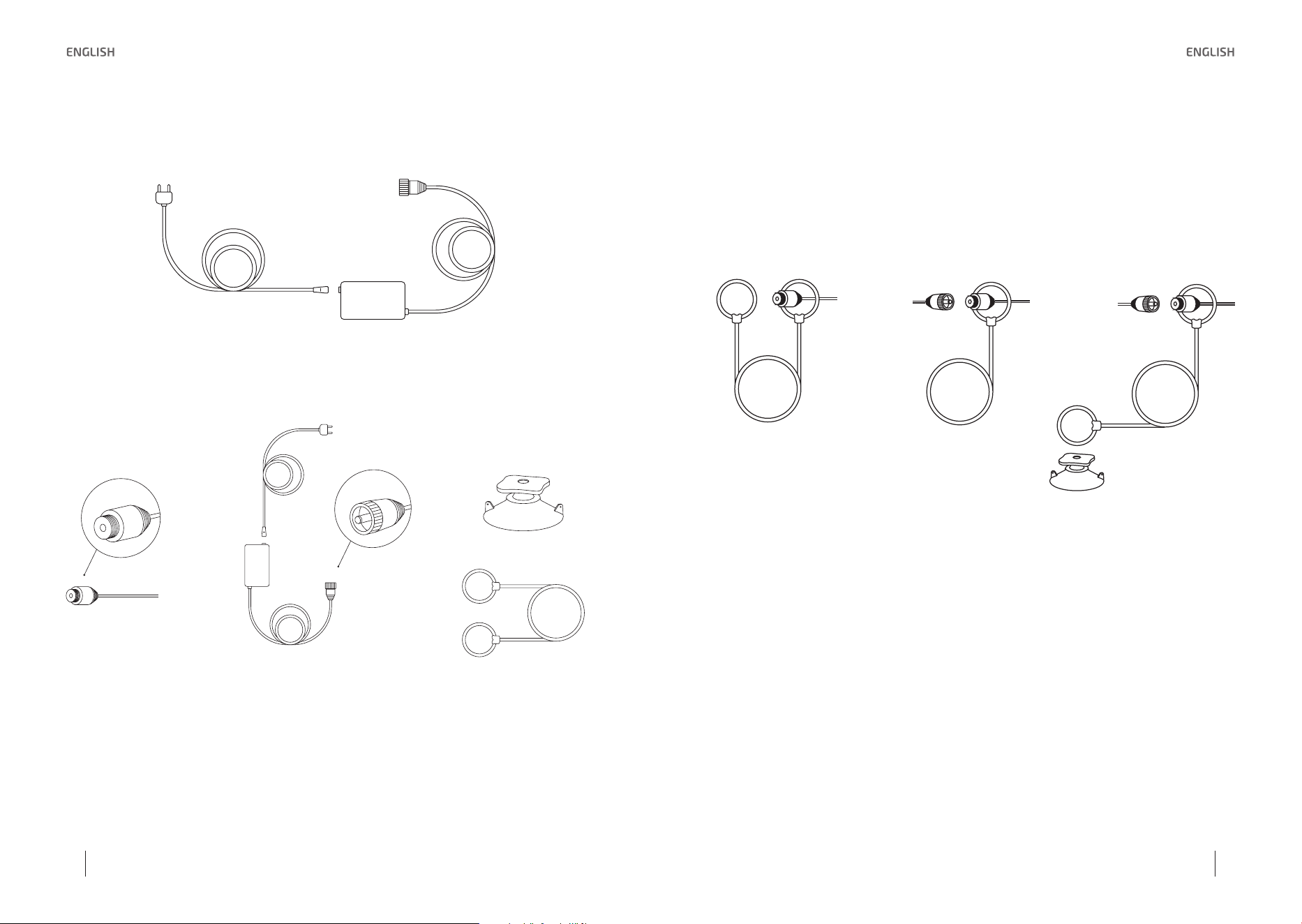
Power adapter assembly
Safety cable assembly
Before using this product cleaning the window, please install the safety cable and other
accessories.
A
C
D
B
A. Power cord
B. Power adapter cord
C. Safety suction cup
D. Safety tether
1. Loop one end of the safety cable into end A on the robot power cord and tighten.
2. Connect end A and end B and tighten.
3. Loop the other end of the safety cable around the safety suction cup’s channel and pull it
tight.
1.
2. 3.
If the length of the power cord restricts the robot’s movement, an extension cord of the robot
can be used. Disconnect end A and end B, and connect them with both ends of the extension
cord respectively and tighten. Only one extension cord can be used with the robot.
How to use the extension cord
• Use the extension cable according to actual distance or glass size, each line is 1.5-metre long.
Please note: when operating the product outside a tall building, only 1 pcs extension cable is
suggested to be used.
• Connect two ends of extension separately to the adapter cable end and product cable end.
Tighten the screw buckles. It is suggested to use the safety tether at the same time.
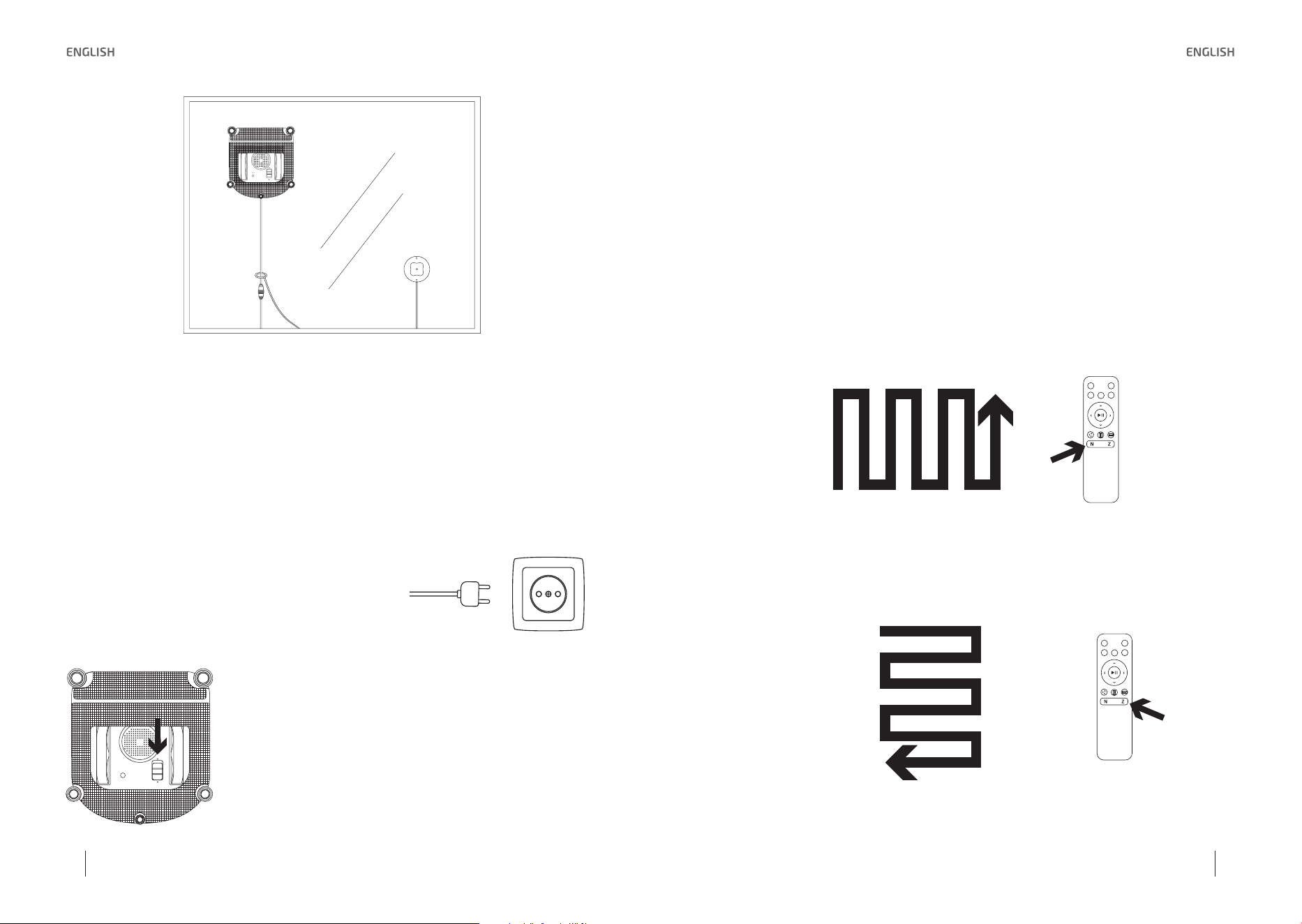
Safety suction cup installation
• When you use the robot to clean an inside window: press the safety suction cup firmly on the
top corner of the inside window. Make sure the safety suction cup is attached securely in place.
• When you use the WinDroid Excellence 970 to clean an outside window: press the safety
suction cup firmly on the inside of the window being cleaned. Make sure the safety suction cup
is attached and securely in place.
28 29
Conga WinDroid 970Conga WinDroid 970
Wipe the surface of the safety suction cup with the provided finishing cloth.
Spray cleaning solution
Spray the upper and lower sides of the mop cloth with the cleaning solution. After spraying,
wipe the bottom of the robot with a cloth.
4. OPERATION
Do not unplug the device from the power supply when the robot is working, otherwise, the
product may fall off.
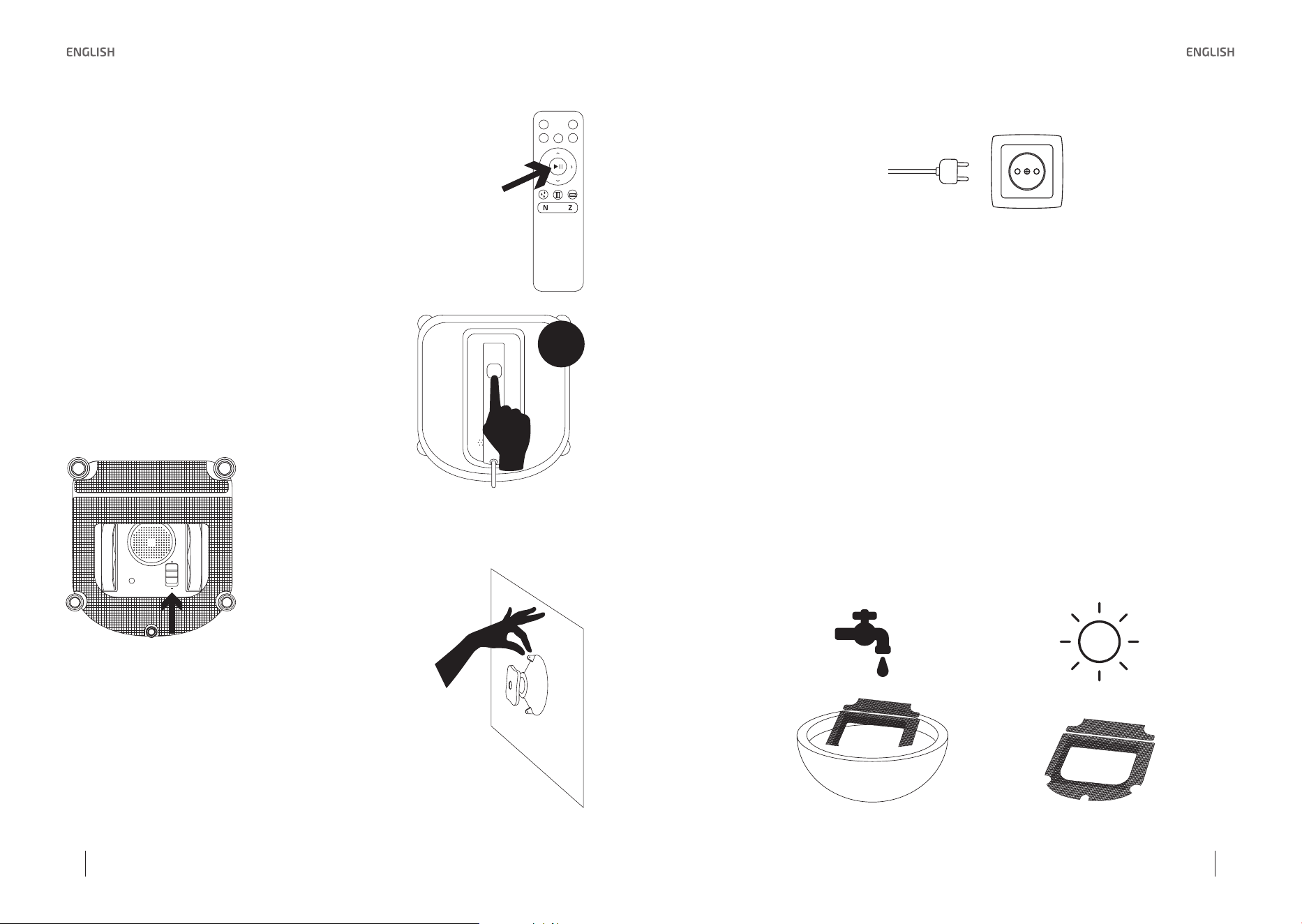
START
1. Plug in the robot.
2. Let the battery charge between 1.5 and 2 hours before
using the robot.
3. Switch on the robot
Take the switch to the “-” position, the status light indicator will
turn on blue when the robot is turned on.
* Keep objects away from the robot ’s fan to avoid blockage.
4. Place the robot on the glass
Place the robot on the window at least 10 cm (4”) from window corners or other obstacles.
The robot has successfully attached to the window when the status indicator light glows a
continuous blue.
• Please ensure there is a 13-cm (5.1”) free space between the glass and obstacles in the room
like curtains or furniture.
5. Start cleaning
There are two methods to start the robot:
• Press Start/Pause button on the robot or on remote control to start cleaning. Conga WinDroid
Excellence 970 automatically chooses “N” cleaning mode.
• Choose between N or Z mode on the remote control depending on the window’s shape.
Use the remote control to start the product. N Cleaning Mode is best for tall windows. The
product will work under “N” mode.
Use the remote control to start the product. Z Cleaning Mode is best for wide windows. The
product will work under “Z” mode.
30 31
Conga WinDroid 970Conga WinDroid 970
PAUSE
Pause the robot during cleaning by pressing Start/Pause button on the ro-
bot or on the remote control.
While the robot is paused, you can control the product’s working direction
or working mode through the buttons on the remote control.
STOP
When cleaning is over, the product returns to the place where cleaning
started and beeps.
1. Remove the robot from the surface
Grab the handle and press Start/Pause for more than
5 seconds. Then, remove the product.
2. Turn the robot off
Move the switch button to the “O” position.
3. Remove the safety suction cup
CLEAN
5”
4. Unplug the product from the power supply.
NOTE: when the product shows red light and beeps, please check if the power adapter is
connected correctly. When the power adapter is connected correctly, the product will show
a blue light and will start operating. When the power adapter is connected correctly, and
the product still shows a red light, please use the direction buttons on the remote control to
operate the product and move it from its current position, until the blue light shows up, press
Start/Pause keys on the remote control for the product to operate properly.
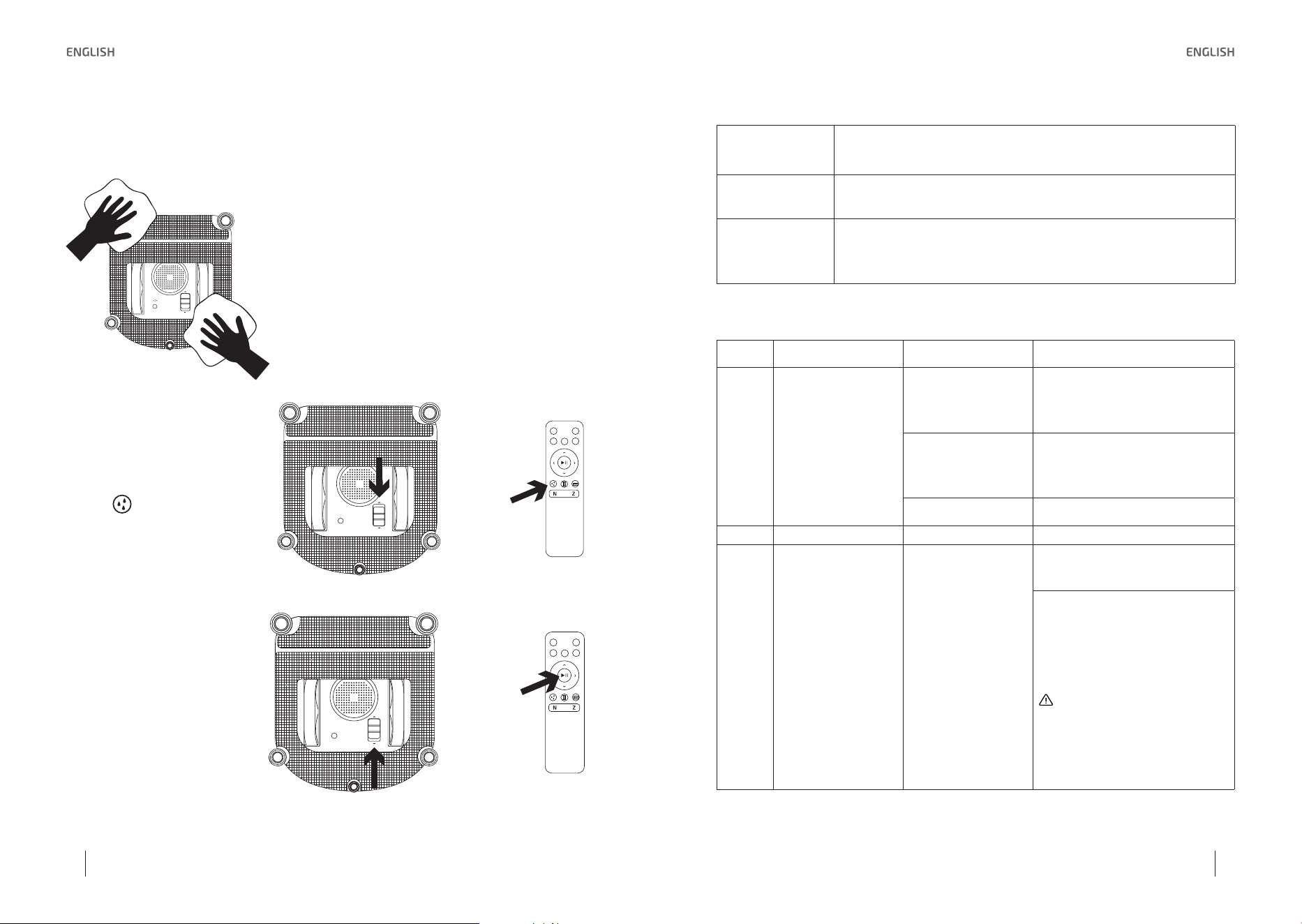
5. CLEANING AND MAINTENANCE
When cleaning the mop cloth and the bottom parts of the product, please switch off the pro-
duct.
Clean mop cloth: Turn the robot over and remove the mop cloth, soak it in cool, clean water
for 2 minutes. Handwash with mild detergent and lay flat to dry. Let it dry completely before
attaching it again to the robot.
• Do not use a wet mop cloth on the robot or it may slip on the window.
• Washing the mop cloth regularly can extend its service life.
• If the cloth becomes worn or no longer fits, replace it with a new one to achieve best cleaning
performance.
32 33
Conga WinDroid 970Conga WinDroid 970
Fan: Turn the robot over and wipe any debris from the fan with a cloth to maintain suction.
Guide wheels: Turn the robot over and wipe the four side rollers with a cloth to maintain their
effectiveness.
Edge Detection Sensors: Turn over the robot and
wipe five edge detection sensors clean with a cloth
to maintain their effectiveness.
Squeegees: Turn over the robot and wipe the squee-
gee with a cloth to maintain their effectiveness.
Driving treads: Before cleaning
the wheels, move the power
switch to the “-” position. Then
wait 8 seconds until it stops suc-
tioning and starts beeping. Then
press “ ” key on the remote
control and start cleaning the dri-
ving wheels.
Press Start/Pause and Clean bu-
ttons on the remote control to
check the driving wheels, if the-
re is any dust, press pause and
clean the dust.
After cleaning, turn off the
switch on of the bottom part to
the “O” position.
Light status indicator
Blue light flashing Ready, you can put the product on glass.
Blue light bright
Ready, product suction is successful, it remains attached to window
and it can start cleaning the window.
Red light flashing
Power adapter is not connected or vacuum is not enough. If the cord is
unplugged and the product starts beeping, remove the product from
the window or plug it again to a power supply.
6. TROUBLESHOOTING
REF. Nº ERROR REASON SOLUTION
1
If the blue light flas-
hes, the robot is
checking that con-
ditions are proper to
work. If this process
takes longer than 20
seconds, it can be
due to any of these
three errors.
Mops are not ins-
talled
correctly
Remove the cleaning mop and
install it again to make it flat.
Free fall sensor error
Check if the free fall sensor has
any foreign matter that stops it
from working properly.
The glass surface is
too dirty
Clean an area first to make the
product stick on the glass.
2
Red light flashing
and beeps warning
Power adapter not
connected
A. Connect to the power supply
first, and press Start to make the
product work again.
B. In case of power cut, use re-
mote control to direct the product
to the place where safely reach it
and remove it.
There is some risk when using
remote control under power cut,
please make sure that highest sa-
fety precautions are taken.
34 35
Conga WinDroid 970Conga WinDroid 970
2
Red light flashing
and beeps warning
Vacuum power is
not enough during
operation
According to real conditions, use
remote controller to control pro-
duct back to safety position.
There is some risk when using
remote controller under power
cut, please make sure that highest
safety precautions are taken.
Free fall sensor error
in work status
Check if there is any dust in the
free fall sensors, and clean it. If
it does not work, please contact
customer service.
3
The product does
not operate pro-
poerly, it does not
clean.
Glass surface is dirty
A. Clean driving wheels.
B. Change cleaning fibers.
This product is not suitable for
too dirty glass.
4
Remote control
failure.
When the product
is in working status,
only Start/Pause
buttons works.
Pause the product first, and then
use other buttons on the remote
control to control the product.
7. TECHNICAL SPECIFICATIONS
Model: Conga Excellence 970
Reference No.: 05461
Power: 90W, 100-240 V, 50/60 HZ.
Made in China. | Designed in Spain
8. DISPOSAL OF OLD ELECTRICAL APPLIANCES
The European directive 2012/19/EU on Waste Electrical and Electronic Equipment
(WEEE), specifies that old household electrical appliances must not be disposed of
with the normal unsorted municipal waste. Old appliances must be collected separately,
in order to optimize the recovery and recycling of the materials they contain, and reduce the
impact on human health and the environment.
The crossed out “wheeled bin” symbol on the product reminds you of your obligation to dispose
of the appliance correctly. If the product has a built-in battery or uses batteries, they should be
removed from the appliance and disposed of appropriately.
Consumers must contact their local authorities or retailer for information concerning the
correct disposal of old appliances and/or their batteries.
9. TECHNICAL SUPPORT SERVICE AND WARRANTY
This product is under warranty for 2 years from the date of purchase, as long as the proof
of purchase is submitted, the product is in perfect physical condition, and it has been given
proper use, as explained in this instruction manual.
The warranty will not cover the following situations:
• The product has been used for purposes other than those intended for it, misused,
beaten, exposed to moisture, immersed in liquid or corrosive substances, as well as any
other fault attributable to the customer.
• The product has been disassembled, modified, or repaired by persons, not authorised by
the official Technical Support Service of Cecotec.
Faults deriving from the normal wear and tear of its parts, due to use.
The warranty service covers every manufacturing defects of your appliance for 2 years, based
on current legislation, except consumable parts. In the event of misuse, the warranty will not
apply.
If at any moment you detect any problem with your product or have any doubt, do not hesitate
to contact Cecotec Technical Support Service at +34 963 210 728.

www.cecotec.es
Grupo Cecotec Innovaciones S.L.
C/ Pinadeta s/n, 46930
Quart de Poblet, Valencia, Spain