Model
Battery
capacity
Charging
Time
Waterproof
level
Operating
Temperature
Product
Frequency
IDW28
3.8V/350mAh
2.5hours
IP68
0°C-60°C
2402-2480MHz
Screen Type
Charging
Voltage
Battery Life
Weight of
Product
Bluetooth
Version
Max. transmission
Power
Consumption
1.85" -inch
5V±0.2v
5-7Day
BLE5.3
6.61dBm
32.21g
Turn on VeryFit app -> Activate Bluetooth connection on your phone
-> Search on the app for the device to pair with (or scan the QR code
on the device) -> Finish binding on the app (or on the device).
2. Turning on/off
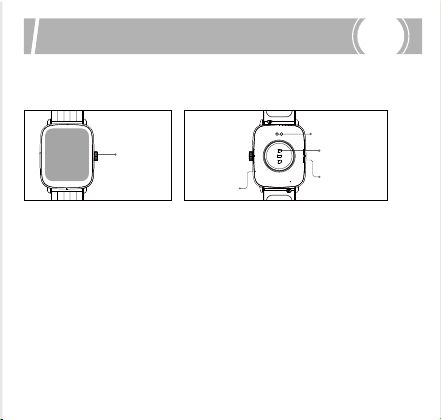
1. Product overview
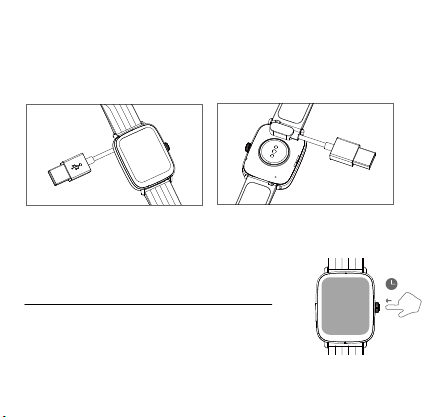
Turning on
Whilst the watch is off, it automatically turns on when you put it on
charge.
Swipe up/down
1. To toggle through menu.
2. To view long text/details.
Swipe left/right
1. To toggle through menu.
Physical button operation
Short press
1. To return.
2. To wake the screen when it is off.
Long press
1. To turn on the watch.
2. Under the power on state, long press for 8s to restart.
Note: Charge the watch to activate it before first use. The original power adapter
must be used for charging.
Turning off
To turn off the watch: go to Settings ->
Turning off menu.
Rotate the encoder crown up and down to
realize the slide switch of the watch interface.
Long press the button to turn on the watch.
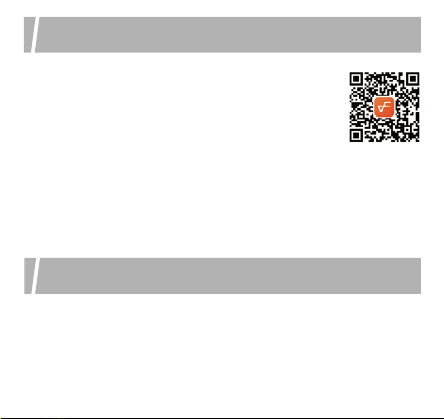
1. App downloads
Download and install the "VeryFit" app on the App
Store, Google Play or by scanning the QR code
below.
2. Pairing
IDW28 has features such as IP68 water resistance, ultra-long
battery life, full-screen touch control, low latency, 100 workout
modes and multiple cloud watch faces. It supports heart rate
monitoring and stress detection throughout the day, blood oxygen
detection and sleep monitoring, etc. For operating instructions and
FAQs on these features, please turn on the app and go to “User
Guide” section.
Three suggestions for use and maintenance:
1. Keep the product clean;
2. Keep the product dry;
3. Do not wear the product too tight;
*
Do not use household cleansers when cleaning the product. Use
soap-free cleansers instead.
*
For stubborn stains, it is recommended to remove by scrubbing with
alcohol.
Waterproof: Not suitable for use while diving, swimming in the sea, or in
a sauna. Suitable for use in swimming pools, showers (cold water) and
shallows.
Tap the screen
1. To enter the menu.
2. To operate according to the
prompts.
Tap and hold on the screen
1. To switch between watch faces.
Do not place the product and its accessories at extreme
temperatures, otherwise it may cause hazards such as product
failure, fire or explosion.
Protect the product from strong impacts or jolts, so as not to
damage the product and its accessories, thus avoiding product
failures.
Do not disassemble or modify the product and its accessories by
yourself. Contact us for after-sales service when the product fails.
EN
Quick start guide
App downloads and pairing
Screen operation
Features
Safety instructions
Care and maintenance
IDW28 Smart Watch
Operation Manual
Thanks for purchasing this product.
Please read this Manual carefully before use.
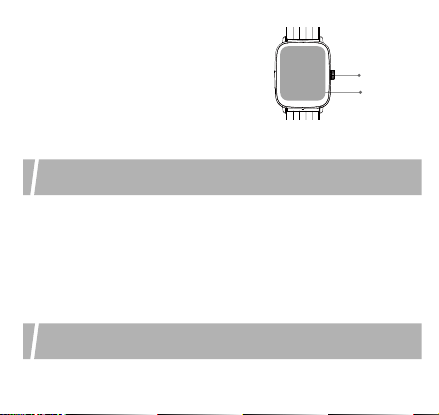
Physical
button
Magnetic
charging
contacts
Heart rate
sensor
Speaker
Microphone
Screen
Button
Scan the QR code
for more function information
SAR compliance is based on a separation distance of 0 mm between
the unit and the body of the user
SAR compliance is based on a separation distance of 0 mm between
the unit and the body of the user
La conformité du das est basée sur une distance de séparation de 0
mm entre l’unité et le corps de l’utilisateur
Model
Battery
capacity
Charging
Time
Waterproof
level
Operating
Temperature
Product
Frequency
IDW28
3.8V/350mAh
2.5hours
IP68
0°C-60°C
2402-2480MHz
Screen Type
Charging
Voltage
Battery Life
Weight of
Product
Bluetooth
Version
Max. transmission
Power
Consumption
1.85" -inch
5V±0.2v
5-7Day
BLE5.3
6.61dBm
32.21g
Turn on VeryFit app -> Activate Bluetooth connection on your phone
-> Search on the app for the device to pair with (or scan the QR code
on the device) -> Finish binding on the app (or on the device).
2. Turning on/off
1. Product overview
Turning on
Whilst the watch is off, it automatically turns on when you put it on
charge.
Swipe up/down
1. To toggle through menu.
2. To view long text/details.
Swipe left/right
1. To toggle through menu.
Physical button operation
Short press
1. To return.
2. To wake the screen when it is off.
Long press
1. To turn on the watch.
2. Under the power on state, long press for 8s to restart.
Note: Charge the watch to activate it before first use. The original power adapter
must be used for charging.
Turning off
To turn off the watch: go to Settings ->
Turning off menu.
Rotate the encoder crown up and down to
realize the slide switch of the watch interface.
Long press the button to turn on the watch.
1. App downloads
Download and install the "VeryFit" app on the App
Store, Google Play or by scanning the QR code
below.
2. Pairing
IDW28 has features such as IP68 water resistance, ultra-long
battery life, full-screen touch control, low latency, 100 workout
modes and multiple cloud watch faces. It supports heart rate
monitoring and stress detection throughout the day, blood oxygen
detection and sleep monitoring, etc. For operating instructions and
FAQs on these features, please turn on the app and go to “User
Guide” section.
Three suggestions for use and maintenance:
1. Keep the product clean;
2. Keep the product dry;
3. Do not wear the product too tight;
*
Do not use household cleansers when cleaning the product. Use
soap-free cleansers instead.
*
For stubborn stains, it is recommended to remove by scrubbing with
alcohol.
Waterproof: Not suitable for use while diving, swimming in the sea, or in
a sauna. Suitable for use in swimming pools, showers (cold water) and
shallows.
Tap the screen
1. To enter the menu.
2. To operate according to the
prompts.
Tap and hold on the screen
1. To switch between watch faces.
Do not place the product and its accessories at extreme
temperatures, otherwise it may cause hazards such as product
failure, fire or explosion.
Protect the product from strong impacts or jolts, so as not to
damage the product and its accessories, thus avoiding product
failures.
Do not disassemble or modify the product and its accessories by
yourself. Contact us for after-sales service when the product fails.
EN
Quick start guide
App downloads and pairing
Screen operation
Features
Safety instructions
Care and maintenance
IDW28 Smart Watch
Operation Manual
Thanks for purchasing this product.
Please read this Manual carefully before use.
Physical
button
Magnetic
charging
contacts
Heart rate
sensor
Speaker
Microphone
Screen
Button
Scan the QR code
for more function information
SAR compliance is based on a separation distance of 0 mm between
the unit and the body of the user
SAR compliance is based on a separation distance of 0 mm between
the unit and the body of the user
La conformité du das est basée sur une distance de séparation de 0
mm entre l’unité et le corps de l’utilisateur
Model
Battery
capacity
Charging
Time
Waterproof
level
Operating
Temperature
Product
Frequency
IDW28
3.8V/350mAh
2.5hours
IP68
0°C-60°C
2402-2480MHz
Screen Type
Charging
Voltage
Battery Life
Weight of
Product
Bluetooth
Version
Max. transmission
Power
Consumption
1.85" -inch
5V±0.2v
5-7Day
BLE5.3
6.61dBm
32.21g
Turn on VeryFit app -> Activate Bluetooth connection on your phone
-> Search on the app for the device to pair with (or scan the QR code
on the device) -> Finish binding on the app (or on the device).
2. Turning on/off
1. Product overview
Turning on
Whilst the watch is off, it automatically turns on when you put it on
charge.
Swipe up/down
1. To toggle through menu.
2. To view long text/details.
Swipe left/right
1. To toggle through menu.
Physical button operation
Short press
1. To return.
2. To wake the screen when it is off.
Long press
1. To turn on the watch.
2. Under the power on state, long press for 8s to restart.
Note: Charge the watch to activate it before first use. The original power adapter
must be used for charging.
Turning off
To turn off the watch: go to Settings ->
Turning off menu.
Rotate the encoder crown up and down to
realize the slide switch of the watch interface.
Long press the button to turn on the watch.
1. App downloads
Download and install the "VeryFit" app on the App
Store, Google Play or by scanning the QR code
below.
2. Pairing
IDW28 has features such as IP68 water resistance, ultra-long
battery life, full-screen touch control, low latency, 100 workout
modes and multiple cloud watch faces. It supports heart rate
monitoring and stress detection throughout the day, blood oxygen
detection and sleep monitoring, etc. For operating instructions and
FAQs on these features, please turn on the app and go to “User
Guide” section.
Three suggestions for use and maintenance:
1. Keep the product clean;
2. Keep the product dry;
3. Do not wear the product too tight;
*
Do not use household cleansers when cleaning the product. Use
soap-free cleansers instead.
*
For stubborn stains, it is recommended to remove by scrubbing with
alcohol.
Waterproof: Not suitable for use while diving, swimming in the sea, or in
a sauna. Suitable for use in swimming pools, showers (cold water) and
shallows.
Tap the screen
1. To enter the menu.
2. To operate according to the
prompts.
Tap and hold on the screen
1. To switch between watch faces.
Do not place the product and its accessories at extreme
temperatures, otherwise it may cause hazards such as product
failure, fire or explosion.
Protect the product from strong impacts or jolts, so as not to
damage the product and its accessories, thus avoiding product
failures.
Do not disassemble or modify the product and its accessories by
yourself. Contact us for after-sales service when the product fails.
EN
Quick start guide
App downloads and pairing
Screen operation
Features
Safety instructions
Care and maintenance
IDW28 Smart Watch
Operation Manual
Thanks for purchasing this product.
Please read this Manual carefully before use.
Physical
button
Magnetic
charging
contacts
Heart rate
sensor
Speaker
Microphone
Screen
Button
Scan the QR code
for more function information
SAR compliance is based on a separation distance of 0 mm between
the unit and the body of the user
SAR compliance is based on a separation distance of 0 mm between
the unit and the body of the user
La conformité du das est basée sur une distance de séparation de 0
mm entre l’unité et le corps de l’utilisateur
Model
Battery
capacity
Charging
Time
Waterproof
level
Operating
Temperature
Product
Frequency
IDW28
3.8V/350mAh
2.5hours
IP68
0°C-60°C
2402-2480MHz
Screen Type
Charging
Voltage
Battery Life
Weight of
Product
Bluetooth
Version
Max. transmission
Power
Consumption
1.85" -inch
5V±0.2v
5-7Day
BLE5.3
6.61dBm
32.21g
Turn on VeryFit app -> Activate Bluetooth connection on your phone
-> Search on the app for the device to pair with (or scan the QR code
on the device) -> Finish binding on the app (or on the device).
2. Turning on/off
1. Product overview
Turning on
Whilst the watch is off, it automatically turns on when you put it on
charge.
Swipe up/down
1. To toggle through menu.
2. To view long text/details.
Swipe left/right
1. To toggle through menu.
Physical button operation
Short press
1. To return.
2. To wake the screen when it is off.
Long press
1. To turn on the watch.
2. Under the power on state, long press for 8s to restart.
Note: Charge the watch to activate it before first use. The original power adapter
must be used for charging.
Turning off
To turn off the watch: go to Settings ->
Turning off menu.
Rotate the encoder crown up and down to
realize the slide switch of the watch interface.
Long press the button to turn on the watch.
1. App downloads
Download and install the "VeryFit" app on the App
Store, Google Play or by scanning the QR code
below.
2. Pairing
IDW28 has features such as IP68 water resistance, ultra-long
battery life, full-screen touch control, low latency, 100 workout
modes and multiple cloud watch faces. It supports heart rate
monitoring and stress detection throughout the day, blood oxygen
detection and sleep monitoring, etc. For operating instructions and
FAQs on these features, please turn on the app and go to “User
Guide” section.
Three suggestions for use and maintenance:
1. Keep the product clean;
2. Keep the product dry;
3. Do not wear the product too tight;
*
Do not use household cleansers when cleaning the product. Use
soap-free cleansers instead.
*
For stubborn stains, it is recommended to remove by scrubbing with
alcohol.
Waterproof: Not suitable for use while diving, swimming in the sea, or in
a sauna. Suitable for use in swimming pools, showers (cold water) and
shallows.
Tap the screen
1. To enter the menu.
2. To operate according to the
prompts.
Tap and hold on the screen
1. To switch between watch faces.
Do not place the product and its accessories at extreme
temperatures, otherwise it may cause hazards such as product
failure, fire or explosion.
Protect the product from strong impacts or jolts, so as not to
damage the product and its accessories, thus avoiding product
failures.
Do not disassemble or modify the product and its accessories by
yourself. Contact us for after-sales service when the product fails.
EN
Quick start guide
App downloads and pairing
Screen operation
Features
Safety instructions
Care and maintenance
IDW28 Smart Watch
Operation Manual
Thanks for purchasing this product.
Please read this Manual carefully before use.
Physical
button
Magnetic
charging
contacts
Heart rate
sensor
Speaker
Microphone
Screen
Button
Scan the QR code
for more function information
SAR compliance is based on a separation distance of 0 mm between
the unit and the body of the user
SAR compliance is based on a separation distance of 0 mm between
the unit and the body of the user
La conformité du das est basée sur une distance de séparation de 0
mm entre l’unité et le corps de l’utilisateur
Model
Battery
capacity
Charging
Time
Waterproof
level
Operating
Temperature
Product
Frequency
IDW28
3.8V/350mAh
2.5hours
IP68
0°C-60°C
2402-2480MHz
Screen Type
Charging
Voltage
Battery Life
Weight of
Product
Bluetooth
Version
Max. transmission
Power
Consumption
1.85" -inch
5V±0.2v
5-7Day
BLE5.3
6.61dBm
32.21g
Turn on VeryFit app -> Activate Bluetooth connection on your phone
-> Search on the app for the device to pair with (or scan the QR code
on the device) -> Finish binding on the app (or on the device).
2. Turning on/off
1. Product overview
Turning on
Whilst the watch is off, it automatically turns on when you put it on
charge.
Swipe up/down
1. To toggle through menu.
2. To view long text/details.
Swipe left/right
1. To toggle through menu.
Physical button operation
Short press
1. To return.
2. To wake the screen when it is off.
Long press
1. To turn on the watch.
2. Under the power on state, long press for 8s to restart.
Note: Charge the watch to activate it before first use. The original power adapter
must be used for charging.
Turning off
To turn off the watch: go to Settings ->
Turning off menu.
Rotate the encoder crown up and down to
realize the slide switch of the watch interface.
Long press the button to turn on the watch.
1. App downloads
Download and install the "VeryFit" app on the App
Store, Google Play or by scanning the QR code
below.
2. Pairing
IDW28 has features such as IP68 water resistance, ultra-long
battery life, full-screen touch control, low latency, 100 workout
modes and multiple cloud watch faces. It supports heart rate
monitoring and stress detection throughout the day, blood oxygen
detection and sleep monitoring, etc. For operating instructions and
FAQs on these features, please turn on the app and go to “User
Guide” section.
Three suggestions for use and maintenance:
1. Keep the product clean;
2. Keep the product dry;
3. Do not wear the product too tight;
*
Do not use household cleansers when cleaning the product. Use
soap-free cleansers instead.
*
For stubborn stains, it is recommended to remove by scrubbing with
alcohol.
Waterproof: Not suitable for use while diving, swimming in the sea, or in
a sauna. Suitable for use in swimming pools, showers (cold water) and
shallows.
Tap the screen
1. To enter the menu.
2. To operate according to the
prompts.
Tap and hold on the screen
1. To switch between watch faces.
Do not place the product and its accessories at extreme
temperatures, otherwise it may cause hazards such as product
failure, fire or explosion.
Protect the product from strong impacts or jolts, so as not to
damage the product and its accessories, thus avoiding product
failures.
Do not disassemble or modify the product and its accessories by
yourself. Contact us for after-sales service when the product fails.
EN
Quick start guide
App downloads and pairing
Screen operation
Features
Safety instructions
Care and maintenance
IDW28 Smart Watch
Operation Manual
Thanks for purchasing this product.
Please read this Manual carefully before use.
Physical
button
Magnetic
charging
contacts
Heart rate
sensor
Speaker
Microphone
Screen
Button
Scan the QR code
for more function information
SAR compliance is based on a separation distance of 0 mm between
the unit and the body of the user
SAR compliance is based on a separation distance of 0 mm between
the unit and the body of the user
La conformité du das est basée sur une distance de séparation de 0
mm entre l’unité et le corps de l’utilisateur

Model
Battery
capacity
Charging
Time
Waterproof
level
Operating
Temperature
Product
Frequency
IDW28
3.8V/350mAh
2.5hours
IP68
0°C-60°C
2402-2480MHz
Screen Type
Charging
Voltage
Battery Life
Weight of
Product
Bluetooth
Version
Max. transmission
Power
Consumption
1.85" -inch
5V±0.2v
5-7Day
BLE5.3
6.61dBm
32.21g
Turn on VeryFit app -> Activate Bluetooth connection on your phone
-> Search on the app for the device to pair with (or scan the QR code
on the device) -> Finish binding on the app (or on the device).
2. Turning on/off
1. Product overview
Turning on
Whilst the watch is off, it automatically turns on when you put it on
charge.
Swipe up/down
1. To toggle through menu.
2. To view long text/details.
Swipe left/right
1. To toggle through menu.
Physical button operation
Short press
1. To return.
2. To wake the screen when it is off.
Long press
1. To turn on the watch.
2. Under the power on state, long press for 8s to restart.
Note: Charge the watch to activate it before first use. The original power adapter
must be used for charging.
Turning off
To turn off the watch: go to Settings ->
Turning off menu.
Rotate the encoder crown up and down to
realize the slide switch of the watch interface.
Long press the button to turn on the watch.
1. App downloads
Download and install the "VeryFit" app on the App
Store, Google Play or by scanning the QR code
below.
2. Pairing
IDW28 has features such as IP68 water resistance, ultra-long
battery life, full-screen touch control, low latency, 100 workout
modes and multiple cloud watch faces. It supports heart rate
monitoring and stress detection throughout the day, blood oxygen
detection and sleep monitoring, etc. For operating instructions and
FAQs on these features, please turn on the app and go to “User
Guide” section.
Three suggestions for use and maintenance:
1. Keep the product clean;
2. Keep the product dry;
3. Do not wear the product too tight;
*
Do not use household cleansers when cleaning the product. Use
soap-free cleansers instead.
*
For stubborn stains, it is recommended to remove by scrubbing with
alcohol.
Waterproof: Not suitable for use while diving, swimming in the sea, or in
a sauna. Suitable for use in swimming pools, showers (cold water) and
shallows.
Tap the screen
1. To enter the menu.
2. To operate according to the
prompts.
Tap and hold on the screen
1. To switch between watch faces.
Do not place the product and its accessories at extreme
temperatures, otherwise it may cause hazards such as product
failure, fire or explosion.
Protect the product from strong impacts or jolts, so as not to
damage the product and its accessories, thus avoiding product
failures.
Do not disassemble or modify the product and its accessories by
yourself. Contact us for after-sales service when the product fails.
EN
Quick start guide
App downloads and pairing
Screen operation
Features
Safety instructions
Care and maintenance
IDW28 Smart Watch
Operation Manual
Thanks for purchasing this product.
Please read this Manual carefully before use.
Physical
button
Magnetic
charging
contacts
Heart rate
sensor
Speaker
Microphone
Screen
Button
Scan the QR code
for more function information
SAR compliance is based on a separation distance of 0 mm between
the unit and the body of the user
SAR compliance is based on a separation distance of 0 mm between
the unit and the body of the user
La conformité du das est basée sur une distance de séparation de 0
mm entre l’unité et le corps de l’utilisateur
Model
Battery
capacity
Charging
Time
Waterproof
level
Operating
Temperature
Product
Frequency
IDW28
3.8V/350mAh
2.5hours
IP68
0°C-60°C
2402-2480MHz
Screen Type
Charging
Voltage
Battery Life
Weight of
Product
Bluetooth
Version
Max. transmission
Power
Consumption
1.85" -inch
5V±0.2v
5-7Day
BLE5.3
6.61dBm
32.21g
Turn on VeryFit app -> Activate Bluetooth connection on your phone
-> Search on the app for the device to pair with (or scan the QR code
on the device) -> Finish binding on the app (or on the device).
2. Turning on/off
1. Product overview
Turning on
Whilst the watch is off, it automatically turns on when you put it on
charge.
Swipe up/down
1. To toggle through menu.
2. To view long text/details.
Swipe left/right
1. To toggle through menu.
Physical button operation
Short press
1. To return.
2. To wake the screen when it is off.
Long press
1. To turn on the watch.
2. Under the power on state, long press for 8s to restart.
Note: Charge the watch to activate it before first use. The original power adapter
must be used for charging.
Turning off
To turn off the watch: go to Settings ->
Turning off menu.
Rotate the encoder crown up and down to
realize the slide switch of the watch interface.
Long press the button to turn on the watch.
1. App downloads
Download and install the "VeryFit" app on the App
Store, Google Play or by scanning the QR code
below.
2. Pairing
IDW28 has features such as IP68 water resistance, ultra-long
battery life, full-screen touch control, low latency, 100 workout
modes and multiple cloud watch faces. It supports heart rate
monitoring and stress detection throughout the day, blood oxygen
detection and sleep monitoring, etc. For operating instructions and
FAQs on these features, please turn on the app and go to “User
Guide” section.
Three suggestions for use and maintenance:
1. Keep the product clean;
2. Keep the product dry;
3. Do not wear the product too tight;
*
Do not use household cleansers when cleaning the product. Use
soap-free cleansers instead.
*
For stubborn stains, it is recommended to remove by scrubbing with
alcohol.
Waterproof: Not suitable for use while diving, swimming in the sea, or in
a sauna. Suitable for use in swimming pools, showers (cold water) and
shallows.
Tap the screen
1. To enter the menu.
2. To operate according to the
prompts.
Tap and hold on the screen
1. To switch between watch faces.
Do not place the product and its accessories at extreme
temperatures, otherwise it may cause hazards such as product
failure, fire or explosion.
Protect the product from strong impacts or jolts, so as not to
damage the product and its accessories, thus avoiding product
failures.
Do not disassemble or modify the product and its accessories by
yourself. Contact us for after-sales service when the product fails.
EN
Quick start guide
App downloads and pairing
Screen operation
Features
Safety instructions
Care and maintenance
IDW28 Smart Watch
Operation Manual
Thanks for purchasing this product.
Please read this Manual carefully before use.
Physical
button
Magnetic
charging
contacts
Heart rate
sensor
Speaker
Microphone
Screen
Button
Scan the QR code
for more function information
SAR compliance is based on a separation distance of 0 mm between
the unit and the body of the user
SAR compliance is based on a separation distance of 0 mm between
the unit and the body of the user
La conformité du das est basée sur une distance de séparation de 0
mm entre l’unité et le corps de l’utilisateur

*
Old electrical appliances must not be disposed of together
with the residual waste, but have to be disposed of
separately. The disposal at the communal collecting point
via private persons is for free. The owner of old appliances is
responsible to bring the appliances to these collecting
points or to similar collection points. With this little personal
effort, you contribute to recycle valuable raw materials and
the treatment of toxic substances.
If you experience discomfort or skin irritation when wearing your smart
watch, then we recommend you try cleaning your device. Sometimes
residue or foreign materials build up around your device and may
aggravate your skin. It's also possible that you are not wearing the
watch correctly. We recommend making sure to clean and adjust your
watch regularly for a more comfortable fit.
Caution:
• If you experience skin irritation when wearing your watch, please
refrain from wearing, and wait two to three days to see if your
symptoms ease. If symptoms persist or worsen, please consult a
physician.
• If you have eczema, allergies or asthma, you may be more likely to
experience a skin irritation or allergy from a wearable device.
If this equipment does cause harmful interference to radio or television
reception, which can be determined by turning the equipment off and on,
the user is encouraged to try to correct the interference by one or more of
the following measures:
-- Reorient or relocate the receiving antenna.
-- Increase the separation between the equipment and receiver.
-- Connect the equipment into an outlet on a circuit different from
that to which the receiver is connected.
-- Consult the dealer or an experienced radio/TV technician for help.
This equipment has been tested and found to comply with the limits
for a Class B digital device, pursuant to Part 15 of the FCC Rules. These
limits are designed to provide reasonable protection against harmful
interference in a residential installation.
This equipment generates, uses and can radiate radio
frequency energy and, if not installed and used in accordance with
the instructions, may cause harmful interference to radio
communications. However, there is no guarantee that interference will
not occur in a particular installation.
Changes or modifications not expressly approved by the party
responsible for compliance could avoid the user’s authority to operate
the equipment.
This device complies with Part 15 of the FCC Rules.Operation is subject
to the following two conditions:
1. this device may not cause harmful interference, and
2. this device must accept any interference received, including
interference that may cause undesired operation.
CAUTION
The device has been evaluated to meet general RF exposure statement.
The device can be used in portable exposure condition without restriction
– Risk of explosion if the battery is replaced by an
incorrect type;
– disposal of a battery into fire or a hot oven, or
mechanically crushing or cutting of a battery, that can result in
an explosion;
– leaving a battery in an extremely high temperature
surrounding environment that can result in an explosion or the
leakage of flammable liquid or gas;
– a battery subjected to extremely low air pressure that may result
in an explosion or the leakage of flammable liquid or gas.
Wear and Care
Some users may experience skin irritation when using this product.
To reduce the potential for irritation,please follow four simple wear
and care tips: (1) keep it clean; (2) keep it dry; (3) do not wear it too
tightly, and keep the wearing gap as one finger; (4) after long-term
wearing, remove the device in time to relax the wrist; (5) after
exercise, if your wrists sweat, please clean and dry your wrists and
watches before wearing again. The residual sweat components will
corrode the watch. It is recommended to regularly use soap or hand
sanitizer to clean the watch. In case of skin allergy, please take off
your watch and Seekmedicaladviceintime.
This device contains licence-exempt transmitter(s)/receiver(s) that
comply with Innovation, Science and Economic Development
Canada’s licence-exempt RSS(s). Operation is subject to the following
two conditions:
(1) This device may not cause interference.
(2)This device must accept any interference, including interference
that may cause undesired operation of the device.
L'émetteur/récepteur exempt de licence contenu dans le présent
appareil est conforme aux
CNR d'Innovation, Sciences et Développement économique Canada
applicables aux appareils radio exempts de licence. L'exploitation est
autorisée aux deux conditions suivantes :
1)L'appareil ne doit pas produire de brouillage;
2)L'appareil doit accepter tout brouillage radioélectrique subi, même
si le brouillage est susceptible d'en compromettre le fonctionnement.
Do not attach the magnetic part of the charging cable to other
metals to avoid short-circuiting the contacts of the charging cable.
Responsible Party
Company name: Cleveland International Trade Agency
Address: 4033 ST Clair Ave, Cleveland, OH 44103, USA
Tel: 216-600-0606
E-mail :Georgewu7012@gmail.com

*
Old electrical appliances must not be disposed of together
with the residual waste, but have to be disposed of
separately. The disposal at the communal collecting point
via private persons is for free. The owner of old appliances is
responsible to bring the appliances to these collecting
points or to similar collection points. With this little personal
effort, you contribute to recycle valuable raw materials and
the treatment of toxic substances.
If you experience discomfort or skin irritation when wearing your smart
watch, then we recommend you try cleaning your device. Sometimes
residue or foreign materials build up around your device and may
aggravate your skin. It's also possible that you are not wearing the
watch correctly. We recommend making sure to clean and adjust your
watch regularly for a more comfortable fit.
Caution:
• If you experience skin irritation when wearing your watch, please
refrain from wearing, and wait two to three days to see if your
symptoms ease. If symptoms persist or worsen, please consult a
physician.
• If you have eczema, allergies or asthma, you may be more likely to
experience a skin irritation or allergy from a wearable device.
If this equipment does cause harmful interference to radio or television
reception, which can be determined by turning the equipment off and on,
the user is encouraged to try to correct the interference by one or more of
the following measures:
-- Reorient or relocate the receiving antenna.
-- Increase the separation between the equipment and receiver.
-- Connect the equipment into an outlet on a circuit different from
that to which the receiver is connected.
-- Consult the dealer or an experienced radio/TV technician for help.
This equipment has been tested and found to comply with the limits
for a Class B digital device, pursuant to Part 15 of the FCC Rules. These
limits are designed to provide reasonable protection against harmful
interference in a residential installation.
This equipment generates, uses and can radiate radio
frequency energy and, if not installed and used in accordance with
the instructions, may cause harmful interference to radio
communications. However, there is no guarantee that interference will
not occur in a particular installation.
Changes or modifications not expressly approved by the party
responsible for compliance could avoid the user’s authority to operate
the equipment.
This device complies with Part 15 of the FCC Rules.Operation is subject
to the following two conditions:
1. this device may not cause harmful interference, and
2. this device must accept any interference received, including
interference that may cause undesired operation.
CAUTION
The device has been evaluated to meet general RF exposure statement.
The device can be used in portable exposure condition without restriction
– Risk of explosion if the battery is replaced by an
incorrect type;
– disposal of a battery into fire or a hot oven, or
mechanically crushing or cutting of a battery, that can result in
an explosion;
– leaving a battery in an extremely high temperature
surrounding environment that can result in an explosion or the
leakage of flammable liquid or gas;
– a battery subjected to extremely low air pressure that may result
in an explosion or the leakage of flammable liquid or gas.
Wear and Care
Some users may experience skin irritation when using this product.
To reduce the potential for irritation,please follow four simple wear
and care tips: (1) keep it clean; (2) keep it dry; (3) do not wear it too
tightly, and keep the wearing gap as one finger; (4) after long-term
wearing, remove the device in time to relax the wrist; (5) after
exercise, if your wrists sweat, please clean and dry your wrists and
watches before wearing again. The residual sweat components will
corrode the watch. It is recommended to regularly use soap or hand
sanitizer to clean the watch. In case of skin allergy, please take off
your watch and Seekmedicaladviceintime.
This device contains licence-exempt transmitter(s)/receiver(s) that
comply with Innovation, Science and Economic Development
Canada’s licence-exempt RSS(s). Operation is subject to the following
two conditions:
(1) This device may not cause interference.
(2)This device must accept any interference, including interference
that may cause undesired operation of the device.
L'émetteur/récepteur exempt de licence contenu dans le présent
appareil est conforme aux
CNR d'Innovation, Sciences et Développement économique Canada
applicables aux appareils radio exempts de licence. L'exploitation est
autorisée aux deux conditions suivantes :
1)L'appareil ne doit pas produire de brouillage;
2)L'appareil doit accepter tout brouillage radioélectrique subi, même
si le brouillage est susceptible d'en compromettre le fonctionnement.
Do not attach the magnetic part of the charging cable to other
metals to avoid short-circuiting the contacts of the charging cable.
Responsible Party
Company name: Cleveland International Trade Agency
Address: 4033 ST Clair Ave, Cleveland, OH 44103, USA
Tel: 216-600-0606
E-mail :Georgewu7012@gmail.com

*
Old electrical appliances must not be disposed of together
with the residual waste, but have to be disposed of
separately. The disposal at the communal collecting point
via private persons is for free. The owner of old appliances is
responsible to bring the appliances to these collecting
points or to similar collection points. With this little personal
effort, you contribute to recycle valuable raw materials and
the treatment of toxic substances.
If you experience discomfort or skin irritation when wearing your smart
watch, then we recommend you try cleaning your device. Sometimes
residue or foreign materials build up around your device and may
aggravate your skin. It's also possible that you are not wearing the
watch correctly. We recommend making sure to clean and adjust your
watch regularly for a more comfortable fit.
Caution:
• If you experience skin irritation when wearing your watch, please
refrain from wearing, and wait two to three days to see if your
symptoms ease. If symptoms persist or worsen, please consult a
physician.
• If you have eczema, allergies or asthma, you may be more likely to
experience a skin irritation or allergy from a wearable device.
If this equipment does cause harmful interference to radio or television
reception, which can be determined by turning the equipment off and on,
the user is encouraged to try to correct the interference by one or more of
the following measures:
-- Reorient or relocate the receiving antenna.
-- Increase the separation between the equipment and receiver.
-- Connect the equipment into an outlet on a circuit different from
that to which the receiver is connected.
-- Consult the dealer or an experienced radio/TV technician for help.
This equipment has been tested and found to comply with the limits
for a Class B digital device, pursuant to Part 15 of the FCC Rules. These
limits are designed to provide reasonable protection against harmful
interference in a residential installation.
This equipment generates, uses and can radiate radio
frequency energy and, if not installed and used in accordance with
the instructions, may cause harmful interference to radio
communications. However, there is no guarantee that interference will
not occur in a particular installation.
Changes or modifications not expressly approved by the party
responsible for compliance could avoid the user’s authority to operate
the equipment.
This device complies with Part 15 of the FCC Rules.Operation is subject
to the following two conditions:
1. this device may not cause harmful interference, and
2. this device must accept any interference received, including
interference that may cause undesired operation.
CAUTION
The device has been evaluated to meet general RF exposure statement.
The device can be used in portable exposure condition without restriction
– Risk of explosion if the battery is replaced by an
incorrect type;
– disposal of a battery into fire or a hot oven, or
mechanically crushing or cutting of a battery, that can result in
an explosion;
– leaving a battery in an extremely high temperature
surrounding environment that can result in an explosion or the
leakage of flammable liquid or gas;
– a battery subjected to extremely low air pressure that may result
in an explosion or the leakage of flammable liquid or gas.
Wear and Care
Some users may experience skin irritation when using this product.
To reduce the potential for irritation,please follow four simple wear
and care tips: (1) keep it clean; (2) keep it dry; (3) do not wear it too
tightly, and keep the wearing gap as one finger; (4) after long-term
wearing, remove the device in time to relax the wrist; (5) after
exercise, if your wrists sweat, please clean and dry your wrists and
watches before wearing again. The residual sweat components will
corrode the watch. It is recommended to regularly use soap or hand
sanitizer to clean the watch. In case of skin allergy, please take off
your watch and Seekmedicaladviceintime.
This device contains licence-exempt transmitter(s)/receiver(s) that
comply with Innovation, Science and Economic Development
Canada’s licence-exempt RSS(s). Operation is subject to the following
two conditions:
(1) This device may not cause interference.
(2)This device must accept any interference, including interference
that may cause undesired operation of the device.
L'émetteur/récepteur exempt de licence contenu dans le présent
appareil est conforme aux
CNR d'Innovation, Sciences et Développement économique Canada
applicables aux appareils radio exempts de licence. L'exploitation est
autorisée aux deux conditions suivantes :
1)L'appareil ne doit pas produire de brouillage;
2)L'appareil doit accepter tout brouillage radioélectrique subi, même
si le brouillage est susceptible d'en compromettre le fonctionnement.
Do not attach the magnetic part of the charging cable to other
metals to avoid short-circuiting the contacts of the charging cable.
Responsible Party
Company name: Cleveland International Trade Agency
Address: 4033 ST Clair Ave, Cleveland, OH 44103, USA
Tel: 216-600-0606
E-mail :Georgewu7012@gmail.com
