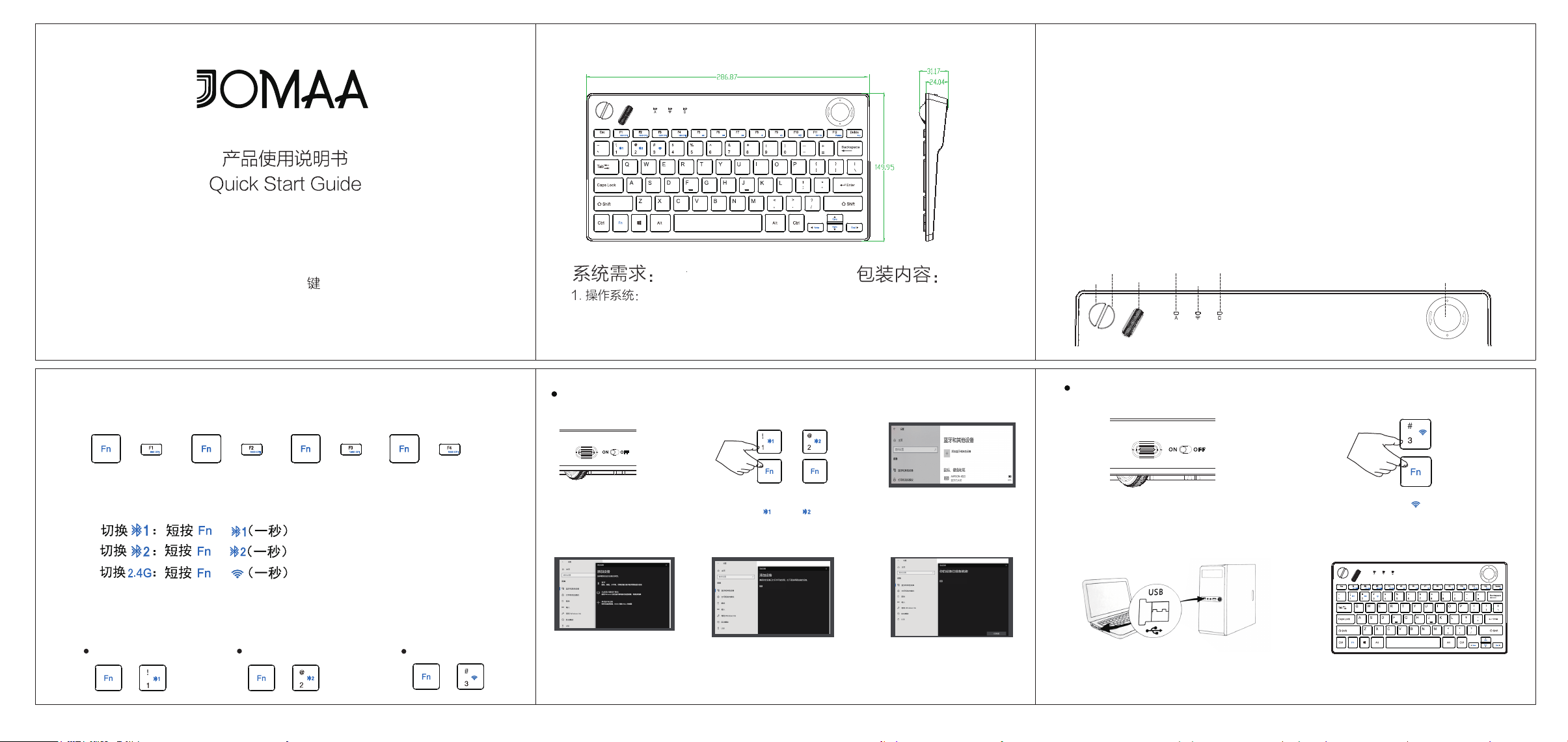
双模无线轨迹球键盘
78
双模无线轨迹球键盘
RF2.4GHz and Bluetooth wireless Trackball Keyboard
800 CPI 1000 CPI 1200 CPI
1600 CPI
Pause
Windows 2000/XP/win7 /win8 /win10/win11 ;
Mac OS , iOS, Android
1. 轨迹球键盘
2. 产品使用说明书
3. 2.4G接收器
2. 接口:蓝牙5.4/RF2.4GHz无线接口
技术规格
尺寸:287*150*31mm 重量:403g(不含电池)
键数:78键 轨迹球尺寸:19mm
工作电压:3V
工作范围:7-10m
电池容量:AA电池2节
工作电流:≤10mA
鼠标左键
鼠标右键
滚轮
大写锁定(绿灯)
充电和低电压报警(橙灯)
无线配对(蓝灯)
轨迹球光标(直径19mm)
功能说明
1.按钮说明:
800 CPI
1000 CPI
1200 CPI
1600 CPI
Pause
蓝牙连接使用说明:
1.请把开关推到“ON”位置
1.请把开关推到“ON”位置
4.电脑识别后,即可以使用
5.直到发现 “Trackball Keyboard”
然后点击配对名连接.
4.在添加设备里选择“蓝牙”,
进行搜索
6.提示连接成功后,即可以使用.
3.打开设置,打开蓝牙,点击“+”
号添加蓝牙或其他设备.
2.长按 Fn+ 三秒,
2.长按 Fn+ 或 FN+ 三秒,
或
Trackball Keyboard
Trackball Keyboard
2.4G连接使用说明:
3.将接收器插入有USB口的设备上
(请确保你的电脑设备USB接口可用)
直到蓝灯闪烁
直到蓝灯闪烁
3.切换通道:
4:连接方式(双模/可同时连三台设备):
蓝牙1
800 CPI 1000 CPI
2.调节鼠标CPI值:
+ ++
1200 CPI
++
1600 CPI
++
蓝牙2
++
2.4G
+
+
+
+
Windows 2000/XP/win7 /win8 /win10/win11 ;
Mac OS , iOS, Android
Dimension: 287*150*31mm Weight: 403g(without batteries)
Keys: 78keys Trackball dimension: 19mm
Working voltage: 3V
Working distance: 7-10m
Battery capacity: AA 2 batteriesWorking current: ≤10mA
800 CPI
1000 CPI
1200 CPI
1600 CPI
Pause
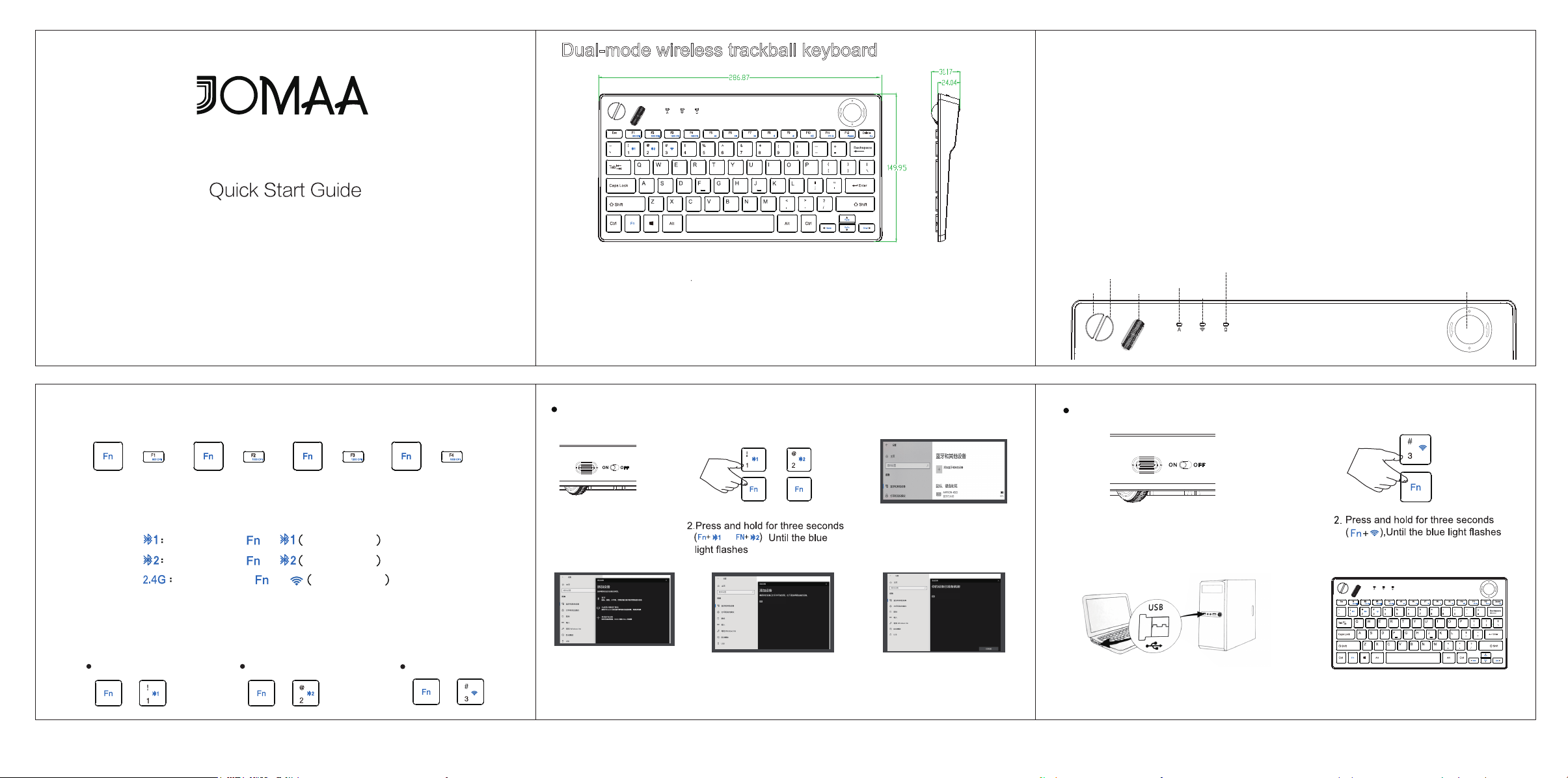
Instructions for use of Bluetooth connection:
Instructions for use of 2.4G connection:
1.Please push the switch to
the "ON" position
4.Select "Bluetooth" in Add
Device and search for it
5.Until you find "Trackball Keyboard"
and click on the pairing name
to connect.
6.The prompt indicates that after
the connection is successful,
it can be used
3.Open Settings, turn on Bluetooth,
tap the "+" sign to add Bluetooth
or other devices.
1.Please push the switch to the "ON" position
或
Trackball Keyboard
Trackball Keyboard
78
RF2.4GHz and Bluetooth wireless Trackball Keyboard
800 CPI 1000 CPI 1200 CPI
1600 CPI
Pause
1. Trackball keyboard
2.
Quick start guide
3.
2.4G Dongle
2. Interface: Bluetooth 5.4/RF2.4GHz wireless interface
Capslock(Green)
Charger and Battery Low(Orange)
Pairing (Blue)
Trackball cursor(19mm diameter)
Feature Description
1.Button description
4: Connectivity (dual-mode / up to 3 devices can be
connected at the same time).
Bluetooth 1 Bluetooth 2
2. Adjust the mouse CPI value
++
2.4G
+
KEY
Dual-mode wireless trackball keyboard
Dual-mode wireless trackball keyboard
System Requirements:
1.operating system:
Package includes:
800 CPI 1000 CPI
+ ++
1200 CPI
++
1600 CPI
++
3. Switch channels:
+
+
Technical Specifications
Mouse left key
Mouse right key
Mouse wheel
Switch
Quick clicks
one second
Switch
Quick clicks
one second
+
Switch
Quick clicks
one second
or
,
3.Plug the receiver into a device with
a USB port (make sure your computer
has a USB port)
4.Once recognized by the computer,
it can be used
