Note: The murmur of water is heard when the refrigerator is
operating. This is a normal phenomenon as the coolant is
circulating in the system. Condensation might be found on the
outside of the refrigerator. This is caused by high humidity
and is normal. Simply use a cloth to wipe it clean.
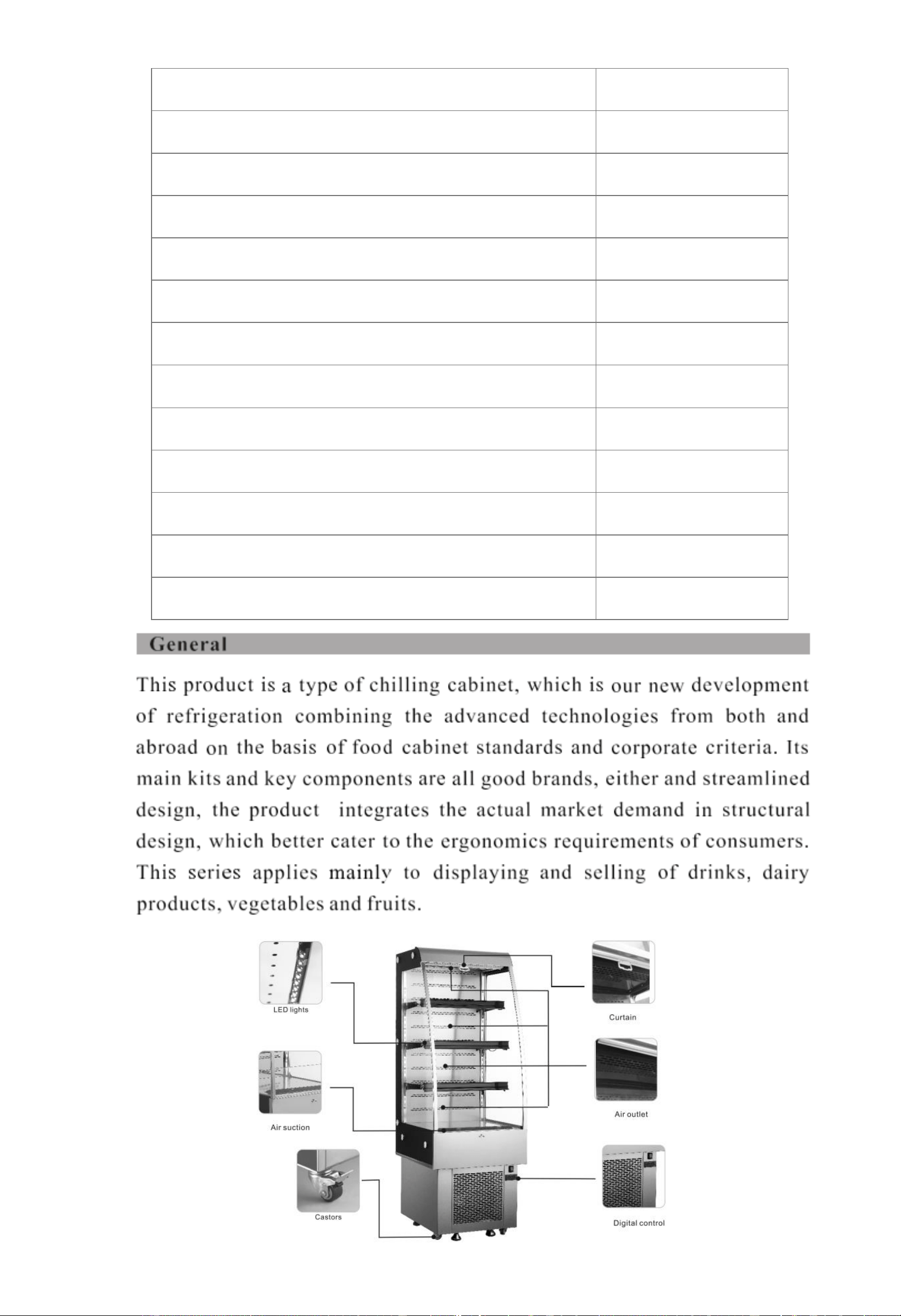
BakeMax Model #
BMGG024
Coolant and injection quantity(g)
R290(148)
General Rated input power(W)
1380
Power running of electrical heating element(W)
450
Max Ambient temp./RH
<80°F (27°C) / 70%
Refrigeration temperature
35°- 50°F (2°-10°C)
Rated voltage(V)
110-120V
Rated Frequency(Hz)
60Hz
Rated Current(A)
12.
Type of Climate
6
Net weight
220.5 lbs.
Total effective volume
8.8 cubic ft.
Overall dimension (W x D x H)
24″ x 29.7″ x 67.1″
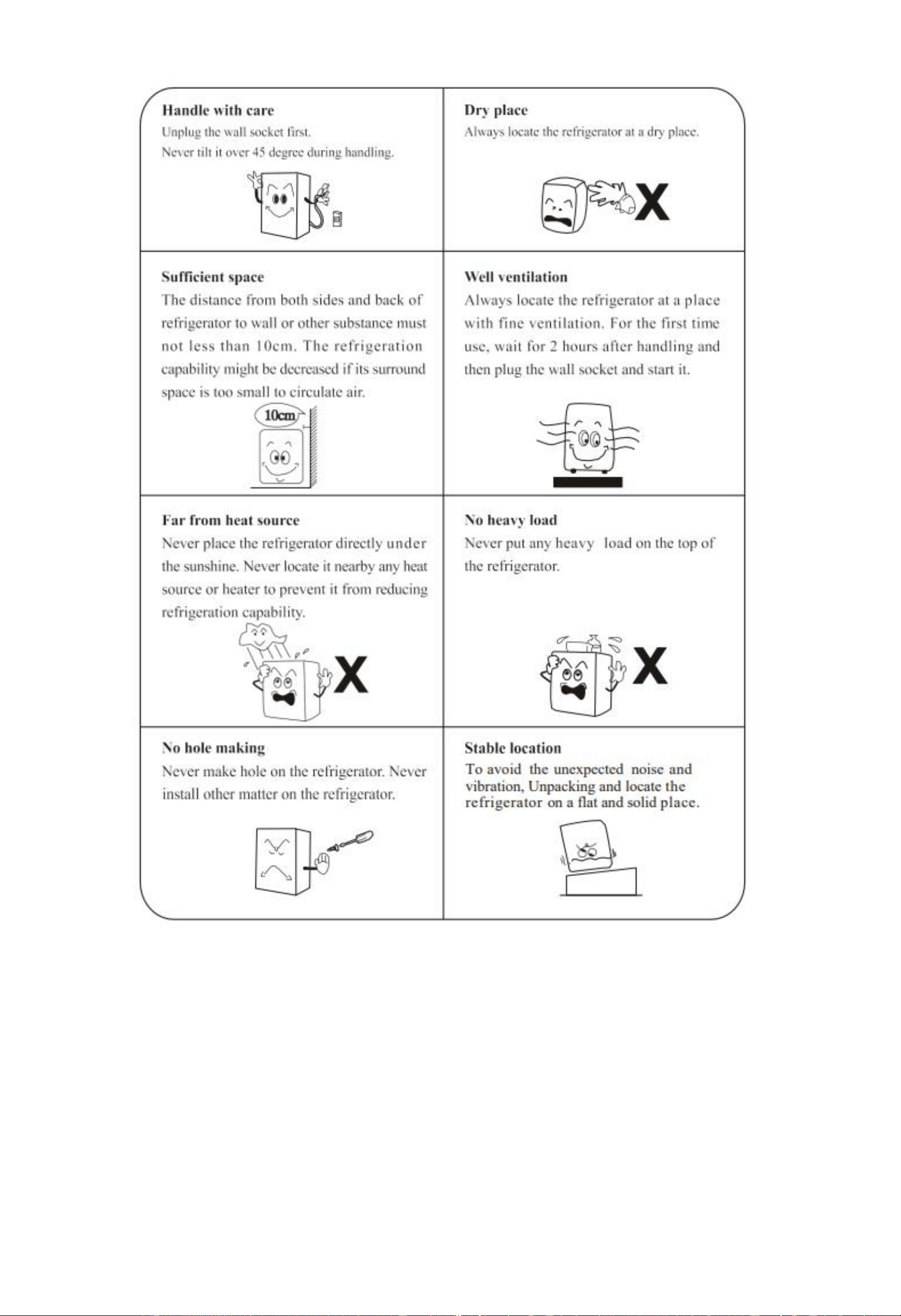
1. Cabinet Cleaning: The cabinet should be cleaned once a week with the power supply disconnected. Wipe
the inside and all surfaces of the refrigerator with a soft cloth with neutral and non-corrosive soap or
detergent. Do not submerge or wash this unit directly with a water supply/faucet.
2. Check for Leaks. Observe all connections and welding joints for oil stains. If found, this would require
patching, contact a licensed professional for help.
3. Frequently observe the operation of the product. If an abnormal noise, smell or smog is noticed,
disconnect the power supplier immediately and contact a licensed professional for assistance. Do not attempt
to restart the unit until cleared by certified personnel.
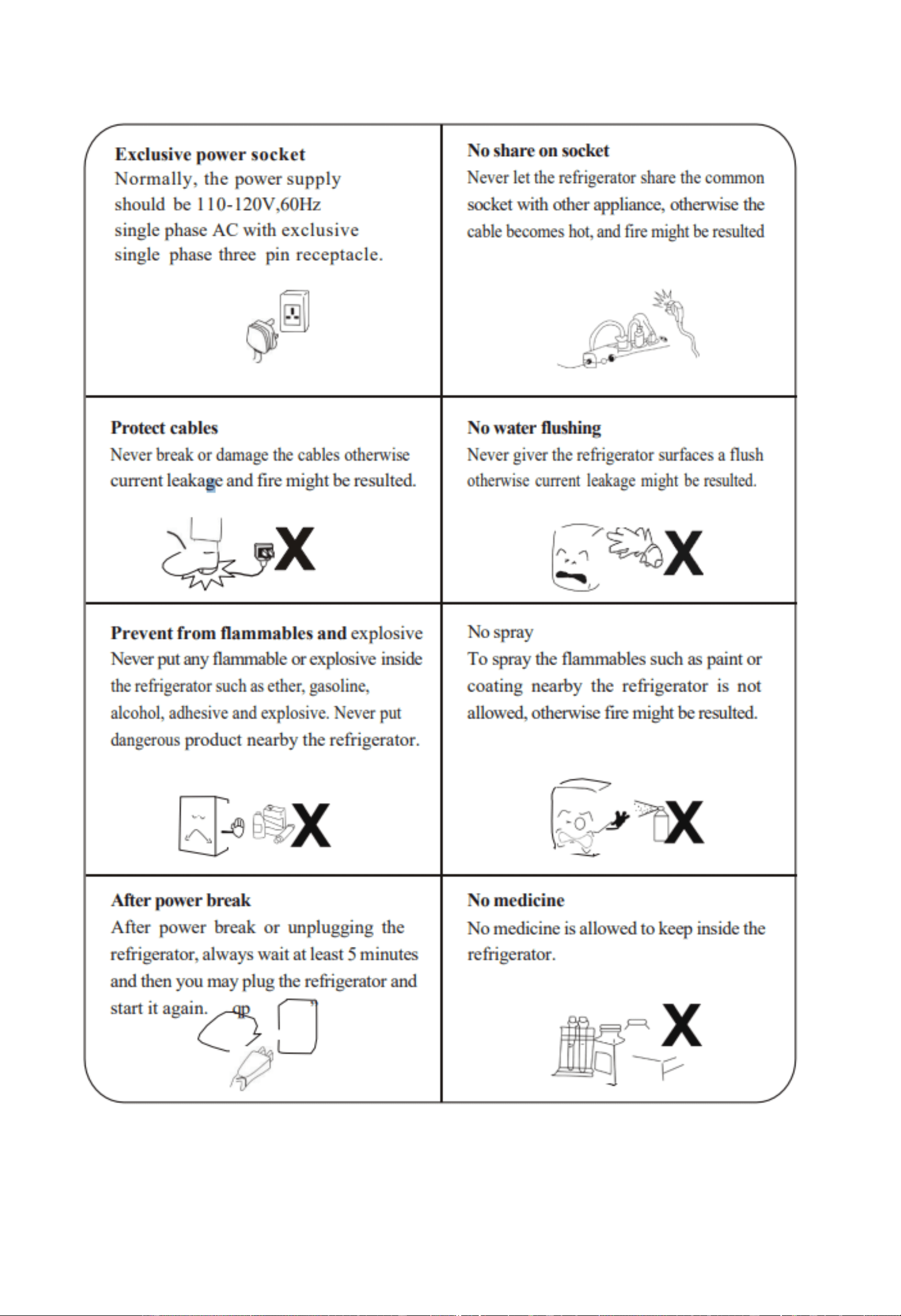
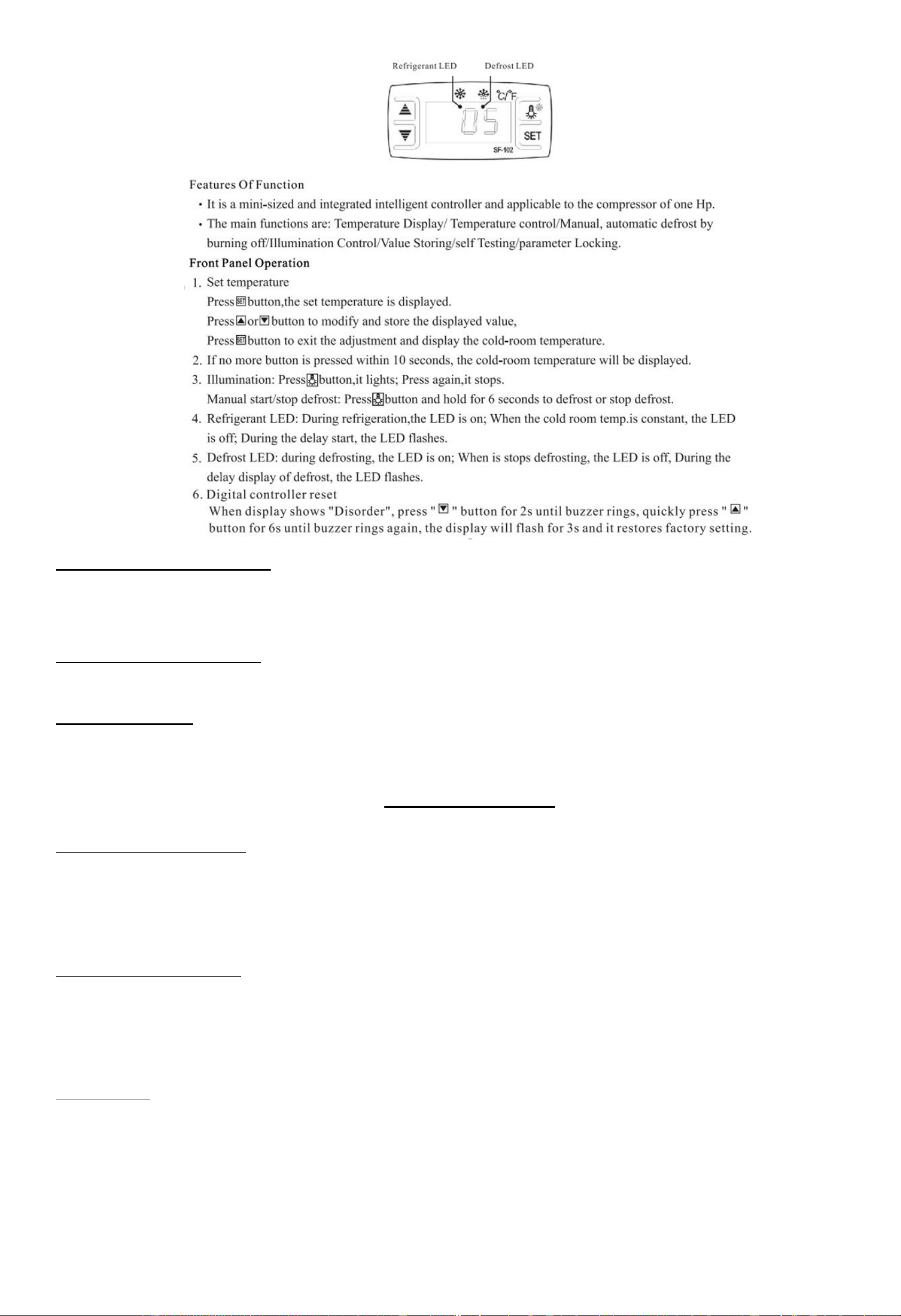
To Unlock the Controller Parameters
Press the Down Arrow for 10 seconds or until the display shows “ON”
If it shows “OFF” , leave it for 10 seconds, then press the Down Arrow again for 10 seconds, then it will show “ON”
To Check Evaporator Temperature
Press the UP Arrow for 10 seconds, and the evaporator temperature will be displayed.
To Change Parameters:
Press “SET” for 6s (Order: E1, E2, E3, E4, E5, E6, F1, F2, F3, F4, C1)
Quickly Press “SET” again to change the parameter you wish to change.
BakeMax Parameters
Lower Set Point Limit (Fahrenheit)
Press “SET” until display flashes “E1”.
Press the “UP” or “Down” arrow to adjust setting to 34°F / 1°C.
Raise Set Point Limit (Fahrenheit)
Press “SET” until display flashes “E2”.
Press the “UP” or “Down” arrow to adjust setting to 50°F / 10°C.
Temp. Hysteresis
Press “SET” until display flashes “E3”.
Press the “UP” or “Down” arrow to adjust setting to 2.

Compressor Start Delay Time
Press “SET” until display flashes “E4”.
Press the “UP” or “Down” arrow to adjust setting to 0.
Offset On Room Temp.
Press “SET” until display flashes “E5”.
Press the “UP” or “Down” arrow to adjust setting to 0.
Offset On Evap. Temp.
Press “SET” until display flashes “E6”.
Press the “UP” or “Down” arrow to adjust setting to 0.
Max Defrost Duration *This is the duration of the defrost (melting cycle)
Press “SET” until display flashes “F1”.
Press the “UP” or “Down” arrow to adjust setting to 20 Minutes.
Defrost Interval Time
Press “SET” until display flashes “F2”.
Press the “UP” or “Down” arrow to adjust setting to 2 Hours.
Defrost Termination Temperature
Press “SET” until display flashes “F3”.
Press the “UP” or “Down” arrow to adjust setting to 59°F. (15°C / 59°F)
Display During Defrost
Press “SET” until display flashes “F4”.
Press the “UP” or “Down” arrow to adjust setting to 00.
Temperature Units (C to F or F to C)
Press “SET” again, so you can change mode from E1 to C1.
C1 Settings: 00 = Celsius , 01 = Fahrenheit
To confirm parameters, do not press any buttons for 10 seconds, until the temperature is displayed.

Troubleshooting
Troubles
Causes
Solutions
Strange noise under
the bottom shelf
Fan blade broken.
Power off and fix the blade.
Non-refrigerating de
spite normal operati
on
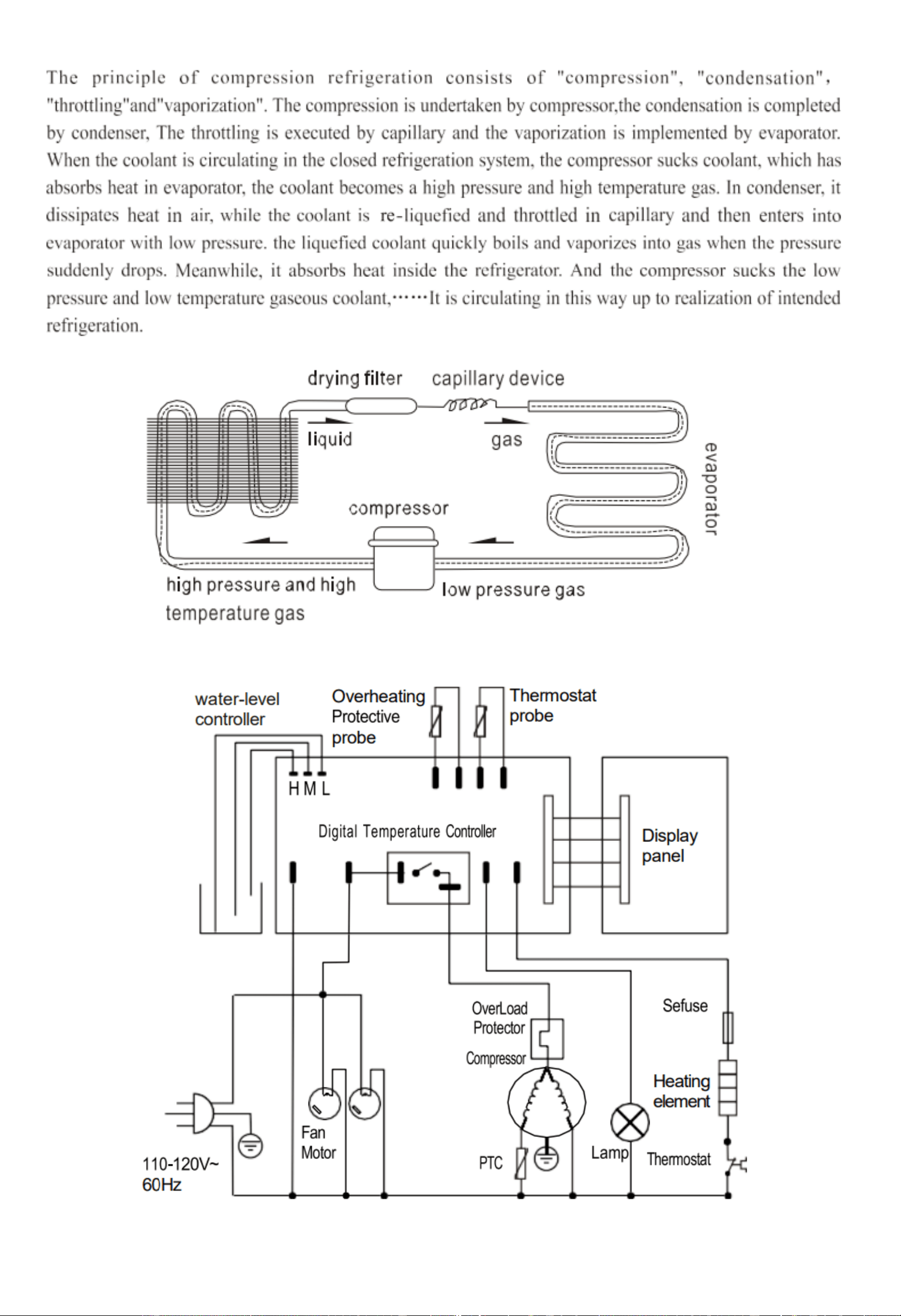
1.Unit off.
2.Melting process
3.Refrigerant leaking
4.Unit failure.
1.Power on.
2.Stop melting.
3.Patch the leak and refill refrigerant
Weak air from air cu
rtain, and higher ca
binet temperature
1.Evaporator blocked by frost.
2.Inside fan damaged.
3.Too low set point of temperatur
e controller
4.Vent blocked by storage
1.Increase melting frequency.
2.Replace the fan.
3.Adjust the set point.
4.Remove the storage.
Normal air curtain,
but higher cabinet
temperature
1. Insufficient refrigerant.
2. Too high set point of temperat
ure controllers.
3. The wind curtain disturbed by
strong air flow.
4. Ambient temperature or humid
ity beyond standards.
1. Refill the refrigerant.
2. Adjust the set point for the temperature
controller.
3. Removing the disturbing factors.
4. Improve the conditions.
Melting water
overflown
1. Heating pipe for melting water
damaged
2. Water-level controller failure.
3. Ambient temperature or humid
ity beyond standards.
1. Replace the heating pipe.
2. Replace the water-level controller.
3. Improve the conditions.
Normal air curtain,
but Periodical
fluctuation of
cabinet temperature
1. Condenser contaminated.
2. Poor venting of the unit.
3. Heat protection of compressor
failure
4. Capillary is blocked by ice
5. Temperature controller failure.
1.Clean the condenser.
2.Improve the venting conditions.
3.Replace the heat protection.
4. Replace the drying filter.
5. Replace the temperature controller

Terms & Conditions
Terms
Net 15 days subject to Credit Approval. All past due Accounts are subject to 2% per month Service Charge as per Credit Application.
We accept Visa, MasterCard, and Discover Credit Cards. We also accept E-Transfer & Wire Transfer, additional fees may apply.
Pricing
All prices are subject to change without notice. All prices are Sales Tax Extra, should you be claiming Tax Exemption, Tax Exempt
Forms must accompany your Purchase Order. BakeMax products are sold in Canadian and US Dollars. BakeMax is not responsible
for specifications errors or printing errors.
Shipping
Free shipping to Canada and the U.S. Minimum order $6,000 for BakeMax and $10,000 for BakeMax America Cooking Line. Tailgate
Delivery is $90.00 minimum. All checks made Payable to Titan Ventures International Inc. BakeMax is not responsible for goods
damaged during shipping. BakeMax is not responsible for any delays in delivery once product has left our Warehouse and is in the
carrier’s possession. Products shipped are to be inspected at time of delivery, the receiver is responsible for inspection. Damaged
Freight Claims are to be claimed with the carrier. BakeMax assumes no responsibility for Damaged Freight. Shipping Insurance
available by request. By signing your name on the delivery receipt without noting any damages, you are stating that you have
received your shipment in Acceptable Condition.
Return Policy
Returns will not be Approved unless in Writing. Returns must be made within 30-Days of Purchase and must have a Return
Authorization Number issued before returning. The purchase order number, reason for return, and the serial number(s) of the unit are
required for the Return Authorization Number. Minimum return amount of $100.00.
Returns are subject to a minimum restocking fee of 30%. The cost of any repairs or re-crating required will be charged back to the
dealer. If there is a manufacturer’s defect BakeMax® will pay standard freight returned and prepaid shipping back to the customer.
Special Order Items, Clearance / Discontinued Equipment, Parts, Refurbished/Demo Equipment, or Non-Standard items are not
Returnable.
Ordering Information
Send purchase orders to BakeMax via e-mail orderdesk@bakemax.com or Fax (506-859-6929). Use Model or Part number when
ordering including Voltage Requirements, and Product Description. Please include the Dealer, Name, Address, terms, special
delivery, or instructions required or attention names to be applied to packaging. Please notify BakeMax should you need order
confirmation or tracking numbers, by calling 1-800-565-2253 or email [email protected].
Special Terms and Conditions
BakeMax reserves the right to make improvements or equipment changes without prior permission. Setup and Installation are the
end user’s Responsibility. Failure to properly Install or Maintain Equipment may Void Warranty.
Catalog, Spec Sheets and Website
BakeMax is not liable for incorrect information found in our Catalog, Spec Sheets or Website. Please contact us to confirm
specifications. Pictures and specifications are for general purposes only. Product may not be exactly as shown. Prices and
availability may change at any time without notice. Dimensions shown may change at any time without notice.
Warranty & Service
BakeMax provides a 1-Year Limited Parts and Labor warranty on most items, there are select items which carry a Limited 2-Year
Warranty. Extended Warranty is available on some products. Please contact us for details. The Warranty is not transferable and is
limited to original installation of equipment sold by BakeMax for the original user.
For all Warranty Claims, Proof of Purchase and/or Serial Number is required. Once the machine is approved, BakeMax will provide
our customers with on-site Warranty Coverage on all equipment more than 100lbs. BakeMax assumes no responsibility for down
time or loss of product. Repairs must be Pre-Authorized by BakeMax and have a Service Authorization Number issued prior to
commencing Warranty Service.
Warranty begins 10-Days after shipping from warehouse; delays in installation which would extend the Warranty must be Approved.
All equipment must be installed and connected by Qualified Professionals in accordance with the Manual Specification. Products
shipped are to be inspected at time of delivery, the receiver is responsible for inspection.
Any abuse or improper use of the equipment will void the warranty. This includes failure to follow all cleaning instructions, improper
installation, improper maintenance, failure to follow capacity charts, improperly wired electrical connections. The Warranty does not
apply to abuse, willful or accidental damage, or to products used for other than their intended purpose. Normal wear parts such as
Accessories, Attachments, or Electrical Components such as Fuses, Bulbs, Elements, and Switches carry a 90-Day Warranty only.
Bench Warranty (Machines Weighing 100 lb. or less)
Once the machine is Approved for Warranty Service, if the machine requires Warranty work in less than 30 days of purchase date,
BakeMax will pay all shipping charges. Once the machine is received and repaired it will be returned to the user at BakeMax
expense. Freight Damages during return shipping is the responsibility of the owner of the machine.
The following is not covered under the BakeMax Warranty:
1. Overtime Labor Rates are not covered by BakeMax.
2. All parts will be shipped via Ground Courier only; If Express Shipping is required, it will be the responsibility of the Customer or
Dealer.
3. Travel for Warranty Service is covered up to 100 Miles /160 Km Roundtrip, any further milage will be the responsibility of the
Customer or Dealer.
4. There is no on-site Warranty Service for Residential Addresses or addresses outside of the contiguous United States (Lower 48)
or Canada.
**BakeMax machines sold outside of the contiguous United States (Lower 48), or Canada will carry 1-Year Parts Warranty only.
