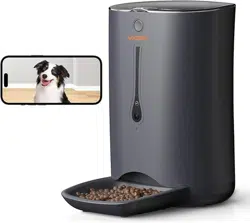
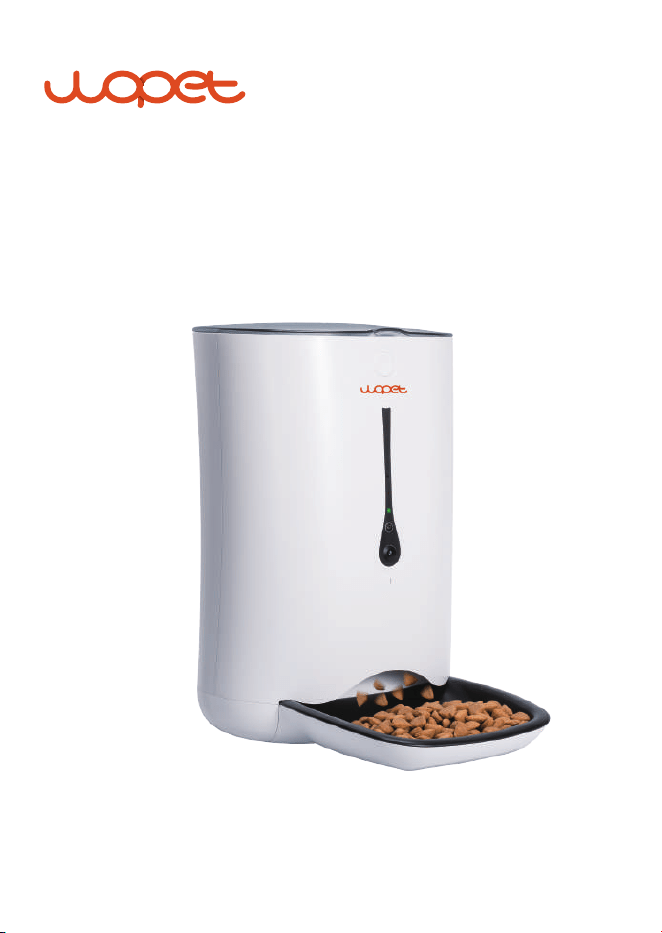
Pioneer WIFI Pet Feeder
USER MANUAL
Model: FV01 Plus


[CONTENTS]
Feeder Specifications
.…...…...………….........………………………………………………
1
Assembly Guidelines
..…...…...………….........………………………………………………
2
APP Setting Guideline
......…...………….........………………………………………………
11
App Installation
..…..…..…...…...………….........………………………………………………
5
App Usage
.........................…...…...………….........………………………………………………
6
App Interface Function Introduction
.....………………………………………………
10
...........…...…...………….........…………………………………………
6
Add the Feeder
…………………………………………………………
7
Access the WLAN Network
.........…...………….........………………………………
8
WLAN Connection Modes
.…….........……...…...………….........………………………………
11
Camera Function
.........…….........……...…...………….........………………………………
12
Setting Meals
……...……...……...……...…...………….........………………………………
13
Scan Mode
..................…….........……...…...………….........………………………………
14
Ap Mode
………………………………………
2
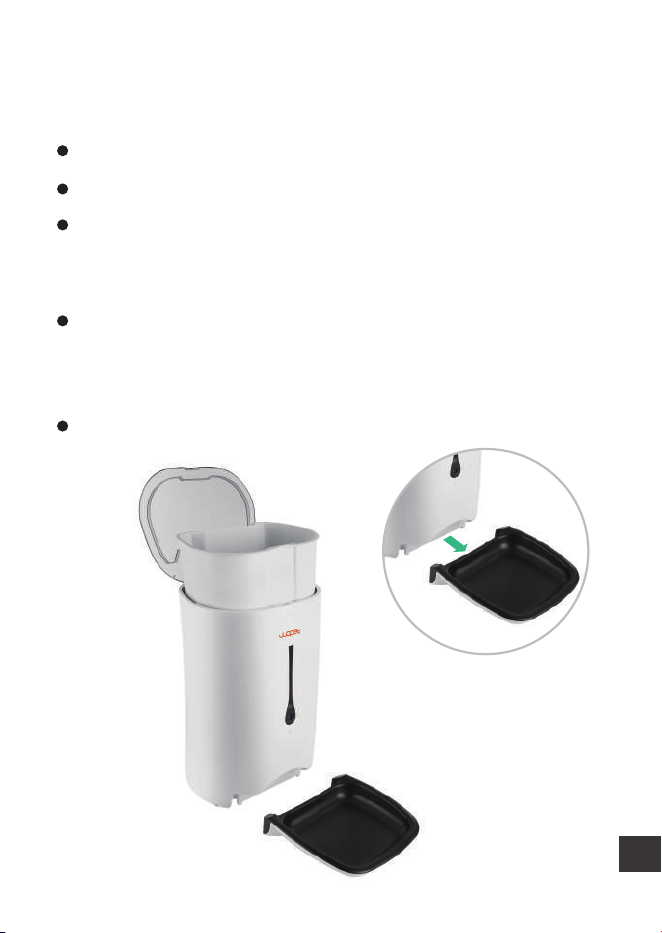
Assemble Bowl as Shown in the Picture
...…………………………………………………………
3
Plug in the Power Adapter
..………………………………
4
Install Batteries in the Battery Compartment
Switching Different Mode
...………….........………………………………………………
13

FAQs
...........................…..….…...…...………….........………………………………………………
16
Important Notes
..…..….…...…...………….........………………………………………………
19
FCC Warnings
..….…...….…...…...………….........………………………………………………
20
Warranty Information
......…...………….........………………………………………………
22
Have a Question?
.........…...…...………….........………………………………………………
25
Feeder Cleaning
............…...…...………….........………………………………………………
15
1
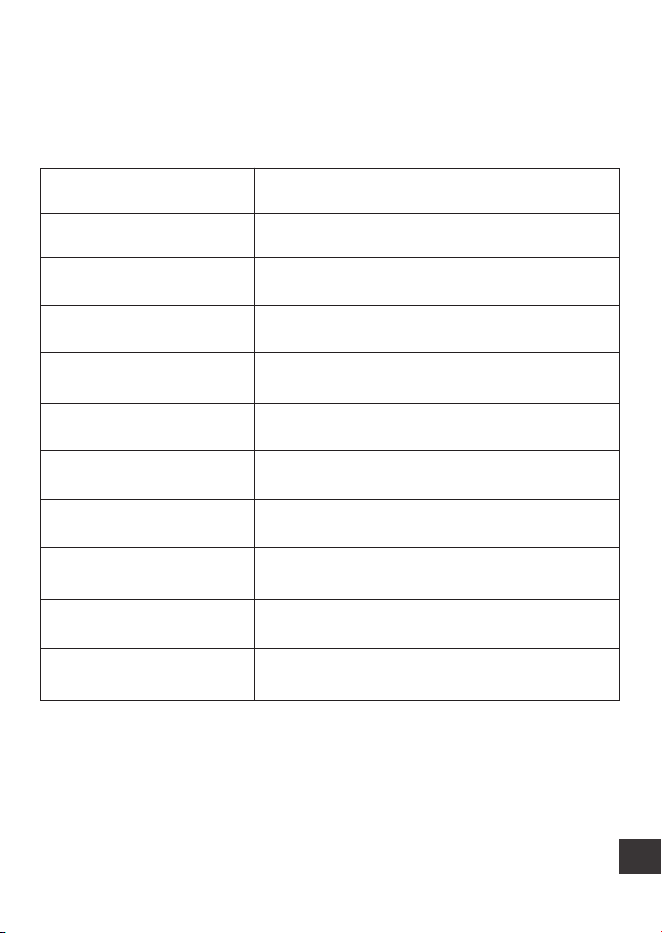
Product Specification
Model FV01 Plus
WLAN 2.4HZ / 5HZ
Capacity 7L
Meals 6 Meal Per Day
One Portion 10 grams(20 portions at most per meal)
Food Size 2-15mm(dry food only)
Product Size 9.8*13.7*15.3in
Product Weight 5.5lbs
Product Materials ABS
DC-powered Supply 5V/1A
Battery-powered Supply 3*alkaline D batteries(not included)
2
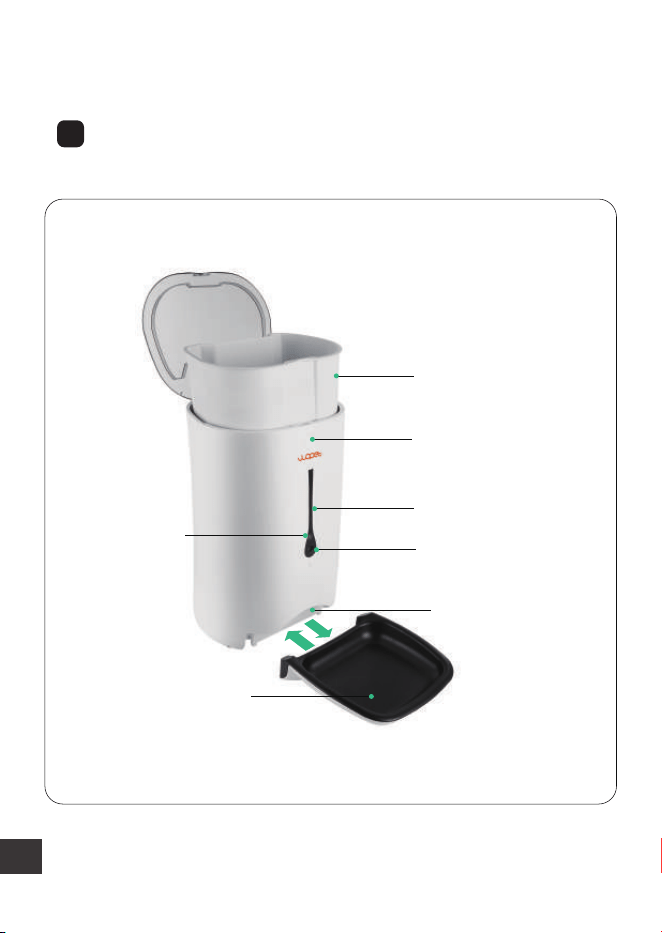
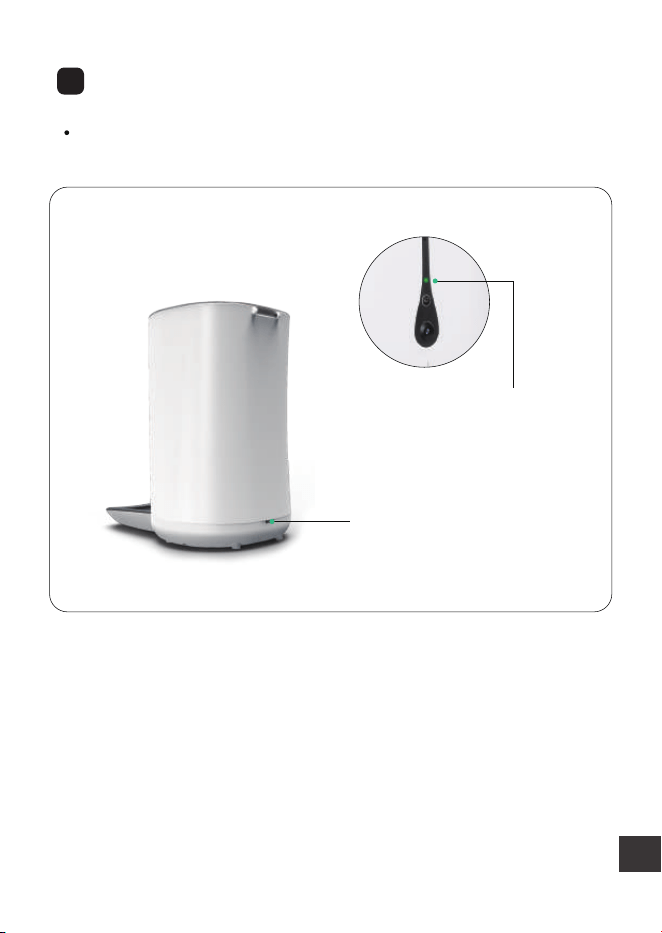
Assembly Guidelines
Assemble Bowl as Shown in the Picture
1
7L Large capacity
Set button
Lid lock
Mic
Camera
Food outlet
Food tray
3
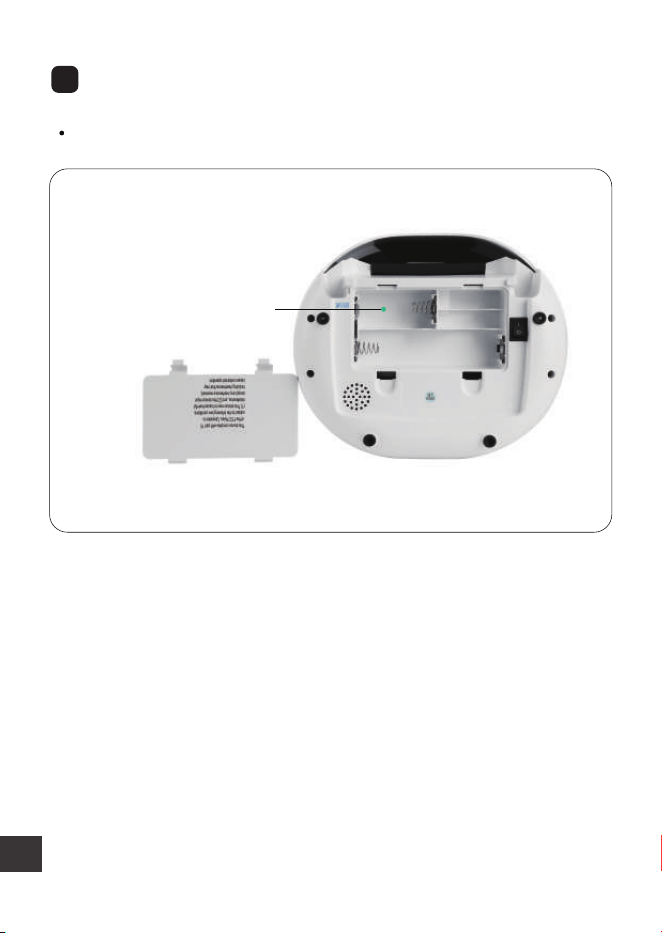
Plug in the Power Adaptor
2
The indicator light on the feeder shows green when you plug
it in
Plug in the power adapter
Note:
It is hugely important to plug in the power adaptor for
the device so that it can connect to WIFI successfully.
Green indicator light
4
3
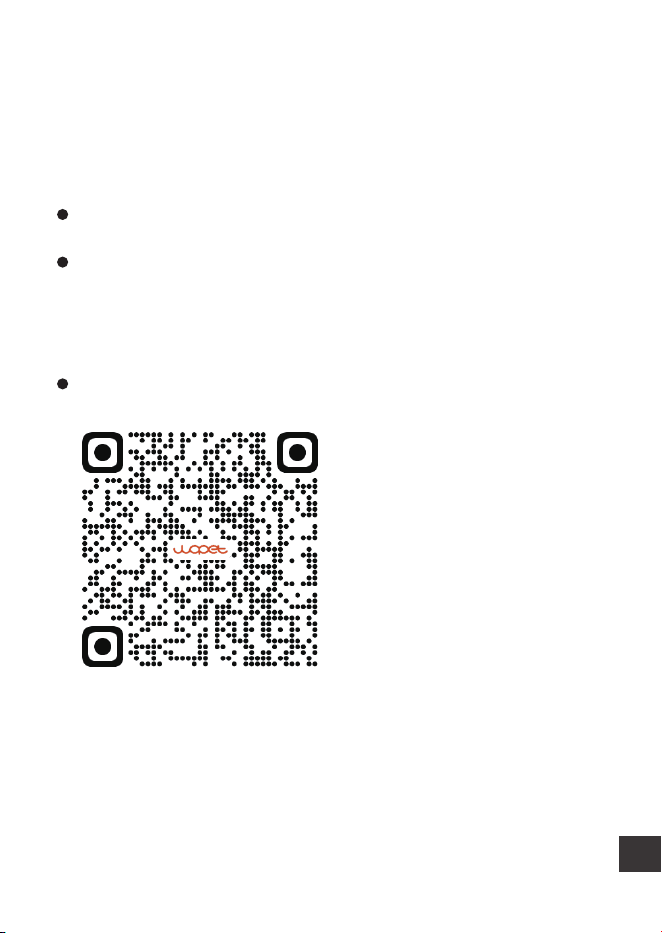
Install Batteries in the Battery Compartment
(3 new D cell, alkaline batteries.Battery NOT included)
Battery compartment
Note:
Battery power supply is only in case of power outage or
WIFI failure, the schedule you set will continue to work.
5
App Installation
Note:
The feeder cannot work without WIFI
Download the app by scanning the below QR code below
Android:Search“WOpet Smart”in Google Play
IOS: Search“WOpet”in the App Store
Scan the QR code to download WOPET APP
6
App Usage
Install and open the “WOpet” App,
then register an account and log
in
Enter your email
Enter your password
Login
Register
Note:
Each device can be attached to only
one account at a time, but each
account can have three devices
connected.
Choose the option to add
a named FV01 Plus device
Note:
Make sure your phone is connected
to WIFI with favorable network
speeds.
Step 1 Add the Feeder
7
Click "next" until you reach this page
Note:
Watch and wait for the indicator to slowly blink green
before selecting the connection mode in the next step
(Wait at least 5S)
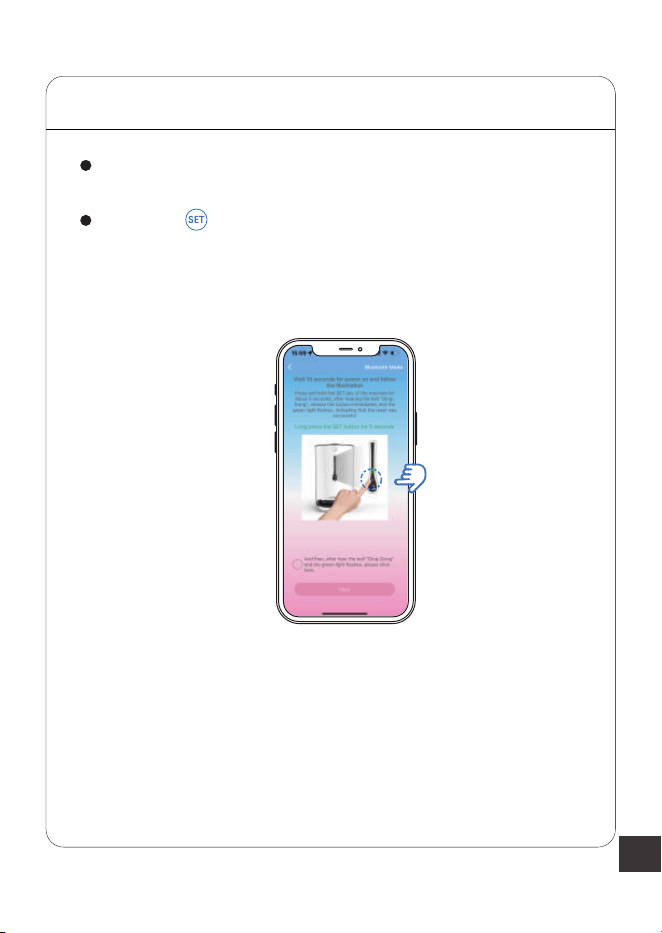
STEP 2 Access the WLAN Network
Hold the button, then release it until the device makes
a "Ding" sound, which means the machine has already
been reset
8
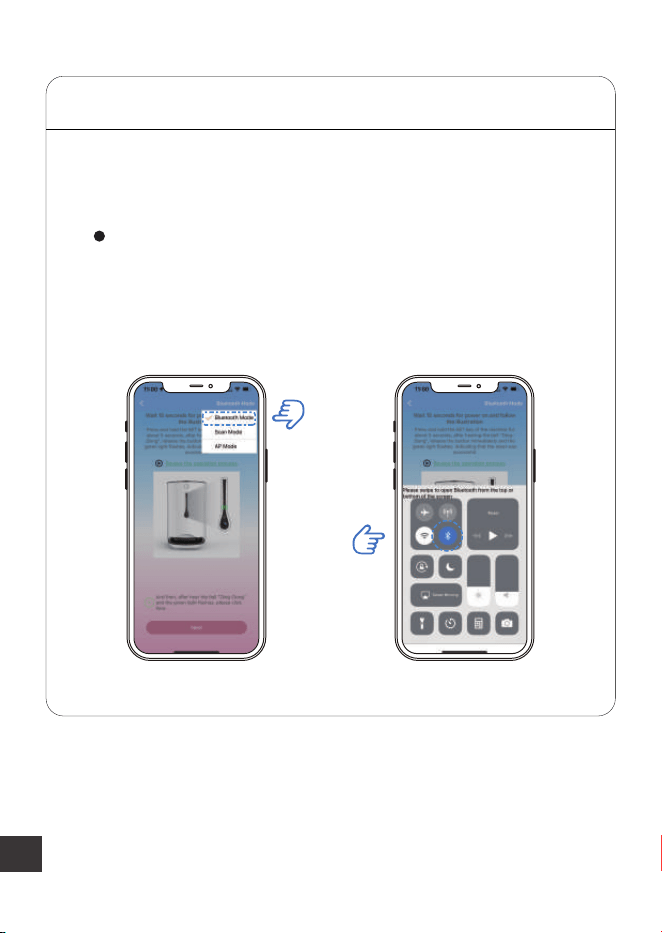
Choose the “Bluetooth Mode”Enter the next step and
there will be a pop-up a prompt. Then turn on
Bluetooth as described.
STEP 3 WLAN Connection Modes
Step 3.1 Bluetooth Mode-Recommended
9
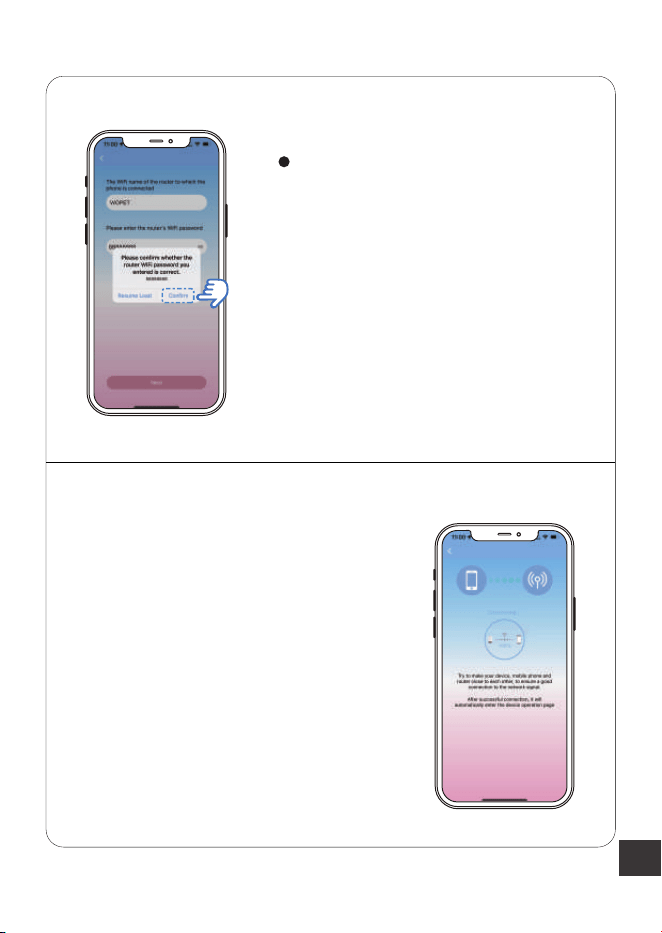
The app will automatically access
WIFI on your phone; just enter
the correct password. Finally,
click the “confirm” option, and it
will establish the connection
Note:
If the Bluetooth mode fails, read the
another mode guides on page 13
and page 14.
10
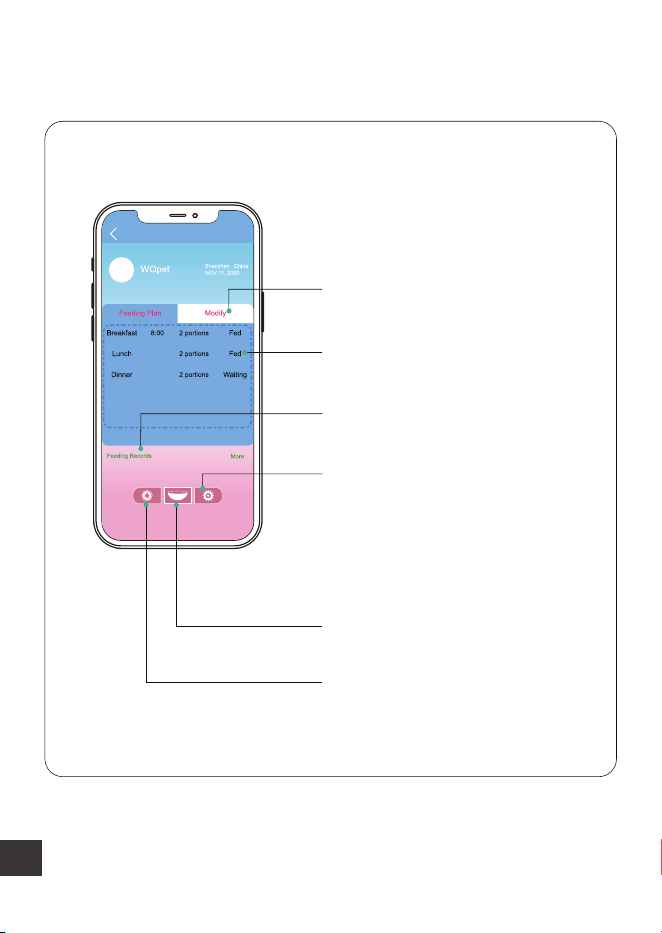
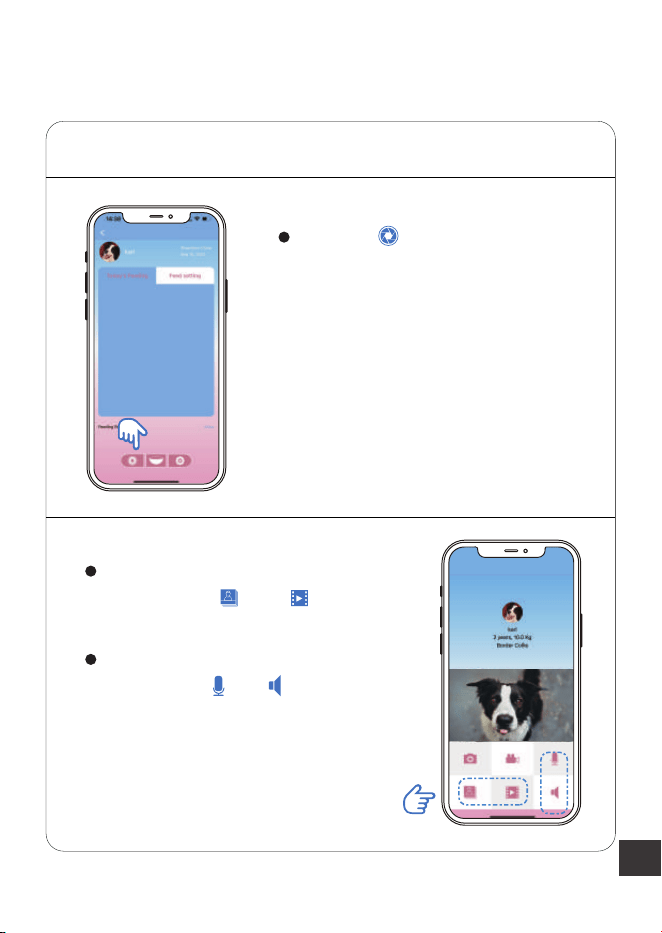
App Interface Function Introduction
Edit feeding schedule
Scheduled meal
Feeding history
Camera interface
Automatic feeding
Basic settings
(includes pet’s profile picture,
age, weight, and remove the
blinding etc)
12:00
18:00
11
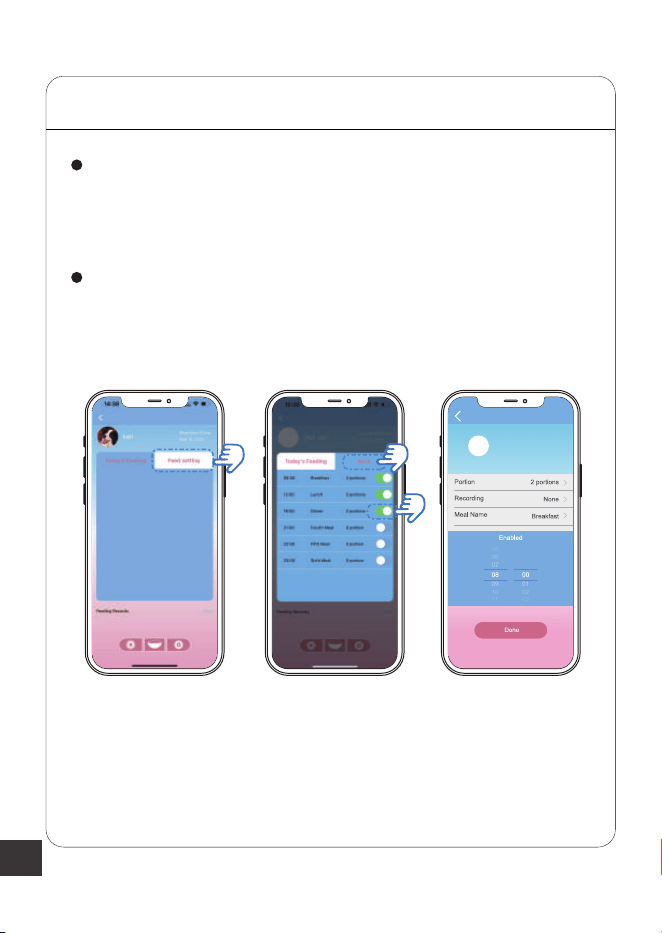
Step 1 Camera Function
Click the option. On this page,
you can take a photo or video of
your cute pet
These pictures and videos are
saved in the and option.
And doing voice interaction with
your pet on and option
APP Setting Guideline
12
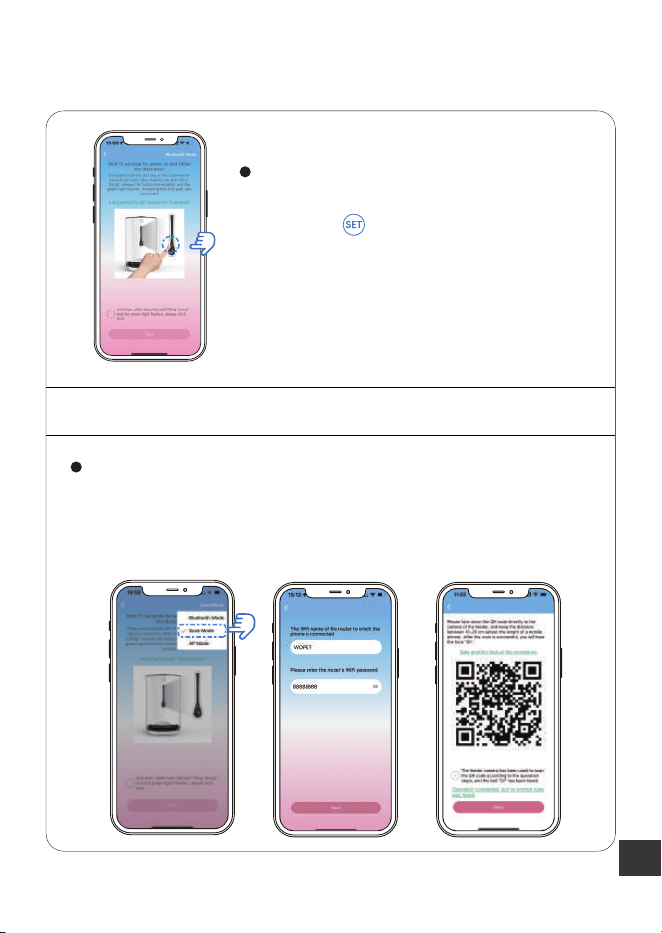
STEP 2 Setting Meals
Click the "feeding setting", you can set up to 6 meals a day.
When clicking one of these six to the next step, you can set
the feeding time, portion, and voice options
07
06
05
09
01
10
02
11
03
:
Leave the button on before clicking the "back" option, and
the schedule you set will show on this page
Note:
1 portion is about 10g, and the maximum is 20 portions.
13
Switching Different Mode
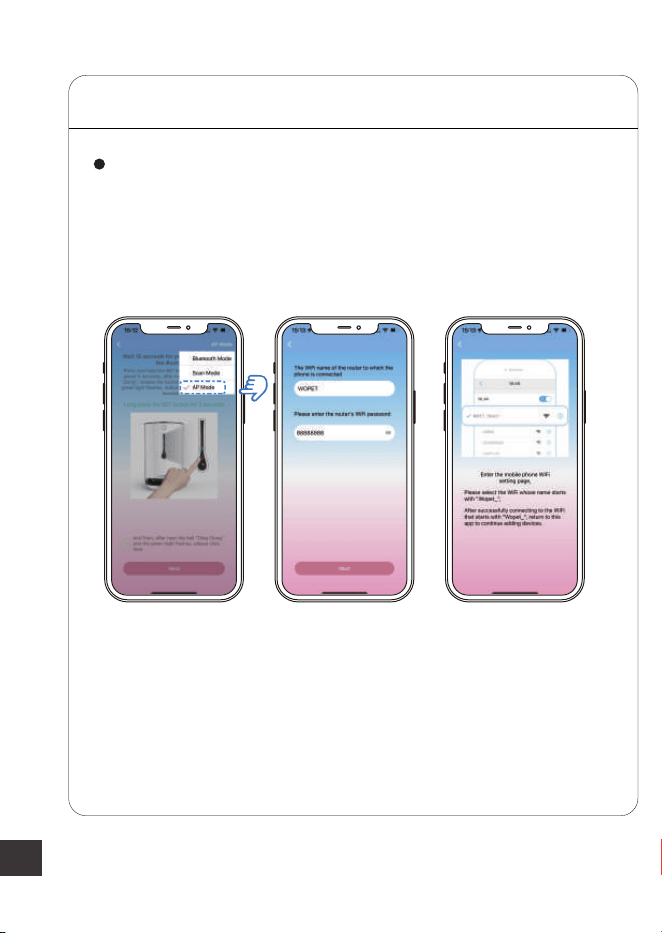
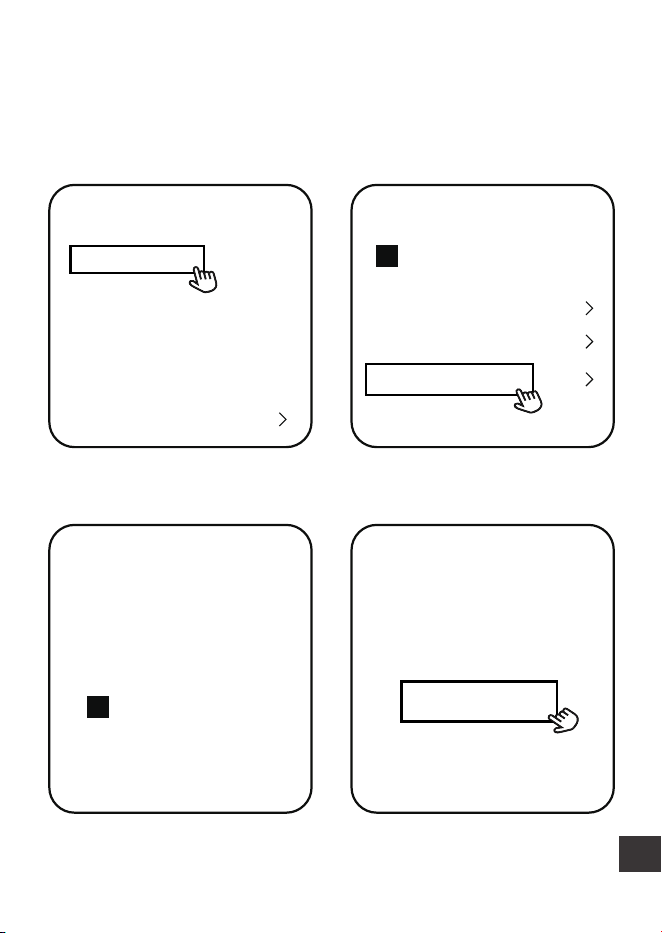
STEP 1 Scan Mode
Enter the next step and type the corresponding password
to reveal the QR code. Aim the camera towards the device
until it makes a ”DI“ sound, and wait for the connection to
finish
Follow the instructions until you arrive
at this page
Hold the button, then release it
until the device makes a "Ding" sound,
waiting for the indicator to slowly blink
green, and then select a “ mode”
14
STEP 2 Ap Mode
Enter the next step and type the corresponding password,
then open your phone’s“WLAN”setting page; find and connect
to the WIFI with the name starting with "Wopet". Finally, go
back to the app
Note:
The app function guides on page 10 to 12.
15
Feeder Cleaning
Unplug feeder and remove the batteries
Disassemble the food bucket and tray
Clean with a soft cloth
Warning:
The base unit should not be submerged in water at any time,
as this will damage the electronic components and void the
warranty
For indoor-use only

16
FAQs
Red Light
OFF
Green Light Feeder State Solution
Always on Normal √
OFF Device Offline
1. Plug in power
2. When plugging in, click the
“Refresh” button on the app.
Flashes
(Once a second)
Flashes quickly
(Twice a second)
Always on
Bettery
Powered
When plugging in, check to
see if there is anything wrong
with the socket and charger
OFF
Always on Abnormal Plug in power
Q: What should I do if the feeder fails to access to WLAN
network?
A: Check whether the feeder’s red light is off; the green light is
always on.
B: Check that the feeder is connected to the same WIFI as your
phone.
C: Check whether the router has reached the limit of machine
connections.
D: Check whether you didn't authorize the APP the right to use
your location.
17
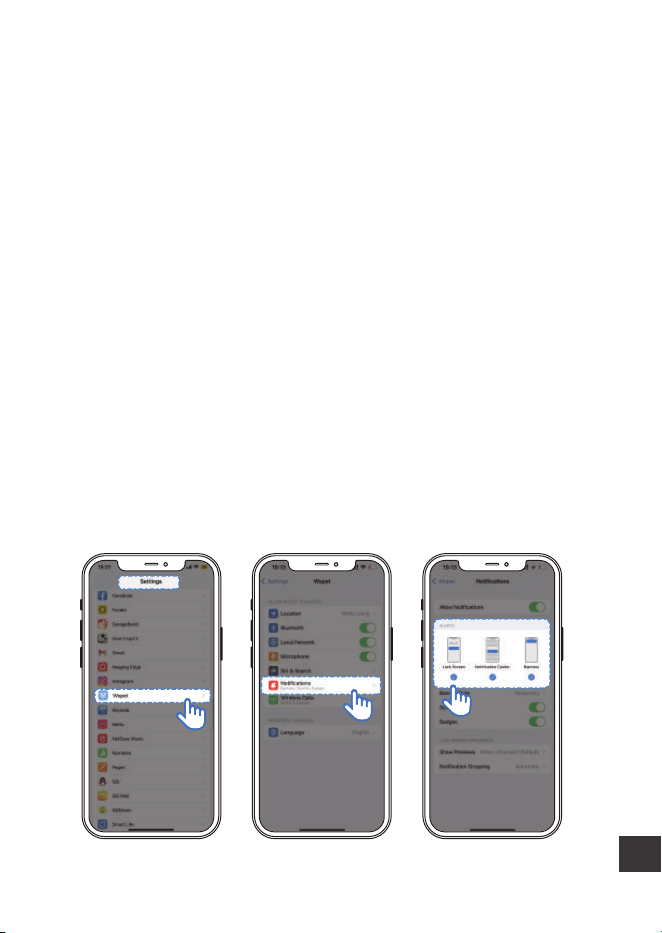
Q: How do I re-connect the device to the network quickly
after it is disconnected?
A: Exit the APP, run it again, and click the“refresh”button on
machine.
Q: What if the cellphone didn't send the feeding record
notification?
A: The feeder is offline.
B: The feeder is only powered by batteries.
C: Your phone is in power-saving mode.
Q: How do I open or turn off the phone notifications?
18
Q: APP updating
A: For better user experience, please update regularly. In
addition, this ensures the stability of the device.
Scan the QR code to
set up the feeder
Q: Why is there a 5-minute error between the time setting
and time dispensing?
A: It takes about 5 minutes for the data to be uploaded to
the server and identified.
Any more questions, please email our support team:

19
Important Notes
Require THREE D size batteries, alkaline batteries only (Batteries
NOT included)
The estimated life of one set of batteries is one year
Keep fingers and hands away from food wheel
Always turn the feeder off before cleaning
Check the low battery light frequently to ensure the feeder has
power
Check the level of food frequently to be sure the feeder is
dispensing properly

20
Notes:
FCC Warnings
Changes or modifications to this unit is not expressly approved.
Non-compliance could void the user's authority to operate the
equipment.
This equipment has been tested and found to comply with the
limits for a Class B digital device, pursuant to Part 15 of the FCC
Rules. These limits are designed to provide reasonable
protection against harmful interference in a residential
installation.

21
This equipment generates, uses, and can radiate radio frequency
energy and, if not installed and used in accordance with the
instructions, may cause harmful interference to radio communi-
cations. There is no guarantee that interference will not occur
with any particular installation. If this equipment does cause
harmful interference to radio or television reception, which can
be determined by turning the equipment off and on, the user is
encouraged to try to correct the interference by one or more of
the following measures:
Reorient or relocate the receiving antenna.
Increase the distance between the equipment and receiver.
Connect the equipment into an outlet on a different circuit
from that to which the receiver is currently connected.
Consult the dealer or an experienced radio / TV technician for
help. Shielded interface cables must be used with the equip-
ment in order to comply with the limits for a digital device
pursuant to Subpart B of Part 15 of FCC Rules. Specifications
and designs are subject to change without any notice or
obligation on the part of the manufacturer.

22
1
Warranty Information
NON-TRANSFERRABLE LIMITED WARRANTY
① To provide customers with a quality shopping and user
experience, we guarantee to replace, issue a refund, provide
acceptable solutions to any defective products (as the
customers prefers) from the date of purchase up to 2 years.
② Proof of purchase must be provided (order number or
receipt) when making a claim to our customer support center.
③ Warranty registration may be requested within a month
since the date of purchase, by sending your order number to
the mailbox: [email protected]
④ The warranty is not transferable. We only provide warranty
services to buyers who purchased from our Amazon store and
WOpet official website store and possess proof of purchase -
not to any other purchaser or subsequent owner.

23
⑤ Price matching policy is not applicable. No price difference
will be refund.
⑥ Sellers are the responsible party. Amazon allows different
sellers to sell the same product,so please confirm the seller
by checking the order details before contacting us.
2
3
WHAT IS COVERED
Receiving defective or used (proof needed) products;
Receiving with missing parts;
Item is defective under proper use.
WHAT IS NOT COVERED
Purchase from non-amazon channels /non-WOpet official
website store/other physical stores;
Gift without proof of purchase;
Tampering/abnormal use/accidental damage;
Replacements and parts;
Installation fee/labor fee;

24
4 MAKING A CLAIM
If you have any problems when using our products, please
send an email to the mailbox: [email protected]
30 days free Return & Replacement
Standard Warranty: 1-Year product Warranty
2-Year Warranty Application: Please scan the QR code below to
finish the registration form on our official website to get 2-Year
in total warranty.
Please finish the form within 30 days after you received the
items.
Note:
25
Have a Question?
Home
Your Order
Buy Again
Your Wish List
Your Account
Shop by Department
Order#
Order Total
Shipped
Product link
Qty: 1
Sold By: Seller
Your Orders
Product link
Buy it again
Write a product review
View order details
View order details BRAND
Have a question
for the seller?
Ask a question
1.Find your order 2.Click "View order details"
3.Click the Seller name 4.Click “Ask a question”

26
Gifted parts, replacements, and consumable products are
not covered by the 2-year warranty
Manufactures' warranties may not apply in all cases,
depending on factors such as use of the product, where
the product was purchased,or who you purchase the
product from.
Please review the warranty carefully, and contact the
manufacture if you have any questions.


Boundless Love for Pets
