
USER MANUAL
ICEMAG 2
POWER BANK
Specifications
Product name: ICEMAG 2 Power Bank
Product model: M2
Port type: USB-C
USB-C(Input): 5V⎓3A, 9V⎓3A, 12V⎓2.5A, 15V⎓2A,
20V⎓1.5A (30W Max)
USB-C(Output:): 5V⎓3A, 9V⎓3A, 12V⎓2.5A, 15V⎓2A,
20V⎓1.5A (30W Max)
Wireless: 5W, 7.5W, 15W
Total output: 5V⎓3A
Battery capacity: 10,000mAh / 36Wh
Rated capacity: 6,000mAh (5V⎓3A)
Conversion rate: ≥70%
Dimensions: 108 × 70.5 × 19.7mm
Weight: ≈220g
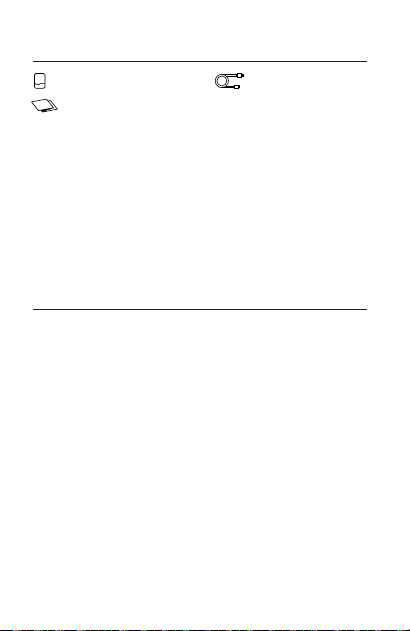
Package Contents
Charging Cable × 1Power Bank × 1
User Manual × 1
01
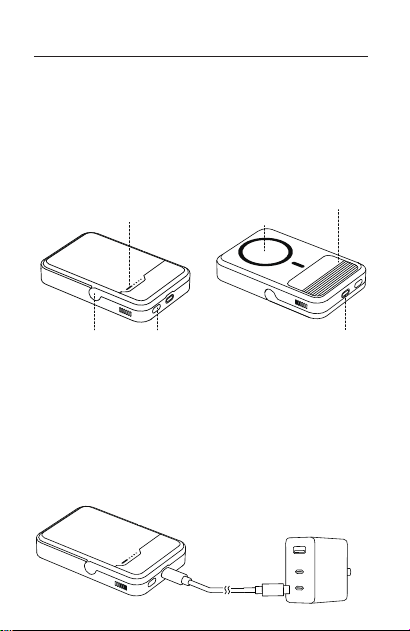
Instructions
This product supports 15W max Qi2 wireless charging
and 30W max 2-way USB-C fast charging. Features
high-quality lithium-ion batteries and advanced chips,
ensuring excellent safety, efficiency, and compatibili-
ty. The built-in fan provides active cooling for better
heat dissipation and longer-lasting performance.
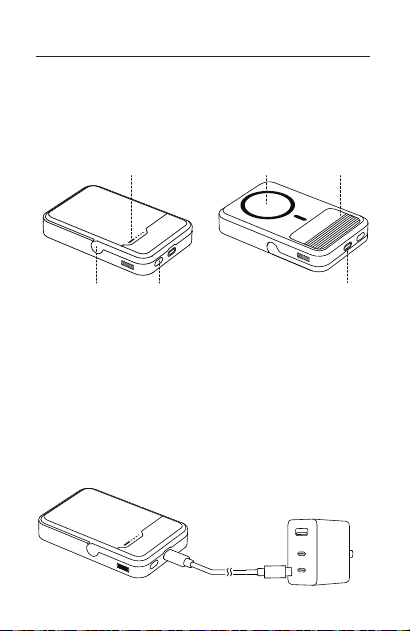
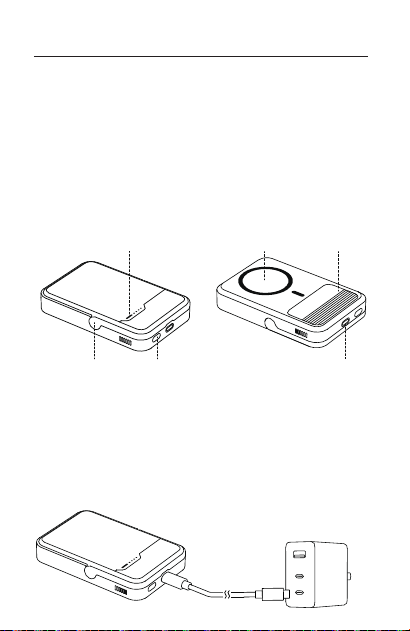
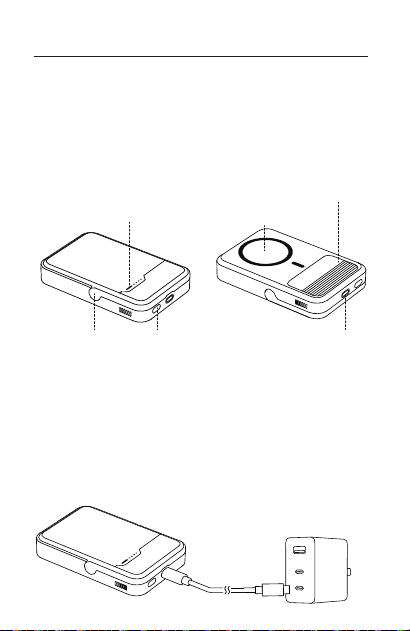
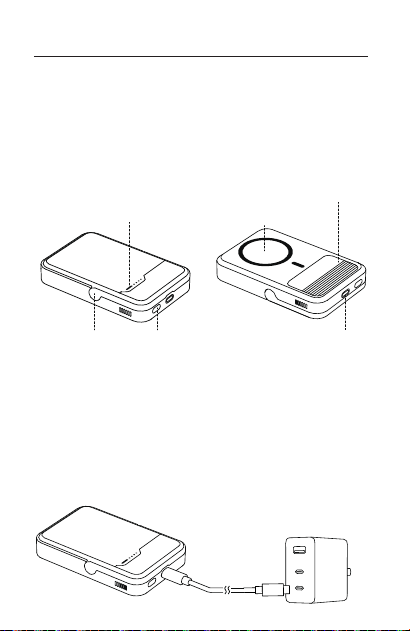
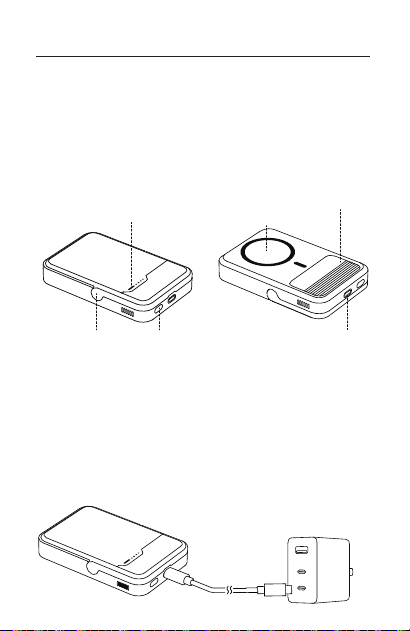
Wireless charging
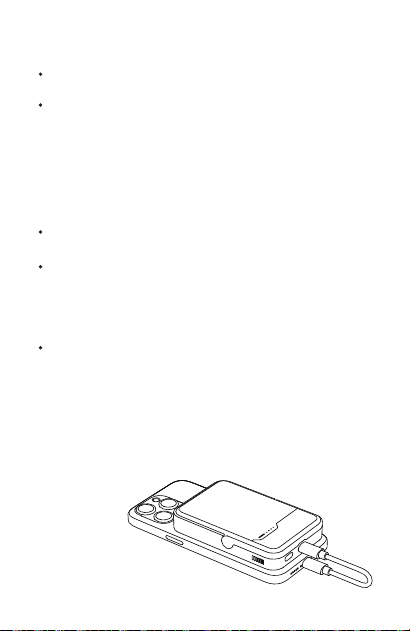
indicator
Wireless
charging area
Thermal pad
USB-CStand
Power button
02
01. Charging the Product
a.
b.
※
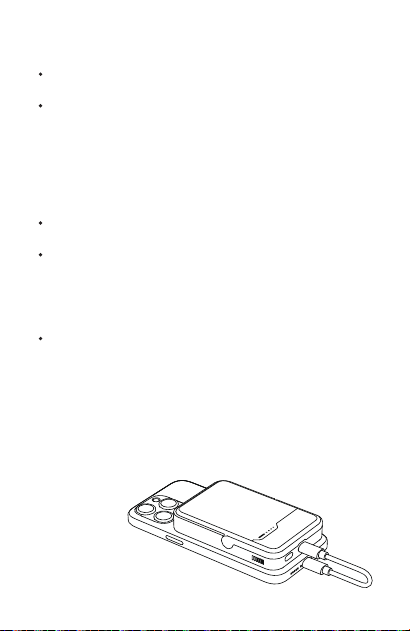
Connect the USB-C port of this product to a charger to charge
the product.
Supports PD fast charging; you can use mainstream fast chargers
to charge the product.
Charger is required to meet the input specifications of this
product.
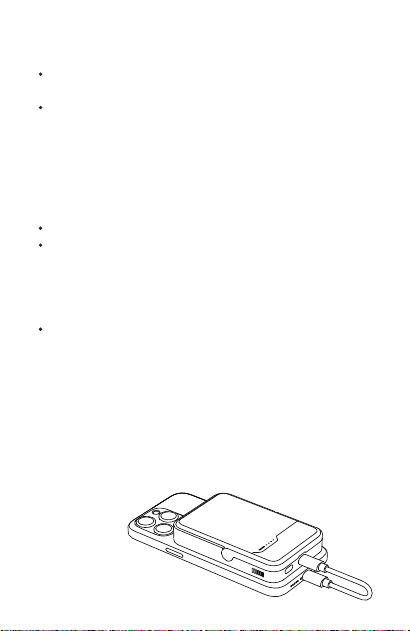
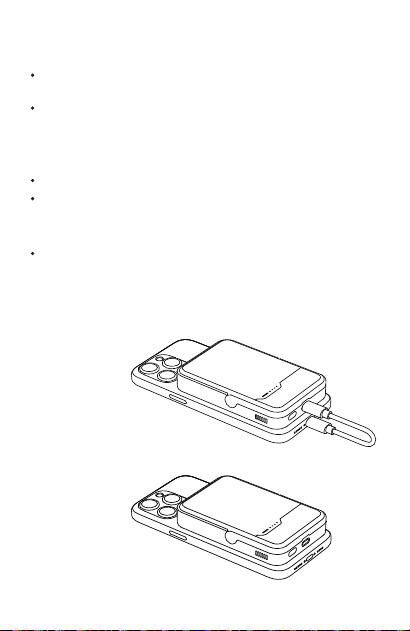
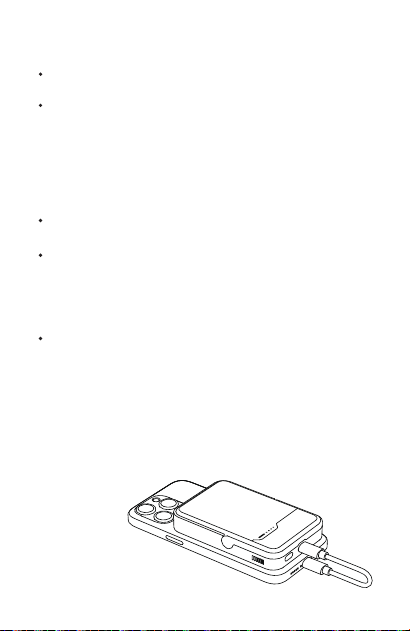
Wired Charging Mode:
02. Charging Your Device
a. Wired and Wireless Charging:
b. Fast Charging
c. Charging Indicator
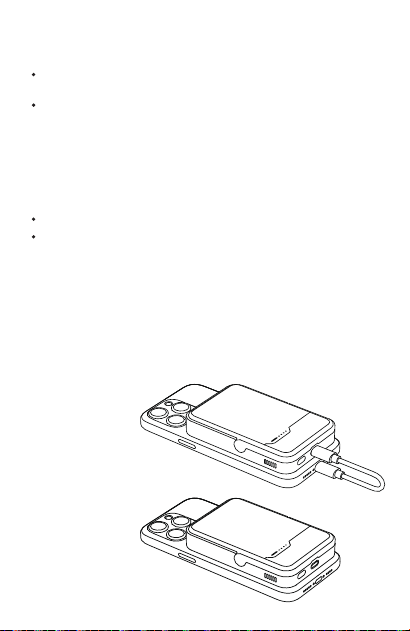
Wired Charging: Connect the product to your device
with a charging cable to charge the device.
Fast charging will only be activated if your device is
compatible with the fast charging protocol support-
ed by the product; otherwise, it will only support
standard 5V charging.
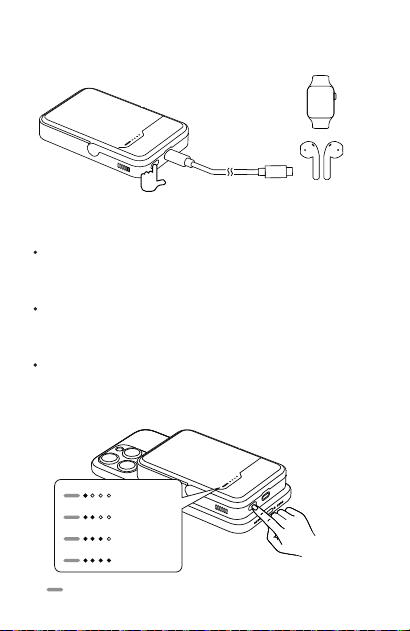
During charging, the four indicator lights will turn off
one by one as the battery level decreases. When the
last indicator light starts flashing, the battery level is
below 10%, and the product needs to be charged
promptly.
The USB-C port supports 30W max fast charging.
Wireless Charging: Place your device on the wireless
charging area to start charging automatically. The
fan will turn on, and the wireless charging indicator
will light up. If charging doesn’t start properly, adjust
your phone’s position to better align with the wireless
charging area on the product.
03
The fan will stop operating when the charging process
enters trickle mode.
※
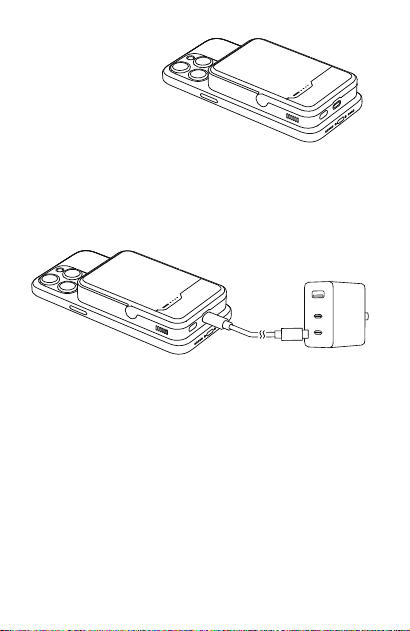
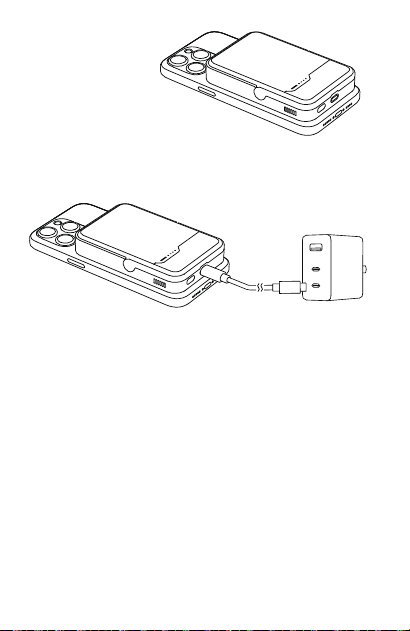
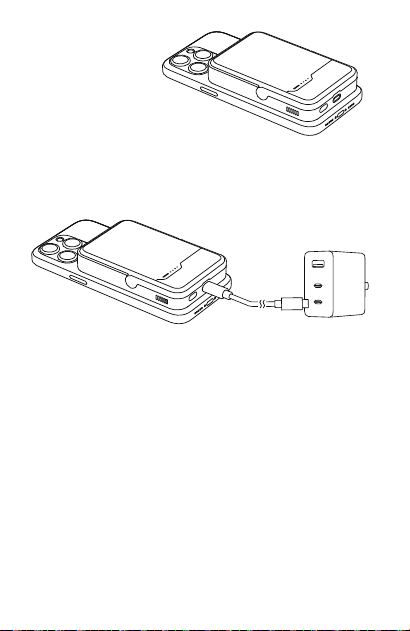
03. Pass-Through Charging
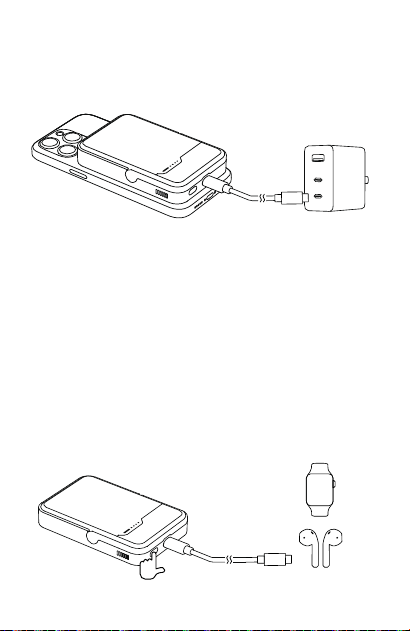
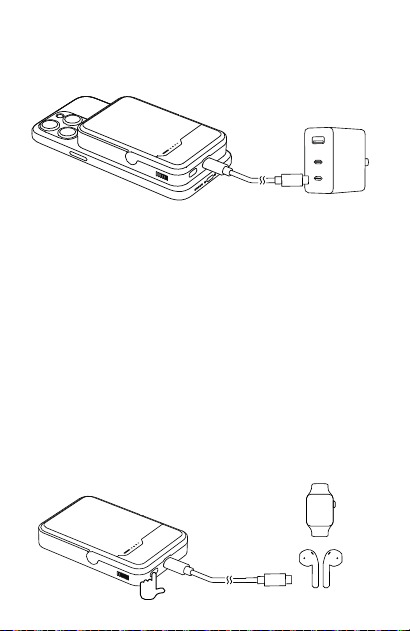
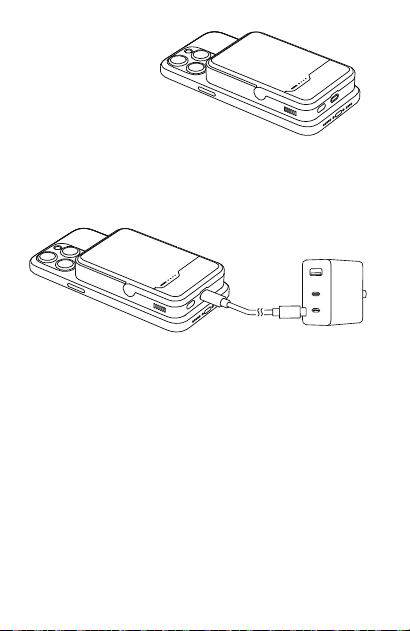
When the USB-C port is connected to a charger, you
can wirelessly charge another device simultaneously.
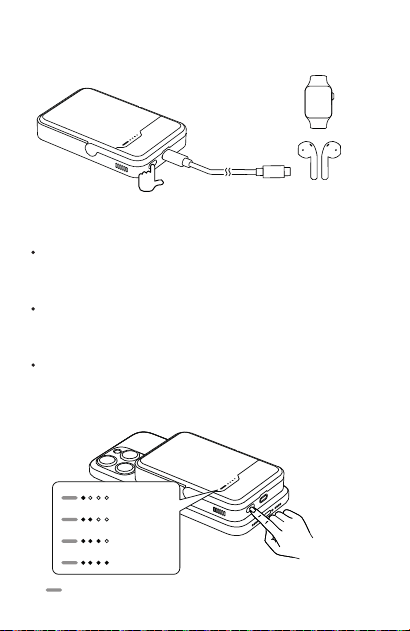
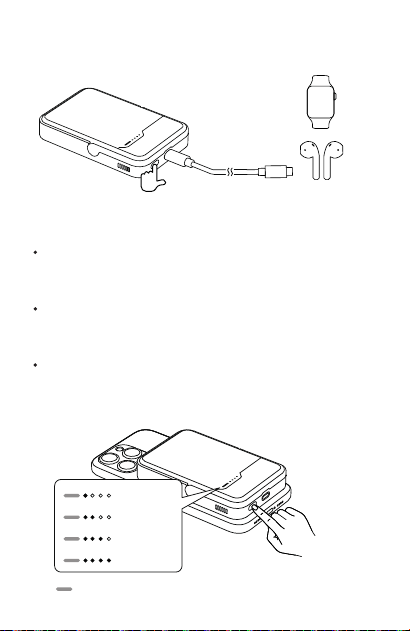
04. Low-Current Mode
a.
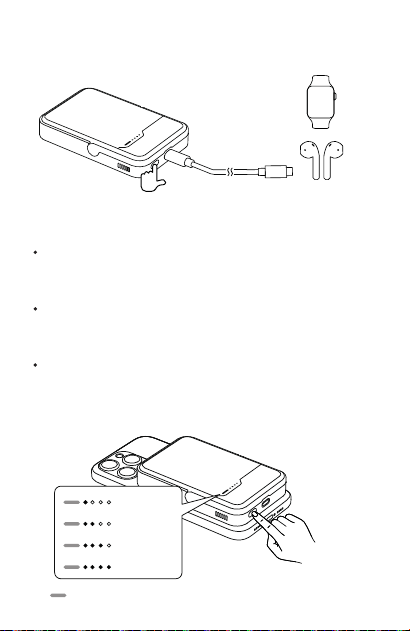
To activate, long-press the button for 3 seconds to
start low-current mode; the four indicator lights will
cycle in sequence.
The device will automatically shut down if the output
current drops below 60mA, which is unsuitable for
low-current devices like watches or headphones.
Low-current mode lets you continue charging these
devices.
c.
※
The product will automatically exit low current mode
after 2 hours of standby.
b. To exit, long-press the button for 3 seconds again.
Wireless Charging Mode:
04
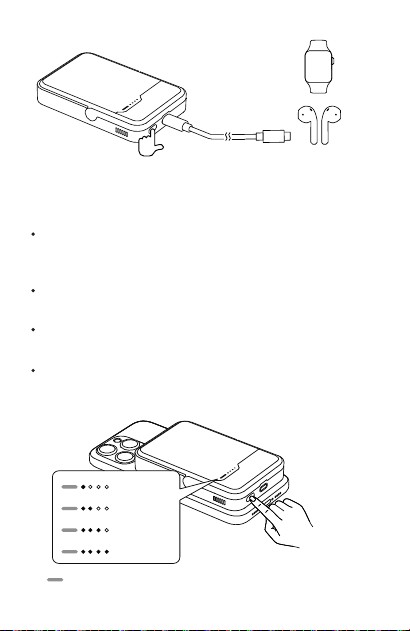
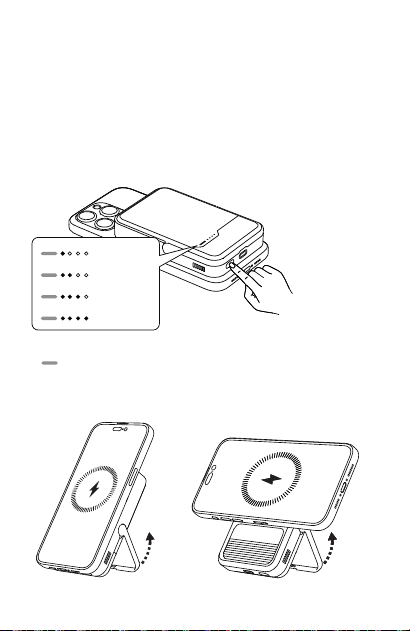
05. Button Operations
a. Power On:
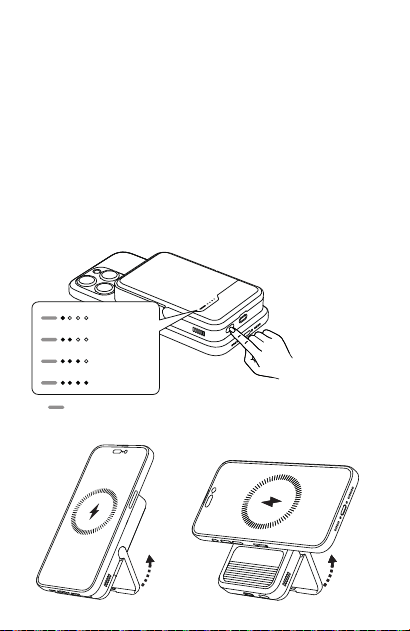
0%-25%
25%-50%
50%-75%
75%-100%
3s
The product powers on automatically when a device
is connected.
If no device is connected for over 30 seconds, the
product will automatically power off.
Double-click the power button to power off.
Lightly press the power button; the indicator lights will
display the remaining battery level and automatical-
ly turn off after 30 seconds.
Wireless Charging Indicator Light
※
b. Power Off:
c. Check Remaining Power:
05
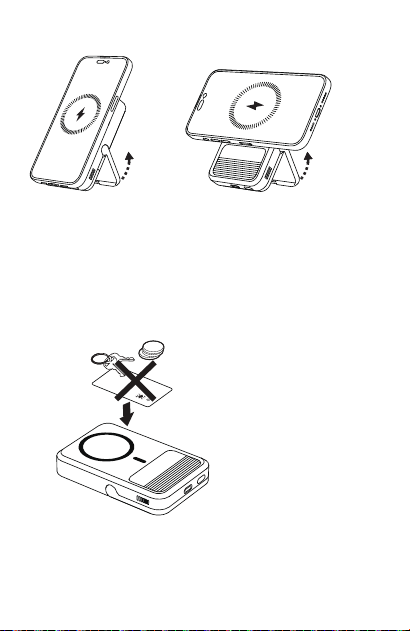
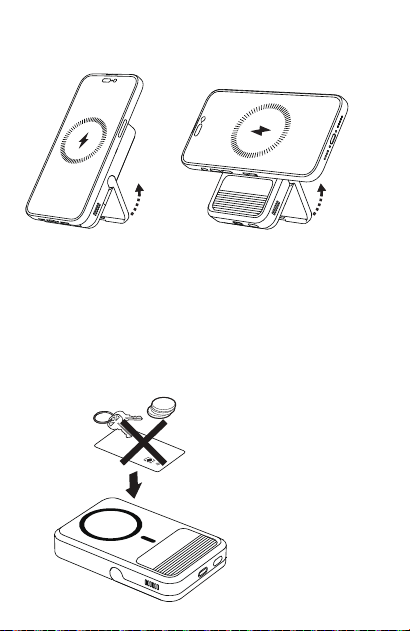
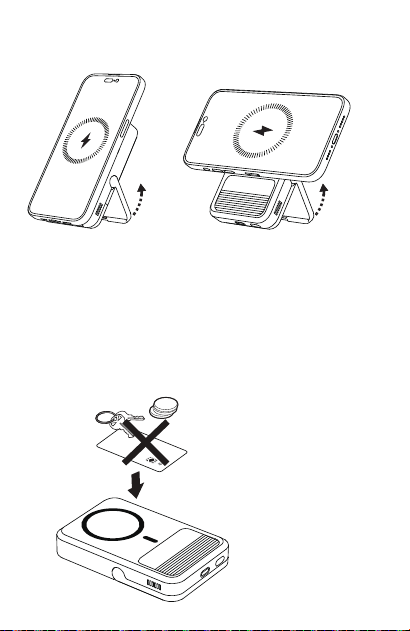
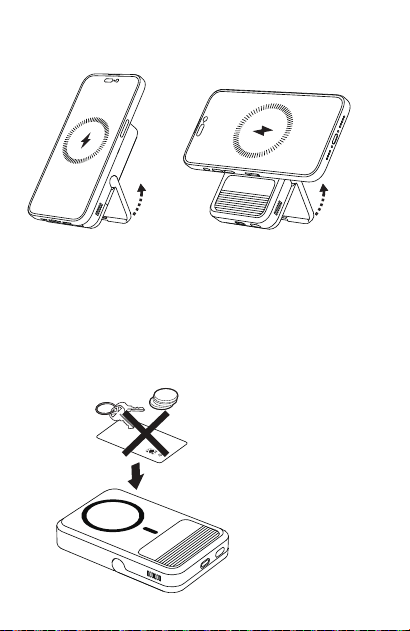
06. Stand Usage
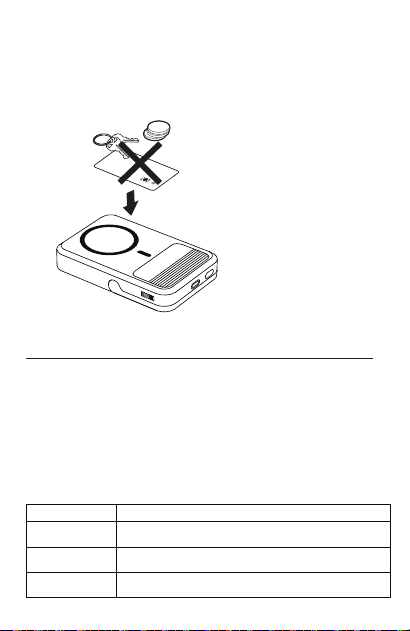
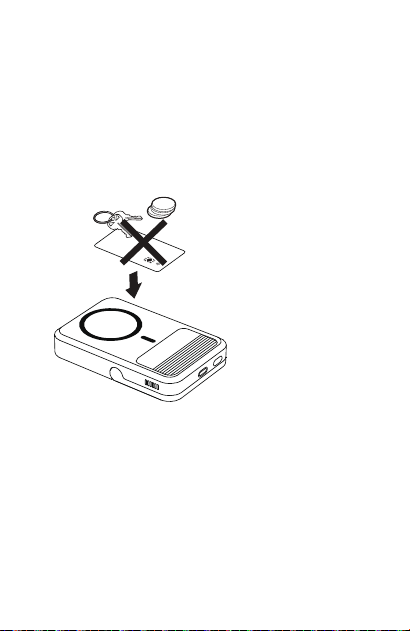
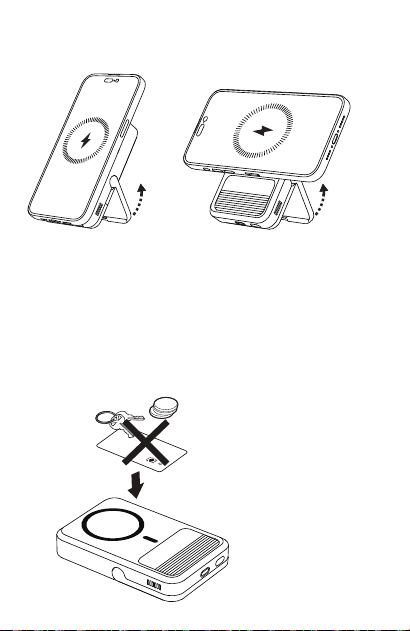
If the power bank detects a metal object, the indicator
light will flash then the power bank will shut down.
※ Note: Keep the power bank away from magnetic cards
(e.g., ID cards, credit cards) to avoid damage.
07. FOD (Foreign Object Detection) Function
06

07
Product Safety Information
Before using this product, please read all instructions and
warnings. Improper use may result in damage to the
product or personal safety.
01. Store this product in a cool, dry place.
02. Do not store this product in high-temperature or humid
environments.
03. Use of power supply or chargers not recommended or
sold by the manufacturer may result in fire or risk of
injury to persons.
04.
Operating temperature should be between 32 and
77°F (0 and 25°C).
05. Do not disassemble the product. If the product
needs service or repair, please contact qualified service
persons. Incorrect reassembly may cause a fire or risk
of injury to persons.
06. To maintain battery health, it's advisable to recharge
the product every three months if it's not in use for
an extended period.
07. When charging a device, the product may feel warm.
This is a normal condition and should not be a cause
for concern.
08. Battery performance will decline over several years
under normal operating conditions.
10. Do not clean this product with harmful chemicals or
detergents.
11. Misuse, dropping, or excessive force may cause
damage to the product.
13. Note that discharged batteries may cause fires or
smoke.
12. When disposing of secondary cells or batteries, keep
cells or batteries of different electrochemical systems
seperate from each other.
09. Do not dispose of the product in heat or fire.
08
The following services are available for you to enjoy free
of charge according to this policy: returns, exchanges,
and repairs. Repairs, exchanges, and returns must be
processed with a receipt.
Product Type
Performance failure
POWER BANK
Cracks in the shell caused by
structural or material factors.
Unable to display battery level.
Unable to charge electronic
devices.
01.
02.
03.
14. Be aware that if the battery (battery pack or installed
battery) is replaced with incorrect types, there may be
a risk of explosion.
15. Be aware that the battery (battery pack or installed
battery) must not be exposed to excessive heat
environments such as sunlight or fire.
16. Batteries may explode or leak flammable liquid or gas
at extremely low pressure.
18. Do not use after immersion in water.
Product Performance Failure
Customer Service
Within 7 days of receipt, you may return the product without
reasons, but you must bear the shipping costs.
01.
12-month warranty in the event that the product experienc-
es any performance failure, as specified in the "Product
Performance Failure" list, and is duly confirmed upon
inspection.
02.
17.
The device is intended for use only in non-tropical regions.
09
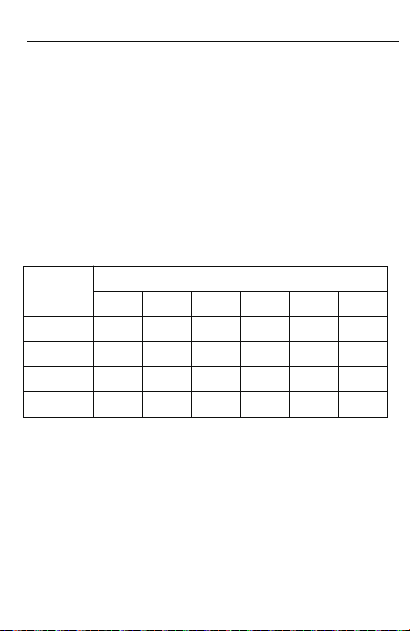
PCB
PLASTICS
METALST
COMPONENTS
TOXIC AND HAZARDEOUS SUBSTANCE AND ELEMENTS
PART NAME
Pb Hg Cd Cr6+ PBB PBDE
o
o
o
o
o
o
o
o
o
o
o
o
o
o
o
o
o
o
o
o
x
o
x
o
Declaration of Toxic and Hazardous
Substances in Electronic Products
Exclusions from Warranty
01.
Unauthorized repairs, misuse, collision, negligence,
abuse, liquid ingress, accidents, modifications, and
incorrect use of accessories.
04.
Cases that do not meet the performance faults listed in
the Product Performance Failure".
05.
Performance failure listed in the "Product Performance
Failure" caused by human factors.
02.
The warranty period has expired.
03.
Damages caused by force majeure factors.
o:
X:
This table is prepared in accordance with the provisions of SJ/T
11364.
Indicates that the content of the toxic and hazardous substance in all
homogeneous materials of the component is below the limit specified
by GB/T 26572.
Indicates that the content of the toxic and hazardous substance exceeds
the limit specified by GB/T 26572 in at least one homogeneous material
of the component.
The information in this table is provided to suppliers in the form of data
and testing results that comply with RoHS environmental requirements.

10
FCC Warning Statement
Changes or modifications not expressly approved by the
party responsible for compliance could void the user’s
authority to operate the equipment. This equipment has
been tested and found to comply with the limits for a Class
B digital device, pursuant to Part 15 of the FCC Rules. These
limits are designed to provide reasonable protection
against harmful interference in a residential installation.
This equipment generates uses and can radiate radio
frequency energy and, if not installed and used in
accordance with the instructions, may cause harmful
interference to radio communications. However, there is no
guarantee that interference will not occur in a particular
installation. If this equipment does cause harmful
interference to radio or television reception, which can be
determined by turning the equipment off and on, the user is
encouraged to try to correct the interference by one or
more of the following measures:
‐‐ Reorient or relocate the receiving antenna.
‐‐ Increase the separation between the equipment and
receiver.
‐‐ Connect the equipment into an outlet on a circuit
different from that to which the receiver is connected.
‐‐ Consult the dealer or an experienced radio/TV
technician for help.
The device has been evaluated to meet general RF
exposure requirement. The device can be used in portable
exposure condition without restriction.
FCC Radiation Exposure Statement
Address :
Manufacturer: Sharge Technology (Shenzhen) Co., Ltd.
Contact﹕ 400-075-5501
Room 305, Floor 3, Xinzhongtai Industrial Park, Building
3, Hengfeng Residential Quarter, Yousong Community,
Longhua Sub-District, Longhua District, Shenzhen
11
产品参数
产品名称:飓风2 磁吸移动电源
产品型号:M2
接口类型:USB-C
额定输入电压、电流 USB-C:5V⎓3A、9V⎓3A、12V⎓2.5A、
15V⎓2A、20V⎓1.5A 30W(Max)
额定输出电压、电流 USB-C:5V⎓3A、9V⎓3A、12V⎓2.5A、
15V⎓2A、20V⎓1.5A 30W(Max)
总输出:5V⎓3A
无线充输出: 5W 7.5W 15W
锂电池能量:10000mAh / 36Wh
额定容量:6000mAh (5V⎓3A)
转换效率:≥70%
产品尺寸:108 × 70.5 × 19.7mm
产品重量:≈220g
执行标准:GB 4943.1-2022 GB 31241-2022
包装清单
数据线 × 1移动电源 × 1
说明书 × 1
12
使用说明
本产品是一款小巧便携、支持30W Max输入输出快充及
15W Max磁吸无线充的移动电源,使用高品质锂离子电池及充
放电芯片,在安全、效率、兼容性等方面均有杰出表现,同时
输入输出时有风扇进行散热。
01.产品充电
a. 本产品的USB-C接口使用充电器连接,可实现对本产品充电。
b. 支持PD快充功能,可使用主流快充充电器给产品充电。
※为保证本产品的正常使用,请使用符合本产品输入规格的充电器。
无线充指示灯 无线充电区 散热片
USB-C支架
开关键
13
有线充电模式:
无线充电模式:
02.产品放电
a. 给您的设备充电:
b. 支持设备快速充电:
有线充电模式:用充电线将产品与您的设备连接,即可对设
备进行充电。
本产品的USB-C接口可支持快充功能。
无线充电模式:将设备对准充电器中心的无线充电区,即可
自动开启无线充电,此时风扇启动,无线充指示灯点亮。如
果设备上未显示充电图标,请调整手机放置方式。
只有设备与本产品支持的快充协议相兼容时,设备才会进入
快充模式,否则仅支持普通5V充电。
c. 放电显示:
放电过程中随着电量的减少,4颗指示灯将逐一熄灭。当最后
一颗指示灯开始闪烁时,代表剩余电量低于10%,请及时给产
品充电。
当进入涓流状态时,风扇暂停运作。
※
14
03.边充边放
本产品USB-C接口使用充电器连接充电时,同时另一个无线充
可对设备进行充电。
3s
正常状态下,当输出电流低于60mA左右时,会关闭设备,不
利于给您的手表、耳机等小电流智能设备充电,启动小电流模
式后,可以继续给您的手表、耳机等小电流智能设备充电,长
按3秒或断开负载2小时后关闭小电流模式。
※
04.小电流模式:
开启后长按按键3秒后,启动小电流模式,四颗灯依次跑马,
依次循环。
a.
待机2小时后将自动退出小电流模式。
c.
长按按键了3秒后,退出小电流模式。
b.
15
06.支架使用方式
0%-25%
25%-50%
50%-75%
75%-100%
05.按键操作逻辑:
开机
本产品设有自动检测识别功能,当识别到设备接入时即开机工作。
a.
剩余电量查询:
轻按“开关键”,电量指示灯将显示剩余电量,显示约30秒后
会自动熄灭。
c.
关机
·开机状态下,若30秒无设备接入,则自动关机。
·开机状态下,双击开关键,即可关机。
b.
无线充指示灯
※
16
注意: 电源请勿与带有磁条或芯片的磁卡(身份证,银行卡等)
放置太近,以免磁卡失效。
※
本产品具备FOD功能,当检测到异物时,无线充指示灯闪烁,
电源进入关机状态。
07.
售后服务
01. 7日无理由退货,由用户承担物流费用。
02. 本产品出现「产品性能故障表」所列性能故障的情况,经检测确定后,
可免费享受如下服务。
SHARGE 售后服务严格依照《中华人民共和国消费者权益保护法》、
《中华人民共和国产品质量法》实行售后三包服务。
服务内容如下:
在三包有效期内,您可以依照本规定免费享受退货、换货、维修的服务。
维修、换货、退货应当凭发票办理。
服务类型
退货 自签收次日起7天内产品质量原因退货换货
换货 自签收次日起15天内产品质量原因换货维修
维修 自签收次日起一年内产品质量原因维修
服务政策
产品安全信息
非保修条例
01. 未经授权的维修、误用、碰撞、疏忽、滥用、进液、事故、改动、不正
确地使用配件。
02. 已超过三包有效期。
03. 因不可抗力因素造成的损坏。
04. 不符合「产品性能故障表」所列性能故障的情况。
05. 因人为原因导致本产品产生「产品性能故障表」所列性能故障。
01. 将本产品存放在阴凉干燥处。
02. 请勿将本产品存放在高温或潮湿的环境中。
03. 使用非本产品制造商推荐或出售的电源或充电器会导致火灾或人员
受伤风险。
04. 工作温度应介于 32 至 77°F ( 0 至 25°C )。
05. 禁止拆解、撞击、挤压或投入火中。
06. 如果本产品长时间不使用,应每三个月补充一次电量。
07. 充电时,本产品可能会发热。这是正常现象,无需担心。
08. 在正常操作情况下,电池性能会在几年内逐渐下降。
09. 切勿置于高温环境中。
10. 请勿使用有害化学品或清洁剂清洁本产品。
11. 使用不当、摔落或过度用力可能会导致本产品损坏。
12. 处置废旧电池时,请将不同电化学体系的电池分开。
13. 若出现严重鼓胀,切勿继续使用。
14. 注意:如果更换为错误类型的电池,则有爆炸风险。
类别 性能故障
移动电源
01. 因结构或材料因素造成的外壳裂损。
02. 无法显示电量。
03. 无法为电子设备充电。
产品性能故障表
17
官方网站:www.sharge.com
联系方式:400-075-5501
制 造 商:闪极科技(深圳)有限公司
地 址:深圳市龙华区龙华街道 油松社区恒丰小区3号楼新中泰
工业园3楼305室
15. 警告:电池(电池包或安装的电池)不得暴露在过热的环境中,例如阳光
下或火中。
16. 电池在极低气压下可能发生爆炸或出现易燃液体或气体泄漏。
17. 表示设备仅适用于非热带地区使用。
18. 浸水后禁止使用。
19. 消费者若使用电源适配器供电,则应购买配套使用满足相应安全标准要求
并获得CCC认证的电源适配器。
电子信息产品有毒有害物质申明
本表格依据 SJ/T 11364 的规定编制。
O: 表示该有毒有害物质在该部件所有均质材料中的含量均在
GB/T 26572 标准规定的限量要求以下。
X: 表示该有毒有害物质至少在该部件某一均质材料中的含量超出
GB/T 26572标准规定的限量要求。
本表格信息是基于供应商提供的数据及符合 RoHS 环保要求的检
测结果。
电子信息产品有毒有害物质申明
有毒有害物质或元素
部件名称
PCB
X O O O O O
O O O O O O
X O O O O O
O O O O O O
塑胶
金属
附件
铅
(Pb)
汞
(Hg)
镉
(Cd)
六价铬
(Cr VI)
多溴联苯
(PBB)
多溴二苯醚
(PBDE)
18
19
製品仕様
製品名: ICEMAG 2 マグネット式モバイルバッテリー
製品モデル: M2
インターフェースタイプ: USB-C
定格入力電圧と電流 USB-C: 5V⎓3A、9V⎓3A、12V⎓2.5A、
15V⎓2A、20V⎓1.5A 30W (Max)
定格出力電圧と電流 USB-C: 5V⎓3A、9V⎓3A、12V⎓2.5A
15V⎓2A、20V⎓1.5A 30W (Max)
合計出力: 5V⎓3A
ワイヤレス充電出力:5W 7.5W 15W
リチウムバッテリー容量:10,000mAh / 36Wh
定格容量:6,000mAh (5V⎓3A)
変換効率:≥70%
製品サイズ:108×70.5×19.7mm
製品重量:約220g
パッケージ内容
ケーブル × 1モバイルバッテリー × 1
取扱説明書 × 1
20
使用説明
本製品は、コンパクトで持ち運び可能なモバイルバッテリ
ーで、最大入力および出力30W、最大マグネット式ワイヤレ
ス充電15Wの高速充電をサポートしています。
高品質のリチウムイオン電池と充電・放電チップを使用して
おり、安全性、効率性、適合性などの性能に優れています。
また、入力および出力時には冷却ファンがモバイルバッテリー
を冷却します。
ワイヤレス充電インジ
ケーターライト
ワイヤレス
充電エリア
放熱板
USB-Cスタンド
オン/オフボタン
本製品を正常に使用するため、本製品の入力仕様を
満たす充電器を使用してください。
※
01. 製品の充電
本製品の USB-C ポートを充電器に接続して、製品を充電
することができます。
a.
PD 高速充電機能をサポートしており、主流の高速充電器
で充電することができます。
b.
21
有線充電モード:
ワイヤレス充電モード:
02.製品の放電
a. デバイスを充電します。
b. デバイスの高速充電をサポート:
c. 放電表示:
有線充電モード:充電ケーブルで製品をデバイスに接続して、
デバイスを充電します。
本製品のUSB-Cポートは高速充電をサポートしています。
本製品がサポートする高速充電規格にデバイスが対応している
場合のみ、高速充電モードになります。
対応していない場合は、通常の5V充電のみをサポートします。
ワイヤレス充電モード:充電器の中央にあるワイヤレス充電
エリアにデバイスを合わせると、ワイヤレス充電が自動的
に開始されます。
ファンが回り、ワイヤレス充電インジケーターが点灯し
ます。デバイスに充電アイコンが表示されない場合は、デ
バイスの置き方を調整してください。
放電中、電力が減少するにつれ、4つのライトが順番に消灯しま
す。
最後のライトが点滅し始めたら、残りの電力は10%以下であるこ
とを意味しますので、速やかに充電してください。
※
充電プロセスがトリクルモードになると、ファンは動作を停止し
ます。
22
3s
通常の状態では、出力電流が約60mAより低い場合、デバイス
はオフになり、腕時計やヘッドフォンなどの低電流でスマート
デバイスを充電するには適していません。
低電流モードを起動した後、腕時計やヘッドフォンなど
の低電流でスマートデバイスを充電し続けることができます。
3秒間長押しするか、負荷を2時間切断すると、低電流モ
ードがオフになります。
※
04. 低電流モード:
ボタンを3秒間押し続けると、低電流モードが起動し、
4つのライトが順番に点灯します。
a.
2時間の待機後、自動的に低電流モードを終了します。
c.
ボタンを3秒間押し続けると、低電流モードが終了します。
b.
本製品のUSB-C端子を充電器に接続して充電する場合、
同時に別のワイヤレス充電器で充電することができます。
03. 同時充電と放電
23
06. スタンドの使用方法
0%-25%
25%-50%
50%-75%
75%-100%
05. ボタン操作ロジック:
電源オン
本製品は自動検出および認識機能を備えています。
機器が接続されたことを検知すると、電源がオンになり、
動作を開始します。
a.
バッテリー残量確認
電源ボタンを軽くタップすると、バッテリーインジケー
ターライトにバッテリー残量が表示されます。
約30秒間表示された後、自動的に電源がオフになります。
c.
電源オフ
·機器がオンの状態で、30秒間機器が接続されていない場合、
自動的に電源がオフになります。
·機器がオンの状態で、電源ボタンをダブルクリックすると
電源がオフになります。
b.
ワイヤレス充電インジケーターライト
※
24
注意: 磁気カード(IDカード、銀行カードなど)の磁気ストリップ
やチップに電源を近づけすぎると、磁気カードが無効になる
場合がありますので、ご注意ください。
※
FOD(異物検知)機能
モバイルバッテリーが金属を検知すると、 ライトが点滅
し、その後モバイルバッテリーがオフになります。
07.

Spécifications
Nom du produit : ICEMAG 2 Power Bank
Modèle du produit : M2
Type de port : USB-C
USB-C(Entrée): 5V⎓3A, 9V⎓3A, 12V⎓2.5A, 15V⎓2A,
20V⎓1.5A (30W Max)
USB-C(Sortie): 5V⎓3A, 9V⎓3A, 12V⎓2.5A, 15V⎓2A,
20V⎓1.5A (30W Max)
Sans Fil : 5W, 7.5W, 15W
Sortie totale : 5V⎓3A
Capacité de la batterie : 10,000mAh / 36Wh
Capacité nominale : 6,000 mAh (5V⎓3A)
Taux de conversion : ≥70%
Dimensions : 108 × 70.5 × 19.7 mm
Poids : ≈220g
Contenu du Colis
Batterie Externe × 1
Manuel d'utilisation × 1
Câble de Chargement × 1
25
Instructions
Ce produit prend en charge la charge sans fil Qi2 de 15W max
et la charge rapide USB-C bidirectionnelle de 30W max.Com-
prend des batteries lithium-ion de haute qualité et des puces
avancées, garantissant une excellente sécurité, efficacité et
compatibilité. Le ventilateur intégré fournit un refroidissement
actif pour une meilleure dissipation de la chaleur et des
performances plus durables.
Indicateur de charge
sans fil
Zone de
charge sans fil
coussin thermique
USB-Csupport
bouton d'alimentation
26
01. Chargement du Produit
a.
b.
※
Connectez le port USB-C de ce produit à un chargeur pour
charger le produit.
Prend en charge la charge rapide PD ; vous pouvez utiliser des
chargeurs rapides grand public pour charger le produit.
Un chargeur est nécessaire pour répondre aux spécifications
d'entrée de ce produit.
Mode de charge filaire :
02. Chargement de Votre Appareil
a. Chargement Filaire et Sans Fil :
b. Charge Rapide
c. Indicateur de Charge
Chargement filaire : connectez le produit à votre appareil
avec un câble de charge pour charger l'appareil.
La charge Cast ne sera activée que si votre appareil
est compatible avec le protocole de charge rapide
pris en charge par le produit ; sinon, il ne prendra en
charge que la charge standard de 5 V.
Pendant la charge, les quatre voyants s'éteignent un par
un à mesure que le niveau de la batterie diminue.
Lorsque le dernier voyant commence à clignoter, le
niveau de la batterie est inférieur à 10% et le produit doit
être chargé rapidement.
Chargement sans fil : placez votre appareil sur la zone de
chargement sans fil pour démarrer le chargement
automatique. Le ventilateur s'allumera et l'indicateur de
charge sans fil s'allumera. Si la charge ne démarre pas
correctement, ajustez la position de votre téléphone pour
mieux l'aligner avec la zone de charge sans fil du produit.
27
Le port USB-C prend en charge une charge rapide
de 30W max.
Le ventilateur cessera de fonctionner lorsque le processus de
charge entrera en mode de maintien.
※
03. Chargement Direct
Lorsque le port USB-C est connecté à un chargeur, vous pouvez
charger sans fil un autre appareil simultanément.
04. Mode Faible Courant
a.
Pour activer, appuyez longuement sur le bouton
pendant 3 secondes pour démarrer le mode faible
courant ; les quatre voyants lumineux s'allumeront en
séquence.
L'appareil s'éteindra automatiquement si le courant
de sortie descend en dessous de 60mA, ce qui ne
convient pas aux appareils à faible courant comme
les montres ou les écouteurs. Le mode faible courant
vous permet de continuer à charger ces appareils.
c.
※
Le produit quittera automatiquement le mode faible
courant après 2 heures de veille.
b.
Pour quitter, appuyez longuement sur le bouton
pendant 3 secondes à nouveau.
Mode de charge sans fil :
28
05. Fonctionnement des boutons
a. Mise sous Tension :
0%-25%
25%-50%
50%-75%
75%-100%
3s
Le produit s'allume automatiquement lorsqu'un
appareil est connecté.
Si aucun appareil n'est connecté pendant plus de 30
secondes, le produit s'éteindra automatiquement.
Appuyez légèrement sur le bouton d'alimentation ;
les voyants lumineux afficheront le niveau de batterie
restant et s'éteindront automatiquement après 30
secondes.
b. Mise hors Tension :
c. Vérifiez la Puissance Restante :
29
Témoin de charge sans fil
※
06. Utilisation du Support
Si la banque d'alimentation détecte un objet métallique, le
voyant lumineux clignote, puis la banque d'alimentation
s'éteint.
Remarque : gardez la banque d'alimentation à l'écart des
cartes magnétiques (par exemple, cartes d'identité, cartes
de crédit) pour éviter tout dommage.
07. Fonction FOD (détection d'objets étrangers)
30
※
Especificaciones
Nombre del producto: ICEMAG 2 Power Bank
Modelo del producto: M2
Tipo de puerto: USB-C
USB-C(Entrada): 5V⎓3A, 9V⎓3A, 12V⎓2.5A, 15V⎓2A,
20V⎓1.5A (30W Max)
USB-C(Salida): 5V⎓3A, 9V⎓3A, 12V⎓2.5A, 15V⎓2A,
20V⎓1.5A (30W Max)
Inalámbrico: 5W, 7.5W, 15W
Salida total: 5V⎓3A
Capacidad de la batería: 10,000mAh / 36Wh
Capacidad nominal: 6,000mAh (5V⎓3A)
Tasa de conversión: ≥70 %
Dimensiones: 108 × 70.5 × 19.7mm
Peso: ≈220g
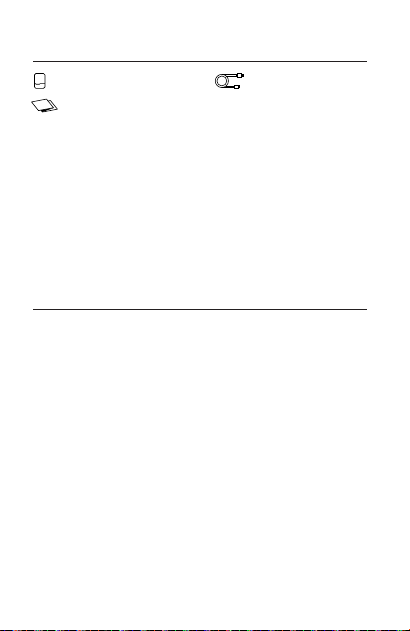
Contenido del Paquete
Batería Externa × 1
Manual del Usuario × 1
Cable de Carga × 1
31
Instrucciones
Este producto admite carga inalámbrica Qi2 de 15 W como
máximo y carga rápida USB-C de 2 vías de 30 W como
máximo. Cuenta con baterías de iones de litio de alta calidad
y chips avanzados, lo que garantiza una excelente seguridad,
eficiencia y compatibilidad. El ventilador integrado proporcio-
na refrigeración activa para una mejor disipación del calor y
un rendimiento más duradero.
Indicador de carga
inalámbrica
Área de
carga inalámbrica
almohadilla térmica
USB-Csoporte
botón de encendido
32
01. Carga del Producto
a.
b.
※
Conecte el puerto USB-C de este producto a un cargador para
cargarlo.
Admite carga rápida PD; puede utilizar cargadores rápidos
convencionales para cargar el producto.
Se requiere un cargador para cumplir con las especificaciones de
entrada de este producto.
Modo de carga por cable:
02. Carga de su Dispositivo
a. Carga Inalámbrica y con Cable:
b. Carga Rápida
c. Indicador de Carga
Carga con cable: conecte el producto a su dispositivo con
un cable de carga para cargar el dispositivo.
La carga Cast solo se activará si su dispositivo es
compatible con el protocolo de carga rápida
compatible con el producto; de lo contrario, solo
admitirá la carga estándar de 5V.
El ventilador dejará de funcionar cuando el proceso de
carga entre en modo de carga lenta.
※
Durante la carga, las cuatro luces indicadoras se
apagarán una por una a medida que disminuya el nivel
de la batería. Cuando la última luz indicadora comience
a parpadear, el nivel de la batería estará por debajo del
10% y el producto debe cargarse rápidamente.
Carga inalámbrica: coloque su dispositivo en el área de
carga inalámbrica para comenzar a cargar automática-
mente. El ventilador se encenderá y el indicador de carga
inalámbrica se iluminará. Si la carga no comienza correcta-
mente, ajuste la posición de su teléfono para alinearlo mejor
con el área de carga inalámbrica del producto.
33
El puerto USB-C admite una carga rápida máxima
de 30W
03. Carga de Transferencia
Cuando el puerto USB-C está conectado a un cargador, puede
cargar otro dispositivo de forma inalámbrica simultáneamente.
04. Modo de Baja Corriente
a.
Para activarlo, mantenga presionado el botón
durante 3 segundos para iniciar el modo de baja
corriente; Las cuatro luces indicadoras se encend-
erán en secuencia.
El dispositivo se apagará automáticamente si la
corriente de salida cae por debajo de 60 mA, lo que
no es adecuado para dispositivos de baja corriente
como relojes o auriculares. El modo de baja corriente
le permite continuar cargando estos dispositivos.
c.
※
El producto saldrá automáticamente del modo de
baja corriente después de 2 horas de espera.
b.
Para salir, mantenga presionado el botón durante 3
segundos nuevamente.
Modo de carga inalámbrica:
34
05. Operaciones de Los Botones
a. Encendido:
0%-25%
25%-50%
50%-75%
75%-100%
3s
El producto se enciende automáticamente cuando
se conecta un dispositivo.
Si no se conecta ningún dispositivo durante más de 30
segundos, el producto se apagará automáticamente.
Presione ligeramente el botón de encendido; las
luces indicadoras mostrarán el nivel de batería
restante y se apagarán automáticamente después
de 30 segundos.
b. Apagado:
c. Verificación de la Energía Restante:
Luz indicadora de carga inalámbrica
※
35
06. Uso del Soporte
Si el banco de energía detecta un objeto metálico, la luz
indicadora parpadeará y luego el banco de energía se
apagará.
Nota: Mantenga el banco de energía alejado de tarjetas
magnéticas (por ejemplo, tarjetas de identificación,
tarjetas de crédito) para evitar daños.
07. Función FOD (detección de objetos extraños)
36
※
37
Specifiche
Nome prodotto: ICEMAG 2 Power Bank
Modello prodotto: M2
Tipo di porta: USB-C
USB-C(Ingresso): 5V⎓3A, 9V⎓3A, 12V⎓2.5A, 15V⎓2A,
20V⎓1.5A (30W Max)
USB-C(Uscita): 5V⎓3A, 9V⎓3A, 12V⎓2.5A, 15V⎓2A,
20V⎓1.5A (30W Max)
Wireless: 5W, 7.5W, 15W
Uscita totale: 5V⎓3A
Capacità della batteria: 10,000mAh / 36Wh
Capacità nominale: 6,000mAh (5V⎓3A)
Tasso di conversione: ≥70%
Dimensioni: 108 × 70.5 × 19.7 mm
Peso: ≈220g
Contenuto della Confezione
Power Bank × 1
Manuale Utente × 1
Cavo di ricarica × 1
38
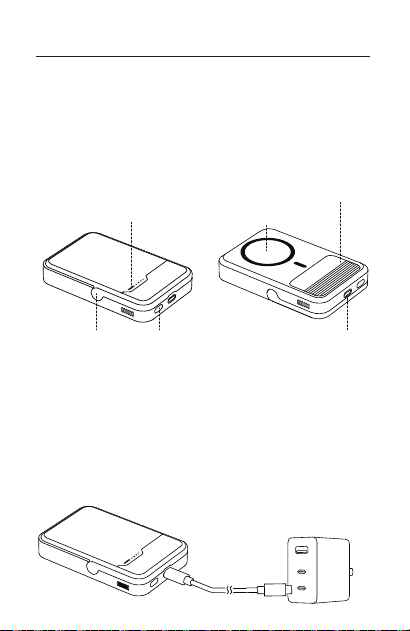
Istruzioni
Questo prodotto supporta la ricarica wireless Qi2 da 15 W
max e la ricarica rapida USB-C bidirezionale da 30 W max. È
dotato di batterie agli ioni di litio di alta qualità e chip
avanzati, che garantiscono sicurezza, efficienza e compatibil-
ità eccellenti. La ventola integrata fornisce un raffreddamento
attivo per una migliore dissipazione del calore e prestazioni
più durature.
Indicatore di
ricarica wireless
Area di
ricarica wireless
cuscinetto termico
USB-Csupporto
pulsante di accensione
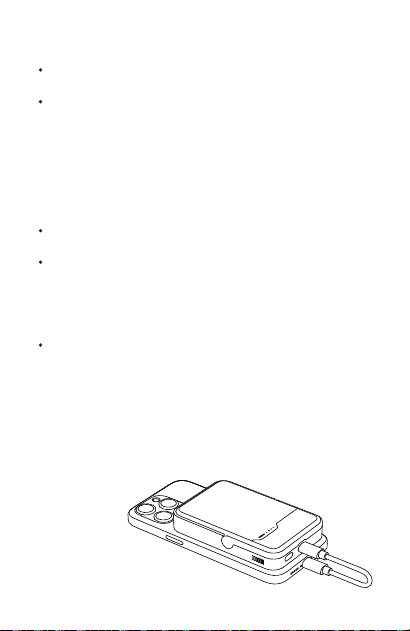
01. Ricarica del Prodotto
a.
b.
※
Collegare la porta USB-C di questo prodotto a un caricabatterie
per caricare il prodotto.
Supporta la ricarica rapida PD; è possibile utilizzare i caricabatterie
rapidi tradizionali per caricare il prodotto.
È necessario un caricabatterie per soddisfare le specifiche di
input di questo prodotto.
39
Modalità di ricarica cablata:
02. Ricarica del Dispositivo
a. Ricarica Cablata e Wireless:
b. Ricarica Rapida
c. Indicatore di Ricarica
Ricarica cablata: collegare il prodotto al dispositivo con un
cavo di ricarica per caricare il dispositivo.
La ricarica Cast verrà attivata solo se il dispositivo è
compatibile con il protocollo di ricarica rapida
supportato dal prodotto; in caso contrario, support-
erà solo la ricarica standard a 5 V.
Durante la ricarica, le quattro spie luminose si spegneran-
no una alla volta man mano che il livello della batteria
diminuisce. Quando l'ultima spia luminosa inizia a
lampeggiare, il livello della batteria è inferiore al 10% e il
prodotto deve essere caricato tempestivamente.
Ricarica wireless: posizionare il dispositivo sull'area di
ricarica wireless per avviare la ricarica automatica-
mente. La ventola si accenderà e l'indicatore di ricarica
wireless si illuminerà. Se la ricarica non si avvia
correttamente, regola la posizione del telefono per
allinearlo meglio con l'area di ricarica wireless sul
prodotto.
La porta USB-C supporta una ricarica rapida da 30 W
max
La ventola smetterà di funzionare quando il processo di
carica entra in modalità di mantenimento.
※
40
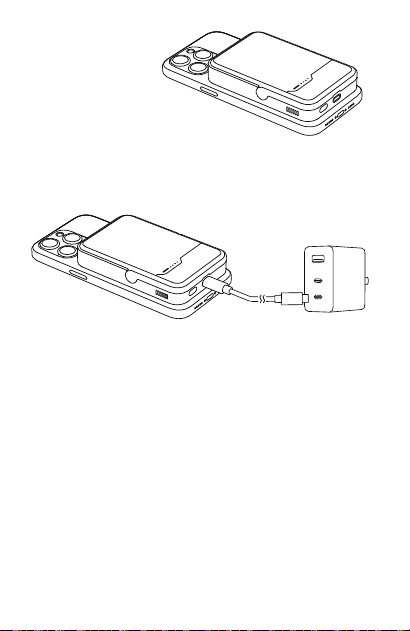
03. Ricarica Pass-through
Quando la porta USB-C è collegata a un caricabatterie, è possibile
caricare in modalità wireless un altro dispositivo contemporanea-
mente.
04. Modalità a Bassa Corrente
a.
Per attivare, premere a lungo il pulsante per 3
secondi per avviare la modalità a bassa corrente; le
quattro spie luminose si accenderanno in sequenza.
Il dispositivo si spegnerà automaticamente se la
corrente di uscita scende sotto i 60 mA, il che non è
adatto per dispositivi a bassa corrente come orologi
o cuffie. La modalità a bassa corrente consente di
continuare a caricare questi dispositivi.
c.
※
Il prodotto uscirà automaticamente dalla modalità a
bassa corrente dopo 2 ore di standby.
b.
Per uscire, premere a lungo il pulsante per 3 secondi
di nuovo.
Modalità di ricarica wireless:
41
05. Operazioni dei Pulsanti
a. Accensione:
0%-25%
25%-50%
50%-75%
75%-100%
3s
Il prodotto si accende automaticamente quando un
dispositivo è collegato.
Se nessun dispositivo è collegato per oltre 30 secondi,
il prodotto si spegnerà automaticamente.
Premere leggermente il pulsante di accensione; le
spie luminose mostreranno il livello di batteria
rimanente e si spegneranno automaticamente dopo
30 secondi.
b. Spegnimento:
c. Controllo della Carica Residua:
Spia di ricarica wireless
※
42
06. Utilizzo del Supporto
Se il power bank rileva un oggetto metallico, la spia
lampeggerà e poi il power bank si spegnerà.
Nota: tenere il power bank lontano da carte magnetiche
(ad esempio carte d'identità, carte di credito) per
evitare danni.
07. Funzione FOD (rilevamento di oggetti estranei)
※
Spezifikationen
Produktbezeichnung: ICEMAG 2 Power Bank
Produktmodell: M2
Anschluss-Typ: USB-C
USB-C(Eingang): 5V⎓3A, 9V⎓3A, 12V⎓2.5A, 15V⎓2A,
20V⎓1.5A (30W Max)
USB-C(Ausgang): 5V⎓3A, 9V⎓3A, 12V⎓2.5A, 15V⎓2A,
20V⎓1.5A (30W Max)
Drahtlos: 5W, 7.5W, 15W
Gesamtleistung: 5V⎓3A
Batteriekapazität: 10,000mAh / 36Wh
Nennkapazität: 6,000mAh (5V⎓3A)
Umwandlungsrate: ≥70%
Abmessungen: 108 × 70.5 × 19.7mm
Gewicht: ≈220g
Lieferumfang
Powerbank × 1
Benutzerhandbuch × 1
Ladekabel × 1
43
Anleitung
Dieses Produkt unterstützt kabelloses Qi2-Laden mit maximal
15 W und 2-Wege-USB-C-Schnellladen mit maximal 30 W.
Verfügt über hochwertige Lithium-Ionen-Akkus und fortschrittli-
che Chips, die eine ausgezeichnete Sicherheit, Effizienz und
Kompatibilität gewährleisten. Der eingebaute Lüfter sorgt für
eine aktive Kühlung für eine bessere Wärmeableitung und eine
länger anhaltende Leistung.
Indikator für
kabelloses Laden
Bereich für
kabelloses Laden
Wärmeleitpad
USB-CStänder
Power-Taste
44
01. Aufladen des Produkts
a.
b.
※
Schließen Sie den USB-C-Anschluss dieses Produkts an ein
Ladegerät an, um das Produkt aufzuladen.
Unterstützt PD-Schnellladung; Sie können gängige
Schnellladegeräte zum Laden des Produkts verwenden.
Das Ladegerät muss die Eingangsspezifikationen dieses Produkts
erfüllen.
Kabelgebundener Lademodus:
02. Aufladen Ihres Geräts
a. Kabelgebundenes und kabelloses Laden:
b. Schnelles Aufladen
c. Ladeindikator
Kabelgebundenes Laden: Schließen Sie das Produkt mit einem
Ladekabel an Ihr Gerät an, um das Gerät aufzuladen.
Die Schnellladung wird nur aktiviert, wenn Ihr Gerät
mit dem vom Produkt unterstützten Schnellladepro-
tokoll kompatibel ist; andernfalls wird nur das
normale 5-V-Laden unterstützt.
Das Gebläse hört auf zu arbeiten, wenn der Ladevorgang
in den Erhaltungsmodus übergeht.
※
Während des Ladevorgangs schalten sich die vier
Anzeigeleuchten nach und nach aus, wenn der
Batteriestand abnimmt. Wenn die letzte Anzeigeleuchte
zu blinken beginnt, liegt der Akkustand unter 10 %, und
das Produkt muss umgehend aufgeladen werden.
Kabelloses Laden: Legen Sie Ihr Gerät auf die kabellose
Ladefläche, um den Ladevorgang automatisch zu starten.
Das Gebläse schaltet sich ein, und die Anzeige für
kabelloses Laden leuchtet auf. Wenn der Ladevorgang
nicht ordnungsgemäß beginnt, passen Sie die Position
Ihres Telefons so an, dass es besser mit dem kabellosen
Ladebereich des Geräts übereinstimmt.
45
Der USB-C-Anschluss unterstützt maximal 30 W
Schnellladung.
03. Pass-Through-Laden
Wenn der USB-C-Anschluss mit einem Ladegerät verbunden ist,
können Sie gleichzeitig ein anderes Gerät drahtlos aufladen.
04. Niedrig-Strom-Modus
a.
Zum Aktivieren drücken Sie die Taste 3 Sekunden
lang, um den Stromsparmodus zu starten; die vier
Anzeigeleuchten leuchten nacheinander auf.
Das Gerät schaltet sich automatisch ab, wenn der
Ausgangsstrom unter 60 mA fällt, was für Schwach-
stromgeräte wie Uhren oder Kopfhörer nicht geeignet
ist. Im Schwachstrommodus können Sie diese Geräte
weiter aufladen.
c.
※
Das Gerät verlässt den Stromsparmodus automa-
tisch nach 2 Stunden Standby-Betrieb.
b.
Zum Beenden drücken Sie die Taste erneut 3 Sekund-
en lang.
Drahtloser Lademodus:
46
05. Tastenbedienung
a. Einschalten:
0%-25%
25%-50%
50%-75%
75%-100%
3s
Das Produkt schaltet sich automatisch ein, wenn ein
Gerät angeschlossen wird.
Wenn länger als 30 Sekunden kein Gerät angeschlos-
sen ist, schaltet sich das Gerät automatisch aus.
Drücken Sie leicht auf die Einschalttaste; die Anzeige-
leuchten zeigen den verbleibenden Batteriestand an
und schalten sich nach 30 Sekunden automatisch
aus.
b. Ausschalten:
c. Verbleibende Leistung prüfen:
47
Drahtlose Ladestandsanzeige
※
06. Verwendung des Ständers
Wenn die Powerbank ein metallisches Objekt erkennt,
blinkt die Anzeigeleuchte und die Powerbank schaltet sich
aus.
Hinweis: Halten Sie die Powerbank von Magnetkarten (z. B.
Ausweisen, Kreditkarten) fern, um Schäden zu vermeiden.
07. FOD (Foreign Object Detection) Funktion
48
※
This symbol indicates that this product shall not be treated as household waste.
Instead it shall be handed over to the applicable collection point for the recycling of
electrical and electronic equipment.
此符号表明本产品不得作为生活垃圾处理﹐ 相反﹐ 应将其交付给适用的收集
点进行电子设备回收。
Made in China 中国制造
FCC ID:2BB2Z-M2
Join our Discord Follow us on Instagram
@SHARGE_OFFICIALSHARGE
官方微信 官方抖音