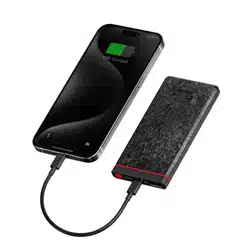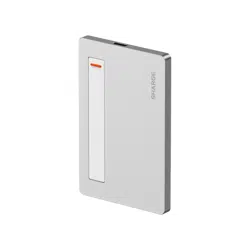

USER MANUAL
Disk Plus

Name: Disk Plus
Model: SD002
Material: Aluminum alloy
Dimensions: 93 × 60 × 6mm
Port type: USB-C × 2
USB-C1 output: 85W (Max)
USB-C2 input: 100W (Max)
Supported SSD model: 2280/2242/2230
Supported SSD type: M Key M.2 NVMe
Supported SSD capacity: Up to 4TB
Protocol: USB 3.2 Gen2 (10Gbps)
OS compatibility: Windows, macOS, iOS, Android, Linux
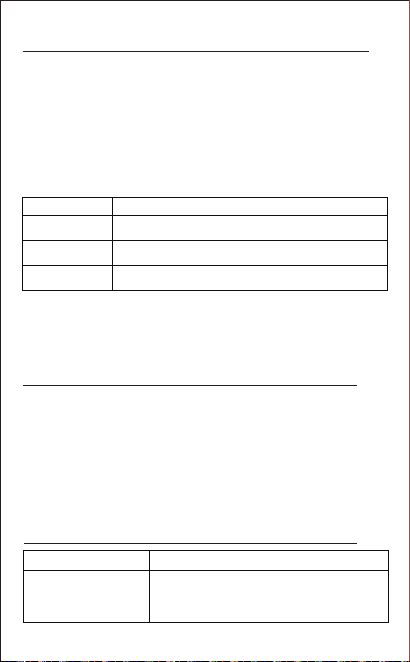
Product Information
Cautions
Package Contents
SSD enclosure × 1
Screwdriver × 1Thermal pads × 2 Backup screws × 3
Leather sleeve × 1Data cable × 1
User manual × 1 Double-sided tape × 2
01. This product supports single-sided 2280/2242/2230
NVMe SSDs only.
02. Store the product in a cool, dry place. Do not
expose it to high temperatures or humidity.
03. Operating temperature: 32-104°F (0-40°C).
Usage environment: -10°C to 35°C.
Storage environment: -20°C to 40°C.
04. Transfer speeds may vary depending on your device
and SSD.
05. Avoid dropping, pressing, hitting, or throwing the
product to prevent damage.
06. Before disconnecting from mobile devices, stop all
data transfers. Failing to do so may cause data
corruption or loss.
01
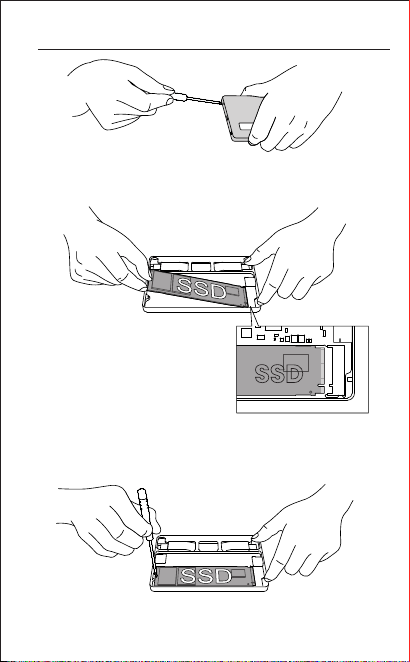
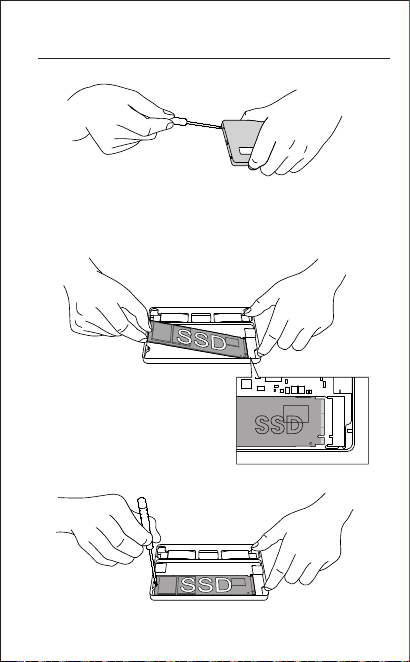
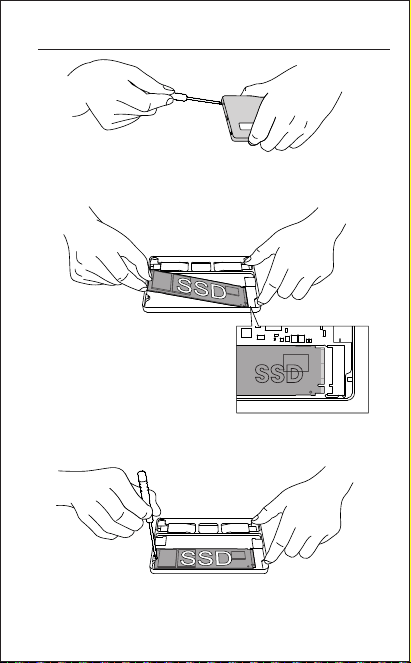
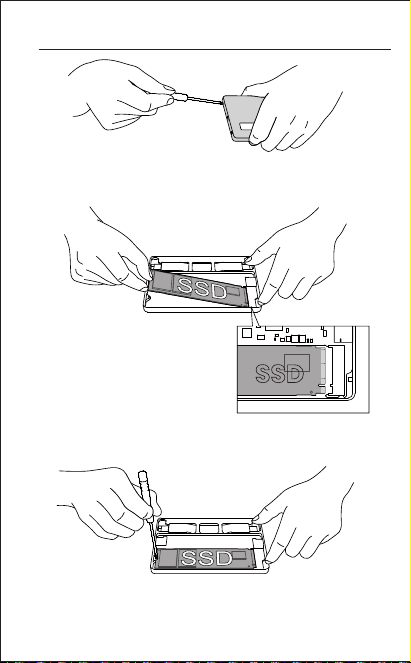
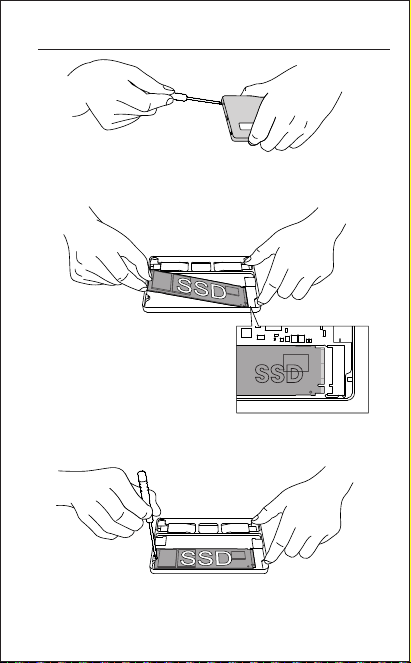
SSD Installation Instructions
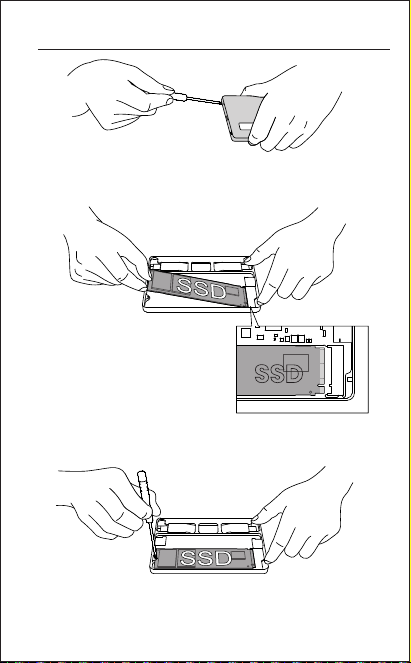
01. Unscrew and open the top cover of the enclosure.
02. Align the SSD with the slot
and insert it.
03. Use a screwdriver to tighten the screws that secure
the rear end of the SSD.
*The SSD shown is for demonstration purposes only
and is not included.
SSD
02
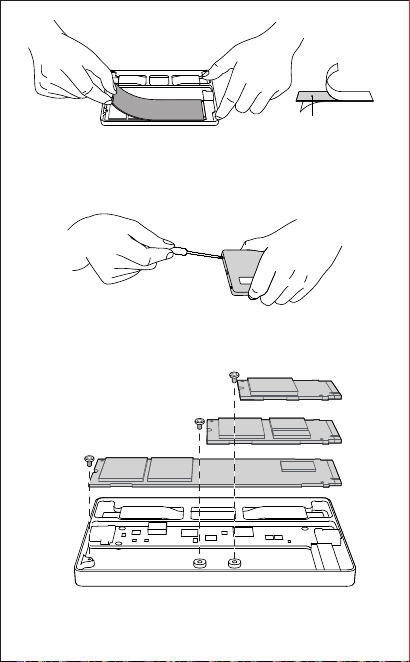
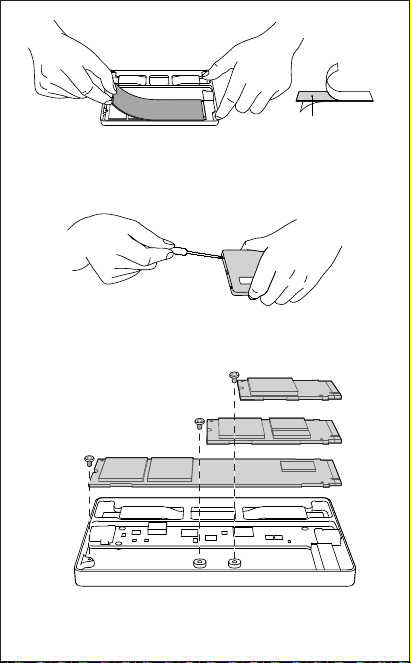
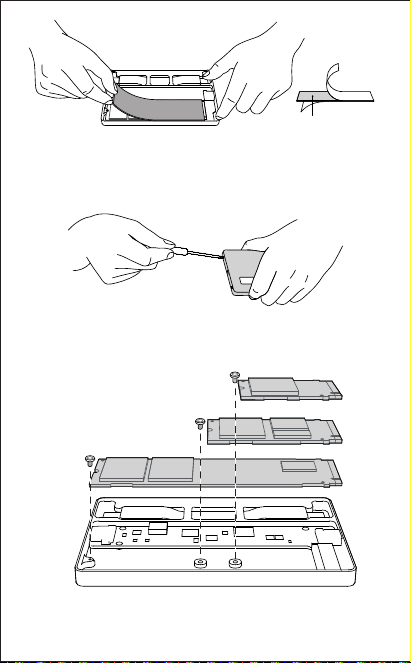
2280
2242
2230
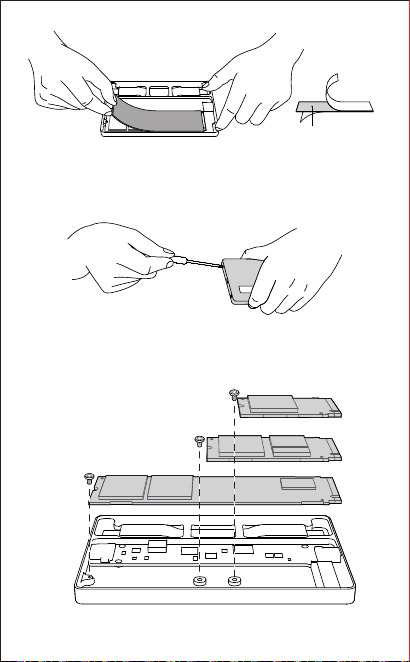
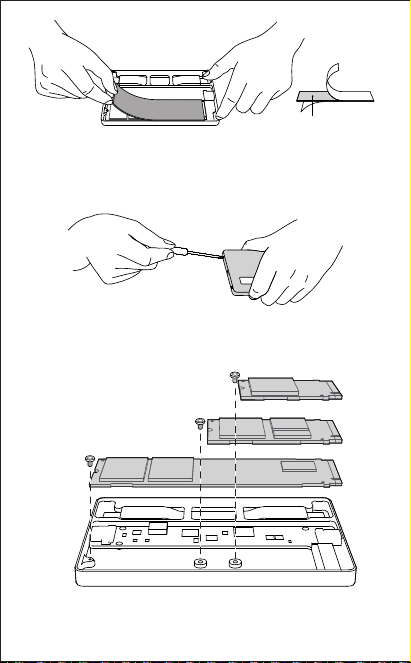
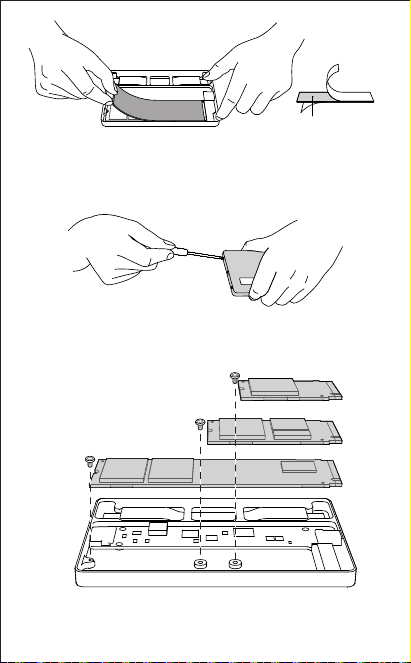
05. Reinstall the top cover of the enclosure and tighten
the screws with a screwdriver.
※The screw mounting holes corresponding to 2280/
2242/2230 sizes are as shown above.
04. Remove the protective films from both sides of the
thermal pad, and attach the pad to the SSD.
Thermal pad
03
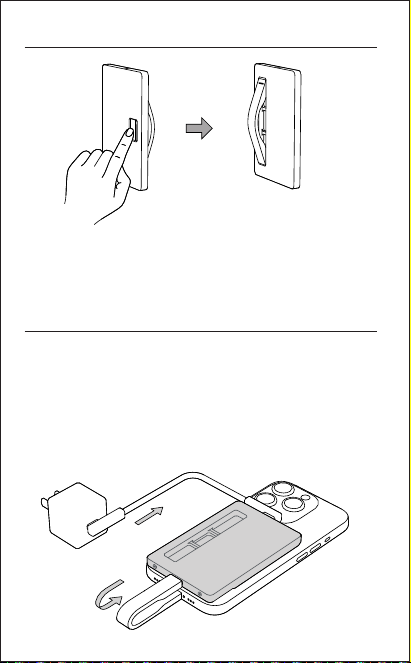
Data and Power Information
01. This product supports both data transfer and
power delivery functions.
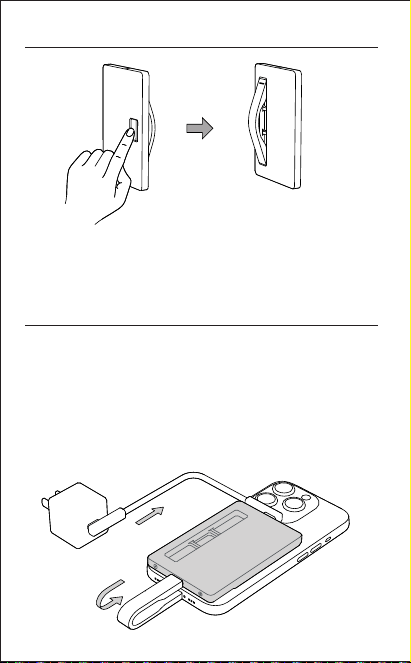
02. When powering through USB-C2, the power must be
greater than PD 15W to activate the power output of
USB-C1.
03. When USB-C2 provides sufficient power, it prioritizes
supplying 15W to the hard drive, with any remaining
power output through USB-C1.
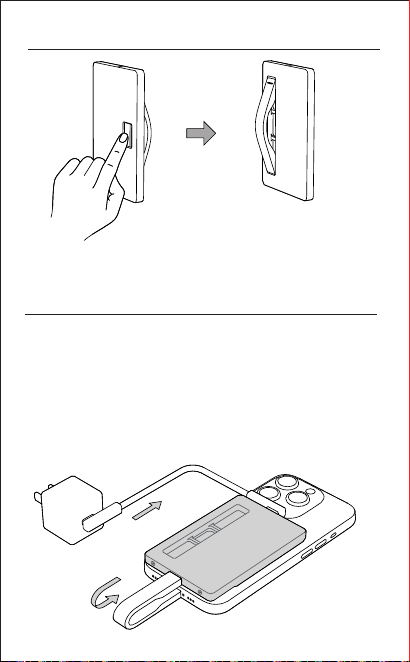
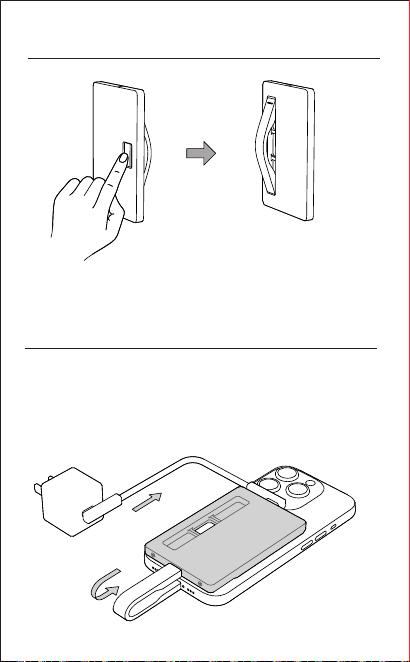
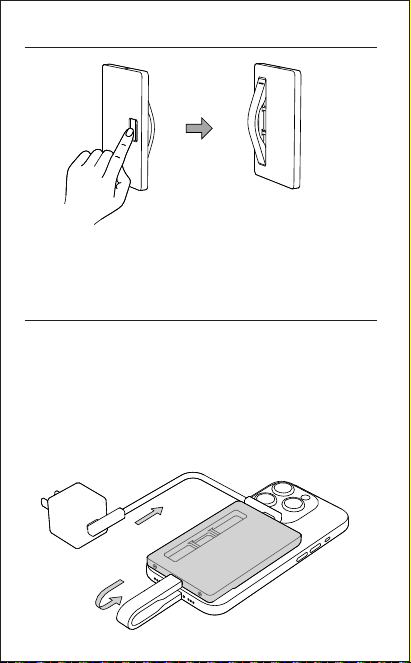
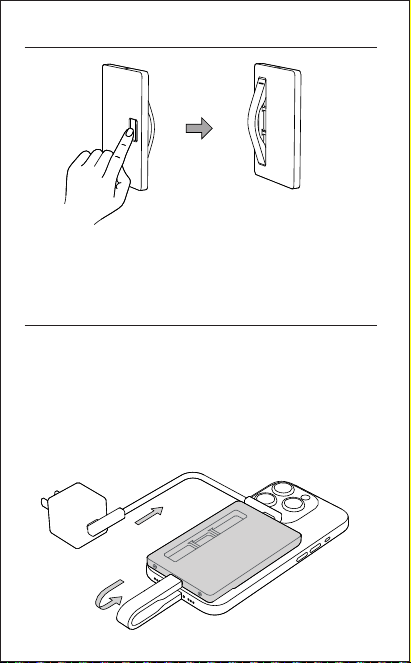
Method of taking out the data cable
01. Push the data cable out through the cutout on the
back of the enclosure.
USB-C2
USB-C1
04
05
Customer Service
Product Performance Failure
Exclusions from Warranty
Product Safety Information
The following services are available for you to enjoy free
of charge according to this policy: returns, exchanges,
and repairs. Repairs, exchanges, and returns must be
processed with a receipt.
Before using this product, please read all instructions
and warnings. Improper use may result in damage to
the product or personal safety.
Within 7 days of receipt, you may return the product
without reasons, but you must bear the shipping
costs.
01.
12-month warranty in the event that the product
experiences any performance failure as specified in
the "Product Performance Failure" list and is duly
confirmed upon inspection.
02.
Product Type
Performance failure
SSD enclosure
01. Unable to read and write under normal use.
02. Listed functions in the manual fail under
normal use.
01.
Unauthorized repairs, misuse, collision, negligence,
abuse, liquid ingress, accidents, modifications, and
incorrect use of accessories.
02. The warranty period has expired.
03. Damages caused by force majeure factors.
06
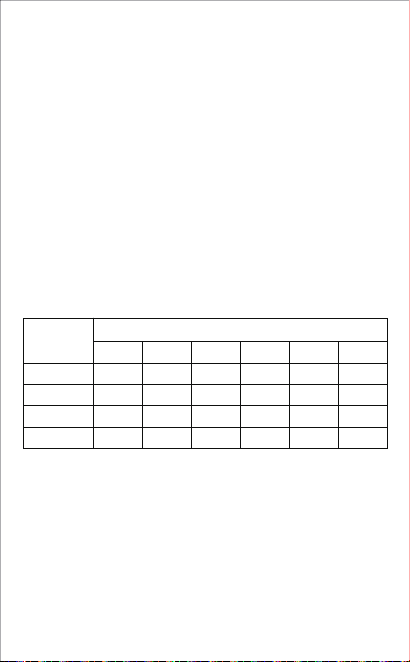
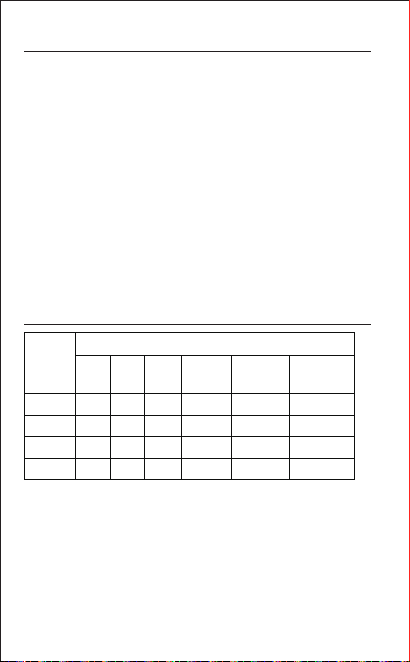
PCB
PLASTICS
METALST
COMPONENTS
TOXIC AND HAZARDEOUS SUBSTANCE AND ELEMENTS
PART NAME
Pb Hg Cd Cr6+ PBB PBDE
o
o
o
o
o
o
o
o
o
o
o
o
o
o
o
o
o
o
o
o
x
o
x
o
Declaration of Toxic and Hazardous
Substances in Electronic Products
o:
X:
This table is prepared in accordance with the provisions of SJ/T
11364.
Indicates that the content of the toxic and hazardous substance in all
homogeneous materials of the component is below the limit specified
by GB/T 26572.
Indicates that the content of the toxic and hazardous substance exceeds
the limit specified by GB/T 26572 in at least one homogeneous material
of the component.
The information in this table is provided to suppliers in the form of data
and testing results that comply with RoHS environmental requirements.
01.
Do not store this product in high-temperature
environments, direct sunlight, or strong magnetic
fields. Do not place it near fire or in other harsh
environments. Do not use it after it has been
submerged in water.
02.
Transfer speeds may vary depending on your
device and SSD.
03.
Consumers will bear all consequences for personal
or property damage resulting from improper use of
the product that violates the instructions. The
company assumes no legal responsibility.
04.
Unauthorized disassembly of this product by
non-professionals is prohibited.
04.
Avoid strong physical impacts, including hitting,
overloading, stamping, or squeezing.
Join our Discord Follow us on Instagram
@SHARGE_OFFICIALSHARGE
E-mail: [email protected]
Official Website: www.sharge.com
Manufacturer: Sharge Technology (Shenzhen) Co., Ltd.
Address: Room 305, Floor 3, Xinzhongtai Industrial Park,
Building 3, Hengfeng Residential Quarter,
Yousong Community, Longhua Sub-District,
Longhua District, Shenzhen
Made in China
This symbol indicates that this product shall not be treated as household
waste. Instead it shall be handed over to the applicable collection point for the
recycling of electrical and electronic equipment.
R-R-ZSZ-SD002
D3C711
RoHS
07
名称: 闪盘 Plus 硬盘盒
型号: SD002
材质: 铝合金
尺寸:93 × 60 × 6mm
接口类型: USB-C × 2
USB-C1 输出: 85W (Max)
USB-C2 输入: 100W (Max)
支持硬盘尺寸: 2280/2242/2230
支持硬盘类型: M Key M.2 NVMe
最大支持容量: 4TB
支持USB协议: USB 3.2 Gen2 (10Gbps)
支持操作系统: Windows, MacOS, Android, Linux, iOS
产品参数
注意事项
包装清单
闪盘 Plus 硬盘盒 × 1
螺丝刀 × 1导热硅脂片 × 2 备用螺丝 × 3
保护皮套 × 1数据线 × 1
说明书 × 1
01.本产品只支持单面贴片的2280/2242/2230规格的NVMe
协议固态硬盘。
02.请将本产品存放在阴凉干燥处,勿将本产品存放在高温或
潮湿的环境中。
03.工作温度应介于 32-104°F(0-40°C)之间,使用环境温度
为-10°C-35°C,存储环境温度为-20°C-40°C。
04.传输速度可能因您的设备和SSD而异。
05.请勿跌落、挤压、撞击、投掷本产品,以避免损坏。
06.当需要退出移动设备时,请先停止移动设备的数据读写,
否则将无法正常退出移动设备,强行退出有可能会导致您
的数据异常或丢失。
纳米胶 × 2
08
SSD安装说明
01. 用螺丝刀拧下螺丝,并打开硬盘盒顶盖。
02. 对准卡槽插入SSD。
*图中SSD仅为安装示意,
需自行提供。
03. 用螺丝刀拧紧用于固定SSD尾部的螺丝。
SSD
09
05. 盖上顶盖,用螺丝刀拧紧螺丝。
※2280/2242/2230分别对应的螺丝安装孔位,如上图所示
04. 撕掉导热硅脂片上下两层膜,将导热硅脂片贴于SSD上。
2280
2242
2230
导热硅脂片
10
数据传输与供电须知
01. 本产品同时满足数据传输及充电功能
02. 给USB-C2口供电时,功率大于PD 15W,方可激活USB-C1
的供电输出。
03. 当USB-C2口供电充足时,优先供给硬盘15W的功率,其余功
率从USB-C1口输出。
数据线取出方式
01. 通过硬盘盒背面的取线孔推出数据线。
USB-C2
USB-C1
11
12
售后服务
01. 7日无理由退货,由用户承担物流费用。
02. 本产品出现「产品性能故障表」所列性能故障的情况,经检测确定后,
可免费享受如下服务。
SHARGE 售后服务严格依照《中华人民共和国消费者权益保护法》、
《中华人民共和国产品质量法》实行售后三包服务。
服务内容如下:
在三包有效期内,您可以依照本规定免费享受退货、换货、维修的服务。
维修、换货、退货应当凭发票办理。
服务类型
退货 自签收次日起7天内产品质量原因退货换货
换货 自签收次日起15天内产品质量原因换货维修
维修 自签收次日起一年内产品质量原因维修
服务政策
类别 性能故障
硬盘盒
01. 正常使用情况下,无法读取和写入
02. 正常使用情况下,说明书所列功能失效。
产品性能故障表
非保修条例
01. 未经授权的维修、误用、碰撞、疏忽、滥用、进液、事故、改动、不正
确地使用配件。
02. 已超过三包有效期。
03. 因不可抗力因素造成的损坏。
电子信息产品有毒有害物质申明
本表格依据 SJ/T 11364 的规定编制。
O: 表示该有毒有害物质在该部件所有均质材料中的含量均在
GB/T 26572 标准规定的限量要求以下。
X: 表示该有毒有害物质至少在该部件某一均质材料中的含量超出
GB/T 26572标准规定的限量要求。
本表格信息是基于供应商提供的数据及符合 RoHS 环保要求的检
测结果。
电子信息产品有毒有害物质申明
有毒有害物质或元素
部件名称
PCB
X O O O O O
O O O O O O
X O O O O O
O O O O O O
塑胶
金属
附件
铅
(Pb)
汞
(Hg)
镉
(Cd)
六价铬
(Cr VI)
多溴联苯
(PBB)
多溴二苯醚
(PBDE)
产品安全信息
在使用本产品前请阅读所有的指示和警告,不规范使用将会给产品或人身
安全带来损害
01. 不要将本产品存储在高温,强光及强磁场环境下,不要放置在火源等
其他恶劣环境中,浸水后禁止使用。
02. 传输速度可能因您的设备和SSD而异。
03. 消费者如因违反产品说明书规定,不恰当使用产品,造成人身及财产
损害,将自行承担一切后果,本公司将不承担任何法律责任。
04. 非专业人员严禁分解本产品。
05. 避免强烈的物理作用,包括敲击、透支、践踏、挤压等。
13
官方微信 官方抖音
官方网站:www.sharge.com
联系方式:400-075-5501
制 造 商:闪极科技(深圳)有限公司
地 址:深圳市龙华区龙华街道 油松社区恒丰小区3号楼新
中泰工业园3楼305室
Made in China 中国制造
此符号表明本产品不得作为生活垃圾处理,相反,应将其交付给适用的收集
点进行电子设备回收。
R-R-ZSZ-SD002
14
D3C711
RoHS
名稱: 隨身碟 Plus 硬碟盒
型號: SD002
材質: 鋁合金
尺寸: 93x60x6mm
介面類型: USB-Cx2
USB-C1 輸出: 85W(Max)
USB-C2 輸入: 100W(Max)
支援硬碟尺寸: 2280/2242/2230
支援硬碟類型: M Key M.2 NVMe
最大支援容量: 4TB
支援USB協定: USB 3.2 Gen2(10Gbps)
支援作業系統: Windows. MacOS, Android, Linux. i0S
產品參數
注意事項
包裝清單
閃盤 Plus 硬碟盒 × 1
螺絲起子 × 1導熱矽脂片 × 2 備用螺絲 × 1
保護皮套 × 1數據線 × 1
說明書 × 1
01. 本產品只支援單面貼片的2280/2242/2230規格的
NVMe協議固態硬碟。
02. 請將本產品存放在陰涼乾燥處,勿將本產品存放在高
溫或潮濕的環境中。
03. 工作溫度應介於 32-104°F(0-40°C)之間,使用環境
溫度為-10°C-35°C,儲存環境溫度為-20°C-40°C
04. 傳輸速度可能會因您的裝置和SSD而異。
05. 請勿摔落、擠壓、撞擊、投擲本產品,以避免損壞。
06. 當需要退出行動裝置時,請先停止行動裝置的資料讀
寫否則將無法正常退出行動設備,強行退出有可能會
導致您的資料異常或遺失。
奈米膠 × 2
15
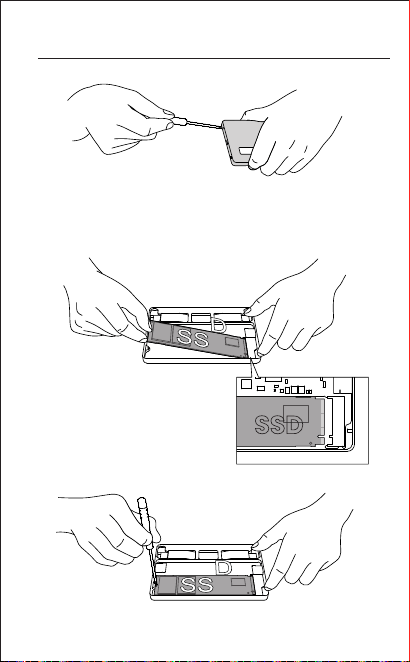
SSD安裝說明
01. 用螺絲起子旋下螺絲,並打開硬碟盒頂蓋。
02. 對準卡槽插入SSD。
*圖中SSD僅為安裝示意,
需自行提供。
03. 用螺絲起子鎖緊用於固定SSD尾部的螺絲。
SSD
16
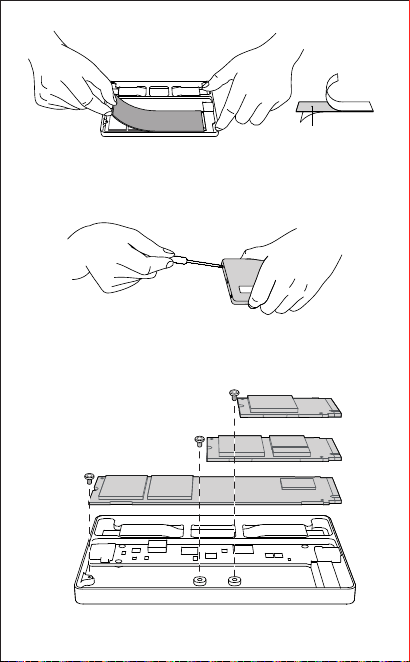
05. 蓋上頂蓋,用螺絲起子鎖緊螺絲。
※2280/2242/2230分別對應的螺絲安裝孔位,如上圖所示
04. 撕下導熱矽脂片上下兩層膜,將導熱矽脂片貼於SSD上。
2280
2242
2230
导热硅脂片
17
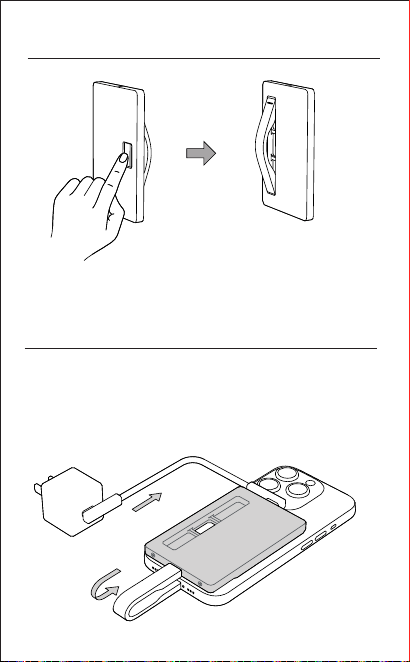
資料傳輸與供電須知
01. 本產品同時滿足資料傳輸及充電功能。
02. 供電給USB-C2口時,功率大於PD15W,方可啟動USB-C1的
供電輸出。
03. 當USB-C2口供電充足時,優先供給硬碟15W的功率,其餘功
率從USB-C1口輸出。
數據線取出方式
01. 透過硬碟盒背面的取線孔推出數據線。
USB-C2
USB-C1
18
19
官方微信 官方抖音
官方網站: www.sharge.com
聯絡方式: 400-075-5501
制 造 商: 閃極科技(深圳)有限公司
地址: 深圳市龍華區龍華街道油松社區恆豐小區3號大樓新中泰
工業園區3樓305室
Made in China 中國製造
此符號表示本產品不得作為生活垃圾處理,相反,應將其交付給適用的收
集點進行電子設備回收。
R-R-ZSZ-SD002
D3C711
RoHS
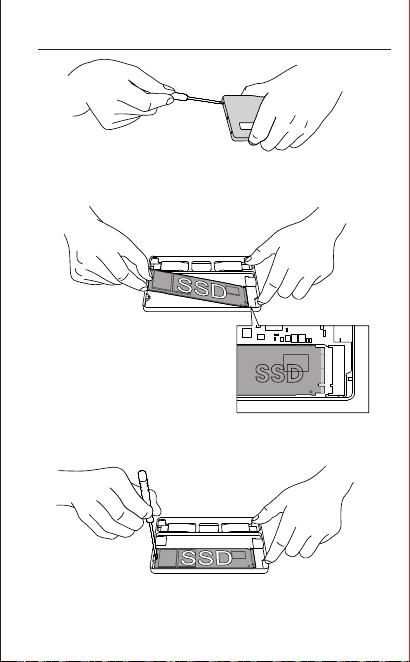
SSD-Installationsanweisungen
01. Schrauben Sie die obere Abdeckung des Gehäuses
ab und öffnen Sie sie.
02. Richten Sie die SSD in das
Fach ein und stecken Sie
sie ein.
*Die dargestellte SSD dient nur zu Demonstrationszwecken
und ist nicht im Lieferumfang enthalten.
SSD
Verwenden Sie einen Schraubenzieher, um die
Schrauben, die das hintere Ende der SSD befestigen,
festzuschrauben.
03.
21

Name: Disk Plus
Modell: SD002
Material: Aluminiumlegierung
Abmessungen: 93 × 60 × 6 mm
Port-Typ: USB-C × 2
USB-C1 Ausgang: 85W (Max)
USB-C2 Eingang: 100W (Max)
Unterstützte SSD-Modelle: 2280/2242/2230
Unterstützter SSD-Typ: M Key M.2 NVMe
Unterstützte SSD-Kapazität: Bis zu 4TB
Protokoll: USB 3.2 Gen2 (10Gbps)
Betriebssystemkompatibilität: Windows, macOS, iOS,
Android, Linux
Produktinformation
Hinweis
Inhalt der Verpackung
SSD Gehäuse × 1
Schraubenzieher × 1Wärmeleitende Silikonfolie× 2
Ersatzschrauben × 3
Lederhülle × 1Datenkabel × 1
Bedienungsanleitung × 1
Doppelseitiges Klebeband × 2
Dieses Produkt unterstützt ausschließlich einseitige
2280/2242/2230 NVMe SSDs.
Verwahren Sie das Produkt an einem kühlen, trockenen Ort.
Unterlassen Sie, es hohen Temperaturen oder Feuchtigkeit zu
ausgesetzt.
Betriebstemperatur: 32-104°F (0-40°C). Nutzungsumgebung:
-10°C bis 35°C. Lagerumgebung: -20°C bis 40°C.
Übertragungsgeschwindigkeiten können je nach Ihrem Gerät
und SSD variieren.
Vermeiden Sie das Fallenlassen, Drücken, Schlägen oder
Werfen des Produkts, um Schäden zu vermeiden.
Bevor Sie von Mobilgeräten trennen, stoppen Sie alle
Datenübertragungen. Das Fehlen dieser Maßnahme kann zu
Datenbeschädigung oder -verlust führen.
01.
02.
03.
04.
05.
06.
20
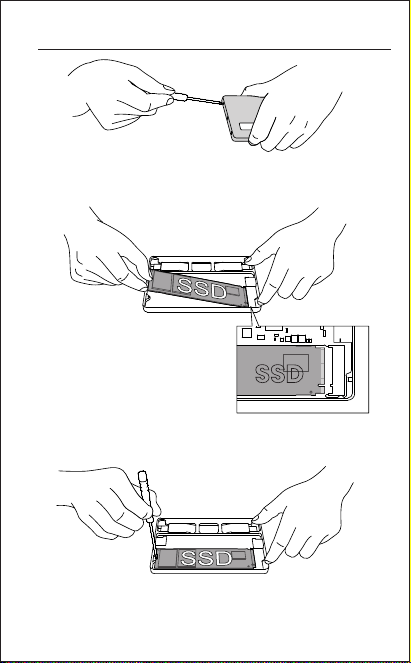
SSD-Installationsanweisungen
01. Schrauben Sie die obere Abdeckung des Gehäuses
ab und öffnen Sie sie.
02. Richten Sie die SSD in das
Fach ein und stecken Sie
sie ein.
*Die dargestellte SSD dient nur zu Demonstrationszwecken
und ist nicht im Lieferumfang enthalten.
SSD
Verwenden Sie einen Schraubenzieher, um die
Schrauben, die das hintere Ende der SSD befestigen,
festzuschrauben.
03.
21
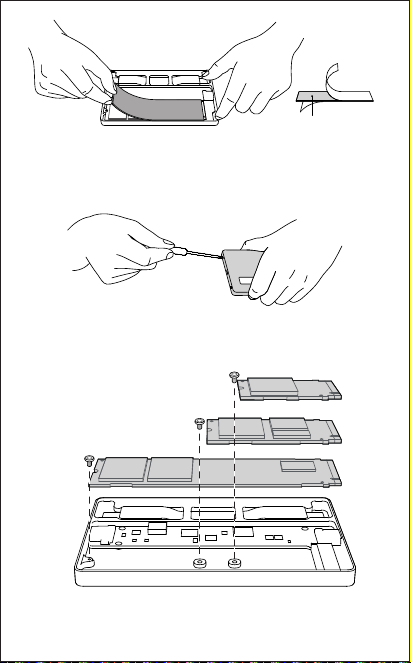
2280
2242
2230
※Die Schraubeneinsatzlöcher, die den Größen 2280/
2242/2230 entsprechen, sind wie oben dargestellt.
Thermal pad
Reißen Sie die obere und untere Schutzfolie von
der wärmeleitenden Silikonfolie und kleben Sie die
entfolgte Silikonplatte auf die SSD.
04.
Montieren Sie die obere Abdeckung des Gehäuses
und schrauben Sie die Schrauben mit einem
Schraubenzieher fest.
05.
22
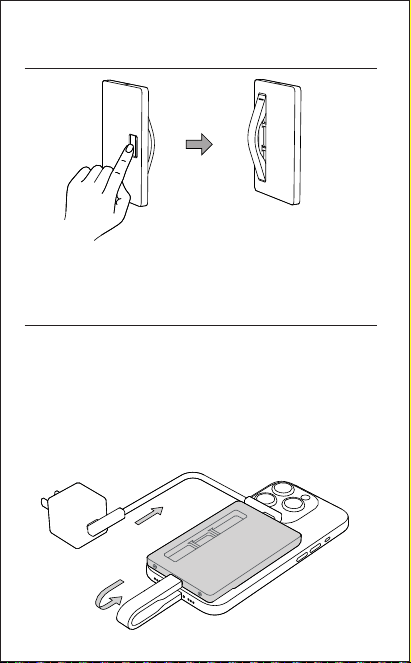
Daten- und Strominformationen
Methode zum Herausnehmen des
Datenkabels
01. Drücken Sie das Datenkabel durch die Aussparung
auf der Rückseite des Gehäuses heraus.
USB-C2
USB-C1
Dieses Produkt unterstützt sowohl Datenübertragungs- als
auch Stromversorgungsfunktionen.
01.
Bei Stromversorgung über USB-C2 muss die Stromversorgung
größer als PD 15W sein, um die Stromausgabe von USB-C1
zu aktivieren.
02.
Wenn USB-C2 ausreichend Strom bereitstellt, priorisiert
es, 15W auf die Festplatte zu liefern, mit dem verbleibenden
Strom ausgegeben durch USB-C1.
03.
23
Join our Discord Follow us on Instagram
@SHARGE_OFFICIALSHARGE
Dieses Symbol zeigt an, dass dieses Produkt nicht als Hausmüll behandelt
werden soll.
Stattdessen sollte es an den zuständigen Sammelpunkt für die Recycling
von Elektro- und Elektronikgeräten übergeben werden.
E-Mail: [email protected]
Offizielle Webseite: www.sharge.com
Hersteller: Sharge Technology (Shenzhen) Co., Ltd.
Adresse:
Longhua-Straße, Longhua-Bezirk, Zimmer
305, 3. Etage, Xinzhongtai Industriepark,
Gebäude 3, Shenzhen, 518000, Provinz
Guangdong, China.
Hergestellt in China
R-R-ZSZ-SD002
D3C711
RoHS
24
Nome: Disk Plus
Modello: SD002
Materiale: lega di alluminio
Dimensioni: 93×60×6mm
Tipo di porta: USB-C × 2
Uscita USB-C1: 85 W (massimo)
Ingresso USB-C2: 100 W (massimo)
Modello SSD supportato: 2280/2242/2230
Tipo di SSD supportato: M Key M.2 NVMe
Capacità SSD supportata: fino a 4 TB
Protocollo: USB 3.2 Gen2 (10 Gbps)
Informazioni sul Prodotto
Compatibilità del sistema operativo:
Windows, macOS, iOS, Android, Linux
Avvertenze
Contenuto della Confezione
Custodia SSD × 1
Cacciavite × 1Cuscinetti termici × 2 Viti di backup × 3
Custodia in pelle × 1
Cavo dati × 1
Nastro biadesivo × 2Manuale dell'utente × 1
Questo prodotto supporta solo SSD NVMe 2280/2242/2230 a
lato singolo.
01.
Conservare il prodotto in un luogo fresco e asciutto. Non
esporlo a temperature elevate o umidità.
02.
Temperatura operativa: 32-104°F (0-40°C). Ambiente di utilizzo:
da -10°C a 35°C. Ambiente di conservazione: da -20°C a 40°C.
03.
Le velocità di trasferimento possono variare a seconda del
dispositivo e dell'SSD.
04.
Evitare di far cadere, premere, colpire o lanciare il prodotto per
evitare danni.
05.
Prima di disconnettersi dai dispositivi mobili, interrompere tutti i
trasferimenti di dati. In caso contrario, si potrebbe causare il
danneggiamento o la perdita dei dati.
06.
25
Istruzioni per l'installazione dell'SSD
01. Svitare e aprire il coperchio superiore della custodia.
02. Allineare l'SSD allo slot e
inserirlo.
*L'SSD mostrato è solo a scopo dimostrativo e non è
incluso.
SSD
Utilizzare un cacciavite per stringere le viti che
fissano l'estremità posteriore dell'SSD.
03.
26
2280
2242
2230
※I fori di montaggio delle viti corrispondenti alle dimensioni
2280/2242/2230 sono come mostrati sopra.
Thermal pad
Rimuovere le pellicole protettive da entrambi i lati
del pad termico e collegare il pad all'SSD.
04.
Reinstallare il coperchio superiore della custodia e
serrare le viti con un cacciavite.
05.
27
Dati e Informazioni sull'alimentazione
Metodo per Estrarre il Cavo Dati
01. Spingere il cavo dati fuori attraverso l'apertura sul
retro dell'involucro.
USB-C2
USB-C1
Questo prodotto supporta sia le funzioni di trasferimento
dati che di erogazione di energia.
01.
Quando si alimenta tramite USB-C2, la potenza deve
essere maggiore di PD 15 W per attivare l'uscita di
potenza di USB-C1.
02.
Quando USB-C2 fornisce energia sufficiente, dà la priorità
alla fornitura di 15 W al disco rigido, con l'eventuale
potenza rimanente in uscita tramite USB-C1.
03.
28
Join our Discord Follow us on Instagram
@SHARGE_OFFICIALSHARGE
Questo simbolo indica che questo prodotto non deve essere trattato come
rifiuto domestico. Dovrà invece essere consegnato al punto di raccolta
competente per il riciclaggio di apparecchiature elettriche ed elettroniche.
E-mail: [email protected]
Sito ufficiale: www.sharge.com
Produttore: Sharge Technology (Shenzhen) Co., Ltd.
Indirizzo:
Sala 305, Piano 3, Parco industriale Xinzhongtai,
Edificio 3, Quartiere residenziale di Hengfeng,
Comunità Yousong, Sottodistretto di Longhua,
Distretto di Longhua, Shenzhen
Made in China
R-R-ZSZ-SD002
D3C711
RoHS
29
Nombre: Disk Plus
Modelo: SD002
Material: aleación de aluminio
Dimensiones: 93 × 60 × 6 mm
Tipo de puerto: USB-C × 2
Salida USB-C1: 85W (máx.)
Entrada USB-C2: 100W (máx.)
Modelo SSD compatible: 2280/2242/2230
Tipo de SSD compatible: M Key M.2 NVMe
Capacidad SSD admitida: hasta 4 TB
Protocolo: USB 3.2 Gen2 (10 Gbps)
Compatibilidad del sistema operativo:
Windows, macOS, iOS, Android, Linux
Información del Producto
Precauciones
Contenido del Paquete
Caja SSD × 1
Destornillador × 1Almohadillas térmicas × 2
Tornillos de respaldo × 3
Funda de cuero × 1Cable de datos × 1
Manual de usuario × 1
Cinta de doble cara × 2
Este producto solo admite SSD NVMe 2280/2242/2230 de una
sola cara.
01.
Almacenar el producto en un lugar fresco y seco. No lo
exponga a altas temperaturas o humedad.
02.
Temperatura de funcionamiento: 32-104°F (0-40°C). Entorno de
uso: -10°C a 35°C. Ambiente de almacenamiento: -20°C a 40°C.
03.
Las velocidades de transferencia pueden variar según su
dispositivo y SSD.
04.
Evite dejar caer, presionar, golpear o tirar el producto para
evitar daños.
05.
Antes de desconectarse de los dispositivos móviles, detenga
todas las transferencias de datos. No hacerlo puede provocar
daños o pérdida de datos.
06.
30
Instrucciones de Instalación de SSD
01. Desenroscar y abrir la tapa superior del gabinete.
02. Alinee el SSD con la ranura
e insértelo.
*El SSD que se muestra es solo para fines de
demostración y no está incluido.
SSD
Utilice un destornillador para apretar los tornillos
que fijan el extremo posterior del SSD.
03.
31
2280
2242
2230
※Los orificios de montaje de los tornillos correspondientes
a los tamaños 2280/2242/2230 se muestran arriba)
Thermal pad
Retire las películas protectoras de ambos lados de
la almohadilla térmica y conecte la almohadilla al
SSD.
04.
Vuelva a instalar la cubierta superior de la carcasa y
apriete los tornillos con un destornillador.
05.
32
Información de Datos y Energía
Método Para Sacar el Cable de Datos.
01. Empuje el cable de datos hacia afuera a través del
recorte en la parte posterior del gabinete.
USB-C2
USB-C1
Este producto admite funciones de transferencia
de datos y suministro de energía.
01.
Al alimentar a través de USB-C2, la potencia debe
ser superior a PD 15W para activar la salida de potencia
de USB-C1.
02.
Cuando USB-C2 proporciona suficiente energía, prioriza
el suministro de 15 W al disco duro, y la energía restante
se envía a través de USB-C1.
03.
33
Join our Discord Follow us on Instagram
@SHARGE_OFFICIALSHARGE
Este símbolo indica que este producto no debe tratarse como residuo
doméstico. En su lugar, se entregará al punto de recogida correspondiente
para el reciclaje de aparatos eléctricos y electrónicos.
Correo electrónico: [email protected]
Sitio web oficial: www.sharge.com
Fabricante: Sharge Technology (Shenzhen) Co., Ltd.
Dirección:
Sala 305, Piso 3, Parque Industrial Xinzhongtai,
Edificio 3, Barrio Residencial Hengfeng, Comuni-
dad Yousong, Subdistrito de Longhua, Distrito de
Longhua, Shenzhen
Hecho en china
R-R-ZSZ-SD002
D3C711
RoHS
34
製品名: Disk Plus
モデル: SD002
材質:アルミニウム合金
サイズ:93×60×6mm
対応コネクタ:USB-C×2
USB-C1出力:85W(Max)
USB-C2入力:100W(Max)
対応ドライブサイズ:2280/2242/2230
対応ドライブタイプ: M Key M.2 NVMe
最大対応容量: 4TB
対応USBプロトコル: USB 3.2 Gen2 (10Gbps)
対応OS:Windows、MacOS、Android、Linux、iOS
製品仕様
注意事項
パッケージ内容
Disk Plus × 1、
熱伝導グリスシート×2ナノ粘着剤 × 2
予備ネジ × 3
保護ケース × 1
ケーブル× 1、
ドライバー×1
取扱説明書×1
本製品は片面チップ2280/2242/2230仕様のNVMeプロトコルSSDの
みをサポートします。
01.
本製品は涼しく乾燥した場所に保管してください、高温多湿の環境
では保管しないでください。
02.
動作温度は32-104°F (0-40°C)、動作温度は-10°C~35°C、保管温度は
-20°C~40°Cでご使用ください。
03.
転送速度はお使いのデバイスやSSDによって異なる場合があります。
04.
損傷を避けるために、本製品を落としたり、押しつぶしたり、叩いたり、
投げたりしないでください。
05.
デバイスを終了する必要がある場合、まずデバイスのデータの読み書き
を停止してください。
そうしないと、デバイスを正常に終了することができず、無理に終了
すると、データが異常終了したり、失われたりする可能性があります。
06.
35
SSD 取り付け方法
01. ドライバーでネジを外し、 エンクロージャの上蓋を開け
ます。
02. ベイに合わせてSSDを挿入
します。
*図のSSDは取り付けイメージです。ご用意ください。
SSD
SSDの端を固定しているネジをドライバーで締めます。
03.
36
2280
2242
2230
※2280/2242/2230の対応ネジ穴は上図の通りです。
熱伝導シート
熱伝導シートの上下の剥がし、SSDに貼り付けます。
04.
上蓋を閉め、ドライバーでネジを締めます。
05.
37
データ転送と給電について
データケーブルの取り出し方法
01. エンクロージャ背面のケーブル取り出し穴からケーブルを
押し出します。
USB-C2
USB-C1
本製品はデータ伝送と充電の機能を同時に満たします。
01.
USB-C2ポートに電力が供給される場合、PD 15W以上
の電力が供給され、USB-C1ポートから出力される電源
が起動します。
02.
USB-C2ポートの電力供給が充分な場合、15Wの電力を
優先的に本製品からSSDに供給し、残りの電力は
USB-C1ポートから出力されます。
03.
38
Join our Discord Follow us on Instagram
@SHARGE_OFFICIALSHARGE
このマークは、この製品が一般廃棄物として処理されるのではなく、
電子機器のリサイクルのために該当する回収場所に搬入されるべきであることを示
しています。
Eメール: [email protected]
公式サイト:www.sharge.com
メーカー:閃極科技(深セン)有限公司
アドレス:
中華人民共和国広東省深セン市龍華区龍華街道油
松社区恒豊小区3号楼新中泰工業園3楼305室。
Made in China 中国製
R-R-ZSZ-SD002
D3C711
RoHS
39
Nom : Disk Plus
Modèle : SD002
Matériel: Alliage d'aluminium
Dimensions : 93 × 60 × 6 mm
Type de port : USB-C × 2
Sortie USB-C1 : 85 W (maximum)
Entrée USB-C2 : 100 W (maximum)
Modèle SSD pris en charge : 2280/2242/2230
Type de SSD pris en charge : M Key M.2 NVMe
Capacité SSD prise en charge : jusqu'à 4 To
Protocole : USB 3.2 Gen2 (10 Gbit/s)
Informations sur le Produit
Compatibilité du système d'exploitation :
Windows, macOS, iOS, Android, Linux
Précautions
Contenu du Paquet
Boîtier SSD × 1
Tournevis × 1Coussinets thermiques × 2 Vis de secours × 3
Housse en cuir × 1
Câble de données × 1
Manuel d'utilisation × 1Ruban adhésif double face × 2
Ce produit prend uniquement en charge les SSD NVMe
2280/2242/2230 simple face.
01.
Conservez le produit dans un endroit frais et sec. Ne l'exposez
pas à des températures élevées ou à l'humidité.
02.
Température de fonctionnement : 32-104°F (0-40°C).
Environnement d'utilisation : -10°C à 35°C. Environnement de
stockage : -20°C à 40°C.
03.
Les vitesses de transfert peuvent varier en fonction de votre
appareil et de votre SSD.
04.
Évitez de laisser tomber, d'appuyer, de frapper ou de jeter le
produit pour éviter tout dommage.
05.
Avant de vous déconnecter des appareils mobiles, arrêtez tous
les transferts de données. Ne pas le faire peut entraîner une
corruption ou une perte de données.
06.
40
Instructions d'installation du SSD
01. Dévissez et ouvrez le couvercle supérieur du boîtier.
02. Alignez le SSD avec
l'emplacement et insérez-le.
*Le SSD présenté est uniquement à des fins de
démonstration et n'est pas inclus.
SSD
Utilisez un tournevis pour serrer les vis qui fixent
l'extrémité arrière du SSD.
03.
41
2280
2242
2230
※Les trous de montage des vis correspondant aux tailles
2280/2242/2230 sont comme indiqué ci-dessus.
Thermal pad
Retirez les films protecteurs des deux côtés du
tampon thermique et fixez le tampon au SSD.
04.
Réinstallez le couvercle supérieur du boîtier et
serrez les vis avec un tournevis.
05.
42
Informations sur les Données et l'alimentation
Méthode de Retrait du Câble de Données
01. Poussez le câble de données à travers la découpe à
l'arrière du boîtier.
USB-C2
USB-C1
Ce produit prend en charge les fonctions de transfert
de données et de fourniture d'énergie.
01.
Lors de l'alimentation via USB-C2, la puissance doit
être supérieure à PD 15 W pour activer la puissance
de sortie de l'USB-C1.
02.
Lorsque l'USB-C2 fournit une puissance suffisante, il
donne la priorité à la fourniture de 15 W au disque dur,
la puissance restante étant fournie via l'USB-C1.
03.
43
Join our Discord Follow us on Instagram
@SHARGE_OFFICIALSHARGE
Ce symbole indique que ce produit ne doit pas être traité comme déchet
ménager. Il doit être remis au point de collecte concerné pour le recyclage
des équipements électriques et électroniques.
Courriel : [email protected]
Site officiel : www.sharge.com
Fabricant : Sharge Technology (Shenzhen) Co., Ltd.
Adresse :
salle 305, étage 3, parc industriel de Xinzhongtai,
bâtiment 3, quartier résidentiel Hengfeng,
communauté Yousong, sous-district de
Longhua, district de Longhua, Shenzhen
Fabriqué en Chine
R-R-ZSZ-SD002
D3C711
RoHS
44