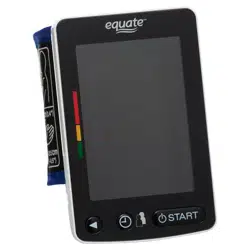
Upper Arm Blood Pressure Monitor
6000 Series – Wireless
Instruction Manual
Original 1WMPD4004430A
❏
1. Introduction
The Equate upper arm blood pressure monitor is
designed for ease of use and accuracy. This device will
facilitate your daily blood pressure regimen.
❏ We recommend that you read through this manual
carefully before using the device for the rst time.
❏ This device is designed for use on adults, and is not
intended for infants and children.
❏ This device is designed for use to operate by yourself
in the home healthcare environment to measure blood
pressure and pulse rate of people for diagnosis.
2. Precautions
FCC Compliance Information
This device complies with Part 15 of FCC rules. Operation is
subject to the following two conditions:
1. This device may not cause harmful interference, and
2. This device must accept any interference received,
including interference that may cause undesired
operations.
❏ Precision components are used in the construction of
this device. Extremes in temperature, humidity, direct
sunlight, shock or dust should be avoided.
❏ Clean the device and cuff with a dry, soft cloth or a cloth
dampened with water and a neutral detergent. Never use
alcohol, benzene, thinner or other harsh chemicals to
clean the device or cuff.
❏ Avoid tightly folding the cuff or storing the hose tightly
twisted for long periods, as such treatment may shorten
the life of the components.
❏ Take care to avoid accidental strangulation of babies or
infants with the hose.
❏ Do not twist the air hose during measurement. This may
cause injury due to continuous cuff pressure.
❏ The device and cuff are not water resistant. Prevent rain,
sweat and water from soiling the device and cuff.
❏ Measurements may be distorted if the device is
used close to televisions, microwave ovens, cellular
telephones, X-ray or other devices with strong electrical
elds.
❏ Wireless communication devices, such as home
networking devices, mobile phones, cordless phones
and their base stations, and walkie-talkies can affect this
blood pressure monitor. Therefore, a minimum distance
of 12” / 30cm should be kept from such devices.
❏ When reusing the device, conrm that the device is clean.
❏ Used equipment, parts and batteries are not treated
as ordinary household waste, and must be disposed of
according to the applicable local regulations.
❏ Do not modify the device. It may cause accidents or
damage to the device.
❏ To measure blood pressure, the arm must be squeezed
by the cuff hard enough to temporarily stop blood ow
through the artery. This may cause pain, numbness or a
temporary red mark to the arm. This condition will appear
especially when measurement is repeated successively.
Any pain, numbness, or red marks will disappear with
time.
❏ Measuring blood pressure too frequently may cause harm
due to blood ow interference.
❏ Check that the operation of the device does not result in
prolonged impairment of blood circulation, when using the
device repeatedly.
❏ Clinical testing has not been conducted on newborn
infants and pregnant woman. Do not use on newborn
infants or pregnant woman.
❏ If you have had a mastectomy, please consult a doctor
before using the device.
❏ Do not let children use the device by themselves and do
not leave the device within the reach of children, it may
cause accidents or injury.
❏ There are small parts that may cause a choking hazard if
swallowed by mistake by infants.
❏ Do not touch the batteries and the patient at the same
time. That may result in electrical shock.
❏ Use of accessories not detailed in this manual may
compromise safety.
❏ Should the battery short-circuit, it may become hot and
potentially cause burns.
❏ Allow the device to adapt to the surrounding environment
before use (about one hour).
❏ Do not inate without wrapping the cuff around the upper
arm.
❏ Do not apply the cuff on an arm in which another medical
device is attached. The equipment may not function
properly.
❏ People who have a severe circulatory decit in the arm
must consult a doctor before using the device, to avoid
medical problems.
❏ Do not self-diagnose the measurement results and start
treatment by yourself. Always consult your doctor for
evaluation of the results and treatment.
❏ Do not apply the cuff on an arm with an unhealed wound.
❏ Do not apply the cuff on an arm receiving an intravenous
drip or blood transfusion. It may cause injury.
❏ Do not use the device where ammable gases such as
anesthetic gases are present. It may cause an explosion.
❏ Do not use the device in highly concentrated oxygen
environments, such as a high-pressure oxygen chamber
or an oxygen tent. It may cause a re or explosion.
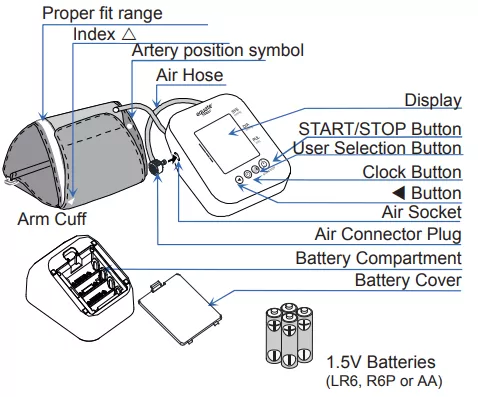
3. Parts Identication
Proper fit range
Index
Artery position symbol
Air Hose
Display
START/STOP Button
Clock Button
Button
Air Socket
Air Connector Plug
Battery Compartment
Battery Cover
Arm Cuff
User Selection Button
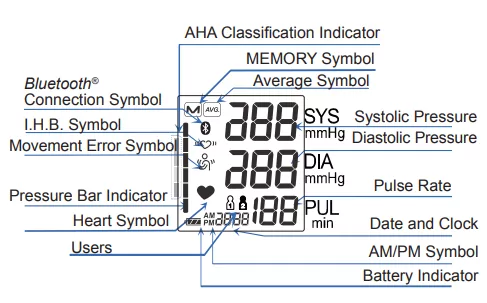
Display
I.H.B. Symbol
Movement Error Symbol
Pressure Bar Indicator
Heart Symbol
AHA Classification Indicator
MEMORY Symbol
Average Symbol
Systolic Pressure
Diastolic Pressure
Pulse Rate
Date and Clock
AM/PM Symbol
Battery Indicator
Users
Bluetooth
®
Connection Symbol
4. Symbols
Symbols that appear on the display
Symbols Function/Meaning Recommended Action
Appears while
measurement is in
progress. It blinks
when the pulse is
detected.
Measurement is in
progress.
Remain as still as
possible.
I.H.B. symbol
appears when an
irregular heartbeat
is detected. It may
appear when a very
slight vibration like
shivering or shaking
is detected.
––––––––––––
Appears when a body
or arm movement is
detected.
––––––––––––
Previous
measurements stored
in memory.
––––––––––––
Average data
––––––––––––
FULL BATTERY
The battery power
indicator during
measurement.
––––––––––––
LOW BATTERY
The battery power is
low when it blinks.
Replace all batteries
with new ones when
the symbol blinks.
User1 and User2 ––––––––––––
AM Time in the morning ––––––––––––
PM Time in the afternoon ––––––––––––
The device is
connecting to the
Bluetooth
®
devices.
––––––––––––
Device internal error
Remove the Batteries
and press the START/
STOP button, and
then install the
batteries again. If the
error still appears,
contact customer
service.
Unstable blood
pressure due to
movement during
measurement.
Take another
measurement.
Remain still during
measurement.
The systolic and
diastolic values are
within 10 mmHg of
each other.
Apply the cuff
correctly, and take
another measurement.
The pressure value
did not increase
during the inflation.
The cuff is not applied
correctly.
PUL DISPLAY
ERROR The pulse is
not detected correctly
Pairing has not been
performed correctly.
Remove and reinstall
the batteries. Try
pairing again.
Pairing in progress. ––––––––––––
Symbols printed on the device case
Symbols Function/Meaning
Standby and Turn the device on
SYS Systolic blood pressure in mmHg
DIA Diastolic blood pressure in mmHg
PUL/min Pulse per minute
Battery installation guide
Direct current
Type BF: Device, cuff and tubing are
designed to provide special protection
against electrical shocks
SN Serial number
Refer to instruction manual/booklet
IP International protection symbol
Keep dry
Clock setting
Clock adjustment and memory recall
User selection
BT Bluetooth
®
address
Used equipment, parts and batteries are
not treated as ordinary household waste,
and must be disposed of according to the
applicable local regurations.
5. Using the Monitor
5.1. Installing / Changing The Batteries
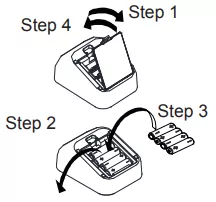
1. Remove the battery cover.
2. Remove the used batteries from the battery compartment
to change them.
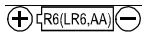
3. Insert new batteries into the battery compartment as
shown, taking care that the polarities (+) and (-) are
correct. Use only R6P, LR6 or AA batteries.
4. Replace the battery cover.
Step 1
Step 4
Step 3
Step 2
CAUTION
❏ Insert the batteries as shown in the battery compartment.
If installed incorrectly, the device will not work.
❏ When blinks on the display, replace all batteries
with new ones. Do not mix old and new batteries. It
may shorten the battery life, or cause the device to
malfunction. Replace the batteries two seconds or more
after the device turns off.
❏ does not appear when the batteries are drained.
❏ The battery life varies with the ambient temperature and
may be shorter at low temperatures.
❏ Generally, four new R6P batteries will last approximately
three months when used twice for measurement each
day.
❏ Use the specied batteries only. The batteries provided
with the device are for testing the device performance
and may have a limited life.
❏ Remove the batteries if the device is not to be used
for a long time. The batteries may leak and cause a
malfunction.
5.2. Connecting The Air Hose
Insert the air connector plug into the air socket firmly.
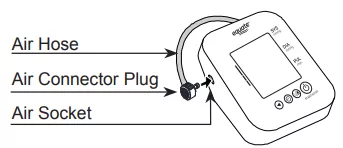
Air Hose
Air Connector Plug
Air Socket
5.3. Selecting The Correct Cuff
❏ Using the correct cuff size is important for an accurate
reading.
If the cuff is not the proper size, the reading may yield an
incorrect blood pressure value.
❏ The arm size is printed on each cuff.
❏ The index and proper t range, on the cuff, tell you if
you are applying the correct cuff. Refer to “5.4 Applying
The Arm Cuff”.
❏ If the index points outside of the range, contact
customer service.
❏ The arm cuff is a consumable. If it becomes worn,
purchase a new one.
Symbols printed on the cuff
Symbols Function/Meaning Recommended Action
Artery Position Symbol
Set the symbol on the
artery of the upper arm
or in line with the ring
finger on the inside of
the arm.
Index ––––––––––––
Catalog number ––––––––––––
Lot number ––––––––––––
5.4. Applying The Arm Cuff
1. Wrap the cuff around the upper arm, about 1 to 2 cm
above the inside of the elbow, as shown.
2. Place the cuff directly against the skin, as clothing may
cause a faint pulse and result in a measurement error.
3. Constriction of the upper arm, caused by rolling up a
shirtsleeve, may prevent accurate readings.
4. Conrm that the index points within the proper t
range.
Note: During measurement, it is normal for the cuff to feel
very tight. (Do not be alarmed).
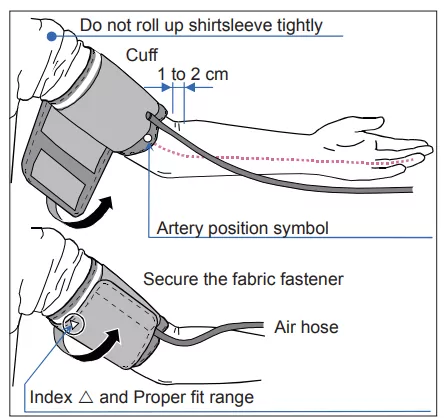
Do not roll up shirtsleeve tightly
Cuff
1 to 2 cm
Artery position symbol
Secure the fabric fastener
Air hose
Index and Proper fit range
6. Pairing with a Mobile Device
CAUTION
❏ In the unlikely event that this monitor causes radio
wave interference to a different wireless station, change
the location where this monitor is used or stop use
immediately.
❏ The communication distance between this monitor and
the mobile device is about 10 m. This distance is reduced
by the conditions in the surrounding environment, so
be sure to check that the distance is short enough for a
connection to be made after measurement is complete.
❏ Be sure to use in a location where visibility between
the two devices that you want to connect is good. The
connection distance is reduced by the structure of
buildings or other obstructions. In particular, connection
may be impossible when devices are used on either side
of reinforced concrete.
❏ Do not use Bluetooth
®
connection in the range of a
wireless LAN or other wireless devices, near devices that
emit radio waves such as microwaves, in locations where
there are many obstructions, or in other locations where
signal strength is weak. Doing so may result in frequent
loss of connection, very slow communication speeds and
errors.
❏ In this case, switch off the power supply to the device
that is not being used or use the monitor in a different
location.
❏ If the monitor does not connect normally when used near
a wireless station or broadcast station, use the monitor in
a different location.
❏ Walmart cannot accept liability for any damages incurred
due to impaired operation or data loss, etc that occur
through the use of this product.
❏ This product is not guaranteed to connect to all
Bluetooth
®
compatible devices.
6.1 Bluetooth
®
Transmission
Bluetooth
®
devices carry the Bluetooth
®
logo mark.
To connect with your mobile device – download and install
Equate Heart Chart app.

Follow the instructions in the app to connect.
6.2 Cautions for Pairing
❏ Only one device can be paired with this monitor at one
time. If the mobile device cannot receive measurement
data, try pairing again.
❏ The monitor is capable of registering 4 mobile devices.
❏ In case a 5th mobile device is registered, the monitor will
delete the oldest mobile device.
6.3 Pairing Procedure
1. Turn on Bluetooth
®
settings on your mobile device
2. Press and hold the START/STOP button until “Pr” is
displayed, and then release the button. The monitor will
be in a state that can be found by the mobile device for
about one minute.
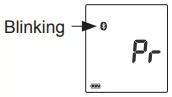
Blinking
3. If “E 10” is displayed or pairing is failed, remove the
batteries and try steps 1-3 again.
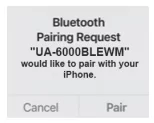
4. Accept the pairing request on the Equate Heart Chart
app.
6.4 Transmitting Temporarily Stored Data
In cases when the mobile device cannot receive
measurement data, the measurement data is temporarily
stored in the monitor memory. The data stored in the
memory is transmitted the next time a connection is
successfully made to the mobile device. A total of 90 sets
of measurement data can be stored per user. When the
amount of data exceeds 90, the oldest data is deleted and
the new data is stored.
6.5 Time
This monitor has a built-in clock. The date and time that a
measurement was taken is included in the measurement
data. The built-in clock is automatically adjusted by syncing
the clock of a mobile device. Sync of the time is done in the
timing Bluetooth
®
icon lights up, in the pairing process.
7. Measurements
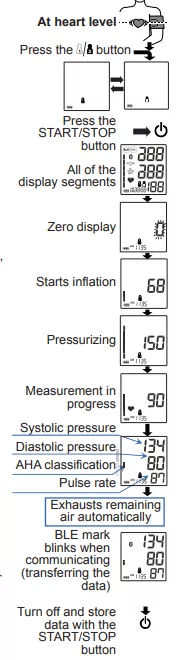
7.1. Normal Measurement
1. Place the cuff on the arm
at heart level (preferably
the left arm). Sit quietly
during measurement.
2. Press the button.
Select a user from user
and user .
3. Press the START/STOP
button. All of the display
segments are displayed.
Zero is displayed blinking
briey. Then the display
changes, as indicated in
the gure at the right, as
the measurement begins.
The cuff starts to inate.
It is normal for the cuff to
feel very tight. A pressure
bar indicator is displayed,
as in the gure at the right,
during ination.
Note: If you wish to stop in-
flation at any time, press the
START/STOP button again.
4. When ination is
complete, deation starts
automatically and the
blinks, indicating that
the measurement is in
progress. Once the pulse
is detected, the symbol
blinks with each pulse
beat.
Note: If an appropriate
pressure is not obtained, the
device starts to inflate again
automatically.
5. When the measurement
is complete, the systolic
and diastolic pressure
readings and pulse rate
are displayed. The cuff
exhausts the remaining air
and deates completely.
In case the monitor is
connected to a mobile
device, it’s possible to
transfer the measurement
data to the app, when the
measurement is done.
6. Press the START/STOP button again to turn off the power
and the measurement data is stored.
Note: This device has an automatic power shut-off function.
Allow at least 3 minutes between measurements on the
same person.
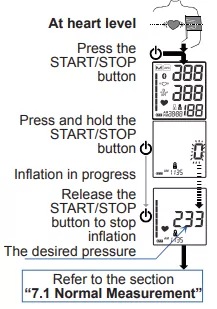
7.2. Measurement with the Desired Systolic Pressure
If re-inflation occurs repeatedly, or if your systolic pressure is
expected to exceed 230 mmHg, use this procedure.
1. Place the cuff on the arm at heart level (preferably the
left arm).
2. Press the START/STOP button.
3. While the zero blinks, press and hold the START/STOP
button until a number about 30 to 40 mmHg higher than
your expected systolic pressure appears.
4. When the desired number is reached, release the
START/STOP button to start measurement. Then
continue to measure your blood pressure as described on
the section “7.1 Normal Measurement”.
At heart level
Press the
START/STOP
button
Inflation in progress
Refer to the section
“7.1 Normal Measurement”
Press and hold the
START/STOP
button
Release the
START/STOP
button to stop
inflation
The desired pressure
7.3. Notes for Accurate Measurement
❏ Sit comfortably on a chair with your feet on the oor and
your back straight. Do not cross your legs.
❏ Place your arm on a table with your palm facing upward
and the cuff at the same level as your heart.
❏ Relax for about ve to ten minutes before measurement.
❏ Remain still and keep quiet during measurement.
❏ Do not smoke, exercise, or consume anything for at least
30 minutes beforehand.
❏ This device bases its measurements on the heartbeat. If
you have a very weak or irregular heartbeat, the device
may have difculty determining your blood pressure.
❏ Should the device detect a condition that is abnormal, it
will stop the measurement and display an error symbol.
Refer to the section “4 Symbols” for the description of
the symbols.
❏ Try to measure your blood pressure at the same time
every day.
❏ The automatic blood pressure monitor’s performance
may be affected by excessive temperature or humidity,
or altitude.
Press the
START/STOP
button
Measurement in
progress
All of the
display segments
Systolic pressure
Diastolic pressure
Zero display
Starts inflation
Pressurizing
Exhausts remaining
air automatically
AHA classification
Pulse rate
Turn off and store
data with the
START/STOP
button
Press the button
At heart level
BLE mark
blinks when
communicating
(transferring the
data)
1.5V Batteries
(LR6, R6P or AA)

Upper Arm Blood Pressure Monitor
6000 Series – Wireless
Instruction Manual
Original 1WMPD4004430A
❏
1. Introduction
The Equate upper arm blood pressure monitor is
designed for ease of use and accuracy. This device will
facilitate your daily blood pressure regimen.
❏ We recommend that you read through this manual
carefully before using the device for the rst time.
❏ This device is designed for use on adults, and is not
intended for infants and children.
❏ This device is designed for use to operate by yourself
in the home healthcare environment to measure blood
pressure and pulse rate of people for diagnosis.
2. Precautions
FCC Compliance Information
This device complies with Part 15 of FCC rules. Operation is
subject to the following two conditions:
1. This device may not cause harmful interference, and
2. This device must accept any interference received,
including interference that may cause undesired
operations.
❏ Precision components are used in the construction of
this device. Extremes in temperature, humidity, direct
sunlight, shock or dust should be avoided.
❏ Clean the device and cuff with a dry, soft cloth or a cloth
dampened with water and a neutral detergent. Never use
alcohol, benzene, thinner or other harsh chemicals to
clean the device or cuff.
❏ Avoid tightly folding the cuff or storing the hose tightly
twisted for long periods, as such treatment may shorten
the life of the components.
❏ Take care to avoid accidental strangulation of babies or
infants with the hose.
❏ Do not twist the air hose during measurement. This may
cause injury due to continuous cuff pressure.
❏ The device and cuff are not water resistant. Prevent rain,
sweat and water from soiling the device and cuff.
❏ Measurements may be distorted if the device is
used close to televisions, microwave ovens, cellular
telephones, X-ray or other devices with strong electrical
elds.
❏ Wireless communication devices, such as home
networking devices, mobile phones, cordless phones
and their base stations, and walkie-talkies can affect this
blood pressure monitor. Therefore, a minimum distance
of 12” / 30cm should be kept from such devices.
❏ When reusing the device, conrm that the device is clean.
❏ Used equipment, parts and batteries are not treated
as ordinary household waste, and must be disposed of
according to the applicable local regulations.
❏ Do not modify the device. It may cause accidents or
damage to the device.
❏ To measure blood pressure, the arm must be squeezed
by the cuff hard enough to temporarily stop blood ow
through the artery. This may cause pain, numbness or a
temporary red mark to the arm. This condition will appear
especially when measurement is repeated successively.
Any pain, numbness, or red marks will disappear with
time.
❏ Measuring blood pressure too frequently may cause harm
due to blood ow interference.
❏ Check that the operation of the device does not result in
prolonged impairment of blood circulation, when using the
device repeatedly.
❏ Clinical testing has not been conducted on newborn
infants and pregnant woman. Do not use on newborn
infants or pregnant woman.
❏ If you have had a mastectomy, please consult a doctor
before using the device.
❏ Do not let children use the device by themselves and do
not leave the device within the reach of children, it may
cause accidents or injury.
❏ There are small parts that may cause a choking hazard if
swallowed by mistake by infants.
❏ Do not touch the batteries and the patient at the same
time. That may result in electrical shock.
❏ Use of accessories not detailed in this manual may
compromise safety.
❏ Should the battery short-circuit, it may become hot and
potentially cause burns.
❏ Allow the device to adapt to the surrounding environment
before use (about one hour).
❏ Do not inate without wrapping the cuff around the upper
arm.
❏ Do not apply the cuff on an arm in which another medical
device is attached. The equipment may not function
properly.
❏ People who have a severe circulatory decit in the arm
must consult a doctor before using the device, to avoid
medical problems.
❏ Do not self-diagnose the measurement results and start
treatment by yourself. Always consult your doctor for
evaluation of the results and treatment.
❏ Do not apply the cuff on an arm with an unhealed wound.
❏ Do not apply the cuff on an arm receiving an intravenous
drip or blood transfusion. It may cause injury.
❏ Do not use the device where ammable gases such as
anesthetic gases are present. It may cause an explosion.
❏ Do not use the device in highly concentrated oxygen
environments, such as a high-pressure oxygen chamber
or an oxygen tent. It may cause a re or explosion.
3. Parts Identication
Proper fit range
Index
Artery position symbol
Air Hose
Display
START/STOP Button
Clock Button
Button
Air Socket
Air Connector Plug
Battery Compartment
Battery Cover
Arm Cuff
User Selection Button
Display
I.H.B. Symbol
Movement Error Symbol
Pressure Bar Indicator
Heart Symbol
AHA Classification Indicator
MEMORY Symbol
Average Symbol
Systolic Pressure
Diastolic Pressure
Pulse Rate
Date and Clock
AM/PM Symbol
Battery Indicator
Users
Bluetooth
®
Connection Symbol
4. Symbols
Symbols that appear on the display
Symbols Function/Meaning Recommended Action
Appears while
measurement is in
progress. It blinks
when the pulse is
detected.
Measurement is in
progress.
Remain as still as
possible.
I.H.B. symbol
appears when an
irregular heartbeat
is detected. It may
appear when a very
slight vibration like
shivering or shaking
is detected.
––––––––––––
Appears when a body
or arm movement is
detected.
––––––––––––
Previous
measurements stored
in memory.
––––––––––––
Average data
––––––––––––
FULL BATTERY
The battery power
indicator during
measurement.
––––––––––––
LOW BATTERY
The battery power is
low when it blinks.
Replace all batteries
with new ones when
the symbol blinks.
User1 and User2 ––––––––––––
AM Time in the morning ––––––––––––
PM Time in the afternoon ––––––––––––
The device is
connecting to the
Bluetooth
®
devices.
––––––––––––
Device internal error
Remove the Batteries
and press the START/
STOP button, and
then install the
batteries again. If the
error still appears,
contact customer
service.
Unstable blood
pressure due to
movement during
measurement.
Take another
measurement.
Remain still during
measurement.
The systolic and
diastolic values are
within 10 mmHg of
each other.
Apply the cuff
correctly, and take
another measurement.
The pressure value
did not increase
during the inflation.
The cuff is not applied
correctly.
PUL DISPLAY
ERROR The pulse is
not detected correctly
Pairing has not been
performed correctly.
Remove and reinstall
the batteries. Try
pairing again.
Pairing in progress. ––––––––––––
Symbols printed on the device case
Symbols Function/Meaning
Standby and Turn the device on
SYS Systolic blood pressure in mmHg
DIA Diastolic blood pressure in mmHg
PUL/min Pulse per minute
Battery installation guide
Direct current
Type BF: Device, cuff and tubing are
designed to provide special protection
against electrical shocks
SN Serial number
Refer to instruction manual/booklet
IP International protection symbol
Keep dry
Clock setting
Clock adjustment and memory recall
User selection
BT Bluetooth
®
address
Used equipment, parts and batteries are
not treated as ordinary household waste,
and must be disposed of according to the
applicable local regurations.
5. Using the Monitor
5.1. Installing / Changing The Batteries
1. Remove the battery cover.
2. Remove the used batteries from the battery compartment
to change them.
3. Insert new batteries into the battery compartment as
shown, taking care that the polarities (+) and (-) are
correct. Use only R6P, LR6 or AA batteries.
4. Replace the battery cover.
Step 1
Step 4
Step 3
Step 2
CAUTION
❏ Insert the batteries as shown in the battery compartment.
If installed incorrectly, the device will not work.
❏ When blinks on the display, replace all batteries
with new ones. Do not mix old and new batteries. It
may shorten the battery life, or cause the device to
malfunction. Replace the batteries two seconds or more
after the device turns off.
❏ does not appear when the batteries are drained.
❏ The battery life varies with the ambient temperature and
may be shorter at low temperatures.
❏ Generally, four new R6P batteries will last approximately
three months when used twice for measurement each
day.
❏ Use the specied batteries only. The batteries provided
with the device are for testing the device performance
and may have a limited life.
❏ Remove the batteries if the device is not to be used
for a long time. The batteries may leak and cause a
malfunction.
5.2. Connecting The Air Hose
Insert the air connector plug into the air socket firmly.
Air Hose
Air Connector Plug
Air Socket
5.3. Selecting The Correct Cuff
❏ Using the correct cuff size is important for an accurate
reading.
If the cuff is not the proper size, the reading may yield an
incorrect blood pressure value.
❏ The arm size is printed on each cuff.
❏ The index and proper t range, on the cuff, tell you if
you are applying the correct cuff. Refer to “5.4 Applying
The Arm Cuff”.
❏ If the index points outside of the range, contact
customer service.
❏ The arm cuff is a consumable. If it becomes worn,
purchase a new one.
Symbols printed on the cuff
Symbols Function/Meaning Recommended Action
Artery Position Symbol
Set the symbol on the
artery of the upper arm
or in line with the ring
finger on the inside of
the arm.
Index ––––––––––––
Catalog number ––––––––––––
Lot number ––––––––––––
5.4. Applying The Arm Cuff
1. Wrap the cuff around the upper arm, about 1 to 2 cm
above the inside of the elbow, as shown.
2. Place the cuff directly against the skin, as clothing may
cause a faint pulse and result in a measurement error.
3. Constriction of the upper arm, caused by rolling up a
shirtsleeve, may prevent accurate readings.
4. Conrm that the index points within the proper t
range.
Note: During measurement, it is normal for the cuff to feel
very tight. (Do not be alarmed).
Do not roll up shirtsleeve tightly
Cuff
1 to 2 cm
Artery position symbol
Secure the fabric fastener
Air hose
Index and Proper fit range
6. Pairing with a Mobile Device
CAUTION
❏ In the unlikely event that this monitor causes radio
wave interference to a different wireless station, change
the location where this monitor is used or stop use
immediately.
❏ The communication distance between this monitor and
the mobile device is about 10 m. This distance is reduced
by the conditions in the surrounding environment, so
be sure to check that the distance is short enough for a
connection to be made after measurement is complete.
❏ Be sure to use in a location where visibility between
the two devices that you want to connect is good. The
connection distance is reduced by the structure of
buildings or other obstructions. In particular, connection
may be impossible when devices are used on either side
of reinforced concrete.
❏ Do not use Bluetooth
®
connection in the range of a
wireless LAN or other wireless devices, near devices that
emit radio waves such as microwaves, in locations where
there are many obstructions, or in other locations where
signal strength is weak. Doing so may result in frequent
loss of connection, very slow communication speeds and
errors.
❏ In this case, switch off the power supply to the device
that is not being used or use the monitor in a different
location.
❏ If the monitor does not connect normally when used near
a wireless station or broadcast station, use the monitor in
a different location.
❏ Walmart cannot accept liability for any damages incurred
due to impaired operation or data loss, etc that occur
through the use of this product.
❏ This product is not guaranteed to connect to all
Bluetooth
®
compatible devices.
6.1 Bluetooth
®
Transmission
Bluetooth
®
devices carry the Bluetooth
®
logo mark.
To connect with your mobile device – download and install
Equate Heart Chart app.
Follow the instructions in the app to connect.
6.2 Cautions for Pairing
❏ Only one device can be paired with this monitor at one
time. If the mobile device cannot receive measurement
data, try pairing again.
❏ The monitor is capable of registering 4 mobile devices.
❏ In case a 5th mobile device is registered, the monitor will
delete the oldest mobile device.
6.3 Pairing Procedure
1. Turn on Bluetooth
®
settings on your mobile device
2. Press and hold the START/STOP button until “Pr” is
displayed, and then release the button. The monitor will
be in a state that can be found by the mobile device for
about one minute.
Blinking
3. If “E 10” is displayed or pairing is failed, remove the
batteries and try steps 1-3 again.
4. Accept the pairing request on the Equate Heart Chart
app.
6.4 Transmitting Temporarily Stored Data
In cases when the mobile device cannot receive
measurement data, the measurement data is temporarily
stored in the monitor memory. The data stored in the
memory is transmitted the next time a connection is
successfully made to the mobile device. A total of 90 sets
of measurement data can be stored per user. When the
amount of data exceeds 90, the oldest data is deleted and
the new data is stored.
6.5 Time
This monitor has a built-in clock. The date and time that a
measurement was taken is included in the measurement
data. The built-in clock is automatically adjusted by syncing
the clock of a mobile device. Sync of the time is done in the
timing Bluetooth
®
icon lights up, in the pairing process.
7. Measurements
7.1. Normal Measurement
1. Place the cuff on the arm
at heart level (preferably
the left arm). Sit quietly
during measurement.
2. Press the button.
Select a user from user
and user .
3. Press the START/STOP
button. All of the display
segments are displayed.
Zero is displayed blinking
briey. Then the display
changes, as indicated in
the gure at the right, as
the measurement begins.
The cuff starts to inate.
It is normal for the cuff to
feel very tight. A pressure
bar indicator is displayed,
as in the gure at the right,
during ination.
Note: If you wish to stop in-
flation at any time, press the
START/STOP button again.
4. When ination is
complete, deation starts
automatically and the
blinks, indicating that
the measurement is in
progress. Once the pulse
is detected, the symbol
blinks with each pulse
beat.
Note: If an appropriate
pressure is not obtained, the
device starts to inflate again
automatically.
5. When the measurement
is complete, the systolic
and diastolic pressure
readings and pulse rate
are displayed. The cuff
exhausts the remaining air
and deates completely.
In case the monitor is
connected to a mobile
device, it’s possible to
transfer the measurement
data to the app, when the
measurement is done.
6. Press the START/STOP button again to turn off the power
and the measurement data is stored.
Note: This device has an automatic power shut-off function.
Allow at least 3 minutes between measurements on the
same person.
7.2. Measurement with the Desired Systolic Pressure
If re-inflation occurs repeatedly, or if your systolic pressure is
expected to exceed 230 mmHg, use this procedure.
1. Place the cuff on the arm at heart level (preferably the
left arm).
2. Press the START/STOP button.
3. While the zero blinks, press and hold the START/STOP
button until a number about 30 to 40 mmHg higher than
your expected systolic pressure appears.
4. When the desired number is reached, release the
START/STOP button to start measurement. Then
continue to measure your blood pressure as described on
the section “7.1 Normal Measurement”.
At heart level
Press the
START/STOP
button
Inflation in progress
Refer to the section
“7.1 Normal Measurement”
Press and hold the
START/STOP
button
Release the
START/STOP
button to stop
inflation
The desired pressure
7.3. Notes for Accurate Measurement
❏ Sit comfortably on a chair with your feet on the oor and
your back straight. Do not cross your legs.
❏ Place your arm on a table with your palm facing upward
and the cuff at the same level as your heart.
❏ Relax for about ve to ten minutes before measurement.
❏ Remain still and keep quiet during measurement.
❏ Do not smoke, exercise, or consume anything for at least
30 minutes beforehand.
❏ This device bases its measurements on the heartbeat. If
you have a very weak or irregular heartbeat, the device
may have difculty determining your blood pressure.
❏ Should the device detect a condition that is abnormal, it
will stop the measurement and display an error symbol.
Refer to the section “4 Symbols” for the description of
the symbols.
❏ Try to measure your blood pressure at the same time
every day.
❏ The automatic blood pressure monitor’s performance
may be affected by excessive temperature or humidity,
or altitude.
Press the
START/STOP
button
Measurement in
progress
All of the
display segments
Systolic pressure
Diastolic pressure
Zero display
Starts inflation
Pressurizing
Exhausts remaining
air automatically
AHA classification
Pulse rate
Turn off and store
data with the
START/STOP
button
Press the button
At heart level
BLE mark
blinks when
communicating
(transferring the
data)
1.5V Batteries
(LR6, R6P or AA)

8. Recalling the Memory Data
The device automatically stores up to 90 x 2 blood pressure
and pulse measurements in memory. Data stored in memory
are assigned a data number in the order of the newest to
the oldest. The oldest data displays as “ “. The symbol
in the upper left corner of the display indicates that you are
viewing previous data stored in memory.
8.1. Recalling Data
1. Press the button.
2. Select the user you want
to review the memory for
by pressing the button.
Select a user from user
or user .
3. Press the button. The
average of the last three
measurements is displayed.
(If no data, “0” is displayed.
Press the or START/
STOP button to turn device
off.)
4. Each time the button is
pressed, the memory data
is displayed as follows.
Most recent data (ex. no.
35). Three seconds after
the data number displays,
the measurement data is
displayed.
Last data (ex. no.1).
Three seconds after the
data number displays,
the measurement data is
displayed.
5. After the last data is
displayed, press the
button to return the average
display of the last three measurements.
6. Press the START/STOP button to turn the device off.
After one minute of non-operation the device will turn off
automatically.
7. Each time the button is pressed, the user is changed
and the average of the last three measurements for that
user is displayed.
Note: If this device stores the two measurements, the
average of the two measurements is displayed. If this device
stores only one measurement, this is displayed.
8.2. Clearing Data
1. Press button to move to the memory display mode.
2. Select the user you want to delete with user button.
3. Turn off the power pressing START/STOP button.
4. Press and hold button.
5. Memory icon blinks and the data is deleted.
6. The device power will be turned off automatically.
9. Setting Date and Time
Set the date and time prior to use.
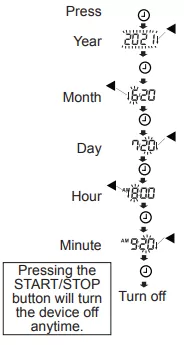
1. Press the button, the year starts blinking.
2. Select the year using the
button. Press the button
to set the current year
and move to month / day
selection. The date can be
set anywhere between the
years 2021 and 2059.
3. Select the month using
the button. Press the
button to set the current
month and move to day
selection.
4. Select the day using the
button. Press the button
to set the current day and
move to hour / minute
selection.
5. Select the hour using the
button. Press the
button to set the current
hour and move to minute
selection.
6. Select the minute using
the button. Press the
button to turn the device
off.
Note: After three minutes of non-operation, the device will
turn off automatically.
When the clock has not been set, the clock display indicates
dashes as shown to the right.
When using the device for the first time, the
clock is not adjusted. When the device is
disconnected from the power supply, the set
date and time will be erased. When the set date
and time is erased, please adjust again.
The clock of the monitor can sync to the
clock of the mobile device during Bluetooth
®
communication.
10. What is an Irregular Heartbeat
The blood pressure monitor provides a blood pressure and
pulse rate measurement even when an irregular heartbeat
occurs. An irregular heartbeat is defined as a heartbeat that
varies from the average of all heartbeats during the blood
pressure measurement. It is important that you are relaxed,
remain still and do not talk during measurements.
Note: We recommend contacting your physician if you see
this indicator frequently.
11. Pressure Bar Indicator
The indicator monitors the progress of pressure during
measurement.
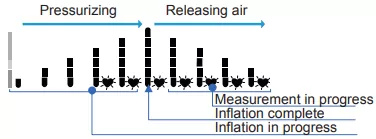
Pressurizing Releasing air
Measurement in progress
Inflation complete
Inflation in progress
12. About Blood Pressure
What is Blood Pressure?
Blood pressure is the force exerted by blood against
the walls of the arteries. Systolic pressure occurs when
the heart contracts. Diastolic pressure occurs when the
heart expands. Blood pressure is measured in millimeters
of mercury (mmHg). One’s natural blood pressure is
represented by the fundamental pressure, which is
measured first thing in the morning while one is still at rest
and before eating.
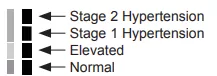
13. AHA Classication Indicator
Each segment of the bar indicator corresponds to the AHA
blood pressure classification.
Stage 2 Hypertension
Stage 1 Hypertension
Normal
AHA Classification Indicator
The indicator displays
a segment, based
on the current data,
corresponding to the
AHA classification.
:
Elevated
1
14. Troubleshooting
Problem
Possible
Reason
Recommended Action
Nothing
appears
on the
display,
even when
the power
is turned
on.
Batteries are
drained.
Replace all batteries with
new ones.
Battery terminals
are not in the
correct position.
Reinstall the batteries
with negative and positive
terminals matching those
indicated on the battery
compartment.
The cuff
does not
inflate.
Battery voltage
is too low.
blinks. If
the batteries
are drained
completely, the
symbol does not
appear.
Replace all batteries with
new ones.
The device
does not
measure.
Readings
are too
high or too
low.
The cuff is not
applied properly.
Apply the cuff correctly.
You moved
your arm or
body during
measurement.
Make sure you remain
still and quiet during
measurement.
The cuff position
is not correct.
Sit comfortably and still.
Place your arm on a table
with your palm facing
upward and the cuff at the
same level as your heart.
––––––––––––
If you have a very weak
or irregular heartbeat, the
device may have difficulty
in determining your blood
pressure.
Other
The value is
different from
that measured
at a clinic or
doctor’s office.
At a clinic or doctor’s office,
apprehension may cause
an elevated reading. Home
measurement reduces the
effects of outside influences
on blood pressure readings
& supplements the doctor’s
readings.
––––––––––––
Remove the batteries. Place
them back properly and take
another measurement.
Note: If the actions described above do not solve the
problem, contact customer service. Do not attempt to open
or repair this product, as any attempt to do so will make your
warranty invalid.
15. Maintenance
Do not open the device. It uses delicate electrical
components and an intricate air unit that could be damaged.
If you cannot fix the problem using the troubleshooting
instructions, contact customer service.
16. Satisfaction Guaranteed
Satisfaction guaranteed – Or we’ll replace it or
give you your money back. For questions or
comments or to report an undesired reaction
or side effect, please call 1-888-287-1915.
Walmart Inc.
702 S.W. 8th St.
Bentonville, AR 72716
www.walmart.com
1-888-287-1915
Equate wordmark and logos are trademarks of Walmart
Apollo LLC.
The Bluetooth word mark and logos are registered
trademarks of Bluetooth SIG, Inc.
17. Technical Data
Type UA-6000BLEWM
Measurement method Oscillometric measurement
Measurement range Pressure: 0 - 299 mmHg
Systolic pressure: 60 - 279 mmHg
Diastolic pressure: 40 - 200 mmHg
Pulse: 40 - 180 beats/minute
Measurement
accuracy
Pressure: ±3 mmHg
Pulse: ±5 %
Power Supply 4 x 1.5V batteries (R6P, LR6 or AA)
Number of measurements Approx. 700 LR6 or AA (alkaline batteries)
Approx. 200 R6P (manganese batteries)
With pressure value 180 mmHg, room temperature 23 °C.
Classification Internally powered ME equipment (by batteries) Continuous operation mode
Clinical test According to ISO81060-2:2013
In the clinical validation study, K5 was used on 85 subjects for determination of diastolic
blood pressure.
EMD IEC 60601-1-2: 2014
Wireless Communication Bluetooth: Ver.5.1LE BLP
Frequency band: 2402 MHz to 2480 MHz
Maximum RF output power: < 10 dBm
Modulation: GFSK
Supported Data: Systolic Pressure, Diastolic Pressure, Pulse Rate
Communication distance: About 10 m (This distance is reduced by the conditions in the
surrounding environment)
Paired device: 4 devices
Memory 90 measurements per user
Operating conditions +10 to +40 °C/15 to 85 %RH/800 to 1060 hPa
Transport/Storage conditions - 20 to +60 °C/10 to 95 %RH/700 to 1060 hPa
Cuff Circumference UA-420WM: 8.6-16.5” (22 to 42 cm)
Dimensions Approx. 4.33”[W]×2.80”[H]×5.47”[D] (110[W]×71[H]×139[D] mm)
Weight Approx. 10.58oz (300g),
excluding the batteries
Ingress protection Device: IP20
Applied part
Cuff: Type BF
Useful life Device: 5 years (when used six times a day)
Cuff: 2 years (when used six times a day)
Note: Specifications are subject to change without prior notice. IP classification is the degrees of protection provided by
enclosures in accordance with IEC 60529. This device is protected against solid foreign objects of 12 mm diameter and greater
such as a finger. This device is not protected against water
FCC Caution
Changes or modifications not expressly approved by the party responsible for compliance could void the user’s authority to
operate the equipment.
This transmitter must not be co-located or operated in conjunction with any other antenna or transmitter.
This equipment complies with FCC radiation exposure limits set forth for an uncontrolled environment and meets the FCC
radio frequency (RF) Exposure Guidelines in Supplement C to OET65. This equipment has very low levels of RF energy that
it deemed to comply without maximum permissive exposure evaluation (MPE). It is recommended that this equipment be
installed and operated keeping the radiator at least 20 cm or more away fro the user’s body (excluding extremities: hands,
writs, feet and ankles).
Note: This equipment has been tested and found to comply with the limits for Class B digital device, pursuant to part 15 of the
FCC Rules.
These limits are designed to provide reasonable protection against harmful interference in a residential installation. This
equipment generates, uses and can radiate radio frequency energy and, if not installed and used in accordance with the
instructions, may cause harmful interference to radio communications. However, there is no guarantee that interference will not
occur in a particular installation. It this equipment does cause harmful interference to radio or television reception, which can be
determined by turning the equipment off and on, the user is encouraged to try to correct the interference by one or more of the
following measures:
❏ Reorient or relocate the receiving antenna.
❏ Increase the separation between the equipment and receiver.
❏ Connect the equipment into an outlet on a circuit different from that to which the receiver is connected.
❏ Consult the dealer or an experienced radio/TV technician for help.
EMD Technical Data Battery-operated Blood Pressure Monitor
Medical Electrical Equipment needs special precautions regarding EMD and needs to be installed and put into service
according to the EMD information provided in the following. Portable and mobile RF communication equipment (e.g. cell
phones) can affect Medical Electrical Equipment. The use of accessories and cables other than those specified may result in
increased emissions or decreased immunity of the unit.
Table 1 - EMISSION Limits
Phenomenon Compliance
Conducted and radiated RF EMISSION
CISPR 11
Group 1, Class B
Table 2 - IMMUNITY TEST LEVELS : Enclosure Port
Phenomenon IMMUNITY TEST LEVELS
Electrostatic discharge
IEC 61000-4-2
±8 kV contact
±2 kV, ±4 kV, ±8 kV, ±15 kV air
Radiated RF EM fields
IEC 61000-4-3
10 V/m
80 MHz - 2.7 GHz
80 % AM at 1 kHz
Proximity fields from RF wireless communications equipment
IEC 61000-4-3
See table 3
Rated power frequency magnetic fields
IEC 61000-4-8
30 A/m
50 Hz or 60 Hz
Table 3 - Test specifications for ENCLOSURE PORT IMMUNITY to RF wireless communications equipment
Test
frequency
(MHz)
Band
(MHz)
Service Modulation
Maximum
power (W)
Distance (m)
IMMUNITY
TEST LEVEL
(V/m)
385 380 - 390 TETRA 400
Pulse modulation
18 Hz
1.8 0.3 27
450 430 - 470
GMRS 460
FRS 460
FM
±5 kHz deviation
1 kHz sine
2 0.3 28
710
704 - 787 LTE Band 13, 17
Pulse modulation
217 Hz
0.2 0.3 9745
780
810
800 - 960
GSM 800/900
TETRA 800
iDEN 820
CDMA 850
LTE Band 5
Pulse modulation
18 Hz
2 0.3 28
870
930
1720
1700 - 1990
GSM 1800
CDMA 1900
GSM 1900
DECT
LTE Band 1, 3, 4, 25
UMTS
Pulse modulation
217 Hz
2 0.3 28
1845
1970
2450 2400 - 2570
Bluetooth
®
WLAN 802.11 b/g/n
RFID 2450
LTE Band 7
Pulse modulation
217 Hz
2 0.3 28
5240
5100 - 5800 WLAN 802.11 a/n
Pulse modulation
217 Hz
0.2 0.3 95500
5785
Average systolic
Average diastolic
Average pulse
Press the button
Average of the last 3 data
Systolic
Diastolic
Pulse
Systolic
Diastolic
Pulse
Most recent data
Last data (oldest)
Return to average
of the last 3 data
User
memory data
User
average data
Press
Year
Month
Day
Hour
Minute
Turn off
Pressing the
START/STOP
button will turn
the device off
anytime.
-/--
-:--

8. Recalling the Memory Data
The device automatically stores up to 90 x 2 blood pressure
and pulse measurements in memory. Data stored in memory
are assigned a data number in the order of the newest to
the oldest. The oldest data displays as “ “. The symbol
in the upper left corner of the display indicates that you are
viewing previous data stored in memory.
8.1. Recalling Data
1. Press the button.
2. Select the user you want
to review the memory for
by pressing the button.
Select a user from user
or user .
3. Press the button. The
average of the last three
measurements is displayed.
(If no data, “0” is displayed.
Press the or START/
STOP button to turn device
off.)
4. Each time the button is
pressed, the memory data
is displayed as follows.
Most recent data (ex. no.
35). Three seconds after
the data number displays,
the measurement data is
displayed.
Last data (ex. no.1).
Three seconds after the
data number displays,
the measurement data is
displayed.
5. After the last data is
displayed, press the
button to return the average
display of the last three measurements.
6. Press the START/STOP button to turn the device off.
After one minute of non-operation the device will turn off
automatically.
7. Each time the button is pressed, the user is changed
and the average of the last three measurements for that
user is displayed.
Note: If this device stores the two measurements, the
average of the two measurements is displayed. If this device
stores only one measurement, this is displayed.
8.2. Clearing Data
1. Press button to move to the memory display mode.
2. Select the user you want to delete with user button.
3. Turn off the power pressing START/STOP button.
4. Press and hold button.
5. Memory icon blinks and the data is deleted.
6. The device power will be turned off automatically.
9. Setting Date and Time
Set the date and time prior to use.
1. Press the button, the year starts blinking.
2. Select the year using the
button. Press the button
to set the current year
and move to month / day
selection. The date can be
set anywhere between the
years 2021 and 2059.
3. Select the month using
the button. Press the
button to set the current
month and move to day
selection.
4. Select the day using the
button. Press the button
to set the current day and
move to hour / minute
selection.
5. Select the hour using the
button. Press the
button to set the current
hour and move to minute
selection.
6. Select the minute using
the button. Press the
button to turn the device
off.
Note: After three minutes of non-operation, the device will
turn off automatically.
When the clock has not been set, the clock display indicates
dashes as shown to the right.
When using the device for the first time, the
clock is not adjusted. When the device is
disconnected from the power supply, the set
date and time will be erased. When the set date
and time is erased, please adjust again.
The clock of the monitor can sync to the
clock of the mobile device during Bluetooth
®
communication.
10. What is an Irregular Heartbeat
The blood pressure monitor provides a blood pressure and
pulse rate measurement even when an irregular heartbeat
occurs. An irregular heartbeat is defined as a heartbeat that
varies from the average of all heartbeats during the blood
pressure measurement. It is important that you are relaxed,
remain still and do not talk during measurements.
Note: We recommend contacting your physician if you see
this indicator frequently.
11. Pressure Bar Indicator
The indicator monitors the progress of pressure during
measurement.
Pressurizing Releasing air
Measurement in progress
Inflation complete
Inflation in progress
12. About Blood Pressure
What is Blood Pressure?
Blood pressure is the force exerted by blood against
the walls of the arteries. Systolic pressure occurs when
the heart contracts. Diastolic pressure occurs when the
heart expands. Blood pressure is measured in millimeters
of mercury (mmHg). One’s natural blood pressure is
represented by the fundamental pressure, which is
measured first thing in the morning while one is still at rest
and before eating.
13. AHA Classication Indicator
Each segment of the bar indicator corresponds to the AHA
blood pressure classification.
Stage 2 Hypertension
Stage 1 Hypertension
Normal
AHA Classification Indicator
The indicator displays
a segment, based
on the current data,
corresponding to the
AHA classification.
:
Elevated
1
14. Troubleshooting
Problem
Possible
Reason
Recommended Action
Nothing
appears
on the
display,
even when
the power
is turned
on.
Batteries are
drained.
Replace all batteries with
new ones.
Battery terminals
are not in the
correct position.
Reinstall the batteries
with negative and positive
terminals matching those
indicated on the battery
compartment.
The cuff
does not
inflate.
Battery voltage
is too low.
blinks. If
the batteries
are drained
completely, the
symbol does not
appear.
Replace all batteries with
new ones.
The device
does not
measure.
Readings
are too
high or too
low.
The cuff is not
applied properly.
Apply the cuff correctly.
You moved
your arm or
body during
measurement.
Make sure you remain
still and quiet during
measurement.
The cuff position
is not correct.
Sit comfortably and still.
Place your arm on a table
with your palm facing
upward and the cuff at the
same level as your heart.
––––––––––––
If you have a very weak
or irregular heartbeat, the
device may have difficulty
in determining your blood
pressure.
Other
The value is
different from
that measured
at a clinic or
doctor’s office.
At a clinic or doctor’s office,
apprehension may cause
an elevated reading. Home
measurement reduces the
effects of outside influences
on blood pressure readings
& supplements the doctor’s
readings.
––––––––––––
Remove the batteries. Place
them back properly and take
another measurement.
Note: If the actions described above do not solve the
problem, contact customer service. Do not attempt to open
or repair this product, as any attempt to do so will make your
warranty invalid.
15. Maintenance
Do not open the device. It uses delicate electrical
components and an intricate air unit that could be damaged.
If you cannot fix the problem using the troubleshooting
instructions, contact customer service.
16. Satisfaction Guaranteed
Satisfaction guaranteed – Or we’ll replace it or
give you your money back. For questions or
comments or to report an undesired reaction
or side effect, please call 1-888-287-1915.
Walmart Inc.
702 S.W. 8th St.
Bentonville, AR 72716
www.walmart.com
1-888-287-1915
Equate wordmark and logos are trademarks of Walmart
Apollo LLC.
The Bluetooth word mark and logos are registered
trademarks of Bluetooth SIG, Inc.
17. Technical Data
Type UA-6000BLEWM
Measurement method Oscillometric measurement
Measurement range Pressure: 0 - 299 mmHg
Systolic pressure: 60 - 279 mmHg
Diastolic pressure: 40 - 200 mmHg
Pulse: 40 - 180 beats/minute
Measurement
accuracy
Pressure: ±3 mmHg
Pulse: ±5 %
Power Supply 4 x 1.5V batteries (R6P, LR6 or AA)
Number of measurements Approx. 700 LR6 or AA (alkaline batteries)
Approx. 200 R6P (manganese batteries)
With pressure value 180 mmHg, room temperature 23 °C.
Classification Internally powered ME equipment (by batteries) Continuous operation mode
Clinical test According to ISO81060-2:2013
In the clinical validation study, K5 was used on 85 subjects for determination of diastolic
blood pressure.
EMD IEC 60601-1-2: 2014
Wireless Communication Bluetooth: Ver.5.1LE BLP
Frequency band: 2402 MHz to 2480 MHz
Maximum RF output power: < 10 dBm
Modulation: GFSK
Supported Data: Systolic Pressure, Diastolic Pressure, Pulse Rate
Communication distance: About 10 m (This distance is reduced by the conditions in the
surrounding environment)
Paired device: 4 devices
Memory 90 measurements per user
Operating conditions +10 to +40 °C/15 to 85 %RH/800 to 1060 hPa
Transport/Storage conditions - 20 to +60 °C/10 to 95 %RH/700 to 1060 hPa
Cuff Circumference UA-420WM: 8.6-16.5” (22 to 42 cm)
Dimensions Approx. 4.33”[W]×2.80”[H]×5.47”[D] (110[W]×71[H]×139[D] mm)
Weight Approx. 10.58oz (300g),
excluding the batteries
Ingress protection Device: IP20
Applied part
Cuff: Type BF
Useful life Device: 5 years (when used six times a day)
Cuff: 2 years (when used six times a day)
Note: Specifications are subject to change without prior notice. IP classification is the degrees of protection provided by
enclosures in accordance with IEC 60529. This device is protected against solid foreign objects of 12 mm diameter and greater
such as a finger. This device is not protected against water
FCC Caution
Changes or modifications not expressly approved by the party responsible for compliance could void the user’s authority to
operate the equipment.
This transmitter must not be co-located or operated in conjunction with any other antenna or transmitter.
This equipment complies with FCC radiation exposure limits set forth for an uncontrolled environment and meets the FCC
radio frequency (RF) Exposure Guidelines in Supplement C to OET65. This equipment has very low levels of RF energy that
it deemed to comply without maximum permissive exposure evaluation (MPE). It is recommended that this equipment be
installed and operated keeping the radiator at least 20 cm or more away fro the user’s body (excluding extremities: hands,
writs, feet and ankles).
Note: This equipment has been tested and found to comply with the limits for Class B digital device, pursuant to part 15 of the
FCC Rules.
These limits are designed to provide reasonable protection against harmful interference in a residential installation. This
equipment generates, uses and can radiate radio frequency energy and, if not installed and used in accordance with the
instructions, may cause harmful interference to radio communications. However, there is no guarantee that interference will not
occur in a particular installation. It this equipment does cause harmful interference to radio or television reception, which can be
determined by turning the equipment off and on, the user is encouraged to try to correct the interference by one or more of the
following measures:
❏ Reorient or relocate the receiving antenna.
❏ Increase the separation between the equipment and receiver.
❏ Connect the equipment into an outlet on a circuit different from that to which the receiver is connected.
❏ Consult the dealer or an experienced radio/TV technician for help.
EMD Technical Data Battery-operated Blood Pressure Monitor
Medical Electrical Equipment needs special precautions regarding EMD and needs to be installed and put into service
according to the EMD information provided in the following. Portable and mobile RF communication equipment (e.g. cell
phones) can affect Medical Electrical Equipment. The use of accessories and cables other than those specified may result in
increased emissions or decreased immunity of the unit.
Table 1 - EMISSION Limits
Phenomenon Compliance
Conducted and radiated RF EMISSION
CISPR 11
Group 1, Class B
Table 2 - IMMUNITY TEST LEVELS : Enclosure Port
Phenomenon IMMUNITY TEST LEVELS
Electrostatic discharge
IEC 61000-4-2
±8 kV contact
±2 kV, ±4 kV, ±8 kV, ±15 kV air
Radiated RF EM fields
IEC 61000-4-3
10 V/m
80 MHz - 2.7 GHz
80 % AM at 1 kHz
Proximity fields from RF wireless communications equipment
IEC 61000-4-3
See table 3
Rated power frequency magnetic fields
IEC 61000-4-8
30 A/m
50 Hz or 60 Hz
Table 3 - Test specifications for ENCLOSURE PORT IMMUNITY to RF wireless communications equipment
Test
frequency
(MHz)
Band
(MHz)
Service Modulation
Maximum
power (W)
Distance (m)
IMMUNITY
TEST LEVEL
(V/m)
385 380 - 390 TETRA 400
Pulse modulation
18 Hz
1.8 0.3 27
450 430 - 470
GMRS 460
FRS 460
FM
±5 kHz deviation
1 kHz sine
2 0.3 28
710
704 - 787 LTE Band 13, 17
Pulse modulation
217 Hz
0.2 0.3 9745
780
810
800 - 960
GSM 800/900
TETRA 800
iDEN 820
CDMA 850
LTE Band 5
Pulse modulation
18 Hz
2 0.3 28
870
930
1720
1700 - 1990
GSM 1800
CDMA 1900
GSM 1900
DECT
LTE Band 1, 3, 4, 25
UMTS
Pulse modulation
217 Hz
2 0.3 28
1845
1970
2450 2400 - 2570
Bluetooth
®
WLAN 802.11 b/g/n
RFID 2450
LTE Band 7
Pulse modulation
217 Hz
2 0.3 28
5240
5100 - 5800 WLAN 802.11 a/n
Pulse modulation
217 Hz
0.2 0.3 95500
5785
Average systolic
Average diastolic
Average pulse
Press the button
Average of the last 3 data
Systolic
Diastolic
Pulse
Systolic
Diastolic
Pulse
Most recent data
Last data (oldest)
Return to average
of the last 3 data
User
memory data
User
average data
Press
Year
Month
Day
Hour
Minute
Turn off
Pressing the
START/STOP
button will turn
the device off
anytime.
-/--
-:--