
User Manual
Narwal Wet Dry Vacuum S10 Pro
Model: YJSC001
TM
Product At A Glance
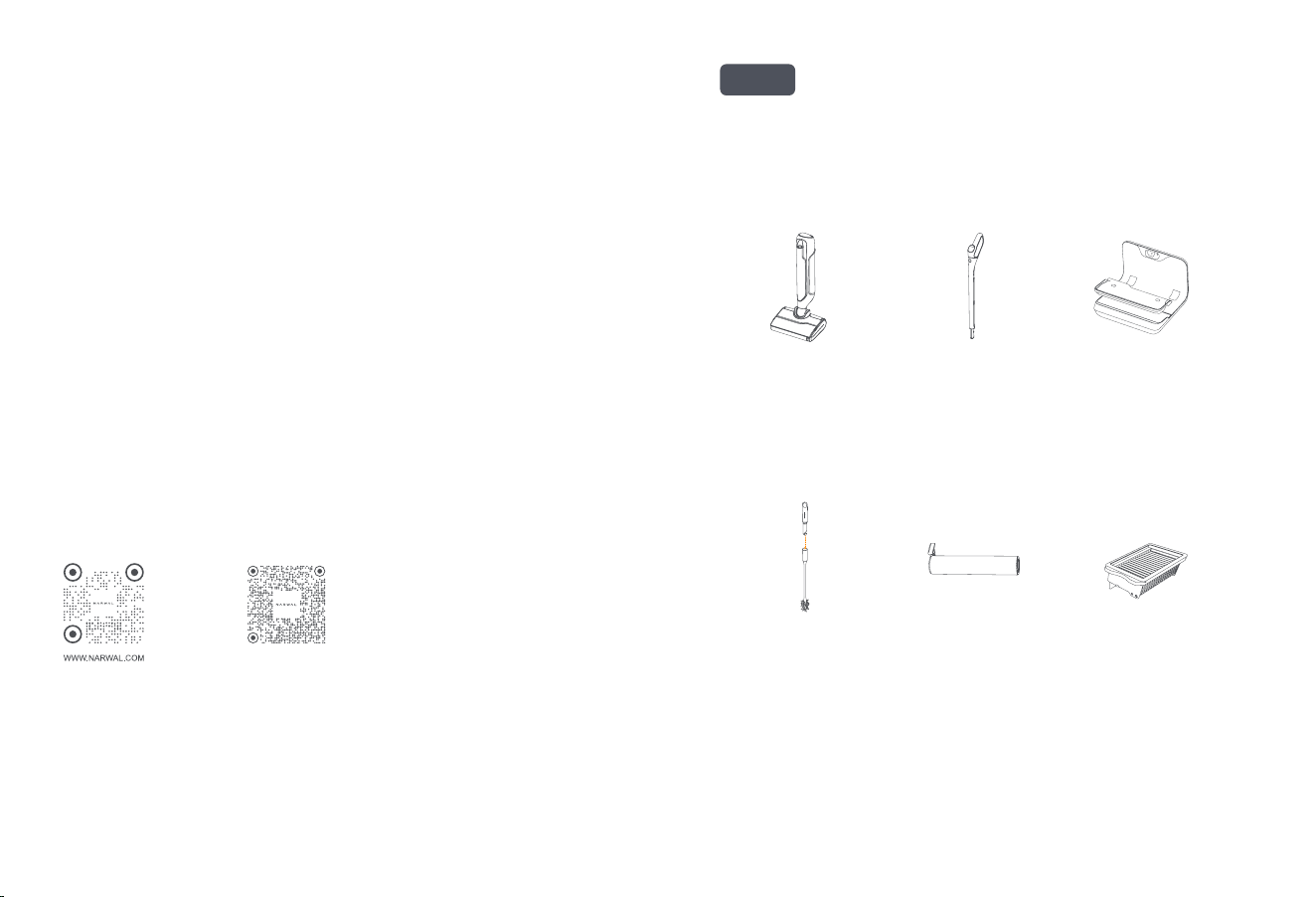
Check List
Wet Dry Vaccum
Main unit *1 (including
roller brush *1, filter *1)
Cleaning brush *1
(including a hook knife)
(consumable items)
Accessories
Roller brush *1
(consumable items)
Filter *1
(consumable items)
Handle *1 Self-cleaning base *1
(including cleaning tray *1)
Dear users:
Thank you for purchasing Narwal products. To access comprehensive support from Narwal, you are recommended to read carefully
the manual and illustrations before using the product. Please keep the manual properly.
The manual may be updated from time to time based on product updates and user feedback. Please scan the QR code below to
browse the oicial website and view the latest version.
In case of any problem in using the product, please contact Narwal after-sales customer service through the following ways:
Customer service email:
[email protected](North America)
[email protected](Germany)
[email protected](Italy)
[email protected](Japan)
[email protected](France)
[email protected](South Korea)
[email protected](Spain)
*For other countries, please refer to the after-sales contact information provided by your local vendors
We wish you a pleasant experience!
Electronic user manual
電子取扱説明書
전자�설명서
Elektronisches Benutzerhandbuch
Manuale Utente Eleronico
Manual de usuario electrónico
Manuel d'utilisation électronique
Электронное руководство пользователя
คู่มืออิเล็กทรอนิกส์
Sổ tay điện tử
ינורטקלאךירדמ
Elektronik Kılavuz
Instrukcja elektroniczna
01
en
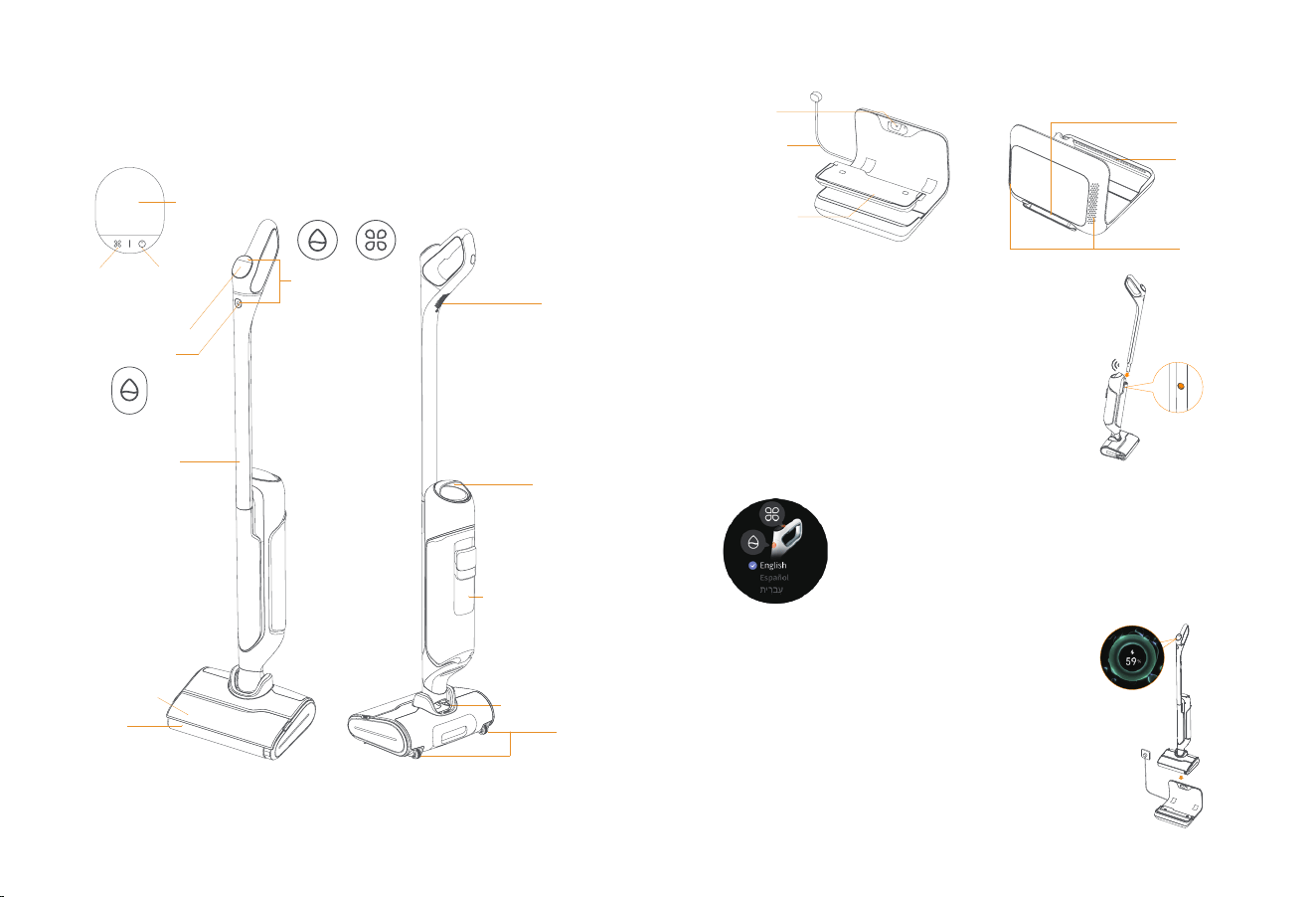
How to charge the product
After the self-cleaning base is connected to a power supply, put the wet
dry vacuum on the base. When it rings ding-dong, the screen shows the
charging animation, and charging starts.
Language Switch Instructions
On the initial startup, a language switch reminder page will appear. Press
the Mode buon and Self-cleaning buon simultaneously to change the
system language.
How to Use
First-time Use
How to install the handle
Insert the end of the handle vertically into the main unit until it clicks
into place. Make sure the handle is firm without loosening.
Main Parts
Wet Dry Vaccum
Self-Cleaning buon
Handle
Roller brush cover
Roller brush
Wheel
Clean water tank
Dirty water tank,
filter,solid waste box
Lift handle
Speaker
Power cord
Cleaning tray
Winding post
Hot air outlet
Side air inlet
Charging
contacts
LCD screen and buons
Mode buon
Power On/O buon
Screen
Disassembly Instructions:
Please use a hard object to
insert into the hole on the
side of the machine and keep
pressing while pulling up the
handle to remove it.
Click
Self-cleaning base
On the initial startup, a
language switch reminder
page will appear. Press the
Mode buon and
Self-cleaning buon
simultaneously to change
the system language.
+
02
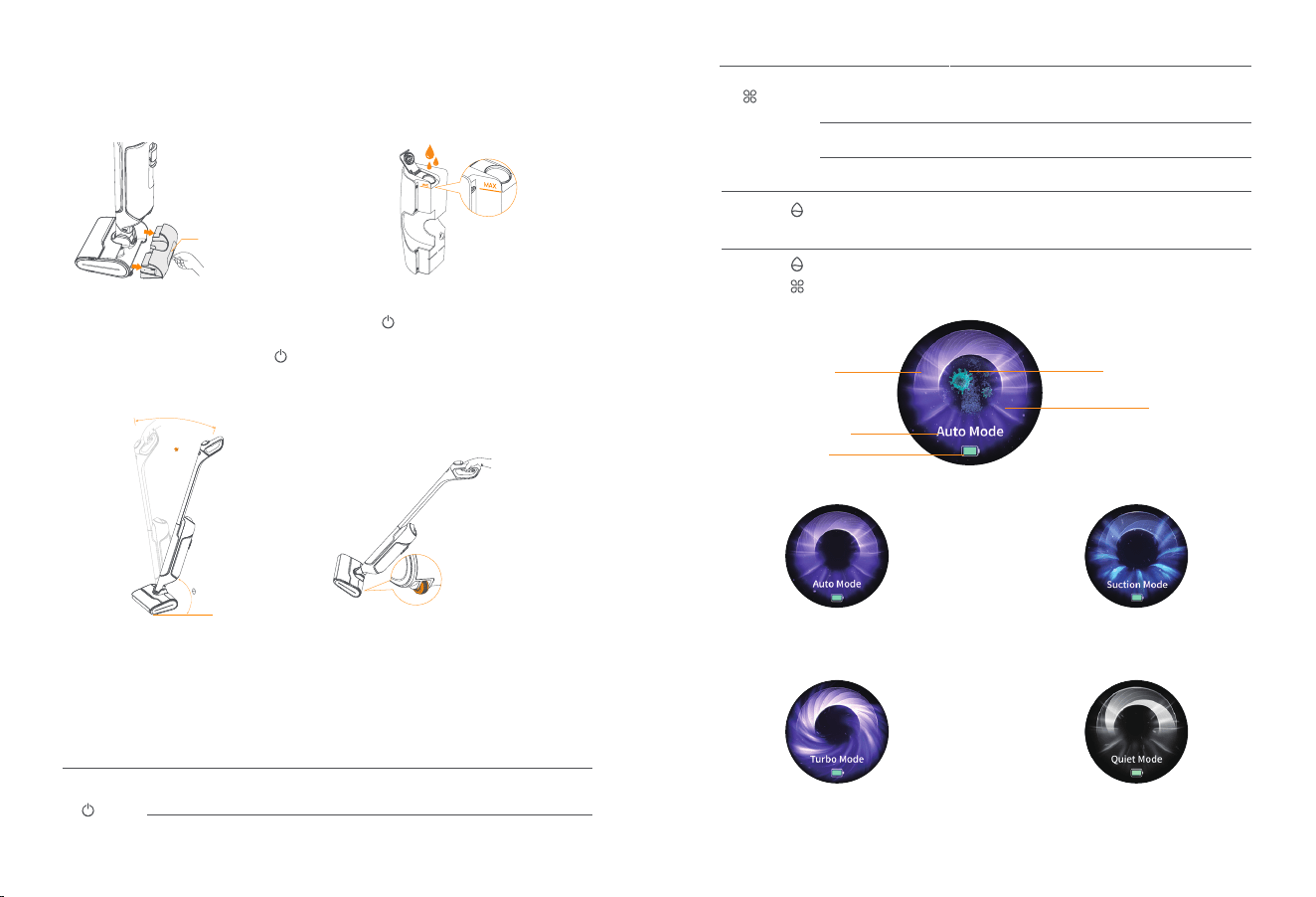
Washer Mode
Smart Mode: Auto adaption to a variety of dirty
surfaces powered by smart detection of floor
dirt level and smart adjustment of suction power,
clear water volume, and other indicators.
Turbo Mode:Tailored for stubborn stains through
increased water and suction power.
Quiet Mode:Suitable for relatively clean floors
to deliver a noise-free experience and secure
a longer baery life to clean more floors.
Suction Mode:Used to remove surface water.
Instructions for Use
Buon functions
*Note: When the vacuum is on the base and the screen is dark, you can press any buon to wake up the
screen.
Buon
Power On/
O buon
Status
When cleaning the floor
During self-cleaning or drying
Functions
Short press: power on/pause
Press and hold for 2s: power o
Short press: end the current task
Shows the cleaning
mode/dirt level
Current cleaning mode
Electrolyzed water enabled
Water level of the
clean water tank
Remaining baery
How to unlock and start the machine
Remove the machine from the self-cleaning base. Short press the Power On/O buon and then follow the
voice prompts to slightly press and recline the handle to start cleaning (locked when θ>90°). You can also
recline the handle and then short press the Power On/O buon to use the machine.
When the machine is locked (the handle being upright), you can recline it to set the wheels under the clean
water tank on the floor. Then you can push or pull it back to the cleaning base like handling a suitcase.
Lock
Gently press
the handle to
pull it
When the machine is locked (the
handle being upright), you can recline it
to set the rollers under the clean water
tank on the floor. Then you can push or
pull it back to the cleaning base like
handling a suitcase.
How to fill the clean water tank
1. Take out the clean water tank
Pull out the clean water tank to take it out.
2. Add clean water
Open the sealing cover and fill water from
the tank opening to the MAX line.
Clean water tank latch
About the screen
Mode buon
Self-Clean-
ing buon
Mode buon+
Self-Clean-
ing buon
When cleaning the floor
Short press: switch the mode (Smart/Turbo/Quiet/Suction)
Press and hold: start MAX enhancement; release to end
MAX enhancement
Short press: start drying only
Press and hold for 2s: turn on/o voice
Short press: start self-cleaning and drying in sequence
Press and hold for 2s: start self-cleaning only
During self-cleaning or
charging with the screen on
During charging with the
screen on
During charging with the
screen on
Press the Mode buon and Self-cleaning buon
simultaneously to change the system language.
Charging/Abnormal Pause
+
03
Self-cleaning and drying
Start self-cleaning and drying
· You can choose whether to start self-cleaning based on the dirt level. If
necessary, put the machine on the self-cleaning base and short press the
Self-Cleaning buon to start self-cleaning and drying. To start
self-cleaning only, press and hold the Self-Cleaning buon for 2s;
· If you only need to start drying, short press the Mode buon.
Note: If the machine prompts that the clean water tank is short of water,
you need to fill the clean water tank to above the self-cleaning water
level line before you can restart self-cleaning.
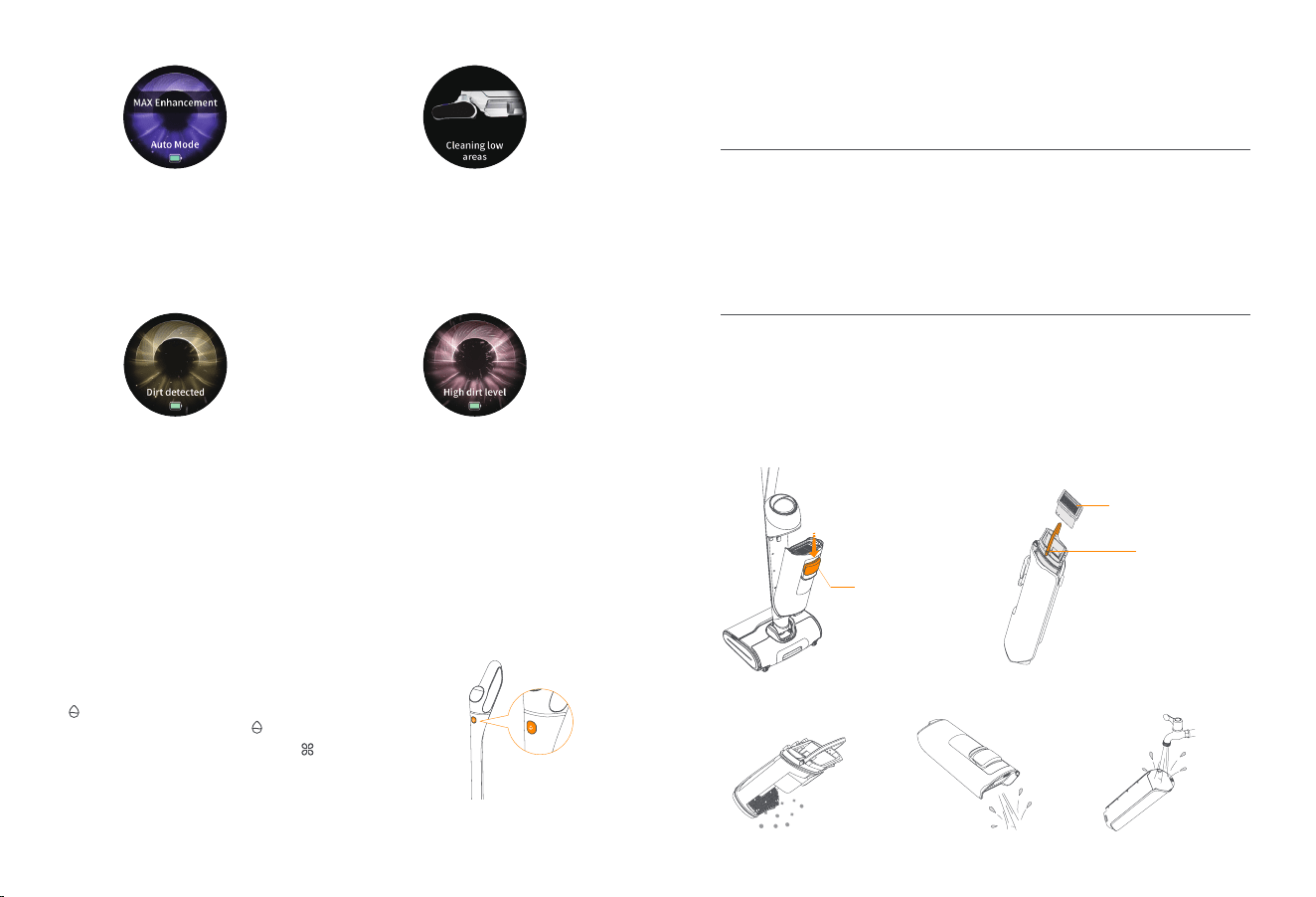
Smart dirt display
Dirt detected:The machine will detect the
floor dirt level in real time. When the floor or the
roller brusher is found to be dirty and the
screen animation shows a yellow background,
and you are recommended to clean the current
location repeatedly. If the background remains
yellow when the floor is already clean, you
should start self-cleaning.
High dirt level: When the floor or the roller
brush is found to be dirty and the screen
animation shows a red background, and you
are recommended to switch to Turbo Mode to
clean the current location. If the background
remains red when the floor is already clean,
you should start self-cleaning as prompted or
manually clean the pipe and the roller brush.
Cleaning and Maintenance
Suggested Maintenance Cycle
Main part
Main Unit
Self-cleaning base
Part
Dirty water tank
Roller brush cover
Pipe
Cleaning tray
Suggested maintenance cycle
Clean after every use
Clean after every use and replace every
3-6 months
Clean regularly on demand
Clean regularly on demand and replace
every 3-6 months
Clean regularly on demand
Clean regularly on demand
· Empty the solid waste box. · Rinse the dirty water tank.· Empty the dirty water tank.
Maintenance Methods
Dirty water tank
Clean after every use
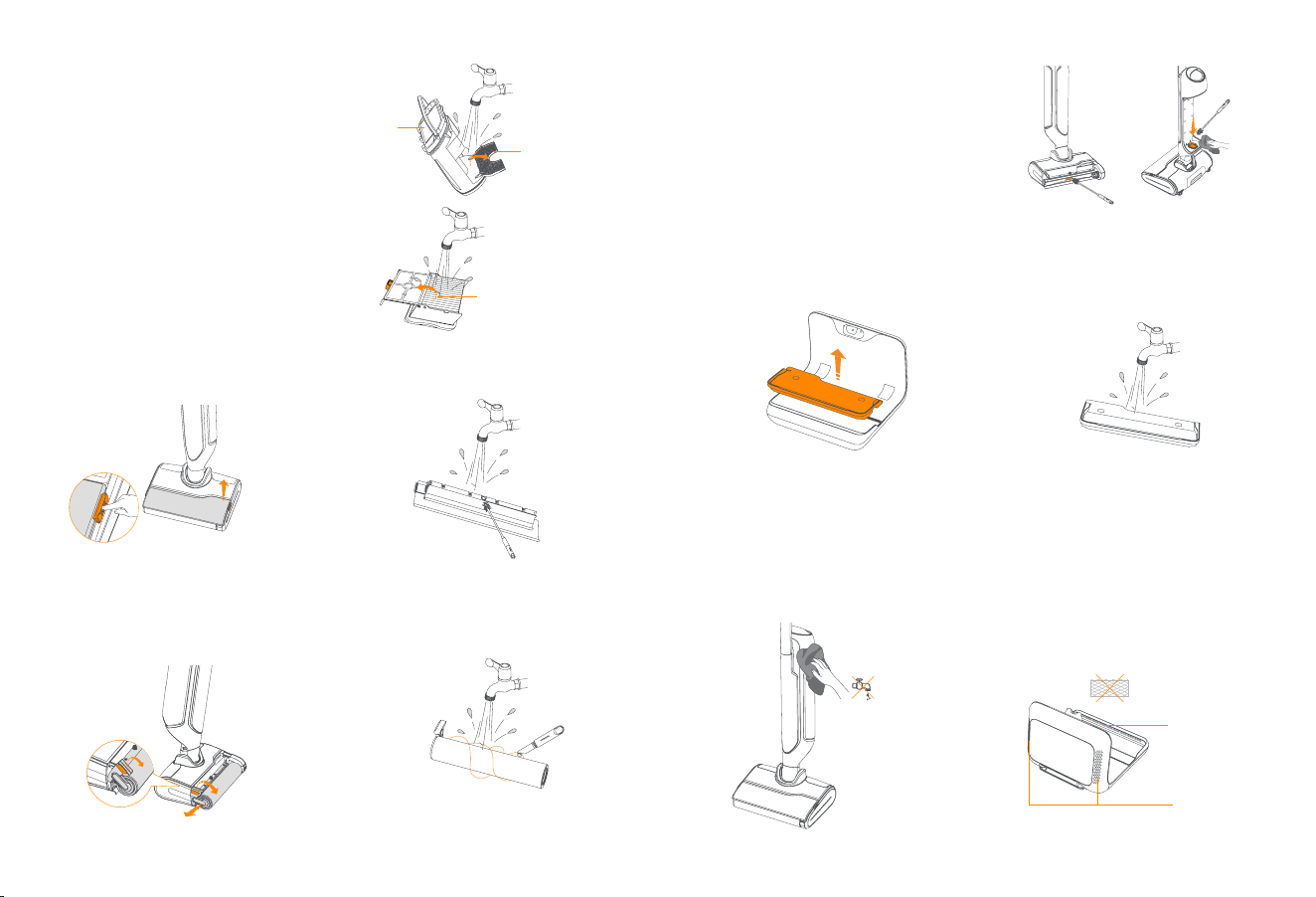
· Remove the dirty water tank, filter, and solid waste box in order.
Press the dirty water tank
release buon to remove
the dirty water tank.
Pull out the filter from the
top of the solid waste box.
Pull up to remove the
solid waste box.
Low Areas Mode
When the angle between the handle and the
floor is below 25°, the machine will automatical-
ly switch to the Low Areas Mode. As such areas
are generally filled with lots of hairs, dust, and
flu, the machine will intelligently adjust the
suction power to avoid dust floating around.
MAX Enhancement:During the cleaning process,
when encountering extremely stubborn stains
that are hard to handle, you can activate MAX
enhancement by pressing and hloding the
mode buon for maximum cleaning strength.
04
Filter
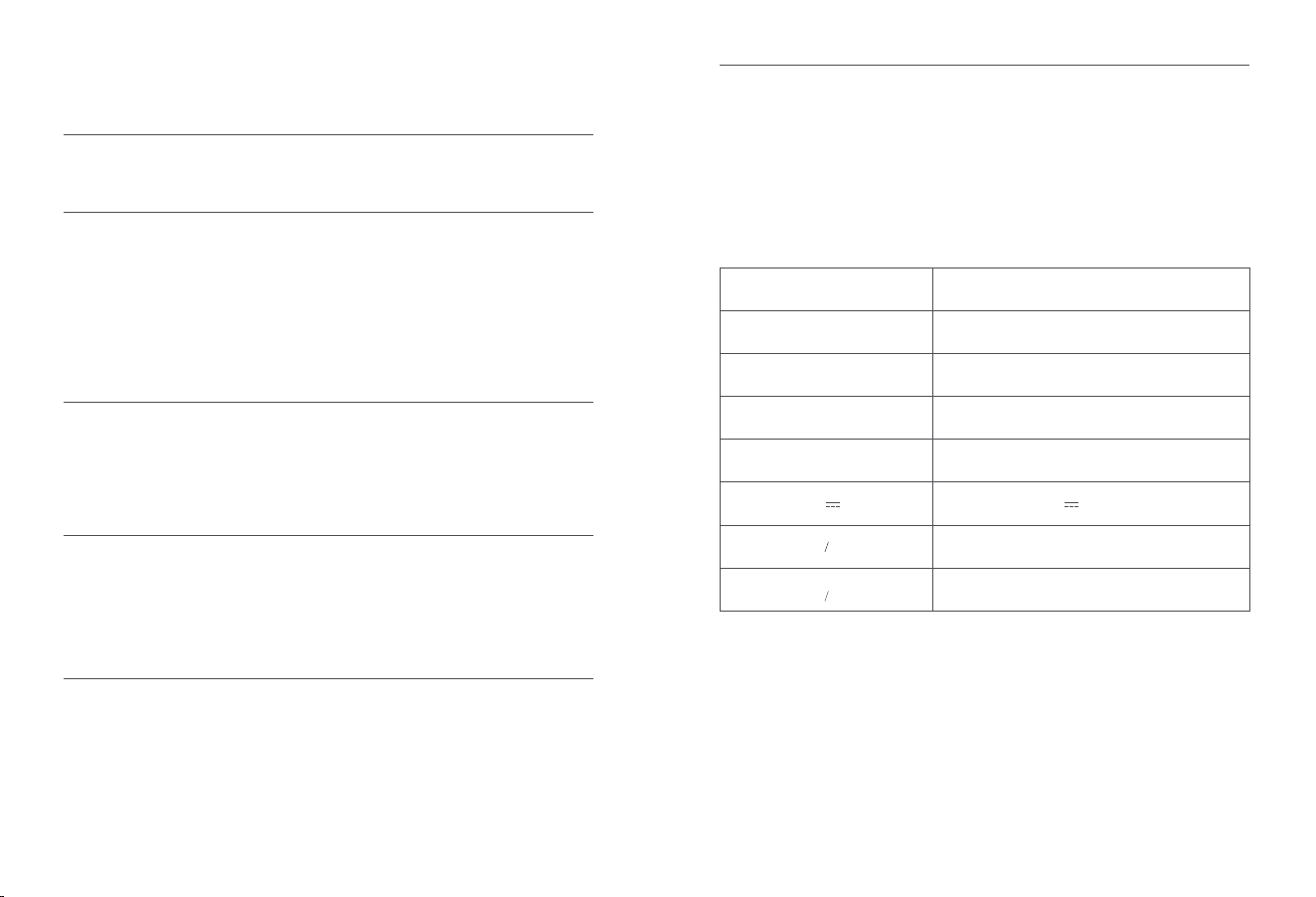
Clean after every use and replace every 3-6 months
· Clean up the filter with clean water. You can open the
filter cover. Shake dry the filter and then put it back into
the machine for filter drying.
Roller brush cover
Clean regularly on demand
· Slightly press the roller brush release buon to remove
the roller brush cover.
Roller brush
Clean regularly on demand and replace every 3-6
months
· Pull up the lift handle on the left of the roller brush and
then pull the roller brush outwards.
· Rinse the roller brush cover with clean water.
· Clean the roller brush with clean water and
the cleaning brush. Use the hook knife to
remove hair stuck on the roller brush.
· Rinse the solid waste box and the filter slot.
You can open it to clean
Please rinse
the filter slot
You can open
it to rinse
1. Push down to open it
1.Lift up 2.Remove outward
2. Pull it up
05
Cleaning tray of the self-cleaning base
Clean regularly on demand
· Remove the cleaning tray from the self-cleaning base.
Pipe
Clean regularly on demand
· If the machine prompts a high dirt level when the
floor is free from obvious dirt and after several
rounds of self-cleaning, the pipe may be dirty;
· The machine prompts that the pipe gets clogged.
(Use the cleaning brush to clean the pipe for the
above two situations)
· Clean the tray and put it back into the
self-cleaning base.
DO NOT rinse with water
Prevent outlet/inlet
from clogging
Hot air outlet
Side air inlet
1. Clean the dirt suction port. 2. Stick the brush inside to
clean the interior of the pipe.
Wet dry vacuum and self-cleaning base
· To ensure optimal performance, you are recommended to maintain all parts regularly;
· Before cleaning any part, please turn o the machine and unplug the power cord;
· Use a clean and dry cloth to scrub clean the machine and the base and prevent water ingress into electrical
components;
· Make sure that the air inlet and hot air outlet of the self-cleaning base are free from clogs.

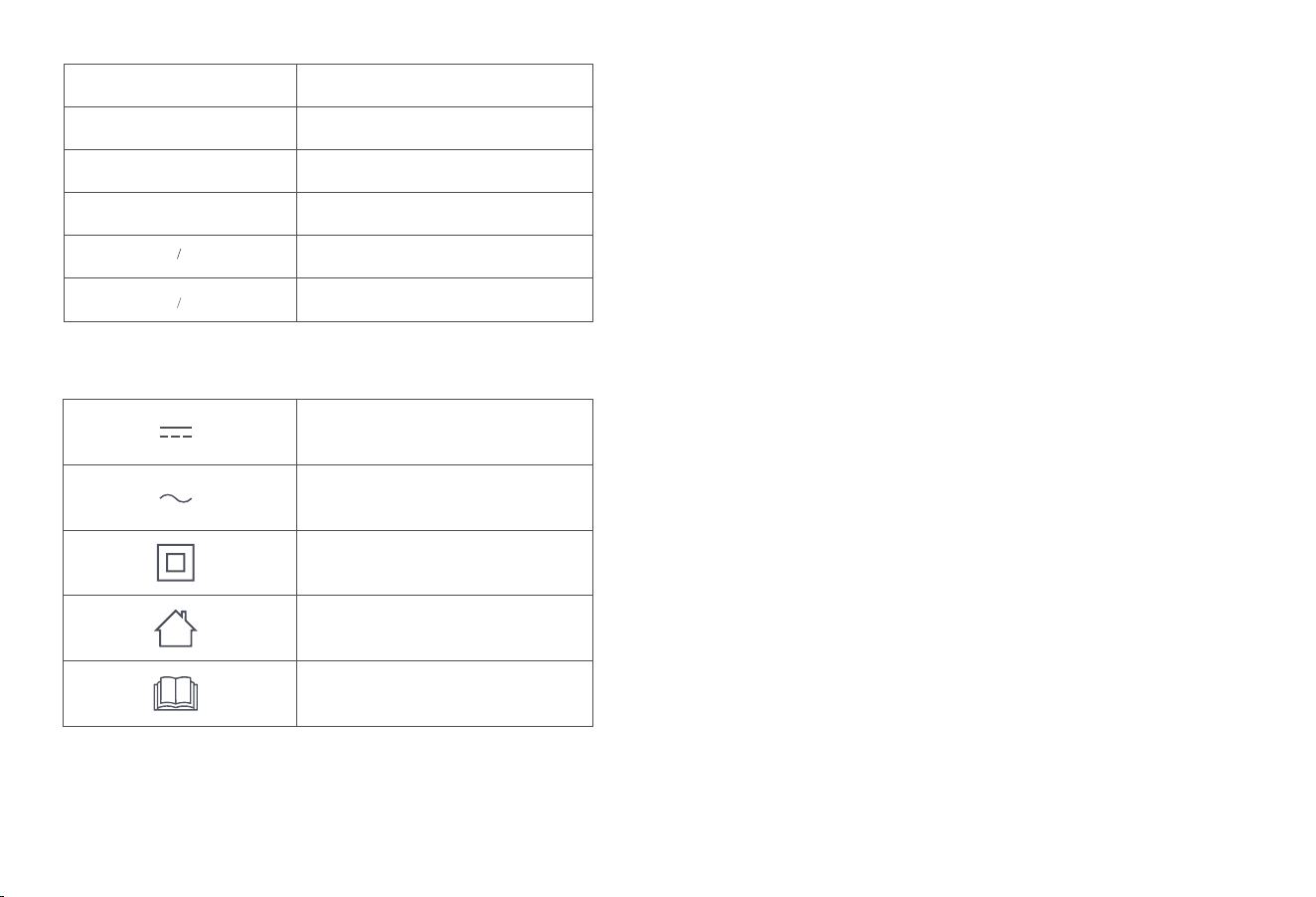
Possible causes
The self-cleaning base is
not connected to a power
source.
The product runs out of
baery.
The product has poor
contact with the
self-cleaning base.
The product is locked.
The dirty water tank is not
installed or not in place.
The roller brush is not
installed or not in place.
The dirty water tank is full.
The clean water tank is
short of water.
Other Questions and Answers (Q&A)
Q: Can I rinse the product with water?
A: There are electrical components in the main unit, handle, and self-cleaning base, and they cannot be
soaked in or rinsed with water. Detailed maintenance guidelines can be found in the “Cleaning and
Maintenance” section in the manual.
Q: Why are there water stains on the floor after the product is turned o?
A: When you pause or turn o the product after cleaning, the fan will continue to work for a while to ensure that the
floor and pipes are dry without water stains. It is recommended that you move the product after the fan stops completely.
Q: Why are my floors geing dirtier when the product is working?
A: It is possibly because the floors are too dirty and there is too much dirt on the roller brush, so it is
recommended that you put the product back on the base for self-cleaning.
Q: Why does the product lose suction power after a period of time?
A: It is recommended that you remove and wash the roller brush cover, roller brush, pipe, and filter as there
may be stubborn stains and waste residue aecting the normal performance of the product.
Q: The roller brush remains wet after self-cleaning and drying. Is the base not
performing the drying task?
A: The product will automatically start hot air drying for 30 to 45 minutes after self-cleaning is completed.
Please do not take out the product or the roller brush during the process, otherwise, the base will stop
drying or the roller brush is not dried enough. Please check whether the roller brush is too dirty, or the space
between the roller brush and the cover is clogged. If so, the drying eect may be aected. Please clean up
the dirt before starting drying. The drying eect will be aected by the ambient humidity. If you are in a
relatively wet region or season, a single drying cycle for the roller brush may not produce the best results. It
is recommended to repeat drying.
Q: Why does the roller brush suddenly stop rotating when the product is working?
A: Please check whether the roller brush is entangled with or the space between the roller brush and the
cover is clogged with foreign objects, causing the roller brush to stop rotating. You can turn o the product
and remove the roller brush cover and the roller brush to clear the foreign objects. It is recommended to put
away the data cables, plastic bags, and shoelaces on the floor before cleaning, to prevent them from
entangling the roller brush and stopping its rotation, which may damage both the product and items on the
floor.
Q: Why does the product keep warning that “Dirty water tank full. Please clean up
the dirty water tank” when the dirty water tank is not full and the MAX water level is
not yet reached?
A: Please check whether the solid waste box in the dirty water tank is full of waste, or whether the product
draws in easy foaming liquids (laundry detergent, detergent, urine, etc.). In case of the above problems,
please clean up the dirty water tank and the roller brush immediately, and then try again.
Q: There are three lines below the MAX water level of the dirty water tank. What are they?
A: They are the full water detection line under dierent working conditions. During cleaning, the liquid in the
dirty water tank will tilt when the product tilts. To prevent overflowing, the product will prompt that the dirty
water tank is full even when the water is below the lines, which is normal.
Problem Analysis and Troubleshooting
FAQ
In case of any fault when the product is working (no action or fault prompt on the screen or via voice),
please refer to the following table:
Problem
Unable to
turn on or
charge the
machine
Unable to
start
cleaning
Part not
installed or
not in
place
Full dirty
water tank
Clean
water tank
short of
water
Fault Warning
When the product reports the error on the screen or by voice, it indicates that there is a fault. Please use
your phone to scan the QR code and contact customer service for help.
Operation fault. Please contact customer
service
1. If the troubleshooting steps provided in the table above are not eective, you can contact Customer Service via email or reach out
to your local purchase channel for contact information. Alternatively, you can scan the QR code on the oicial website to access
more information and assistance;
2. Please use the product as instructed in the manual, and any loss caused by improper use shall be borne by the use
Please contact customer service
or technical support for more help.
Voice prompt Remedies
Description
The product cannot start
charging/there is no
prompt/the product fails to
work properly.
The screen functions properly,
but the product does not perform
cleaning tasks.
The pruduct pauses and
broadcasts "Filter of the dirty
water tank not in place. Please
install it and check the dirty
water tank." The outer ring of
the screen keeps flashing red.
The pruduct pauses and
broadcasts "Roller brush not in
place. Please install it." The
outer ring of the screen keeps
flashing red.
The product pauses and
broadcasts "Dirty water tank full.
Please empty it." The outer ring
of the screen keeps flashing red.
The product pauses and
broadcasts "Clean water tank
short of water. Please refill it."
The outer ring of the screen
keeps flashing red.
Remedies
Make sure the self-cleaning
base has a proper power supply.
If not, plug the power cord again
and then put the machine on the
base for charging.
Please put the machine back
onto the self-cleaning base for
charging.
Check whether the charging
contacts of the base are
covered with dirt or fail to pop
and whether the charging
contacts of the product are
covered with dirt. If so, please
unplug the power cord and
turn o the product, then
clean the charging contacts
and try again.
Please recline the handle to
start cleaning.
Confirm whether the filter is
installed and whether the dirty
water tank is in place.
Confirm whether the roller brush
is in place. If not, please install
it and try again.
Empty and clean the dirty water
tank and then put it in place.
Fill the clean water tank with
clean water, put it in place, and
try again.
Stuck roller
brush
High dirt
level
Pipe clogging
Base
overflowing
The product pauses and
broadcasts "Roller brush stuck.
Please clean it." The outer ring of
the screen keeps flashing red.
The product broadcasts "Dirty
roller brush detected. You are
recommended to put it back to
the base for self-cleaning.” The
outer ring of the screen flashes
red for 5s.
The product pauses and
broadcasts "Pipe clogged.
Please manually clean the pipe
and the roller brush." The outer
ring of the screen keeps
flashing red.
Self-cleaning pauses and the
product broadcasts "Base
overflowing. Please clean and
air dry the base." The outer ring
of the screen keeps flashing
red.
The roller brush fails to work
properly because it is stuck
by hair or other foreign
objects.
The product’s dirt sensor
detects a consistently
high dirt level.
The product’s pipe is
clogged.
Lots of water builds
around the base and runs
across it.
Please remove the roller brush
to check if there is any foreign
maer blocking it. If yes, clean
the roller brush and put it back
in place.
Place the product back onto
the base for self-cleaning. If
the problem persists after
self-cleaning, you can try to
clean the dirty water pipe with
the cleaning brush.
Use the cleaning brush to
clean the pipe and the dirt
suction port.
To avoid electric shock, the
product and the base will turn
themselves o and report the
problem. Please clean and air
dry the base timely and
contact customer service.
06
Other Questions and Answers (Q&A)
Q: Can I rinse the product with water?
A: There are electrical components in the main unit, handle, and self-cleaning base, and they cannot be
soaked in or rinsed with water. Detailed maintenance guidelines can be found in the “Cleaning and
Maintenance” section in the manual.
Q: Why are there water stains on the floor after the product is turned o?
A: When you pause or turn o the product after cleaning, the fan will continue to work for a while to ensure that the
floor and pipes are dry without water stains. It is recommended that you move the product after the fan stops completely.
Q: Why are my floors geing dirtier when the product is working?
A: It is possibly because the floors are too dirty and there is too much dirt on the roller brush, so it is
recommended that you put the product back on the base for self-cleaning.
Q: Why does the product lose suction power after a period of time?
A: It is recommended that you remove and wash the roller brush cover, roller brush, pipe, and filter as there
may be stubborn stains and waste residue aecting the normal performance of the product.
Q: The roller brush remains wet after self-cleaning and drying. Is the base not
performing the drying task?
A: The product will automatically start hot air drying for 30 to 45 minutes after self-cleaning is completed.
Please do not take out the product or the roller brush during the process, otherwise, the base will stop
drying or the roller brush is not dried enough. Please check whether the roller brush is too dirty, or the space
between the roller brush and the cover is clogged. If so, the drying eect may be aected. Please clean up
the dirt before starting drying. The drying eect will be aected by the ambient humidity. If you are in a
relatively wet region or season, a single drying cycle for the roller brush may not produce the best results. It
is recommended to repeat drying.
Q: Why does the roller brush suddenly stop rotating when the product is working?
A: Please check whether the roller brush is entangled with or the space between the roller brush and the
cover is clogged with foreign objects, causing the roller brush to stop rotating. You can turn o the product
and remove the roller brush cover and the roller brush to clear the foreign objects. It is recommended to put
away the data cables, plastic bags, and shoelaces on the floor before cleaning, to prevent them from
entangling the roller brush and stopping its rotation, which may damage both the product and items on the
floor.
Q: Why does the product keep warning that “Dirty water tank full. Please clean up
the dirty water tank” when the dirty water tank is not full and the MAX water level is
not yet reached?
A: Please check whether the solid waste box in the dirty water tank is full of waste, or whether the product
draws in easy foaming liquids (laundry detergent, detergent, urine, etc.). In case of the above problems,
please clean up the dirty water tank and the roller brush immediately, and then try again.
Q: There are three lines below the MAX water level of the dirty water tank. What are they?
A: They are the full water detection line under dierent working conditions. During cleaning, the liquid in the
dirty water tank will tilt when the product tilts. To prevent overflowing, the product will prompt that the dirty
water tank is full even when the water is below the lines, which is normal.
Q: Why does the product keep prompting that “High dirt level detected. Please put
the product back onto the base for self-cleaning” after self-cleaning is completed?
A: There is residual dirt in the pipe for the product has not been cleaned and maintained for a long time. You
are recommended to clean the pipe with the cleaning brush.
Specifications
Parameters
Wet Dry vacuum
Dimensions: 273*255*1172 mm
Color: White
Weight: ≈4.4 kg (empty water tank
Baery: 4000 mAh
Rated input: 27V 1.2A
Self-cleaning base
Dimensions: 305*309*237 mm
Color: White
Weight: ≈2.6kg
Rated input: (refer to the Base Nameplate)
Rated output: 27V 1.2A
Rated power: 28W-158W
Rated frequency: 50Hz-60Hz
07
Bluetooth (Wet Dry Vacuum)
Protocol: BLE 5.0
Frequency Range: 2402-2480MHz
Max. Transmier Power (EIRP): ≤10dBm
Baery (Wet Dry Vacuum)
Baery Type: Rechargeable Li-ion Baery
Baery Pack Quantity Per Pack: 1 pcs
Quantity of Baery Cells Per Baery Pack: 6 pcs
Rated Capacity, Rated Energy: 3600mAh, 77.76Wh
Nominal Voltage: DC 21.6V
08
Direct current
Alternating current
Class ll equipment
For indoor use only.
Before charging, read the instruction.

WWW.NARWAL.COM
Manufacturer:Yunjing Intelligence Innovation (Shenzhen) Co., Ltd.
Address:Room A2901, Yunzhongcheng, Building 1, Vanke Yuncheng VI, Dashi 2nd Road,
Xili Community, Xili Street, Nanshan District, Shenzhen, Guangdong, China
