Item# 17007
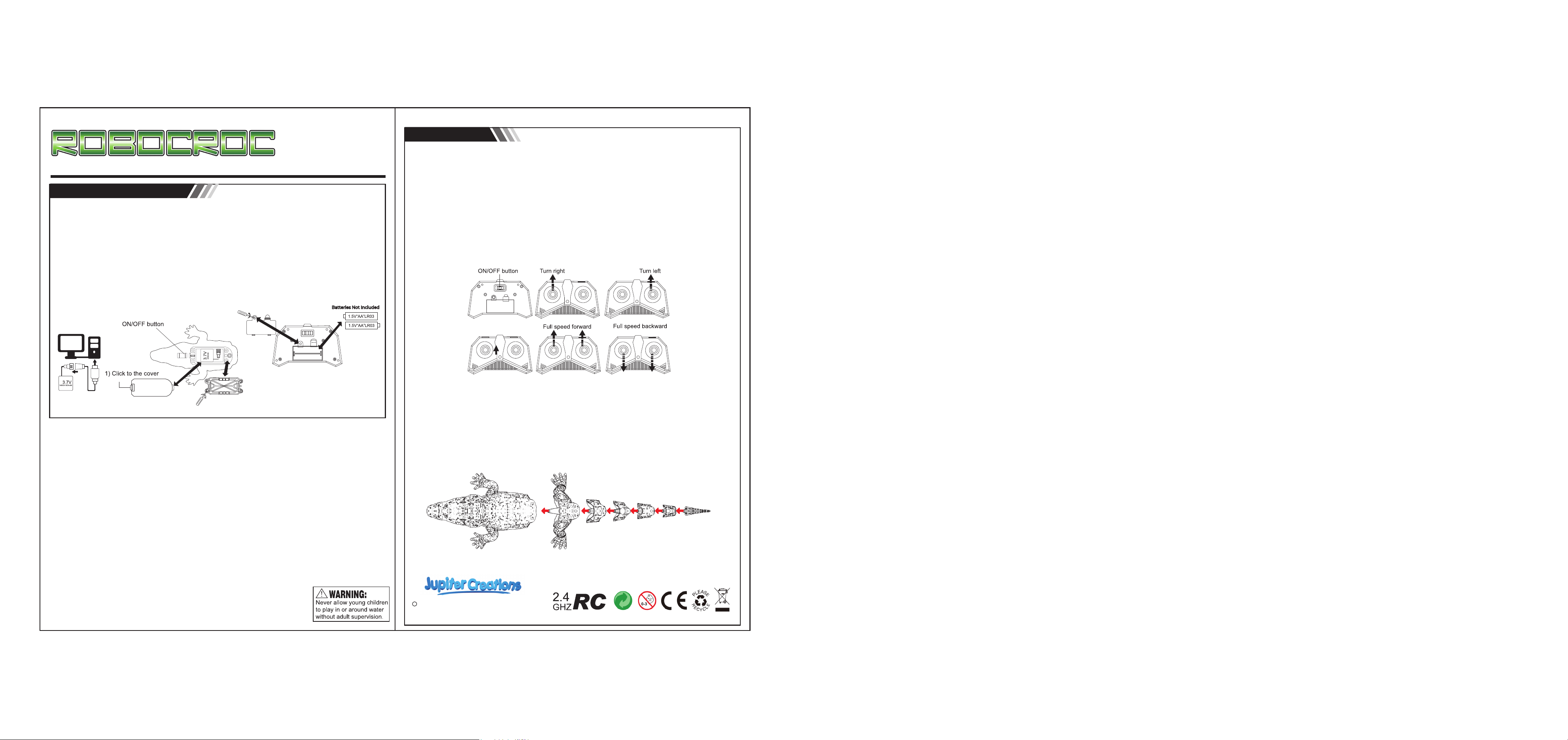
Charge the 3.7V battery using the USB chord (included) and a USB outlet (not included).
Please charge for 90 minutes. A red light on the chord will be lit while charging.
When the light turns off, the battery will be fully charged. Play time of a fully charged battery is 20 mins.
Open the battery compartment under the croc. Insert and plug charged 3.7V battery into compartment.
Once battery is plugged in, close the battery compartment. Make sure the battery compartment is
closed securely as this is the waterproof cover that will protect the battery from getting wet.
Open the battery compartment under the remote control. Insert 2 x AA batteries (not included)
Close the battery compartment. Once the croc and the remote have working batteries,
turn the ON/OFF button under croc to ON. The croc will pair with the remote as soon as it is on
water. Out of water, the propellers will not work.
Battery information:
How to play:
Insert batteries into the remote. Turn the switch under the remote control from OFF to ON.
If the left and right LED lights flash simultaneously for 0.25 seconds, the remote is ready to be paired.
Insert charged batteriy into the croc. Turn the switch under the croc from OFF to ON.
It will automatically pair with the remote control. The left and right LED lights will stop blinking and
remain on, while paired with croc.
Put the croc in the water. Please note that even when paired, croc will only work while in the water.
Toggle the left and right joysticks to begin your swim.
Each joystick controls a propeller. If you push the left joystic forward, the croc will turn right.
If you push the right joystick foward, the croc will turn left. Pushing both joysticks foward will make
thr croc go forward. Pulling both joysticks backwards, will move the croc backwards.
On top of the remote, on the right, there is a speed control button. Croc has two speeds.
Battery Safety Information:
Only adults should install and replace batteries.
Switch toy and remote to OFF before opening battery compartments.
Insert batteries correctly. Match positive+ and negative- signs.
Alkaline batteries are recommended for best performance.
Rechargeable batteries are not recommended.
If rechargeableare used, they are only to be charged under adult supervision.
Rechargeable batteries are to be removed from the product before they are charged.
Do not recharge non-rechargeable batteries.
Only use batteries specified.
Only use batteries of the same or equivalent type that are recommended for use.
Do not mix different types of batteries: alkaline, standard (carbon-zinc), or rechargeable (nickel-cadium).
Do not mix old and new batteries.
Remove the batteries during long periods of non-use.
Always remove exhausted batteries from toy, and dispose responisibly.
Battery leakage and corrosion can damage this product.
Dispose of batteries safely. Recycle where available.
Do not dispose of batteries in a fire or attempt to open the outer casing.
Never short-circuit the battery terminals.
Do not immerse remote control in water.
Speed control
Recommended for ages 5+
Adult supervision required.
Please read and follow this
instruction manual.
Always keep the croc within 150 feet to avoid control loss.
A fully charged battery will run for up to 20 minutes. Avoid hitting obstacles to prevent strikes or
capsize. Please avoid objects such as weeds to avoid being trapped.
When you are finish driving, please remember to turn off both the remote and croc.
If you are planning in not using the croc for a long time, please remove the batteries from
remote and croc.
Do not put the remote on water to avoid damaging the electronics components.
2022 Jupiter Creations, Inc. All rights reserved
www.jupitercreations.com
c
