Model: 308-1451 www.lacrossetechnology.com/support pg. 1
Model: 308-1451v2
Instruction Manual
DC: 112618
WIRELESS FORECAST STATION
Model: 308-1451 www.lacrossetechnology.com/support pg. 2
Table of Contents
INITIAL SETUP ................................................................................................. 3
LCD FFEATURES ............................................
Error! Bookmark not defined.
BUTTONS ........................................................................................................ 4
SET TIME, DATE, ETC. ..................................................................................... 4
BACKLIGHT .....................................................................................................6
CITY SELECTION-SUNRISE/SUNSET TIMES ....................................................5
COMFORT STATEMENT...................................................................................6
TIDE ................................................................................................................6
MOON PHASE ................................................................................................. 7
ALARMS and ALERTS ...................................................................................... 7
TIME ALARMS ................................................................................................. 7
OUTDOOR TEMPERATURE ALERTS ................................................................ 8
FROST ALARM ................................................................................................9
TEMPERATURE TREND ICONS ...................................................................... 10
CHANNELS-AUTO SCROLL ........................................................................... 10
ADD SENSORS .............................................................................................. 10
ABSOLUTE PRESSURE NUMBER ................................................................... 11
PRESSURE HISTORY ...................................................................................... 11
12 HOUR PRESSURE HISTORY GRAPH .......................................................... 11
WEATHER FORECAST ICONS ........................................................................ 12
WEATHER TENDENCY ARROWS ................................................................... 12
FISHERMAN CLOTHING BASED ON .............................................................. 12
OUTDOOR TEMPERATURE CHANNEL 1 ........................................................ 12
VIEW/RESET MIN/MAX VALUES .................................................................... 13
MANUAL WWVB RADIO-CONTROLLED TIME SEARCH ................................. 13
POSITION THE FORECAST STATION ............................................................. 13
POSITION OUTDOOR SENSOR ..................................................................... 13
Model: 308-1451 www.lacrossetechnology.com/support pg. 3
SPECIFICATIONS ........................................................................................... 14
LOW BATTERY ICON ..................................................................................... 15
CARE AND MAINTENANCE ........................................................................... 15
WARRANTY AND SUPPORT INFORMATION .................................................. 15
FCC STATEMENT ........................................................................................... 16
City Codes ……………………………...........................................Appendix
INITIAL SETUP
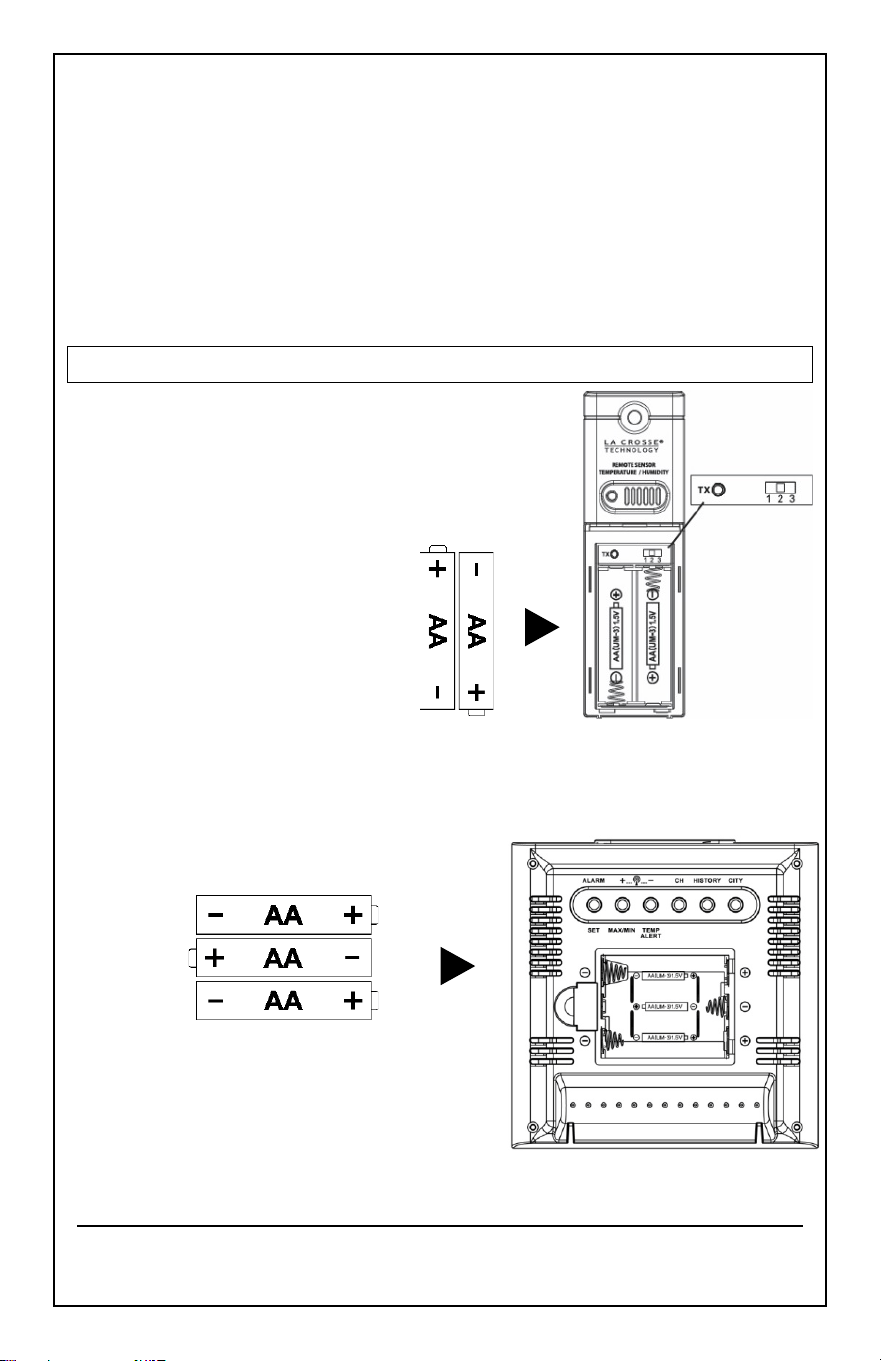
Step 1:
Insert 2 new AA batteries
(not included) into the
TX142THv3 sensor. Observe
the correct polarity.
Step 2:
Insert 3 new AA Alkaline batteries
(not included) into the forecast
station. Observe the correct polarity.
Step 3:
After 5 minutes, place the sensor
Outside in a shaded location.
Model: 308-1451 www.lacrossetechnology.com/support pg. 4
Note:
If the outdoor Temperature area shows dashes after 3 minutes,
remove the batteries and start from step 1.
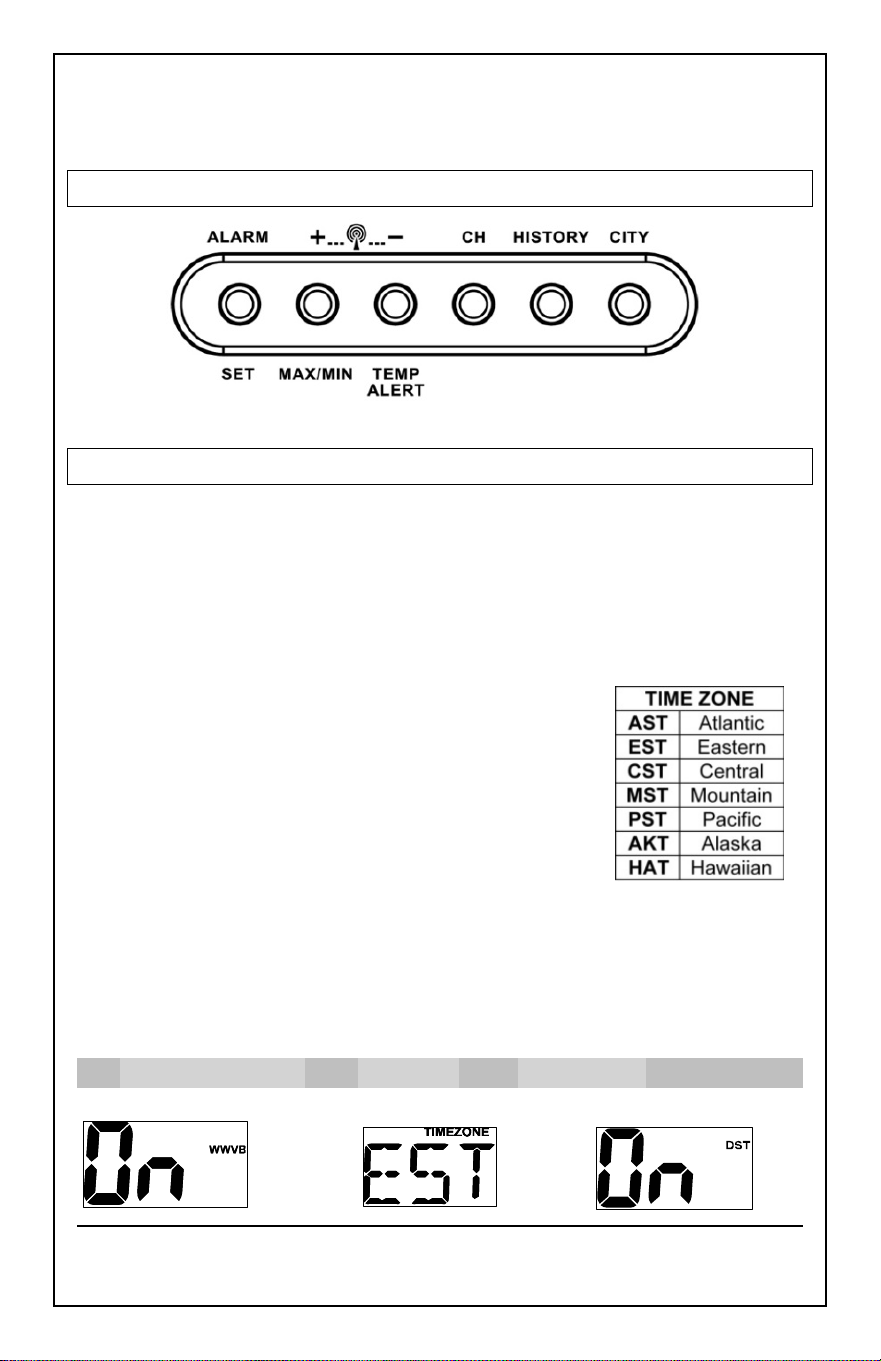
BUTTONS
SET TIME, DATE, ETC.
1. Hold the
SET
button to enter time set mode.
2. Press the
+
or
-
button to adjust values.
3. Press the SET button to confirm adjustments and move to the next
item.
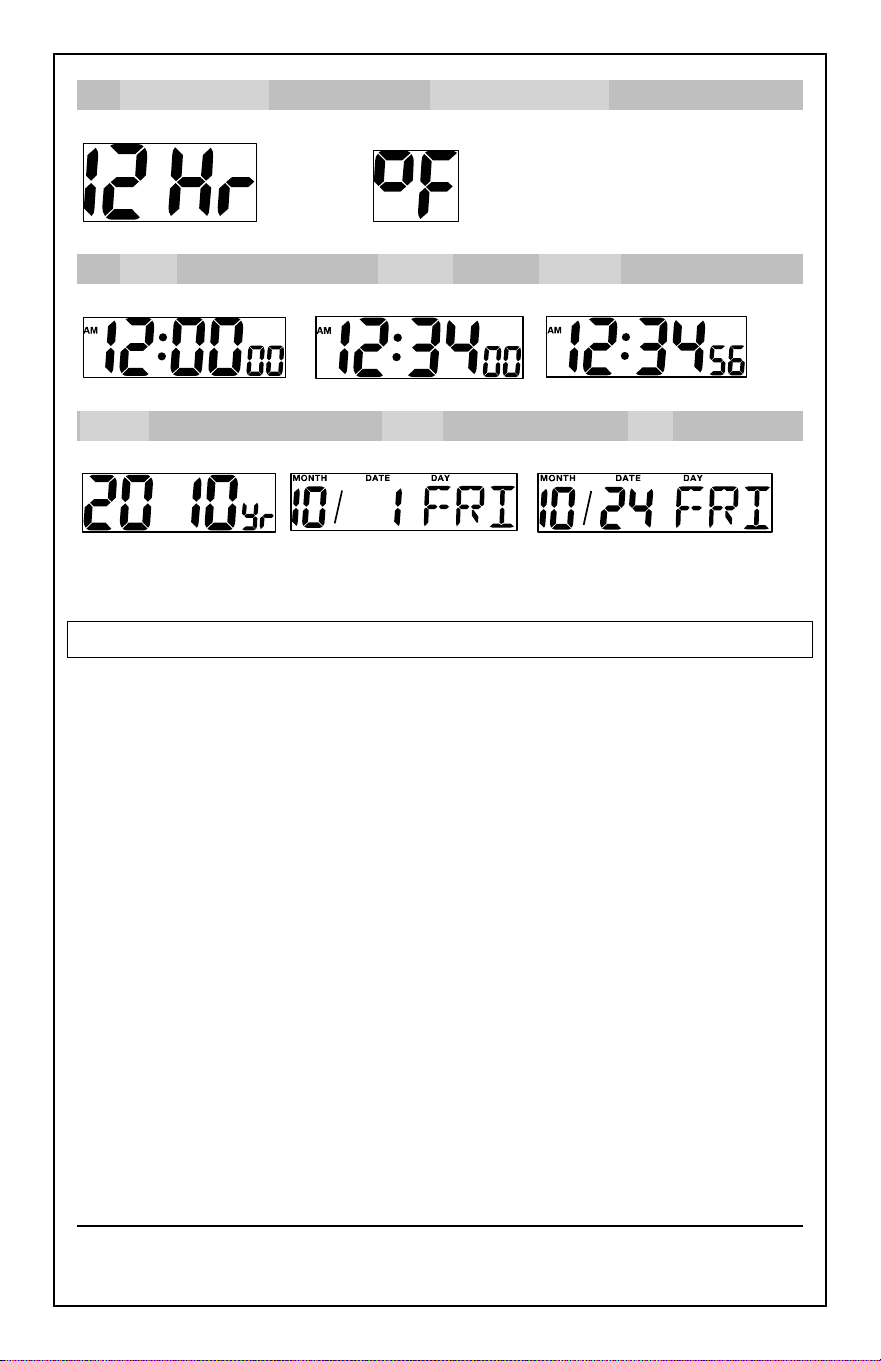
Settings order:
1.
WWVB Reception
2.
Time Zone
3.
DST Indicator,
4.
12/24 Hour Time Format
5.
Fahrenheit/Celsius
6.
Hour
7.
Minutes,
8.
Seconds
9.
Year
10.
Month
11.
Date
1. WWVB Time On/Off 2. Time Zone 3. DST Indicator
Model: 308-1451 www.lacrossetechnology.com/support pg. 5
4. 12Hr/24Hr Time 5. Fahrenheit/Celsius
6. Hours 7. Minutes 8. Seconds
9. Year 10. Month 11. Date
Press the
SET
button to exit or wait 20 seconds.
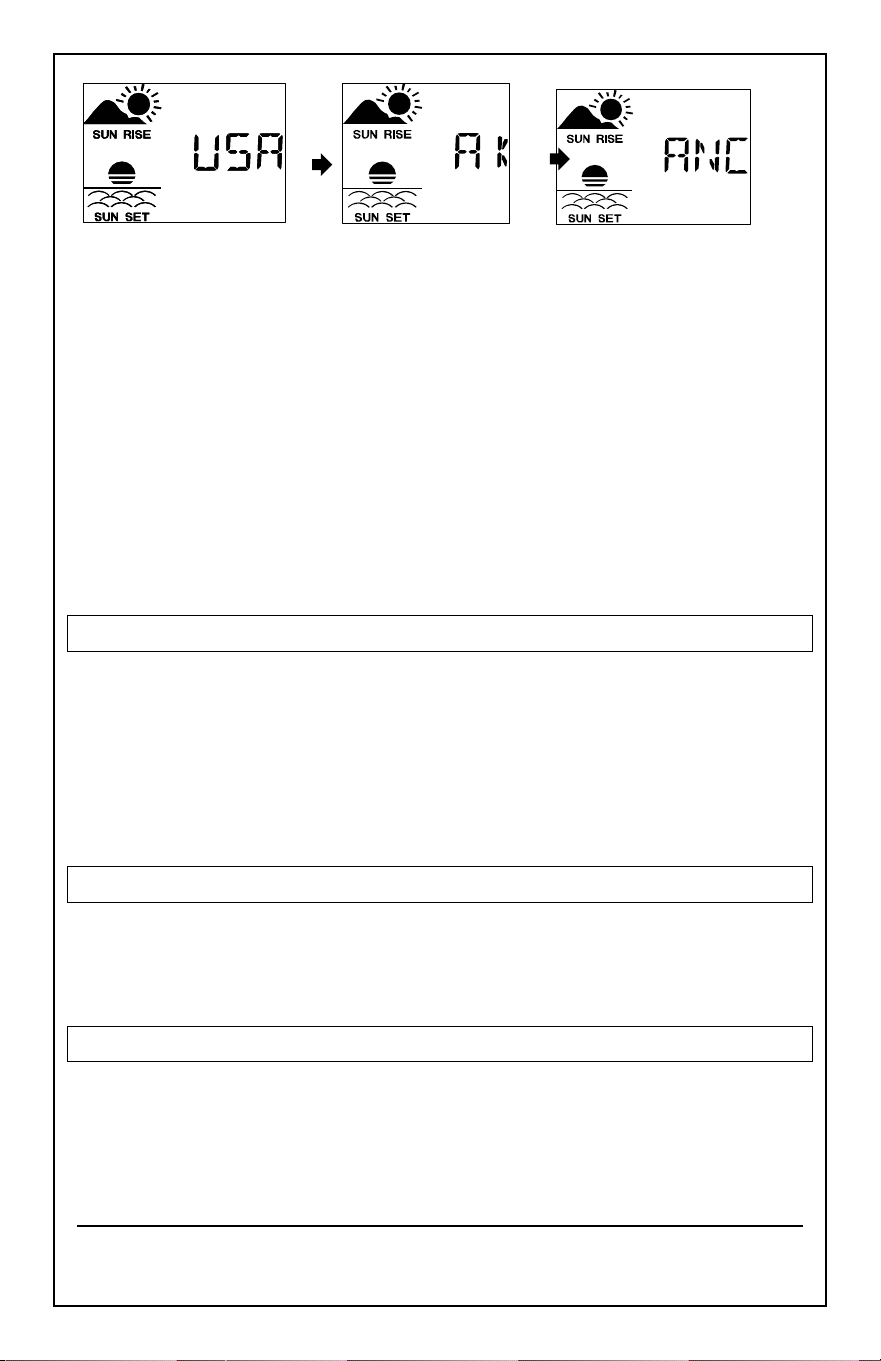
CITY SELECTION-SUNRISE/SUNSET TIMES
Select a city location
closest
to you in a North/South line, even a city in
another state or country. This will provide the most accurate sunrise/sunset
times for your location.
COUNTRY
:
1. Hold the
CITY
button and the Country will flash.
2. Press the
+
or
-
button to select the country.
(USA, Canada or Mexico)
3. Press the
CITY
button to confirm and enter state selection.
Note
: When either Canada or Mexico is chosen you will move directly to
city selection. Preset City abbreviations are at the end of this guide.
Model: 308-1451 www.lacrossetechnology.com/support pg. 6
STATE
:
4. Press the
+
or
-
button to select the state.
5. Press the
CITY
button to confirm and enter city selection.
CITY
:
6. Press the
+
or
-
button to select the city.
7. Press the
CITY
button to confirm and exit.
Note
: Use the city location
closest
to you in a North/South line even a city
in another state or country, for the most accurate sunrise/sunset times for
your location.
COMFORT STATEMENT
The comfort statement is based on the indoor humidity.
•
WET
: Humidity is above 70%
•
COMFORTABLE
: Temperature is between 68°F and 82°F. Humidity is
between 40% and 70%
•
DRY
: Humidity is below 40%
BACKLIGHT
• Press the SNOOZE/LIGHT button to activate the blue backlight for 5
seconds.
TIDE
The tides reflected on this station are based on the ebb and neap tides of
the lunar month. When it reads high, your tides will be higher than usual,
etc. This does not reflect daily high and low tides.
Model: 308-1451 www.lacrossetechnology.com/support pg. 7
•
Full & new moon
= spring tide (TIDE
HI
).
•
Quarter
= neap tide (TIDE
LO
)
•
Other
= mean water level (TIDE
MID
)
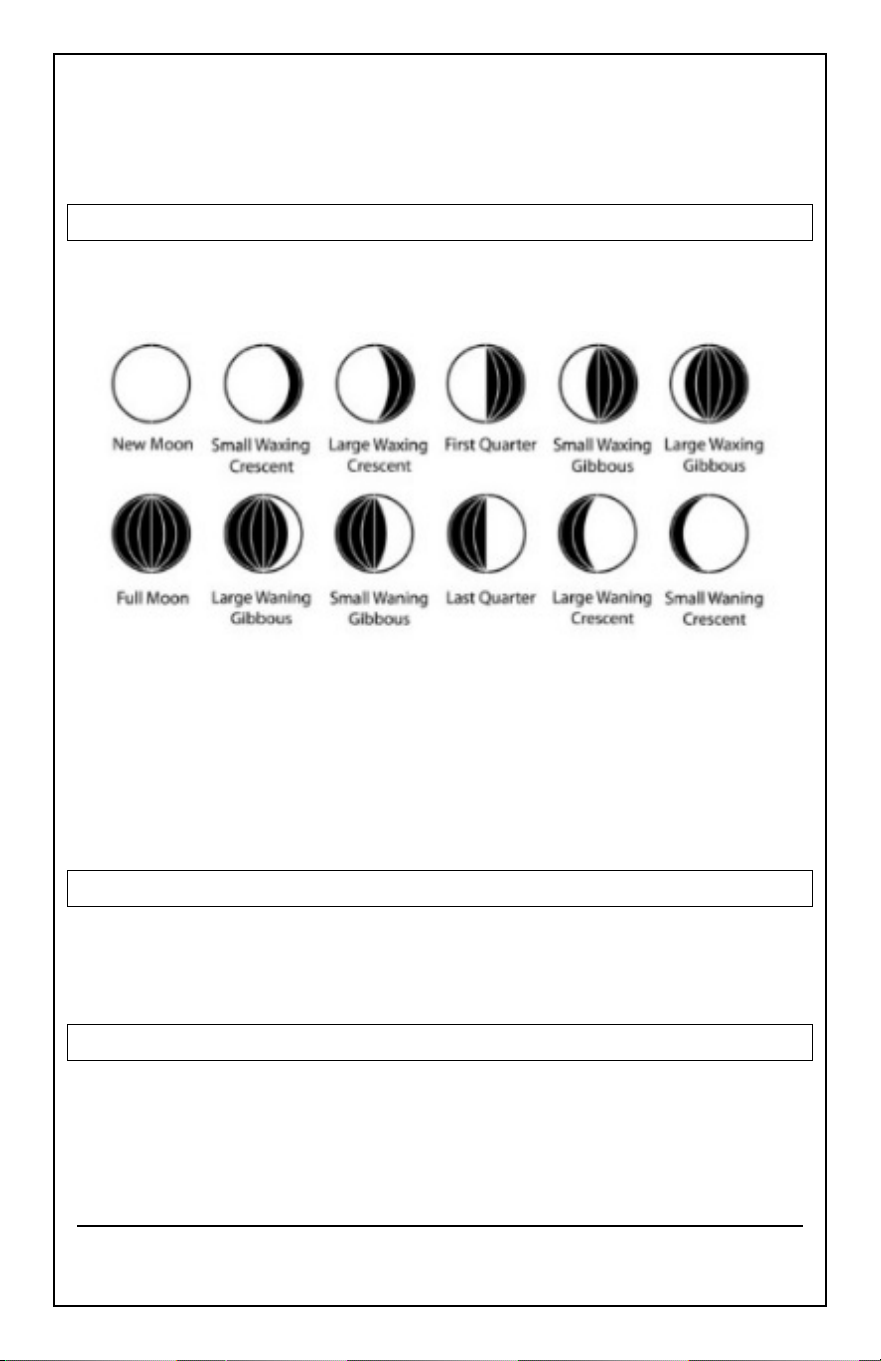
MOON PHASE
The LCD Moon phase is divided by 6 sections, showing a total of 12 phases
of the moon.
Note
: With the moon shown against a light background, the
phases will show opposite to a paper calendar.
For instance, the moon will be blank during a new moon
and dark during a full moon.
ALARMS and ALERTS
There are two time alarms and high and low outdoor temperature alerts
available on this station.
TIME ALARMS
Setting and activating time alarms are separate actions.
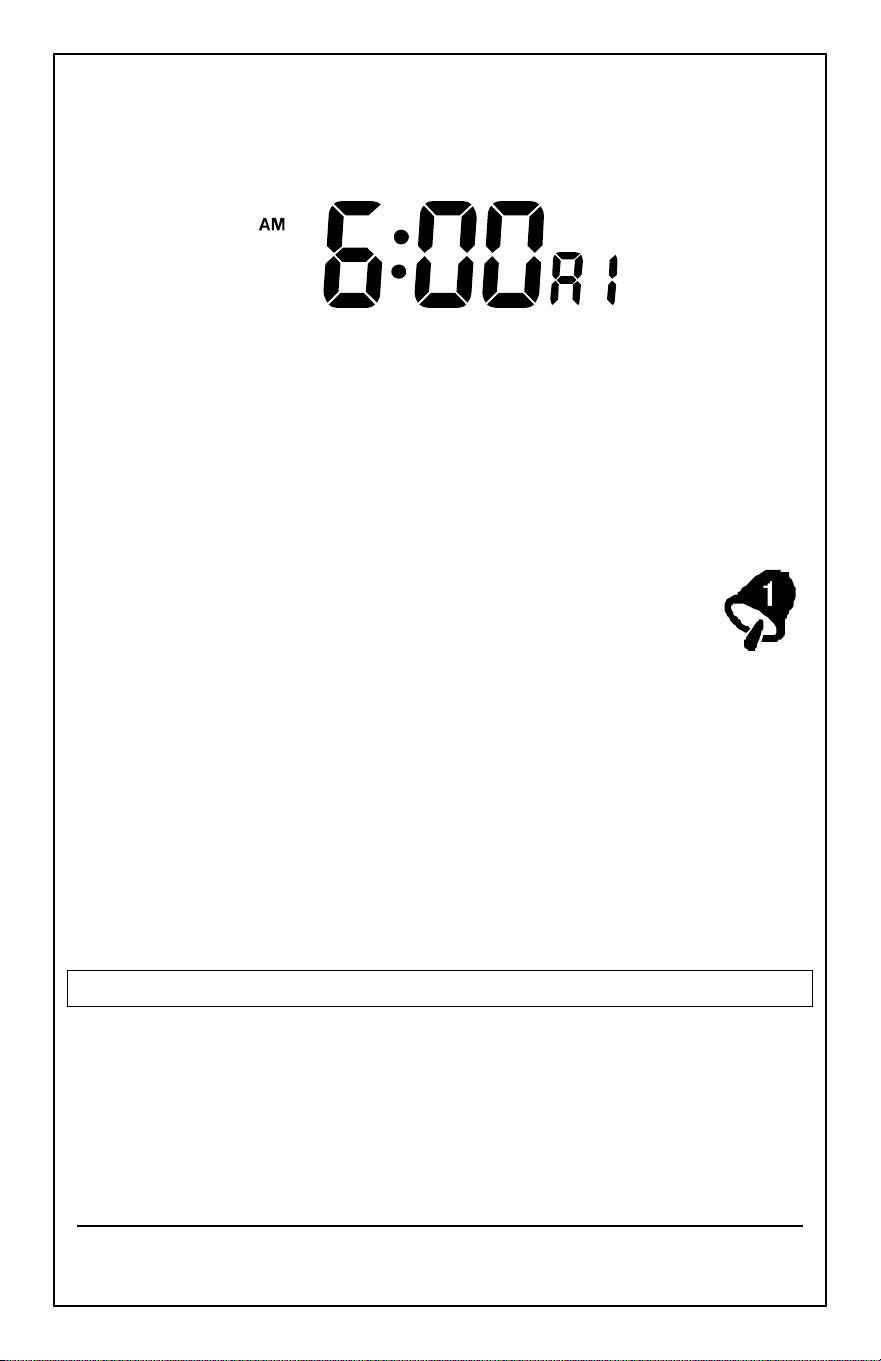
Set Alarm 1:
1. Press the
ALARM
button to enter alarm 1.
Model: 308-1451 www.lacrossetechnology.com/support pg. 8
(A1 will show in the seconds’ area).
2. Hold the
ALARM
button to enter alarm
set
mode.
3. Press the
+
or
-
button to adjust values.
Set Alarm 2:
1. Press the
ALARM
button twice to enter alarm 2.
(A2) will show in the seconds’ area).
2. Hold the
ALARM
button to enter alarm
set
mode.
3. Press the
+
or
-
button to adjust values.
Activate:
1. Press the
ALARM
button to enter alarm mode.
2. Press the
+
button and the bell icon with the alarm number
will appear.
Deactivate:
3. Press the ALARM button to enter the correct alarm mode.
4. Press the
+
button and the bell icon will disappear.
Snooze
:
1. When either alarm sounds, press the
SNOOZE/LIGHT
button to
activate the snooze feature for 10 minutes.
2. The letters Zz will appear.
3. Press any button to deactivate the snooze feature.
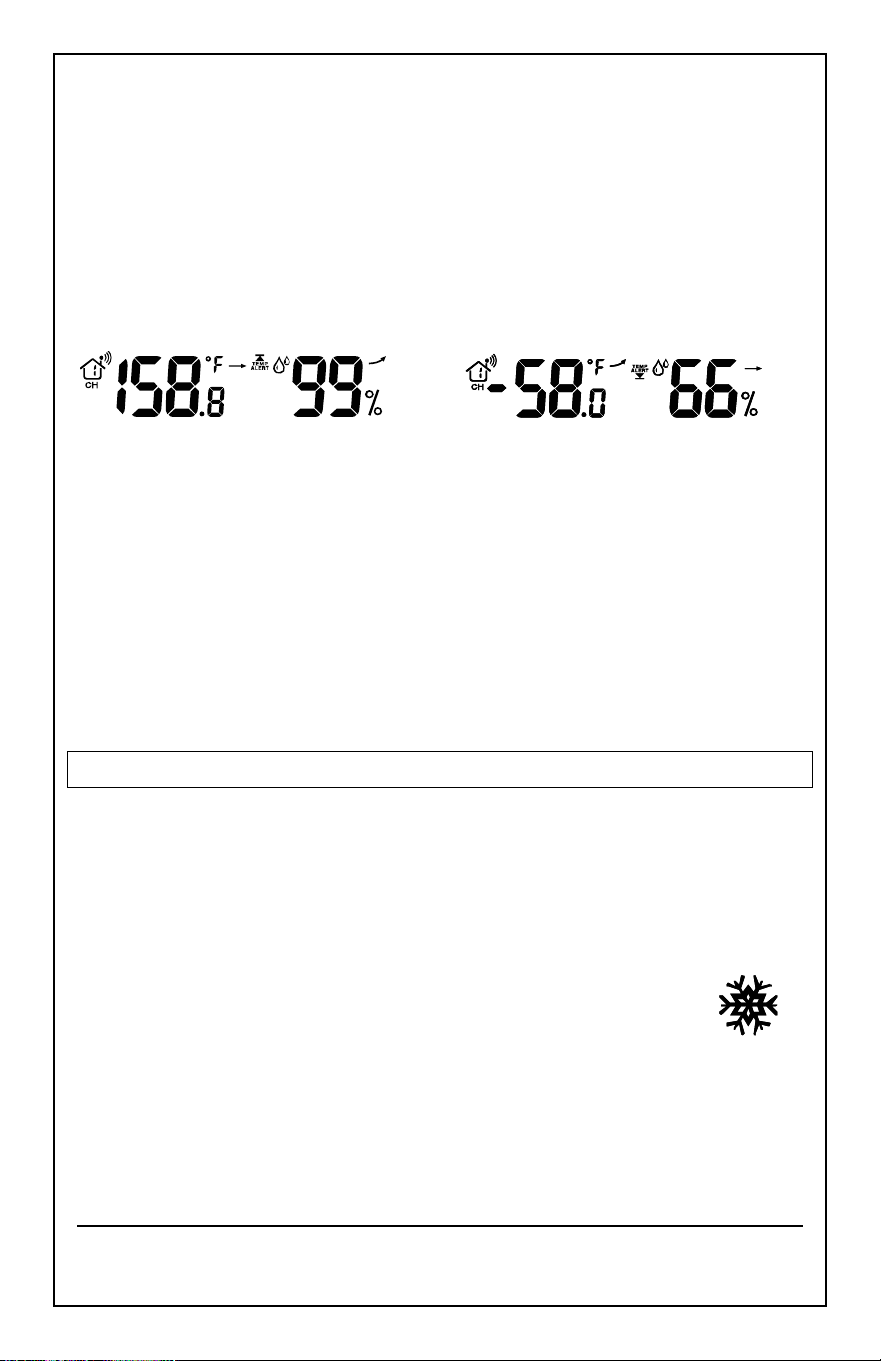
OUTDOOR TEMPERATURE ALERTS
High and low outdoor temperature alerts may be set on the forecast
station for each channel that has a sensor attached.
Set Temperature Alert Channel 1:
1. Hold the
TEMP ALERT
button and the High Temp Alert icon will flash.
2. Press the
+
or
-
button to adjust values.
Model: 308-1451 www.lacrossetechnology.com/support pg. 9
3. Press the
SET
button to move to the Low Temp alert.
4. The Low Temp Alert icon will flash.
5. Press the
+
or
-
button to adjust values.
6. Press the
SET
button to confirm and exit to current temperature.
7. The Temp Alert icon will show in the outdoor temperature area.
8. When alert sounds, the temperature value will flash.
9. Press any button to silence the alert temporarily.
High Alert Low Alert
Set Temperature Alerts Channels 2 or 3
(When using multiple sensors):
1. Press the
CH
button to select the channel.
2. Follow steps 2-4 above to set temperature alerts on other channels.
Deactivate Temperature Alert
:
• Press the TEMP ALERTS button three times to deactivate all
temperature alerts.
• The alert icon will disappear.
FROST ALARM
The Frost Alert sounds when outdoor temperature is between:
(34°F~37°F (1.1 °C~2.7°C))
1.
Activate
: Press the
TEMP ALERT
button twice to activate the Frost
Alarm.
2. The FROST ALERT icon will appear in the outdoor
temperature area when active.
3.
Deactivate
: Press and release the
TEMP ALERT
button
until the FROST ALERT icon no longer shows.
Model: 308-1451 www.lacrossetechnology.com/support pg. 10
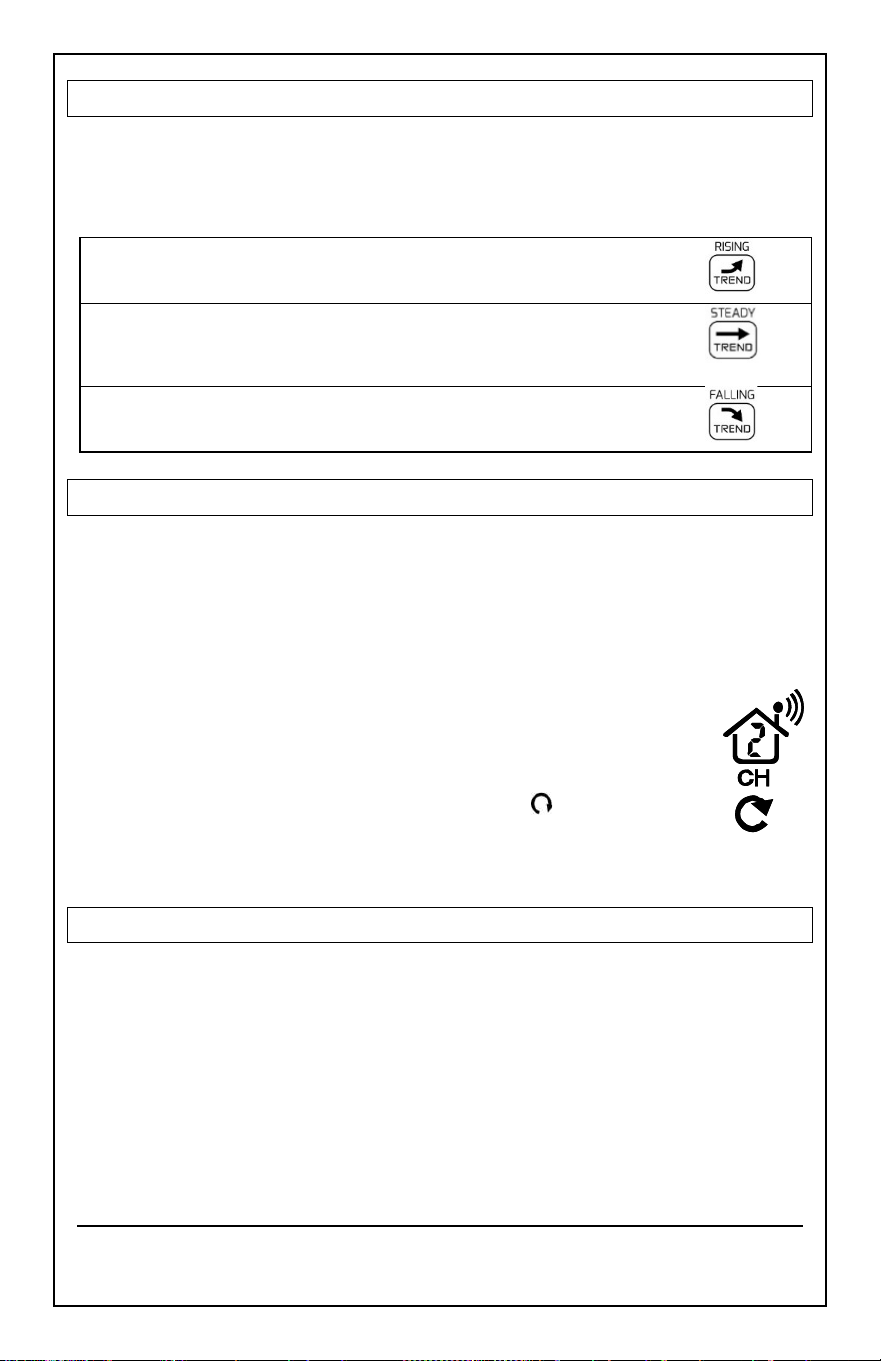
TEMPERATURE TREND ICONS
The temperature (2°F/1°C) and humidity (3% RH) trend indicators update
every 30 minutes or less.
• Temperature has risen in the past 3 hours.
• Humidity has risen in the past 3 hours.
• Temperature has
not changed
in the past 3 hours.
• Humidity has
not changed
in the past 3 hours.
• Temperature has fallen in the past 3 hours.
• Humidity has fallen in the past 3 hours.
CHANNELS-AUTO SCROLL
Channel Search
: The Forecast Station can receive up to 3 outdoor
sensors: (TX142THv3 or TX142TH)
• When more than one sensor is used, set each sensor to a different
channel number then hold the
CH
button to search for the sensors.
View Channels
: Press the
CH
button to select Ch1, Ch2, or Ch3
or auto-scroll channels.
Auto scroll-channel
will show a circling arrow below the
channel number and will rotate through each channel
approximately every 3-5 seconds
ADD SENSORS
• Remove battery covers from all sensors.
• Set each sensor to a different channel with the switch.
• Insert batteries into all sensors.
• Hold the
CH
button to search for sensors.
• Press the
TX
button on each sensor.
• After 15 minutes place, sensors in shaded locations.
Model: 308-1451 www.lacrossetechnology.com/support pg. 11
ABSOLUTE PRESSURE NUMBER
Absolute Pressure Number
: Barometric Pressure is read by the forecast
station. Since this number is absolute pressure it may not be the same as a
local reporting station that reads in relative pressure.
Note
: The number
cannot
be calibrated.
Unit of Measure: (InHg or hPa)
:
• Hold the
HISTORY
button to switch from InHg (inches or mercury) or
hPa (Hecto Pascal).
PRESSURE HISTORY
1. Press the
HISTORY
button to view numeric pressure history.
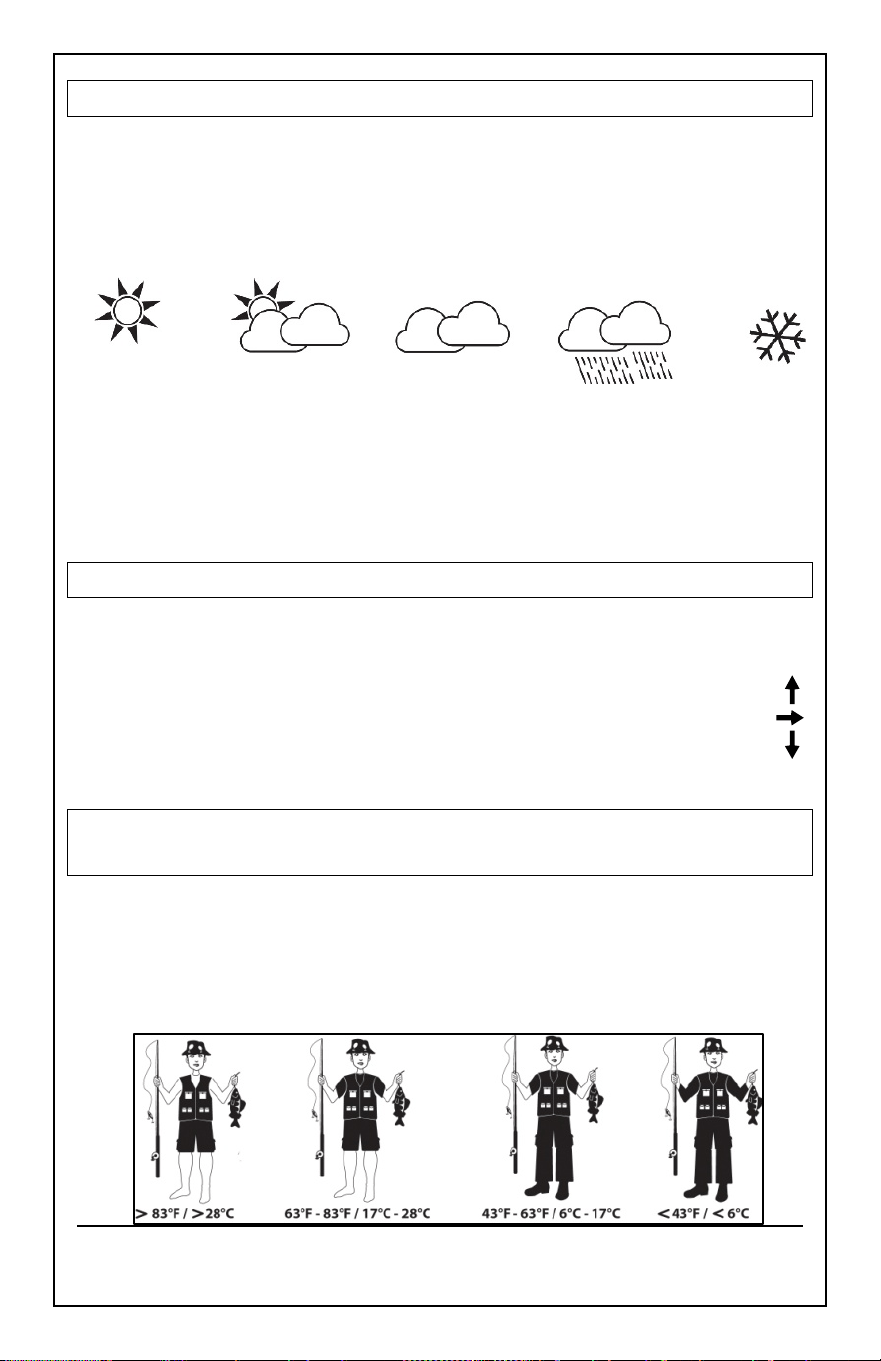
2. 0 is current pressure. -1 through -12 reflects the pressure history in
one-hour increments.
12 HOUR PRESSURE HISTORY GRAPH
• The bar chart indicates the pressure trend over the last 12 hours.
• The columns represent the pressure change readings at specific
times.
• The “0” is equal to the current pressure and each bar represents how
past pressure was
compared
to the current pressure.
• Read the graph from left to right. If the bars are rising, it means that
the weather is getting better due to the increase of air pressure.
• If the bars go down, it means the air pressure has dropped and the
weather is expected to get worse from the present time.
Note
: The bar graph will scroll
to prevent LCD burnout.
Model: 308-1451 www.lacrossetechnology.com/support pg. 12
WEATHER FORECAST ICONS
The icons in the top right corner shown below, forecast the weather for
the next 12-24 hours. The icon is a prediction of the weather in terms of
getting better or worse based on rising and falling barometric pressure.
SUNNY PARTLYLY CLOUDY CLOUDY RAINY SNOWY
INTELLIGENT WEATHER FORECAST
This station learns. Please allow 7-10 days for barometric calibration. This
will ensure an accurate personal forecast for your location.
WEATHER TENDENCY ARROWS
UP ARROW: the Air Pressure is increasing; the weather is expected to
improve.
RIGHT ARROW: the Air Pressure has not changed.
DOWN ARROW: the Air Pressure is falling; the weather is expected to
degrade.
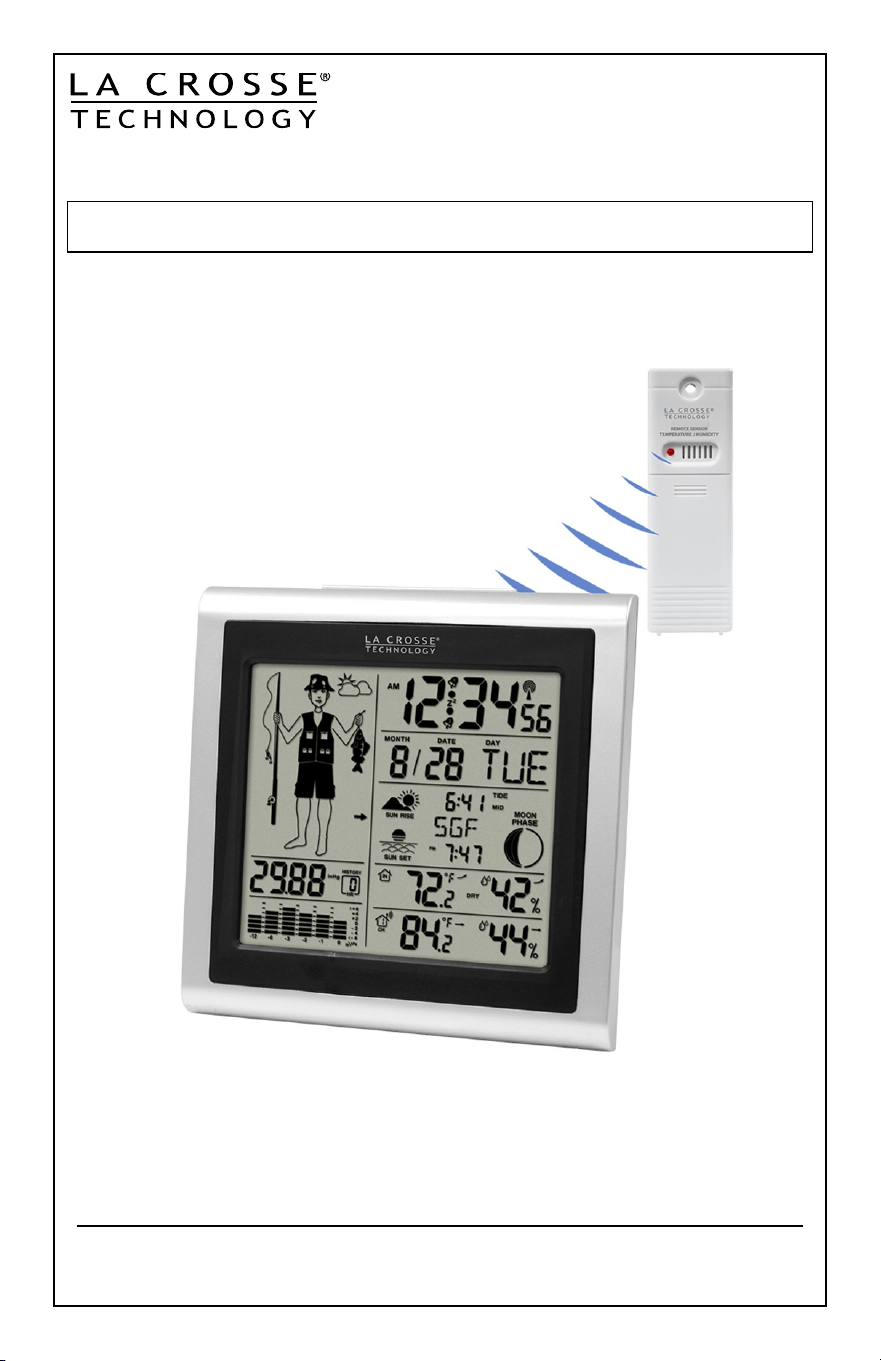
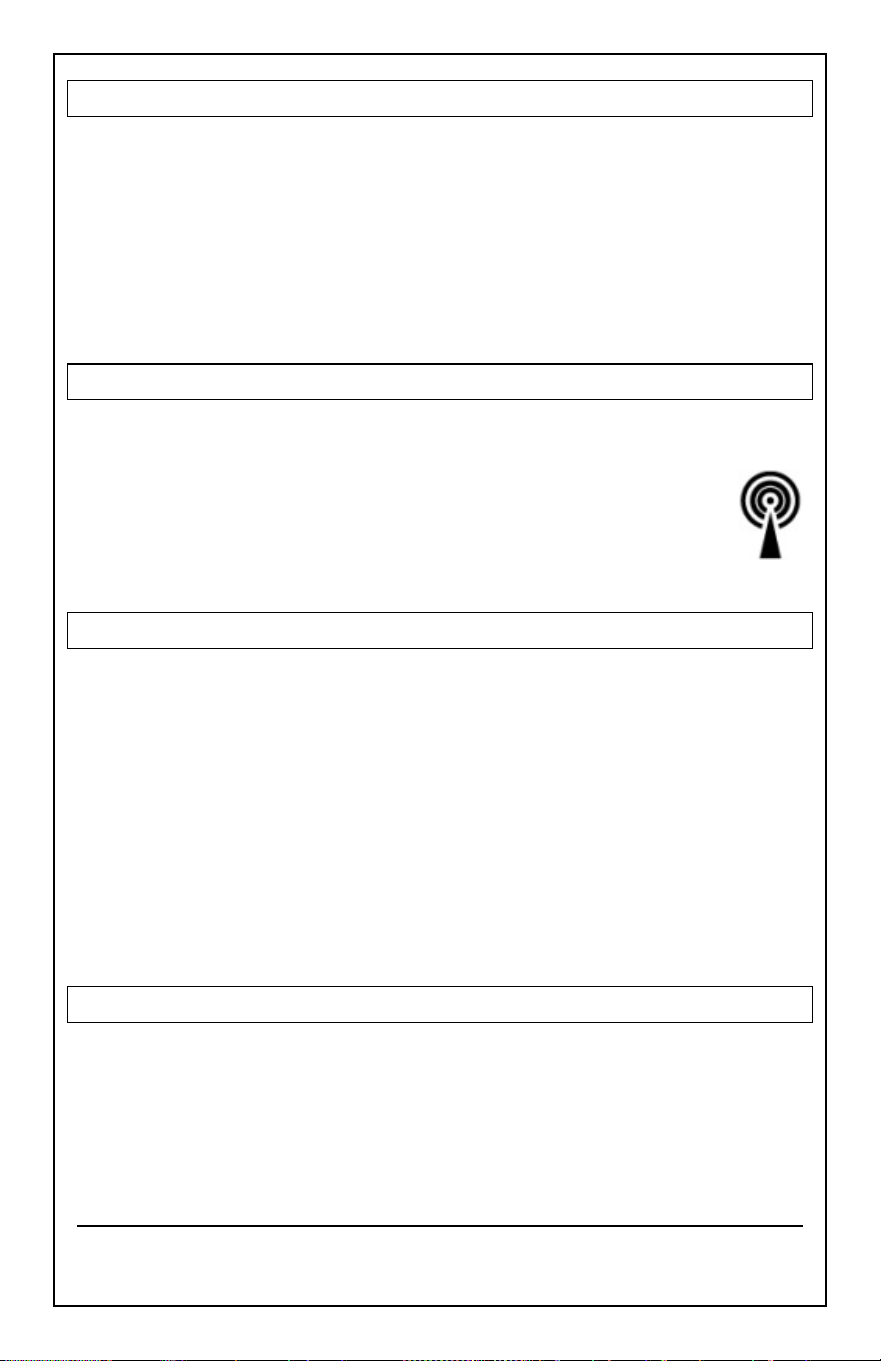
FISHERMAN CLOTHING BASED ON
OUTDOOR TEMPERATURE CHANNEL 1
• The fisherman’s clothing updates with changes in the measured
Outdoor Temperature from the sensor on
channel 1
.
• The fisherman icon represents CURRENT TRENDS in Temperature.
Model: 308-1451 www.lacrossetechnology.com/support pg. 13
VIEW/RESET MIN/MAX VALUES
The station automatically resets MIN/MAX values daily at midnight (12:00
AM).
• Press the
MAX/MIN
button once to view maximum values
.
• Hold the
MAX/MIN
button to reset
maximum values
.
• Press the
MAX/MIN
button twice to view minimum values
.
• Hold the
MAX/MIN
button to reset minimum values
.
MANUAL WWVB RADIO-CONTROLLED TIME SEARCH
• Hold both the
+
and
–
together to start or stop a WWVB signal search.
• WWVB Icon will flash
For information about WWVB visit:
www.nist.gov/pml/div688/grp40/wwvb.cfm
POSITION THE FORECAST STATION
The forecast station has a wide base to sit on a desk or table.
• For best WWVB reception orientate the forecast station with the front
of the back facing Ft. Collins, Colorado.
• Choose a location 6 feet or more from electronics such as cordless
phones, gaming systems, televisions, microwaves, routers etc.
• Place within range of the outdoor sensor.
• The maximum transmitting range in open air is 330 feet (100 meters).
Obstacles such as walls, windows, stucco, concrete and large metal
objects can reduce the range.
POSITION OUTDOOR SENSOR
• Mount the outdoor sensor on a north-facing wall or in any well shaded
area. Under an eave or deck rail is preferred.
• The maximum transmitting range to the forecast station is over 330
feet (100 meters) in open air, not including walls.
Model: 308-1451 www.lacrossetechnology.com/support pg. 14
SPECIFICATIONS
Indoor:
Temperature Range: +32°F to +122°F (0°C to 50°C)
Humidity Range: 10%-99% (RH)
Interval: About every 30 seconds
Outdoor:
Temperature Range: -40°F to 140°F (-40°C to 60°C)
Humidity Range: 10%-99% (RH)
Distance: Over 330 ft. (100 meters) RF 433MHz (open air)
Interval: About every 50 seconds
Power:
Forecast Station: 3-AA, IEC, LR6 batteries (not included)
TX142THv3 Sensor: 2-AA, IEC, LR6 batteries (not included)
Battery Life: Battery life is over 24 months
Dimensions:
Forecast Station: 5.12’’ L x 2.36’’ W x 5.12’’ H
(13.0cm L x 6.0cm W x 13.0 cm H)
TX142THv3 Sensor: 1.57’’ L x 0.82’’ W x 5.11’’ H
(3.98cm L x 2.08cm W x 12.98cm H)
Model: 308-1451 www.lacrossetechnology.com/support pg. 15
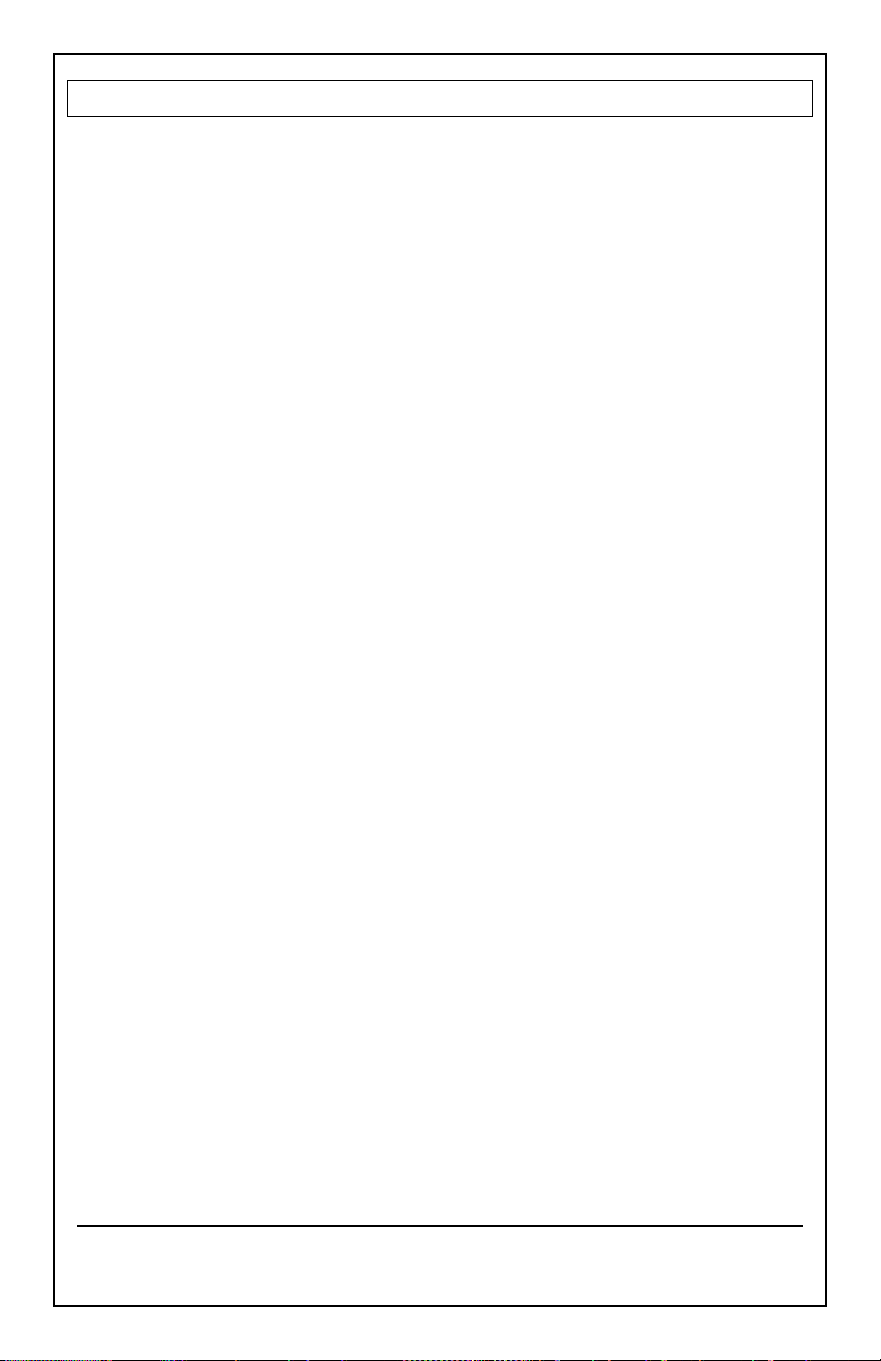
LOW BATTERY ICON
• When displayed in Outdoor Temperature section, replace
batteries in the outdoor sensor.
• When displayed in Indoor Temperature section, replace
batteries in the forecast station.
CARE AND MAINTENANCE
• Do not mix old and new batteries
• Do not mix Alkaline, Standard, Lithium or Rechargeable Batteries
• Always purchase the correct size and grade of battery suitable for the
intended use.
• Replace all batteries of a set at the same time.
• Clean the battery contacts and also those of the device prior to battery
installation.
• Ensure the batteries are installed correctly with regard to polarity
(+and -).
• Remove batteries from equipment with is not to be used for an
extended period.
• Promptly remove expired batteries.
WARRANTY AND SUPPORT INFORMATION
La Crosse Technology, Ltd. provides a 1-year limited time warranty (from
date of purchase) on this product relating to manufacturing defects in
materials & workmanship.
Before returning a product, please contact our friendly customer support
or visit our online help:
Phone: 1-608-782-1610
Online: www.lacrossetechnology.com/support/
Low
Battery
Icon
Model: 308-1451 www.lacrossetechnology.com/support pg. 16
FCC STATEMENT
This equipment has been tested and found to comply with the limits for a Class B
digital device, pursuant to part 15 of the FCC Rules. These limits are designed to
provide reasonable protection against harmful interference in a residential
installation. This equipment generates, uses and can radiate radio frequency
energy and, if not installed and used in accordance with the instructions, may
cause harmful interference to radio communications. However, there is no
guarantee that interference will not occur in a particular installation. If this
equipment does cause harmful interference to radio or television reception,
which can be determined by turning the equipment off and on, the user is
encouraged to try to correct the interference by one or more of the following
measures:
• Reorient or relocate the receiving antenna.
• Increase the separation between the equipment and receiver.
• Connect the equipment into an outlet on a circuit different from that to
which the receiver is connected.
• Consult the dealer or an experienced radio/TV technician for help.
This device must not be co-located or operating in conjunction with any other
antenna or transmitter.
Operation is subject to the following two conditions:
(1) This device may not cause harmful interference, and
(2) This device must accept any interference received, including interference that
may cause undesired operation.
Caution!
The manufacturer is not responsible for any radio or TV interference caused by
unauthorized modifications to this equipment. Such modifications could void the
user authority to operate the equipment.
All rights reserved. This manual may not be reproduced in any form, even in part,
or duplicated or processed using electronic, mechanical or chemical process
without the written permission of the publisher. This booklet may contain errors
or misprints. The information it contains is regularly checked and corrections are
included in subsequent editions. We disclaim any responsibility for any technical
error or printing error, or their consequences.
All trademarks and patents are recognized.

AK ALASKA
ANC ANCHORAGE
FAI FAIRBANKS
AJN JUNEAU
OME NOME
AL ALABAMA
BHM BIRMINGHAM
GAD GADSDEN
MGM MONTGOMERY
MOB MOBILE
AR ARKANSAS
FSM FORT SMITH
LIT LITTLE ROCK
TXK TEXARKANA
AZ ARIZONA
FLG FLAGSTAFF
PHX PHOENIX
TUS TUCSON
YUM YUMA
CA CALIFORNIA
BFL BAKERSFIELD
BLH BLYTHE
EKA EUREKA
FAT FRESNO
FTB FORT BRAGG
LAX LOS ANGELES
ROD REDDING
SAC SACRAMENTO
SAN SAN DIEGO
SBD SAN BERNADINO
SFO SAN FRANCISCO
CO COLORADO
DEN DENVER
DRO DURANGO
FNL FT COLLINS
GJT GRAND JUNCTION
ITR BURLINGTON
PUB PUEBLO
CT CONNECTICUT
HFD HARTFORD
DC DISTRICT OF
COLUMBIA
DCA WASHINGTON
DE DELAWARE
ON5 DOVER
FL FLORIDA
EYW KEYWEST
JAX JACKSONVILLE
MIA MIAMI
ORL ORLANDO
PNS PENSACOLA
TLH TALLAHASSEE
TPA TAMPA
GA GEORGIA
ABY ALBANY
AGS AUGUSTA
ATL ATLANTA
CSG COLUMBUS
MAC MACON
SAV SAVANNAH
HI HAWAII
HNL HONOLULU
ITO HILO
OGC KAHULUI
WAI WAIMEA
IA IOWA
ALO WATERLOO
DSM DES MOINES
DVN DAVENPORT
SUX SIOUX CITY
ID IDAHO
BOI BOISE
GIB GIBBONSVILLE
PIH POCATELLO
SZT SAND POINT
IL ILLINOIS
CMI CHAMPAIGN
ORD CHICAGO
SPI SPRINGFIELD
IN INDIANA
EVV EVANSVILLE
HUF TERRE HAUTE
IND INDIANAPOLIS
SBN SOUTH BEND
KS KANSAS
DDC DODGE CITY
K32 WICHITA
KCK KANSA CITY
OH1 WAKEENEY
TOP TOPEKA
KY KENTUCKY
FFT FRANKFORT
LEX LEXINGTON
LOU LOUISVILLE
LA LOUISIANA
BTR BATON ROUGE
CWF LAKE CHARLES
IER NATCHITOCHES
NEW NEW ORLEANS
SHV SHREVEPORT
MA MASSACHUSETTS
BOS BOSTON
MD MARYLAND
BWI BALTIMORE
ME MAINE
AUG AUGUSTA
BGR BANGOR
CAR CARIBOU
PWM PORTLAND
MI MICHIGAN
AZO KALAMAZOO
DET DETROIT
FNT FLINT
LAN LANSING
PZQ ROGERS CITY
SAW MARQUETTE
TVC TRAVERSE CITY
MN MINNESOTA
AEL ALBERT LEA
BJI BEMIDJI
DLH DULUTH
GPO GRAND PORTAGE
INL INTERNATIONAL FALLS
STP SAINT PAUL
MO MISSOURI
JEF JEFFERSON CITY
MKC KANSA CITY
MPH MEMPHIS
POF POPLAR BLUFF
SGF SPRINGFIELD
STL ST LOUIS
MS MISSISSIPPI
GWO GREENWOOD
HUV HUNTSVILLE
JAN JACKSON
TUP TUPELO
MT MONTANA
BIL BILLINGS
FTP FORT PECK
GFT GREAT FALLS
HLN HELENA
SDY SIDNEY
WTF WHITEFISH
NC NORTH CAROLINA
AVL ASHEVILLE
CLT CHARLOTTE
FAY FAYETTEVILLE
ILM WILMINGTON
INT WINSTON-SALEM
MCZ WILLIAMSTON
RDU RALEIGH
ND NORTH DAKOTA
BIS BISMARCK
BWB BOWBELLS
FAR FARGO
GFK GRAND FORKS
NE NEBRASKA
GRI GRAND ISLAND
LNK LINCOLN
OMA OMAHA
SNY SYDNEY
VTN VALENTINE
NH NEW HAMPSHIRE
CON CONCORD
NJ NEW JERSEY
EWR NEWARK
TTN TRENTON
NM NEW MEXICO
ABQ ALBUQUERQUE
MAG MAGDALENE
ROW ROSWELL
RTN RATON
SAF SANTA FE
NV NEVADA
AIN AUSTIN
CXP CARSON CITY
ELY ELY
LAS LAS VEGAS
LWL WELLS
RNO RENO
NY NEW YORK
ALB ALBANY
BUF BUFFALO
JFK NEW YORK CITY
LKP LAKE PLACID
SYR SYRACUSE
OH OHIO
CLE CLEVELAND
CMH COLUMBUS
ISZ CINNCINATI
TOL TOLEDO
YNG YOUNGSTOWN
OK OKLAHOMA
17K BOISE CITY
LAW LAWTON
OKC OKLAHOMA CITY
TUL TULSA

OR OREGON
BNO BURNS
EUG EUGENE
MFR MEDFORD
PDX PORTLAND
SLE SALEM
PA PENNSYLVANIA
CXY HARRISBURG
PHL PHILADELPHIA
PIT PITTSBURGH
SCR SCRANTON
PR PUERTO RICO
SJU SAN JUAN
RI RHODE ISLAND
PVD PROVIDENCE
SC SOUTH CAROLINA
CHS CHARLESTON
CUB COLUMBIA
GMU GREENVILLE
SD SOUTH DAKOTA
FSD SOUIX FALLS
PIR PIERRE
RAP RAPID CITY
TN TENNESSEE
BNA NASHVILLE
CHA CHATTANOOGA
DKX KNOXVILLE
MEM MEMPHIS
TX TEXAS
ABI ABILENE
AMA AMARILLO
AUS AUSTIN
BRO BROWNSVILLE
DFW DALLAS/FT. WORTH
ELP EL PASO
HOU HOUSTON
LRD LAREDO
ODO ODESSA
SAT SAN ANTONIO
UT UTAH
SAL SALINE
SGU ST GEORGE
SLC SALT LAKE CITY
TSN THOMPSON
VA VIRGINIA
DON VIENNA
LYH LYNCHBURG
ORF NORFOLK
RIC RICHMOND
ROA ROANOKE
VT VERMONT
BTV BURLINGTON
MPR MONTPELIER
WA WASHINGTON
ABE ABERDEEN
ALW WALLA WALLA
KTF KETTLE FALLS
MVN MT VERNON
OLM OLYMPIA
SEA SEATTLE
SFF SPOKANE
TON TONASKET
YKM YAKIMA
WI WISCONSIN
AUW WAUSAU
GRB GREEN BAY
LSE LA CROSSE
MSN MADISON
MWC MILWAUKEE
SSQ SPOONER
WV WEST VIRGINIA
CRW CHARLESTON
HLG WHEELING
WY WYOMING
BYG BUFFALO
CPR CASPER
CYS CHEYENNE
LAA LITTLE AMERICA
WYE WEST YELLOWSTONE
CANADA CITY LISTING
EDM EDMONTON
ALB CALGARY
VAN VANCOUVER
WIN WINNIPEG
FRE FREDERICTON
HAL HALIFAX
YEL YELLOWKNIFE
OTT OTTAWA
SUD SUDBURY
THU THUNDER BAY
TOR TORONTO
CHT CHARLOTTE TOWN
MON MONTREAL
QUE QUEBEC
REG REGINA
WHI WHITEHORSE