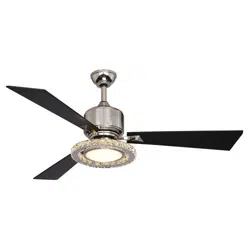
Model No.: # 355-6703
PAGE: 1 / 11
220104
A
D
B
C
PAGE: 2 / 11
11
10
12
13
5
7
6
9
8
3
4
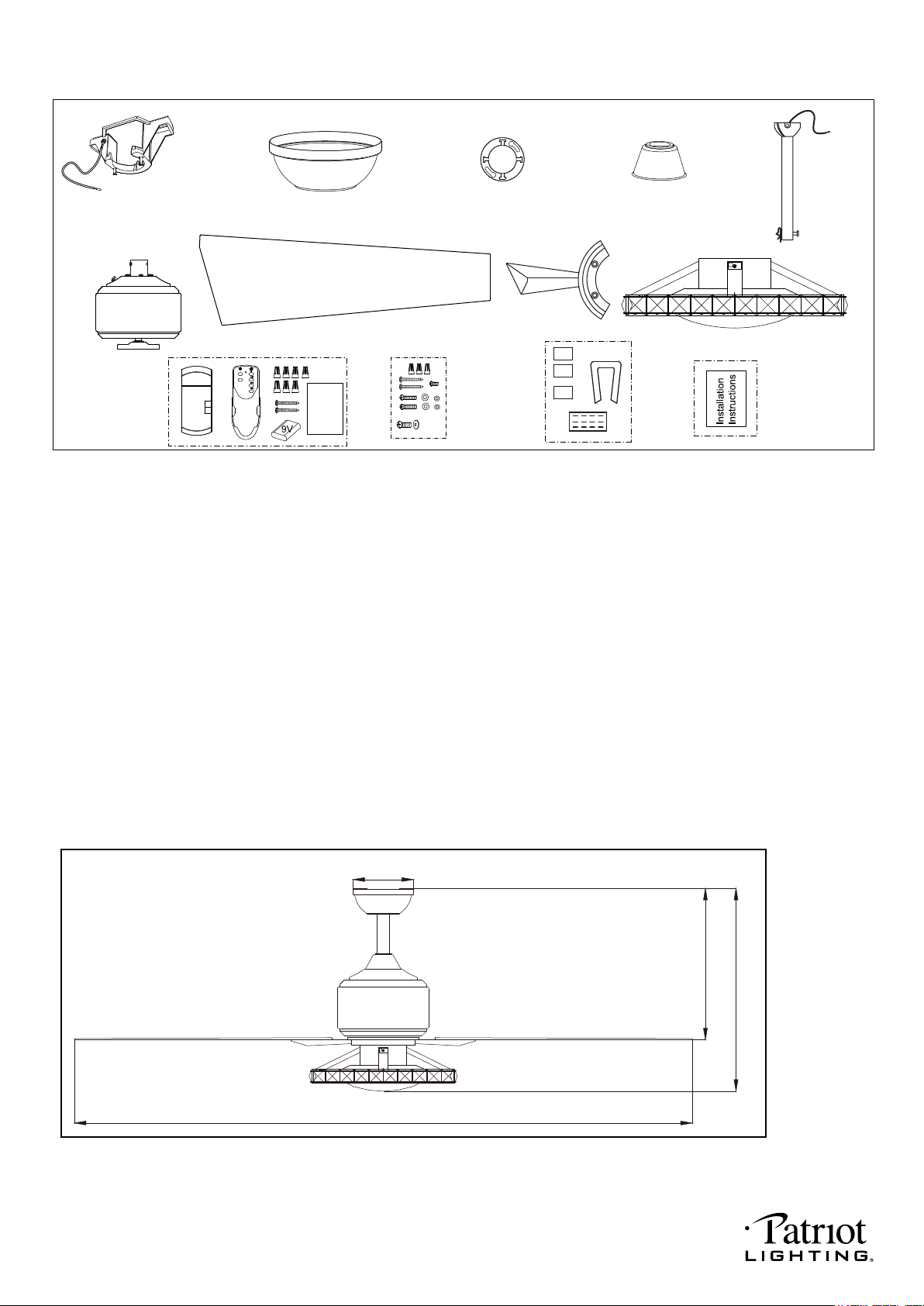
Unpack your fan and check the contents. You should have the following items.
1.) Hanger Bracket
2.) Canopy
3.) Decorative Cap (Comes in a Separate Bag)
4.) Downrod Stand Cover
5.) Downrod Set (Included Hanger Ball, 6” Downrod, Hanger Pin & Lock Pin)
6.) Fan Motor Assembly
7.) Fan Blades (3PCS)
8.) Blade Holder (3PCS)
9.) Fan Light Kit
10.) Remote Control Set (Includes Receiver & Transmitter & Wire Connectors & Battery
& Screws & Remote Control Instructions)
11.) Assembly Kit
12.) Blade Balancing Kit
13.) Installation Instructions
Package Contents:
2
1
Dimension Reference (Installed with 6” Downrod):
A. 16-7/8 in. B. 12-1/2 in. C. 52 in. D. 5 in.
Remote
Control
Instructions
REMOTE
Main
CONTROL
Accent
X10
220104
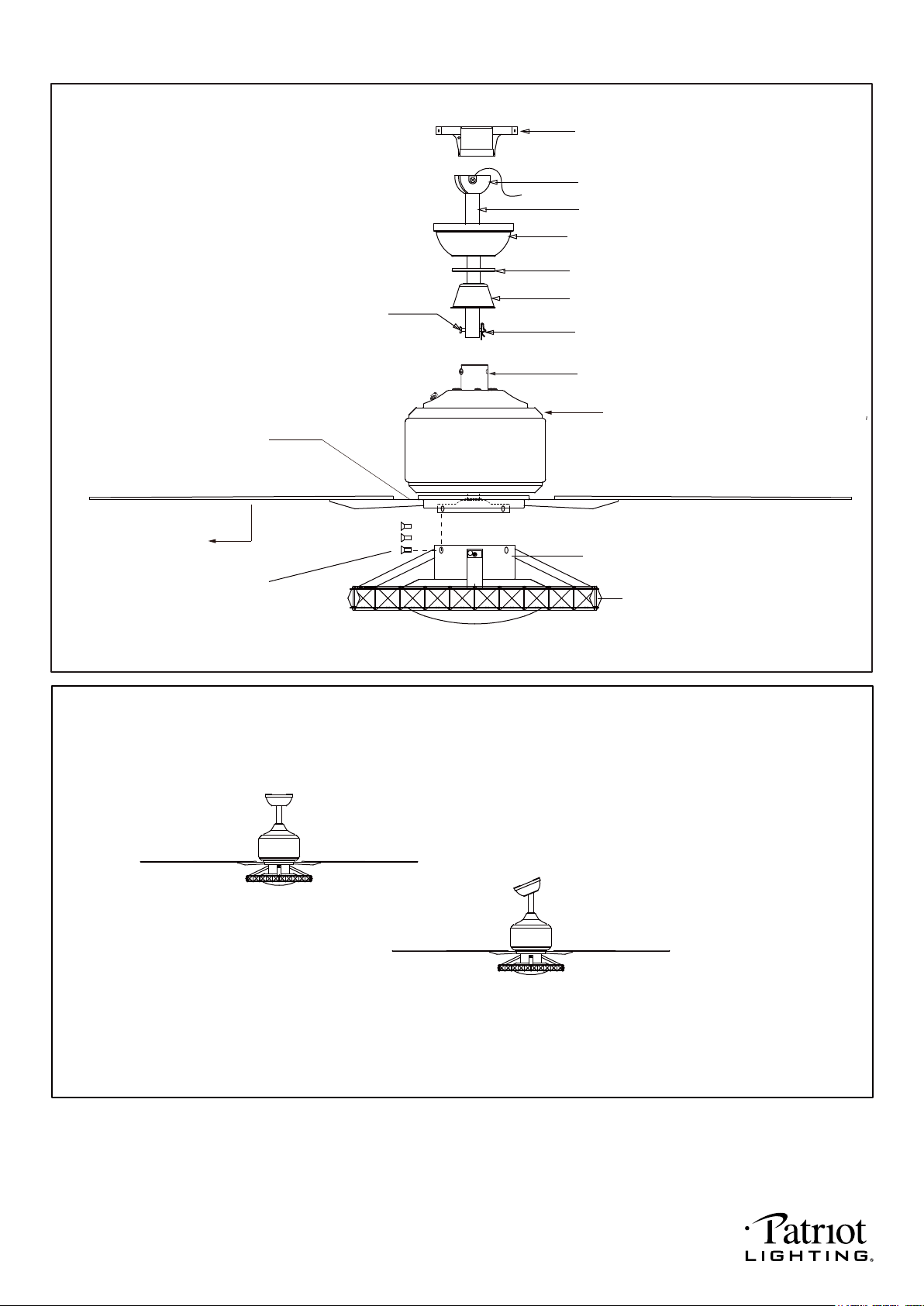
Downrod Mount
Sloped Ceiling Mount (Up to 23 degrees)
Exploded View Detail
PAGE: 3 / 11
Dual Mount Drawing
Collar
Housing
Fan Light
Blade Holder
Switch Box Screw
Switch Box
Blade
Hanger Bracket
Canopy
Downrod
Downrod Stand Cover
Hanger Ball
Hanger Pin
Lock Pin
Decorative Cap
220104

PAGE: 4 / 11
Safety Instructions
READ ALL SAFETY INFORMATION AND INSTALLATION INSTRUCTIONS BEFORE YOU BEGIN TO
INSTALL THE FAN AND SAVE INSTRUCTIONS.
All set screws of the fan must be checked and retightened where necessary before installation.
To reduce the risk of personal injury, do not bend the blade brackets when installing the brackets,
balancing the blades or cleaning the fan. Do not insert foreign objects between rotating fan blades.
Before changing the fan direction, turn off the fan and wait for the fan blades to stop completely.
The safeguards provided by these safety instructions and by the separate installation
instructions are not meant to cover all possible conditions and situations that may occur. It must be
understood that common sense, caution and care are factors which can not be built into this product.
These factors must be supplied by the person(s) installing, caring for and operating the fan.
TO AVOID RISK OF ELECTRIC SHOCK, BE SURE TO SHUT OFF POWER AT THE MAIN
FUSE OR CIRCUIT BREAKER BOX BEFORE INSTALLING OR SERVICING THIS
FIXTURE. TURNING OFF THE ELECTRICAL POWER BY USING THE LIGHT SWITCH
IS NOT SUFFICIENT TO PREVENT ELECTRICAL SHOCK.
TO REDUCE THE RISK OF INJURY, INSTALL THE FAN SO THAT THE BLADES ARE
AT LEAST 7 FEET (2.1 METERS) ABOVE THE FLOOR AND AT LEAST 18 INCHES
(0.5 METERS) FROM THE TIP OF THE BLADES TO THE WALL.
TO REDUCE THE RISK OF FIRE, ELECTRIC SHOCK, OR PERSONAL INJURY, MOUNT
TO OUTLET BOX MARKED "ACCEPTABLE FOR FAN SUPPORT" AND USE MOUNTING
SCREWS PROVIDED WITH THE OUTLET BOX.
THE INSTALLATION HAS TO BE IN ACCORDANCE WITH THE NATIONAL ELECTRICAL
CODE, ANSI/NFPA 70-1999 AND LOCAL CODES. IF YOU ARE UNFAMILIAR WITH THE
METHODS OF INSTALLING ELECTRICAL WIRING, SEEK THE SERVICES OF A
QUALIFIED LICENSED ELECTRICIAN.
WARNING
220104
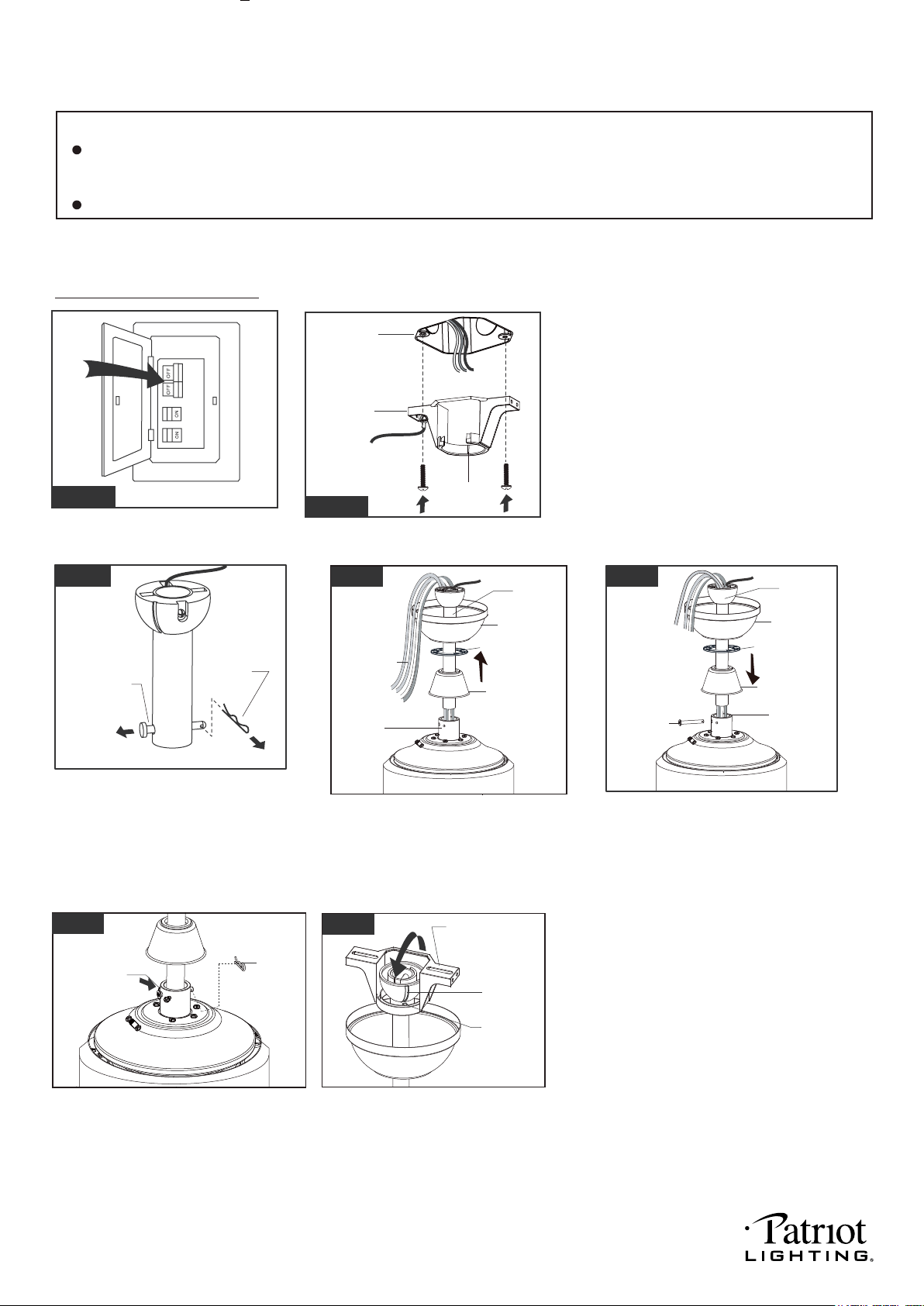
Thread the motor wires through the
downrod stand cover, decorative
cap (Making sure the smooth side
of decorative cap is facing
downward.), canopy and downrod.
PAGE: 5 / 11
Collar
Lock Pin
Collar
Hanger Pin
Installation Steps :
Hanger Pin
Lock Pin
Hang the fan on hanger bracket, and
make sure the slot of hanger ball is
snapped into the chip of hanger
bracket exactly.
Note: For sloped ceiling installation,
make sure the slot of hanger ball and
the chip of hanger bracket face down.
Fig.1
Turn OFF the electric circuit at the
main fuse or circuit breaker box.
Remove the lock pin and take off
the hanger pin.
Fig.3
Loosen the collar screws out part way.
Insert the downrod into the collar.
Slide hanger pin through holes of
collar and downrod.
Fig.4
Motor Wires
Downrod
Downrod Stand
Cover
Canopy
Downrod
Canopy
Downrod Stand
Cover
Fig.5
Tighten the two collar screws.
Slide lock pin into hanger
pin until it is locked into position.
Fig.6
Collar Screws
Decorative Cap
Decorative Cap
Tighten the hanger bracket to the outlet
box with two mounting screws. (To reduce
the risk of fire, electric shock, or personal
injury, mount to an outlet box marked
"Acceptable for fan support" and use
mounting screws provided with the outlet
box.)
Note: For sloped ceiling installation, make
sure that the chip of the hanger bracket
is toward the floor.
Hanger
Bracket
Fig.2
Outlet Box
Fig.7
Slot
Chip
Hanger Bracket
NOTE: The fan weight is 17.28 lbs (7.84 kgs). Be sure the outlet box you are using is securely attached to the building
structure and can support the full weight of the fan. Failing to do so can result in serious injury.
INSTALLATION INSTRUCTIONS
IMPORTANT:
BEFORE YOU BEGIN INSTALLING THE FAN, CAREFULLY READ ALL INFORMATION IN
SAVE ALL INSTRUCTIONS.
Chip
THE SAFETY
INSTRUCTIONS AND INSTALLATION INSTRUCTIONS. IF IN DOUBT, CONSULT A QUALIFIED
ELECTRICIAN.
220104
Grounding
Green
Green
Black
Black
Black
Black
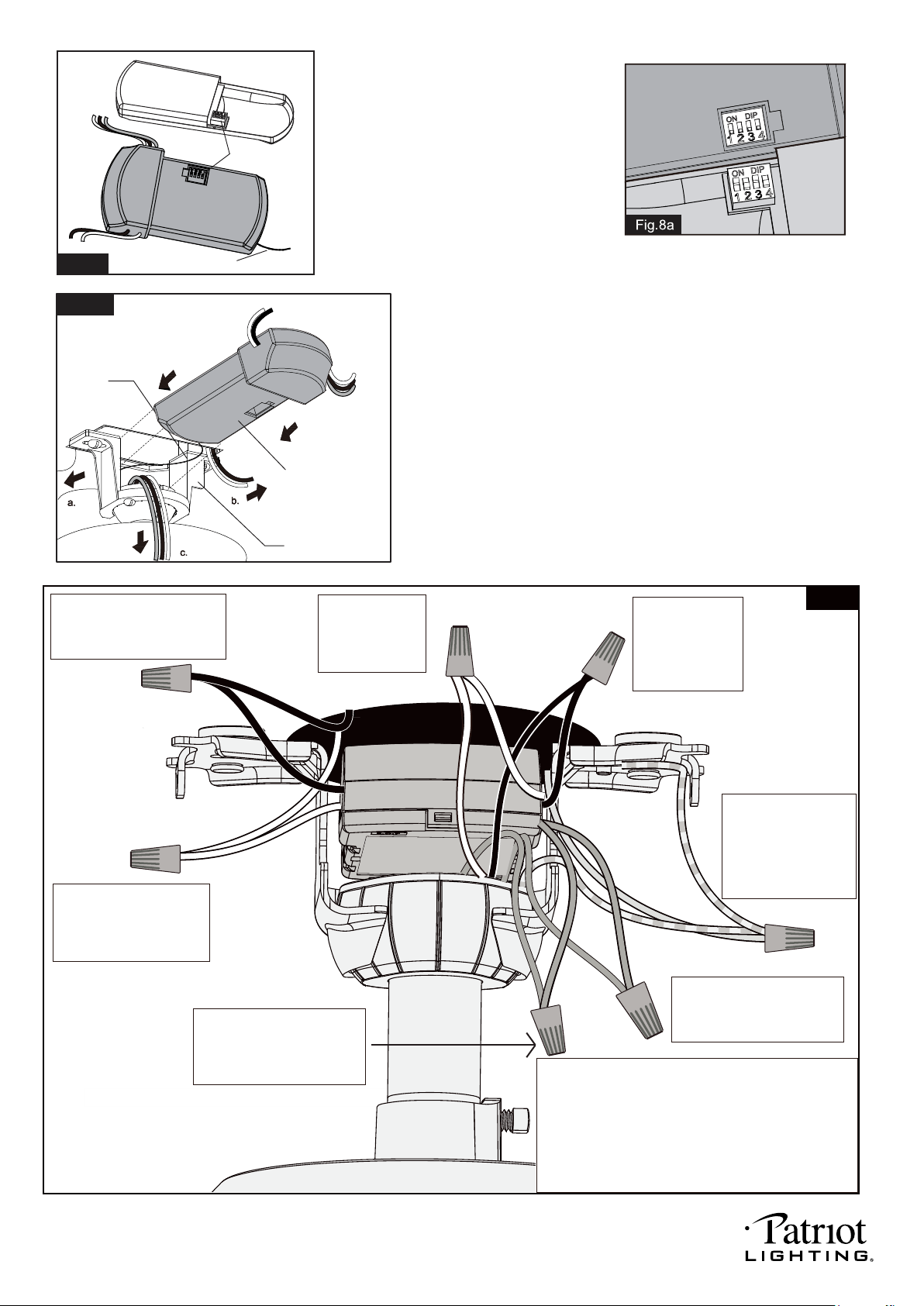
Connect the white (neutral)
wire from receiver to the
white (neutral) wire from the
outlet box with a wire
connector.
White
White
White
White
Connect the black (hot) wire
from receiver to the black (hot)
wire from outlet box with a wire
connector.
Blue
Blue
Fig.10
orange
orange
*** After making the wire connections, the wires should
be spread apart. The white (neutral) conductor from
receiver and outlet box with green (grounding)
conductor on one side; the black (hot) conductor from
receiver and outlet box with the white, black, blue and
orange conductor from receiver and motor on the
other side of the outlet box.
*** The wire connection points should be turned upward
and pushed carefully up into outlet box.
Connect the blue wire from
receiver to the blue wire from
motor (This is for main light
control) with a wire connector
Connect three
ground wires (Green,
or bare copper) coming
from outlet box,
downrod and hanging
bracket with a wire
connector.
Connect the black
wire from receiver
to the black wire
from motor (This is
for fan control)
a wire connector
Connect the white
wire from receiver
to the white wire
from motor
wire connector
Connect the orange wire from
receiver to the orange wire
from motor (This is for accent
light control) with a wire
connector
Fig.9
Move ground wires (a), outlet box wires (b), and
motor wires (c) away from the center of the hanger
bracket. Then slide receiver through hanger
bracket as shown. Antenna end first, until it is
centered. Finally, cut motor wires (c) to length
needed for connections.
Code example:
1-ON 2-OFF 3-ON 4-OFF on both DIP
Switches.
Note: If you have two ceiling fans
with 2 remote control units, set 2
different codes for each set of
transmitter / receiver.
Fig.8
Antenna
DIP Switch
Transmitter
Receiver
PAGE: 6 / 11
Both the transmitter and receiver have a 4-key
unit code on each DIP Switch (Fig.8) and by
default, all keys are pre-set to the "off" position.
This means that the transmitter and receiver are
already paired together. However, if you have
multiple fans and remote controls and want to
avoid interference between them, you can "pair"
other transmitters and receivers together by
adjusting the DIP switches, so the same
numbered keys are in the "ON" position
on both (Fig.8a).
Note: The ceiling fan may work abnormally
if there is interference from other remote
controls.
SUR
ON
ON SUR
Hanger Bracket
Receiver
Antenna
220104
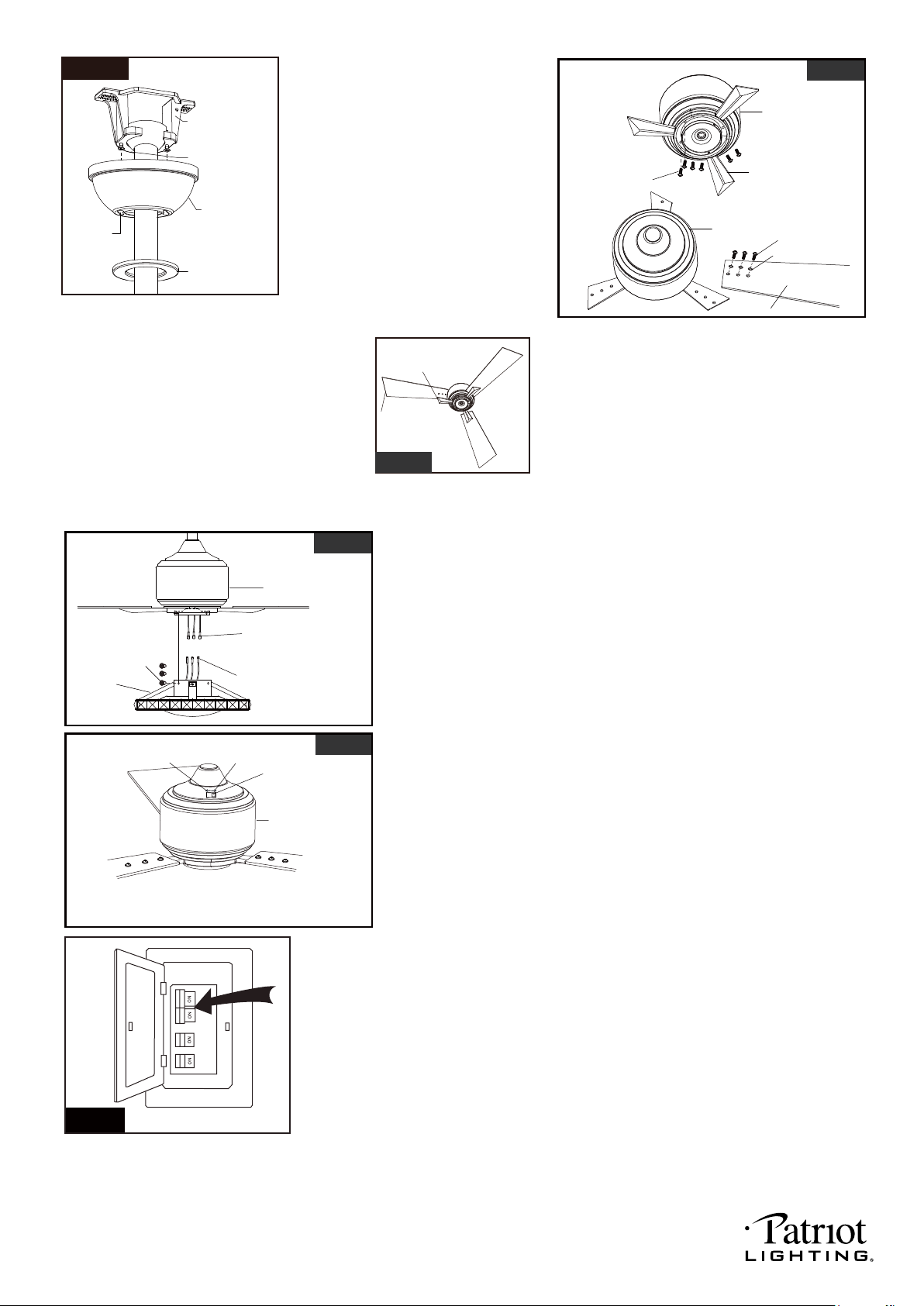
Connect the female terminals from motor to male terminals
from fan light kit.
secure the fan light kit to the motor by fan screws.
Note: 1). The blue fixture wire to blue motor wire;
2). The orange fixture wire to orange motor wire;
3). The white fixture wire to white motor wire;
Align holes and fasten blade holder to the
motor with screws. Then align holes and
fasten blade to the blade holder with rubber
washers and blade screws. Repeat for
remaining blades and blade holders (Fig.12a).
Suggest: Using magnetic Philips screwdriver.
NOTE: The blade outside edge angle and
blade holder outside edge angle
must be same(Fig.12b).
PAGE: 7 / 11
Fig.11
Blade Screw
Rubber Washer
Screw
Fan Blade
Fig.12a
Fig.12b
Fig.15
Turn ON the electric circuit at the
main fuse or circuit breaker box.
CAUTION :Handle the light kit gently during installing. In order
to avoid noise please keep crystalls tightly.
The slide switch on motor assembly sets direction of fan rotation.
Select the desired direction of fan rotation.
Push the slide switch left for " Forward" and right for "Reverse".
Note: Wait for fan to stop before reversing the direction of blade
rotation.
Canopy Screw
Key Hole
Slot
Hanger Bracket
Canopy
Decorative Cap
Motor
Motor
Blade Holder
Loose canopy screw and do not
remove it, push the canopy
upwards to cover hanger bracket by
inserting canopy screw into key
hole slot, then rotate the canopy till it
fixed on the hanger bracket. Finally,
Attach the decorative cap to canopy,
rotate it clockwise until tight.
Fig.13
Motor
Fan Light Kit
Fan Screw
Male terminal
Female terminal
Fig.14
Slide Switch
Reverse
Forward
Motor
Blade Angle Edge
Blade Holder Edge Angle
220104
PAGE: 8 / 11
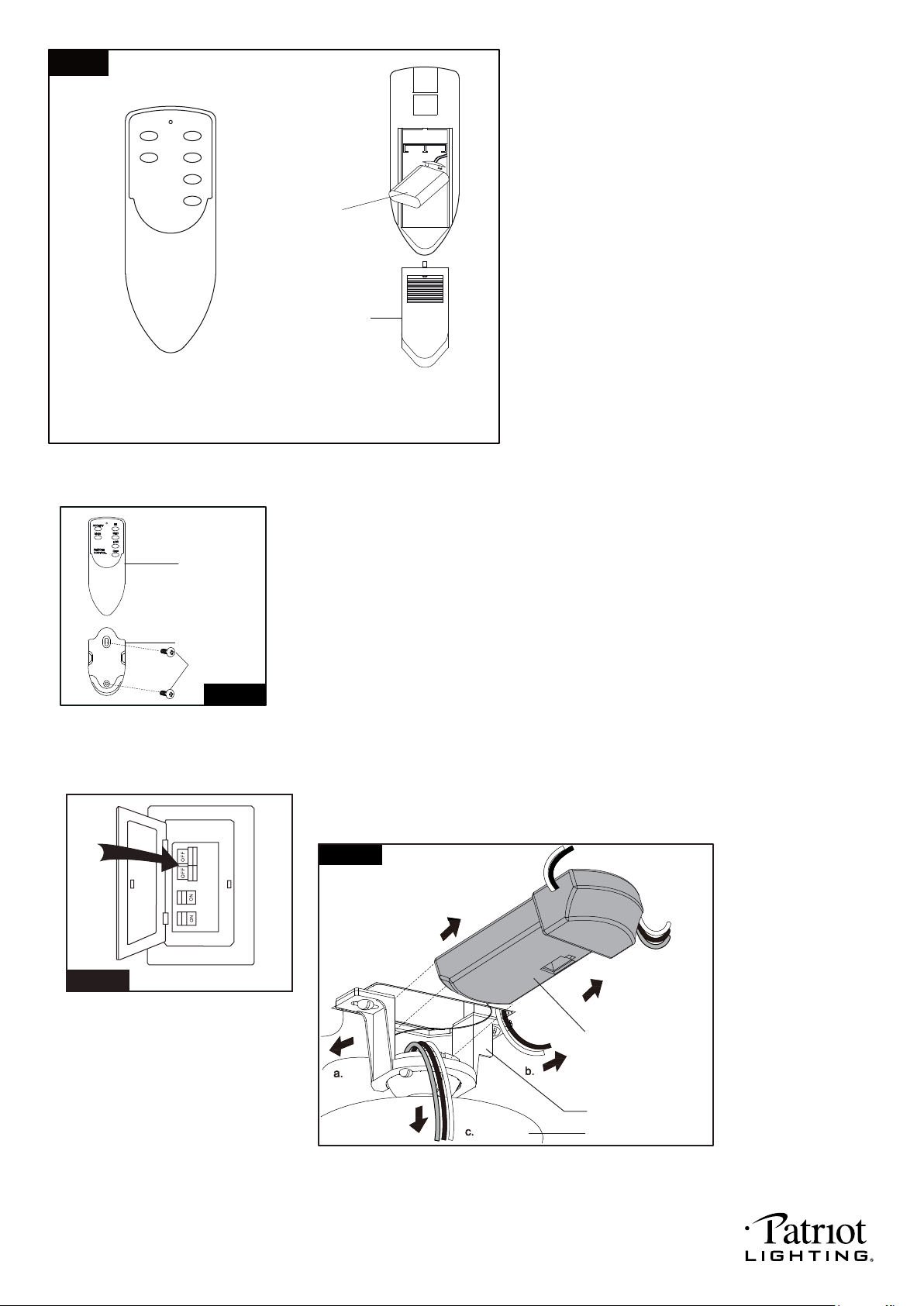
1. Install the battery (9V) into the transmitter.
2. OPERATING TRANSMITTER:
* Press "HI" to turn on the fan at high speed.
* Press "MED" button to turn the fan in medium speed.
* Press "LOW" button to turn the fan in low speed.
* Press "OFF" button to turn off the fan.
* Press and release the "Accent" button quickly to turn
on or turn off the accent light.
* Press and hold the "DIMMER" button to dim or brighten
lights to the desired level and release, and the brightness
level will be memorized. Turn on the light again, then fan
light will be restored to the brightness-level at which it was
dimmed last time.
Fig.16
Battery Cover
Battery
NOTE:
1. Accent light is non-dimmable. Main light is
dimmable.
2. This remote controller has a memory function
setting. The fan will operate at the same speed
and the fan light will stay at the same
brightness-level as the last time the power
supply was turned off.
3. Compatible Wall Switch: Menards SKU#
363-5580, the wall switch only can turn on
or turn off the light, but can not control dimming.
Install Without Remote Controller Fig.18.
.
Install Without Remote Controller
Fig.18
Turn OFF the electric circuit at the main fuse or circuit breaker box. (See Fig.18)
Unscrew the canopy. Remove the wire connectors from
the fan to ceiling wire connection. The receiver should
be removed from the hanger bracket (See Fig.19).
Note: Remote controller can not be used along with a solid-state speed control at the same time.
Install the transmitter wall bracket on the wall with two screws and
place transmitter in it carefully.
Fig.17
Transmitter
Wall Bracket
Screw
ACCENT
HI
MAIN
MED
LOW
OFF
REMOTE
CONTROL
Fig.19
Receiver
Canopy
Hanger Bracket
220104
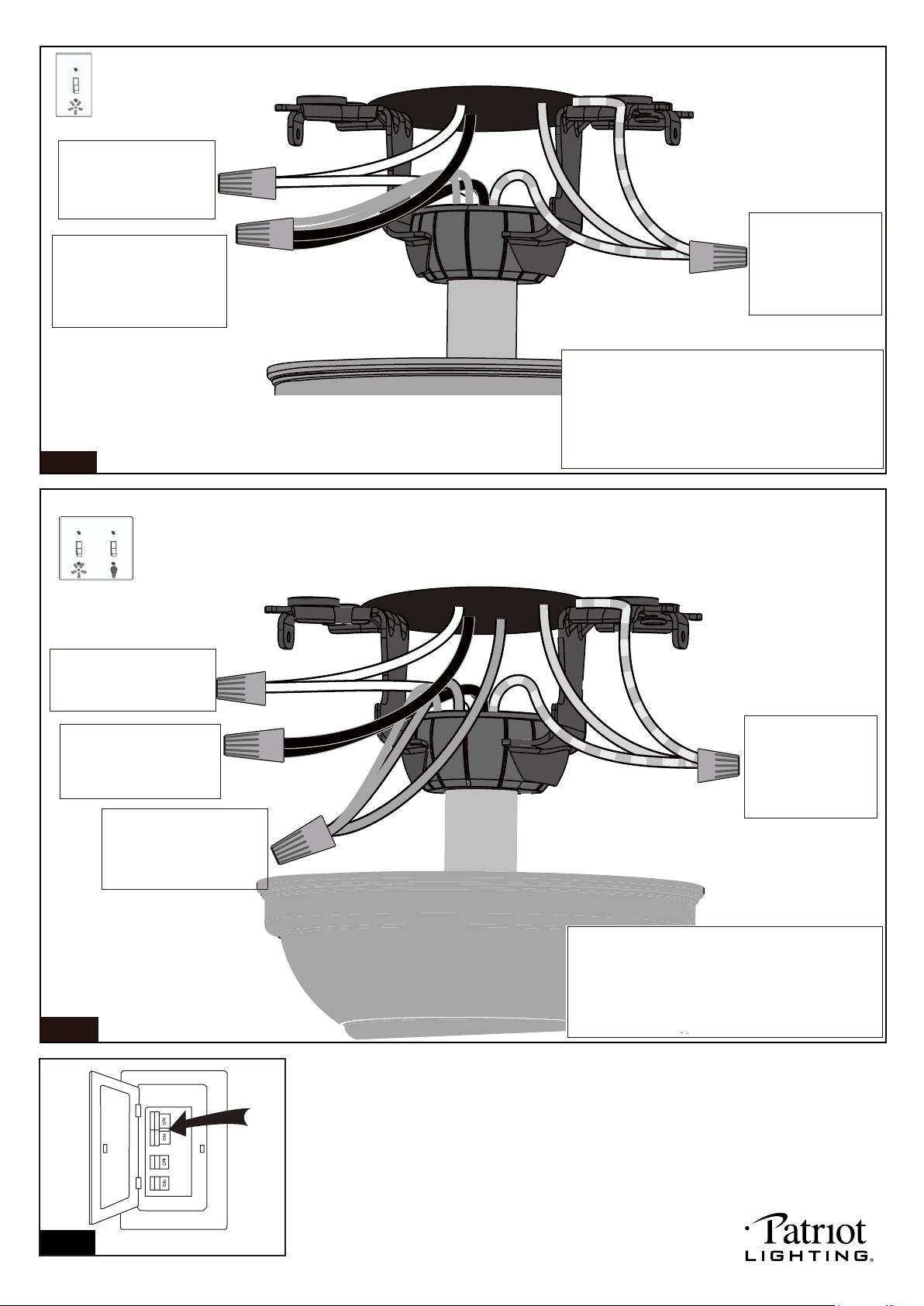
PAGE: 9 / 11
Fig.20
Connect the white (neutral)
wire from motor to the white
(neutral) wire from the
outlet box with a wire
connector.
Connect the black (hot) wire
(This is for fan control),orange
wire and blue wire (This is for
light control) from motor to the
black (hot) wire from outlet box
with a wire connector.
Bla
Black
ck
Blue
Orange
Green
White
White
Grounding
Green
*** After making the wire connections, the wires should
be spread apart. The white (neutral) conductor and
green (grounding) conductor on one side and the
black (hot) conductor, blue and orange (light)
conductor on the other side of the outlet box.
*** The wire connection points should be turned upward
and pushed carefully up into outlet box.
Connect three
ground wires (Green
or bare copper) coming
from outlet box,
downrod and hanging
bracket with a wire
connector.
For a single switch
Follow these steps:
Connect three
ground wires (Green
or bare copper) coming
from outlet box,
downrod and hanging
bracket with a wire
connector.
Connect the black (hot) wire
from motor (This is for fan
control) to the black (hot)
wire from outlet box with a
wire connector .
Green
Black
Blue
Green
White
Black
Blue
(main light)
Orange
(accent light)
White
Grounding
For dual switches
Follow these steps:
Connect the white (neutral)
wire from motor to the white
(neutral) wire from outlet box
with a wire connector .
Connect the blue wire and
orange wire (This is for light
control) from motor to the
blue wire from outlet box with
a wire connector.
*** After making the wire connections, the wires should
be spread apart. The white (neutral) conductor and
green (grounding) conductor on one side and the
black (hot) conductor, blue and orange (light)
conductor on the other side of the outlet box.
*** The wire connection points should be turned
upward and pushed carefully up into outlet box.
Fig.21
Fig.22
Turn ON the electric circuit at the main fuse or circuit breaker box.
220104
PAGE: 10 / 11
Troubleshooting Guide
If you have difficulty operating your new ceiling fan, it may be the result of incorrect assembly, installation
or wiring. If you experience any faults, please check this Troubleshooting Guide. If a problem cannot be
remedied or you are experiencing difficulty in installation, please call our Customer Service Department
(1-800-887-6326).
PROBLEM
1. If fan does not start:
2. If fan sounds noisy:
3. If fan wobbles:
4. If light does not work:
5. If accent light does flash:
1. Check main and branch circuit fuses or circuit breakers.
2. Make sure forward/reverse switch is firmly in left or right position. Fan will not
operate when switch is in the middle.
3. Make sure that the wall control is turned "ON".
4. Check line wire connections to fan and switch wire connections in switch box.
CAUTION: Make sure main power is turned off.
1. Check the fixed tightness of crystalls. Open the clips more wide to hold crystalls
tightened.
2. Make sure all screws in motor housing are snug. (not over tightened)
3. Make sure the screws which attach the fan blade bracket to the motor are tight.
4. Make sure wire connectors in switch box are not rattling against each
other or against the interior wall of the switch box.
CAUTION: Make sure main power is turned off before accessing switch box.
5. Check to be sure the light kit is secured on switch box tightly.
6. Some fan motors are sensitive to signals from Solid State variable speed
controls. DO NOT USE a Solid State variable speed control.
7. Allow "break-in" period of 24 hours. Most noises associated with a new fan will
disappear after this period.
All blades are weighed and grouped by weight. Natural woods vary in density
which could cause the fan to wobble even though all blades are weight-matched.
The following procedures should eliminate most of the wobble. Check for wobble
after each step.
1. Check that all blades are screwed firmly into blade brackets.
2. Check that all blade brackets are tightened securely to motor.
3. Make sure that canopy and hanger bracket are tightened securely to ceiling
outlet box and outlet box is mounted firmly to ceiling joist.
4. Most wobble problems of fan are caused when blades are not in equal level. To
check the blade levels, select a point on the ceiling above the tip of any blade.
Measure the distance from the ceiling to the blade tip, to an accuracy of 1/8
inch. Rotate the blades until the next blade is in the measuring position. Repeat
measurement for each blade. If all blade levels are not equal, you can adjust
blade levels by the following procedure. To adjust a blade tip down, insert a
washer (not supplied) between the blade and blade bracket at the screw
closest to the motor. To adjust a blade tip up, insert washer (not supplied)
between the blade and blade bracket at the two screws farthest from the motor.
5. Interchanging two adjacent blades could redistribute the weight and possibly result
in smoother operation.
1. Check connections between female terminals and male terminals are in correct
state. Ensure the contacts between female terminals and male terminals are good
conditions, no looses.
2. Check for loose or disconnected wires in fan switch box.
3. Check for loose or disconnected wires in light kit.
1. Do not connect blue wire from main light to organge wire from accent light.
Make sure wire connections are correct.
SUGGESTED REMEDY
220104
PAGE: 11 / 11
DYNAMIC BLADE BALANCING KIT
PREFACE
Your ceiling fan may sometimes have wobbling problems when operating due to irregularity in the
blades or the blade brackets. Improper assembly in the mounting system may cause some additional
problems. This balancing kit can be used to fix wobbling problems.
DYNAMIC BLADE BALANCING KIT FOR CEILING FANS
1. Make sure that all blades are firmly screwed into the blade brackets.
2. Make sure that all blade brackets are firmly secured to the motor housing.
3. By looking up at the fan from below, check and be certain that none of the blade brackets are bent
and that none of the blades are out of position.
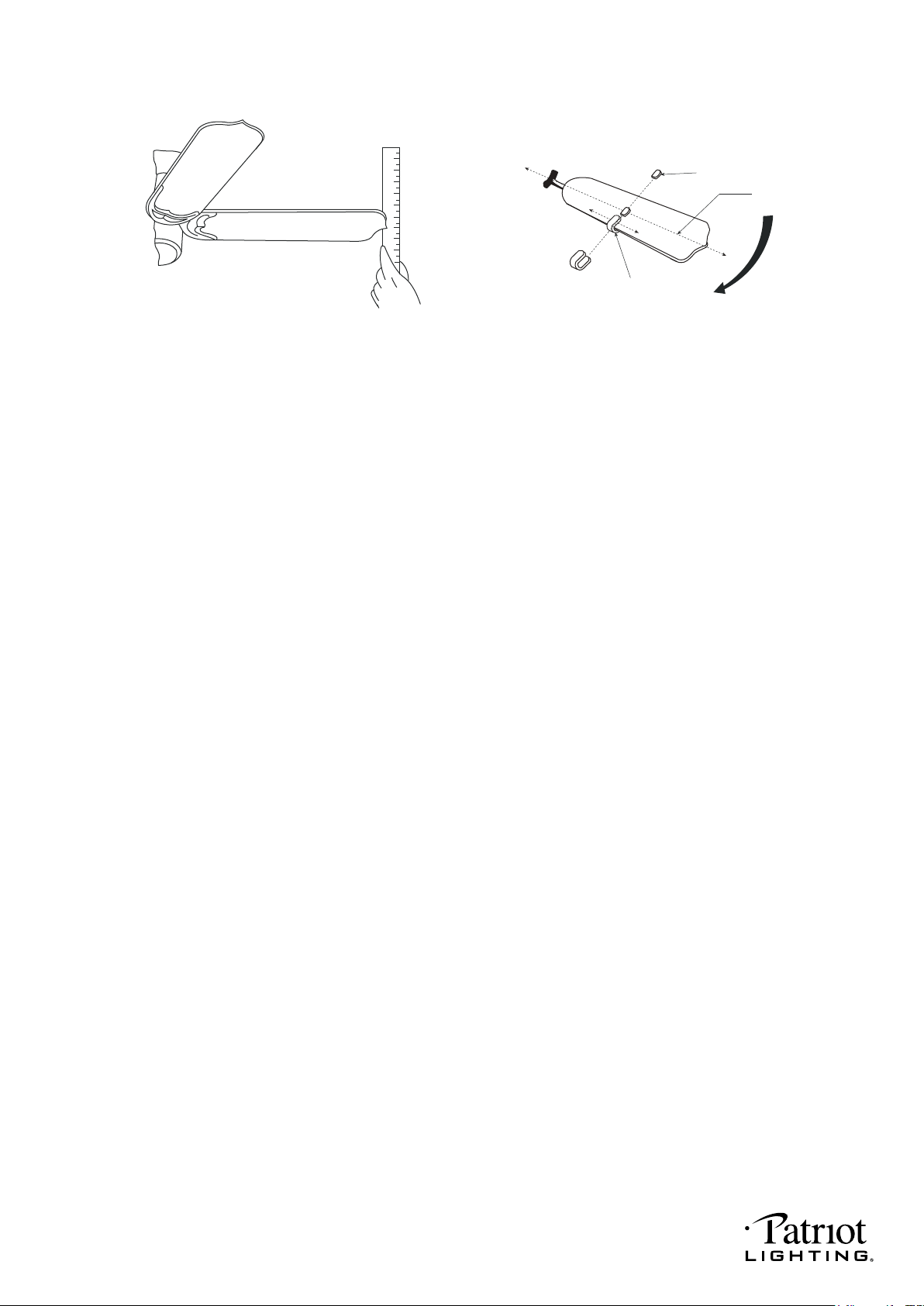
4. Use a yardstick to check the blade tracking. Put the yardstick up against the ceiling vertically and
against the outside leading edge of a blade. Note the distance of the edge of blade to the ceiling.
Carefully turn the blades slowly by hand to check the remaining blades. All distances should be
the same.
Operate the fan ten minutes. After following all the steps and if the wobbling problem is not solved, a
dynamic balancing needs to be done with balancing kit. Follow the procedure listed below:
● Turn the fan off. Select one blade and place the plastic clip on it, with the plastic clip located
halfway between the blade bracket and the blade tip on the edge of the blade.
Caution: The plastic clip should be placed on the windward edge of the blade for fear of
clip flying off.
● Turn the fan on (set the speed that causes the wobble most). Observe if the wobble is better or
worse. Turn the fan off and move the clip to the next blade. Do the same for all blades and note
on which blade the clip reduces the wobble most. Place the clip on the blade which showed the
most improvement. Move the clip inward and outward on this blade and operte the fan to find
the position where the clip gives the most improvement.
Caution: Stay clear of the blades. If the clip, for any reason, is not secure, injury could result.
● Once the exact position is determined, place a weight on the top of the blade, on its centerline and
as close as possible to the clip. Peel the paper off of the back of the weight and press firmly to
ensure that it is securely attached to the blade. Remove the clip.
Caution: Clean the surface of fan blade before placing the balancing weight so that the
balancing weight will be firmly attached to it.
BALANCING WEIGHT
MEASURING
POINT
YARDSTICK
PLASTIC CLIP
CENTERLINE
COUNTER-
CLOCKWISE
1
2
3
4
5
6
7
8
9
220104
