Email: support@euhomy.com
Facebook: @Euhomy.Official
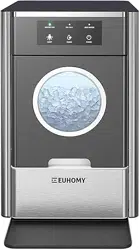
ICE MAKER
SKU: IM-10S
Instruction Manual


Congratulations
Dear Customer:
Welcome to the Euhomy family. Thank you for purchasing one of our products.
Our goal is to provide you with superior service. If there is anything missing from or wrong with
your order, or if you have any questions about using our ice maker, PLEASE contact us.
Email: [email protected]
Facebook: @Euhomy.Official
The Euhomy team is available 24/7 to address your questions, comments, and concerns. Your
satisfaction is our ultimate goal. We want to make everything right so you'll share your positive
experience with other shoppers on Amazon.
If you experience any problems, please send an email to [email protected].
Our mission:
* To be the most trusted appliance brand.
* To create practical, compact appliances that better your life.
Be sure to register at
www.euhomy.com/register
for updates, warranty, and other relevant information.

1. How often do I need to clean my ice maker?
It depends on your usage habits. If you use the ice maker often, it is recommended that you clean it
at least once a week. Failure to clean the machine will cause scale accumulation, which will
eventually block the pump and cause the product to stop working.
2. How should I clean the machine?
It is recommended to use lemon water or a solution of low-acid vinegar and water for cleaning.
Drain the machine immediately after cleaning and then rinse it with pure water.
It is recommended to drain the water tank at least once every three days. This keeps the hardness
of the water low, ensures that impurities can be discharged, and prevents scale buildup in the
water tank.
3. Why are my ice cubes cloudy?
It means that your water quality is turbid. It is recommended to use only drinking water and distilled
water. If your water quality problem is serious, it is recommended that you install a water filtration
system on your faucet.
4. Can I put milk and juice into the water tank to make ice cubes?
Using liquids other than water to make ice cubes is not recommended. Our research has found that
the particles in milk and beverages can easily block the pump and reduce the life of the pump. Also,
the protein in milk is prone to calcification, which chemically reacts with the PU water pipe inside
the machine and easily breaks it, making the product unable to continue working.
5. Why do my ice cubes melt easily?
Because the ice maker is not a refrigerator, it does not have a heat-control function. High ambient
temperatures in summer will accelerate the melting of ice cubes. You can close the lid of the
machine to maintain the internal temperature. Some users put electric fans by the machine to blow
away hot air, which you can also try. However, if you are not going to use the ice cubes for a long
time, we recommend removing them from the ice basket and storing them in your freezer.
6. Why do my ice cubes stick together?
Either the room temperature or the water temperature is too low. You can add water to increase the
temperature of the water in the tank. If this does not work, then the evaporator may have sagged
and become deformed. It is recommended that you push up the cubes with your hand.
7. Why do the ice cubes I made smell of plastic?
The ice cubes themselves have no taste. If they smell of plastic, first try to clean the inside of the
machine with lemon water. Then run a few ice-making cycles and discard the ice cubes made.
Finally, rinse the machine with distilled water.
8. Why does my machine make noise when it is running?
The machine will make a faint sound when it is running. Closing the lid can reduce the noise. If the
water pump makes noise during use, it is recommended to turn off the machine first. Then turn on
the machine after cleaning the filter in the water tank to see whether the noise disappears.
Q&A

9. Why is water leaking from my machine?
It may be that the tube inside the machine fell off during transport. You can remove the back cover
of the machine and reconnect the tube yourself. If you do not know how to do this, please contact
the Euhomy team. We will refer you to a professional video to help you solve the problem.
1O. Why is there water flowing but not making ice?
If the ambient temperature and refrigeration pipe are OK, then the refrigerant in the machine has
leaked. Please send us a video or picture, and the Euhomy team will help you.
11. Why the ice making is not big?
When the ambient temperature or the initial water temperature is too high or the machine's
evaporator column deformation will lead to the production of ice is not large enough.It is
recommended to continue to wait for the machine to make a few more rounds of ice, or add the
water temperature of the tank is not too high, and then the deformed evaporator column will be
manually pulled down to restore its original state.
Q&A

Contents
Technical Parameters 11
Operation & Maintenance 6-10
Safety Precautions 1-2
Unit Construction 3-5
13
Troubleshooting: [email protected]
Warranty
12
01
All safety messages will follow the safety alert symbol and the word "DANGER" or "WARNING”
These words mean:
Death or serious injury may occur if you don't follow the immediate instructions exactly.
All safety messages will tell you what the potential hazard is, how to reduce the chance of
injury, and what can happen if the instructions are not followed.
WARNING:
DANGER:
Safety Precautions
We have provided many important safety messages in this manual and on your appliance.
Always read and obey all safety messages.
This is the safety alert symbol:
IMPORTANT SAFETY INSTRUCTIONS / For Household Use Only
Your safety and the safety of others are very important.
02
To prevent a hazard due to instability of the appliance, it must be placed on a flat, even surface.
WARNING:
This appliance must be grounded.
When using electrical appliances, basic safety precautions
should be followed to reduce the risk of fire, electric shock,
and injury to persons or property. Read all instructions
before using any appliance.
If the power cord is damaged, please do not operate the machine.
The power socket must have reliable grounding. Ensure that the power plug is inserted all the
way into the socket. Do not cover the power cord when in use. The power cord should never
be immersed in water.
It is not recommended to use extension cords, which may cause overheating or fire. If
necessary, please use at least 59 inch. of extension cord.
Children must have adult supervision before they can use the machine.
Please do not use flammable liquids to clean the ice maker as these may cause fire or
explosion.
Turn off the power and unplug the machine before cleaning or repairing it.
Safety Precautions
03
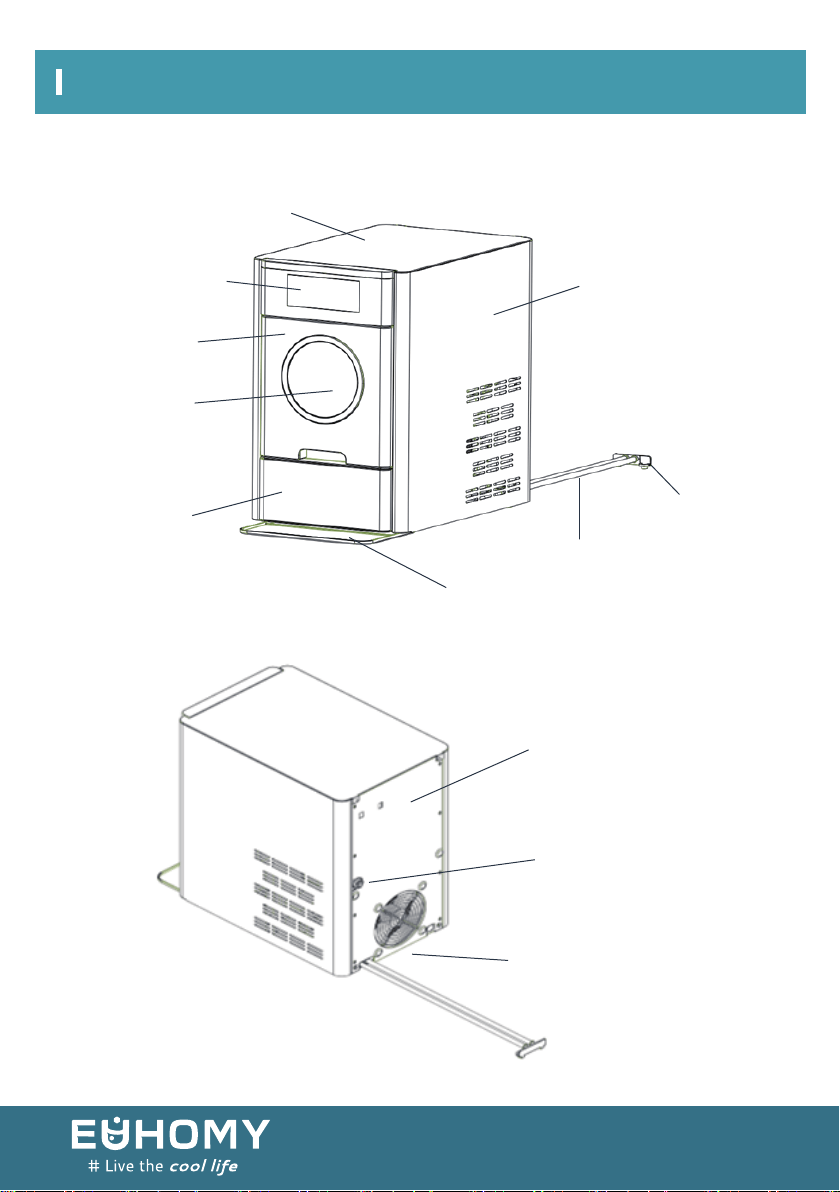
Window
Lower panel
Water tray
ICE MAKER STRUCTURE
Drainage pipe
Drainage joint
Side panel
Backplate
Water inlet pipe joint
Outlet
Control panel
Drawer
Unit Construction
Top cover
04

1. Air outlet: ensure the smoothness of the air outlet and the air outlet from the
obstruction distance of more than 15cm.
2. Water tray: catch the condensate drip when pulling out the drawer.
3. Drainage bracket: when cleaning the machine's water tank, remove the drainage
bracket from the back of the machine, then pull out the drainage bracket, empty the
water in the water pipe. Re-installed the drainage bracket after the drainage.
4. After the machine is cleaned, the sewage is discharged from the drainage pipe (there
are two, one from the top tank and one from the bottom tank. Be sure to plug the
drainage pipe with a drainage fitting and hang it on the back of the machine after the
water is discharged).
Note:
Attention
Unit Construction
05
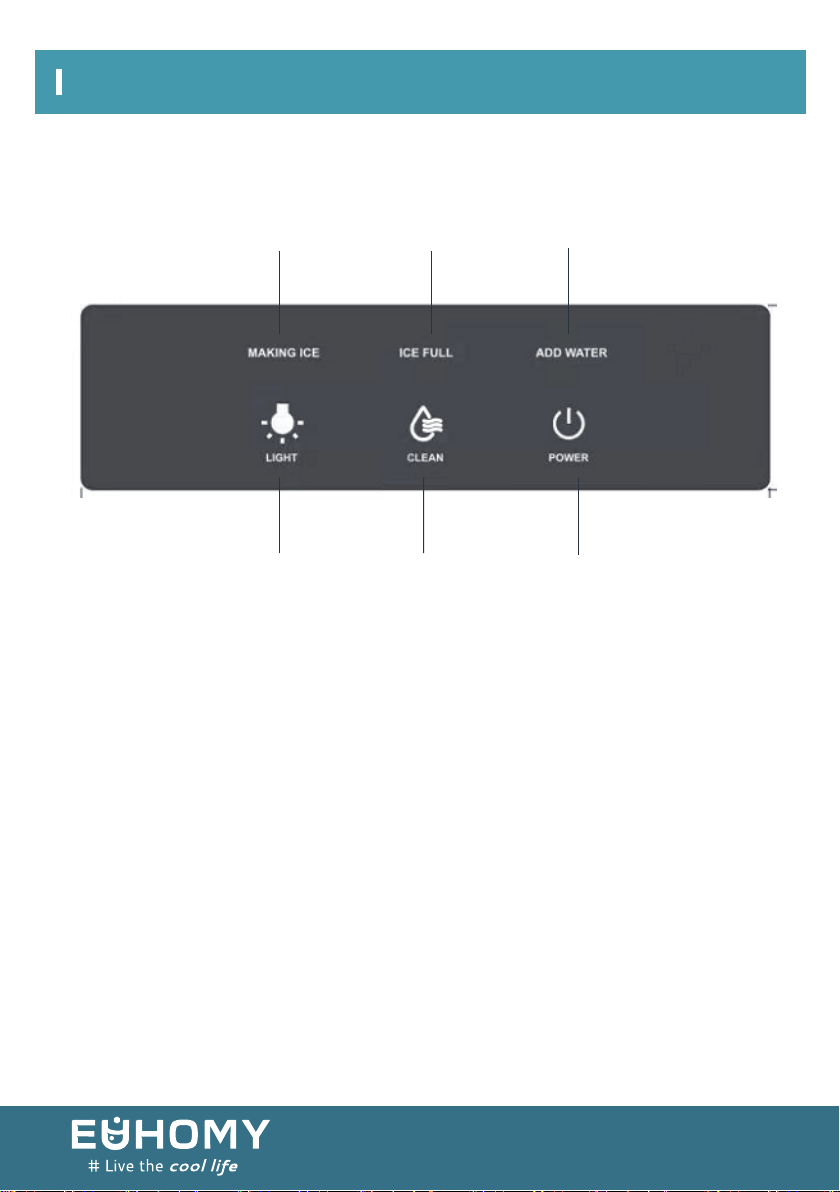
Making Ice
indicator
Ice Full
indicator
Add Water
indicator
LED Light button Clean button Power button
OPERATION AND DISPLAY AREAS
Unit Construction
06
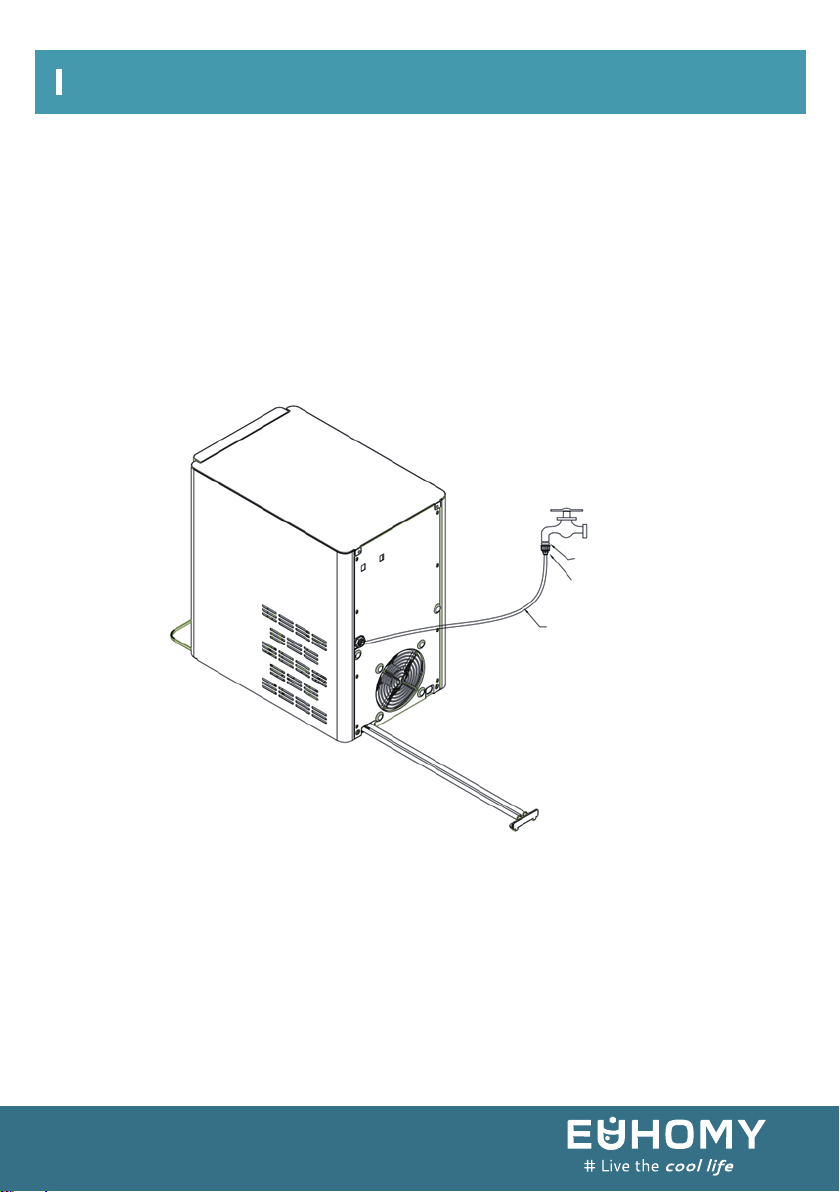
① Put the water tray on the desktop and push it to the bottom of the machine (stuck it
between the two rubber)
② The machine will be connected to the water source
1. Manual refill water mode: pull out the drawer, then add the water to the liner. The
water level shall not exceed the maximum water level line in the liner (MAX mark). Put
back the drawer. Note: drawer should put back thoroughly.
2. Auto refill water mode(recommended to use drinkable room temperature filtered
water): connect the tap water inlet pipe to the water inlet connector on the back panel,
then turn on the faucet (water supply water pressure must be controlled between
100kpa ~ 800kpa)
3. Plug the power cord into the socket, then connect the rated power.
4. After the power is on, the power light flashes. Then press the "POWER" button, the
pump starts to pump water and start making ice.
5. Pressing the "LIGHT" button, the internal light will turn on. Press the "LIGHT" button
again, the light will go out and the internal light will turn off.
6. Long pressing "CLEAN" button for 3 seconds, it will enter the cleaning mode. Then the
"CLEAN" button lights up , and the machine enters the automatic cleaning mode. The
automatic cleaning will last 8 minutes to end.
7. To stop making ice, pressing the "POWER" button, the power indicator flashes state.
And the machine enters the cleaning state. Motor, pump start to operate. After 5
minutes cleaning, motor, pump stop running, indicating the cleaning is done.
HOW TO START THE UNIT
Seals
Water inlet fitting
double-ended inlet tube
Operation & Maintenance
07

8. The lack of water indicator lights up, indicating that there is no water in the liner. The
ice production stop. Please pull out the drawer, then manually add water to the liner
(only for manual water mode). If the water is automatically flowing into the drawer,
please check whether the faucet is turned down or the water pressure is too low.
Note: the amount of water added should not exceed the maximum water level line.
Pull back the drawer --- If the drawer is not pull back in place, the ice indicator light
flashes. After 5 minutes, the machine will turn to standby; After the drawer is pulled
back , the ice light turn on, and the machine begins to make ice.
9. Ice full indicator light is on, indicating that the ice in the ice basket is full. The ice
production stops. Please pull out the drawer, then pour out the ice. After that, please
pull back the drawer. The ice full indicator light will automatically go out, and at the
same time automatically start making ice.
Operation & Maintenance
08
When using the machine for the first time or after a long period of disuse, it is recommended
to clean the machine before making ice. It is recommended to discard any ice cubes made
within the first hour. Ice made after one hour can be used.
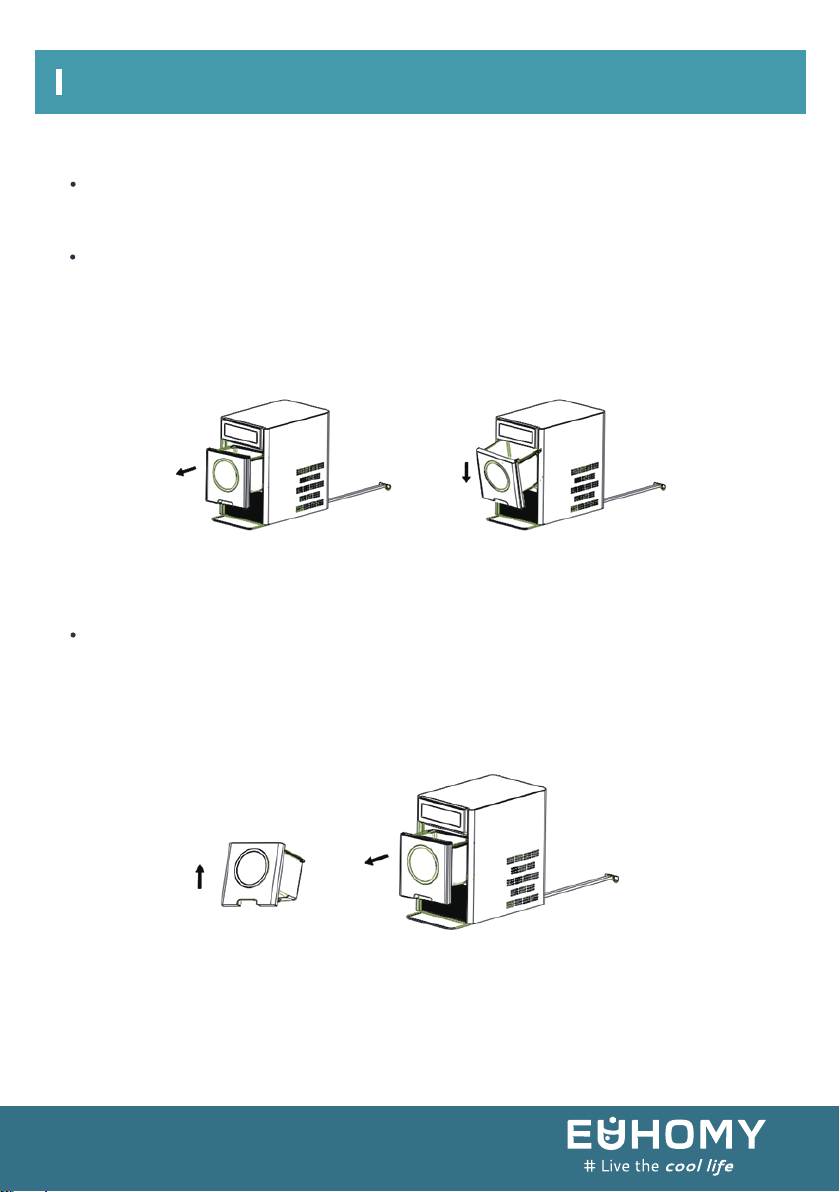
To open the drawer:
Use your hand to gently pull out the drawer until it catches. Let go of the drawer, and it will
hang at an angle from the frame of the machine. When you need to close the drawer again,
first lift it up to a horizontal position. Then gently push it all the way in.
To take out the drawer:
Use your hand to gently pull out the drawer until it catches. Then lift the drawer at an angle
and pull it all the way out. When you need to reinsert the drawer, first tilt the drawer at the
same angle it was when you removed it. First, place the raised edge to the frame at the back
of the drawer, then slowly level the drawer, and gently push it in until it is fully closed.
MAINTAINING YOUR ICE MAKER
Operation & Maintenance
09
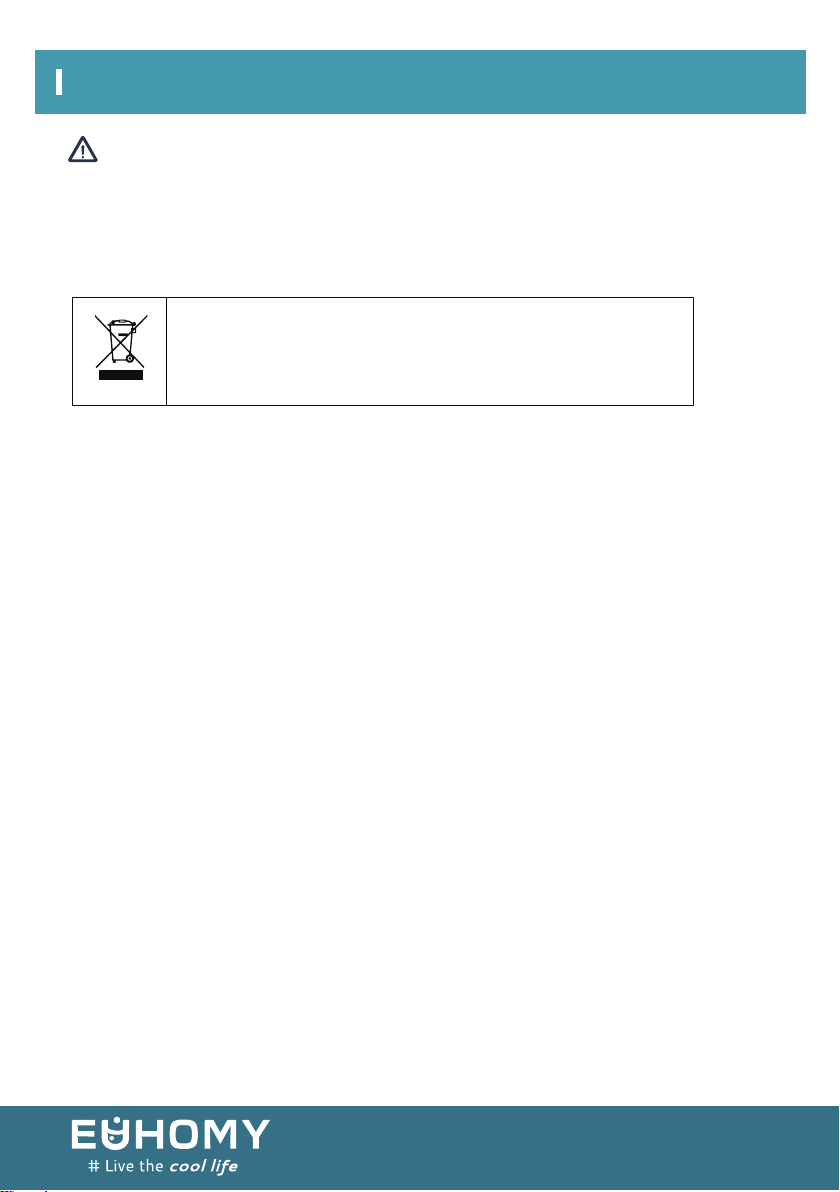
When the unit is taken out of service, disposal of this unit and its
materials shall be in accordance with national regulations.
CORRECT DISPOSAL OF THIS PRODUCT
Note:
Do not use organic solvents, boiled water, detergent, strong acids, strong alkali, or other harsh
substances for cleaning. Please empty the water tank and dry it before storing the ice maker if it
will not be used for a long time.
Operation & Maintenance
10
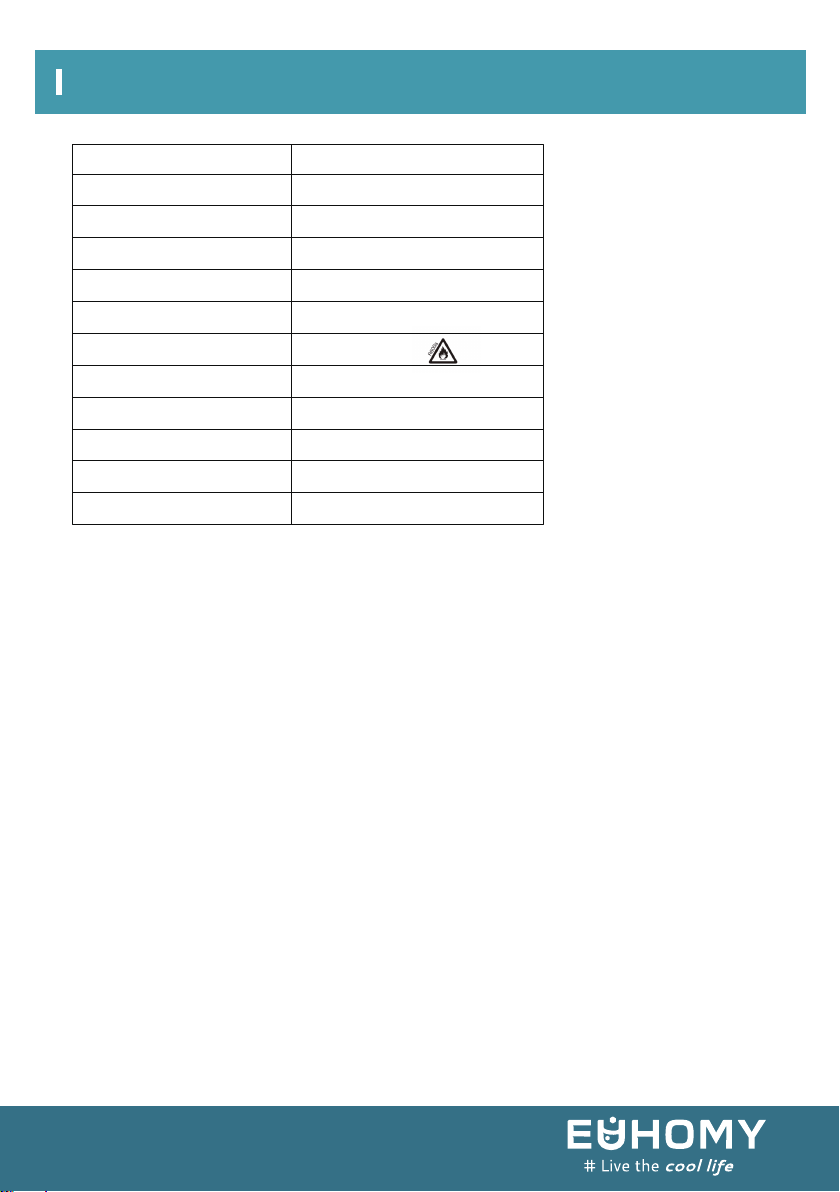
Sku
Applicable climate type
Anti-electric shock level
Rated voltage/frequency
Rated current
Input power
Refrigerator/charge amount
Insulation type
Net weight
Gross weight
Overall size
Carton size
IM-10S
I
SN/N/ST
110V/60Hz
3A
149W
Cyclopenane
17.15kg
18.9kg
265(L)×422(W)×427(H) mm
360(L)×493(W)×518(H) mm
C
5H10
R600a/24g
( )
Technical Parameters
11

Euhomy offers a limited 1-year warranty ("warranty period") on all our products purchased
new and unused from Euhomy company, with an original proof of purchase and where a defect
has arisen, wholly or substantially, as a result of faulty manufacture, parts, or workmanship
during the warranty period. The warranty does not apply where damage is caused by other
factors, including without limitation:
(a) normal wear and tear;
(b) abuse, mishandling, accident, or failure to follow operating instructions;
(c) exposure to liquid or infiltration of foreign particles;
(d) servicing or modifications of the product other than by Euhomy;
(e) commercial or non-household use.
The Euhomy warranty covers all costs related to restoring the proven defective product
through repair or replacement of any defective part and necessary labor so that it conforms to
its original specifications. A replacement product may be provided instead of repairing a
defective product. Euhomy’s exclusive obligation under this warranty is limited to such repair
or replacement. A receipt indicating the purchase date is required for any claim, so please keep
all receipts in a safe place. Although greatly appreciated, the product registration is not
required to activate any warranty and product registration does not eliminate the need for the
original proof of purchase. The warranty becomes void if attempts at repair are made by
non-authorized third parties and/or if spare parts, other than those provided by Euhomy, are
used.
You may also arrange for service after the warranty expires at an additional cost. These are our
general terms for warranty service, but we always urge our customers to reach out to us with
any issue, regardless of warranty terms. If you have an issue with a Euhomy product, please
email us ([email protected]), and we will do our best to resolve it for you.
Warranty
12
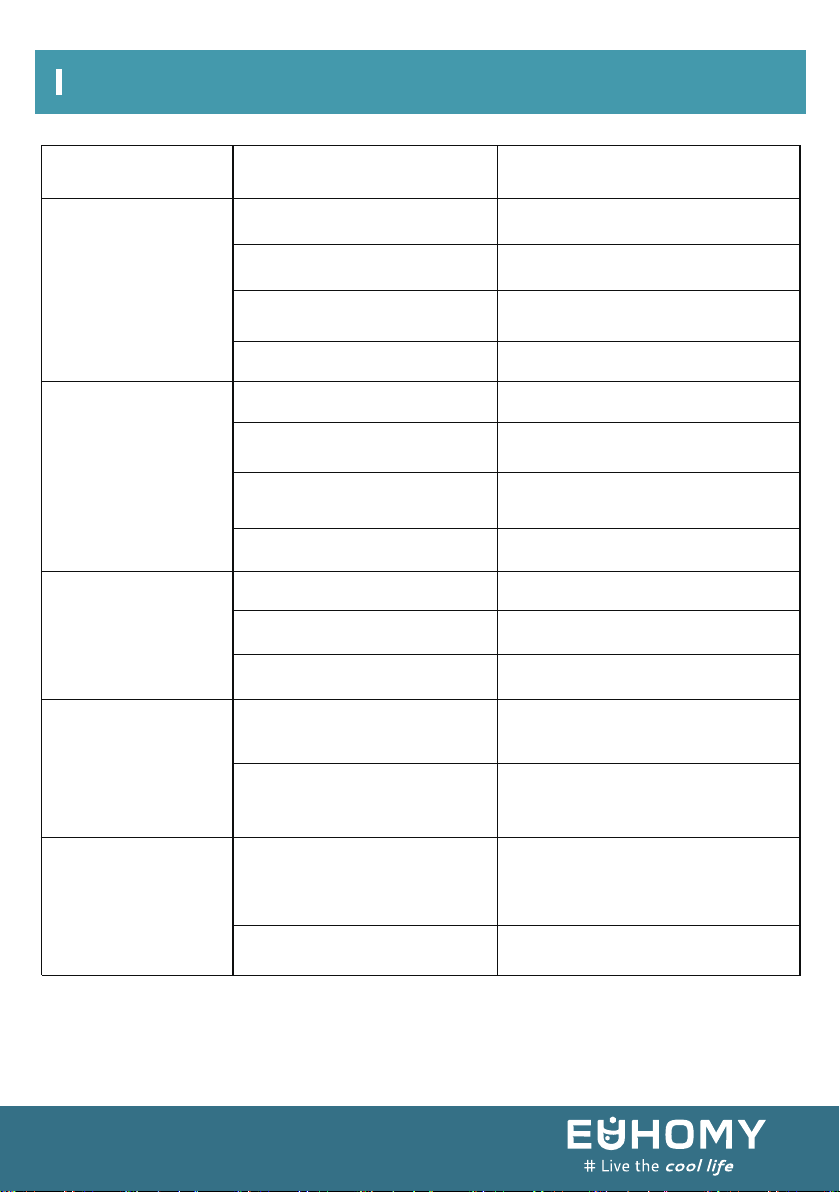
Possible cause(s)Problem Solution
No power /
equipment doesn't
respond
Add Water
indicator is lit
Ice Full indicator
is lit
Water leakage
Ice forms too
slowly or not at all
Please check whether the power
cord is damaged.
Please check the power cord
connection.
Not powered on
Power cord disconnected
No water or low water
Water sensitivity is poor
Power off and restart after 2
minutes.
Please contact [email protected]
Please contact [email protected]
Please contact [email protected]
Please contact [email protected]
The pump is stuck or damaged
Add Water sensor is bad
Ice is full
Water sensitivity is poor
Ice full sensor is bad
The water pipe connector
inside the machine is not
installed
The drainage pipe bracket is
not installed in place
Air temperature is too high
Water temperature in inner
tank is too high
Refrigeration pipe blockage
Refrigerant leak
Air temperature should be below
90 °F.
Plug the water drain bracket into
the water drain.
Contact professional
after-sales service personnel
for maintenance.
Remove ice cubes.
Clean sensor probe.
Please add water.
No power from the power outlet
Power cord is not plugged
in firmly
Power cord is damaged Please contact [email protected]
Please check the local power supply.
Troubleshooting ([email protected])
13