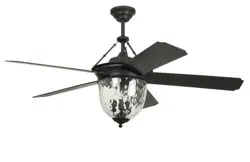
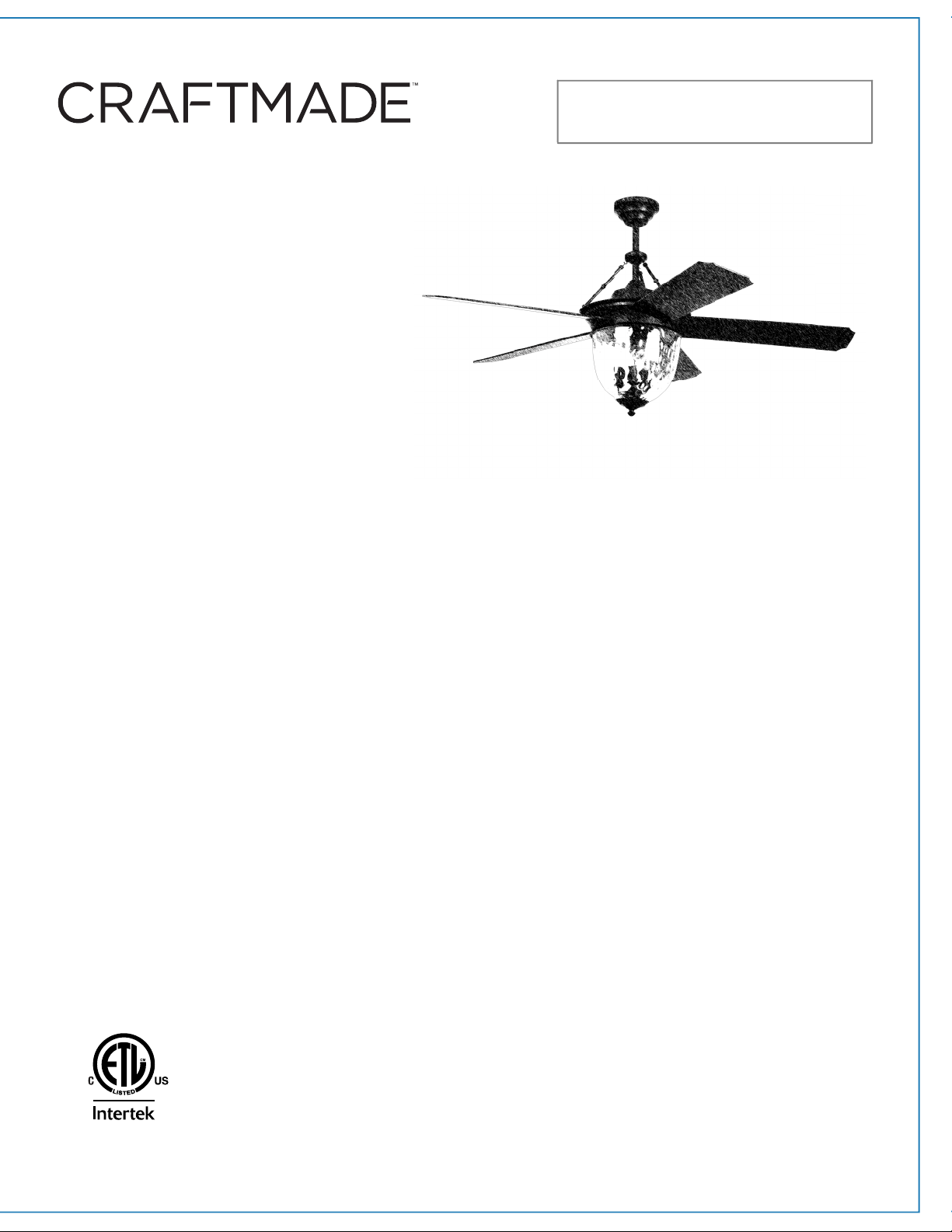
Installation Guide
Table of Contents:
Safety Tips. pg. 2
Unpacking Your Fan. pg. 3
Parts Inventory. pg. 3
Installation Preparation. pg. 4
Hanging Bracket Installation. pg. 4
Fan Assembly. pgs. 5 - 6
Wiring. pgs. 6 - 7
Canopy Assembly. pg. 7
Rod Support Assembly. pg. 8
Blade Assembly. pg. 8
Light Kit Assembly. pg. 9
Handheld Remote Control
Assembly. pg. 10
Automated Learning Process./
Activating Code. pg. 11
Remote Control Operation. pg. 11
Testing Your Fan. pg. 11
Troubleshooting. pg. 12
Warranty. pg. 12
Parts Replacement. pg. 12
net weight of fan: 29.7 lb (13.47 kg)
page 1
PRINTED IN CHINA
READ THESE INSTRUCTIONS
AND SAVE THEM FOR FUTURE USE
For Model:
CAV52
Cavalier
LISTED FOR
DAMP LOCATION

SAFETY TIPS.
WARNING: To reduce the risk of electrical shock, turn off the electricity to the fan at the main fuse box or circuit panel before you
begin the fan installation or before servicing the fan or installing accessories.
1. READ ALL INSTRUCTIONS AND SAFETY INFORMATION CAREFULLY BEFORE INSTALLING YOUR FAN AND SAVE THESE
INSTRUCTIONS.
CAUTION: To avoid personal injury, the use of gloves may be necessary while handling fan parts with sharp edges.
2. Make sure all electrical connections comply with Local Codes or Ordinances, the National Electrical Code, and ANSI/NFPA
70-1999. If you are unfamiliar with electrical wiring or if the house/building wires are different colors than those
referred to in the instructions, please use a qualified electrician.
3. Make sure you have a location selected for your fan that allows clear space for the blades to rotate, and at least seven (7)
feet (2.13 meters) of clearance between the floor and the fan blade tips. The fan should be mounted so that the tips of
the blades are at least thirty (30) inches (76 centimeters) from walls or other upright structures.
4. The outlet box and ceiling support joist used must be securely mounted and capable of supporting at least 35 pounds (16
kilograms). The outlet box must be supported directly by the building structure. Use only CETL or CUL in Canada or
ETL or UL in USA listed outlet boxes marked "FOR FAN SUPPORT."
WARNING: To reduce the risk of fire, electrical shock, or personal injury, mount to the outlet box marked "Acceptable for Fan
Support of 15.9 kg (35 lb) or less," and use the mounting screws provided with the outlet box. Most outlet boxes commonly used
for the support of lighting fixtures are not acceptable for fan support and may need to be replaced. Consult a qualified
electrician if in doubt.
WARNING: To reduce the risk of fire, electrical shock, or personal injury, wire connectors provided with this fan are designed to
accept only one 12 gauge house wire and two lead wires from the fan. If your house wire is larger than 12 gauge or there is more
than one house wire to connect to the corresponding fan lead wires, consult an electrician for the proper size wire connectors to
use.
5. Electrical diagrams are for reference only.
6. After installation is complete, check that all connections are absolutely secure.
7. After making electrical connections, spliced conductors should be turned upward and pushed carefully up into the outlet
box. The wires should be spread apart with the grounded conductor and the equipment-grounding conductor on
opposite sides of the outlet box.
WARNING: To reduce the risk of fire or electrical shock, do not use this fan with any solid state speed control device or control
fan speed with a full range dimmer switch. [Using a full range dimmer switch to control fan speed will cause a loud humming
noise from fan.]
8. Do not operate the reverse switch until fan has come to a complete stop.
9. Do not insert anything between the fan blades while they are rotating.
WARNING: To reduce the risk of personal injury, do not bend the blade arms during assembly or after installation. Do not insert
objects into the path of the blades.
WARNING: To avoid personal injury or damage to the fan and other items, be cautious when working around or cleaning the fan.
10. Do not use water or detergents when cleaning the fan or fan blades. A dry dust cloth or lightly dampened cloth will be
suitable for most cleaning.
WARNING: To reduce the risk of personal injury, use only parts provided with this fan. The use of parts OTHER than those
provided with this fan will void the warranty.
Modifications not approved by the party responsible for compliance could void the user's authority to operate the equipment.
[The equipment refers to the remote and/or wall control and/or LED light kit.]
NOTE: This equipment has been tested and found to comply with the limits for a Class B digital device, pursuant to Part 15 of the
FCC Rules. These limits are designed to provide reasonable protection against harmful interference in a residential installation.
This equipment generates, uses and can radiate radio frequency energy and, if not installed and used in accordance with the
instructions, may cause harmful interference to radio communications. However, there is no guarantee that interference will not
occur in a particular installation. If this equipment does cause harmful interference to radio or television reception, which can be
determined by turning the equipment off and on, the user is encouraged to try to correct the interference by one or more of the
following measures:
* Reorient or relocate the receiving antenna.
* Increase the separation between the equipment and receiver.
* Connect the equipment into an outlet on a circuit different from that to which the receiver is connected.
* Consult the dealer or an experienced radio/TV technician for help.
NOTE: The important safety precautions and instructions appearing in the manual are not meant to cover all possible conditions
and situations that may occur. It must be understood that common sense and caution are necessary factors in the installation
and operation of this fan.
page 2
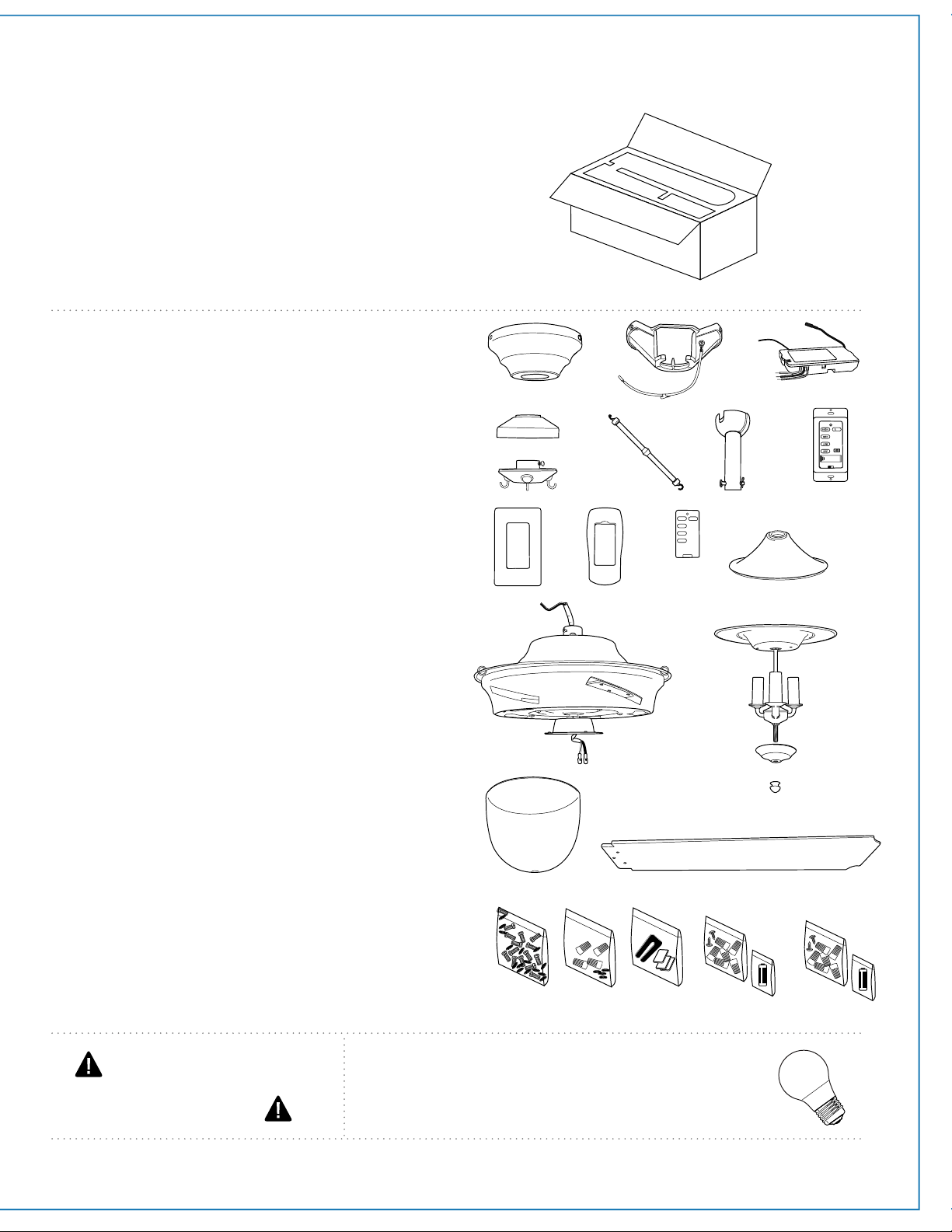
1. Unpacking Your Fan.
2. Parts Inventory.
Carefully open the packaging. Remove items
from Styrofoam inserts. Remove motor housing
and place on carpet or Styrofoam to avoid
damage to finish. Do not discard fan carton or
Styrofoam inserts should this fan need to be
returned for repairs.
Check against parts inventory that all parts have
been included.
a. canopy. 1 piece
b. hanging bracket (pre-attached to canopy).
1 piece
c. remote control receiver. 1 piece
d. rod support cap. 1 piece
e. rod. 3 pieces
f. downrod and hanging ball (with pin and clip).
1 piece
g. wall control. 2 pieces
h. rod support. 1 piece
i. plate. 1 piece
j. remote control cover. 1 piece
k. faceplate. 3 pieces
l. yoke cover. 1 piece
m. motor housing. 1 piece
n. light kit fitter. 1 piece
o. finial plate. 1 piece
p. finial. 1 piece
q. glass shade. 1 piece
r. blade. 5 pieces
s. hardware packs
page 3
IMPORTANT REMINDER: You must
use the parts provided with this fan for
proper installation and safety.
ab c
l
m
d
h
efg
q
n
p
o
r
s
j
k
i
11
-
ON/ DIM
OFF
w/ remote
w/ wall control
required bulbs:
3 x 6.5 watt medium base LED bulbs
(included)
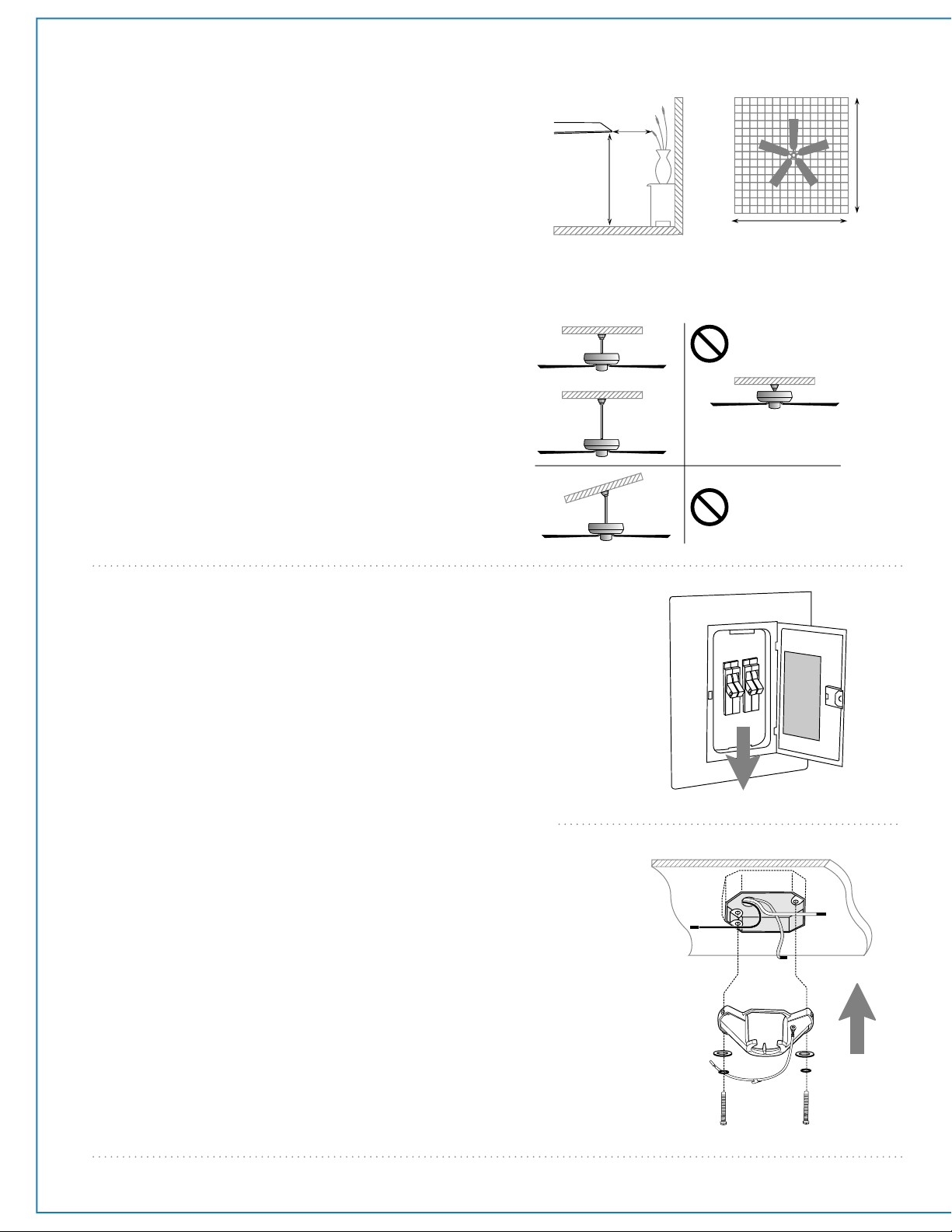
This fan can be mounted with a downrod
on a regular (no-slope) or vaulted ceiling. The
hanging length can be extended by purchasing
a longer downrod (0.5in./1.27cm diameter).
Other installation, such as flushmount, is not
available for this fan.
Vaulted ceiling
angle is not to
exceed 25 degrees.
3. Installation Preparation.
To prevent personal injury and damage, ensure
that the hanging location allows the blades a
clearance of 7 feet (2.13m) from the floor and
30in. (76cm) from any wall or obstruction.
This fan is suitable for room sizes up to 400
square feet (37.2 square meters).
Installation requires these tools:
Phillips screwdriver, flat-head screwdriver,
adjustable pliers or wrench, stepladder, wire
cutters and rated electrical tape.
downrod
installation
flushmount
installation
4. Hanging Bracket Installation.
page 4
ON
OFF
ON
OFF
hanging bracket
spring washers
outlet box screws
12ft. - 20ft.
12ft. - 20ft.
(3.66m - 6.1m)
(3.66m - 6.1m)
blade edge
7 feet
(2.13m)
(76cm)
30
inches
flat washers
Turn off circuit breakers to current fixture from breaker panel
and be sure operating light switch is turned to the OFF
position.
WARNING: Failure to disconnect power supply prior to
installation may result in serious injury.
Remove existing fixture.
WARNING: When using an existing outlet box, be sure the
outlet box is securely attached to the building structure and can
support the full weight of the fan. Ensure the outlet box is
clearly marked "Suitable for Fan Support." If not, it must be
replaced with an approved outlet box. Failure to do so can
result in serious injury.
CAUTION: Be sure outlet box is grounded and that a ground
wire (GREEN or bare) is present.
Partially loosen screws in slotted holes of canopy. Remove
the other 2 screws (along with the star washers)--save for
later use. Twist canopy to remove hanging bracket.
Install hanging bracket to outlet box using original screws,
spring washers and flat washers provided with new or
original outlet box.* If installing on a vaulted ceiling, face
opening of hanging bracket towards high point of ceiling.
Arrange electrical wiring around the back of the hanging
bracket and away from the bracket opening.
*Note: It is very important that you use the proper hardware
when installing the hanging bracket as this will support the fan.
page 5
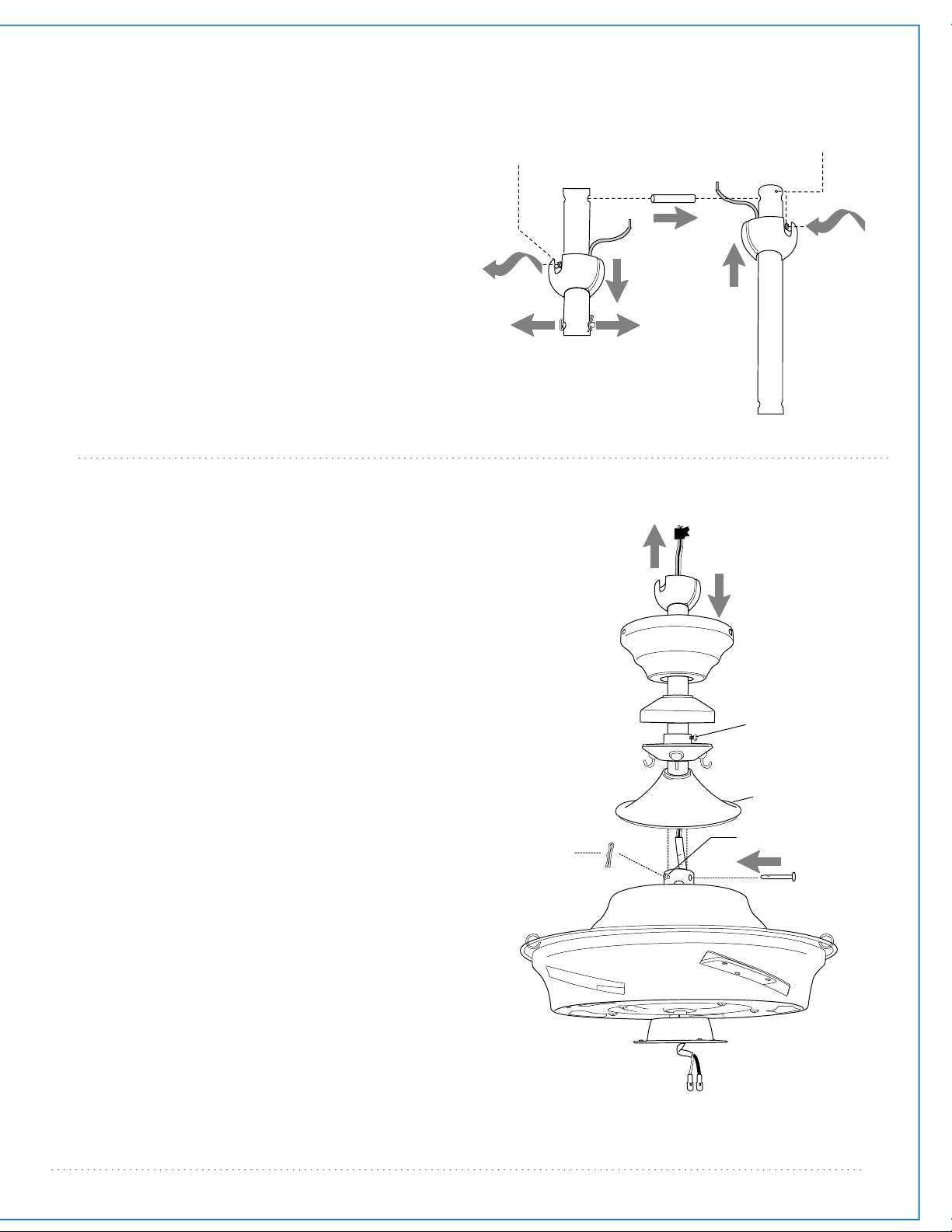
5. Fan Assembly.
If you wish to extend the hanging length of your
fan, you must remove the hanging ball from the
downrod provided to use with an extended
downrod (sold separately). [If you wish to use the
downrod provided, please proceed to instructions
following the dotted line below.]
To remove hanging ball, loosen set screw on
hanging ball and remove the pin and clip. Lower
hanging ball and remove stop pin. Slide hanging
ball off the original downrod, A, and slide it down
the longer downrod, B (the top of the downrod
should be noted as having a set screw hole; use this
hole when setting the set screw). Insert stop pin
into top of extended downrod and raise hanging
ball. Be sure stop pin aligns with slots on the inside
of the hanging ball. Tighten set screw securely.
Tip: To prepare for threading electrical wires
through downrod, apply a small piece of electrical
tape to the ends of the electrical wires--this will
keep the wires together when threading them
through the downrod.
Loosen yoke set screws and nut at top of motor
housing. Remove pin and clip from downrod (if you
have not already done so). Slide downrod through
canopy, rod support cap, rod support (loosen rod
support set screw to prevent scratching the
downrod finish) and then the yoke cover.
Thread electrical wires through downrod and pull
extra wire slack from the upper end of the
downrod.
Thread downrod into the motor housing yoke until
holes for pin and clip in downrod align with holes in
yoke--make sure wires do not get twisted. Re-insert
pin and clip that were previously removed. Tighten
yoke set screws and nut securely.
WARNING: Failure to tighten set screw (on hanging
ball) completely could result in the fan becoming
loose and possibly falling.
NOTE: The important safety precautions and
instructions appearing in the manual are not meant
to cover all possible conditions and situations that
may occur. It must be understood that common sense
and caution are necessary factors in the installation
and operation of this fan.
["Fan Assembly" continued on next page.]
set screw hole
set screw
hanging ball
stop pin
clip
A
B
motor
housing
yoke set screw
downrod
rod support cap
rod support
set screw
rod support
canopy
yoke cover
electrical wiring
clip
pin
5. Fan Assembly. (cont.)
page 6
hanging bracket tab
hanging ball slot
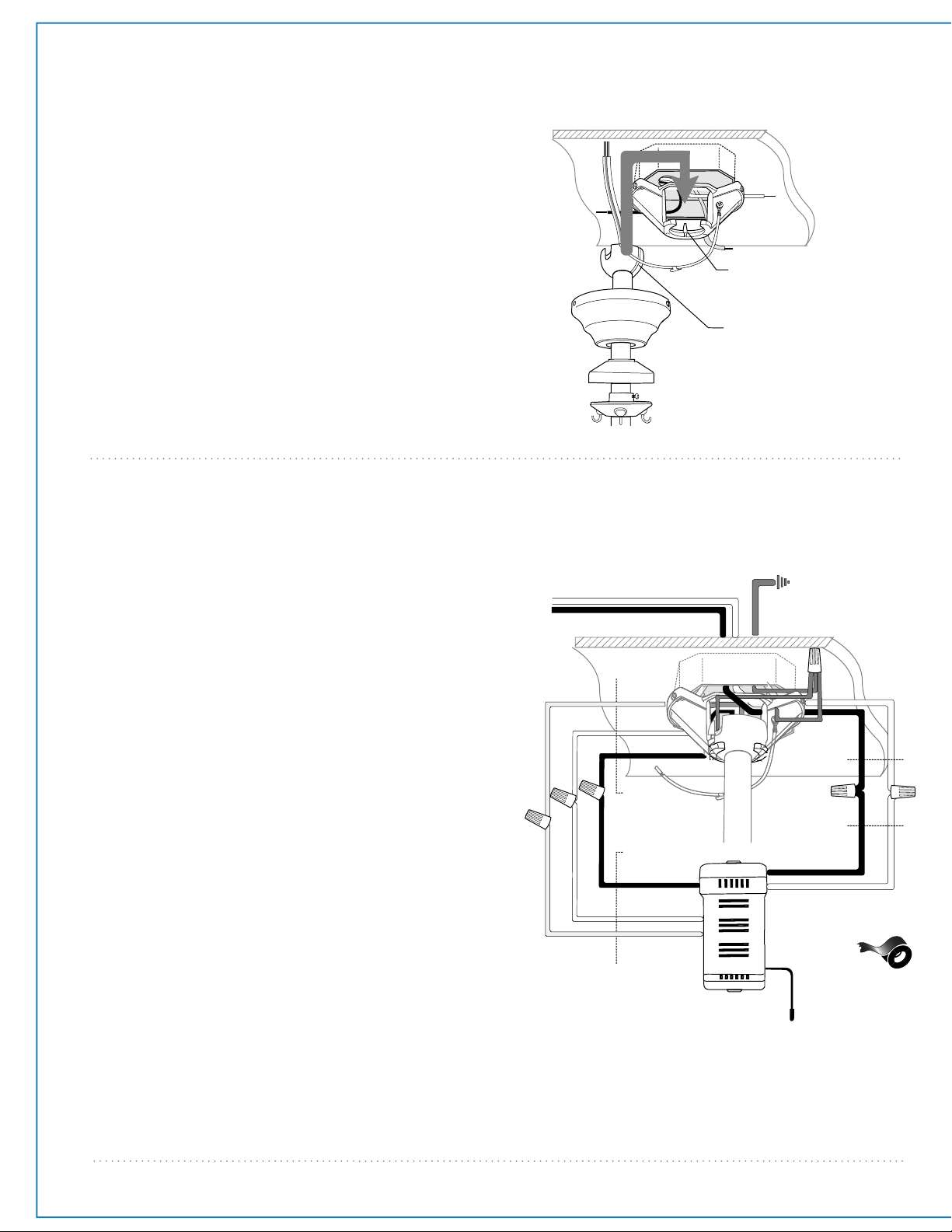
6. Wiring.
WARNING: Turn off circuit breakers to current
fixture from breaker panel and be sure switch is
turned to the OFF position.
CAUTION: Be sure outlet box is properly grounded
and that a ground wire (GREEN or Bare) is present.
Make sure all electrical connections comply with
Local Codes or Ordinances and the National
Electrical Code. If you are unfamiliar with electrical
wiring or if the house/building wires are different
colors than those referred to in the diagram to the
right, please use a qualified electrician.
Wire the receiver with wire connectors provided
as shown in diagram at right.
Tip: While you are wiring, keep in mind that wires
must not obstruct receiver from sliding into
hanging bracket.
* Wrap each wire connector separately with
electrical tape as an extra safety measure.
Insert receiver into hanging bracket (flat side up)
and gently push taped wire connectors into
outlet box. Allow antenna from remote control
receiver to hang out of the hanging bracket.
["Wiring" continued on next page.]
black
black
black
from receiver
from fan
from ceiling
from receiver
white
white
blue
blue
black supply wire
ground (green
or bare)
white supply wire
white
AC IN N
AC IN L
receiver
black
white
With the hanging bracket secured to the outlet
box and able to support the fan, you are now
ready to hang your fan. Grab the fan firmly with
two hands. Slide downrod through opening in
hanging bracket and let hanging ball rest on the
hanging bracket. Turn the hanging ball slot until it
lines up with the hanging bracket tab.
WARNING: Failure to align slot in hanging ball
with tab in hanging bracket may result in serious
injury or death.
Tip: Seek the help of another person to hold the
stepladder in place and to help lift the fan up to
you once you are set on the ladder.
*
antenna
ground
(green or bare)
(wiring for receiver)
11
-
DIM ON
page 7
7. Canopy Assembly.
Raise canopy to hanging bracket and align slotted
holes in canopy with loosened screws in hanging
bracket. Twist canopy to lock. Re-insert screws (along
with star washers) that were previously removed
(page 4, Section 4) and secure all screws with a
Phillips screwdriver.
*Remember that antenna for remote control receiver
must rest outside of hanging bracket.
canopy
hanging
bracket
slotted hole
antenna
6. Wiring. (cont.)
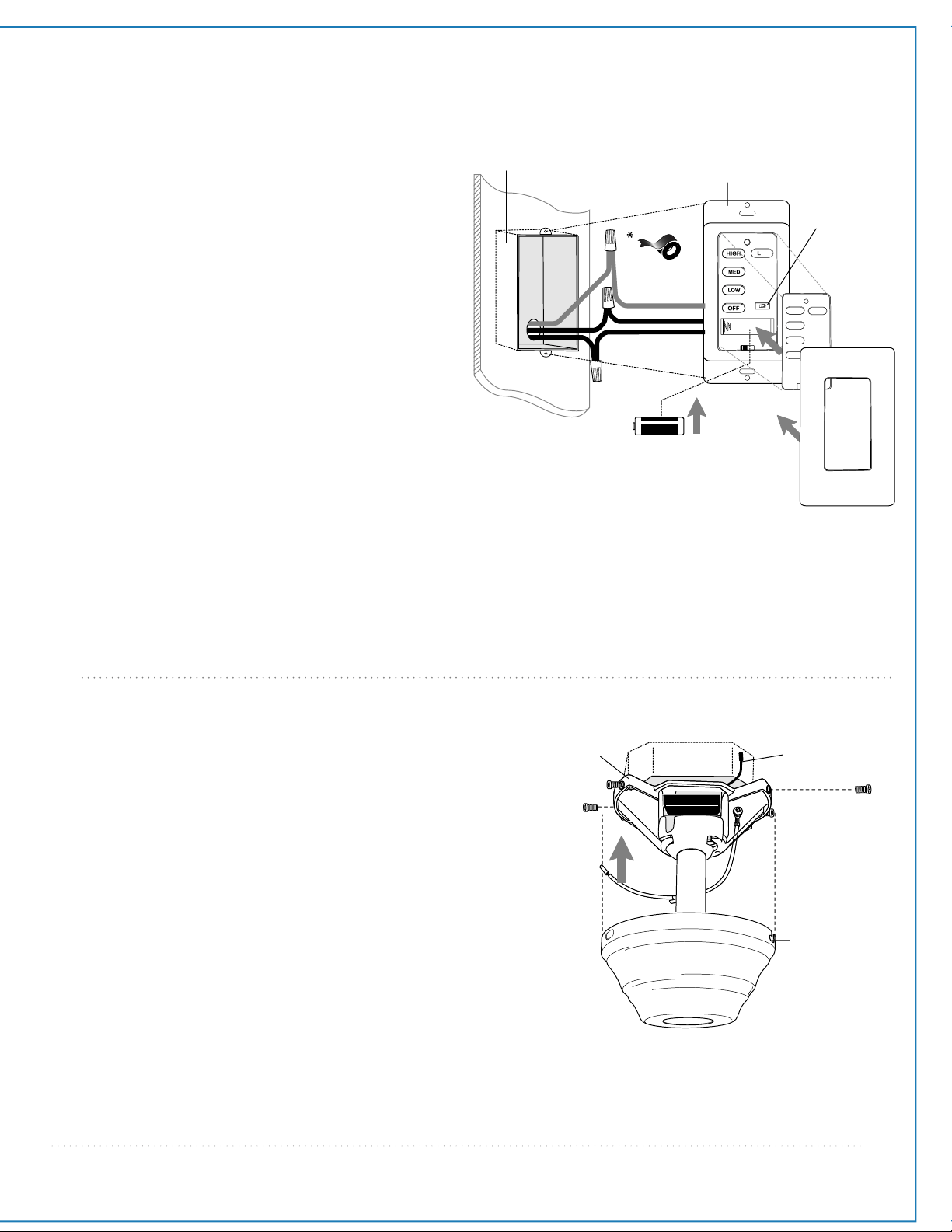
[PLEASE NOTE: Wall and/or handheld remote
control must be used for fan to operate. If you do
not wish to use the wall control, please proceed to
Section 7 below to continue with fan installation.]
To install wall control, remove existing wall switch.
Wire one of the wall controls with wire connectors
provided as shown in diagram at right.
*Wrap each wire connector separately with
electrical tape as an extra safety measure. Gently
push wires and taped wire connectors into outlet
box.
Install one 12-volt battery (included) in wall control.
IMPORTANT: Wall control will not function unless
battery is installed.
Since this fan comes with an incandescent bulb, the
dimmer switch (labeled DIM and ON) has been
pre-set to the "ON" position (DIM). If you do not
wish to have dimming capability, please move the
switch to the "OFF" position (ON).
Select a faceplate (almond or white) and press
firmly onto front of wall control. Attach wall control
to outlet box and secure with screws from original
wall switch. Attach plate (included) to wall control
using 2 screws provided with the wall control.
(wiring for wall control)
black (OUT to fan)
green
black
(AC IN from
breaker box)
black
(TO POWER supply)
black
green/
green/
bare
bare
ground
ground
green/
bare
ground
outlet box
wall
control
faceplate
12V battery
dimmer
switch
plate
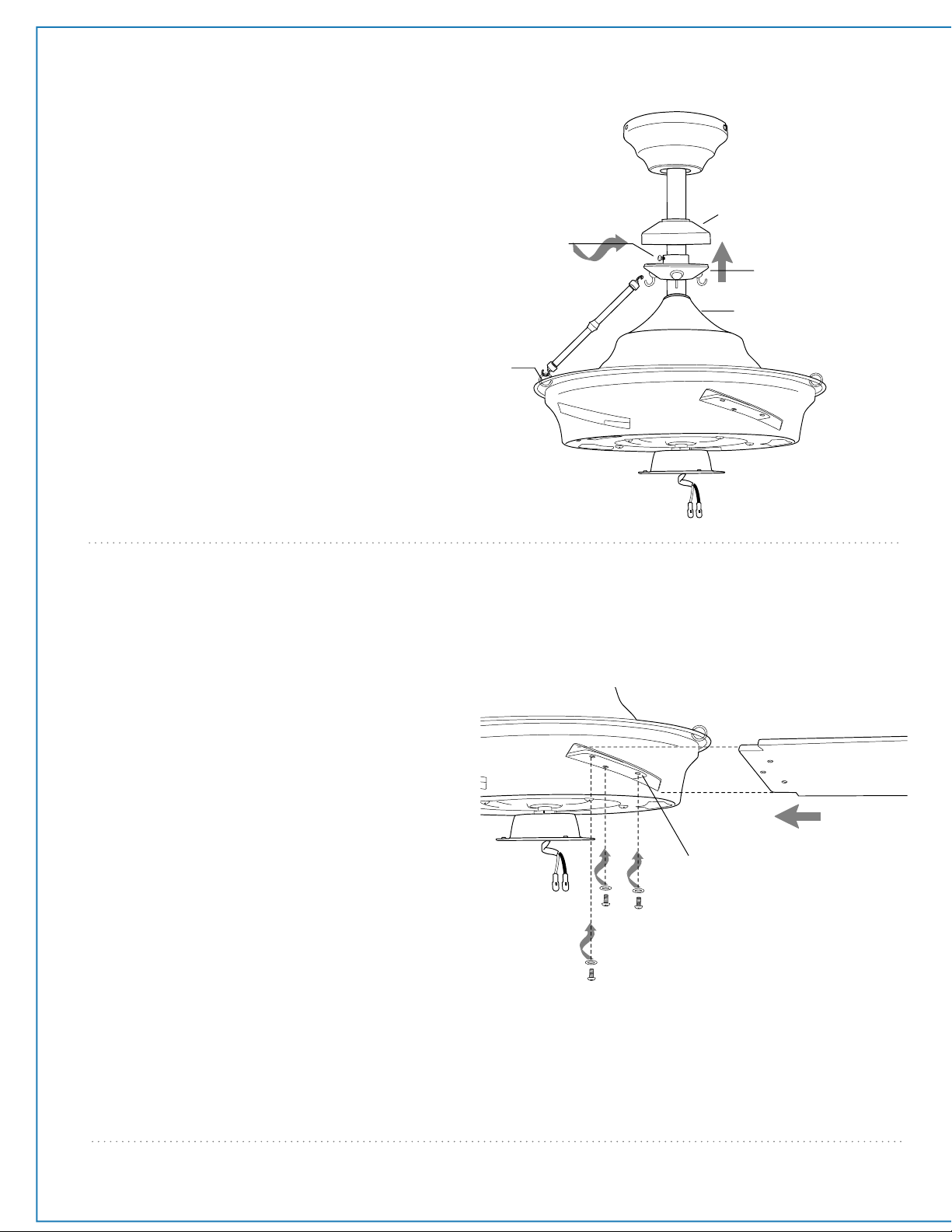
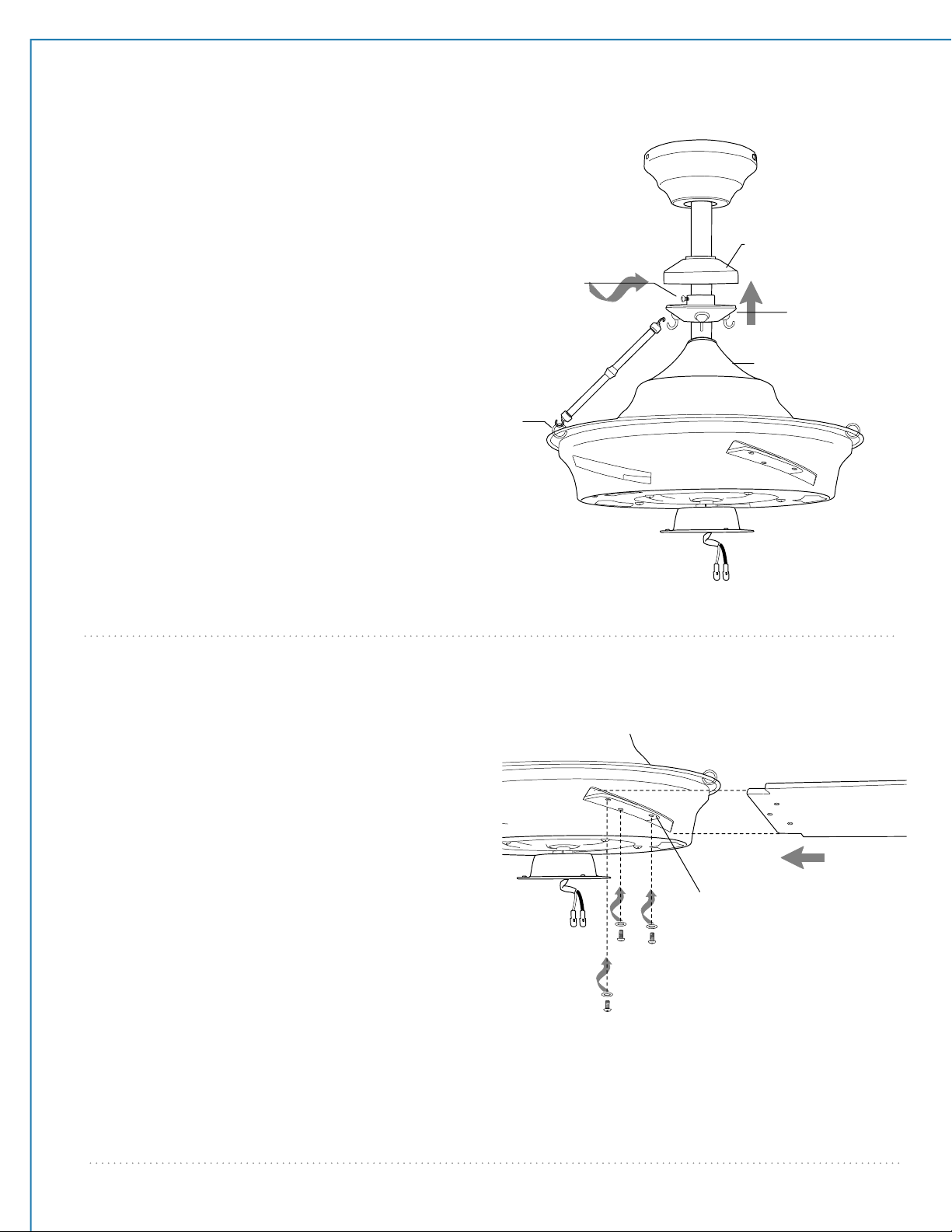
9. Blade Assembly.
WARNING: To reduce the risk of serious
bodily injury, DO NOT use power tools to
assemble the blades. If overtightened, blades
may crack and break.
Time Saver: Washers for blade screws can be
set on each blade screw prior to installing
blades.
Locate 15 blade attachment screws and
washers in a hardware pack. Slide blade into
slot on side of motor housing (please note
side of blade indicating THIS SIDE UP), then
align holes in blade with holes on blade plate
located inside motor housing. Insert 3 blade
attachment screws (along with washers)
from underside of motor housing. Tighten
screws securely with a Phillips screwdriver.
Repeat for remaining blades.
Note: Tighten blade arm screws twice a year.
motor housing
blade
page 8
blade plate
blade attachment
screws and washers
rod support cap
rod support
rod support
set screw
canopy
yoke cover
rod
8. Rod Support Assembly.
Hook one end of rod to loop on motor
housing. Adjust rod support to top end of
rod so it holds the rod in place and tighten
rod support set screw. Allow rod support
cap to rest on rod support.
Install remaining rods in between motor
housing and rod support. If rods fall off
easily, re-adjust rod support (by
re-adjusting rod support set screw as
described above) with rods already
installed.
loop
motor
housing
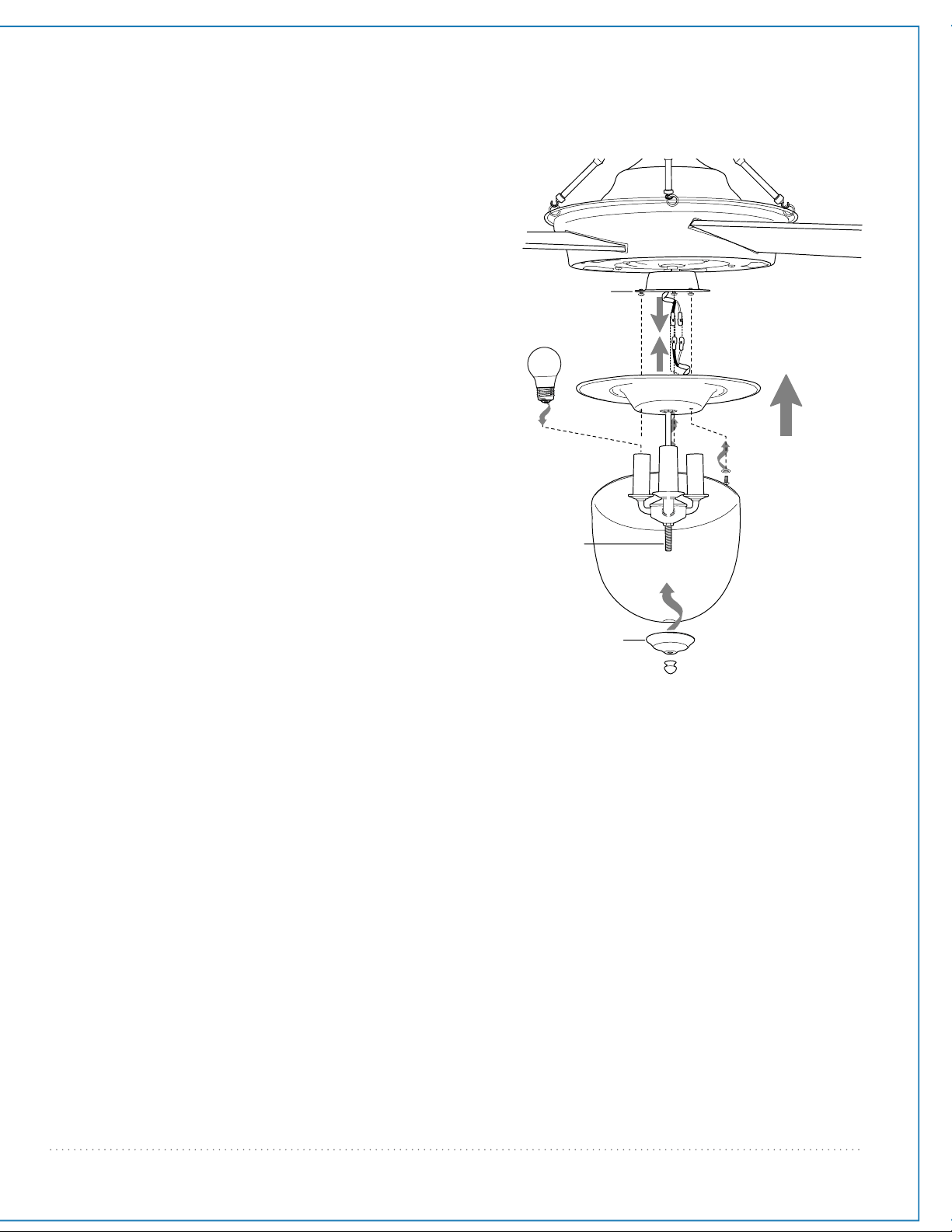
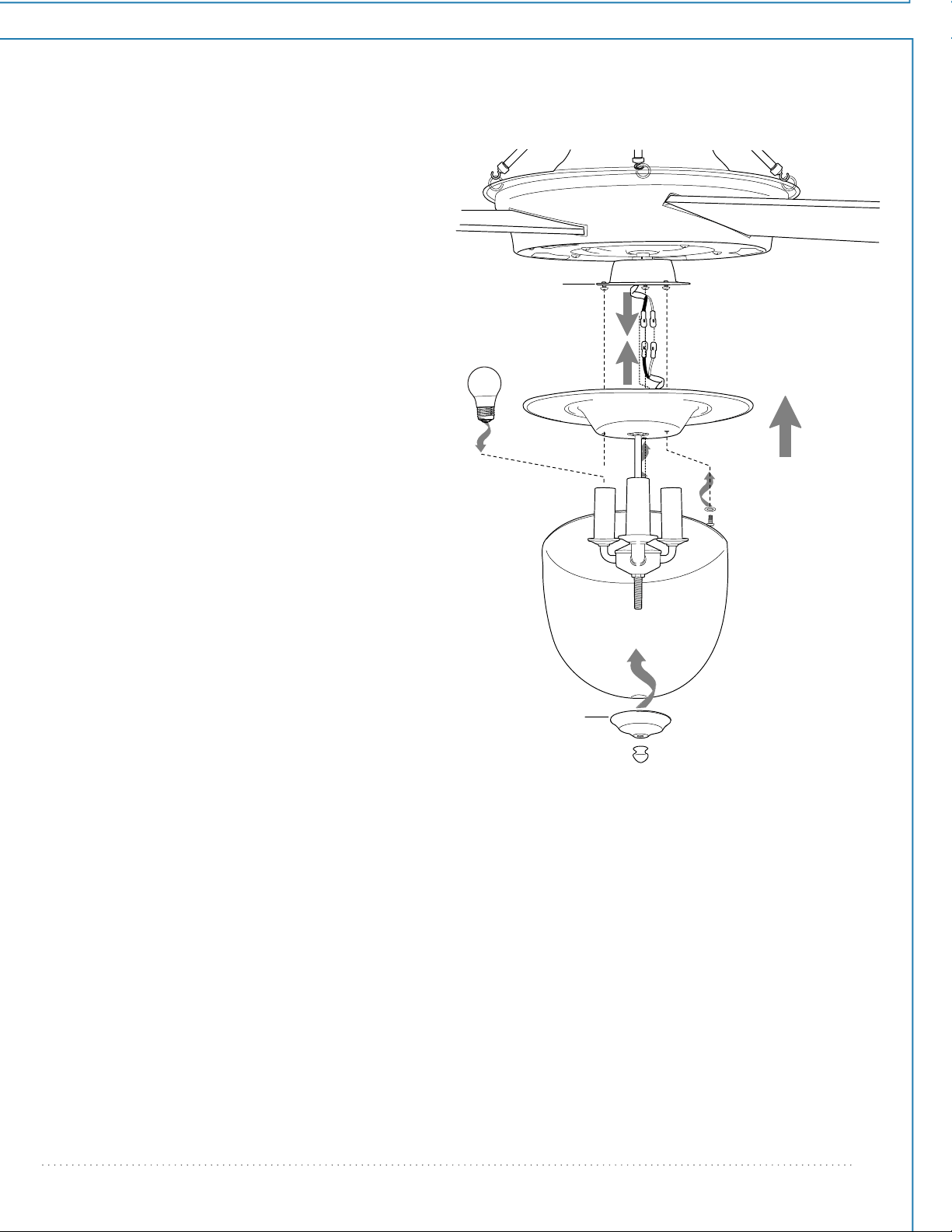
Remove 1 screw from fitter plate (on the
underside of the motor housing) and loosen
the other 2 screws.
Connect WHITE wire from light kit fitter to
WHITE wire from motor housing. Connect
BLACK wire from the light kit fitter to BLACK
(or BLUE) wire from the motor housing. Be
sure that the molex connections snap
together securely.
Align slotted holes in light kit fitter with
loosened screws on fitter plate; twist light kit
fitter to lock. Re-install screw that was
previously removed and then securely tighten
all 3 screws.
Install 3 medium base 6.5 watt LED bulbs
(included).
Important: When replacing bulbs, please allow
bulbs and glass shade to cool down before
touching.
Align hole in glass shade with threaded rod on
light kit fitter and push up gently until
threaded rod comes through hole. Align hole
in center of finial plate with threaded rod and
push up. Secure glass shade with finial. Do NOT
overtighten finial as glass may crack or break.
page 9
10. Light Kit Assembly.
molex connections
fitter plate
bulb
light kit fitter
glass shade
finial
motor housing
finial plate
threaded
rod
11
-
DIM ON
page 10
dimmer
switch
wall control
wire
wire
wire
12V battery
11. Handheld Remote Control Assembly.
IN ORDER TO USE THE HANDHELD REMOTE CONTROL,
PLEASE CONTINUE WITH SECTION 11 for remote control
assembly instructions. If you have already installed the
wall control but do not wish to use the handheld remote
control, please proceed to Section 12.
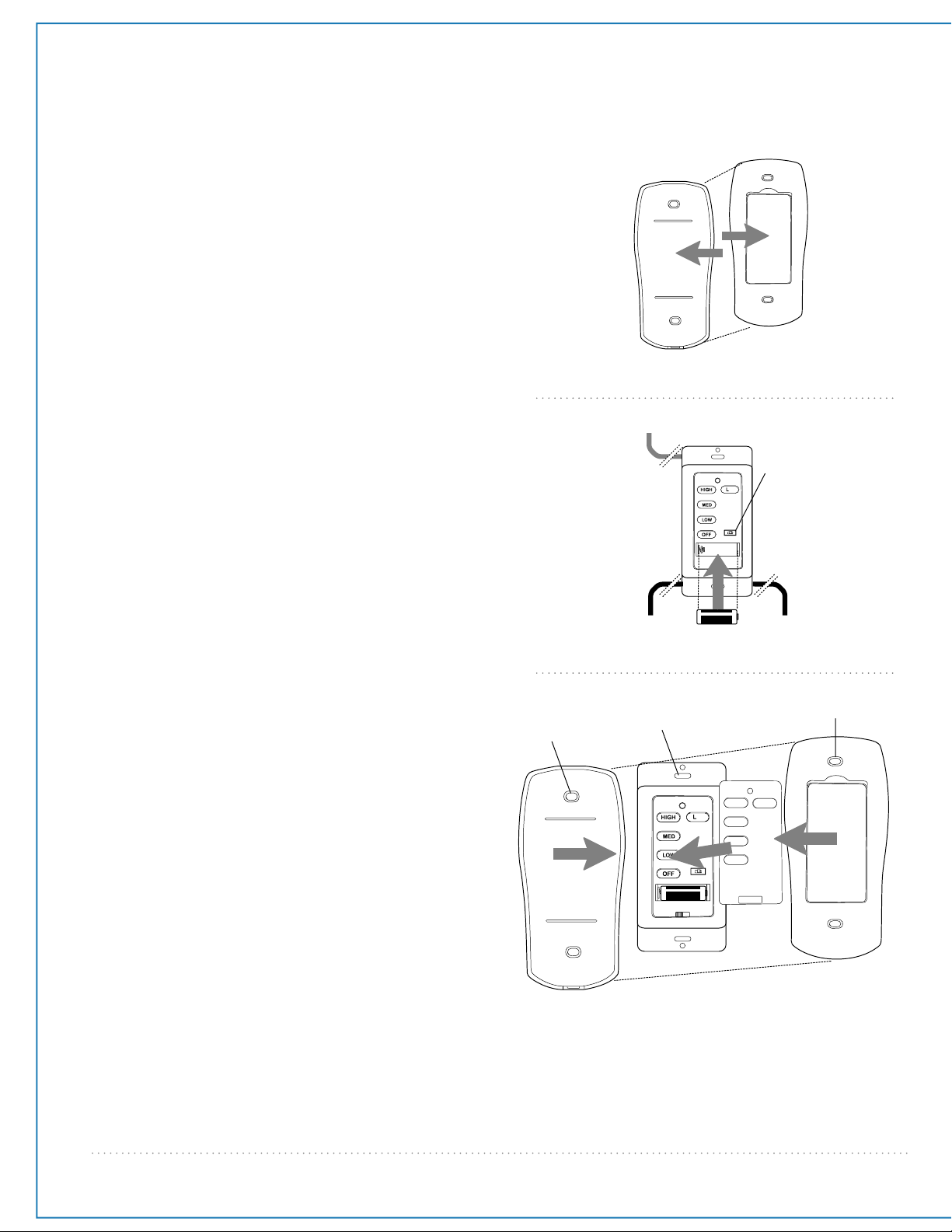
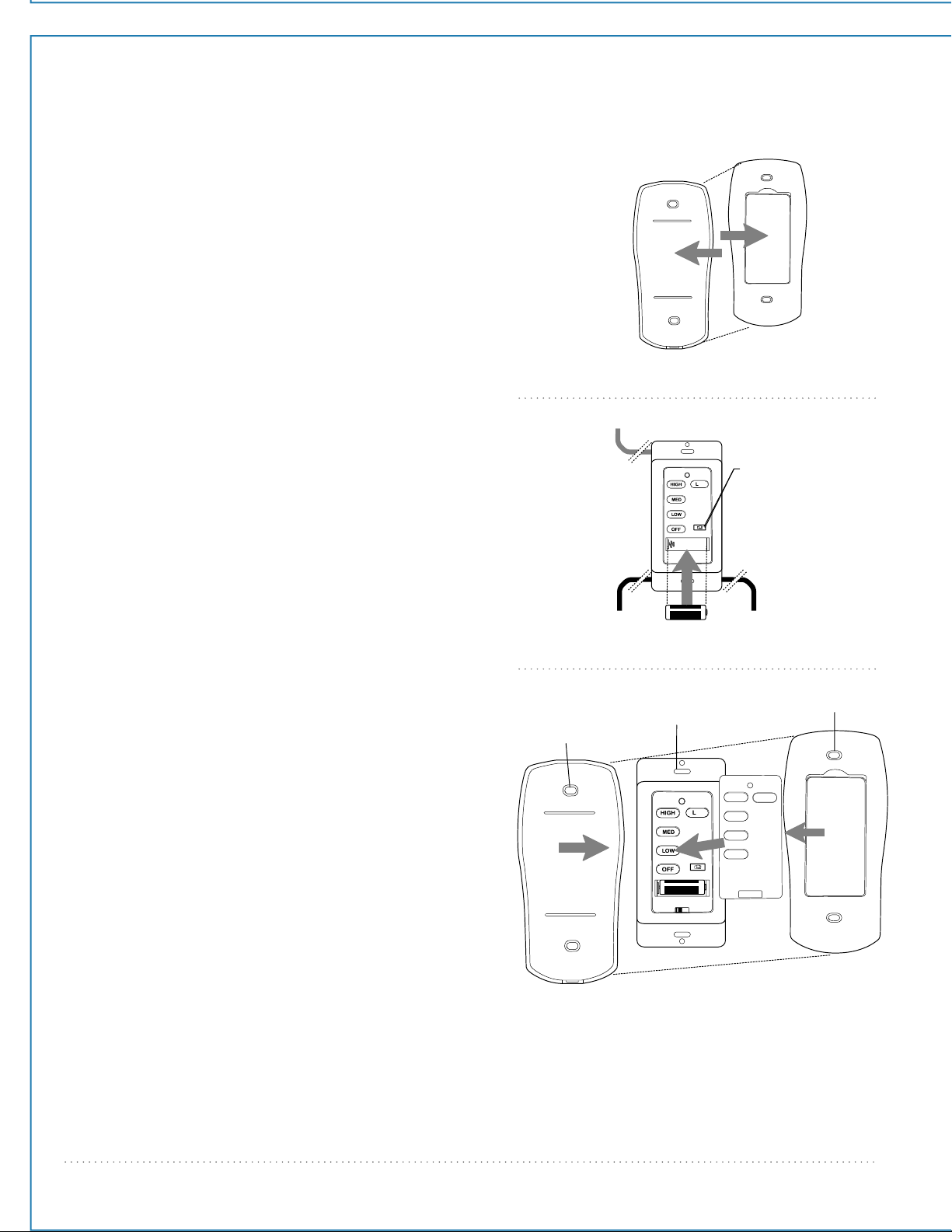
Gently pull on remote control cover to separate top
and bottom parts. [Refer to diagram 1.]
In order to use wall control as a handheld remote
control, cut each wire on wall control (that was not
previously used)--use wire cutters to cut off each wire
as close to the wall control as possible. [Refer to
diagram 2.]
Install one 12-volt battery (included) in wall control.
[Refer to diagram 2.]
The dimmer switch (labeled DIM and ON) has been
pre-set to the "ON" position (DIM). If you do not wish
to have dimming capability, please move the switch to
the "OFF" position (ON). [Refer to diagram 2.]
Attach black faceplate to front of wall control; press
down firmly. [Refer to diagram 3.]
Align holes in wall control with posts located on inside
of TOP part of remote control cover and press
together firmly. Place wall control into BOTTOM part of
remote control cover, aligning posts in top of remote
control cover with post holes in the bottom.
[Refer to diagram 3.]
(NOTE: Make sure to align narrower ends of remote
control cover before closing.) Squeeze top and bottom
of remote control cover together until you hear a click
at each end, indicating that the remote control cover
has closed completely.
IMPORTANT: Store the remote control away from
excess heat or humidity. To prevent damage to remote
control, remove the battery if remote control will not
be used for long periods.
CAUTION: “DO NOT DISPOSE OF BATTERIES IN FIRE,
BATTERIES MAY EXPLODE OR LEAK.” - When disposing
of household alkaline batteries, it is best to check with
your local and state recycling or household hazardous
waste coordinators concerning the specifics of the
program in your area. You may also locate a recycling
center by calling 1-800-8-BATTERY or 1-877-2-RECYCLE
or visit www.epa.gov/epawaste/index.htm or
www.earth911.org for more information.
WARNING: Choking Hazard - Small parts. Keep
battery away from children.
(top)
(bottom)
remote
control
cover
wall
control
faceplate
remote control
cover, BOTTOM
post
hole
diagram 1
diagram 2
diagram 3
post
hole
remote control
cover, TOP
11
-
DIM ON
page 11
14. Testing Your Fan.
CAUTION: The wall and/or handheld remote control can be programmed to multiple receivers or fans. If this is not
desired, turn wall switch off to any other programmable receiver or fan.
Restore electrical power and then, if using wall control, set slider switch on wall control to the ON position. Within
60 seconds of turning on the wall control, press and hold the fan OFF button on the wall control for 5 seconds or
until light blinks twice.
Turn power off again for at least 5 seconds and then turn power back on. Within 60 seconds of restoring the
power, press and hold the fan OFF button on the front of the handheld remote control for 5 seconds or until light
blinks twice.
Test the light and fan functions to confirm the learning process is complete--see Section 14 below.
12. Automated Learning Process./Activating Code.
diagram 1
diagram 2 diagram 3 diagram 4
It is recommended that you test fan before finalizing installation. Restore power
from circuit box and light switch (if applicable). Test wall control (optional
installation) by locating ON/OFF slider switch on wall control, then set to the ON
position. Test light and dimmer function and then test fan speeds. Next, locate
handheld remote control. Test the light ON/OFF function by pressing the L1
button; test the dimmer function by pressing the L1 button and holding it
down for1 second. Test fan speeds with the different fan speed buttons. If the
wall and/or handheld remote control operates all of the functions of the fan,
battery has been installed correctly. If the wall and/or handheld remote control
do (does) not operate all of the fan/light functions, refer to "Troubleshooting"
section to solve any issues before contacting Customer Service.
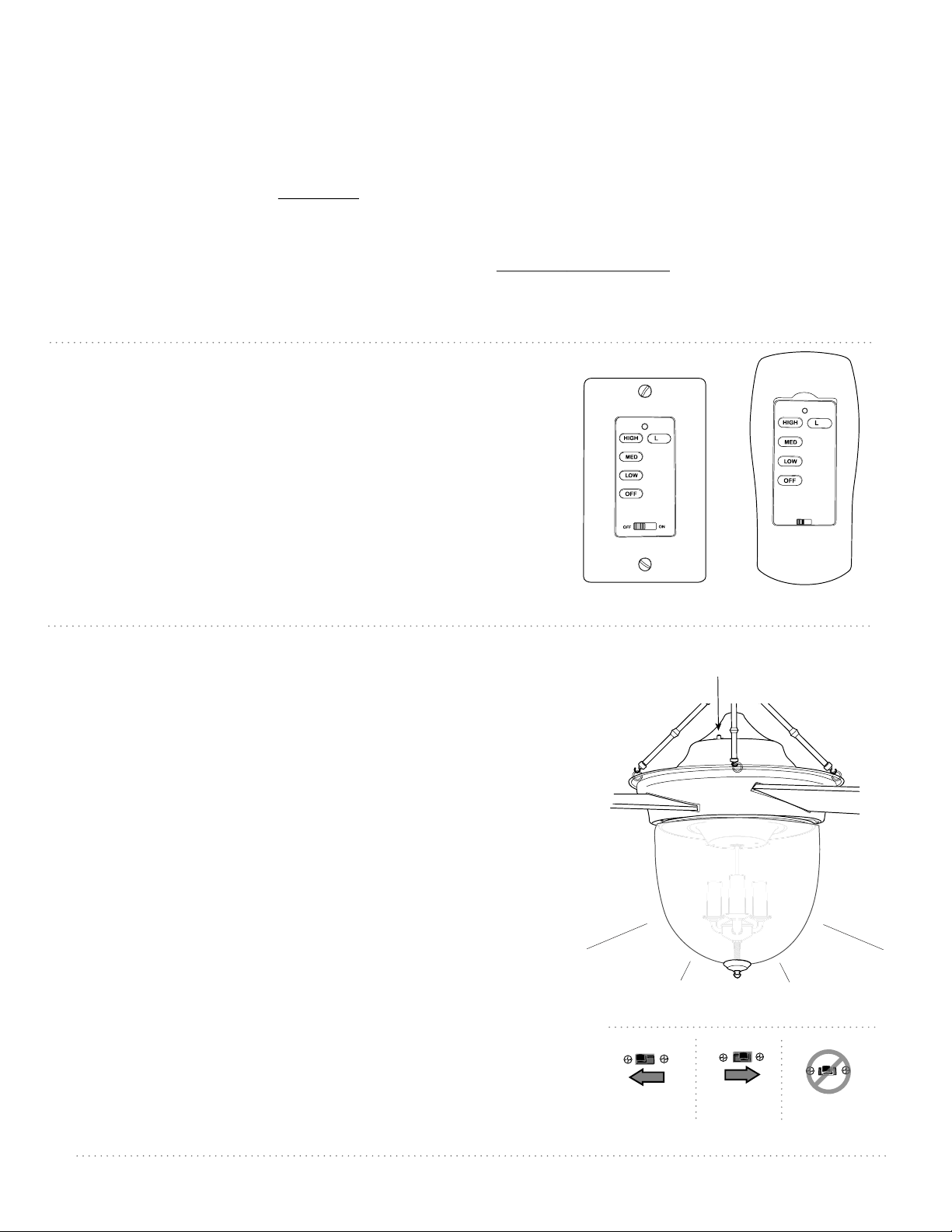
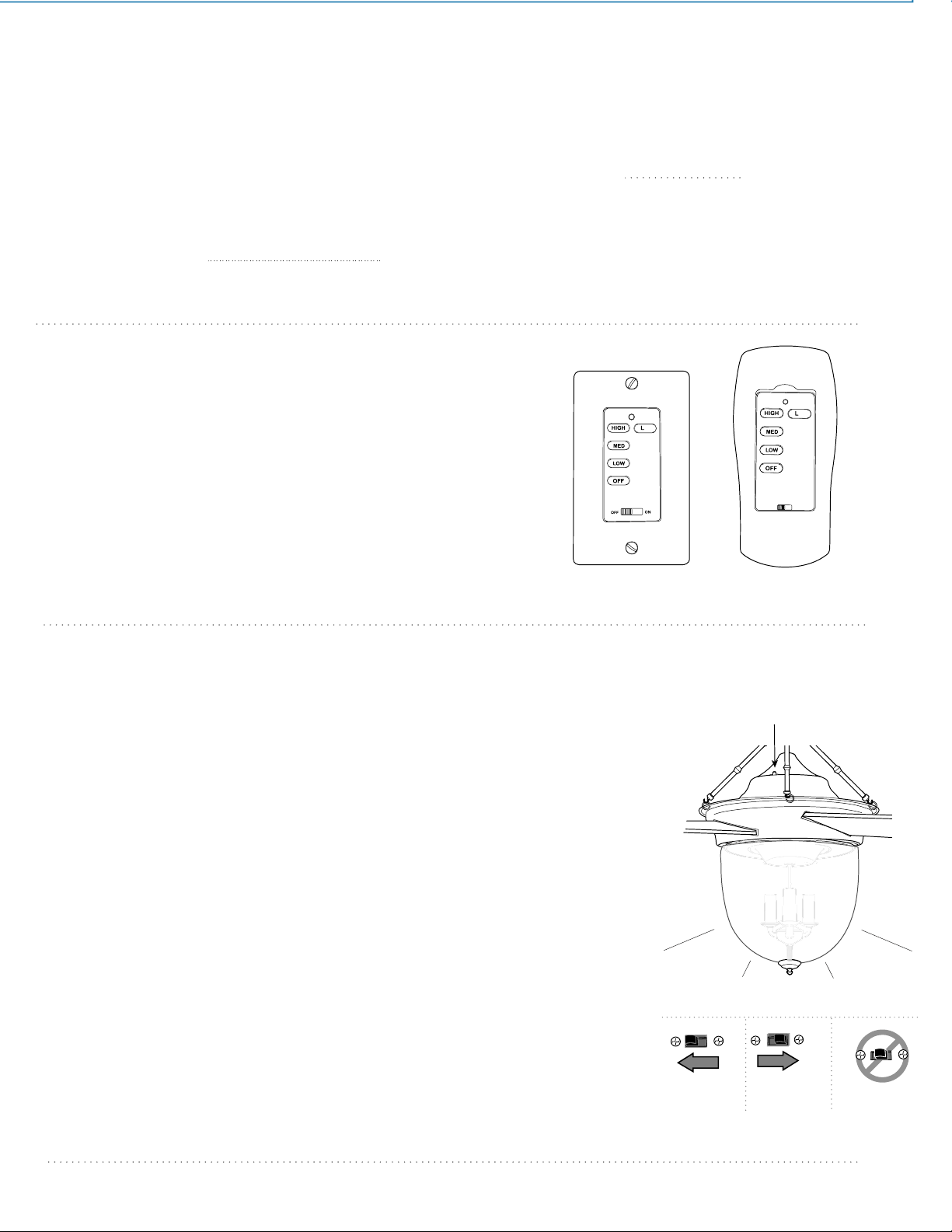
Turn fan completely off before moving the reverse switch (located on top of the
motor housing). (diagram 1) Set reverse switch to recirculate air depending on
the season:
- LEFT position in summer (diagram 2)
- RIGHT position in winter (diagram 3)
A ceiling fan will allow you to raise your thermostat setting in summer and
lower your thermostat setting in winter without feeling a difference in your
comfort.
Important: Reverse switch must be set either completely to the LEFT or
completely to the RIGHT for fan to function. If the reverse switch is set in the
middle position (diagram 4), fan will not operate.
NOTE: If the wall control/handheld remote control interferes with other
appliances, turn off power and go back to the instructions in Section 12.
Reverse Switch
13. Remote Control Operation.
ON/OFF slider switch - turns wall control ON or OFF
(ON/OFF slider switch not
functional on handheld remote)
HIGH button - turns fan to HIGH speed
MED button - turns fan to MEDIUM speed
LOW button - turns fan to LOW speed
OFF button - turns fan OFF
L1 button - turns light kit ON/OFF when pressed once;
dims light kit when pressed and held down
wall control
handheld
remote control
11
-
11
-

Troubleshooting. Warranty.
Parts Replacement.
WARNING: Failure to disconnect power supply
prior to troubleshooting any wiring issues may
result in serious injury.
Problem: Fan fails to operate.
Solutions:
1. Check wall switch to fan/wall control.
2. Check to be sure wall control (optional use) is wired
properly.
3. Check to be sure fan is wired properly.
4. Learning process between fan, handheld remote control
and, if applicable, wall control may not have been successful
and code was not activated. Turn off power and repeat
instructions in Section 12 (page 11).
5. Check that red light on handheld remote control turns on
when a button is pressed indicating that the battery is good.
Problem: Light kit not lighting.
Solutions:
1. Check wall switch to fan/wall control.
2. Check that bulb is installed correctly.
3. Check that wires in canopy are wired properly.
4. Verify that molex connections in light kit fitter are
connected properly.
5. Learning process between fan, handheld remote control
and, if applicable, wall control may not have been successful
and code was not activated. Turn off power and repeat
instructions in Section 12 (page 11).
Problem: Fan operates but light fails.
Solutions:
1. Check that bulb is installed correctly.
2. Check that wires in canopy are wired properly.
3. Replace defective bulb with same type of bulb.
4. Verify that molex connections in light kit fitter are
connected properly.
Problem: Fan and light fail to operate with wall control
(optional) and/or handheld remote control.
Solutions:
1. Check battery power in handheld remote control.
2. Learning process between fan, handheld remote control
and, if applicable, wall control may not have been successful
and code was not activated. Turn off power and repeat
instructions in Section 12 (page 11).
3. If using optional wall control, check that battery in wall
control is still good.
Problem: Lighting source (up-light, down-light or both) not
functioning.
Solution:
Wattage Limiting Device has interrupted the flow of
electricity to the light source. Ensure bulbs total no more than
190W in the light source.
Problem: Fan wobbles.
Solutions:
1. Use the balancing kit in one of the hardware packs. If no
blade balancing kit is provided, please call Customer Support,
1-800-486-4892, to request one.
2. Check to be sure set screw(s) on motor housing yoke is
(are) tightened securely.
3. Check to be sure set screw on hanging ball is tightened
securely.
page 12
JMLI1706
CRAFTMADE™ LIFETIME LIMITED WARRANTY:
CRAFTMADE warrants this fan to the original household
purchaser for indoor use under the following provisions:
1-YEAR WARRANTY: CRAFTMADE will replace or repair any
fan which has faulty performance due to a defect in
material or workmanship. Contact Craftmade Customer
Service at 1-800-486-4892 to arrange for return of fan.
Return fan, shipping prepaid, to Craftmade. We will repair
or ship you a replacement fan, and we will pay the return
shipping cost.
5-YEAR WARRANTY: CRAFTMADE will repair or replace, at
no charge to the original purchaser, any fan motor that fails
to operate satisfactorily when failure results from normal
use.
RETURN FAN MOTOR ONLY, shipping prepaid, to Craftmade
Industries. We will repair or ship purchaser a replacement
motor and Craftmade will pay the return shipping cost.
6-YEAR to LIFETIME LIMITED WARRANTY: CRAFTMADE will
repair the fan, at no charge for labor only to the original
purchaser, if the fan motor fails to operate satisfactorily
when failure results from normal use. Parts used in the
repair will be billed to the purchaser at prevailing prices at
time of repair.
The purchaser shall be responsible for all costs incurred
in the removal, reinstallation and shipping of the product
for repairs.
This warranty does not apply when damage from
mechanical, physical, electrical or water abuse results in
causing the malfunction. Deterioration of finishes or other
parts due to time or exposure to salt air is specifically
exempted under this warranty.
Neither Craftmade nor the manufacturer will assume any
liability resulting from improper installation or use of this
product. In no case shall the company be liable for any
consequential damages for breach of this, or any other
warranty expressed or implied whatsoever. This limitation
as to consequential damages shall not apply in states
where prohibited.
For parts and information, please refer to
"Parts Inventory" on page 3.
Craftmade Customer Support:
1-800-486-4892
www.craftmade.com
Índice de materias:
Sugerencias de seguridad. Pág. 2
Desempaquetado del ventilador. Pág. 3
Inventario de piezas. Pág. 3
Preparación para la instalación. Pág. 4
Instalación del soporte de montaje. Pág. 4
Ensamblaje del ventilador. Págs. 5 - 6
Instalación eléctrica. Págs. 6 - 7
Colocación de la cubierta decorativa. Pág. 7
Ensamblaje del soporte para las varitas. Pág. 8
Colocación de las aspas. Pág. 8
Instalación del juego de luz. Pág. 9
Ensamblaje del control remoto de mano. Pág. 10
Proceso de aprendizaje automático./
El activar el código. Pág. 11
Funcionamiento del control remoto. Pág. 11
Verificación del funcionamiento del
ventilador. Pág. 11
Localización de fallas. Pág. 12
Garantía. Pág. 12
Piezas de repuesto. Pág. 12
IMPRESO EN CHINA
LEER ESTAS INSTRUCCIONES Y
GUARDARLAS PARA UTILIZACION FUTURA
peso neto del ventilador: 12,25 kg (27 lb)
Para modelo:
CAV52
Guía de instalación
Cavalier
página 1
REGISTRADO PARA
LUGAR HUMEDO
SUGERENCIAS DE SEGURIDAD.
página 2
ADVERTENCIA: para evitar la posibilidad de una descarga eléctrica, desconectar la corriente en la caja de fusibles principal o el
interruptor protector antes de iniciar la instalación del ventilador o antes de repararlo o instalar accesorios.
1. LEER TODAS LAS INSTRUCCIONES E INFORMACIÓN DE SEGURIDAD CUIDADOSAMENTE ANTES DE INSTALAR SU
VENTILADOR Y GUARDAR ESTAS INSTRUCCIONES.
PRECAUCION: para reducir el riesgo de daño corporal, es posible que sea necesario usar guantes al manejar las piezas del ventilador
que tengan bordes afilados.
2. Asegurarse de que todas las conexiones eléctricas cumplan con los Códigos o las Ordenanzas Locales, el Código Nacional
Eléctrico y ANSI/NFPA 70-1999. Si usted no está familiarizado con el alambrado eléctrico o los cables de la casa/el edificio son
de colores diferentes a los cuales se refieren en las instrucciones, favor de buscar un electricista calificado.
3. Asegurarse de que haya localizado una ubicación para su ventilador que permite el espacio necesario para la rotación de las
aspas, y por lo menos 2,13 metros (7 pies) de espacio libre entre el piso y las puntas de las aspas. Debe instalar el ventilador
para que las puntas de las aspas queden a una distancia de por lo menos 76 centímetros (30 pulgadas) de las paredes y otras
estructuras verticales.
4. La caja de salida eléctrica debe estar bien sujetada a la viga de soporte del techo y deben ser capaces de sostener por lo menos
16 kilogramos (35 libras). La caja de salida debe tener apoyo directo de la estructura del edificio. Sólo usar cajas de salida
registradas con CETL o
CUL en Canadá o ETL o UL en EEUU
que indican que "sirven para ventilador" ("FOR FAN SUPPORT" en
inglés).
ADVERTENCIA: para reducir el riesgo de incendio, descarga eléctrica o daño corporal, instalar en la caja de salida marcada "Aceptable
para sostener ventilador de 15,9 kg (35 lb) o menos" ["Acceptable for Fan Support of 15.9 kg (35 lb) or less"] y utilizar los tornillos
proporcionados con la caja de salida. La mayoría de las cajas de salida que normalmente se usan para sostener los aparatos de
alumbrado no siempre son apropiadas para sostener ventiladores y es posible que las tenga que reemplazar. En caso de duda,
consultar con un electricista calificado.
ADVERTENCIA: para reducir el riesgo de incendio, descarga eléctrica o daño corporal, los conectores para cable provistos con este
ventilador son diseñados para aceptar sólo un cable de calibre 12 de la casa y dos cables principales del ventilador. Si el calibre del
cable de la casa es superior al 12 o hay más de un cable de la casa para conectar a los cables principales del ventilador al cual
corresponda cada uno, consultar con un electricista para informarse sobre el tamaño correcto de conectores para cable que se debe
usar.
5. Los diagramas eléctricos son únicamente para referencia.
6. Después de haber terminado la instalación, asegurarse de que todas las conexiones estén totalmente seguras.
7. Después de haber terminado todas las conexiones eléctricas, los conductores empalmados deben ser volteados para arriba y
colocados cuidadosamente dentro de la caja de salida. Los alambres se deben de separar con el conductor a tierra a un lado
y el conductor a tierra del equipo al lado opuesto.
ADVERTENCIA: para reducir el riesgo de incendio o un choque eléctrico, no usar el ventilador con ningún control de velocidad de
estado sólido ni controlar la velocidad del ventilador con un interruptor con reductor de luz de gama completa. [El usar un interruptor
con reductor de luz de gama completa para controlar la velocidad del ventilador causara un zumbido recio del ventilador.]
8. No utilizar el interruptor de reversa hasta que el ventilador se haya parado completamente.
9. No insertar ningún objeto entre las aspas mientras estén rotando.
ADVERTENCIA: para reducir el riesgo de daño corporal, no doblar los brazos de las aspas durante el ensamblaje ni durante la
instalación. No insertar objetos entre las aspas mientras estén rotando.
ADVERTENCIA: para reducir el riesgo de daño corporal o algún daño al ventilador, tener cuidado al estar trabajando alrededor del
ventilador o limpiándolo.
10. No utilizar agua ni detergentes para limpiar el ventilador ni las aspas. Usar un trapo seco o ligeramente
húmedo para su limpieza general.
ADVERTENCIA: para reducir el riesgo de daño corporal, usar sólo las piezas provistas con este ventilador. Al usar piezas DISTINTAS
a las provistas con este ventilador se invalidará la garantía.
Las modificaciones no aprobadas por la parte responsable de la conformidad podrían invalidar la autorización del usuario para
manejar el equipo. [El equipo se refiere al control remoto y/o el control de pared y/o el juego de luz LED.]
NOTA: se han hecho pruebas en este equipo y se ha comprobado que cumple con los límites para un aparato digital de clase B, de
acuerdo con la Parte 15 de las Reglas de la FCC. Se concibieron estos límites para proveer protección razonable contra la interferencia
adversa en una instalación residencial. Este equipo produce, usa y puede radiar energía de radiofrecuencia y, si no se instala y no se usa
según las instrucciones, puede causar interferencia adversa en la radiocomunicación. Sin embargo, no hay ninguna garantía de que
no habrá interferencia en una instalación en particular. Si este equipo sí causa interferencia adversa en la recepción de radio o
televisión, que se puede determinar apagando y prendiendo el equipo, se le urge al usuario a intentar rectificar la interferencia
tomando una o más de las medidas que siguen:
* Orientar la antena de nuevo o localizarla en otro sitio.
* Aumentar la separación entre el equipo y el receptor.
* Conectar el equipo a un tomacorriente en un circuito distinto al cual está conectado el receptor.
* Solicitar ayuda del distribuidor o un técnico de radio/televisión.
NOTA: no se debe concluir que las precauciones de seguridad importantes e instrucciones en este manual van a abarcar todas las
condiciones y situaciones posibles que puedan ocurrir. Se debe entender que el sentido común y la precaución son factores
necesarios en la instalación y la operación de este ventilador.
página 5
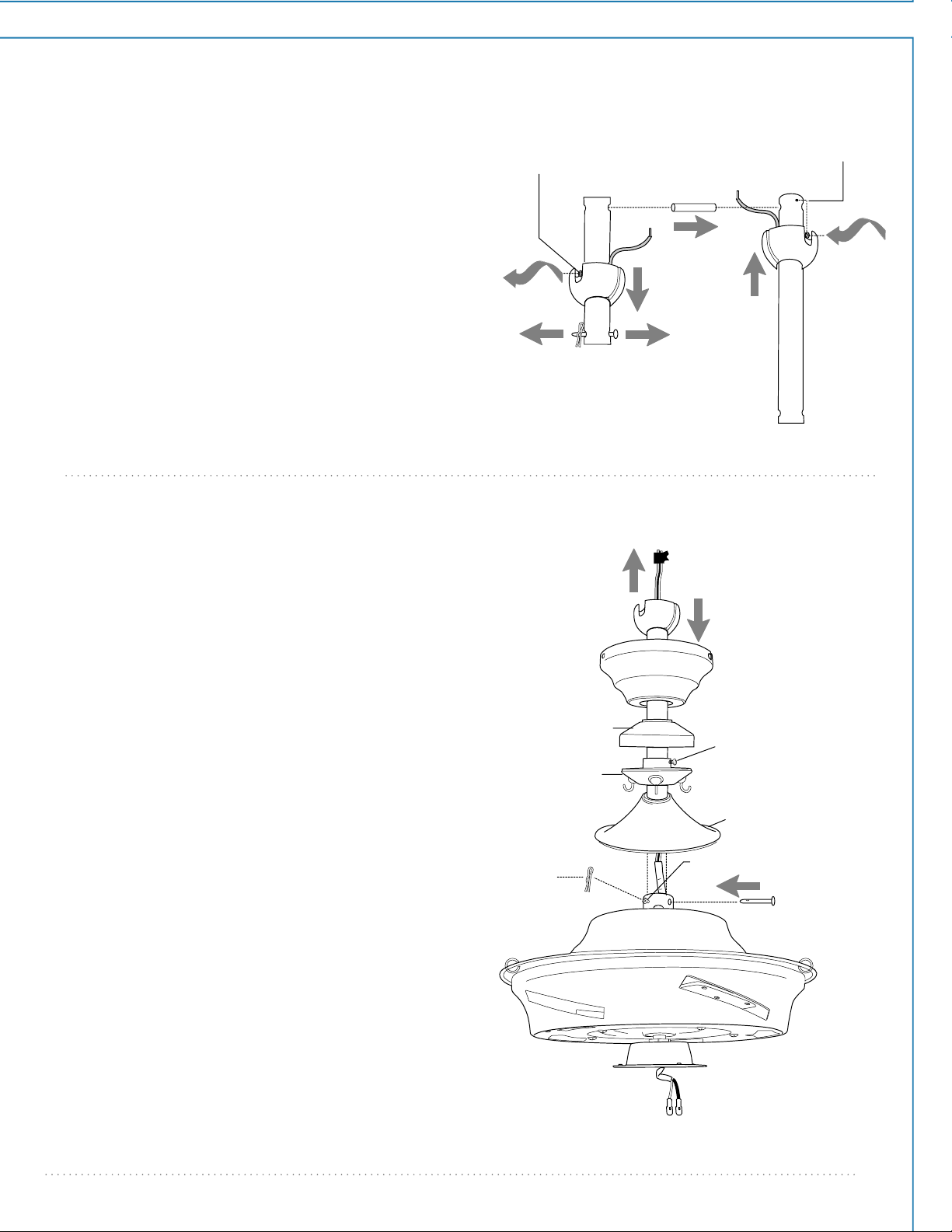
5. Ensamblaje del ventilador.
bastidor
del
motor
tornillo de fijación del cuello
tubo
tapa del soporte
para las varitas
tornillo de fijación del
soporte para las varitas
soporte para
las varitas
cubierta
decorativa
cubierta del cuello
cableado
clavija
perno
A
B
perno
clavija
agujero para
el tornillo
de fijación
tornillo
de fijación
bola que
sirve para
colgar
perno
de tope
NOTA: no se debe concluir que las precauciones de
seguridad importantes e instrucciones en este manual
van a abarcar todas las condiciones y situaciones
posibles que puedan ocurrir. Se debe entender que el
sentido común y la precaución son factores necesarios
en la instalación y la operación de este ventilador.
Si usted desea extender la longitud colgante del
ventilador, usted tendrá que quitar la bola que sirve
para colgar del tubo provisto para usarlo con un tubo
más largo (a la venta por separado). [Si desea utilizar el
tubo provisto, favor de pasar a las instrucciones después
de la línea punteada más abajo.]
Aflojar el tornillo de fijación de la bola que sirve para
colgar y quitar el perno y la clavija. Bajar la bola que
sirve para colgar y sacar el perno de tope. Quitar la
bola del tubo original, A, y deslizarla sobre el tubo más
largo, B (la parte de arriba de el tubo debe tener el
agujero para el tornillo de fijación en ese extremo; usar
ese agujero al colocar el tornillo de fijación). Introducir
el perno de tope en la parte de arriba del tubo más
largo y subir la bola que sirve para colgar. Asegurarse
de que el perno de tope se ponga en línea con las
ranuras dentro de la bola. Apretar bien el tornillo de
fijación.
Sugerencia: para preparar los cables para pasarlos por
el tubo, poner un pedacito de cinta aisladora en la
punta de los cables--esto mantendrá los cables juntos
al pasarlos por el tubo.
Aflojar los tornillos de fijación del cuello y la tuerca de
la parte superior del bastidor del motor. Quitar el
perno y la clavija del tubo (si todavía no se hace). Pasar
el tubo por la cubierta decorativa, la tapa del soporte
para las varitas, el soporte para las varitas (aflojar el
tornillo de fijación del soporte para las varitas para
evitar que se raye el acabado del tubo) y luego la
cubierta del cuello.
Pasar los cables del ventilador a través del tubo y jalar
con cuidado los cables en exceso por la parte de arriba
del tubo.
Enroscar el tubo en el cuello del bastidor del motor
hasta alinearse los agujeros para el perno y la clavija en
el tubo con los del cuello—asegurarse de que no se
tuerzan los cables. Volver a introducir el perno y la clavija
que se quitaron anteriormente. Apretar los tornillos de
fijación del cuello y la tuerca completamente.
ADVERTENCIA: si no se aprieta bien el tornillo de
fijación (en la bola que sirve para colgar) es posible que
se afloje el ventilador y que se caiga.
[El "Ensamblaje del ventilador" continúa en la
página siguiente.]
5. Ensamblaje del ventilador. (cont.)
página 6
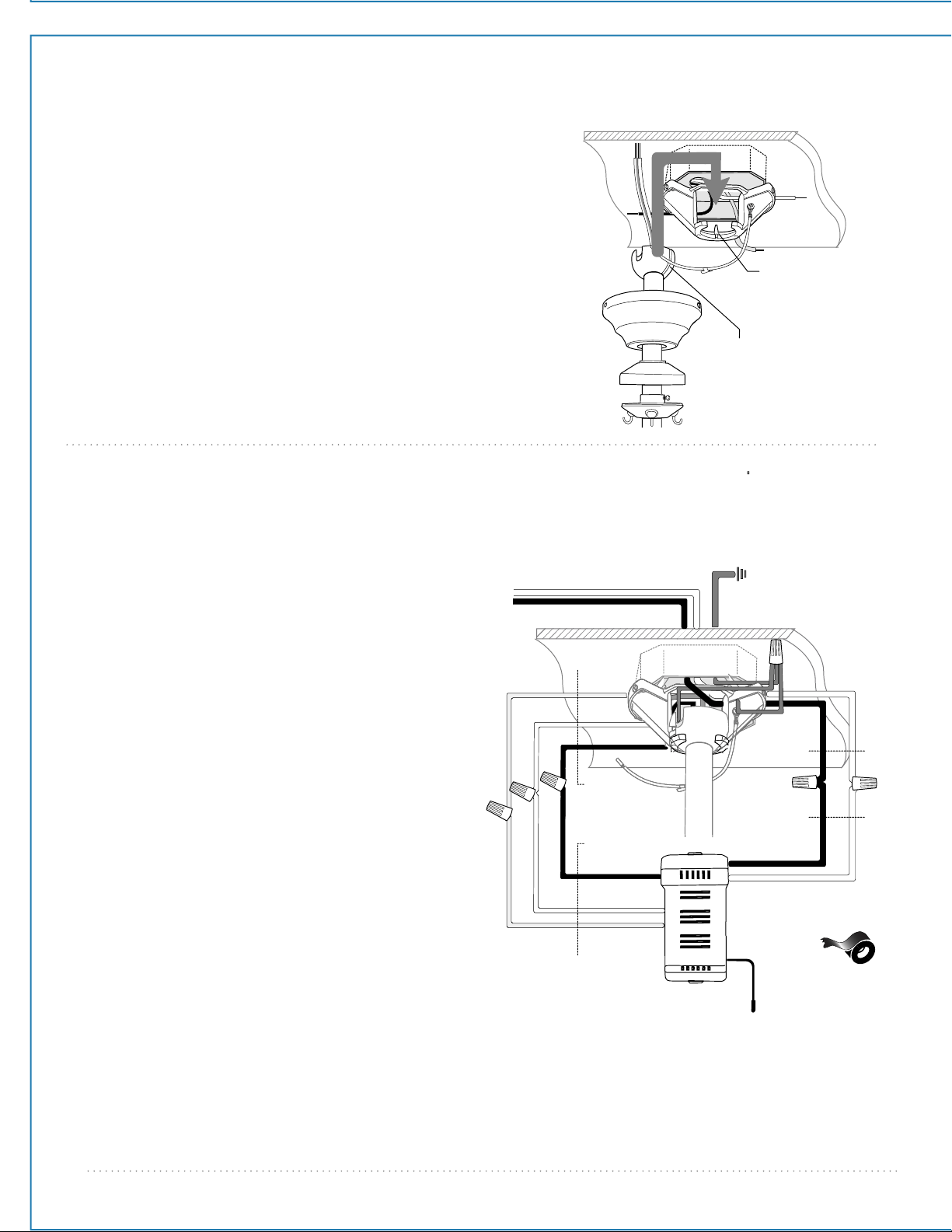
6. Instalación eléctrica.
PRECAUCION: asegurarse de que la caja de salida
esté conectada a tierra como es debido y que
exista un conductor a tierra (VERDE o pelado).
Asegurarse de que todas las conexiones eléctricas
cumplan con los Códigos o las Ordenanzas
Locales y el Código Nacional Eléctrico. Si usted no
está familiarizado con el alambrado eléctrico o los
cables de la casa/el edificio son de colores
diferentes a los cuales se refieren en el diagrama al
lado, favor de buscar un electricista calificado.
Alambrar el receptor usando los conectores
para cable provistos como se muestra en el
diarama al lado. Sugerencia: mientras está
haciendo la instalación eléctrica, recordar que
los cables no deben impedir el posicionamiento
del receptor en el soporte de montaje.
* Como una medida de seguridad adicional,
envolver cada conectador para cable por
separado con cinta aisladora.
Meter el receptor (con el lado plano hacia
arriba) en el soporte de montaje y
delicadamente meter los conectores para cable
que tienen cinta dentro de la caja de salida.
Dejar que la antena se quede fuera del soporte
de montaje.
parte saliente del
soporte de montaje
ranura en la bola
que sirve para colgar
negro
negro
negro
negro
del receptor
del techo
del receptor
blanco
blanco
blanco
azul
azul
alambre conductor negro
toma de
tierra (verde
o pelada)
blanco
Entrada CA N
Entrada CA L
receptor
alambre conductor blanco
del
ventilador
Ya que esté sujetado el soporte de montaje a la caja de
salida y capaz de apoyar el ventilador, usted está listo para
colgar el ventilador. Agarrar el ventilador firmemente con
las dos manos. Deslizar el tubo por la abertura del soporte
de montaje y dejar que se detenga la bola en el soporte de
montaje. Girar la bola que sirve para colgar hasta que la
ranura de la bola se alinee con la parte saliente del soporte
de montaje.
ADVERTENCIA: el no alinear la ranura en la bola que sirve
para colgar con la parte saliente del soporte de montaje
puede causar lesiones graves o la muerte.
Sugerencia: solicitar ayuda de otra persona para mantener
la escalera sujeta y para que le suba el ventilador cuando
usted ya esté preparado en la escalera para colgarlo.
*
antena
toma de tierra
(verde o pelada)
[La "Instalación eléctrica" continúa en la
página siguiente.
página 7
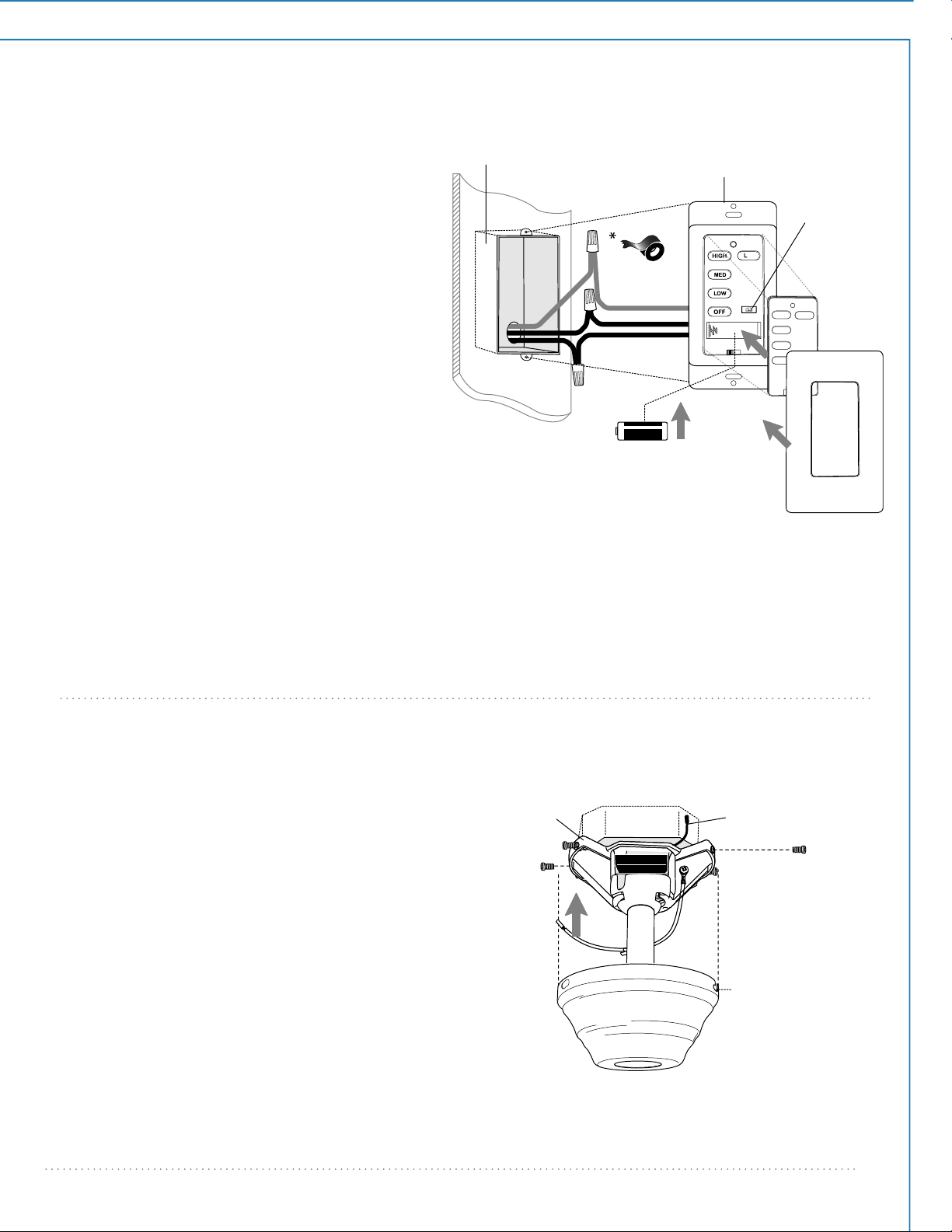
7. Colocación de la cubierta decorativa.
cubierta decorativa
Subir la cubierta decorativa al soporte de
montaje y alinear los agujeros con ranura
en la cubierta decorativa con los tornillos
aflojados en el soporte de montaje. Girar la
cubierta decorativa para cerrarla. Introducir
los tornillos (junto con las arandelas de
estrella) que se quitaron anteriormente (en
la página 4, sección 4) en los otros agujeros
y apretar bien todos los tornillos con
destornillador de estrella Phillips.
*Recordar que la antena del receptor del
control remoto debe quedar fuera del
soporte de montaje.
soporte de
montaje
agujero con ranura
antena
6. Instalación eléctrica.
[FAVOR DE DARSE CUENTA: hay que utilizar el control
de pared y/o el control remoto de mano para que
funcione el ventilador. Si no desea utilizar el control de
pared, favor de pasar a la sección 7más abajo para seguir
con la instalación del ventilador.]
Para instalar el control de pared, quitar el interruptor
de pared existente. Alambrar uno de los controles de
pared con los conectores para cable provistos así
como se muestra en el diagrama al lado.
* Como una medida de seguridad adicional, envolver
cada conector para cable con cinta aisladora.
Delicadamente meter los cables y los conectores para
cable que tienen cinta dentro de la caja de salida.
Instalar 1 batería de 12 voltios (incluida) en el control
de pared.
IMPORTANTE: el control de pared no funcionará sin
que se instale la batería.
Ya que este ventilador viene con bombillas
incandescentes, el interruptor del reductor de luz
(etiquetado DIM y ON) está programado de antemano
en posición "ENCENDIDO" (DIM). Si no desea tener la
capacidad de bajar la luz, favor de mover el interruptor
a la posición "APAGADO" (ON).
Escoger una tapa (color almendra o blanca) y apretarla
fijamente en la parte delantera del control de pared.
Sujetar el control de pared a la caja de salida y
asegurarlo con los tornillos del interruptor de pared
original. Sujetar la placa (incluida) al control de pared
usando los 2 tornillos provistos con el control de pared.
verde
negro
tierra
verde/
pelado
placa
tapa
(cableado del
control de pared)
caja de salida
control
de pared
interruptor
del reductor
de luz
batería de 12V
negro (AL ventilador)
negro (ENTRADA CA
del cortacircuitos)
negro
(AL SUMINISTRO
de fuerza)
11
-
DIM ON
9. Colocación de las aspas.
bastidor del motor
bastidor
del motor
aspa
página 8
tapa del soporte
para las varitas
soporte para
las varitas
tornillo de fijación
del soporte
para las varitas
cubierta decorativa
cubierta del cuello
varita
8. Ensamblaje del soporte para las varitas.
Enganchar una extremidad de la varita en
el anillo en el bastidor del motor. Ajustar el
soporte para las varitas en el extremo
superior de la varita para mantener la
varita en su posición correcta y luego
apretar el tornillo de fijación del soporte
para las varitas. Dejar que la tapa del
soporte para las varitas se apoye en el
soporte para las varitas.
Instalar las demás varitas entre el bastidor
del motor y el soporte para las varitas. Si
las varitas se caen fácilmente, ajustar el
soporte para las varitas de nuevo
(ajustando el tornillo de fijación del
soporte para las varitas de nuevo como se
describe más arriba) con las varitas ya
instaladas.
anillo
placa para
el aspa
tornillos y arandelas
para fijar el aspa
ADVERTENCIA: para reducir el riesgo de lesiones
corporales graves, NO utilizar herramientas
eléctricas para ensamblar las aspas. Si aprieta
demasiado los tornillos, las aspas podrían
agrietarse y quebrarse.
Para ahorrar tiempo: se pueden poner las
arandelas en los tornillos que son para las aspas
antes de colocar las aspas.
Localizar los 15 tornillos y arandelas que se usan
para fijar las aspas en uno de los paquetes de
artículos de ferretería. Meter el aspa en una de las
aberturas en el bastidor del motor (favor de
observar el lado del aspa que indique ESTE LADO
HACIA ARRIBA), luego alinear los agujeros en el
aspa con los agujeros en la placa para el aspa que
se encuentra dentro del bastidor del motor.
Introducir 3 tornillos para fijar las aspas (junto con
las arandelas) desde el lado inferior del bastidor
del motor. Apretar los tornillos bien con
destornillador de estrella Phillips. Repetir el
procedimiento con las demás aspas.
Nota: apretar los tornillos para los brazos para el
aspa dos veces al año.
página 9
conexiones
tipo "molex"
placa de
conexión
bombilla
conectador para
el juego de luz
pantalla
de vidrio
adorno con rosca
bastidor
del motor
placa del
adorno
con rosca
10. Instalación del juego de luz.
Quitar 1 tornillo de la placa de conexión (en la
parte inferior del bastidor del motor) y aflojar
los otros 2 tornillos.
Conectar el cable BLANCO del conectador
para el juego de luz al cable BLANCO del
bastidor del motor. Conectar el cable NEGRO
del conectador para el juego de luz al cable
NEGRO (o AZUL) del bastidor del motor.
Asegurarse de que las conexiones tipo "molex"
se cierren bien con un clic.
Alinear los agujeros que tengan ranura en el
conectador para el juego de luz con los
tornillos aflojados en la placa de conexión;
girar el conectador para el juego de luz para
cerrarlo. Volver a introducir el tornillo que se
quitó anteriormente y apretar bien los 3
tornillos.
Instalar 3 bombillas LED de base mediana de
6,5 vatios (incluidas).
Importante: Cuando necesite reemplazar las
bombillas, dejar que se enfríen las bombillas y
la pantalla de vidrio antes de tocarlas.
Alinear el agujero en la pantalla de vidrio con
la varilla roscada en el conectador para el
juego de luz y con cuidado empujar hacia
arriba hasta que pase la varilla roscada por el
agujero. Alinear el agujero de en medio de la
placa del adorno con rosca con la varilla
roscada y empujar hacia arriba. Asegurar la
pantalla de vidrio con el adorno con rosca. NO
apretarlo demasiado ya que el vidrio se puede
rajar o romper.
11
-
DIM ON
11
-
DIM ON
página 10
11. Ensamblaje del control remoto de mano.
PARA PODER UTILIZAR EL CONTROL REMOTO DE MANO,
FAVOR DE SEGUIR CON LA SECCION 11 para armar el
control remoto. Si ya se instaló el control de pared pero no
desea utilizar el control remoto de mano, favor de pasar a la
sección 12.
Con cuidado separar la cubierta del control remoto,
despegando la parte superior de la inferior.
[Referirse al
diagrama 1.]
Para utilizar el control de pared como control remoto de
mano, cortar cada cable en el control de pared (que no
se usó anteriormente)--usar cortaalambres para cortar
cada cable para que se quede tan corto como sea
posible.
[Referirse al diagrama 2.]
Instalar 1 batería de 12 voltios (incluida) en el control de
pared.
[Referirse al diagrama 2.]
El interruptor del reductor de luz (etiquetado DIM y ON)
está programado de antemano en posición
"ENCENDIDO" (DIM). Si no desea tener la capacidad de
bajar la luz, favor de mover el interruptor a la posición
"APAGADO" (ON).
[Referirse al diagrama 2.]
Fijar la tapa negra a la parte delantera del control de
pared; apretar la tapa fijamente.
[Referirse al diagrama 3.]
Alinear los agujeros en el control de pared con los
postes que se encuentran adentro de la parte SUPERIOR
de la cubierta del control remoto y apretar fijamente.
Colocar el control de pared dentro de la parte INFERIOR
de la cubierta del control remoto, alineando los postes
en la parte superior de la cubierta del control remoto
con los agujeros para los postes en la parte inferior.
[Referirse al diagrama 3.] (NOTA:
asegurarse de alinear
los extremos más angostos de la cubierta del control
remoto antes de cerrarla.) Apretar la parte superior e
inferior de la cubierta del control remoto hasta que se
oiga un “clic” en cada extremo, lo cual indicará que se
haya cerrado completamente la cubierta del control
remoto.
IMPORTANTE: guardar el control remoto lejos del calor
excesivo o la humedad. Para prevenir daño al control
remoto, sacar la batería si no se va a utilizar el control
remoto por un tiempo extendido.
PRECAUCIÓN: "NO ARROJAR LAS BATERÍAS AL
FUEGO, PUEDEN EXPLOTAR O CHORREAR” - Antes de
desechar baterías alcalinas domésticas, se recomienda
consultar a los coordinadores de residuos domésticos
peligrosos o de reciclaje locales y estatales para
solicitarles información específica sobre el programa
vigente en su zona. A su vez, puede localizar un centro
de reciclaje llamando al 1-800-8-BATTERY o el
1-877-2-RECYCLE, o visitando la página
www.epa.gov/epawaste/index.htm o www.earth911.org
para obtener más información.
ADVERTENCIA: peligro de asfixia - piezas pequeñas.
Mantener las baterías fuera del alcance de los niños.
interruptor del
reductor de luz
control de pared
cable
cable
cable
(parte
superior)
(parte
inferior)
cubierta del
control remoto
control
de pared
tapa
cubierta del
control remoto,
parte INFERIOR
poste
agujero
diagrama 1
diagrama 2
agujero
para el
poste
cubierta del
control remoto,
parte SUPERIOR
batería de 12V
diagrama 3
página 11
12. Proceso de aprendizaje automático./El activar el código.
14. Verificación del funcionamiento del ventilador.
PRECAUCION: se puede programar el control de pared/control remoto de mano para usar con varios receptores o
ventiladores. Si no desea hacer esto, apagar el interruptor de cualquier otro receptor o ventilador programable.
Conectar la electricidad y luego, si se instaló el control de pared, poner el interruptor corredero en el control de
pared en posición ON (encendido). Dentro de 60 segundos de haber prendido el control de pared, oprimir el
botón OFF del ventilador por 5 segundos o hasta que la luz parpadee dos veces.
Cortar la corriente de nuevo por 5 segundos como mínimo y luego volver a conectar la electricidad. Dentro de
60 segundos de haber conectado la electricidad, oprimir el botón OFF del ventilador por 5 segundos en la
parte de enfrente del control remoto de mano o hasta que la luz parpadee dos veces.
Poner a prueba las funciones de luz y ventilador para confirmar que se haya terminado el proceso de
aprendizaje--verse la sección 14 a continuación.
Se le recomienda poner el ventilador a prueba antes de terminar la instalación.
Regresar la corriente de electricidad en el corta-circuitos y el interruptor de la luz (si
aplica). Poner a prueba el control de pared (instalación opcional) localizando el
interruptor corredero de APAGADO y ENCENDIDO en el control de pared, luego ponerlo
en posición de ENCENDIDO (ON). Poner a prueba la luz y la función del reductor de luz
y después las velocidades del ventilador. Luego, localizar el control remoto de mano.
Poner a prueba la función de luz de APAGADO y ENCENDIDO con el botón L1; poner a
prueba el funcionamiento del reductor de luz oprimiendo el botón L1 por más de 1
segundo. Verificar las velocidades del ventilador con los diferentes botones de
velocidad. Si el control de pared/control remoto de mano maneja todas las funciones
de ventilador y luz, se ha instalado bien la batería. Si el control de pared y/o el control
remoto de mano no controla(n) todas las funciones del ventilador/la luz, favor de
referirse a la sección "Localización de fallas" para resolver cualquier asunto antes de
comunicarse con el Servicio al cliente.
Apagar el ventilador completamente antes de mover el interruptor de reversa (localizado
debajo de la cubierta del cuello en el bastidor del motor). (diagrama 1) Regularlo para
que se circule bien el aire dependiendo de las estaciones del año.
- posición IZQUIERDA en verano (diagrama 2)
- posición DERECHA en invierno (diagrama 3)
Un ventilador de techo le permitirá subir el termostato en verano y bajarlo en invierno sin
notar una diferencia en su comodidad.
Importante: hay que mover el interruptor de reversa o completamente hacia la
IZQUIERDA o completamente hacia la DERECHA para que funcione el ventilador. Si el
interruptor de reversa está puesto en la posición de en medio (diagrama 3), no
funcionará el ventilador.
NOTA: si el control de pared/control remoto de mano interfiere con otros aparatos,
repetir las instrucciones de la sección 12 más arriba.
diagrama 1
diagrama 2 diagrama 3 diagrama 4
interruptor
de reversa
13. Funcionamiento del control remoto.
Interruptor corredero - ENCIENDE y APAGA el control de pared
ON / OFF (el interruptor corredero no funciona en el
control de mano)
Botón HIGH - pone el ventilador en velocidad ALTA
Botón MED - pone el ventilador en velocidad MEDIA
Botón LOW - pone el ventilador en velocidad BAJA
Botón OFF - APAGA el ventilador
Botón L1 - ENCIENDE/APAGA el juego de luz cuando se oprime el
botón una vez; al oprimir el botón y mantenerlo
oprimido, se convierte en reductor de luz el juego de luz
11
-
control
de pared
control remoto
de mano
11
-

página 12
Localización de fallas.
Garantía.
Piezas de repuesto.
ADVERTENCIA: el no desconectar el suministro de
fuerza eléctrica antes de hacer localización de fallas
para cualquier problema de instalación eléctrica puede
causar lesiones graves.
Problema: el ventilador no funciona.
Soluciones:
1. Inspeccionar el interruptor de pared del ventilador/control de pared.
2. Verificar la instalación eléctrica del control de pared (uso opcional).
3. Verificar la instalación eléctrica del ventilador.
4. Es posible que no tuvo éxito el proceso de aprendizaje entre el
ventilador, el control remoto de mano y, si se aplica, el control de pared
y que no se activó el código. Desconectar la electricidad y repetir las
instrucciones de la sección 12 (página 11).
5. Averiguar que la luz roja se prende en el control remoto de mano
cuando se oprima un botón, lo cual significa que sirve la batería.
Problema: el juego de luz no se ilumina.
Soluciones:
1. Inspeccionar el interruptor de pared del ventilador/control de pared.
2. Verificar que se instaló correctamente la bombilla.
3. Verificar que se hizo correctamente la conexión de cables en la
cubierta decorativa.
4. Asegurarse de que se conectaron bien las conexiones tipo "molex"
en el conectador para el juego de luz.
5. Es posible que no tuvo éxito el proceso de aprendizaje entre el
ventilador, el control remoto de mano y, si se aplica, el control de pared
y que no se activó el código. Desconectar la electricidad y repetir las
instrucciones de la sección 12 (página 11).
Problema: el ventilador funciona pero la luz no.
Soluciones:
1. Verificar que se instaló correctamente la bombilla.
2. Verificar que se hizo correctamente la conexión de cables en la
cubierta decorativa.
3. Reemplazar una bombilla defectuosa con el mismo tipo de bombilla.
4. Asegurarse de que se conectaron bien las conexiones tipo "molex"
en el conectador para el juego de luz.
Problema: no funcionan el ventilador ni la luz con el control de
pared/control remoto de mano.
Soluciones:
1. Averiguar la carga de la batería en el control remoto de mano.
2. Es posible que no tuvo éxito el proceso de aprendizaje entre el
ventilador, el control remoto de mano y, si se aplica, el control de pared
y que no se activó el código. Desconectar la electricidad y repetir las
instrucciones de la sección 12 (página 11).
3. Si se está usando el control de pared opcional, verificar si aún sirve la
batería en el control de pared.
Problema: no funciona la fuente de luz (luz superior, luz inferior o
ambas).
Solución:
El aparato que sirve para limitar el vatiaje ha interrumpido la corriente
eléctrica que va a la fuente de luz. Asegurarse de que las bombillas en
la fuente de luz no sumen más de 190W.
Problema: el ventilador se tambalea.
Soluciones:
1. Usar el juego para balancear las aspas incluido en uno de los
paquetes de artículos de ferretería. Si no se incluye un juego para
balancear las aspas, llamar al Servicio al cliente, 1-800-486-4892, para
pedir uno.
2. Averiguar que se apretó (apretaron) bien el (los) tornillo(s) de fijación
en el cuello del bastidor del motor.
3. Averiguar que se apretó bien el tornillo de fijación en la bola que
sirve para colgar.
Para piezas o información, referirse al
"Inventario de piezas" en la página 3.
Servicio al cliente de Craftmade:
1-800-486-4892
www.craftmade.com
GARANTÍA LIMITADA DE POR VIDA DE CRAFTMADE™ :
CRAFTMADE garantiza este ventilador al comprador
original de grupo familiar para uso interior con las
siguientes condiciones:
GARANTÍA DE 1 AÑO: CRAFTMADE reemplazará o
reparará cualquier ventilador que tenga funcionamiento
deficiente debido a defectos en los materiales o trabajo
manual. Comunicarse con el Servicio al cliente de
CRAFTMADE al 1-800-486-4892 para acordar el reenvío
del ventilador. Devolver el ventilador, con los gastos de
envío prepagados, a Craftmade. Nosotros repararemos o
reemplazaremos el ventilador y pagaremos los gastos de
envío de regreso.
GARANTÍA DE 5 AÑOS: CRAFTMADE reemplazará o
reparará sin costo al comprador original, cualquier motor
de ventilador que no funcione de manera satisfactoria a
causa de uso normal.
DEVOLVER EL MOTOR SOLAMENTE, los gastos de envío
prepagados, a Craftmade. Nosotros repararemos el
motor al comprador o le enviaremos uno de reemplazo
y Craftmade pagará los gastos de envío de regreso.
GARANTÍA LIMITADA DE 6 AÑOS hasta DE POR VIDA:
CRAFTMADE reparará el ventilador, sin costo al
comprador original por el coste laboral, si el motor del
ventilador no funciona satisfactoriamente a causa del
uso normal. Las piezas que se utilizan en hacer la
reparación serán facturadas al comprador a los precios
prevalecientes en el momento de la reparación.
El comprador original será responsable de todos los
gastos incurridos en sacar, reinstalar y enviar el producto
para reparación.
Esta garantía no se aplica cuando el ventilador tenga
daños por abuso mecánico, físico, eléctrico o por agua
resultando en su mal funcionamiento. Se exenta
específicamente el deterioro en el acabado u otras
partes debido al tiempo o exposición al aire marino bajo
esta garantía.
Ni Craftmade ni el fabricante se harán responsables
por lo que pasa por una instalación inadecuada o el uso
impropio de este producto. La compañía no se hará
responsable en ningún caso de ningún daño emergente
por incumplimiento de esta o cualquier otra garantía
expresada o implicada en absoluto. Esta limitación de
daños emergentes no se aplicará en estados donde es
prohibido.
