

1/7/2019 [ext]StripeImplGuidev0.9 - Google Docs
https://docs.google.com/document/d/1VN2TZqs1QUMOLa4cThszHLAQcCyzGFmenpIJKuKMstY/edit# 1/9
Stripe Terminal Implementation Guide
12/27/2018
This document details how to install the Stripe Terminal application in compliance with PCI
PA-DSS Version 3.2 . This guide applies to the Stripe Terminal application version 3.0.x.y.
1
Installation guide
Application versioning
Secure application updates
Secure data handling
Secure transfer protocols
Network Segmentation
PA-DSS requirements
1.1.4 Delete Historical Sensitive Data
1.1.5 Delete Sensitive Authentication Data used for Debugging
2.1 Securely Delete Cardholder Data
2.2 Mask PAN When Displayed
2.3 Render PAN Unreadable Anywhere it is Stored
2.4 Protect Keys Used to Secure Cardholder Data
2.5 Implement Key Management Processes & Procedures
2.5.1 - 2.5.7 Implement Key Management Functions
2.6 Provide Mechanism to Wipe Key Material
3.1 - 3.2 Use Unique IDs & Secure Authentication
3.2 Implement Automated Audit Trails / Centralized Logging
5.4.4 Implement and Communicate Application Versioning Methodology
6.1 - 6.3 Securely Implement Wireless Technology
7.3.2 Provide Instructions on Secure Installation of Patches and Updates
8.2 Use of secure protocols
9.1 Store cardholder data on servers not IP connected
10.1 Implement multi--factor authentication for remote access
1
https://www.pcisecuritystandards.org/documents/PA-DSS_v3-2.pdf
1
1/7/2019 [ext]StripeImplGuidev0.9 - Google Docs
https://docs.google.com/document/d/1VN2TZqs1QUMOLa4cThszHLAQcCyzGFmenpIJKuKMstY/edit# 2/9
10.2.1 Securely deliver remote payment application updates
10.2.3 Securely implement remote-access software
11.1 Secure transmission of cardholder data
11.2 Encrypt cardholder data over messaging technologies
12 Non console administrative access
Installation guide
Required components for installation of the Stripe Terminal application in a customer payment environment
● Stripe Terminal P400 hardware
● PCI compliant network
● A functioning Point of Sale utilizing the Stripe Javascript SDK to drive payment flows on the Stripe
Terminal application
The Stripe Terminal hardware is shipped provisioned with the Stripe Terminal application and necessary
encryption keys loaded. An up to date installation guide is available for successfully powering and
2
connecting your new Stripe Terminal device.
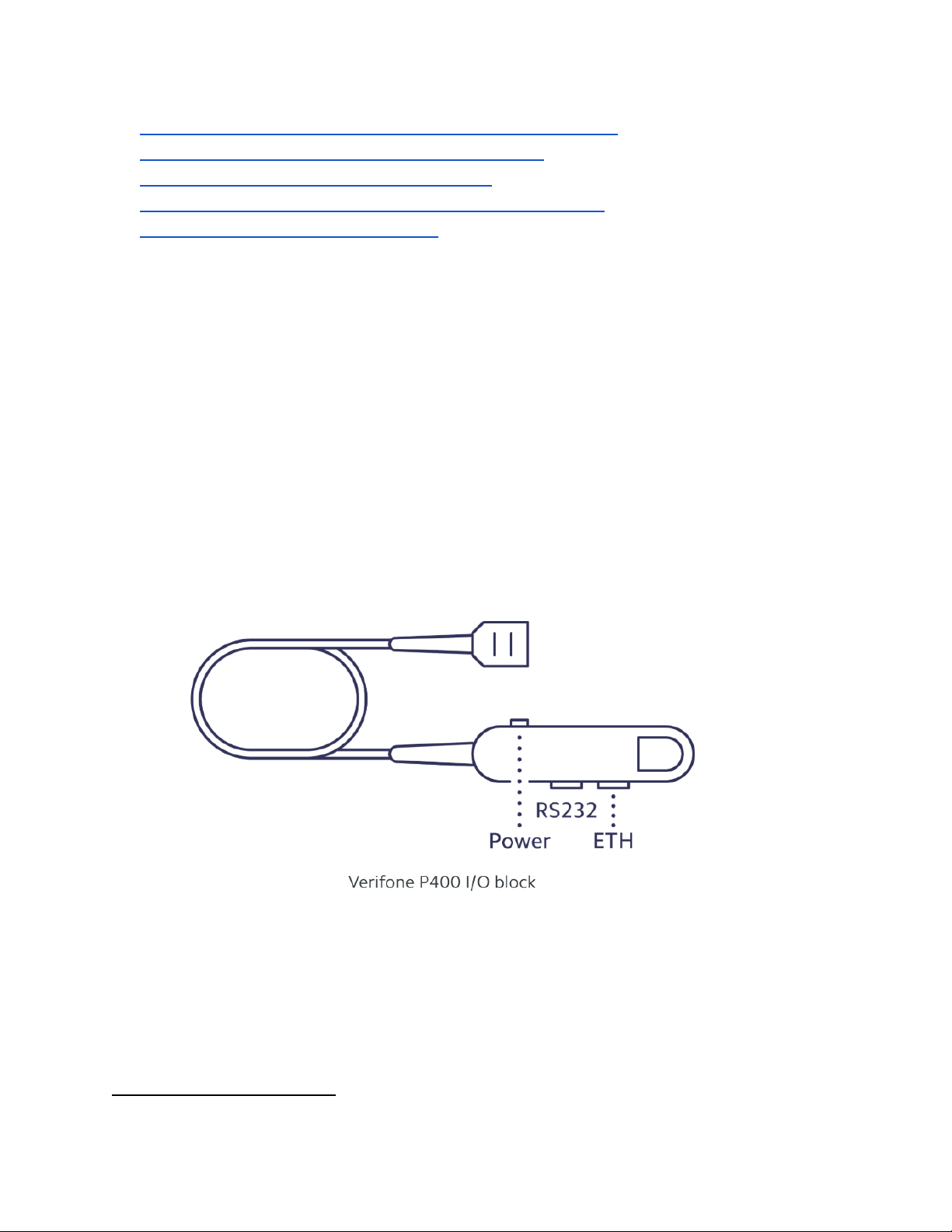
On receipt of the Stripe Terminal hardware, it must first be provided power. To turn the reader on, plug its
proprietary I/O cable securely into the port on the bottom of the Verifone P400. (The cover slides back over
the port to hold the I/O cable in place.) Plug the power adapter into the I/O block, and into an electrical
outlet.
The Stripe Terminal application is required to be IP connected for proper functionality. The Verifone P400
manages data connectivity through a LAN. Connect an Ethernet cable from your router to the Verifone
P400, using the ETH port (not the RS232 port).
Once your Stripe Terminal hardware is powered and IP connected, connect to the device using your
Javascript SDK integrated application and begin taking payments.
2
https://stripe.com/docs/terminal/readers/verifonep400
2

1/7/2019 [ext]StripeImplGuidev0.9 - Google Docs
https://docs.google.com/document/d/1VN2TZqs1QUMOLa4cThszHLAQcCyzGFmenpIJKuKMstY/edit# 3/9
Application versioning
the internal and published Stripe Terminal application version format is 3.0.x.y
3 - Major version - indicates a major change to application with corresponding security implications
0 - Minor version - Indicates minor change to application with corresponding security implications
x - Feature - Indicates minor feature update with no security implications
y - Patch - Indicates bug fixes or minor tweaks with no security implications
Secure application updates
The Stripe Terminal application independently manages the secure downloading and application of
updates.
The terminal application is notified by the Stripe fleet management service when a new application is
available for update. The terminal application will download the new binary over HTTPS using TLS1.2. The
terminal application utilizes the PCI PTS approved hardware for validation of authenticity of the signed
software bundle and proceeds with the install.
Current and past release notes can be accessed from the P400 user guide
3
Secure data handling
The Stripe Terminal application encrypts all authentication and cardholder data immediately upon customer
entry using RSA 2048-bit encryption. The plaintext data is discarded, and the encrypted payload is sent to
Stripe for payment processing. The resulting metadata passed to the Point-of-Sale is the required
non-sensitive receipt fields along with the masked PAN.
No secure data is stored by the payment application. All encrypted and unencrypted data is deleted
immediately after authorization. The key material contained in the Stripe Terminal application for secure
authentication and cardholder data is isolated to a single RSA public key that is kept and stored in plain
text on disk.
Secure transfer protocols
The Stripe Terminal application communicates with a local Point-of-Sale using Remote Procedure Calls
(RPC) sent over HTTPS / TLS1.2. An SDK is available for robust and easy integration with the Stripe
4
Payment application. The SDK wraps the encrypted RPC calls with an easy to use Javascript interface.
Payment authorisation messages are sent to Stripe servers over a secure HTTPS / TLS1.2 channel.
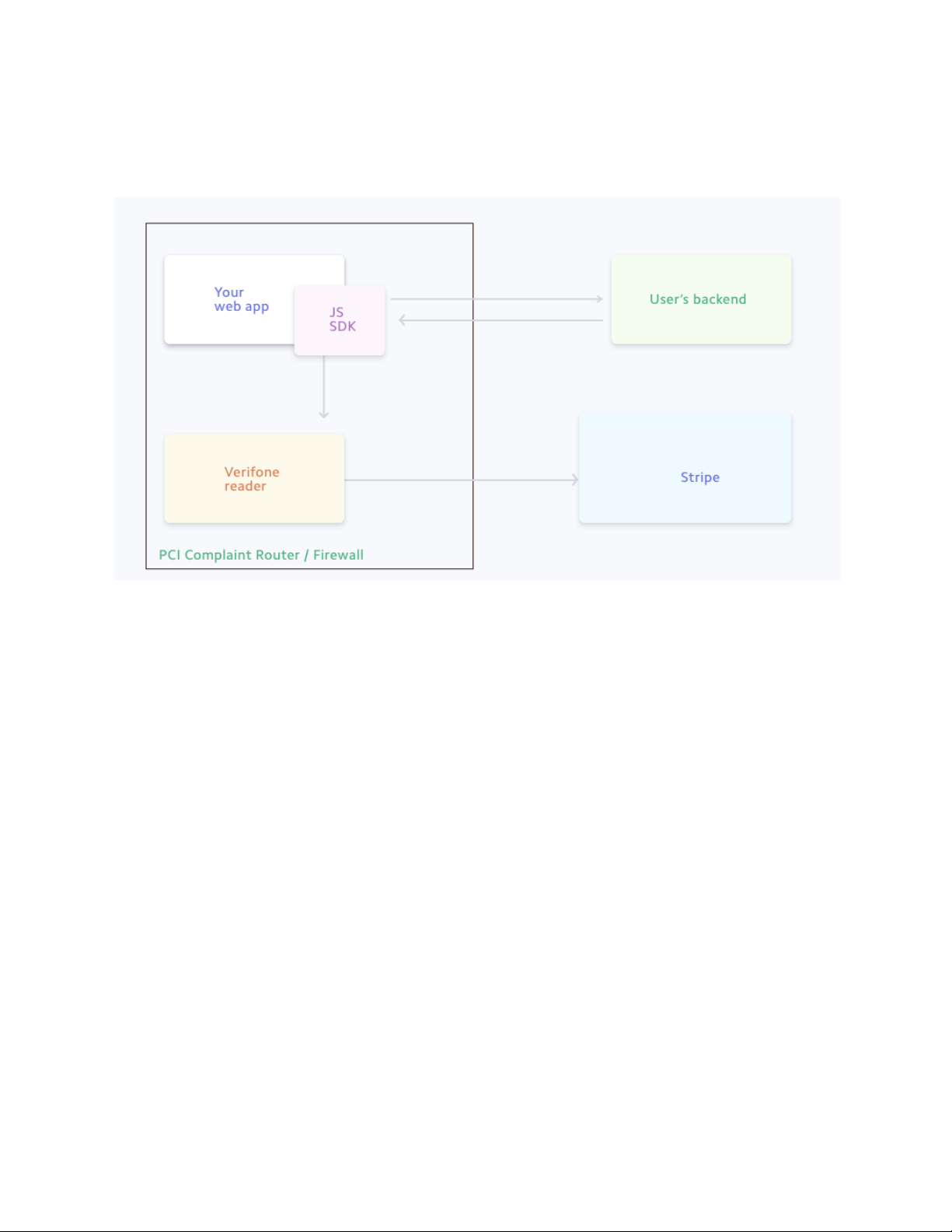
Network Segmentation
The PCI DSS requires that firewall services be used (with NAT or PAT) to segment network segments into
logical security domains based on the environmental needs for internet access. Traditionally, this
corresponds to the creation of a trusted network segment where only authorized, business-justified traffic
is allowed to connect to the trusted segment. No direct incoming internet traffic to the trusted application
3
https://stripe.com/docs/terminal/readers/verifonep400
4
https://stripe.com/docs/terminal/js
3
1/7/2019 [ext]StripeImplGuidev0.9 - Google Docs
https://docs.google.com/document/d/1VN2TZqs1QUMOLa4cThszHLAQcCyzGFmenpIJKuKMstY/edit# 4/9
environment can be allowed. Additionally, outbound internet access from the trusted segment must be
limited to required and justified ports and services.
Network Diagram
PA-DSS requirements
1.1.4 Delete Historical Sensitive Data
No current or historical version of the Stripe Terminal application has stored any sensitive payment data.
No action is required to remove any historical sensitive data.
Customer / vendor responsibility: None
1.1.5 Delete Sensitive Authentication Data used for Debugging
No sensitive authentication data can be retrieved for any debugging or troubleshooting use. Any sensitive
authentication data required for troubleshooting can only be done in a Stripe lab using test cards / data.
Customer / vendor responsibility: Customers and vendors should never capture sensitive data of any kind
for troubleshooting purposes. Stripe object IDs can be captured and reported along with a support ticket
for optimal issue resolution
2.1 Securely Delete Cardholder Data
No cardholder data is retained with-in the Stripe Terminal application for any reason.
Customer / vendor responsibility: Customers and vendors should never retrain sensitive data of any kind
for any reason.
2.2 Mask PAN When Displayed
The full PAN is never made available in any logs or to any personnel.
4

1/7/2019 [ext]StripeImplGuidev0.9 - Google Docs
https://docs.google.com/document/d/1VN2TZqs1QUMOLa4cThszHLAQcCyzGFmenpIJKuKMstY/edit# 5/9
The masked PAN is available to the merchant within the Stripe ecosystem. It can be accessed as an output
result in the return method of confirm payment API in the Terminal API
5
The masked PAN is also displayed on the transaction summary screen to give customer indication that their
card was charged. The full PAN is never displayed in the Stripe terminal application.
Customer / vendor responsibility: Customers and vendors should never retrain sensitive data of any kind
for any reason. The masked PAN returned in the instance of a successful authorisation can be displayed
for compliance and customer records. It should be retained only so long as to accomplish these goals.
2.3 Render PAN Unreadable Anywhere it is Stored
The PAN is never stored in the Stripe Terminal application.
Customer / vendor responsibility: Customers and vendors should never retrain sensitive data of any kind
for any reason. If for any reason cardholder data or secure authentication data is retained, it must never be
stored on any system that is public facing or accessible on the internet.
2.4 Protect Keys Used to Secure Cardholder Data
See Secure data handling
Customer / vendor responsibility: None
2.5 Implement Key Management Processes & Procedures
See Secure data handling
Customer / vendor responsibility: None
2.5.1 - 2.5.7 Implement Key Management Functions
See Secure data handling
Customer / vendor responsibility: None
2.6 Provide Mechanism to Wipe Key Material
See Secure data handling
Customer / vendor responsibility: None
5
https://stripe.com/docs/terminal/js
5

1/7/2019 [ext]StripeImplGuidev0.9 - Google Docs
https://docs.google.com/document/d/1VN2TZqs1QUMOLa4cThszHLAQcCyzGFmenpIJKuKMstY/edit# 6/9
3.1 - 3.2 Use Unique IDs & Secure Authentication
No administrative access is granted to the device on which the Stripe Terminal application runs.
Customer / vendor responsibility:
The PCI DSS requires that access to all systems in the payment processing environment
be protected through use of unique users and complex passwords. Unique user accounts
indicate that every account used is associated with an individual user and/or process with
no use of generic group accounts used by more than one user or process.
To maintain PCI DSS compliance the following 11 points must be followed per the PCI DSS:
1. You must not use or require the use of default administrative accounts for other
necessary or required software (for example, database default administrative
accounts) (PCI DSS 2.1 / PA-DSS 3.1.1)
2. You must assign unique IDs for all user accounts. (PCI DSS 8.1.1 / PA-DSS
3.1.3)
3. You must provide at least one of the following three methods to authenticate
users: (PCI DSS 8.2 / PA-DSS 3.1.4)
a. Something you know, such as a password or passphrase
b. Something you have, such as a token device or smart card
c. Something you are, such as a biometric
4. You must NOT require or use any group, shared, or generic accounts and
passwords (PCI DSS 8.5 / PA-DSS 3.1.5)
5. You must configure passwords must to be at least 7 characters and includes both
numeric and alphabetic characters (PCI DSS 8.2.3 / PA-DSS 3.1.6)
6. You must configure passwords to be changed at least every 90 days (PCI DSS
8.2.4 / PA-DSS 3.1.7)
7. You must configure passwords so that password history is kept and requires that a
new password is different than any of the last four passwords used (PCI DSS
8.2.5 / PA-DSS 3.1.8)
8. The payment application limits repeated access attempts by locking out the user
account after not more than six logon attempts (PCI DSS 8.1.6 / PA-DSS 3.1.9)
9. The payment application sets the lockout duration to a minimum of 30 minutes or
until an administrator enables the user ID. (PCI DSS 8.1.7 / PA-DSS 3.1.10)
10. The payment application requires the user to re-authenticate to re-activate the
session if the application session has been idle for more than 15 minutes. (PCI
DSS 8.1.8 / PA-DSS 3.1.11)
11. You must assign strong passwords to any default accounts (even if they won’t be used),
6

1/7/2019 [ext]StripeImplGuidev0.9 - Google Docs
https://docs.google.com/document/d/1VN2TZqs1QUMOLa4cThszHLAQcCyzGFmenpIJKuKMstY/edit# 7/9
and then disable or do not use the accounts.
4.1, 4.4 Implement Automated Audit Trails / Centralized Logging
Verifone system logs and hardware auditing can be found on the verifone device using the steps found in
the Verifone hardware user guide.
Stripe logs for each transaction are available through the Stripe dashboard accessed through your Stripe
account.
Customer / vendor responsibility: Your payment terminal’s events and logs are available are available for
6
auditing and troubleshooting in your Stripe dashboard. If you suspect payment application errors, check
your terminal integration and refer your Stripe dashboard for support. If you suspect your hardware has
been tampered with, contact Stripe or your hardware provider as soon as possible.
The Stripe Terminal application log functionality is not configurable by the customer. The customer must
not attempt to disable logging functionality in any way. Any attempt to disable or disrupt application
logging will result in non-compliance.
5.4.4 Implement and Communicate Application Versioning Methodology
See Application versioning for information on the Stripe Terminal application versioning methodology.
Customer / vendor responsibility: Visit the release notes page to stay up to date on the latest Stripe
7
Terminal application updates
6.1 - 6.3 Securely Implement Wireless Technology
The Stripe Terminal application sends all requests over a secure channel ( Secure transfer protocols )
Customer / vendor responsibility: Should the merchant implement wireless access within the cardholder
data environment, the following guidelines for secure wireless settings must be followed per PCI Data
Security Standard 1.2.3, 2.1.1 and 4.1.1:
2.1.1: Change wireless vendor defaults per the following 5 points:
1. Encryption keys must be changed from default at installation, and must be
changed anytime anyone with knowledge of the keys leaves the company or
changes positions
2. Default SNMP community strings on wireless devices must be changed
3. Default passwords/passphrases on access points must be changed
4. Firmware on wireless devices must be updated to support strong encryption for
6
https://dashboard.stripe.com
7
https://stripe.com/docs/terminal/readers/p400releases
7

1/7/2019 [ext]StripeImplGuidev0.9 - Google Docs
https://docs.google.com/document/d/1VN2TZqs1QUMOLa4cThszHLAQcCyzGFmenpIJKuKMstY/edit# 8/9
authentication and transmission over wireless networks
5. Other security-related wireless vendor defaults, if applicable, must be changed
1.2.3: Perimeter firewalls must be installed between any wireless networks and systems
that store cardholder data, and these firewalls must deny or control (if such traffic is
necessary for business purposes) any traffic from the wireless environment into the
cardholder data environment.
4.1.1: Industry best practices (for example, IEEE 802.11.i) must be used to implement
strong encryption for authentication and transmission of cardholder data.
Note: The use of WEP as a security control was prohibited as of June 30, 2010.
7.2.3 Provide Instructions on Secure Installation of Patches and Updates
See Secure application updates for information on how Stripe manages secure updating of the Stripe
Terminal application.
Customer / vendor responsibility: Customers are unable to impact the secure downloading and updating of
the device. Follow the provided links to stay up to date on your device.
8.2 Use of secure protocols
The Stripe Terminal application only communicates with external endpoints using HTTPS over TLS1.2. No
insecure protocols are used.
Customer / vendor responsibility: None
9.1 Store cardholder data on servers not IP connected
Cardholder data is never stored in the Stripe Terminal payment application
Customer / vendor responsibility: Customers and vendors should never retrain sensitive data of any kind
for any reason. The masked PAN returned in the instance of a successful authorisation can be displayed
for compliance.
10.1 Implement multi--factor authentication for remote access
Remote access is not permitted by the payment application or the the PCI-PTS approved hardware on
which it runs
Customer / vendor responsibility: The Stripe payment application does not allow remote access to the
application. If the remote access is allowed in any of the customer services, multi-factor authentication
should be used.
8

1/7/2019 [ext]StripeImplGuidev0.9 - Google Docs
https://docs.google.com/document/d/1VN2TZqs1QUMOLa4cThszHLAQcCyzGFmenpIJKuKMstY/edit# 9/9
10.2.1 Securely deliver remote payment application updates
See Secure application updates for information on remote updates
Customer / vendor responsibility: None
10.2.3 Securely implement remote-access software
See Secure application updates for information on remote updates
Customer / vendor responsibility: None
11.1 Secure transmission of cardholder data
See Secure transfer protocols
Customer / vendor responsibility: None
11.2 Encrypt cardholder data over messaging technologies
The Stripe Terminal application does not send any data over any end user messaging technology
Customer / vendor responsibility: None
12 Non console administrative access
The Stripe terminal application does not support any external console administrative access
Customer / vendor responsibility: The Stripe Terminal application does not support non-console
administration and we do not recommend using non-console administrative access. If the customer does
support non console administrative access, it must use SSH, VPN, or TLS 1.2 or higher for encryption of this
non-console
administrative access, and employ multi-factor authentication for use.
9