USER
MANUAL
EN User Manual
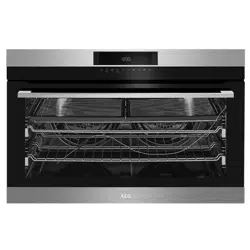
Oven
BPK722910M

www.aegaustralia.com.au
|
www.aegnewzealand.co.nz
2
CONTENTS
1. SAFETY INFORMATION .......................................................... 3
2. CONDITIONS OF USE ............................................................ 4
3. SAFETY INSTRUCTIONS ....................................................... 4
4. PRODUCT DESCRIPTION ....................................................... 8
5. CONTROL PANEL .................................................................. 10
6. BEFORE FIRST USE .............................................................. 12
7. DAILY USE .............................................................................. 12
8. CLOCK FUNCTIONS .............................................................. 15
9. ROAST MODES ...................................................................... 16
10. USING THE ACCESSORIES .................................................. 17
11. ADDITIONAL FUNCTIONS ..................................................... 21
12. HINTS AND TIPS .................................................................... 22
13. CARE AND CLEANING........................................................... 35
14. TROUBLESHOOTING ............................................................ 39
15. INSTALLATION ....................................................................... 40
16. ENERGY SAVINGS ................................................................ 45
17. WARRANTY ............................................................................ 46
FOR PERFECT RESULTS
Thank you for choosing this AEG product. We have created it to give you impeccable
performance for many years, with innovative technologies that help make life simpler
features you might not nd on ordinary appliances. Please spend a few minutes reading
to get the very best from it. Visit our website for:
Get usage advice, brochures, trouble shooter, service information:
www.aegaustralia.com.au/support/
|
www.aegnewzealand.co.nz/support/
Register your product for better service:
www.aegaustralia.com.au/support/product-registration/
www.aegnewzealand.co.nz/support/product-registration/
Buy accessories, consumables and original spare parts for your appliance
www.aegaustralia.com.au | www.aegnewzealand.co.nz
CUSTOMER CARE AND SERVICE
Always use original spare parts.
When contacting our Authorised Service Centre, ensure that you have the following data
available: Model, PNC, Serial Number. The information can be found on the rating plate.

English
3
1. SAFETY INFORMATION
The symbols you will see in this booklet have these meanings
Warning / Caution-Safety information
General information and tips
Environmental information
Subject to change without notice.
Before the installation and use of the appliance, carefully read the supplied instructions.
The manufacturer is not responsible for any injuries or damages that are the result of
incorrect installation or usage. Always keep the instructions in a safe and accessible
location for future reference.
IMPORTANT INFORMATION
Important – check for any damages or marks.
• If you nd the oven is damaged or marked, you must report it within 7 days if you
wish to claim for damage/marks under the manufacturer’s warranty. This does not
affect your statutory rights.
• Discolouration of the enamel has no effect on the performance of the appliance.
ENVIRONMENT
Information on disposal for users
• Most of the packing materials are recyclable. Please dispose of those materials
through your local recycling depot or by placing them in appropriate collection
containers.
• If you wish to discard this product, please contact your local authorities and ask for the
correct method of disposal.
1.1 Children and vulnerable people safety
• This appliance is not intended for use by persons (including children) with reduced
physical, sensory or mental capabilities, or lack of experience and knowledge, unless
they have been given supervision or instruction concerning use of the appliance by a
person responsible for their safety.
• Do not let children play with the appliance.
• Keep all packaging away from children and dispose of it appropriately.
• Keep children and pets away from the appliance when it operates or when it cools
down. Accessible parts are hot.
• If the appliance has a child safety device, this should be activated.
• Children shall not carry out cleaning and user maintenance of the appliance without
supervision.
• Children aged 3 years and under must be kept away from this appliance when it is in
operation at all times.
1.2 General Safety
• Only a qualied person must install this appliance and carry out servicing.
(Certicate of Compliance to be retained).

www.aegaustralia.com.au
|
www.aegnewzealand.co.nz
4
2. CONDITIONS OF USE
This appliance is intended to be used inhousehold and similar applications such as:
• Farm houses
• By clients in serviced apartments, holiday apartments and other residential type
environments.
• Staff kitchen areas in shops, ofces and other working environments, Bed and
breakfast type environments
3. SAFETY INSTRUCTIONS
3.1 Installation
WARNING! Only a qualied person must install this appliance and carry
out servicing. (Certicate of Compliance to be retained)
• Remove all the packaging
• Do not install or use a damaged appliance.
• Follow the installation instruction supplied with the appliance.
• Always take care when moving the appliance as it is heavy. Always use safety
gloves and enclosed footwear.
CAUTION! Avoid sharp edges during handling.
• Do not pull the appliance by the handle.
• Keep the minimum distance from the other appliances and units.
• Make sure that the appliance is installed below and adjacent safe structures.
• Where the appliance is built into a cabinet, the cabinet material must be capable
of withstanding 70°C. If adjacent to vinyl-wrapped surfaces, use installation kit
from vinyl wrap supplier.
• The sides of the appliance must stay adjacent to appliances or to units with the
same height.
• The appliance is equipped with an electric cooling system. It must be operated
with the electric power supply.
WARNING! The appliance and its accessible parts become hot during use.
Care should be taken to avoid touching heating elements.
Children shall be kept away unless continuously supervised.
• Always use oven gloves to remove or put in accessories or ovenware.
• Before carrying out any maintenance, disconnect the appliance from the power supply.
• Ensure that the appliance is switched off before replacing the lamp to avoid the
possibility of electric shock.
• Do not use a steam cleaner to clean the appliance.
• Do not use harsh abrasive cleaners or sharp metal scrapers to clean the glass
door since they can scratch the surface, which may result in shattering of the glass.
• Excessive spillage must be removed before the pyrolytic cleaning. Remove all
parts from the oven.
• To remove the shelf supports rst pull the front of the shelf support and then the
rear end away from the side walls. Install the shelf supports in the opposite sequence.
• The means for disconnection must be incorporated in the xed wiring in accordance
with the wiring rules.
• Use only the food sensor (core temperature sensor) recommended for this appliance.

English
5
3.2 Electrical connection
WARNING! Risk of re and
electrical shock.
• All electrical connections should be
made by a qualied electrician.
• The appliance must be earthed.
• Make sure that the parameters on the
rating plate are compatible with the
electrical ratings of the mains power
supply.
• Use only correct isolation devices: line
protecting cut-outs, fuses (screw type
fuses removed from the holder), earth
leakage trips and contactors.
• The electrical installation must have
an isolation device which lets you
disconnect the appliance from the
mains.
The isolation device must have a
contact opening width of minimum
3 mm.
• A means for disconnection must
be incorporated in xed wiring in
accordance with the wiring rules.
• Switch the appliance off before
removing the oven light glass for
globe replacement
3.3 Use
WARNING! Risk of injury, burns
and electrical shock or explosion.
• Do not change the specication of this
appliance.
• Make sure that the ventilation openings
are not blocked.
• Do not let the grill operation stay
unattended during operation.
• Deactivate the appliance after each use.
• Be careful when you open the appliance
door while the appliance is in operation.
Hot air can release.
• Do not operate the appliance with wet
hands or when it has contact with water.
• Do not apply pressure on the open door.
• Do not use the appliance as a work
surface or as a storage surface.
• Open the appliance door carefully.
The use of ingredients with alcohol can
cause a mixture of alcohol and air.
• Do not let sparks or open ames to
come in contact with the appliance
when you open the door.
• Do not put ammable products or items
that are wet with ammable products
in, near or on the appliance.
CAUTION! Risk of damage to
the appliance.
• To prevent damage or discoloration to
the enamel:
– do not put ovenware or other
objects in the appliance directly on
the base of the oven.
– do not put aluminium foil directly
on the bottom of cavity of the
appliance.
– do not put water directly into the hot
appliance.
– do not keep moist dishes and food
in the appliance after you nish the
cooking.
– be careful when you remove or
install the accessories.
• Discoloration of the enamel or stainless
steel has no effect on the performance
of the appliance.
• Use a deep pan for moist cakes.
Fruit juices cause stains that can be
permanent.
• This appliance is for cooking purposes
only. It must not be used for other
purposes, for example room heating.
• Always cook with the oven door closed.

www.aegaustralia.com.au
|
www.aegnewzealand.co.nz
6
3.4 Care and cleaning
WARNING! Risk of injury, re, or
damage to the appliance.
• Before maintenance, deactivate the
appliance and disconnect the mains
• Make sure the appliance is cold. There is
the risk that the glass panels can break.
• Care must be taken when wiping
exposed stainless steel edges. They can
be sharp!
• Replace immediately the door glass
panels when they are damaged. Contact
the Authorised Service Centre.
• The door glass on this appliance is
made from a tough, durable material that
withstands heating and cooling without
breaking. As a precaution however, do
not put cold water on hot glass.
• Clean regularly the appliance to prevent
the deterioration of the surface material.
• Ensure fats and oils do not accumulate
around elements, burners or fans.
• Clean the appliance with a moist soft
cloth. Only use neutral detergents.
• Do not use any abrasive products,
abrasive cleaning pads, solvents or metal
objects.
• If you use an oven spray, follow the
safety instruction on it’s packaging.
• Always clean the appliance immediately
after any food spills.
3.5 Pyrolytic cleaning
WARNING! Risk of Injury / Fires
/ Chemical Emissions (Fumes) in
Pyrolytic Mode.
• Before carrying out a Pyrolitic
selfcleaning function or the First Use
please remove from the oven cavity:
– any excess food residues, oil or
grease spills / deposits.
– any removable objects (including
shelves, side rails, food sensor,
etc., provided with the product)
particularly any non-stick pots,
pans, trays, utensils etc.
• Read carefully all the instructions for
Pyrolytic cleaning.
• Keep children away from the appliance
while the Pyrolytic cleaning is in
operation.
The appliance becomes very hot and
hot air is released from the front cooling
vents.
• Pyrolytic cleaning is a high temperature
operation that can release fumes from
cooking residues and construction
materials, as such consumers are
strongly advised to:
– provide good ventilation during and
after each Pyrolytic cleaning.
– provide good ventilation during
and after the rst use at maximum
temperature operation.
• Unlike all humans, some birds and
reptiles can be extremely sensitive
to potential fumes emitted during the
cleaning process of all Pyrolytic Ovens.
– Remove any pets (especially birds)
from the vicinity of the appliance
location during and after the
Pyrolytic cleaning and rst use
maximum temperature operation to
a well ventilated area.
• Small pets can also be highly sensitive
to the localized temperature changes in
the vicinity of all Pyrolytic Ovens when
the Pyrolytic self cleaning program is in
operation.
• Non-stick surfaces on pots, pans, trays,
utensils etc., can be damaged by the
high temperature Pyrolytic cleaning
operation of all Pyrolytic Ovens and can
be also a source for low level harmful
fumes.
• Fumes released from all Pyrolytic
Ovens / Cooking Residues as
described are not harmful to humans,
including infants.

English
7
3.6 Internal light
• The type of light bulb or halogen lamp
used for this appliance is only for
household appliances Do not use it
for house lighting.
WARNING! Risk of
electrical shock.
• Before replacing the lamp, disconnect
the appliance from the power supply.
• Only use lamps with the same
specications.
3.7 Disposal
WARNING! Risk of injury or
suffocation.
• Disconnect the appliance from the
mains supply.
3.8 Service
• To repair the appliance contact an
Authorised Service Centre.
• Use original spare parts only.
• To maintain safe operation, it is
recommended that the product
be inspected every 5 years by an
authorised service person.
www.aegaustralia.com.au
|
www.aegnewzealand.co.nz
8
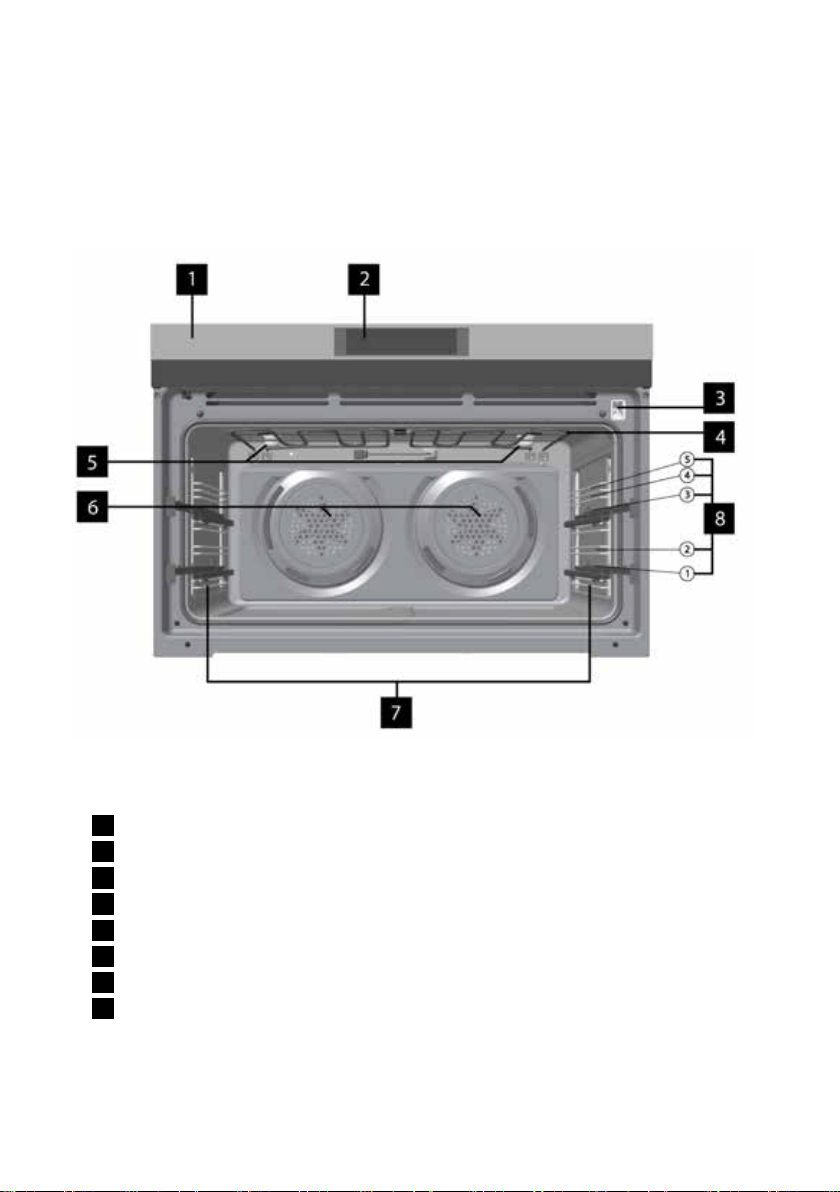
4. PRODUCT DESCRIPTION
4.1 General overview
1
Control panel
2
Electronic programmer
3
Socket for the food temperature sensor
4
Heating element
5
Lamp
6
Fans and heating elements
7
Shelf support, removable
8
Shelf positions
English
9
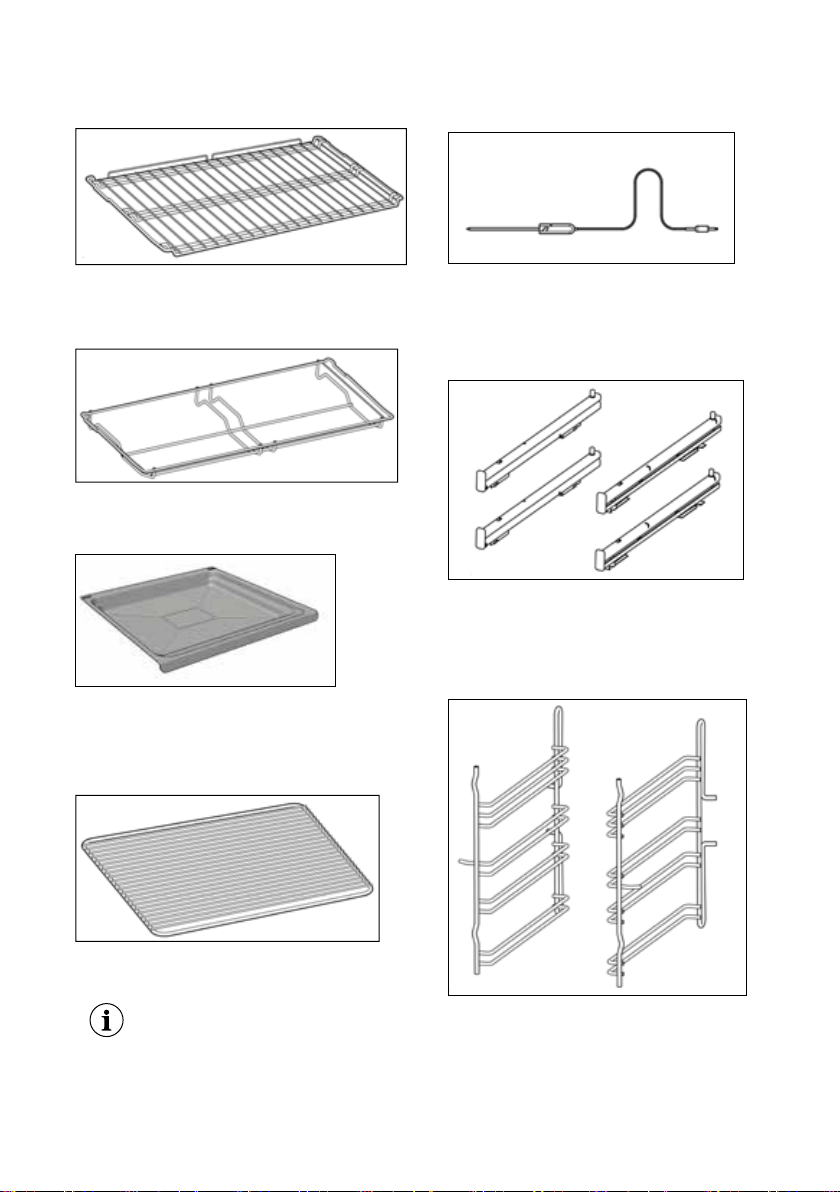
4.2 Accessories
Wire shelf
For cookware, cake tins, roasts.
Grill shelf
Grill- / Roasting pan
To bake and roast or as a pan to
collect fat.
Grill insert
For roasting and grilling.
Use the grill insert only with the
Grill- / Roasting pan.
Food Sensor
To measure the temperature inside
the food.
Telescopic runners
For shelves and trays.
Shelf support / Side racks
Left
2 x Left 2 x Right
Right
www.aegaustralia.com.au
|
www.aegnewzealand.co.nz
10
5. CONTROL PANEL
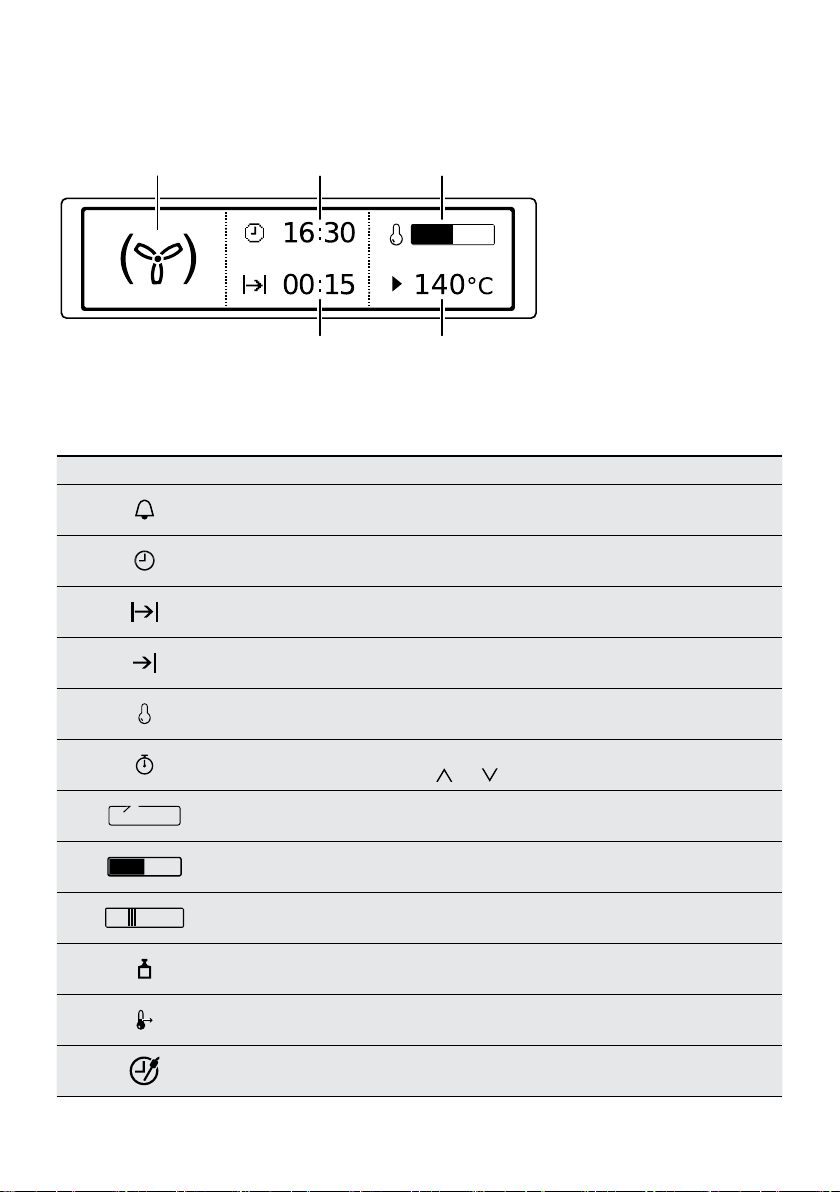
5.1 Electronic programmer
Sensor eld Function Comment
1
- Display Shows the current settings of the appliance.
2
ON / OFF To turn on and off the appliance.
3
Heating Functions
Press the sensor eld to choose the menu: Heating Functions.
To turn on or turn off the light, press the eld for 3 seconds.
You can turn on the light also when the appliance is turned off.
4
Favourites To save and access your favourite programmes.
5
Temperature selection
To set the temperature or show the current temperature in the
appliance. Press the eld for 3 seconds to turn on or turn off
the function: Fast heat up.
6
Down key To move down in the menu or to adjust settings.
7
Up key To move up in the menu or to adjust settings.
8
OK To conrm the selection or setting.
9
Back key
To go back one level in the menu. To show the
main menu, press the eld for 3 seconds.
10
Time and additional
functions
To set different functions. When a heating function operates, press
the sensor eld to set the timer or the functions: Function Lock,
Favourites, Heat + Hold, Set + Go. You can also change the settings
of the food sensor.
11
Minute Minder To set the function: Minute Minder.
5. CONTROL PANEL
5.1 Electronic programmer
21 3 4 5 8 9 10 1176
Use the sensor fields to operate the appliance.
Sensor
field
Function Comment
1
- Display Shows the current settings of the appliance.
2
ON / OFF To turn on and off the appliance.
3
Heating Functions
or Assisted Cook-
ing
Press the sensor field to choose the menu: Assis-
ted Cooking or Heating Functions. To turn on or
turn off the light, press the field for 3 seconds. You
can turn on the light also when the appliance is
turned off.
4
Favourites To save and access your favourite programmes.
5
Temperature se-
lection
To set the temperature or show the current tem-
perature in the appliance. Press the field for 3 sec-
onds to turn on or turn off the function: Fast heat
up.
6
Down key To move down in the menu.
7
Up key To move up in the menu.
8
OK To confirm the selection or setting.
9
Back key To go back one level in the menu. To show the
main menu, press the field for 3 seconds.
ENGLISH 9
Use the sensor elds to operate the appliance.
English
11
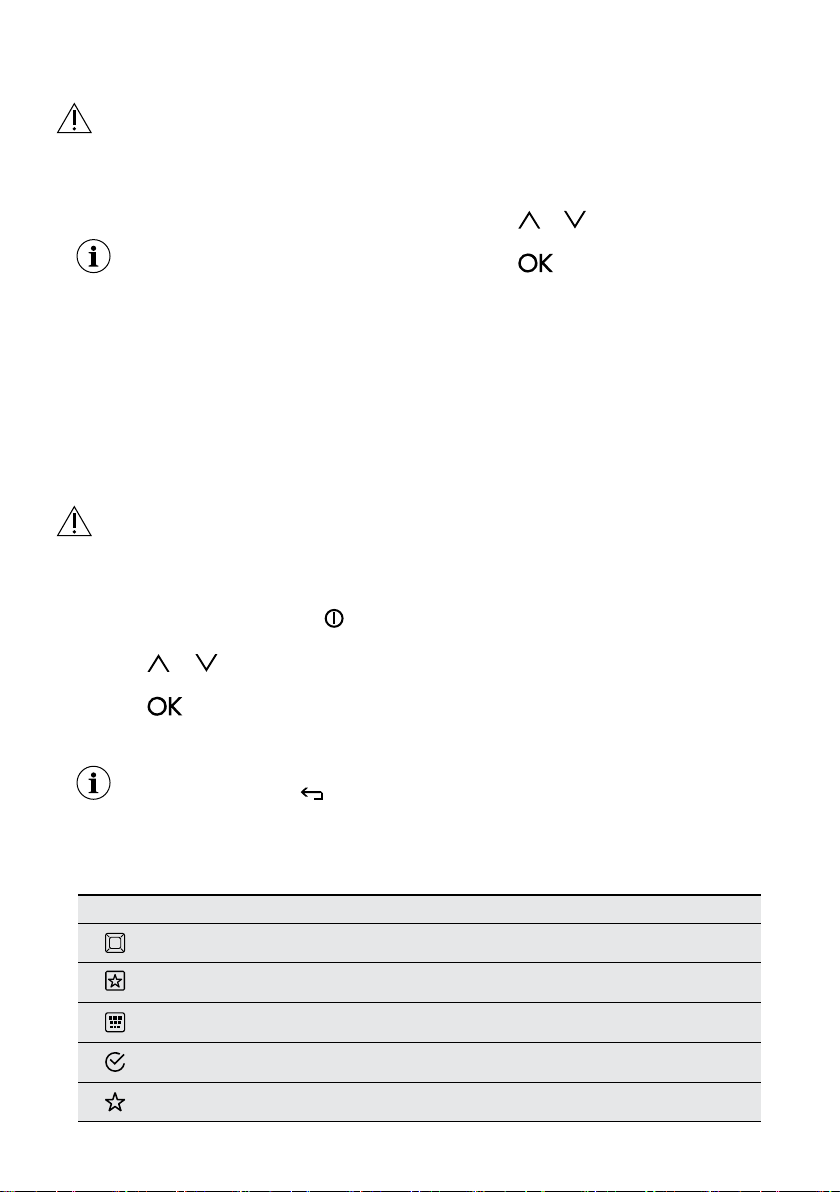
5.2 Display
Icon Function
Minute Minder The function operates.
Time of day The display shows the current time.
Duration The display shows the necessary time for cooking.
End Time The display shows when the cooking time is complete.
Temperature The display shows the temperature.
Time Indication
The display shows how long the heating function operates.
Press
and at the same time to reset the time.
Calculation The appliance is calculating the time for cooking.
Heat-up Indicator The display shows the temperature in the appliance.
Fast Heat Up Indicator The function is active. It decreases the heat up time.
Weight Automatic
The display shows that the automatic weight system is active
or that weight can be changed.
Heat + Hold The function is active.
Food Sensor The food sensor function is active
Sensor
field
Function Comment
10
Time and addi-
tional functions
To set different functions. When a heating func-
tion operates, press the sensor field to set the tim-
er or the functions: Function Lock, Favourites,
Heat + Hold, Set + Go. You can also change the
settings of the core temperature sensor.
11
Minute Minder To set the function: Minute Minder.
5.2 Display
A
DE
B C
A. Heating function
B. Time of day
C. Heat-up indicator
D. Temperature
E. Duration time or end time of a
function
Other indicators of the display:
Symbol Function
Minute Minder The function operates.
Time of day The display shows the current time.
Duration The display shows the necessary time
for cooking.
End Time The display shows when the cooking
time is complete.
Temperature The display shows the temperature.
Time Indication The display shows how long the heat-
ing function operates. Press
and
at the same time to reset the time.
Calculation The appliance calculates the time for
cooking.
Heat-up Indicator The display shows the temperature in
the appliance.
Fast Heat Up Indicator The function is active. It decreases the
heat up time.
www.aeg.com10
Other indicators of the display:
A. Heating function
B. Time of day
C. Heat-up indicator
D. Temperature
E. Duration time or end
time of a function
www.aegaustralia.com.au
|
www.aegnewzealand.co.nz
12
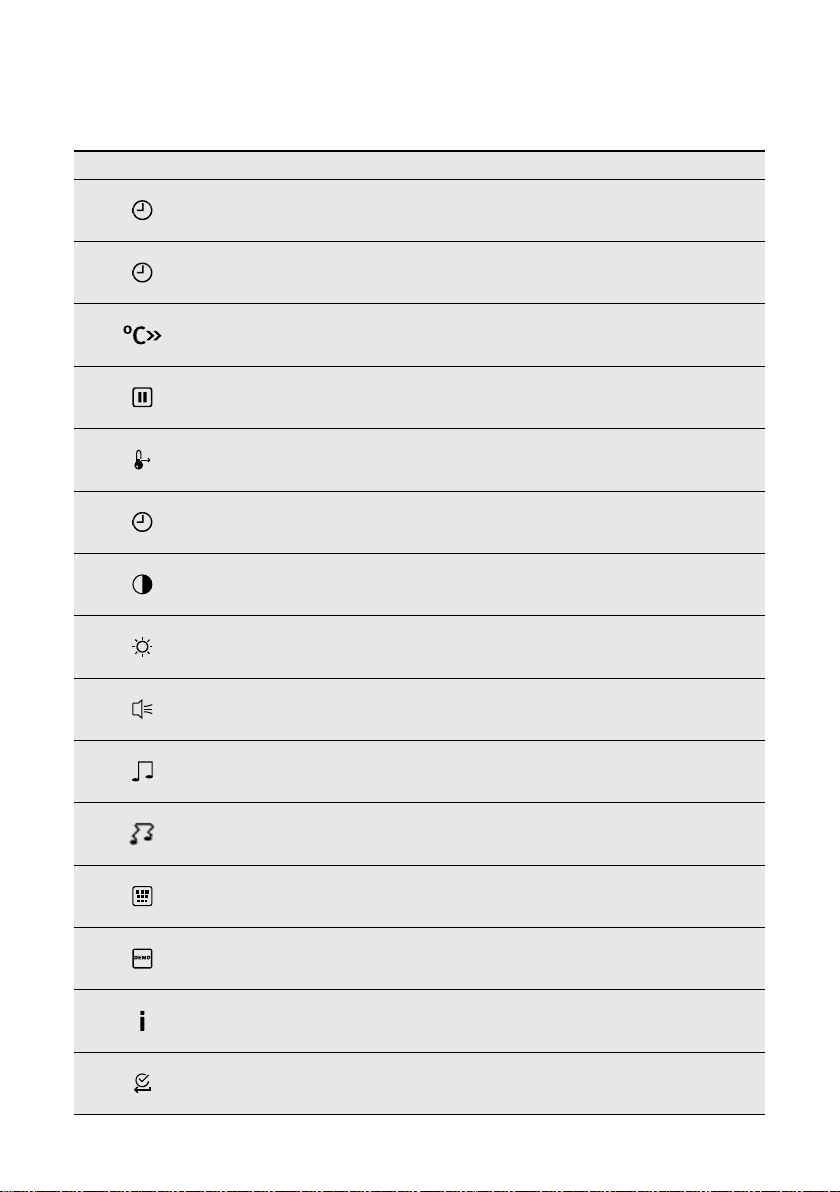
Symbol Menu item Application
Heating Functions Contains a list of heating functions.
Favourites Contains a list of favourite cooking programmes created by the user.
Pyrolysis Pyrolytic cleaning.
Basic Settings Used to set the appliance conguration.
Specials Contains a list of additional heating functions.
6. BEFORE FIRST USE
WARNING! Refer to Safety chapters.
6.1 Initial Cleaning
Remove all accessories and removable
shelf supports from the appliance.
Refer to “Care and cleaning” chapter.
Clean the appliance and the accessories
before rst use. Put the accessories and
the removable shelf supports back to
their initial position.
6.2 First Connection
When you connect the appliance to the
mains or after the power cut, the display
contrast, the display brightness and the
time of the day need to be set.
1. Press
or to set the value.
2. Press
to conrm.
7. DAILY USE
WARNING! Refer to Safety chapters.
7.1 Navigating the menus
1. Activate the appliance using
2. Press
or to select the menu option.
3. Press
to move to the submenu
or accept the setting
At each point you can go back
to the main menu with
7.2 The menus in overview
Main menu
English
13
Sensor eld Submenu Description
Set Time of Day Sets the current time on the clock.
Time Indication
When ON, the display shows the current time when you
deactivate the appliance.
Fast heat up When ON, the function decreases the heat-up time.
Set + Go
To set a function and activate it later with a press of any symbol
on the control panel.
Heat + Hold
Keeps the prepared food warm for 30 minutes after a cooking
cycle nished.
Time Extension Activates and deactivates the time extension function.
Display Contrast Adjusts the display contrast
Display Brightness Adjusts the display brightness
Buzzer Volume Adjusts the volume of press-tones and signals by degrees.
Key Tones
Activates and deactivates the tone of the touch elds. It is not
possible to deactivate the tone of the ON / OFF touch eld.
Alarm/Error Tones Activates and deactivates the alarm tones.
Cleaning Reminder Reminds you when to clean the appliance.
DEMO mode Activation / deactivation code: 2468
Service Shows the software version and conguration.
Factory Settings Resets all settings to factory settings.
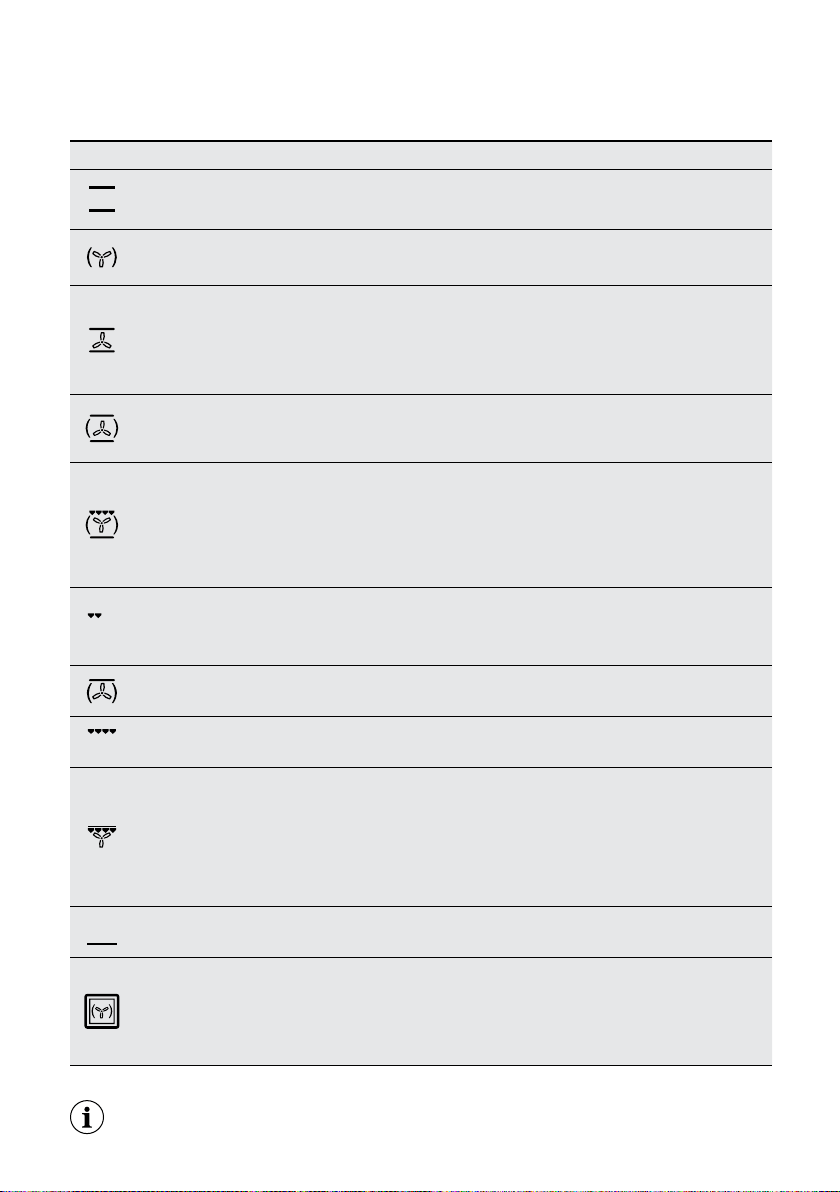
7.2 The menus in overview
Submenu for: Basic Settings
www.aegaustralia.com.au
|
www.aegnewzealand.co.nz
14
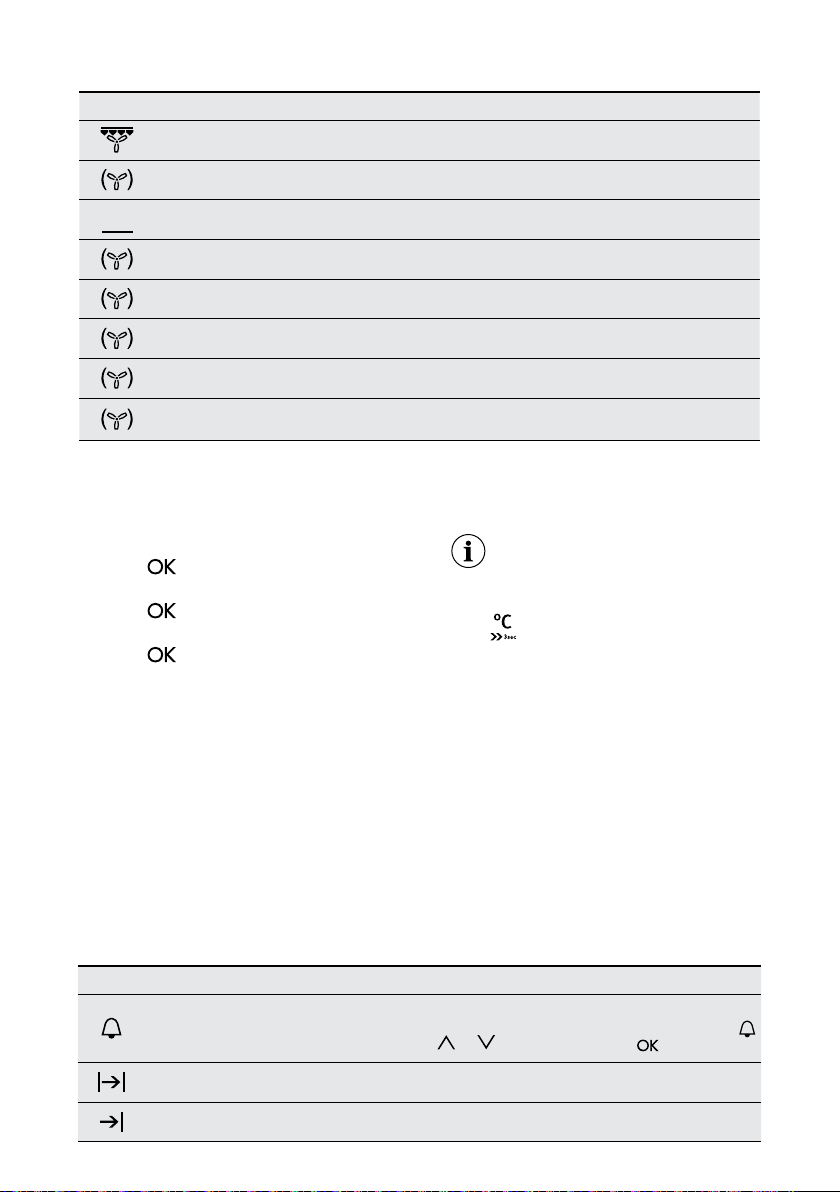
Heating Function Application
Conventional
Cooking (Top /
Bottom Heat)
To bake and roast food on one shelf position.
True Fan Cooking
To bake on up to three shelf positions at the same time and to dry food. Set the
temperature 10 - 20°C lower than for the function: Conventional Cooking.
Fan Assist Cooking
Heat comes from two elements, one above and one below the food. The fan
circulates the hot air around the oven cavity so that you can put the food in different
places in the oven and still cook them at the same time. You should only use a
maximum of two shelves with ‘Fan Assist Bake’. Do not use the bottom shelf. If
the two shelves are used, food on the shelf in the higher position will cook rst and
should then be removed to allow the food on the lower shelf to nish cooking.
Pizza Setting
To bake food on one shelf position for a more intensive browning and a crispy
bottom. Set the temperature 20 - 40 °C lower than for the function: Conventional
Cooking.
Roast
The Roast function is designed for roasting meats and poultry by utilising heat
from all elements in combination with the fan to surround the food. This provides
even cooking throughout and enhanced browning. This function starts at a higher
temperature to seal the meat. The oven will then automatically reduce to the selected
temperature to cook the meat for as long as desired. For example, if you use the
default 200°C the “Roast” cycle will start at 220°C and then lower to 200°C.
Left Grilling
The ‘Left Grill’ directs radiant heat from only one of the powerful upper elements onto
the food. The ‘Left Grill’ function is used instead of ‘Full Grill’ when only half the amount
of grill area is needed. Grill with the oven door closed.
Frozen Foods To make convenience food like e.g. french fries, potato wedges or spring rolls crispy.
Full Grilling To grill at food and to toast bread.
Turbo Grilling
‘Turbo Grill’ offers you the benets of both fan assist bake and traditional grill
functions. The grill element turns on and off to maintain set temperature while the
fan circulates the heated oven air. Grill with the oven door closed.You can use ‘Turbo
Grill’ for large cuts of meat, which gives you a result similar to ‘rotisserie’ cooked
meat. Put your food on a shelf in the second lowest shelf position. Put the grill dish
on the lowest shelf position to catch any spills. When using ‘Turbo Grill’ it is not
necessary to turn the food over during the cooking cycle.
Bottom Heat To bake cakes with crispy bottom and to preserve food.
Moist Fan Baking
To bake breads, cakes and cookies. To save energy during cooking. This function
must be used in accordance with the Moist Fan Baking table in order to achieve the
desired cooking result. To get more information about the recommended settings,
refer to the Hints and Tips chapter, Moist Fan Baking table. This function was used
to dene the energy efciency class acc. to EN 60350-1.
7.3 Heating Functions
Submenu for: Basic Settings
The lamp may automatically deactivate at a
temperature below 60°C during some oven functions.
English
15
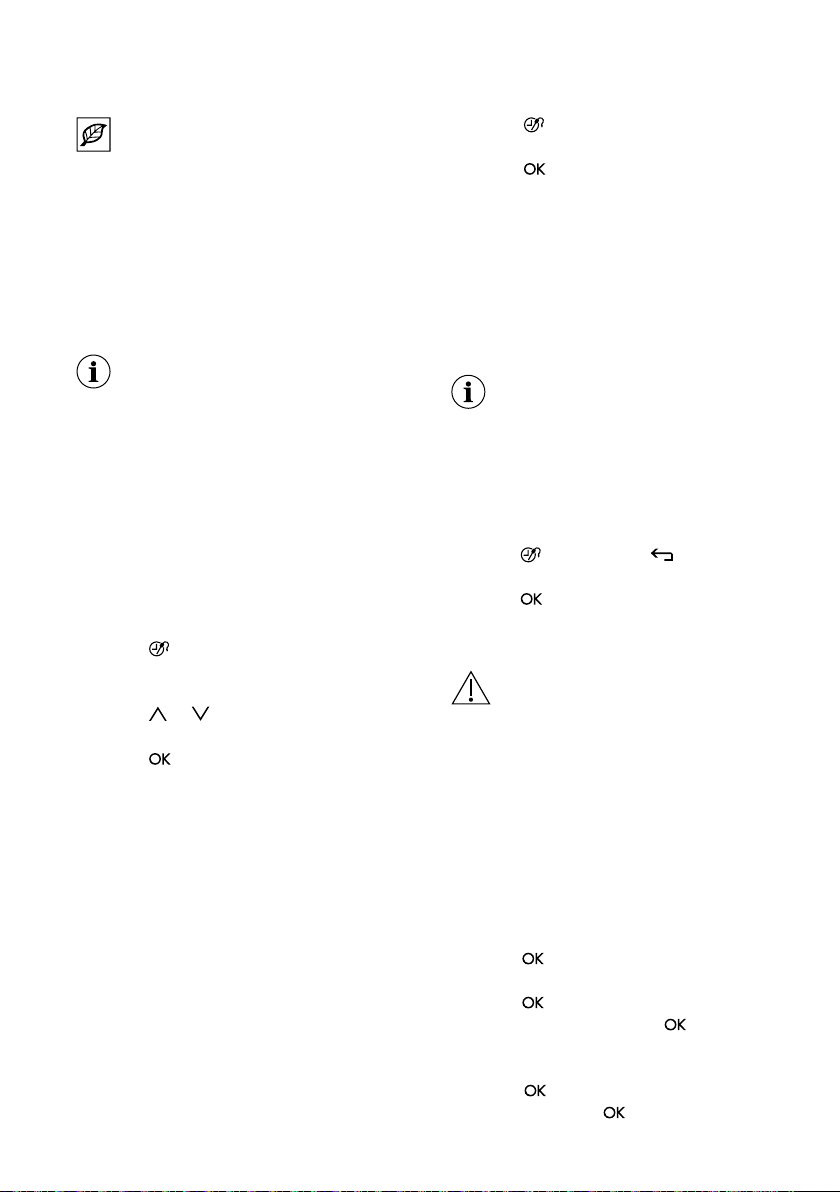
Heating Function Application
Keep Warm To keep food warm.
Plate Warming To preheat plates for serving.
Preserving To preserve fruits and vegetables in sterilized cans and jars
Drying
To dry sliced fruit (e.g. apples, plums, peaches) and vegetables
(e.g. tomatoes, zucchini, mushrooms).
Dough Proving For controlled rising of yeast dough before baking.
Slow Cooking To prepare tender, succulent roasts.
Bread Baking To bake bread.
Defrost
This function can be used for defrosting frozen foods, such as vegetables and
fruits. The defrosting time depends on the amount and size of the frozen food.
7.4 Specials
7.5 Activating a heating
function
1. Activate the appliance
2. Select the menu: Heating Functions
3. Press
to conrm
4. Select a heating function.
5. Press
to conrm.
6. Set the temperature.
7. Press
to conrm.
7.6 Heat-up indicator
When you activate a heating function,
the bar on the display comes on. The bar
shows that the temperature increases.
When temperature is reached the buzzer
sounds 3 times and the bar ashes and
then disappears.
7.7 Activating a fast heat up
This function decreases the heat-up time.
Do not put food in the oven when
the Fast heat up function operates.
To activate / deactivate the function,
hold
for 3 seconds. The heat-up
indicator alternates. (This function is
enabled by default)
7.8 Residual heat
When you deactivate the appliance, the
display shows the residual heat. You can
use the heat to keep the food warm.
8. CLOCK FUNCTIONS
8.1 Clock functions table
Clock Function Application
Minute Minder
To set a countdown (max. 2 h 30 min). This function has no effect on the operation
of the appliance. You can also activate it when the appliance is deactivated. Use
to activate the function. Press
or to set the minutes and to start
Duration To set the length of a cooking operation (max. 23 h 59 min).
End Time To set the switch-off time for a heating function (max. 23 h 59 min).
www.aegaustralia.com.au
|
www.aegnewzealand.co.nz
16
If you set the time for a clock function, the
time starts to count down after 5 seconds.
If you use the clock functions:
Duration, End Time, the appliance
deactivates the heating elements
after 90 % of the set time. The
appliance uses the residual heat
to continue the cooking process until
the time ends (3 - 20 minutes).
8.2 Setting the clock
functions
Before you use the functions:
Duration, End Time, you must set
a heating function and temperature
rst. The appliance deactivates
automatically. You can use the
functions: Duration and End Time
at the same time if you want
to automatically activate and
deactivate the appliance on a given
time later. The functions: Duration
and End Time do not work when you
use the core temperature sensor.
1. Set a heating function.
2. Press
again and again until the
display shows the necessary clock
function and the related symbol.
3. Press
or to set the necessary
time.
4. Press
to conrm.When the time
ends, an acoustic signal sounds.
The appliance deactivates.
The display shows a message.
5. Press any symbol to stop the signal.
8.3 Heat + Hold
Conditions for the function:
• The set temperature is more than 80°C.
• The function: Duration is set.
The function: Heat + Hold keeps prepared
food warm at 80 °C for 30 minutes.
It activates after the baking or roasting
procedure ends. You can activate or
deactivate the function in the menu:
Basic Settings.
1. Activate the appliance.
2. Select the heating function.
3. Set the temperature above 80 °C.
4. Press
again and again until the
display shows: Heat + Hold.
5. Press
to conrm. When the function
ends, an acoustic signal sounds.
The function stays on if you change the
heating functions.
8.4 Time Extension
The function: Time Extension makes the
heating function continue after the end of
Duration.
Applicable to all heating functions
with Duration or Weight Automatic.
Not applicable to heating functions
with the core temperature sensor.
1. When the cooking time ends, an
acoustic signal sounds. Press any
symbol. The display shows the
message.
2. Press
to activate or to cancel.
3. Set the length of the function.
4. Press
.
9. ROAST MODES
WARNING! REFER TO SAFETY
CHAPTERS.
9.1 Assisted Cooking for
Roast Meats
This appliance has a set of recipes you
can use. The recipes are xed and you
cannot change them
1. Activate the appliance.
2. Select menu: Heating
3. Select sub-menu: Roast Meats
Press
to conrm.
4. Select the type of meat.
Press
to conrm.
5. Select a doneness level,
to conrm.
6. Select a cooking mode (Manual, Food
sensor Automatic, Weight Automatic).
Press
to conrm. Select a
doneness level,
to conrm.
English
17
When you use ‘Manual’ mode, the
appliance uses the recommended
settings. You can change them as
with other functions when using
Assisted cooking Food Sensor or
weight refer to next chapters.
9.2 Assisted Cooking with
Weight Automatic
This function automatically calculates the
roasting time. To use it, it is necessary
to input the food weight, when the
automatic programme starts.
1. You can change the weight at any
time. Press
or to change the
weight.
2. When the time ends, an acoustic
signal sounds. Press any symbol to
deactivate the signal.
With some programmes turn over
the food after 30 minutes.
10. USING THE
ACCESSORIES
WARNING! Refer to Safety
chapters.
10.1 Food sensor
The food sensor measures temperature
inside the food. When the food is at
the set temperature, the appliance
deactivates.
There are two temperatures to be set:
• The oven temperature (minimum
120°C),
• The food core temperature.
CAUTION! Use only the food
sensor supplied and the original
replacement parts.
Directions for the best results:
• Ingredients should be at room
temperature.
• Food sensor cannot be used for liquid
dishes.
• During cooking the food sensor must
remain in the dish and the plug in the
socket.
• Use recommended food core
temperature settings. Refer to “Hints
and tips” chapter.
The appliance calculates an
approximate end of cooking time.
It depends on the quantity of
food, the set oven function and
temperature.
Food categories: meat, poultry
and sh
1.Activate the appliance.
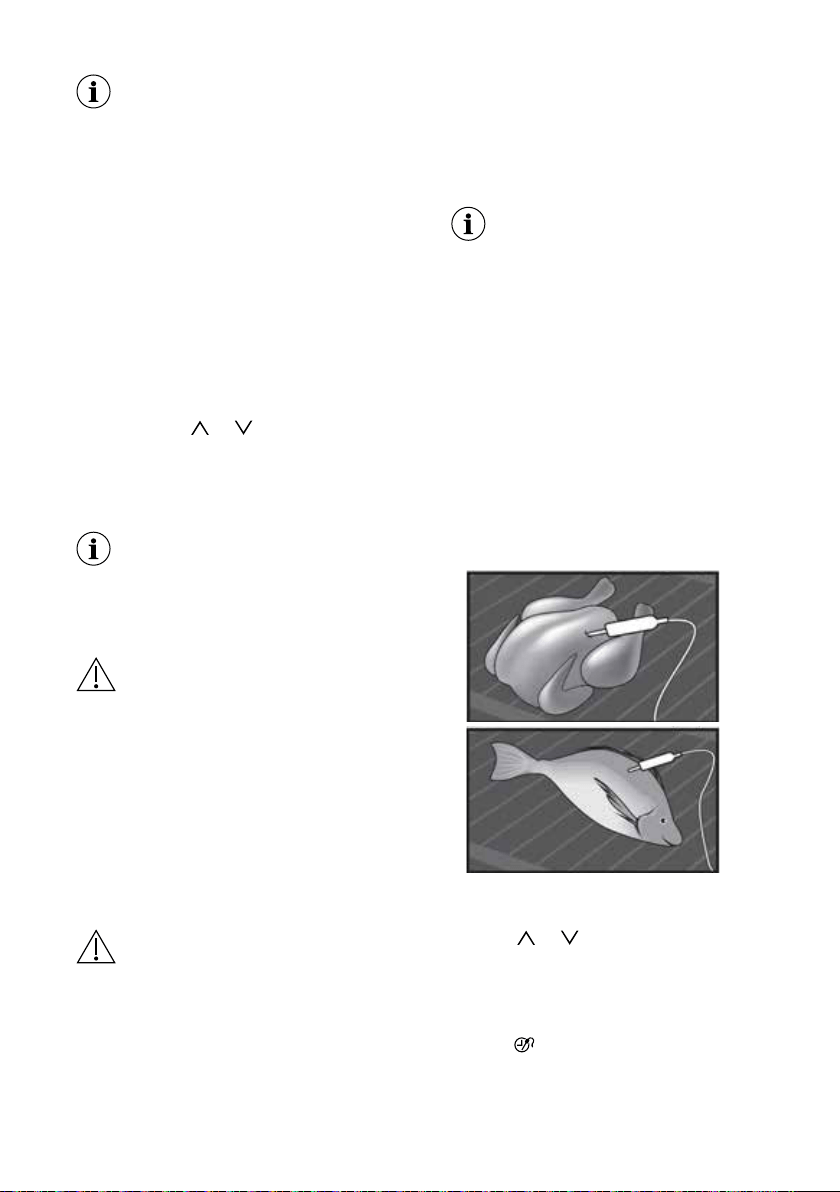
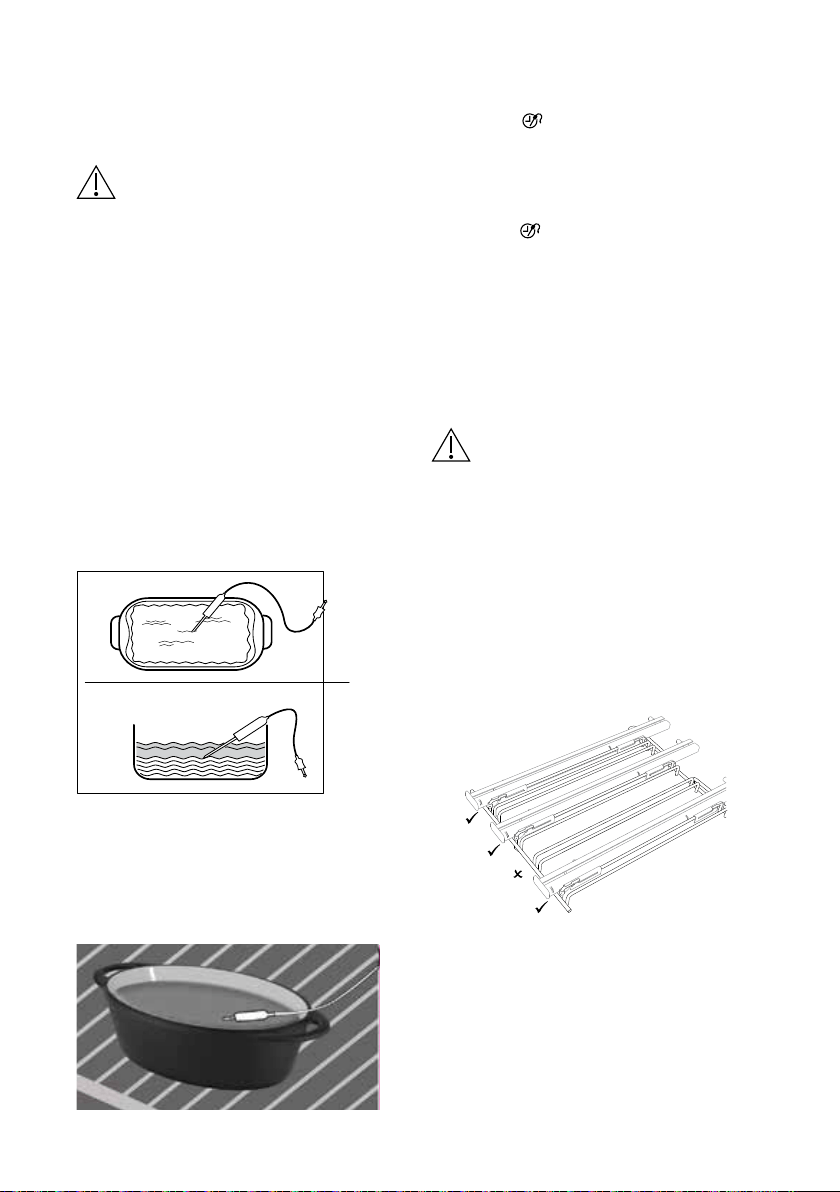
2. Insert the tip of the food sensor into the
centre of meat or sh, in the thickest part
if possible. Make sure that at least 3/4 of
the food sensor is inside of the dish.
3. Put the plug of the food sensor into the
socket located in the front frame of the
appliance.
The display shows the food sensor
symbol.
4. Press
or in less than 5 seconds
to set the food core temperature.
5. Set a heating function and, if
necessary, the oven temperature.
6. To change the food core temperature,
press
. When the food core reaches
the set temperature, an acoustic signal
sounds. The appliance deactivates
automatically.
7.Touch any symbol to stop the signal.
www.aegaustralia.com.au
|
www.aegnewzealand.co.nz
18
8. Remove the food sensor plug from the
socket and remove the dish from the
appliance.
WARNING! There is a risk of burns
as the food sensor becomes hot.
Be careful when you unplug it and
remove it from the food.
Food category: casserole
1. Activate the appliance.
2. Place half of the ingredients in a
baking dish.
3. Insert the tip of the food sensor exactly
in the centre of the casserole. The
food sensor should be stabilized in
one place during baking. Use a solid
ingredient to achieve that. Use the
rim of the baking dish to support the
silicone handle of the food sensor.
The tip of the food sensor should not
touch the bottom of a baking dish.
4. Cover the food sensor with the
remaining ingredients.
5. Put the plug of the food sensor into the
socket located in the front frame of the
appliance.
The display shows the food sensor
symbol.
6. Press
or in less than 5 seconds to
set the food core temperature.
7. Set a heating function and, if
necessary, the oven temperature.
8. To change the food core temperature,
press
. When the dish is at the
set temperature, an acoustic signal
sounds. The appliance deactivates
automatically.
9. Touch any symbol to stop the signal.
10. Remove the food sensor plug from the
socket and remove the dish from the
appliance.
WARNING! There is a risk of burns
as the food sensor becomes hot. Be
careful when you unplug it and remove
it from the food.
10.2 Attaching Telescopic
runners
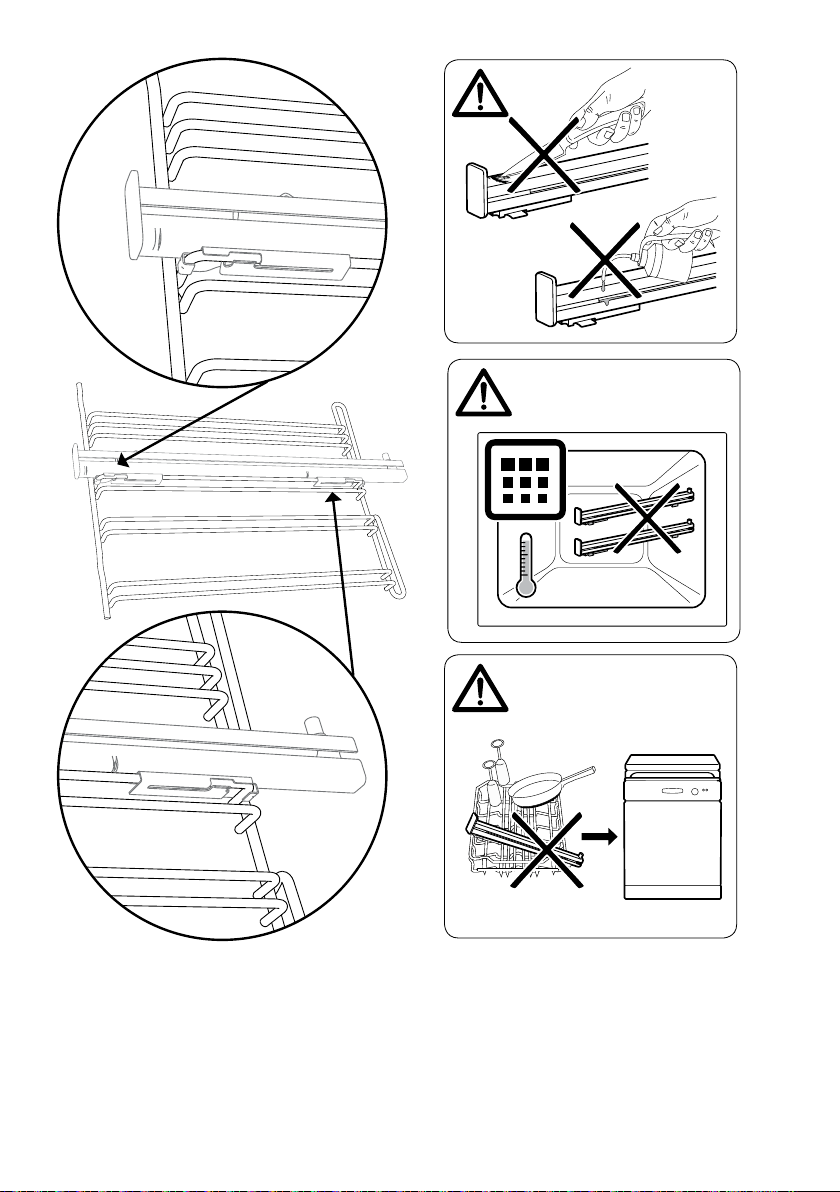
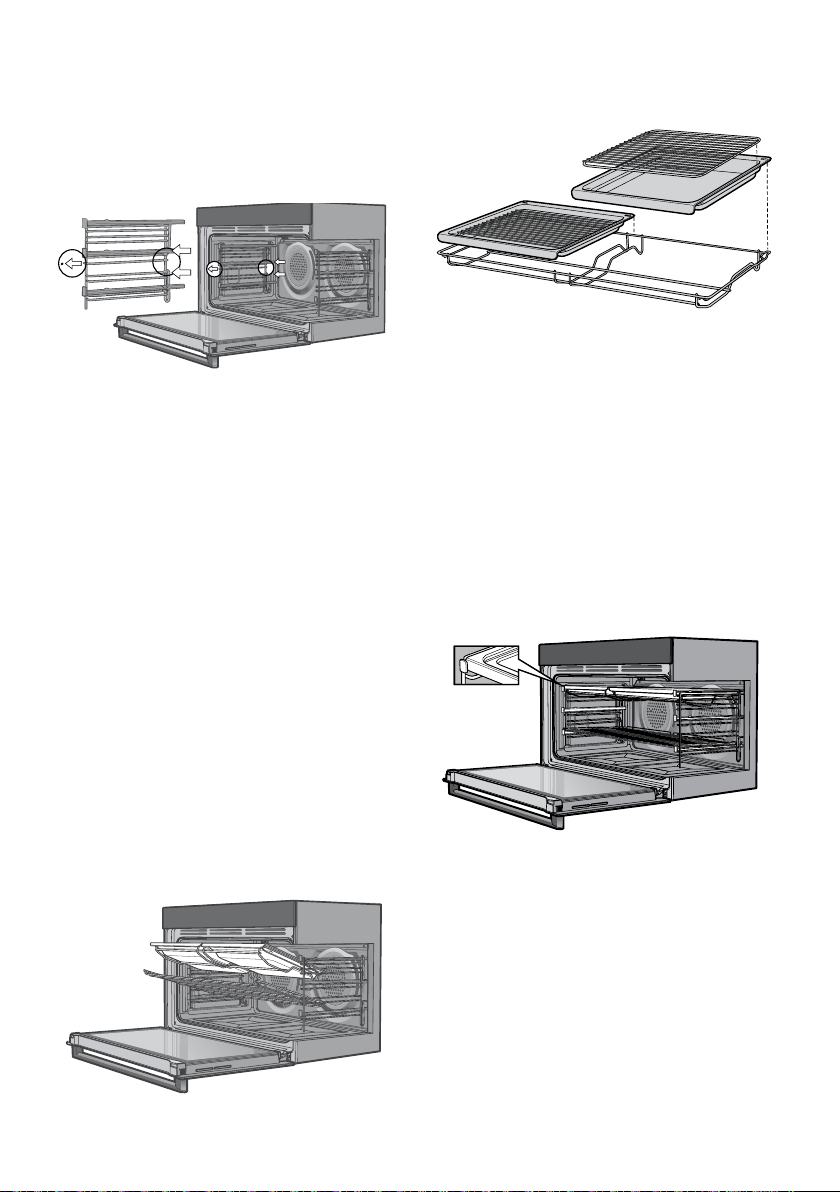
If the telescopic runners (slides) are
not attached to the shelf supports
(racks), follow these instructions
1. Refer image below for feasible
positions.
2. Lay racks onto at protected surface,
prior to tting slides. Ensure the rack
and slides are of the same hand. E.g.
Left hand slide should be tted on left
hand rack.
3. Push bottom clips onto selected wire.
4. Ensure both clips are secured to wire.
5. Repeat for the other side.
English
19
> 300°C
> 300°C
> 300°C
English
20
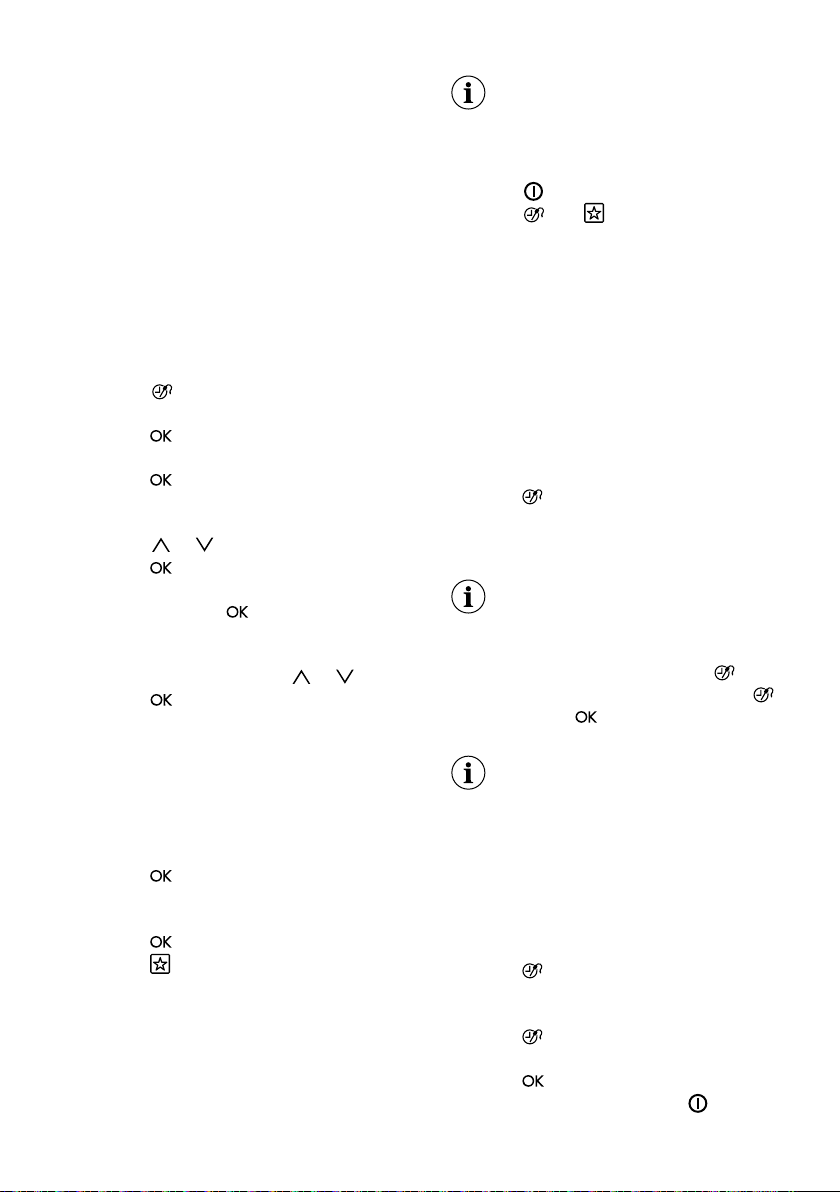
Installing the side racks
1. Insert the twin pegged side into the
rear access holes provided, ensuring
pegs are fully inserted.
2. Then locate the front peg into the front
access hole and push in rmly.
9
Installing the side racks
1. Insert the twin pegged side into the rear access holes
provided, ensuring pegs are fully inserted.
2. Then locate the front peg into the front access hole
and push in firmly.
Positioning the dishes on the grill dish carrier
Fitting the shelves and grill dish
carrier between the side rack
wires
The shelves are designed so that they
have maximum extension but cannot be
accidentally pulled right out. The grill dish
carrier is designed the same way and
can slot straight into the side racks. To t
a shelf or grill dish carrier to side racks:
1. Locate the rear edge of the shelf/
carrier in between guide rails of the
side rack - see diagram.
2. Ensure the same rail positions on both
sides of the oven are being engaged.
With the front edge raised, begin to
slide the shelf into the oven.
3. Once the detents have passed the
front edge of the side rack, the shelf
can be pushed completely in. When
fully inserted the shelf/carrier should
not interfere with the closed oven door.
9
Installing the side racks
1. Insert the twin pegged side into the rear access holes
provided, ensuring pegs are fully inserted.
2. Then locate the front peg into the front access hole
and push in firmly.
Positioning the dishes on the grill dish carrier
Positioning the dishes on the
grill dish carrier
9
Installing the side racks
1. Insert the twin pegged side into the rear access holes
provided, ensuring pegs are fully inserted.
2. Then locate the front peg into the front access hole
and push in firmly.
Positioning the dishes on the grill dish carrier
Fitting the shelves and grill dish
carrier onto telescopic slides
To t a shelf or grill dish carrier to
telescopic slides:
1. With the slides fully pushed in, push
the shelf/carrier along the top of the
slide until it hits the back post.
2. Drop the front of the shelf/carrier
ensuring it sits behind the front post of
the slide (see illustration). When fully
inserted the shelf/carrier should not
interfere with the closed oven door.
9
Installing the side racks
1. Insert the twin pegged side into the rear access holes
provided, ensuring pegs are fully inserted.
2. Then locate the front peg into the front access hole
and push in firmly.
Positioning the dishes on the grill dish carrier
www.aegaustralia.com.au
|
www.aegnewzealand.co.nz
21
11. ADDITIONAL
FUNCTIONS
11.1 Favourites
You can save your favourite settings,
such as duration, temperature or
heating function. They are available in
the menu: Favourites. You can save 20
programmes.
Saving a programme
1. Activate the appliance.
2. Set a heating function or an automatic
programme.
3. Touch
again and again until the
display shows: SAVE.
4. Press
to conrm. The display
shows the rst free memory position.
5. Press
to conrm.
6. Enter the name of the programme.
The rst letter ashes.
7. Touch
or to change the letter.
8. Press
. The next letter ashes.
9. Do step 7 again as necessary.
10. Press and hold
to save. You
can overwrite a memory position.
When the display shows the rst free
memory position, touch
or and
press
to overwrite an existing
programme.You can change the name
of a programme in the menu: Edit
Programme Name.
Activating the programme
1. Activate the appliance.
2. Select the menu: Favourites.
3. Press
to conrm.
4. Select your favourite programme
name.
5. Press
to conrm.
Press
to go directly to menu:
Favourites. You can also use it
when the appliance is deactivated.
11.2 Using the Child Lock
When the Child Lock is on, the appliance
cannot be activated accidentally.
If the Pyrolysis function operates,
the door locks automatically.
A message comes on in the display
when you touch any symbol.
1. Touch
to activate the display.
2. Touch
and at the same time
until the display shows a message.
To deactivate the Child Lock function
repeat step 2.
11.3 Function Lock
This function prevents an accidental
change of the heating function. You
can activate it only when the appliance
operates.
1. Activate the appliance.
2. Set a heating function or setting.
3. Press
again and again until the
display shows: Function Lock.
4. Press to conrm.
If the Pyrolysis function operates,
the door is locked and the symbol
of a key comes on in the display.
To deactivate the function, press
.
The display shows a message. Press
again and then
to conrm.
When you deactivate the appliance,
the lock function also deactivates.
11.4 Set + Go
The function lets you set a heating
function (or a programme) and use it later
with one press of any symbol.
1. Activate the appliance.
2. Set a heating function.
3. Press
again and again until the
display shows: Duration.
4. Set the time.
5. Press
again and again until the
display shows: Set + Go
6. Press
to conrm.
Press any symbol (except for
) to start
the function: Set + Go. The set heating
English
22
function starts. When the heating function
ends, an acoustic signal sounds.
• Function Lock is on when the
heating function operates.
• The menu: Basic Settings lets
you activate and deactivate the
function: Set + Go.
11.5 Automatic Switch-off
For safety reasons the appliance turns off
automatically after some time if a heating
function operates and you do not change
any settings.
Temperature (°C) Switch-off time (h)
30 - 115 12.5
120 - 195 8.5
200 - 245 5.5
250 - maximum 1.5
The Automatic switch-off does not
work with the functions: Light, Food
Sensor, Duration, End Time.
11.6 Brightness of the display
There are two modes of display
brightness:
• Night brightness - when the appliance
is deactivated, the brightness of the
display is lower between 10 PM and 6
AM.
• Day brightness:
– when the appliance is activated.
– if you touch a symbol during the
night brightness (apart from ON /
OFF), the display goes back to the
day brightness mode for the next 10
seconds.
– if the appliance is deactivated and
you set the function: Minute Minder.
When the function ends, the display
goes back to the night brightness.
11.7 Cooling fan
When the appliance operates, the cooling
fan activates automatically to keep the
surfaces of the appliance cool. If you
deactivate the appliance, the cooling
fan can continue to operate until the
appliance cools down.
12. HINTS AND TIPS
WARNING! Refer to Safety
chapters.
The temperature and baking times
in the tables are guidelines only.
They depend on the recipes and
the quality and quantity of the
ingredients used.
12.1 Advice for special
heating functions of the oven
Keep Warm
Use this function if you want to keep food
warm.The temperature regulates itself
automatically to 80 °C.
Plate Warming
For warming plates and dishes.
Distribute plates and dishes evenly on
the wire shelf. Move stacks around after
half of the warming time (swap top and
bottom). The automatic temperature is
70 °C.
Dough Proving
You can use this automatic function with
any recipe for yeast dough you like. It
gives you a good atmosphere for rising.
Put the dough into a dish that is big
enough for rising and cover it with a wet
towel or plastic foil. Insert a wire shelf on
the rst shelf position and put the dish in.
Close the door and set the function:
Dough Proving. Set the necessary time.
12.2 Baking
• For best baking results preheat oven for
30 minutes
• Your oven may bake or roast differently

www.aegaustralia.com.au
|
www.aegnewzealand.co.nz
23
to the appliance you had before.
Adapt your usual settings such as
temperature, cooking time and shelf
position to the values in the tables.
• Use the lower temperature the rst time.
• If you cannot nd the settings for a
special recipe, look for the similar one.
• You can extend baking times by 10 – 15
minutes if you bake cakes on more than
one shelf position.
• Cakes and pastries at different heights
do not always brown equally at rst.
If this occurs, do not change the
temperature setting. The differences
equalize during the baking procedure.
• Trays in the oven can twist during
baking. When the trays become cold
again, the distortions disappear.

English
24
Baking results Possible cause Remedy
The bottom of the cake is
not browned sufciently.
The shelf position is incorrect. Put the cake on a lower shelf.
The cake sinks and becomes
soggy, lumpy or streaky.
The oven temperature is too high.
The next time you bake, set a slightly lower
oven temperature.
The cake sinks and becomes
soggy, lumpy or streaky.
The baking time is too short.
Set a longer baking time. You cannot decrease
baking times by setting higher temperatures.
The cake sinks and becomes
soggy, lumpy or streaky.
There is too much liquid in
the mixture.
Use less liquid. Be careful with mixing times,
especially if you use a mixing machine.
The cake is too dry. The oven temperature is too low
The next time you bake, set a higher oven
temperature.
The cake is too dry. The baking time is too long.
The next time you bake, set a shorter baking
time.
The cake browns unevenly.
The oven temperature is too high
and the baking time is too short.
Set a lower oven temperature and a longer
baking time.
The cake browns unevenly. The mixture is unevenly distributed. Spread the mixture evenly on the baking tray.
The cake is not ready in
the baking time given.
The oven temperature is
too low.
The next time you bake, set a slightly higher
oven temperature.
The cake is too brown on top. The oven is not preheated. Next time you bake, preheat the oven.
The cake is too brown
on top.
The oven temperature is too high.
The next time you bake, set a lower oven
temperature.
The cake is too brown
on bottom.
The shelf position is incorrect. Put the cake one shelf higher.
12.3 Tips on baking

www.aegaustralia.com.au
|
www.aegnewzealand.co.nz
25
Food Function Temperature (°C) Time (min) Shelf position
Ring cake / Brioche True Fan Cooking 150 - 160 50 - 70 1
Madeira cake / Fruit cakes True Fan Cooking 140 - 160 70 - 90 1
Fatless sponge cake True Fan Cooking 140 - 150 35 - 50 2
Fatless sponge cake Conventional Cooking 160 35 - 50 2
Flan base - short pastry True Fan Cooking
170 - 180
1)
10 - 25 2
Flan base - sponge mixture True Fan Cooking 150 - 170 20 - 25 2
Apple pie / Apple pie (2 tins
Ø20 cm, diagonally off set)
True Fan Cooking 160 60 - 90 2
Apple pie / Apple pie (2 tins
Ø20 cm, diagonally off set)
Conventional Cooking 180 70 - 90 1
Cheesecake Conventional Cooking 170 - 190 60 - 90 1
1)
Preheat the oven.
Food Function Temperature (°C) Time (min) Shelf position
Plaited bread / Bread crown Conventional Cooking 170 - 190 30 - 40 3
Christmas stollen Conventional Cooking
160 - 180
1)
50 - 70 2
Bread (rye bread):
1. First part of baking
procedure.
2. Second part of baking
procedure.
Conventional Cooking
1. 230
1)
2. 160 - 180
1. 20
2. 30 - 60
1
Cream puffs / Eclairs Conventional Cooking
190 - 210
1)
20 - 35 3
Swiss roll Conventional Cooking
180 - 200
1)
10 - 20 2
Cake with crumble
topping (dry)
True Fan Cooking 150 - 160 20 - 40 3
Buttered almond cake /
Sugar cakes
True Fan Cooking
190 - 210
1)
20 - 30 3
Fruit ans (made with yeast
dough / sponge mixture)
2)
True Fan Cooking 150 35 - 55 3
Fruit ans (made with yeast
dough / sponge mixture)
2)
Conventional Cooking 170 35 - 55 3
Yeast cakes with delicate
toppings (e.g. quark, cream,
custard)
Conventional Cooking
160 - 180
1)
40 - 80 3
1)
Preheat the oven.
2)
Use a deep pan.
12.4 Baking on single level
Baking in tins
Cakes / pastries / breads on baking trays

English
26
Food Function Temperature (°C) Time (min) Shelf position
Short pastry biscuits True Fan Cooking 150 - 160 10 - 20 3
Short bread / Pastry stripes True Fan Cooking 140 20 - 35 3
Short bread / Pastry stripes
Conventional
Cooking
160
1)
20 - 30 3
Biscuits made with sponge mixture True Fan Cooking 150 - 160 15 - 20 3
Pastries made with egg white /
Meringues
True Fan Cooking 80 - 100 120 - 150 3
Macaroons True Fan Cooking 100 - 120 30 - 50 3
Biscuits made with yeast dough True Fan Cooking 150 - 160 20 - 40 3
Puff pastries True Fan Cooking
170 - 180
1)
20 - 30 3
Rolls True Fan Cooking
160
1)
10 - 25 3
Rolls
Conventional
Cooking
190 - 210
1)
10 - 25 3
Small cakes / Small cakes
(20 per tray)
True Fan Cooking
150
1)
20-35 3
Small cakes / Small cakes
(20 per tray)
Conventional
Cooking
170
1)
20-30 3
1)
Preheat the oven.
Food Function Temperature (°C) Time (min) Shelf position
Pasta bake
Conventional
Cooking
180 - 200 45 - 60 1
Lasagne
Conventional
Cooking
180 - 200 25 - 40 1
Vegetables au gratin
1)
Turbo Grilling 160 - 170 15 - 30 1
Baguettes topped with melted
cheese
True Fan Cooking 160 - 170 15 - 30 1
Sweet bakes
Conventional
Cooking
180 - 200 40 - 60 1
Fish bakes
Conventional
Cooking
180 - 200 30 - 60 1
Stuffed vegetables True Fan Cooking 160 - 170 30 - 60 1
1)
Preheat the oven.
Biscuits
12.5 Bakes and gratins

www.aegaustralia.com.au
|
www.aegnewzealand.co.nz
27
Food Temperature (°C) Time (min) Shelf position
Pasta gratin 200 - 220 45 - 55 3
Potato gratin 180 - 200 70 - 85 3
Moussaka 170 - 190 70 - 95 3
Lasagne 180 - 200 75 - 90 3
Cannelloni 180 - 200 70 - 85 3
Bread pudding 190 - 200 55 - 70 3
Rice pudding 170 - 190 45 - 60 3
Apple cake, made with sponge mixture (round cake tin) 160 - 170 70 - 80 3
White bread 190 - 200 55 - 70 3
Food Temperature (°C) Time (min)
Shelf position
2 positions
Cream puffs / Eclairs 160 - 180
1)
25 - 45 1 / 4
Dry streusel cake 150 - 160 30 - 45 1 / 4
1)
Preheat the oven.
Food Temperature (°C) Time (min)
Shelf position
2 positions
Short pastry biscuits 150 - 160 20 - 40 1 / 4
Short bread / Short bread / Pastry
Stripes
140 25 - 45 1 / 4
Biscuits made with sponge mixture 160 - 170 25 - 40 1 / 4
Biscuits made with egg white,
meringues
80 - 100 130 - 170 1 / 4
Macaroons 100 - 120 40 - 80 1 / 4
Biscuits made with yeast dough 160 - 170 30 - 60 1 / 4
Puff pastries 170 - 180
1)
30 - 50 1 / 4
Rolls 180 20 - 30 1 / 4
Small cakes / Small cakes (20 per tray) 150
1)
23 - 40 1 / 4
1)
Preheat the oven.
12.6 Moist Fan Baking
12.7 Multilevel Baking
Use the function: True Fan Cooking.
Cakes / pastries / breads on baking trays
Biscuits / small cakes / small cakes / pastries / rolls

English
28
Food Temperature (°C) Time (min) Shelf position
Pizza (thin crust)
200 - 230
1)2)
15 - 20 2
Pizza (with a lot of topping) 180 - 200 20 - 30 2
Tarts 180 - 200 40 - 55 1
Spinach an 160 - 180 45 - 60 1
Quiche Lorraine 170 - 190 45 - 55 1
Swiss Flan 170 - 190 45 - 55 1
Apple cake, covered 150 - 170 50 - 60 1
Vegetable pie 160 - 180 50 - 60 1
Unleavened bread
230 - 250
1)
10 - 20 2
Puff pastry an
160 - 180
1)
45 - 55 2
Flammekuchen (Piz- za-like dish from Al- sace)
230 - 250
1)
12 - 20 2
Piroggen (Russian version of calzone)
180 - 200
1)
15 - 25 2
1)
Preheat the oven.
2)
Use a deep pan.
Food Quantity Function Temperature (°C) Time (min) Shelf position
Pot roast 1 - 1.5 kg
Conventional
Cooking
230 120 - 150 1
Roast beef or llet: rare per cm of thickness Turbo Grilling 190 - 200
1)
5 - 6 1
Roast beef or llet: medium per cm of thickness Turbo Grilling 180 - 190
1)
6 - 8 1
Roast beef or llet: well done per cm of thickness Turbo Grilling 170 - 180
1)
8 - 10 1
1)
Preheat the oven.
12.8 Pizza Setting
12.9 Roasting
• Use heat-resistant ovenware to roast.
Refer to the instructions of the ovenware
manufacturer.
• You can roast large roasting joints directly
in the roast pan or on the wire shelf above
the deep pan.
• Put some liquid in the roast pan to prevent
the meat juices or fat from burning on it’s
surface.
• All types of meat that can be browned
or have crackling can be roasted in the
roasting tin without the lid.
• If necessary, turn the roast after 1/2 to 2/3
of the cooking time.
12.10 Roasting tables
Beef

www.aegaustralia.com.au
|
www.aegnewzealand.co.nz
29
Food Quantity Function Temperature (°C) Time (min) Shelf position
Shoulder / Neck / Ham joint 1 - 1.5 kg Turbo Grilling 160 - 180 90 - 120 1
Chop / Spare rib 1 - 1.5 kg Turbo Grilling 170 - 180 60 - 90 1
Meatloaf 750 g - 1 kg Turbo Grilling 160 - 170 50 - 60 1
Pork knuckle (precooked) 750 g - 1 kg Turbo Grilling 150 - 170 90 - 120 1
Food Quantity Function Temperature (°C) Time (min) Shelf position
Saddle / Leg of hare up to 1 kg Conventional Cooking
230
1)
30 - 40 1
Saddle of venison 1.5 - 2 kg Conventional Cooking 210 - 220 35 - 40 1
Haunch of venison 1.5 - 2 kg Conventional Cooking 180 - 200 60 - 90 1
1)
Preheat the oven.
Food Quantity Function Temperature (°C) Time (min) Shelf position
Poultry portions 200 - 250 g each Turbo Grilling 200 - 220 30 - 50 1
Half chicken 400 - 500 g each Turbo Grilling 190 - 210 35 - 50 1
Chicken, poulard 1 - 1.5 kg Turbo Grilling 190 - 210 50 - 70 1
Duck 1.5 - 2 kg Turbo Grilling 180 - 200 80 - 100 1
Goose 3.5 - 5 kg Turbo Grilling 160 - 180 120 - 180 1
Turkey 2.5 - 3.5 kg Turbo Grilling 160 - 180 120 - 150 1
Turkey 4 - 6 kg Turbo Grilling 140 - 160 150 - 240 1
Food Quantity Function Temperature (°C) Time (min) Shelf position
Leg of lamb / Roast lamb 1 - 1.5 Turbo Grilling 150 - 170 100 - 120 1
Saddle of lamb 1 - 1.5 Turbo Grilling 160 - 180 40 - 60 1
Food Quantity Function Temperature (°C) Time (min) Shelf position
Whole sh 1 - 1.5 Conventional Cooking 210 - 220 40 - 60 1
Food Quantity Function Temperature (°C) Time (min) Shelf position
Roast veal 1 Turbo Grilling 160 - 180 90 - 120 1
Knuckle of veal 1.5 - 2 Turbo Grilling 160 - 180 120 - 150 1
Pork
Game
Poultry
Lamb
Fish (steamed)
Veal

English
30
12.11 Grilling
• Set the shelf into the shelf position as
recommended in the grilling table.
• Always set the pan to collect the fat.
• Grill only at pieces of meat or sh.
• Always preheat the empty oven with the
grill functions for 5 minutes.
CAUTION! Always grill with
the oven door closed.
12.12 Frozen Foods
Food Temperature (°C) Time (min) Shelf position
1st side 2nd side
Roast beef 210 - 230 30 - 40 30 - 40 2
Filet of beef 230 20 - 30 20 - 30 3
Back of pork 210 - 230 30 - 40 30 - 40 2
Back of veal 210 - 230 30 - 40 30 - 40 2
Back of lamb 210 - 230 25 - 35 20 - 25 3
Whole Fish, 500 - 1000 g 210 - 230 15 - 30 15 - 30 3 / 4
Food Time (min) Shelf position
1st side 2nd side
Burgers 8 - 10 6 - 8 4
Pork llet 10 - 12 6 - 10 4
Sausages 10 - 12 6 - 8 4
Fillet / Veal steaks 7 - 10 6 - 8 4
Toast / Toast 1 - 3 1 - 3 5
Toast with topping 6 - 8 - 4
Turbo Grilling
Grilling
Food Temperature (°C) Time (min) Shelf position
Pizza, frozen 200 - 220 15 - 25 2
Pizza American, frozen 190 - 210 20 - 25 2
Pizza, chilled 210 - 230 13 - 25 2
Pizza Snacks, frozen 180 - 200 15 - 30 2
French Fries, thin 200 - 220 20 - 30 3
French Fries, thick 200 - 220 25 - 35 3
Use this function to cook frozen prepared foods. Follow cooking instructions on
the pack. Use the table below as guideline only.
www.aegaustralia.com.au
|
www.aegnewzealand.co.nz
31
Food Temperature (°C) Time (min) Shelf position
Wedges / Croquettes 220 - 230 20 - 35 3
Hash Browns 210 - 230 20 - 30 3
Lasagne / Cannelloni, fresh 170 - 190 35 - 45 2
Lasagne / Cannelloni, frozen 160 - 180 40 - 60 2
Oven baked cheese 170 - 190 20 - 30 3
Chicken Wings 190 - 210 20 - 30 2
Food Quantity (kg) Temperature (°C) Time (min) Shelf position
Roast beef 1 - 1.5 120 120 - 150 1
Fillet of beef 1 - 1.5 120 90 - 150 3
Roast veal 1 - 1.5 120 120 - 150 1
Steaks 0.2 - 0.3 120 20 - 40 3
Food Function Temperature (°C) Time (min) Shelf position
Frozen pizza Conventional Cooking
as per manufacturer’s
instructions
as per manufacturer’s
instructions
3
French fries
1)
(300 - 600 g)
Conventional Cooking
or Turbo Grilling
200 - 220
as per manufacturer’s
instructions
3
Baguettes Conventional Cooking
as per manufacturer’s
instructions
as per manufacturer’s
instructions
3
Fruit ans Conventional Cooking
as per manufacturer’s
instructions
as per manufacturer’s
instructions
3
1)
Turn the French fries 2 or 3 times during cooking.
Frozen ready meals
12.13 Slow Cooking
Use this function to prepare lean,
tender pieces of meat and sh with
core temperatures no more than 65°C.
This function is not applicable to such
recipes as pot roast or fatty roast pork.
You can use the core temperature sensor
to guarantee that the meat has the correct
core temperature (see the table for the
core temperature sensor).
In the rst 10 minutes you can set an oven
temperature between 80°C and 150°C.
The default is 90°C. After the temperature
is set, the oven continues to cook at 80°C.
Do not use this function for poultry.
Always cook without a lid when
you use this function.
1. Sear the meat in a pan on the hob on
a very high setting for 1 - 2 minutes on
each side.
2. Put the meat together with the hot
roasting pan in the oven and on the
wire shelf.
3. Put the core temperature sensor into
the meat.
4. Select the function: Slow Cooking and
set the correct end core temperature.

English
32
Food Quantity Defrosting time (min) Further defrosting time (min) Comments
Chicken 1 kg 100 - 140 20 - 30
Put the chicken on an upturned saucer
in a big plate. Turn halfway through.
Meat 1 kg 100 - 140 20 - 30 Turn halfway through.
Meat 500 g 90 - 120 20 - 30 Turn halfway through.
Trout 150 g 25 - 35 10 - 15 -
Strawberries 300 g 30 - 40 10 - 20 -
Butter 250 g 30 - 40 10 - 15 -
Cream 2 x 200 g 80 - 100 10 - 15
Whip the cream when still slightly
frozen in places.
Gateau 1.4 kg 60 60 -
12.14 Defrost
• Remove the food packaging and put
the food on a plate.
• Use the rst shelf position from the bottom.
• Do not cover the food with a bowl or a
plate, as this can extend the defrost time.
12.15 Preserving
• Use only preserve jars of the same
dimensions available on the market.
• Do not use jars with twist-off and bayonet
type lids or metal tins.
• Use the rst shelf from the bottom for this
function.
• Put no more than six one-litre preserve
jars on the baking tray.
• Fill the jars equally and close with a clamp.
• The jars cannot touch each other.
• Put approximately 1/2 litre of water into
the baking tray to give sufcient moisture
in the oven.
• When the liquid in the jars starts to simmer
(after approximately 35 - 60 minutes with
one-litre jars), stop the oven or decrease
the temperature to 100 °C (see the table).
Food Temperature (°C) Cooking time until simmering (min) Continue to cook at 100°C (min)
Strawberries / Blueberries
/ Raspberries / Ripe
gooseberries
160 - 170 35 - 45 -
Food Temperature (°C) Cooking time until simmering (min) Continue to cook at 100°C (min)
Pears / Quinces / Plums 160 - 170 35 - 45 10 - 15
Food Temperature (°C) Cooking time until simmering (min) Continue to cook at 100°C (min)
Carrots
1)
160 - 170 50 - 60 5 - 10
Cucumbers 160 - 170 50 - 60 -
Mixed pickles 160 - 170 50 - 60 5 - 10
Kohlrabi / Peas /
Asparagus
160 - 170 50 - 60 15 - 20
1)
Leave standing in the oven after it is deactivated.
Vegetables
Stone fruit
Soft fruit

www.aegaustralia.com.au
|
www.aegnewzealand.co.nz
33
12.16 Drying
• Cover trays with grease proof paper or
baking parchment.
• For a better result, stop the oven halfway
through the drying time, open the door
and letit cool down for one night to
complete the drying.
Food Temperature (°C) Time (h) Shelf position
1st side 2nd side
Beans 60 - 70 6 - 8 3 1 / 4
Peppers 60 - 70 5 - 6 3 1 / 4
Vegetables for sour 60 - 70 5 - 6 3 1 / 4
Mushrooms 50 - 60 6 - 8 3 1 / 4
Herbs 40 - 50 2 - 3 3 1 / 4
Food Temperature (°C) Time (h) Shelf position
1st side 2nd side
Plums 60 - 70 8 - 10 3 1 / 4
Apricots 60 - 70 8 - 10 3 1 / 4
Apple slices 60 - 70 6 - 8 3 1 / 4
Pears 60 - 70 6 - 9 3 1 / 4
Beef Food core temperature (°C)
Rare Medium Well done
Roast beef 45 60 70
Sirloin 45 60 70
Food Temperature (°C) Time (h) Shelf position
White Bread 180 - 200 40 - 60 2
Baguette 200 - 220 35 - 45 2
Brioche 180 - 200 40 - 60 2
Ciabatta 200 - 220 35 - 45 2
Rye Bread 190 - 210 50 - 70 2
Dark Bread 180 - 200 50 - 70 2
All Grain bread 170 - 190 60 - 90 2
12.17 Bread Baking
Preheating is not recommended.
Vegetables
Fruit
12.18 Food Sensor table

English
34
Pork Food core temperature (°C)
Less Medium More
Ham, Roast 80 84 88
Chop (saddle), Smoked pork
loin, Smoked loin poached
75 78 82
Veal Food core temperature (°C)
Less Medium More
Roast veal 75 80 85
Knuckle of veal 85 88 90
Mutton / lamb Food core temperature (°C)
Less Medium More
Leg of mutton 80 85 88
Saddle of mutton 75 80 85
Leg of lamb, Roast lamb 65 70 75
Game Food core temperature (°C)
Less Medium More
Saddle of hare,
Saddle of venison
65 70 75
Leg of hare, Whole hare,
Leg of venison
70 75 80
Poultry Food core temperature (°C)
Less Medium More
Chicken (whole / half /
breast)
80 83 86
Duck (whole / half),
Turkey (whole / breast)
75 80 85
Duck (breast) 60 65 70
Beef Food core temperature (°C)
Less Medium More
Chop (saddle), Smoked pork
loin, Smoked loin poached
75 78 82
Fish (salmon, trout, zander) Food core temperature (°C)
Less Medium More
Fish (whole / large /
steamed), Fish (whole /
large / roasted)
60 64 68
www.aegaustralia.com.au
|
www.aegnewzealand.co.nz
35
Casseroles - Precooked
vegetables
Food core temperature (°C)
Less Medium More
Zucchini Casserole, Broccoli
Casserole, Fennel Casserole
85 88 91
Casseroles - Savoury Food core temperature (°C)
Less Medium More
Cannelloni, Lasagne,
Pasta bake
85 88 91
Casseroles - Savoury Food core temperature (°C)
Less Medium More
White bread casserole with /
without fruits, Rice porridge
casserole with / without fruits,
Sweet noodle casserole
80 85 90
13. CARE AND CLEANING
WARNING!
REFER TO SAFETY CHAPTERS.
13.1 Notes on cleaning
• Clean the front of the appliance with
a soft cloth with warm water and a
cleaning agent.
• To clean metal surfaces, use a
dedicated cleaning agent.
• Clean the appliance interior after each
use. Fat accumulation or other food
remains may result in a re. The risk is
higher for the grill pan.
• Clean stubborn dirt with a special
oven cleaner.
• Clean all accessories after each use
and let them dry. Use a soft cloth with
warm water and a cleaning agent.
• If you have nonstick accessories,
do not clean them using aggressive
agents, sharp-edged objects or a
dishwasher. It can cause damage to
the nonstick coating.
• Dry the oven when the cavity is wet
after usage.
To clean the oven, remove the shelf
supports.
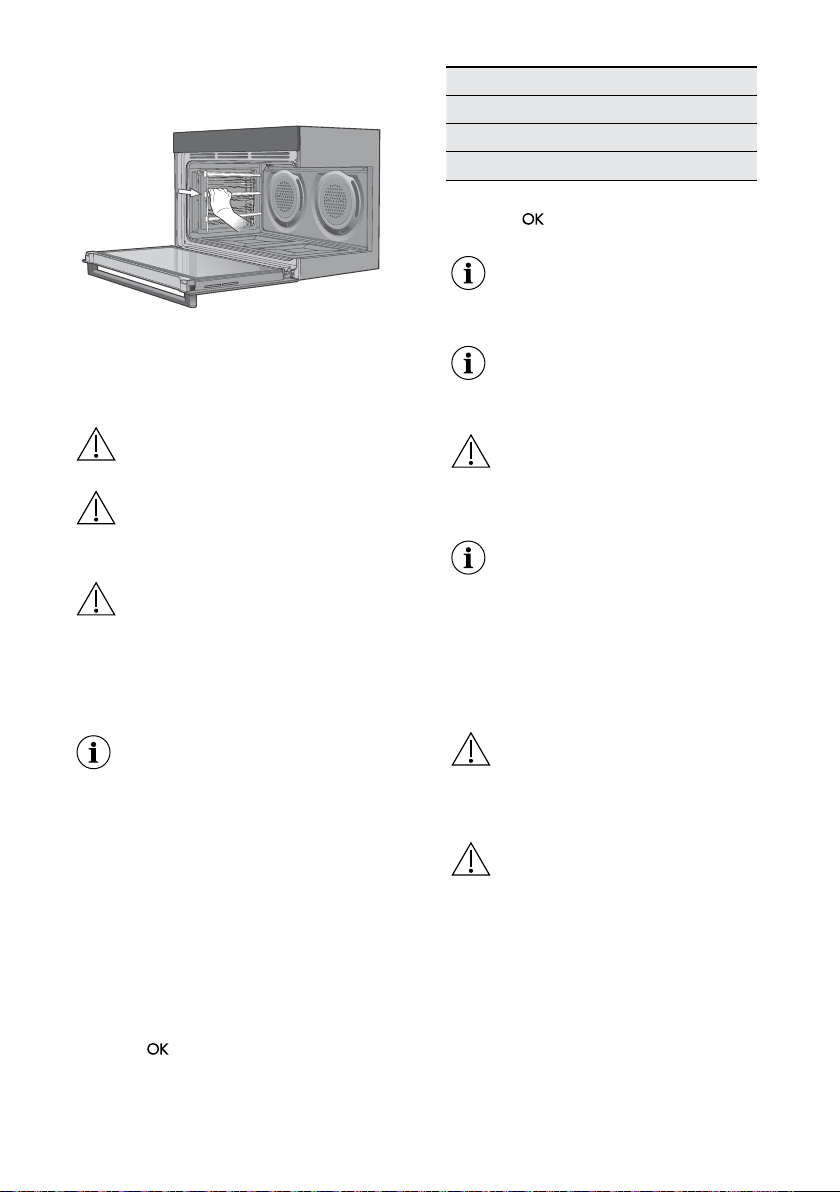
13.2 Removing the shelves,
grill dishes and shelf supports
Removing the shelves and grill dishes
• Slide the shelves and grill dish carrier
towards you until they reach the front
stop.
• Tilt them up at the front to clear the side
supports, taking care not to spill the
contents.
• Lift them clear.
• Wash the shelves and grill dish in hot
soapy water.
• Reverse the above steps to put the
shelves and grill dishes back again.
• Ensure that they are placed between
the 2 support wires or correctly onto
the runners.
English
36
Removing the shelf supports
• Grasp the shelf support at the front.
• Pull it rmly inwards.
13.3 Pyrolysis
(Pyrolytic Cleaning)
CAUTION! Remove all accessories
and removable shelf supports.
WARNING! Do not leave non-stick
cookware in the oven during Pyrolysis.
It may emit poisonous gases.
CAUTION! If there are other
appliances installed in the same
cabinet, do not use them at the same
time as the function: Pyrolysis.
It can cause damage to the
appliance.
The pyrolytic cleaning procedure
cannot start:
• If you did not remove the core
temperature sensor plug from the
socket.
• If you did not fully close the oven
door.
1. Clean the inner side of the door with
hot water, so that the residues do not
burn from the hot air.
2. Turn on the appliance and select from
the main menu the function: Pyrolysis.
Press
to conrm.
3. Set the duration of the cleaning
procedure:
Option Description
Quick 1 h for a low degree of dirt
Normal 1 h 30 min for a usual degree of dirt
Intense 3 h for a high degree of dirt
4. Press to conrm.
When the pyrolytic cleaning starts,
the appliance door is locked and
the lamp does not work.
To stop the pyrolytic cleaning
before it is completed, turn off the
appliance.
WARNING! After the function is
completed, the appliance is very hot.
Let it cool down. There is a
risk of burns.
After the function is completed,
the door stays locked for the cool
down phase. Some of the appliance
functions are not available during
the cool down phase.
13.4 Cleaning the oven door
WARNING! Be careful when you
remove the door glasses from the
appliance. The door glasses are
heavy.
WARNING! The door glass on this
appliance is made from a tough,
durable material that withstands
heating and cooling without
breaking. However, it must be
remembered that it is GLASS, it
may break. Treat it accordingly!
Should you have any questions
about the glass in your new
appliance, please contact the
customer care centre by dialling
1300 363 640.
www.aegaustralia.com.au
|
www.aegnewzealand.co.nz
37
WARNING! Do not use harsh
abrasive cleaners or sharp metal
scrapers to clean the oven door
since they can scratch the surface,
which may result in shattering of
the glass.
Positioning the door for dismantling
The door needs to be positioned at an
angle to aid in the disassembly of the
panes.
• Open the door fully to gain access to the
hinges.
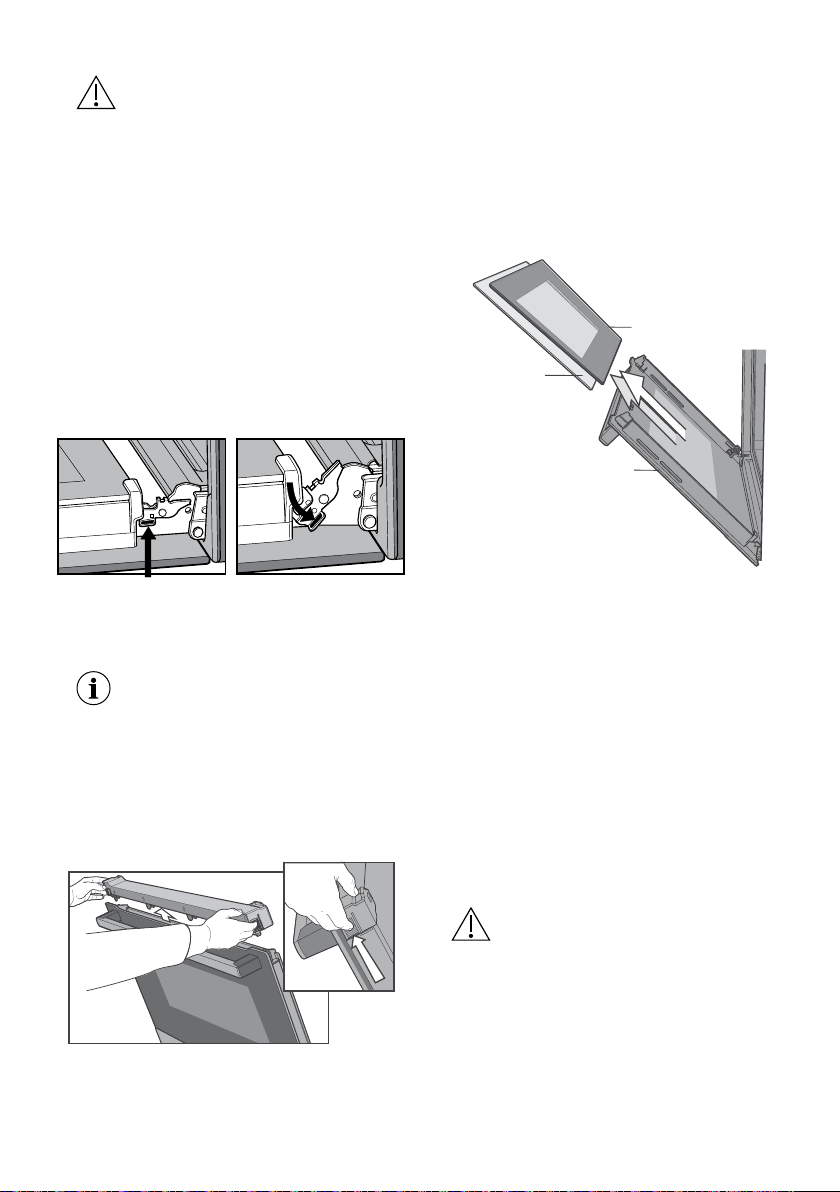
• Push down the hinge locking tab on both
hinges.
Locking tab up - normal position Locking tab down - for cleaning
Inner Glass
Middle Glass x 2
Outside_
Light glass can be removed
- turn anti-clockwise
• Gently close the door until it stops in the
partially open position on the locking tab.
NOTE: The door cannot fully close
with the locking tab in this down
position.
Removing the top door trim
• Push in the 2 tabs on either side of
the trim.
• Lift the trim away from the door.
Locking tab up - normal position Locking tab down - for cleaning
Inner Glass
Middle Glass x 2
Outside_
Light glass can be removed
- turn anti-clockwise
Removing the glass panes
• Remove the inner glass and middle
glass layers from the door.
• Clean the glass using detergent and
warm water. Wipe clean and dry
thoroughly.
• The outside glass cannot be removed
from the door and hence can be
cleaned in-situ.
Locking tab up - normal position Locking tab down - for cleaning
Inner Glass
Middle Glass x 2
Outside_
Light glass can be removed
- turn anti-clockwise
Reassembling the glass panes and
top door trim
• Replace the middle glass back to the
door rst. The middle glass is a clear
pane and orientation of the glass is not
important.
• Replace the inner glass next ensuring the
side that is painted is facing away from
the oven cavity.
• Replace the top door trim ensuring
the 2 side tabs have clipped into the
column.
• Pull the hinge locking tabs back up and
close the door.
WARNING! Make sure that the
glasses are inserted in the correct
position otherwise the surface
of the door may overheat.
English
38
13.5 Changing the light
globes
• Switch the appliance off at the isolation
switch before attempting to change the
light globe.
• There are 2 light globes located in the
top of the oven cavity towards the rear.
• To get access to the globes, rstly drop
the element down as explained under
‘Releasing the grill element’ topic.
• To remove, turn oven light glass anti-
clockwise.
• A special high temperature resistant
borosilicate globe should be used.
This can be purchased from the
Customer Care Centre.
Locking tab up - normal position Locking tab down - for cleaning
Inner Glass
Middle Glass x 2
Outside_
Light glass can be removed
- turn anti-clockwise
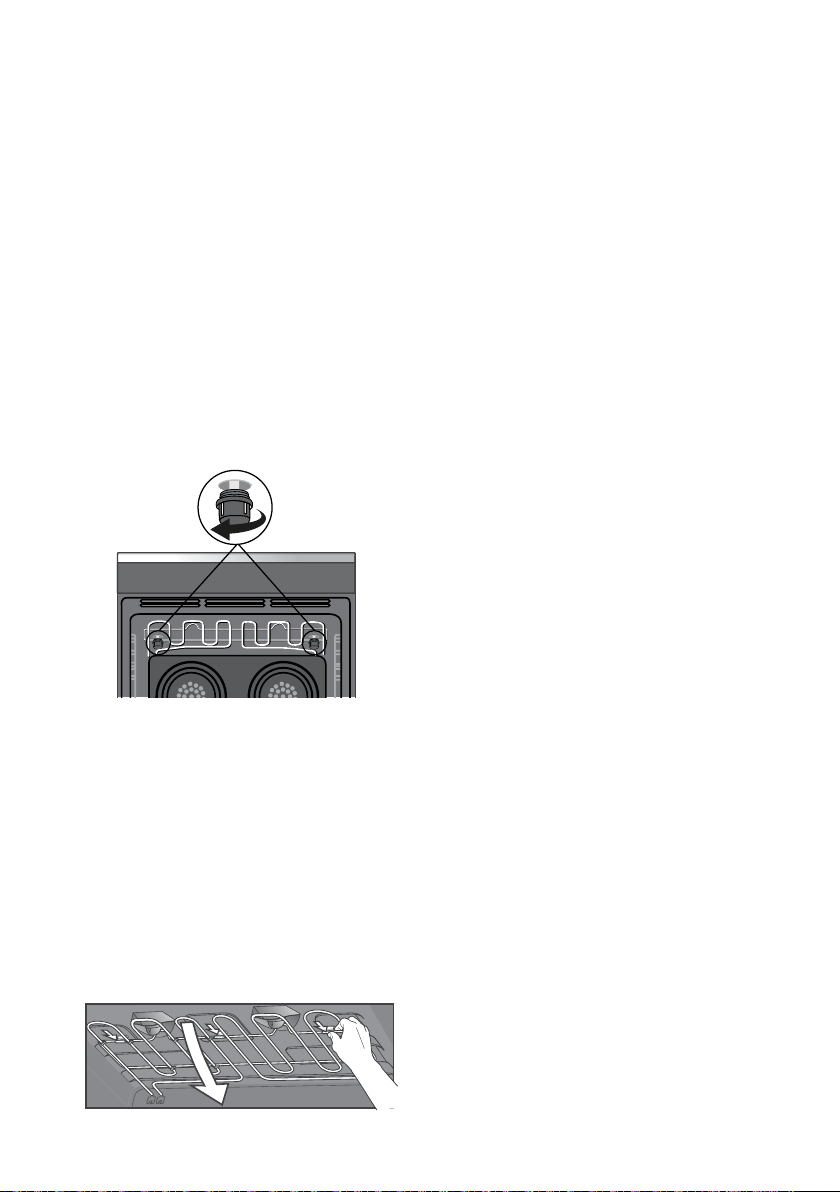
13.6 Releasing the grill
element
To release the grill element so that
the oven roof can be accessed for
cleaning.
• Push element upwards and rotate the
3 clips backwards and away from the
element rod. This will allow the front of
the element to drop down.

English
39
14. TROUBLESHOOTING
WARNING! Refer to Safety chapters.
14.1 What to do if...
Problem Possible cause Remedy
You cannot activate or
operate the oven.
The oven is not connected
to an electrical supply or it is
connected incorrectly.
Check if the oven is correctly connected to
the electrical supply (refer to the connection
diagram if available).
The oven does not heat up.
The oven is deactivated.
Activate the oven.
The oven does not heat up.
The clock is not set.
Set the clock.
The oven does not heat up.
The necessary settings are not set.
Make sure that the settings are correct.
The oven does not heat up.
The automatic switch-off is
activated.
Refer to “Automatic switchoff”.
The oven does not heat up.
The Child Lock is on.
Refer to “Using the Child Lock”.
The oven does not heat up.
The door is not closed correctly.
Fully close the door.
The oven does not heat up.
The fuse is blown.
Make sure that the fuse is the cause of the
malfunction. If the fuse is blown again
and again, contact a qualied electrician.
The lamp does not operate.
The lamp is defective.
Replace the lamp.
The display shows F111.
The plug of the core temperature
sensor is not correctly installed into
the socket.
Put the plug of the core temperature
sensor as far as possible into the socket.
The display shows an error
code that is not in this table.
There is an electrical fault.
• Deactivate the oven with the house fuse
or the safety switch in the fuse box and
activate it again.
• If the display shows the error code again,
contact the Customer Care Department.
Steam and condensation
settle on the food and in the
cavity of the oven.
You left the dish in the oven for
too long.
Do not leave the dishes in the oven for
longer than 15 - 20 minutes after the cooking
process ends.
The appliance is activated
and does not heat up.
Thefan does not operate.
The display shows “Demo”.
The demo mode is activated.
Refer to “Basic Settings” in “Daily use”
chapter.
14.2 Service data
If you cannot nd a solution to the
problem yourself, contact your dealer
or an Authorised Service Centre.
The necessary data for the service centre
is on the rating plate. The rating plate is
on the front frame of the appliance cavity.
Do not remove the rating plate from the
appliance cavity.
We recommend that you write the data here:
Model (MOD.)
........................................................................................................................................
Product number (PNC)
........................................................................................................................................
Serial number (S.N.)
........................................................................................................................................
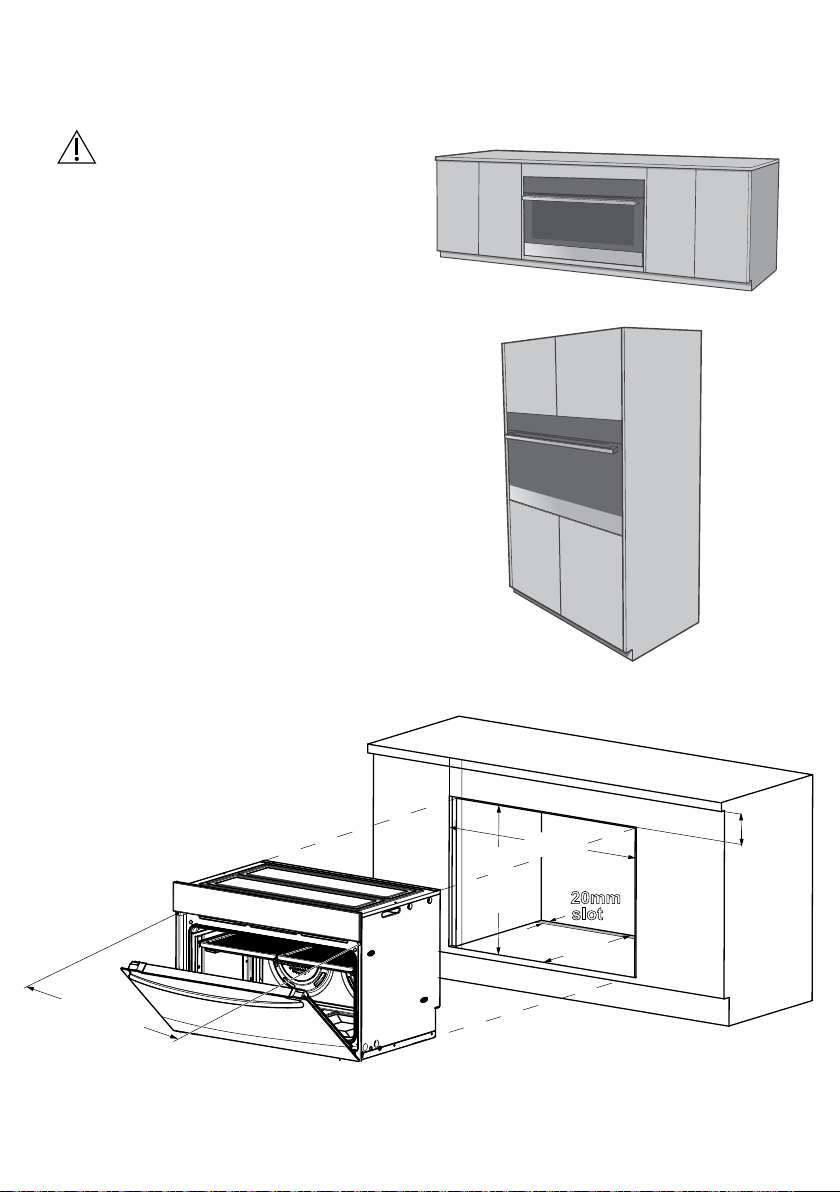
English
40
15. INSTALLATION
WARNING! Refer to
Safety chapters.
Underbench installation
Your underbench oven looks best
when the control panel is directly
under the benchtop. An upper inll
panel may be added if the cooktop
placed above the benchtop is too
deep. *Refer to cooktop installation
instructions for required clearance
between cooktop and oven.
Vertical cabinet installation
The oven can be built into a vertical
cabinet in the same manner as an
underbench. The required cavity
dimensions are the same and the
product is secured to the cabinet in
the same way.
NOTE: If a powerpoint is fitted it must be accessible with the
appliance installed.
900mm
600mm
580mm
*Refer to cooktop installation instructions
for required clearance between cooktop and oven.
20mm
slot
100mm max
*20mm
see note
below
876mm
Mounting holes
(Infill panel)
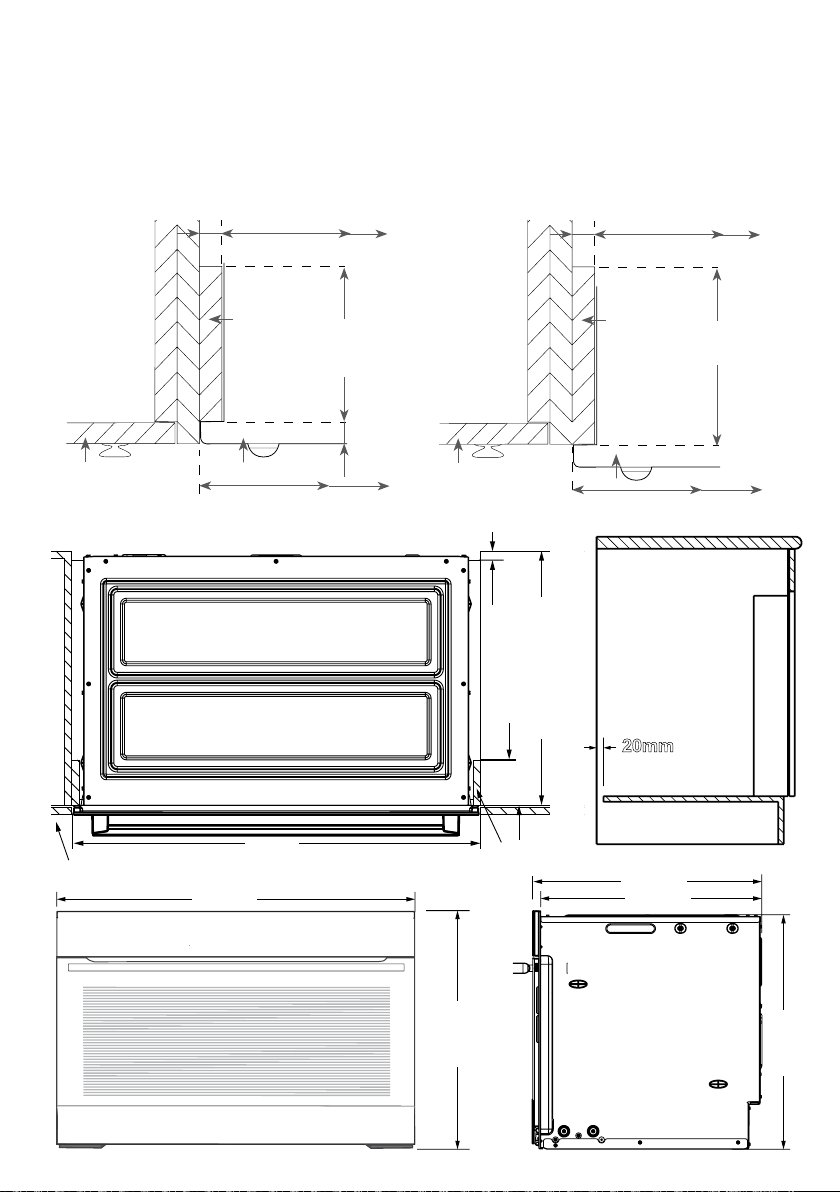
www.aegaustralia.com.au
|
www.aegnewzealand.co.nz
41
Cabinet construction for built in oven
For the best integration within a kitchen,
install this appliance in a cupboard that gives
a ush t with the surrounding cupboard
fronts. A recess of 20mm is ideal.
NOTE: Your appliance must be mounted on a horizontal
surface for the full width and depth of the product.
NOTE: A ventilation slot 20mm wide is required
at the rear of the base of the cabinet oor.
42 electrolux.com.au
Oven dimensions
895mm
596mm
586mm
552mm
572mm
20mm
900mm
580mm minimum
Infill panel
cupboard door
100mm
max.
20mm
(see NOTE)
Fig. A
Flush Fit
900mm
20mm
Infill
panel
Cupboard
door
Oven
100mm max
for Pyro oven
Fig. B
Proud Fit
900mm
868 mm868 mm
Infill
panel
Cupboard
door
Oven
100mm max
for Pyro oven
16mm
16mm
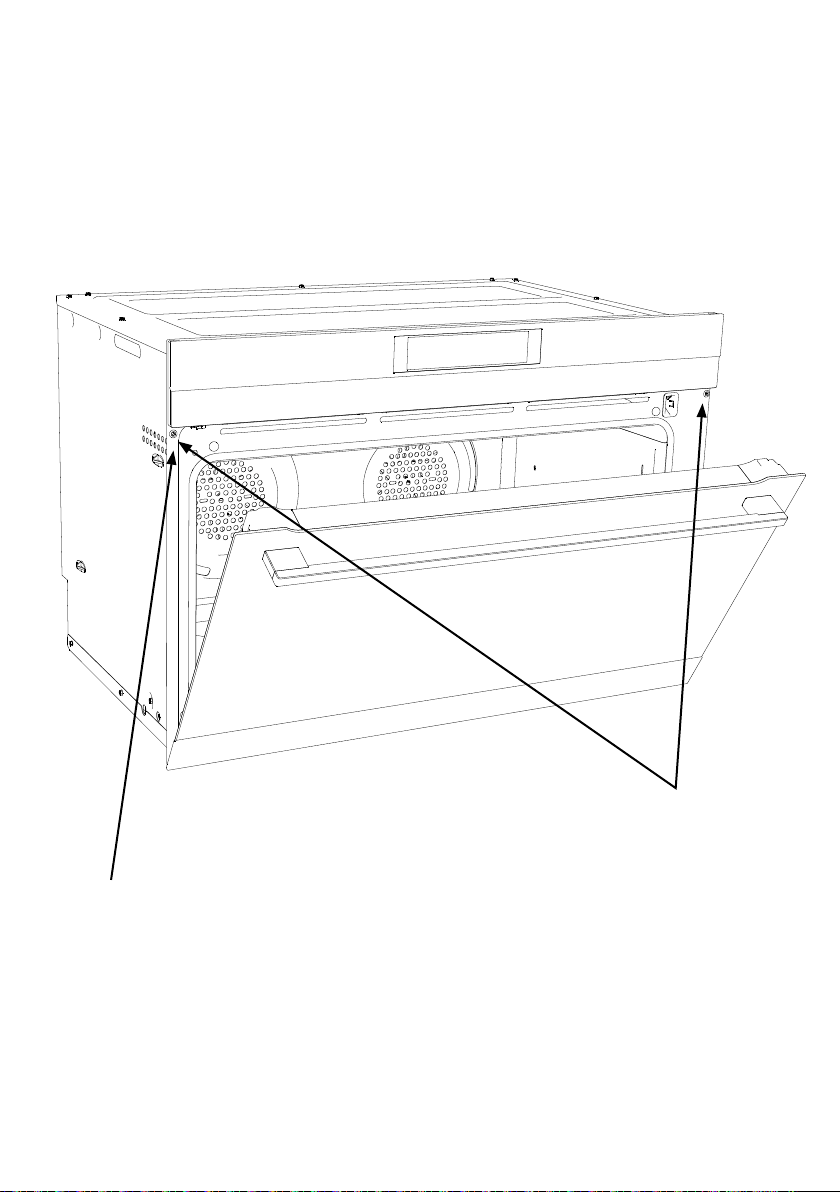
www.aegaustralia.com.au
|
www.aegnewzealand.co.nz
42
To prevent tipping, use the screws supplied to secure
your oven into the cupboard. Use just 2 screws for
underbench oven installation.
Mounting holes
Use long black installation screws
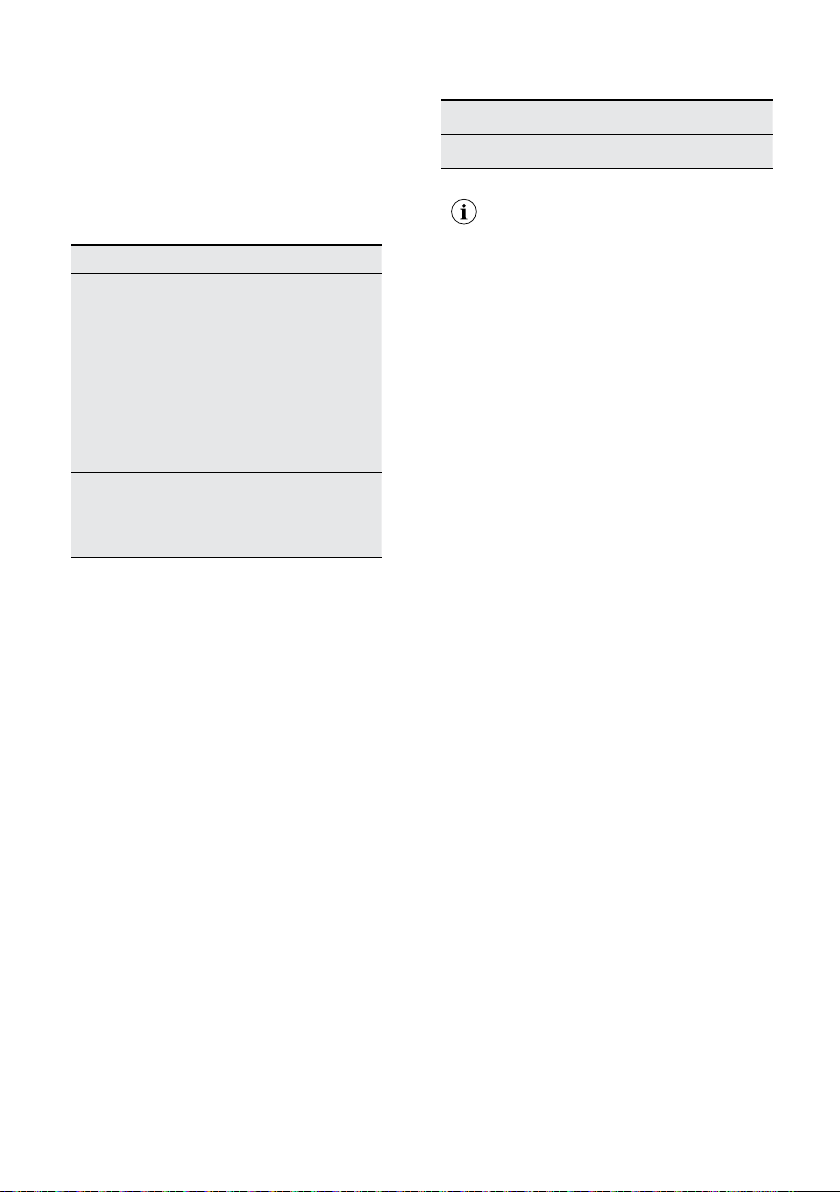
English
43
WIRING REQUIREMENTS
The cooker MUST be installed in
compliance with:
• Wiring connections in AS/NZS 3000
Wiring Rules.
• Local regulations, municipal building
codes and other statutory regulations.
For New Zealand Only:
The cooking range must be connected to
the supply by a supply cord tted with the
appropriately rated plug. This plug is to be
compatible with the socket-outlet tted to
the nal sub-circuit in the xed wiring that
is intended to supply this cooking range.
Supply cord size required
BPK722910M - 4mm2
Data plate gives information
about rating is located
behind the bottom of
the oven door
• Disconnection in the xed wiring must
occur in accordance with the AS/
NZS3000 wiring rule.
• The cooker requires a means of all pole
disconnection incorporated into the xed
wiring. This MUST have a disconnection
gap of 3mm.
• The cooker MUST be properly earthed.
• This oven must be connected with cable
of 75°C rating minimum.
• This product has passed the insulation
resistance test after manufacture. If the
resistance reading is low at installation,
it is probably caused by moisture from
the atmosphere being absorbed by
the elements after the range has been
produced. (Pass at 0.01 MW AS/NZS
3000 Wiring Rules Clause 8.3.6.2).
NOTE: When connections are made to a multi-phase
230/240V supply, the bridge piece MUST be
removed from between the active connections.
Rated Power Input
Model Total kW
BPK722910M 5.5
IMPORTANT!
Before you cook in your new oven
it is important that the protective oils
used in the manufacture of the product
be removed.
• Make sure that the room is well
ventilated (to allow smoke to escape).
• Run the grill on high for 30 minutes
without grill dish.
• Then run the oven on 220°C for 1 hour.
Connecting to services and
commissioning
This appliance must be installed by an
authorised person, according to all codes
and regulations of:
• Electrical supply authorities.
• Building regulations.
• Local government and council
authorities.
• AS/NZS 3000 (particular attention to
clause 4.3.11 and clause 3.9).
Hard wiring detail
1. Remove terminal cover plate from rear
panel of appliance.
2. Fit wires through hole in cover plate and
make connections to terminals.
3. Engage wires into plastic clip. Secure
plastic clip with two long silver screws
(supplied in separate bag).
4. Replace cover plate onto rear panel.
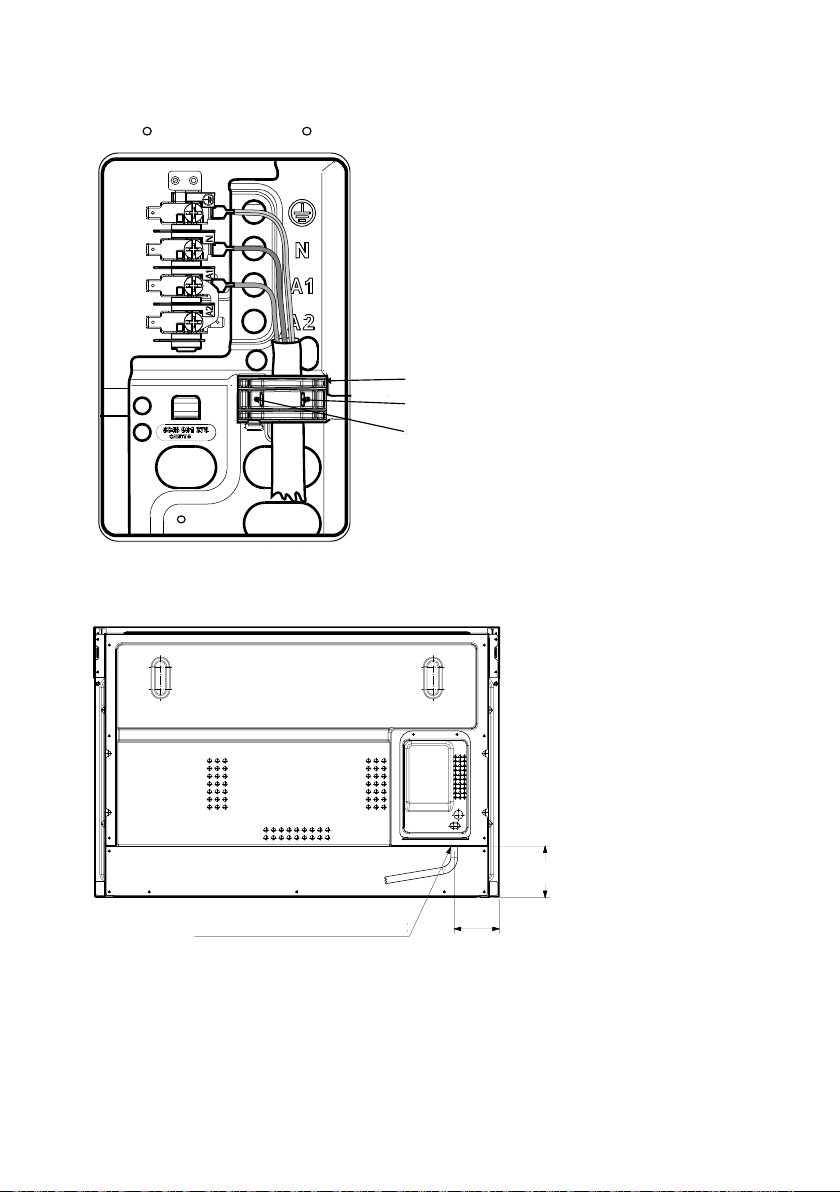
www.aegaustralia.com.au
|
www.aegnewzealand.co.nz
44
Securing points
Plastic clips
Plastic clip
Electrical connection location
- Model EVEP916SB
Entry point of electrical cable
99
113
Securing points
Plastic clips
Plastic clip
Electrical connection location
- Model EVEP916SB
Entry point of electrical cable
99
113

English
45
16. ENERGY SAVING
The oven contains features
which help you save energy
during everyday cooking.
General hints
Make sure that the oven door is closed
properly when the appliance operates.
Do not open the door too often during
cooking. Keep the door gasket clean and
make sure it is well xed in its position.
Use metal dishes to improve energy
saving. When possible, do not preheat
the ovenbefore you put the food inside.
When the cooking duration is longer than
30 minutes, reduce the oven temperature
to minimum 3 - 10 minutes before the
end of the cooking time, depending on
the duration of the cooking. The residual
heat inside the oven will continue to
cook.Use the residual heat to warm up
other dishes. Keep breaks between
baking as short as possible when you
prepare few dishes at one time.
Residual heat
If a programme with the Duration or
End Time selection is activated and the
cooking time is longer than 30 minutes,
the heating elements automatically
deactivate earlier in some oven functions.
The fan and lamp continue to operate.
Keep food warm
Choose the lowest possible temperature
setting to use residual heat and keep a
meal warm. The residual heat indicator
or temperature appears on the display.
Cooking with the lamp off
Turn off the lamp during cooking. Turn it
on only when you need it.
Moist Fan Baking
Function designed to save energy during
cooking. It operates in such a way that
the temperature in the oven cavity may
differ from the temperature indicated on
the display during a cooking cycle and
cooking times may be different from the
cooking times in other programmes.
When you use Moist Fan Baking, the
lamp automatically turns off after 30
seconds. You may turn on the lamp again
but this action will reduce the expected
energy savings.
English
46
17. WARRANTY
This document sets out the terms and conditions of the product warranties for
AEG Appliances. It is an important document. Please keep it with your proof
of purchase documents in a safe place for future reference should there be a
manufacturing defect in your Appliance. This warranty is in addition to other
rights you may have under the Australian Consumer Law.
1. In this warranty:
(a) ‘ACL’ or ‘Australian Consumer Law’ means Schedule 2 to the Competition and
Consumer Act 2010;
(b) ‘Appliance’ means any Electrolux product purchased by you and accompanied
by this document;
(c) ‘ASC’ means Electrolux’s authorised serviced centres;
(d) ‘AEG’ is the brand controlled by Electrolux Home Products Pty Ltd of 163
O’Riordan Street, Mascot NSW 2020, ABN 51 004 762 341 in respect of
Appliances purchased in Australia and Electrolux (NZ) Limited (collectively
“Electrolux”) of 3-5 Niall Burgess Road, Mount Wellington, in respect of
Appliances purchased in New Zealand;
(e) ‘Warranty Period’ means the period specified in clause 3 of this warranty;
(f) ‘you’ means the purchaser of the Appliance not having purchased the
Appliance for re-sale, and ‘your’ has a corresponding meaning.
2. Application: This warranty only applies to new Appliances, purchased and used
in Australia or New Zealand and is in addition to (and does not exclude, restrict, or
modify in any way) other rights and remedies under a law to which the Appliances
or services relate, including any non-excludable statutory guarantees in Australia
and New Zealand.
3. Warranty Period: Subject to these terms and conditions, this warranty continues
for in Australia for a period of 60 months and in New Zealand for a period of 60
months, following the date of original purchase of the Appliance.
4. Repair or replace warranty: During the Warranty Period, Electrolux or its ASC
will, at no extra charge if your Appliance is readily accessible for service, without
special equipment and subject to these terms and conditions, repair or replace
any parts which it considers to be defective. Electrolux may, in its absolute
discretion, choose whether the remedy oered for a valid warranty claim is repair
or replacement. Electrolux or its ASC may use refurbished parts to repair your
Appliance. You agree that any replaced Appliances or parts become the property
of Electrolux.
5. Travel and transportation costs: Subject to clause 7, Electrolux will bear the
reasonable cost of transportation, travel and delivery of the Appliance to and from
Electrolux or its ASC. Travel and transportation will be arranged by Electrolux as
part of any valid warranty claim.
6. Proof of purchase is required before you can make a claim under this warranty.
7. Exclusions: You may not make a claim under this warranty unless the defect claimed
is due to faulty or defective parts or workmanship. This warranty does not cover:
(a) light globes, batteries, filters or similar perishable parts;
(b) parts and Appliances not supplied by Electrolux;
(c) cosmetic damage which does not aect the operation of the Appliance;
(d) damage to the Appliance caused by:
(i) negligence or accident;
(ii) misuse or abuse, including failure to properly maintain or service;
(iii) improper, negligent or faulty servicing or repair works done by
anyone other than an Electrolux authorised repairer or ASC;
(iv) normal wear and tear;
(v) power surges, electrical storm damage or incorrect power supply;
(vi) incomplete or improper installation;
(vii) incorrect, improper or inappropriate operation;
(viii) insect or vermin infestation;
(ix) failure to comply with any additional instructions supplied with
the Appliance;
In addition, Electrolux is not liable under this warranty if:
(a) the Appliance has been, or Electrolux reasonably believes that the Appliance
has been, used for purposes other than those for which the Appliance was
intended, including where the Appliance has
been used for any non-domestic purpose;
(b) the Appliance is modified without authority from Electrolux in writing;
(c) the Appliance’s serial number or warranty seal has been removed
or defaced.
8. How to claim under this warranty: To enquire about claiming under this warranty,
please follow these steps:
(a) carefully check the operating instructions, user manual and the terms of
this warranty;
(b) have the model and serial number of the Appliance available;
(c) have the proof of purchase (e.g. an invoice) available;
(d) telephone the numbers shown below.
9. Australia: For Appliances and services provided by Electrolux in Australia: Electrolux
goods come with guarantees that cannot be excluded under the Australian
Consumer Law. You are entitled to a replacement or refund for a major failure and
for compensation for any other reasonably foreseeable loss or damage. You are also
entitled to have the Appliance repaired or replaced if the Appliance fails to be of
acceptable quality and the failure does not amount to a major failure. ‘Acceptable
quality’ and ‘major failure’ have the same meaning as referred to in the ACL.
10. New Zealand: For Appliances and services provided by Electrolux in New
Zealand, the Appliances come with a guarantee by Electrolux pursuant to the
provisions of the Consumer Guarantees Act, the Sale of Goods Act and the Fair
Trading Act. Where the Appliance was purchased in New Zealand for commercial
purposes the Consumer Guarantee Act does not apply.
11. Confidentiality: You accept that if you make a warranty claim, Electrolux and
its agents including ASC may exchange information in relation to you to enable
Electrolux to meet its obligations under this warranty.
Warranty
FOR SALES IN AUSTRALIA AND NEW ZEALAND
ALL AEG BRANDED APPLIANCES
Important Notice
Before calling for service, please ensure that the steps listed in clause 8 above have been followed.
FOR SERVICE
or to find the address of your nearest
authorised service centre in Australia
PLEASE CALL 1300 363 664
OR EMAIL
customercare@aegaustralia.com.au
For the cost of a local call (Australia only)
SERVICE AUSTRALIA
aeg.com/au
FOR SPARE PARTS
or to find the address of your nearest
spare parts centre in Australia
PLEASE CALL 13 13 50
OR EMAIL
customercare@aegaustralia.com.au
For the cost of a local call (Australia only)
FOR SERVICE
or to find the address of your nearest
authorised service centre in New Zealand
PLEASE CALL 0800 234 234
OR EMAIL customercare@electrolux.co.nz
(New Zealand only)
SERVICE NEW ZEALAND
aegnewzealand.co.nz
FOR SPARE PARTS
or to find the address of your nearest
spare parts centre in New Zealand
PLEASE CALL 0800 10 66 20
OR EMAIL customercare@electrolux.co.nz
(New Zealand only)
AEG_Warr_May17
This document sets out the terms and conditions of the product warranties for
AEG Appliances. It is an important document. Please keep it with your proof
of purchase documents in a safe place for future reference should there be a
manufacturing defect in your Appliance. This warranty is in addition to other
rights you may have under the Australian Consumer Law.
1. In this warranty:
(a) ‘ACL’ or ‘Australian Consumer Law’ means Schedule 2 to the Competition and
Consumer Act 2010;
(b) ‘Appliance’ means any Electrolux product purchased by you and accompanied
by this document;
(c) ‘ASC’ means Electrolux’s authorised serviced centres;
(d) ‘AEG’ is the brand controlled by Electrolux Home Products Pty Ltd of 163
O’Riordan Street, Mascot NSW 2020, ABN 51 004 762 341 in respect of
Appliances purchased in Australia and Electrolux (NZ) Limited (collectively
“Electrolux”) of 3-5 Niall Burgess Road, Mount Wellington, in respect of
Appliances purchased in New Zealand;
(e) ‘Warranty Period’ means the period specified in clause 3 of this warranty;
(f) ‘you’ means the purchaser of the Appliance not having purchased the
Appliance for re-sale, and ‘your’ has a corresponding meaning.
2. Application: This warranty only applies to new Appliances, purchased and used
in Australia or New Zealand and is in addition to (and does not exclude, restrict, or
modify in any way) other rights and remedies under a law to which the Appliances
or services relate, including any non-excludable statutory guarantees in Australia
and New Zealand.
3. Warranty Period: Subject to these terms and conditions, this warranty continues
for in Australia for a period of 60 months and in New Zealand for a period of 60
months, following the date of original purchase of the Appliance.
4. Repair or replace warranty: During the Warranty Period, Electrolux or its ASC
will, at no extra charge if your Appliance is readily accessible for service, without
special equipment and subject to these terms and conditions, repair or replace
any parts which it considers to be defective. Electrolux may, in its absolute
discretion, choose whether the remedy oered for a valid warranty claim is repair
or replacement. Electrolux or its ASC may use refurbished parts to repair your
Appliance. You agree that any replaced Appliances or parts become the property
of Electrolux.
5. Travel and transportation costs: Subject to clause 7, Electrolux will bear the
reasonable cost of transportation, travel and delivery of the Appliance to and from
Electrolux or its ASC. Travel and transportation will be arranged by Electrolux as
part of any valid warranty claim.
6. Proof of purchase is required before you can make a claim under this warranty.
7. Exclusions: You may not make a claim under this warranty unless the defect claimed
is due to faulty or defective parts or workmanship. This warranty does not cover:
(a) light globes, batteries, filters or similar perishable parts;
(b) parts and Appliances not supplied by Electrolux;
(c) cosmetic damage which does not aect the operation of the Appliance;
(d) damage to the Appliance caused by:
(i) negligence or accident;
(ii) misuse or abuse, including failure to properly maintain or service;
(iii) improper, negligent or faulty servicing or repair works done by
anyone other than an Electrolux authorised repairer or ASC;
(iv) normal wear and tear;
(v) power surges, electrical storm damage or incorrect power supply;
(vi) incomplete or improper installation;
(vii) incorrect, improper or inappropriate operation;
(viii) insect or vermin infestation;
(ix) failure to comply with any additional instructions supplied with
the Appliance;
In addition, Electrolux is not liable under this warranty if:
(a) the Appliance has been, or Electrolux reasonably believes that the Appliance
has been, used for purposes other than those for which the Appliance was
intended, including where the Appliance has
been used for any non-domestic purpose;
(b) the Appliance is modified without authority from Electrolux in writing;
(c) the Appliance’s serial number or warranty seal has been removed
or defaced.
8. How to claim under this warranty: To enquire about claiming under this warranty,
please follow these steps:
(a) carefully check the operating instructions, user manual and the terms of
this warranty;
(b) have the model and serial number of the Appliance available;
(c) have the proof of purchase (e.g. an invoice) available;
(d) telephone the numbers shown below.
9. Australia: For Appliances and services provided by Electrolux in Australia: Electrolux
goods come with guarantees that cannot be excluded under the Australian
Consumer Law. You are entitled to a replacement or refund for a major failure and
for compensation for any other reasonably foreseeable loss or damage. You are also
entitled to have the Appliance repaired or replaced if the Appliance fails to be of
acceptable quality and the failure does not amount to a major failure. ‘Acceptable
quality’ and ‘major failure’ have the same meaning as referred to in the ACL.
10. New Zealand: For Appliances and services provided by Electrolux in New
Zealand, the Appliances come with a guarantee by Electrolux pursuant to the
provisions of the Consumer Guarantees Act, the Sale of Goods Act and the Fair
Trading Act. Where the Appliance was purchased in New Zealand for commercial
purposes the Consumer Guarantee Act does not apply.
11. Confidentiality: You accept that if you make a warranty claim, Electrolux and
its agents including ASC may exchange information in relation to you to enable
Electrolux to meet its obligations under this warranty.
Warranty
FOR SALES IN AUSTRALIA AND NEW ZEALAND
ALL AEG BRANDED APPLIANCES
Important Notice
Before calling for service, please ensure that the steps listed in clause 8 above have been followed.
FOR SERVICE
or to find the address of your nearest
authorised service centre in Australia
PLEASE CALL 1300 363 664
OR EMAIL
For the cost of a local call (Australia only)
SERVICE AUSTRALIA
aeg.com/au
FOR SPARE PARTS
or to find the address of your nearest
spare parts centre in Australia
PLEASE CALL 13 13 50
OR EMAIL
For the cost of a local call (Australia only)
FOR SERVICE
or to find the address of your nearest
authorised service centre in New Zealand
PLEASE CALL 0800 234 234
OR EMAIL [email protected]
(New Zealand only)
SERVICE NEW ZEALAND
aegnewzealand.co.nz
FOR SPARE PARTS
or to find the address of your nearest
spare parts centre in New Zealand
PLEASE CALL 0800 10 66 20
OR EMAIL [email protected]
(New Zealand only)
AEG_Warr_May17

www.aegaustralia.com.au
|
www.aegnewzealand.co.nz
47
AEG SERVICE AUSTRALIA
www.aegaustralia.com.au
FOR SERVICE
or to nd the address of your nearest state service centre in Australia
PLEASE CALL 1300 363 664
OR EMAIL [email protected]
For the cost of a local call (Australia only)
FOR SPARE PARTS
or to nd the address of your nearest state spare parts centre in Australia
PLEASE CALL 13 13 50
OR EMAIL [email protected]
For the cost of a local call (Australia only)
AEG SERVICE NEW ZEALAND
www.aegnewzealand.co.nz
FOR SERVICE
or to nd the address of your nearest state service centre in New Zealand
FREE CALL 0800 10 66 10
OR EMAIL [email protected]
(New Zealand only)
FOR SPARE PARTS
or to nd the address of your nearest state spare parts centre in Australia
FREE CALL 0800 10 66 20
OR EMAIL [email protected]
(New Zealand only)
Recycle the materials with the symbol
. Put the packaging in applicable
containers to recycle it. Help protect the
environment and human health and to
recycle waste of electrical and electronic
appliances. Do not dispose appliances
marked with the symbol
with the
household waste. Return the product to
your local recycling facility or contact
your municipal ofce.
18. ENVIRONMENTAL CONCERNS
www.aeg.com/au
867336735-A-202017
© 2017 Electrolux Home Products Pty Ltd
ABN 51 004 762 341
P/No: A12345101 Rev 001 ECN 086520
AMAN_90cmPyro_Nov17
www.aegaustralia.com.au
www.aegnewzealand.co.nz
