USER
MANUAL
EN User Manual
Washing Machine
LF8C8412A

CONTENTS
1. SAFETY INFORMATION.............................................................................................3
2. SAFETY INSTRUCTIONS.............................................................................................5
3. PRODUCT DESCRIPTION...........................................................................................6
4. TECHNICAL DATA...................................................................................................... 7
5. INSTALLATION............................................................................................................8
6. CONTROL PANEL..................................................................................................... 12
7. DIAL AND BUTTONS................................................................................................14
8.
PROGRAMS..........................................................................................................17
9. BEFORE FIRST USE................................................................................................... 21
10. SETTINGS................................................................................................................ 21
11. DAILY USE................................................................................................................22
12. HINTS AND TIPS..................................................................................................... 27
13. CARE AND CLEANING.......................................................................................... 29
14. TROUBLESHOOTING.............................................................................................34
15. ACCESSORIES.........................................................................................................38
16. WARRANTY .............................................................................................................39
IMPORTANT INFORMATION THAT MAY IMPACT
YOUR MANUFACTURER'S WARRANTY
Adherence to the directions for use in this manual is extremely important for
health and safety. Failure to strictly adhere to the requirements in this manual
may result in personal injury, property damage and affect your ability to make a
claim under the AEG manufacturer’s warranty provided with your product.
Products must be used, installed and operated in accordance with this manual.
You may not be able to claim on the AEG manufacturer’s warranty in the event
that your product fault is due to failure to adhere to this manual.
FOR PERFECT RESULTS
Thank you for choosing this AEG product. We have created it to give you
impeccable performance for many years, with innovative technologies that help
make life simpler features you might not find on ordinary appliances. Please
spend a few minutes reading to get the very best from it.
Visit our website for:
Get usage advice, brochures, trouble shooter, service information:
www.aeg.com
Register your product for better service:
www.registeraeg.com
CUSTOMER CARE AND SERVICE
Always use original spare parts.
When contacting our Authorised Service Centre, ensure that you have the
following data available: Model, PNC, Serial Number.
The information can be found on the rating plate.
Warning / Caution-Safety information
www.aeg.com2

General information and tips
Environmental information
Subject to change without notice.
1. SAFETY INFORMATION
Before the installation and use of the appliance,
carefully read the supplied instructions. The
manufacturer is not responsible for any injuries or
damage that are the result of incorrect installation or
usage. Always keep the instructions in a safe and
accessible location for future reference.
1.1 Children and vulnerable people safety
• This appliance can be used by children aged from 8
years and above and persons with reduced physical,
sensory or mental capabilities or lack of experience
and knowledge if they have been given supervision or
instruction concerning the use of the appliance in a
safe way and understand the hazards involved.
• Children between 3 and 8 years of age and persons
with very extensive and complex disabilities shall be
kept away from the appliance unless continuously
supervised.
• Children of less than 3 years of age should be kept
away from the appliance unless continuously
supervised.
• Do not let children play with the appliance.
• Keep all packaging away from children and dispose of
it appropriately.
• Keep detergents away from children.
• Keep children and pets away from the appliance when
the door is open.
• If the appliance has a child safety device, it should be
activated.
• Children shall not carry out cleaning and user
maintenance of the appliance without supervision.
ENGLISH
3

1.2
General Safety
• Do not change the specification of this appliance.
• This appliance is intended to be used in household
and similar applications such as:
– staff kitchen areas in shops, offices and other
working environments;
– farm houses;
– by clients in hotels, motels, bed & breakfast and
other residential type environments;
– areas for communal use in blocks of flats or in
launderettes.
• Do not exceed the maximum load of 8 kg (refer to the
"Program chart" chapter).
• The operating water pressure at the water entry point
from the outlet connection must be between 0.5 bar
(0.05 MPa) and 8 bar (0.8 MPa).
• The ventilation opening in the base must not be
covered by a carpet, mat, or any floor covering.
• The appliance must be connected to the water mains
using the new supplied hose sets, or other new hose
sets supplied by the Authorised Service Centre.
• Old hose sets must not be reused.
• If the mains power supply cable is damaged, it must
be replaced by the manufacturer, its Authorised
Service Centre or similarly qualified persons to avoid
an electrical hazard.
• Before any maintenance operation, deactivate the
appliance and disconnect the mains plug from the
socket.
• Do not use high pressure water sprays and/or steam
to clean the appliance.
• Clean the appliance with a moist cloth. Use only
neutral detergents. Do not use abrasive products,
abrasive cleaning pads, solvents or metal objects.
www.aeg.com4
2. SAFETY INSTRUCTIONS
2.1 Installation
The installation must comply
with relevant national
regulations.
• Remove all the packaging and the
transit bolts.
•
Keep the transit bolts in a safe place.
If the appliance is to be moved in the
future they must be reattached to lock
the drum to prevent an internal
damage.
• Always take care when moving the
appliance as it is heavy. Always use
safety gloves and enclosed footwear.
• Follow the installation instructions
supplied with the appliance.
• Do not install or use a damaged
appliance.
• Do not install or use the appliance
where the temperature can be less
than 0°C or where it is exposed to the
weather.
• The floor area on which the appliance
is to be installed must be flat, stable,
heat resistant and clean.
• Make sure that there is air circulation
between the appliance and the floor.
• Do not install the appliance directly
above a floor drain.
• Adjust the feet to have the necessary
space between the appliance and the
flooring.
• Do not install the appliance where the
appliance door cannot be fully
opened.
• Do not put a container to collect
possible water leakage under the
appliance. Contact the Authorised
Service Centre to ensure which
accessories can be used.
2.2 Electrical connection
WARNING!
Risk of fire and electric
shock.
• The appliance must be earthed.
•
Always use a correctly installed
shockproof socket.
• Make sure that the parameters on the
rating plate are compatible with the
electrical ratings of the mains power
supply.
•
Do not use multi-plug adapters and
extension cables.
• Make sure not to cause damage to
the mains plug and to the mains
cable. Should the mains cable need
to be replaced, this must be carried
out by our Authorised Service Centre.
• Connect the mains plug to the mains
socket only at the end of the
installation. Make sure that there is
access to the mains plug after the
installation.
• Do not touch the mains cable or the
mains plug with wet hands.
• Do not pull the mains cable to
disconnect the appliance. Always pull
the mains plug.
2.3 Water connection
• Do not cause damage to the water
hoses.
•
Before connection to new pipes,
pipes not used for a long time, where
repair work has been carried out or
new devices fitted (water meters,
etc.), let the water flow until it is clean
and clear.
• Ensure that there are no visible water
leaks during and after the first use of
the appliance.
• Do not use an extension hose if the
inlet hose is too short. Contact the
Authorised Service Centre for the
replacement of the inlet hose.
• When unpacking the appliance, It is
possible to see water flowing from the
drain hose. This is due to the testing
of the appliance with the use of water
in the factory.
• You can extend the drain hose to
maximum 400 cm. Contact the
Authorised Service Centre for the
other drain hose and the extension.
• Make sure that there is access to the
tap after the installation.
ENGLISH 5
2.4 Use
WARNING!
Risk of injury, electric shock,
fire, burns or damage to the
appliance.
• Follow the safety instructions on the
detergent packaging.
• Do not put flammable products or
items that are wet with flammable
products in, near or on the appliance.
• Do not wash fabrics which are heavily
soiled with oil, grease or other greasy
substances. It can damage rubber
parts of the washing machine.
Prewash such fabrics by hand before
loading them into the washing
machine.
• Do not touch the glass door while a
program operates. The glass can get
hot.
• Make sure that all metal objects are
removed from the laundry.
2.5
Service
•
To repair the appliance contact the
Authorised Service Centre.
• Use original spare parts only.
2.6 Disposal
WARNING!
Risk of injury or suffocation.
• Disconnect the appliance from the
mains electrical and water supplies.
• Cut off the mains electrical cable
close to the appliance and dispose of
it.
• Remove the door catch to prevent
children or pets from becoming
trapped in the drum.
• Dispose of the appliance in
accordance with local requirements
for the disposal of Waste Electrical
and Electronic Equipment (WEEE).
3. PRODUCT DESCRIPTION
3.1 Special features
Your new washing machine meets all
modern requirements for an effective
treatment of laundry with low water,
energy and detergent consumption and
proper care of fabric.
• The Oko-Mix technology has been
designed to protect the fabric fibres
thanks to different pre-mixing phases
that dissolves first the detergent and
then fabric softener in the water
before they are distributed in the
laundry. So every fibre is reached and
cared for.
• The ProSense technology detects the
laundry load size defining the
program duration in 30 seconds. The
washing program is tailored to the
laundry load and the type of fabric
without consuming more time, energy
and water than necessary.
• The steam has a quick and easy way to
refresh the clothes. The gentle steam
programs remove odours and reduce
creases in dry fabrics so they need
little ironing.
The Plus Steam option, finishes every
cycle with gentle steam that relaxes
the fibres and reduces fabric creasing.
Ironing will be easier!
• The Stains option pre-treats stubborn
stains optimizing the effectiveness of
the stain remover.
• Thanks to the Soft Plus option, the
fabric softener is uniformly spread out
in the laundry and deeply penetrates
the fabric fibres favouring a perfect
softness.
www.aeg.com6
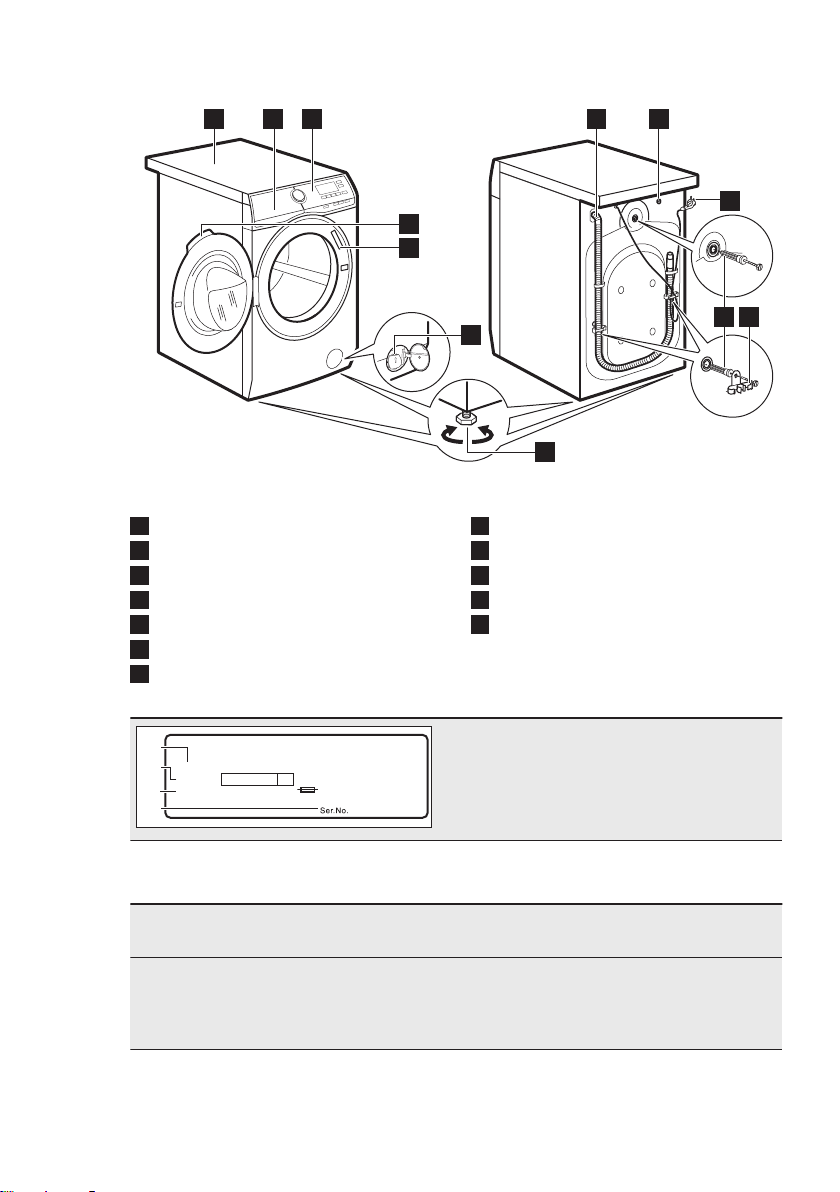
3.2 Appliance overview
1 2 3
9
5
6
7
4
10
8
11 12
1
Worktop
2
Detergent dispenser
3
Control panel
4
Door handle
5
Rating plate
6
Drain pump filter
7
Feet for levelling the appliance
8
Drain hose
9
Inlet hose connection
10
Mains cable
11
Transit bolts
12
Hose support
00000000
00A
Mod.
xxxxxxxxx
000V ~ 00Hz 0000 W
910000000
00
A
B
C
Prod.No.
D
The rating plate reports the model name
(A), product number (B), electrical ratings
(C) and serial number (D).
4. TECHNICAL DATA
Dimension Width/ Height/ Total
depth
600 mm/ 850 mm/ 630 mm/ 660 mm
Electrical connection Voltage
Overall power
Fuse
Frequency
220 - 240 V
2200 W
10 A
50 Hz
ENGLISH 7
Level of protection against ingress of solid particles
and moisture ensured by the protective cover, ex-
cept where the low voltage equipment has no pro-
tection against moisture
IPX4
Water supply pressure Minimum
Maximum
0.5 bar (0.05 MPa)
8 bar (0.8 MPa)
Water supply
1)
Cold water
Maximum Load Cotton 8 kg
Spin Speed Maximum 1400 rpm
1)
Connect the water inlet hose to a water tap with a 3/4'' thread.
5. INSTALLATION
WARNING!
Refer to Safety chapters.
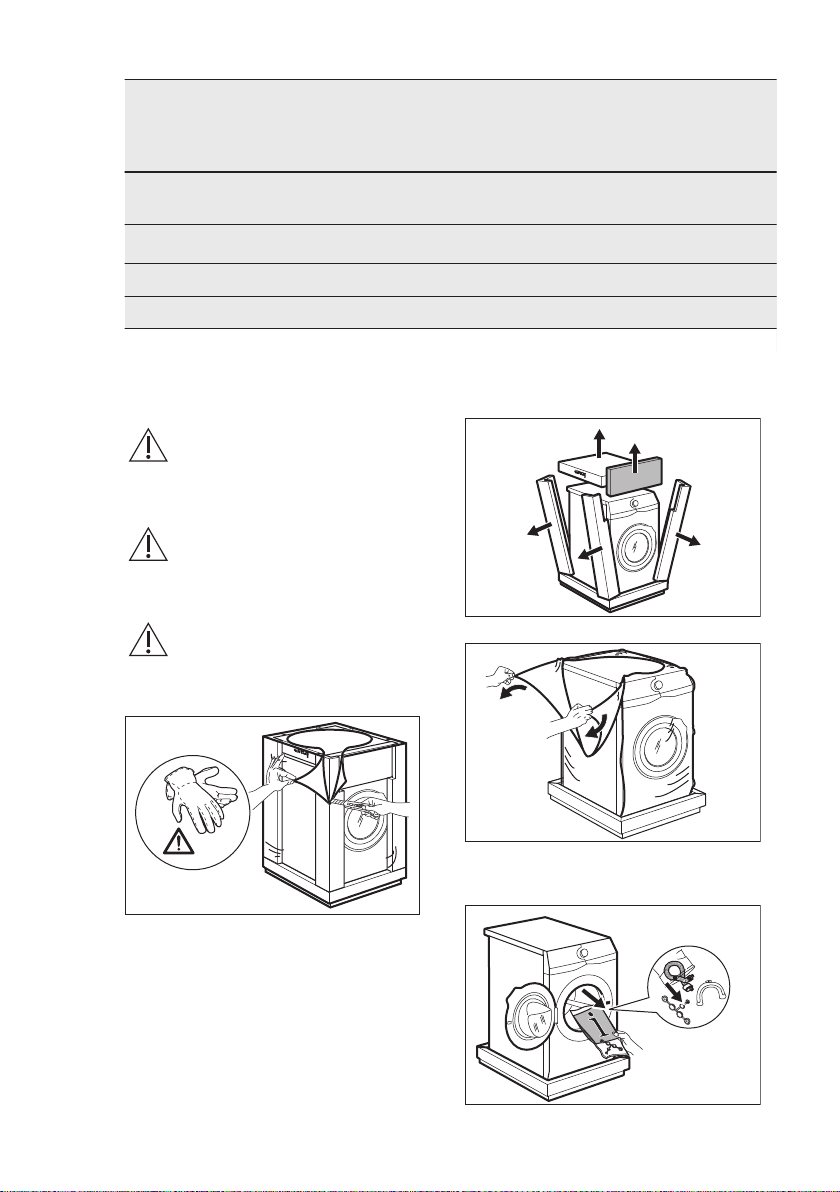
5.1 Unpacking
WARNING!
Remove all the packaging
and the transit bolts before
installing the appliance.
WARNING!
Use the gloves.
1. Remove the external film. If
necessary, use a cutter.
2. Remove the cardboard top and the
polystyrene packaging materials.
3. Remove the internal film.
4. Open the door and remove the
polystyrene piece from the door seal
and all the items from the drum.
www.aeg.com8
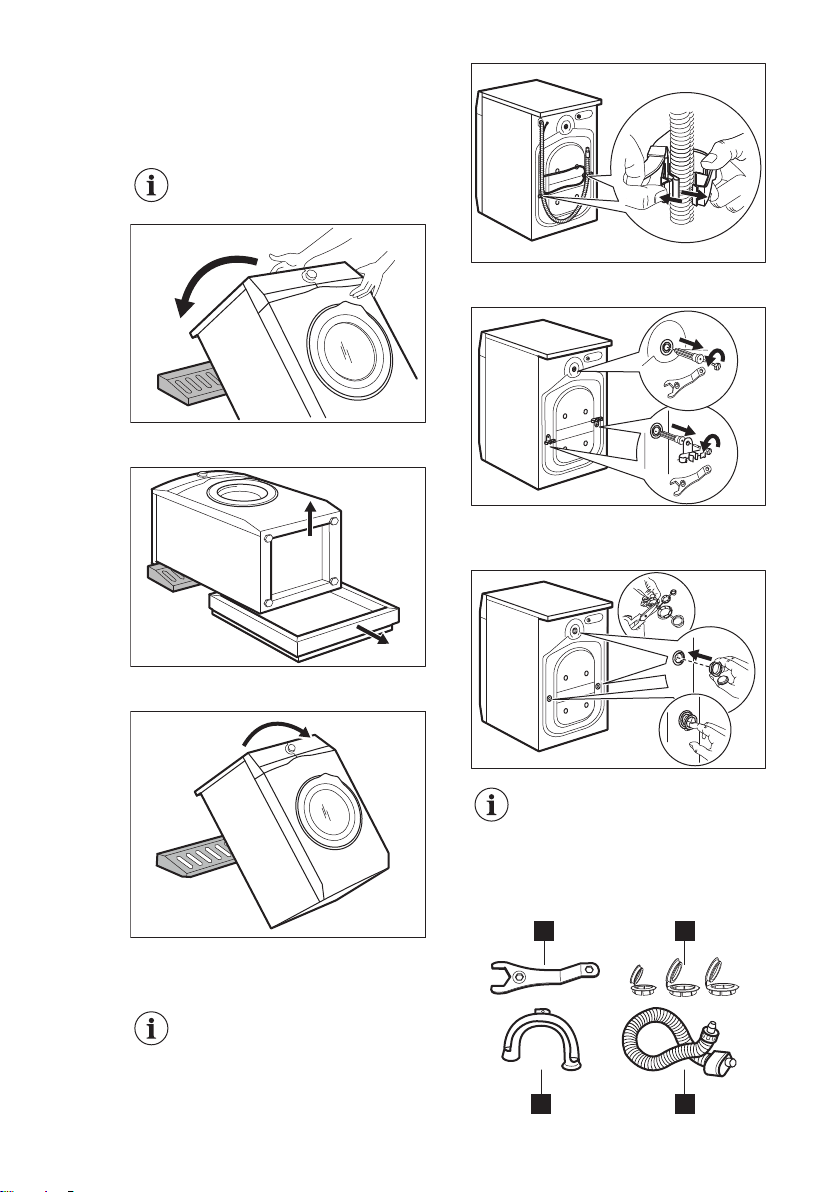
5. Carefully put the appliance down on
its rear side.
6. Put the front polystyrene packaging
element on the floor under the
appliance.
Make sure not to
damage the hoses.
7. Remove the polystyrene protection
from the bottom.
1
2
8. Pull up the appliance in vertical
position.
9. Remove the power supply cable and
the drain hose from the hose holders.
It is possible to see
water flowing from the
drain hose. This is due to
the testing with water of
the appliance in factory.
10. Remove the three bolts by using the
spanner supplied with the appliance.
11. Pull out the plastic spacers.
12. Put the plastic caps, that you find in
the user manual bag, in the holes.
We recommend that you
keep the packaging and the
transit bolts for any
movement of the appliance.
5.2 Accessories
1 2
34
ENGLISH 9
1
Spanner
To remove the transit bolts.
2
Plastic caps
To close the holes on the rear side of
the cabinet after the removal of the
transit bolts.
3
Anti-flood inlet hose
To connect the appliance to the
water tap and to prevent possible
leakage.
4
Plastic hose guide
To connect the drain hose on the
edge of a sink.
5.3 Positioning and levelling
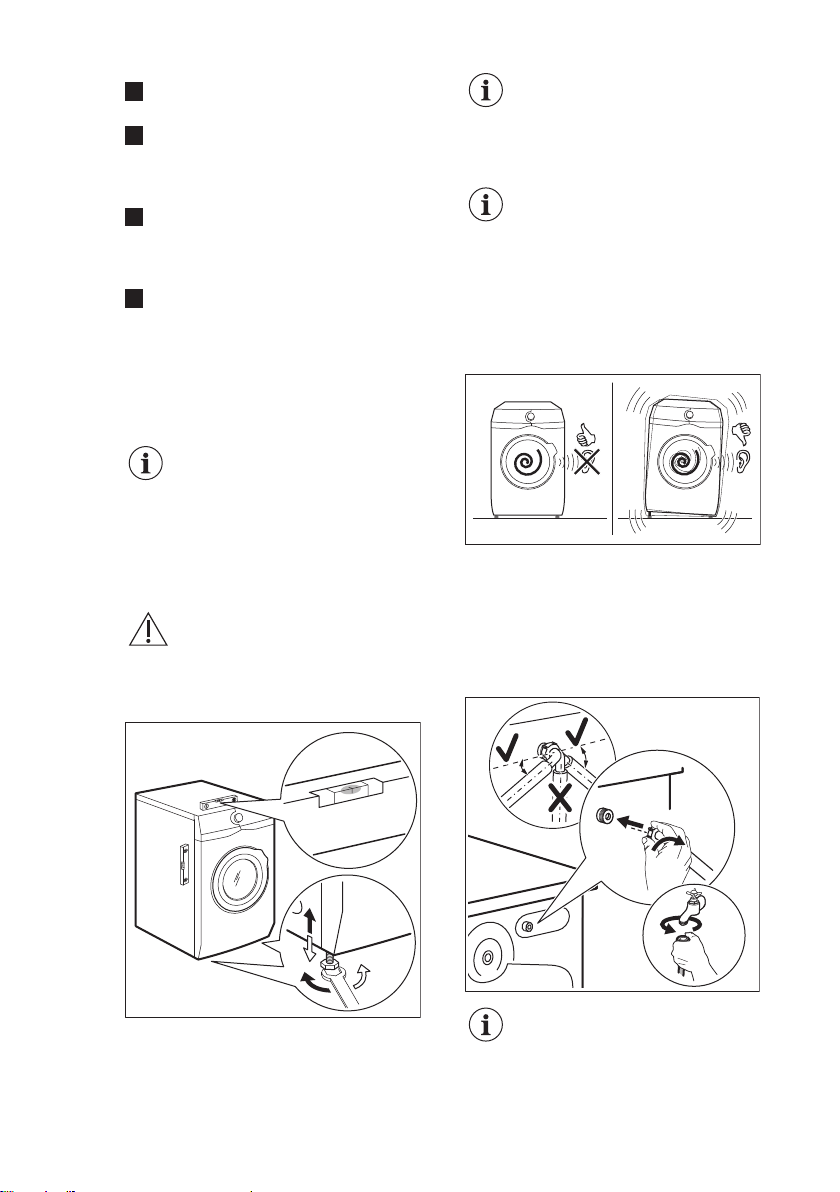
1. Install the appliance on a flat hard
floor.
Make sure that carpets do
not stop the air circulation
below the appliance.
Make sure that the
appliance does not touch
the wall or other units.
2. Loosen or tighten the feet to adjust
the level.
WARNING!
Do not put cardboard, wood
or equivalent materials
below the appliance feet to
adjust the level.
x4
The appliance must be level and stable.
A correct adjustment of the
appliance level prevents the
vibration, noise and the
movement of the appliance
when in operation.
When the machine is
installed on a plinth or if a
washer dryer is stacked on
the washing machine, use
the accessories described in
chapter 'Accessories'. Read
carefully the instructions
supplied with the appliance
and with the accessory.
5.4 The inlet hose
1. Connect the water inlet hose to the
back of the appliance.
2. Position it toward left or right
depending on the position of the
water tap.
20º20º
45º45º
Make sure that the inlet hose
is not in vertical position.
3. If necessary, loose the ring nut to set
it in the correct position.
www.aeg.com
10
4. Connect the water inlet hose to the
cold water tap with 3/4" thread.
CAUTION!
Make sure that there are no
leaks from the couplings.
Do not use an extension
hose if the inlet hose is too
short. Contact the service
centre for the replacement
of the inlet hose.
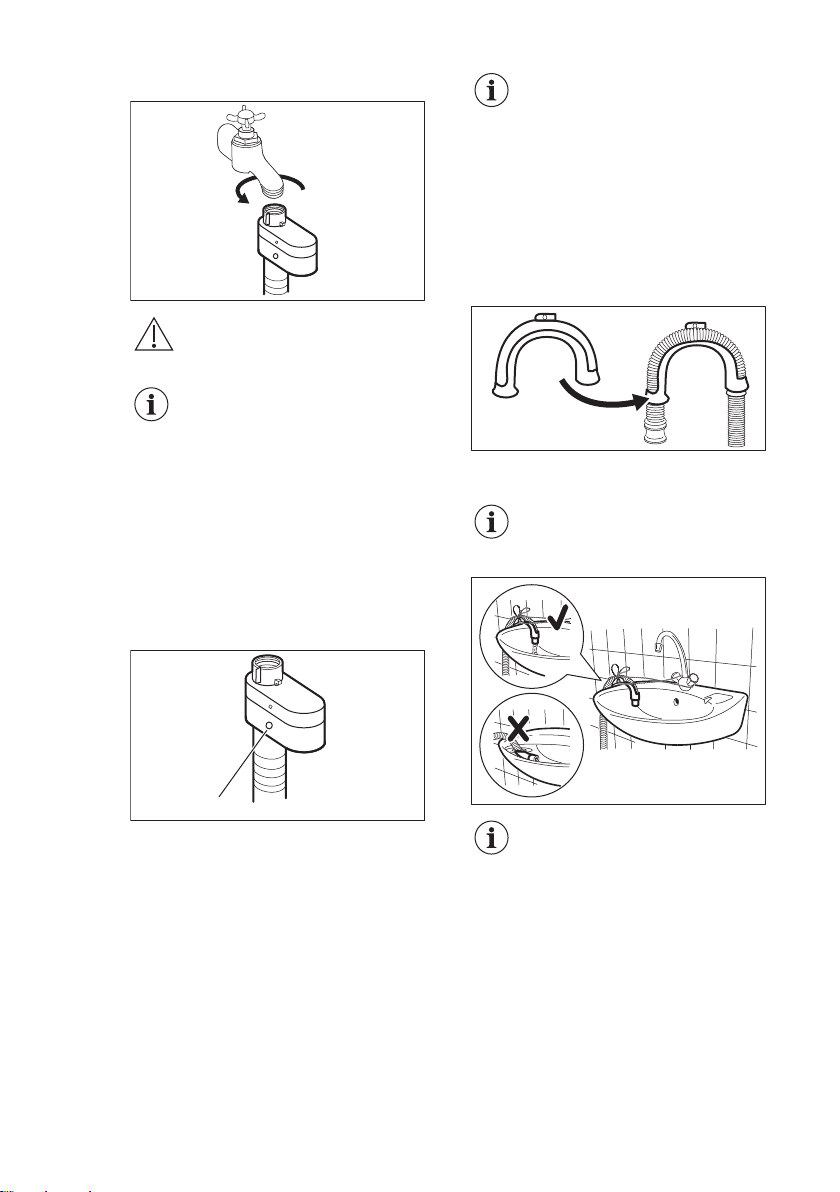
5.5 Water-stop device
The inlet hose has a water stop device.
This device prevents water leaks in the
hose because of its natural ageing.
The red sector in the window «A» shows
this fault.
A
If this occurs, close the water tap and
contact the authorized service centre to
replace the hose.
5.6 Water drainage
The drain hose should be positioned at a
height of not less than 60 cm and not
more than 100 cm from the floor.
You can extend the drain
hose to maximum 400 cm.
Contact the authorized
service centre for the other
drain hose and the
extension.
It is possible to connect the drain hose in
different ways:
1. Make a U shape with the drain hose
and put it around the plastic hose
guide.
2. On the edge of a sink - Fasten the
guide to the water tap or to the wall.
Make sure that the plastic
guide cannot move when
the appliance drains.
Make sure that the drain
hose end is not immersed in
the water. There may be a
return of dirty water into the
appliance.
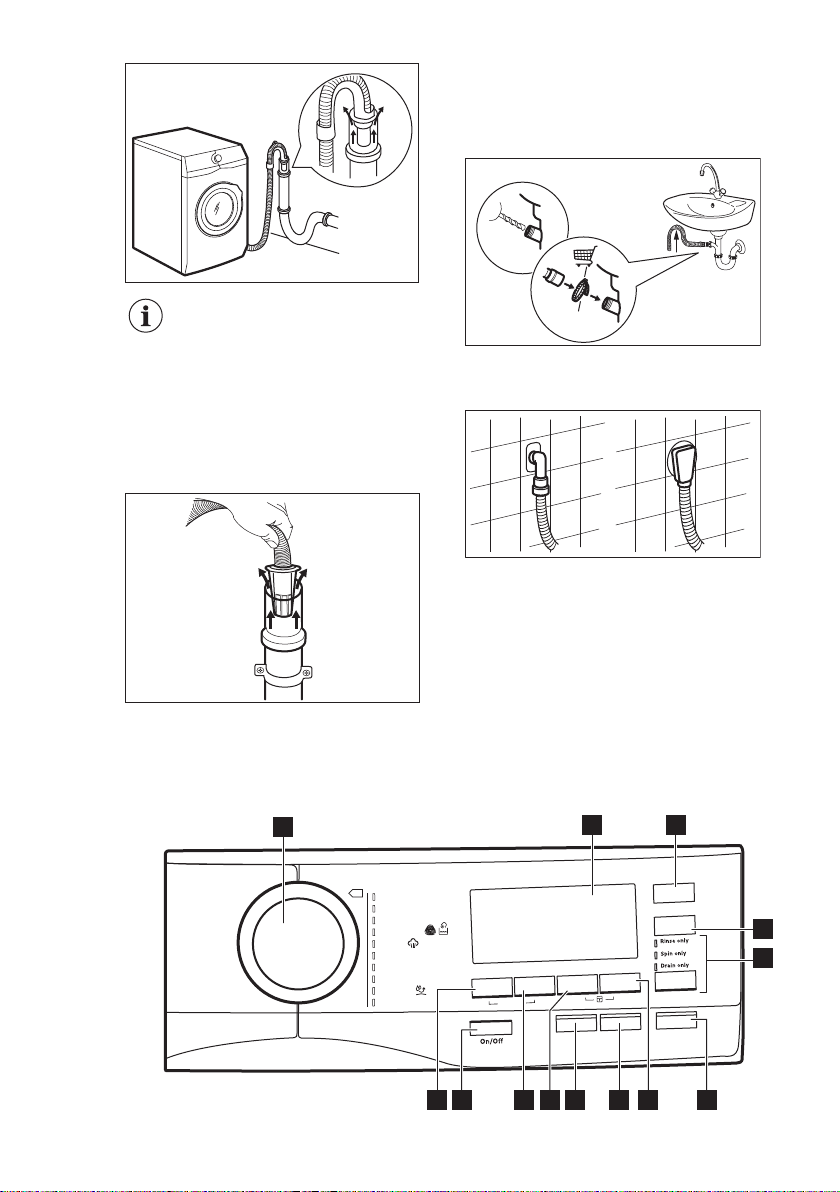
3. To a stand pipe with vent-hole -
Insert the drain hose directly into a
drain pipe. Refer to the illustration.
ENGLISH
11
The end of the drain hose
must always be ventilated ,
i.e. the inner diameter of the
drain pipe (min. 38 mm -
min. 1.5") must be larger
than the external diameter
of the drain hose.
4. If the end of the drain hose looks like
this (see the picture), you can push it
directly into the stand pipe.
5. Without the plastic hose guide, to
a sink spigot - Remove the plastic
membrane from the sink trap spigot.
6. Connect the drain hose to the spigot
and tighten it with a clamp.
ø16
1
W011
2
7. Position the hose directly to a built-
in drain pipe in the room wall and
tighten it with a clamp.
6. CONTROL PANEL
6.1 Control panel description
Plus Ste
am
Delay St
a
rt
Start/Pause
margorP
snotto
C
s
c
iteh
tny
S
setacileD
kliS / looW
ma
et
S
ygrellA-itnA
r
oodtuO
n
a
e
l
C
e
ni
h
caM
gk3 - .nim 02
r
ewoPOKO
Soft Plus
S
pi
n
S
t
ains/
P
r
e
wash
Extr
a Rinse
Options
Time Save
T
emperature
Eco
2
3
6
12 11 10 8
1
4
5
7
9
13
www.aeg.com12
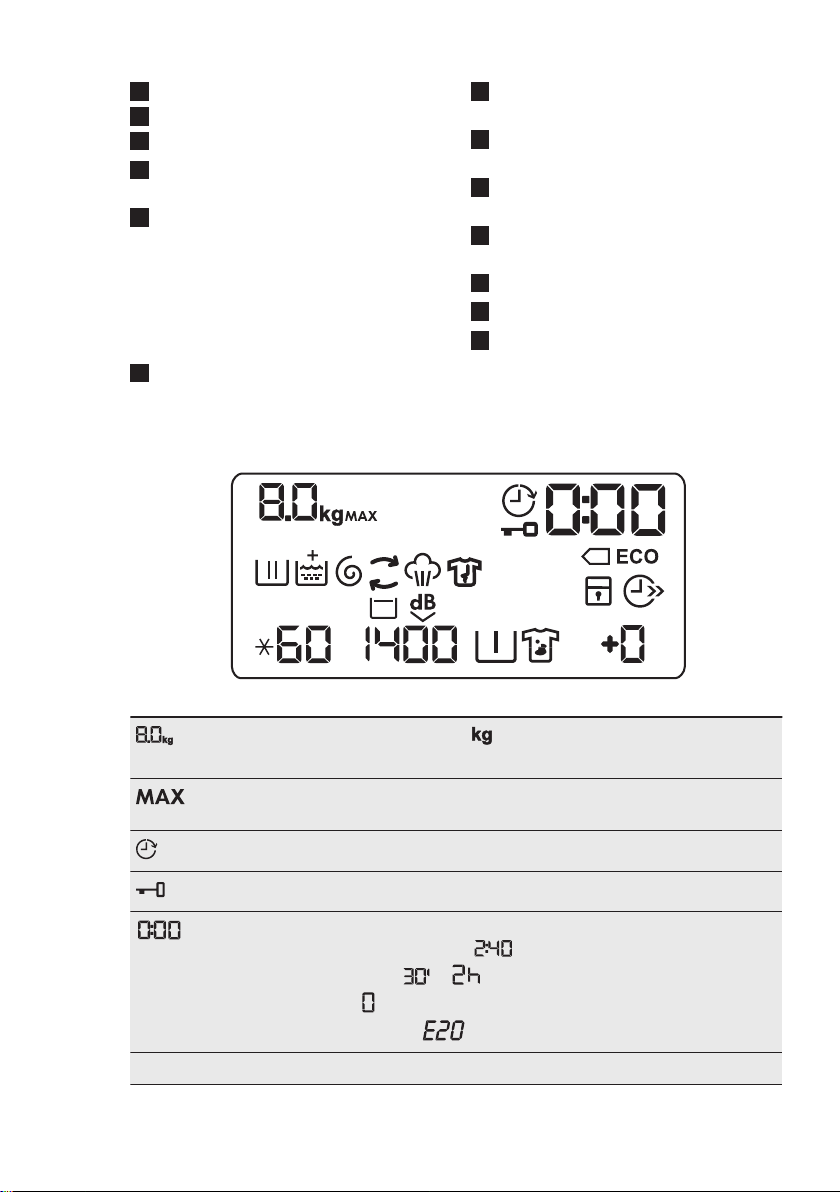
1
Program dial
2
Display
3
Energy saving touch button (Eco)
4
Time saving touch button (Time
Save)
5
Skipping phase touch button
(Options)
• Wash phase skipping (Rinse only)
• Wash and rinse phase skipping
(Spin only)
• Only drain (Drain only)
6
Start/Pause touch button (Start/
Pause)
7
Extra rinse touch button (Extra Rinse)
8
Delay start touch button (Delay Start)
9
Super steam touch button (Plus
Steam)
10
Anti-stain and prewash touch button
(Stains/Prewash)
11
Spin reduction touch button (Spin)
12
On/Off push button (On/Off)
13
Temperature touch button
(Temperature)
6.2 Display
MIX
Maximum load indicator. The icon flashes during laundry load esti-
mation (refer to "PROSENSE load detection" paragraph).
Maximum laundry indicator. It flashes when the laundry load exceeds the
maximum declared load of the selected program.
Delay start indicator.
Door locked indicator.
The digital indicator can show:
• Program duration (e. g. ).
• Delay time (e. g. or ).
•
Cycle end (
).
• Warning code (e.g. ).
ECO Energy saving indicator.
ENGLISH 13
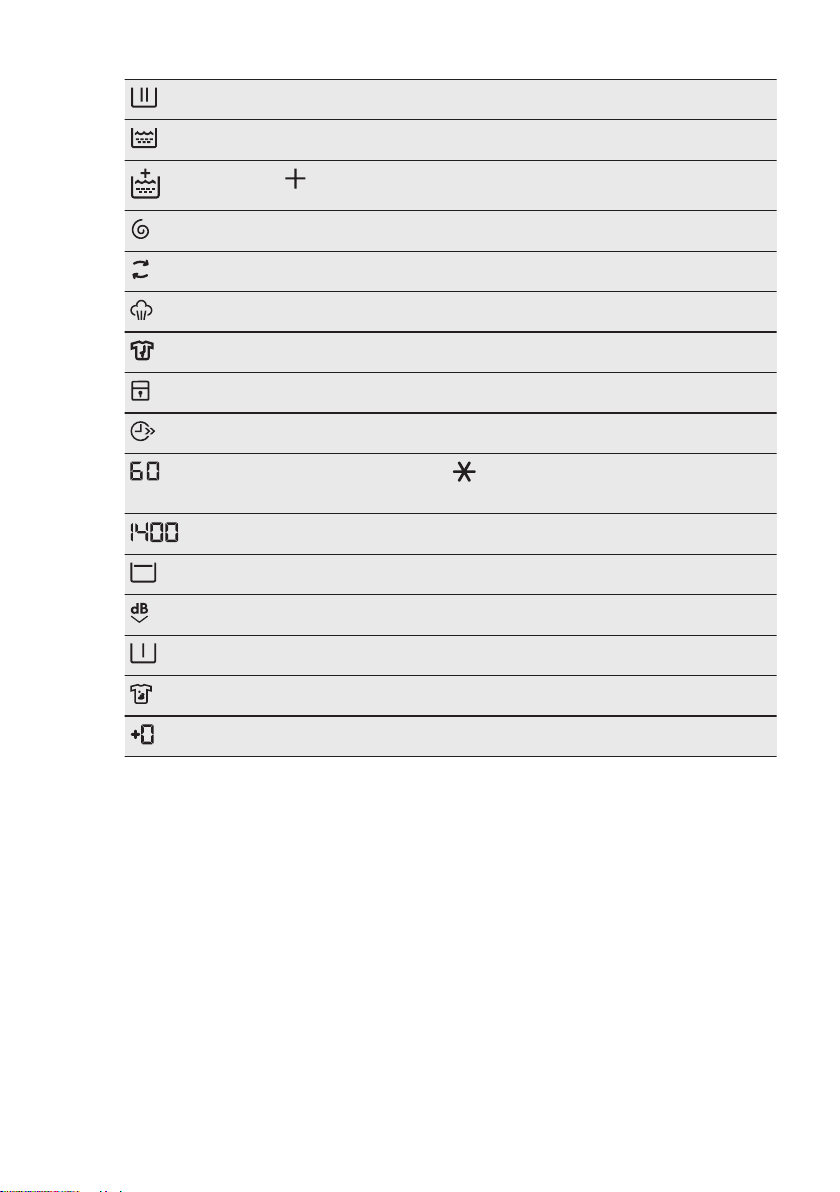
Washing phase indicator: it flashes during prewash and wash phase.
Rinsing phase indicator: it flashes during rinse phase.
The indicator appears when the Soft Plus option is activated.
Spin and drain phase indicator. It flashes during spin and drain phase.
MIX
OKO MIX indicator.
Steam phase indicator.
Anti-crease phase indicator.
Child safety lock indicator.
Time saving indicator.
Temperature indicator. The indicator appears when a cold wash is
set.
Spin speed indicator.
Rinse hold indicator.
Extra silent indicator.
Pre-wash indicator.
Stain indicator.
Extra rinse indicator.
7. DIAL AND BUTTONS
7.1 On/Off
Pressing this button for a few seconds
allows to activate or deactivate the
appliance. Two different tunes sound
while switching the appliance on or off.
As the Stand-by function automatically
deactivates the appliance to decrease
the energy consumption in a few cases,
you may need to activate the appliance
again.
For more details, refer to Stand-by
paragraph in Daily Use chapter.
www.aeg.com14
7.2 Introduction
The options/functions are
not selectable with all
washing programs. Check
the compatibility between
options/functions and
washing programs in the
"Program Chart". An option/
function can exclude another
one, in this case the
appliance doesn't allow you
to set the incompatible
options/functions together.
Make sure the screen and
touch buttons are always
clean and dry.
7.3 Temperature
When you select a washing program,
the appliance automatically proposes a
default temperature.
Touch this button repeatedly until the
desired temperature value appears on
the display.
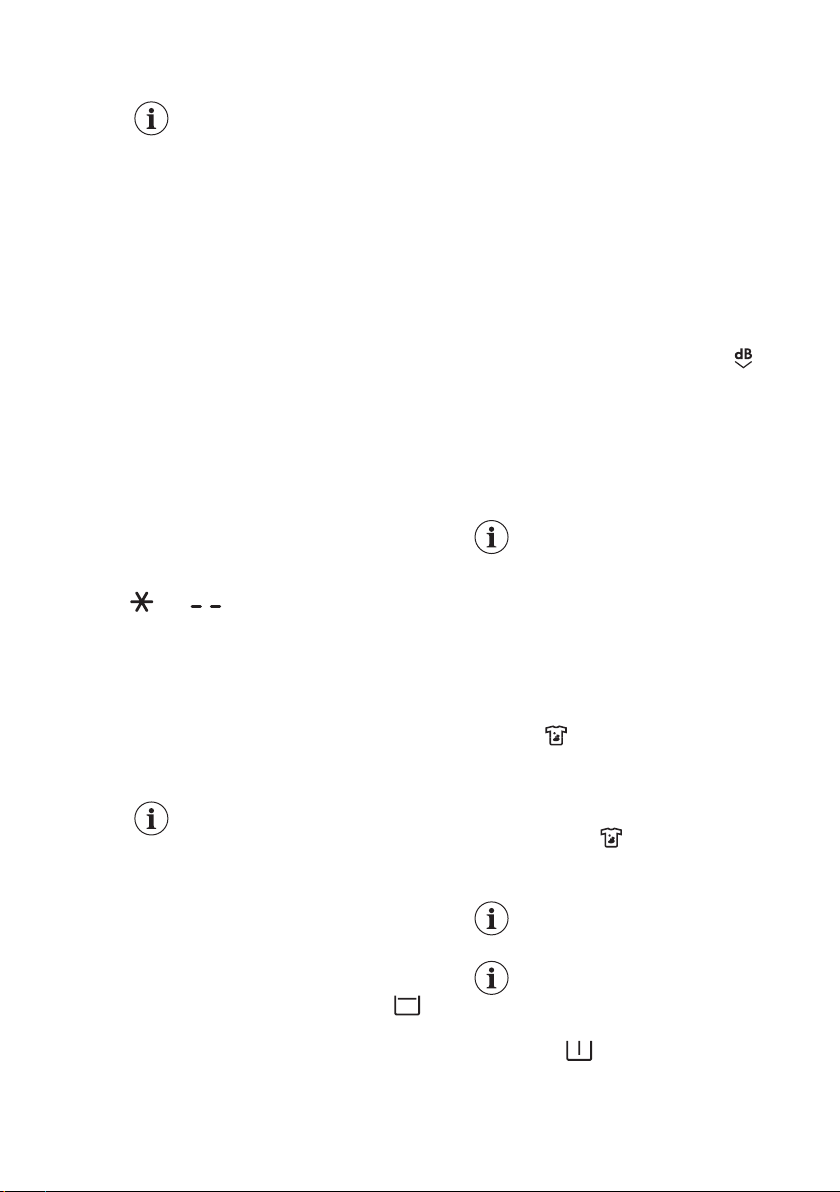
When the display shows the indicators
and , the appliance does not
heat the water.
7.4 Spin
When you set a program, the
appliance automatically selects the
maximum spin speed.
Touch this button repeatedly to:
• Decrease the spin speed.
The display shows only
the spin speeds available
for the set program.
.
• Activate the Rinse Hold option .
The water of the last rinse is not
drained out to prevent the fabrics
from creasing. The washing
program ends with water in the
drum and the final spin phase is not
performed.
The display shows the indicator The
drum turns regularly to reduce
creasing.
The door stays locked. The drum
turns regularly to reduce creasing.
You must drain the water to unlock
the door.
Touch Start/Pause button: the
appliance performs the spinning
phase and drains the water.
• Activate the Extra silent option. All
spinning phases (intermediate spin
and final spin) are suppressed and the
program ends with water in the drum.
This helps to reduce creasing. As the
program is very quiet, it is suitable for
use at night time when cheaper
electricity tariffs are available. In some
programs the rinses are performed
with more water.
The display shows the indicator .
The door stays locked. The drum turns
regularly to reduce creasing. You must
drain the water to unlock the door.
Touch the Start/Pause button: the
appliance performs only the draining
phase.
The appliance empties the
water out automatically after
approximately 18 hours.
7.5 Stains/Prewash
Press this button repeatedly to activate
one of the two options or both.
The relevant indicator goes on in the
display.
• Stains
Select this option to pre-treat heavily
soiled or stained laundry using stain
remover.
Pour the stain remover into
compartment . The stain remover is
pre-mixed and heated with detergent
in order to improve its effectiveness.
This option can increase
the program duration.
This option is not
available with a
temperature lower than
40 °C.
• Prewash
Use this option to add a prewash
phase at 30 °C before the washing
phase.
ENGLISH 15
This option is recommended for
heavily soiled laundry, especially if
containing sand, dust , mud and other
solid particles.
This option can increase
the program duration.
7.6 Extra Rinse
With this option you can add up to 3
rinses accordingly to the selected
washing programs.
Useful for people allergic to detergents
and in areas where the water is soft.
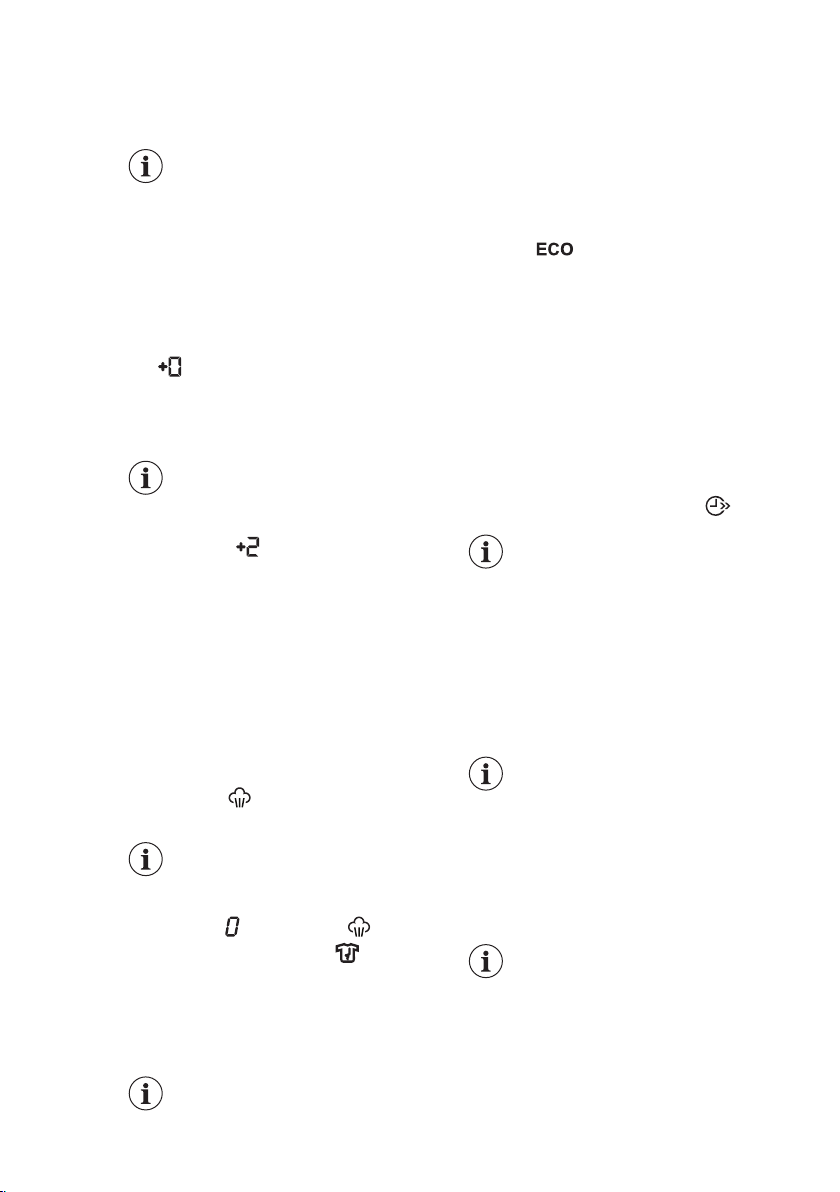
The indicator shows the selected
number of rinses.
This option increases the program
duration.
If the Extra Rinse is set as a
default option and you
select a compatible washing
program, the display
shows
. In this case, by
pressing the Extra Rinse
button , it is possible to add
just one rinse.
flashes on the display
7.7 Plus Steam
This option adds a steam phase followed
by a short anti-crease phase at the end
of
the washing program.
The steam phase reduces fabric creasing
and facilitates the fabric ironing.
The indicator
during steam phase.
This option can increase the
program duration.
When the program stops the display
shows a zero , the indicator is
steady on and the indicator starts
flashing. The drum performs smooth
movements for about 30 minutes to keep
the steam benefit. By touching any
button the anti-crease movements stop
and the door unlocks.
A small laundry load helps to
reach better results.
7.8 Eco
Set this option for slightly or normally
soiled items washed at 30°C or higher
temperatures.
The appliance decreases the washing
temperature and extends the washing
time to obtain a good washing efficiency
by saving energy. The display shows the
indicator
.
7.9 Time Save
With this option you can decrease the
program duration.
• If your laundry is normally or lightly
soiled, it may be advisable to shorten
the washing program. Touch this
button once to decrease the duration.
• In case of smaller load, touch this
button twice to set an extra quick
program.
The display shows the indicator .
This option can also be used
to shorten the Steam
program duration.
7.10 Skipping phase button
(Options)
By touching this button you can set:
• Rinse only at first touch. The washing
program starts from the rinsing
phase by skipping the wash phase.
All set options (except
permanent extra rinse)
are deselected
automatically.
• Spin only at second touch. The
appliance skips wash and rinse phase.
• Drain only at third touch. The
appliance performs only the drain
phase.
At firth touch the appliance
proposes the default setting
of the washing program
again.
7.11 Delay Start
With this option you can delay the start
of a program in a more convenient
time.
www.aeg.com16
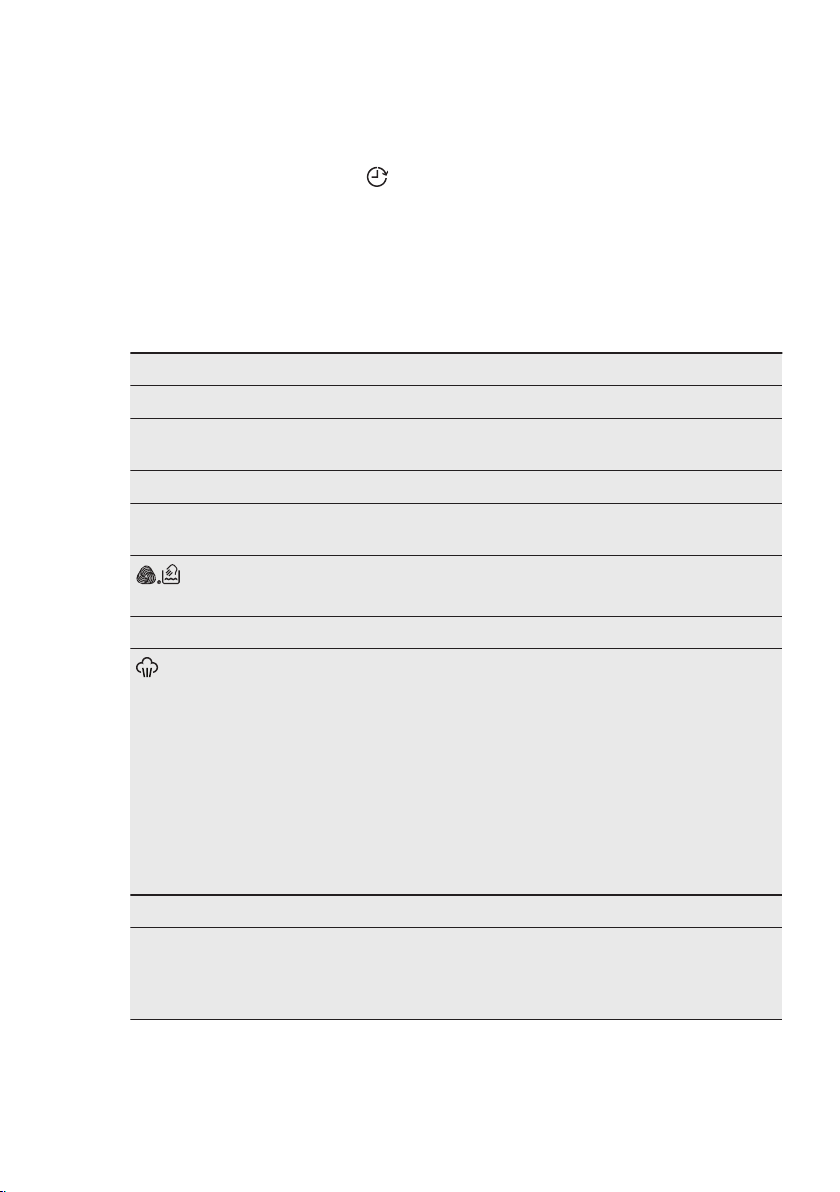
Touch the button repeatedly to set the
required delay. The time increases by
steps of 30 minutes up to 90' and from 2
hours up to 20 h.
After touching the Start/Pause button,
the display shows the indicator and
the selected delay time and the
appliance begins the countdown.
7.12 Start/Pause
Touch the Start/Pause button to start,
pause the appliance or interrupt a
running program.
8. PROGRAMS
8.1 Program Chart
Washing programs
Program Program description
Washing programs
Cottons White cotton and coloured cotton. Normally, heavily and
lightly soiled items.
Synthetics Synthetic items or mixed fabric items. Normally soiled items.
Delicates Delicate fabrics such as acrylics, viscose and mixed fabrics
requiring gentler washing. Normally and lightly soiled items.
Wool / Silk
Machine washable wool, hand washable wool and other
fabrics with «hand washing» care symbol
1)
.
Steam program
Steam
Steam program for cotton and synthetic items. Steam
can be used for dried
2)
, washed or worn once laundry. This
program reduce creases and odours
3)
and relaxes the fibres.
When the program is completed, quickly remove the laundry
from the drum. After a steam program, ironing becomes
effortless. Do not use any detergent. If necessary, remove
stains by washing or using localized stain removal. Steam
programs do not perform any hygienic cycle. Do not set a
Steam program with these types of items:
• Items that are not suitable for tumble drying.
• Items with label "Dry clean only".
Washing programs
OKOPower
Cotton and fast-coloured synthetic items. Complete washing
program that, in only 59 minutes, washes the daily soiled
laundry intensively and ensures a good washing performance
in a short time.
ENGLISH 17
Program Program description
Anti-Allergy White cotton items. This program removes micro-organisms
thanks to a washing phase with the temperature maintained
above 60°C for several minutes. This helps remove germs,
bacteria, micro-organism and particles. An additional rinsing
phase ensures a proper removal of detergent residues
and
pollens/allergenic items. In this way the wash is more ef-
fective.
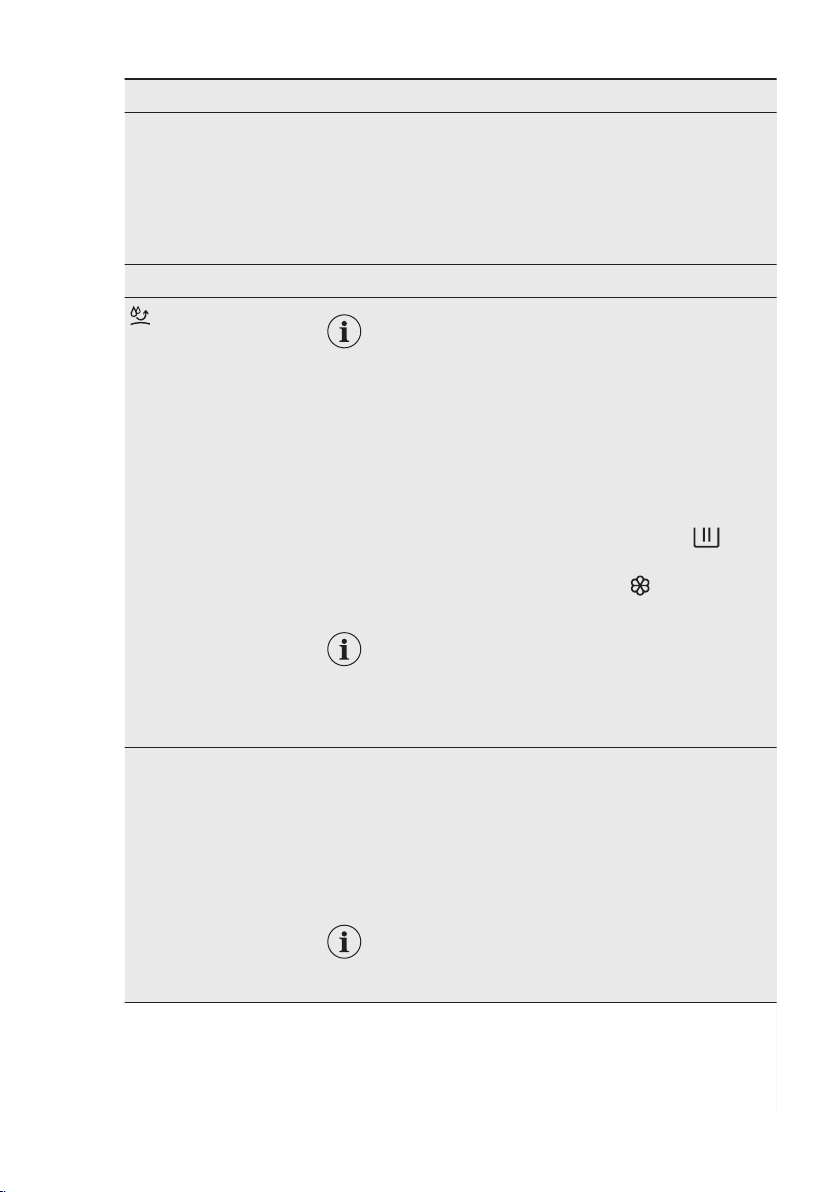
20 min. - 3 kg Cotton and synthetic items lightly soiled or once worn.
Outdoor
Do not use fabric softener and make sure that
there is no softener residue in the detergent
dispenser.
Outdoor clothing, technical, sport fabrics, waterproof and
breathable jackets, shell jackets with a removable fleece or
inner insulation. The recommended laundry load is 2.5 kg.
This program can also be used as water-repellent restoring
cycle, specifically tailored for treating clothes with a hydropho-
bic coating. To perform the water-repellent restoring cycle,
proceed as follows:
• Pour the washing detergent in the compartment .
• Pour a special water-repellent restorer for fabric in the
drawer compartment for fabric softener .
• Reduce the laundry load to 1 kg.
To further improve the water-repellent restor-
ing action, dry the laundry in a tumble dryer by
setting the Outdoor drying program (if
available and if the garment care label permits
tumble drying).
Machine Clean Maintenance cycle with hot water to clean and freshen the
drum and to remove residue that may cause odour. For the
best result use this cycle once a month. Before running this cy-
cle, remove all items from the drum. In the washing phase
compartment of the detergent dispenser, put the flap of the
compartment in upward position. Pour a cup of chlorine bleach
or a washing machine cleaner in the washing phase compart-
ment. DO NOT use both together.
After the drum cleaning, run a further rinse cy-
cle with empty drum and no detergent to re-
move any residue of bleach.
1) During this cycle the drum rotates slowly to ensure a gentle wash. It can seem that the drum doesn't
rotate or doesn't rotate properly, but this is normal for this program.
2) If you set a Steam program with dried laundry, at the end of the cycle the laundry can be humid.
Line dry the items for about 10 minutes.
3) Steam program doesn't remove particularly intense odour.
www.aeg.com18
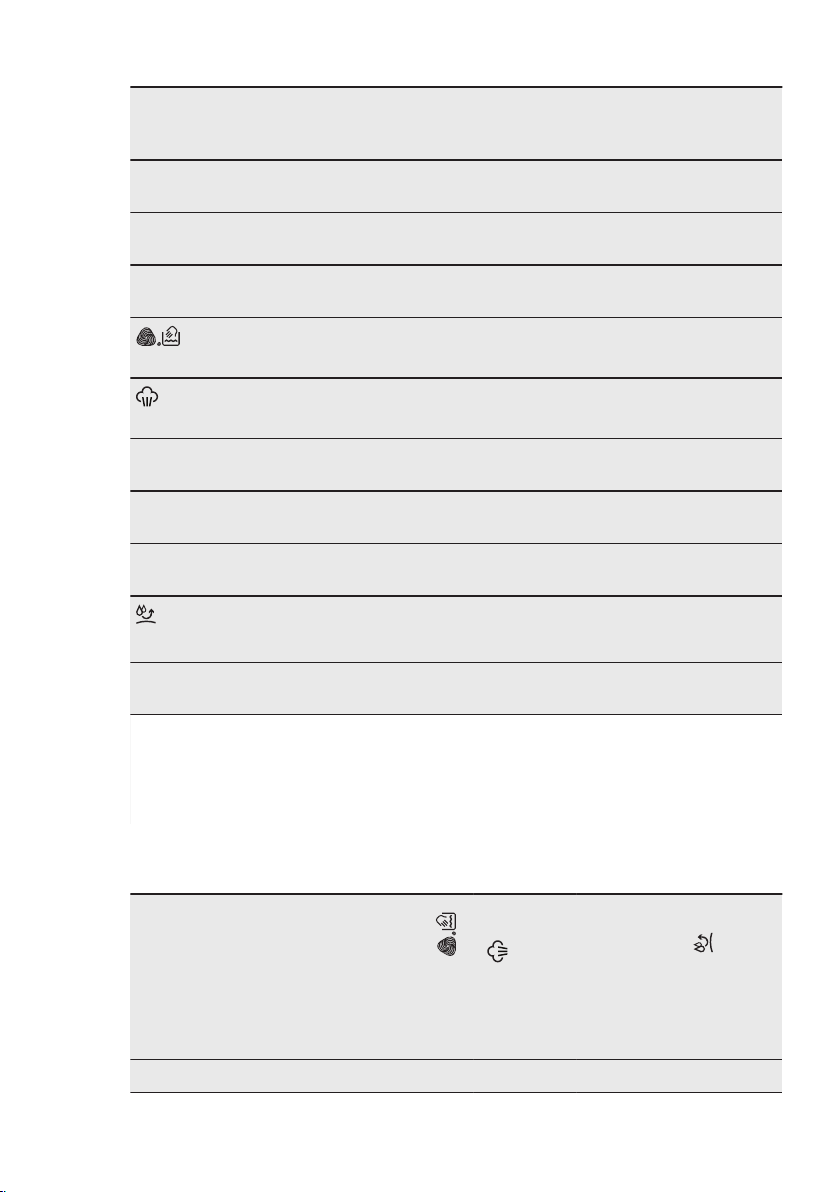
Program temperature, maximum spin speed and maximum load
Program Default temperature
Temperature range
Reference spin
speed
Spin speed range
Maximum load
Cottons
1)
40 °C
95 °C - Cold
1400 rpm
1400 rpm - 400 rpm
8 kg
Synthetics 40 °C
60 °C - Cold
1200 rpm
1200 rpm - 400 rpm
3.5 kg
Delicates 30 °C
40 °C - Cold
1200 rpm
1200 rpm - 400 rpm
3.5 kg
Wool / Silk
40 °C
40 °C - Cold
1200 rpm
1200 rpm - 400 rpm
2 kg
Steam
- - 1 kg
OKOPower 30 °C
60 °C - 30 °C
1400 rpm
1400 rpm - 400 rpm
5 kg
Anti-Allergy
60 °C
1400 rpm
1400 rpm - 400 rpm
8 kg
20 min. - 3 k g 30 °C
40 °C - 30 °C
1200 rpm
1200 rpm - 400 rpm
3 kg
Outdoor
30 °C
40 °C - Cold
1200 rpm
1200 rpm - 400 rpm
2.5 kg
2)
1 kg
3)
Machine Clean
60 °C
1200 rpm
1200 rpm - 400 rpm
-
1) The cotton program at 40 °C with the ECO option is recommended for a full load of normally soiled
cotton and is the water and energy rating label program in accordance with AS/NZS2040.2 and AS/
NZS6400.
2) Washing program.
3) Washing program and waterproofing phase.
Program options compatibility
Cottons
Synthetics
Delicates
Wool / Silk
Steam
OKOPower
Anti-Allergy
20 min. - 3 k g
Outdoor
Machine Clean
Spin ■ ■ ■ ■ ■ ■ ■ ■ ■
ENGLISH 19
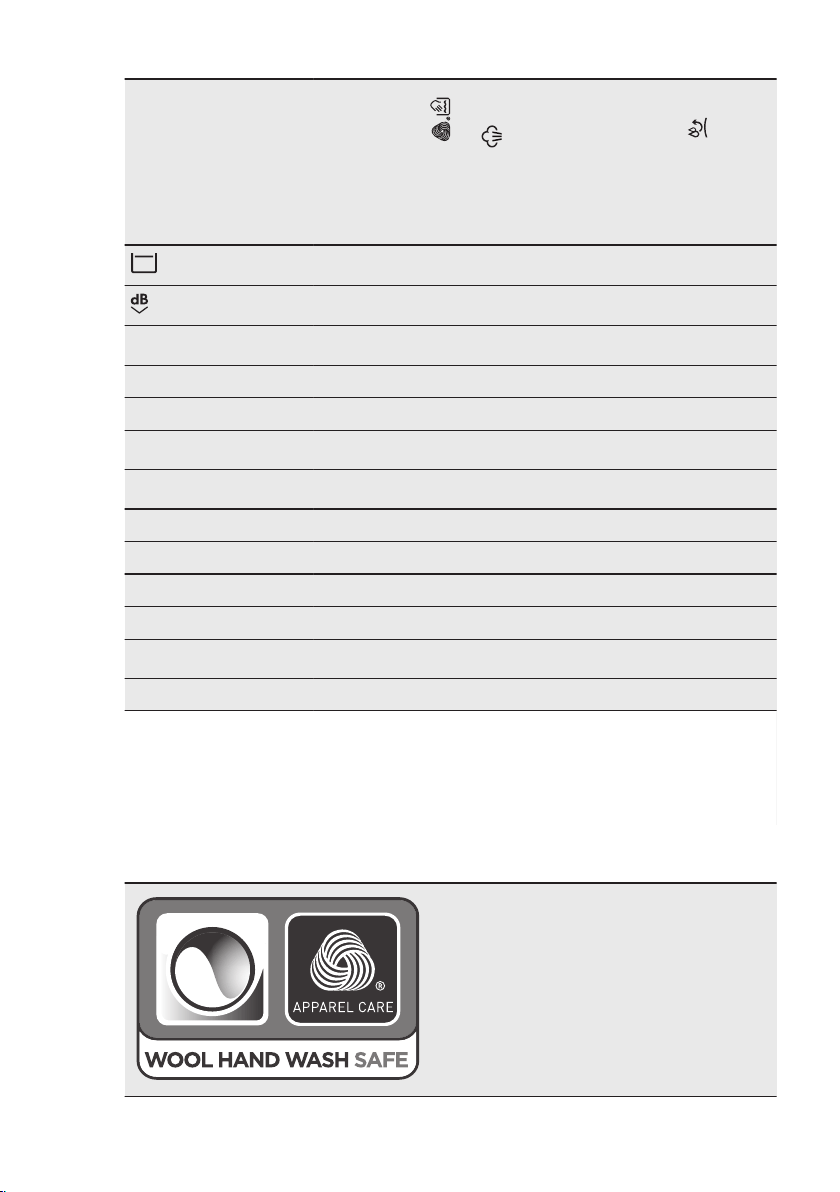
Cottons
Synthetics
Delicates
Wool / Silk
Steam
OKOPower
Anti-Allergy
20 min. - 3 k g
Outdoor
Machine Clean
■ ■ ■ ■ ■ ■ ■
■ ■ ■
Stains
1)
■ ■ ■
Prewash ■ ■ ■
Extra Rinse ■ ■ ■ ■ ■ ■
Eco
2)
■ ■ ■
Time Save
3)
■ ■ ■ ■
Only Rinse ■ ■ ■ ■ ■ ■ ■ ■
Only Spin ■ ■ ■ ■ ■ ■ ■ ■
Only Drain ■ ■ ■ ■ ■ ■ ■ ■
Delay Start ■ ■ ■ ■ ■ ■ ■ ■ ■ ■
Plus Steam
4)
■ ■ ■
Soft Plus ■ ■ ■ ■ ■
1)
This option is not available with temperature lower than 40 °C.
2)
This option is not available with a temperature lower than 30 °C.
3)
If you set the shortest duration, we recommend that you decrease the load size. It is possible to fully
load the appliance, however the washing results can be less satisfactory.
4)
This option is not available with temperature lower than 40 °C.
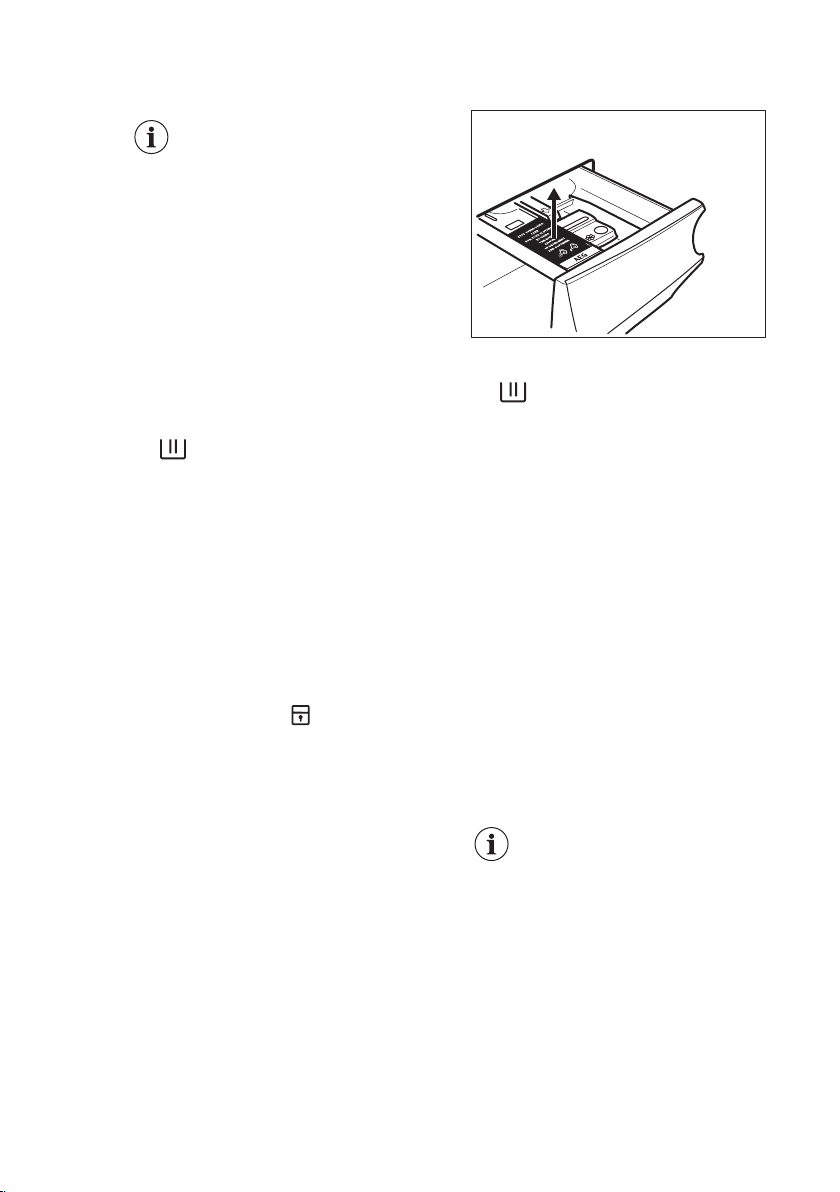
8.2 Woolmark Apparel Care - Green
The wool wash cycle of this machine has been
approved by The Woolmark Company for the
washing of wool garments labelled as «hand
wash» provided that the garments are wash-
ed according to the instructions issued by the
manufacturer of this washing machine. Follow
the garment care label for drying and other
laundry instructions. M1361
The Woolmark symbol is a Certification mark
in many countries.
www.aeg.com20
9. BEFORE FIRST USE
During installation or before
first use you may observe
some water in the appliance.
This is a residual water left in
the appliance after a full
functional test in the factory
to ensure the appliance is
delivered to customers in
perfect working order and is
no cause for concern.
1. Make sure that all transit bolts have
been removed from the appliance.
2. Make sure that the electrical power is
available and the water tap is open.
3. Remove the folded tag in the
detergent compartment marked by
. This tag suggests to use the
right amount of detergent or
softener for avoiding overdosing.
4. Pour 2 litres of water into the
detergent compartment marked by
.
This action activates the drain system. 5.
Set and start a program for cotton
at the highest temperature without
any detergent and laundry in the
drum.
10. SETTINGS
10.1
Child Lock
With this option you can prevent that the
children play with the control panel.
• To activate/deactivate this option,
touch the Stains/Prewash and the
Extra Rinse buttons simultaneously
until the indicator
comes on/goes
off on the display.
You can activate this option:
• After you touch the Start/Pause
button: all the buttons and the
program dial are deactivated
(except On/Off button ).
• Before you touch the Start/Pause
button: the appliance cannot start.
The appliance keeps the selection of this
option after you switch it off.
10.2 Acoustic signals
This appliance is provided with different
acoustic signals, that operate when:
• You activate the appliance (special
short tune).
• You deactivate the appliance (special
short tune).
• You touch the buttons (click sound).
• You make a wrong selection (3 short
sounds).
• The program is completed
(sequence of sounds for about 2
minutes).
• The appliance has a malfunction
(sequence of short sounds for about 5
minutes).
To
deactivate/activate the acoustic
signals when the program is
completed, touch the Extra Rinse and
the Delay Start buttons simultaneously
for about 6 seconds.
If you deactivate the
acoustic signals, they
continue operate when the
appliance has a malfunction.
10.3 Permanent Extra Rinse
With this option you can permanently
have an extra rinse when you set a
program where it is selectable.
• To activate/deactivate
this option
touch the Extra Rinse button and the
Options button simultaneously the
relevant indicator comes on/goes off.
ENGLISH 21
This option adds two rinses and the
display shows .
10.4 Soft Plus
Set the Soft Plus option to optimise the
fabric softener distribution and improve
the fabric softness.
It is suggested when you use the fabric
softener.
This option increases slightly
the program duration.
To activate/deactivate
this option touch
the Temperature button and the Spin
button simultaneously until the
indicator comes on/goes off above the
indicator.
11. DAILY USE
WARNING!
Refer to Safety chapters.
11.1 Activating the appliance
1. Connect the mains plug to the mains
socket.
2. Open the water tap.
3. Press the On/Off button for a few
seconds to activate the appliance.
A short tune sounds (if activated). The
appliance automatically proposes a
default program. The relevant indicator
illuminates.
The display shows the maximum load,
the default temperature, the default spin
speed, the indicators of the phases
making up the program and the cycle
duration.
11.2 Loading the laundry
1. Open the appliance door.
2. Shake the items before you put them
in the appliance.
3. Put the laundry in the drum, one item
at a time.
Make sure not to put too much laundry
in the drum.
4. Close the door firmly.
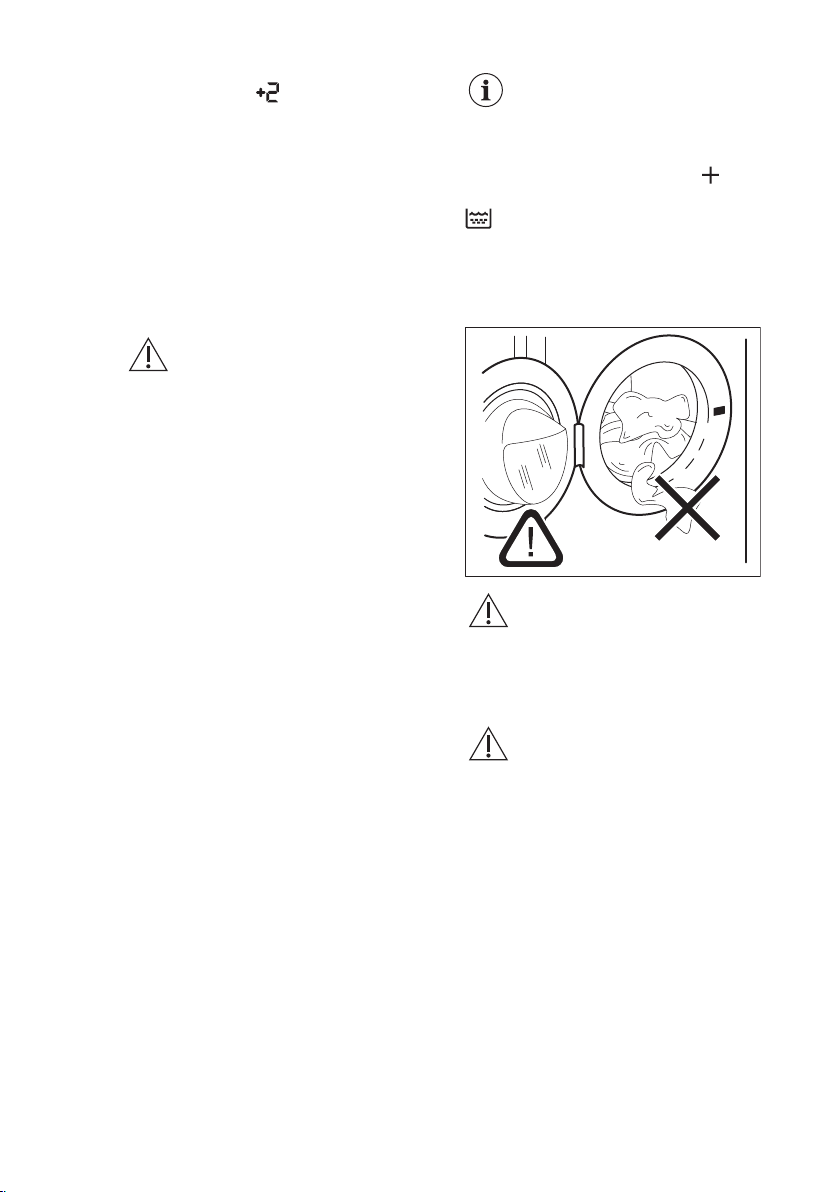
CAUTION!
Make sure that no laundry
stays between the seal and
the door. There is a risk of
water leakage or damage to
the laundry.
CAUTION!
Washing heavily oiled,
greasy stains could cause
damage rubber parts of the
washing machine.
www.aeg.com22
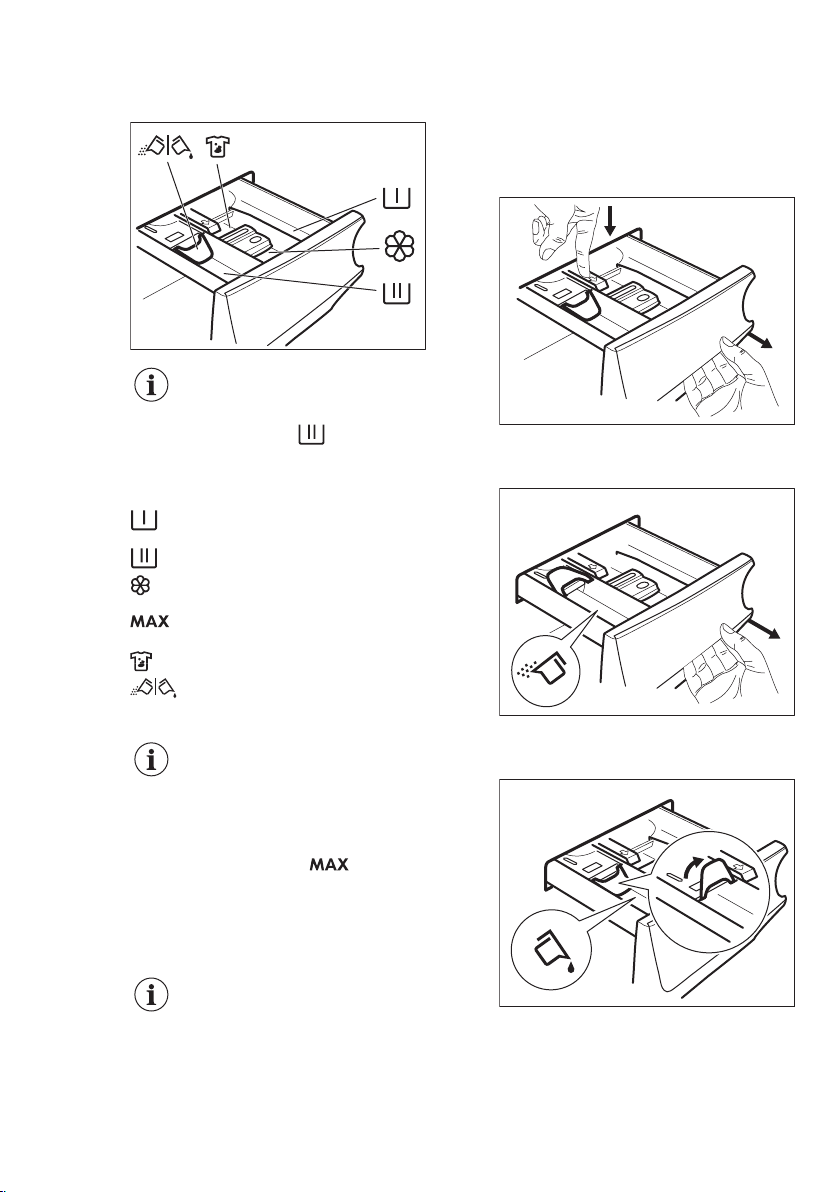
11.3 Filling the detergent and
additives
Before using the detergent
dispenser, make sure that
the folded tag in the
compartment has been
removed. Refer to "Before
first use" chapter.
Compartment for prewash phase
an soak program. Compartment
for washing phase.
Compartment for liquid additives
(fabric conditioner, starch).
Maximum level for quantity of
liquid additives.
Compartment for stain remover.
Flap for powder or liquid
detergent.
Always follow the
instructions that you find on
the packaging of the
detergent products, but we
recommend that you do not
exceed the maximum
indicated level ( ). This
quantity will however
guarantee the best washing
results.
After a washing cycle, if
necessary, remove any
detergent residue from the
detergent dispenser.
11.4 Check the position of the
flap
1. Pull out the detergent dispenser until
it stops.
2. Press the lever down to remove the
dispenser.
1
2
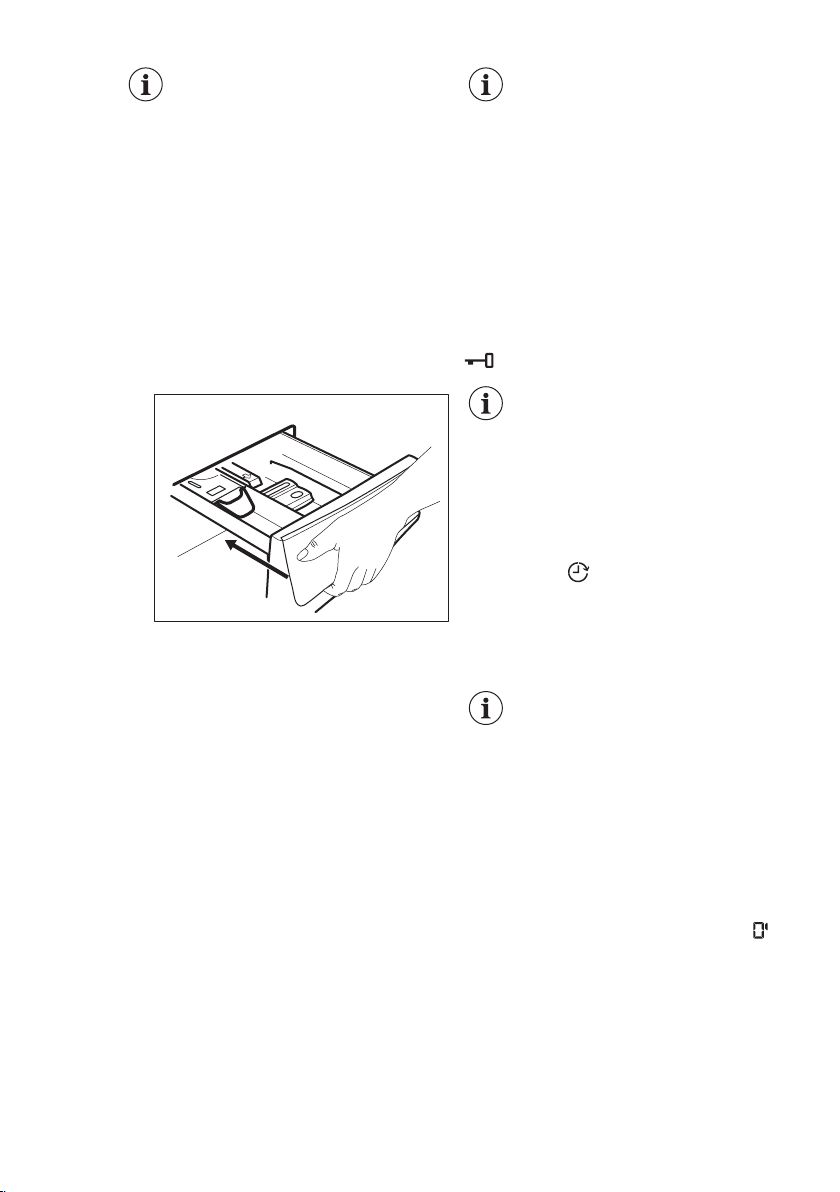
3. To use powder detergent, turn the
flap up.
4. To use liquid detergent, turn the flap
down.
ENGLISH 23
With the flap in the
position DOWN:
•
Do not use
gelatinous or thick
liquid detergents.
•
Do not put more
liquid detergent than
the limit shown on
the flap.
•
Do not set the
prewash phase.
•
Do not set the delay
start function.
5. Measure out the detergent and the
fabric conditioner.
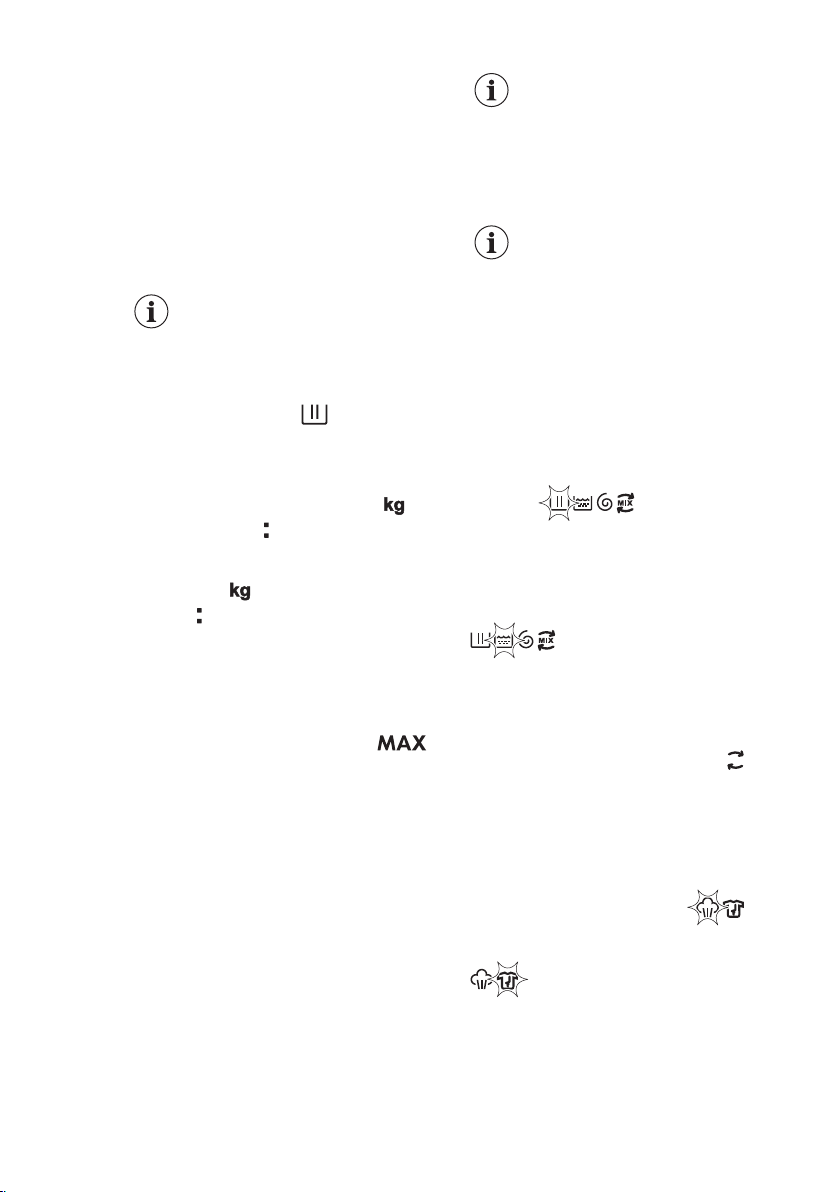
6. Carefully close the detergent
dispenser.
Make sure that the flap does not cause a
blockage when you close the drawer.
11.5 Setting a program
1. Turn the program dial to select
the desired washing program. The
related program indicator comes on.
The indicator of the Start/Pause button
flashes.
The display shows the maximum
declared load for the program, the
default temperature, the default spin
speed, the washing phase indicators
(when available) and an indicative
program duration.
2. To change the temperature and/or
the spin speed, touch the related
buttons.
3. If desired, set one or more options
by touching the related buttons. The
related indicators come on in the
display and the given information
changes accordingly.
In case a selection is not
possible, no indicator comes
on and an acoustic signal
sounds.
11.6 Starting a program
Touch the Start/Pause button to start the
program.
The related indicator stops flashing and
stays on.
In the display, the indicator of the
operating phase starts flashing.
The program starts, the door is locked.
The display shows the indicator
.
The drain pump can operate
shortly before the appliance
fills water.
11.7 Starting a program
with the delay start
1. Touch this repeatedly until the
display shows the desired delay time.
The indicator comes on.
2. Touch the Start/Pause button.
The appliance starts the countdown of
the delay start.
When the countdown is completed, the
programm starts.
The ProSense estimation
starts at the end of the
countdown.
Cancelling the delay start after
the countdown has started
To cancel the delay start:
1. Touch the Start/Pause button to
pause the appliance. The related
indicator flashes.
2. Touch the Delay Start button
repeatedly until the display shows .
3. Touch the Start/Pause button again
to start the program immediately.
Changing the delay start after
the countdown has started
To change the delay start:
www.aeg.com24
1. Touch the Start/Pause button to
pause the appliance. The related
indicator flashes.
2. Touch the Delay Start button
repeatedly until the display shows
the desired delay time.
3. Touch the Start/Pause button again
to start the new countdown.
11.8 The ProSense load
detection
The program duration in
the display is referred to a
medium/high load.
After touching the Start/Pause button,
the maximum declared load indicator
goes off, the indicator
flashes, the
ProSense starts the laundry load
detection:
1. The appliance detects the load in the
first 30 seconds: the indicator and
the time dots flash, the drum rotates
shortly.
2. At the end of the load detection, the
indicator goes off and the time
dots stop flashing. The program
duration will be adjusted accordingly
and could increase or decrease. After
further 30 seconds, the water filling
starts.
At the end of the load detection, in case
of drum overload, the indicator is
flashing in the display:
In this case, for 30 seconds, it is possible
to pause the appliance and remove the
exceeding garments.
Once removed the exceeding garments,
touch the Start/Pause button to start the
program again. The ProSense phase can
be repeated up to three times (see point
1).
Important! If the laundry amount will not
be reduced, the washing program starts
anyway, despite the overload. In this
case, it will be not possible to guarantee
the best washing results.
About 20 minutes after the
program start, the program
duration could be adjusted
again depending on the
capacity of water
absorption of the fabrics.
The ProSense detection is
carried out with complete
washing programs only (no
skipping phase selected).
11.9 Program phase
indicators
When the program starts the indicator of
the running phase flashes and the other
phase indicators are steady on.
E.g. the washing or pre wash phase is
running: .
When the phase ends the relevant
indicator stops flashing and is steady on.
The next phase indicator starts flashing.
E.g. the rinse phase is running:
.
During the washing cycle, the appliance
mixes the detergent, the stain removal
for fabric treatment and/or the fabric
softener with water before introducing
MIX
them into the drum; the indicator
appears and disappears on the display
according to the different program
phases (the arrows flash alternatively).
If you select the Plus Steam the steam
phase indicators come on.
The steam phase is running: .
The anti-crease phase is running:
.
ENGLISH 25
11.10
Interrupting a program
and changing the
options
When the program is running, you can
change only some options:
1. Touch the Start/Pause button.
The related indicator flashes.
2. Change the options. The given
information in the display changes
accordingly.
3. Touch the Start/Pause button again.
The washing program continues.
11.11 Cancelling a running
program
1. Press the On/Off button to cancel
the program and to deactivate
the appliance.
2. Press the On/Off button again to
activate the appliance.
Now, you can set a new washing
program.
If the ProSense phase is
already carried out and the
water filling is already
started, the new program
starts without repeating
the ProSense phase. The
water and the detergent are
not drained out in order to
avoid waste. The display
shows the maximum duration
of the program, updating it
about 20 minutes after the
starting of the new program.
11.12 Opening the door -
Adding garments
While a program or the delay start
operates, the appliance door is locked.
If the temperature and level
of the water in the drum are
too high and/or the drum
still rotates you cannot open
the door.
1. Touch the Start/Pause button.
In the display the related door lock
indicator goes off.
2. Open the appliance door. If
necessary, add or remove the items.
3. Close the door and touch the Start/
Pause button.
The program or the delay start
continues.
4. The door can be opened when the
program is complete, or set
spinning or draining program/
option and than press Start/Pause
button.
11.13 End of the program
When the program has finished, the
appliance stops automatically. The
acoustic signals operate (if they are
active).
In the display all washing phase
indicators become steady and the time
area shows .
The indicator of the Start/Pause button
goes off.
The door unlocks and the indicator
goes off.
1. Press the On/Off button to
deactivate the appliance.
After five minutes from the end of the
program, the energy saving function
automatically deactivates the appliance.
When you activate the
appliance again, the display
show the end of the last
selected program. Turn the
program dial to set a new
cycle.
2. Remove the laundry from the
appliance.
3. Make sure that the drum is empty.
4. Keep the door and the detergent
dispenser slightly ajar to prevent
mildew and odours.
5. Close the water tap.
11.14 Draining water out after
end of cycle
If you have chosen a program or an
option that does not empty out the
www.aeg.com26
water of the last rinse, the program is
completed, but:
• The display shows the indicator , the
option indicator or and the
door locked indicator . The
indicator of the running phase
flashes.
•
The drum still turns at regular intervals
to prevent the creases in the laundry.
•
The door stays locked.
•
You must drain the water to open the
door:
1. If necessary, touch the Spin button to
decrease the spin speed proposed
by the appliance.
2. Touch the Start/Pause button:
• If you have set
, the appliance
drains the water and spins.
• If you have set , the appliance
only drains the water.
The option indicator or goes off,
while the indicator flashes and then
goes off.
3. When the program is completed
and the door locked indicator
goes off, you can open the door.
4. Press the On/Off button a few
seconds to deactivate the appliance.
In any case, the appliance
empties the water out
automatically after
approximately 18 hours.
11.15 Stand-by option
The Stand-by function automatically
deactivates the appliance to decrease
the energy consumption when:
• You do not use the appliance for 5
minutes before you touch the Start/
Pause button.
Press the On/Off button to activate
the appliance again.
• After 5 minutes from the end of the
washing program.
Press the On/Off button to activate
the appliance again.
The display shows the end of the last
set program.
Turn the program dial to set a new
cycle.
If you set a program or an
option that ends with water
in the drum, the Stand-by
function doesn't deactivate
the appliance to remind you
to drain the water.
12. HINTS AND TIPS
WARNING!
Refer to Safety chapters.
12.1 The laundry load
• Divide the laundry into: whites,
coloureds, synthetics, delicates and
woollens.
• Follow the washing instructions on the
laundry care labels.
• Do not wash white and coloured
items together: whites may lose their
«whiteness» in the wash.
• Some coloured items can discolour
with the first wash. We recommend
that you wash them separately for the
first couple of times.
• Turn multilayered fabrics, wool and
items with printed illustrations inside
out.
• Pre-treat tough stains.
• Wash heavy soil stains with a special
detergent.
• Treat curtains with special care.
Remove the hooks and put the
curtains in a washing bag or
pillowcase.
• Do not wash laundry without hems or
with cuts. Use a washing bag to wash
small and/or delicate items (e.g.
underwired bras, belts, tights,
shoelaces, ribbons, etc. ).
• A very small load can cause balance
problems with the spin phase leading
to excessive vibration. If this occurs:
a. interrupt the program and open
the door (refer to "Daily Use"
chapter);
ENGLISH 27
b. manually redistribute the load so
that the items are spaced evenly
around the tub;
c. press the Start/Pause button. The
spin phase continues.
•
Avoid washing garments full of long
animal hair or poor quality garments
releasing lots of fluff that could block
the drain circuit and therefore
requiring the Service assistance.
• Make sure that you wash lint
collectors separately from lint
producer.
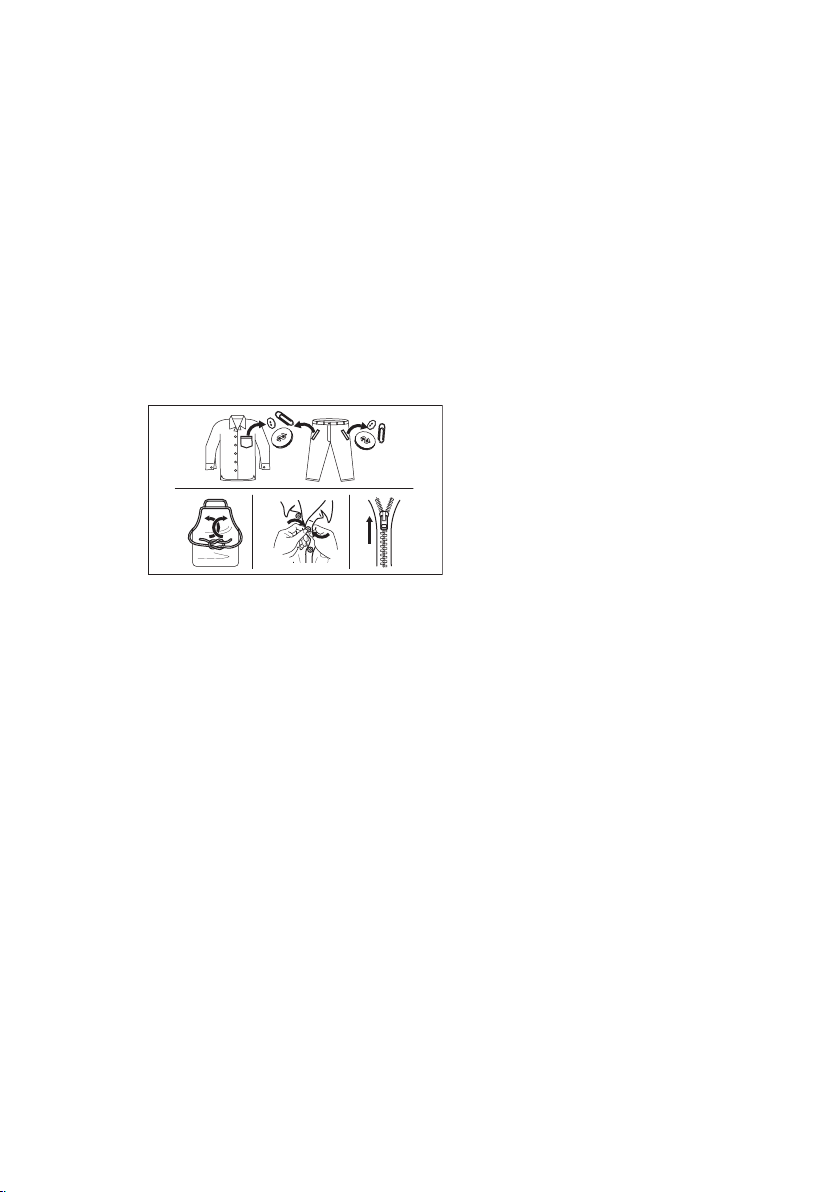
• Button up pillowcases, close zippers,
hooks and poppers. Tie up belts,
cords, shoelaces, ribbons and any
other loose elements.
• Empty pockets and unfold the items.
• The recommended loads for each
program are indicated in the
program chart. Washing a maximum
load makes the most efficient use of
water and energy. For heavily soiled
laundry, reduce the load size.
12.2 Stubborn stains
For some stains, water and detergent is
not sufficient.
We recommend that you pre-treat these
stains before you put the items in the
appliance.
Special stain removers are available. Use
the special stain remover that is
applicable to the type of stain and fabric.
12.3 Detergents type and
quantity of detergent
Low sudsing detergent is required for
this washing machine to prevent
oversudsing problems, unsatisfied
washing result and harm to the
appliance. Low sudsing detergents
designed for front load washing
machines are labelled "Front loading",
"high efficiency", "HE" or "Matic".
Do not use wrong types of detergent,
such as Top Loading, Handwash
detergent or Soap-Based products in
your front-load washing machine. This
can result in excessive suds, longer
cycle time, low spin speeds, poor
rinsing and overloading of the motor
and, in extreme cases, suds flowing
out of the appliance with symptoms
similar to water leak.
Quantity of detergent to be
used
The choice of detergent and use of
correct quantities not only affects your
wash performance, but also helps to
avoid waste and protect the
environment.
Although biodegradable, detergents
contain substances which in large
quantities can upset the delicate balance
of nature.
The choice and quantity of detergent will
depend on:
• type of fabric (delicates, woollens,
cottons, etc);
• the colour of clothes;
• size of the load;
• degree of soil;
• wash temperature; and
• hardness of the water used.
Water hardness is classified by so-called
"degrees" of hardness.
Information on hardness of the water in
your area can be obtained from the
relevant water supply company, or from
your local authority.
You may have to try using the detergent
quantity as per manufactures'
instructions then compare the wash
result to the list below and adjust the
amount of detergent for your future
washes accordingly.
Not enough washing powder causes
:
• the wash load to turn grey,
• greasy clothes.
Too much washing powder causes:
• sudsing,
• reduced washing effect,
www.aeg.com28
• inadequate rinsing.
Use less detergent if:
•
you are washing a small load,
•
the laundry is lightly soiled,
• large amounts of foam during
washing.
12.4 Ecological hints
To save water, energy and to help
protect the environment, we recommend
that you follow these tips:
• Normally soiled laundry may be
washed without prewashing in order
to save detergent, water and time (the
environment is protected too!).
•
The machine works more
economically if it is fully loaded.
• With adequate pre-treatment, stains
and limited soiling can be removed;
the laundry can then be washed at a
lower temperature.
• To use the correct quantity of
detergent, refer to the quantity
suggested by the detergent
producer.
12.5
Water hardness
If the water hardness in your area is high
or moderate, we recommend that you
use a water softener for washing
machines. In areas where the water
hardness is soft it is not necessary to use
a water softener.
To find out the water hardness in your
area, contact your local water authority.
Use the correct quantity of water
softener. Follow the instructions that you
find on the packaging of the product.
13. CARE AND CLEANING
WARNING!
Refer to Safety chapters.
13.1 External cleaning
Clean the appliance with mild soap and
warm water only. Fully dry all the
surfaces.
Do not use a scouring pads or any
scratching material.
CAUTION!
Do not use alcohol, solvents
or chemical products.
CAUTION!
Do not clean the metal
surfaces with chlorine-based
detergent.
13.2 Descaling
If the water hardness in your
area is high or moderate, we
recommend that you use a
water descaling product for
washing machines.
Regularly examine the drum to check for
limescale.
The regular detergents already contain
water softening agents, but we
recommend to run a cycle with empty
drum and a descaling product
occasionally.
Always follow the
instructions that you find on
the packaging of the
product.
13.3 Maintenance wash
The repeated and prolonged use of low
temperature programs can cause
detergent deposits, fluff residues,
bacterial growth inside the drum and the
tub. This could generate bad odours and
mildew.
To eliminate these deposits and
hygienize the inner part of the appliance,
run a maintenance wash regularly (at
least once a month):
1. Remove all laundry from the drum.
2. Run a cotton program with the
highest temperature without
detergent or, if available, run the
Machine Clean program.
ENGLISH 29
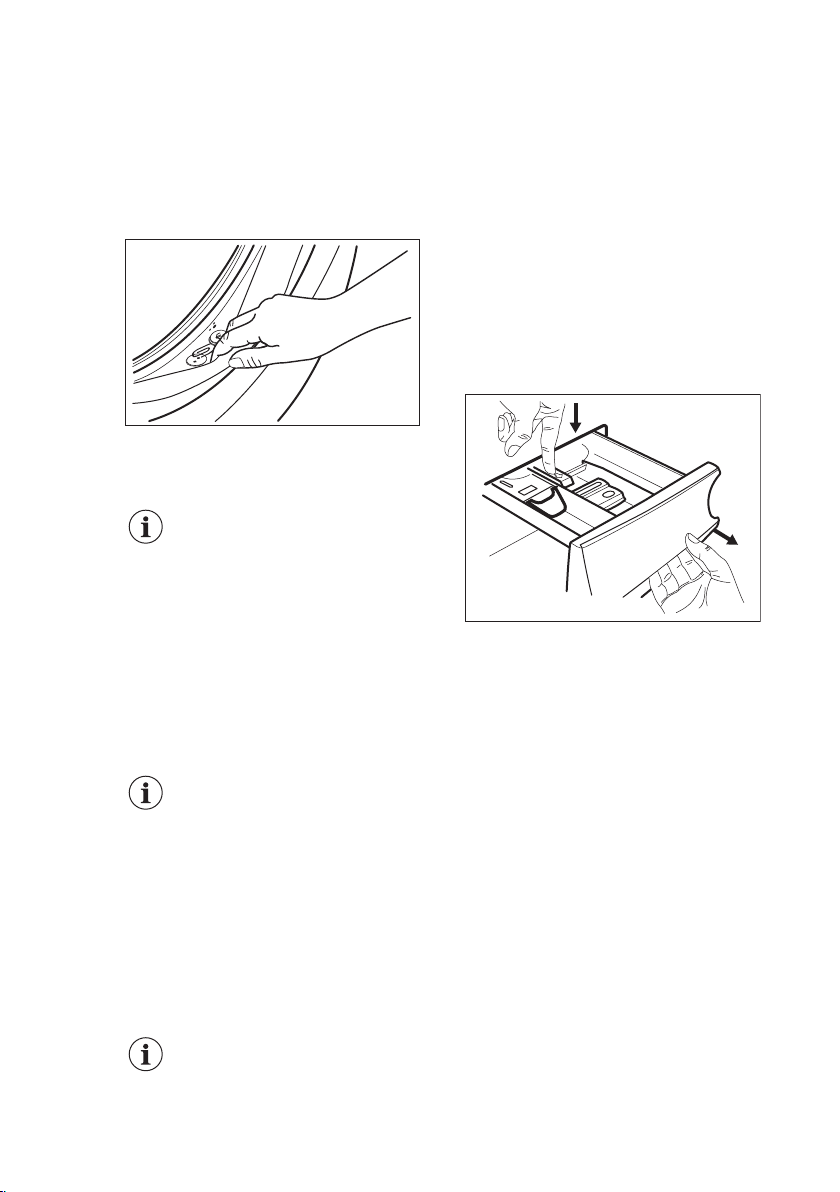
13.4 Door seal
This appliance is designed with a self
cleaning draining system, allowing light
fluff fibers that fall off the clothes to be
drained out with the water. Regularly
examine the seal. Coins, buttons, other
small items can be recovered at the end
of the cycle.
Clean it when needed, using ammonia
cream cleanser agent without scratching
the seal surface.
Always obey the instructions
that you find on the
packaging of the product.
13.5 Cleaning the drum
Regularly examine the drum to prevent
unwanted deposits.
Rust deposits in the drum may occur due
to rusting foreign body in the washing or
tap water containing iron.
Clean the drum with special products for
stainless steel.
Always follow the
instructions that you find on
the packaging of the
product.
Do not clean the drum with
acidic descaling products,
scouring products
containing chlorine or iron or
steel.
For a thorough clean:
1. Clean the drum with special products
for stainless steel.
Always follow the
instructions that you find on
the packaging of the
product.
2. Run a short cotton program at
high temperature with empty drum
or, if available, run the Machine
Clean program.
13.6 Cleaning the detergent
dispenser
To prevent possible deposits of dried
detergent or clotted fabric softener
and/or formation of mould in the
detergent dispenser drawer, once in a
while carry out the following cleaning
procedure:
1. Open the drawer. Press the catch
downwards as indicated in the
picture and pull it out.
1
2
2. Remove the top part of the additive
compartment to aid cleaning. Make
sure that all detergent residue is
removed from the upper and lower
part of the recess. Use a small brush
to clean the recess.
www.aeg.com30
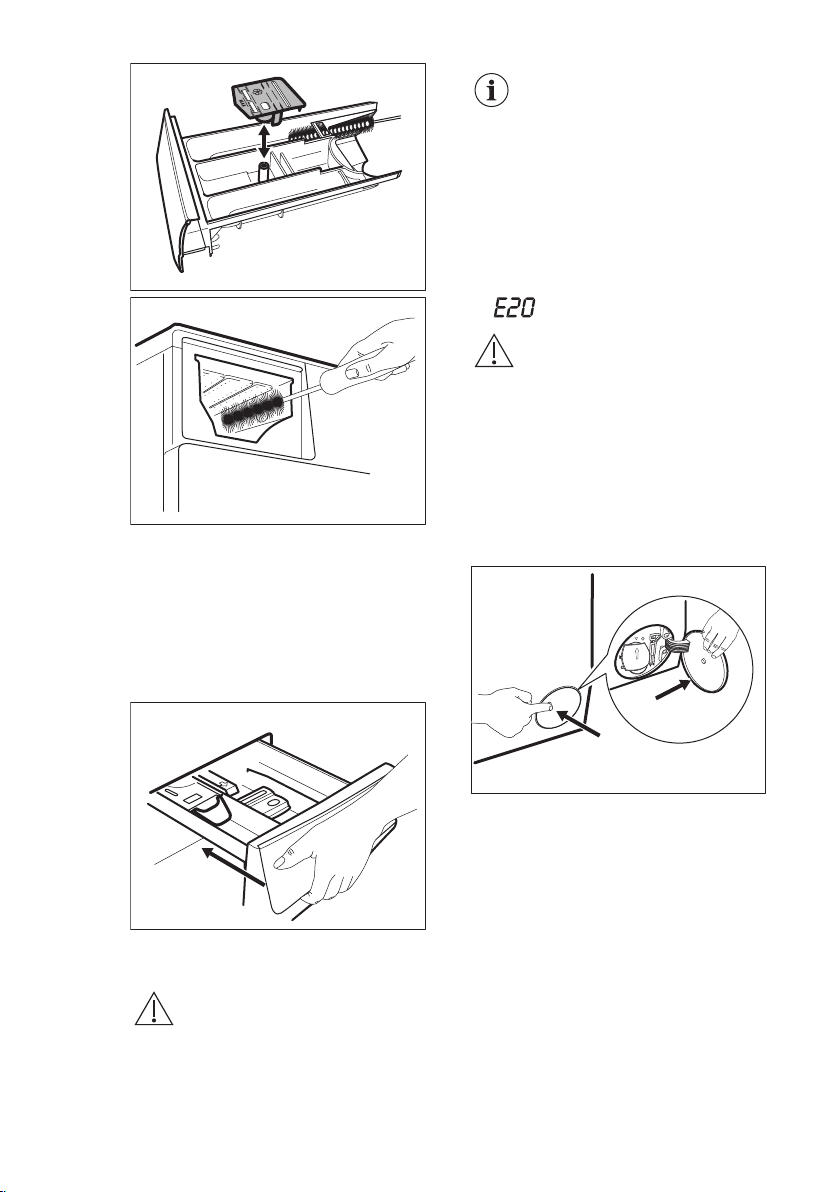
3. Flush the detergent drawer out under
running warm water to remove any
traces of accumulated detergent.
After cleaning, replace the top part in
its position.
4. Insert the detergent drawer into the
guide rails and close it. Run the
rinsing program without any clothes
in the drum.
13.7 Cleaning the drain pump
WARNING!
Disconnect the mains plug
from the mains socket.
Regularly check the drain
pump filter and make sure
that it is clean.
Clean the drain pump if:
•
The appliance does not drain the
water.
• The drum does not turn.
• The appliance makes an unusual
noise because of the blockage of the
drain pump.
• The display shows the alarm code
.
WARNING!
•
Do not remove the filter
while the appliance
operates.
• Do not clean the pump if
the water in the
appliance is hot. Wait
until the water cools
down
Proceed as follows to clean the pump:
1. Open the pump cover.
1
2
2. Place a suitable bowl below the drain
pump access to collect the water that
flows out.
3. Open the chute downwards. Always
keep a rag nearby to dry up any
water spillages when removing the
filter.
ENGLISH 31
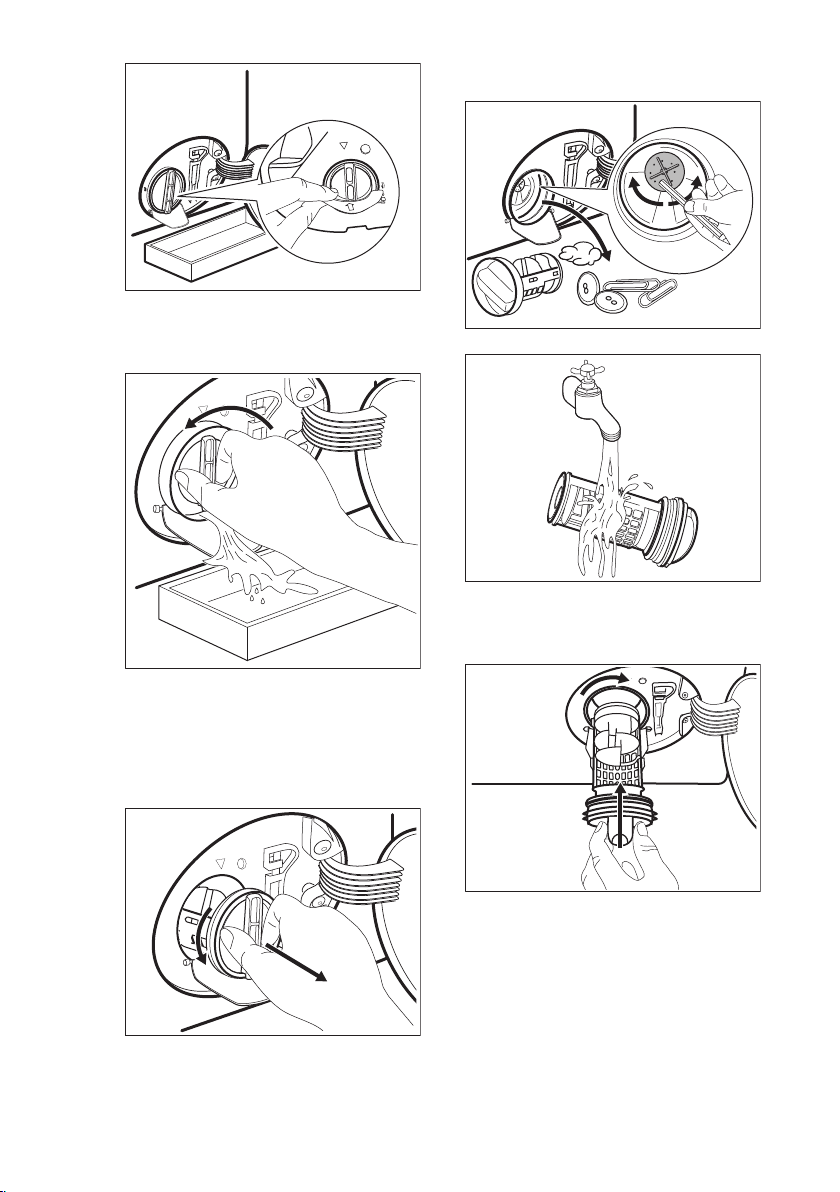
4. Turn the filter 180 degrees in anti-
clockwise direction to open it,
without removing. Let the water flow
out.
5. When the bowl is full of water, turn
the filter back and empty the
container.
6. Repeat the steps 4 and 5 until the
water stops to flow out.
7. Turn the filter anti-clockwise to
remove it.
1
2
8. If it is necessary, remove fluff and
objects from the filter recess.
9. Make sure that the impeller of the
pump can rotate. If it does not
rotate, contact the Authorised
Service Centre.
10. Clean the filter under the water tap.
11. Put the filter back into the special
guides by turning it clockwise. Make
sure that you tighten the filter
correctly to prevent leakages.
2
1
12. Close the pump cover.
www.aeg.com
32
2
1
When you drain the water with the
emergency drain procedure, you must
activate the drain system again:
a. Put 2 litres of water in the main
wash compartment of the
detergent dispenser.
b. Start the program to drain the
water.
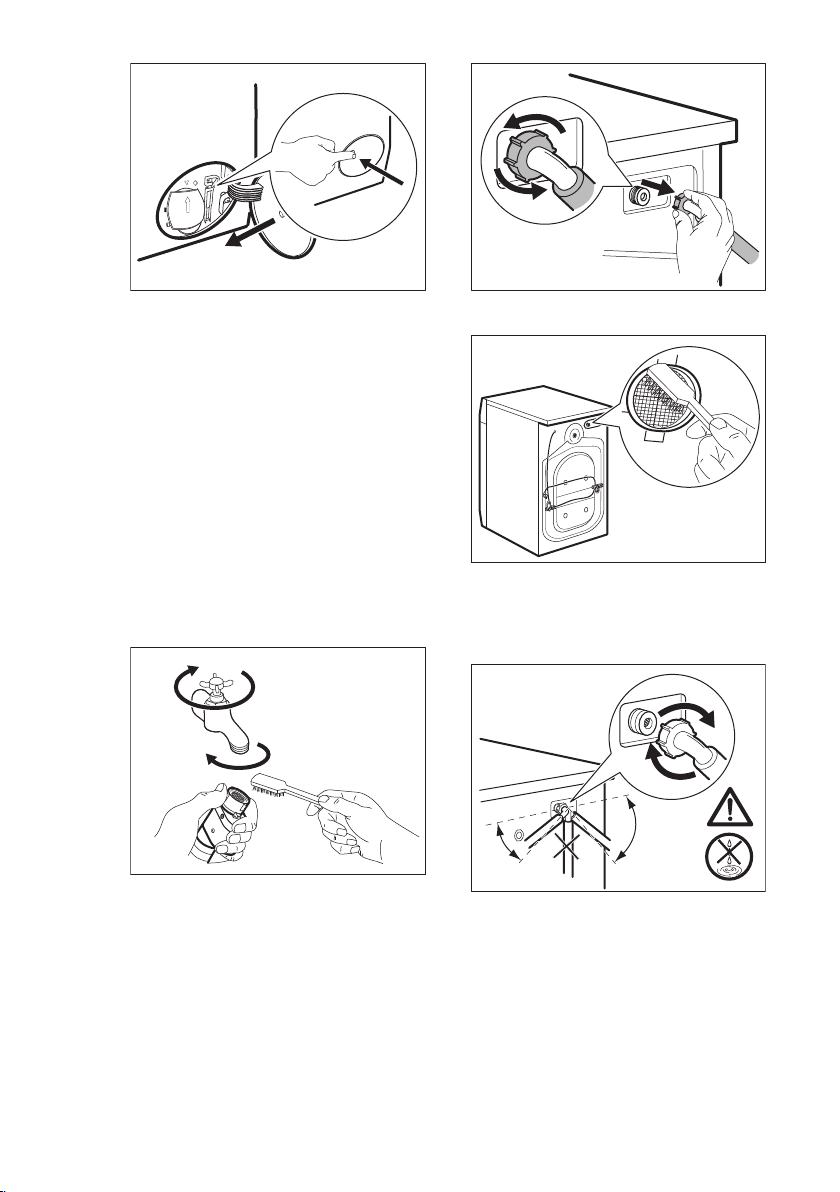
13.8 Cleaning the inlet hose
and the valve filter
It is recommended to clean both the
filters of the inlet hose and valve
occasionally to remove any deposit,
collected over the time:
1. Remove the inlet hose from the tap
and clean the filter.
1
2
3
2. Remove the inlet hose from the
appliance by loosening the ring nut.
3. Clean the valve filter on the back of
the appliance with a toothbrush.
4. When you reconnect the hose to the
back of the appliance, turn it left or
right (not in vertical position)
depending on the position of your
water tap.
45°
20°
13.9 Emergency drain
If the appliance cannot drain the water,
carry out the same procedure, described
in 'Cleaning the drain pump' paragraph.
If necessary, clean the pump.
When you drain the water with the
emergency drain procedure, you must
activate the drain system again:
ENGLISH 33
1. Put 2 litres of water in the main wash
compartment of the detergent
dispenser.
2. Start the program to drain the water.
13.10
Frost precautions
If the appliance is installed in an area
where the temperature can reach the
values around 0° C or drop below,
remove the remaining water from the
inlet hose and the drain pump.
1. Disconnect the mains plug from the
mains socket.
2. Close the water tap.
3. Put the two ends of the inlet hose in
a container and let the water flow out
of the hose.
4. Empty the drain pump. Refer to the
emergency drain procedure.
5. When the drain pump is empty,
install the inlet hose again.
WARNING!
Make sure that the
temperature is higher than 0
°C before you use the
appliance again.
The manufacturer is not
responsible for damages
caused by low temperatures.
14. TROUBLESHOOTING
WARNING!
Refer to Safety chapters.
14.1 Alarm Codes and Possible failures
The appliance does not start or it stops during operation. First try to find a solution to the
problem (refer to the tables).
WARNING!
Deactivate the appliance before carrying out any check.
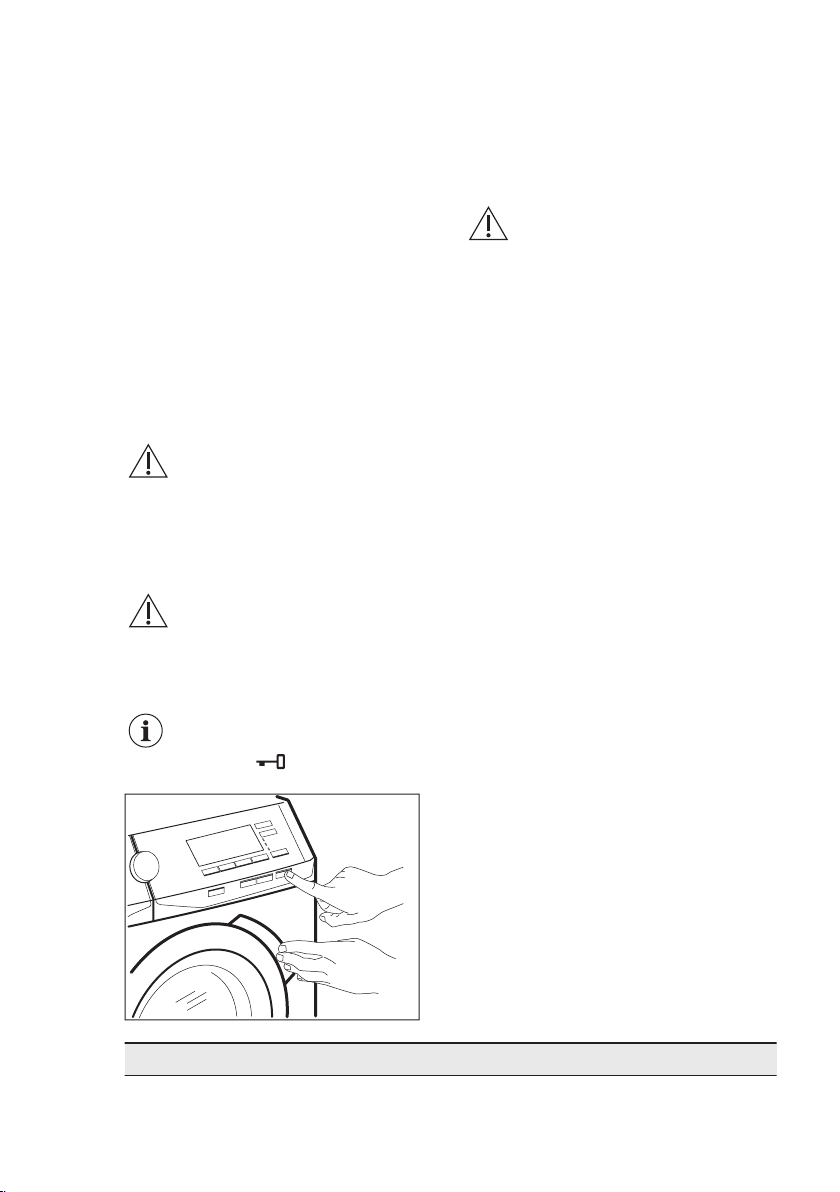
With some problems, the display shows an alarm code and the Start/Pause button may
flash continuously:
If the appliance is overloaded, remove some items from the drum and/or
keep pressed the door while touching the Start/Pause button until the
indicator stops flashing (see the picture below).
Problem Possible solution
www.aeg.com34
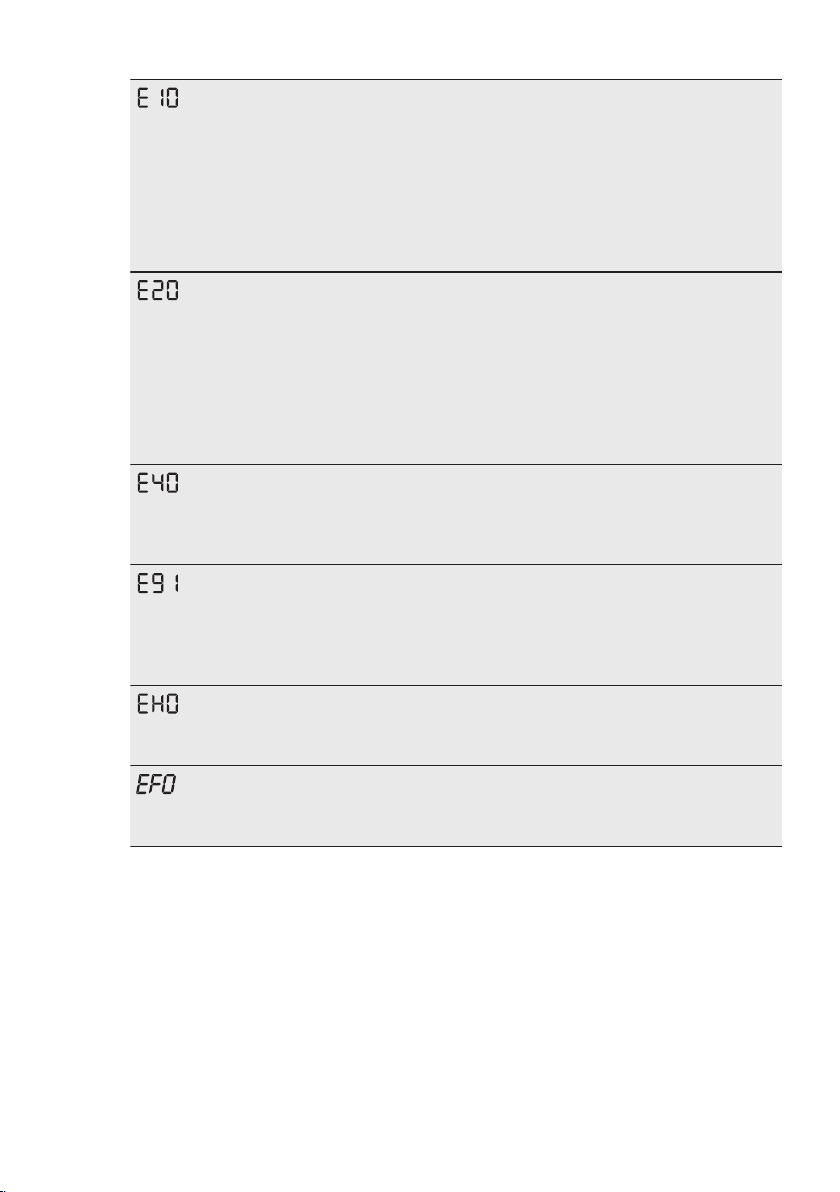
The appliance does
not fill with water
properly.
• Make sure that the water tap is open.
• Make sure that the pressure of the water supply is not too low.
For this information, contact your local water authority.
•
Make sure that the water tap is not clogged.
• Make sure that the inlet hose has no kinks, damages or bends.
• Make sure that the connection of the water inlet hose is cor-
rect.
• Make sure that the filter of the inlet hose and the filter of the
valve are not clogged. Refer to 'Care and cleaning'.
The appliance does
not drain the water.
• Make sure that the sink spigot is not clogged.
• Make sure that the drain hose has no kinks or bends.
• Make sure that the drain filter is not clogged. Clean the filter,
if necessary. Refer to "Care and cleaning".
• Make sure that the connection of the drain hose is correct.
• Set the drain program if you set a program without drain
phase.
• Set the drain program if you set an option which ends with
water in the tub.
The appliance door is
open or not closed
correctly.
• Make sure that the door is properly closed.
No communication
between electronic el-
ements of the appli-
ance.
• The program was not finished properly or the appliance
stopped too early. Switch the appliance off and on again.
• If the alarm code appears again, contact the Authorised Serv-
ice Centre.
The mains supply is
unstable.
• Wait until mains supply is stable.
The anti-flood device
is on.
• Disconnect the appliance and close the water tap. Contact the
Authorised Service Centre.
If the display shows other alarm codes, deactivate and activate the appliance. If the
problem continues, contact the Authorised Service Centre.
In case of different problem with the washing machine check the table below for possible
solutions.
ENGLISH 35
Problem Possible solution
The program does
not start.
• Make sure that the mains plug is connected to the mains
socket.
• Make sure that the appliance door is closed.
• Make sure that there is no damaged fuse in the fuse box.
• Make sure that the Start/Pause has been touched.
• If the delay start is set, cancel the setting or wait for the end of
countdown.
• Deactivate the Child Lock function if it is on.
• Check the position of the knob on the selected program.
The appliance fills with
water and drains im-
mediately.
• Make sure that the drain hose is in the correct position. The
hose may be positioned too low. Refer to "Installation instruc-
tion".
The spin phase does
not operate or the
washing cycle lasts
longer than usual.
• Set the spin program.
• Make sure that the drain filter is not clogged. Clean the filter,
if necessary. Refer to "Care and cleaning".
• Adjust manually the items in the tub and start the spin phase
again. This problem may be caused by balance problems.
There is water on the
floor.
• Make sure that the couplings of the water hoses are tight and
there is not water leakages.
• Make sure that the water inlet hose and the drain hose have
no damages.
• Make sure you use the correct detergent and the correct
quantity of it.
• Too much detergent or unsuitable detergent creates too
much foam. Reduce detergent quantity and/or use a suitable
detergent.
You cannot open the
appliance door.
• Make sure that a washing program that ends with water in
tub, has not been selected.
• Make sure that the washing program is finished.
• Set the drain or the spin program if there is water in the
drum.
• Make sure that the appliance receives electrical power.
• This problem may be caused by a failure of the appliance.
Contact the Authorised Service Centre.
If you need to open the door, please read carefully "Emer-
gency door opening".
The appliance makes
an unusual noise and
vibrates.
• Make sure the levelling of the appliance is correct. Refer to
"Installation instruction".
• Make sure that the packaging and/or the transit bolts are re-
moved. Refer to "Installation instruction".
• Add more laundry in the drum. The load may be too small.
The program dura-
tion increases or de-
creases during pro-
gram execution.
• The ProSense System is able to adjust the program duration
according to the type and the laundry load size. Refer to
"The ProSense System load detection" in "Daily Use" chap-
ter.
www.aeg.com36
Problem Possible solution
The washing results
are not satisfactory.
• Increase the detergent quantity or use a different detergent.
•
Use special products to remove the stubborn stains before
you wash the laundry.
• Make sure that you set the correct temperature.
• Decrease the laundry load.
Too much foam in the
drum during the wash-
ing cycle.
• Reduce the quantity of detergent.
•
Too much detergent or unsuitable detergent has been used.
Reduce detergent quantity and/or use a correct detergent.
After the washing cy-
cle, there are some
detergent residues in
the dispenser drawer.
• Make sure that the flap is in the correct position (UP for pow-
der detergent - DOWN for liquid detergent).
•
Make sure you have used the detergent dispenser according
the indications given in this user manual.
After the check, activate the appliance. The program continues from the point of
interruption.
If the problem occurs again, contact the Authorised Service Centre.
The necessary data for the service centre are on the rating plate.
14.2 Emergency door opening
In case of power failure or functioning
failure the appliance door remains
locked. The washing program continues
when the power is restored. If the door
remains locked in case of failure, it is
possible to open it using the emergency
unlock function.
Before opening the door:
CAUTION!
Risk of burns! Make sure
that the water
temperature is not too
high and the laundry is not
hot. If necessary, wait until
they cool down.
CAUTION!
Risk of injury! Make sure
that the drum is not
rotating. If necessary, wait
until the drum stops
rotating.
Make sure that the water
level inside the drum is not
too high. If necessary,
proceed with an
emergency drain (refer to
«Emergency drain» in
«Care and cleaning»
chapter).
To open the door, proceed as follows:
1. Press the On/Off button to switch the
appliance off.
2. Disconnect the mains plug from the
mains socket.
3. Open the filter flap.
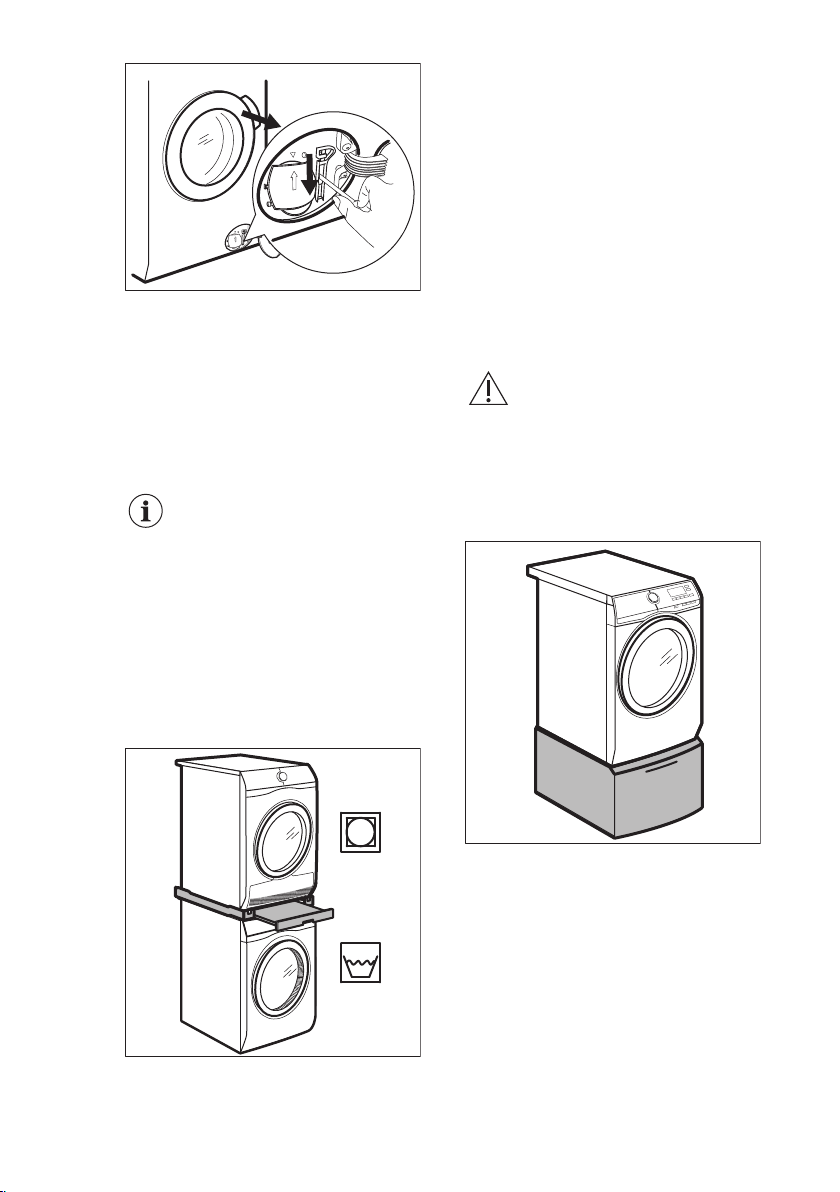
4. Pull the emergency unlock trigger
downward once. Pull it downward
once again, keep it tensed and, in
the meanwhile, open the appliance
door.
ENGLISH 37
5. Take out the laundry and then close
the appliance door.
6. Close the filter flap.
15. ACCESSORIES
15.1 Available in
www.aeg.com/shop or from
authorised dealer
Read carefully the instructions supplied
with the accessory.
Only appropriate
accessories approved by
AEG ensure the safety
standards of the appliance. If
unapproved parts are used,
any claims will be
invalidated.
15.2 Stacking kit
The tumble dryer can be stacked on the
top of the washing machine only by
using the correct stacking kit.
WARNING!
Do not put the tumble dryer
under the washing machine.
Verify the compatible
stacking kit by checking the
depth of your appliances.
15.3 Pedestal with the drawer
To raise your appliance and make
loading and unloading laundry easier.
The drawer can be used for laundry
storage e.g.: towels, cleaning products
and more.
www.aeg.com
38

16. WARRANTY
FOR SALES IN AUSTRALIA AND NEW
ZEALAND
ALL AEG BRANDED APPLIANCES
This document sets out the terms and
conditions of the product warranties
for AEG Appliances. It is an important
document. Please keep it with your
proof of purchase documents in a safe
place for future reference should there
be a manufacturing defect in your
Appliance. This warranty is in addition
to other rights you may have under
the Australian Consumer Law.
1. In this warranty:
a) ‘ACL’ or ‘Australian Consumer
Law’ means Schedule 2 to the
Competition and Consumer Act
2010;
b) ‘Appliance’ means any Electrolux
product purchased by you and
accompanied by this document;
c) ‘ASC’ means Electrolux’s
authorised serviced centres;
d) ‘AEG’ is the brand controlled by
Electrolux Home Products Pty
Ltd of 163 O’Riordan Street,
Mascot NSW 2020, ABN 51 004
762 341 in respect of Appliances
purchased in Australia and
Electrolux (NZ) Limited
(collectively “Electrolux”) of 3-5
Niall Burgess Road, Mount
Wellington, in respect of
Appliances purchased in New
Zealand;
e) ‘Warranty Period’ means the
period specified in clause 3 of
this warranty;
f) ‘you’ means the purchaser of the
Appliance not having purchased
the Appliance for re-sale, and
‘your’ has a corresponding
meaning.
2. Application: This warranty only
applies to new Appliances,
purchased and used in Australia or
New Zealand and is in addition to
(and does not exclude, restrict, or
modify in any way) other rights and
remedies under a law to which the
Appliances or services relate,
including any non-excludable
statutory guarantees in Australia and
New Zealand.
3. Warranty Period: Subject to these
terms and conditions, this warranty
continues for in Australia for a period
of 60 months and in New Zealand for
a period of 60 months, following the
date of original purchase of the
Appliance.
4. Repair or replace warranty: During
the Warranty Period, Electrolux or its
ASC will, at no extra charge if your
Appliance is readily accessible for
service, without special equipment
and subject to these terms and
conditions, repair or replace any
parts which it considers to be
defective. Electrolux may, in its
absolute discretion, choose whether
the remedy offered for a valid
warranty claim is repair or
replacement. Electrolux or its ASC
may use refurbished parts to repair
your Appliance. You agree that any
replaced Appliances or parts
become the property of Electrolux.
5. Travel and transportation costs:
Subject to clause 7, Electrolux will
bear the reasonable cost of
transportation, travel and delivery of
the Appliance to and from Electrolux
or its ASC. Travel and transportation
will be arranged by Electrolux as part
of any valid warranty claim.
6. Proof of purchase is required before
you can make a claim under this
warranty.
7. Exclusions: You may not make a
claim under this warranty unless the
defect claimed is due to faulty or
defective parts or workmanship. This
warranty does not cover:
a) light globes, batteries, filters or
similar perishable parts;
b) parts and Appliances not
supplied by Electrolux;
c) cosmetic damage which does
not affect the operation of the
Appliance;
d) damage to the Appliance caused
by:
– negligence or accident;
ENGLISH
39

– misuse or abuse, including
failure to properly maintain or
service;
– improper, negligent or faulty
servicing or repair works done
by anyone other than an
Electrolux authorised repairer
or ASC;
– normal wear and tear;
– power surges, electrical storm
damage or incorrect power
supply;
– incomplete or improper
installation;
– incorrect, improper or
inappropriate operation;
– insect or vermin infestation;
– failure to comply with any
additional instructions
supplied with the Appliance;
In addition, Electrolux is not
liable under this warranty if:
– the Appliance has been, or
Electrolux reasonably believes
that the Appliance has been,
used for purposes other than
those for which the Appliance
was intended, including
where the Appliance has
been used for any non-
domestic purpose;
– the Appliance is modified
without authority from
Electrolux in writing;
– the Appliance’s serial number
or warranty seal has been
removed or defaced.
8. How to claim under this warranty:
To enquire about claiming under this
warranty, please follow these steps:
a. carefully check the operating
instructions, user manual and the
terms of this warranty;
b. have the model and serial
number of the Appliance
available;
c. have the proof of purchase (e.g.
an invoice) available;
d. telephone the numbers shown
below.
9. Australia: For Appliances and
services provided by Electrolux in
Australia: Electrolux goods come
with guarantees that cannot be
excluded under the Australian
Consumer Law. You are entitled to a
replacement or refund for a major
failure and for compensation for any
other reasonably foreseeable loss or
damage. You are also entitled to
have the Appliance repaired or
replaced if the Appliance fails to be
of acceptable quality and the failure
does not amount to a major failure.
‘Acceptable quality’ and ‘major
failure’ have the same meaning as
referred to in the ACL.
10. New Zealand: For Appliances and
services provided by Electrolux in
New Zealand, the Appliances come
with a guarantee by Electrolux
pursuant to the provisions of the
Consumer Guarantees Act, the Sale
of Goods Act and the Fair Trading
Act. Where the Appliance was
purchased in New Zealand for
commercial purposes the Consumer
Guarantee Act does not apply.
11. Confidentiality: You accept that if
you make a warranty claim, Electrolux
and its agents including ASC may
exchange information in relation to
you to enable Electrolux to meet its
obligations under this warranty.
Important Notice
Before calling for service, please ensure that the steps listed in clause 8 above have been
followed.
SERVICE AUSTRALIA
aeg.com/au
www.aeg.com40
FOR SERVICE
or to find the address of your nearest au-
thorised service centre in Australia
PLEASE CALL 1300 363 664
OR EMAIL
For the cost of a local call (Australia only)
FOR SPARE PARTS
or to find the address of your nearest spare
parts centre in Australia
PLEASE CALL 13 13 50
OR EMAIL
For the cost of a local call (Australia only)
SERVICE NEW ZEALAND
aegnewzealand.co.nz
FOR SERVICE
or to find the address of your nearest au-
thorised service centre in New Zealand
PLEASE CALL 0800 234 234
OR EMAIL
(New Zealand only)
FOR SPARE PARTS
or to find the address of your nearest spare
parts centre in New Zealand
PLEASE CALL 0800 10 66 20
OR EMAIL
(New Zealand only)
AEG_Warr_May_17
17. ENVIRONMENTAL CONCERNS
Recycle materials with the symbol .
Put the packaging in relevant containers
to recycle it. Help protect the
environment and human health by
recycling waste of electrical and
electronic appliances. Do not dispose of
appliances marked with the symbol
with the household waste. Return the
product to your local recycling facility or
contact your municipal office.
*
ENGLISH
41


www.aeg.com/au
157032090-A-092020