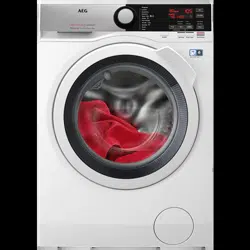
Your new washing machine meets all modern requirements for an effective treatment of laundry with low water, energy and detergent consumption and respectful of fabric care.
The ProSense technology detects the laundry load size defining the programme duration in 30 seconds. The washing programme is tailored to the laundry load and the type of fabric without consuming more time, energy and water than necessary.
The steam has a quick and easy way to refresh the clothes. The gentle steam programmes remove odours and reduce creases in dry fabrics so they need little ironing. The Plus Steam option, finishes every cycle with gentle steam that relaxesthe fibres and reduces fabric creasing. Ironing will be easier!
Thanks to the Soft Plus option, the fabric softener is uniformly spread out in the laundry and deeply penetrates the fabric fibres favouring a perfect softness.
Appliance overview
1 Worktop 2 Detergent dispenser 3 Control panel 4 Door handle 5 Rating plate 6 Drain pump filter
7 Feet for levelling the appliance 8 Drain hose 9 Inlet hose connection 10 Mains cable 11 Transit bolts 12 Hose support
8 Delay start touch button 9 Soft Plus touch button 10 Spin reduction touch button • Rinse Hold option • Extra Silent option • Skipping wash and rinse phases - Only Spin option • Skipping wash, rinse and spin phases - Only Drain option 11 Temperature touch button 12 On/Off push button
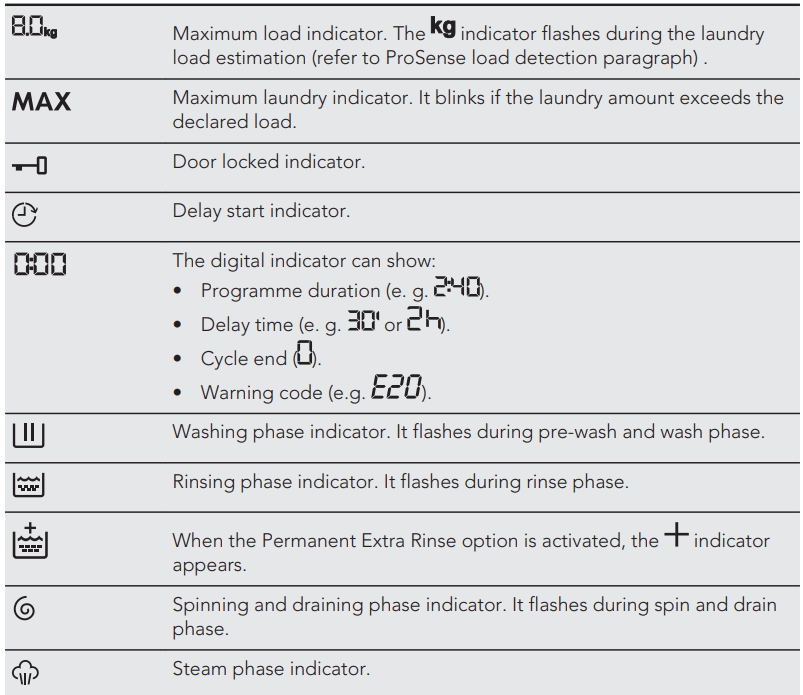
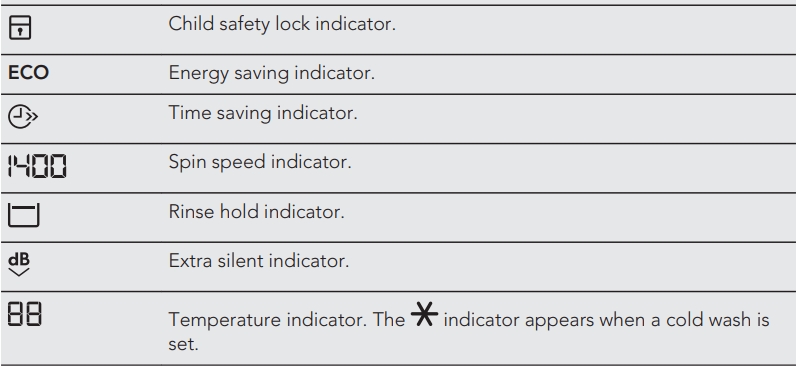
Display
DIAL AND BUTTONS
On/Off
Pressing this button for a few seconds allows to activate or deactivate the appliance. Two different tunes sound while switching the appliance on or off.
As the Stand-by function automatically deactivates the appliance to decrease the energy consumption in a few cases, you may need to activate the appliance again.
For more details, refer to Stand-by paragraph in Daily Use chapter.
Introduction
Note: The options/functions are not selectable with all washing programmes. Check the compatibility between options/functions and washing programmes in the "Programme Chart". An option/function can exclude another one, in this case the appliance doesn't allow you to set the incompatible options/functions together.
Temp
When you select a washing programme, the appliance automatically proposes a default temperature.
Touch this button repeatedly until the desired temperature value appears on the display.
When the display shows the indicators and , the appliance does not heat the water.
Spin
When you set a programme, the appliance automatically sets the maximum spin speed allowed.
Touch repeatedly this button to:
Decrease the spin speed.
Note: The display shows only the spin speeds available for the set programme.
Activate the Rinse Hold option.
The final spin is not performed. The water of the last rinse is not drained out to prevent the fabrics from creasing. The washing programme ends with water in the drum.
The display shows the indicator . The door stays locked and the drum turns regularly to reduce creasing. You must drain the water to unlock the door.
If you touch the Start/Pause button, the appliance performs the spinning phase and drains the water.
Note: The appliance empties the water out automatically after 18 hours approximately.
Activate the Extra Silent option.
The intermediate and the final spinning phases are suppressed and the programme ends with water in the drum. This helps to reduce creasing.
The display shows the indicator . The door stays locked. The drum turns regularly to reduce creasing. You must drain the water to unlock the door.
As the programme is very quiet, it is suitable for use at night time when cheaper electricity tariffs are available. In some programmes the rinses are performed with more water. If you touch the Start/Pause button, the appliance performs the only draining phase.
Note: The appliance empties the water out automatically after 18 hours approximately.
Drain Only option (Skipping the wash, rinse and spin phases) . The appliance performs the only draining phase of the selected washing programme.
The display shows the indicator (cold), and the indicator - - - (no spin) and the indicator
Spin Only option (Skipping the wash and rinse phases) . The appliance performs only the spinning phase of the selected washing programme.
The display shows the indicator (cold), the phase indicator and the spin speed.
Note: If it is necessary to reduce the spin speed, select a programme with a lower spin speed as default.
Stains/Prewash
Press this button repeatedly to activate one of the two options.
The relevant indicator goes on in the display.
Stain
Select this option to add an anti-stain phase to a programme in order to treat heavily soiled or stained laundry with stain remover. Pour the stain remover into compartment . The stain remover will be added in the appropriate phase of the washing programme.
Note: This option is not available with a temperature lower than 40 °C.
Prewash
Use this option to add a pre-wash phase at 30 °C before the washing phase.
This option is recommended for heavily soiled laundry, especially if containing sand, dust , mud and other solid particles.
Note: The options can increase the programme duration.
Soft Plus
Set the Soft plus option to optimise the fabric softener distribution and improve the fabric softness.
It is suggested when you use the fabric softener.
Note: This option slightly increases the programme duration.
Delay Start
With this option you can delay the start of a programme in a more convenient time.
Touch the button repeatedly to set the required delay. The time increases by steps of 30 minutes up to 90' and from 2 hours up to 20 h.
After touching the Start/Pause button, the display shows the indicator and the selected delay time and the appliance begins the countdown.
Rinse
With this button you can select one of the following options:
Extra Rinse option
This option adds a few rinses according to the selected washing programme.
Use this option for persons allergic to detergent residues and in areas where the water is soft.
Note: This option increases slightly the programme duration.
Skipping wash phase - Only Rinse option
The appliance performs only the rinsing phase, the spinning and the draining phases of the selected programme.
The corresponding indicator above the touch button illuminates.
Time Save
With this option you can decrease the programme duration.
If your laundry is normally or lightly soiled, it may be advisable to shorten the washing programme. Touch this button once to decrease the duration.
In case of smaller load, touch this button twice to set an extra quick programme.
The display shows the indicator .
Note: This option can also be used to shorten the Steam programme duration.
Eco
Set this option for slightly or normally soiled items washed at 30°C or higher temperatures.
The appliance decreases the washing temperature and extends the washing time to obtain a good washing efficiency by saving energy. The display shows the indicator ECO.
Start/Pause
Touch the Start/Pause button to start, pause the appliance or interrupt a running programme.
SETTINGS
Child Lock
With this option you can prevent that the children play with the control panel.
To activate/deactivate this option, touch the Spin and the Stains/ Prewash buttons simultaneously until the indicator comes on/goes off on the display.
You can activate this option:
After you touch the Start/Pause button: all the buttons and the programme dial are deactivated (except On/Off button ).
Before you touch the Start/Pause button: the appliance cannot start.
The appliance keeps the selection of this option after you switch it off.
Acoustic signals
This appliance is provided with different acoustic signals, that operate when:
You activate the appliance (special short tune).
You deactivate the appliance (special short tune).
You touch the buttons (click sound).
You make a wrong selection (3 short sounds).
The programme is completed (sequence of sounds for about 2 minutes).
The appliance has a malfunction (sequence of short sounds for about 5 minutes).
To deactivate/activate the acoustic signals, touch the Stains/Prewash and the Delay Start buttons simultaneously for about 6 seconds.
Note: If you deactivate the acoustic signals, they continue operate when the appliance has a malfunction.
Permanent Extra Rinse
With this option you can permanently have an extra rinse when you set a new programme.
To activate/deactivate this option touch the Temp. button and the Spin button simultaneously until the indicator of the Extra Rinse button comes on/goes off and appears/ disappears above the indicator on the display.
BEFORE FIRST USE
Make sure that all transit bolts have been removed from the appliance.
Make sure that the electrical power is available and the water tap is open.
Pour 2 litres of water into the detergent compartment marked by . This action activates the drain system.
Set and start a programme for cotton at the highest temperature without any laundry in the drum.
This removes all possible dirt from the drum and the tub.
DAILY USE
WARNING! Refer to Safety chapters.
Activating the appliance
Connect the mains plug to the mains socket.
Open the water tap.
Press the On/Off button for a few seconds to activate the appliance.
A short tune sounds (if activated). The programme dial is automatically set on Cotton programme .
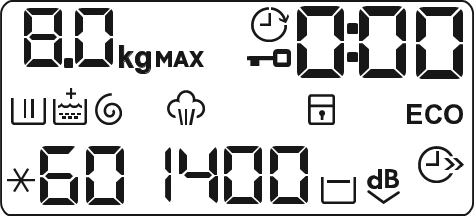
The display shows the maximum load, the default temperature, the maximum spin speed, the indicators of the phases making up the programme and the cycle duration.
Loading the laundry
Open the appliance door.
Shake the items before you put them in the appliance.
Put the laundry in the drum, one item at a time. Make sure not to put too much laundry in the drum.
Close the door firmly.
CAUTION! Make sure that no laundry stays between the seal and the door. There is a risk of water leakage or damage to the laundry.
Filling the detergent and additives
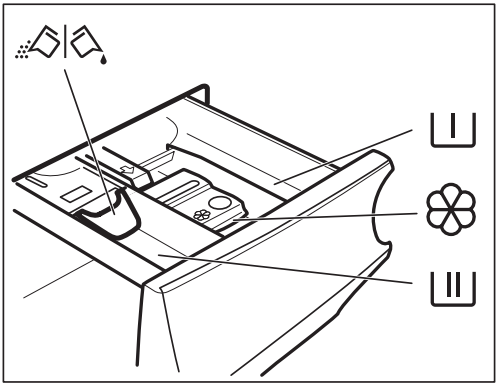
Compartment for prewash phase, soak programme or stain remover.
Compartment for washing phase.
Compartment for liquid additives (fabric conditioner, starch).
Maximum level for quantity of liquid additives.
Flap for powder or liquid detergent.
Note: Always follow the instructions that you find on the packaging of the detergent products, but we recommend that you do not exceed the maximum indicated level (). This quantity will however guarantee the best washing results.
Note: After a washing cycle, if necessary, remove any detergent residue from the detergent dispenser.
Check the position of the flap
1. Pull out the detergent dispenser until it stops.
2. Press the lever down to remove the dispenser.
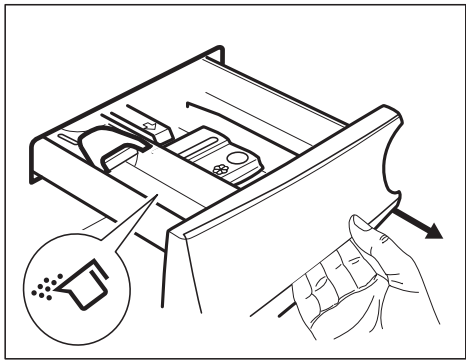
3. To use powder detergent, turn the flap up.
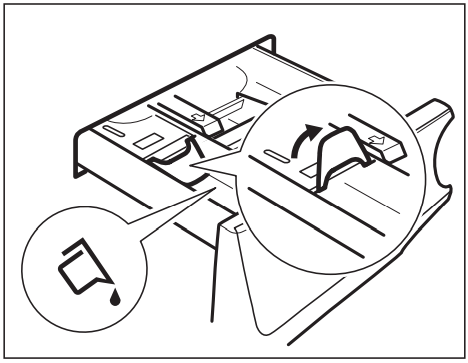
4. To use liquid detergent, turn the flap down.
Note: With the flap in the position DOWN:
• Do not use gelatinous or thick liquid detergents.
• Do not put more liquid detergent than the limit shown on the flap.
• Do not set the prewash phase.
• Do not set the delay start function.
5. Measure out the detergent and the fabric conditioner.
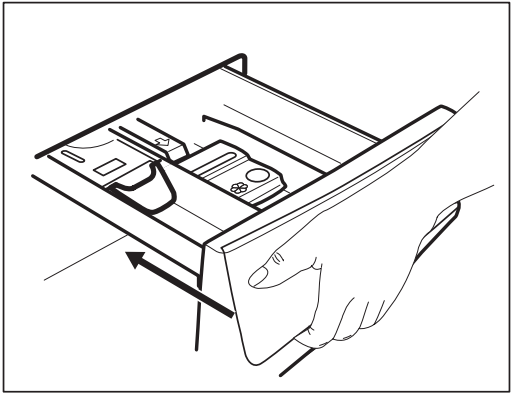
6. Carefully close the detergent dispenser.
Make sure that the flap does not cause a blockage when you close the drawer.
Setting a programme
1. Turn the programme dial to select the desired washing programme. The related programme indicator comes on.
The indicator of the Start/Pause button flashes.
The display shows the maximum declared load for the programme, the default temperature, the maximum spin speed, the washing phase indicators (when available) and an indicative programme duration.
2. To change the temperature and/or the spin speed, touch the related buttons.
3. If desired, set one or more options by touching the related buttons. The related indicators come on in the display and the given information changes accordingly.
Note: In case a selection is not possible, no indicator comes on and an acoustic signal sounds.
Starting a programme
Touch the Start/Pause button to start the programme.
The related indicator stops flashing and stays on.
In the display, the indicator of the operating phase starts flashing and the maximum load indicator goes off. The programme starts, the door is locked. The display shows the indicator
Note: The drain pump can operate shortly before the appliance fills water.
Starting a programme with the delay start
1. Touch the Delay Start button repeatedly until the display shows the desired delay time. The indicator comes on
2. Touch the Start/Pause button. The appliance starts the countdown of the delay start.
When the countdown is completed, the programme starts.
Note: The PROSENSE estimation starts at the end of the countdown.
Cancelling the delay start after the countdown has started
To cancel the delay start:
Touch the Start/Pause button to pause the appliance. The related indicator flashes.
Touch the Delay Start button repeatedly until the display shows .
Touch the Start/Pause button again to start the programme immediately.
Changing the delay start after the countdown has started
To change the delay start:
Touch the Start/Pause button to pause the appliance. The related indicator flashes.
Touch the Delay Start button repeatedly until the display shows the desired delay time.
Touch the Start/Pause button again to start the new countdown.
The ProSense load detection
Note: The programme duration in the display is referred to a medium/high load.
After touching the Start/Pause button, the maximum declared load indicator goes off, the indicator flashes, the ProSense starts the laundry load detection:
The appliance detects the load in the first 30 seconds: the indicator and the time dots :flash, the drum rotates shortly.
At the end of the load detection, the indicator goes off and the time dots : stop flashing. The programme duration will be adjusted accordingly and could increase or decrease. After further 30 seconds, the water filling starts.
At the end of the load detection, in case of drum overload, the indicator is flashing in the display:
In this case, for 30 seconds, it is possible to pause the appliance and remove the exceeding garments. Once removed the exceeding garments, touch the Start/Pause button to start the programme again. The ProSense phase can be repeated up to three times (see point 1).
Important! If the laundry amount will not be reduced, the washing programme starts anyway, despite the overload. In this case, it will be not possible to guarantee the best washing results.
Note: About 20 minutes after the programme start, the programme duration could be adjusted again depending on the capacity of water absorption of the fabrics.
Note: The ProSense detection is carried out with complete washing programmes only (no skipping phase selected).
Programme phase indicators
When the programme starts the indicator of the running phase flashes and the other phase indicators are steady on.
E.g. the washing or pre wash phase is running:
When the phase ends the relevant indicator stops flashing and is steady on. The next phase indicator starts flashing.
E.g. the rinse phase is running: . If you select the Plus Steam the steam phase indicators come on.
The steam phase is running: .
The anti-crease phase is running:
Interrupting a programme and changing the options
When the programme is running, you can change only some options:
Touch the button Start/Pause. The related indicator flashes.
Change the options. The given information in the display changes accordingly.
Touch the button Start/Pause again. The washing programme continues.
Cancelling a running programme
Press the button On/Off to cancel the programme and to deactivate the appliance.
Press the button On/Off again to activate the appliance.
Now, you can set a new washing programme.
Note: If the ProSense phase is already carried out and the water filling is already started, the new programme starts without repeating the ProSense phase. The water and the detergent are not drained out in order to avoid waste. The display shows the maximum duration of the programme, updating it about 20 minutes after the starting of the new programme.
Opening the door
Note: If the temperature and level of the water in the drum are too high and/or the drum still rotates you cannot open the door.
While a programme or the delay start operates, the appliance door is locked.
Touch the button Start/Pause. In the display the related door lock indicator goes off.
Open the appliance door. If necessary, add or remove the items.
Close the door and touch the button Start/Pause.
The programme or the delay start continues.
End of the programme
When the programme has finished, the appliance stops automatically. The acoustic signals operate (if they are active).
In the display all washing phase indicators become steady and the time area shows .
The indicator of the Start/Pause button goes off.
The door unlocks and the indicator goes off.
1. Press the On/Off button to deactivate the appliance.
After five minutes from the end of the programme, the energy saving function automatically deactivates the appliance. When you activate the appliance again, the display show the end of the last selected programme. Turn the programme dial to set a new cycle.
2. Remove the laundry from the appliance.
3. Make sure that the drum is empty.
4. Keep the door and the detergent dispenser slightly ajar to prevent mildew and odours.
5. Close the water tap.
Draining water out after end of cycle
If you have chosen a programme or an option that does not empty out the water of the last rinse, the programme is completed, but:
The display shows the indicator , the option indicator or and the door locked indicator . The indicator of the running phase flashes.
The drum still turns at regular intervals to prevent the creases in the laundry.
The door stays locked.
You must drain the water to open the door:
1. If necessary, touch the Spin button to decrease the spin speed proposed by the appliance.
2. Touch the Start/Pause button:
If you have set , the appliance drains the water and spins.
If you have set , the appliance only drains the water.
The option indicator or goes out, while the indicator flashes and then goes off.
3. When the programme is completed and the door locked indicator goes off, you can open the door.
4. Press the On/Off button a few seconds to deactivate the appliance.
Note: In any case, the appliance empties the water out automatically after approximately 18 hours.
Stand-by option
The Stand-by function automatically deactivates the appliance to decrease the energy consumption when:
You do not use the appliance for 5 minutes before you touch the Start/ Pause button.
Press the button On/Off to activate the appliance again.
After 5 minutes from the end of the end of the washing programme
Press the On/Off button to activate the appliance again.
The display shows the end of the last set programme.
Turn the programme dial to set a new cycle.
Note: If you set a programme or an option that ends with water in the drum, the Stand-by function doesn't deactivate the appliance to remind you to drain the water.
HINTS AND TIPS
The laundry load
Divide the laundry into: white, coloured, synthetics, delicates and wool.
Follow the washing instructions on the laundry care labels.
Do not wash white and coloured items together.
Some coloured items can discolour with the first wash. We recommend that you wash them separately for the first couple of times.
Button up pillowcases, close zippers, hooks and poppers. Tie up belts.
Empty pockets and unfold.
Turn multilayered fabrics, wool and items with printed illustrations inside out.
Pre-treat tough stains.
Wash heavy soil stains with a special detergent.
Be careful with curtains. Remove the hooks and put the curtains in a washing bag or pillowcase.
Do not wash laundry without hems or with cuts. Use a washing bag to wash small and/or delicate items (e.g. underwired bras, belts, tights, etc. ).
A very small load can cause balance problems with the spin phase leading to excessive vibration. If this occurs:
interrupt the programme and open the door (refer to "Opening the door when a programme or the delay start operates");
manually redistribute the load so that the items are spaced evenly around the tub;
press the Start/Pause button. The spin phase continues.
Stubborn stains
For some stains, water and detergent is not sufficient.
We recommend that you pre-treat these stains before you put the items in the appliance.
Special stain removers are available. Use the special stain remover that is applicable to the type of stain and fabric.
Detergents and other treatments
Only use detergents and other treatments specially made for washing machines:
powder detergents for all types of fabric,
powder detergents for delicate fabrics (40 °C max) and woollens,
liquid detergents, preferably for low temperature wash programmes (60 °C max) for all types of fabric, or special ones for woollens only.
Do not mix different types of detergents.
To help the environment, do not use more than the recommended quantity of detergent.
Follow the instructions that you find on packaging of the detergents or other treatments without exceeding the indicated maximum level ().
Use the recommended detergents for the type and colour of the fabric, the programme temperature and the level of soil.
Ecological hints
Set a programme without the prewash phase to wash laundry with normal soil.
Always start a washing programme with the maximum load of laundry allowed.
If you pre-treat the stains, you can use a stain remover when you set a programme with a low temperature.
To use the correct quantity of detergent, check the water hardness of your domestic system. Refer to "Water hardness".
Water hardness
If the water hardness in your area is high or moderate, we recommend that you use a water softener for washing machines. In areas where the water hardness is soft it is not necessary to use a water softener.
To find out the water hardness in your area, contact your local water authority.
Use the correct quantity of water softener. Follow the instructions that you find on the packaging of the product.
CARE AND CLEANING
WARNING! Refer to Safety chapters.
External cleaning
Clean the appliance with mild soap and warm water only. Fully dry all the surfaces.
CAUTION! Do not use alcohol, solvents or chemical products.
CAUTION! Do not clean the metal surfaces with chlorine-based detergent.
Descaling
Note: If the water hardness in your area is high or moderate, we recommend that you use a water descaling product for washing machines.
Regularly examine the drum to check any limescale.
The regular detergents already contain water softening agents, but we recommend to run a cycle with empty drum and a descaling product occasionally.
Note: Always follow the instructions that you find on the packaging of the product.
Maintenance wash
The repeated and prolonged use of low temperature programmes can cause detergent deposits, fluff residues, bacterial growth inside the drum and the tub. This could generate bad odours and mildew.
To eliminate these deposits and hygienize the inner part of the appliance, run a maintenance wash regularly (at least once a month):
Remove all laundry from the drum.
Run a cotton programme with the highest temperature without detergent.
Door seal
Regularly examine the seal and remove all objects from the inner part.
Cleaning the drum
Regularly examine the drum to prevent rust particles.
For a complete cleaning:
1. Clean the drum with special products for stainless steel.
Note: Always follow the instructions that you find on the packaging of the product.
2. Run a short cotton programme at high temperature with empty drum and with a small quantity of powder detergent , in order to rinse out any left residues.
Cleaning the detergent dispenser
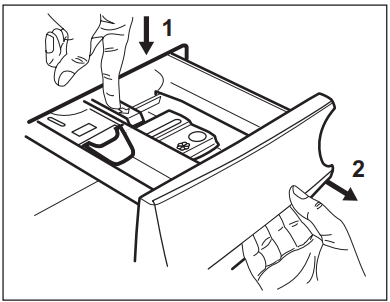
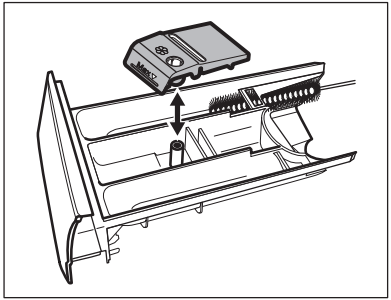
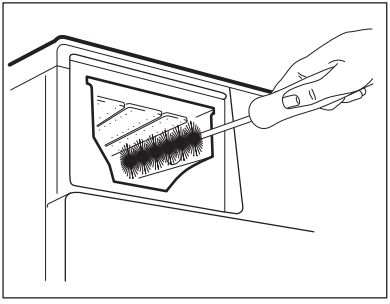
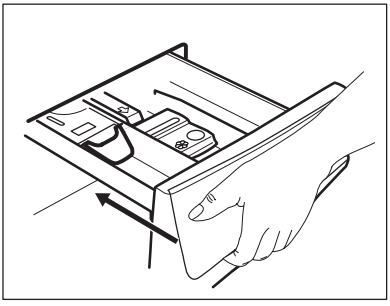
To prevent possible deposits of dried detergent or clotted fabric softener and/or formation of mould in the detergent dispenser drawer, once in a while carry out the following cleaning procedure:
1. Open the drawer. Press the catch downwards as indicated in the picture and pull it out.
2. Remove the top part of the additive compartment to aid cleaning and flush it out under running warm water, to remove any traces of accumulated detergent. After cleaning, replace the top part in its position.
3. Make sure that all detergent residue is removed from the upper and lower part of the recess. Use a small brush to clean the recess.
4. Insert the detergent drawer into the guide rails and close it. Run the rinsing programme without any clothes in the drum.
Cleaning the drain pump
WARNING!
Disconnect the mains plug from the mains socket.
Note: Regularly check the drain pump filter and make sure that it is clean.
Clean the drain pump if:
The appliance does not drain the water.
The drum does not turn.
The appliance makes an unusual noise because of the blockage of the drain pump.
The display shows the alarm code
WARNING!
Do not remove the filter while the appliance operates.
Do not clean the pump if the water in the appliance is hot. Wait until the water cools down
Proceed as follows to clean the pump:
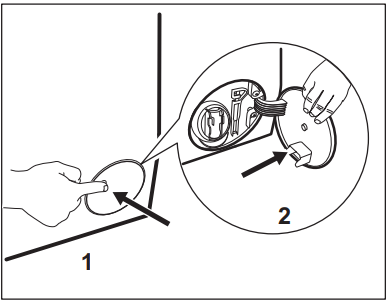
1.Open the pump cover.
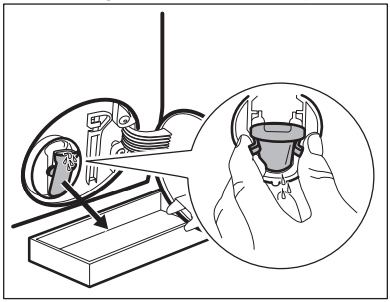
2. Place a suitable bowl below the drain pump access to collect the water that flows out.
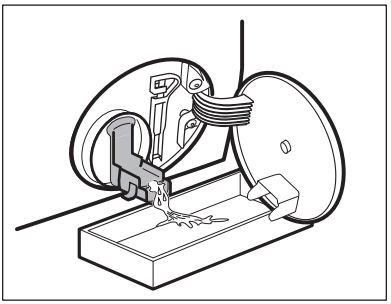
3. Squeeze the two levers and pull the drainage duct forward to open it.
4. Let the water flow out.
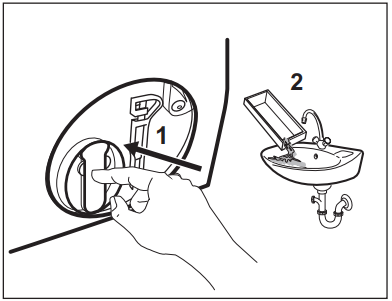
5. When the bowl is full of water, close the drainage duct back and empty the container.
6. Repeat the steps 4 and 5 until the water stops to flowing out.
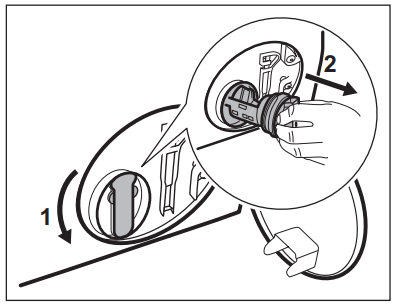
7. Close the drainage duct and turn the filter anti-clockwise to remove it.
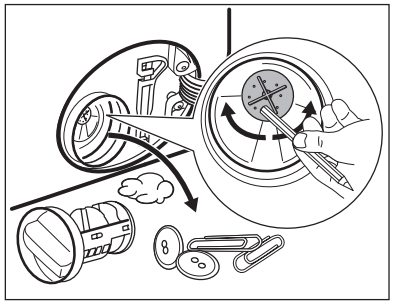
8. If it is necessary, remove fluff and objects from the filter recess.
9. Make sure that the impeller of the pump can rotate. If it does not rotate, contact the Authorised Service Centre.
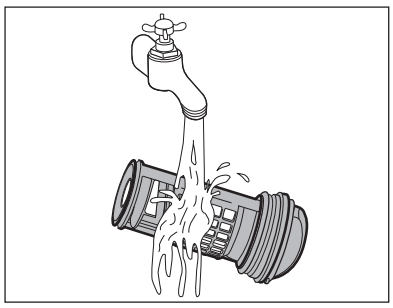
10. Clean the filter under the water tap.
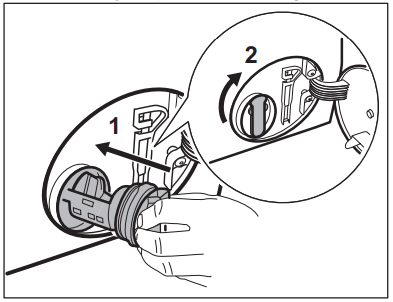
11. Put the filter back into the special guides by turning it clockwise. Make sure that you tighten the filter correctly to prevent leaks.
12. Close the pump access.
When you drain the water with the emergency drain procedure, you must activate the drain system again:
Put 2 litres of water in the main wash compartment of the detergent dispenser.
Start the programme to drain the water.
Cleaning the inlet hose and the valve filter
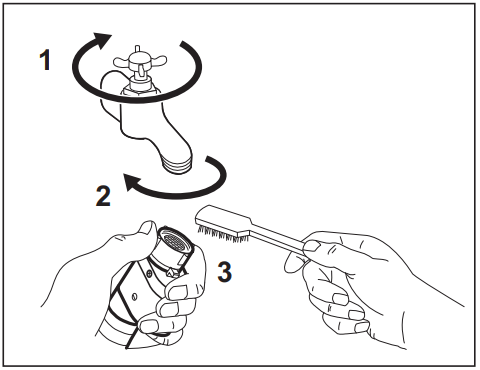
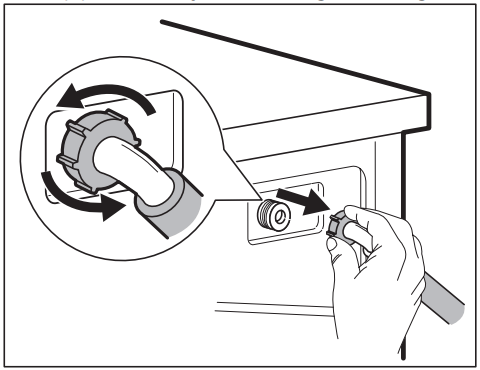
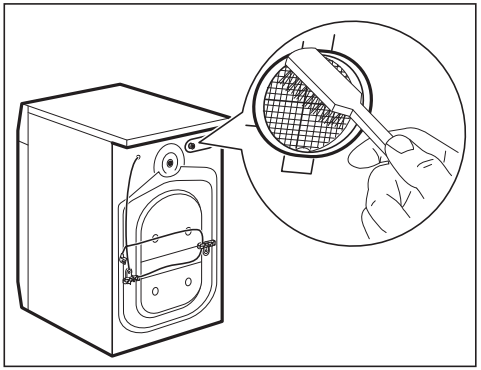
It is recommended to clean both the filters of the inlet hose and valve occasionally to remove any deposit, collected over the time:
1. Remove the inlet hose from the tap and clean the filter.
2. Remove the inlet hose from the appliance by loosening the ring nut.
3. Clean the valve filter on the back of the appliance with a toothbrush.
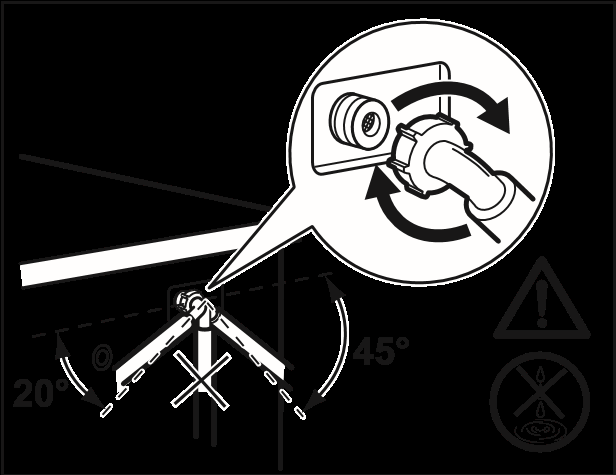
4. When you reconnect the hose to the back of the appliance, turn it left or right (not in vertical position) depending on the position of your water tap.
Emergency drain
If the appliance cannot drain the water, carry out the same procedure, described in 'Cleaning the drain filter' paragraph. If necessary, clean the pump.
When you drain the water with the emergency drain procedure, you must activate the drain system again:
Put 2 litres of water in the main wash compartment of the detergent dispenser.
Start the programme to drain the water.
Frost precautions
If the appliance is installed in an area where the temperature can reach the values around 0° C or drop below, remove the remaining water from the inlet hose and the drain pump.
Disconnect the mains plug from the mains socket.
Close the water tap.
Put the two ends of the inlet hose in a container and let the water flow out of the hose.
Empty the drain pump. Refer to the emergency drain procedure.
When the drain pump is empty, install the inlet hose again.
WARNING!
Make sure that the temperature is higher than 0 °C before you use the appliance again. The manufacturer is not responsible for damages caused by low temperatures.
TROUBLESHOOTING
WARNING! Refer to Safety chapters.
Introduction
The appliance does not start or it stops during operation.
First try to find a solution to the problem (refer to the table). If the problem persists, contact the Authorised Service Centre.
In case of major problems, the acoustic signals operate, the display shows an alarm code and the Start/Pause button may flash continuously:
- The appliance does not fill withwater properly.
- The appliance does not drainthe water.
- The appliance door is open ornot closed correctly. Please check the door!
Note: If the appliance is overloaded, remove some items from the drum and/or keep pressed the door while touching the Start/Pause button until the indicator stops flashing (see the picture below).
- The mains supply is unstable. Wait until the mains supply is stable.
- No communication between electronic elements of the appliance. Switch it off and switch on again.
- The anti-flood device is on. Disconnect the appliance and close the water tap. Contact the Authorised Service Centre.
WARNING! Deactivate the appliance before carrying out any check.
Possible failures
Problem
Possible solution
The appliance does not fill with water properly.
Make sure that the water tap is open.
Make sure that the pressure of the water supply is not too low. For this information, contact your local water authority.
Make sure that the water tap is not clogged.
Make sure that the inlet hose has no kinks, damages or bends.
Make sure that the connection of the water inlet hose is correct.
Make sure that the filter of the inlet hose and the filter of the valve are not clogged. Refer to 'Care and cleaning'.
The appliance fills with water and drains immediately
• Make sure that the drain hose is in the correct position. The hose may be positioned too low. Refer to 'Installation instruction'.
The appliance does not drain the water.
Make sure that the sink spigot is not clogged.
Make sure that the drain hose has no kinks or bends.
Make sure that the drain filter is not clogged. Clean the filter, if necessary. Refer to 'Care and cleaning'.
Make sure that the connection of the drain hose is correct.
Set the drain programme if you set a programme without drain phase.
Set the drain programme if you set an option which ends with water in the tub.
The spin phase does not operate or the washing cycle lasts longer than usual.
Set the spin programme.
Make sure that the drain filter is not clogged. Clean the filter, if necessary. Refer to 'Care and cleaning'.
Adjust manually the items in the tub and start the spin phase again. This problem may be caused by balance problems.
There is water on the floor.
Make sure that the couplings of the water hoses are tight and there is not water leakages.
Make sure that the water inlet hose and the drain hose have no damages.
Make sure you use the correct detergent and the correct quantity of it.
You cannot open the appliance door.
Make sure that a washing programme that ends with water in tub, has been selected.
Make sure that the washing programme is finished.
Set the drain or the spin programme if there is water in the drum.
Make sure that the appliance receives electrical power.
This problem may be caused by a failure of the appliance. Contact the Authorised Service Centre. If you need to open the door, please read carefully «Emergency door opening».
The appliance makes an unusual noise and vibrates.
Make sure the levelling of the appliance is correct. Refer to 'Installation instruction'.
Make sure that the packaging and/or the transit bolts are removed. Refer to 'Installation instruction'.
Add more laundry in the drum. The load may be too small.
The programme duration increases or decreases during programme execution.
• The ProSense function is able to adjust the programme duration according to the type and the laundry load size. Refer to 'The ProSense load detection' in 'Daily Use' chapter.
The washing results are not satisfactory.
Increase the detergent quantity or use a different detergent.
Use special products to remove the stubborn stains before you wash the laundry.
Make sure that you set the correct temperature.
Decrease the laundry load.
Too much foam in the drum during the washing cycle.
• Reduce the quantity of detergent.
After the washing cycle, there are some detergent residues in the dispenser drawer.
Make sure that the flap is in the correct position (UP for powder detergent - DOWN for liquid detergent).
Make sure you have used the detergent dispenser according the indications given in this user manual.
After the check, activate the appliance. The programme continues from the point of interruption.
If the problem occurs again, contact the Authorised Service Centre.
If the display shows other alarm codes. Deactivate and activate the appliance. If the problem continues, contact the Authorised Service Centre.
Emergency door opening
In case of power failure or functioning failure the appliance door remains locked. The washing programme continues when the power is restored. If the door remains locked in case of failure, it is possible to open it using the emergency unlock function.
Before opening the door:
CAUTION!
Risk of burns! Make sure that the water temperature is not too high and the laundry is not hot. If necessary, wait until they cool down.
CAUTION!
Risk of injury! Make sure that the drum is not rotating. If necessary, wait until the drum stops rotating.
To open the door, proceed as follows:
1. Press the On/Off button to switch the appliance off.
2. Disconnect the mains plug from the mains socket.
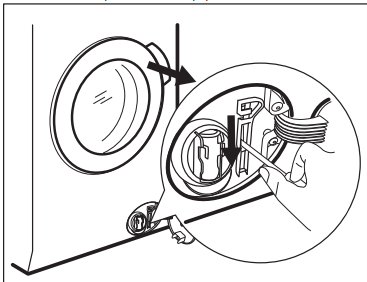
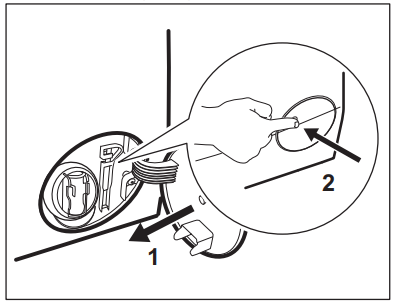
3. Open the filter flap.
4. Keep the emergency unlock trigger pulled downward and, at the same time, open the appliance door.
5. Take out the laundry and then close the appliance door.


 and
and  , the appliance does not heat the water.
 . The door stays locked and the drum turns regularly to reduce creasing. You must drain the water to unlock the door.
 . The door stays locked. The drum turns regularly to reduce creasing. You must drain the water to unlock the door.
 (cold), and the indicator - - - (no spin) and the indicator
 . The stain remover will be added in the appropriate phase of the washing programme.
 and the selected delay time and the appliance begins the countdown.
 .
. comes on/goes off on the display.
 appears/ disappears above the indicator
  on the display.
 . This action activates the drain system.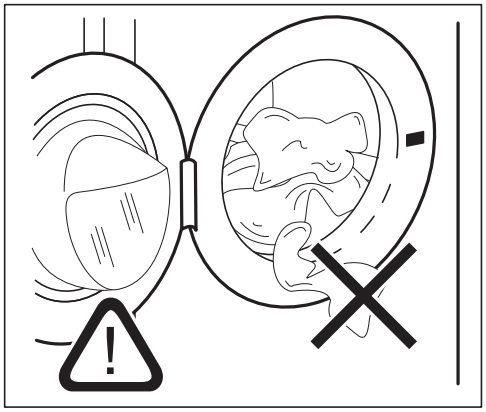
 Compartment for prewash phase, soak programme or stain remover.
 Compartment for washing phase.
 Compartment for liquid additives (fabric conditioner, starch).
 Maximum level for quantity of liquid additives.
 Flap for powder or liquid detergent.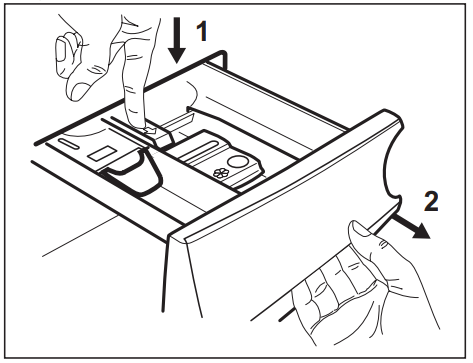

 comes on
 .
. and the time dots :flash, the drum rotates shortly.
 . If you select the Plus Steam the steam phase indicators come on.
 .
. .
. flashes and then goes off.

 - The appliance does not fill withwater properly.
 - The appliance does not drainthe water.
 - The appliance door is open ornot closed correctly. Please check the door!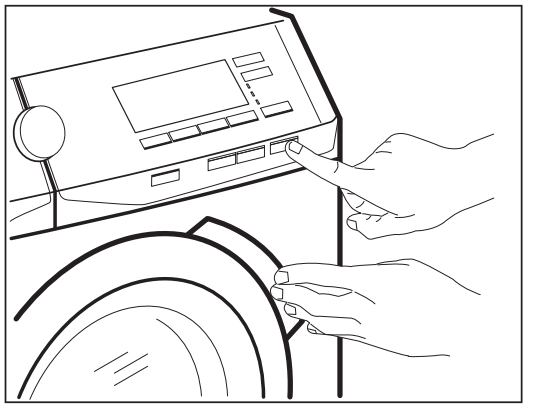
 - The mains supply is unstable. Wait until the mains supply is stable.
 - No communication between electronic elements of the appliance. Switch it off and switch on again.
 - The anti-flood device is on. Disconnect the appliance and close the water tap. Contact the Authorised Service Centre.