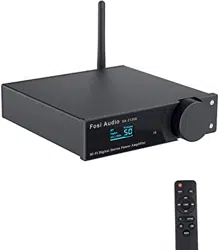

English Fosi Audio Hi-Fi Home Amplifier DA2120A
☆Troubleshooting
No sound
- Check the correct input mode is selected at the power amplifier terminal.
- Check the speaker terminal / banana head contact for short circuit, please use
bare wires to connect the device.
- Check that the TV / DVD / other device's audio output is PCM output. The device
does not allow DTS / Dolby output.
Noise
- Check the power plug for poor contact. Replace the socket or power supply for
testing.
- Please unplug the signal cable to check whether the noise is still emitted, check
whether the signal cable is damaged or dirty, use shielded signal cable.
Insufficient power
- The maximum output power of the amplifier can reach 50W x2 @ 4ohm, suitable
for 2-8ohm, the larger the impedance, the power will gradually decay.
Optical failure
- Check that the optical interface is free of dirt and clogging.
- Check that the optical cable is not folded.
- Multiple plug tests to ensure a good connection.

English Fosi Audio Hi-Fi Home Amplifier DA2120A
- Replace the optical fiber cable or the audio source to check whether the
amplifier is a problem.
Bluetooth failure
- Check that the device has Bluetooth input selected.
- The amplifier supports no more than 2 devices for connection. Please do not use
3 devices for connection or disconnect other Bluetooth devices manually.
- The effective transmission distance of Bluetooth is 65ft (20M), please do not
exceed this range and stack obstacles.