EN
RU
ZH-CN
ZH-TW
KO
JA
Setup Guide
Руководство по установке
USB AUDIO INTERFACE / USB-АУДИОИНТЕРФЕЙС
USB
音频界面 /
USB
音訊介面 /
USB
신호변환장치
USB
オーディオインターフェース
セットアップ ガイド
설치 가이드
设置指南
設定指南
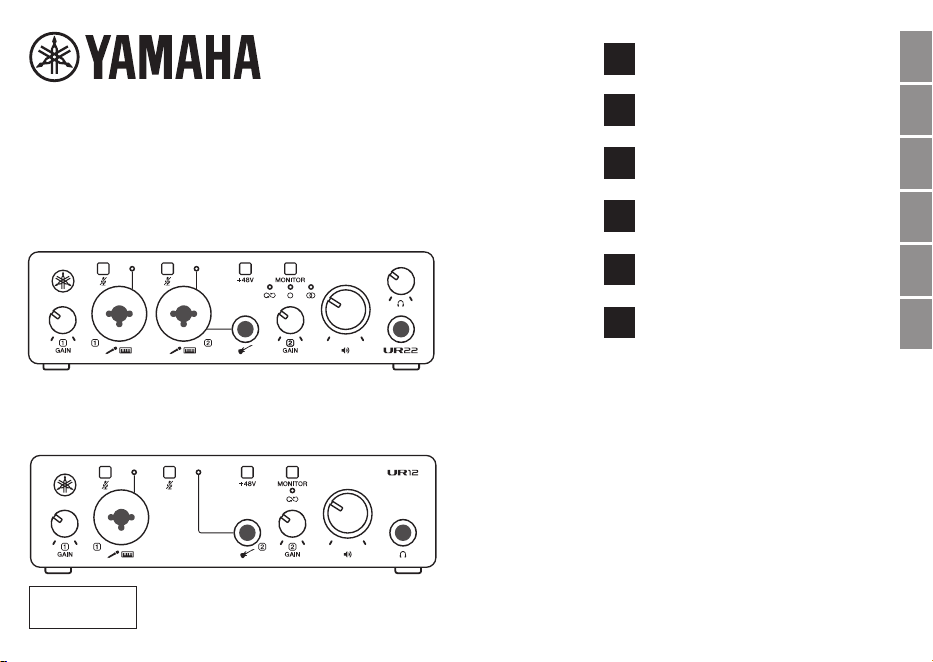
UR22 MK3
UR12 MK3
兼保証書
保証規定は巻末にあります。

2
UR22MK3 UR12MK3 Setup Guide
FCC INFORMATION (U.S.A.)
1. IMPORTANT NOTICE: DO NOT MODIFY THIS UNIT!
This product, when installed as indicated in the instructions contained in this manual, meets FCC requirements. Modications
not expressly approved by Yamaha may void your authority, granted by the FCC, to use the product.
2. IMPORTANT: When connecting this product to accessories and/or another product use only high quality shielded cables.
Cable/s supplied with this product MUST be used. Follow all installation instructions. Failure to follow instructions could void
your FCC authorization to use this product in the USA.
3. NOTE: This product has been tested and found to comply with the requirements listed in FCC Regulations, Part 15 for
Class “B” digital devices. Compliance with these requirements provides a reasonable level of assurance that your use of
this product in a residential environment will not result in harmful interference with other electronic devices. This equipment
generates/uses radio frequencies and, if not installed and used according to the instructions found in the users manual, may
cause interference harmful to the operation of other electronic devices. Compliance with FCC regulations does not guarantee
that interference will not occur in all installations. If this product is found to be the source of interference, which can be
determined by turning the unit “OFF” and “ON”, please try to eliminate the problem by using one of the following measures:
- Relocate either this product or the device that is being affected by the interference.
- Utilize power outlets that are on different branch (circuit breaker or fuse) circuits or install AC line lter/s.
- In the case of radio or TV interference, relocate/reorient the antenna. If the antenna lead-in is 300 ohm ribbon lead, change
the lead-in to co-axial type cable.
If these corrective measures do not produce satisfactory results, please contact the local retailer authorized to distribute
this type of product. If you cannot locate the appropriate retailer, please contact Yamaha Corporation of America, 6600
Orangethorpe Avenue, Buena Park, CA 90620, U.S.A.
The above statements apply ONLY to those products distributed by Yamaha Corporation of America or its subsidiaries.
(529-M04 FCC class B YCA 02)
3
UR22MK3 UR12MK3 Setup Guide
COMPLIANCE INFORMATION STATEMENT
(Supplier’s declaration of conformity procedure)
Responsible Party: Yamaha Corporation of America
Address: 6600 Orangethorpe Avenue, Buena Park, CA 90620, U.S.A.
Telephone: 714-522-9011
Type of Equipment: USB Audio Interface
Model Name: UR22MK3, UR12MK3
This device complies with Part 15 of the FCC Rules.
Operation is subject to the following two conditions:
1) this device may not cause harmful interference, and
2) this device must accept any interference received, including interference that may cause undesired operation.
(529-M02 FCC sdoc YCA 03)
The model number, serial number, power requirements, etc., may be found on or near the name plate, which is at the bottom of
the unit. You should note this serial number in the space provided below and retain this manual as a permanent record of your
purchase to aid identication in the event of theft.
Model No.
Serial No.
(1003-M06 plate bottom en 01)

4
UR22MK3 UR12MK3 Setup Guide
Package contents
(check rst after unpacking)
• UR22MK3 UR12MK3 Setup Guide (booklet) ×1
• Cubase AI License Card ×1
• Steinberg Plus License Card ×1
• USB 2.0 Cable (USB Type-C™ to Type-A, 1.5 m) ×1
Contents
Package contents (check rst after unpacking) .......... 4
Manuals ........................................................................ 5
PRECAUTIONS ........................................................... 6
NOTICE ........................................................................ 7
Connection with power source .................................... 9
Specications..............................................................11
Troubleshooting ..........................................................12
5
UR22MK3 UR12MK3 Setup Guide
Thank you for choosing the UR22MK3, UR12MK3
USB Audio Interface. These USB audio interfaces
allow music and other content creators to effectively
create high-quality online content. Using this product,
you can connect microphones, electronic musical
instruments, portable music players, etc. to computers,
iPads, and iPhones that support the USB 2.0 standard.
In order to take full advantage of the UR’s functionality
and get maximum enjoyment performing with it, please
read this guide carefully before use. After you have
read it, keep it in a safe and handy place for future
reference.
Manuals
The UR has the following two separate manuals.
• UR22MK3 UR12MK3 Setup Guide (this book)
Explains precautions for using your UR
safely, information on power supplies, product
specications, and information on product support.
• UR22MK3 UR12MK3 User Guide (PDF)
Explains functions and operations of your UR.
For users who have basic knowledge of music
production and content creation.
https://manual.yamaha.com/audio/music_audio_
production/ur22mk3_ur12mk3/
6
UR22MK3 UR12MK3 Setup Guide
PRECAUTIONS
PLEASE READ CAREFULLY BEFORE
PROCEEDING
Especially in the case of children who might
use the product, a guardian should provide
guidance on how to properly use and handle
it before actual use.
Please keep this manual in a safe place for future
reference.
WARNING
Always follow the basic precautions listed below
to avoid the possibility of serious injury or even
death from electrical shock, short-circuiting,
damages, re or other hazards. These precautions
include, but are not limited to, the following:
If you notice any abnormality
• If any of the following problems occur, immediately
disconnect the USB cable from the computer and the
USB power adaptor.
- The USB cable becomes frayed or damaged.
- Unusual smells or smoke are emitted.
- Some object, or water has been dropped into the
product.
- There is a sudden loss of sound during use of the
product.
- Cracks or other visible damage appear on the
product.
Then have the product inspected or repaired by
qualied Yamaha service personnel.
Power supply
• Only use the voltage specied as correct for the
product. The required voltage is printed on the name
plate of the product.
Do not open
• This product contains no user-serviceable parts.
Do not attempt to disassemble the internal parts or
modify them in any way.
Fire warning
• Do not place any burning items or open ames near
the product, since they may cause a re.
PA-15 1/2
7
UR22MK3 UR12MK3 Setup Guide
Hearing loss
• Before connecting the product to other devices, turn
off the power for all devices. Also, before turning
the power of all devices on or off, make sure that
all volume levels are set to the minimum. Failing to
do so may result in hearing loss, electric shock, or
device damage.
• Do not use headphones for a long period of time at
a high or uncomfortable volume level, since this can
cause permanent hearing loss. If you experience
any hearing loss or ringing in the ears, consult a
physician.
CAUTION
Always follow the basic precautions listed below
to avoid the possibility of physical injury to you
or others. These precautions include, but are not
limited to, the following:
Location and connection
• Use the supplied USB cable only.
• Before moving the product, remove all connected
cables.
NOTICE
About this manual
• The illustrations as shown in this manual are for
instructional purposes only.
• Steinberg is registered trademarks of Steinberg
Media Technologies GmbH.
• iPad and iPhone are trademarks of Apple Inc.
registered in the United States and other countries.
• Android is a trademark of Google LLC.
• USB Type-C™ and USB-C™ are trademarks of USB
Implementers Forum.
About disposal
• This product contains recyclable components.
When disposing of this product, please contact the
appropriate local authorities.
PA-15 2 /2
8
UR22MK3 UR12MK3 Setup Guide
Information for users on collection and disposal of old equipment:
This symbol on the products, packaging, and/or accompanying documents means that used
electrical and electronic products should not be mixed with general household waste.
For proper treatment, recovery and recycling of old products, please take them to applicable
collection points, in accordance with your national legislation.
By disposing of these products correctly, you will help to save valuable resources and prevent any
potential negative effects on human health and the environment which could otherwise arise from
inappropriate waste handling.
For more information about collection and recycling of old products, please contact your local
municipality, your waste disposal service or the point of sale where you purchased the items.
For business users in the European Union:
If you wish to discard electrical and electronic equipment, please contact your dealer or supplier for
further information.
Information on Disposal in other Countries outside the European Union:
This symbol is only valid in the European Union. If you wish to discard these items, please contact
your local authorities or dealer and ask for the correct method of disposal.
(58-M02 WEEE en 01)
9
UR22MK3 UR12MK3 Setup Guide
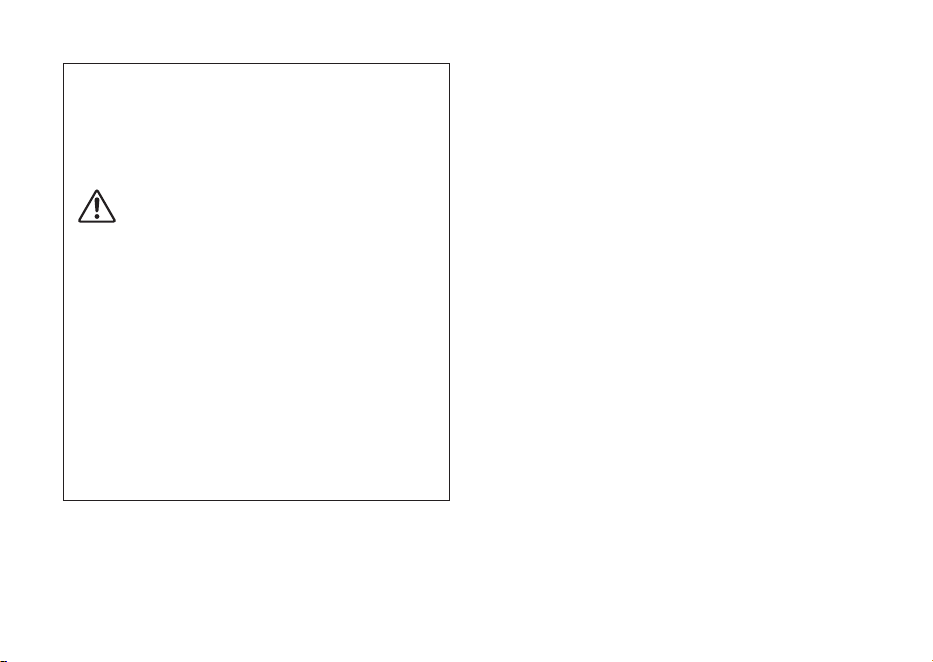
Connection with power source
The UR22MK3 and UR12MK3 normally operate on
USB bus power from a computer, but when using with
an iPhone or iPad, if necessary, they can also receive
power from a USB power adapter, USB mobile battery,
etc. The power automatically turns on when the UR is
connected to the power source via a USB cable and
turns off when the device is disconnected from the
power source.
The UR22MK3 and UR12MK3 do not have a power on/
off switch.
NOTICE
When connecting your UR to a speaker, always turn on the
power amplier LAST.
When disconnecting from a speaker, the power amplier
should be turned off FIRST.
WARNING
• Before connecting the UR to other devices, turn off the
power for all devices.
• Before turning the power of all devices on or off, make
sure that all volume levels are set to the minimum.
Failing to do so may result in hearing loss, electric shock,
or device damage.
Connect with a USB power adaptor
or USB mobile battery
2 2
11
USB power
adaptor
(commercially
available)
USB mobile
battery
(commercially
available)
USB cable
10
UR22MK3 UR12MK3 Setup Guide
USB power adaptor / USB mobile
battery requirements
Output voltage: 5 V DC
Output current: 0.5 A or greater
WARNING
Make sure to use a USB power adaptor or USB mobile
battery with the specications above. Using the wrong
adaptors or batteries can result in damage to the
product, overheating or re.
Follow the instructions that come with the connected
USB power adaptor or the USB mobile battery.
NOTICE
When the power does not turn on, or when the
product is turned on and power turns off suddenly
and unexpectedly, your USB device may not meet the
minimum requirements or may be damaged. Try using
another USB device that meets the requirements, etc.
If the product appears to be malfunctioning, consult
Yamaha service personnel.
11
UR22MK3 UR12MK3 Setup Guide
Specications
General Specications
Power Requirements 2.5 W (5 V DC, 0.5 A)
Dimensions 158 (W) × 47 (H) × 102 (D) mm
Net Weight 450 g
Operating Free-air Temperature Range 0 – 40°C
Included Accessories
• UR22MK3 UR12MK3 Setup Guide (booklet)
• Cubase AI License Card
• Steinberg Plus License Card
• USB 2.0 Cable (USB Type-C™ to Type-A, 1.5 m)
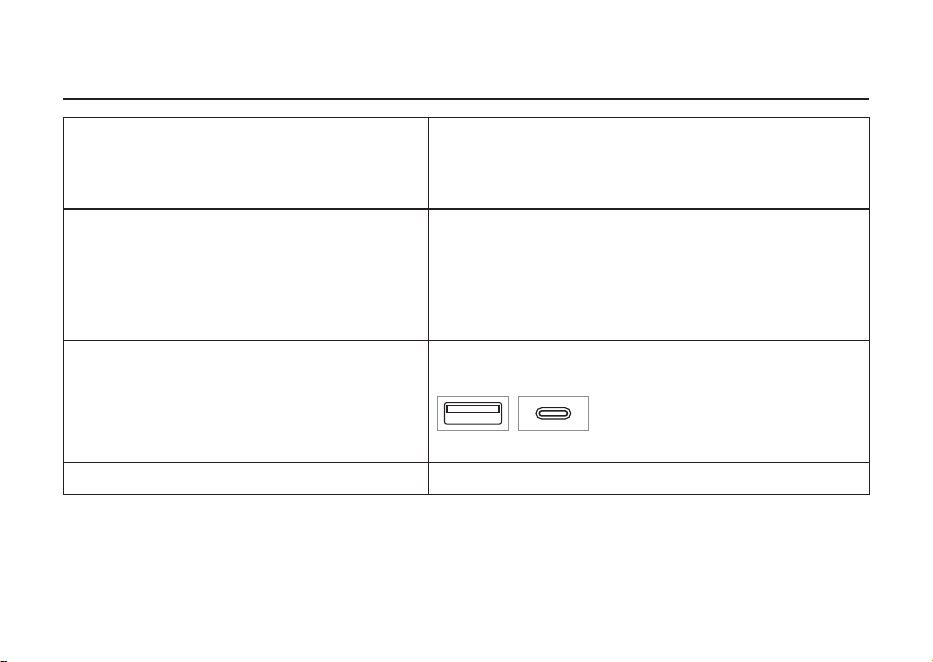
Technical Specications
* The contents of this guide apply to the latest specications as of the publishing date. To obtain the latest guide,
access the Yamaha website then download the manual le.
12
UR22MK3 UR12MK3 Setup Guide
Troubleshooting
Can I use a USB hub with this product?
The product can be used with a USB hub; however, we do
not recommend it as it can cause problems. Use the UR by
connecting it directly to your computer’s USB port whenever
possible.
What do I need to supply power to the [5V DC IN]
terminal?
Use a USB power adapter, or a USB mobile battery. If the
terminal shape of the USB device that supplies power is
incompatible with the included USB cable, convert to USB
Type-C. For information on compatible USB power adapters
and USB mobile batteries, refer to “USB power adapter/USB
mobile battery requirements” (page10).
Can the UR be connected to a port other than
USB Type -A?
You can connect to a USB Type-C terminal by using a
commercially available USB Type-C to USB Type-C cable.
Can I use the UR with Android devices? The UR is not compatible with Android devices.
Type A Type C

13
UR22MK3 UR12MK3 Setup Guide
MEMO
UR22MK3 UR12MK3 Setup Guide
UR22MK3 UR12MK3 Setup Guide
UR22MK3 UR12MK3 Setup Guide
Yamaha Worldwide Representative Offices
For details on the product(s), contact your nearest Yamaha representative or the authorized distribu-
tor, found by accessing the 2D barcode below.
English
Wenden Sie sich für nähere Informationen zu Produkten an eine Yamaha-Vertretung oder einen
autorisierten Händler in Ihrer Nähe. Diese finden Sie mithilfe des unten abgebildeten 2D-Strichodes.
Deutsch
Pour obtenir des informations sur le ou les produits, contactez votre représentant ou revendeur agréé
Yamaha le plus proche. Vous le trouverez à l'aide du code-barres 2D ci-dessous.
Français
Para ver información detallada sobre el producto, contacte con su representante o distribuidor
autorizado Yamaha más cercano. Lo encontrará escaneando el siguiente código de barras 2D.
Español
Per dettagli sui prodotti, contattare il rappresentante Yamaha o il distributore autorizzato più vicino,
che è possibile trovare tramite il codice a barre 2D in basso.
Italiano
Para mais informações sobre o(s) produto(s), fale com seu representante da Yamaha mais próximo
ou com o distribuidor autorizado acessando o código de barras 2D abaixo.
Português
Чтобы узнать подробнее о продукте (продуктах), свяжитесь с ближайшим представителем или
авторизованным дистрибьютором Yamaha, воспользовавшись двухмерным штрихкодом ниже.
Русский
如需有关产品的详细信息,请联系距您最近的Yamaha代表或授权经销商,可通过访问下方
的 �D 条形码找到这些代表或经销商的信息。
简体中文
如需產品的詳細資訊,請聯絡與您距離最近的 Yamaha 銷售代表或授權經銷商,您可以掃描下方的二維
條碼查看相關聯絡資料。
繁體中文
제품에 대한 자세한 정보는 아래 �D 바코드에 엑세스하여 가까운 Yamaha 담당 판매점 또는 공식 대리점에
문의하십시오.
한국어
https://manual.yamaha.com/audio/address_list/
Head Oce/Manufacturer: Yamaha Corporation 10-1, Nakazawa-cho, Chuo-ku, Hamamatsu, 430-8650, Japan
Importer (European Union): Yamaha Music Europe GmbH Siemensstrasse 22-34, 25462 Rellingen, Germany
Importer (United Kingdom): Yamaha Music Europe GmbH (UK) Sherbourne Drive, Tilbrook, Milton Keynes, MK7 8BL, United Kingdom
AP01
UR22MK3 UR12MK3 Setup Guide
Yamaha Worldwide Representative Offices
For details on the product(s), contact your nearest Yamaha representative or the authorized distribu-
tor, found by accessing the 2D barcode below.
English
Wenden Sie sich für nähere Informationen zu Produkten an eine Yamaha-Vertretung oder einen
autorisierten Händler in Ihrer Nähe. Diese finden Sie mithilfe des unten abgebildeten 2D-Strichodes.
Deutsch
Pour obtenir des informations sur le ou les produits, contactez votre représentant ou revendeur agréé
Yamaha le plus proche. Vous le trouverez à l'aide du code-barres 2D ci-dessous.
Français
Para ver información detallada sobre el producto, contacte con su representante o distribuidor
autorizado Yamaha más cercano. Lo encontrará escaneando el siguiente código de barras 2D.
Español
Per dettagli sui prodotti, contattare il rappresentante Yamaha o il distributore autorizzato più vicino,
che è possibile trovare tramite il codice a barre 2D in basso.
Italiano
Para mais informações sobre o(s) produto(s), fale com seu representante da Yamaha mais próximo
ou com o distribuidor autorizado acessando o código de barras 2D abaixo.
Português
Чтобы узнать подробнее о продукте (продуктах), свяжитесь с ближайшим представителем или
авторизованным дистрибьютором Yamaha, воспользовавшись двухмерным штрихкодом ниже.
Русский
如需有关产品的详细信息,请联系距您最近的Yamaha代表或授权经销商,可通过访问下方
的 �D 条形码找到这些代表或经销商的信息。
简体中文
如需產品的詳細資訊,請聯絡與您距離最近的 Yamaha 銷售代表或授權經銷商,您可以掃描下方的二維
條碼查看相關聯絡資料。
繁體中文
제품에 대한 자세한 정보는 아래 �D 바코드에 엑세스하여 가까운 Yamaha 담당 판매점 또는 공식 대리점에
문의하십시오.
한국어
https://manual.yamaha.com/audio/address_list/
Head Oce/Manufacturer: Yamaha Corporation 10-1, Nakazawa-cho, Chuo-ku, Hamamatsu, 430-8650, Japan
Importer (European Union): Yamaha Music Europe GmbH Siemensstrasse 22-34, 25462 Rellingen, Germany
Importer (United Kingdom): Yamaha Music Europe GmbH (UK) Sherbourne Drive, Tilbrook, Milton Keynes, MK7 8BL, United Kingdom
AP01
© 2025 Yamaha Corporation
Published 06/2025
2025
年
6
月发行
MWES-A1
VJD4620
〒430-8650 静岡県浜松市中央区中沢町10-1
雅马哈乐器音响(中国)投资有限公司
上海市静安区新闸路1818号云和大厦2楼
客户服务热线: 4000517700
公司网址: https://www.yamaha.com.cn
厂名: 雅马哈电子(苏州)有限公司
厂址: 江苏省苏州市苏州新区鹿山路18号
台灣山葉音樂股份有限公司
YAMAHA MUSIC & ELECTRONICS TAIWAN CO., LTD.
https://tw.yamaha.com
總公司: (02) 7741-8888 新北市板橋區遠東路1號2樓
客服專線: 0809-091388