Visit Our Website
SCAN ME
PyleUSA.com
USER GUIDE

www.PyleUSA.com
2
READ ALL INSTRUCTIONS CAREFULLY BEFORE USING THIS PRODUCT.
RETAIN THIS OWNER’S MANUAL FOR FUTURE REFERENCE.
Important Safety Instructions
For your own Safety and for the protection of others, please observe the
following safety precautions:
1. Read these instructions.
2. Keep these instructions.
3. Heed all warnings.
4. Follow all instructions.
5. WARNING: To reduce the risk of re or electric shock, do not expose this
apparatus to rain or moisture.
6. Clean only with dry cloth.
7. Do not block any ventilation openings.
8. Do not install near any heat sources such as radiators, heat registers, stoves,
or other apparatus (including ampliers) that produce heat.
9. Protect the cord from being walked on or pinched particularly at plugs,
convenience receptacles, and the point where they exit from the apparatus.
10. Unplug this apparatus during lightning storms or when unused for long
periods of time.
11. Refer all servicing to qualied service personnel.
Servicing is required when the apparatus has been damaged in any way,
such as when liquid has been spilled or objects have fallen into the apparatus,
the apparatus has been exposed to rain or moisture, does not operate
normally, or has been dropped.
WARNING: Cancer and Reproductive Harm - www.P65warnings.ca.gov
www.PyleUSA.com
3
Product Function Guidelines
NOTE: Put the DC +48V phantom power supply in the OFF state before
turning ON.
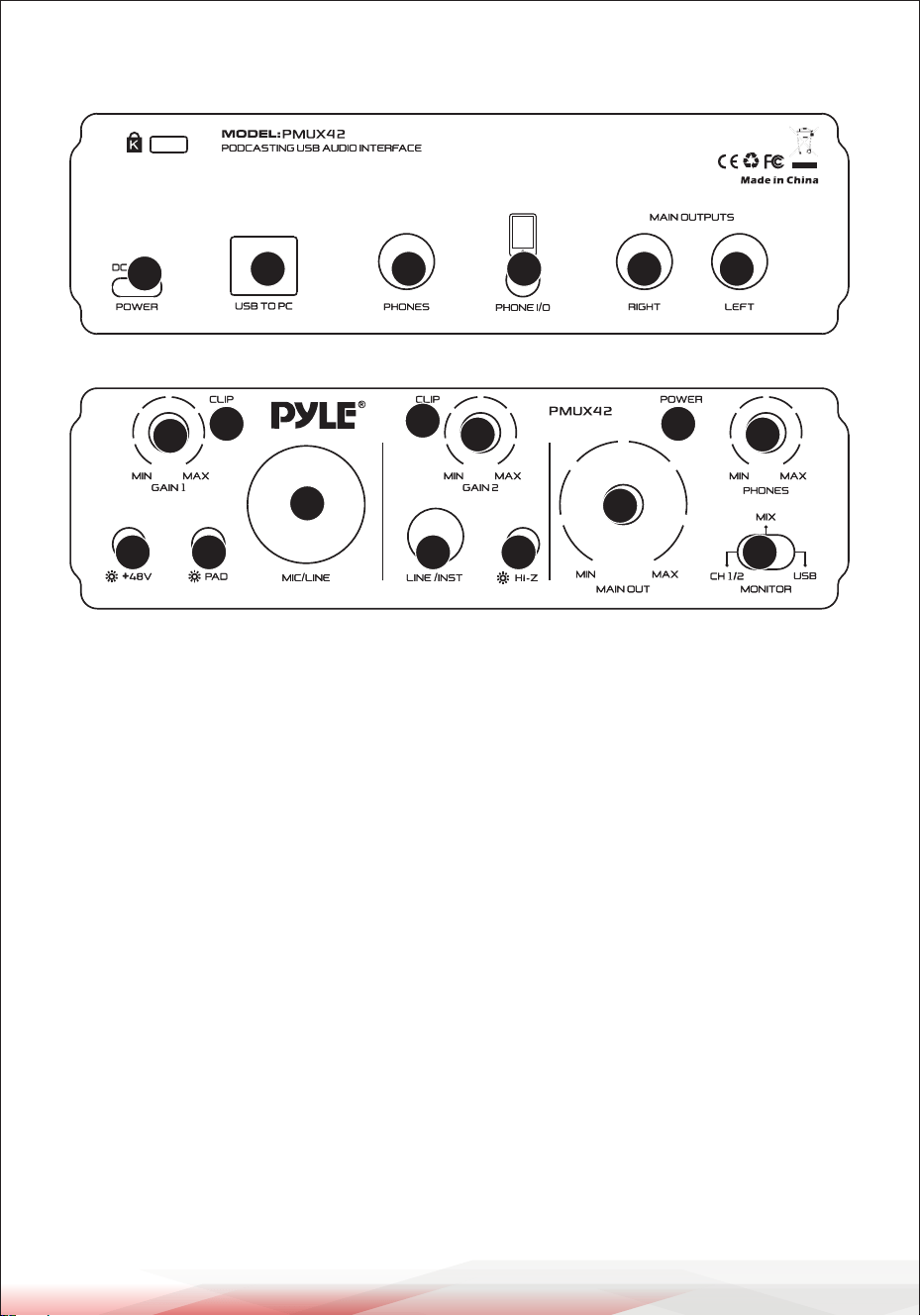
1. USB Jack (type C): Power supply input interface,USB power is DC5V 1000mA
2. USB jack (type B 2.0): For connecting to a computer using the included USB
2.0 cable. When connected to a computer, the computer supplies power to the
[PMUX42] and audio data can be sent between the [PMUX42] and computer.
NOTE: Please do not connect any device to this USB jack other than a personal
computer or tablet devices.
• When using power with USB,USB power is DC5V 1000mA.
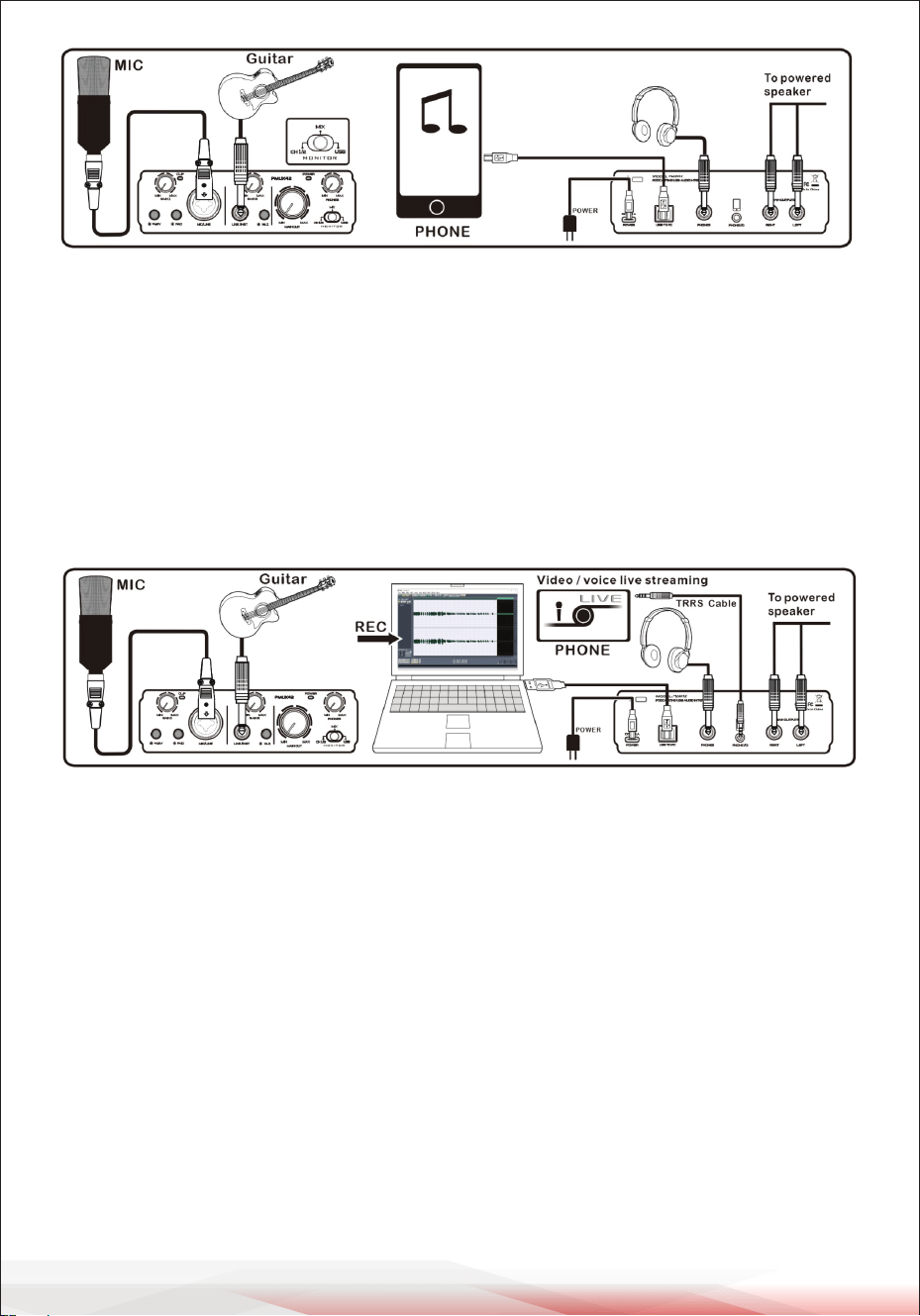
• Can connect to the mobile phone, when connected to the mobile phone,
need to set accordingly, please open the OTG function of the mobile phone,
note: Dierent brand mobile phone settings are dierent, please refer to the
corresponding brand set instructions; use the mobile phone directly, please
type C interface auxiliary power supply to [PMUX42], so as not to aect the
normal use.
1
2 3 4 5 6
7 8
9
10 11
12
13
19
18
17
16
15
14
www.PyleUSA.com
4
3.PHONES jack (1/4-inch jack): for connection of stereo headphones
(minimum impedance 32Ω) for monitoring the sum signal independent of
the PHONES control.
4.HPONE jack (1/8-inch TRRS): When the headset output interface of the
phone passes through the TRRS Jack, the sound of the phone will be output
internally, and the sound of the [PMUX42] external microphone (CH1) is
transmitted to the phone through this TRRS jack.
***With the TRRS interface function, the signal of this interface cannot be
recorded.
NOTE: Turn on the 48V phantom power supply when the microphone is the
condenser microphone.
5. MAIN OUTPUT (RIGHT 1/4-inch jack): This is a TS mono (right channel)
return interface, and the level size of the return input can be controlled.
6. MAIN OUTPUT (LEFT 1/4inch jack): This is a TS mono (left channel) return
interface, and the level size of the return input can be controlled.
7. +48V PHANTOM SWITCH: When this switch is turned ON, the DC +48V
phantom power is supplied to the XLR plug connected the channel 1.
Turn this switch ON when using a phantom powered condenser microphone.
NOTE: Be sure to leave this switch OFF if you do not need phantom power.
Follow the important precautions below, in order to prevent to prevent noise
and possible damage to external devices as well as the [PMUX42] if you turn
this switch ON.

www.PyleUSA.com
5
8.CH1 PAD switch: Turning the switch ON will attenuate the sound input to
the unit. If you hear distortion or the [PEAK] led light frequently even if the
[GAIN] pot is turned fully to the left, turn this switch ON.
• Be sure to leave this switch o when you connect a device that does not
support phantom power to channel 1.
• Make sure to turn this switch OFF when connecting/disconnecting a cable
to/from channel.
• Turn the level knob of the channel 1 to “0” (minimum) before turning this
switch ON/OFF.
NOTE:Turn the level pot to minimum before toggling the [PAD] switch on
and o.
9.CH1 INPUT jack:(combined jack XLR, balanced ¼-inch TRS jack or
unbalanced ¼-inch TS jack) for channel CH 1, for the connection of a
microphone via an XLR plug or microphone via an XLR plug or an audio source
with line signal level via a 1/4-inch plug.
MONO INPUT: (combined jack XLR, unbalanced 1/4-inch TS jack unbalanced)
for channel CH 1 for the connection of a microphone via an XLR plug or an
audio source with line signal level via a Phone plug. CH1
10.CH2 LINE/INSTR INPUT jack(1/4-inch TS jack):This interface is mainly
specially provided to the external musical instrument signal connection
input.
11.Hi-Z key (For channel CH 2):Press the button when an electric guitar or an
electric bass with passive audio pick-up has been connected to the jack
1/4-inch.
12.MONITOR LEVEL knob:This adjusting knob is used to control the main
output level (channel right and lef) of the [PMUX42].
13.MONITOR OUTPUT selector switch:This switch is mainly switching the
main output and the headset output mono or stereo input mode, when the
switch is placed in the OFF, closing the direct signal.
• MIX OUTPUT MODE:All the input signals are passed through the[PMUX42]
monitor output(For example, CH1-2 and USB signals)
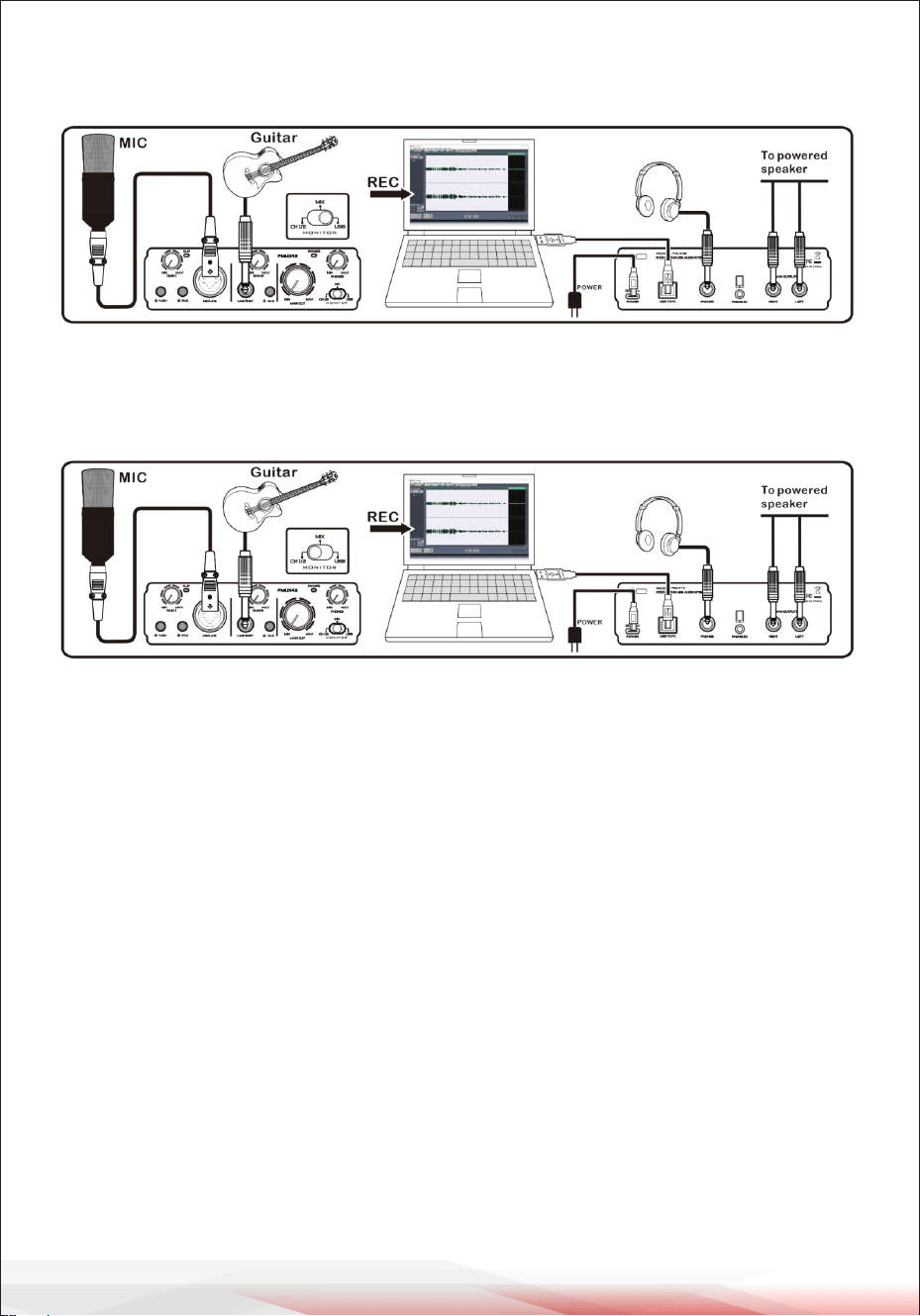
www.PyleUSA.com
6
• SUB OUTPUT MODE: The USB input signals are passed through the
[PMUX42] monitor output (The CH1-2 signal is turned o).
• SUB OUTPUT MODE: The CH1-2 input signals are passed through the
[PMUX42] monitor output (The USB signal is turned o,however,
USB recording of CH1-2 signal no will will any aected)
NOTE:Either mode the switch chooses will not aect the output of the PHONE
I/O interface. The PHONE I/O signal defaults to the bypass state.
14. CH1 GAIN knob: This adjusting knob is used to control the CH1 input gain
of the [PMUX42].
15. CH1 CLIP indicator light: Level Peak Indication for channel CH1.
16. CH2 CLIP indicator light: Level Peak Indication for channel CH2.
17. CH2 GAIN knob: This adjusting knob is used to control the CH2 input gain
of the [PMUX42].
18. POWER indicator light.
19. PHONES LEVEL knob: This adjusting knob is used to control the PHONES
output level of the [PMUX42].
Recording Function
• This [PMUX42] is the recording of external input signal, mainly for CH1 and
CH2 signals recorded via [PMUX42] to USB to computer, internal records
between the USB and the computer are not supported.
• Up to 24bit/192KHz of audio signal support.

www.PyleUSA.com
7
Features:
•High-delity, studio quality recording, and most of all the software you need
to record
•Pro-performance with the nest pre-amps
•Studio quality recording for music and podcasts
•Low-noise for crystal clear listening
•Dc 5v power supply, or pc power supply
•Rugged metal chassis and compact size
•2in 2out 24bit /192khz asio/podcaster
What's in the box:
•Usb interface
•Usb cable
•3.5 to 3.5 jack cable
Technical Specs:
•Construction materials: aluminum case, abs, copper
•Power input: dc 5v, 1a
•Voltage: 100-240v
•Usb sound card: 2.0 type-c
•Frequency response: 20hz-20khz
•Total harmonic distortion: <0.5%@+4dbu
•Power consumption: 2w
•Product dimension (l x w x h): 5.91’’ x 3.94’’ x 1.75’’ -inches
Register Product
Thank you for choosing PyleUSA. By registering your product,
you ensure that you receive the full benets of our exclusive
warranty and personalized customer support.
Complete the form to access expert support and to keep your
PyleUSA purchase in perfect condition.
PyleUSA.com/register

Questions or Comments?
We are here to help!
Phone: 1.718.535.1800
PyleUSA.com/ContactUs